Amazon Quick 发布 Agentic Catalog Experience
英文标题:Announcing the Agentic Catalog Experience in Amazon Quick
Amazon Quick 推出 Agentic Catalog Experience(代理式目录体验),通过自然语言帮助数据管理员发现上游数据目录资产,并自动创建继承语义的 Datasets 和 Topics。该功能目前以预览版支持 AWS Glue Data Catalog 和 Databricks Unity Catalog,重点继承表和列定义,以及主键、外键关系。Amazon Quick 定位为上游目录元数据的消费者,默认通过 DirectQuery 查询数据,不复制数据,并支持按需同步继承的元数据。该能力旨在缩短从目录连接到业务问答的时间,减少语义重复配置和因元数据变更导致的语义漂移。
 1.3 MB
 101.1 KB
 124.1 KB
 345.0 KB
 141.2 KB
 346.5 KB
 175.0 KB
 95.2 KB
 43.5 KB
 56.8 KB
 114.5 KB
 159.0 KB
 86.4 KB
 99.6 KB
 138.1 KB
 12.2 MB
 19.1 MB
 3.7 MB
 16.5 KB
 82.6 KB
中文
随着组织开始采用 AI 驱动的分析,自然语言(Text2SQL)回答的价值,取决于其背后的业务上下文质量。我们正进入这样一个阶段:语义丰富度——包括表和列描述以及关系——必须从其在上游数据目录和语义工具中的编写位置,直接流入服务终端用户的 AI 产品。Amazon Quick 等产品不能再孤立运行。它们需要原生地消费并理解数据团队在 AWS Glue Data Catalog 和 Databricks Unity Catalog 等系统中维护的定义、关系和治理元数据。从孤立元数据转向互联、具备目录感知能力的 AI,正是实现大规模智能分析的关键。
挑战:弥合“最后一公里”
投资已经完成
企业数据团队已经完成了艰巨的工作。他们已在 AWS Glue、Databricks Unity Catalog、Snowflake Horizon、Collibra 和 dbt 等上游目录平台投入大量资源。在这些平台上,他们细致定义了表描述、列语义、主键和外键关系、词汇表术语以及指标定义。
然而,当需要为终端用户——例如销售经理、市场总监和财务负责人——提供可用于生产环境的 AI 和可信仪表板时,仍然存在显著缺口。
三项叠加的挑战
当数据管理员(商业智能工程师、分析负责人和高级分析师)需要在 Amazon Quick 中为业务用户提供支持时,会面临三项相互叠加的挑战:
- 可发现性有限:企业目录中往往有数千张表,要发现适合报表、且已经过治理和审批的上游资产,如同大海捞针。用户无法描述自己的需求并让系统自动找到相关资产。
- 语义碎片化与手动重建:上游已有的丰富元数据——包括表和列的业务描述,以及主键和外键关系——无法自动传递。管理员必须从零开始重新创建资产、重新定义描述,并手动协调定义。例如,“收入”是指总收入还是净收入?“活跃客户”是指 30 天内购买,还是 90 天内购买?这些定义已存在于上游,却仍需要手动重新录入。
- 获得洞察需要数周,而非数小时:手动发现加上手动重建,意味着从数据到可执行洞察的周期从数小时延长到数周。更糟的是,当上游定义变更后,在 Quick Datasets 中手动创建的语义会逐渐过时,造成语义漂移,长期侵蚀用户对 AI 回答和仪表板的信任。
缺口所在
问题不在上游。元数据已经存在,治理规则已经定义,关系也已经映射。
问题出在最后一公里:如何将丰富的目录上下文转化为经过治理、易于使用的体验,从而提供有据可依的 AI 回答和终端用户可以信赖的确定性仪表板。
在 Amazon Quick 中推出 Agentic Catalog Experience
今天,我们宣布在 Amazon Quick 中推出 Agentic Catalog Experience。这是一项由 AI 驱动的工作流,可帮助数据管理员快速定义上下文边界、继承上游语义,并大规模地为终端用户提供有据可依的问答和可信仪表板。
这一体验的核心是 Quick Agent,其职责范围限定在目录上下文内的发现、创建和继承任务。它利用目录连接提供的语义上下文,一览式总结整个目录,与客户进行自然语言对话,根据客户的使用场景呈现最相关的表和关系,并评估元数据的就绪程度。随后,只需在对话中进行一次确认,它便会自动创建 Catalog-Generated Datasets 和 Topics,并从上游目录继承有针对性的元数据。
无需手动配置。无需切换上下文。无需数周设置。
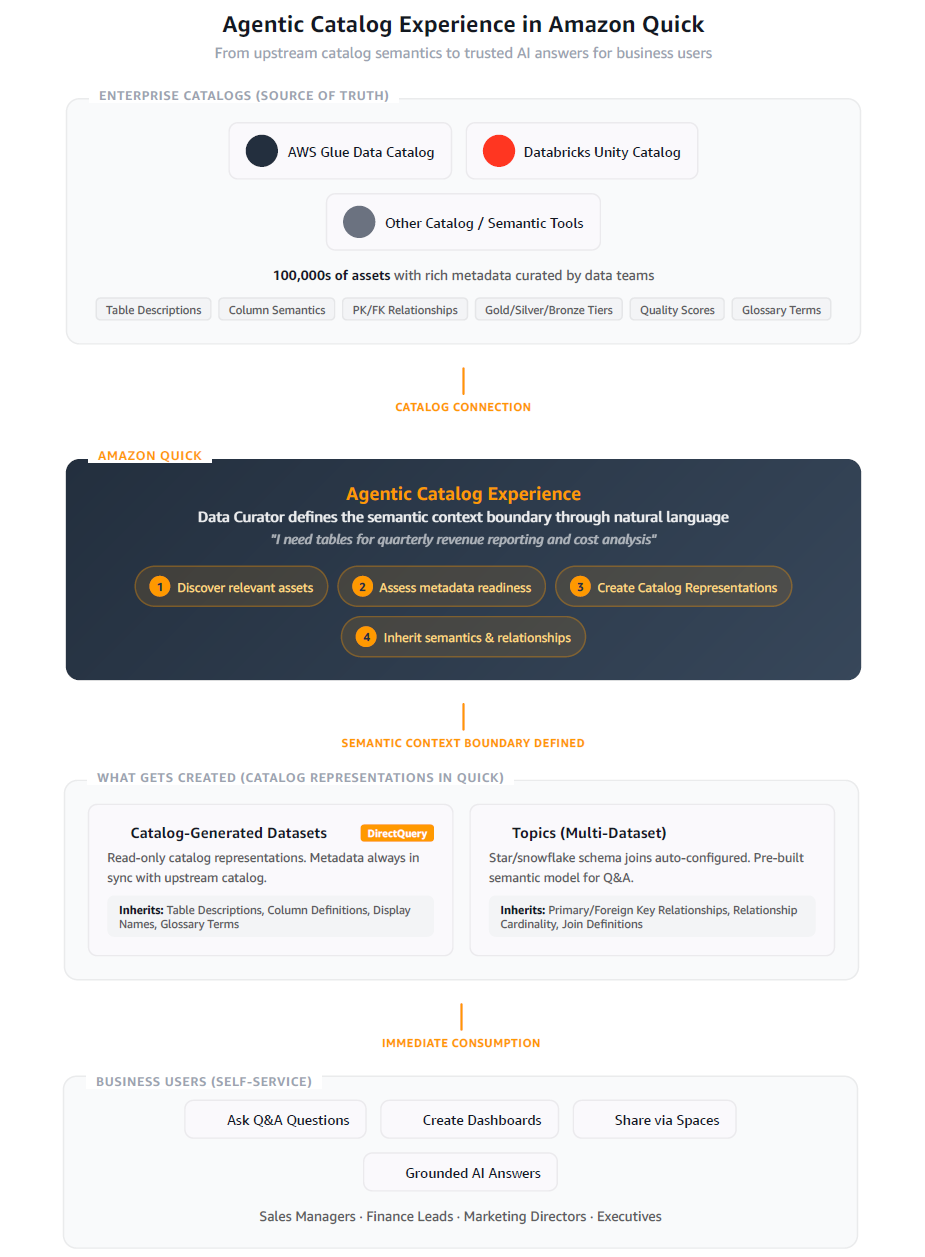
工作原理
自然语言资产发现
管理员无需在数千张表中滚动查找所需数据,而是可以使用自然语言描述需求。通过 Agentic Catalog Experience,管理员可以这样说明:
管理员:“我是财务团队的一名高级分析师。我需要用于季度收入报告和成本分析的表。”
Quick Agent 会搜索整个目录,立即呈现最相关的表,并使用所有可用元数据,包括业务描述、标签、Gold/Silver/Bronze 分类、质量评分、表健康度评分和词汇表术语。无需再手动浏览,也无需再凭猜测选择。
批量代理式数据集创建
管理员选择所需表后,Quick Agent 会在单个引导式工作流中大规模创建目录表示形式(Datasets)。由于默认创建路径为 Direct Query,您的上游目录仍是唯一事实来源。继承语义的 Datasets 会显示清晰的“Semantics Inherited(已继承语义)”徽标,其元数据为只读。作者可按需选择同步按钮刷新继承的元数据,以保持与目录一致。
Quick Agent:“正在创建 6 个 Catalog-Generated Datasets:
revenue_by_region已创建(DirectQuery,只读元数据),cost_centers已创建,gl_transactions已创建。”
语义和关系继承
Quick Agent 会将目录中有针对性的元数据带入其创建的资产。目前,为避免噪声并保持 Datasets 简洁,继承功能有意聚焦于两个关键领域:
- 从表和列定义到 Datasets:业务描述和列定义会直接继承到创建的 Datasets 中,使管理员和终端用户获得所需的语义上下文。
- 从主键和外键关系到 Topics:Agent 会检测关系,并利用这些关系建议和创建多数据集结构(Topics),其中已预先配置星型和雪花型模式连接。
注意:尽管所有可用元数据(Gold/Silver 分类、质量评分、标签和健康度评分)都会在发现阶段用于定位正确的表,但目前继承到 Datasets 的内容有意限定为表和列定义。我们计划逐步向 Datasets 添加更多元数据类型。
Quick Agent:“我检测到这些表之间存在 3 项关系,并创建了名为‘Finance Revenue Model’的 Topic,其中已预先配置星型模式连接。表和列定义已从上游目录继承。”
经过治理的 Datasets 和 Topics 可立即使用:
- 提问:使用新的 Datasets 发起问答对话。AI Agent 会使用继承的业务描述、词汇表术语和质量评分,提供有据可依的回答。
- 创建仪表板:在已具备完整语义上下文的基础上,构建确定性的可视化内容。
- 与终端用户共享:将 Datasets 添加到 Space,并与业务用户共享,以支持自助式问答。
创建完成后,与这些 Datasets 和 Topics 关联的元数据会进入 Amazon Quick semantic store,为 AI 驱动的问答提供重排序和统一上下文支持。从连接目录到提出第一个业务问题,只需数分钟,而非数周。
架构:消费者,而非目录
这一体验建立在一项关键设计原则之上:Amazon Quick 是上游目录元数据的消费者,而非专用目录本身。这意味着:
- 不复制数据:Catalog-Generated Datasets 使用 DirectQuery,不会复制或迁移任何数据。
- 为上下文消费元数据:继承的语义在 Amazon Quick 中为只读,并流入 semantic store,以支持重排序和 AI 回答的事实依据。您的上游目录仍然是权威来源。
- 手动语义同步:作者可以按需选择同步按钮刷新继承的元数据。定时自动同步已列入产品路线图。
- 兼顾透明度的可扩展性:Catalog-Generated Datasets 将继承语义显示为只读(标记为目录表示)。如果作者选择编辑某个 Dataset,Amazon Quick 会清晰提示:编辑将创建自定义 Dataset,语义同步将不再适用。这样既为作者提供完全控制权,也能默认维护目录完整性。
当前支持的目录
| 目录平台 | 身份验证 |
|---|---|
| AWS Glue Data Catalog | AWS Identity and Access Management (IAM) Role ARN |
| Databricks Unity Catalog | OAuth 2.0 / Personal Access Token |
即将支持更多目录平台。
会继承哪些内容
元数据继承经过有意控制,以保持 Datasets 简洁且适合生产环境:
继承到 Datasets 中的内容(表和列定义)
- 表的业务描述和技术描述。
- 列描述和显示名称。
- 数据类型和可为空性。
- 词汇表术语和同义词。
继承到 Topics 中的内容(关系)
- 主键和外键关系。
- 关系定义和基数。
- 星型和雪花型模式模型。
终端用户体验
这对下游业务用户意味着什么:
一位销售经理提问:“我们第四季度各地区的销售额是多少?”
在后台,AI Agent 会:
- 使用业务描述和词汇表术语搜索 Catalog-Generated Datasets。
- 识别出
sales.revenue_by_product表(Gold,质量评分 98%)。 - 应用 Topic 中预先配置的连接,以组合相关维度。
- 遵守目录元数据中的个人身份信息(PII)掩码规则。
- 在数秒内返回有据可依、值得信赖的答案。
无需手动配置数据集。管理员只需通过 Quick Agent 定义一次上下文边界,每位终端用户即可立即受益。
统一的企业上下文
Agentic Catalog Experience 并非孤立存在。结合 Amazon Quick 更广泛的平台能力——包括与 Slack、Outlook、文档和知识库的集成——终端用户可以获得完整的企业上下文:
- 通过 Catalog-Generated Datasets 从目录获取的结构化数据。
- 来自文档、电子邮件消息和对话的非结构化上下文。
- 来自词汇表术语和指标定义的业务规则。
这种统一上下文能够提供可用于生产环境的 AI 回答,并以组织特有的数据和语义为事实基础。
连接 AWS Glue Data Catalog
要开始使用 Agentic Catalog Experience,请在 Amazon Quick 中创建与 AWS Glue Data Catalog 的数据源连接。建立连接后,Quick Agent 会通过单个对话式工作流,引导您完成资产发现、模式探索和 Topic 创建。在本演示中,我们将连接一个 Glue Data Catalog 并构建一个 Financial Analytics Topic。
在 Amazon Quick 中,创建新的数据源。在连接类型列表中,选择 Glue Data Catalog(以预览版提供),然后选择 Next。此连接用于获取元数据。借助该连接,Amazon Quick 可以消费您的团队已在 AWS Glue 中维护的表和列定义以及关系。
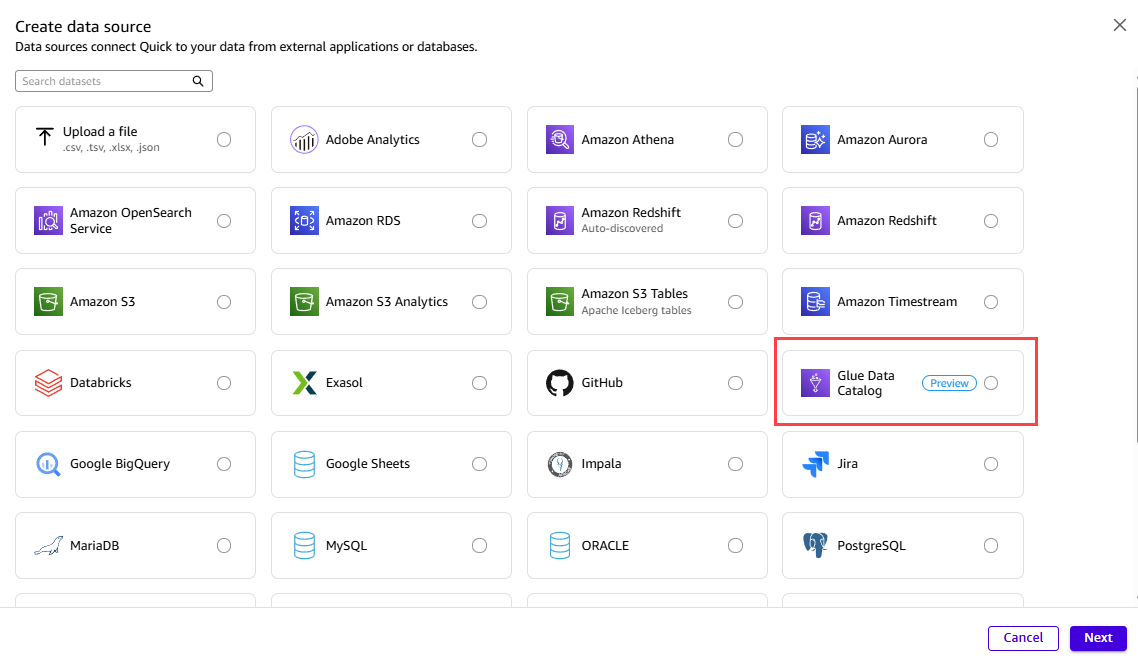
图 1:在 Amazon Quick 中选择 Glue Data Catalog 连接类型
Glue Data Catalog 连接需要与 Amazon Athena 连接配合使用。Glue 提供元数据,而 Athena 提供对 Amazon Simple Storage Service(Amazon S3)中实际数据的查询路径。还需要创建 Athena 数据源,以便 Amazon Quick 可以对底层数据执行查询。创建两者后,Data sources 页面会并排显示两项条目:用于元数据的 Glue Data Catalog 数据源和用于数据的 Athena 数据源。
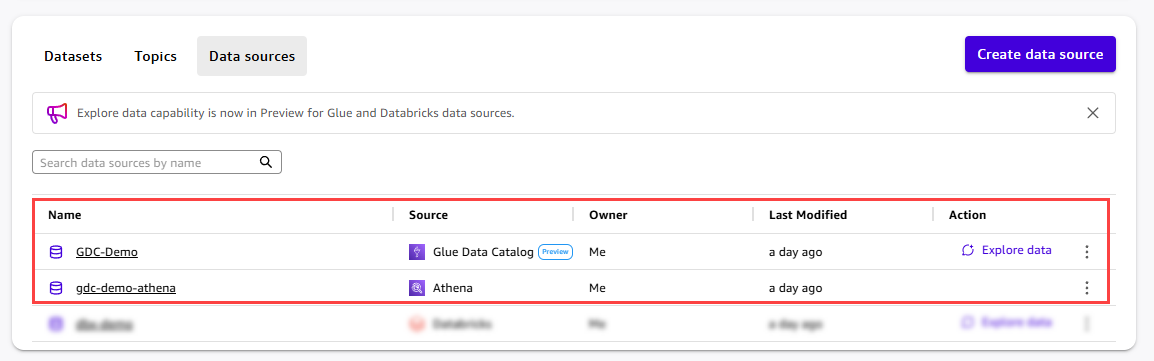
图 2:一同列出的 Glue Data Catalog 和 Athena 数据源
打开 GDC-Demo 数据源详情页。在 Data connections 下,您可以看到 Amazon Quick 用于查询数据的已关联 Athena 数据源。选择 Explore data,启动限定在此数据源范围内的 Quick Agent。
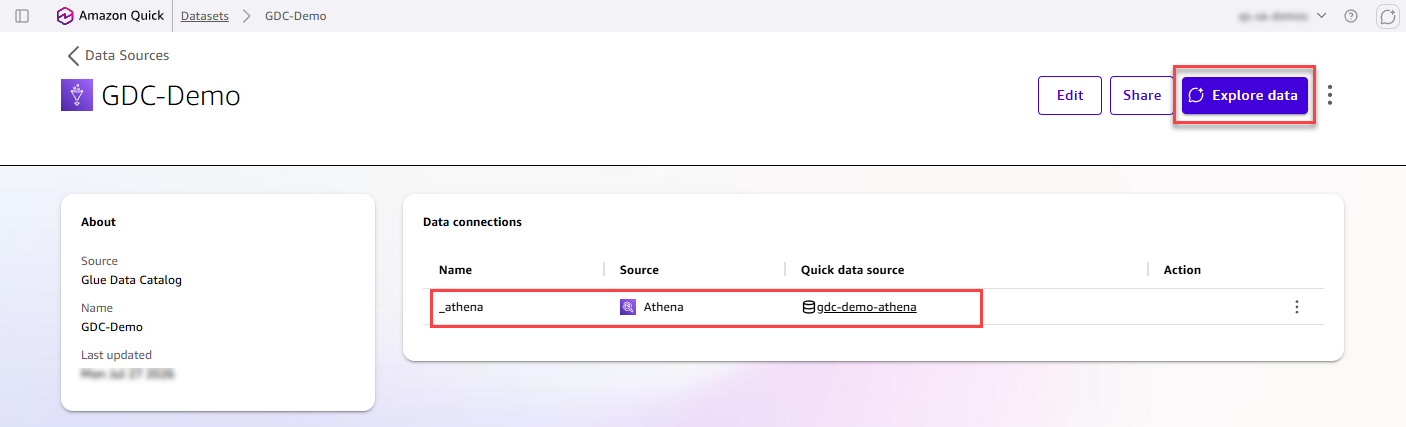
图 3:从数据源详情页启动 Quick Agent
Quick Agent 面板会在屏幕右侧打开,并自动限定为该 Glue Data Catalog 数据源。“Specific data”模式已被选中,“GDC-Demo”被固定为上下文边界。因此,Agent 仅呈现来自这个特定目录连接的元数据。
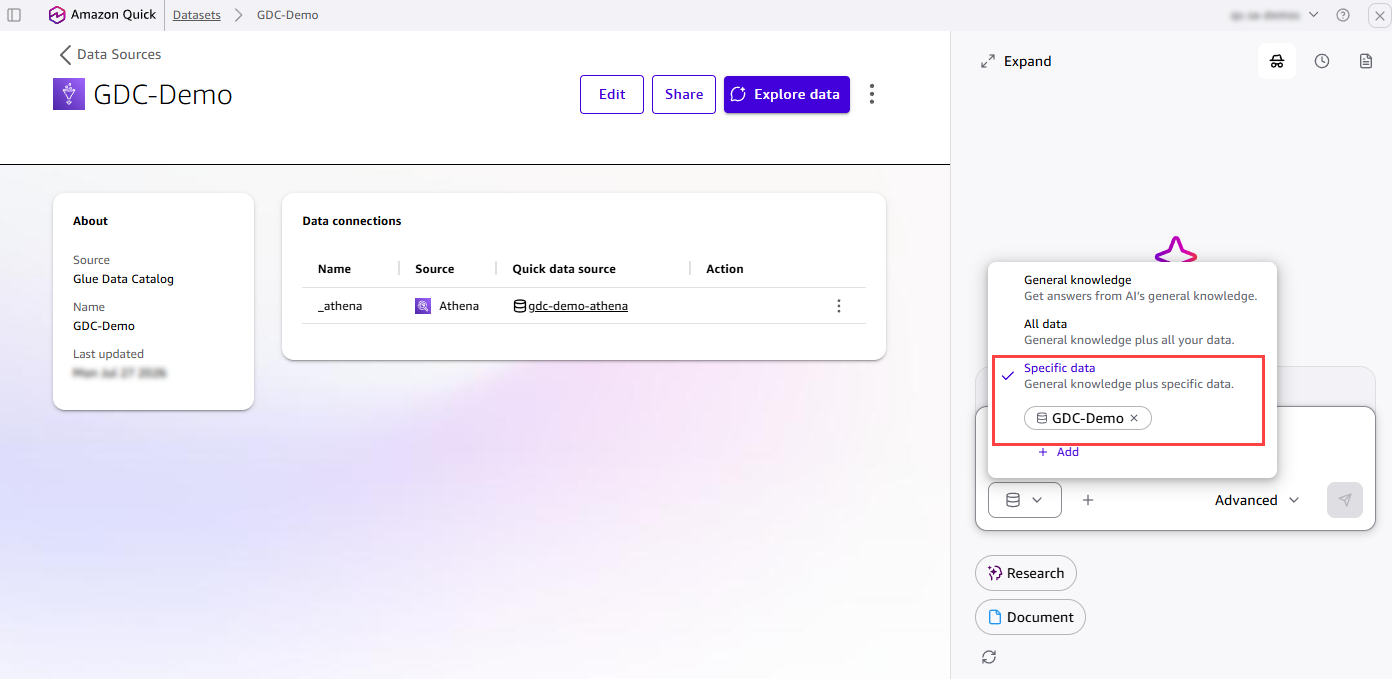
图 4:限定在特定目录连接范围内的 Quick Agent
要求 Agent 探索您的目录。Agent 会一览式总结可用的目录和数据库,让您可以快速了解 Glue Data Catalog 中已治理的内容。本文以“fa-demo”数据库为例,它是一个面向银行分析的 Finance Analytics Demo 星型模式。本演示说明了该功能的工作方式,并非精确的实际场景,因此您可以将相同步骤应用于自己的目录。
 answer is only as good as the business context behind it. We’re entering a phase where semantic richness (table and column descriptions, and relationships) must flow directly from where it’s authored in upstream data catalogs and semantic tools into the AI products that serve end users. Products like Amazon Quick can no longer operate in isolation. They need to natively consume and reason over the definitions, relationships, and governance metadata that data teams curate in systems like AWS Glue Data Catalog and Databricks Unity Catalog. This shift from siloed metadata to connected, catalog-aware AI is what enables intelligent analytics at scale.
The challenge: Bridging the last mile
The investment is done
Enterprise data teams have done the hard work. They have invested heavily in upstream catalog platforms such as AWS Glue, Databricks Unity Catalog, Snowflake Horizon, Collibra, and dbt. On these platforms, they meticulously define table descriptions, column semantics, primary and foreign key relationships, glossary terms, and metric definitions.
Yet when it comes to enabling end users (such as sales managers, marketing directors, and finance leads) for production-ready AI and trusted dashboards, a significant gap remains.
Three compounding challenges
When data curators (business intelligence engineers, analytics leads, and senior analysts) need to enable their business users in Amazon Quick, they face three compounding challenges:
- Limited discoverability : With thousands of tables in enterprise catalogs, discovering the right upstream assets that are curated and approved for reporting is a needle-in-a-haystack problem. There’s no way to describe what you need and have the system find it.
- Semantic fragmentation and manual recreation : Rich metadata that already exists upstream (business descriptions on tables and columns, and primary and foreign key relationships) does not flow through. Curators must recreate assets from scratch, redefine descriptions, and reconcile definitions manually. Does “revenue” mean gross or net? Does “active customer” mean a purchase within 30 days or 90 days? These definitions exist upstream but require manual re-entry.
- Time to insight in weeks, not hours : The combination of manual discovery and manual recreation means that the time from data to actionable insights stretches from hours to weeks. Worse, when upstream definitions change, manually created semantics in Quick Datasets become stale, causing semantic drift that erodes trust in AI answers and dashboards over time.
The gap
The problem isn’t upstream. The metadata exists. The governance is defined. The relationships are mapped.
The problem is the last mile: translating that rich catalog context into a curated, consumable experience that delivers grounded AI answers and deterministic dashboards end users can trust.
Introducing the Agentic Catalog Experience in Amazon Quick
Today, we’re announcing the Agentic Catalog Experience in Amazon Quick, an AI-powered workflow that helps data curators rapidly define their context boundary, inherit upstream semantics, and enable end users for grounded Q&A and trusted dashboards at scale.
At the heart of this experience is the Quick Agent, scoped to discovery, creation, and inheritance tasks within the catalog context. It uses the semantic context from the catalog connection to summarize the entire catalog at a glance, engage the customer in natural language conversation, surface the most relevant tables and relationships based on the customer’s use case, and assess metadata readiness. Then, with a single conversational confirmation, it auto-creates Catalog-Generated Datasets and Topics with targeted metadata inherited from the upstream catalog.
No manual configuration. No context-switching. No weeks of setup.
How it works
Natural language asset discovery
Instead of scrolling through thousands of tables to find the right ones, curators use natural language. With the Agentic Catalog Experience, curators describe what they need:
Curator: “I’m a Senior Analyst on the Finance team. I need tables for quarterly revenue reporting and cost analysis.”
The Quick Agent searches across your entire catalog to surface the most relevant tables instantly, using all available metadata including business descriptions, tags, Gold/Silver/Bronze classifications, quality scores, table health scores, and glossary terms. No more manual browsing. No more guessing.
Bulk agentic dataset creation
After the curator selects their tables, the Quick Agent creates catalog representations (Datasets) at scale in a single guided workflow. Your upstream catalog remains the source of truth because the default creation path is Direct Query. Datasets with inherited semantics are flagged with a clear “Semantics Inherited” badge, and their metadata is read-only. Authors can refresh inherited metadata on demand by choosing the sync button to stay aligned with their catalog.
Quick Agent: “Creating 6 Catalog-Generated Datasets now:
revenue_by_regioncreated (DirectQuery, read-only metadata),cost_centerscreated, andgl_transactionscreated.”
Semantic and relationship inheritance
The Quick Agent carries forward targeted metadata from your catalog into the assets it creates. Today, inheritance is deliberately focused on two key areas to avoid noise and keep Datasets clean:
- Table and column definitions to Datasets : Business descriptions and column definitions are inherited directly into the created Datasets, so that curators and end users have the semantic context they need.
- Primary and foreign key relationships to Topics : The Agent detects relationships and uses them to suggest and create multi-dataset constructs (Topics) with star and snowflake schema joins preconfigured.
Note : While all available metadata (Gold/Silver classifications, quality scores, tags, and health scores) is used during discovery to find the right tables, inheritance into Datasets is intentionally scoped to table and column definitions today. We plan to add more metadata types to Datasets over time.
Quick Agent: “I detected 3 relationships between these tables and created a Topic called ‘Finance Revenue Model’ with the star schema joins preconfigured. Table and column definitions have been inherited from the upstream catalog.”
The curated Datasets and Topics are ready for use immediately:
- Ask questions : Start a Q&A conversation with your new Datasets. The AI agent uses inherited business descriptions, glossary terms, and quality scores to deliver grounded answers.
- Create dashboards : Build deterministic visualizations with full semantic context already in place.
- Share with end users : Add Datasets to a Space and share them with business users for self-service Q&A.
After creation, the metadata tied to these Datasets and Topics feeds into the Amazon Quick semantic store, which powers re-ranking and unified context for AI-powered Q&A. Getting from catalog connection to the first business question takes minutes, not weeks.
Architecture: Consumer, not catalog
A key design principle underpins this experience: Amazon Quick is a consumer of upstream catalog metadata, not a dedicated catalog itself. This means:
- No data duplication : Catalog-Generated Datasets use DirectQuery. No data is copied or moved.
- Metadata consumed for context : Inherited semantics are read-only in Amazon Quick and flow into the semantic store to power re-ranking and AI answer grounding. Your upstream catalog remains the authoritative source.
- Manual semantic sync : Authors can refresh inherited metadata on demand by choosing the sync button. Scheduled automatic sync is on the roadmap.
- Extensibility with transparency : Catalog-Generated Datasets show inherited semantics as read-only (marked as catalog representations). If an Author chooses to edit a Dataset, Amazon Quick provides a clear notification that editing creates a custom Dataset and that semantic sync no longer applies. This gives Authors full control while preserving catalog integrity by default.
Supported catalogs today
| Catalog platform | Authentication |
|---|---|
| AWS Glue Data Catalog | AWS Identity and Access Management (IAM) Role ARN |
| Databricks Unity Catalog | OAuth 2.0 / Personal Access Token |
Support for additional catalog platforms is coming soon.
What gets inherited
Metadata inheritance is intentionally focused to keep Datasets clean and production-ready:
Into Datasets (table and column definitions)
- Table business and technical descriptions.
- Column descriptions and display names.
- Data types and nullability.
- Glossary terms and synonyms.
Into Topics (relationships)
- Primary and foreign key relationships.
- Relationship definitions and cardinality.
- Star and snowflake schema models.
The end-user experience
Here’s what this means for the business users downstream:
A sales manager asks: “What were our Q4 sales by region?”
Behind the scenes, the AI agent:
- Searches Catalog-Generated Datasets using business descriptions and glossary terms.
- Identifies the
sales.revenue_by_producttable (Gold, 98 percent quality). - Applies preconfigured joins from the Topic to combine relevant dimensions.
- Respects personally identifiable information (PII) masking rules from catalog metadata.
- Returns a grounded, trusted answer in seconds.
No manual dataset configuration required. The curator defined the context boundary once with the Quick Agent, and every end user benefits immediately.
Unified enterprise context
The Agentic Catalog Experience doesn’t exist in isolation. Combined with the broader platform capabilities of Amazon Quick (including integration with Slack, Outlook, documents, and knowledge bases), end users get the full enterprise context:
- Structured data from catalogs through Catalog-Generated Datasets.
- Unstructured context from documents, email messages, and conversations.
- Business rules from glossary terms and metric definitions.
This unified context enables production-ready AI answers, grounded in your organization’s specific data and semantics.
Connecting to AWS Glue Data Catalog
To get started with the Agentic Catalog Experience, create a data source connection to your AWS Glue Data Catalog in Amazon Quick. After you establish the connection, the Quick Agent guides you through discovery, schema exploration, and Topic creation in a single conversational workflow. In this walkthrough, we connect to a Glue Data Catalog and build a Financial Analytics Topic.
In Amazon Quick, create a new data source. From the list of connection types, select Glue Data Catalog (available in preview), and then choose Next. This connection is for the metadata. With it, Amazon Quick can consume the table and column definitions and the relationships your teams have already curated in AWS Glue.
Figure 1: Selecting the Glue Data Catalog connection type in Amazon Quick
A Glue Data Catalog connection works together with an Amazon Athena connection. Glue provides the metadata, and Athena provides the query path to the data itself in Amazon Simple Storage Service (Amazon S3). Create the Athena data source as well, so that Amazon Quick can run queries against the underlying data. After you create both, the Data sources page shows the two entries side by side: the Glue Data Catalog source for the metadata and the Athena source for the data.
Figure 2: The Glue Data Catalog and Athena data sources listed together
Open the GDC-Demo data source detail page. Under Data connections , you can see the linked Athena data source that Amazon Quick uses to query the data. Choose Explore data to launch the Quick Agent scoped to this data source.
Figure 3: Launching the Quick Agent from the data source detail page
The Quick Agent panel opens on the right side of the screen, automatically scoped to the Glue Data Catalog data source. The “Specific data” mode is selected, with “GDC-Demo” pinned as the context boundary. As a result, the Agent surfaces only metadata from this specific catalog connection.
Figure 4: The Quick Agent scoped to a specific catalog connection
Ask the Agent to explore your catalog. The Agent summarizes the available catalogs and databases at a glance, so you can quickly see what is curated in your Glue Data Catalog. For this post, we use the “fa-demo” database as our example, a Finance Analytics Demo star schema for banking analytics. This walkthrough illustrates how the feature works and is not an exact scenario, so you can apply the same steps to your own catalog.
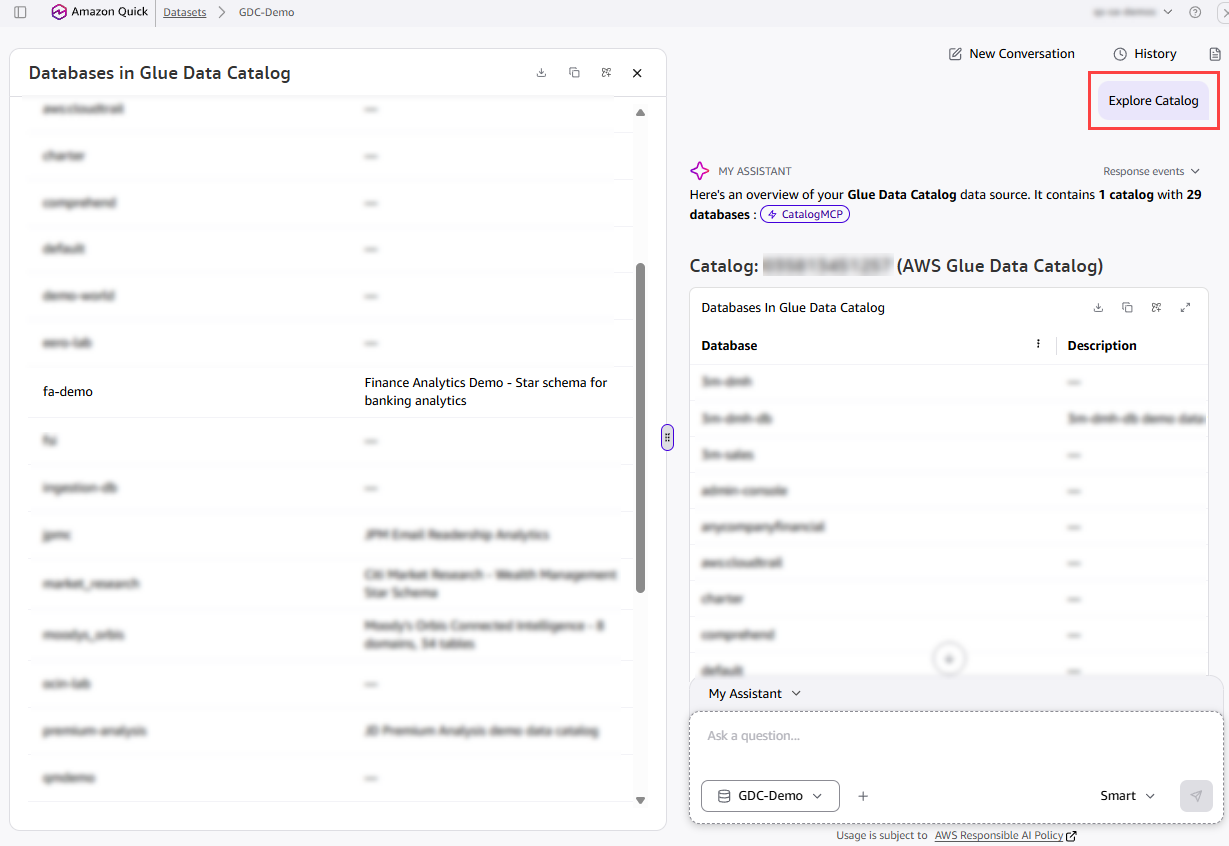
Figure 5: The Agent summarizing available catalogs and databases
Ask the Agent to explore the fa-demo database. The Agent identifies a classic star schema with 7 tables: 2 fact tables (fact_transactions and fact_loans) and 5 dimension tables (dim_account, dim_date_transactions, dim_date_loans, dim_merchant, and dim_txn_category). All are stored as external tables in Amazon S3. The Agent recognizes the schema as covering customer account transactions and loan portfolios, with supporting dimensions for merchants, transaction categories, and date hierarchies.
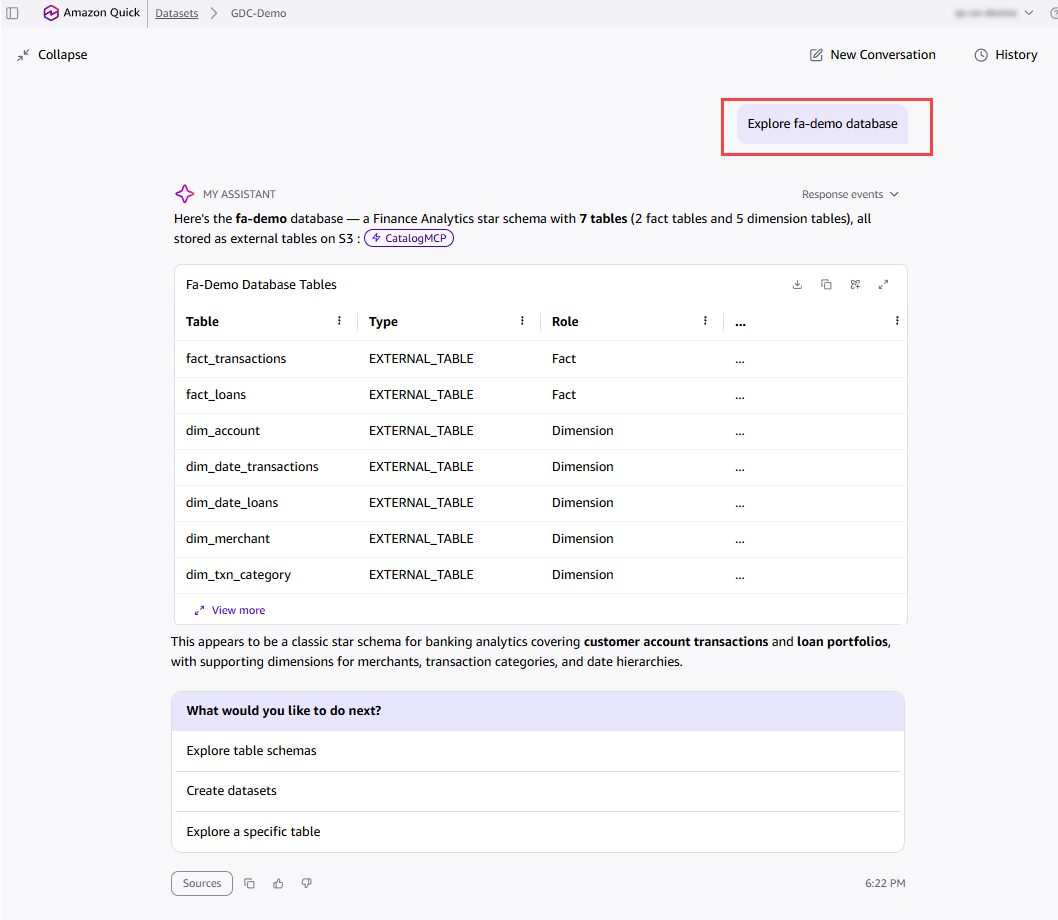
Figure 6: The Agent identifying the fact and dimension tables in the fa-demo database
Ask the Agent to create a star schema diagram for fa-demo. The Agent analyzes the tables, identifies the primary and foreign key relationships, and presents a complete logical data model with a schema summary. It highlights that dim_account is the shared conformed dimension connecting both fact tables. Choose Create datasets & Topic to let the Agent build everything automatically.
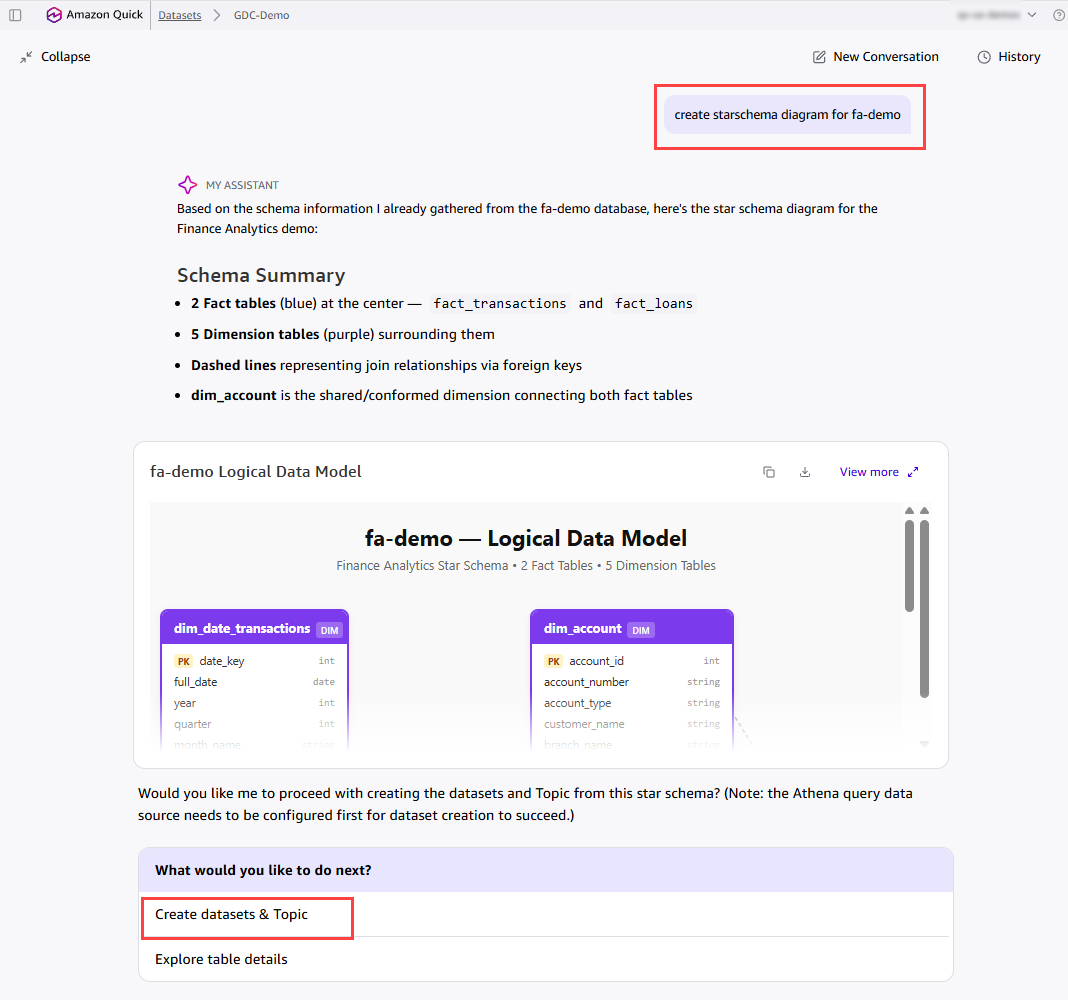
Figure 7: The generated logical data model for the fa-demo schema
The Agent creates a fully configured Topic with all Datasets and relationships in place. In this example, it creates the “Financial Analytics” Topic with all seven Datasets from the fa-demo database and 6 preconfigured star schema joins. Each Dataset carries its inherited business description, and the join relationships between the fact and dimension tables are validated automatically. The Topic is immediately ready for natural language Q&A, so you can ask questions like “What is the total transaction amount by merchant category?” or “Show me delinquent loans by risk rating.”
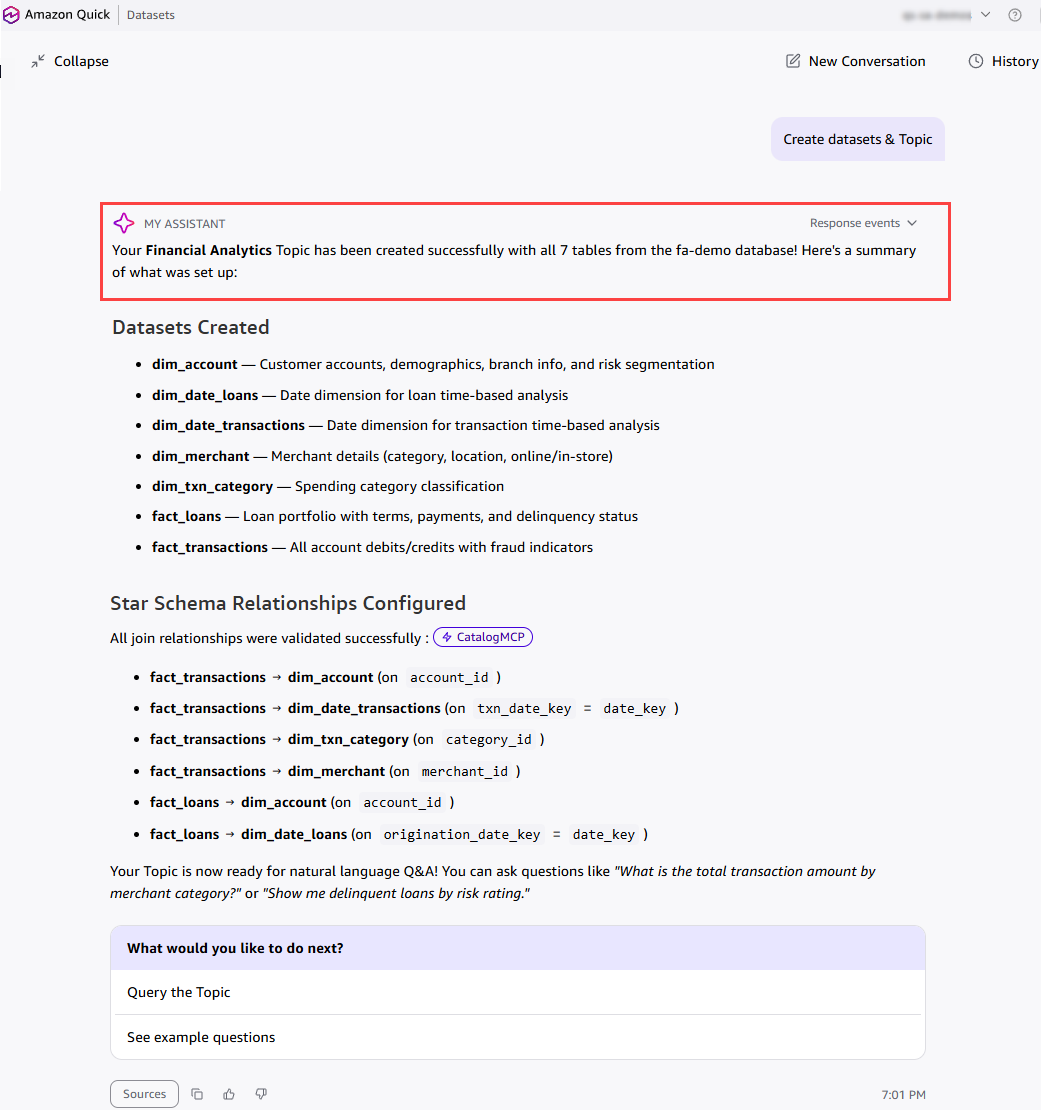
Figure 8: The fully configured Financial Analytics Topic
Now, let’s see how the Financial Analytics Topic created from the Glue Data Catalog works in action. With the Topic pinned as context, end users can ask questions in plain language and get grounded answers instantly. For example, a user can ask “Total transaction amount by merchant category” and the Agent returns a ranked breakdown with key highlights. The user can then follow up with “Delinquent loans by risk rating” to see a risk-level summary with insights. Because the Datasets and relationships were inherited from the catalog, every answer is backed by the trusted schema, joins, and business definitions defined upstream. This is the power of the Agentic Catalog Experience: curators define the context boundary once, and every end user can explore the data conversationally from there.
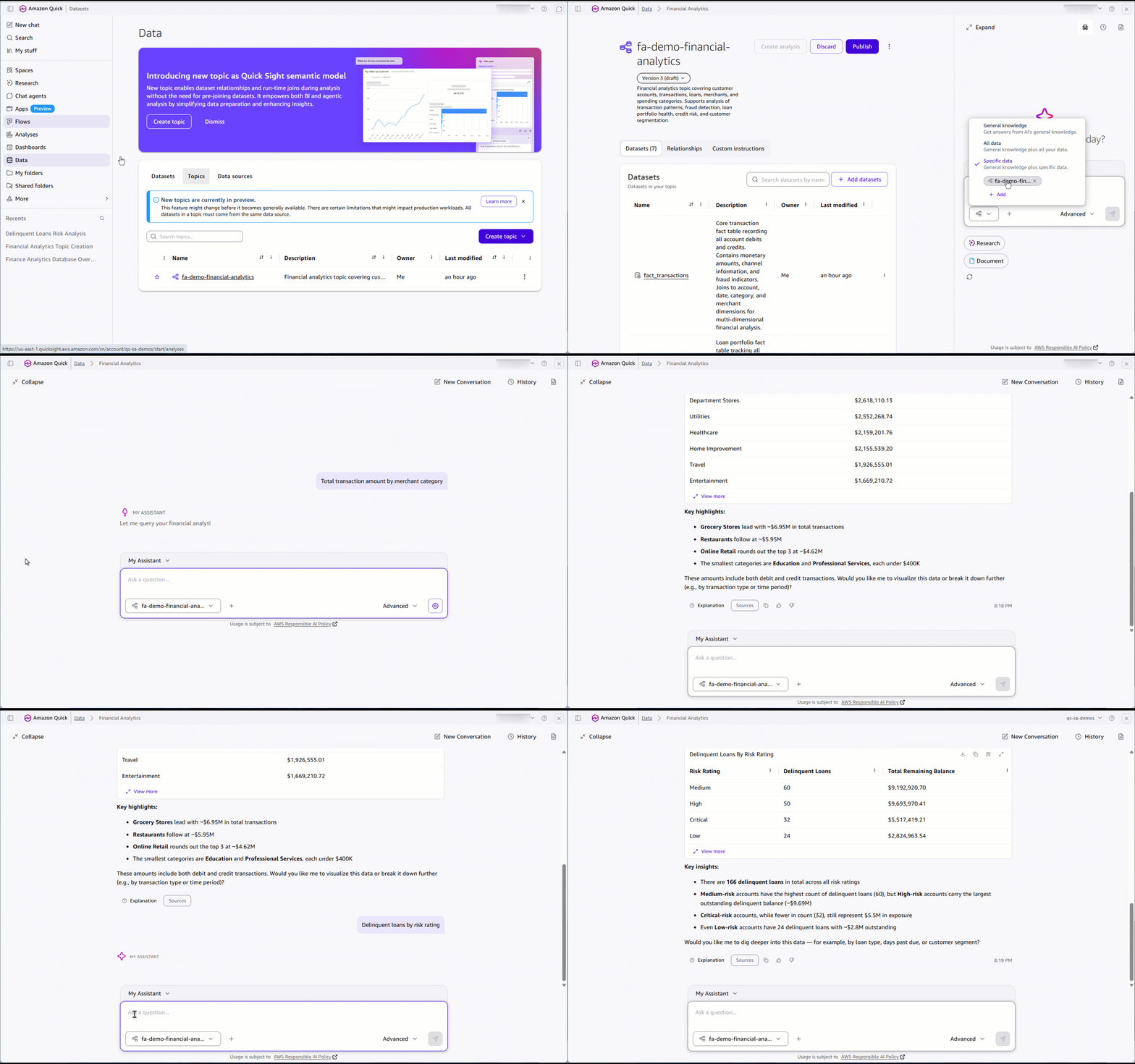
Figure 9: Asking natural language questions against the Financial Analytics Topic
Connecting to Databricks Unity Catalog
The same experience works with Databricks Unity Catalog. Here is a quick example that shows the full flow, from configuring the connection to creating Datasets and a Topic.
Create a Databricks Unity Catalog data source, and then choose Explore data to launch the Quick Agent. The Agent summarizes the catalog, and with a single confirmation it creates the Datasets and a Topic with the star schema joins already configured.
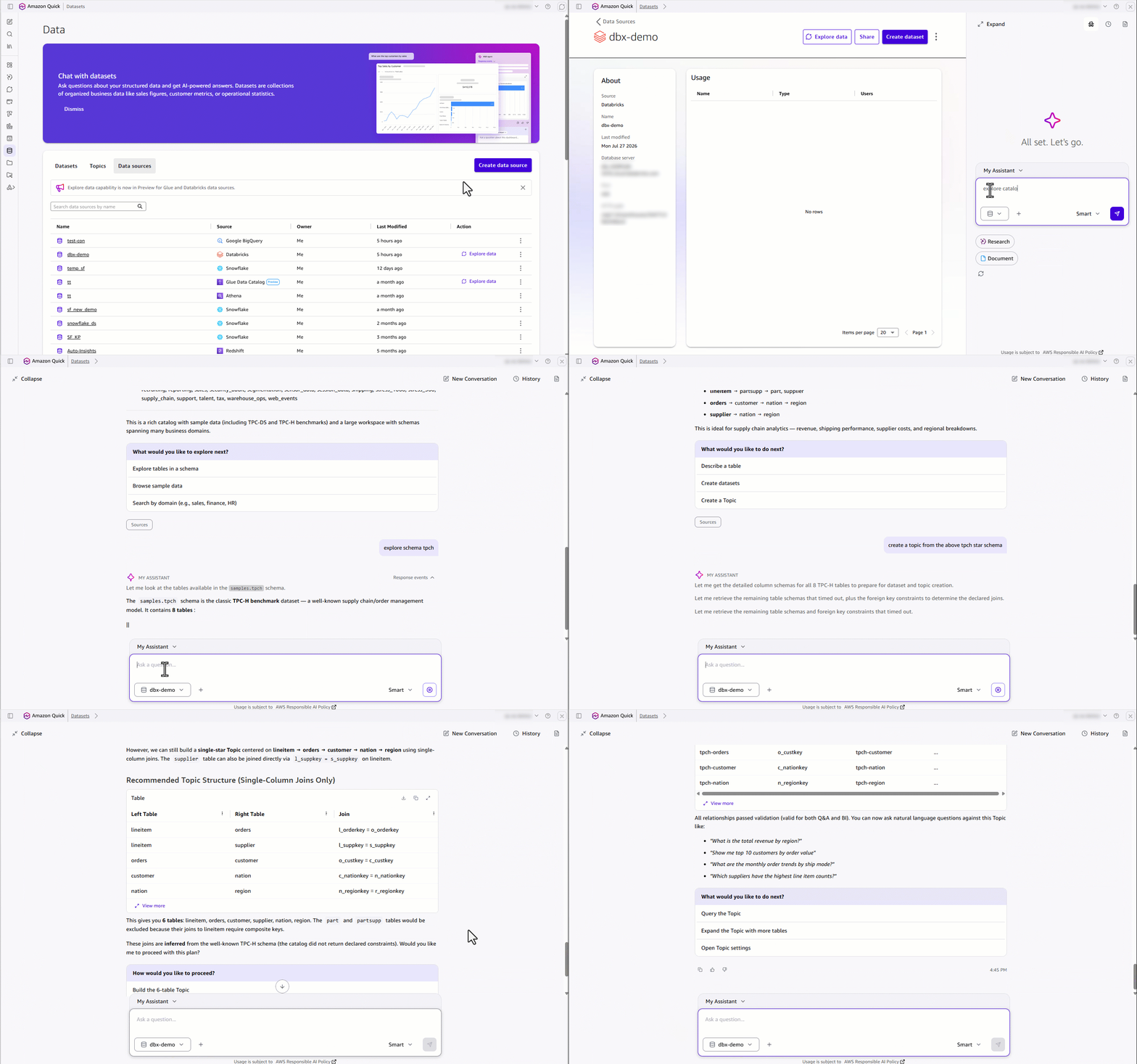
Figure 10: Creating Datasets and a Topic from Databricks Unity Catalog
After the Topic is ready, end users can ask complex questions that span multiple related tables. In this example, the Agent answers “Top 5 brands by revenue per region” by joining across the Topic relationships, and returns a grounded, visual result.
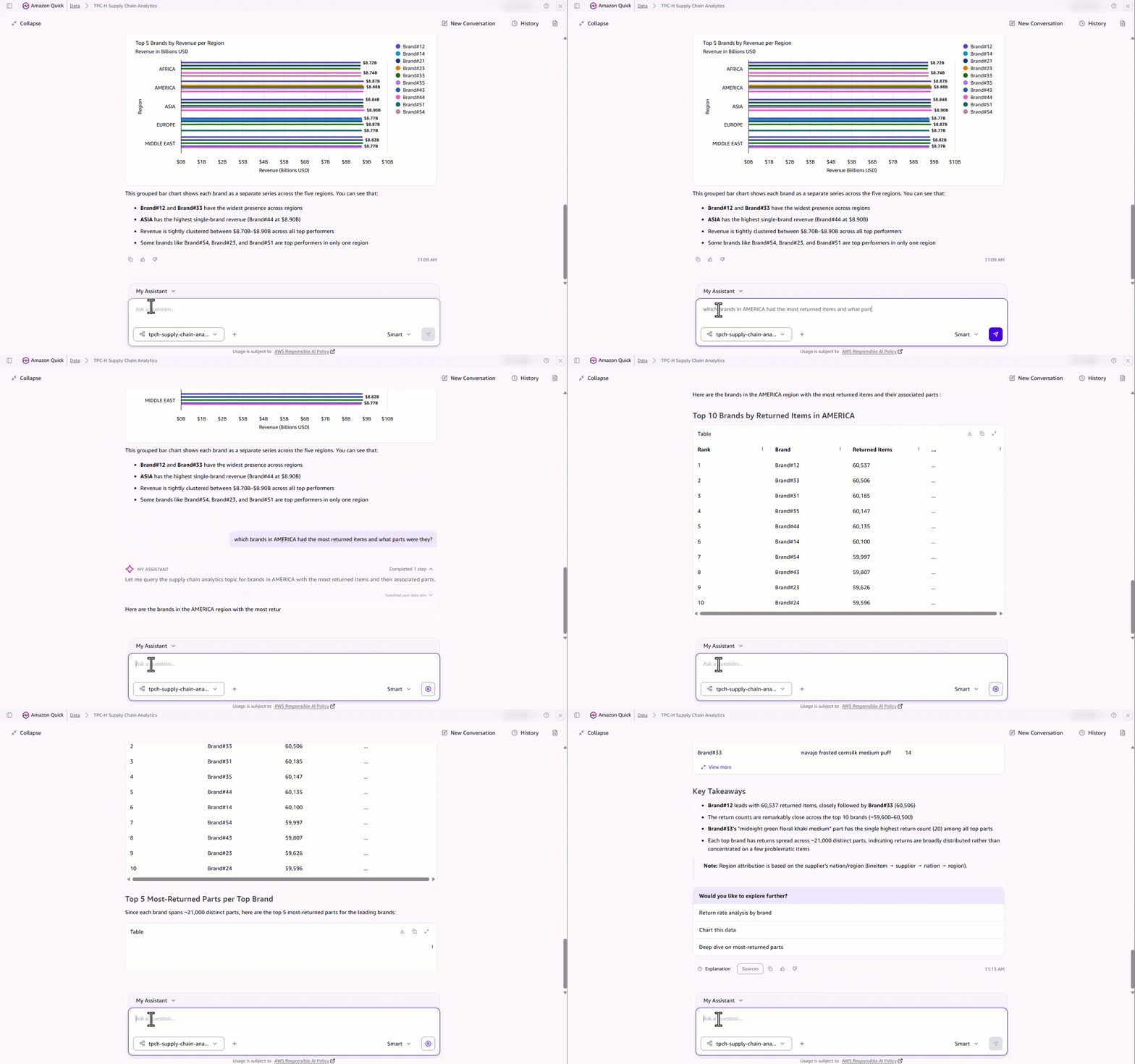
Figure 11: Answering a multi-table question across Topic relationships
The result
Curators deliver trusted data, full enterprise context, and production-ready AI answers and dashboards in a fraction of the time. End users get grounded answers they can trust, backed by Gold-standard data with full semantic lineage.
From weeks of manual configuration to minutes of guided conversation.
That’s the Agentic Catalog Experience in Amazon Quick.
About the authors
Srikanth Baheti
Srikanth is a Senior Manager for Amazon QuickSight. He started his career as a consultant and worked for multiple private and government organizations. Later he worked for PerkinElmer Health and Sciences & eResearch Technology Inc, where he was responsible for designing and developing high traffic web applications and highly scalable and maintainable data pipelines for reporting platforms using AWS services and serverless computing.
Vignessh Baskaran
Vignessh is a Sr. Technical Product Manager in Amazon Quick, where he owns AI-powered data products for connectivity, catalog & semantics, and data preparation. He has over a decade of experience in developing large-scale data and analytics solutions. Outside of work, he enjoys watching Cricket, playing Racquetball and exploring different cuisines in Seattle.
Ashok Dasineni
Ashok is a Solutions Architect for Amazon Quick Suite. Before joining AWS, Ashok worked with clients and organizations in the banking and financial domain, focusing on fraud research and prevention. He designed and implemented innovative solutions to improve business process, reduce cost, and increase revenue, helping companies around the world achieve their highest potential through data.
Salim Khan
Salim is a Senior Worldwide Generative AI Solutions Architect for Amazon Quick at AWS. He has over 16 years of experience implementing enterprise business intelligence solutions. At AWS, Salim works with customers globally to design and implement AI-powered BI and generative AI capabilities on Amazon Quick. Prior to AWS, he worked as a BI consultant across industry verticals including Automotive, Healthcare, Entertainment, Consumer, Publishing, and Financial Services, delivering business intelligence, data warehousing, data integration, and master data management solutions.