LLM 新版本支持推理轨迹、OpenAI Responses、服务端工具与更智能的日志
英文标题:New release of LLM adds support for reasoning traces, OpenAI Responses, server-side tools, and smarter logging
LLM 0.32 发布,引入可见推理轨迹、服务端提供商工具、重新设计的内容寻址 SQLite 日志,以及基于 OpenAI Responses API 的新能力。CLI 用户可查看推理模型的 reasoning traces、调用 OpenAI 与 Anthropic 的服务端工具,并通过 `llm openai endpoint` 直接访问任意 OpenAI 兼容端点。Python API 新增结构化消息与流式事件支持,可处理推理文本、普通文本、工具调用和图片附件等复杂响应。该版本还通过内容寻址消息存储降低多轮对话日志的重复数据,并使 LLM 更接近一个可组合的 Agent 框架。
 51.4 KB
 30.7 KB
 151.7 KB
中文
LLM 新版本支持推理轨迹、OpenAI Responses、服务端工具与更智能的日志
2026 年 8 月 4 日
我今天发布了 LLM 0.32。这是自该项目最初推出以来最重要的 LLM 新版本。新版支持可见的推理轨迹、服务端提供商工具、重新设计的内容寻址 SQLite 日志、新模型,以及由 OpenAI Responses API 支持的新功能。我还发布了 llm-anthropic、llm-gemini 和 llm-openrouter 插件的新版本,它们各自也都包含重大更新。
面向 LLM CLI 用户的重点功能
现在,针对推理模型运行 LLM 时,CLI 会将其推理轨迹显示到标准错误输出,因此你可以看到它们在“思考”什么,同时这部分信息不会被混入你可能会管道传输给其他工具的标准输出中。添加 -R/--hide-reasoning 可关闭这一功能。
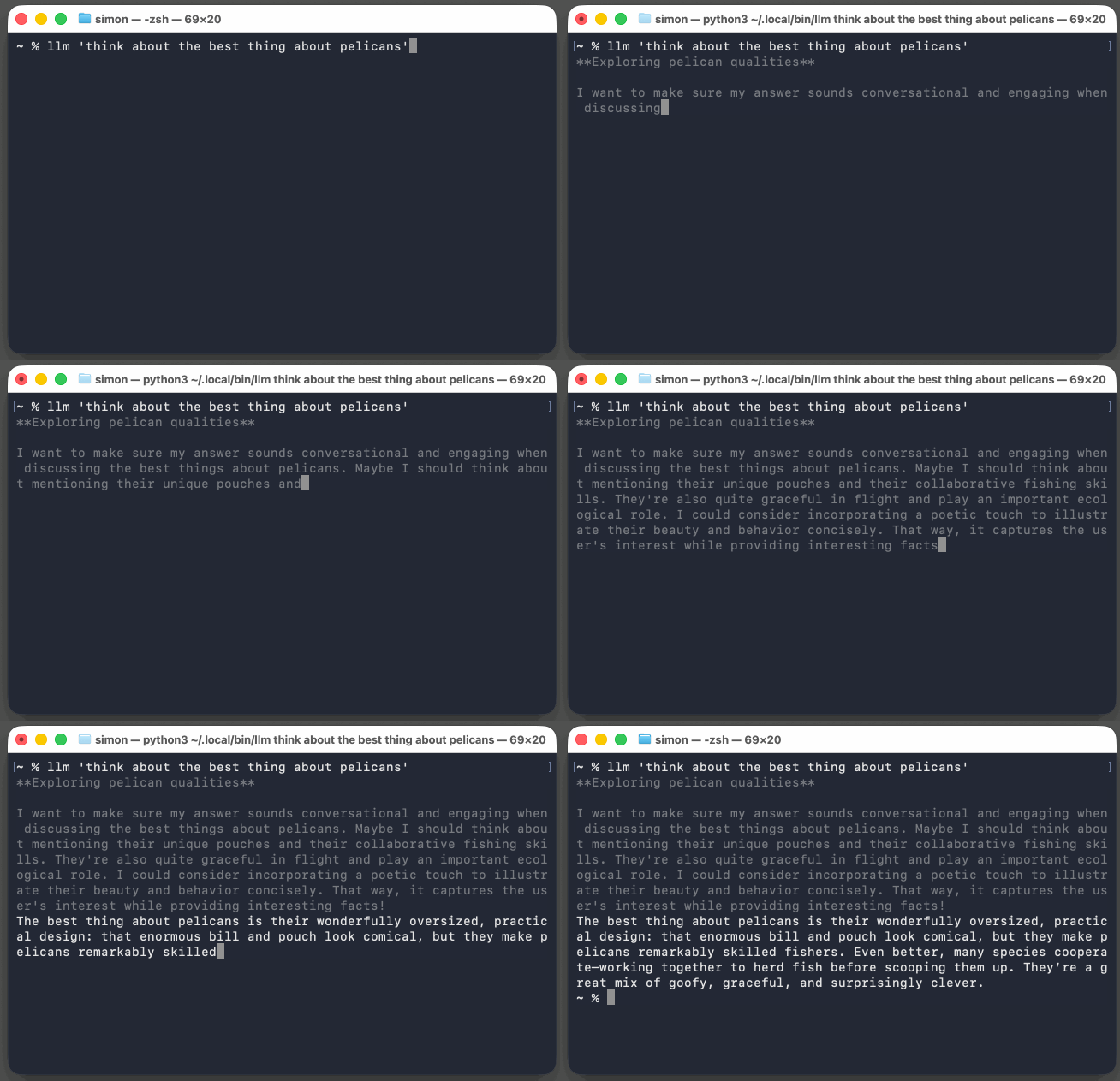
LLM 开箱即支持 GPT-5.6 模型家族,而通过 llm "prompt" 使用的默认模型现已改为价格低廉但能力出色的 GPT-5.6 Luna。
LLM 调用现在可以使用来自不同提供商的服务端工具。OpenAI 提供了一个代码执行环境作为服务端工具;LLM 现在可以像下面这样运行能够从中受益的提示:
llm --tool CodeInterpreter 'Show current python and SQLite versions'
OpenAI 还新增了 WebSearch 工具。
llm-anthropic 插件新增了 WebSearch、WebFetch、CodeExecution 和 AnthropicMCP,用法如下:
llm -m claude-sonnet-5 -T 'AnthropicMCP("https://datasette.simonwillison.net/-/mcp")' \
  'how many rows in the blog_blogmark table?'
这会让 Anthropic 在与其 API 的一次请求/响应交互中,针对我新的 datasette-mcp 插件执行 MCP 调用。
新的 llm openai endpoint 命令提供了一个工具,可通过一行命令针对任意 OpenAI 兼容端点执行提示。这些调用不会被记录,因此它很适合用于针对任何使用 LLM API 世界通用语言的服务执行一次性提示。
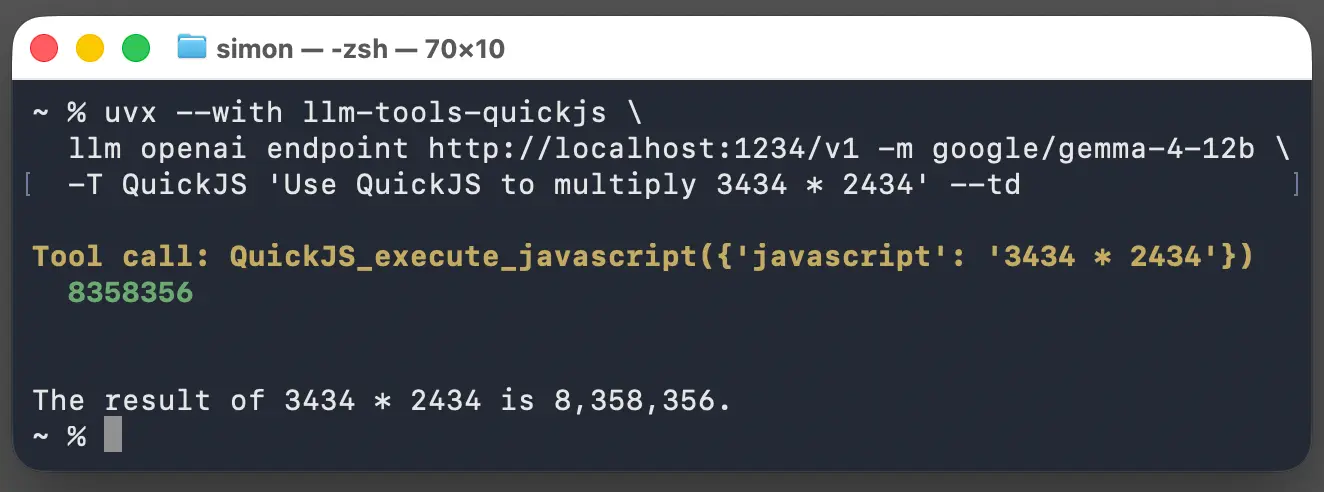
以下是我如何通过 uvx 使用它,对运行在本地主机 LM Studio API 中的 Gemma 4 12B 执行提示:无需安装 LLM,同时还顺便混用了 llm-tools-quickjs 工具插件:
uvx --with llm-tools-quickjs \
  llm openai endpoint http://localhost:1234/v1 -m google/gemma-4-12b \
  -T QuickJS 'Use QuickJS to multiply 3434 * 2434' --td
Python API 中的新功能
LLM 的 Python API 此前要求你先创建一个会话,然后一次向其中发送一条消息。这是对 LLM 真实工作方式的一种抽象:每个请求都携带此前全部消息的完整历史记录。对于一些更高级的场景,这种抽象开始造成阻碍,因此新版本引入了 model.prompt(messages=[]) 参数,可像这样使用:
import llm
from llm import user, assistant, system

model = llm.get_model("gpt-5.6-luna")

response = model.prompt(messages=[
    system("You are a helpful pirate."),
    user("What is the capital of France?"),
    assistant("Paris, matey."),
    user("And Germany?"),
])
print(response.text())
此前,LLM 会从每次提示中返回一个由字符串组成的可迭代序列。当模型返回字符串响应时,这种设计效果很好,但没有预见到模型响应会演化为如此复杂的形态。如今,许多模型会返回推理文本、输出字符串、工具调用,甚至图片附件的混合内容。使用 LLM 0.32,你可以改用以下方式:
for event in model.prompt("Explain cats").stream_events():
    if event.type == "reasoning":
        print(f"[thinking] {event.chunk}", end="", flush=True)
    elif event.type == "text":
        print(event.chunk, end="", flush=True)
    else:
        print(f"Other event: {event}")
结合这些功能,我们终于可以为半标准的 OpenAI chat completions API 提供一个健壮的实现;我现已将其作为 llm-chat-completions-server 插件发布:
llm install llm-chat-completions-server
llm chat-completions-server --port 9000
# Server is now running on http://127.0.0.1:9000/v1
现在,你可以使用新的 llm openai endpoint 命令,通过该服务器向 LLM 运行提示:
llm openai endpoint http://127.0.0.1:9000/v1 'hello' -m gpt-5.4-mini
这类 API 面临的更大挑战是日志记录。如果要支持每次请求都向消息序列追加内容的模式,理想情况下应避免在每一轮都记录全部重复的 JSON。
解决方案是新的内容寻址消息存储,其设计参考了 Git。你可以在文档中查看这一新架构,但 llm logs 和 llm logs --json 命令均已升级,可将该格式转换回易于使用的形式。
以及其他内容
这个版本还有更多更新。0.32 发布说明相当全面,而 0.32rc2、0.32rc、0.32a3、0.32a2 和 0.32a0 的说明应能补充所有遗漏细节。
现有 LLM 插件应该都能继续工作,但提供额外模型的插件需要升级至 0.32,才能完全参与新的流式事件系统。文档中提供了一份关于使用结构化消息和流式事件实现插件的指南。
我更新了自己的一些插件:
看来 LLM 现在是一个 Agent 框架了
本次发布中许多底层工具的改动,都是由 Datasette Agent 的需求推动的。我刚开始开发 LLM 时,“agent”这个术语的定义非常模糊,以至于我拒绝使用它。在 2025 年 9 月,我逐渐接受了这样的观点:**“一个 LLM agent 会在循环中运行工具以实现目标。”**这一表述如今已足够确立,因此我不必再完全回避这个术语。
工具链现在可以暂停以等待人工批准,也可以从已存储的消息历史中恢复——这两项能力都是 Datasette Agent 所需要的。
如今再看 LLM,在我看来它正越来越像一个 Agent。能够通过一行命令,将来自不同来源的不同工具与不同模型混合搭配,这一点很有意思;同时,它还包含一个足以构建 Datasette Agent 和 llm-coding-agent 等系统的强大 Python 库。
也许 LLM 的下一个版本会将“agent”这一概念纳入核心库。我还在试着弄清楚那具体会是什么样子。
English / 原文
New release of LLM adds support for reasoning traces, OpenAI Responses, server-side tools, and smarter logging
4th August 2026
I released LLM 0.32 this morning, the most significant new version of LLM since the initial launch of the project. The new version includes support for visible reasoning traces, server-side provider tools, redesigned content-addressable SQLite logs, new models, and new features enabled by the OpenAI Responses API. I also released new versions of the llm-anthropic, llm-gemini, and llm-openrouter plugins, each with substantial updates of their own.
Headline features for LLM CLI users
Running LLM against reasoning models now displays their reasoning traces to standard error, so you can see what they are “thinking” without that information being included in the standard output that you might pipe to another tool. Add -R/--hide-reasoning to turn this off.
LLM includes support out-of-the-box for the GPT-5.6 model family , and the new default model used with llm "prompt" is now the inexpensive but capable GPT-5.6 Luna.
LLM calls can now use server-side tools from various providers. OpenAI provide a code execution environment as a server-side tool; LLM can now run prompts that benefit from that like so:
llm --tool CodeInterpreter 'Show current python and SQLite versions'
OpenAI also gets a WebSearch tool.
The llm-anthropic plugin adds WebSearch, WebFetch, CodeExecution, and AnthropicMCP, which looks like this:
llm -m claude-sonnet-5 -T 'AnthropicMCP("https://datasette.simonwillison.net/-/mcp")' \
  'how many rows in the blog_blogmark table?'
That causes Anthropic to execute MCP calls against my new datasette-mcp plugin as part of a single request/response interaction with their API.
The new llm openai endpoint command provides a tool for executing prompts against any OpenAI compatible endpoint as a one-liner. These aren’t logged, which makes this a handy tool for running one-off prompts against anything that speaks the lingua franca of the LLM API world.
Here’s how I use that to run prompts against Gemma 4 12B running in my localhost LM Studio API, via uvx (no LLM installation required) and mixing in the llm-tools-quickjs tool plugin for good measure:
uvx --with llm-tools-quickjs \
  llm openai endpoint http://localhost:1234/v1 -m google/gemma-4-12b \
  -T QuickJS 'Use QuickJS to multiply 3434 * 2434' --td
New features in the Python API
LLM’s Python API previously required you to create a conversation and then send messages to it one at a time. This was an abstraction over the true nature of LLMs, where each request carries a complete history of the messages that came before it. That abstraction started to get in the way for some more advanced cases, so the new release introduces a model.prompt(messages=[]) parameter that can be used like this:
import llm
from llm import user, assistant, system

model = llm.get_model("gpt-5.6-luna")

response = model.prompt(messages=[
    system("You are a helpful pirate."),
    user("What is the capital of France?"),
    assistant("Paris, matey."),
    user("And Germany?"),
])
print(response.text())
LLM previously returned an iterable sequence of strings from each prompt. This worked great when models returned a string response, but failed to predict the weird shape that models would evolve towards. Today many models return a mix of reasoning text, output strings, tool calls, and even image attachments. With LLM 0.32 you can do this instead:
for event in model.prompt("Explain cats").stream_events():
    if event.type == "reasoning":
        print(f"[thinking] {event.chunk}", end="", flush=True)
    elif event.type == "text":
        print(event.chunk, end="", flush=True)
    else:
        print(f"Other event: {event}")
Combine these features and we can finally provide a robust implementation of the semi-standard OpenAI chat completions API, which I’ve now released as the llm-chat-completions-server plugin:
llm install llm-chat-completions-server
llm chat-completions-server --port 9000
# Server is now running on http://127.0.0.1:9000/v1
Now you can run prompts against LLM via that server, using the new llm openai endpoint command!
llm openai endpoint http://127.0.0.1:9000/v1 'hello' -m gpt-5.4-mini
The bigger challenge with that kind of API concerns logging. If we’re going to support the pattern where the message sequence is appended to on every request, ideally we can avoid logging all of that duplicate JSON for every turn.
The solution is the new content-addressable message store, modeled after Git. You can see the new schema for that in the documentation, but the llm logs and llm logs --json commands have both been upgraded to convert that format back into something that’s easy to consume.
And the rest
There is a whole lot more in this release. The 0.32 release notes are pretty comprehensive, and the notes for 0.32rc2, 0.32rc, 0.32a3, 0.32a2, and 0.32a0 should fill in any gaps.
Existing LLM plugins should all continue to work, but plugins that provide extra models will need to be upgraded to 0.32 in order to participate fully in the new streaming events system. There’s a guide to implementing plugins with Structured messages and streaming events in the documentation.
I’ve updated some of my own plugins:
I guess LLM is an agent framework now
Quite a few of the lower-level tools changes in this release were driven by the needs of Datasette Agent. When I started work on LLM, the term “agent” had such a vague definition that I refused to use it. In September 2025 I came around to the idea that "An LLM agent runs tools in a loop to achieve a goal " is well established enough now that I could stop avoiding the term entirely.
Tool chains can now pause for human approval and resume from a stored message history—both needed by Datasette Agent.
Looking at LLM today it’s beginning to look very agent-shaped to me. There’s something neat about having a CLI utility that can mix and match different tools from different sources with different models all as a one-liner, and that includes a Python library powerful enough to build systems like Datasette Agent and llm-coding-agent.
Maybe the next version of LLM will bake the concept of an “agent” into the core library. I’m still trying to figure out what that would look like.