Show HN:HUD,一款面向 Claude Code、Codex 与 OpenCode 的开源极简终端 UI
英文标题:🔶 Show HN: HUD, an open-source minimal terminal UI for ClaudeCode, Codex, OpenCode
HUD 是一款零依赖的开源终端抬头显示界面,可为 OpenCode、Claude Code 和 Codex 提供统一的编码 Agent 交互体验。它通过各 CLI 的 JSON 事件流实时展示模型、Token、成本、上下文、子 Agent 和当前活动,同时避免工具调用刷屏。开发者可在 Agent 运行中随时输入并排队消息,也能在 HUD 与各引擎完整 TUI 之间无损切换和恢复同一会话。项目要求 Node 18 及以上版本,并通过 `hud install` 自动配置三种 CLI 的接力机制。
 8.2 MB
 8.5 KB
 113.1 KB
中文
为你的编码 Agent 打造的紧凑型抬头显示界面。 它会在 Agent 工作时呈现仪表数据,并在 Agent 停止时显示回答,支持 OpenCode、Claude Code 和 Codex。零依赖。
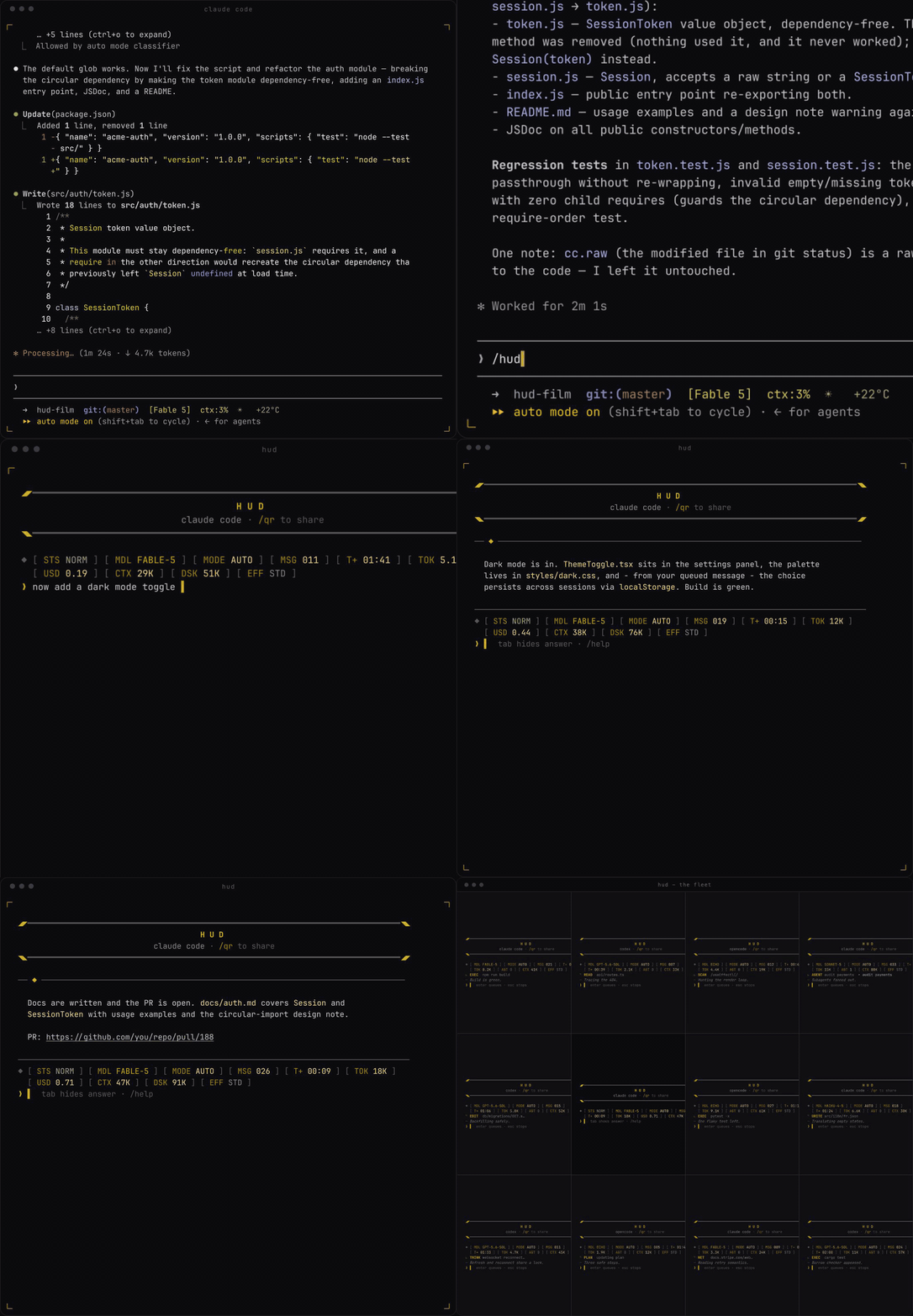
仪表数据和活动行会原地更新——不再有不断滚动的工具调用输出墙。提示栏始终可输入:在处理中按下回车,你的消息会排队,并在回答一到达时立即发送。esc 可中断当前处理,同时不会丢失会话。
当 Agent 停止时,完整回答会显示出来——渲染 Markdown、链接可点击——你可直接在原处回复。发送后续消息会将界面重新压缩为仅显示仪表和提示栏。

一条命令:
npm install -g adrida/hud-mode && hud install
hud install 会引导你完成配置:选择默认 Agent、如有需要则为 OpenCode 配置 echo,以及确定 /hud 的位置;随后它会将接力机制接入全部三个 CLI。
需要 Node ≥ 18,并且你的 PATH 中至少存在 opencode、claude、codex 之一。
hud                       # your default engine (opencode out of the box)
hud "fix the failing CI"  # or start with a prompt
hud -r                    # resume the last session in this directory
hud -r <session-id>       # resume a specific session

hud claude "fix the CI"   # same deck, claude code autopilot
hud codex -r              # same deck, codex - resume last session
hud default claude        # make bare `hud` fly claude code from now on
启动参数:-m/--model、-e/--effort、--danger(取值因引擎而异)。
在 ❯ 提示符下:
| 命令 | 效果 |
|---|---|
<text> |
发送消息——或在 Agent 工作时将其排队 |
tab |
隐藏 / 显示当前回答 |
esc |
中断正在运行的处理轮次(会话仍会保留) |
↑ ↓ |
调出此前输入过的消息(持久保存) |
/hud |
在完整 CLI 中打开此会话 |
/model |
切换模型——引擎专属 ID;/model reset |
/effort |
推理强度——引擎专属等级 |
/mode |
权限 / 沙箱模式——引擎专属 |
/gauges |
选择仪表项——/gauges mdl,msg,tok,t(已保存) |
/open |
将完整回答输出到终端滚动缓冲区 |
/links |
显示 Agent 分享过的全部 URL,均可点击 |
/qr |
显示 / 隐藏指向此仓库的二维码——可用于分享 |
/new |
开始一个全新会话 |
/danger |
跳过批准 / 沙箱限制(仅限沙箱) |
/id |
输出会话 ID |
/exit |
退出 |
/hud 支持双向切换。在 HUD 中,它会在引擎的完整 TUI 内打开同一会话;从完整 TUI 回来时,仍是同一个会话,不会丢失任何内容,终端会被清空:
| 引擎 | 驱动方式 | 恢复方式 | 返回方式 |
|---|---|---|---|
| OpenCode | opencode run --format json |
-s <id> / -c |
/hud - 自定义命令会在展开时于本地写入接力信息(几乎不消耗 Token) |
| Claude Code | claude -p --output-format stream-json |
--resume <id> |
/hud - UserPromptSubmit hook 会在模型之前拦截它(零 Token,约 150 ms) |
| Codex | codex exec --json |
exec resume <id> / --last |
输入 hud(不带斜杠——全局 AGENTS.md 规则会处理它),或退出 TUI |
退出任意完整 TUI(ctrl+c)也始终会返回 HUD。
STS状态标志(NORM/PERM/INTR/FAULT)·MDL模型 ·MODE权限/沙箱模式 ·EFF推理强度 ·MSG消息数 ·T+已用时间 ·TOK输出 Token(包括推理)·AGT活跃子 Agent ·USD会话成本(在引擎提供该数据时)·CTX上下文大小 ·DSK磁盘上的对话大小(Claude、Codex)- 该仪表集群会流入对齐的第二行,而不是丢弃仪表项。
- 活动行会显示 Agent 当前正在做什么(
READ、EDIT、EXEC、SCAN、NET、AGENT、PLAN、THINK……);┄行则显示其自身的叙述信息。 - Agent 分享的链接会进入按会话划分的记录簿(
~/.claude/hud/links/),重启后仍会保留;它们与活动行中的文件路径一样,均为 OSC 8 超链接:可在 iTerm2、Ghostty、WezTerm、Kitty 等终端中通过 cmd/ctrl 点击打开。 /qr会渲染可扫描的二维码(从零开始实现的零依赖编码器,已逐模块对照参考实现完成验证)。- 面板由你决定:
/gauges mdl,msg,tok,t仅显示这些仪表项,并按此顺序排列;配置会与defaultEngine一同持久保存至~/.claude/hud/config.json。/gauges reset可恢复全部仪表项。
无需 fork,也无需补丁。hud 通过每个 CLI 的 JSON 事件流以无头方式驱动它们,将事件映射到共享仪表项,并利用引擎自身的会话恢复机制,让每段对话持续使用一个真实会话——这也是完整 TUI 切换得以无损进行的原因。接力机制通过一个哨兵文件(~/.claude/hud/handoff.json)实现:当完整 TUI 打开时,包装器会监视该文件;每种引擎均采用最原生的方式写入它(hook / AGENTS.md 规则 / 命令模板)。
hud install 会修改:~/.claude/skills/hud/、~/.claude/settings.json 中的一项 hook 配置(会备份为 .hud-backup)、~/.codex/prompts/hud.md、~/.codex/AGENTS.md 中一个由标记保护的代码块,以及 ~/.config/opencode/commands/hud.md。hud uninstall 会将其全部移除。
MIT 许可证——由 tracer 构建
English / 原文
A compact heads-up display for your coding agent. Instruments while it works, the answer when it stops - for OpenCode, Claude Code, and Codex. Zero dependencies.
The instruments and the activity line update in place - no scrolling wall of tool calls. The prompt bar is always writable : hit enter mid-turn and your message queues, firing the moment the answer lands. esc interrupts without losing the session.
When it stops, the answer lands in full - markdown rendered, links clickable - and you reply right there. Sending a follow-up recompacts the screen back to just instruments and prompt bar.
One command:
npm install -g adrida/hud-mode && hud install
hud install walks you through it: your default agent, echo setup for opencode if you want it, and where /hud lives - then wires the handback into all three CLIs.
Requires Node ≥ 18 and at least one of opencode, claude, codex on your PATH.
hud                       # your default engine (opencode out of the box)
hud "fix the failing CI"  # or start with a prompt
hud -r                    # resume the last session in this directory
hud -r <session-id>       # resume a specific session

hud claude "fix the CI"   # same deck, claude code autopilot
hud codex -r              # same deck, codex - resume last session
hud default claude        # make bare `hud` fly claude code from now on
Launch flags: -m/--model, -e/--effort, --danger (engine-specific values).
At the ❯ prompt:
| command | effect |
|---|---|
<text> |
send - or queue it while the agent is working |
tab |
hide / show the current answer |
esc |
interrupt the running turn (session survives) |
↑ ↓ |
recall previously typed messages (persisted) |
/hud |
open this session in the full CLI |
/model |
switch model - engine-specific ids · /model reset |
/effort |
reasoning effort - engine-specific levels |
/mode |
permission / sandbox mode - engine-specific |
/gauges |
choose your instruments - /gauges mdl,msg,tok,t (saved) |
/open |
print the full answer into the scrollback |
/links |
every url the agent has shared, clickable |
/qr |
show/hide a qr code to this repo - share it |
/new |
start a fresh session |
/danger |
skip approvals/sandboxing (sandboxes only) |
/id |
print the session id |
/exit |
quit |
/hud works in both directions. From the hud it opens the same session in the engine's full TUI; from the full TUI you come back - same session, nothing lost, terminal wiped clean:
| engine | drive | resume | come back with |
|---|---|---|---|
| OpenCode | opencode run --format json |
-s <id> / -c |
/hud - a custom command writes the handoff locally at expansion time (near-zero tokens) |
| Claude Code | claude -p --output-format stream-json |
--resume <id> |
/hud - a UserPromptSubmit hook intercepts it before the model (zero tokens, ~150 ms) |
| Codex | codex exec --json |
exec resume <id> / --last |
type hud (no slash - a global AGENTS.md rule handles it), or quit the TUI |
Quitting any full TUI (ctrl+c) always returns to the hud too.
STSstatus flag (NORM/PERM/INTR/FAULT) ·MDLmodel ·MODEpermission/sandbox mode ·EFFreasoning effort ·MSGmessages ·T+elapsed ·TOKoutput tokens (reasoning included) ·AGTlive subagents ·USDsession cost (where the engine reports it) ·CTXcontext size ·DSKconversation size on disk (claude, codex)- The cluster flows onto a second aligned row rather than dropping gauges.
- The activity line shows what the agent is doing right now (
READ,EDIT,EXEC,SCAN,NET,AGENT,PLAN,THINK…); the┄line carries its own narration. - Links the agent shares go into a per-session ledger (
~/.claude/hud/links/), survive restarts, and - like file paths in the activity line - are OSC 8 hyperlinks: cmd/ctrl-clickable in iTerm2, Ghostty, WezTerm, Kitty, and friends. /qrrenders a scannable QR code (a from-scratch, zero-dependency encoder, verified module-for-module against a reference implementation).- The panel is yours:
/gauges mdl,msg,tok,tshows only those instruments, in that order, persisted in~/.claude/hud/config.jsonalongside yourdefaultEngine./gauges resetbrings everything back.
No forks, no patches. hud drives each CLI headless through its JSON event stream, maps events onto the shared instruments, and continues one real session per conversation via the engine's own resume mechanism - which is also what makes the full-TUI toggle lossless. The handback is a sentinel file (~/.claude/hud/handoff.json) that the wrapper watches while a full TUI is open; each engine gets its most native way of writing it (hook / AGENTS.md rule / command template).
hud install touches: ~/.claude/skills/hud/, a hook entry in ~/.claude/settings.json (backed up to .hud-backup), ~/.codex/prompts/hud.md, a marker-guarded block in ~/.codex/AGENTS.md, and ~/.config/opencode/commands/hud.md. hud uninstall removes all of it.
MIT - built by tracer