Show HN:Labgrid-MCP——让 AI Agent 驱动真实嵌入式硬件实验室
英文标题:🔶 Show HN: Labgrid-MCP – let AI agents drive real embedded hardware labs
Labgrid-MCP 是一个 Model Context Protocol(MCP)服务器,可将基于 labgrid 的嵌入式硬件实验室接入 Claude、AI 编辑器及其他 MCP 客户端。它提供 47 项工具和 5 个可浏览的 `labgrid://` 资源,覆盖开发板发现、预约、供电、串口、SSH、文件传输和可选烧录等完整流程。项目通过只读模式、按类别白名单及默认关闭烧录和设备删除等机制控制高风险操作。对嵌入式开发团队而言,这意味着 Agent 可以在保留 labgrid 资源预约与所有权仲裁能力的前提下,直接自动化真实硬件测试和调试工作流。
 1.2 KB
 3.8 KB
 7.0 MB
 121.0 KB
中文
通过 Claude、AI 编辑器和任意 MCP 客户端驱动真实嵌入式硬件。
labgrid 是嵌入式团队用于共享实验室硬件的开源框架:开发板(“places”)配备可远程切换的电源、串口控制台、USB 多路复用器和烧录工具。labgrid-mcp 是一个 Model Context Protocol 服务器,可将任意 labgrid 实验室接入 MCP 生态系统,使 Agent 和开发工具能够直接操作实验室:
“获取 rk3399 开发板,烧录昨晚的镜像,对它执行断电重启,并告诉我它是否进入登录提示符。如果没有,请粘贴控制台日志。”
它不仅适用于聊天:任何脚本驱动或人工操作的 MCP 客户端,都能通过 labgrid 成熟的驱动生态系统获得受策略控制的远程操控界面,并拥有临时设备服务器所不具备的预约和所有权仲裁能力。
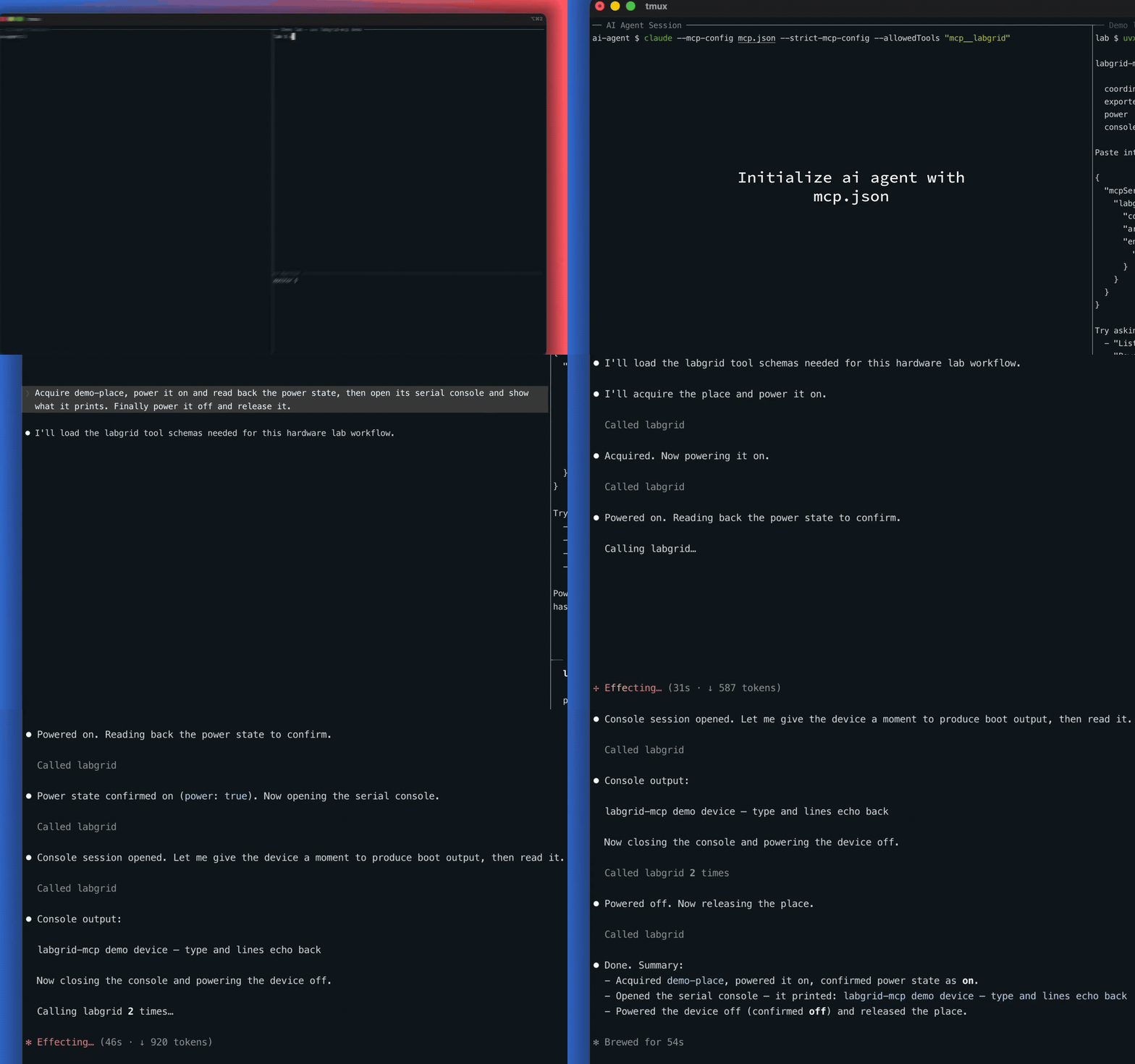
Claude 驱动内置演示实验室——无需硬件,一条命令:uvx labgrid-mcp demo
- 完整设备生命周期:发现、预约、获取、释放;由 keepalive 支持,因此占用不会在任务中途过期
- 硬件控制:开机、关机、重启,数字 I/O,SD/USB 多路复用切换
- 交互式串口控制台:打开、读取、发送、关闭;采用环形缓冲区
- 通过 SSH 连接设备:运行命令、传输文件、双向隧道
- 烧录 (选择启用):DFU、fastboot、bootstrap 加载器、镜像写入;均以后台任务形式执行,并支持状态和日志轮询
- 实验室维护:标签、别名、注释、place 管理、变更监控
- 安全门控:只读模式和按类别设置的白名单;不可逆类别(烧录、删除 place)默认关闭
共 47 项工具、5 个可浏览的 labgrid:// 资源,每项工具均提供如实的 readOnly/destructive 标注。
5 分钟试用(无需硬件)
需要 uv(其内置的 uvx 会处理其余工作,包括配置 Python):
这会在你的机器上启动一个完整的虚拟实验室:真实的 labgrid coordinator 和 exporter、一个配有虚拟电源开关和虚拟串口控制台的演示开发板。它会打印一段可直接粘贴的 .mcp.json 片段。随后向你的 Agent 提问:
- “列出 places,然后获取 demo-place”
- “打开 demo-place 电源并读取它的电源状态”
- “打开 demo-place 的控制台并读取其输出”
按 Ctrl-C 即可销毁全部内容。
无需单独安装——uvx 首次运行时会从 PyPI 获取 labgrid-mcp。(更喜欢 pip?执行 pip install labgrid-mcp,随后使用不带下方 args 的 "command": "labgrid-mcp"。)
你需要运行中的、gRPC 时代的 labgrid coordinator(labgrid ≥ 24;已针对 26.x 测试),且该 coordinator 必须可从此机器访问。
1. 在 MCP 客户端中注册服务器。 各处的服务器定义相同——命令为 uvx,参数为 ["labgrid-mcp"],并附加你的 LG_* 环境变量——只有配置文件位置和顶层键名不同。请选择你的客户端:
Claude Code
在项目根目录保存为 .mcp.json:
{
  "mcpServers": {
    "labgrid": {
      "command": "uvx",
      "args": ["labgrid-mcp"],
      "env": { "LG_COORDINATOR": "your-coordinator-host:20408" }
    }
  }
}
或使用一条命令:claude mcp add labgrid --env LG_COORDINATOR=your-coordinator-host:20408 -- uvx labgrid-mcp
Claude Desktop
依次打开“设置 → 开发者 → 编辑配置”,然后在 claude_desktop_config.json 的 mcpServers 下添加:
{
  "mcpServers": {
    "labgrid": {
      "command": "uvx",
      "args": ["labgrid-mcp"],
      "env": { "LG_COORDINATOR": "your-coordinator-host:20408" }
    }
  }
}
Cursor
保存为 .cursor/mcp.json(项目级)或 ~/.cursor/mcp.json(全局):
{
  "mcpServers": {
    "labgrid": {
      "command": "uvx",
      "args": ["labgrid-mcp"],
      "env": { "LG_COORDINATOR": "your-coordinator-host:20408" }
    }
  }
}
VS Code(Copilot)
保存为 .vscode/mcp.json——注意 VS Code 使用 servers 键:
{
  "servers": {
    "labgrid": {
      "command": "uvx",
      "args": ["labgrid-mcp"],
      "env": { "LG_COORDINATOR": "your-coordinator-host:20408" }
    }
  }
}
Windsurf
在 ~/.codeium/windsurf/mcp_config.json 的 mcpServers 下添加:
{
  "mcpServers": {
    "labgrid": {
      "command": "uvx",
      "args": ["labgrid-mcp"],
      "env": { "LG_COORDINATOR": "your-coordinator-host:20408" }
    }
  }
}
任何其他 MCP 客户端 / SDK
labgrid-mcp 是标准的 stdio MCP 服务器:在环境中设置 LG_COORDINATOR 后,启动 uvx labgrid-mcp(或在执行 pip install labgrid-mcp 后启动 labgrid-mcp),并通过 stdin/stdout 使用 MCP 协议通信。它适用于支持 stdio 服务器的任何客户端或 Agent SDK。
2. 重启客户端,使其加载新服务器。
3. 确认已连接——向 Agent 提问 “列出 labgrid places”;你应该会得到实验室中的开发板列表。至此即可开始使用。
身份标识的工作方式与 labgrid-client 完全相同:设置 LG_HOSTNAME / LG_USERNAME,或者省略它们以使用真实的主机名/用户名。安全性委托给网络(VPN / SSH 隧道),与 labgrid-client 相同。
(从克隆的代码仓库而非 PyPI 运行?请使用 "command": "uv"、"args": ["run", "--directory", "/path/to/labgrid-mcp", "labgrid-mcp"]。)
将服务器构建并运行在容器中(适用于受限主机,或在实验室网络内部托管)
从仓库的 Dockerfile 构建镜像:
git clone https://github.com/onurcelep/labgrid-mcp && cd labgrid-mcp
docker build -t labgrid-mcp .
然后让 MCP 客户端指向它:
{
  "mcpServers": {
    "labgrid": {
      "command": "docker",
      "args": ["run", "-i", "--rm",
               "-e", "LG_COORDINATOR=your-coordinator-host:20408",
               "labgrid-mcp"]
    }
  }
}
对于实验室,一个实用模式是:在实验室网络内的一台主机上构建并运行容器,而 MCP 客户端可在任意位置运行;每名用户使用一个容器,从而使身份和所有权保持按人区分:
{
  "mcpServers": {
    "labgrid": {
      "command": "ssh",
      "args": ["labhost", "docker", "run", "-i", "--rm",
               "-e", "LG_COORDINATOR=127.0.0.1:20408",
               "-e", "LG_USERNAME=your-name",
               "labgrid-mcp"]
    }
  }
}
不要让多名用户共享一个正在运行的服务器:每个实例只持有一个 labgrid 身份,因此共享实例会使所有人的获取操作无法区分。每个用户/Agent 使用一个容器,能够保持实验室的所有权模型完整。(注意:你构建的镜像会捆绑 labgrid,其许可证为 LGPL-2.1-or-later——可在任何地方使用;如果你再分发该镜像,则 LGPL 条款适用于该副本,镜像中已包含 labgrid 的许可证文本。)
只需用自然语言提出请求——Agent 会将其映射至正确工具。典型的首次工作流如下:
- “现在有哪些空闲的 places?”
- “帮我获取 board-7。”
- “打开电源,然后打开串口控制台并展示启动输出。”
- “通过 SSH 登录并运行
uname -a。”- “关闭电源并释放开发板。”
只读请求(“列出 places”“谁在占用 board-7?”)可立即执行。任何会改变硬件状态的操作都受到门控(见下文);两个不可逆类别——烧录和删除 place——会保持关闭状态,直到你显式启用。
| 环境变量 | 默认值 | 作用 |
|---|---|---|
LG_COORDINATOR |
127.0.0.1:20408 |
Coordinator 地址 |
LG_HOSTNAME / LG_USERNAME |
真实主机/用户 | 身份标识,与 labgrid-client 相同 |
LABGRID_MCP_READONLY |
关闭 | 1 = 仅注册只读工具:Read 组,以及 wait_for_change 和 forward_list |
LABGRID_MCP_ALLOW |
未设置 | 要注册的类别逗号分隔列表;必须显式列出 flash 和 place_delete;它们即使在默认情况下也处于关闭状态 |
LABGRID_MCP_SSH_KEYFILE |
未设置 | SSH 工具的私钥;未设置时,会在调用时明确报错 |
LABGRID_MCP_ACQUIRE_TIMEOUT |
120 |
acquire_place 等待分配的最长秒数 |
安全性一段话说明:烧录和删除 place 可能造成不可逆损害,因此每项操作都需要在 LABGRID_MCP_ALLOW 中单独显式列出。SSH 工具可在已获取的开发板上执行任意命令,其信任级别与控制台会话相同;LABGRID_MCP_READONLY=1 会移除它们及其他所有受门控工具(forward_list 除外,因为它仅列出内存中的隧道状态)。还有一项值得了解的 labgrid 注意事项:coordinator 不会对 place 元数据实施所有权保护——本服务器拒绝编辑已被获取的 place,除非使用 force=True;但任何机制都无法保护无人持有的 place(且 set_place_tags 中的空标签值会删除该键,这是 labgrid 自身的语义)。详见:docs/DESIGN.md §4 和 §11.12。
| 按分组列出的全部 47 项工具 组别 | 工具 |
|---|---|
| 读取 | coordinator_info, list_places, show_place, who, list_resources, list_reservations |
| 获取 / 预约 | acquire_place, release_place, allow_place, release_from, reserve, cancel_reservation, reservation_wait |
| 驱动 | get_power_state, set_power, get_io, set_io, get_sd_mux, set_sd_mux, set_usb_mux |
| 控制台 | console_open, console_read, console_send, console_close |
| SSH / 转发 | ssh_run, put_file, get_file, forward_open, forward_remote_open, forward_close, forward_list |
| 烧录 (选择启用) | flash_dfu, flash_fastboot, flash_script, bootstrap, write_image, flash_status, flash_logs |
| Place 元数据 | add_place, add_place_alias, delete_place_alias, set_place_tags, set_place_comment, add_place_match |
| 删除 place (选择启用) | delete_place, delete_place_match |
| 变更监控 | wait_for_change |
资源:labgrid://places、labgrid://places/{name}、labgrid://resources、labgrid://reservations、labgrid://sessions。
每项工具的参数和行为均记录在该工具自身的描述中(可在你的 MCP 客户端内查看),也记录在 docs/DESIGN.md §5/§11 中。
- 不支持视频/音频/屏幕采集或 USB 仪器(需要 gstreamer 和物理 USB;没有合理的 MCP 操作界面)
- 不提供实时事件流;改用
wait_for_change长轮询 - 旧版 crossbar coordinator(labgrid < 24)无法连接
- 身份验证处于网络层(VPN/隧道),完全遵循 labgrid 自身的模型
- 真实的烧录/多路复用驱动步骤需要真实开发板:任务机制已针对虚拟设备完成完整 CI 测试,但实际触及芯片的步骤尚未测试
开发 labgrid-mcp 本身
集成测试套件会运行完整技术栈,包括演示环境;它在每个 PR 的 CI 中针对真实 coordinator/exporter 进程和虚拟硬件执行,并且每周针对 labgrid master 运行一次金丝雀测试:
git clone <this-repo> labgrid-mcp && cd labgrid-mcp
uv sync
uv run pytest              # unit
uv run pytest -m integration
架构、决策日志以及经验证的 labgrid 内部机制参考资料:docs/DESIGN.md。
Apache-2.0。版权所有 2026 Onur Celep。
labgrid 本身采用 LGPL-2.1-or-later 许可证,并作为常规、未经修改的依赖项使用。
English / 原文
Drive real embedded hardware from Claude, AI editors, and any MCP client.
labgrid is the open-source framework embedded teams use to share lab hardware: boards ("places") with remotely switchable power, serial consoles, USB muxes, and flashing tools. labgrid-mcp is a Model Context Protocol server that plugs any labgrid lab into the MCP ecosystem, so agents and dev tools can work with the lab directly:
"Acquire the rk3399 board, flash last night's image, power-cycle it, and tell me whether it reaches a login prompt. Paste the console log if it doesn't."
Not only for chat: any MCP client, scripted or human-driven, gets a policy-gated remote-control surface over labgrid's mature driver ecosystem, with the reservations and ownership arbitration ad-hoc device servers don't have.
Claude driving the built-in demo lab — no hardware, one command:uvx labgrid-mcp demo
- Full device lifecycle : discover, reserve, acquire, release; keepalive-backed so holds never expire mid-task
- Hardware control : power on/off/cycle, digital I/O, SD/USB mux switching
- Interactive serial console : open, read, send, close; ring-buffered
- SSH to the device : run commands, transfer files, tunnels in both directions
- Flashing (opt-in) : DFU, fastboot, bootstrap loaders, image writing, all as background jobs with status/log polling
- Lab housekeeping : tags, aliases, comments, place management, change monitoring
- Safety gating : read-only mode and per-category allowlists; the irreversible families (flash, place deletion) are off by default
47 tools, 5 browseable labgrid:// resources, honest readOnly/destructive annotations on every tool.
Try it in 5 minutes (no hardware needed)
Requires uv (its bundled uvx does the rest, including provisioning Python):
This boots a complete fake lab on your machine: a real labgrid coordinator and exporter, one demo board with a fake power switch and a fake serial console. It prints a paste-ready .mcp.json snippet. Then ask your agent:
- "List places, then acquire demo-place"
- "Power demo-place on and read its power state"
- "Open the console on demo-place and read its output"
Ctrl-C tears everything down.
No separate install step — uvx fetches labgrid-mcp from PyPI the first time it runs. (Prefer pip? pip install labgrid-mcp, then use "command": "labgrid-mcp" with no args below.)
You need a running, gRPC-era labgrid coordinator (labgrid ≥ 24; tested against 26.x) reachable from this machine.
1. Register the server with your MCP client. The server definition is the same everywhere — command uvx, args ["labgrid-mcp"], plus your LG_* env vars — only the config file location and top-level key differ. Pick your client:
Claude Code
Save as .mcp.json in your project root:
{
  "mcpServers": {
    "labgrid": {
      "command": "uvx",
      "args": ["labgrid-mcp"],
      "env": { "LG_COORDINATOR": "your-coordinator-host:20408" }
    }
  }
}
or one command: claude mcp add labgrid --env LG_COORDINATOR=your-coordinator-host:20408 -- uvx labgrid-mcp
Claude Desktop
Settings → Developer → Edit Config, then add under mcpServers in claude_desktop_config.json:
{
  "mcpServers": {
    "labgrid": {
      "command": "uvx",
      "args": ["labgrid-mcp"],
      "env": { "LG_COORDINATOR": "your-coordinator-host:20408" }
    }
  }
}
Cursor
Save as .cursor/mcp.json (project) or ~/.cursor/mcp.json (global):
{
  "mcpServers": {
    "labgrid": {
      "command": "uvx",
      "args": ["labgrid-mcp"],
      "env": { "LG_COORDINATOR": "your-coordinator-host:20408" }
    }
  }
}
VS Code (Copilot)
Save as .vscode/mcp.json — note VS Code uses a servers key:
{
  "servers": {
    "labgrid": {
      "command": "uvx",
      "args": ["labgrid-mcp"],
      "env": { "LG_COORDINATOR": "your-coordinator-host:20408" }
    }
  }
}
Windsurf
Add under mcpServers in ~/.codeium/windsurf/mcp_config.json:
{
  "mcpServers": {
    "labgrid": {
      "command": "uvx",
      "args": ["labgrid-mcp"],
      "env": { "LG_COORDINATOR": "your-coordinator-host:20408" }
    }
  }
}
Any other MCP client / SDK
labgrid-mcp is a standard stdio MCP server: spawn uvx labgrid-mcp (or labgrid-mcp after pip install labgrid-mcp) with LG_COORDINATOR set in its environment, and speak MCP over stdin/stdout. Works with any client or agent SDK that supports stdio servers.
2. Restart the client so it picks up the new server.
3. Confirm it's connected — ask your agent "List the labgrid places" ; you should get your lab's boards back. You're ready.
Identity works exactly like labgrid-client: set LG_HOSTNAME / LG_USERNAME, or omit them to use your real hostname/user. Security is delegated to the network (VPN / SSH tunnel), same as labgrid-client.
(Running from a clone instead of PyPI? Use"command": "uv", "args": ["run", "--directory", "/path/to/labgrid-mcp", "labgrid-mcp"].)
Build and run the server as a container (locked-down hosts, or hosting it inside the lab network)
Build the image from the repo's Dockerfile:
git clone https://github.com/onurcelep/labgrid-mcp && cd labgrid-mcp
docker build -t labgrid-mcp .
Then point your MCP client at it:
{
  "mcpServers": {
    "labgrid": {
      "command": "docker",
      "args": ["run", "-i", "--rm",
               "-e", "LG_COORDINATOR=your-coordinator-host:20408",
               "labgrid-mcp"]
    }
  }
}
A useful pattern for labs: build and run the container on a host inside the lab network while your MCP client runs anywhere, one container per user so identity and ownership stay per-person:
{
  "mcpServers": {
    "labgrid": {
      "command": "ssh",
      "args": ["labhost", "docker", "run", "-i", "--rm",
               "-e", "LG_COORDINATOR=127.0.0.1:20408",
               "-e", "LG_USERNAME=your-name",
               "labgrid-mcp"]
    }
  }
}
Don't share one running server between users: each instance holds a single labgrid identity, so a shared instance would make everyone's acquisitions indistinguishable. One container per user/agent keeps the lab's ownership model intact. (Note: an image you build bundles labgrid, LGPL-2.1-or-later — fine to use anywhere; if you redistribute the image, the LGPL's terms apply to that copy, with labgrid's license texts already inside it.)
Just ask in plain language — the agent maps it to the right tools. A typical first workflow:
- "Which places are free right now?"
- "Acquire board-7 for me."
- "Power it on, then open the serial console and show me the boot output."
- "SSH in and run
uname -a."- "Power it off and release the board."
Read-only asks ("list places", "who's holding board-7?") work immediately. Anything that changes hardware state is gated (see below), and the two irreversible families — flashing and place deletion — stay off until you explicitly enable them.
| Env var | Default | Effect |
|---|---|---|
LG_COORDINATOR |
127.0.0.1:20408 |
Coordinator address |
LG_HOSTNAME / LG_USERNAME |
real host/user | Identity, as in labgrid-client |
LABGRID_MCP_READONLY |
off | 1 = only read-only tools are registered: the Read group plus wait_for_change and forward_list |
LABGRID_MCP_ALLOW |
unset | Comma list of categories to register; flash and place_delete must be listed explicitly ; they're off even by default |
LABGRID_MCP_SSH_KEYFILE |
unset | Private key for the SSH tools; unset, they error clearly at call time |
LABGRID_MCP_ACQUIRE_TIMEOUT |
120 |
Max seconds acquire_place waits for allocation |
Safety in one paragraph: flashing and place deletion can do irreversible damage, so each needs its own explicit LABGRID_MCP_ALLOW entry. SSH tools are arbitrary command execution on the acquired board, the same trust class as a console session; LABGRID_MCP_READONLY=1 drops them along with every other gated tool (forward_list stays, since it only lists in-memory tunnel state). And a labgrid caveat worth knowing: the coordinator enforces no ownership guard on place metadata: this server refuses to edit an acquired place without force=True, but nothing can protect a place nobody holds (and an empty tag value in set_place_tags deletes that key, which is labgrid's own semantics). Details: docs/DESIGN.md §4 and §11.12.
| All 47 tools by group Group | Tools |
|---|---|
| Read | coordinator_info, list_places, show_place, who, list_resources, list_reservations |
| Acquisition / reservation | acquire_place, release_place, allow_place, release_from, reserve, cancel_reservation, reservation_wait |
| Drivers | get_power_state, set_power, get_io, set_io, get_sd_mux, set_sd_mux, set_usb_mux |
| Console | console_open, console_read, console_send, console_close |
| SSH / forward | ssh_run, put_file, get_file, forward_open, forward_remote_open, forward_close, forward_list |
| Flash (opt-in) | flash_dfu, flash_fastboot, flash_script, bootstrap, write_image, flash_status, flash_logs |
| Place metadata | add_place, add_place_alias, delete_place_alias, set_place_tags, set_place_comment, add_place_match |
| Place deletion (opt-in) | delete_place, delete_place_match |
| Change monitoring | wait_for_change |
Resources: labgrid://places, labgrid://places/{name}, labgrid://resources, labgrid://reservations, labgrid://sessions.
Per-tool arguments and behaviors are documented in each tool's own description (visible in your MCP client) and in docs/DESIGN.md §5/§11.
- No video/audio/screen capture or USB instruments (need gstreamer + physical USB; no sane MCP surface)
- No live event stream;
wait_for_changelong-polling instead - Old crossbar coordinators (labgrid < 24) can't connect
- Authentication is network-level (VPN/tunnel), exactly labgrid's own model
- The real flash/mux driver step needs a real board: the job machinery is fully CI-tested against fakes, the silicon-touching step is not
Working on labgrid-mcp itself
The integration suite runs the whole stack, including the demo, against real coordinator/exporter processes with fake hardware, in CI on every PR, plus a weekly canary against labgrid master:
git clone <this-repo> labgrid-mcp && cd labgrid-mcp
uv sync
uv run pytest              # unit
uv run pytest -m integration
Architecture, decision log, and a verified reference of labgrid's internals: docs/DESIGN.md.
Apache-2.0. Copyright 2026 Onur Celep.
labgrid itself is LGPL-2.1-or-later and is used as a regular, unmodified dependency.