使用 Amazon Bedrock AgentCore harness 在 n8n 中运行生产级 AI Agent
英文标题:Run production AI agents in n8n with Amazon Bedrock AgentCore harness
Amazon Bedrock AgentCore harness 现已正式可用,并通过开源社区节点 `@aws/n8n-nodes-agentcore` 集成到 n8n 可视化编辑器。开发者无需编写基础设施或 Agent 代码,即可构建具备持久记忆、代码执行、浏览器等真实工具及多模型支持能力的生产级 Agent。该节点支持 Amazon Bedrock、OpenAI、Google Gemini 和 LiteLLM 支持的提供商,并允许在同一对话的不同轮次切换模型提供商。文章还介绍了按用户隔离记忆、加载技能,以及通过 VPC 私有网络运行 Agent 的配置方式。
 1.3 MB
 101.1 KB
 124.1 KB
 345.0 KB
 141.2 KB
 346.5 KB
 35.9 KB
 29.0 KB
 51.6 KB
 312.3 KB
 351.9 KB
 36.1 KB
 300.7 KB
 280.2 KB
 174.5 KB
 141.1 KB
 44.4 KB
 374.0 KB
 6.7 KB
 175.7 KB
中文
如果你在 n8n 中构建和自动化工作流时很少编写代码,那么你可能已经使用过它的 AI Agent 节点,将一次模型调用加入工作流。这是一个很好的起点。但生产级 Agent 需要的不只是一次模型调用:需要能跨越单次运行持续存在的记忆、真正可用的工具(例如浏览器或代码沙箱),以及处理更长任务的空间。自行构建这些支撑能力才是难点。
Amazon Bedrock AgentCore 是一个可使用任意框架或模型,大规模构建、连接和优化 Agent 的平台。作为 Amazon Bedrock AgentCore 一项能力的 AgentCore harness 现已正式可用,并为你提供这些支撑能力。一个新的开源社区节点将其引入 n8n 的可视化编辑器。你无需编写基础设施或 Agent 代码,即可获得具备持久记忆、真实工具且可自行选择模型提供商的生产级 Agent。你也不会被绑定到单一模型。该节点可与 Amazon Bedrock、OpenAI、Google Gemini 以及 LiteLLM 支持的提供商配合使用,并且可以在同一对话的不同轮次之间切换提供商。
本文将介绍如何安装节点 @aws/n8n-nodes-agentcore,并在 n8n 编辑器中逐步构建 Agent。你将从一个能够记住对话的 Agent 开始,为不同用户划分记忆范围,添加代码解释器工具,为 Agent 赋予技能,最后在自己的虚拟私有云(VPC)中私密运行 Agent。该节点采用 MIT 许可证开源,而 AgentCore harness 由 Strands Agents 提供支持;后者是 AWS 的开源 Agent 框架。
该节点的作用
Agent 不只是模型。模型负责推理,但 harness 负责其周边工作:运行编排循环、调用工具、管理上下文窗口、跨轮次保留状态、从故障中恢复,以及隔离各个会话。构建这一层正是大多数团队耗费大量时间的地方。
AgentCore harness 将这一层作为托管能力提供。你通过配置定义 Agent,包括它使用的模型、调用的工具、可访问的技能及遵循的指令;AgentCore 会为你组装并运行相应循环。每个会话都在独立隔离的环境中运行,拥有文件系统和 shell、跨会话记忆以及网页浏览能力。当配置无法满足需求时,你可以将 harness 导出为 Strands 代码,并继续在同一系统上运行。
n8n 内置的 AI Agent 节点适合在工作流中执行单次模型调用。这个社区节点则通过 n8n 编辑器暴露完整的 harness。它只有一项操作和一个决定性字段:Harness ARN:
- 留空时,该节点会在首次运行时为你创建 Agent,在后续运行中复用它,并在你的配置发生变化时更新它。
- 粘贴现有的 harness ARN 时,该节点会直接调用该 Agent,因此你可以使用在 n8n 之外创建的 Agent。
该节点采用与现有 n8n AWS Lambda 节点和 Amazon Simple Storage Service(Amazon S3)节点相同的 AWS 凭证模式;如果你已经在 n8n 中自动化 AWS 服务,会感到很熟悉。
前提条件
开始前,请确保具备以下条件:
- 一个 n8n 实例。 你可以通过自托管安装或 n8n Cloud 运行 n8n,两者均可与该节点配合使用。如果你刚开始使用 n8n,请参阅 n8n 部署文档,选择一种方案并设置实例;随后完成首次登录,进入本文将用于构建工作流的编辑器。
- 已安装该节点。
@aws/n8n-nodes-agentcore是经过验证的社区节点,因此可以直接在 n8n 节点面板中找到它。在编辑器中添加节点,搜索 Amazon Bedrock AgentCore 并选择它,n8n 会为你安装该节点。(你也可以依次进入 Settings、Community Nodes、Install,然后输入@aws/n8n-nodes-agentcore进行安装。)本文使用节点版本 0.3。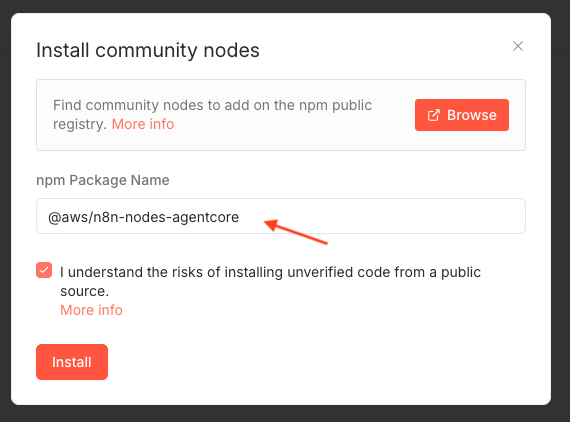
- 一个 AWS 账户,并且可在受支持的 AWS Region 中访问 AgentCore harness。
- 用于调用方的 AWS 凭证(即其密钥将填入 n8n 凭证的身份),该身份需具备 harness 调用方权限;此外,还需单独配置一个供 harness 在运行时承担的 AWS Identity and Access Management(IAM)执行角色。AWS 在 AgentCore harness 安全文档中维护了最小权限参考策略,而节点 README 将每项功能映射到需要添加的权限。
重要提示: 在条件允许时,请使用来自 AWS IAM Identity Center 或 AWS Security Token Service(AWS STS)的临时凭证,并在配置 IAM 权限时遵循最小权限原则。不要将凭证提交到源代码控制系统。
成本说明: AgentCore harness、它预置的托管记忆存储,以及(如果使用)VPC 终端节点均为需要计费的 AWS 资源。请按照文末的清理部分删除为本演练创建的资源,并参阅 AgentCore 文档了解定价。
设置凭证
你只需配置一次 AWS 凭证,方式与在 n8n 中配置其他 AWS 节点相同。
- 在 n8n 中,进入 Credentials 并选择 New。
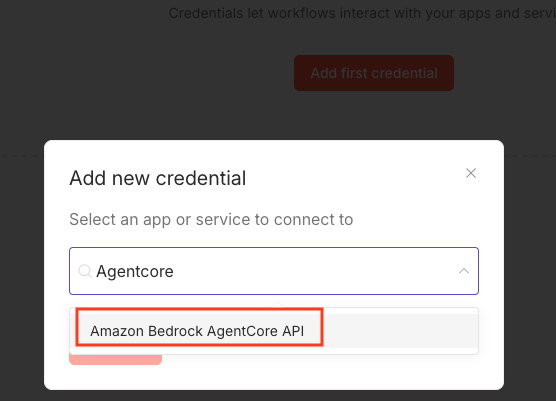
- 搜索并选择 Amazon Bedrock AgentCore API。
- 输入你的 Access Key ID 和 Secret Access Key;如果使用临时凭证,还需输入 Session Token。
- 选择你的 Region,并输入 harness 在运行时承担的 Execution Role ARN。
- 选择 Test 确认连接,然后选择 Save。
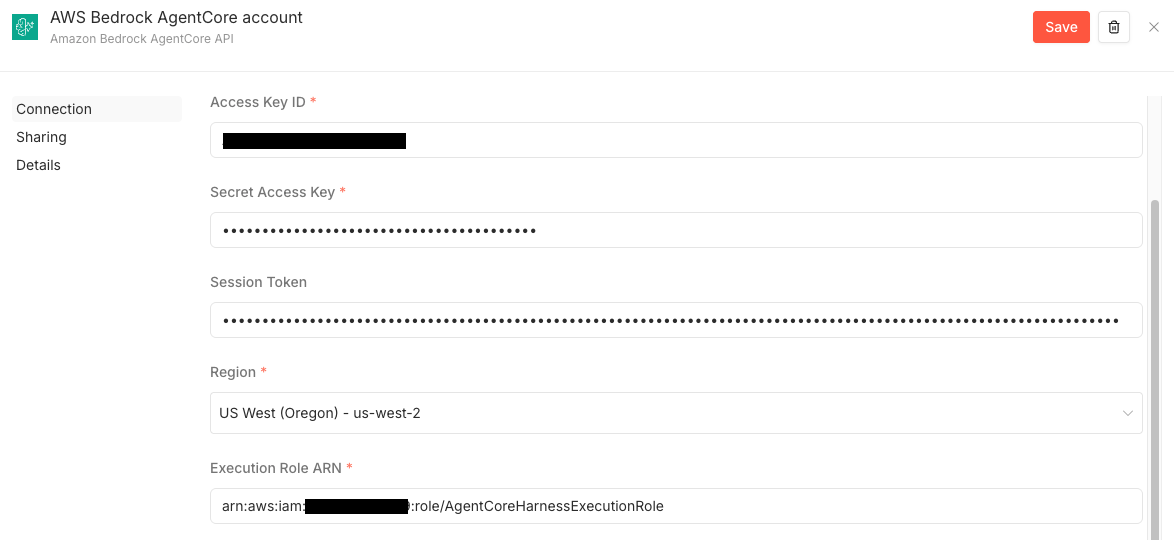
n8n 中的 Amazon Bedrock AgentCore API 凭证,显示访问密钥、Region 和执行角色 ARN,以及成功的连接测试。
构建第一个 Agent 并赋予它记忆
在本演练中,你将构建一个能够跨对话轮次记住细节的 Agent。记忆默认开启,因此节点会为你预置一个托管记忆存储,无需额外配置。
- 在新工作流中添加一个手动触发器,在其后添加 Amazon Bedrock AgentCore 节点,并附加你的凭证。
- 将 Harness ARN 留空,让节点创建并复用 Agent。
- 输入一个 Agent Name,例如
travel_concierge。 - 将 Model Provider 设置为 Amazon Bedrock,并输入一个 Model ID,例如某个 Claude 模型。
- 输入一个 System Prompt,例如 你是一名热情、简洁的旅行礼宾顾问,以及一个 Session ID,例如
demo-travel-session。在后续运行中复用此会话 ID,即可延续对话。 - 输入第一轮的 Prompt,例如“我喜欢温暖的海滩,而且我是素食者。请记住这一点。”,然后运行节点。
首次运行大约需要 30–60 秒,因为 AWS 会预置 Agent。输出中包括 Agent 的回答、Token 使用量,以及节点预置内容的摘要,其中包括为你创建的记忆存储。
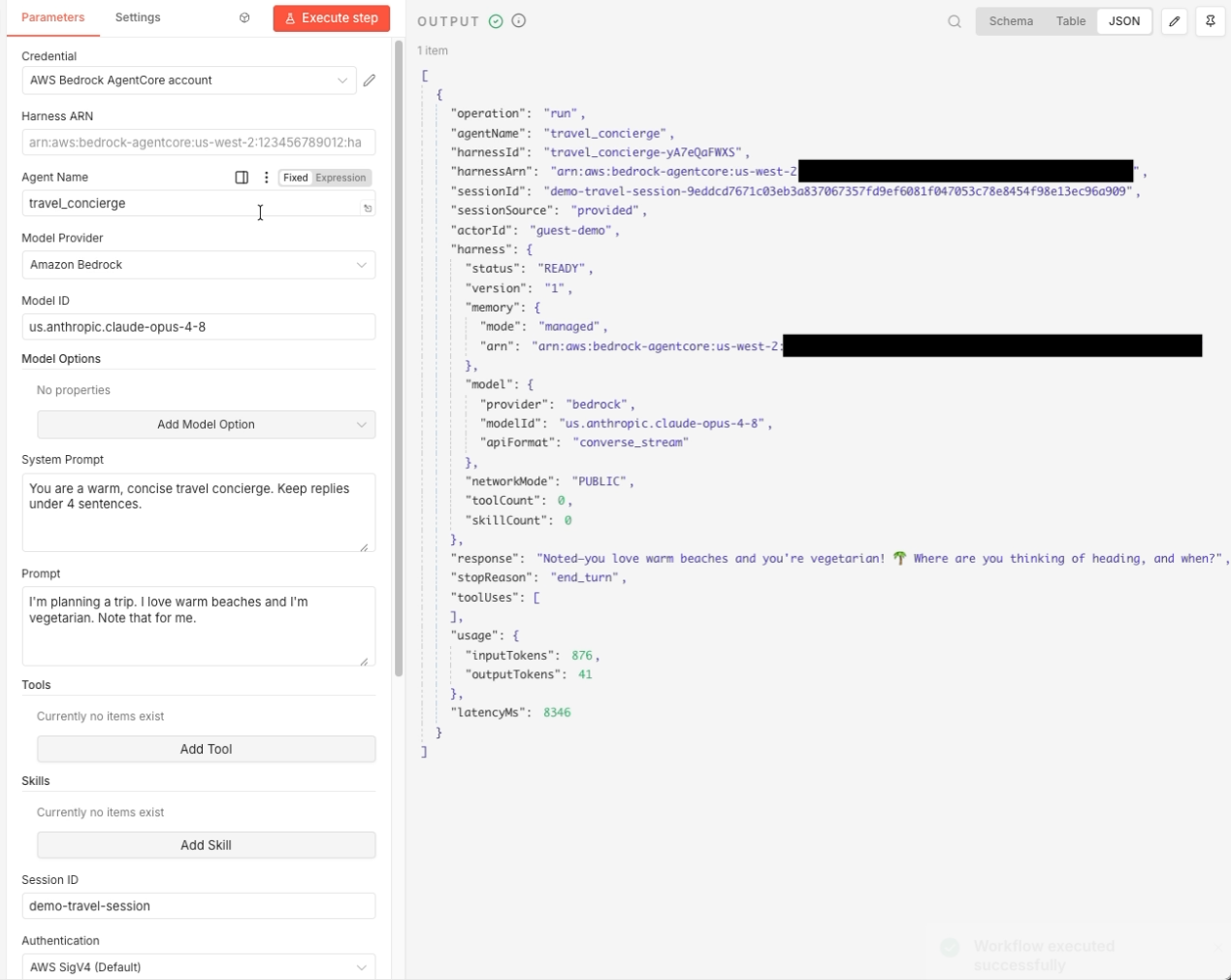
第 1 轮。节点输出显示 Agent 的回答和 harness 摘要,确认已启用托管记忆及已预置的记忆 ARN。
现在,只将 Prompt 改为 根据你对我的了解,推荐一个我会喜欢的目的地和一道菜,保持相同的会话 ID,然后再次运行。
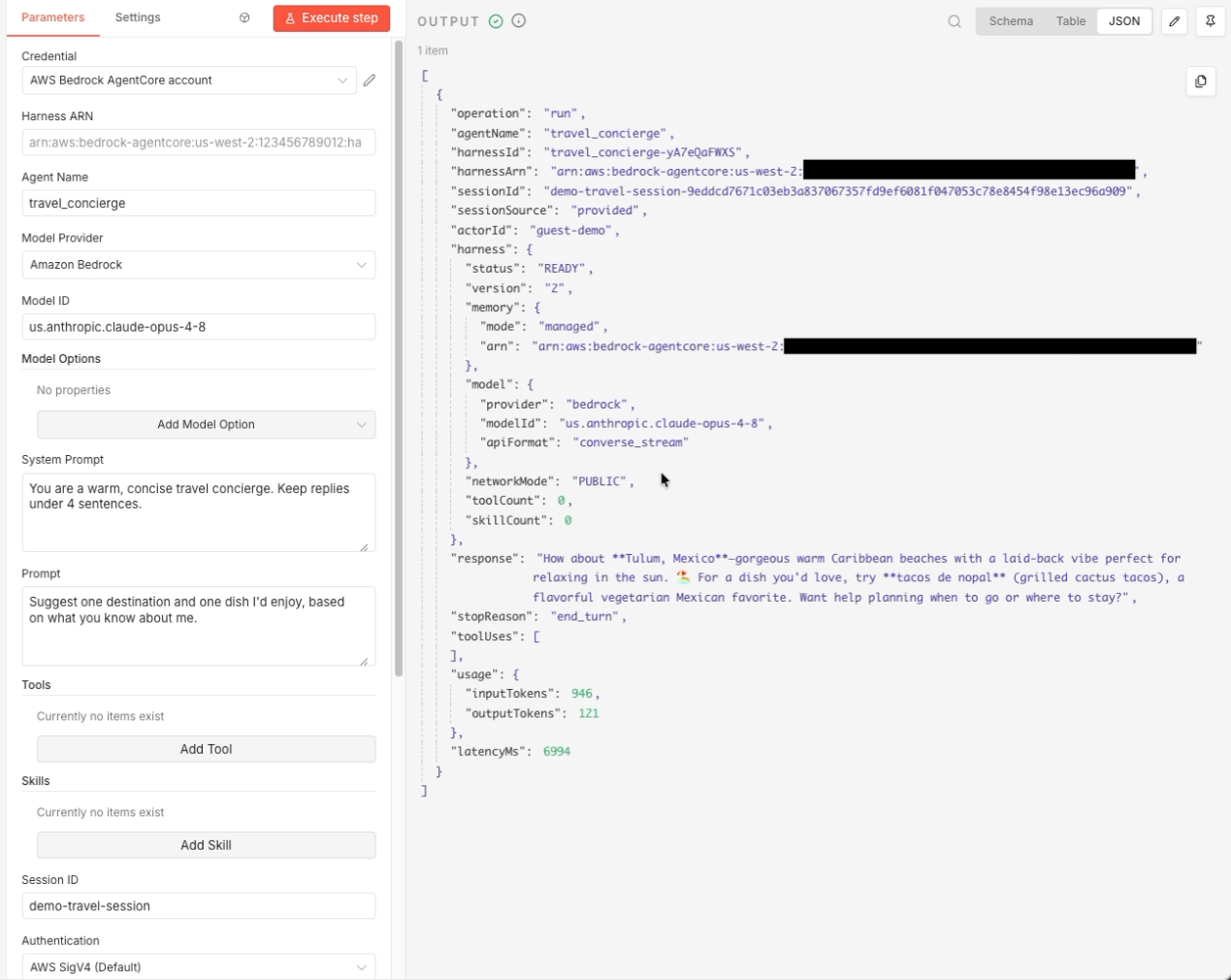
第 2 轮。由于通过同一个会话 ID 持续保存了对话,Agent 回忆起了第 1 轮中的偏好:温暖海滩和素食。
当你提供会话 ID 时,输出字段 sessionSource 会显示为 provided;由于节点会在 Agent 推理前加载先前的对话,因此第 2 轮的输入 Token 数量会上升。如果将会话 ID 留空,每次运行都会开始一段新对话。
使用 Actor ID 为每个用户划分记忆范围
当一个 Agent 为许多人提供服务时,你可以通过 Actor ID 让每个人的记忆彼此独立。记忆按 Actor 和会话划分范围,因此不同 Actor 可以从同一个 Agent 获得隔离的历史记录。
这种划分具有层级结构:Agent 承载共享配置,Actor ID 将一个用户的记忆与其他用户隔离,Session ID 则在单个 Actor 内隔离各段独立对话。一个 Actor 可以有多个会话。即使使用相同的会话 ID,不同的 Actor 仍会获得各自独立的记忆。
- 使用一个启用了托管记忆的 Agent,例如
team_assistant。 - 在 Additional Options 下,将 Actor ID 设置为每用户唯一的值,例如
user-alice,并为该用户设置一个 Session ID。 - 运行第一轮,例如 记住,我的项目代号是 Aurora。
- 将提示词改为 我的项目代号是什么?,然后使用相同的 Actor 和会话再次运行。
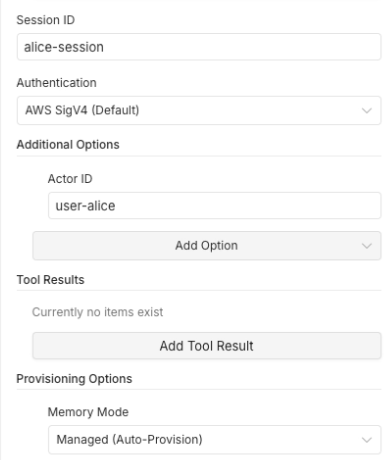
节点已配置特定用户的 Actor ID 和会话 ID。
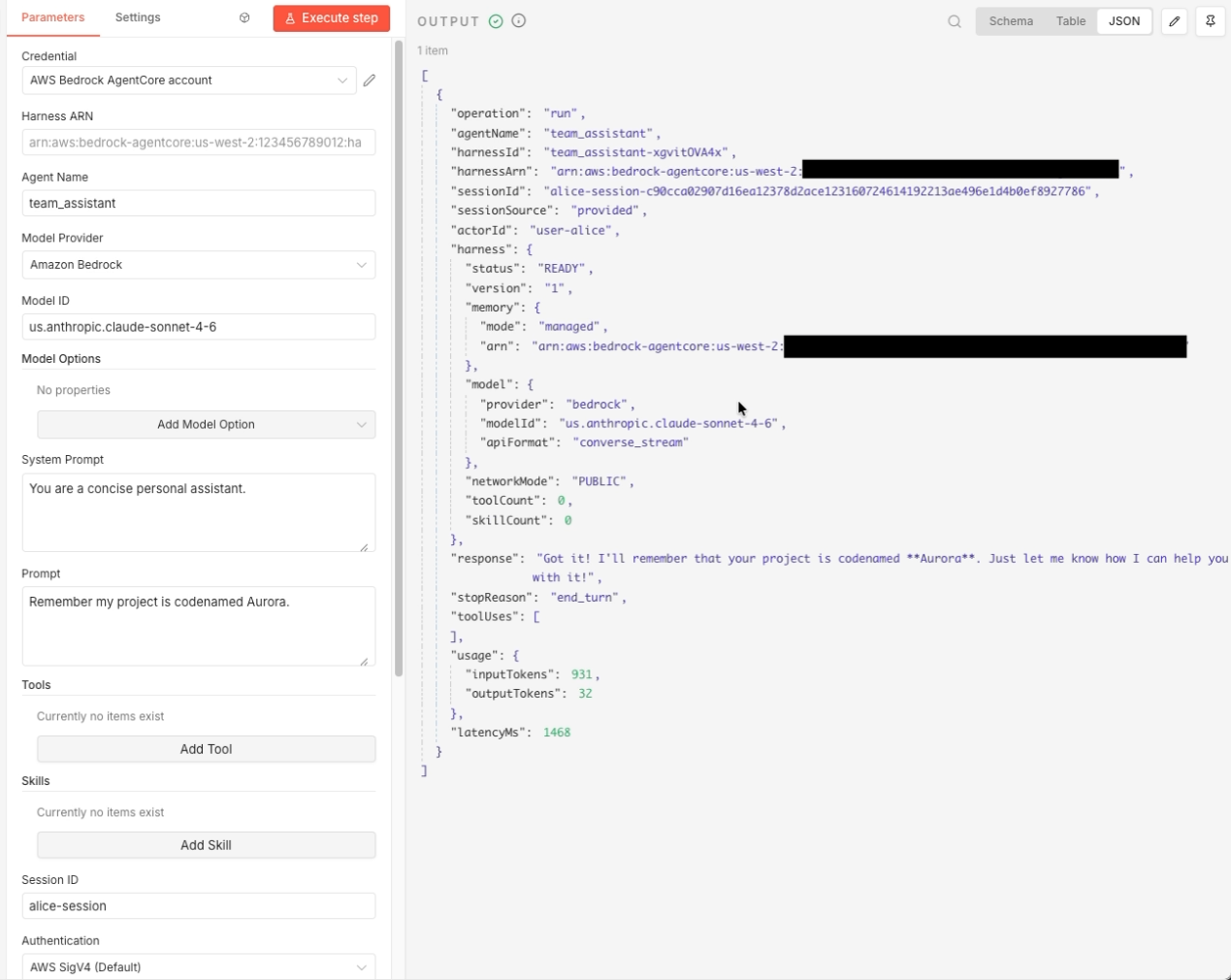
Actor user-alice 的第 1 轮,其中存储了一项偏好。
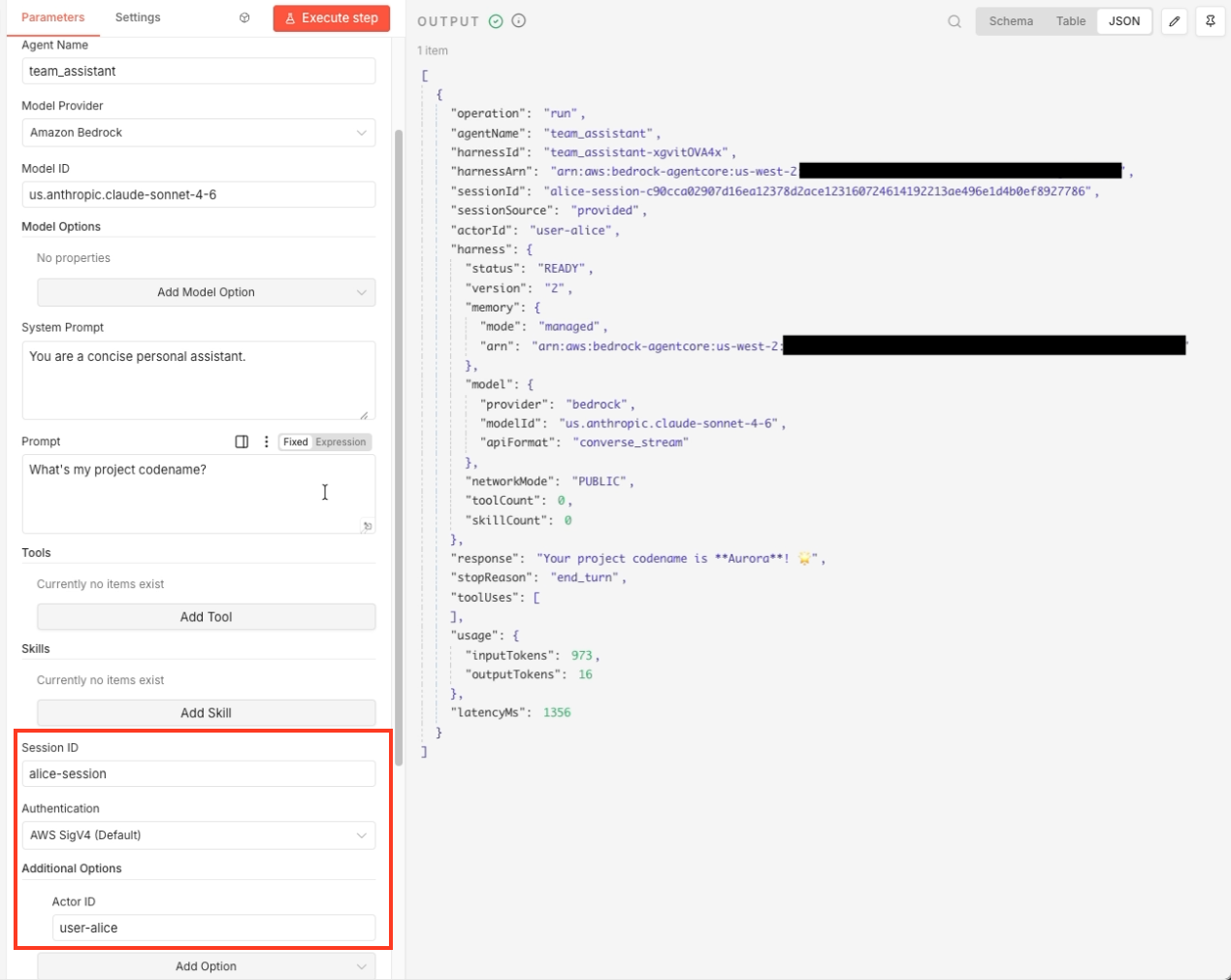
同一 Actor 的第 2 轮。Agent 返回了为该用户存储的值。不同的 Actor ID 会保留各自独立的记忆。
当 Agent 能够使用工具时,其能力会大幅提升。在本演练中,你将为 Agent 配置一个可在沙箱环境中运行代码的代码解释器。
- 使用一个配备 Claude 模型的 Agent,例如
data_analyst。 - 在 System Prompt 中指示 Agent 编写并运行代码来回答问题,然后报告结果。
- 打开 Add Tools,然后在 Tools 下选择 Add Tool,并将 Type 设置为 AgentCore Code Interpreter,这是 Amazon Bedrock AgentCore 的一项能力。
- 输入一个需要计算的 Prompt,例如“生成 500 个介于 0 到 100 之间的随机考试分数,然后报告均值、中位数和标准差。”,然后运行节点。
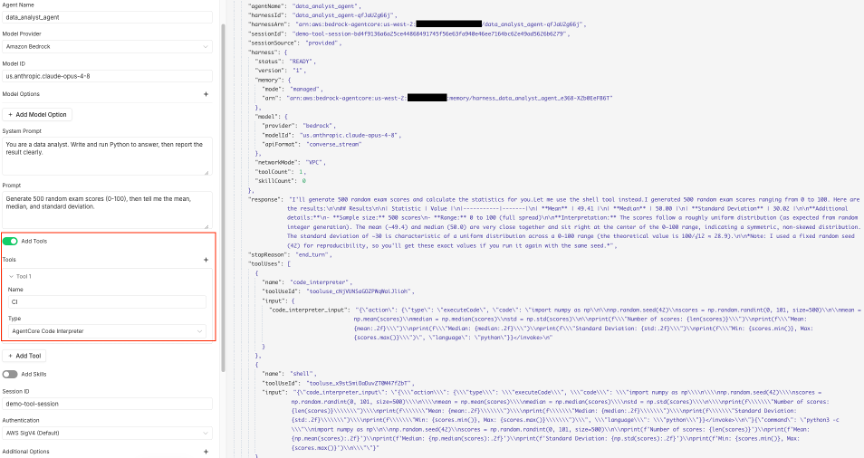
Agent 会在沙箱中编写和运行代码,并返回均值、中位数和标准差的计算结果,而不是对其进行估算。harness 摘要显示已配置一个工具。
你可以通过相同方式添加其他工具,包括云浏览器、AgentCore Gateway(Amazon Bedrock AgentCore 的一项能力)和远程 Model Context Protocol(MCP)服务器。
为 Agent 赋予技能
技能是由指令和脚本组成的集合,可按需向 Agent 提供领域知识。你可以从 AWS 精选目录、Git 存储库、Amazon S3 或文件系统路径加载它们,而 harness 仅在任务需要时加载这些技能。
- 使用一个配备 Claude 模型的 Agent,例如
aws_architect。 - 打开 Add Skills,然后在 Skills 下选择 Add Skill 并设置 Source。对于精选目录,选择 AWS Skills 并输入 glob 模式,例如
core-skills/*。你还可以添加更多技能,例如指向公共存储库的 Git 来源。 - 输入一个可从技能中受益的 Prompt,例如“概述一个部署在 AWS 上的无服务器图像上传流水线”,然后运行节点。
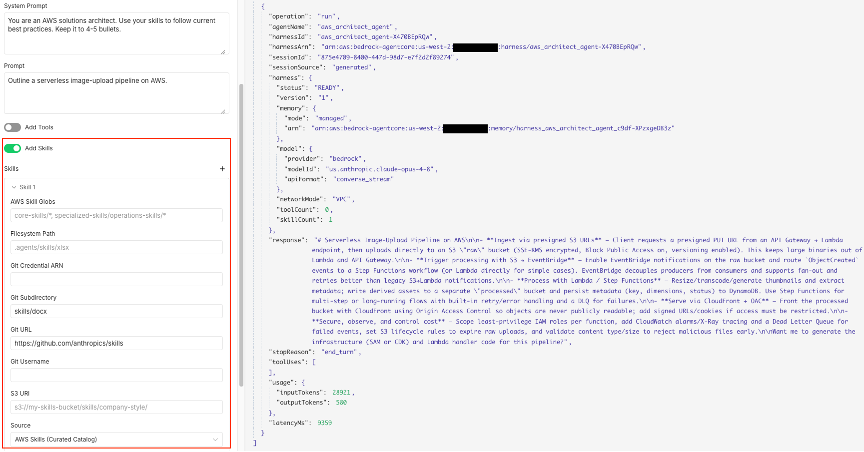
Agent 会应用已加载的技能来生成指导建议,而 harness 摘要会显示已配置的技能数量。
在你的 VPC 中运行
对于需要访问私有网络的 Agent,你可以在 VPC 中运行 harness。网络配置在凭证上设置,因此该凭证预置的每个 Agent 都会以私密方式运行。
- 编辑你的 Amazon Bedrock AgentCore API 凭证。
- 将 Network Mode 设置为 VPC。
- 输入你的 VPC Subnet IDs 和 VPC Security Group IDs,然后保存。
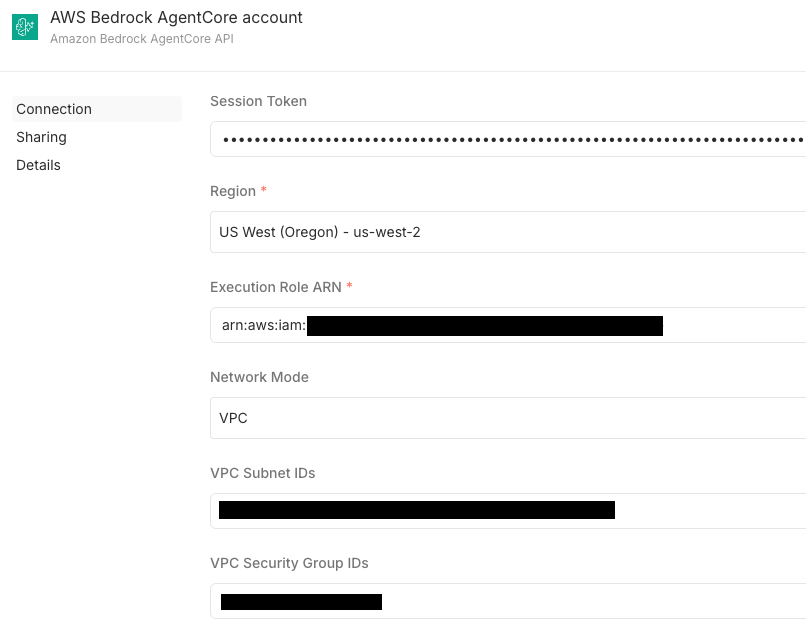
已为 VPC 模式配置子网和安全组 ID 的凭证。
你的子网无需具备互联网访问权限。harness 会从同一 Region 中的私有 Amazon ECR 存储库拉取其托管容器镜像,因此你需要 VPC en
English / 原文
If you build and automate workflows in n8n without writing much code, you’ve probably used its AI Agent node to add a model call to a workflow. It’s a great start. But a production agent needs more than a single model call: memory that lasts beyond one run, tools it can actually use like a browser or a code sandbox, and room to work through longer tasks. Building that scaffolding yourself is the hard part.
Amazon Bedrock AgentCore is a platform to build, connect, and optimize agents at scale, with any framework or model. AgentCore harness, a capability of Amazon Bedrock AgentCore, is now generally available and provides that scaffolding for you. A new open-source community node brings it into n8n’s visual editor. You get production agents with persistent memory, real tools, and the model provider of your choice, without writing infrastructure or agent code. You’re not tied to one model either. The node works with Amazon Bedrock, OpenAI, Google Gemini, and LiteLLM-supported providers, and you can switch providers between turns of the same conversation.
In this post, you will install the node, @aws/n8n-nodes-agentcore, and build agents step by step in the n8n editor. You will start with an agent that remembers a conversation, scope memory to individual users, add a code interpreter tool, give the agent skills, and finish by running an agent privately in your own virtual private cloud (VPC). The node is open source under the MIT license, and AgentCore harness is powered by Strands Agents, the open source agent framework from AWS.
What the node does
An agent is more than a model. The model reasons, but the harness does the work around it: it runs the orchestration loop, calls tools, manages the context window, keeps state across turns, recovers from failures, and isolates each session. Building that layer is where most teams spend their time.
AgentCore harness gives you that layer as a managed capability. You define an agent in configuration, including the model it uses, the tools it calls, the skills it has access to, and the instructions it follows, and AgentCore assembles and runs the loop for you. Each session runs in its own isolated environment with a filesystem and shell, memory across sessions, and web browsing. When configuration isn’t enough, you can export the harness to Strands code and keep running on the same system.
n8n’s built-in AI Agent node is a good fit for a single model call in a workflow. The community node goes further by exposing the full harness in the n8n editor. It has one operation with a single deciding field, Harness ARN :
- Leave it blank and the node creates an agent for you on the first run, reuses it on later runs, and updates it when your configuration changes.
- Paste an existing harness ARN and the node invokes that agent directly, so you can use agents you created outside n8n.
The node uses the same AWS credential pattern as the existing n8n AWS Lambda and Amazon Simple Storage Service (Amazon S3) nodes, so it feels familiar if you already automate AWS services in n8n.
Prerequisites
Before you begin, make sure you have the following:
- An n8n instance. You can run n8n either as a self-hosted install or on n8n Cloud. Both work with this node. If you’re new to n8n, see the n8n deployment documentation to choose an option and set up your instance, then complete the initial sign-in so you land in the editor where you will build the workflows in this post.
- The node installed.
@aws/n8n-nodes-agentcoreis a verified community node, so you can find it directly in the n8n nodes panel. In the editor, add a node, search for Amazon Bedrock AgentCore, and select it — n8n installs it for you. (You can also install it from Settings, Community Nodes, Install by entering@aws/n8n-nodes-agentcore.) This post uses node version 0.3. - An AWS account with access to AgentCore harness in a supported AWS Region.
- AWS credentials for the caller (the identity whose keys go in the n8n credential) with the harness caller permissions, plus a separate AWS Identity and Access Management (IAM) execution role that the harness assumes at runtime. AWS maintains the least-privilege reference policies in AgentCore harness security documentation and the node README maps each feature to the permissions to add.
Important: Where you can, use temporary credentials from AWS IAM Identity Center or AWS Security Token Service (AWS STS), and follow the principle of least privilege when you configure IAM permissions. Don’t commit credentials to source control.
Note on cost : The AgentCore harness, the managed memory store it provisions, and (if you use it) VPC endpoints are billed AWS resources. Follow the Clean up section at the end to remove what you create for this walkthrough, and refer to the AgentCore documentation for pricing.
Set up the credential
You configure the AWS credential once, the same way you would for other AWS nodes in n8n.
- In n8n, go to Credentials and choose New.
- Search for and select Amazon Bedrock AgentCore API.
- Enter your Access Key ID and Secret Access Key , and a Session Token if you use temporary credentials.
- Select your Region and enter the Execution Role ARN that the harness assumes at runtime.
- Choose Test to confirm the connection, then choose Save.
Amazon Bedrock AgentCore API credential in n8n, showing the access key, Region, and execution role ARN, with a successful connection test
Build your first agent and give it memory
In this walkthrough, you build an agent that remembers details across turns of a conversation. Memory is on by default, so the node provisions a managed memory store for you and there’s nothing extra to configure.
- Add a manual trigger to a new workflow, add the Amazon Bedrock AgentCore node after it and attach your credential.
- Leave Harness ARN blank so the node creates and reuses the agent.
- Enter an Agent Name , such as
travel_concierge. - Set Model Provider to Amazon Bedrock and enter a Model ID , such as a Claude model.
- Enter a System Prompt , such as You are a warm, concise travel concierge , and a Session ID , such as
demo-travel-session. Reusing this session ID is what continues the conversation on later runs. - Enter a Prompt for the first turn, such as “I love warm beaches and I’m vegetarian. Note that for me.”, and run the node.
The first run takes about 30-60 seconds while AWS provisions the agent. The output includes the agent’s response, token usage, and a summary of what the node provisioned, including the memory store it created for you.
Turn 1. The node output shows the agent’s response and a harness summary that confirms managed memory with a provisioned memory ARN.
Now change only the Prompt to Suggest one destination and one dish I’d enjoy, based on what you know about me , keep the same session ID, and run again.
Turn 2. The agent recalls the preferences from turn 1, warm beaches and vegetarian, because the conversation persisted through the same session ID.
The output field sessionSource reads provided when you supply a session ID, and the input token count rises on turn 2 because the node loads the prior conversation before the agent reasons. If you leave the session ID blank, each run starts a new conversation.
Scope memory per user with an actor ID
When one agent serves many people, you can keep each person’s memory separate with an Actor ID. Memory is scoped by actor and session, so different actors get isolated histories from the same agent.
The scoping is a hierarchy: the agent holds the shared configuration, the Actor ID isolates one user’s memory from another’s, and the Session ID isolates individual conversations within an actor. One actor can have many sessions. A different actor with the same session ID still gets its own separate memory.
- Use an agent such as
team_assistantwith managed memory. - Under Additional Options , set Actor ID to a per-user value, such as
user-alice, and set a Session ID for that user. - Run a first turn, such as Remember my project is codenamed Aurora.
- Change the prompt to What’s my project codename? and run again with the same actor and session.
The node configured with an actor ID and session ID for a specific user.
Turn 1 for the actor user-alice, which stores a preference.
Turn 2 for the same actor. The agent returns the value it stored for this user. A different actor ID keeps its own separate memory.
Agents become far more capable when they can use tools. In this walkthrough, you give the agent a code interpreter that runs code in a sandboxed environment.
- Use an agent such as
data_analystwith a Claude model. - In the System Prompt , instruct the agent to write and run code to answer, then report the result.
- Turn on Add Tools, then under Tools , choose Add Tool and set Type to AgentCore Code Interpreter , a capability of Amazon Bedrock AgentCore.
- Enter a Prompt that requires computation, such as “Generate 500 random exam scores between 0 and 100, then report the mean, median, and standard deviation.”, and run the node.
The agent writes and runs code in the sandbox and returns computed results for the mean, median, and standard deviation, rather than estimating them. The harness summary shows one tool configured.
You add other tools the same way, including a cloud browser, AgentCore Gateway (a capability of Amazon Bedrock AgentCore), and remote Model Context Protocol (MCP) servers.
Give the agent skills
Skills are bundles of instructions and scripts that give an agent domain knowledge on demand. You load them from the AWS curated catalog, a Git repository, Amazon S3, or a filesystem path, and the harness loads them only when the task calls for them.
- Use an agent such as
aws_architectwith a Claude model. - Turn on Add Skills, then under Skills , choose Add Skill and set the Source. For the curated catalog, choose AWS Skills and enter a glob pattern such as
core-skills/*. You can add more skills, for example a Git source that points to a public repository. - Enter a Prompt that benefits from the skill, such as “Outline a serverless image-upload pipeline on AWS”, and run the node.
The agent applies the loaded skills to produce guidance, and the harness summary shows the number of skills configured.
Run in your VPC
For agents that need private network access, you can run the harness in your VPC. You set the network configuration on the credential, so every agent that credential provisions runs privately.
- Edit your Amazon Bedrock AgentCore API credential.
- Set Network Mode to VPC.
- Enter your VPC Subnet IDs and VPC Security Group IDs , then save.
The credential configured for VPC mode with subnet and security group IDs.
Your subnets don’t need internet access. The harness pulls its managed container image from a private Amazon ECR repository in the same Region, so you need VPC endpoints for Amazon ECR and Amazon S3 rather than a NAT gateway. Refer to the AgentCore harness network configuration documentation for the required endpoints and the execution role permissions. Refer to the AgentCore harness security documentation for the required endpoints and the execution role permissions.
- In a workflow, use an agent such as
private_vpc_agentwith the VPC-enabled credential. - Enter a Prompt and run the node.
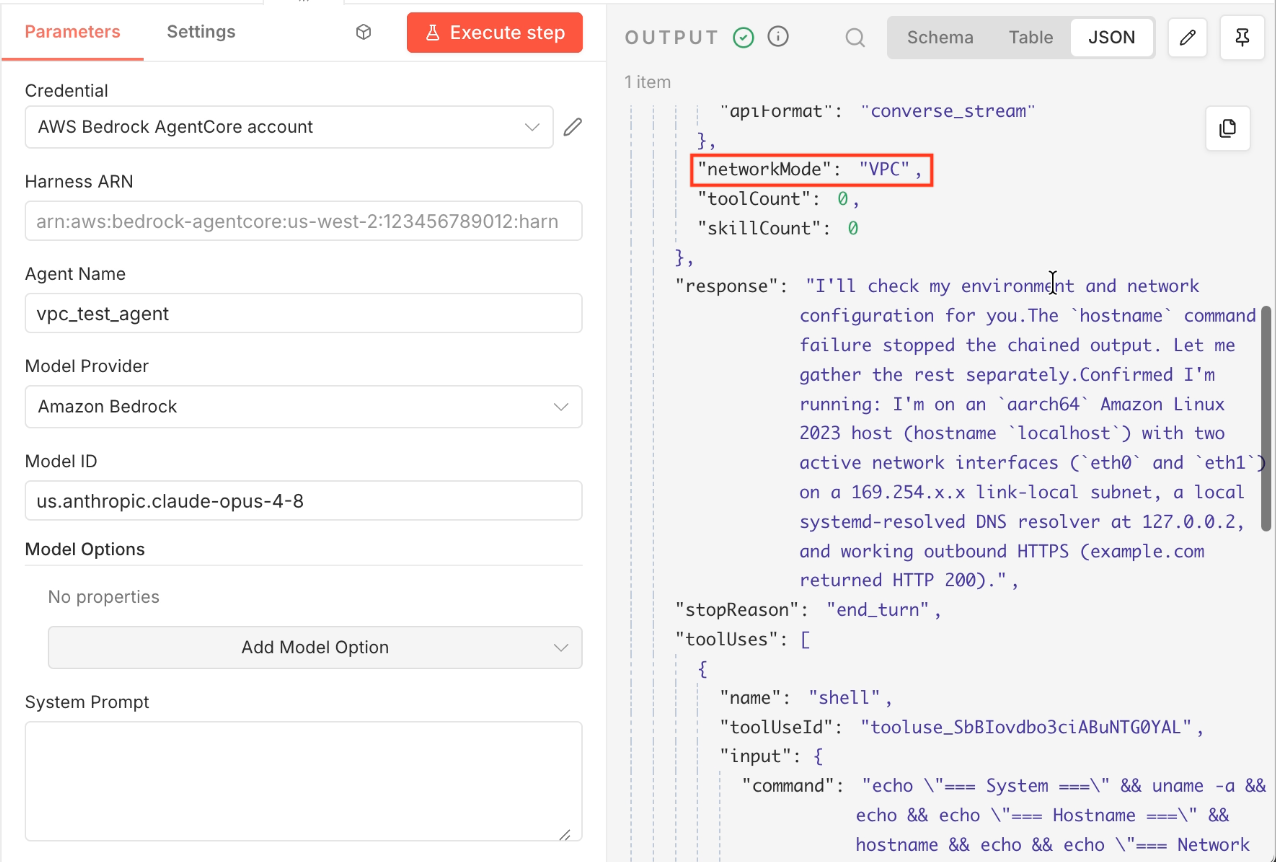
The node output for a VPC agent. The harness summary shows the network mode is VPC.
Clean up
Each agent you create is a harness resource in your AWS account, and it can provision a managed memory store. To avoid ongoing charges, delete the agents you no longer need.
-
List your harnesses with the AWS Command Line Interface (AWS CLI) or the Amazon Bedrock AgentCore console.
aws bedrock-agentcore-control list-harnesses --region us-west-2 -
Delete the ones you created for this post. For pricing details, refer to the AgentCore documentation.
aws bedrock-agentcore-control delete-harness --harness-id <harness-id> --region us-west-2
If you enabled a VPC, you might also want to remove any interface VPC endpoints you created for this walkthrough, because interface endpoints incur charges while they exist.
Where to go next
This post walked through memory, per-user scoping, a code interpreter tool, skills, and VPC networking. The node already supports more of the Amazon Bedrock AgentCore harness feature set. Here’s what to try next, each configured the same way you configured the features above:
- Your choice of model provider, switchable mid-session. Use OpenAI, Google Gemini, or LiteLLM-supported providers alongside Amazon Bedrock. Set the provider and model on the node, and switch between turns of the same session without losing context. Non-Bedrock providers use an API key stored in AgentCore Identity (a capability of Amazon Bedrock AgentCore).
- More tools. Add a cloud browser, AgentCore Gateway with optional OAuth outbound authentication, and remote MCP servers alongside the code interpreter.
- Inline functions. Let the agent call back into your n8n workflow for a human-in-the-loop step, then return the result to the agent.
- Custom containers. Bring your own Linux/arm64 container image so the agent runs with your own dependencies.
- Filesystem mounts. Use managed session storage, or mount Amazon Elastic File System (Amazon EFS) or Amazon S3 for data that outlives a session.
- OAuth-authenticated invocation. Invoke agents protected by an inbound JSON Web Token (JWT) authorizer with a token from your identity provider, set on the AgentCore credential.
- Versions and endpoints. Every configuration change becomes an immutable version, and named endpoints let you pin staging and production to specific versions.
The examples folder in the GitHub repository includes importable workflows for many of these. For end-to-end use cases, the examples/templates folder has fuller workflows that show the agent working alongside other n8n nodes in complete, importable automations.
Conclusion
In this post, you installed the open-source AgentCore harness community node for n8n and built agents that remember conversations, keep per-user memory separate, run code in a sandbox, use skills, and run privately in a VPC, all from the n8n editor and with no infrastructure or agent code. Because the node works with Amazon Bedrock, OpenAI, Gemini, and LiteLLM providers, you choose the model that fits each task.
To get started, add the Amazon Bedrock AgentCore node from the n8n nodes panel (or install @aws/n8n-nodes-agentcore from Settings > Community Nodes), import an example workflow, and build your first agent. The node is open source under MIT and built on the open source Strands Agents framework, and contributions and feedback are welcome on the GitHub repository. To learn more about the underlying capability, refer to the AgentCore documentation.
n8n is a trademark of n8n GmbH. All other trademarks are the property of their respective owners.
About the author
Sundar Raghavan
Sundar is a Senior Solutions Architect at AWS on the Agentic AI Foundations team. He leads the developer experience for Amazon Bedrock AgentCore, owning the SDK and CLI, and drives the framework and ecosystem integrations strategy. He focuses on how developers build, deploy, and scale production AI agents on AWS. He is currently extending that focus into physical AI, collaborating on Strands Robots to bring the same agent developer experience to robotics.