使用 Amazon Bedrock AgentCore harness 构建无服务器图像编辑代理
英文标题:Build a serverless image editing agent with Amazon Bedrock AgentCore harness
本文演示如何利用配置驱动的 AgentCore harness 构建无服务器图像编辑器,用户上传照片并用自然语言描述编辑,数秒内获得结果。该代理无需编写自定义编排代码,由 Claude Sonnet 4.6 自动分解指令并调用三个 Stability AI 工具完成修复、扩展与替换,随后通过 microVM 上的 shell 命令添加水印且不消耗令牌。整体方案包括 React 前端、Lambda 代理、AgentCore 记忆及加密存储,支持单次调用切换模型与行业角色,一键 CDK 部署。该实践为开发者提供了端到端的 agent 构建范式,大幅简化工具路由、记忆管理和后处理。
 644.5 KB
 9.5 KB
 4.9 KB
 7.0 KB
 192.7 KB
中文
构建一个能根据自然语言编辑图像的 AI 代理需要编排循环、工具路由、记忆管理以及运行它的计算环境。Amazon Bedrock AgentCore harness 通过配置即可处理整个堆栈。你只需声明代理的功能,harness 便会在一个有状态、隔离的 microVM 中运行它,内置记忆、工具路由和可观测性。
本文带你构建一个无服务器图像编辑器,用户上传照片,用通俗易懂的英语描述编辑需求,几秒钟内就能收到结果。该代理在 AgentCore harness 上运行,无需自定义编排代码。我们部署完整的解决方案,包括身份验证、加密存储、三个图像编辑工具和一个 React 前端,只需一条部署命令。基础设施使用 AWS Cloud Development Kit (AWS CDK) 定义。
图像编辑应用
该应用接受诸如“把汽车颜色改成蓝色”或“将图像向右扩展 200 像素”之类的提示。由 Claude Sonnet 4.6 驱动的代理将需求分解为一系列步骤,并编排工具调用,每个工具与不同的 Stability AI 模型关联。然后执行编辑,在 microVM 上使用 shell 命令添加水印(无令牌成本),并返回结果。
该应用展示了 AgentCore harness 的以下能力:
- 通过配置驱动的代理创建。 代理完全通过 API 参数定义。无需 Python 编排代码、无需框架、无需容器。
- 每次调用切换模型。 前端将基本聊天路由到 Claude Haiku 4.5,将编辑路由到 Claude Sonnet 4.6。代理在切换模型时保留对话上下文。
- 每次调用切换角色。 用户选择行业角色(房地产、零售、汽车),注入特定领域的系统提示,无需重新部署。
- AgentCore 记忆在 AgentCore 服务中存储对话历史,保留30天。代理在会话内跨轮次保留完整上下文,因此它可以引用之前的编辑,无需前端重新发送历史。此示例将会话 ID 持久化在
localStorage中,对话在浏览器刷新后仍然存在。清除浏览器数据会在前端启动新会话,但对话历史仍可通过ListEventsAPI 在 AgentCore 中获取。 - AgentCore Gateway with MCP。 三个基于 AWS Lambda 的工具通过模型上下文协议(MCP)暴露出来,并带有语义路由。代理根据提示选择正确的工具。
- InvokeAgentRuntimeCommand。 每次编辑后,一个 Python 脚本直接在 AgentCore 运行时 microVM 上运行,添加水印。无需模型推理,不消耗令牌。
方案概述
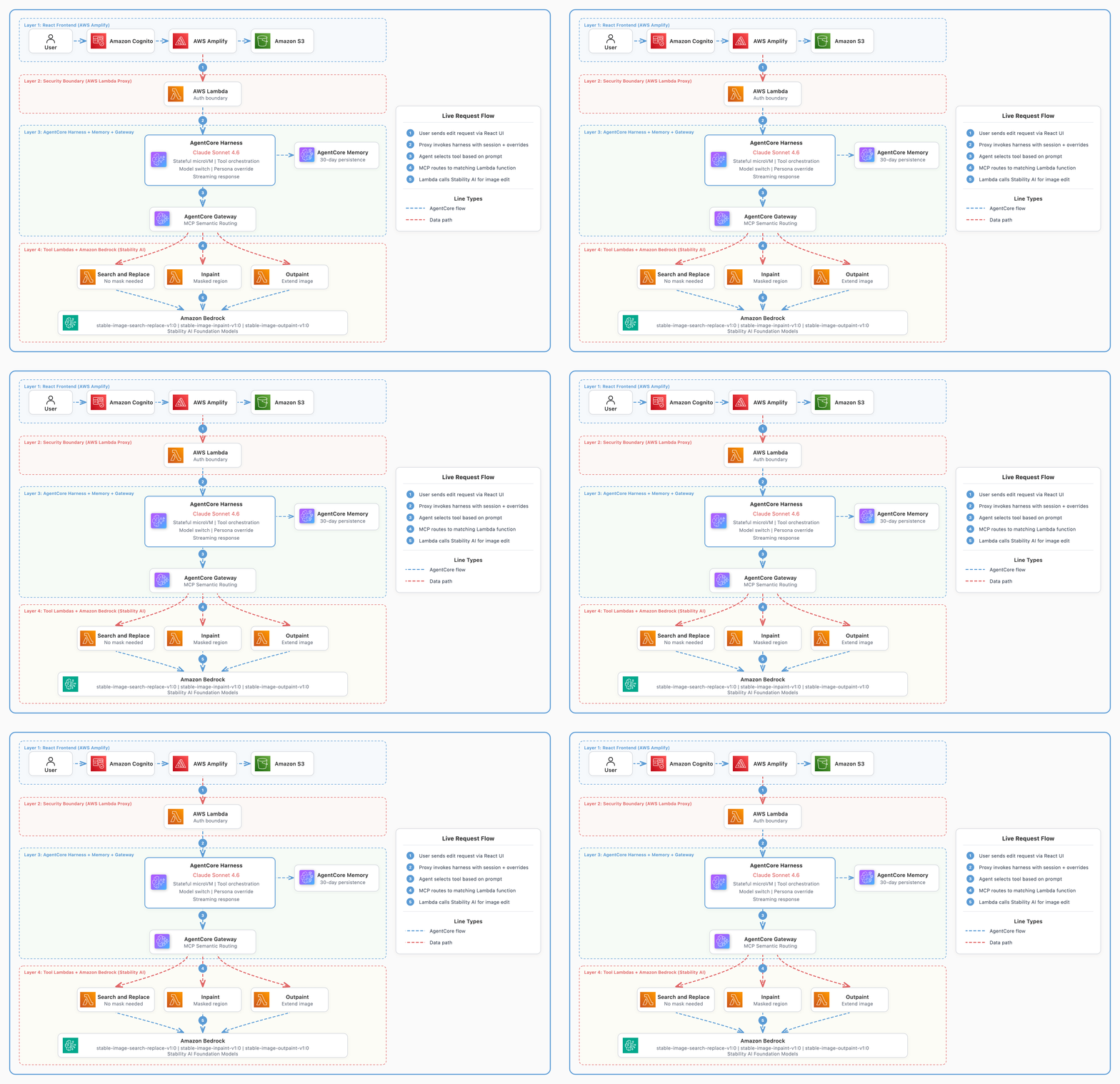
图像编辑应用的架构包含四层。
- 托管在 AWS Amplify 上的 React 前端,用户可上传图像、绘制蒙版并输入编辑指令。
- 一个 AWS Lambda 代理,作为浏览器凭证与 harness API 之间的安全边界,并控制允许哪些系统提示。
- 一个 Amazon Bedrock AgentCore harness 代理,配备 AgentCore Memory 以实现对话持久化。
- 三个工具 Lambda 函数,通过 Amazon Bedrock 调用 Stability AI 基础模型进行图像生成。
通过配置创建代理
使用 AgentCore harness,代理定义就是一组传递给 create_harness API 的参数。以下是在 cdk deploy 期间创建代理的配置代码核心部分。
harness_params = {
    'harnessName': 'img_editor',
    'executionRoleArn': execution_role_arn,
    'model': {'bedrockModelConfig': {'modelId': 'us.anthropic.claude-sonnet-4-6'}},
    'systemPrompt': [{'text': system_prompt}],
    'tools': [{'type': 'agentcore_gateway', 'name': 'gateway',
        'config': {'agentCoreGateway': {'gatewayArn': gateway_arn}}}],
    # Scope the agent to exactly the three tools the gateway exposes
    # rather than allowing every tool with a wildcard.
    'allowedTools': [
        'inpaint-target___inpaint',
        'outpaint-target___outpaint',
        'search-replace-target___search_and_replace',
    ],
    'maxIterations': 10,
    'timeoutSeconds': 300,
}

# Attach memory for conversation persistence
harness_params['memory'] = {
    'agentCoreMemoryConfiguration': {'arn': memory_arn}
}

response = client.create_harness(**harness_params)
以上就是整个代理。没有编排循环,没有工具执行逻辑,没有流式处理程序,也没有错误重试代码。AgentCore harness 处理了所有这些。
通常,让代理访问工具需要编写代码,接收来自模型的工具调用、解析参数、调用目标函数、处理错误并将结果传回。有了 harness,你可以跳过所有这些。你在 AgentCore Gateway 上声明工具模式,并将其指向一个 Lambda 函数。harness 会发现工具,在推理过程中将工具呈现给模型,通过 Gateway 调用所选工具,并自动将结果馈送回对话中。
下面展示了我们如何在 CDK 堆栈中声明 search-and-replace 工具。
this.gateway.addLambdaTarget('SearchReplaceTarget', {
  gatewayTargetName: 'search-replace-target',
  lambdaFunction: this.searchReplaceLambda,
  toolSchema: agentcore.ToolSchema.fromInline([{
    name: 'search_and_replace',
    description: 'Find an object in the image by description and replace it. '
      + 'Does NOT require a mask. Use when the user wants to replace a specific object.',
    inputSchema: {
      type: agentcore.SchemaDefinitionType.OBJECT,
      properties: {
        source_image_key: { type: agentcore.SchemaDefinitionType.STRING },
        search_prompt: { type: agentcore.SchemaDefinitionType.STRING },
        prompt: { type: agentcore.SchemaDefinitionType.STRING },
      },
      required: ['source_image_key', 'search_prompt', 'prompt'],
    },
  }]),
});
代理读取这些工具描述,并根据用户提示选择合适的工具。无需任何路由逻辑。harness 通过模型的推理处理工具选择。
每次调用切换模型和角色
harness 在每次调用时接受模型参数。传入不同的模型 ID 会改变该轮次处理的基础模型。harness 会自动从 AgentCore Memory 加载完整的对话历史,并为新模型格式化,因此上下文无需额外代码即可延续。你不需要编写模型切换逻辑、历史检索或输入格式化代码。harness 会根据单个参数更改在内部管理所有这些。
Lambda 代理利用这一点将基本聊天路由到 Haiku,将图像编辑路由到 Sonnet。
invoke_params = {
    'harnessArn': harness_arn,
    'runtimeSessionId': session_id,
    'messages': [{'role': 'user', 'content': [{'text': input_text}]}],
    'actorId': actor_id,
}

# Switch model per invocation (Haiku for chat, Sonnet for edits)
if model_override:
    invoke_params['model'] = {
        'bedrockModelConfig': {'modelId': model_override}
    }

# Switch persona per invocation (Real Estate, Retail, Automotive)
if persona_text:
    invoke_params['systemPrompt'] = [{'text': persona_text}]

response = client.invoke_harness(**invoke_params)
前端根据提示是否包含编辑关键词来决定使用哪个模型。“hi”或“你能做什么”等简短消息会路由到 Haiku 以降低延迟。编辑请求会路由到 Sonnet 以获得更高质量的工具选择。用户也可以从菜单中手动选择模型。
无论 harness 中配置的模型如何更改,AgentCore Memory 都会保留完整的对话历史。当 Sonnet 处理完“把车改成黑色”之后,Haiku 收到“蓝色怎么样?”,它会知道“蓝色”指的是汽车,因为 Memory 会将完整历史馈送给任何活跃的模型。
使用 shell 命令进行后处理(无令牌成本)
代理生成图像后,我们直接在 harness microVM 上运行一个 Python 脚本来添加水印。这使用了 InvokeAgentRuntimeCommand,它让你无需通过模型就能 shell 访问代理的环境。
# Build a Python script and base64 encode it to avoid shell escaping issues
script = '\n'.join([
    'from PIL import Image, ImageDraw, ImageFont',
    'import boto3, io',
    's3 = boto3.client("s3")',
    f'obj = s3.get_object(Bucket="{bucket_name}", Key="{result_key}")',
    'img = Image.open(io.BytesIO(obj["Body"].read())).convert("RGBA")',
    '# ... tile watermark text across the image ...',
    's3.put_object(Bucket=bucket, Key=key, Body=buf.getvalue())',
])

encoded_script = base64.b64encode(script.encode()).decode()

# Run on the microVM: no model reasoning, no tokens consumed
client.invoke_agent_runtime_command(
    agentRuntimeArn=harness_arn,
    runtimeSessionId=session_id,
    body={'command': f'echo {encoded_script} | base64 -d | python3'},
)
此模式对确定性后处理很有用。在发送到模型之前调整图像大小(节省输入令牌),对代理输出运行验证,提取结构化数据,或应用业务逻辑。microVM 默认提供 Python 和 bash,你也可以在运行时安装其他软件包。
因为 harness 仅配置,没有代理脚本供你添加自定义逻辑。InvokeAgentRuntimeCommand 就是你在代理运行的同一 microVM 上但在代理循环之外运行自己代码的方式。Lambda 代理在代理结束其回合后调用它。命令执行、完成工作并返回。代理并不知道它发生过了。
先决条件
要部署此解决方案,你需要以下条件。
- 一个 AWS 账户,具有创建 AWS Identity and Access Management (IAM) 角色、Lambda 函数、Amazon Simple Storage Service (Amazon S3) 存储桶、Amazon Cognito 池和 AgentCore 资源的权限。
- Node.js 20.x 或更高版本。
- Python 3.13 或更高版本(用于 Lambda 函数运行时)。
- 已配置凭证的 AWS Command Line Interface (AWS CLI) 2.x。
- 在 Amazon Bedrock 中访问 Anthropic Claude 模型(Sonnet, Haiku)的权限。
- 在 Amazon Bedrock 中访问 Stability AI 模型的权限。
预计部署时间为 3 到 5 分钟。
部署解决方案
部署脚本端到端处理所有事务。它安装先决条件、打包 Lambda 依赖项、部署 CDK 堆栈、构建前端并将之上传到 Amplify,最后创建一个测试用户。
克隆 GitHub 仓库 并进入项目目录。
git clone https://github.com/aws-samples/sample-serverless-image-editing-agent-bedrock-agentcore-harness
cd sample-serverless-image-editing-agent-bedrock-agentcore-harness
运行部署脚本。
脚本结束时,会打印出可访问的 URL 和登录凭证。
CDK 堆栈在单个 AWS CloudFormation 堆栈中创建所有资源。该解决方案使用 Amazon Cognito 的用户池和身份池来处理身份验证。图像存储在受 AWS Key Management Service (AWS KMS) 加密保护的 Amazon S3 存储桶中。图像编辑能力由三个 Lambda 函数提供支持,这些函数通过 AgentCore Gateway 作为 MCP 工具公开。这些工具由一个配备记忆的 AgentCore harness 代理进行编排,并通过 Lambda 代理访问。前端方面,一个 AWS Amplify 应用为基于 React 的用户界面提供服务。
操作演练
登录后,编辑器会在左侧显示画布,右侧显示聊天界面。
1. 上传图像。 图像会按用户身份范围前缀上传到 S3。
2. 描述你的编辑。 在聊天输入框中输入自然语言指令。对于对象替换(“把天空改成日落”),代理会自动使用搜索替换功能。
3. 为区域特定编辑绘制蒙版。 要编辑图像的特定区域,在画布上绘制蒙版以定义区域,然后输入要在蒙版区域内生成的内容。
4. 查看结果。 编辑后的图像会出现在聊天线程中,并带有由 microVM shell 命令添加的平铺水印。“幕后”展示了整个过程。
English / 原文
Building an AI agent that edits images based on natural language requires an orchestration loop, tool routing, memory management, and a compute environment to run it all. Amazon Bedrock AgentCore harness handles that entire stack with configuration. You declare what the agent does, and the harness runs it in a stateful, isolated microVM with built-in memory, tool routing, and observability.
This post walks through building a serverless image editor where users upload a photo, describe an edit in plain English, and receive the result in seconds. The agent runs on AgentCore harness without custom orchestration code. We deploy the full solution, including authentication, encrypted storage, three image editing tools, and a React frontend, with a single deployment command. The infrastructure is defined using AWS Cloud Development Kit (AWS CDK).
Image editing application
The application accepts prompts like “change the car color to blue” or “extend the image 200 pixels to the right.” An agent powered by Claude Sonnet 4.6 breaks the requirement into a series of steps and orchestrates the tool calling, each associated with a different Stability AI model. Then it executes the edit, applies a watermark using a shell command on the microVM (no token cost), and returns the result.
This application demonstrates the following AgentCore harness capabilities:
- Configuration-driven agent creation. The agent is defined entirely through API parameters. No Python orchestration code, no framework, no container.
- Per-invocation model switching. The frontend routes basic chat to Claude Haiku 4.5 and edits to Claude Sonnet 4.6. The agent preserves conversation context across model switches.
- Per-invocation persona override. Users select industry personas (Real Estate, Retail, Automotive) that inject domain-specific system prompts without redeploying.
- AgentCore memory stores conversation history in the AgentCore service for 30 days. The agent retains full context across turns within a session, so it can reference prior edits without the frontend re-sending history. This sample persists the session ID in
localStorage, so conversations survive browser refresh. Clearing browser data starts a new session on the frontend, but the conversation history remains available in AgentCore through theListEventsAPI. - AgentCore Gateway with MCP. Three AWS Lambda-backed tools are exposed through Model Context Protocol (MCP) with semantic routing. The agent selects the right tool based on the prompt.
- InvokeAgentRuntimeCommand. After each edit, a Python script runs directly on the AgentCore runtime microVM to add a watermark. No model reasoning, no tokens consumed.
Solution overview
The architecture of the image editing application has four layers.
- A React frontend hosted on AWS Amplify where users upload images, draw masks, and enter editing instructions.
- An AWS Lambda proxy that acts as a security boundary between browser credentials and the harness API, and controls which system prompts are allowed.
- An Amazon Bedrock AgentCore harness agent with AgentCore Memory for conversation persistence.
- Three tool Lambda functions calling Stability AI foundation models through Amazon Bedrock for image generation.
Creating the agent using configuration
With an AgentCore harness, the agent definition is a set of parameters passed to the create_harness API. Here is the core of our provisioning code that creates the agent during cdk deploy.
harness_params = {
    'harnessName': 'img_editor',
    'executionRoleArn': execution_role_arn,
    'model': {'bedrockModelConfig': {'modelId': 'us.anthropic.claude-sonnet-4-6'}},
    'systemPrompt': [{'text': system_prompt}],
    'tools': [{'type': 'agentcore_gateway', 'name': 'gateway',
        'config': {'agentCoreGateway': {'gatewayArn': gateway_arn}}}],
    # Scope the agent to exactly the three tools the gateway exposes
    # rather than allowing every tool with a wildcard.
    'allowedTools': [
        'inpaint-target___inpaint',
        'outpaint-target___outpaint',
        'search-replace-target___search_and_replace',
    ],
    'maxIterations': 10,
    'timeoutSeconds': 300,
}

# Attach memory for conversation persistence
harness_params['memory'] = {
    'agentCoreMemoryConfiguration': {'arn': memory_arn}
}

response = client.create_harness(**harness_params)
That is the entire agent. No orchestration loop, no tool execution logic, no streaming handler, no error retry code. The AgentCore harness handles all of it.
Giving an agent access to tools normally requires writing code that receives tool calls from the model, parses arguments, invokes the target function, handles errors, and passes results back. With the harness, you skip all of that. You declare the tool schema on an AgentCore Gateway and point it at a Lambda function. The harness discovers the tools, presents them to the model during reasoning, invokes the selected tool through the Gateway, and feeds the result back into the conversation automatically.
Here is how we declared the search-and-replace tool in the CDK stack.
this.gateway.addLambdaTarget('SearchReplaceTarget', {
  gatewayTargetName: 'search-replace-target',
  lambdaFunction: this.searchReplaceLambda,
  toolSchema: agentcore.ToolSchema.fromInline([{
    name: 'search_and_replace',
    description: 'Find an object in the image by description and replace it. '
      + 'Does NOT require a mask. Use when the user wants to replace a specific object.',
    inputSchema: {
      type: agentcore.SchemaDefinitionType.OBJECT,
      properties: {
        source_image_key: { type: agentcore.SchemaDefinitionType.STRING },
        search_prompt: { type: agentcore.SchemaDefinitionType.STRING },
        prompt: { type: agentcore.SchemaDefinitionType.STRING },
      },
      required: ['source_image_key', 'search_prompt', 'prompt'],
    },
  }]),
});
The agent reads these tool descriptions and selects the right one based on the user prompt. No routing logic is required. The harness handles tool selection through the model’s reasoning.
Per-invocation model and persona switching
The harness accepts a model parameter on every invocation. Passing a different model ID changes which foundation model handles that turn. The harness automatically loads the full conversation history from AgentCore Memory and formats it for the new model, so context carries over without additional code. You do not need to write model-switching logic, history retrieval, or input formatting. The harness manages all of that internally based on a single parameter change.
The Lambda proxy uses this to route basic chat to Haiku and image edits to Sonnet.
invoke_params = {
    'harnessArn': harness_arn,
    'runtimeSessionId': session_id,
    'messages': [{'role': 'user', 'content': [{'text': input_text}]}],
    'actorId': actor_id,
}

# Switch model per invocation (Haiku for chat, Sonnet for edits)
if model_override:
    invoke_params['model'] = {
        'bedrockModelConfig': {'modelId': model_override}
    }

# Switch persona per invocation (Real Estate, Retail, Automotive)
if persona_text:
    invoke_params['systemPrompt'] = [{'text': persona_text}]

response = client.invoke_harness(**invoke_params)
The frontend determines which model to use based on whether the prompt contains editing keywords. Short messages like “hi” or “what can you do” go to Haiku for lower latency. Edits go to Sonnet for higher quality tool selection. The user can also manually select a model from a menu.
AgentCore Memory preserves the full conversation history regardless of configured model changes in the harness. When Haiku receives “how about blue?” after Sonnet handled “change the car to black,” it knows “blue” refers to the car because Memory feeds the complete history to whatever model is active.
Post-processing with shell commands (no token cost)
After the agent generates an image, we run a Python script directly on the harness microVM to add a watermark. This uses InvokeAgentRuntimeCommand, which gives you shell access to the agent’s environment without going through the model.
# Build a Python script and base64 encode it to avoid shell escaping issues
script = '\n'.join([
    'from PIL import Image, ImageDraw, ImageFont',
    'import boto3, io',
    's3 = boto3.client("s3")',
    f'obj = s3.get_object(Bucket="{bucket_name}", Key="{result_key}")',
    'img = Image.open(io.BytesIO(obj["Body"].read())).convert("RGBA")',
    '# ... tile watermark text across the image ...',
    's3.put_object(Bucket=bucket, Key=key, Body=buf.getvalue())',
])

encoded_script = base64.b64encode(script.encode()).decode()

# Run on the microVM: no model reasoning, no tokens consumed
client.invoke_agent_runtime_command(
    agentRuntimeArn=harness_arn,
    runtimeSessionId=session_id,
    body={'command': f'echo {encoded_script} | base64 -d | python3'},
)
This pattern is useful for deterministic post-processing. Resize images before sending to a model (save input tokens), run validation on agent output, extract structured data, or apply business logic. The microVM has Python and bash available by default, and you can install additional packages at runtime.
Because the harness is configuration-only, there is no agent script where you can add custom logic. InvokeAgentRuntimeCommand is the way to run your own code on the same microVM where the agent runs, but outside the agent loop. The Lambda proxy calls it after the agent finishes its turn. The command executes, does the work, and returns. The agent does not know it had happened.
Prerequisites
To deploy this solution, you need the following.
- An AWS account with permissions to create AWS Identity and Access Management (IAM) roles, Lambda functions, Amazon Simple Storage Service (Amazon S3) buckets, Amazon Cognito pools, and AgentCore resources.
- Node.js 20.x or later.
- Python 3.13 or later (for Lambda function runtimes).
- AWS Command Line Interface (AWS CLI) 2.x configured with credentials.
- Access to Anthropic Claude models (Sonnet, Haiku) in Amazon Bedrock.
- Access to Stability AI models in Amazon Bedrock.
Estimated deployment time is 3 to 5 minutes.
Deploy the solution
The deploy script handles everything end-to-end. It installs prerequisites, bundles Lambda dependencies, deploys the CDK stack, builds the frontend, uploads it to Amplify, and creates a test user.
Clone the GitHub repository and navigate into the project directory.
git clone https://github.com/aws-samples/sample-serverless-image-editing-agent-bedrock-agentcore-harness
cd sample-serverless-image-editing-agent-bedrock-agentcore-harness
Run the deployment script.
At the end, it prints the live URL and login credentials.
The CDK stack creates all resources in a single AWS CloudFormation stack. The solution uses Amazon Cognito with both a user pool and identity pool to handle authentication. Images are stored in an Amazon S3 bucket protected by AWS Key Management Service (AWS KMS) encryption. The image editing capabilities are powered by three Lambda functions, which are exposed as MCP tools through an AgentCore Gateway. These tools are orchestrated by an AgentCore harness agent equipped with memory, accessed via a Lambda proxy. On the frontend, an AWS Amplify application serves the React-based user interface.
Walkthrough
After signing in, the editor presents a canvas on the left and a chat interface on the right.
1. Upload an image. The image uploads to S3 under the user’s identity-scoped prefix.
2. Describe your edit. Enter a natural-language instruction in the chat input. For object replacement (“change the sky to a sunset”), the agent uses search-and-replace automatically.
3. Draw a mask for Region-specific edits. To edit a specific area of the image, draw a mask on the canvas to define the region, then enter what to generate in the masked area.
4. View the result. The edited image appears in the chat thread with a tiled watermark applied by the microVM shell command. The “Behind the Scenes” panel shows which model was used, which tool was called, token counts, latency, and whether the watermark was applied.
5. Optionally switch models or personas. Use the menus at the top of the chat to change the reasoning model or switch to an industry-specific persona. The change takes effect on the next message without losing conversation history.
What the harness specifically reduced for this project
The solution does not require lines of agent orchestration code. No model call loop, no tool execution handler, no streaming parser, no error retry logic, no container image.
What we did write.
- A Lambda proxy (80 lines) that acts as a security boundary and controls which system prompts reach the harness.
- Three tool Lambda functions (one per Stability AI model) that do the actual image processing.
- A provisioning script that calls the
create_harnessAPI during deployment (AgentCore harness is in preview and does not yet have a native CDK construct).
The agent itself is configuration. Changing its behavior (different model, new tool, updated instructions) is an API call, not a code deployment.
When to use AgentCore Runtime instead
AgentCore harness works well for agents with straightforward tool-calling patterns. The agent receives a prompt, picks a tool, calls it, and returns the result. If your agent needs custom orchestration logic, such as pre-processing inputs between turns, running a LangGraph state machine, or executing arbitrary Python before and after each model call, AgentCore Runtime gives you full control.
Both the harness and AgentCore Runtime run on the same underlying infrastructure (microVMs, Memory, Gateway, Observability). You can start with the harness and move to AgentCore Runtime as complexity grows.
Clean up
Running the destroy script permanently deletes all resources including the S3 bucket and uploaded images. Back up any data you want to keep before proceeding.
Delete the stack:
Conclusion
AgentCore harness lets us build a production-ready image editing agent without writing orchestration code. The agent handles tool selection, model switching, persona customization, conversation persistence, and deterministic post-processing through configuration and per-invocation parameters. Each session runs in an isolated microVM where we can execute shell commands at no token cost for tasks like watermarking.
For agents with straightforward tool-calling patterns, the harness removes operational overhead and you can iterate behavior at the speed of a configuration change. The full source code and one-command deployment script are available on GitHub.
To get started with AgentCore harness, visit the AgentCore harness documentation or explore the Amazon Bedrock AgentCore product page for pricing and availability details.
About the authors
Salman Ahmed
Salman is a Senior Technical Account Manager at AWS, specializing in helping customers design, implement, and optimize their AWS environments. He combines deep networking expertise with a passion for exploring emerging technologies to help organizations get the most out of their cloud investments. Outside of work, he enjoys photography, traveling, and watching his favorite sports teams.
Sergio Barraza
Sergio is a Senior Technical Account Manager at AWS, helping customers design and optimize cloud solutions. With more than 25 years in software development, he guides customers through AWS services adoption. Outside work, Sergio is a multi-instrument musician playing guitar, piano, and drums, and he also practices Wing Chun Kung Fu.
Ravi Kumar
Ravi is a Senior Technical Account Manager in AWS Enterprise Support who helps customers in the travel and hospitality industry to streamline their cloud operations on AWS. He is a results-driven IT professional with over 20 years of experience. Ravi is passionate about generative AI and actively explores its applications in cloud computing. Outside of work, Ravi enjoys creative activities like painting. He also likes playing cricket and traveling to new places.