使用 Amazon SageMaker AI 与 MLflow 监控判别式机器学习模型
英文标题:Monitoring discriminative ML models using Amazon SageMaker AI with MLflow
本文介绍了如何利用开源 Evidently 库与 Amazon SageMaker AI 和 MLflow,构建针对分类和回归模型的监控方案。方案通过检测数据漂移与模型漂移,在批量推理和实时端点两种场景下量化模型质量下降,并支持将监控结果集成到 MLflow 进行可视化、通过 SNS 发送告警或触发自动重训练。文中提供了完整的架构图、端到端 MLOps 集成示例以及可操作的 Jupyter 笔记本仓库,为开发者维护生产环境模型准确度提供了可定制的实践参考。
 398.4 KB
 427.4 KB
 443.9 KB
 440.5 KB
 35.9 KB
 56.0 KB
 47.6 KB
 45.2 KB
 41.8 KB
 389.7 KB
 61.8 KB
 2.6 KB
 17.1 KB
 41.5 KB
中文
机器学习(ML)模型的有效性和准确性几乎在训练作业完成后就开始下降。消费者行为的变化、新产品的发布、传感器技术的升级以及经济政治环境的变动,都是改变模型在训练时学到的模式和概率的不可控因素的例子。通过主动监控已部署到生产环境的模型在准确性和基线统计方面的变化,你可以在准确度下降带来问题之前进行干预。模型监控可以与 AI 可观测性工具结合使用,这些工具会跟踪延迟、应用程序可用性以及用于识别整体系统问题的其他指标。
本文聚焦于用于分类和回归场景的判别式机器学习模型。关于生成式 AI 模型,请参阅 Amazon SageMaker AI 端点推理上针对 LLM 的生产就绪实时监控方案。导致判别式机器学习模型质量下降的因素大致可以分为两类:
- 数据漂移 指输入数据统计特性的变化。它可能简单如上游数据源意料之外的变更,将某一列从整数类型改为浮点类型,也可能复杂如全新的产品线推出。你可以通过计算训练数据集的基线统计信息,并将其与生产环境中随时间采集的数据的相同统计信息进行比较,来衡量数据漂移。
- 模型漂移 指模型预测准确度的变化,因为模型学到的概率模式不再适用于传入的数据。例如,由于经济改善导致的消费者行为变化就可能引发模型漂移。你可以通过收集真实标签来计算模型质量指标,并将这些指标与模型训练过程中计算的相同指标进行比较,从而衡量模型漂移。
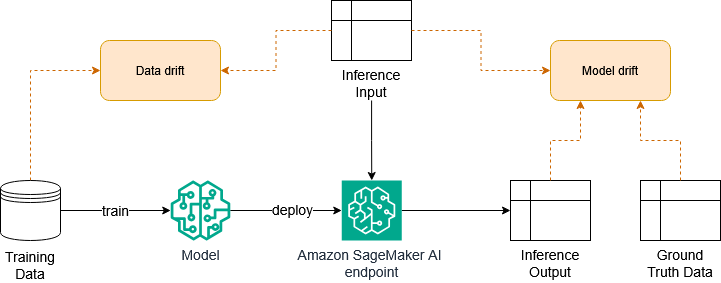
图 1:数据漂移和模型漂移如何融入 ML 工作流
Amazon SageMaker AI 是一项全面托管的机器学习服务,帮助组织构建、训练、部署和管理判别式及生成式 ML 模型。虽然 SageMaker AI 是全面托管的,但你可能会需要更具定制性的方案。例如,你可能希望以经济有效的方式管理整个建模生命周期,监控托管服务不支持的独特使用场景,或者将模型监控集成到其他 UI 或可观测性管道中。因此,本文介绍一种基于开源 Evidently Python 库 和 Amazon SageMaker AI with MLflow 的模型监控架构,用于计算数据和模型漂移。该模型监控方案的结果可以集成到你偏好的仪表盘中,用于向相关利益方发送告警,或触发自动模型重训练管道。
方案概述
该方案演示了如何在整个机器学习工作流中实施模型监控,从模型训练到模型部署。图 2 展示了批量推理场景的工作流,直至在 Slack 中告警和在 MLflow 中可视化模型结果。
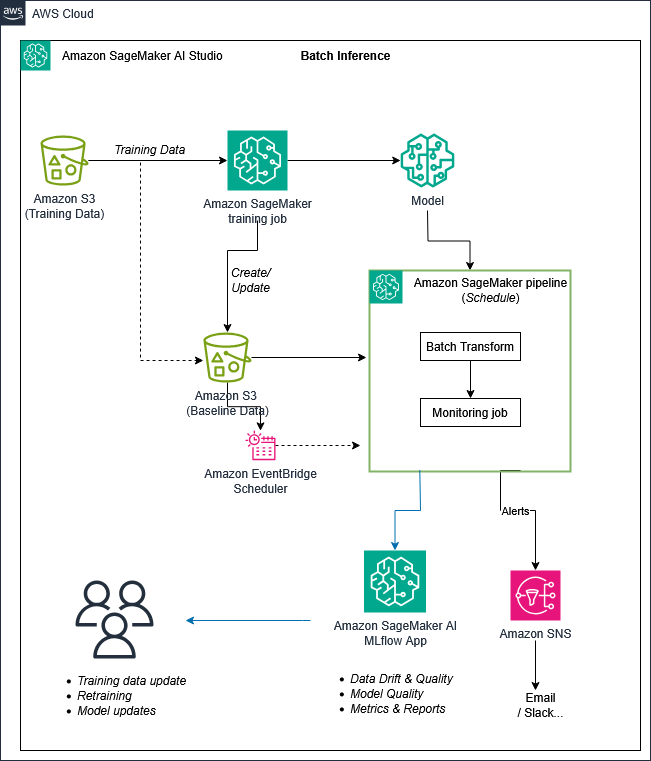
图 2:批量推理的模型监控工作流
工作流包含以下步骤:
- 在来自 Amazon Simple Storage Service (Amazon S3) 桶的输入数据上运行 训练作业 来训练模型。同一训练作业计算模型指标,这些指标可以存储在 MLflow 中。用于训练模型的基线数据集单独存储在 S3 中,以便用于在生产环境中监控模型。
- 在推理生产工作负载上使用 批量转换。批量转换作业的结果存储在 S3 桶中。
- 在 处理作业 中使用批量转换作业的结果,以及原始数据集和模型指标,并利用开源 Evidently 预设来计算数据漂移和模型质量指标。注意,Evidently 计算的是模型指标,它并不会通过直接与训练运行中的先前指标进行比较来计算模型漂移。不过,处理作业可以通过自定义代码进行扩展,以计算模型漂移。批量转换和处理作业可以封装在 管道 中,以便使用 Amazon EventBridge 调度器 进行调度。
- 所有监控指标和 Evidently 报告都存储在 MLflow 中,你可以在其中跟踪随时间变化的运行情况、比较运行间结果并可视化报告。
- 可选地,如果检测到漂移,管道可以触发 Amazon Simple Notification Service (Amazon SNS) 通知,通过邮件告警用户。
对于使用 实时端点 部署模型的场景,你也可以采用类似的方法。图 3 展示了实时端点的工作流。关键区别在于,端点必须 启用数据捕获,将端点的输入和输出记录到 S3 桶中。该架构使用 AWS Lambda 函数而非处理作业来部署监控代码。两种架构都可以根据你的偏好选择处理作业或 Lambda。计算数据和模型漂移的 AWS Lambda 函数可以按常规计划运行。你也可以在端点数据落入 S3 桶时触发它们。
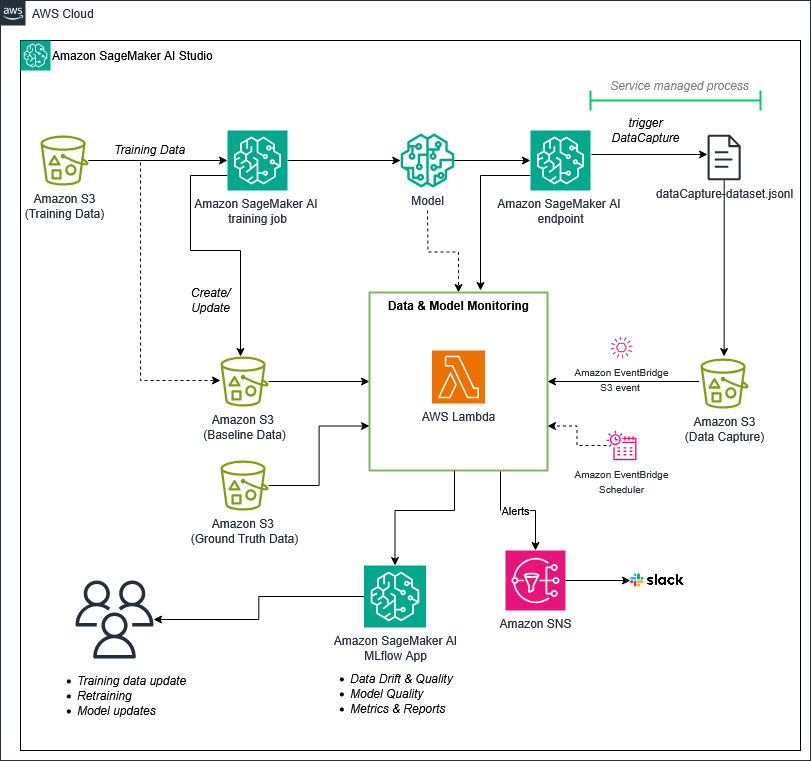
图 3:实时端点的模型监控工作流
这种面向实时端点的模式也可以与 Amazon SageMaker Hyperpod 一起使用,你可以在其中配置集群用于模型训练和模型推理。你可以在端点级别、负载均衡器级别或模型 pod 级别为 Hyperpod 启用数据捕获。推理请求和响应会被自动写入 S3 桶,你可以访问它们来执行模型监控。
上述两个图都仅关注模型监控过程。然而,模型监控通常作为更大的 MLOps 工作流的一部分来实施。图 4 显示了该模型监控方案如何融入端到端 MLOps 场景,其中用于计算漂移的处理作业通过 CI/CD 工作流与端点一起部署。有关使用 SageMaker AI 实施 MLOps 的更多信息,请参阅 使用 Amazon SageMaker AI 的企业 MLOps 基础路线图。
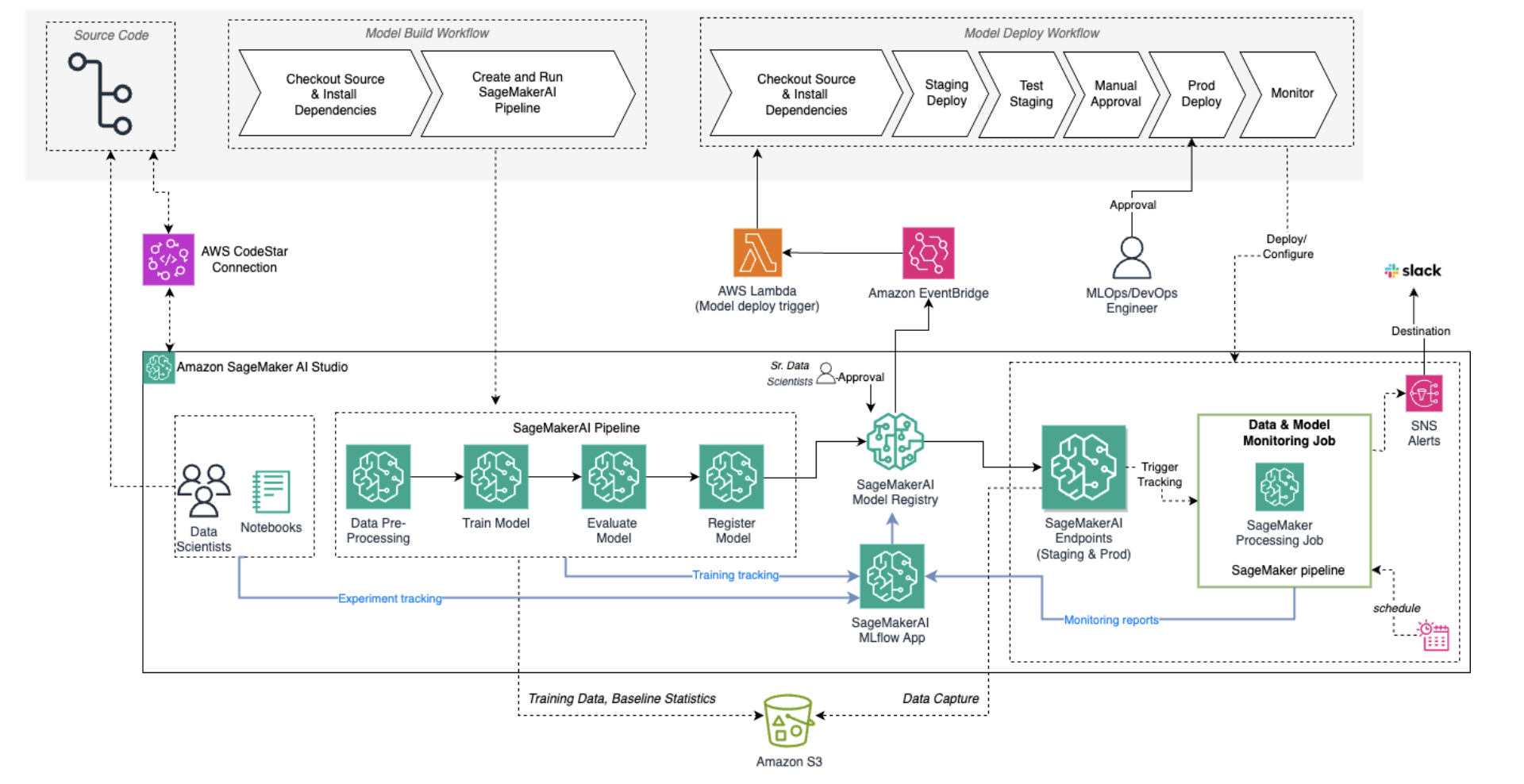
图 4:模型监控如何与 MLOps 架构集成
操作演练
本节分步解释如何为批量转换设置模型监控方案。其他示例,包括 实时端点 的示例,请查看 完整仓库。
先决条件
在按照本演练中的步骤操作之前,你需要:
- 在提供该服务的 AWS 区域中拥有一个 Amazon SageMaker AI 域。
- SageMaker Studio 中的一个 MLflow 应用。
- SageMaker Studio 中的一个 JupyterLab 空间(一个
ml.t3.medium实例足以运行此方案)。 - JupyterLab 上的一份 解决方案仓库副本。请在空间启动后克隆该仓库。
要继续演练,请打开笔记本 predictive_ml_experimentation_data_model_monitoring_evidently.ipynb。注意,该方案使用了 SageMaker Python SDK v3。如果使用 DefaultMLFlowApp,笔记本代码会自动识别正确的应用。否则,请使用你的 MLflow 应用名称编辑代码。
模型训练与推理
示例笔记本使用来自 UCI 机器学习库的 Bank Marketing 数据集。该数据集包含葡萄牙一家银行的营销电话信息,目标是预测客户是否会订购定期存款。这是一个二元分类场景,目标变量在客户订购时值为 1,未订购时值为 0。
在笔记本的前半部分,数据被清洗、处理并拆分为训练集、验证集和测试集。使用训练集和验证集训练了一个 XGBoost 模型,日志和指标发送到 MLflow,最终模型对象注册到 MLflow 模型注册中心。
在这一数据处理与模型训练部分,有两个关键操作可以为后续在生产环境中的监控做好准备:
- 训练数据集作为基线数据集存储在 S3 桶中,用于计算数据漂移。
- 模型指标存储在 MLflow 中,可用于模型漂移计算。
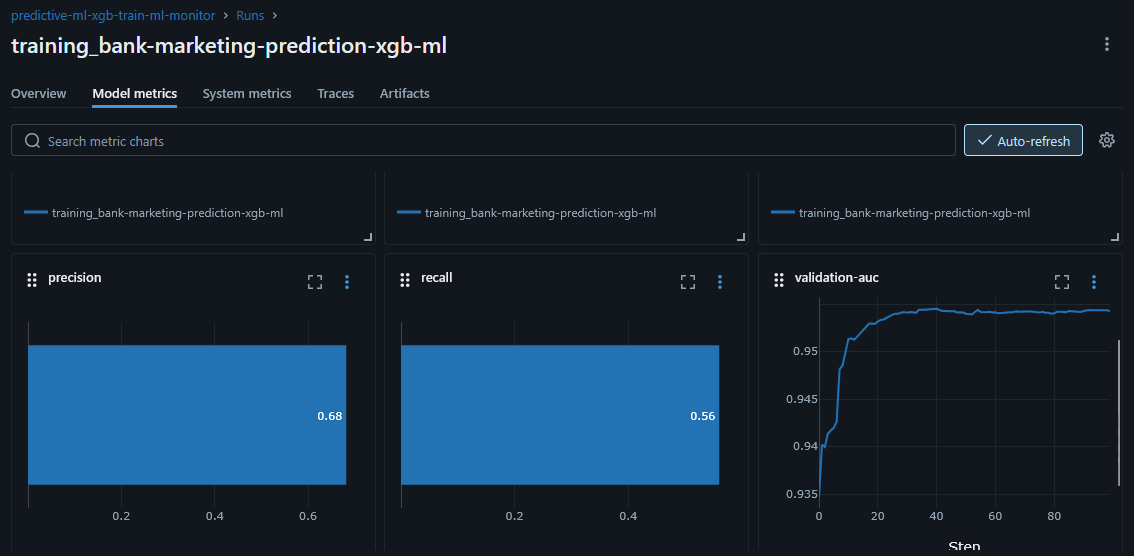
图 5:MLflow 中显示的模型指标(精确率、召回率、AUC)
接下来,笔记本从训练作业输出创建模型对象,并设置一个批量转换作业,该作业使用测试特征通过模型进行推理。
计算数据漂移与模型质量
Evidently 提供了多种用于计算不同类型 数据漂移 的预设,所有这些都可以根据具体的机器学习使用场景进行定制
English / 原文
The effectiveness and accuracy of machine learning (ML) models decreases almost as soon as the training job finishes. Changes in consumer behavior, releases of new products, upgrades in sensor technology, and a shifting economic and political landscape are all examples of uncontrollable factors that change the patterns and probabilities the model learned during training. By actively monitoring models deployed in production for changes in accuracy and baseline statistics, you can intervene before the drop in accuracy becomes problematic. Model monitoring can be combined with AI observability tools that track latency, application availability, and other metrics used to identify problems in the overall system.
This post focuses on discriminative machine learning models used for classification and regression use cases. For generative AI models, see Production-Ready Real-Time Monitoring Solution for LLMs on Amazon SageMaker AI Endpoint inference. The factors that cause a reduction in quality for discriminative ML models can be broadly split into two categories:
- Data drift refers to changes in the statistical properties of the input data. It can be as simple as an unexpected change in an upstream data source that changes a column from integer to float data type, or as complex as entirely new product lines being released. You can measure data drift by calculating baseline statistics for the training dataset and comparing these to the same statistics calculated on data gathered over time in production.
- Model drift refers to changes in the accuracy of predictions produced by the model because the probabilistic patterns learned by the model no longer fit the data coming in. This can be caused, for example, by changes in consumer behavior because of an improving economy. You can measure model drift by gathering the ground truth labels to calculate model quality metrics, and comparing these metrics to the same metrics calculated during the model training process.
Figure 1: How data drift and model drift fit in an ML workflow
Amazon SageMaker AI is a fully managed machine learning service that helps organizations build, train, deploy, and manage both discriminative and generative ML models. Although SageMaker AI is fully managed, you might need a more customizable approach. For example, you might want to manage the entire modeling life cycle cost-effectively, monitor unique use cases that managed services do not support, or integrate your model monitoring into other UI or observability pipelines. Therefore, this post introduces a model monitoring architecture based on the open source Evidently Python library and Amazon SageMaker AI with MLflow for calculating data and model drift. The results of this model monitoring solution can be integrated into your preferred dashboard, can be used to send alerts to relevant stakeholders, or can trigger automatic model retraining pipelines.
Solution overview
This solution demonstrates how to implement model monitoring in the machine learning workflow, from model training to model deployment. Figure 2 shows the workflow for a batch inference use case, up to and including alerting in Slack and visualizing the model results in MLflow.
Figure 2: Model monitoring workflow for batch inference
The workflow consists of the following steps:
- A training job to train the model on input data from an Amazon Simple Storage Service (Amazon S3) bucket. The same training job calculates model metrics, which can be stored in MLflow. The baseline dataset used to train the model is stored separately in S3 so it can be used to monitor the model in production.
- Batch transform for inference on production workloads. The results of a batch transform job are stored in an S3 bucket.
- The results of the batch transform job, and the original dataset and model metrics, are used in a processing job to calculate data drift and model quality metrics using open source Evidently presets. Note that Evidently calculates model metrics. It does not calculate model drift directly by comparing the metrics to the previous metrics from the training run. However, the processing job can be extended with custom code to calculate model drift. The batch transform and processing job can be wrapped in a pipeline for scheduling using Amazon EventBridge Scheduler.
- All monitoring metrics and Evidently reports are stored in MLflow where you can track runs over time, compare results between runs, and visualize the report.
- Optionally, if drift is detected, the pipeline can trigger an Amazon Simple Notification Service (Amazon SNS) notification to alert users by email.
You can take a similar approach for use cases where real-time endpoints are used for model deployment. Figure 3 shows the workflow for real-time endpoints. The key difference is that the endpoint must have data capture enabled, which logs the inputs and outputs of the endpoint to an S3 bucket. Instead of a processing job, this architecture uses AWS Lambda functions to deploy the monitoring code. Both architectures can use either processing jobs or Lambda, based on your preference. The AWS Lambda functions that calculate data and model drift can run on a regular schedule. You can also trigger them when data from the endpoint lands in the S3 bucket.
Figure 3: Model monitoring workflow for real-time endpoints
This pattern for real-time endpoints can also be used with Amazon SageMaker Hyperpod, where you can provision clusters to use for model training as well as model inference. You can enable data capture for Hyperpod at the endpoint level, at the load balancer level, or at the model pod level. Inference requests and responses are automatically written to an S3 bucket, where you can access them to perform model monitoring.
Both previous diagrams focus only on the model monitoring process. However, model monitoring is normally implemented as part of a larger MLOps workflow. Figure 4 shows how this model monitoring solution fits in an end-to-end MLOps scenario, where the processing job used to calculate drift is deployed alongside the endpoint through a CI/CD workflow. For more information on implementing MLOps with SageMaker AI, see MLOps foundation roadmap for enterprises with Amazon SageMaker AI.
Figure 4: How model monitoring integrates with an MLOps architecture
Walkthrough
This section provides a step-by-step explanation for setting up the model monitoring solution for batch transform. See the full repository for other examples, including a sample for real-time endpoints.
Prerequisites
Before following the steps in this walkthrough, you will need:
- An Amazon SageMaker AI domain in an AWS Region where this service is available.
- An MLflow App in SageMaker Studio.
- A JupyterLab space within SageMaker Studio (an
ml.t3.mediuminstance is sufficient for this solution). - A copy of the solution repository on JupyterLab. Clone the repository after the space has started.
To continue with the walkthrough, open the notebook predictive_ml_experimentation_data_model_monitoring_evidently.ipynb. Note that the solution uses the SageMaker Python SDK v3. If you use the DefaultMLFlowApp, the notebook code identifies the correct app automatically. Otherwise, edit the code with the name of your MLflow App.
Model training and inference
The example notebook uses the Bank Marketing dataset from the UCI Machine Learning Repository. This dataset contains information about marketing phone calls made on behalf of a Portuguese bank, with the goal of predicting if the customer will subscribe to a term deposit. It is a binary classification use case where the target variable has a value of 1 if the customer subscribed and 0 if a customer did not subscribe.
In the first half of the notebook, the data is cleaned, processed, and split into training, validation, and test sets. An XGBoost model is trained on the training and validation datasets, with logs and metrics sent to MLflow and the final model object registered in the MLflow model registry.
Two key actions in this data processing and model training section set up the model for monitoring later in production:
- The training dataset is stored as the baseline dataset in an S3 bucket, which you use to calculate data drift.
- The model metrics are stored in MLflow, which can be used for model drift calculations.
Figure 5: Model metrics (precision, recall, AUC) displayed in MLflow
Next, the notebook creates the model object from the training job output and sets up a batch transform job which runs the test features through the model for inference.
Calculating data drift and model quality
Evidently has various presets for calculating different types of data drift, all of which can be customized to suit the particular ML use case. The sample notebook uses the DataDriftPreset and DataSummaryPreset and creates a helper function to save the Evidently reports (both HTML and JSON) in MLflow and extracts specific drift values to save separately as metrics in MLflow. This enables you to compare different runs or generate alerts based on certain values.
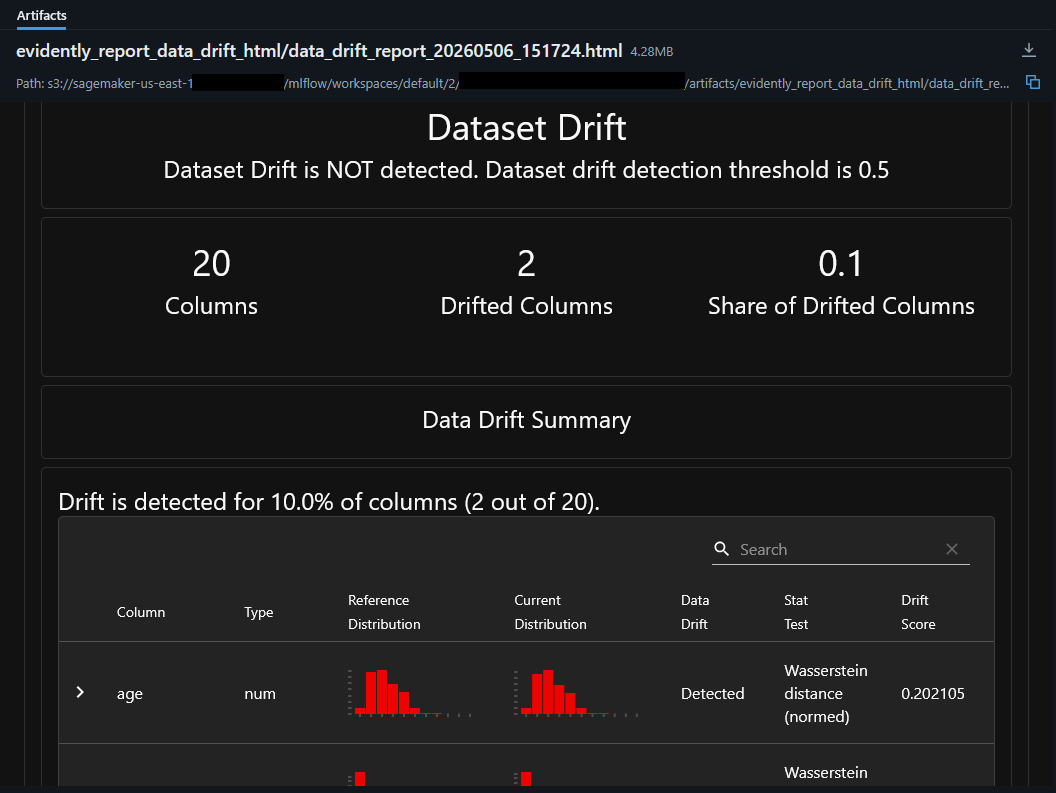
Figure 6: An Evidently data drift report as an artifact in MLflow
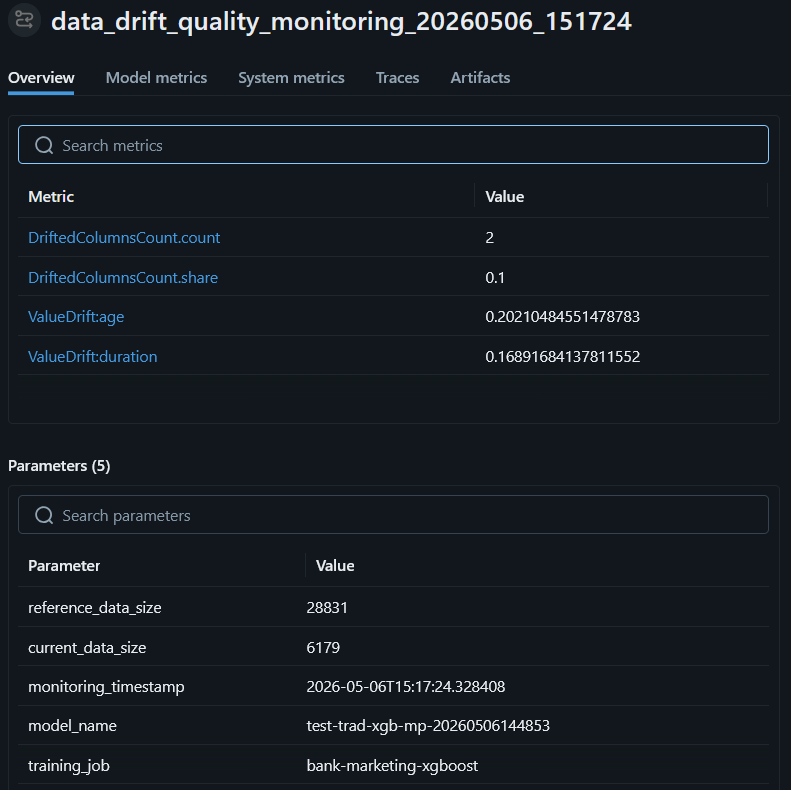
Figure 7: Data drift metrics and parameters in MLflow
Another advantage of saving each data drift calculation as a run in MLflow is that it allows us to add parameters such as the model name, the name of the training job, the size of the dataset, and other important information.
Evidently also provides presets for calculating model quality. This notebook uses the ClassificationPreset, which calculates accuracy, precision, recall, F1 score, and more based on model predictions and the ground truth dataset. Instead of the ClassificationPreset with its broad range of metrics, Evidently also supports custom reports that you can target to calculate the metrics most relevant to a particular use case. For example, because of imbalanced labels in the marketing dataset used in the sample notebook, accuracy is a less relevant metric than precision, recall, and AUC.
Similar to data monitoring, the Evidently reports for model quality are added as artifacts to MLflow, and the individual metrics can be extracted into MLflow metrics. Note that Evidently does not calculate model drift, meaning the difference between metrics from the original training job and metrics calculated from the predictions. However, you can add drift calculations in the monitoring code, and we provide an example of this in the real-time endpoint sample, where model drift, when detected, triggers an alert via Amazon SNS.
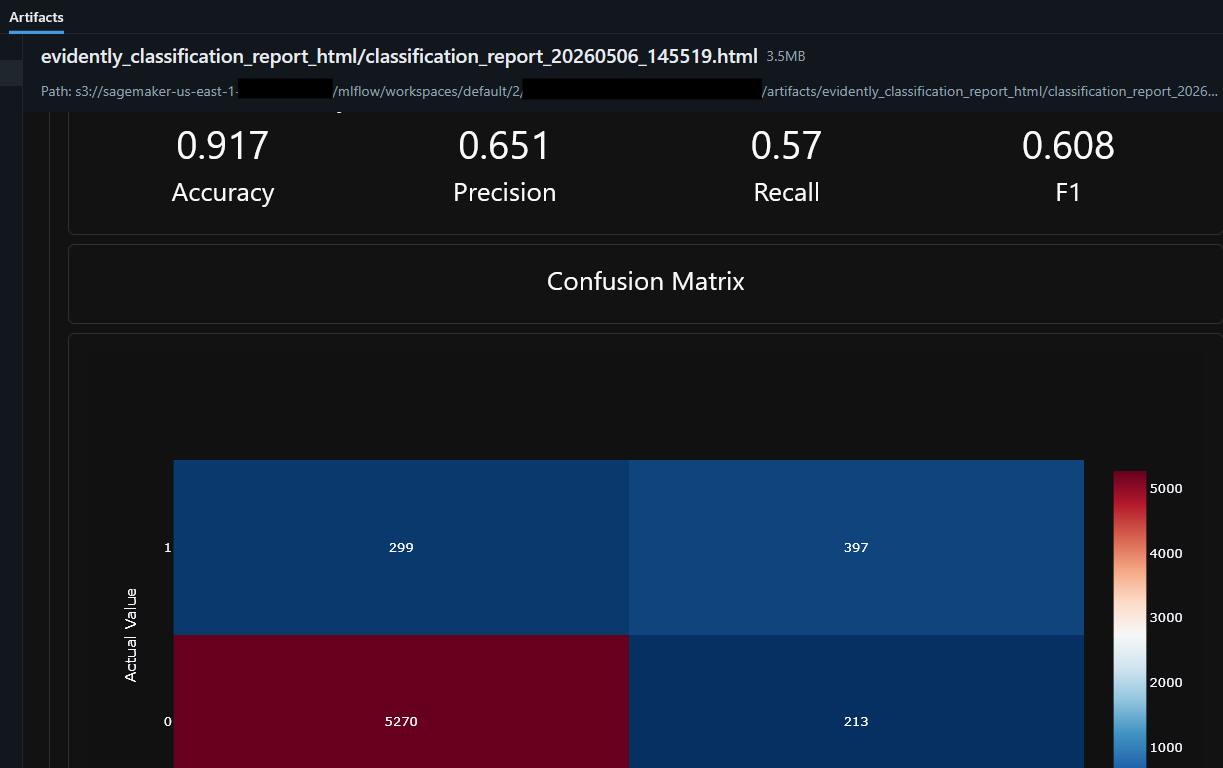
Figure 8: Model quality report artifact in MLflow
Views in MLflow can be customized and individual runs can be compared based on certain attributes. Figure 9 shows a view of multiple data drift, model quality, and comprehensive quality runs together with the original training job. You can see which training run the monitoring runs relate to, how many drifted columns were detected in the consecutive data drift runs, and how much the accuracy dropped between training and running the model quality job.
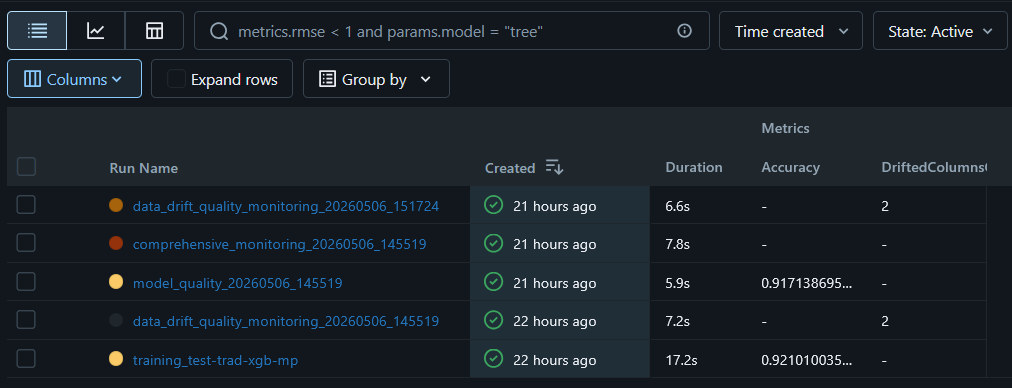
Figure 9: Multiple monitoring runs in MLflow
Furthermore, you can plot the metrics captured in MLflow over time. As shown in Figure 10, this lets you view the entire model life cycle in one place, covering model experimentation, model training, and model deployment and monitoring.
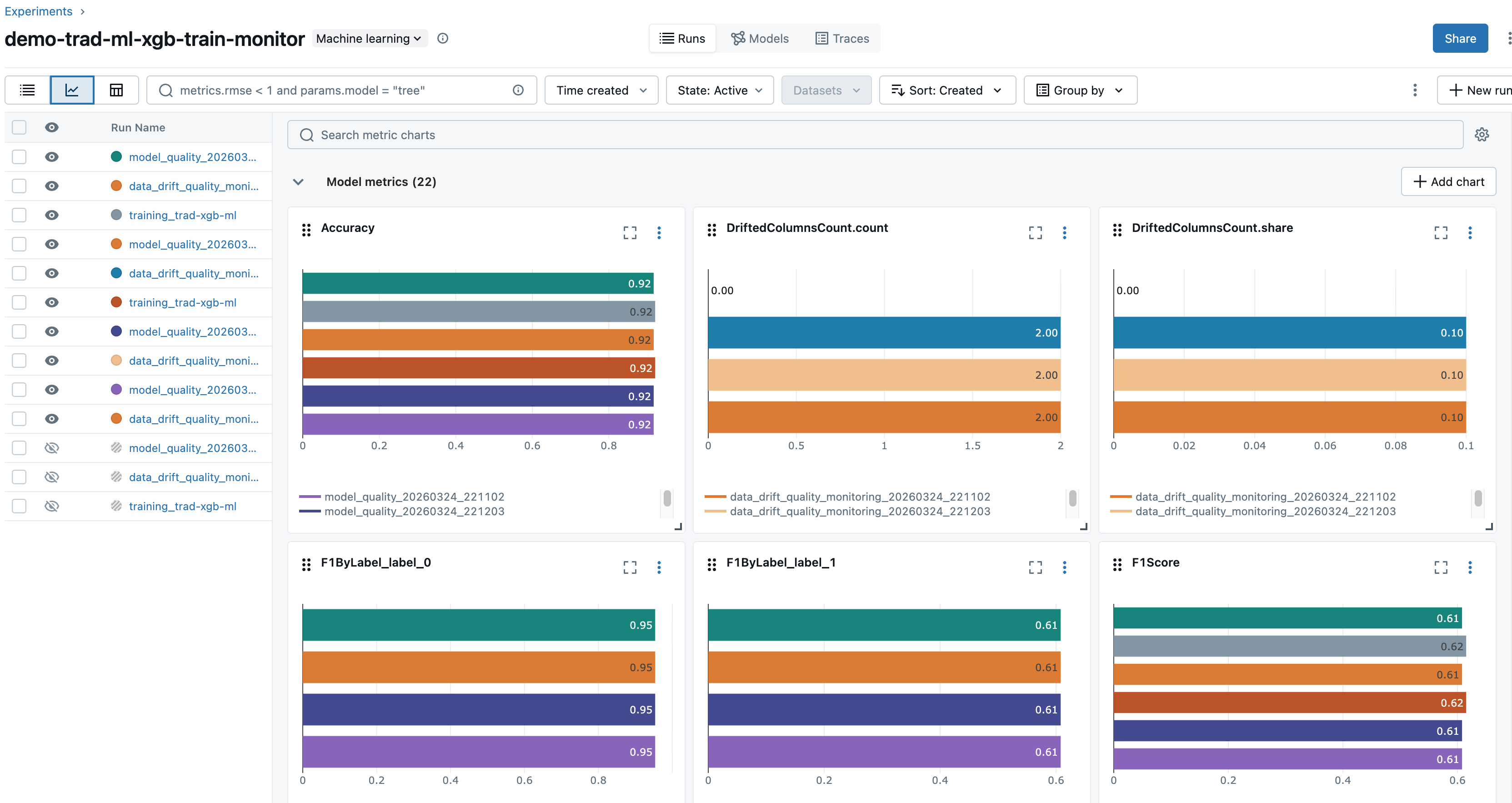
Figure 10: Model life cycle tracking metrics view in MLflow
Scaling with pipelines
Although the first notebook demonstrates in depth how to train a model, deploy it, and run monitoring with Evidently, the second notebook batch_monitoring_pipeline.ipynb shows how to scale inference and monitoring through jobs and pipelines. It creates a pipeline with two steps:
- A Transform step that fetches the input data from S3 and runs the data through the trained XGBoost model to generate the subscription probability predictions. Predictions are stored back in S3 and passed to the next step.
- A Processing step that uses the predictions and the baseline dataset to perform monitoring. The input dataset used to generate predictions is compared to the baseline dataset to calculate data drift, and the reports are added to MLflow.
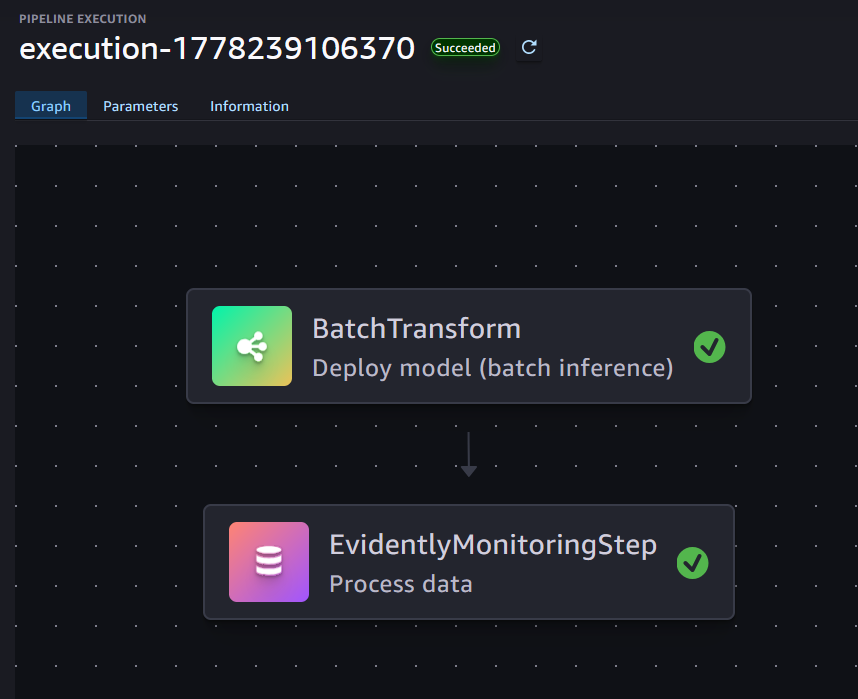
Figure 11: A pipeline with one batch transform step and one monitoring step
Finally, the notebook demonstrates how pipeline executions can be run on a regular schedule with Amazon EventBridge. For an example of how to trigger pipeline executions based on inference data becoming available in S3, see the real-time endpoint sample.
Clean up
Each notebook has a section at the end to help you clean up the resources you deployed, including any endpoints and model objects. If you wish to delete the data artifacts in S3 or the runs logged to MLflow, you need to remove them manually.
Conclusion
Implementing a data and model monitoring solution is necessary to maintain prediction accuracy and help achieve the best outcome for your machine learning use case. This post shows how you can use open source Evidently together with Amazon SageMaker AI to generate monitoring reports, organize and compare the results in MLflow, scale through pipelines, and trigger drift notifications. The AWS sample GitHub repository provides implementations for both batch predictions and real-time endpoints, with scaling done either through SageMaker AI pipelines or AWS Lambda. To learn more about MLOps on Amazon SageMaker AI, see the Amazon SageMaker AI MLOps workshop.
About the authors
Sandeep Raveesh-Babu
Sandeep is a GenAI GTM Specialist Solutions Architect at AWS. He works with customers through their LLM training, LLM inference, and GenAI observability. He focuses on product development helping AWS build and solve industry challenges in the generative AI space. You can connect with Sandeep on LinkedIn to learn about generative AI solutions.
Sara van de Moosdijk
Sara, known as Moose, is an AI/ML Solutions Architect at AWS in the Netherlands. She helps AWS customers build and scale AI/ML solutions through technical enablement, support, and architectural guidance. Drawing on experience from her previous role with AWS in Australia, Moose aims to make machine learning accessible to all levels within an organization.