使用 Amazon Bedrock AgentCore 构建 AI 驱动的 AWS 支持助手
英文标题:Build an AI-powered AWS support companion with Amazon Bedrock AgentCore
本文介绍了如何利用 Amazon Bedrock AgentCore 构建一个 AWS 支持助手,该助手使用 Strands Agents 作为编排框架,并通过模型上下文协议(MCP)连接 AWS 服务。该解决方案将 CloudWatch 日志分析、文档搜索、社区知识查询和支持案例创建整合到单一对话界面中,可将每次事件调查前的上下文切换时间减少 30–45 分钟。文章详细说明了架构、部署步骤、代理代码的核心模式以及安全考量,并提供了可直接使用的 CloudFormation 模板和 Amplify 前端。对于希望提高运维效率并获取生产级代理实现参考的开发者,本文提供了端到端的实践指南。
 107.1 KB
 104.4 KB
 129.9 KB
 65.9 KB
 512.4 KB
 36.5 KB
 33.4 KB
 40.4 KB
中文
管理 AWS 基础设施通常意味着要在不同控制台之间切换、搜索文档并手动创建支持案例。针对每一次事件,工程师都需要打开 AWS 管理控制台,查看 Amazon CloudWatch,搜索 AWS 文档,查阅社区帖子,然后提交支持案例。这类上下文切换导致在正式开始解决问题之前,每次调查就要花费 30 到 45 分钟。
在本文中,您将使用 Amazon Bedrock AgentCore 构建一个 AWS 支持助手。该助手使用 Strands Agents 作为编排框架,并通过 模型上下文协议(MCP) 连接 AWS 服务。最终,您将得到一个能够分析 CloudWatch 日志、搜索 AWS 文档、从 AWS re:Post 查询社区知识并创建支持案例的可用代理,所有这些操作都在一个统一的对话界面中完成。该解决方案通过 AWS CloudFormation 使用单个脚本进行部署,并包含一个基于 AWS Amplify 构建的 Web 前端,用于与代理交互。
事件调查瓶颈
AWS 支持与运维团队在处理每起事件时都遵循一套重复的模式:
- 打开 AWS 管理控制台并导航到受影响的服务。
- 检查 CloudWatch 日志和指标,查找错误模式。
- 搜索 AWS 文档,获取相关的故障排查指导。
- 查阅 AWS re:Post 上的社区帖子,寻找类似问题。
- 汇总发现并创建具有适当严重级别的支持案例。
- 将证据和上下文附加到案例中。
每一步都需要不同的工具和界面。手动调查限制了团队的响应速度,而且在一个工具中收集到的上下文信息无法传递到下一个工具。
解决方案概览
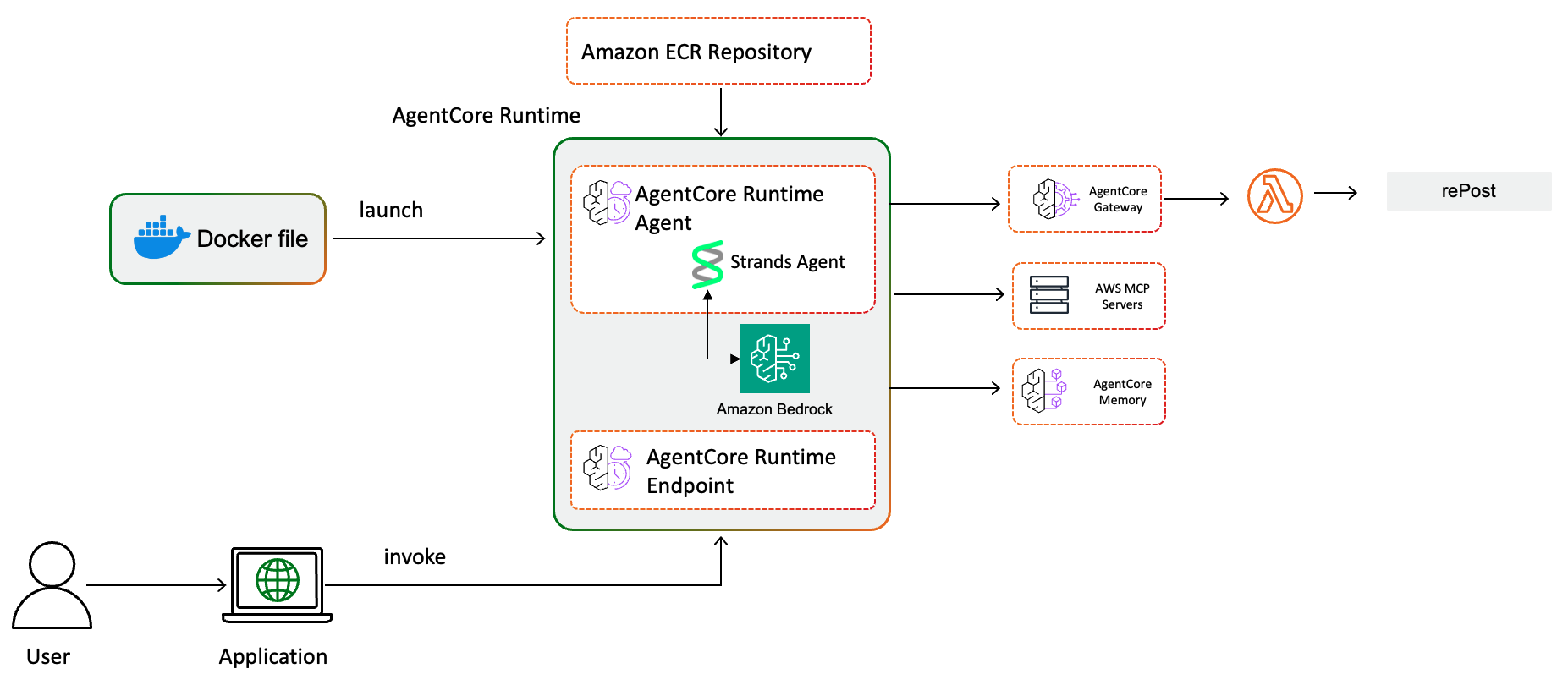
该解决方案将这些步骤整合到一个部署在 Amazon Bedrock AgentCore 上的对话式代理中。AgentCore 负责处理运行生产级 AI 代理的运维复杂性(会话隔离、自动扩缩容、安全性和可观测性),因此您可以专注于代理的功能而不是其运行方式。
该代理连接到以下组件:
代理运行时 – 一个使用 Strands Agents 的 Python 应用程序,打包为 Docker 容器并部署到 AgentCore 运行时。该代理根据您的输入编排对基础模型(FM)(通过 Amazon Bedrock 使用 Amazon Nova Pro)和工具的调用。您无需更改代理代码即可切换到其他受支持的模型。
MCP 服务器 – 三个 MCP 服务器使代理能够访问 AWS 文档 (aws-documentation-mcp-server)、AWS Support API (aws-support-mcp-server) 和 AWS 服务 API (aws-api-mcp-server)。MCP 为 AI 代理从外部工具接收上下文提供了标准协议。
AgentCore 网关 – 将工具集中为可重用、安全的端点。该网关通过由 AWS Lambda 支持的目标,并使用 Amazon Cognito JSON Web 令牌(JWT)进行身份验证,提供对 AWS re:Post 社区知识的访问。
AgentCore 记忆 – 维护短期对话上下文,使代理能够在会话内基于之前的故障排查步骤进行构建。
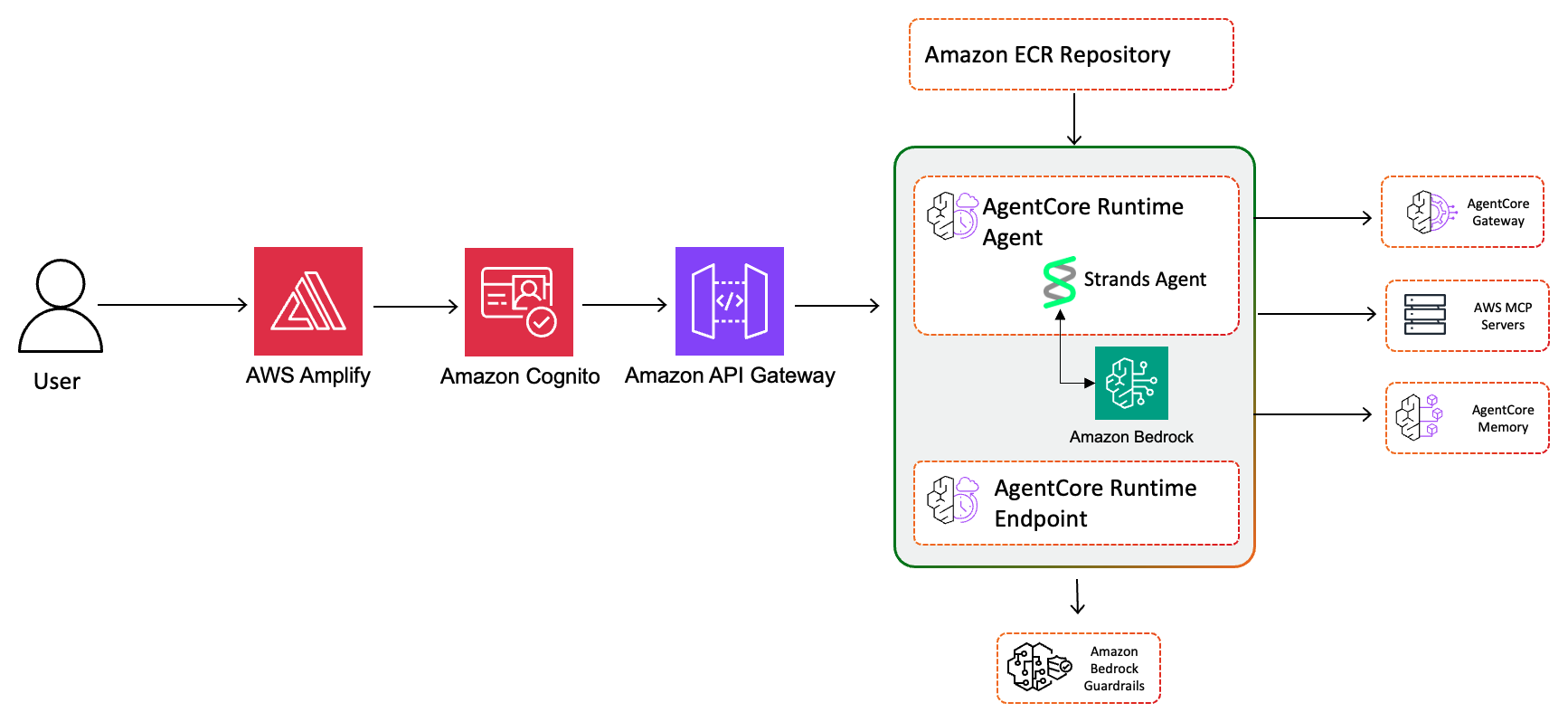
API 和前端层 – 带有 Cognito 授权、AWS WAF 速率限制和请求验证的 Amazon API Gateway 充当了调用 AgentCore 运行时的 Lambda 函数的前端。一个托管在 AWS Amplify 上的 React 应用程序提供用户界面,并通过 Cognito 身份验证进行注册和登录。
护栏 – 一个 Amazon Bedrock Guardrails 配置用于过滤有害内容、帮助阻止提示注入攻击、修订个人身份信息(PII),例如 AWS 密钥、信用卡和社会安全号码,并将代理限制在 AWS 支持主题范围内。
基础设施 – 单个 CloudFormation 模板部署所有资源,包括 AWS Identity and Access Management(IAM)角色、Cognito 用户池、AWS Key Management Service(AWS KMS) 密钥、AWS Secrets Manager 密钥以及 AWS Systems Manager Parameter Store 参数。
先决条件
在开始之前,请确认您具备以下条件:
- Python 3.11 或更高版本。
- 支持 ARM64 且带有 buildx 的 Docker。
- 拥有 Amazon Bedrock、IAM 和 CloudFormation 权限的 AWS 账户。
- 在部署 AWS 区域中为 Amazon Nova Pro 启用了 Amazon Bedrock 模型访问权限(您可以使用其他受支持的模型)。
- 已安装并配置了具有适当凭证的 AWS Command Line Interface(AWS CLI)。
- 已安装 uv 包管理器。
- 一个 AWS Business、Enterprise On-Ramp 或 Enterprise 支持计划(Support MCP 服务器所必需)。
重要提示: 此解决方案会创建产生费用的 AWS 资源。请按照本文末尾的清理部分操作,以避免持续产生费用。
部署解决方案
部署使用一个脚本来配置所有基础设施、构建容器并输出所需的配置值。
步骤 1:克隆代码仓库
首先克隆示例代码并进入项目目录:
git clone https://github.com/aws-samples/sample-support-agent-with-agentcore
cd sample-support-agent-with-agentcore
步骤 2:配置 AWS 凭证
确认您的 AWS CLI 已配置了拥有所需权限的凭证:
aws sts get-caller-identity
步骤 3:运行部署
赋予部署脚本可执行权限并使用容器构建标志运行:
chmod +x deploy.sh
./deploy.sh --build-container
该脚本会处理使用 uv 的 Python 环境设置、部署前安全验证(AWS CloudTrail 检查、模板验证、凭证类型检查)、Amazon Elastic Container Registry(Amazon ECR)仓库创建、Docker 镜像构建以及 CloudFormation 堆栈部署。它会验证目标区域中 CloudTrail 是否处于活动状态、验证 CloudFormation 模板,并确认您使用的是临时角色凭证而非长期 IAM 用户密钥。
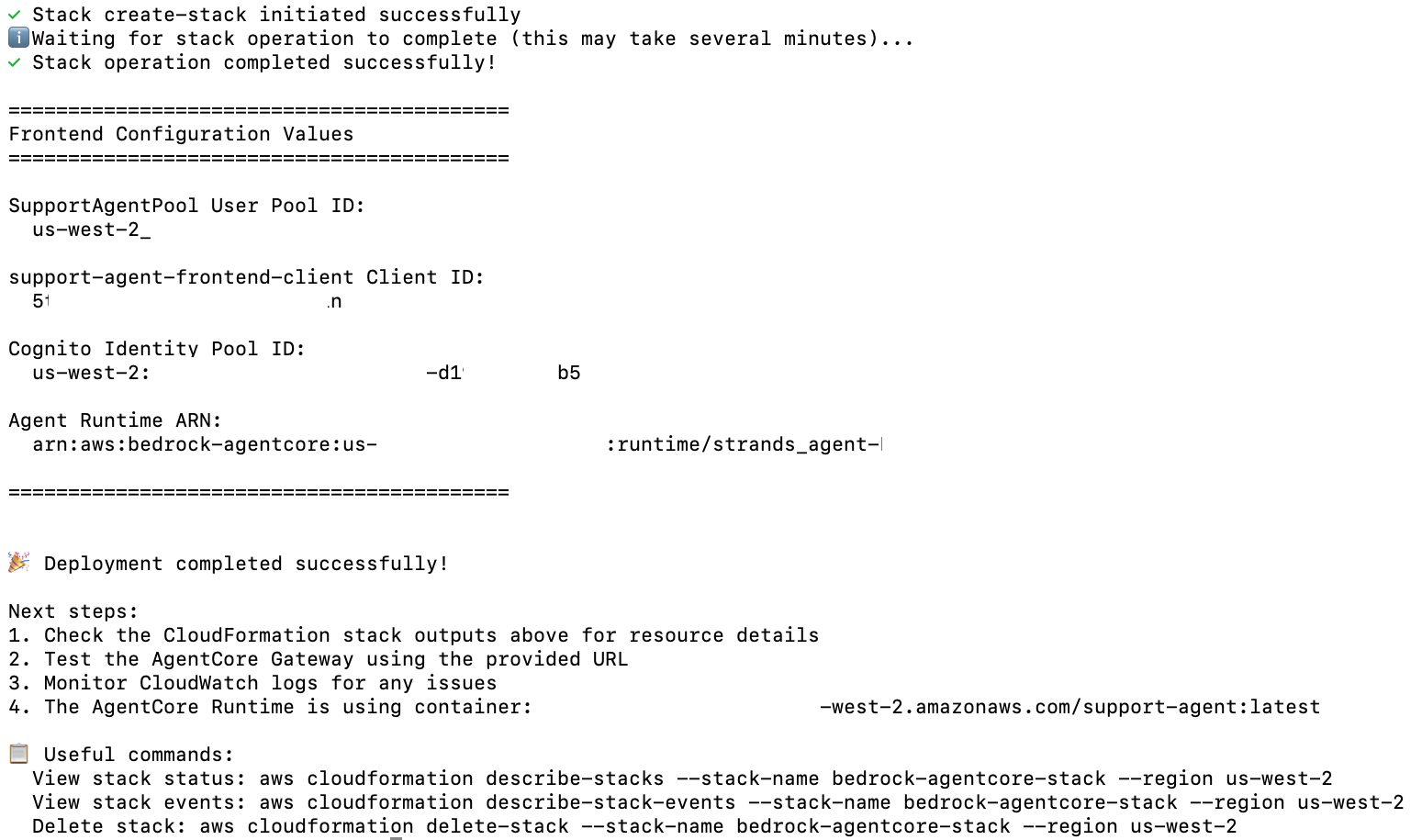
当堆栈部署完成后,脚本会输出前端所需的配置值:Cognito 用户池 ID、Cognito 客户端 ID、Cognito 身份池 ID 和代理运行时 Amazon Resource Name(ARN)。
步骤 4:部署 Amplify 前端
导航到部署区域中的 AWS Amplify 控制台,然后按照以下步骤操作:
- 选择 support-agent-frontend 应用。
- 在主分支中选择 部署更新。
- 选择 拖放 作为方法,然后从
frontend/目录上传support-agent-amplify-frontend.zip文件。 - 选择 保存并部署。
步骤 5:配置并访问应用程序
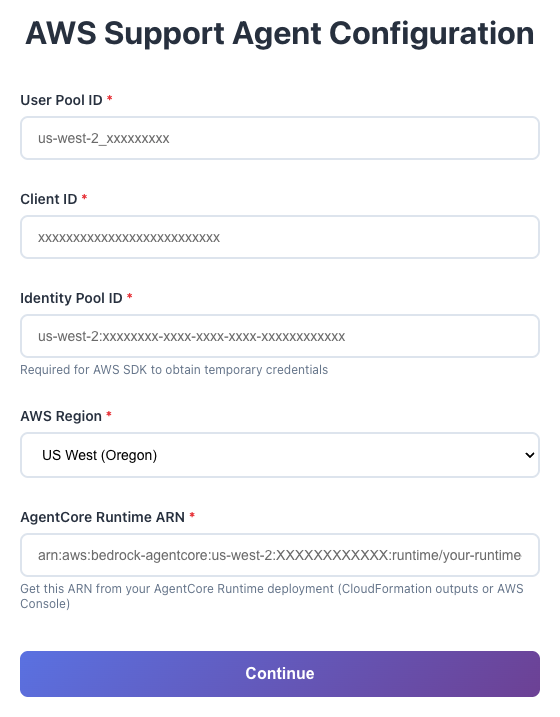
使用 CloudFormation 输出值(用户池 ID、客户端 ID、身份池 ID 和运行时 ARN)更新前端配置。通过注册选项创建一个用户账户,使用一次性验证码验证您的电子邮件,然后登录。
步骤 6:与代理交互
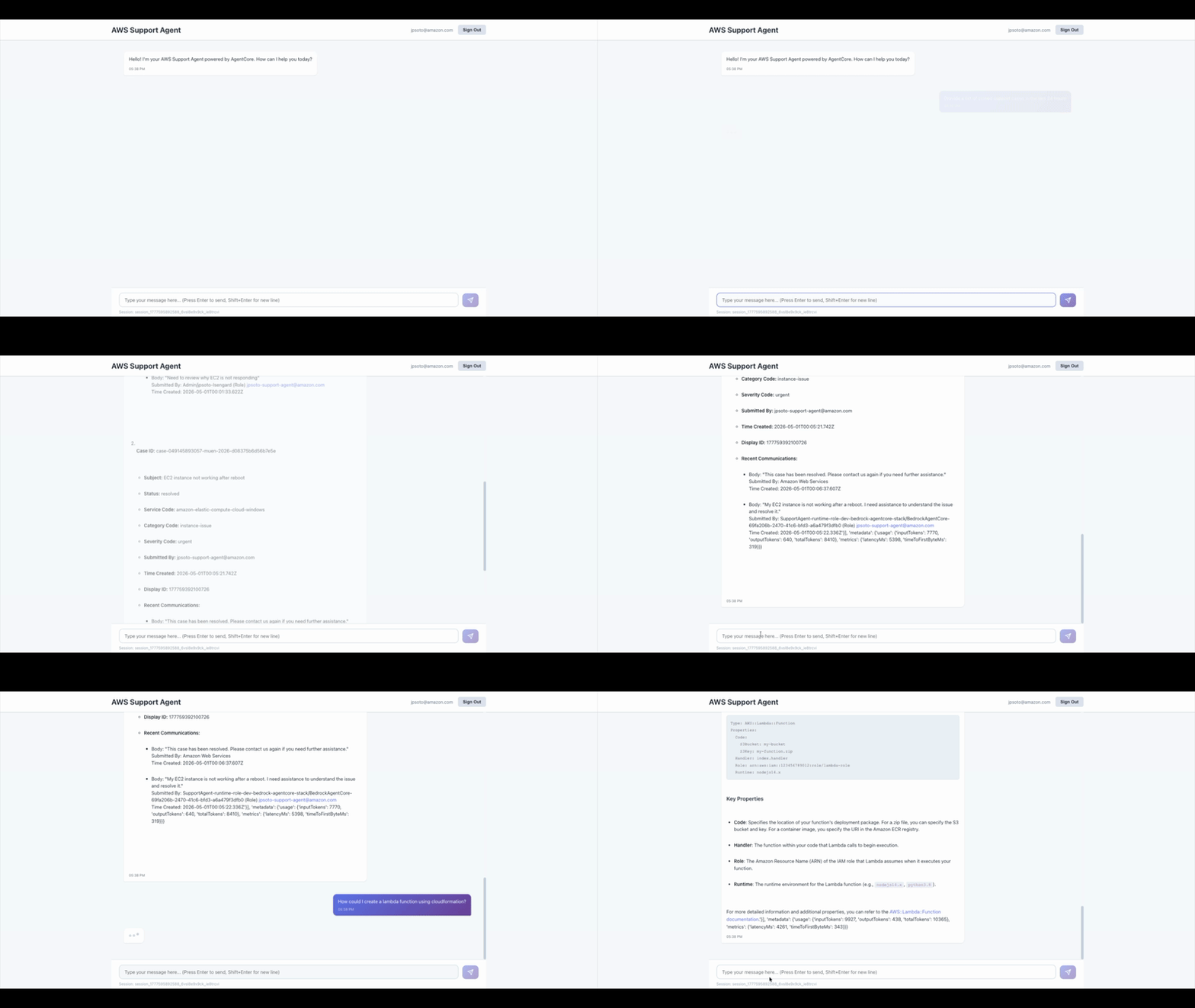
聊天界面连接到在 AgentCore 运行时中运行的代理。该代理通过 MCP 服务器访问 AWS 文档和支持,并通过 AgentCore 网关访问 AWS re:Post。可以尝试以下查询:
- “保护 Amazon Simple Storage Service(Amazon S3)存储桶的最佳实践是什么?”
- “帮我排查 us-east-1 区域中 Lambda 函数超时的问题”
- “为我的 RDS 实例间歇性连接问题创建一个支持案例”
理解代理代码
代理在 agent.py 中定义,并使用 BedrockAgentCoreApp 框架。本节重点介绍三种实现模式,它们解决了生产代理的常见挑战。
并行 MCP 初始化。 顺序加载三个 MCP 服务器会显著增加启动延迟。该代理使用 asyncio.gather 并行初始化所有三个客户端,从而缩短冷启动时间。每个客户端使用 uvx 连接到其服务器,并向 Strands Agent 注册可用的工具:
并行初始化所有客户端
results = await asyncio.gather( init_aws_docs(), # AWS 文档 MCP init_aws_support(), # AWS Support MCP init_aws_api(), # AWS API MCP return_exceptions=True )
带优雅超时的记忆。 该代理使用 AgentCore 记忆来维护对话上下文。在每次请求时,它都会检索最近三个对话轮次,并设置两秒的超时时间。如果上下文检索超时,代理会继续处理而不阻塞响应。生成响应后,它会异步保存对话。记忆按会话 ID 限定范围,因此每个用户对话都维护自己的上下文。
网关令牌刷新。 AgentCore 网关客户端使用存储在 Secrets Manager 中的 Cognito JWT 令牌进行身份验证。代理在每次网关调用之前验证令牌过期时间,并在令牌离过期不足五分钟时自动刷新。如果不这样做,在令牌一小时的生存期之后,网关调用会间歇性失败。
安全注意事项
该解决方案默认部署了多层安全保护。身份验证使用具有符合 NIST SP 800-63B 密码策略的 Amazon Cognito。带有速率限制和托管规则集的 AWS WAF 保护 API Gateway。每个组件都有其自身的最小权限 IAM 角色,代理调用器 Lambda 会在向用户返回响应之前修订其中的凭证模式。
Amazon Bedrock Guardrails 过滤有害内容,阻止提示注入(设置为 HIGH),修订 PII(AWS 密钥、信用卡、SSN),并将代理限制在 AWS 支持主题范围内。API Gateway 访问日志以 90 天保留期传输到 Amazon CloudWatch,AWS CloudTrail 捕获 API 调用。有关完整的安全实现细节,包括加密配置、IAM 角色限定和护栏策略,请参阅代码仓库中的 SECURITY.md。
清理
为避免持续产生费用,请按以下顺序删除资源。
警告: 这些步骤是不可逆的。在继续之前,请备份您需要的所有数据。
-
从 AWS Amplify 控制台删除 Amplify 应用。
-
删除 CloudFormation 堆栈:
aws cloudformation delete-stack --stack-name bedrock-agentcore-stack --region us-west-2 -
删除 ECR 仓库(CloudFormation 不会删除非空仓库):
aws ecr delete-repository --repository-name support-agent --region us-west-2 --force -
删除用于 CloudFormation 模板的 S3 桶:
aws s3 rb s3://cfn-templates-ACCOUNTID-us-west-2 --force
结论
在本文中,您使用 Amazon Bedrock AgentCore 构建了一个 AI 驱动的 AWS 支持助手。该代理将基础模型推理与通过 MCP 和 AgentCore 网关对 AWS 文档、支持 API 和社区知识的实时访问相结合。该解决方案使用单个脚本部署,并包含身份验证、速率限制、加密、护栏和审计日志记录。
该代理将多个调查工具整合到一个对话界面中,使工程师能够从问题识别到创建支持案例,无需在不同的控制台之间切换。
示例代码仓库包含了关于网络隔离、多账户部署、使用 AgentCore 跟踪实现可观测性、人工上报阈值以及为生产就绪而进行的密钥轮换的额外指导。要开始使用,请访问 Amazon Bedrock AgentCore 文档 并 克隆示例代码仓库。
如果您需要完全托管的事件调查服务,请参阅 AWS DevOps Agent。本文展示了当您需要完全控制工具、模型、护栏和工作流时,如何在 AgentCore 运行时上构建自定义代理。
关于作者
Jose Soto
Jose 是 AWS 的技术客户经理。他热衷于生成式 AI 和物理 AI 技术,以及它们在自动化流程和加速各行业系统性能方面的潜力。
Puneeth Ranjan Komaragiri
Puneeth 是 AWS 的首席技术客户经理。他热衷于监控和可观测性、云财务管理以及生成式
English / 原文
Managing AWS infrastructure often means switching between consoles, searching documentation, and manually creating support cases. For each incident, an engineer opens the AWS Management Console, checks Amazon CloudWatch, searches AWS documentation, reviews community posts, and files a support case. This context-switching adds up to 30–45 minutes per investigation before resolution work begins.
In this post, you build an AWS Support Companion using Amazon Bedrock AgentCore. The agent uses Strands Agents as the orchestration framework and connects to AWS services through the Model Context Protocol (MCP). By the end, you have a working agent that can analyze CloudWatch logs, search AWS documentation, query community knowledge from AWS re:Post, and create support cases, all from a single conversational interface. The solution deploys with a single script using AWS CloudFormation and includes a web frontend built on AWS Amplify for interacting with the agent.
The incident investigation bottleneck
AWS support and operations teams follow a repetitive pattern for every incident:
- Open the AWS Management Console and navigate to the affected service.
- Check CloudWatch logs and metrics for error patterns.
- Search AWS documentation for relevant troubleshooting guidance.
- Review community posts on AWS re:Post for similar issues.
- Compile findings and create a support case with the appropriate severity.
- Attach evidence and context to the case.
Each step requires a different tool and interface. Manual investigation limits the speed at which teams can respond, and the context gathered in one tool does not carry over to the next.
Solution overview
The solution consolidates these steps into a single conversational agent deployed on Amazon Bedrock AgentCore. AgentCore handles the operational complexity of running a production AI agent (session isolation, auto scaling, security, and observability), so you focus on what the agent does rather than how it runs.
The agent connects to the following components:
Agent runtime – A Python application using Strands Agents, packaged as a Docker container and deployed to AgentCore Runtime. The agent orchestrates calls to a foundation model (FM) (Amazon Nova Pro through Amazon Bedrock) and tools based on your input. You can swap to supported models without changing the agent code.
MCP servers – Three MCP servers give the agent access to AWS documentation (aws-documentation-mcp-server), AWS Support APIs (aws-support-mcp-server), and AWS service APIs (aws-api-mcp-server). MCP provides a standard protocol for AI agents to receive context from external tools.
AgentCore Gateway – Centralizes tools into reusable, secure endpoints. The gateway provides access to AWS re:Post for community knowledge through an AWS Lambda-backed target with Amazon Cognito JSON Web Token (JWT) authentication.
AgentCore Memory – Maintains short-term conversation context so the agent builds on previous troubleshooting steps within a session.
API and frontend layers – Amazon API Gateway with Cognito authorization, AWS WAF rate limiting, and request validation fronts a Lambda function that invokes the AgentCore Runtime. An AWS Amplify-hosted React application provides the user interface with Cognito authentication for sign-up and sign-in.
Guardrails – An Amazon Bedrock Guardrails configuration filters harmful content, helps block prompt injection attacks, redacts personally identifiable information (PII) such as AWS keys, credit cards, and Social Security numbers, and restricts the agent to AWS support topics.
Infrastructure – A single CloudFormation template deploys all resources, including AWS Identity and Access Management (IAM) roles, Cognito user pools, AWS Key Management Service (AWS KMS) keys, AWS Secrets Manager secrets, and AWS Systems Manager Parameter Store parameters.
Prerequisites
Before you begin, confirm that you have the following:
- Python 3.11 or later.
- Docker with buildx support for ARM64.
- An AWS account with permissions for Amazon Bedrock, IAM, and CloudFormation.
- Amazon Bedrock model access for Amazon Nova Pro in your deployment AWS Region (you can use a different supported model).
- The AWS Command Line Interface (AWS CLI) installed and configured with appropriate credentials.
- The uv package manager installed.
- An AWS Business, Enterprise On-Ramp, or Enterprise Support plan (required for the Support MCP server).
Important: This solution creates billable AWS resources. Follow the Cleanup section at the end of this post to avoid ongoing charges.
Deploy the solution
The deployment uses a single script that provisions all infrastructure, builds the container, and outputs the configuration values you need.
Step 1: Clone the repository
Start by cloning the sample code and changing into the project directory:
git clone https://github.com/aws-samples/sample-support-agent-with-agentcore
cd sample-support-agent-with-agentcore
Step 2: Configure AWS credentials
Confirm your AWS CLI is configured with credentials that have the required permissions:
aws sts get-caller-identity
Step 3: Run the deployment
Make the deploy script executable and run it with the container build flag:
chmod +x deploy.sh
./deploy.sh --build-container
The script handles Python environment setup with uv, pre-deployment security validation (AWS CloudTrail check, template validation, credential type check), Amazon Elastic Container Registry (Amazon ECR) repository creation, Docker image build, and CloudFormation stack deployment. It verifies that CloudTrail is active in the target Region, validates the CloudFormation template, and confirms you are using temporary role credentials rather than long-term IAM user keys.
When the stack completes, the script outputs the configuration values that you need for the frontend: Cognito User Pool ID, Cognito Client ID, Cognito Identity Pool ID, and Agent Runtime Amazon Resource Name (ARN).
Step 4: Deploy the Amplify frontend
Navigate to the AWS Amplify console in your deployment Region, then follow these steps:
- Select the support-agent-frontend app.
- Choose Deploy updates in the main branch.
- Select Drag and drop as the method, then upload the
support-agent-amplify-frontend.zipfile from thefrontend/directory. - Choose Save and deploy.
Step 5: Configure and access the application
Update the frontend configuration with the CloudFormation output values (User Pool ID, Client ID, Identity Pool ID, and Runtime ARN). Create a user account through the Sign Up option, verify your email with the one-time code, and sign in.
Step 6: Interact with the agent
The chat interface connects to the agent running in AgentCore Runtime. The agent has access to AWS MCP servers for documentation and support, and AWS re:Post through AgentCore Gateway. Try queries like:
- “What are the best practices for securing an Amazon Simple Storage Service (Amazon S3) bucket?”
- “Help me troubleshoot a Lambda function timeout in us-east-1”
- “Create a support case for an intermittent connectivity issue with my RDS instance”
Understanding the agent code
The agent is defined in agent.py and uses the BedrockAgentCoreApp framework. This section highlights three implementation patterns that address common challenges with production agents.
Parallel MCP initialization. Loading three MCP servers sequentially adds noticeable startup latency. The agent initializes all three clients in parallel using asyncio.gather, which reduces cold start time. Each client connects to its server using uvx and registers the available tools with the Strands Agent:
# Initialize all clients in parallel
results = await asyncio.gather(
    init_aws_docs(),    # AWS Documentation MCP
    init_aws_support(), # AWS Support MCP
    init_aws_api(),     # AWS API MCP
    return_exceptions=True
)
Memory with graceful timeout. The agent uses AgentCore Memory to maintain conversation context. On each request, it retrieves the last three conversation turns with a two-second timeout. If context retrieval times out, the agent proceeds without it rather than blocking the response. After generating a response, it saves the conversation asynchronously. Memory is scoped per session ID, so each user conversation maintains its own context.
Gateway token refresh. The AgentCore Gateway client authenticates using Cognito JWT tokens stored in Secrets Manager. The agent validates token expiration before each gateway call and refreshes automatically when the token is within five minutes of expiring. Without this, gateway calls fail intermittently after the one-hour token lifetime.
Security considerations
The solution deploys with multiple security layers configured by default. Authentication uses Amazon Cognito with NIST SP 800-63B-aligned password policies. AWS WAF with rate limiting and managed rule sets protects the API Gateway. Each component has its own least-privilege IAM role, and the agent invoker Lambda redacts credential patterns from responses before returning them to users.
Amazon Bedrock Guardrails filters harmful content, blocks prompt injection (set to HIGH), redacts PII (AWS keys, credit cards, SSNs), and restricts the agent to AWS support topics. API Gateway access logs flow to Amazon CloudWatch with 90-day retention, and AWS CloudTrail captures API calls. For the full security implementation details, including encryption configuration, IAM role scoping, and guardrail policies, see SECURITY.md in the repository.
Cleanup
To avoid ongoing charges, delete the resources in this order.
Warning: these steps are irreversible. Back up any data you need before proceeding.
-
Delete the Amplify app from the AWS Amplify console.
-
Delete the CloudFormation stack:
aws cloudformation delete-stack --stack-name bedrock-agentcore-stack --region us-west-2 -
Delete the ECR repository (CloudFormation doesn’t delete non-empty repositories):
aws ecr delete-repository --repository-name support-agent --region us-west-2 --force -
Delete the S3 bucket used for CloudFormation templates:
aws s3 rb s3://cfn-templates-ACCOUNTID-us-west-2 --force
Conclusion
In this post, you built an AI-powered AWS Support Companion using Amazon Bedrock AgentCore. The agent combines foundation model reasoning with real-time access to AWS documentation, support APIs, and community knowledge through MCP and AgentCore Gateway. The solution deploys with a single script and includes authentication, rate limiting, encryption, guardrails, and audit logging.
The agent consolidates multiple investigation tools into a single conversational interface, so engineers can move from problem identification to support case creation without switching between consoles.
The sample repository includes additional guidance on network isolation, multi-account deployment, observability with AgentCore tracing, human escalation thresholds, and secret rotation for production readiness. To get started, visit the Amazon Bedrock AgentCore documentation and clone the sample repository.
If you need a fully managed incident investigation service, see AWS DevOps Agent. This post shows you how to build a custom agent on AgentCore Runtime when you need full control over the tools, model, guardrails, and workflow.
About the authors
Jose Soto
Jose is a Technical Account Manager at AWS. He is passionate about generative AI and physical AI technologies and their potential to automate processes and accelerate system performance across industries.
Puneeth Ranjan Komaragiri
Puneeth is a Principal Technical Account Manager at AWS. He is passionate about monitoring and observability, cloud financial management, and generative AI. In his current role, Puneeth collaborates closely with customers, using his expertise to help them design and architect their cloud workloads for scale and resilience.