为 AgentCore gateway 上的 AI 流量配置速率限制
英文标题:Configure rate limits for AI traffic on AgentCore gateway
Amazon Bedrock AgentCore gateway 现支持速率限制,可按用户、用户组和目标对 AI 流量实施细粒度控制。开发者可基于 JWT 声明或 IAM 身份,为请求速率、Token 吞吐量和并发连接配置限制,以保护下游模型、工具与 Agent 免受流量峰值影响。该机制同时支持客户自定义限制与 AWS 服务配额,并可组合 `targetName`、模型 ID、用户角色和用户 ID 等维度,建立面向不同用户群和目标的独立限流桶。
 1.3 MB
 101.1 KB
 124.1 KB
 345.0 KB
 141.2 KB
 346.5 KB
 696.3 KB
 639.9 KB
 417.6 KB
 51.2 KB
 43.2 KB
 60.4 KB
 27.3 KB
 770.7 KB
 40.1 KB
 255.0 KB
中文
Amazon Bedrock AgentCore gateway 是一项全托管、无服务器的 AI 网关服务,为 AI 流量提供统一且安全的入口。AgentCore gateway 可将流量路由至如下工具和服务:托管式 Web 搜索、托管知识库、MCP 服务器、推理模型(LLM)、Agent(A2A、作为工具的 Agent 等)或 HTTP 端点。今天,我们宣布 AgentCore gateway 支持速率限制,让您能够细粒度控制单个用户可通过网关消耗的流量。
AgentCore gateway 中的速率限制让您能够逐用户控制其使用工具、推理模型和 Agent 的方式。您可以定义基于 OAuth 或 IAM 的规则,对每分钟请求数、并发连接数和 Token 吞吐量加以限制,确保下游服务即使在流量激增时仍可用。
使用 AgentCore gateway 集中限制 AI 流量
AgentCore gateway 提供三类目标:MCP 目标、推理目标和 HTTP 透传目标。这些目标支持以下速率限制指标。
- 请求速率限制以每秒请求数(RPS)和每分钟请求数(RPM)衡量,适用于所有目标类型。每项限制都定义了指定时间窗口内允许的最大请求数量,网关会根据该限制衡量每一个传入请求。无论请求完成所需时间长短,每个请求都恰好计作配置限制中的一个单位:50 毫秒完成的请求与持续流式传输 90 秒的请求,都会从每秒或每分钟限制中各消耗一个单位。
- Token 速率限制以每分钟 Token 数(TPM)衡量,仅适用于推理目标。Token 速率限制会同时计算输入 Token 和输出 Token。请求的完整往返 Token 成本都会计入限制。AgentCore gateway 使用通用 Tokenizer 估算请求的传入 Token,并在网关分发推理调用前,预先从速率限制桶中扣除。推理调用返回响应后,其中包含模型提供商报告的实际输入和输出 Token 使用量,网关会通过核算实际 Token 消耗量来校正限制。
- 连接速率限制以每秒连接数(CPS)衡量,适用于所有目标类型。与请求速率限制不同,连接速率限制会跟踪每个请求保持开放连接的时长。例如,如果一次流式推理调用需要 100 秒才能完成,该请求将在整个期间占用一个连接槽位。CPS 为保护目标免受长生命周期并发会话影响提供了额外机制;当您需要限制一个目标可维持的同时连接数,而非限制每个时间窗口内到达的请求数时,这一机制尤其有用。
对于这个用例,假设存在三个用户组:Basic、Advanced 和 Beta。AgentCore Identity 使用 JSON Web Tokens(JWT)处理入站身份验证,以 Microsoft Entra ID作为身份提供商,同时还充当出站目标的 Token 发放服务。Amazon Bedrock AgentCore 中的策略实施基于角色的访问控制(RBAC),将每个组的访问范围限定至特定目标和模型。下图展示了这一配置。
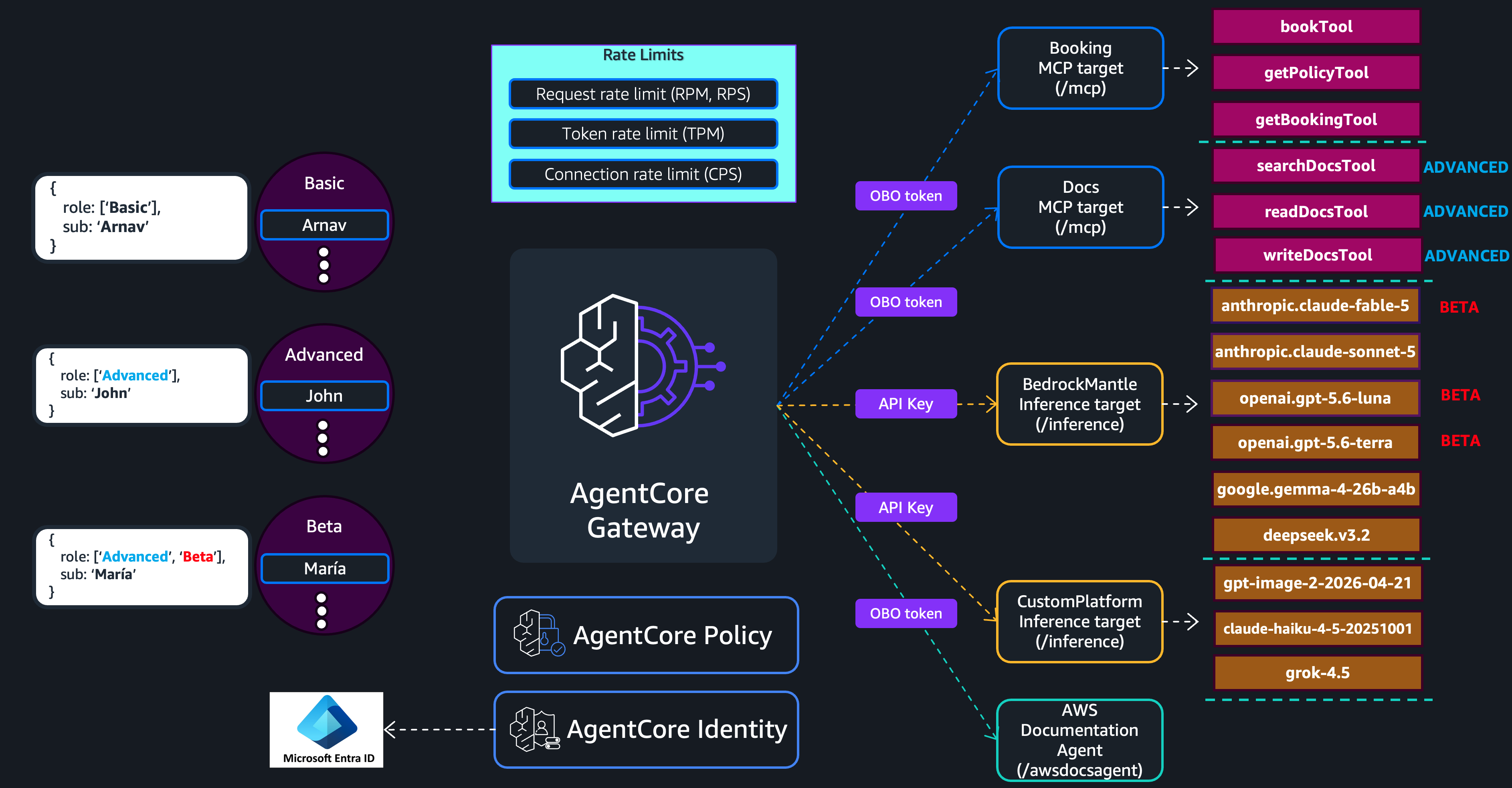
图 1:采用用户组、身份和策略强制机制的 AgentCore gateway 速率限制架构
Basic 用户的速率限制比 Advanced 用户更严格;Beta 用户则在受限模型上获得更高的限制,使组织能够在将这些模型推广到更广泛的组织之前,对其性能和适用性进行基准测试。在为每个用户组设置速率限制前,请先了解速率限制的结构。
速率限制结构
速率限制配置由两部分组成:维度键和条目。维度键定义网关如何将传入流量划分到速率桶中。条目则定义每个桶允许的吞吐量。
本文使用 AWS Command Line Interface(AWS CLI)创建速率限制配置。以下示例展示了维度键与条目之间的关系。该速率限制使用 targetName 作为维度键,并定义两个条目:针对高流量目标 Booking(MCP 服务器)的特定条目,限制为每秒 100 个请求;以及适用于其余每个目标的通配符条目,分别限制为每秒 10 个请求。这意味着其他每个目标都拥有各自独立的 10 RPS 桶。
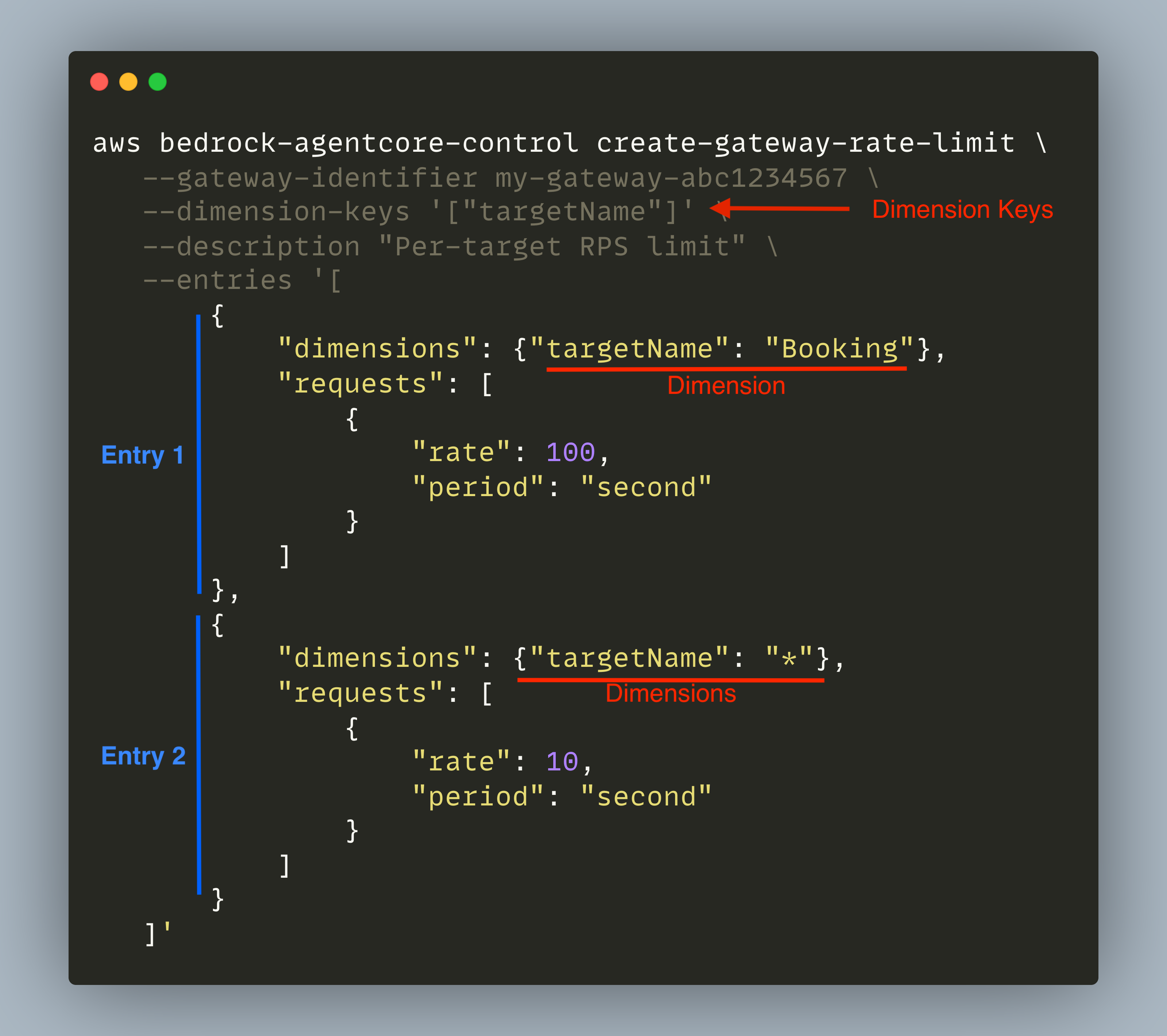
图 2:包含维度键和条目的速率限制结构
维度键定义网关如何将流量划分到速率桶中。请求到达时,网关会从请求上下文中解析每个维度键对应的值,并使用所得组合将请求分配到正确的速率桶。AgentCore gateway 支持以下维度键:targetName、toolName、qualifiedModelId、$.context.jwt.<claim>、$.context.iam.principal 和 $.context.iam.sourceIdentity。我们将在后续章节中通过示例逐一介绍它们。
条目是速率限制中的规则。每个条目都会指定一组待匹配的维度键,以及该匹配允许的吞吐量。条目支持特殊的全匹配默认值 *,该值会让每个不同的值都以配置的速率拥有独立的桶。网关评估请求时,会先检查是否有按名称匹配的条目,随后才会回退至通配符。按名称指定的条目优先级更高,因为它显式引用了该值,而不是依赖全匹配规则。
以上述速率限制为例,当 Booking 目标(MCP 服务器)收到请求时,网关会匹配第一个条目,并最多允许 100 RPS。由于该条目按名称引用了 Booking 目标,最具体的值匹配优先于默认值 *,因此它具有更高优先级。对于其他任何目标,不存在按名称指定的条目,因此网关会回退至通配符条目,并最多允许每秒 10 个请求。每个匹配通配符的目标(Docs、BedrockMantle、CustomPlatform 和 awsdocsagent)都会获得各自独立的桶。
您可以组合多个维度键,实现更细粒度的控制。例如,dimensionKeys: [“targetName”, “$.context.jwt.role”] 会同时按目标和调用者身份角色声明对流量分组,从而让每个用户组(在前述示例中为 Basic、Advanced 或 Beta)在每个目标上拥有独立的速率桶。
速率限制类型和配置示例
AgentCore gateway 实施两层速率限制:客户定义的速率限制和 Service Quotas。系统首先评估客户定义的速率限制;如果请求通过,才会评估服务配额。以下章节将说明服务配额以及不同类型的客户定义速率限制。
- 服务托管配额。
这些是服务针对每个 AWS 账户在 AgentCore gateway 上实施的限制。服务托管配额定义了客户定义速率限制不可超越的上限。请求的有效速率为客户定义限制与服务托管限制中的较小值。您可以通过 Service Quotas 控制台申请提高某些配额。
- 客户定义的用户限制。
用户级限制使用 $.context.jwt.<claim>、$.context.iam.principal 和 $.context.iam.sourceIdentity 作为维度键,控制单个用户或整个用户组可消耗的流量。这些限制可在调用者群体中实施公平使用,并防止任一调用者独占网关容量。以下示例为每个用户组分配不同的请求速率。JWT 的角色声明是一个数组,因此每种唯一组合都需要各自的条目。
aws bedrock-agentcore-control create-gateway-rate-limit \
  --gateway-identifier my-gateway-abc1234567 \
  --dimension-keys '["$.context.jwt.role"]' \
  --description "Per-role request and connection limit" \
  --entries '[
    {
      "dimensions": {"$.context.jwt.role": "[\"Basic\"]"},
      "requests": [{"rate": 100, "period": "minute"}],
      "connections": [{"rate": 50, "period": "second"}]
    },
    {
      "dimensions": {"$.context.jwt.role": "[\"Advanced\"]"},
      "requests": [{"rate": 300, "period": "minute"}],
      "connections": [{"rate": 150, "period": "second"}]
    },
    {
      "dimensions": {"$.context.jwt.role": "[\"Advanced\", \"Beta\"]"},
      "requests": [{"rate": 300, "period": "minute"}],
      "connections": [{"rate": 200, "period": "second"}]
    },
    {
      "dimensions": {"$.context.jwt.role": "*"},
      "requests": [{"rate": 80, "period": "minute"}],
      "connections": [{"rate": 10, "period": "second"}]
    }
  ]'
在这一配置中,Basic 用户获得两个桶:100 RPM 和 50 CPS。这意味着任一 Basic 用户的每个请求都会计入相同的 100 RPM 总量,每个连接都会计入相同的 50 CPS 总量。如果一名 Basic 用户在一分钟内发送了 80 个请求,那么该窗口内所有其他 Basic 用户仅剩 20 个请求额度。Advanced 用户拥有自己的两个桶,分别为 300 RPM 和 150 CPS,且遵循同样的共享机制。属于 [“Advanced”, “Beta”] 组的用户拥有两个桶,分别为 300 RPM 和 200 CPS。更高的连接额度可满足其以流式传输为主的基准测试工作负载。
但是,在同一个组内,单个用户仍可能消耗整个组的速率桶,从而限制该组中其他所有用户。例如,一名 Basic 用户在一分钟内发送 100 个请求,就会使其他所有 Basic 用户的可用容量归零。为避免这一情况,我们还会创建如下速率限制配置。
aws bedrock-agentcore-control create-gateway-rate-limit \
  --gateway-identifier my-gateway-abc1234567 \
  --dimension-keys '["$.context.jwt.role", "$.context.jwt.sub"]' \
  --description "Per-user request and connection limit within each role" \
  --entries '[
    {
      "dimensions": {"$.context.jwt.role": "[\"Basic\"]", "$.context.jwt.sub": "*"},
      "requests": [{"rate": 20, "period": "minute"}],
      "connections": [{"rate": 10, "period": "second"}]
    },
    {
      "dimensions": {"$.context.jwt.role": "[\"Advanced\"]", "$.context.jwt.sub": "*"},
      "requests": [{"rate": 60, "period": "minute"}],
      "connections": [{"rate": 30, "period": "second"}]
    },
    {
      "dimensions": {"$.context.jwt.role": "[\"Advanced\", \"Beta\"]", "$.context.jwt.sub": "*"},
      "requests": [{"rate": 60, "period": "minute"}],
      "connections": [{"rate": 50, "period": "second"}]
    },
    {
      "dimensions": {"$.context.jwt.role": "*", "$.context.jwt.sub": "*"},
      "requests": [{"rate": 20, "period": "minute"}],
      "connections": [{"rate": 20, "period": "second"}]
    }
  ]'
采用这一配置后,无论组中有多少用户,每名用户都会被限制在各自的速率范围内。JWT 中的 $.context.jwt.sub 声明可唯一标识每一名用户,使网关能够在个人层面跟踪和实施限制。即使组级限制允许 Basic 用户总计达到 100 RPM,也不会
English / 原文
Amazon Bedrock AgentCore gateway is a fully managed, serverless AI gateway that provides a single, secure entry point for AI traffic. AgentCore gateway routes traffic to tools such as managed web search, managed knowledge bases, MCP servers, inference models (LLMs), agents (A2A, agents as tools, etc.), or HTTP endpoint. Today, we are announcing support for rate limiting on AgentCore gateway, giving you fine-grained control over how much traffic individual users can consume through your gateway.
Rate limiting in AgentCore gateway gives you per-user control over how users consume your tools, inference models, and agents. Define OAuth or IAM-based rules for requests per minute, concurrent connections, and token throughput, making sure downstream services remain available under heavy traffic spikes.
Centralized rate limiting for AI traffic with AgentCore gateway
AgentCore gateway provides three target types: MCP targets, inference targets, and HTTP passthrough targets. The following rate limiting metrics are supported on the targets.
- Request rate limits, measured in requests per second (RPS) and requests per minute (RPM), apply to all target types. Each limit defines a maximum count of requests permitted within the given time window, and the gateway measures every incoming request against it. A request counts as exactly one unit toward the configured limit, regardless of how long it takes to complete, a request that finishes in 50 milliseconds and one that streams for 90 seconds each consume exactly one unit from the per-second or per-minute limit.
- Token rate limits , measured in tokens per minute (TPM), apply to inference targets only. Token rate limiting accounts for both input tokens and output tokens. The full round-trip token cost of a request counts against the limit. AgentCore gateway uses a general-purpose tokenizer to estimate the incoming tokens for a request and deducts it from the rate-limit bucket upfront before the gateway dispatches the inference call. Once the inference call returns a response, which includes actual input and output token usage reported by the model provider, the gateway reconciles the limit by accounting for the true token consumption.
- Connection rate limits , measured in connections per second (CPS), apply to all target types. Unlike request rate limits, connection rate limiting tracks how long each request holds an open connection. For example, if a streaming inference call takes 100 seconds to complete, that request consumes one connection slot for the entire duration. CPS provides an additional mechanism for protecting targets against long-lived concurrent sessions particularly useful when you need to cap how many simultaneous connections a target sustains, rather than how many requests arrive in each window.
For this use case, assume three user groups: Basic, Advanced, and Beta. AgentCore Identity handles inbound authentication using JSON Web Tokens (JWT) with Microsoft Entra ID as the identity provider and also serves as the token vending service for outbound targets. Policy in Amazon Bedrock AgentCore enforces role-based access control (RBAC), scoping each group’s access to specific targets and models. The following diagram illustrates this configuration.
Figure 1: AgentCore gateway rate limiting architecture with user groups, identity, and policy enforcement
Basic users operate under more restrictive rate limits than Advanced users, while Beta users receive elevated limits on restricted models, enabling the organization to benchmark performance and suitability before rolling these models out to the broader organization. Before setting up rate limits for each user-group, review the rate limit structure.
Rate limit structure
A rate limit configuration consists of two parts: dimension keys and entries. Dimension keys define how the gateway groups incoming traffic into rate buckets. Entries define the allowed throughput for each bucket.
In this post, we use the AWS Command Line Interface (AWS CLI) to create the rate limit configuration. The following example demonstrates the relationship between dimension keys and entries. This rate limit uses targetName as the dimension key and defines two entries: a specific entry for the Booking target (MCP server), a high-traffic target, at 100 requests per second, and a wildcard entry that applies 10 requests per second individually to each remaining target, meaning every other target receives its own 10 RPS bucket.
Figure 2: Rate limit structure with dimension keys and entries
Dimension keys define how the gateway groups traffic into rate buckets. When a request arrives, the gateway resolves each dimension key to its value from the request context and uses the resulting combination to assign the request to the correct rate bucket. AgentCore gateway supports the following dimension keys: targetName, toolName, qualifiedModelId, $.context.jwt.<claim>, $.context.iam.principal, and $.context.iam.sourceIdentity. We will explore each of these through examples in the sections that follow.
Entries are the rules within a rate limit. Each entry specifies a set of dimension keys to match, and the allowed throughput for that match. Entries support the special catch-all default value * that gives each distinct value its own independent bucket at the configured rate. When the gateway evaluates a request, it checks whether an entry matches by name before falling back to the wildcard. A named entry takes precedence because it refers to the value explicitly rather than relying on the catch-all.
Taking the preceding rate limit as an example, when a request arrives for the Booking target (MCP server), the gateway matches the first entry and allows up to 100 RPS. This entry takes precedence because the most specific value match wins over default value * as it refers to the Booking target by name. For any other target, no named entry exists, so the gateway falls back to the wildcard entry and allows up to 10 requests per second. Each target that matches the wildcard (Docs, BedrockMantle, CustomPlatform, and awsdocsagent) gets its own independent bucket.
You can combine multiple dimension keys for more granular control. For example, dimensionKeys: [“targetName”, “$.context.jwt.role”] groups traffic by both target and caller identity role claim, giving each user-group (Basic, Advanced, or Beta in the preceding example) their own independent rate bucket per target.
Types of rate limits and example configurations
AgentCore gateway enforces two layers of rate limiting: customer-defined rate limits and Service Quotas. Customer-defined rate limits are evaluated first. If the request passes, service quotas are evaluated. The following sections explain service quotas and the different types of customer-defined rate limits.
- Service managed quotas.
These are the limits enforced on AgentCore gateway per AWS account by the service. Service managed quotas define the ceiling that customer-defined rate limits cannot exceed. The effective rate for requests is the minimum of the customer-defined limit and the service-managed limit. You can request increases for some quotas using the Service Quotas console.
- Customer-defined user limits.
User-level limits use $.context.jwt.<claim>, $.context.iam.principal, and $.context.iam.sourceIdentity as the dimension keys to control how much traffic individual users or entire user-group can consume. These limits enforce fair usage across your caller base and prevent any single caller from monopolizing gateway capacity. The following example assigns different request rates per user group. The JWT role claim is an array, so each unique combination requires its own entry.
aws bedrock-agentcore-control create-gateway-rate-limit \
  --gateway-identifier my-gateway-abc1234567 \
  --dimension-keys '["$.context.jwt.role"]' \
  --description "Per-role request and connection limit" \
  --entries '[
    {
      "dimensions": {"$.context.jwt.role": "[\"Basic\"]"},
      "requests": [{"rate": 100, "period": "minute"}],
      "connections": [{"rate": 50, "period": "second"}]
    },
    {
      "dimensions": {"$.context.jwt.role": "[\"Advanced\"]"},
      "requests": [{"rate": 300, "period": "minute"}],
      "connections": [{"rate": 150, "period": "second"}]
    },
    {
      "dimensions": {"$.context.jwt.role": "[\"Advanced\", \"Beta\"]"},
      "requests": [{"rate": 300, "period": "minute"}],
      "connections": [{"rate": 200, "period": "second"}]
    },
    {
      "dimensions": {"$.context.jwt.role": "*"},
      "requests": [{"rate": 80, "period": "minute"}],
      "connections": [{"rate": 10, "period": "second"}]
    }
  ]'
In this configuration, Basic users receive two buckets, 100 RPM and 50 CPS, meaning every request from any Basic user counts toward the same 100 RPM total, and every connection counts toward the same 50 CPS total. If one Basic user sends 80 requests in a minute, only 20 remain for all other Basic users in that window. Advanced users receive their own two buckets at 300 RPM and 150 CPS, governed by the same collective behavior. Users with [“Advanced”, “Beta”] group membership receive two buckets at 300 RPM and 200 CPS. The higher connection allowance accommodates their streaming-heavy benchmarking workloads.
However, within a group, a single user can still consume the entire group rate bucket, throttling everyone else in that group. For example, one Basic user sending 100 requests in a minute would leave zero capacity for all other Basic users. To prevent this, we create the following rate limit configuration as well.
aws bedrock-agentcore-control create-gateway-rate-limit \
  --gateway-identifier my-gateway-abc1234567 \
  --dimension-keys '["$.context.jwt.role", "$.context.jwt.sub"]' \
  --description "Per-user request and connection limit within each role" \
  --entries '[
    {
      "dimensions": {"$.context.jwt.role": "[\"Basic\"]", "$.context.jwt.sub": "*"},
      "requests": [{"rate": 20, "period": "minute"}],
      "connections": [{"rate": 10, "period": "second"}]
    },
    {
      "dimensions": {"$.context.jwt.role": "[\"Advanced\"]", "$.context.jwt.sub": "*"},
      "requests": [{"rate": 60, "period": "minute"}],
      "connections": [{"rate": 30, "period": "second"}]
    },
    {
      "dimensions": {"$.context.jwt.role": "[\"Advanced\", \"Beta\"]", "$.context.jwt.sub": "*"},
      "requests": [{"rate": 60, "period": "minute"}],
      "connections": [{"rate": 50, "period": "second"}]
    },
    {
      "dimensions": {"$.context.jwt.role": "*", "$.context.jwt.sub": "*"},
      "requests": [{"rate": 20, "period": "minute"}],
      "connections": [{"rate": 20, "period": "second"}]
    }
  ]'
With this configuration, each individual user is capped at their own rate regardless of how many users exist in their group. The $.context.jwt.sub claim from the JWT uniquely identifies each user, enabling the gateway to track and enforce limits at the individual level. Even if the group-level limit allows 100 RPM total for Basic, no single user can consume more than 20 RPM and 10 CPS of that shared pool. The same logic applies to Advanced and Beta users at their respective individual caps. Together, the per-group limit and the per-user limit create a two-layer enforcement model: the group ceiling helps prevent one group from starving another, and the per-user ceiling helps prevent one individual from starving their peers within the same group.
Both rate limits are evaluated independently using AND semantics. A request must pass both the group-level limit and the per-user limit to proceed. If either check denies the request, the gateway returns a throttling response. For example, if Arnav (Basic) has consumed 20 RPM individually, his next request is denied by the per-user limit even though the Basic group still has 80 RPM of remaining capacity. Conversely, if the Basic group has collectively consumed 100 RPM, all Basic users are throttled regardless of their individual consumption.
- Customer defined target-level limits.
Target-level limits use targetName, qualifiedModelId, or toolName as the dimension key to control throughput to specific downstream targets, models, or tools. These limits protect backend capacity and distribute load across your target resources. The following example limits traffic on a per-target basis.
aws bedrock-agentcore-control create-gateway-rate-limit \
  --gateway-identifier my-gateway-abc1234567 \
  --dimension-keys '["targetName"]' \
  --description "Per-target rate limit" \
  --entries '[
    {
      "dimensions": {"targetName": "Booking"},
      "requests": [{"rate": 20, "period": "second"}]
    },
    {
      "dimensions": {"targetName": "Docs"},
      "requests": [{"rate": 15, "period": "second"}]
    },
    {
      "dimensions": {"targetName": "awsdocsagent"},
      "requests": [{"rate": 10, "period": "second"}],
      "connections": [{"rate": 60, "period": "second"}]
    },
    {
      "dimensions": {"targetName": "BedrockMantle"},
      "tokens": [{"rate": 100000, "period": "minute"}],
      "connections": [{"rate": 250, "period": "second"}]
    },
    {
      "dimensions": {"targetName": "CustomPlatform"},
      "tokens": [{"rate": 50000, "period": "minute"}],
      "connections": [{"rate": 100, "period": "second"}]
    },
    {
      "dimensions": {"targetName": "*"},
      "tokens": [{"rate": 10000, "period": "minute"}],
      "requests": [{"rate": 10, "period": "second"}],
      "connections": [{"rate": 50, "period": "second"}]
    }
  ]'
You can also use qualifiedModelId to set connection rate limits (CPS) per model, or toolName to set request rate limits (RPS) per individual tool such as Booking___bookTool or Docs___searchDocsTool.
Note: We exclude customer-defined target-level rate limits from our use-case configuration. Beta users run heavy benchmarking workloads against restricted models, consuming a disproportionate share of a shared target-level limit. Because this limit dimensions only on targetName, all users share a single ceiling, meaning high traffic from one group or individual can starve everyone else on that target. When a subset of users is expected to dominate token or connection consumption on a specific target, scope the limit by identity instead (for example, [“targetName”, “$.context.jwt.role”]). See the following example.
- Customer defined target-user level limits.
Hybrid limits combine target and user dimensions in a single rate limit configuration, giving you the most granular control. Using multi-dimension keys, you can scope rate limits to a specific user or user group on a specific target, model, or tool.
The following example enforces token limits at the model level, scoped to each user within their group. The qualifiedModelId dimension is the fully qualified model identifier for inference targets. It uniquely identifies the model being invoked (see documentation).
aws bedrock-agentcore-control create-gateway-rate-limit \
  --gateway-identifier my-gateway-abc1234567 \
  --dimension-keys '["$.context.jwt.role", "qualifiedModelId", "$.context.jwt.sub"]' \
  --description "Per-user per-role per-model TPM and access limit" \
  --entries '[
    {
      "dimensions": {"$.context.jwt.role": "[\"Advanced\", \"Beta\"]", "qualifiedModelId": "anthropic.claude-fable-5", "$.context.jwt.sub": "*"},
      "tokens": [{"rate": 80000, "period": "minute"}]
    },
    {
      "dimensions": {"$.context.jwt.role": "[\"Basic\"]", "qualifiedModelId": "anthropic.claude-fable-5", "$.context.jwt.sub": "*"},
      "requests": [{"rate": 0, "period": "second"}]
    },
    {
      "dimensions": {"$.context.jwt.role": "[\"Advanced\"]", "qualifiedModelId": "anthropic.claude-fable-5", "$.context.jwt.sub": "*"},
      "requests": [{"rate": 0, "period": "second"}]
    },
    ... (repeat for openai.gpt-5.6-luna and openai.gpt-5.6-terra)
    {
      "dimensions": {"$.context.jwt.role": "[\"Advanced\"]", "qualifiedModelId": "*", "$.context.jwt.sub": "*"},
      "tokens": [{"rate": 40000, "period": "minute"}]
    },
    {
      "dimensions": {"$.context.jwt.role": "[\"Basic\"]", "qualifiedModelId": "*", "$.context.jwt.sub": "*"},
      "tokens": [{"rate": 20000, "period": "minute"}]
    }
  ]'
In this configuration, anthropic.claude-fable-5 is a restricted model. Only users with the [“Advanced”, “Beta”] role can invoke it, receiving 80,000 TPM per user for benchmarking and evaluation workloads. Both [“Basic”] and [“Advanced”] users are blocked* from invoking this model with a rate of zero. The same pattern applies to other restricted models (openai.gpt-5.6-luna and openai.gpt-5.6-terra), make sure to add entries following the same structure for each. For generally available models, Basic users receive 20,000 TPM per user while Advanced users receive 40,000 TPM per user through wildcard entries.
Specific entries take precedence over wildcards following the most-specific-match-wins rule. When María (sub: “María”, role: [“Advanced”, “Beta”]) invokes anthropic.claude-fable-5, the gateway matches the explicit entry and applies 80,000 TPM scoped to María individually. If María exhausts 80,000 TPM limit, other Beta users remain unaffected because * on $.context.jwt.sub gives each user their own isolated bucket. When John (sub: “John”, role: [“Advanced”]) attempts anthropic.claude-fable-5, the gateway matches the explicit [“Advanced”] entry for that model, which sets requests to zero blocking the call. When John invokes a generally available model like anthropic.claude-sonnet-5, no explicit entry exists for that model-role combination, so the gateway falls through to the wildcard entry for [“Advanced”] and applies 40,000 TPM. When Arnav (sub: “Arnav”, role: [“Basic”]) invokes the same generally available model, he receives 40,000 TPM through the Basic wildcard entry.
You can also combine dimensions such as [“$.context.jwt.role”, “targetName”] for per-role per-target request limits, [“$.context.jwt.sub”, “targetName”] for per-user per-target combined request and token limits, or [“$.context.jwt.role”, “toolName”] for per-role per-tool request limits. For more rate limiting configurations, see Rate limit API examples.
Rate limits for agentic workloads
Consider the following AgentCore gateway configuration where a user invokes the AWS Documentation Agent. The agent uses two downstream resources through the gateway: the Docs MCP target for document search and retrieval, and the BedrockMantle inference target for reasoning through the anthropic.claude-sonnet-5 model. The following architecture shows this:
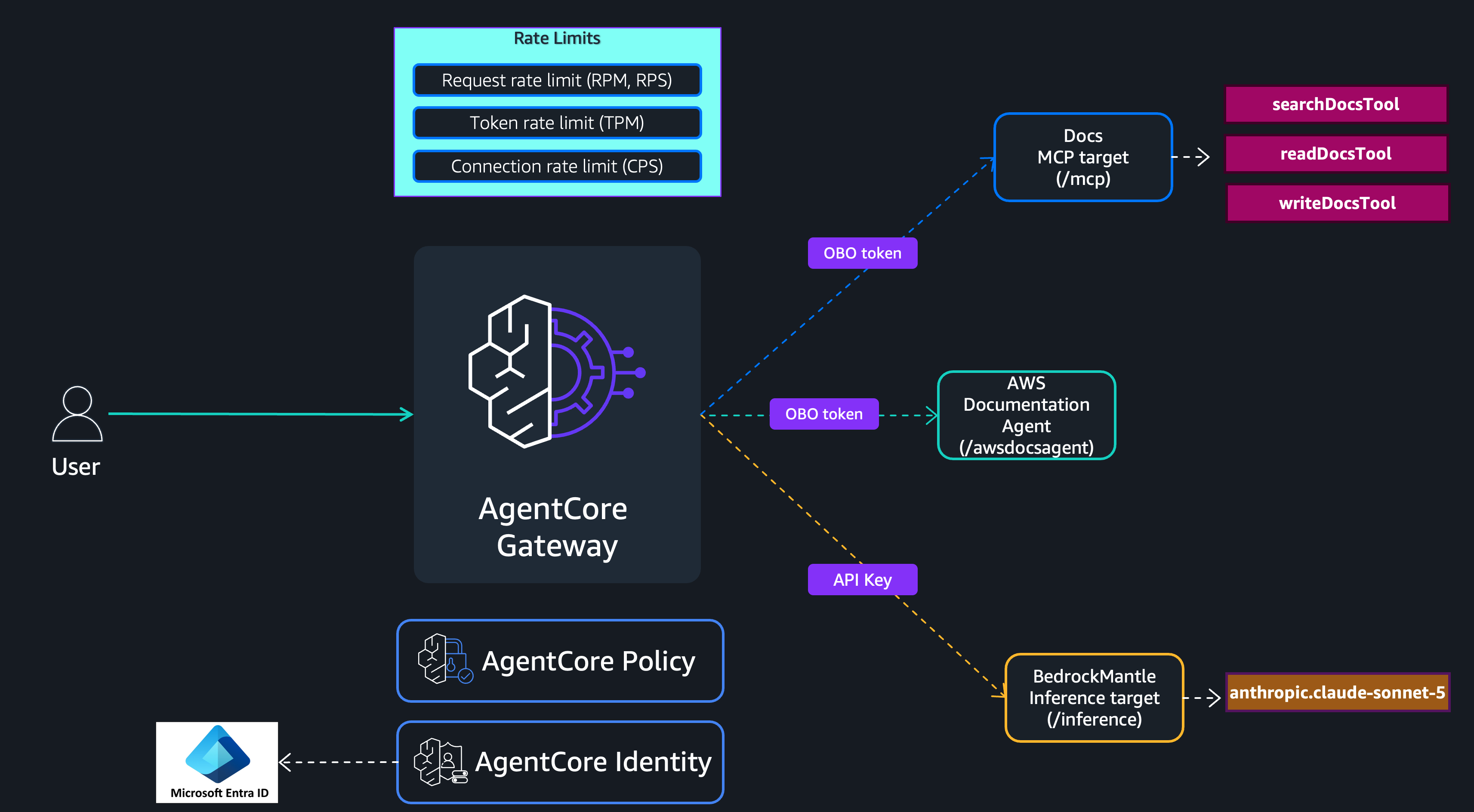
Figure 3: Agentic workload rate limiting with downstream resource consumption
There are two types of rate limits to consider for agentic workloads:
- Rate limits on agent invocation.
The first type protects how frequently users or other services can invoke the agent. These are request (RPM) and connection (CPS) limits scoped to the agent target itself. At the simplest level, you can dimension on targetName alone, for example, {“targetName”: “awsdocsagent”}, so that all users share a single invocation ceiling. For more granular control, pair targetName with user dimensions such as [“targetName”, “$.context.jwt.role”] or [“targetName”, “$.context.jwt.role”, “$.context.jwt.sub”] to cap how often each user group or individual user can invoke the agent.
- Rate limits on resources consumed by the agent.
The second type protects the downstream resources the agent consumes on each invocation. AWS Documentation Agent triggers multiple downstream requests. The agent calls the Docs MCP target for document retrieval and the BedrockMantle target for inference. How you rate limit these downstream calls depends on how the agent authenticates with the gateway when invoking those resources.
If the agent performs an on-behalf-of (OBO) token exchange based on the user’s incoming JWT token, then the downstream requests carry the original user’s identity. All existing user-based rate limits apply. The per-role and per-user limits you configured previously will enforce on the agent’s downstream calls as if the user made them directly.
However, if the agent performs a machine-to-machine grant to obtain a new token (for example, a client credentials flow), the downstream requests carry the agent’s own identity rather than the caller’s. In this case, the user-based rate limits will not match the user’s claims. You should add rate limits that identify the agent itself, based on your identity provider, use a claim that uniquely identifies the agent, such as $.context.jwt.azp (authorized party), and limit accordingly to prevent a single agent from exhausting shared resources.
Rate limiting best practices
Follow these best practices when creating rate limits with AgentCore gateway:
-
If you are using Policy in AgentCore to enforce RBAC authorization, it is important to understand the evaluation order. Rate limits are applied first; AgentCore Policy is evaluated after. This means that even if a user or role is ultimately denied access by AgentCore Policy, their request still consumes the rate limit bucket before that denial occurs. To avoid this consumption, create a rate limit entry that explicitly assigns a rate of zero to users or groups that AgentCore Policy would block, this makes sure the request is rejected at the rate limit layer without depleting the budget available to authorized callers.
-
The gateway evaluates rate limits with more dimension keys first (more specific limits take priority). Within the same number of dimensions, the gateway evaluates rate limits with tighter (lower) rates first. Evaluation short-circuits on the first denial, meaning the gateway does not evaluate remaining rate limits once a request is denied. Design your rate limit configuration so that your tightest limits live at the highest-dimension level (for example, the three-key [“
$.context.jwt.role”,“qualifiedModelId”,“$.context.jwt.sub”] limit). -
Two rate limits with same dimension key but with different orders cannot be created. For example, you cannot create a rate limit with [“
$.context.jwt.role”, “qualifiedModelId”, “$.context.jwt.sub”] and [“qualifiedModelId”, “$.context.jwt.role”, “$.context.jwt.sub”] dimension key on the same gateway. However, the order of the dimension key matters. When a rate limit has multiple dimension keys, the order you declare them determines how wildcards can be used. The catch all default * can only appear in trailing positions. If you use * at position N, all subsequent positions must also be *. This trailing-only constraint facilitates predictable matching behavior. To understand this behavior, see examples. -
Avoid using high-cardinality or unbounded JWT claims as dimension keys (for example,
$.context.jwt.jti,$.context.jwt.nonce, or request IDs). These create an unbounded number of rate buckets, and may reduce the effectiveness of rate limiting. Use stable, bounded identifiers such as sub, role, team, or tier instead. -
The gateway uses fail-open semantics for rate limit evaluation. Because of fail-open behavior, do not rely solely on rate limits as a security boundary. Use rate limits for traffic management and quality of service, and use authentication, authorization, and AWS WAF rules for security enforcement.
-
Enable application logs on your AgentCore gateway. This gives you access to rate limiting logs. The gateway emits OpenTelemetry (OTEL) span attributes on the server span for every request where customer rate limits are evaluated. Use these attributes for debugging and monitoring.
-
Make sure to include a catch-all entry, consider a gateway with a single rate limit for simplicity:
aws bedrock-agentcore-control create-gateway-rate-limit
--gateway-identifier my-gateway-abc1234567
--dimension-keys '["$.context.jwt.sub"]'
--description "Per-sub request limit"
--entries '[ { "dimensions": {"$.context.jwt.sub": "Arnav"}, "requests": [{"rate": 100, "period": "minute"}] } ]'
In this configuration, only Arnav has an explicit entry. If John ($.context.jwt.sub: “John”) invokes the gateway, the request does not match any entry, the rate limit is effectively skipped, and John falls through to service-managed quotas with no customer-defined enforcement. Adding a wildcard catch-all entry makes sure that all callers without an explicit entry receive their own per-user rate limit bucket:
aws bedrock-agentcore-control create-gateway-rate-limit \
  --gateway-identifier my-gateway-abc1234567 \
  --dimension-keys '["$.context.jwt.sub"]' \
  --description "Per-sub request limit" \
  --entries '[
    {
      "dimensions": {"$.context.jwt.sub": "Arnav"},
      "requests": [{"rate": 100, "period": "minute"}]
    },
    {
      "dimensions": {"$.context.jwt.sub": "*"},
      "requests": [{"rate": 50, "period": "minute"}]
    }
  ]'
Now John, María, and any other caller each receive their own isolated 50 RPM bucket through the wildcard, while Arnav retains his explicit 100 RPM allocation. Without the catch-all entry, unmatched callers bypass the rate limit entirely.
For more best practices, see the AgentCore gateway documentation.
Conclusion
In this post, we walked through how to configure rate limits on Amazon Bedrock AgentCore gateway to govern AI traffic, enforcing fair usage across roles and users while helping to prevent any single caller or workload from exhausting shared capacity. We demonstrated how to layer rate limits: user-level limits for per-role and per-user fairness, target-level limits for protecting downstream service capacity, and multi-dimensional limits that combine user and target to enforce fine-grained rate limits. We also covered rate limiting considerations for agentic workloads, where downstream resource consumption varies depending on how the agent authenticates with the gateway.
Rate limits are one layer of a comprehensive traffic management strategy. Combined with AgentCore Identity for authentication, Policy in AgentCore for role-based access control, and application logging for observability, they give you the tools to operate a production-grade AI gateway with confidence, facilitating fair usage, protecting backend services, and maintaining availability as your workloads scale.
What’s next?
To get started with rate limits on AgentCore gateway, explore the following resources:
- Add rate limits to AgentCore gateway, complete API reference for creating, updating, and deleting rate limits with dimension keys, entries, and supported metrics.
- Rate limit API examples, additional CLI examples covering batch operations, listing, filtering, and delete workflows.
- AgentCore gateway quotas and limits, service-managed quotas, default limits, and how to request increases.
- AgentCore Identity, configure inbound JWT authentication and outbound token vending for AgentCore gateway targets.
- Policy in AgentCore, set up role-based access control to complement rate limits with authorization enforcement.
- Application logging for AgentCore gateway, enable OpenTelemetry-based logging to monitor rate limit evaluations, denials, and per-bucket consumption in real time.
We continue to invest in AgentCore gateway based on customer feedback. We look forward to how you use AgentCore gateway as a central enforcement system for your AI traffic.
About the authors
Anagh Agrawal
Anagh is a Software Engineer with Amazon Bedrock AgentCore, where he builds core Gateway infrastructure powering agentic AI experiences. He has previously worked on Amazon Bedrock Agents and brings distributed systems and cryptographic services experience from his time at AWS Key Management Service. He holds an MS in Computer Science from Stony Brook University. Outside of work, Anagh is a musician who plays piano and ukulele, and an avid hiker with a love for anything outdoors.
Eashan Kaushik
Eashan is a Specialist Solutions Architect AI/ML at Amazon Web Services. He is driven by creating cutting-edge generative AI solutions while prioritizing a customer-centric approach to his work. Before this role, he obtained an MS in Computer Science from NYU Tandon School of Engineering. Outside of work, he enjoys sports, lifting, and running marathons.
Tanuja Joshi
Tanuja is a Software Engineer at Amazon Web Services on the AgentCore Gateway team. Since the start of her tenure, she has been working in the agentic AI space, contributing to services such as Bedrock Agents. When not at work, she enjoys reading and rock climbing.
Sean Eichenberger
Sean is a Principal Product Manager at AWS Agentic AI. He leads initiatives across agent governance, safety, and connectivity for Amazon Bedrock AgentCore.
Yuan Tian
Yuan is a Software Development Engineer on the Agentcore Gateway team. Previously an intern on the AutoGluon team, Yuan returned to AWS Agentic AI as a new grad and now works on helping customers build and deploy agentic AI applications. When not coding, Yuan enjoys playing video games and reading novels.
Shravani Banda
Shravani is a Frontend Engineer at Amazon Web Services on the AgentCore Gateway team, where she builds console experiences for agentic AI infrastructure. She began her AWS journey on the Bedrock Agents team and has been part of the agentic AI Gateway team since its inception. She holds an MS in Information Systems from Dakota State University. Outside of work, Shravani enjoys hiking and camping.