借助 OpenTelemetry 和 Amazon CloudWatch 构建 Amazon Bedrock 上 Codex 的可观测性
英文标题:Build visibility for Codex on Amazon Bedrock with OpenTelemetry and Amazon CloudWatch
随着工程团队从试用转向规模化采用 Codex 等编程 Agent,企业需要掌握使用采纳、资源消耗、可靠性与成本归属。本文介绍了一种 AWS 原生方案:本地 Codex 客户端将 OpenTelemetry(OTel)指标发送至本机 Collector,再经 SigV4 认证写入 Amazon CloudWatch,而不会在 Amazon Bedrock 的模型推理路径中加入集中式代理。配套的 `CodexOnBedrock` 仪表板可按用户、团队、部门、成本中心、模型和会话来源分析活跃用户、请求量、Token 用量及工具调用等数据。文章同时强调,CloudWatch 指标适合运营与趋势分析,实际账单成本应以 AWS Cost and Usage Reports(CUR)2.0 或 Amazon Bedrock 成本管理报告为准。
 1.3 MB
 101.1 KB
 124.1 KB
 345.0 KB
 141.2 KB
 346.5 KB
 10.8 KB
 26.6 KB
 26.5 KB
 179.2 KB
中文
随着组织从试验编程 Agent 转向在工程团队中推广采用,管理层面临的问题也发生了变化。不再只是“这个工具能否帮助开发者?”,而是“我们如何了解采用情况、管理消耗、维持可靠性,并以负责任的方式扩大访问范围?”。Codex 可以发出有关其活动的 OpenTelemetry(OTel)指标。当本地 Codex 客户端通过 Amazon Bedrock 使用 OpenAI 模型、并通过 AWS IAM Identity Center 进行身份验证时,可以将这些指标经由本地 OTel Collector 路由至 Amazon CloudWatch。由此形成的 AWS 原生视图,可按用户、团队、部门、组织或成本中心组织 Codex 的使用数据。
这种方法不会在模型请求路径中增加集中式代理。开发者仍在本地使用 Codex。运行在每位开发者工作站上的 Collector 在本地主机接收指标,并为其补充组织上下文;随后,它使用 AWS Signature Version 4(SigV4)将指标发送至区域 CloudWatch OpenTelemetry Protocol(OTLP)端点。参考部署会创建一个 CloudWatch 仪表板,而不会创建 Amazon Elastic Container Service(Amazon ECS)服务、负载均衡器、虚拟私有云(VPC)或公共数据接入端点。
本文将说明这一模式如何支持受治理的采用,介绍其架构,并总结 Codex on AWS 指导仓库中的实现方式。
将遥测数据转化为业务决策
遥测数据最有价值之处在于回答决策问题,而不只是增加另一个仪表板。随附的 CodexOnBedrock 仪表板提供过去 24 小时的滚动汇总数据,包括活跃用户、对话轮次、API 请求和 Token 用量。它还提供按模型、Token 类型、用户、部门、团队、成本中心、组织和会话来源划分的视图。
这些信号可帮助技术负责人区分广泛采用与零星试验。例如,多个团队的活跃用户数量增加,所需的赋能措施不同于仅集中在少数群体中的高消耗量。工具调用活动可帮助团队了解 Agent 工作流正在哪些地方形成。请求量与时长指标则可用于调查体验劣化问题。
| 管理层问题 | 可用信号 | 可支持的决策 |
|---|---|---|
| Codex 的采用是否正在扩大? | 活跃用户、线程、轮次和 API 请求 | 是扩大试点,还是将重点放在入门培训上 |
| 消耗集中在哪里? | 按用户、模型、部门、团队和成本中心划分的 Token 数 | 应在哪里实施成本分摊展示、审查使用情况或调整赋能措施 |
| 团队是否在使用 Agent 能力? | 工具调用量和会话来源 | 哪些地方可能需要工作流指导或系统投入 |
| 开发者体验是否可靠? | API 状态、请求时长和端到端轮次时长 | 是否应调查模型访问、网络或客户端行为 |
| 服务成本是多少? | 含 IAM 主体数据的 AWS Cost and Usage Reports(CUR)2.0 | 用于财务级报告和成本分配 |
最后一行的区别很重要。CloudWatch OTel 指标展示的是使用量和运行行为。Token 计数可支持趋势分析,但并非计费账本。由于价格变化、折扣、抵扣额度和账单调整等因素,按目录价格估算的结果可能与实际费用存在偏差。对于实际支出,应使用 AWS Cost and Usage Reports(CUR)2.0 中基于 IAM 主体的成本分配,或适用的 Amazon Bedrock 成本管理报告。
解决方案概览
该架构对模型访问和遥测发布使用同一 AWS 身份。开发者通过 IAM Identity Center 登录,并以 Amazon Bedrock 作为模型提供方运行 Codex。Codex 将指标发送给仅监听 127.0.0.1 的 Collector。Collector 添加身份和组织属性,对指标进行批处理,并使用临时 AWS 凭证为发送至 CloudWatch 的请求签名。
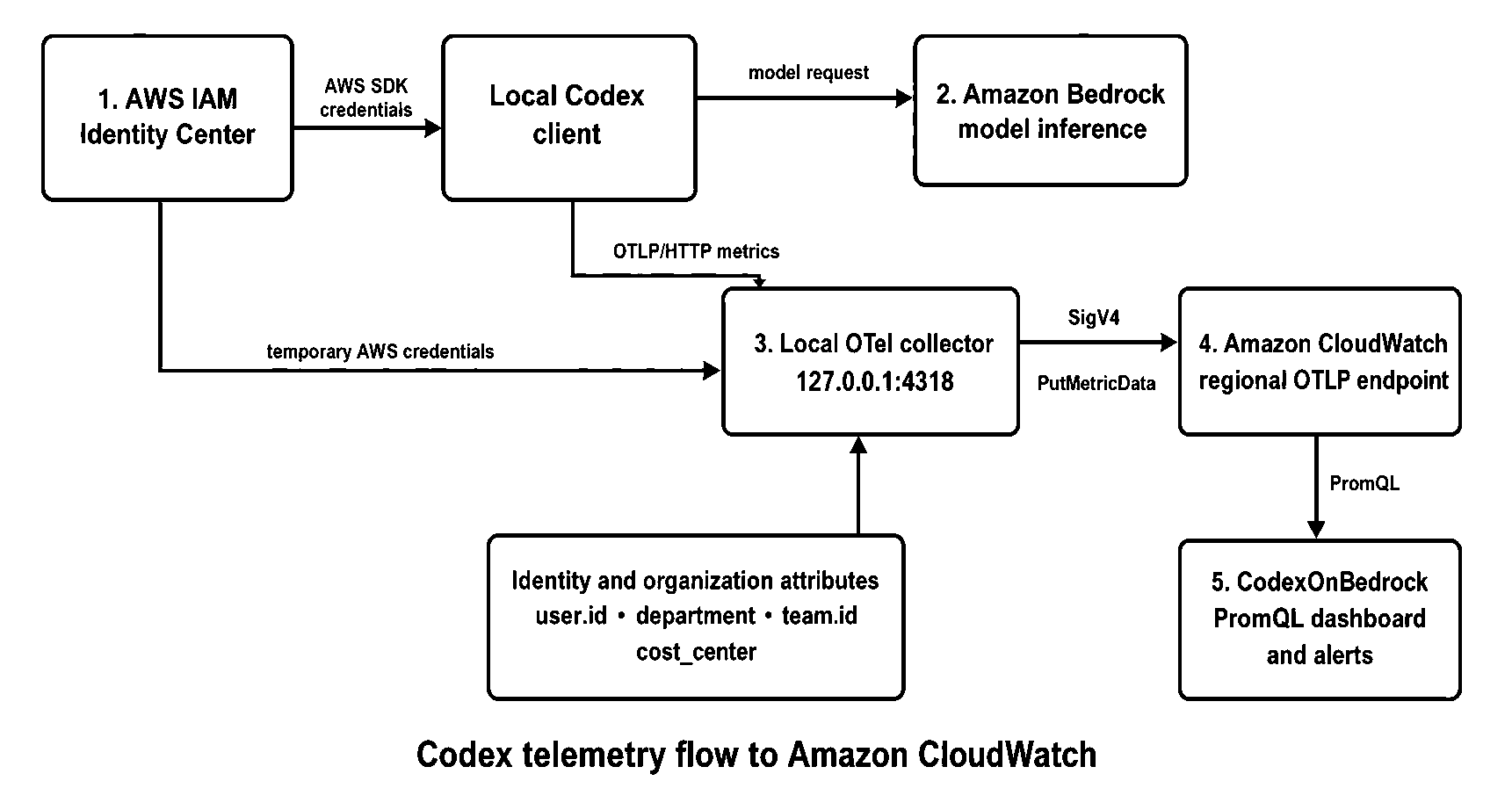
Codex 本地遥测数据流:通过本地 Collector 将指标发送至 Amazon CloudWatch,使用 SigV4 身份验证发布指标,并始终不进入 Amazon Bedrock 推理路径
Codex 会发出诸如 codex.api_request、codex.api_request.duration_ms、codex.turn.e2e_duration_ms、codex.turn.token_usage、codex.turn.tool.call、codex.thread.started 和 codex.conversation.turn.count 等指标。当前的 Codex 配置文档将 OTel 描述为可选启用功能,并说明了日志、指标和追踪各自独立的导出器。
本地 Collector 将 user.id 和 user.email 添加为必需的资源属性。可选属性包括 department、team.id、cost_center、organization、location、role 和 manager。参考 Collector 还会将这些属性复制到每个指标数据点上。这种方式让仪表板能够在本地 Sidecar 及其他受支持的数据接入模式中,保持一致的 Prometheus Query Language(PromQL)分组。
实施参考模式
完整命令和模板位于 AWS 原生访问快速入门中。以下五个阶段概述了实施过程。
1. 启用 CloudWatch OTel 功能
参考运行手册首先在目标区域中为遥测数据启用 OTel 富集和资源标签:
aws cloudwatch start-otel-enrichment --region us-west-2
aws observabilityadmin start-telemetry-enrichment --region us-west-2
aws cloudwatch get-otel-enrichment --region us-west-2
当前的 CloudWatch OTel 文档介绍了原生 OTLP 接入和 PromQL 查询。start-otel-enrichment 操作用于为受支持的 AWS 托管指标启用富集和 PromQL 访问。start-telemetry-enrichment 操作用于启用资源标签富集。请先确认哪些账户级设置已经启用,再进行更改。
2. 部署仪表板并构建 Collector
克隆仓库,然后部署仪表板并获取 Collector 二进制文件:
deployment/scripts/deploy-otel-stack.sh --region us-west-2
deployment/scripts/build-local-collector.sh --all
AWS CloudFormation 堆栈会部署 CodexOnBedrock 仪表板。Collector 运行在开发者工作站上,因此此步骤不会创建集中式 Collector 计算或网络基础设施。
3. 生成每位开发者的配置
根据开发者已认证的 AWS Profile 生成 Collector 配置:
deployment/scripts/generate-sidecar-config.sh \
  --region us-west-2 \
  --profile codex-bedrock \
  --auto-lookup
使用 --auto-lookup 时,脚本可以从 IAM Identity Center 身份存储中读取组织属性。显式指定的命令行值可覆盖自动发现的值。如果某个可选属性不可用,应省略其整个配置块。不要将占位字符串作为维度发送;它们会产生价值较低的时间序列,并削弱报告质量。
对于大规模部署,请通过现有的终端管理流程生成和分发此配置。应将组织元数据视为受治理的数据:在将其用于管理层报告之前,先建立获批准的取值、数据所有权和更新流程。
4. 配置 Codex 并授予最小权限访问
将 Codex 指标导出器指向本地 Collector。必须包含完整的 /v1/metrics 路径,因为 Codex 不会自动追加该路径:
[otel]
environment = "production"
log_user_prompt = false

[otel.metrics_exporter]
otlp-http = { endpoint = "http://127.0.0.1:4318/v1/metrics", protocol = "binary" }
Collector 将指标转发至区域 CloudWatch OTLP 指标端点,例如 https://monitoring.us-west-2.amazonaws.com/v1/metrics。对于短期 AWS 凭证,推荐使用 SigV4 作为身份验证方法。发布身份需要 cloudwatch:PutMetricData 权限。此指标路径不需要日志组或 ECS 权限。
请保留 log_user_prompt = false。该设计旨在衡量运营和采用信号,而不是收集源代码或提示词内容。
5. 验证完整流程
使用生成的配置启动特定服务的 Collector,运行一个 Codex 任务,然后在 CloudWatch 控制台中打开 CodexOnBedrock 仪表板。也可以使用 CloudWatch Query Studio 或仓库中的 check-otel-pipeline.sh 脚本,确认 codex.turn.token_usage 正在到达。
Codex 指标会定期刷新,并在进程正常退出时刷新。参考运行手册记录了 60 秒的时间间隔,并建议将 OTEL_METRIC_EXPORT_INTERVAL=1000 作为可选保障措施,以应对可能跳过退出时刷新的错误路径。如果没有显示指标,还应确认受管配置没有设置 [analytics] enabled = false,因为该设置会禁用 Codex 指标管道。
以治理为前提开展运营
让仪表板具备实用价值的同一批维度,如果暴露范围过广,也可能造成隐私和治理问题。面向管理层报告时,应使用汇总的团队、部门和成本中心视图。每用户仪表板应仅限获得批准的系统、运维、安全或财务角色访问,并使访问权限与员工监控和数据保留政策保持一致。
随着规模扩大,应控制指标基数。统一属性名称和取值;省略不能支撑既定决策的字段;避免在没有保留和查询计划的情况下添加项目名称或短暂性标识符。CloudWatch OTel 指标按每 GB 接入量计费,PromQL 查询则按扫描样本数计费。在大规模推广前,请查看最新的 CloudWatch OTel 定价文档和 Amazon CloudWatch 定价。
这一模式提供可见性和软性控制。可以使用 CloudWatch 告警和 Amazon Simple Notification Service(Amazon SNS)通知,在用户或团队超过定义的使用阈值时发出提醒。不过,IAM Identity Center 会直接签发临时凭证。该本地遥测路径无法基于 Token 预算同步阻止 Amazon Bedrock 请求。如果需要硬性执行,应采用具有预算控制能力的路径内网关,并评估其在运营和身份归因方面的权衡。
分阶段推广
先从一个工程团队开始,其管理者和开发者应已就遥测数据的用途达成一致。验证身份归因是否准确、仪表板是否能够回答实际运营问题,以及访问控制是否符合治理政策。
接下来,添加一小组受控的组织维度,并为需要采取行动的条件定义告警。只有在 Collector 生命周期管理、身份更新和支持流程均可重复执行后,才应通过受管工作站配置扩大部署。最后,将 CloudWatch 使用遥测与 CUR 2.0 报告结合,使管理者能够同时审查采用情况、运营行为以及财务级成本。
这一顺序可将初始投入维持在较低水平,并让利益相关者有机会完善指标本身及其所支持的决策。
清理
如需移除这一监控模式,请停止开发者工作站上的 Collector,并删除仪表板堆栈:
aws cloudformation delete-stack \
  --stack-name codex-otel-dashboard \
  --region us-west-2

aws cloudformation wait stack-delete-complete \
  --stack-name codex-otel-dashboard \
  --region us-west-2
如果没有其他工作负载依赖账户级富集功能,可以评估使用 aws cloudwatch stop-otel-enrichment 和 aws observabilityadmin stop-telemetry-enrichment 停用这些功能。请先确认依赖关系。这些设置可能支持账户中的其他 CloudWatch 可观测性使用场景。
结论
规模化部署 Codex 不仅是访问权限决策,也是一项运营模式决策,关联着开发者赋能、系统可靠性、治理和财务责任。
通过结合 Codex OTel 指标、IAM Identity Center 属性、本地 Collector 和 Amazon CloudWatch,组织可以在不将新的集中式服务置于推理路径中的前提下,构建可直接支撑决策的可见性。CloudWatch 展示 Codex 的使用方式;CUR 2.0 则提供财务事实来源。两者共同支持从试点走向受治理采用的稳健路径。
可使用 Codex on AWS 原生访问快速入门启动试点,然后根据组织需要做出的决策,调整维度、访问模式和报告节奏。
本文介绍了一种基于公开指导仓库的实施模式,并不意味着 AWS 已发布或认可该方案。
关于作者
Claudio Mazzoni
Claudio 是 Amazon Bedrock GTM 团队的高级专项解决方案架构师,擅长指导客户推进其生成式 AI 之旅。工作之余,Claudio 喜欢与家人共度时光、打理花园,以及烹饪乌拉圭美食。
Sudeesh Sasidharan
Sudeesh 是 OpenAI 市场进入战略团队成员,专注于 OpenAI API 和 Codex。他的工作包括与 AWS 围绕 Amazon Bedrock 开展合作,帮助组织采用和部署 OpenAI 的前沿模型。
English / 原文
As organizations move from experimenting with coding agents to adopting them across engineering teams, the leadership question changes. It is no longer only, “Can this tool help a developer?” It becomes, “How do we understand adoption, manage consumption, maintain reliability, and scale access responsibly?”. Codex can emit OpenTelemetry (OTel) metrics about its activity. When local Codex clients use OpenAI models through Amazon Bedrock and authenticate with AWS IAM Identity Center, you can route those metrics through a local OTel collector to Amazon CloudWatch. The result is an AWS native view of Codex usage that can be organized by user, team, department, organization, or cost center.
This approach does not add a centralized proxy to the model-request path. Developers continue to use Codex locally. A collector running on each developer workstation receives metrics on the local host and enriches them with organizational context. It then sends them to the regional CloudWatch OpenTelemetry Protocol (OTLP) endpoint using AWS Signature Version 4 (SigV4). The reference deployment creates a CloudWatch dashboard, not an Amazon Elastic Container Service (Amazon ECS) service, load balancer, virtual private cloud (VPC), or public ingestion endpoint.
In this post, we explain how this pattern supports governed adoption, review its architecture, and summarize the implementation in the Codex on AWS guidance repository.
Turn telemetry into business decisions
Telemetry is most useful when it answers a decision, not simply when it produces another dashboard. The bundled CodexOnBedrock dashboard includes rolling 24-hour totals for active users, conversation turns, API requests, and token usage. It also provides views by model, token type, user, department, team, cost center, organization, and session source.
These signals can help technology leaders distinguish broad adoption from isolated experimentation. For example, an increase in active users across several teams suggests a different enablement need than high consumption concentrated among a small group. Tool-call activity can help teams see where agentic workflows are taking hold. Request and duration metrics can support investigation of degraded experiences.
| Executive question | Available signal | Decision it can inform |
|---|---|---|
| Is Codex adoption expanding? | Active users, threads, turns, and API requests | Whether to expand a pilot or focus on onboarding |
| Where is consumption concentrated? | Tokens by user, model, department, team, and cost center | Where to apply showback, review usage, or adjust enablement |
| Are teams using agentic capabilities? | Tool-call volume and session source | Where workflow guidance or system investment might help |
| Is the developer experience reliable? | API status, request duration, and end-to-end turn duration | Whether to investigate model access, networking, or client behavior |
| What did the service cost? | AWS Cost and Usage Reports (CUR) 2.0 with IAM principal data | Billing-grade financial reporting and allocation |
The distinction in the last row is important. CloudWatch OTel metrics show usage volume and operational behavior. Token counts can support trend analysis, but they are not a billing ledger. List-price estimates can diverge from actual charges because of pricing changes, discounts, credits, and billing adjustments. For realized spend, use IAM principal cost allocation from AWS Cost and Usage Reports (CUR) 2.0 or the applicable Amazon Bedrock cost-management reports.
Solution overview
The architecture uses the same AWS identity for model access and telemetry publishing. A developer signs in through IAM Identity Center and runs Codex with Amazon Bedrock as the model provider. Codex sends metrics to a collector listening only on 127.0.0.1. The collector adds identity and organizational attributes, batches the metrics, and signs requests to CloudWatch with temporary AWS credentials.
Local Codex telemetry flow to Amazon CloudWatch through a local collector that publishes metrics with SigV4 authentication and stays out of the Amazon Bedrock inference path
Codex emits metrics such as codex.api_request, codex.api_request.duration_ms, codex.turn.e2e_duration_ms, codex.turn.token_usage, codex.turn.tool.call, codex.thread.started, and codex.conversation.turn.count. The current Codex configuration documentation describes OTel as opt-in and documents separate exporters for logs, metrics, and traces.
The local collector adds user.id and user.email as required resource attributes. Optional attributes include department, team.id, cost_center, organization, location, role, and manager. The reference collector copies these attributes onto each metric datapoint as well. This approach gives the dashboard consistent Prometheus Query Language (PromQL) groupings across the local sidecar and other supported ingestion patterns.
Implement the reference pattern
The complete commands and templates are in the native AWS access quickstart. The following five stages summarize the implementation.
1. Enable the CloudWatch OTel capabilities
The reference runbook begins by enabling OTel enrichment and resource tags for telemetry in the target Region:
aws cloudwatch start-otel-enrichment --region us-west-2
aws observabilityadmin start-telemetry-enrichment --region us-west-2
aws cloudwatch get-otel-enrichment --region us-west-2
The current CloudWatch OTel documentation describes native OTLP ingestion and PromQL querying. The start-otel-enrichment operation enables enrichment and PromQL access for supported AWS vended metrics. The start-telemetry-enrichment operation enables resource-tag enrichment. Confirm which account-level settings are already enabled before changing them.
2. Deploy the dashboard and build the collector
Clone the repository, then deploy the dashboard and obtain the collector binary:
deployment/scripts/deploy-otel-stack.sh --region us-west-2
deployment/scripts/build-local-collector.sh --all
The AWS CloudFormation stack deploys the CodexOnBedrock dashboard. The collector runs on developer workstations, so this step does not create centralized collector compute or networking infrastructure.
3. Generate per-developer configuration
Generate the collector configuration from the developer’s authenticated AWS profile:
deployment/scripts/generate-sidecar-config.sh \
  --region us-west-2 \
  --profile codex-bedrock \
  --auto-lookup
With --auto-lookup, the script can read organizational attributes from the IAM Identity Center identity store. Explicit command-line values can override discovered values. If an optional attribute is unavailable, omit its entire configuration block. Do not send placeholder strings as dimensions. They create low-value series and weaken reporting quality.
For a fleet rollout, generate and distribute this configuration through your existing endpoint-management process. Treat organizational metadata as governed data: establish approved values, ownership, and update procedures before using it for executive reporting.
4. Configure Codex and grant least-privilege access
Point the Codex metrics exporter to the local collector. Include the full /v1/metrics path because Codex does not append it:
[otel]
environment = "production"
log_user_prompt = false

[otel.metrics_exporter]
otlp-http = { endpoint = "http://127.0.0.1:4318/v1/metrics", protocol = "binary" }
The collector forwards metrics to the regional CloudWatch OTLP metrics endpoint, such as https://monitoring.us-west-2.amazonaws.com/v1/metrics. SigV4 is the recommended authentication method for short-term AWS credentials. The publishing identity requires cloudwatch:PutMetricData. No log-group or ECS permissions are required for this metrics path.
Retain log_user_prompt = false. This design is intended to measure operational and adoption signals, not collect source code or prompt content.
5. Validate the complete flow
Start the service-specific collector with the generated configuration, run a Codex task, and then open the CodexOnBedrock dashboard in the CloudWatch console. You can also use CloudWatch Query Studio or the repository’s check-otel-pipeline.sh script to confirm that codex.turn.token_usage is arriving.
Codex metrics flush periodically and on a clean process exit. The reference runbook documents a 60-second interval and suggests OTEL_METRIC_EXPORT_INTERVAL=1000 as an optional safeguard for error paths that might skip the exit flush. If no metrics appear, also confirm that managed configuration has not set [analytics] enabled = false, because that setting disables the Codex metrics pipeline.
Operate with governance in mind
The same dimensions that make the dashboard useful can create privacy and governance concerns if they are exposed too broadly. Use aggregated team, department, and cost-center views for executive reporting. Restrict per-user dashboards to approved system, operations, security, or finance roles, and align access with employee-monitoring and data-retention policies.
Control metric cardinality as you scale. Standardize attribute names and values, omit fields that do not support a defined decision, and avoid adding project names or ephemeral identifiers without a retention and query plan. CloudWatch OTel metrics use per-gigabyte ingestion pricing, and PromQL queries are priced according to samples scanned. Review the current CloudWatch OTel pricing documentation and Amazon CloudWatch Pricing before a broad rollout.
This pattern provides visibility and soft controls. You can use CloudWatch alarms and Amazon Simple Notification Service (Amazon SNS) notifications to alert when a user or team crosses a defined usage threshold. However, IAM Identity Center issues temporary credentials directly. This local telemetry path cannot synchronously block an Amazon Bedrock request based on a token budget. If hard enforcement is required, use an in-path gateway with budget controls and evaluate the operational and identity-attribution tradeoffs.
Roll out in phases
Start with one engineering group whose leaders and developers agree on the purpose of the telemetry. Validate that identity attribution is accurate, the dashboard answers real operating questions, and access controls reflect your governance policy.
Next, add a small set of controlled organizational dimensions and define alerts for conditions that require action. Expand through managed workstation configuration only after the collector lifecycle, identity updates, and support process are repeatable. Finally, pair CloudWatch usage telemetry with CUR 2.0 reporting so leaders can review adoption and operational behavior alongside billing-grade costs.
This sequence keeps the initial investment small and gives stakeholders an opportunity to refine both the metrics and the decisions they support.
Clean up
To remove the monitoring pattern, stop the collector on developer workstations and delete the dashboard stack:
aws cloudformation delete-stack \
  --stack-name codex-otel-dashboard \
  --region us-west-2

aws cloudformation wait stack-delete-complete \
  --stack-name codex-otel-dashboard \
  --region us-west-2
If no other workload depends on the account-level enrichment features, you can evaluate disabling them with aws cloudwatch stop-otel-enrichment and aws observabilityadmin stop-telemetry-enrichment. Confirm dependencies first. These settings can support other CloudWatch observability use cases in the account.
Conclusion
Scaling Codex is not only an access decision. It is an operating-model decision that connects developer enablement, system reliability, governance, and financial accountability.
By combining Codex OTel metrics, IAM Identity Center attributes, a local collector, and Amazon CloudWatch, organizations can build decision-ready visibility without placing a new centralized service in the inference path. CloudWatch shows how Codex is being used. CUR 2.0 provides the financial source of truth. Together, they support a measured path from pilot to governed adoption.
Use the Codex on AWS native access quickstart to begin a pilot, then adapt the dimensions, access model, and reporting cadence to the decisions your organization needs to make.
This post describes an implementation pattern based on a public guidance repository. It does not imply publication or endorsement by AWS.
About the authors
Claudio Mazzoni
Claudio is a Sr Specialist Solutions Architect on the Amazon Bedrock GTM team. Claudio excels at guiding customers through their Gen AI journey. Outside of work, Claudio enjoys spending time with family, working in his garden, and cooking Uruguayan food.
Sudeesh Sasidharan
Sudeesh is a Member of Go-to-Market Staff at OpenAI, focused on OpenAI APIs and Codex. His work includes collaborating with AWS on Amazon Bedrock to help organizations adopt and deploy OpenAI’s frontier models.