TReNDS 如何借助 Amazon Bedrock 自动化根因分析
英文标题:How TReNDS automates root-cause analysis with Amazon Bedrock
佐治亚州立大学 TReNDS 中心基于 Amazon Bedrock、Strands Agents SDK、AWS Lambda 和 CloudWatch 构建了生产错误自动根因分析流水线。该系统可实时捕获错误日志,补充同一容器的上下文日志,并从 GitHub 检索相关源码后生成结构化修复建议。TReNDS 表示,这将原本通常需要工程师手动花费 15 至 30 分钟的根因调查缩短至 60 秒以内。该方案展示了 Agent 如何通过工具调用自主调整排障路径,同时让日志和源代码数据保留在 AWS 环境中,对受合规要求约束的研发团队尤其具有参考价值。
 1.3 MB
 101.1 KB
 124.1 KB
 345.0 KB
 141.2 KB
 346.5 KB
 161.6 KB
 107.3 KB
 26.5 KB
 33.4 KB
 35.1 KB
 180.8 KB
中文
本文由佐治亚州立大学 TReNDS 中心的 Vitaly Omelchenko 共同撰写,是一篇客座文章。
在 转化神经影像与数据科学中心(TReNDS),即佐治亚州立大学、佐治亚理工学院和埃默里大学共同成立的中心,我们开发并应用先进分析方法与神经信息学工具,以支持脑健康研究。自 2019 年起,我们便在 Amazon Web Services(AWS)上运行基础设施;多年来,我们构建了多种应用,包括研究工具和 API,全部运行于 Amazon Elastic Kubernetes Service(Amazon EKS),并通过 FluentBit 将日志发送至 Amazon CloudWatch。
随着应用规模扩大,需要调查的错误数量也随之增长。当我们开始探索 Amazon Bedrock 时,看到了一个长期以来一直期待的机会:将事件响应中最耗时的环节——根因调查本身——自动化。
本文将分享我们在 TReNDS 生产环境中构建和使用的架构。该架构结合 Amazon CloudWatch 订阅筛选器、AWS Lambda、Strands Agents SDK 和 Amazon Bedrock,可实时检测错误,利用日志上下文和 GitHub 源代码补充信息,并向团队交付由 AI 驱动的根因分析。
本文中的架构和建议反映了 TReNDS 中心团队的经验,并不代表佐治亚州立大学、佐治亚理工学院或埃默里大学的官方指导意见。
我们希望解决的问题
和许多团队一样,我们已经部署了告警和监控机制。我们知道系统何时发生故障。然而,知道某件事失败了,与理解它为什么失败,是两回事。工程师仍然需要打开 Amazon CloudWatch Logs,阅读堆栈跟踪,找到相关源文件,并在脑中追踪执行路径。对于简单错误,这通常需要 15–30 分钟;对于跨多个服务的复杂问题,则需要更长时间。
我们意识到,这一调查过程正是具备合适工具的基础模型能够完成的工作。模型并非只是总结错误消息,而是通过提取周边日志上下文、读取源代码并生成结构化分析来调查错误。这正是我们着手构建的系统。
架构
以下是我们最终采用的架构:
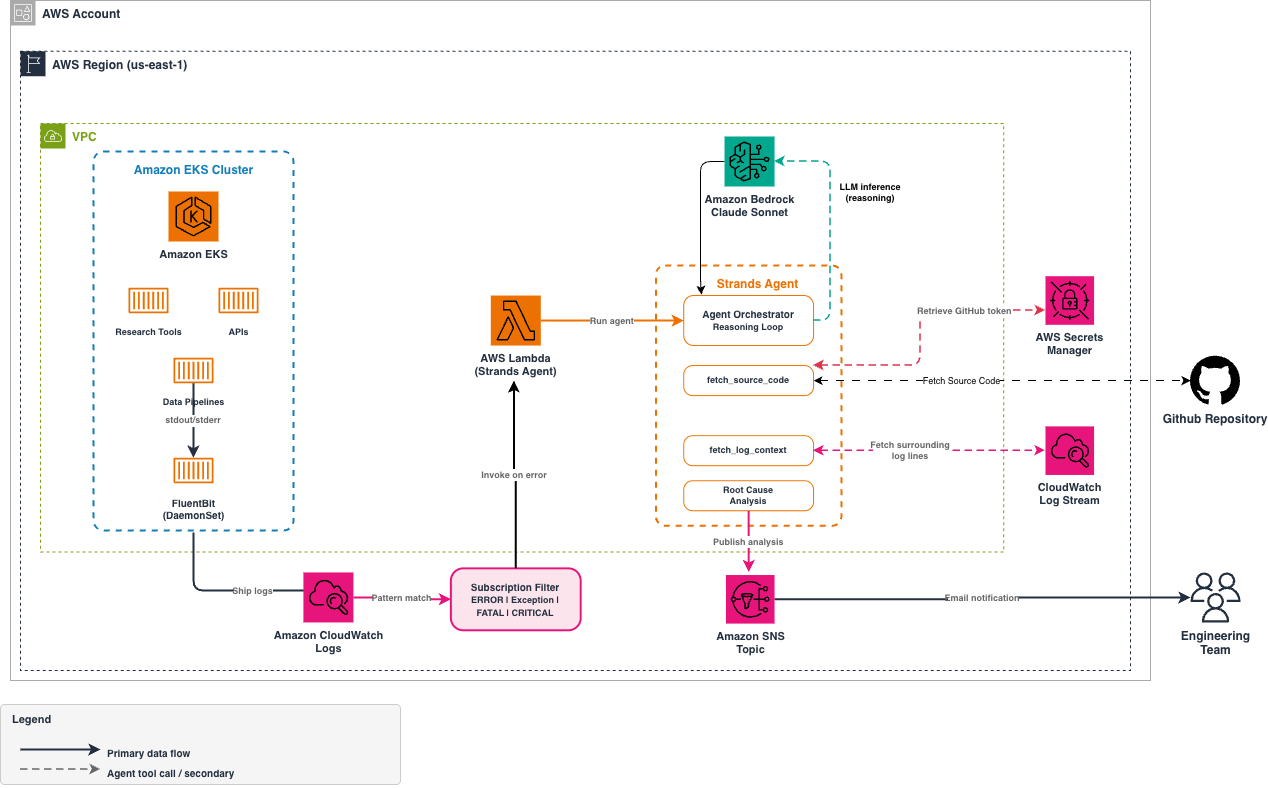
图 1 — 自动化根因分析架构
我们在 EKS 上运行的应用通过 FluentBit 将日志发送至 CloudWatch。CloudWatch 订阅筛选器会监控错误级别模式(ERROR、Exception、FATAL、CRITICAL),一旦发现匹配便调用 Lambda 函数。该 Lambda 运行一个由 Amazon Bedrock 驱动的 Strands Agent 来调查错误,随后将分析结果发布到 Amazon Simple Notification Service(Amazon SNS)主题,交付给团队成员。
系统核心是 Amazon Bedrock。基础模型(FM)负责针对错误、代码和根因进行实际推理。我们在 Amazon Bedrock 之上使用 Strands Agents SDK 来处理工具调用编排。我们定义可用工具,由模型决定何时以及如何调用这些工具。面对一条堆栈跟踪,Agent 可能会获取相关源文件,意识到自己需要更多上下文,搜索关联的错误处理逻辑,然后生成结构化分析——而无需我们将这条调查路径硬编码。
由于 TReNDS 处理与健康相关的研究数据,数据驻留和合规性是重要考量。Amazon Bedrock 在我们的 AWS 账户内处理请求,因此日志数据和源代码会与应用的其余部分保留在相同环境中。AI 分析不需要将数据发送至外部端点,使数据流保持在我们已管理的边界内。这对于我们的工作尤为重要,因为 TReNDS 处理的健康相关研究数据可能受到 HIPAA 要求约束。有关符合《健康保险可携带性和责任法案》(HIPAA)要求的 AWS 服务的更多信息,请参阅 AWS HIPAA Eligible Services Reference。
尽管我们的部署使用 EKS 和 FluentBit,这一模式同样适用于其他将日志发送至 CloudWatch 的应用,包括 ECS、Lambda、EC2,或使用 CloudWatch Agent 的本地工作负载。
前提条件
要实施该解决方案,需要具备以下条件:
- 一个可访问 Amazon Bedrock 的 AWS 账户(具体而言,需要访问 Anthropic Claude Sonnet)。
- 一个 Amazon EKS 集群,应用通过 FluentBit 将日志发送至 CloudWatch。
- 配置了订阅筛选器的 CloudWatch 日志组。
- 包含应用源代码的 GitHub 仓库。
- 已安装 Strands Agents SDK(可通过官方 Lambda Layer 获取)。
- 熟悉 Python。
- 一个已配置通知功能的 Amazon SNS 主题。
- 一个具备适当 IAM 权限的 AWS Lambda 函数,可访问 Amazon Bedrock、CloudWatch Logs、AWS Secrets Manager 和 SNS。
Agent 的能力来自我们赋予它的工具。在我们构建的所有工具中,源代码检索最为关键。堆栈跟踪会引用文件路径和行号,但如果无法访问实际实现代码,Agent 的能力就会局限于日志模式匹配。赋予 Agent 读取源文件的能力后,它便能追踪执行路径,并识别导致故障的具体代码。借助 Strands Agents SDK,只需使用 @tool 装饰器装饰一个 Python 函数,即可定义自定义工具。以下是我们构建的、用于从 GitHub 仓库获取源代码的工具:
import base64
import boto3
import requests
from strands import Agent, tool

# Retrieve the GitHub token from AWS Secrets Manager
secrets_client = boto3.client("secretsmanager")
github_token = secrets_client.get_secret_value(
    SecretId="trends/github-token"
)["SecretString"]

@tool
def fetch_source_code(file_path: str, repo: str) -> str:
    """Fetch a source file from a GitHub repository.

    Args:
        file_path: Path to the file in the repository
        repo: Repository in 'owner/repo' format
    """
    response = requests.get(
        f"https://api.github.com/repos/{repo}/contents/{file_path}",
        headers={"Authorization": f"token {github_token}"}
    )
    if response.status_code != 200:
        return f"Could not fetch {file_path} from {repo}: HTTP {response.status_code}"
    content = base64.b64decode(response.json()["content"])
    return content.decode("utf-8")
文档字符串和类型提示很重要。Strands 使用它们向模型说明工具的作用及其预期参数。随后,模型会根据其在错误中发现的信息,决定何时调用该工具。有关更多模式,请参阅 自定义工具文档。
部署时,我们使用 Strands Agents 的官方 Lambda Layer,无需手动打包 SDK。
流水线如何工作
当我们的某个应用发生错误时,流水线会自动经过四个阶段。首先,CloudWatch 检测错误模式,并使用压缩日志数据调用 Lambda 函数。Lambda 对事件进行解码,之后由 Strands Agent 接手。Agent 从同一容器获取额外日志上下文,从 GitHub 检索相关源代码,并对根因进行推理。最后,它将结构化分析发布至 SNS,以便交付给团队。以下各节将详细介绍每个阶段。
接收和解码 CloudWatch 事件
CloudWatch 订阅筛选器会向 Lambda 发送经 Base64 编码、gzip 压缩的日志事件。每次调用都包含在较短时间窗口内与筛选模式匹配的一个或多个日志事件。Lambda 处理程序对信息进行解码,提取日志组名称和匹配事件,并将其传递给 Agent 进行分析。有关标准解码模式,请参阅 CloudWatch Logs 订阅筛选器文档。
获取扩展上下文
订阅筛选器会交付匹配的日志行,但单独一行通常不足以支持分析。CloudWatch 事件信息包含 logStream,它标识生成错误的具体容器。我们构建了第二个 @tool,用于从同一日志流中获取错误前后的日志。这使 Agent 能够获得完整堆栈跟踪以及导致故障的请求上下文,同时避开其他并发请求造成的噪声:
@tool
def fetch_log_context(log_group: str, log_stream: str, timestamp: int,
                      window_seconds: int = 30) -> str:
    """Fetch log lines from the same log stream surrounding an error.

    Args:
        log_group: CloudWatch Log Group name
        log_stream: Log stream that produced the error
        timestamp: Error event timestamp in milliseconds
        window_seconds: Time window before and after the error
    """
    response = logs_client.filter_log_events(
        logGroupName=log_group,
        logStreamNames=[log_stream],
        startTime=timestamp - (window_seconds * 1000),
        endTime=timestamp + (window_seconds * 1000),
    )
    events = response.get("events", [])
    if not events:
        return f"No log events found in {log_stream} within {window_seconds}s of the error."
    return "\n".join(e["message"] for e in events)
通过将范围限定在日志流中,我们可以获得来自同一容器的、干净且按时间顺序排列的事件序列。其中包括触发错误的请求、此前的警告以及完整异常跟踪。
Agent 分析
Agent 接收错误及其上下文,然后自主决定需要调查哪些内容。不同于遵循预定义决策树的基于规则系统,Agent 会解释错误消息,识别堆栈跟踪中的文件路径和类名,并确定要检索哪些源文件。如果初步代码审查显示错误源于某项依赖或共享工具,Agent 会沿着这条链路继续调查,而不需要我们额外提示。我们通过系统提示词塑造输出格式:
SYSTEM_PROMPT = """You are a senior Site Reliability Engineer analyzing production errors.

Given an error and its surrounding log context:
1. Identify the root cause by analyzing the stacktrace
2. Use fetch_source_code to read the relevant source files
3. Provide a structured analysis with:
   - Severity (CRITICAL/HIGH/MEDIUM/LOW)
   - Root cause explanation
   - Relevant source code context
   - Suggested fix
   - Related areas that may be affected
"""
系统提示词定义了结构化输出格式,但将调查策略交由模型决定。Agent 会根据在错误中发现的信息决定调用哪些工具。包含清晰文件路径的堆栈跟踪会触发 fetch_source_code 调用;没有堆栈跟踪的错误,则可能引导 Agent 在代码库中搜索错误消息字符串。这种灵活性正是 Agentic 方法的核心价值。我们无需预先预测应用可能产生的每一种错误类型。
Lambda 处理程序将所有组件串联起来:
agent = Agent(
    model=BedrockModel(model_id="us.anthropic.claude-sonnet-4-20250514"),
    system_prompt=SYSTEM_PROMPT,
    tools=[fetch_source_code, search_github_code, fetch_log_context]
)

result = agent(
    f"Analyze this error from {log_group}:\n\n{error_message}"
)
处理程序会使用我们选择的 Amazon Bedrock 模型、用于定义输出格式的系统提示词,以及可用工具列表来创建 Agent 实例。随后,它将错误消息和日志组名称传递给 Agent,由此触发自主调查循环。
交付结果
Agent 完成分析后,我们会将结果发布到 Amazon SNS 主题,并分发至电子邮件和 Slack。以下是一条典型通知:
Error Analysis — order-service

Severity: HIGH
Error: NullPointerException at OrderService.java:142

Root Cause: The method processPayment() calls paymentGateway.charge()
which can return null on gateway timeout, but line 142 accesses
response.getTransactionId() without a null check.

Source Context (OrderService.java:138-148):
[relevant code shown]

Suggested Fix: Add null check for gateway response before accessing
fields. Consider retry mechanism for gateway timeouts.

Related: Similar pattern in RefundService.java:89
Agent 在无需人工指导的情况下自主调查了这一错误。它读取相关源代码,识别出缺少空值检查的问题,甚至标记了另一文件中的类似模式。这体现了 Agentic 方法的价值。Agent 并非遵循固定检查清单,而是会依据每一步发现的信息调整调查策略,就像一名经验丰富的工程师一样。
结果
自部署该系统以来,我们已经看到它对团队处理生产环境错误的方式产生了明显影响
English / 原文
This is a guest post co-written with Vitaly Omelchenko from the TReNDS Center at Georgia State University.
At the Center for Translational Research in Neuroimaging and Data Science (TReNDS), a joint center of Georgia State University, Georgia Institute of Technology, and Emory University, we develop and apply advanced analytical methods and neuroinformatics tools for brain health research. We’ve been running our infrastructure on Amazon Web Services (AWS) since 2019, and over the years we’ve built a diverse set of applications, including research tools and APIs, all running on Amazon Elastic Kubernetes Service (Amazon EKS) with logs shipped to Amazon CloudWatch using FluentBit.
As our application grew, so did the volume of errors we needed to investigate. When we started exploring Amazon Bedrock, we saw an opportunity we had wanted for a long time. We could automate the most time-consuming part of incident response, the root-cause investigation itself.
In this post, we share the architecture we built and use in production at TReNDS. It combines Amazon CloudWatch subscription filters, AWS Lambda, the Strands Agents SDK, and Amazon Bedrock to detect errors in real time, enrich them with log context and source code from GitHub, and deliver AI-powered root-cause analysis to our team.
The architecture and recommendations in this post reflect our team’s experience at the TReNDS Center and do not represent official guidance from Georgia State University, Georgia Institute of Technology, or Emory University.
The problem we wanted to solve
Like many teams, we had alerting and monitoring in place. We knew when things broke. However, knowing that something failed and understanding why it failed are different things. Our engineers still had to open Amazon CloudWatch Logs, read through stack traces, find the relevant source files, and mentally trace the execution path. For straightforward errors, this took 15–30 minutes. For complex issues spanning multiple services, much longer.
We realized that this investigation process is exactly the kind of work a foundation model with the right tools can do. The model does more than summarize the error message. It investigates the error by pulling the surrounding log context, reading the source code, and producing a structured analysis. That is what we set out to build.
Architecture
Here’s the architecture we arrived at:
Figure 1 — Architecture for automated root-cause analysis
Our applications on EKS send logs to CloudWatch using FluentBit. A CloudWatch subscription filter watches for error-level patterns (ERROR, Exception, FATAL, CRITICAL) and invokes a Lambda function when a match occurs. The Lambda runs a Strands Agent powered by Amazon Bedrock that investigates the error, then publishes the analysis to an Amazon Simple Notification Service (Amazon SNS) topic for delivery to our team.
The core of the system is Amazon Bedrock. The foundation model (FM) does the actual reasoning about errors, code, and root causes. We use the Strands Agents SDK on top of Amazon Bedrock to handle tool-use orchestration. We define what tools are available, and the model decides when and how to call them. Given a stack trace, the agent might fetch the relevant source file, realize it needs more context, search for related error handling, and produce a structured analysis, without us hardcoding that investigation path.
Because TReNDS works with health-related research data, data residency and compliance are important considerations. Amazon Bedrock processes requests within our AWS account, so log data and source code stay within the same environment as the rest of our application. The AI analysis doesn’t require sending data to external endpoints. This keeps data flows within boundaries we already manage. This is particularly important for our work, because TReNDS handles health-related research data that might fall under HIPAA requirements. For more on Health Insurance Portability and Accountability Act (HIPAA)-eligible AWS services, see the AWS HIPAA Eligible Services Reference.
While our setup uses EKS and FluentBit, this pattern works with other applications that send logs to CloudWatch, including ECS, Lambda, EC2, or on-premises workloads using the CloudWatch Agent.
Prerequisites
To implement this solution, you need the following:
- An AWS account with access to Amazon Bedrock (specifically Anthropic Claude Sonnet).
- An Amazon EKS cluster with applications sending logs to CloudWatch through FluentBit.
- CloudWatch log groups configured with subscription filters.
- A GitHub repository containing your application source code.
- The Strands Agents SDK installed (available through the official Lambda layer).
- Familiarity with Python.
- An Amazon SNS topic configured for notifications.
- An AWS Lambda function with appropriate IAM permissions to access Amazon Bedrock, CloudWatch Logs, AWS Secrets Manager, and SNS.
The agent’s capabilities come from the tools we give it. Of all the tools we built, source code retrieval is the most critical. Stack traces reference file paths and line numbers, but without access to the actual implementation, the agent would be limited to log pattern matching. By giving the agent the ability to read source files, it can trace execution paths and identify the specific code that caused the failure. With the Strands Agents SDK, you define a custom tool by decorating a Python function with @tool. Here’s the tool we built to fetch source code from our GitHub repositories:
import base64
import boto3
import requests
from strands import Agent, tool

# Retrieve the GitHub token from AWS Secrets Manager
secrets_client = boto3.client("secretsmanager")
github_token = secrets_client.get_secret_value(
    SecretId="trends/github-token"
)["SecretString"]

@tool
def fetch_source_code(file_path: str, repo: str) -> str:
    """Fetch a source file from a GitHub repository.

    Args:
        file_path: Path to the file in the repository
        repo: Repository in 'owner/repo' format
    """
    response = requests.get(
        f"https://api.github.com/repos/{repo}/contents/{file_path}",
        headers={"Authorization": f"token {github_token}"}
    )
    if response.status_code != 200:
        return f"Could not fetch {file_path} from {repo}: HTTP {response.status_code}"
    content = base64.b64decode(response.json()["content"])
    return content.decode("utf-8")
The docstring and type hints matter. Strands uses them to tell the model what the tool does and what parameters it expects. The model then decides when to call this tool based on what it finds in the error. See the custom tools documentation for more patterns.
For deployment, we use the Strands Agents official Lambda layer. There’s no need to bundle the SDK manually.
How the pipeline works
When an error occurs in one of our applications, the pipeline moves through four stages automatically. First, CloudWatch detects the error pattern and invokes our Lambda function with the compressed log data. The Lambda decodes the event, and the Strands Agent takes over from there. The agent fetches additional log context from the same container, retrieves relevant source code from GitHub, and reasons through the root cause. Finally, it publishes a structured analysis to SNS for delivery to our team. The following sections walk through each stage in detail.
Receiving and decoding CloudWatch events
CloudWatch subscription filters send base64-encoded, gzip-compressed log events to Lambda. Each invocation contains one or more log events that matched the filter pattern within a short time window. The Lambda handler decodes the information, extracts the log group name and matching events, and passes them to the agent for analysis. See the CloudWatch Logs subscription filter documentation for the standard decoding pattern.
Fetching extended context
The subscription filter delivers the matching log line, but a single line is rarely enough. The CloudWatch event information includes the logStream, which identifies the specific container that produced the error. We built a second @tool that fetches surrounding logs from the same stream. This gives the agent the full stacktrace and the request context that led to the failure, without noise from other concurrent requests:
@tool
def fetch_log_context(log_group: str, log_stream: str, timestamp: int,
                      window_seconds: int = 30) -> str:
    """Fetch log lines from the same log stream surrounding an error.

    Args:
        log_group: CloudWatch Log Group name
        log_stream: Log stream that produced the error
        timestamp: Error event timestamp in milliseconds
        window_seconds: Time window before and after the error
    """
    response = logs_client.filter_log_events(
        logGroupName=log_group,
        logStreamNames=[log_stream],
        startTime=timestamp - (window_seconds * 1000),
        endTime=timestamp + (window_seconds * 1000),
    )
    events = response.get("events", [])
    if not events:
        return f"No log events found in {log_stream} within {window_seconds}s of the error."
    return "\n".join(e["message"] for e in events)
By scoping to the log stream, we get a clean, chronological sequence of events from the same container. This includes the request that triggered the error, preceding warnings, and the full exception trace.
Agent analysis
The agent receives the error plus context, then autonomously decides what to investigate. Unlike a rule-based system that follows predefined decision trees, the agent interprets the error message, identifies file paths and class names in the stack trace, and determines which source files to retrieve. If the initial code review reveals that the error originates in a dependency or a shared utility, the agent follows that chain without additional prompting from us. We shaped the output format through the system prompt:
SYSTEM_PROMPT = """You are a senior Site Reliability Engineer analyzing production errors.

Given an error and its surrounding log context:
1. Identify the root cause by analyzing the stacktrace
2. Use fetch_source_code to read the relevant source files
3. Provide a structured analysis with:
   - Severity (CRITICAL/HIGH/MEDIUM/LOW)
   - Root cause explanation
   - Relevant source code context
   - Suggested fix
   - Related areas that may be affected
"""
The system prompt defines a structured output format but leaves the investigation strategy to the model. The agent decides which tools to call based on what it finds in the error. A stack trace with clear file paths triggers fetch_source_code calls. An error without a stack trace might lead the agent to search the code base for the error message string. This flexibility is the core value of the agentic approach. We did not need to anticipate every type of error our applications can produce.
The Lambda handler ties everything together:
agent = Agent(
    model=BedrockModel(model_id="us.anthropic.claude-sonnet-4-20250514"),
    system_prompt=SYSTEM_PROMPT,
    tools=[fetch_source_code, search_github_code, fetch_log_context]
)

result = agent(
    f"Analyze this error from {log_group}:\n\n{error_message}"
)
The handler creates an Agent instance with our chosen Amazon Bedrock model, the system prompt that defines the output format, and the list of available tools. It then passes the error message along with the log group name to the agent, which triggers the autonomous investigation loop.
Delivering results
After the agent completes its analysis, we publish the result to an Amazon SNS topic and fan out to email and Slack. Here’s what a typical notification looks like:
Error Analysis — order-service

Severity: HIGH
Error: NullPointerException at OrderService.java:142

Root Cause: The method processPayment() calls paymentGateway.charge()
which can return null on gateway timeout, but line 142 accesses
response.getTransactionId() without a null check.

Source Context (OrderService.java:138-148):
[relevant code shown]

Suggested Fix: Add null check for gateway response before accessing
fields. Consider retry mechanism for gateway timeouts.

Related: Similar pattern in RefundService.java:89
The agent autonomously investigated this error without human guidance. It read the relevant source code, identified the null check gap, and even flagged a similar pattern in another file. This demonstrates the value of the agentic approach. Rather than following a fixed checklist, the agent adapts its investigation strategy based on what it discovers at each step, much like an experienced engineer would.
Results
Since deploying this system, we have seen a clear impact on how our team handles production errors. The most immediate change is speed. Investigation time dropped from 15 to 30 minutes down to under 60 seconds. Because the agent’s analysis includes a suggested fix, our engineers often receive a ready solution in their inbox. They can go straight to implementing the fix instead of spending time on diagnosis.
The cost of running this system is negligible. Each analysis incurs only minimal Amazon Bedrock inference charges, typically involving two to three tool-use rounds per error. For our workload, this is a fraction of what the equivalent engineer time would cost.
Our developers receive the agent’s analysis by email, and the feedback has been consistently positive. The analyses provide a clear starting point for resolution, even for errors the engineer has not encountered before. Engineers can quickly understand what happened and what to do about it without additional investigation.
After a release, the same code path can produce repeated errors. Our deduplication, which uses Amazon DynamoDB, makes sure that only the first occurrence triggers an analysis. The rest are silently filtered, keeping inboxes clean and Amazon Bedrock costs low.
Choosing the right Amazon Bedrock model
Amazon Bedrock gives us access to a range of foundation models through a single API. We tested several to find the best fit for our error analysis use case, evaluating reasoning quality (understanding code and errors), tool use reliability (calling our GitHub and CloudWatch tools), latency, and cost per analysis.
| Model | Best For | Tool Use | Latency | Relative Cost |
|---|---|---|---|---|
| Anthropic Claude Sonnet | Complex multi-file reasoning, subtle code issues | Reliable | Fast | Medium |
| Anthropic Claude Haiku | Straightforward errors, high-volume triage | Good | Fastest | Low |
| Anthropic Claude Opus | Deep cross-service investigations | Reliable | Moderate | High |
| Amazon Nova Pro | General-purpose analysis, cost-effective | Good | Fast | Low |
| Amazon Nova Lite | Simple error classification, budget workloads | Good | Fastest | Lowest |
We selected Claude Sonnet as our primary model. In our testing, it consistently produced the most accurate root-cause analyses. It can trace through multi-file call chains, identify subtle issues like missing null checks, and reason about concurrency problems. For teams with different cost or latency requirements, the other models in the table are strong alternatives for simpler error patterns.
Switching models with Strands is a one-line change, which made our evaluation straightforward:
# We tested multiple models by changing this single line.
# Check Amazon Bedrock documentation for the latest available model IDs.
model = BedrockModel(model_id="us.anthropic.claude-sonnet-4-20250514")
Note: Model IDs are updated regularly. See the Amazon Bedrock supported models documentation for current model IDs.
Next steps
We are exploring several extensions to this system. The first priority is connecting Retrieval Augmented Generation (RAG) with our internal runbooks.
- By integrating Amazon Bedrock Knowledge Bases with our internal runbooks and past incident reports, the agent will be able to reference TReNDS-specific procedures in its analysis.
- We also plan to implement a tiered model strategy. Simple, known error patterns would route to Haiku for fast, low-cost triage, while complex or novel errors would escalate to Sonnet for deep analysis. This would optimize both cost and response time across our error volume.
- Finally, we are working toward automated GitHub issue and pull request creation. When the agent identifies a potential fix, it would automatically create a GitHub issue with the analysis and open a pull request with the suggested code change, reducing the manual steps between diagnosis and resolution.
As we scale this further, we’re also looking at Amazon Bedrock AgentCore for managed agent runtime, observability, and identity management. See the Strands Agents examples for multi-agent and deployment patterns.
Conclusion
We built this system at TReNDS because we wanted every error in our application to get an instant, structured investigation instead of only an alert. Amazon Bedrock and the Strands Agents SDK made it straightforward to implement. We defined a few tools and wrote a system prompt. Now, we have an agent that reasons through production errors the same way an experienced engineer would. It delivers results in seconds.
Adding a new capability means writing another @tool function and a few lines of Python. Whether the need is a Jira integration, a GitHub PR with a suggested fix, or a tool that connects to a running pod for deeper investigation, the pattern is the same. The foundation model handles the reasoning and orchestration, and we connect it to the systems it needs.
About the authors
Vitaly Omelchenko
Vitaly is a Full Stack Developer and DevOps Engineer at the Center for Translational Research in Neuroimaging and Data Science (TReNDS), where he designs and operates the cloud and AI infrastructure supporting large-scale neuroimaging and brain health research. He has been building production systems on AWS since 2019, and his current work centers on agentic AI – applying foundation models on Amazon Bedrock to automate software operations and accelerate research computing.
Chris Riddle
Chris is a senior solutions architect at Amazon Web Services (AWS) and supports R1 university customers. With 20-plus years of experience in technology and a decade in higher education, Chris helps researchers use AWS for their artificial intelligence/machine learning (AI/ML) and high performance computing (HPC) workloads.
Devin Hicks
Devin is a Solutions Architect at Amazon Web Services (AWS) supporting the University System of Georgia’s member institutions. With nearly a decade of experience in technology, Devin guides higher education customers towards scalable, secure, and cost-effective cloud solutions.
Vadim Omeltchenko
Vadim is a Sr. Amazon Bedrock Go-to-Market Solutions Architect who is passionate about helping AWS customers innovate in the cloud.