面向企业工作负载的 AWS Anthropic Claude apps gateway 部署指南
英文标题:Deploying Anthropic Claude apps gateway for AWS for enterprise workloads
Claude apps gateway 是部署在企业自有环境中的治理层,位于 Claude Code、Claude Desktop 与 Amazon Bedrock 或 Claude Platform on AWS 之间。该参考部署以 AWS Fargate、Amazon RDS、内部 Application Load Balancer 和私有 DNS 为基础,覆盖身份认证、模型访问控制、成本归因、支出限制与遥测能力。网关通过 OIDC 实现企业 SSO,不在开发者设备上分发上游凭证,并可按身份提供商群组下发模型和工具权限。对开发者和企业而言,这一方案可在不改造客户端的情况下集中实施 AI 使用治理、按用户追踪成本,并支持上游推理服务故障切换。
 1.3 MB
 101.1 KB
 124.1 KB
 345.0 KB
 141.2 KB
 346.5 KB
 116.5 KB
 75.3 KB
 104.1 KB
 121.5 KB
 366.8 KB
 28.5 KB
 106.0 KB
 212.7 KB
 33.5 KB
 30.6 KB
 91.8 KB
 51.5 KB
 137.9 KB
 78.4 KB
中文
部署 Claude Code 和 Claude Desktop 给全体员工使用的 AI 管理员,需要对身份验证、模型访问、成本归因和支出强制执行进行集中控制。这些控制措施能够降低运营开销,并在大规模环境中一致地实施治理。
Claude apps gateway 在这些应用与 Amazon Bedrock 或 Claude Platform on AWS 之间提供一个自托管的治理层。
在此前的发布文章基础上,本文介绍一套生产级参考部署,涵盖端到端架构、企业部署模式、成本以及实施资源。
架构
本节介绍参考部署拓扑以及请求如何流经网关。
部署拓扑
Claude apps gateway 与开发者已在使用的 Claude Code CLI 二进制文件一同提供。通过 claude gateway --config gateway.yaml 启动后,它将以服务器模式运行,并在启动时加载 YAML 配置。在这套参考部署中,容器运行在您虚拟私有云(VPC)内的 AWS Fargate 上。如果更符合现有环境,您也可以在 Amazon Elastic Kubernetes Service(Amazon EKS)或 Amazon Elastic Compute Cloud(Amazon EC2)上运行同一镜像。
参考架构使用以下组件:
- **计算与状态:**每个 AWS Fargate 任务运行一个无状态网关容器。Amazon Relational Database Service(Amazon RDS)for PostgreSQL 存储短期登录状态,包括设备代码和会话。启用支出限额时,它还会存储按用户统计的支出计数器和审计记录。认证状态保存在数据库中,而非任务内。这意味着任何任务都可以处理任何请求,负载均衡器无需会话粘滞。
- **入口与私有 DNS:**内部 Application Load Balancer 使用 AWS Certificate Manager 证书终止 TLS。Amazon Route 53 私有托管区域将网关解析为可通过 VPN、AWS Direct Connect 或等效私有连接访问的私有 IP 地址。
- **服务连接:**VPC 终端节点使受支持 AWS 服务的流量保持私有,而 NAT gateway 提供其他所需的出站连接。
- **上游凭证:**网关使用分配给网关任务的 AWS Identity and Access Management(IAM)角色向 Amazon Bedrock 进行认证。Claude Platform on AWS API 密钥及其他静态凭证保留在 AWS Secrets Manager 中。不会向开发者机器分发任何上游凭证。
**运维说明:**将负载均衡器空闲超时设置为大于预期最长无数据传输间隔的时长。默认值为 60 秒。连接的空闲时间超过配置超时时间后,负载均衡器会终止连接。请同时检查延迟的非流式响应,以及流式分块之间的暂停情况。
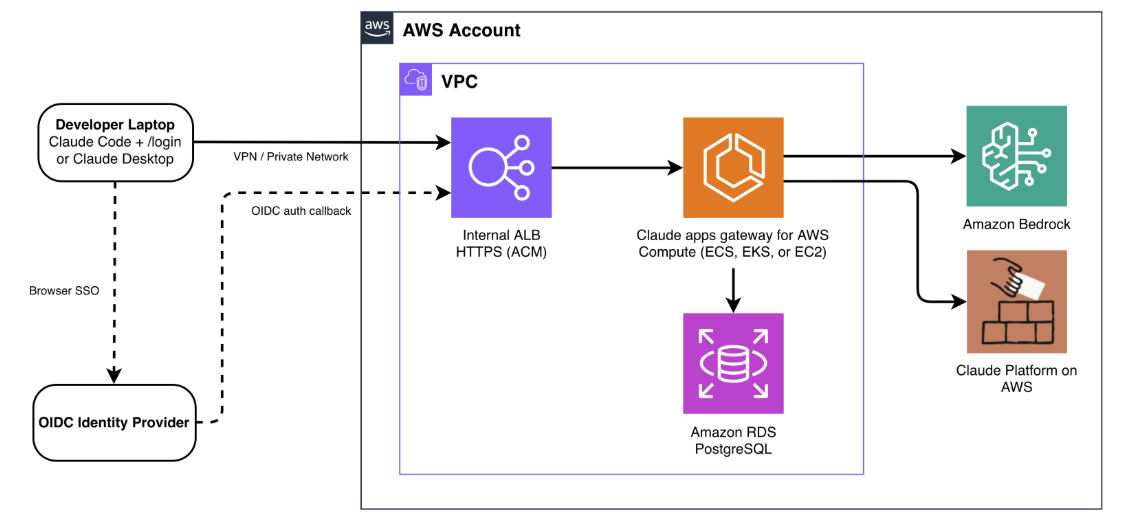
图 1:AWS 上 Claude apps gateway 的参考架构
请求流
**登录(每个会话一次)。**平台团队分发托管设置,将 Claude Code 和 Claude Desktop 指向网关的私有 URL。当开发者运行 /login 时,客户端会启动 OAuth 2.0 设备授权授予流程,并在浏览器中打开页面,通过您的 OpenID Connect(OIDC)身份提供商进行认证。由于网关提供设备验证页面,浏览器也必须能够访问网关的私有端点。认证完成后,网关会签发一个短期 bearer token,默认有效期为一小时。随后,会话会在后台静默刷新。
**推理(每次请求)。**每个推理请求都携带 bearer token。网关验证该令牌,解析开发者身份及其群组成员关系,应用匹配的策略,评估适用的支出上限,并将请求路由至 Amazon Bedrock 或 Claude Platform on AWS。响应以流式方式返回客户端。客户端发出使用指标,网关通过 OpenTelemetry Protocol(OTLP)将其转发至您配置的采集器。指标归因于用于策略评估的已认证身份。
有关部署脚本和配置模板,请参阅配套代码仓库。有关运维指导,请参阅部署指南。有关设备代码验证和令牌生命周期的详细信息,请参阅 Claude apps gateway 文档。
它解决的问题
网关解决五项治理需求,以下各节将分别说明。
1. 身份:SSO 认证
网关将认证委托给您的 OIDC 身份提供商。开发者通过浏览器 SSO 登录一次。网关签发短期令牌,并在后台处理静默刷新。网关支持符合 OIDC 标准的提供商,例如 Okta、Microsoft Entra ID、Auth0、Keycloak 或 Amazon Cognito。
这使您能够集中实施 OIDC 认证,无需在开发者机器上保存上游凭证;通过从身份提供商中移除用户即可立即完成离职权限回收;同时,无需自定义埋点即可在所有请求中实现一致的按用户归因。
网关不维护自己的用户目录。无需预创建账户,也无需配置 SCIM 同步。身份提供商分配给用户的任何群组,网关都会直接用于策略匹配,完全一对一对应,不存在转换层。用户和群组完全在身份提供商中管理,网关会在下次会话刷新时获取变更。离职权限回收只需从身份提供商中移除该用户。其会话会在配置的存活时间内过期,默认值为 1 小时,无需轮换凭证。
以下示例展示了使用 Microsoft Entra ID 配置的网关:
oidc:
  issuer: https://login.microsoftonline.com/<tenant-id>/v2.0
  client_id: ${OIDC_CLIENT_ID}
  client_secret: ${OIDC_CLIENT_SECRET}
  allowed_email_domains: [company.com]
  groups_claim: roles
**注意:**Microsoft Entra ID 默认不包含群组或角色声明。如果您的策略通过 match: {groups: [...]} 使用 Entra 应用角色,请在 OIDC 配置中添加 groups_claim: roles。如果不执行这一步,网关将无法解析群组成员关系,所有用户只会匹配兜底策略。
有关针对不同身份提供商的设置说明,请参阅身份提供商设置指南。以下图片展示了开发者视角下 Claude Code 和 Claude Desktop 的登录体验。
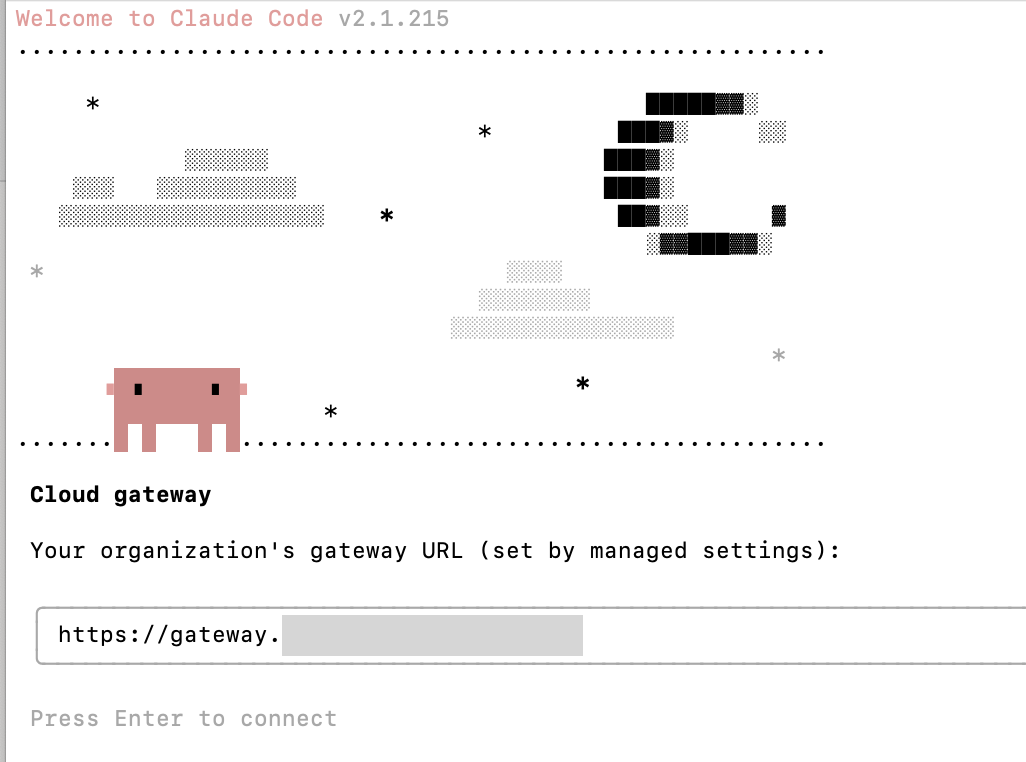
图 2:通过网关进行认证
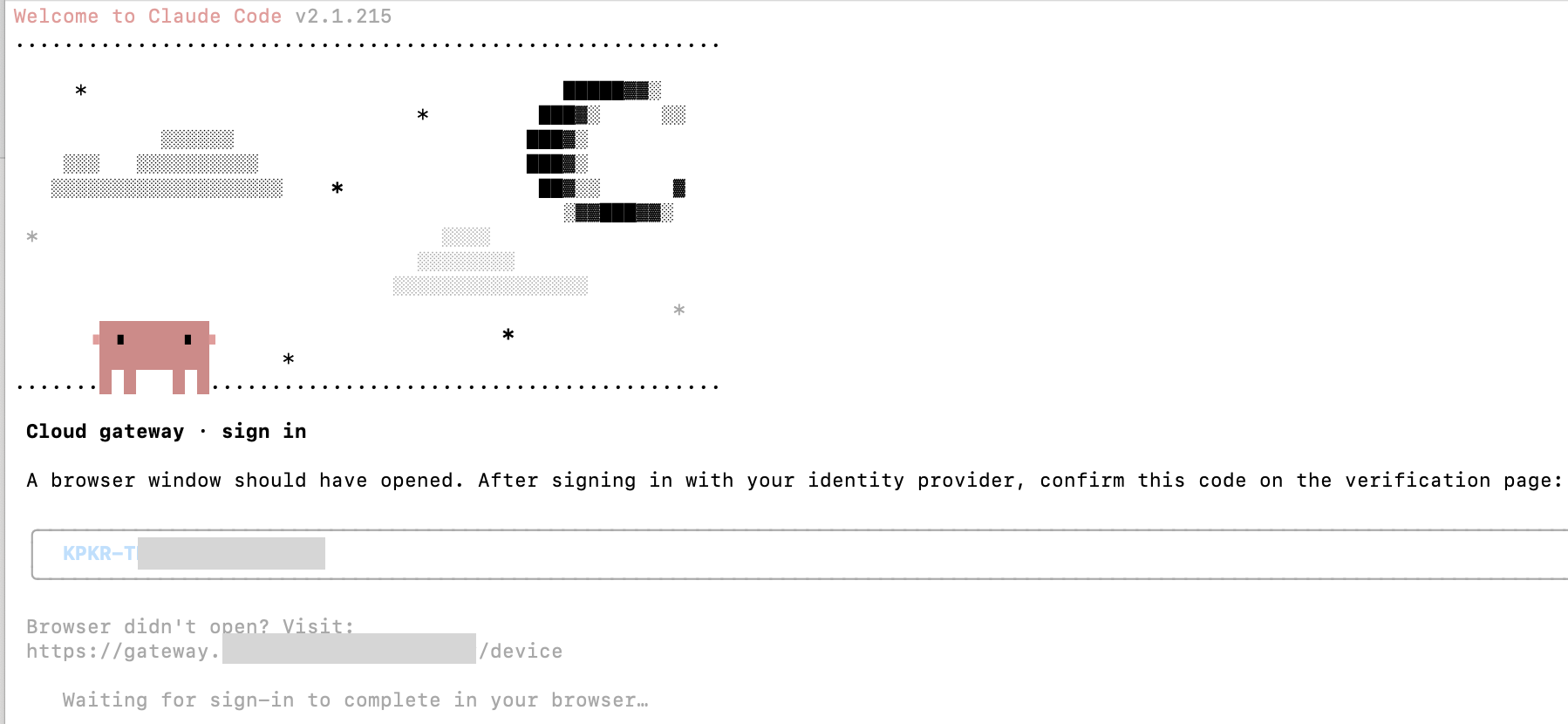
图 3:网关委托给您现有的 OIDC 身份提供商
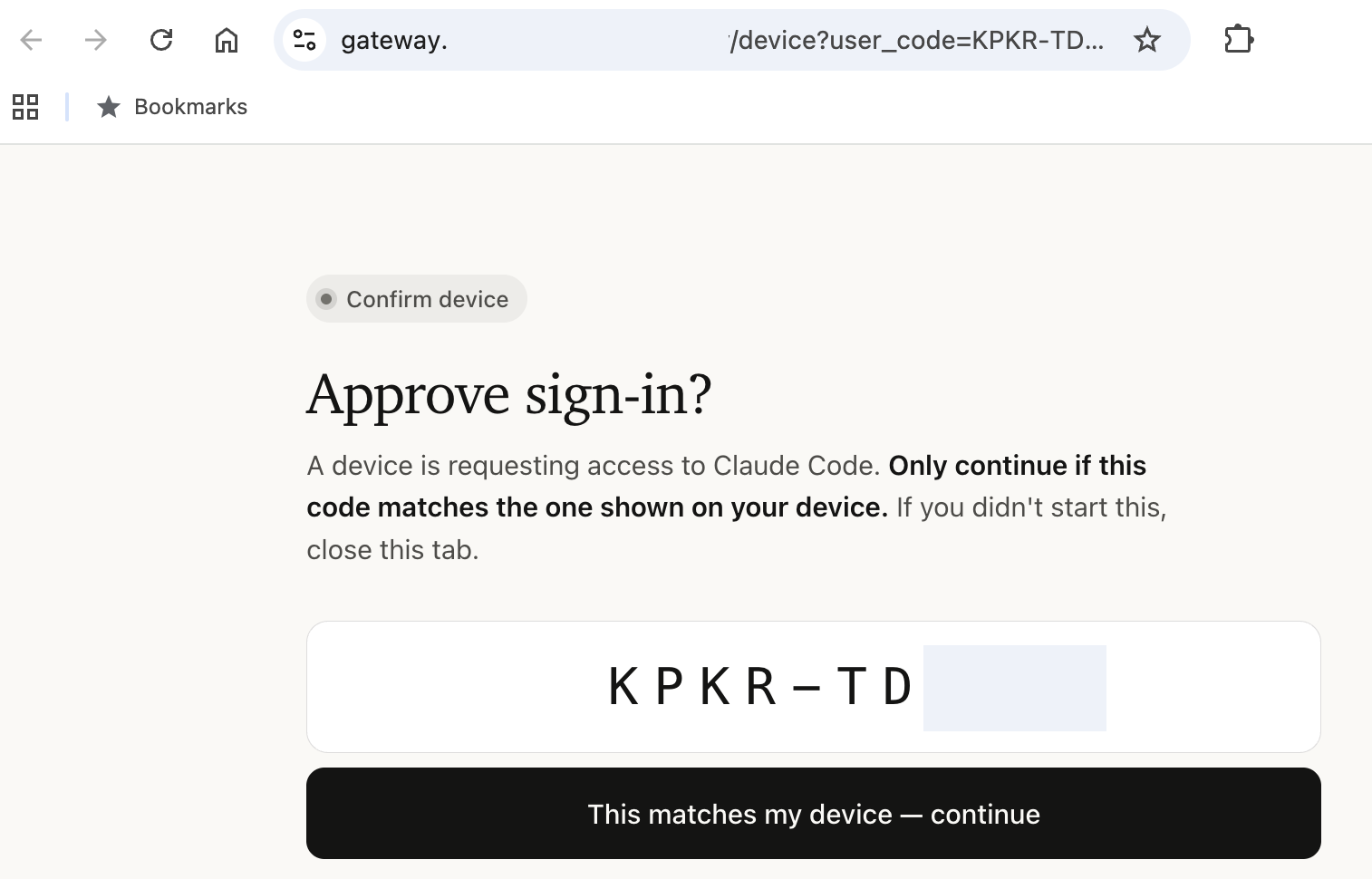
图 4:在浏览器中授权设备
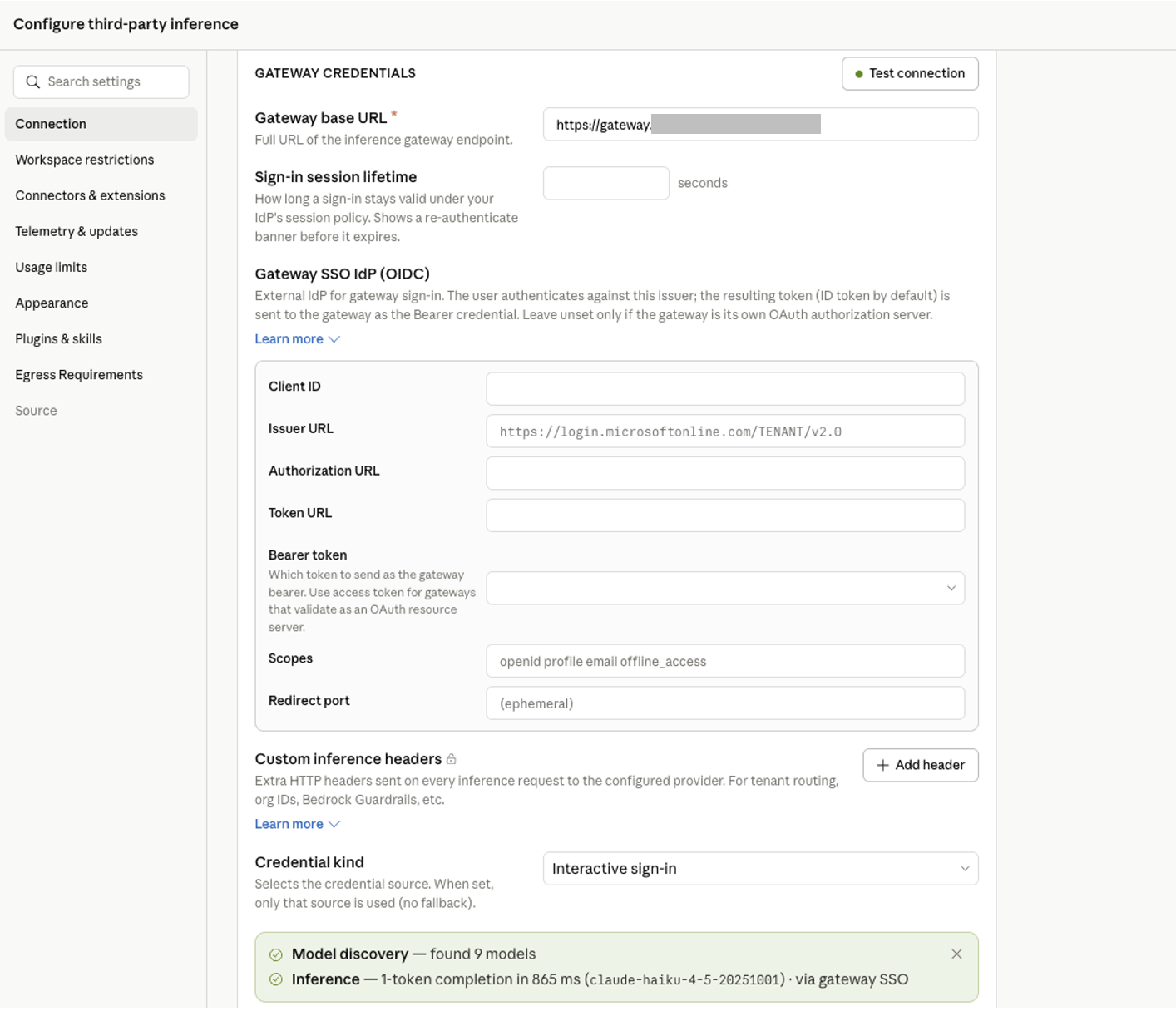
图 5:为 Claude Desktop 配置通过网关使用 Amazon Bedrock 进行推理
2. 策略:集中式模型访问与权限
网关在服务器端强制执行模型访问控制,并以身份提供商群组为范围下发工具权限托管设置。您可以在单个 YAML 块中定义每个团队可使用的模型和能力。策略按声明顺序评估。系统选择第一个匹配项,然后将其与 match: {} 兜底基础策略合并。列表应以 match: {} 策略结束。它为群组未匹配列表中较早特定策略的用户提供兜底。若没有该策略,未匹配用户将获得完整目录访问权限。变更会在一小时内传播至已连接客户端,开发者无需采取任何操作。
Managed:
  policies:
    # Contractors: Haiku only, no web access
    - match: { groups: [contractors] }
      cli:
        availableModels: [claude-sonnet-5, claude-haiku-4-5]
        enforceAvailableModels: true
      permissions:
        deny: ["WebFetch", "WebSearch"]
    # Engineers: full model access with guardrails
    - match: { groups: [engineers] }
      cli:
        availableModels: [claude-opus-4-8, claude-sonnet-5, claude-haiku-4-5]
      permissions:
        allow: [Read, Grep, Bash, Edit]
        deny: ["Read(./.env)", "Read(./secrets/**)"]
    # Catch-all: every other authenticated user. Must be last.
    - match: {}
      cli:
        availableModels: [claude-haiku-4-5, claude-sonnet-5]
**注意:**请在每个策略条目中加入 desktop: {},以启用 Claude Desktop 客户端。否则,即使登录成功,网关也会拒绝匹配该策略用户的 Desktop 推理请求。
模型访问控制在服务器端强制执行。即使修改客户端,仅被其群组授权使用 Claude Haiku 的开发者也无法绕过该限制。Claude Code 和 Claude Desktop 中的模型选择器只会显示获准使用的模型。有关完整策略架构(包括工具权限和托管设置分发),请参阅配置参考。
以下图片展示了策略强制执行的实际效果。

图 6:contractors 群组用户在 Claude Code 中请求 Claude Opus 4.8 时收到 400 错误
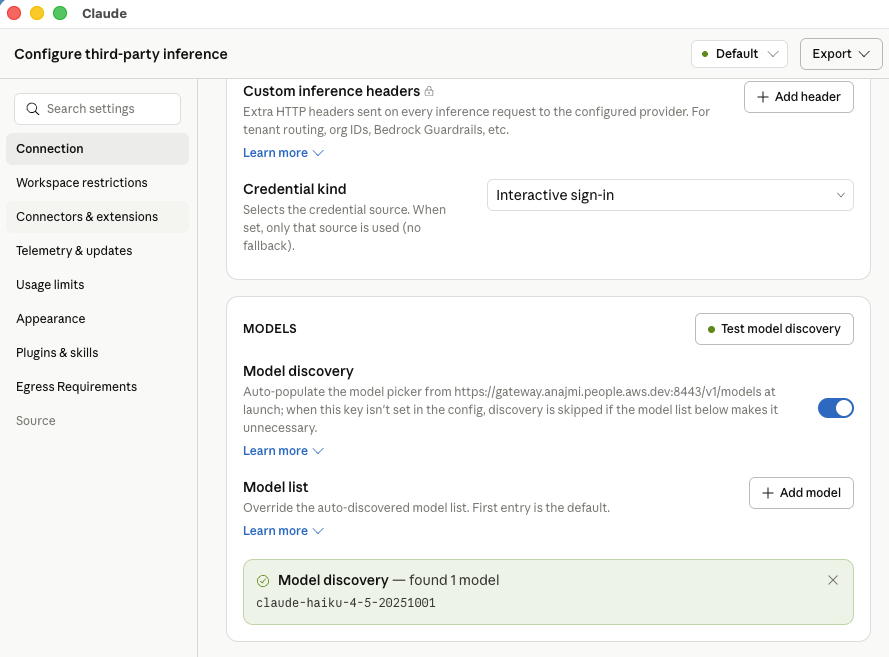
图 7:同一用户在 Claude Desktop 中只能访问 Claude Haiku
3. 遥测:按用户归因的使用情况
客户端会发出使用指标(claude_code.token.usage、claude_code.cost.usage 和 claude_code.active_time.total),并将其归因于已认证开发者的身份:用户 ID、电子邮件地址和群组成员关系。
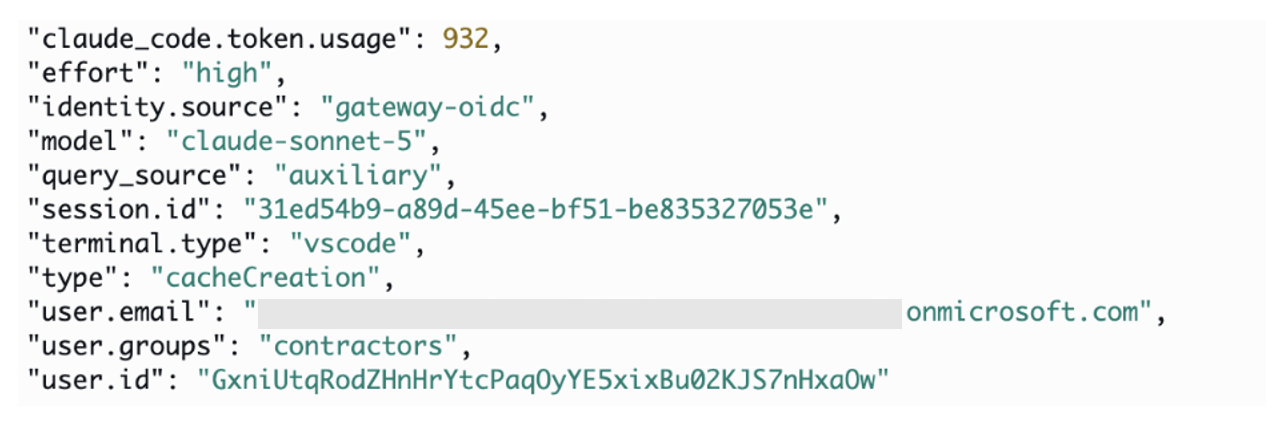
图 8:由网关从 Claude Code 会话转发,并由采集器导出至 Amazon CloudWatch 的 OpenTelemetry 指标
网关通过 OpenTelemetry Protocol(OTLP)将这些遥测数据转发至您配置的采集器。支持的 OTLP 兼容后端包括 Datadog、Splunk、Grafana 以及通过 AWS Distro for OpenTelemetry(ADOT)采集器接入的 Amazon CloudWatch。
telemetry:
  forward_to:
    - url: https://otel-collector.internal.example.com
      metrics: true
      logs: false
      traces: false
日志和追踪需要主动启用,因为它们可能包含源代码和提示词内容。大多数部署起初只启用指标,这能够提供按用户划分的成本和使用情况明细,同时不会暴露敏感数据。更多信息请参阅 Claude apps gateway 配置页面。
4. 路由:具备故障切换的推理
网关会按声明顺序将推理请求路由至一个或多个上游,并在上游不可用、受到限流或发生超时时自动进行故障切换。跨提供商故障切换可能会改变适用的服务条款和数据处理
English / 原文
AI administrators deploying Claude Code and Claude Desktop across their workforce need centralized controls over authentication, model access, cost attribution, and spend enforcement. These controls reduce operational overhead and apply governance consistently at scale.
Claude apps gateway provides a self-hosted governance layer between these applications and Amazon Bedrock or Claude Platform on AWS.
Building on our launch post, this post presents a production reference deployment covering end-to-end architecture, enterprise deployment patterns, cost, and implementation resources.
Architecture
This section covers the reference deployment topology and how requests flow through the gateway.
Deployment topology
Claude apps gateway ships in the same Claude Code CLI binary that developers already run. Started with claude gateway --config gateway.yaml, it runs in server mode and loads its YAML configuration at startup. In this reference deployment, the container runs on AWS Fargate inside your virtual private cloud (VPC). The same image can run on Amazon Elastic Kubernetes Service (Amazon EKS) or Amazon Elastic Compute Cloud (Amazon EC2) if either better matches your existing setup.
The reference architecture uses the following components:
- Compute and state: Each AWS Fargate task runs one stateless gateway container. Amazon Relational Database Service (Amazon RDS) for PostgreSQL stores short-lived sign-in state, including device codes and sessions. When spend limits are enabled, it also stores per-user spend counters and audit records. Auth state lives in the database rather than in a task. This means any task can serve any request, with no sticky sessions required on the load balancer.
- Ingress and private DNS: An internal Application Load Balancer terminates TLS using an AWS Certificate Manager certificate. An Amazon Route 53 private hosted zone resolves the gateway to private IP addresses reachable through a VPN, AWS Direct Connect, or equivalent private connectivity.
- Service connectivity: VPC endpoints keep supported AWS service traffic private, while a NAT gateway provides other required egress.
- Upstream credentials: The gateway authenticates to Amazon Bedrock using the AWS Identity and Access Management (IAM) role assigned to the gateway task. The Claude Platform on AWS API key and other static credentials remain in AWS Secrets Manager. No upstream credentials are distributed to developer machines.
Operational note: Configure the load balancer idle timeout to exceed the longest expected interval without data. The default is 60 seconds. The load balancer terminates connections that remain idle longer than the configured timeout. Check both delayed non-streaming responses and pauses between streaming chunks.
Figure 1: Reference architecture for Claude apps gateway on AWS
Request flow
Sign-in (once per session). The platform team distributes managed settings that point Claude Code and Claude Desktop to the gateway’s private URL. When a developer runs /login, the client starts the OAuth 2.0 device authorization grant and opens a browser to authenticate through your OpenID Connect (OIDC) identity provider. The browser must also reach the gateway’s private endpoint because the gateway serves the device verification page. After authentication, the gateway issues a short-lived bearer token, valid for one hour by default. The session subsequently refreshes silently in the background.
Inference (every request). Every inference request carries the bearer token. The gateway validates it, resolves the developer’s identity and group membership, applies the matching policy, evaluates the applicable spend cap, and routes the request to Amazon Bedrock or Claude Platform on AWS. The response streams back to the client. The client emits usage metrics, which the gateway forwards over the OpenTelemetry Protocol (OTLP) to a collector you configure. The metrics are attributed to the authenticated identity used for policy evaluation.
For deployment scripts and configuration templates, refer to the accompanying repository. For operational guidance, refer to the deployment guide. For device code verification and token lifecycle details, refer to the Claude apps gateway documentation.
What it solves
The gateway addresses five governance needs, each described in the following sections.
1. Identity: SSO authentication
The gateway delegates authentication to your OIDC identity provider. Developers sign in once through browser SSO. The gateway issues a short-lived token and handles silent refresh in the background. The gateway supports OIDC-approved providers including Okta, Microsoft Entra ID, Auth0, Keycloak, or Amazon Cognito, for example.
This gives you centralized OIDC authentication with no upstream credentials on developer machines, instant offboarding through identity provider removal, and consistent per-user attribution across requests without custom instrumentation.
The gateway keeps no user directory of its own. There are no accounts to pre-create and no SCIM sync to configure. Whatever groups your identity provider assigns to a user are the groups the gateway uses for policy matching, 1:1 with no translation layer. Manage users and groups entirely in your identity provider, and the gateway picks up changes at the next session refresh. Offboarding is removing the user from your identity provider. Their session expires within the configured time to live (1 hour by default), with no credential rotation required.
The following example shows a gateway configured with Microsoft Entra ID:
oidc:
  issuer: https://login.microsoftonline.com/<tenant-id>/v2.0
  client_id: ${OIDC_CLIENT_ID}
  client_secret: ${OIDC_CLIENT_SECRET}
  allowed_email_domains: [company.com]
  groups_claim: roles
Note: Microsoft Entra ID doesn’t include group or role claims by default. If your policies use match: {groups: [...]} with Entra app roles, add groups_claim: roles to your OIDC configuration. Without this step, the gateway cannot resolve group membership and all users match only the catch-all policy.
For per-identity-provider setup instructions, refer to the identity provider setup guide. The following images show the sign-in experience from the developer’s perspective, for both Claude Code and Claude Desktop.
Figure 2: Authenticating through the gateway
Figure 3: The gateway delegates to your existing OIDC identity provider
Figure 4: Authorizing the device in the browser
Figure 5: Configuring inference with Amazon Bedrock through the gateway for Claude Desktop
2. Policy: Centralized model access and permissions
The gateway enforces model access server-side and distributes tool permissions as managed settings, scoped by identity provider group. You define which models and capabilities each team gets in a single YAML block. Policies are evaluated in declaration order. The first match is selected, then merged onto the match: {} catch-all base. End the list with a match: {} policy. It acts as a catch-all for users whose groups don’t match a specific policy earlier in the list. Without one, unmatched users receive full catalog access. Changes propagate to connected clients within one hour, requiring no action from developers.
Managed:
  policies:
    # Contractors: Haiku only, no web access
    - match: { groups: [contractors] }
      cli:
        availableModels: [claude-sonnet-5, claude-haiku-4-5]
        enforceAvailableModels: true
      permissions:
        deny: ["WebFetch", "WebSearch"]
    # Engineers: full model access with guardrails
    - match: { groups: [engineers] }
      cli:
        availableModels: [claude-opus-4-8, claude-sonnet-5, claude-haiku-4-5]
      permissions:
        allow: [Read, Grep, Bash, Edit]
        deny: ["Read(./.env)", "Read(./secrets/**)"]
    # Catch-all: every other authenticated user. Must be last.
    - match: {}
      cli:
        availableModels: [claude-haiku-4-5, claude-sonnet-5]
Note: Include desktop: {} in every policy entry to turn on Claude Desktop clients. Without it, the gateway rejects Desktop inference requests for users matching that policy, even though sign-in succeeds.
Model access is enforced server-side. A developer whose group only grants Claude Haiku cannot bypass the restriction, even with a modified client. The model picker in Claude Code and Claude Desktop shows only permitted models. For the full policy schema including tool permissions and managed settings delivery, refer to the configuration reference.
The following figures show policy enforcement in action.
Figure 6: A user in the contractors group receives a 400 error when requesting Claude Opus 4.8 in Claude Code
Figure 7: The same user can access only Claude Haiku in Claude Desktop
3. Telemetry: Per-user usage attribution
The client emits usage metrics (claude_code.token.usage, claude_code.cost.usage, and claude_code.active_time.total) attributed to the authenticated developer’s identity: user ID, email, and group membership.
Figure 8: OpenTelemetry metrics from Claude Code sessions relayed by the gateway and exported to Amazon CloudWatch by the collector
The gateway relays this telemetry over OpenTelemetry Protocol (OTLP) to a collector you configure. Supported OTLP-compatible backends include Datadog, Splunk, Grafana, and Amazon CloudWatch through the AWS Distro for OpenTelemetry (ADOT) collector.
telemetry:
  forward_to:
    - url: https://otel-collector.internal.example.com
      metrics: true
      logs: false
      traces: false
Logs and traces are opt-in because they can contain source code and prompt content. Most deployments start with metrics only, which provide per-user cost and usage breakdowns without exposing sensitive data. For more information, refer to the Claude apps gateway configuration page.
4. Routing: Inference with failover
The gateway routes inference to one or more upstreams in declared order, failing over automatically on upstream unavailability, throttling, or timeouts. Cross-provider failover can change the applicable service terms and data-processing geography.
You can configure combinations with the following upstream types:
upstreams:
  # Amazon Bedrock (uses ECS task role, no static keys)
  - name: bedrock-east
    provider: bedrock
    region: us-east-1
    auth: {}
  # Amazon Bedrock in a second region for failover
  - name: bedrock-west
    provider: bedrock
    region: us-west-2
    auth: {}
  # Claude Platform on AWS (cross-provider fallback)
  - name: claude-platform
    provider: anthropicAws
    region: us-east-1
    workspace_id: wrkspc_01ABCDEFGHIJKLMN
    auth:
      api_key: ${ANTHROPIC_AWS_API_KEY}
The Deployment patterns section shows how to combine these building blocks for common scenarios. For the full upstream configuration and provider-specific auth options, refer to the upstreams reference.
5. Spend caps: Per-user budget enforcement
AWS Budgets and AWS Cost Explorer provide account-level visibility with periodic aggregation, making them well suited for organizational cost governance. The gateway complements these tools by providing inline enforcement before inference occurs, in addition to visibility into per-developer usage.
Caps are set at three levels: organization-wide defaults, per-group, and per-user overrides. Each cap applies individually per developer, not as a shared pool. The gateway resolves the effective limit for each request: a per-user override takes precedence, then the most restrictive applicable group cap, then the organization default. If no cap exists at any level, spend is unlimited. When a developer reaches their ceiling, the gateway returns HTTP 429 immediately. Counters reset automatically at the start of each period (daily, weekly, or monthly).
# Org-wide default: $500/month per developer (amounts in USD cents)
curl -X POST https://<gateway>/v1/organizations/spend_limits \
  -H "x-api-key: $ADMIN_KEY" \
  -H "Content-Type: application/json" \
  -d '{"scope":{"type":"organization"},"amount":"50000","period":"monthly"}'

# Tighter cap for a specific group: $10/day for contractors
curl -X POST https://<gateway>/v1/organizations/spend_limits \
  -H "x-api-key: $ADMIN_KEY" \
  -H "Content-Type: application/json" \
  -d '{"scope":{"type":"rbac_group","rbac_group_id":"contractors"},"amount":"1000","period":"daily"}'

# Instant shutoff for one user: set cap to zero
curl -X POST https://<gateway>/v1/organizations/spend_limits \
  -H "x-api-key: $ADMIN_KEY" \
  -H "Content-Type: application/json" \
  -d '{"scope":{"type":"user","user_id":"<oidc-sub>"},"amount":"0","period":"daily"}'
Spend caps are separate from model access control. A group may have access to Opus, Sonnet, and Haiku. Caps govern how much that access costs, not which models are available.
Admin workflow: Caps are managed entirely through the Admin API. There is no admin UI. Platform teams typically automate this with a script that syncs limits from a checked-in config file as part of the deploy pipeline, or through Terraform calling the API. The GET /v1/organizations/spend_limits/effective endpoint shows each developer’s resolved cap and period-to-date spend for reporting.
Limitations to be aware of: Spend is estimated from token counts at list price. It’s a real-time circuit breaker, not an invoice. Committed-use discounts and negotiated rates aren’t reflected. If the database is unavailable, spend enforcement fails open by default, allowing inference to continue. Organizations requiring strict budget enforcement can set fail_closed_on_error: true to block requests instead. For authoritative billing, reconcile against Amazon Bedrock invocation logs or the AWS Cost and Usage Report. For the full Admin API reference and enforcement mechanics, refer to the spend limits documentation.

Figure 9: A user request is rejected with a 429 error on reaching the daily spend limit
Deployment patterns
How you deploy the gateway depends on your organization’s structure, traffic patterns, and governance requirements. There’s no single correct architecture.
Centralizing all Claude usage through the gateway simplifies quota management and gives you one place for cost attribution and policy enforcement. Onboarding is typically instant: a new developer joins the identity provider group and gets access. The tradeoff is that the gateway becomes shared infrastructure your platform team operates, and workloads that need native Amazon Bedrock features cannot route through it.
Running Amazon Bedrock directly in dedicated accounts gives each team isolated quotas, no shared dependency, and access to the full Amazon Bedrock feature set. Direct Amazon Bedrock deployments can use IAM roles and retain centralized billing and audit data. The tradeoff is losing the gateway’s per-developer authentication, policy, telemetry, and spend controls.
Most organizations combine both approaches in some form. The following patterns illustrate common configurations, from single-team setups to multi-account architectures. Start with the pattern closest to your current environment and evolve as your usage grows.
Pattern A: Single team, single AWS Region
Recommended for: teams evaluating the gateway or organizations with a single development group in one Region.
A minimal deployment: one Amazon Bedrock upstream in us-east-1, an org-wide daily spend cap, and all developers get the same model access. Start here. Add complexity when the use case demands it.

Figure 10: Single team in a single account and Region, with org-wide daily, weekly, and monthly caps
Pattern B: Multi-team with tiered access
Best for: organizations with multiple teams that need different model access levels and spend limits. Groups from the identity provider drive differentiated policies:
- Platform engineering: Opus + Sonnet + Haiku, $50/day.
- Application developers: Sonnet + Haiku, $20/day.
- Contractors: Haiku only, $5/day, web tools denied.
Group limits are inherited individually by each developer, not shared as a team budget. The Admin API reports spend per developer with group metadata, so team totals must be aggregated separately. The platform team can sync limits from a checked-in config file as part of the deploy pipeline.
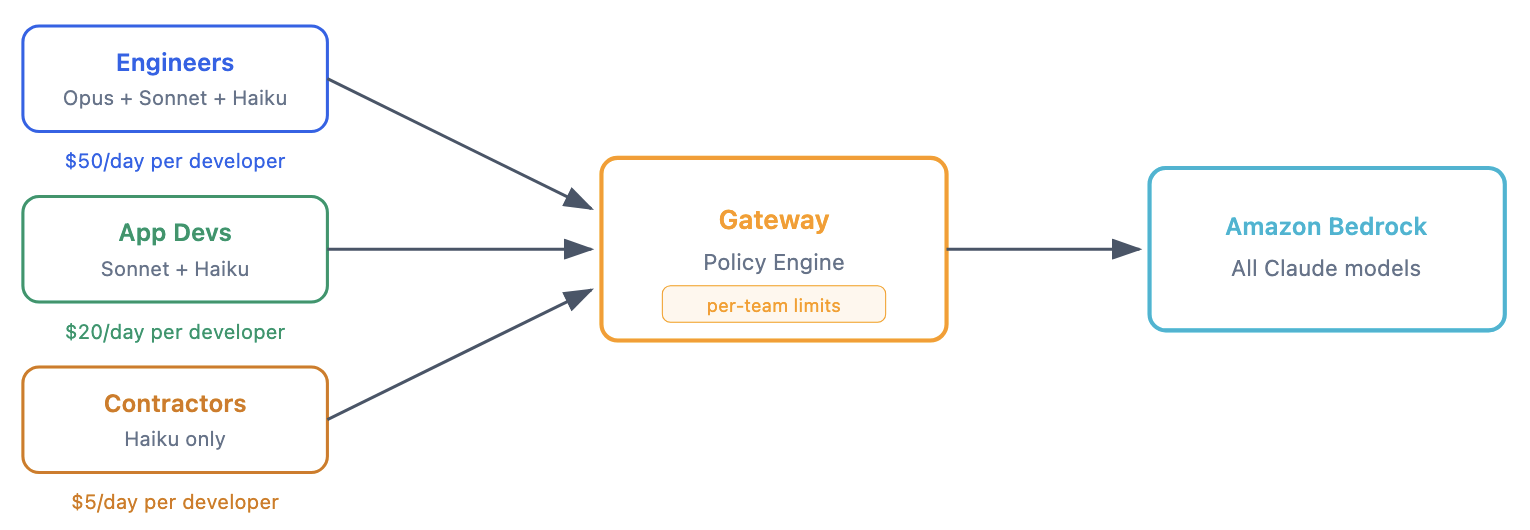
Figure 11: Multiple teams in a single account and Region, with team-wide daily, weekly, and monthly caps
Pattern C: Hybrid Amazon Bedrock + Claude Platform on AWS
Best for: organizations that want Amazon Bedrock as the preferred upstream with Claude Platform on AWS as overflow capacity. Note that cross-provider failover can change the applicable service terms and data-processing geography.
upstreams:
  - name: claude-platform
    provider: anthropicAws
    region: us-east-1
    workspace_id: wrkspc_01ABCDEFGHIJKLMN
    auth:
      api_key: ${ANTHROPIC_AWS_API_KEY}
  - name: bedrock
    provider: bedrock
    region: us-east-1
    auth: {}
Requests go to Amazon Bedrock first. Only on rate-limit or outage does the gateway fall back to Claude Platform on AWS.
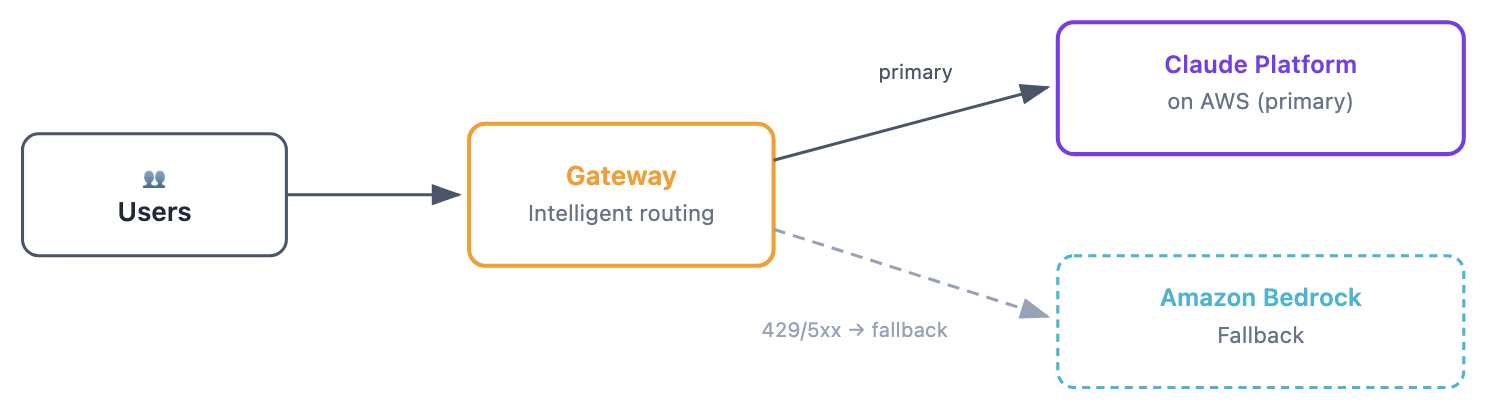
Figure 12: Single account with multiple upstreams, using Amazon Bedrock and Claude Platform on AWS for failover
Recommended for: organizations where developer tooling needs governance (SSO, spend caps, telemetry) but production applications call Amazon Bedrock directly with isolated quotas and native features.
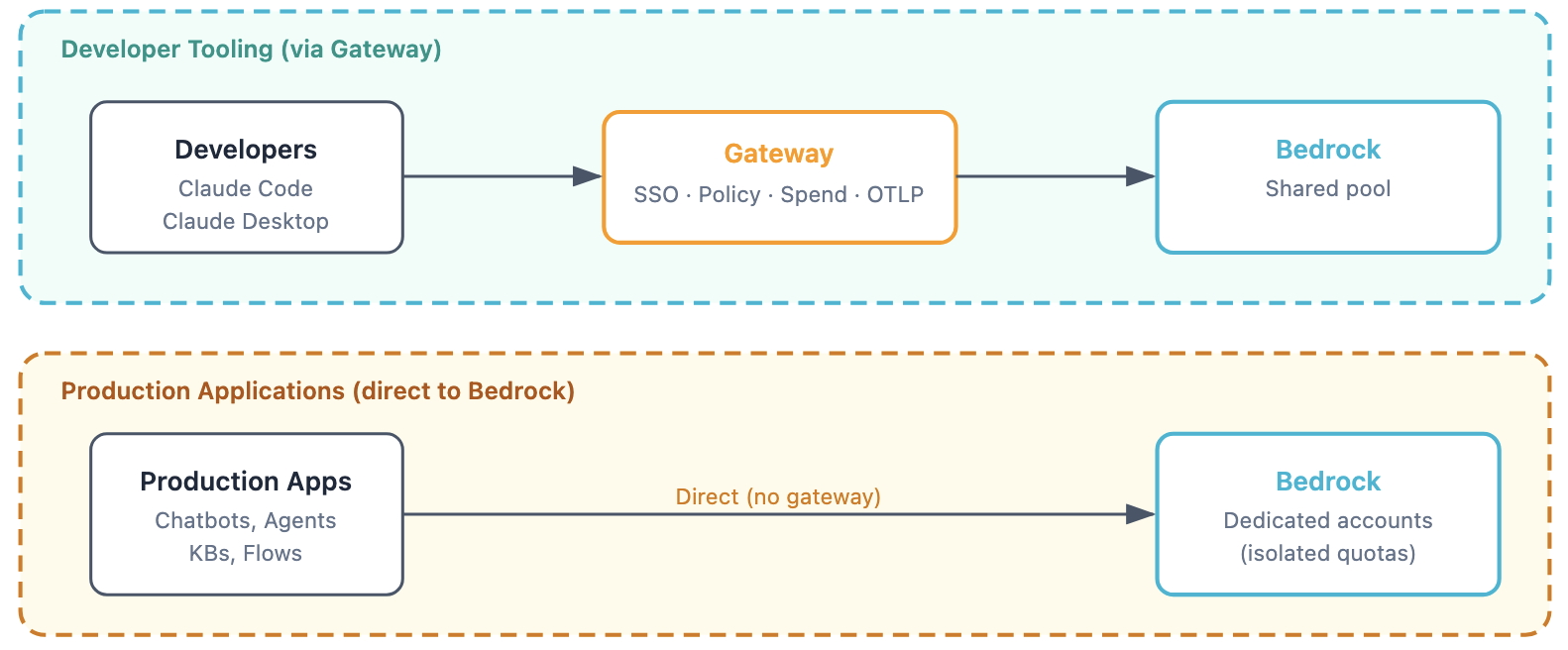
Figure 13: Production workloads stay on dedicated Amazon Bedrock accounts with native features such as Amazon Bedrock Knowledge Bases, Agents, and Flows that the gateway does not proxy
Pattern E: Multi-account (shared services)
Recommended for: organizations where a central platform team operates the gateway and individual business units own their Amazon Bedrock access in separate accounts.
upstreams:
  - name: team-alpha
    provider: bedrock
    region: us-east-1
    auth:
      aws_access_key_id: ${TEAM_ALPHA_AKID}
      aws_secret_access_key: ${TEAM_ALPHA_SK}
  - name: team-beta
    provider: bedrock
    region: us-east-1
    auth:
      aws_access_key_id: ${TEAM_BETA_AKID}
      aws_secret_access_key: ${TEAM_BETA_SK}
Billing lands in each team’s account. The gateway routes to the correct upstream based on model configuration.
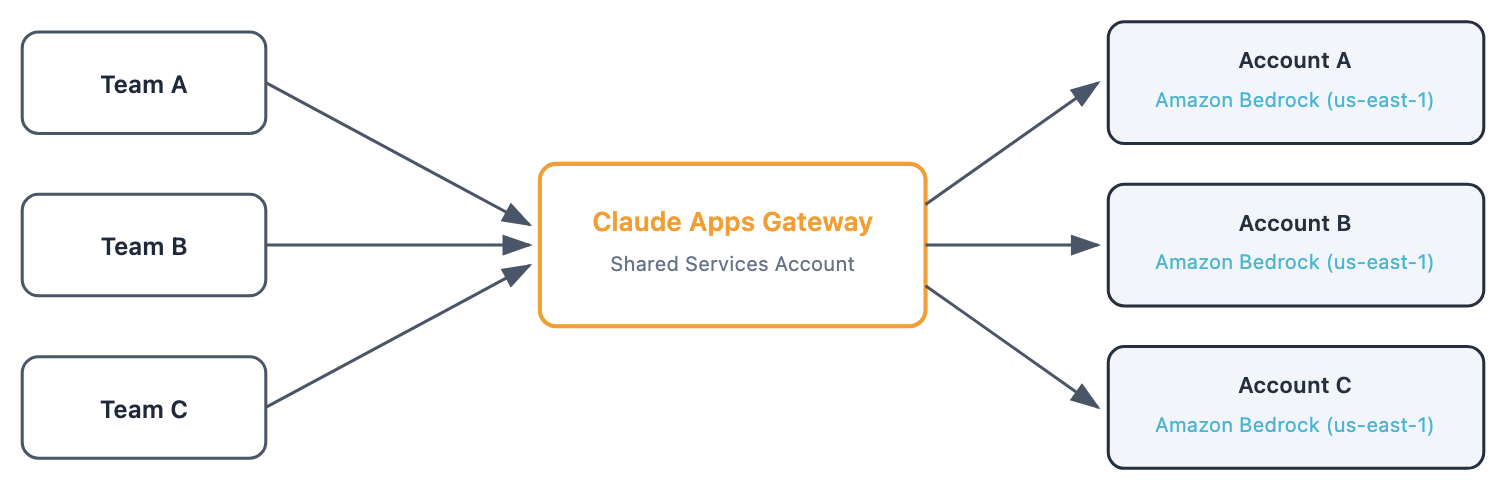
Figure 14: Multiple teams across multiple accounts, with per-account billing for Bedrock consumption
Gateway lives in a shared-services account. Each business unit’s Amazon Bedrock usage is billed to their own AWS account. The gateway doesn’t natively assume a different IAM role per upstream. Multi-account routing requires explicit credentials in the upstream config. Store these credentials in AWS Secrets Manager and rotate them on a schedule. Long-lived access keys are a significant security and operational tradeoff. Consider an external process that periodically refreshes short-lived AWS Security Token Service (AWS STS) credentials into the gateway’s environment to reduce exposure.
Conclusion
The Claude apps gateway gives platform teams a single control point for Claude Code and Claude Desktop on AWS. One container, one YAML configuration file. Five capabilities: SSO authentication, per-group model policies, per-user telemetry, multi-region routing with failover, and spend caps.
There is no per-seat license fee. When using Amazon Bedrock as the upstream, no developer data leaves your AWS account. Developers run the same claude binary they already know. The gateway is invisible to them after initial sign-in.
To get started, clone the accompanying GitHub repository and choose one of two tracks. Both provision the same Amazon ECS Fargate deployment: an internal ALB, Amazon RDS for PostgreSQL, ECR, Secrets Manager, an IAM task role, and an ADOT telemetry collector. Choose the idempotent setup.sh script for full visibility into every AWS call, or an AWS Cloud Development Kit (AWS CDK) stack for a managed lifecycle. For configuration details, refer to the Claude apps gateway documentation.
About the authors
Dani Mitchell
Dani is a Sr GenAI Specialist Solutions Architect at AWS and the SA lead for Amazon Bedrock Knowledge Bases. He helps enterprises across the world design and deploy generative AI solutions using Amazon Bedrock and Anthropic’s models and capabilities to build scalable, production-ready applications.
Bryn Price
Bryn is a technologist, paragliding pilot, and Principal Solutions Architect at AWS. With more than 20 years of experience across telecommunications, banking, and software, he’s spent recent years deep in Applied AI, designing and building multi-agent AI products in production, and helping customers move from experimenting with generative AI to shipping it at scale. He loves defying gravity and talking through anything from agent architectures to how AI is reshaping software engineering itself.
Aamna Najmi
Aamna is a Senior Specialist Solutions Architect for Generative AI focusing on Anthropic models and operationalizing and governing generative AI systems at scale on Amazon Bedrock. She helps ISVs solve their challenges, embrace innovation, and create new business opportunities with Amazon Bedrock. In her spare time, she pursues her passion for experimenting with food and discovering new places.