使用 AgentCore Observability 监控本地部署和多云 AI Agent
英文标题:Monitor on-premises and multi-cloud AI agents with AgentCore Observability
本文介绍如何为运行在本地数据中心、GCP、Azure 或开发者机器上的 AI Agent 配置 Amazon Bedrock AgentCore Observability。方案通过 AWS Distro for OpenTelemetry(ADOT)自动插桩,并使用 IAM 凭证和 SigV4 认证,将会话追踪、span 指标、日志及 token 使用量发送至 CloudWatch 和 AgentCore Observability 仪表板。开发者需要配置 CloudWatch Transaction Search、相应 IAM 权限以及 OpenTelemetry 环境变量,即可将 Strands Agents 等框架的遥测数据统一纳入观测。该能力有助于跨环境审计 Agent 推理、工具调用和模型输出,并支持幻觉检测、风险响应监控与成本治理。
 1.3 MB
 101.1 KB
 124.1 KB
 345.0 KB
 141.2 KB
 346.5 KB
 85.4 KB
 100.8 KB
 33.4 KB
 221.3 KB
 387.1 KB
 493.5 KB
 403.6 KB
 10.5 KB
 10.7 KB
 178.8 KB
中文
当你部署使用 Strands Agents、LangGraph 和 CrewAI 等框架构建的 AI Agent 时,需要对其性能进行可观测性监控。无论这些 Agent 运行在 Amazon Elastic Kubernetes Service(Amazon EKS)、Amazon Elastic Container Service(Amazon ECS)、AWS Lambda、本地环境,还是 Google Cloud Platform(GCP)或 Microsoft Azure 等其他云服务提供商上,这一点都同样适用。
Amazon Bedrock AgentCore 是一个可利用任意框架或模型大规模构建、连接和优化 Agent 的平台。尽管 Amazon Bedrock AgentCore 的能力之一——Amazon Bedrock AgentCore Observability——提供了本地云监控工具默认不具备的原生追踪、监控和分析能力,但它原生仅支持部署在 AWS Cloud 中 AgentCore runtime 上的 Agent。如果你的 Agent 运行在其他任何环境中,则需要进行额外配置,才能将遥测数据发送到仪表板。
本文将介绍如何为运行在 AWS 之外的 Agent 设置可观测性。你将学习如何在非 AWS 环境中配置 AWS Distro for OpenTelemetry(ADOT)自动插桩、将遥测数据路由至 AgentCore Observability 仪表板,以及端到端验证这一配置。
下图展示了端到端可观测性管道,以及遥测数据如何从 Agent 流向 AgentCore Observability 仪表板。
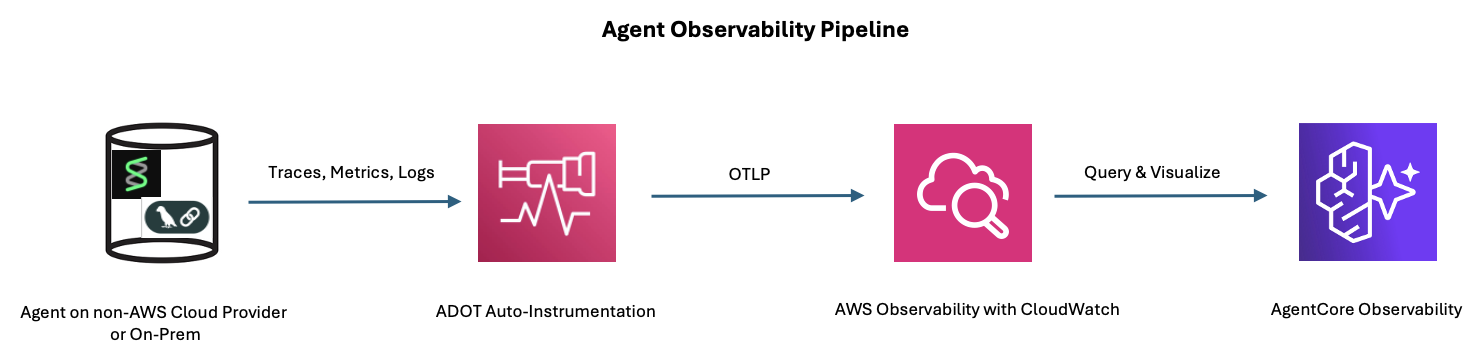
图 1:从 Agent 到 AgentCore Observability 仪表板的端到端可观测性管道
解决方案概览
该解决方案使用与 Agent 应用程序在进程内运行的 AWS Distro for OpenTelemetry(ADOT)。ADOT 会对 Agent 框架进行自动插桩并捕获生成式 AI 语义约定 span,随后使用 AWS Identity and Access Management(IAM)凭证,通过 SigV4 身份验证将遥测数据直接导出至 Amazon CloudWatch OpenTelemetry Protocol(OTLP)端点。
要将 AI Agent 的遥测数据发送至 Amazon Bedrock AgentCore Observability,需要三个核心组件:
- ADOT 自动插桩:AWS Distro for OpenTelemetry 可处理从非 AWS 环境导出遥测数据的复杂性。
- IAM 凭证:ADOT 使用这些访问密钥向 CloudWatch 进行身份验证,并将 Agent 的遥测数据(追踪、指标和日志)转发至 AgentCore Observability 仪表板。
- 环境变量:其中包含与路由和身份验证相关的特定 OpenTelemetry 设置。
如下图所示,该跨平台可观测性方案集成了多项 AWS 服务。Amazon CloudWatch 作为基础,负责遥测数据的摄取和存储。Amazon Bedrock AgentCore Observability 则为 AI Agent 提供专用监控仪表板。AWS Distro for OpenTelemetry(ADOT)提供跨平台插桩能力。IAM 负责保护外部环境与 AWS 之间的身份验证。
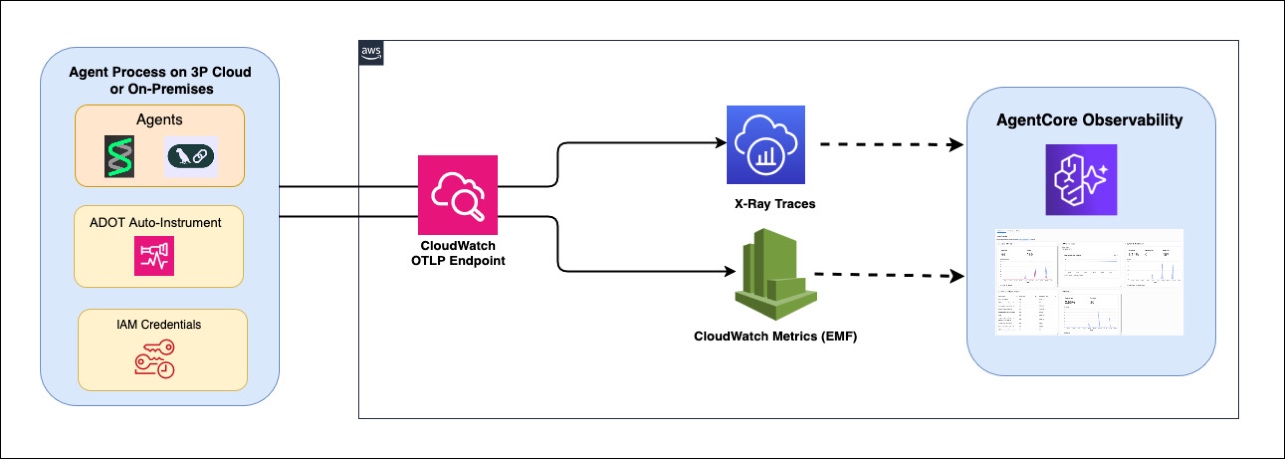
图 2:跨平台可观测性架构及所涉及的 AWS 服务
可观测性是负责任 AI 的基础支柱。通过将遥测数据路由到 AgentCore Observability,你可以了解 Agent 的推理链、工具调用和模型输出。这使你能够检测幻觉,监控有害或偏离主题的响应,跟踪 token 使用量以进行成本治理,并审计跨环境的 Agent 行为。对于运行在 AWS 之外的 Agent 而言,这一点尤为关键;如果没有集中式可观测性,问题输出可能无法被察觉。
前提条件
开始前,请确认你具备以下条件:
- 一个 AWS 账户:
- 已配置 Amazon Bedrock 模型访问权限(本演练使用 Claude Haiku)。有关各 AWS 区域的模型可用性,请参阅 Amazon Bedrock 中的 按 AWS 区域列出的支持模型。
- 已指定 AgentCore Observability 和指定的日志组。
- 已在账户中启用 CloudWatch Transaction Search(一次性设置)。
- 非 AWS 环境中已安装 Python 3.10 或更高版本。
- 具备 IAM 用户凭证(访问密钥 ID 和秘密访问密钥),并拥有以下权限:
bedrock:InvokeModel。logs:CreateLogGroup、logs:CreateLogStream、logs:PutLogEvents。xray:PutTraceSegments、xray:PutTelemetryRecords、xray:GetSamplingRules和xray:GetSamplingTargets。cloudwatch:PutMetricData。
- 你的环境可以通过出站 HTTPS 访问 AWS 端点。
启用 CloudWatch Transaction Search
如果尚未启用 Transaction Search,请运行以下命令(每个账户仅需执行一次):
aws xray update-trace-segment-destination --destination CloudWatchLogs --region us-east-1
验证其是否已启用:
aws xray get-trace-segment-destination --region us-east-1
# Expected: {"Destination": "CloudWatchLogs", "Status": "ACTIVE"}
工作原理
ADOT 自动插桩(aws-opentelemetry-distro)负责处理将遥测数据从非 AWS 环境导出到 CloudWatch 的复杂工作:
- 自动插桩:
opentelemetry-instrument命令会将 ADOT 注入 Python runtime。它会自动修补boto3(用于 Amazon Bedrock 调用)和 Strands 框架(用于 Agent 推理 span),以生成 OpenTelemetry 追踪数据。 - SigV4 身份验证:
aws_configurator使用boto3凭证链,通过 SigV4 对 OTLP 导出请求进行签名。在非 AWS 环境中,它使用AWS_ACCESS_KEY_ID和AWS_SECRET_ACCESS_KEY环境变量。 - CloudWatch OTLP 端点:ADOT 会将追踪数据和日志导出至 CloudWatch 原生 OTLP 摄取端点。
OTEL_EXPORTER_OTLP_LOGS_HEADERS标头会将日志定向至特定的 AgentCore 日志组,CloudWatch 因此能够在生成式 AI 可观测性仪表板下为数据建立索引。有关如何确定和配置 CloudWatch OTLP 端点 URL 的详细信息,请参阅 CloudWatch OTLP endpoint。 - 生成式 AI 语义约定:Strands 的
[otel]软件包会生成遵循 OpenTelemetry 生成式 AI 语义约定 的 span,其中包括 Agent 推理步骤、工具调用,以及带有 token 使用量的模型调用。
下图展示了在非 AWS 环境中通过 ADOT 自动插桩将遥测数据导出至 CloudWatch 的工作方式。
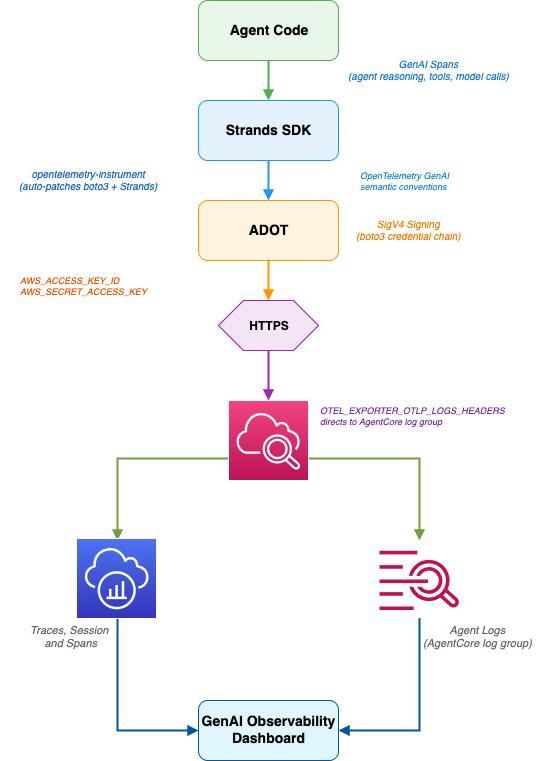
图 3:通过 ADOT 自动插桩从非 AWS 环境导出遥测数据至 CloudWatch
演练
按照以下步骤,在非 AWS 环境中配置并运行一个 Strands Agent,并将遥测数据路由至 AgentCore Observability。
第 1 步:安装依赖项
在你的非 AWS 环境中(本地服务器、GCP VM、Azure VM,或可访问互联网的计算环境),运行:
pip install "aws-opentelemetry-distro>=0.10.0" boto3 "strands-agents[otel]"
aws-opentelemetry-distro 软件包包含 ADOT 自动插桩、AWS 专用的 OTLP 导出器,以及用于处理 SigV4 身份验证的 aws_configurator。strands-agents[otel] 软件包为 Strands 框架提供 OpenTelemetry 追踪数据生成能力。
第 2 步:配置 AWS 凭证
将 IAM 用户凭证设置为环境变量。
export AWS_ACCESS_KEY_ID=<your-access-key-id>
export AWS_SECRET_ACCESS_KEY=<your-secret-access-key>
export AWS_REGION=us-east-1
安全说明:对于生产部署,请考虑使用 IAM Roles Anywhere 替代长期访问密钥。借助 IAM Roles Anywhere,本地工作负载可以使用 X.509 证书获取临时凭证。
第 3 步:设置 OpenTelemetry 环境变量
以下环境变量将 ADOT 配置为把遥测数据路由至 AgentCore Observability 仪表板:
export AGENT_OBSERVABILITY_ENABLED=true
export OTEL_PYTHON_DISTRO=aws_distro
export OTEL_PYTHON_CONFIGURATOR=aws_configurator
export OTEL_RESOURCE_ATTRIBUTES="service.name=my-external-agent,aws.log.group.names=/aws/bedrock-agentcore/runtimes/my-external-agent"
export OTEL_EXPORTER_OTLP_LOGS_HEADERS="x-aws-log-group=/aws/bedrock-agentcore/runtimes/my-external-agent,x-aws-log-stream=runtime-logs,x-aws-metric-namespace=bedrock-agentcore"
export OTEL_EXPORTER_OTLP_PROTOCOL=http/protobuf
export OTEL_TRACES_EXPORTER=otlp
关键配置详情:
AGENT_OBSERVABILITY_ENABLED=true会在 ADOT 中启用生成式 AI 专用遥测处理。OTEL_PYTHON_DISTRO=aws_distro和OTEL_PYTHON_CONFIGURATOR=aws_configurator会启用 AWS 专用的 OpenTelemetry 配置,包括针对 CloudWatch OTLP 端点的 SigV4 签名。- 带有
aws.log.group.names的OTEL_RESOURCE_ATTRIBUTES会告知 CloudWatch 在 AgentCore Observability 仪表板下为遥测数据建立索引。如果没有这一设置,追踪数据将进入通用 Amazon CloudWatch Logs。 - 带有
x-aws-metric-namespace=bedrock-agentcore的OTEL_EXPORTER_OTLP_LOGS_HEADERS会将采用嵌入式指标格式的指标路由至正确的 CloudWatch 命名空间。
第 4 步:创建 Agent 应用程序
创建名为 agent_test.py 的文件,并写入一个 Strands Agent:
from strands import Agent
from strands.models.bedrock import BedrockModel
from opentelemetry import baggage
from opentelemetry.context import attach
import time

# Configure the Bedrock model
model = BedrockModel(
    model_id="us.anthropic.claude-haiku-4-5-20251001-v1:0",
    region_name="us-east-1"
)
# Create the agent
agent = Agent(
    model=model,
    system_prompt="You are a helpful travel assistant."
)

# Set session ID for AgentCore session tracking
# All agent calls after attach() share same session ID for multiple requests/responses
session_id = f"external-session-{int(time.time())}"
ctx = baggage.set_baggage("session.id", session_id)
attach(ctx)

# Run the agent
response = agent("What are the top 3 things to do in Tokyo?")
print(response)
第 5 步:使用 ADOT 自动插桩运行
opentelemetry-instrument 命令会使用 ADOT 包装 Python 进程,自动对 Amazon Bedrock 调用和 Strands 框架操作进行插桩:
opentelemetry-instrument python3.12 agent_test.py
Agent 的响应将显示在终端中。在后台,ADOT 会捕获追踪、span 和日志,并将它们导出至 CloudWatch。
第 6 步:在 AgentCore Observability 中验证
执行后两到三分钟内即可看到遥测数据。打开 Amazon CloudWatch 控制台:
- 选择 GenAI Observability,然后选择 Bedrock AgentCore。
- 在 Agents 选项卡中,查找
my-external-agent。 - 选择该 Agent,查看会话、追踪和 span 指标。
以下截图展示了在非 AWS 环境中运行的 Strands Agent(my-external-agent)的遥测数据,这些数据可在 CloudWatch 的 AgentCore Observability 仪表板中查看。
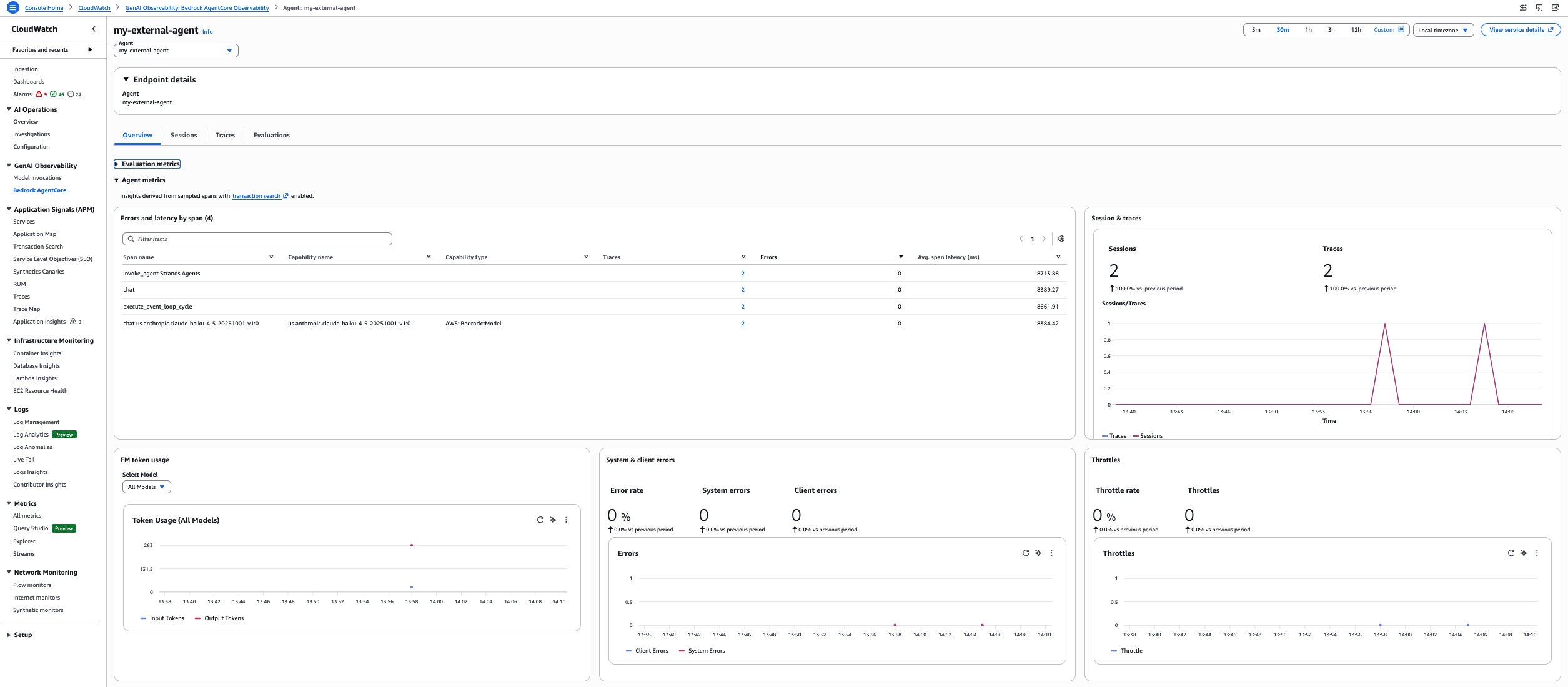
图 4:AgentCore Observability 仪表板中的 my-external-agent 遥测数据
控制台显示:
- Agent 名称:
my-external-agent。 - 会话:至少一个会话。
- 追踪:显示 Agent 推理过程和 Amazon Bedrock 模型调用的追踪 span。
- Span 详情:包含延迟和 token 指标的
invoke_agent、chat、execute_event_loop_cycle和chat.us.anthropic.claude-haikuspan。
以下截图展示了 Strands Agent(my-external-agent)的一条成功追踪,其中包含四个 span、模型信息以及延迟和 token 详情,显示于 AgentCore Observability 仪表板中。
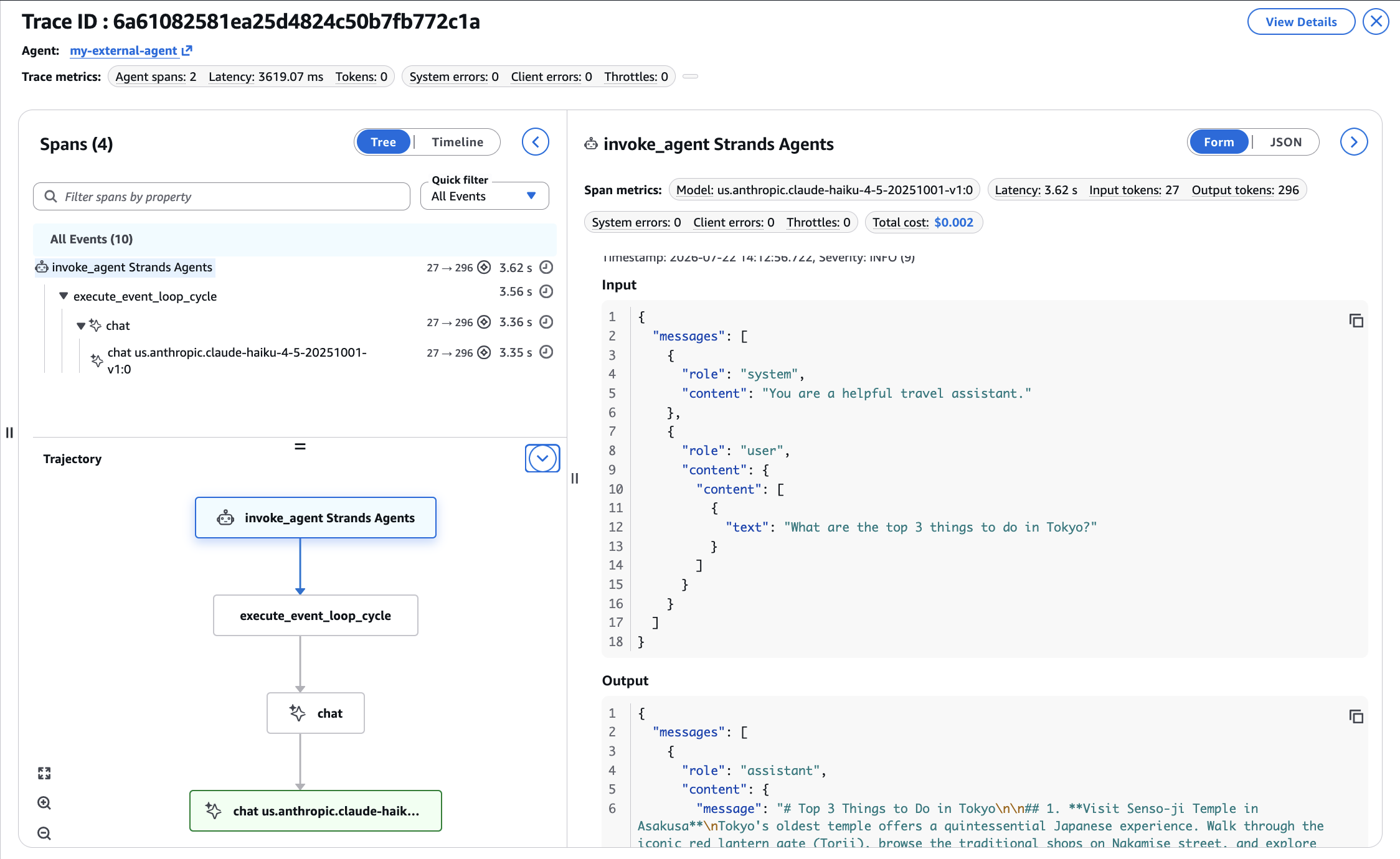
图 5:my-external-agent 的追踪详情,包含 span、延迟和 token 指标
从 Google Cloud Platform 验证
为确认该方案可在第三方云服务提供商环境中运行,我们在 Google Cloud Shell 中测试了相同配置。Google Cloud Shell 是一个运行在 GCP 基础设施上的基于浏览器的终端。
在 Google Cloud Shell 上设置环境:
# Create a virtual environment
python3.12 -m venv venv
source venv/bin/activate
# Install dependencies
pip install "aws-opentelemetry-distro" boto3 "strands-agents[otel]"
# Set AWS credentials
export AWS_ACCESS_KEY_ID
English / 原文
When you deploy AI agents built with frameworks like Strands Agents, LangGraph, and CrewAI, you need observability into their performance. This holds true whether they run on Amazon Elastic Kubernetes Service (Amazon EKS), Amazon Elastic Container Service (Amazon ECS), AWS Lambda, on-premises, or another cloud provider such as Google Cloud Platform (GCP) or Microsoft Azure.
Amazon Bedrock AgentCore is a platform to build, connect, and optimize agents at scale, with any framework or model. Although Amazon Bedrock AgentCore Observability, a capability of Amazon Bedrock AgentCore, provides native tracing, monitoring, and analytics that local cloud monitoring tools don’t offer out of the box, it natively supports only agents deployed on AgentCore runtime in the AWS Cloud. If your agents run anywhere else, you need additional configuration to send telemetry to the dashboard.
In this post, we show you how to set up observability for agents running outside AWS. You learn how to configure the AWS Distro for OpenTelemetry (ADOT) auto-instrumentation in non-AWS environments, route telemetry to the AgentCore Observability dashboard, and validate the setup end to end.
The following diagram shows the end-to-end observability pipeline and how telemetry flows from agents to the AgentCore Observability dashboard.
Figure 1: End-to-end observability pipeline from agents to the AgentCore Observability dashboard
Solution overview
The solution uses the AWS Distro for OpenTelemetry (ADOT) running in-process with the agent application. ADOT auto-instruments the agent framework and captures generative AI semantic convention spans, then exports the telemetry directly to the Amazon CloudWatch OpenTelemetry Protocol (OTLP) endpoint using SigV4 authentication with AWS Identity and Access Management (IAM) credentials.
Sending telemetry from your AI agent to Amazon Bedrock AgentCore Observability requires three core components:
- ADOT auto-instrumentation : The AWS Distro for OpenTelemetry handles the complexities of exporting telemetry from non-AWS environments.
- IAM credentials : The ADOT uses these access keys to authenticate with CloudWatch and forward your agent’s telemetry (traces, metrics, and logs) to the AgentCore Observability dashboard.
- Environment variables : These contain specific OpenTelemetry settings related to routing and authentication.
As seen in the following diagram, this cross-platform observability solution integrates several AWS services. Amazon CloudWatch serves as the foundation, handling telemetry ingestion and storage. Amazon Bedrock AgentCore Observability adds specialized monitoring dashboards for AI agents. AWS Distro for OpenTelemetry (ADOT) provides the cross-platform instrumentation capabilities. IAM secures the authentication between your external environments and AWS.
Figure 2: Cross-platform observability architecture and the AWS services involved
Observability is a foundational pillar of responsible AI. By routing telemetry to AgentCore Observability, you gain visibility into agent reasoning chains, tool invocations, and model outputs. This allows you to detect hallucinations, monitor for harmful or off-topic responses, track token usage for cost governance, and audit agent behavior across environments. This is especially critical for agents running outside AWS, where problematic outputs might go unnoticed without centralized observability.
Prerequisites
Before you begin, verify that you have:
- An AWS account:
- with Amazon Bedrock model access configured (this walkthrough uses Claude Haiku). For model availability by AWS Region, refer to supported models by AWS Region in Amazon Bedrock.
- for designated AgentCore Observability and designated log group(s).
- CloudWatch Transaction Search turned on in your account (one-time setup)
- Python 3.10 or later installed on your non-AWS environment.
- IAM user credentials (access key ID and secret access key) with permissions for:
bedrock:InvokeModel.logs:CreateLogGroup,logs:CreateLogStream,logs:PutLogEvents.xray:PutTraceSegments,xray:PutTelemetryRecords,xray:GetSamplingRules, andxray:GetSamplingTargets.cloudwatch:PutMetricData.
- Outbound HTTPS access to AWS endpoints from your environment.
Turn on CloudWatch Transaction Search
If you haven’t turned on Transaction Search, run the following (one-time per account):
aws xray update-trace-segment-destination --destination CloudWatchLogs --region us-east-1
Verify it’s active:
aws xray get-trace-segment-destination --region us-east-1
# Expected: {"Destination": "CloudWatchLogs", "Status": "ACTIVE"}
How it works
The ADOT auto-instrumentation (aws-opentelemetry-distro) handles the complexity of exporting telemetry from non-AWS environments to CloudWatch:
- Auto-instrumentation : The
opentelemetry-instrumentcommand injects the ADOT into the Python runtime. It automatically patchesboto3(for Amazon Bedrock calls) and the Strands framework (for agent reasoning spans) to emit OpenTelemetry traces. - SigV4 authentication : The
aws_configuratoruses theboto3credential chain to sign OTLP export requests with SigV4. From non-AWS environments, this uses theAWS_ACCESS_KEY_IDandAWS_SECRET_ACCESS_KEYenvironment variables. - CloudWatch OTLP endpoint : The ADOT exports traces and logs to the CloudWatch native OTLP ingestion endpoint. The
OTEL_EXPORTER_OTLP_LOGS_HEADERSheader directs logs to the specific AgentCore log group, which is how CloudWatch indexes the data under the generative AI observability dashboard. For details on how the CloudWatch OTLP endpoint URL is determined and configured, see CloudWatch OTLP endpoint. - Generative AI semantic conventions : The Strands
[otel]package emits spans following the OpenTelemetry generative AI semantic conventions, including agent reasoning steps, tool invocations, and model calls with token usage.
The following diagram shows how telemetry export through ADOT auto-instrumentation works from non-AWS environments to CloudWatch.
Figure 3: Telemetry export through ADOT auto-instrumentation from non-AWS environments to CloudWatch
Walkthrough
Follow these steps to configure and run a Strands agent in a non-AWS environment, with telemetry routed to AgentCore Observability.
Step 1: Install dependencies
On your non-AWS environment (on-premises server, GCP VM, Azure VM, or a compute with internet access):
pip install "aws-opentelemetry-distro>=0.10.0" boto3 "strands-agents[otel]"
The aws-opentelemetry-distro package includes the ADOT auto-instrumentation with OTLP exporters specific to AWS and the aws_configurator that handles SigV4 authentication. The strands-agents[otel] package provides OpenTelemetry trace emission from the Strands framework.
Step 2: Configure AWS credentials
Set your IAM user credentials as environment variables.
export AWS_ACCESS_KEY_ID=<your-access-key-id>
export AWS_SECRET_ACCESS_KEY=<your-secret-access-key>
export AWS_REGION=us-east-1
Security note : For production deployments, consider using IAM Roles Anywhere instead of long-lived access keys. With IAM Roles Anywhere, on-premises workloads can obtain temporary credentials using X.509 certificates.
Step 3: Set OpenTelemetry environment variables
These environment variables configure the ADOT to route telemetry to the AgentCore Observability dashboard:
export AGENT_OBSERVABILITY_ENABLED=true
export OTEL_PYTHON_DISTRO=aws_distro
export OTEL_PYTHON_CONFIGURATOR=aws_configurator
export OTEL_RESOURCE_ATTRIBUTES="service.name=my-external-agent,aws.log.group.names=/aws/bedrock-agentcore/runtimes/my-external-agent"
export OTEL_EXPORTER_OTLP_LOGS_HEADERS="x-aws-log-group=/aws/bedrock-agentcore/runtimes/my-external-agent,x-aws-log-stream=runtime-logs,x-aws-metric-namespace=bedrock-agentcore"
export OTEL_EXPORTER_OTLP_PROTOCOL=http/protobuf
export OTEL_TRACES_EXPORTER=otlp
Key configuration details:
AGENT_OBSERVABILITY_ENABLED=trueactivates generative AI-specific telemetry processing in the ADOT.OTEL_PYTHON_DISTRO=aws_distroandOTEL_PYTHON_CONFIGURATOR=aws_configuratoractivate the OpenTelemetry configuration specific to AWS, including SigV4 signing for the CloudWatch OTLP endpoint.OTEL_RESOURCE_ATTRIBUTESwithaws.log.group.namestells CloudWatch to index the telemetry under the AgentCore Observability dashboard. Without this, traces go to generic Amazon CloudWatch Logs.OTEL_EXPORTER_OTLP_LOGS_HEADERSwithx-aws-metric-namespace=bedrock-agentcoreroutes metrics in embedded metric format to the correct CloudWatch namespace.
Step 4: Create the agent application
Create a file named agent_test.py with a Strands agent:
from strands import Agent
from strands.models.bedrock import BedrockModel
from opentelemetry import baggage
from opentelemetry.context import attach
import time

# Configure the Bedrock model
model = BedrockModel(
    model_id="us.anthropic.claude-haiku-4-5-20251001-v1:0",
    region_name="us-east-1"
)
# Create the agent
agent = Agent(
    model=model,
    system_prompt="You are a helpful travel assistant."
)

# Set session ID for AgentCore session tracking
# All agent calls after attach() share same session ID for multiple requests/responses
session_id = f"external-session-{int(time.time())}"
ctx = baggage.set_baggage("session.id", session_id)
attach(ctx)

# Run the agent
response = agent("What are the top 3 things to do in Tokyo?")
print(response)
Step 5: Run with ADOT auto-instrumentation
The opentelemetry-instrument command wraps your Python process with the ADOT, automatically instrumenting Amazon Bedrock calls and Strands framework operations:
opentelemetry-instrument python3.12 agent_test.py
The agent’s response appears in the terminal. Behind the scenes, the ADOT captures traces, spans, and logs, and exports them to CloudWatch.
Step 6: Verify in AgentCore Observability
You see telemetry data within two to three minutes of execution. Open the Amazon CloudWatch console:
- Choose GenAI Observability , then Bedrock AgentCore.
- In the Agents tab, look for
my-external-agent. - Choose the agent to view sessions, traces, and span metrics.
The following screenshot shows the telemetry from the Strands agent (my-external-agent) running in a non-AWS environment, as seen in the AgentCore Observability dashboard in CloudWatch.
Figure 4: The my-external-agent telemetry in the AgentCore Observability dashboard
The console shows:
- Agent name :
my-external-agent. - Sessions : at least one session.
- Traces : trace spans showing the agent’s reasoning and Amazon Bedrock model invocations.
- Span details :
invoke_agent,chat,execute_event_loop_cycle, andchat.us.anthropic.claude-haikuspans with latency and token metrics.
The following screenshot shows a successful trace from the Strands agent (my-external-agent) with four spans, model information, and latency and token details in the AgentCore Observability dashboard.
Figure 5: Trace detail for my-external-agent with span, latency, and token metrics
Validating from Google Cloud Platform
To confirm the solution works from a third-party cloud provider, we tested the same setup from Google Cloud Shell, a browser-based terminal running on GCP infrastructure.
Set up the environment on Google Cloud Shell:
# Create a virtual environment
python3.12 -m venv venv
source venv/bin/activate
# Install dependencies
pip install "aws-opentelemetry-distro" boto3 "strands-agents[otel]"
# Set AWS credentials
export AWS_ACCESS_KEY_ID=<your-access-key-id>
export AWS_SECRET_ACCESS_KEY=<your-secret-access-key>
export AWS_REGION=us-east-1
# Set ADOT environment variables
export AGENT_OBSERVABILITY_ENABLED=true
export OTEL_PYTHON_DISTRO=aws_distro
export OTEL_PYTHON_CONFIGURATOR=aws_configurator
export OTEL_RESOURCE_ATTRIBUTES="service.name=gcp-hosted-agent,aws.log.group.names=/aws/bedrock-agentcore/runtimes/gcp-hosted-agent"
export OTEL_EXPORTER_OTLP_LOGS_HEADERS="x-aws-log-group=/aws/bedrock-agentcore/runtimes/gcp-hosted-agent,x-aws-log-stream=runtime-logs,x-aws-metric-namespace=bedrock-agentcore"
export OTEL_EXPORTER_OTLP_PROTOCOL=http/protobuf
export OTEL_TRACES_EXPORTER=otlp
Run the agent from GCP:
cat > agent_test.py << 'EOF'
from strands import Agent
from strands.models.bedrock import BedrockModel
from opentelemetry import baggage
from opentelemetry.context import attach
import time

model = BedrockModel(
    model_id="us.anthropic.claude-haiku-4-5-20251001-v1:0",
    region_name="us-east-1"
)
agent = Agent(model=model, system_prompt="You are a helpful assistant.")

# Set session ID for AgentCore session tracking
# All agent calls after attach() share same session ID for multiple requests/responses
session_id = f"gcp-session-{int(time.time())}"
ctx = baggage.set_baggage("session.id", session_id)
attach(ctx)

response = agent("What are the top 3 things to do in Paris?")
print(response)
EOF
opentelemetry-instrument python3.12 agent_test.py
The following screenshot shows the Strands agent (gcp-hosted-agent) running on Google Cloud Shell (GCP) and returning a successful response.
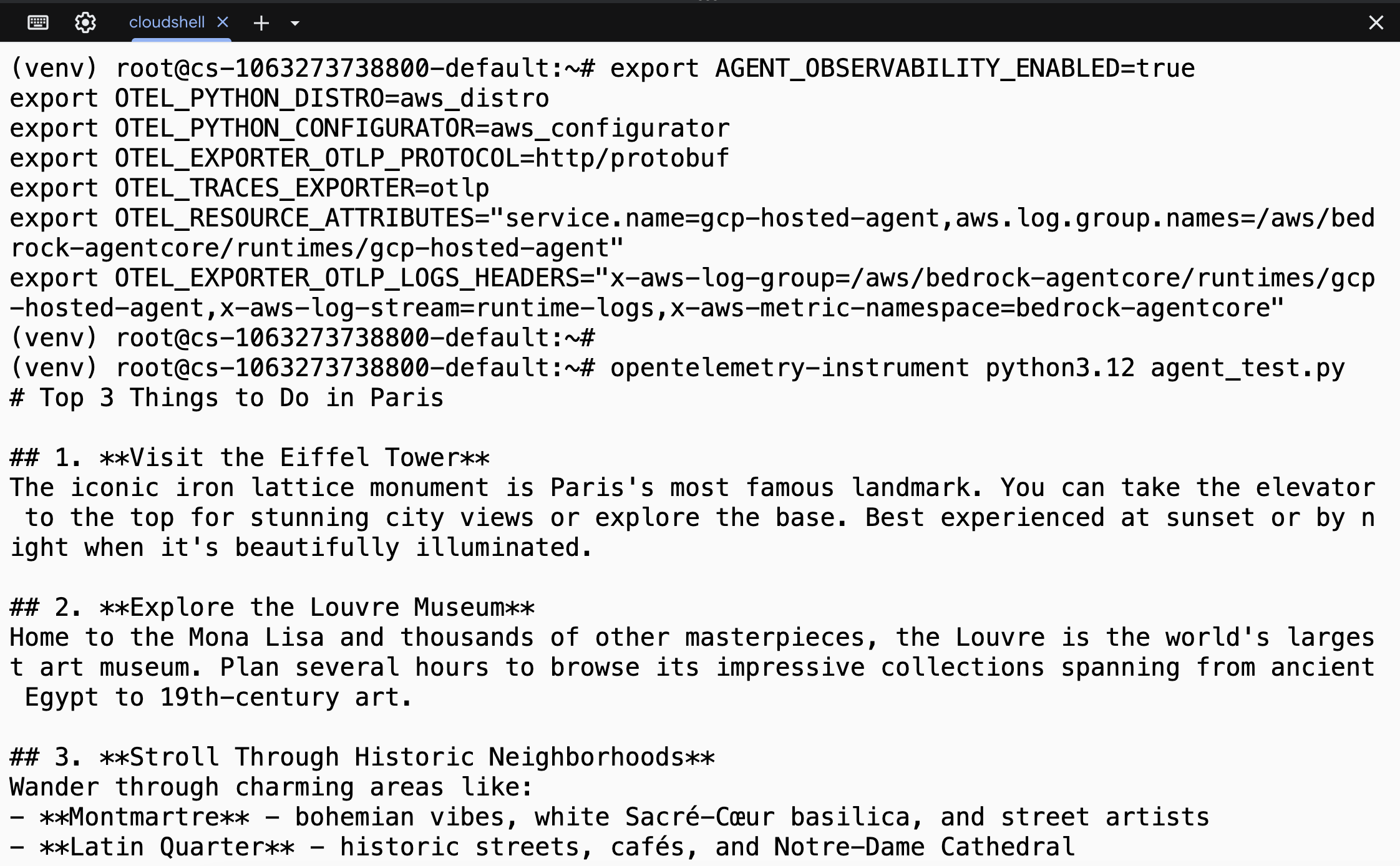
Figure 6: The gcp-hosted-agent running in Google Cloud Shell
Verify cross-cloud telemetry
Within two to three minutes of execution, the gcp-hosted-agent appears in the AgentCore Observability dashboard alongside agents running on AgentCore runtime or other environments.
The following screenshot shows a successful trace from the Strands agent (gcp-hosted-agent) running on GCP with four spans, model information, and latency and token details in the AgentCore Observability dashboard.
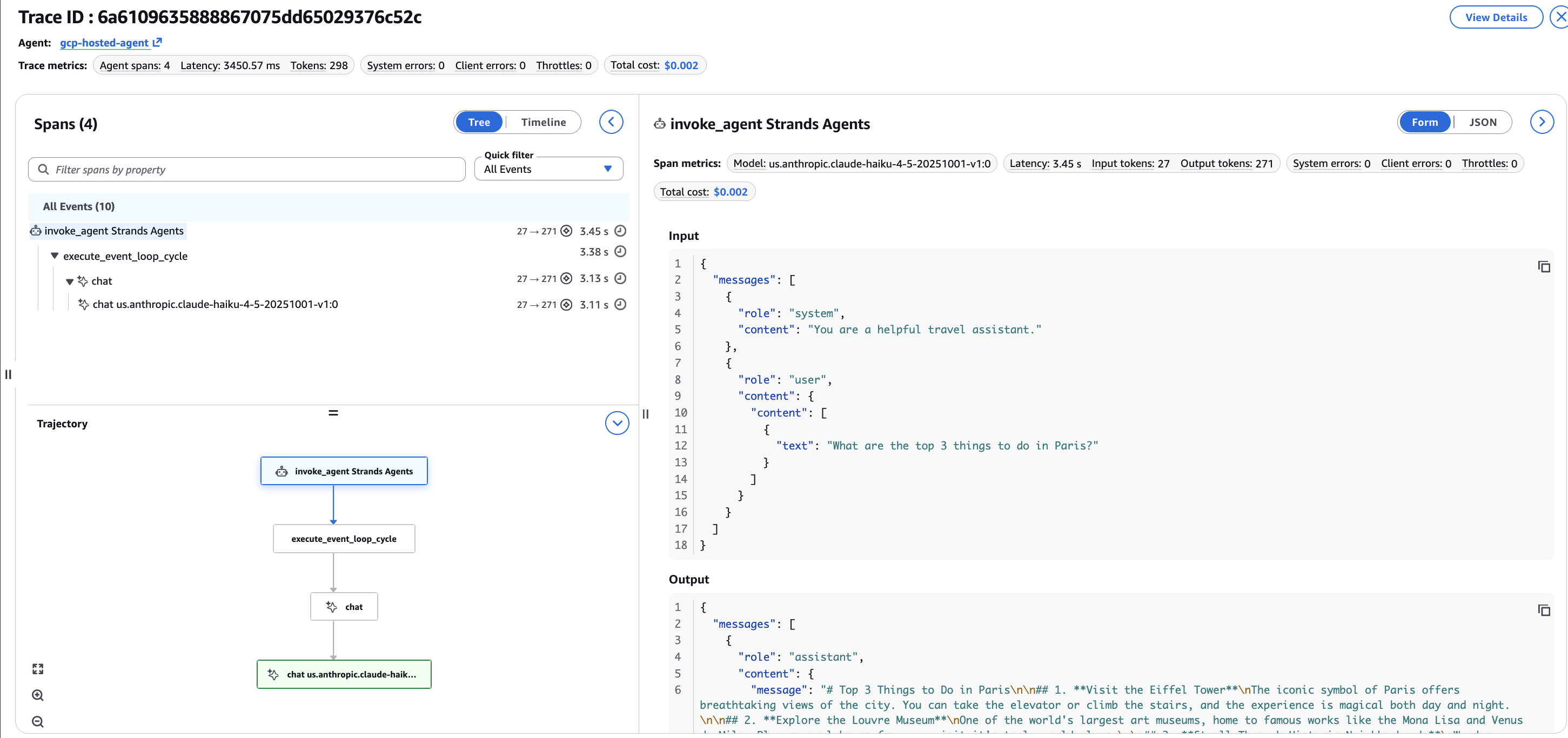
Figure 7: Trace detail for gcp-hosted-agent running on GCP
The telemetry is identical to what an AgentCore runtime-hosted agent produces. Sessions, traces, span metrics, token usage, and latency are all visible in the same dashboard, regardless of where the agent runs.
Although this walkthrough uses Strands Agents, the same ADOT-based pattern applies to other OpenTelemetry-compatible agent frameworks.
When choosing how to deploy your AI agents, understanding the observability trade-offs between different runtime environments helps you make the right architectural decision. Agents deployed directly on Amazon Bedrock AgentCore runtime benefit from automatic observability configuration. Agents running in non-AWS environments require additional manual setup but offer greater deployment flexibility. The following comparison highlights the key differences in telemetry collection, credential management, and use cases to help you determine the best approach for your requirements.
| Aspect | Non-AWS Runtime | AgentCore runtime |
|---|---|---|
| Telemetry supported | ADOT – manual OTEL variables required | ADOT – Automatic in-built OTEL variables |
| Credential management | IAM access key/secret or IAM Roles Anywhere | Automatic (IAM role) |
| Best for | Agents on-premises, GCP, Azure, or a non-AWS environment | Agents deployed on AWS with AgentCore |
Validated environments
We tested the ADOT auto-instrumentation approach across two non-AWS environments:
| Environment | Platform | Result |
|---|---|---|
| On-premises (simulated) | Standalone server running in non-AWS environment | Strands agent reporting telemetry (sessions, traces, spans) in AgentCore Observability |
| Google Cloud Shell (GCP) | Browser-based terminal running on Google Cloud Platform | Strands agent reporting telemetry (sessions, traces, spans) in AgentCore Observability |
Best practices
Based on our testing, we recommend the following when setting up cross-platform AgentCore Observability:
- Use consistent naming : The
service.nameinOTEL_RESOURCE_ATTRIBUTESbecomes the agent name on the dashboard. Use descriptive names that identify the environment (for example,prod-onprem-support-agentandstaging-gcp-research-agent). - Verify with
get-caller-identityfirst: Before running the agent, confirm that your credentials work by runningpython -c "import boto3; print(boto3.client('sts').get_caller_identity())". If this fails, the ADOT also fails silently. - Use Python 3.10 or later : The ADOT requires Python 3.10 or later. We recommend Python 3.12 for the best compatibility with all dependencies.
- Set session IDs for multi-turn conversations : Use the OpenTelemetry baggage API to propagate session IDs:
from opentelemetry import baggage
from opentelemetry.context import attach
ctx = baggage.set_baggage("session.id", "my-session-123")
attach(ctx)
- Rotate credentials regularly : For production deployments, avoid long-lived access keys. Consider IAM Roles Anywhere for on-premises workloads, or use your cloud provider’s identity federation to assume AWS IAM roles.
Clean up
To remove the resources created during this walkthrough:
# Delete the IAM access key (if created for testing)
aws iam delete-access-key --user-name <your-user> --access-key-id <your-key-id>
# Optionally delete the auto-created CloudWatch log groups
aws logs delete-log-group --log-group-name /aws/bedrock-agentcore/runtimes/my-external-agent --region us-east-1
aws logs delete-log-group --log-group-name /aws/bedrock-agentcore/runtimes/gcp-hosted-agent --region us-east-1
This walkthrough uses Amazon Bedrock, Amazon CloudWatch, and AWS X-Ray, which incur costs. See the respective pricing pages for details.
Conclusion
Amazon Bedrock AgentCore Observability isn’t limited to agents running on AgentCore runtime or within AWS. Using ADOT auto-instrumentation with IAM credentials and the correct OpenTelemetry environment variables, you can send telemetry from your choice of environment with internet access. Your agents can run on-premises, on GCP, on Azure, or anywhere else and still report to the same AgentCore Observability dashboard.
The setup requires a pip install and a set of environment variables. The resulting telemetry is identical to what AgentCore runtime-hosted agents produce: sessions, traces, span metrics, and token usage, all in one unified view.
To get started, clone the sample code from GitHub and follow the instructions in the README to configure and run the agent in your environment.
For agents already running on AWS but outside AgentCore runtime (EKS, ECS, Lambda), refer to the AgentCore Observability for EKS-hosted agents tutorial. For agents on AgentCore runtime, observability is configured automatically. See Add observability to your AgentCore resources.
About the authors
Vipul Gargav
Vipul is a Technical Account Manager in AWS Enterprise Support, where he supports startup customers across a range of workloads with a specialization in monitoring and observability. He assists customers in designing and optimizing their cloud solutions for reliability and performance. Outside of work, Vipul enjoys woodworking and spending time outdoors biking and camping.
Rajesh Kumar Ravi
Rajesh is a Worldwide Specialist and Senior Solutions Architect at Amazon Web Services specializing in Amazon Bedrock AgentCore and Amazon Quick. He is an accomplished technology leader with years of experience in cross-functional leadership, scalable platforms, and enterprise AI product development, with a current focus on multi-agent systems, RAG, and cloud-native SaaS. Outside of work, he enjoys walking and short hiking trips.