使用 SageMaker AI 和 Bedrock AgentCore 构建智能体工作流
英文标题:Building agentic workflows with SageMaker AI and Bedrock AgentCore
本文介绍如何将 Amazon SageMaker AI 的 OpenAI 兼容端点与 Amazon Bedrock AgentCore runtime 结合,构建由不同模型驱动的多智能体工作流。示例中,Claude Haiku 4.5 负责请求编排,Claude Sonnet 4.6 处理预算任务,而部署在 SageMaker AI 上的 Qwen 3.5 9B 执行金融分析与工具调用。文章重点说明了如何为 SageMaker OpenAI 兼容端点补充 OpenTelemetry 自定义 span,以获得输入、输出和总 Token 的可观测性。对于开发者而言,该架构可在单一生产级部署中兼顾模型灵活性、成本优化、数据驻留和端到端追踪。
 1.3 MB
 101.1 KB
 124.1 KB
 345.0 KB
 141.2 KB
 346.5 KB
 70.5 KB
 71.6 KB
 6.9 KB
 21.8 KB
 8.9 KB
 267.8 KB
中文
构建智能体工作流时,一个常见挑战是如何混合使用托管基础模型(FM)与自有的、经过成本优化或面向特定领域的模型,同时不必为此重写整个智能体框架。本文将展示如何把 Amazon SageMaker AI 上的 OpenAI 兼容端点与 Amazon Bedrock AgentCore runtime(Amazon Bedrock AgentCore 的一项能力)及其托管部署结合起来。专业化智能体可以协作完成复杂任务,同时各自使用最适合其工作的模型。这种组合可在单一生产就绪架构中提供成本优化、数据驻留和模型灵活性。
我们将演示如何在 Amazon SageMaker AI 上部署 Qwen 3.5 9B,将其与 Strands Agents 多智能体系统中的 Amazon Bedrock 模型集成,并将整个工作流部署到 Amazon Bedrock AgentCore runtime。重点在于集成机制,包括如何从 SageMaker 端点获得 Token 级可观测性——这是 Strands 默认不提供的能力。
解决方案概述
该架构通过单个 Amazon Bedrock AgentCore 容器连接三条模型托管路径:
- 编排器智能体(Bedrock 上的 Claude Haiku 4.5) —— 对用户意图进行分类,并通过全局跨 Region 推理路由任务。
- 预算智能体(Bedrock 上的 Claude Sonnet 4.6) —— 使用结构化的 Pydantic 输出处理 50/30/20 预算拆分。
- 金融分析智能体(Amazon SageMaker AI 上的 Qwen 3.5 9B) —— 使用工具调用执行股票分析和投资组合构建。
Amazon Bedrock 的模型可用性因 AWS Region 而异。请参阅 Amazon Bedrock 中按 AWS Region 列出的受支持模型。
用户请求进入运行在 Amazon Bedrock AgentCore runtime 内的编排器智能体。编排器使用 Strands Agents 的 agents as tools 模式,将请求路由至预算智能体或金融分析智能体。两个专业化智能体分别调用各自的模型:预算智能体通过 Amazon Bedrock 调用 Claude Sonnet 4.6,金融分析智能体则通过 OpenAI 兼容 API 调用 SageMaker AI 实时端点上的 Qwen 3.5 9B。结果经由编排器返回给用户。完整源代码请参阅配套的 GitHub 仓库。下图展示了该架构。
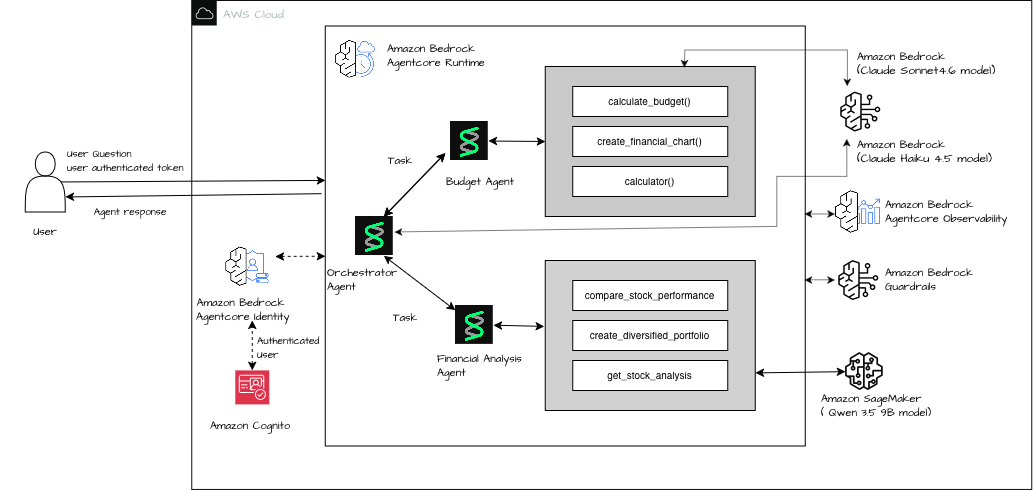
图 1:跨 Amazon Bedrock 和 Amazon SageMaker AI 的多智能体工作流架构
前提条件
要跟随本文操作,必须具备以下前提条件。
- 拥有具备 Amazon SageMaker AI、Amazon Bedrock 和 AgentCore 权限的 AWS 账户。
pip install sagemaker-core openai httpx strands-agents[otel] yfinance pydantic bedrock-agentcore。
- 具有
sagemaker:InvokeEndpoint和sagemaker:CallWithBearerToken权限的 AWS Identity and Access Management(IAM)角色。 - 对 Claude Haiku 4.5 和 Claude Sonnet 4.6 的 Bedrock 模型访问权限。
- Python 3.12+。
第 1 步:在 SageMaker AI 上部署 Qwen 3.5 9B
使用 vLLM Deep Learning Container(DLC)镜像 vllm:0.22.1-gpu-py312-cu130,在 ml.g6e.2xlarge 上部署 Qwen 3.5 9B。
region = "us-west-2"
model_id = "Qwen/Qwen3.5-9B"
instance_type = "ml.g6e.2xlarge"  # 1x L40S (48GB VRAM)
num_gpu = 1

# vLLM 0.22.1, Python 3.12, CUDA 13.0, Ubuntu 22.04
inference_image = f"763104351884.dkr.ecr.{region}.amazonaws.com/vllm:0.22.1-gpu-py312-cu130-ubuntu22.04-sagemaker"

env = {
    "SM_VLLM_MODEL": model_id,
    "SM_VLLM_TENSOR_PARALLEL_SIZE": "1",
    "SM_VLLM_MAX_MODEL_LEN": "32768",
}

# Create Model
sm.create_model(
    ModelName=model_name,
    ExecutionRoleArn=role,
    PrimaryContainer={"Image": inference_image, "Environment": env},
)

# Create Endpoint Config + Endpoint
sm.create_endpoint_config(
    EndpointConfigName=endpoint_config_name,
    ProductionVariants=[{
        "VariantName": "v1",
        "ModelName": model_name,
        "InstanceType": instance_type,
        "InitialInstanceCount": 1,
        "ContainerStartupHealthCheckTimeoutInSeconds": 1200,
        "InferenceAmiVersion": inference_ami_version,
    }],
)

sm.create_endpoint(EndpointName=endpoint_name, EndpointConfigName=endpoint_config_name)
第 2 步:构建多智能体系统
SageMaker AI 的 OpenAI 兼容 API 需要 bearer token。Token 会过期,因此对于任何长时间运行的智能体会话,你都需要一种在每次请求时刷新 Token 的方法。使用 httpx.Auth 子类设置自动刷新的 bearer token:
import httpx
from openai import AsyncOpenAI
from sagemaker.core.token_generator import generate_token

class SageMakerAuth(httpx.Auth):
    def __init__(self, region): self.region = region
    def auth_flow(self, request):
        request.headers["Authorization"] = f"Bearer {generate_token(region=self.region)}"
        yield request

strands_client = AsyncOpenAI(
    base_url=f"https://runtime.sagemaker.{REGION}.amazonaws.com/endpoints/{ENDPOINT_NAME}/openai/v1",
    api_key="sagemaker",
    http_client=httpx.AsyncClient(auth=SageMakerAuth(region=REGION)),
)
使用 Strands Agents 的 agents as tools 模式构建系统,并在每次调用时创建新的智能体实例。
from strands import Agent, tool
from strands.models.openai import OpenAIModel

qwen_model = OpenAIModel(
    client=strands_client, model_id="",
    params={"temperature": 0.7, "max_tokens": 4096, "stream_options": {"include_usage": True}},
)

@tool
def financial_analysis_agent_tool(query: str) -> str:
    fresh = Agent(model=qwen_model, tools=[...], callback_handler=None)
    return str(fresh(query))

orchestrator = Agent(
    model=BedrockModel(model_id="global.anthropic.claude-haiku-4-5-20251001-v1:0"),
    tools=[budget_agent_tool, financial_analysis_agent_tool],
)
第 3 步:部署到 Amazon Bedrock AgentCore runtime
使用 bedrock-agentcore-starter-toolkit 进行部署。完整部署 Notebook 请参阅 deploy_agentcore.ipynb。
from bedrock_agentcore_starter_toolkit import Runtime

agentcore_runtime = Runtime()
agentcore_runtime.configure(
    entrypoint="main.py", auto_create_execution_role=True,
    auto_create_ecr=True, requirements_file="requirements.txt",
    region="ap-south-1", agent_name="personal_finance_agent",
)

launch_result = agentcore_runtime.launch(
    env_vars={
        "SAGEMAKER_ENDPOINT_NAME": "qwen35-9b-260612-082732",
        "SAGEMAKER_REGION": "ap-south-1",
        "AGENT_OBSERVABILITY_ENABLED": "true",
    }
)
为 SageMaker 端点配置可观测性
Amazon Bedrock AgentCore runtime 会自动使用 OpenTelemetry 为智能体插桩,但这种插桩并不能同等覆盖每一种模型提供商。在监控 Amazon SageMaker AI 上 Qwen 模型的成本和延迟之前,必须先了解默认插桩在哪些方面不足,以及如何弥补这一缺口。
挑战:不可见的 Token 使用量
Amazon Bedrock AgentCore runtime 会自动使用 OpenTelemetry 为智能体插桩。但是,存在一个关键缺口:
- Amazon Bedrock 模型调用会自动获得带 Token 计数的完整生成式 AI span,无需额外操作。
- Amazon SageMaker OpenAI 兼容端点(通过 Strands
OpenAIModel)不会自动获得 Token 遥测数据。插桩机制不会将其识别为生成式 AI 调用。
这意味着,金融分析智能体调用 Amazon SageMaker 上 Qwen 3.5 9B 所消耗的 Token 在追踪中完全不可见。你无法监控成本、检测回归问题或调试延迟。
**根本原因:**Strands 的 OTEL 集成为工具调用和智能体生命周期事件生成 span,但不会为 OpenAIModel 提供商生成带 Token 属性的 gen_ai.chat span。AgentCore 的自动插桩仅将通过 boto3 发起的 Amazon Bedrock 模型推理调用识别为生成式 AI 操作。
解决方案:自定义 OpenTelemetry span
手动生成一个包裹 Amazon SageMaker 智能体调用的 gen_ai.chat span,并从 Strands 内部的 AgentResult.metrics.accumulated_usage 中提取 Token 使用量:
from opentelemetry import trace

tracer = trace.get_tracer("financial_analysis_agent")

@tool
def financial_analysis_agent_tool(query: str) -> str:
    """Route investment queries to Qwen on SageMaker with observability."""
    with tracer.start_as_current_span("gen_ai.chat", attributes={
        "gen_ai.system": "openai",
        "gen_ai.request.model": f"qwen3.5-9b ({SAGEMAKER_ENDPOINT_NAME})",
        "gen_ai.operation.name": "chat",
    }) as span:
        fa_agent = Agent(
            model=OpenAIModel(
                client=strands_client, model_id="",
                params={"temperature": 0.7, "max_tokens": 4096,
                        "stream_options": {"include_usage": True}},
            ),
            system_prompt=FINANCIAL_ANALYSIS_PROMPT,
            tools=[get_stock_analysis, create_diversified_portfolio, compare_stock_performance],
            callback_handler=None,
        )
        result = fa_agent(query)
        # Extract token usage from Strands agent metrics
        usage = result.metrics.accumulated_usage
        span.set_attribute("gen_ai.usage.input_tokens", usage.get("inputTokens", 0))
        span.set_attribute("gen_ai.usage.output_tokens", usage.get("outputTokens", 0))
        span.set_attribute("gen_ai.usage.total_tokens", usage.get("totalTokens", 0))
        return str(result)
**关键细节:**Strands 使用 inputTokens、outputTokens 和 totalTokens 作为键,在内部跟踪 Token 使用量。只有当模型提供商返回使用量数据时,这个字典才会被填充。
为什么 vLLM 必须设置 stream_options
默认情况下,vLLM 不会在流式响应中包含 usage 数据块。Strands 会接收到文本块,但永远不会收到最终的 usage 对象。因此,accumulated_usage 将保持为零。添加 stream_options: {"include_usage": True} 会指示 vLLM 发送一个额外的最终数据块,其中包含 Token 计数:
qwen_model = OpenAIModel(
    client=strands_client,
    model_id="",
    params={
        "temperature": 0.7,
        "max_tokens": 4096,
        "stream_options": {"include_usage": True},  # Critical for token tracking
    },
)
如果没有这个参数,gen_ai.chat span 将报告 0 Token,从而失去自定义 span 的意义。
分步配置
-
开启 Amazon CloudWatch Transaction Search(每个账户或 Region 仅需执行一次):
aws xray update-trace-segment-destination --region ap-south-1 --destination CloudWatchLogs aws xray update-indexing-rule --region ap-south-1 --name "Default" \ --rule '{"Probabilistic": {"DesiredSamplingPercentage": 100}}' -
安装包含 OTEL 扩展的 Strands:
strands-agents[otel]>=1.0.0。 -
设置代码或环境变量中的
AGENT_OBSERVABILITY_ENABLED=true。 -
使用
opentelemetry-instrument作为容器 CMD。 -
在
OpenAIModel参数中添加stream_options: {"include_usage": True}。 -
创建自定义
gen_ai.chatspan,以包裹 SageMaker 智能体调用。
示例追踪输出
{
    "name": "gen_ai.chat",
    "attributes": {
        "gen_ai.system": "openai",
        "gen_ai.request.model": "qwen3.5-9b (qwen35-9b-260612-082732)",
        "gen_ai.operation.name": "chat",
        "gen_ai.usage.input_tokens": 1391,
        "gen_ai.usage.output_tokens": 1432,
        "gen_ai.usage.total_tokens": 2823
    },
    "durationNano": 37237386894
}
Bedrock AgentCore Observability 控制台中的智能体轨迹
该追踪视图展示了 Amazon SageMaker AI 托管 Qwen 模型的 gen_ai.chat span,以及自动插桩的 Amazon Bedrock AgentCore span;现在两者的 Token 计数都可见。构建这种端到端可观测性时,还发现了一些值得特别说明的实现细节。
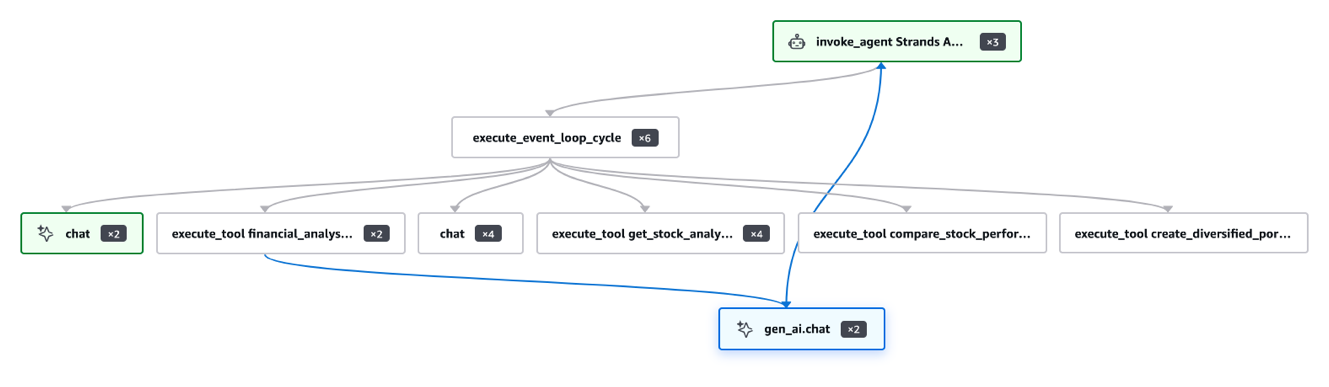
图 2:AgentCore 可观测性追踪,其中包含 SageMaker 托管模型的 Token 计数
关键经验
- Amazon Bedrock AgentCore 会自动插桩 Bedrock 调用 —— Claude 或 Amazon Nova 无需额外操作。
- SageMaker OpenAI 端点需要手动 span —— Strands 不会为
OpenAIModel生成gen_ai.chatspan。 - Token 使用量依赖 stream_options —— vLLM 默认不会在流式响应中发送 usage 数据。
- 使用 result.metrics.accumulated_usage —— 键包括:
inputTokens、outputTokens、totalTokens。 - AWS X-Ray 采样率很重要 —— 默认 1% 的采样率会丢弃大多数追踪记录。开发期间应使用 100%。
- 每次请求创建新的智能体实例 —— 单例会导致并发调用错误。
扩展这一模式
该架构具有可组合性。以下是一些可探索的方向:
- 替换为微调模型:
English / 原文
A common challenge in building agentic workflows is mixing managed foundation models (FMs) with your own cost-optimized or domain-specific models, without rewriting your agent framework to do it. In this post, we show you how to combine OpenAI-compatible endpoints on Amazon SageMaker AI with Amazon Bedrock AgentCore runtime, a capability of Amazon Bedrock AgentCore, and its managed deployment. Specialized agents can collaborate on complex tasks while each uses the model best suited to its job. This combination gives you cost optimization, data residency, and model flexibility in a single production-ready architecture.
We walk through deploying Qwen 3.5 9B on Amazon SageMaker AI, integrating it into a Strands Agents multi-agent system alongside models on Amazon Bedrock, and shipping the entire workflow to Amazon Bedrock AgentCore runtime. The focus is on the integration mechanics including how to get token-level observability from SageMaker endpoints, which Strands doesn’t provide by default.
Solution overview
The architecture connects three model-hosting paths through a single Amazon Bedrock AgentCore container:
- Orchestrator agent (Claude Haiku 4.5 on Bedrock) – Classifies user intent and routes tasks through Global cross-Region inference.
- Budget agent (Claude Sonnet 4.6 on Bedrock) – Handles 50/30/20 budget breakdowns with structured Pydantic output.
- Financial analysis agent (Qwen 3.5 9B on Amazon SageMaker AI) – Stock analysis and portfolio construction using tool-calling.
Amazon Bedrock model availability varies by AWS Region. See Supported models by AWS Region in Amazon Bedrock.
A user request enters the orchestrator agent running inside the Amazon Bedrock AgentCore runtime. The orchestrator uses the agents as tools pattern from Strands Agents to route the request to either the budget agent or the financial analysis agent. Both specialized agents call their respective models. The budget agent invokes Claude Sonnet 4.6 through Amazon Bedrock, and the financial analysis agent invokes Qwen 3.5 9B through a SageMaker AI real-time endpoint using the OpenAI-compatible API. Results flow back through the orchestrator to the user. For the complete source code, see the accompanying GitHub repository. The following diagram illustrates this architecture.
Figure 1: Architecture of the multi-agent workflow across Amazon Bedrock and Amazon SageMaker AI
Prerequisites
You must have the following prerequisites to follow along with this post.
- An AWS account with permissions for Amazon SageMaker AI, Amazon Bedrock, and AgentCore.
pip install sagemaker-core openai httpx strands-agents[otel] yfinance pydantic bedrock-agentcore.
- An AWS Identity and Access Management (IAM) role with
sagemaker:InvokeEndpointandsagemaker:CallWithBearerToken. - Bedrock model access for Claude Haiku 4.5 and Claude Sonnet 4.6.
- Python 3.12+.
Step 1: Deploy Qwen 3.5 9B on SageMaker AI
Deploy Qwen 3.5 9B using the vLLM Deep Learning Container (DLC), image vllm:0.22.1-gpu-py312-cu130, on ml.g6e.2xlarge.
region = "us-west-2"
model_id = "Qwen/Qwen3.5-9B"
instance_type = "ml.g6e.2xlarge"  # 1x L40S (48GB VRAM)
num_gpu = 1

# vLLM 0.22.1, Python 3.12, CUDA 13.0, Ubuntu 22.04
inference_image = f"763104351884.dkr.ecr.{region}.amazonaws.com/vllm:0.22.1-gpu-py312-cu130-ubuntu22.04-sagemaker"

env = {
    "SM_VLLM_MODEL": model_id,
    "SM_VLLM_TENSOR_PARALLEL_SIZE": "1",
    "SM_VLLM_MAX_MODEL_LEN": "32768",
}

# Create Model
sm.create_model(
    ModelName=model_name,
    ExecutionRoleArn=role,
    PrimaryContainer={"Image": inference_image, "Environment": env},
)

# Create Endpoint Config + Endpoint
sm.create_endpoint_config(
    EndpointConfigName=endpoint_config_name,
    ProductionVariants=[{
        "VariantName": "v1",
        "ModelName": model_name,
        "InstanceType": instance_type,
        "InitialInstanceCount": 1,
        "ContainerStartupHealthCheckTimeoutInSeconds": 1200,
        "InferenceAmiVersion": inference_ami_version,
    }],
)

sm.create_endpoint(EndpointName=endpoint_name, EndpointConfigName=endpoint_config_name)
Step 2: Build the multi-agent system
The OpenAI-compatible API of SageMaker AI expects a bearer token. Tokens expire, so for any long-running agent session you need a way to refresh them on every request. Set up auto-refreshing bearer tokens with an httpx.Auth subclass:
import httpx
from openai import AsyncOpenAI
from sagemaker.core.token_generator import generate_token

class SageMakerAuth(httpx.Auth):
    def __init__(self, region): self.region = region
    def auth_flow(self, request):
        request.headers["Authorization"] = f"Bearer {generate_token(region=self.region)}"
        yield request

strands_client = AsyncOpenAI(
    base_url=f"https://runtime.sagemaker.{REGION}.amazonaws.com/endpoints/{ENDPOINT_NAME}/openai/v1",
    api_key="sagemaker",
    http_client=httpx.AsyncClient(auth=SageMakerAuth(region=REGION)),
)
Build using Strands Agents’ agents as tools pattern with fresh agent instances per invocation.
from strands import Agent, tool
from strands.models.openai import OpenAIModel

qwen_model = OpenAIModel(
    client=strands_client, model_id="",
    params={"temperature": 0.7, "max_tokens": 4096, "stream_options": {"include_usage": True}},
)

@tool
def financial_analysis_agent_tool(query: str) -> str:
    fresh = Agent(model=qwen_model, tools=[...], callback_handler=None)
    return str(fresh(query))

orchestrator = Agent(
    model=BedrockModel(model_id="global.anthropic.claude-haiku-4-5-20251001-v1:0"),
    tools=[budget_agent_tool, financial_analysis_agent_tool],
)
Step 3: Deploy to Amazon Bedrock AgentCore runtime
Deploy using the bedrock-agentcore-starter-toolkit. See deploy_agentcore.ipynb for the full deployment notebook.
from bedrock_agentcore_starter_toolkit import Runtime

agentcore_runtime = Runtime()
agentcore_runtime.configure(
    entrypoint="main.py", auto_create_execution_role=True,
    auto_create_ecr=True, requirements_file="requirements.txt",
    region="ap-south-1", agent_name="personal_finance_agent",
)

launch_result = agentcore_runtime.launch(
    env_vars={
        "SAGEMAKER_ENDPOINT_NAME": "qwen35-9b-260612-082732",
        "SAGEMAKER_REGION": "ap-south-1",
        "AGENT_OBSERVABILITY_ENABLED": "true",
    }
)
Configure observability for SageMaker endpoints
Amazon Bedrock AgentCore runtime instruments your agents with OpenTelemetry automatically, but that instrumentation doesn’t extend equally to every model provider. Before you can monitor cost and latency for the Qwen model on Amazon SageMaker AI, you must understand where the default instrumentation falls short and how to close that gap.
The challenge: Invisible token usage
Amazon Bedrock AgentCore runtime automatically instruments agents using OpenTelemetry. However, there is a critical gap:
- Amazon Bedrock model calls get full generative AI spans with token counts automatically. No extra work is needed.
- Amazon SageMaker OpenAI-compatible endpoints (through Strands
OpenAIModel) don’t get automatic token telemetry. The instrumentation doesn’t recognize them as generative AI calls.
This means tokens consumed by the financial analysis agent calling Qwen 3.5 9B on Amazon SageMaker are completely invisible in traces. You cannot monitor cost, detect regressions, or debug latency.
Root cause: Strands’ OTEL integration emits spans for tool calls and agent lifecycle events, but it doesn’t emit gen_ai.chat spans with token attributes for the OpenAIModel provider. The auto-instrumentation of AgentCore only recognizes Amazon Bedrock model inference calls (made through boto3) as generative AI operations.
The solution: Custom OpenTelemetry spans
Manually emit a gen_ai.chat span that wraps the Amazon SageMaker agent invocation and extracts token usage from Strands’ internal AgentResult.metrics.accumulated_usage:
from opentelemetry import trace

tracer = trace.get_tracer("financial_analysis_agent")

@tool
def financial_analysis_agent_tool(query: str) -> str:
    """Route investment queries to Qwen on SageMaker with observability."""
    with tracer.start_as_current_span("gen_ai.chat", attributes={
        "gen_ai.system": "openai",
        "gen_ai.request.model": f"qwen3.5-9b ({SAGEMAKER_ENDPOINT_NAME})",
        "gen_ai.operation.name": "chat",
    }) as span:
        fa_agent = Agent(
            model=OpenAIModel(
                client=strands_client, model_id="",
                params={"temperature": 0.7, "max_tokens": 4096,
                        "stream_options": {"include_usage": True}},
            ),
            system_prompt=FINANCIAL_ANALYSIS_PROMPT,
            tools=[get_stock_analysis, create_diversified_portfolio, compare_stock_performance],
            callback_handler=None,
        )
        result = fa_agent(query)
        # Extract token usage from Strands agent metrics
        usage = result.metrics.accumulated_usage
        span.set_attribute("gen_ai.usage.input_tokens", usage.get("inputTokens", 0))
        span.set_attribute("gen_ai.usage.output_tokens", usage.get("outputTokens", 0))
        span.set_attribute("gen_ai.usage.total_tokens", usage.get("totalTokens", 0))
        return str(result)
Key detail: Strands tracks token usage internally with keys inputTokens, outputTokens, and totalTokens. This dict is populated only if the model provider returns usage data.
Why stream_options is mandatory for vLLM
By default, vLLM doesn’t include a usage chunk in streaming responses. Strands receives text chunks but never a final usage object. As a result, accumulated_usage stays at zero. Adding stream_options: {"include_usage": True} tells vLLM to send an extra final chunk with token counts:
qwen_model = OpenAIModel(
    client=strands_client,
    model_id="",
    params={
        "temperature": 0.7,
        "max_tokens": 4096,
        "stream_options": {"include_usage": True},  # Critical for token tracking
    },
)
Without this parameter, your gen_ai.chat spans report 0 tokens. This defeats the purpose of the custom span.
Step-by-step configuration
-
Turn on Amazon CloudWatch Transaction Search (one-time per account or Region):
aws xray update-trace-segment-destination --region ap-south-1 --destination CloudWatchLogs aws xray update-indexing-rule --region ap-south-1 --name "Default" \ --rule '{"Probabilistic": {"DesiredSamplingPercentage": 100}}' -
Install Strands with OTEL extras:
strands-agents[otel]>=1.0.0. -
Set
AGENT_OBSERVABILITY_ENABLED=truein your code or env vars. -
Use
opentelemetry-instrumentas the container CMD. -
Add
stream_options: {"include_usage": True}toOpenAIModelparams. -
Create custom
gen_ai.chatspan wrapping the SageMaker agent call.
Example trace output
{
    "name": "gen_ai.chat",
    "attributes": {
        "gen_ai.system": "openai",
        "gen_ai.request.model": "qwen3.5-9b (qwen35-9b-260612-082732)",
        "gen_ai.operation.name": "chat",
        "gen_ai.usage.input_tokens": 1391,
        "gen_ai.usage.output_tokens": 1432,
        "gen_ai.usage.total_tokens": 2823
    },
    "durationNano": 37237386894
}
Agent trajectory on Bedrock AgentCore Observability dashboard
This trace view shows the gen_ai.chat span for the Amazon SageMaker AI hosted Qwen model alongside the automatically instrumented Amazon Bedrock AgentCore spans, with token counts now visible for both. Building this end-to-end observability surfaced several implementation details worth calling out.
Figure 2: AgentCore observability trace with token counts for the SageMaker-hosted model
Key learnings
- Amazon Bedrock AgentCore auto-instruments Bedrock calls – No extra work for Claude or Amazon Nova.
- SageMaker OpenAI endpoints need manual spans – Strands doesn’t emit
gen_ai.chatspans forOpenAIModel. - Token usage requires stream_options – vLLM doesn’t send usage in streaming by default.
- Use result.metrics.accumulated_usage – Keys:
inputTokens,outputTokens,totalTokens. - AWS X-Ray sampling rate matters – Default 1 percent drops most traces. Use 100 percent during development.
- Fresh agent instances per request – Singletons cause concurrent invocation errors.
Extending the pattern
This architecture is composable. A few directions to explore:
- Swap in fine-tuned models : Point
SM_VLLM_MODELto your fine-tuned checkpoint on Amazon Simple Storage Service (Amazon S3). The auth layer, OTEL spans, and AgentCore deployment stay unchanged. - A/B test with inference components: Deploy base and fine-tuned variants on the same Amazon SageMaker endpoint. Add a variant attribute to your OTEL span to compare quality in traces.
- Cost-aware routing: Check query complexity before dispatch. Route simple lookups to Haiku on Amazon Bedrock. Reserve the Amazon SageMaker GPU endpoint for multi-step reasoning tasks.
Cleaning up
To avoid incurring future charges, delete the resources:
agentcore_control = boto3.client("bedrock-agentcore-control", region_name=region)
agentcore_control.delete_agent_runtime(agentRuntimeId=launch_result.agent_id)
sagemaker_client.delete_endpoint(EndpointName=ENDPOINT_NAME)
sagemaker_client.delete_endpoint_config(EndpointConfigName=f"qwen35-9b-epc-{TIMESTAMP}")
sagemaker_client.delete_model(ModelName=f"qwen35-9b-{TIMESTAMP}")
Conclusion
In this post, we showed how to connect a self-hosted model on Amazon SageMaker AI to Amazon Bedrock AgentCore runtime, and critically, how to get full token-level observability from Amazon SageMaker endpoints that Strands Agents doesn’t instrument by default.
httpx.Auth+generate_token()+AsyncOpenAI– Production-ready SageMaker authentication inside AgentCore.- Custom
gen_ai.chatOTEL span +stream_options: {"include_usage": True}– Full token visibility for Amazon SageMaker endpoints. result.metrics.accumulated_usage– The Strands API for extracting token counts.
To get started, clone the accompanying repository and see OBSERVABILITY.md for the complete reference.
About the authors
Ayush Sharma
Ayush is a Senior AI Specialist Solutions Architect at AWS. He helps ISV and startup customers build production-ready generative AI solutions on AWS, specializing in multi-agent architectures and model deployment on Amazon SageMaker AI.
Shabna MT
Shabna is a Senior AI/ML Specialist Solutions Architect at AWS with more than 20 years of experience designing enterprise-scale, distributed software systems in the cloud. She specializes in generative AI and machine learning, and works with enterprise customers to take generative AI and ML applications from prototype to production at scale.
Vivek Gangasani
Vivek is a Worldwide Leader for Solutions Architecture, SageMaker Inference. He leads Solution Architecture, Technical Go-to-Market (GTM), and Outbound Product strategy for SageMaker Inference. He also helps enterprises and startups deploy and optimize generative AI models and build AI workflows with SageMaker and GPUs.