Show HN:agent-shell——在 Emacs 中与 AI Agent 进行厂商中立聊天
英文标题:🔶 Show HN: Agent-shell – vendor-neutral chat with AI agents in Emacs
Emacs 原生 AI Agent 交互模式 agent-shell 发布新一轮更新,覆盖从 v0.63.3 到 v0.73.2 的大量改动。新版默认启用更接近传统聊天界面的 chat mode,并改进了活动分组、提示词队列、Markdown 列表、TAB 导航、图片与表格自适应渲染等体验。针对开发者,项目新增动态 Agent 配置、流式消息块订阅、远程 Agent 支持及可定制的文件打开、折叠和图片尺寸行为。维护方面,项目过去一个月关闭了 27 个 issue、合并了 13 个 PR,并新增用于管理多个会话的第三方包 agent-shell-hq。
 146.0 KB
 173.9 KB
 142.9 KB
 228.5 KB
 123.6 KB
 398.0 KB
 304.5 KB
 1.5 MB
 235.6 KB
 274.1 KB
 467.3 KB
 308.2 KB
 6.9 KB
中文
2026 年 8 月 15 日
又过了一个月,又迎来一次 agent-shell 更新。如果你错过了上一次更新,可以看看 0.63 更新。本文展示最新亮点,但完整的变更列表远比我们将要介绍的内容丰富得多。
什么是 agent-shell?
agent-shell 是一个原生 Emacs 模式,用于与由 ACP(Agent Client Protocol)驱动的 AI Agent 交互。
agent-shell 进入聊天时代
自去年 9 月诞生以来(天啊,快一年了),agent-shell 一直提供由 comint mode 驱动的类 Shell 体验。如果你偏好更专注的体验,也可以使用 viewport mode(通过 agent-shell-prefer-viewport-interaction,参见 viewport mode);现在,我们则有了 chat mode。
聊天模式将 comint mode 与更传统的聊天式标签体验结合起来。
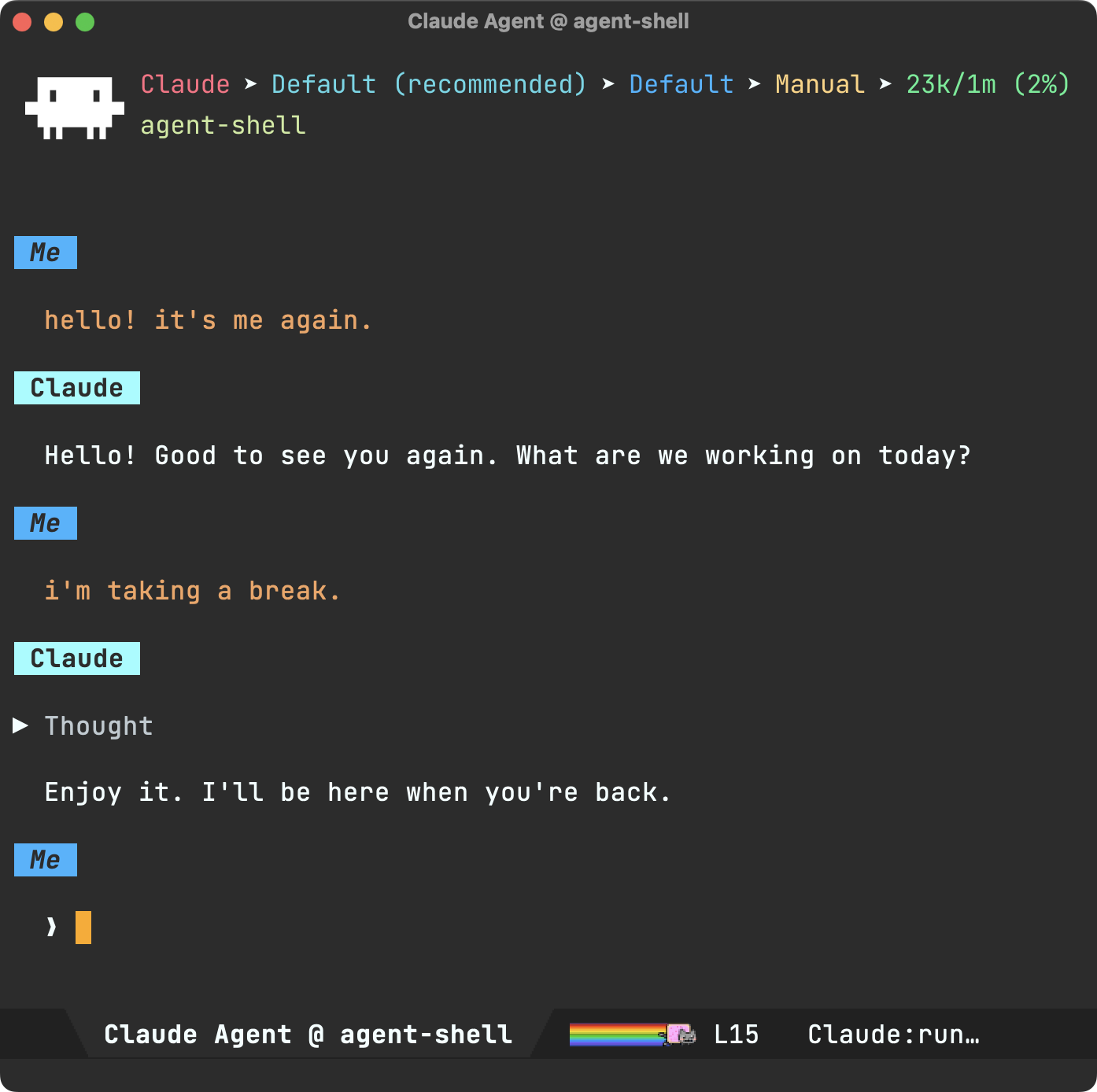
这次我们走在技术前沿,因此聊天模式现已默认启用。好吧,其实也没那么激进:它相当安全(由 overlays 驱动),并且可通过 (setq agent-shell-chat-mode-enabled nil) 完全禁用。聊天模式本身是一个 minor mode,因此你也可以随时通过 M-x agent-shell-chat-mode 切换开关。
更多活动信息
在上一篇文章中,我们谈到通过对工具调用、Agent 思考等内容进行更多分组,并默认折叠这些内容,来让 agent-shell 少说一点。如果你觉得这样过于安静,可以通过 (setq agent-shell-activity-group-expand-by-default t) 让它们默认展开。如果你觉得前两种设置不是太安静就是太吵,现在还有第三种选择:(setq agent-shell-activity-group-expand-by-default 'latest)。设置后,默认只展开最新的分组活动;当 Agent 转向其他任务时,该分组会自动折叠。

我已经相当喜欢这个功能了(感谢 @nhojb 提交的 PR),所以没错,它也已默认启用。
提示词排队
队列功能也获得了一些改进。相关命令已整合至 agent-shell-prompt-queue.el。当 Agent 正忙时,你可以将提示词加入队列;随后可通过 M-x agent-shell-prompt-queue、M-x agent-shell-prompt-queue-resume 和 M-x agent-shell-prompt-queue-remove 查看、恢复或删除待处理提示词。现在,每次提交新的提示词后都会显示待处理队列。

从任意位置撰写提示词
M-x agent-shell-prompt-compose 会打开一个专用缓冲区来撰写提示词,现在它与 Shell 的绑定更加独立。你可以从任意缓冲区调用它(它会解析到正确的 Shell);C-c C-c 会发送提示词并让你返回原本正在处理的内容(发出即忘);C-u C-c C-c 则会提交提示词,并立即让你继续撰写另一条排队提示词。
更早开始输入
视你所使用的 Agent 而定,Shell 初始化可能需要一两秒钟,这意味着此前你必须等待初始化完成,才能在新的 Shell 中开始输入。这没有必要,因此现在不再如此。Shell 提示符会尽快提供,你可以立即开始输入。
Markdown 列表
尽管 Markdown 列表即使不经过特殊渲染也很容易阅读,但我们可以做得更好。因此,现在会通过统一的间距、缩进,以及当然更文明的项目符号来优化其显示效果。

TAB 导航改进与提示
TAB 导航很早就加入了 agent-shell。我很喜欢通过 TAB 在缓冲区的任意区段间移动,并按 RET 切换折叠状态。这已经很好了,但我们还可以让导航体验更丰富:欢迎 Markdown 源代码块、链接和图片加入导航。为什么特别是这些?当然,因为它们都可以通过 RET 进行操作。

你或许会理所当然地认为,RET 会在 Emacs 中打开指向本地文本文件的链接,并在需要时交由浏览器处理;Markdown 源代码块和图片现在也获得了类似的处理。它们各自的 RET 操作可能没有那么显而易见,但我们当然可以让它们更容易被发现,因此现在新增了提示。光标落到可操作项目上时,会显示你可以执行的操作及其对应按键,例如源代码块上显示“按 RET 复制”,图片上显示“按 + 放大”等。鼠标悬停时同样会显示提示。
图片尺寸提示
尽管 agent-shell 提供了 agent-shell-markdown-image-max-width 来定制图片大小,但这个选项相当受限。并非所有图片都一样,为何要强制它们都遵守同一个约束?agent-shell-markdown-image-max-width 仍然可以指定首选默认值,但现在你可以让 Agent 使用 Pandoc 风格链接属性标注 Markdown 图片,从而以不同方式缩放图片。
属性块紧跟在图片之后,可使用像素或百分比指定 width 和/或 height:
{width=300}
{width=50% height=200}

自动调整大小
我可能是在为小事烦恼,但这件事确实让我很抓狂。我们拥有漂亮的 Markdown 表格渲染,这很好,因为 LLM 并不总是擅长生成完美对齐的表格。在最理想的情况下,LLM 会把表格对齐得完美无缺,但它仍然可能太宽,无法放进 Emacs 窗口。幸运的是,渲染器也会换行单元格,使其适配窗口。不过,一旦你调整 Emacs frame 的大小,或只是拆分窗口,这种漂亮的渲染效果就会消失,变成这样的灾难:

我知道,我是在为小事烦恼。但我们没必要忍受这种状态。Emacs 拥有无数 hook,因此让我们跟踪窗口变化,重返文明世界。

在更小的范围内,我也希望图片能自动调整大小,所以现在也实现了……

手动调整大小
尽管我们可以在渲染时影响图片尺寸,但仍可能产生不理想的图片大小。因此,现在可以按需重新缩放缓冲区中的所有图片。

有时大锤并不是合适的工具,因此现在也可以重新缩放光标所在位置的单张图片。

按你的意愿打开文件链接
打开本地文件(无论来自链接、图片还是 @file 提及)现在都会经由 agent-shell-file-display-action,这是一个可定制的标准 display-buffer action。默认行为是复用已显示该文件的窗口,或接管当前窗口。
如果你希望采用不同的窗口布局,可以这样设置:
(setq agent-shell-file-display-action
      '(display-buffer-pop-up-window))
Xref 支持
访问本地文件链接时,现在会将你的起始位置压入 xref 的标记栈,因此 xref-go-back(M-,)可以直接带你回到 agent-shell 中先前的位置,就像其他 Emacs 跳转一样。
使用你偏好的折叠快捷键
可折叠片段现在使用 agent-shell-ui-fragment-map 并绑定 agent-shell-ui-toggle-fragment。如果你不喜欢使用 RET 切换折叠,现在可以改用自己偏好的快捷键。
如果你钟爱 TAB,可以这样设置:
(with-eval-after-load 'agent-shell-ui
  (define-key agent-shell-ui-fragment-map
              (kbd "TAB") #'agent-shell-ui-toggle-fragment))
思考内容的样式
如果你希望以不同样式显示 Agent 的思考内容,新的 agent-shell-thought-body face 可以满足这一需求。
流式传输性能
流式传输性能也获得了改进。感谢 @suhail-singh 所做的性能分析与改进,也感谢 @Scott-Guest 和 @claytharrison 在 #757 中进行的追踪分析和基准测试。
更丰富的选项展示
“可用配置选项”区段现在会显示可选值。

公开函数
动态 Agent 配置
agent-shell-agent-configs 现在可以设为一个函数,让你能够动态计算可用 Agent 配置,而不是硬编码静态列表。该函数会在每次访问时调用,因此即使重新加载代码,配置也会保持最新。
也许你只想列出可用的 Agent。以下是一段粗略示例:
(setq agent-shell-agent-configs
      (lambda ()
        (seq-filter
         (lambda (maker)
           (when-let* ((client (ignore-errors
                                 (funcall (map-elt (funcall maker) :client-maker)
                                          (current-buffer))))
                       (command (map-elt client :command)))
             (executable-find command)))
         (agent-shell-default-agent-config-makers))))
订阅 Agent 消息块
agent-shell-subscribe-to 现在会广播 agent-message-chunk 事件,便于希望观察流式输出的外部集成使用。
远程 Agent
executable-find 现在可在远程主机上正确工作(由 @CeleritasCelery 提交的 #742),让由 TRAMP 驱动的远程 Agent 使用体验更加顺畅。
新的第三方软件包
agent-shell-hq 加入了这一生态,提供用于管理多个 agent-shell 会话的界面。
维护与日常事务
如果你查看过提交日志,就会注意到我每天都在维护 agent-shell,持续处理项目新增事项。自上个月以来,已有 27 个 issue 被关闭、13 个 pull request 被合并。截至今天,积压事项为 11 个未关闭 issue 和 5 个未合并 PR(上次分别为 13 个和 4 个)。如果有你希望我优先处理的事情,欢迎提醒我。
agent-shell 需要你的支持
厂商中立的工具比以往任何时候都更重要,而帮助 agent-shell 持续发展的方式有好几种。有些需要花钱,有些只需点击一下。无论哪种支持都非常感谢;)
agent-shell 只有我一名独立开发者在维护,而与它竞争的工具背后则有资金充足的团队。投入在 agent-shell 上的时间,意味着无法用于支付账单的工作;所以如果它对你有用,请考虑赞助该项目。如果你的雇主能从你使用 agent-shell 中获益,也请鼓励他们贡献一份力量——他们通常能够以个人无法企及的规模提供支持。
通过 GitHub Star 获得更多曝光
GitHub Star 有助于提升曝光度,吸引新用户和潜在赞助者。给 agent-shell 点 Star 不需要花钱,并且有可能带来更多资金支持;因此,如果你不介意多点几下,这个项目确实需要又一个 GitHub Star。
Pull request
感谢所有贡献者带来的这些改进!
喜欢 agent-shell 吗?希望看到它持续演进吗?欢迎考虑赞助这项工作。
English / 原文
ââ ââ âââââââ âââ ââ ââââââ ââââââ ââ ââ ââ âââ âââ
ââ ââ ââ ââââ ââ ââ ââ ââ ââ ââ ââ ââ ââââ ââââ
âââ âââââ ââ ââ ââ ââ ââ ââ ââ ââ ââ ââ ââ ââââ ââ
ââ ââ ââ ââ ââ ââ ââ ââ ââ ââ ââ ââ ââ ââ ââ ââ
ââ ââ âââââââ ââ ââââ ââââââ ââââââ ââ ââââââ ââ ââ
August 15, 2026
Another month, another agent-shell update. If you missed the last one, have a look at the 0.63 update. While this post showcases the latest highlights, the full list of changes is far chunkier than what we'll cover.
What's agent-shell?
agent-shell is a native Emacs mode to interact with AI agents powered by ACP (Agent Client Protocol).
agent-shell enters the chat
Since inception in September last year (yikes nearly a year), agent-shell has featured a shell-like experience, powered by comint mode. There's also viewport mode (via agent-shell-prefer-viewport-interaction), if you prefer a more focused experience, and now we have chat mode.
Chat mode fuses comint mode with a more traditional chat-like labelling experience.
We're living on the edge here, so chat mode is now enabled by default. Ok not really that edgy, it's fairly safe (powered overlays) and can be disabled entirely via (setq agent-shell-chat-mode-enabled nil). Chat mode itself is a minor mode, so you can always toggle it on and off via M-x agent-shell-chat-mode.
A little more chatter
In the last post, we talked about making agent-shell less chatty with more grouping for the likes of tool calls and agent thinking, all collapsed by default. If that's far too quiet, you can expand by default via (setq agent-shell-activity-group-expand-by-default t). If you found these two settings either too quiet or too chatty, we now have a third alternative via (setq agent-shell-activity-group-expand-by-default 'latest). When set, only the latest grouped activity is expanded by default, and automatically collapsed when the agent moves on to something else.
I've become quite fond of this feature (thank you @nhojb for the PR), so yes. It's also enabled by default.
Prompt queueing
Queuing received some improvements. The related commands have been consolidated under agent-shell-prompt-queue.el. You can queue prompts while the agent is busy, then view, resume, or drop pending prompts via M-x agent-shell-prompt-queue, M-x agent-shell-prompt-queue-resume, and M-x agent-shell-prompt-queue-remove. The pending queue is now shown after each new submission.
Compose from anywhere
M-x agent-shell-prompt-compose opens a dedicated buffer for crafting a prompt, and it's now more independent of the shell. You can invoke it from any buffer (it resolves to the right shell), C-c C-c sends and returns you to whatever you were doing (fire and forget), and C-u C-c C-c submits the prompt and immediately lets you craft another queued prompt.
Start typing sooner
Shell initialization may take a second or two, depending on what agent you're using, which meant you had to wait for initialization before you could start typing into your new shell. Unnecessary, so that's no longer the case. Shell prompts are now offered as soon as possible, so one can get typing.
Markdown lists
While Markdown lists are easily digestible without special rendering, we can do better than that, so we now give them a better treatment with normalized padding, indentation, and of course, civilized bullets.
TAB navigation improvements + hints
TAB navigation made it into agent-shell fairly early on. I love being able to TAB my way into any section in the buffer and press RET to toggle folding. That's great and all, but we can make the navigation experience richer by welcoming the likes of Markdown source blocks, links, and images to the navigation party. Why these in particular? They are all actionable by RET too, of course.
While you'd rightly assume RET opens links to local text files in Emacs and delegates to browsers when needed, Markdown source blocks and images get a similar treatment. While their respective RET actions may not be as obvious, we can certainly make them much more discoverable, so we now add hints. Landing point on an actionable item now echoes a hint of what you can do and which key does it (say, "Press RET to copy" on a source block, "Press + to enlarge" on an image, and so on). Hints are also shown on mouse over events.
Image size hints
While agent-shell offers agent-shell-markdown-image-max-width for customizing image sizes, it's fairly restrictive. Not all images are the same, so why force them all to fit within the same constraint? agent-shell-markdown-image-max-width continues to offer a preferred default, but you can now scale images differently by getting the agent to annotate Markdown images with Pandoc-style link attributes.
The attribute block goes right after the image, taking a width and/or height in pixels or percentages:
{width=300}
{width=50% height=200}
Auto resize
I may be sweating the small stuff here, but this was really grinding my gears. We have lovely Markdown table rendering, which I'm glad we do as LLMs aren't always great at producing perfectly aligned tables. In the best of cases, the LLMs align the table perfectly, but it's just too wide for our Emacs window. Luckily, our lovely rendering also wraps cells to make them fit into our window. The thing is, all that lovely rendering goes out the door the moment you either resize your Emacs frame or merely split your window, resulting in a monstrosity like this:
I know. I'm sweating the small stuff here, but hey we don't have to live like this. Emacs has all the hooks in the world, so let's track window changes and rejoin the civilized world.
On a much smaller scale, I also wanted auto resize for images, so here you have itâ¦
Manual resize
While we can influence image size at render time, this can still generate undesirable image dimensions, so we can now rescale all images in buffer on demand.
Sometimes a hammer really isn't the right tool, so we can now also rescale an image at point.
Open file links as you please
Opening a local file (from a link, image, or @file mention) now routes through agent-shell-file-display-action, a standard display-buffer action you can customize. The default reuses a window already showing the file, or takes over the current one.
If you'd like a different window arrangement, you could do something like:
(setq agent-shell-file-display-action
      '(display-buffer-pop-up-window))
Xref support
Following a local file link now pushes your origin onto xref's marker stack, so xref-go-back (M-,) brings you right back to where you were in your agent-shell, just like other Emacs jumps.
Use your favorite folding key binding
Foldable fragments now use agent-shell-ui-fragment-map and bind agent-shell-ui-toggle-fragment. If you're not a fan of the RET binding to toggle folding, you can now use your preferred binding.
If TAB is your jam, you can do something like:
(with-eval-after-load 'agent-shell-ui
  (define-key agent-shell-ui-fragment-map
              (kbd "TAB") #'agent-shell-ui-toggle-fragment))
Styling thoughts
If you prefer styling agent thoughts differently, a new agent-shell-thought-body face lets you do just that.
Streaming performance
Streaming performance also received some love. Thanks to @suhail-singh for the profiling and improvements, and to @Scott-Guest and @claytharrison for the trace analysis and benchmarking in #757.
Richer display of options
The "Available config options" section now displays possible values.
Public functions
Dynamic agent configs
agent-shell-agent-configs can now be set to a function, letting you compute the available agent configurations dynamically rather than hard-coding a static list. The function is called on every access, so it stays current across code reloads.
Maybe you'd like to list only available agents. Here's a rough snippet.
(setq agent-shell-agent-configs
      (lambda ()
        (seq-filter
         (lambda (maker)
           (when-let* ((client (ignore-errors
                                 (funcall (map-elt (funcall maker) :client-maker)
                                          (current-buffer))))
                       (command (map-elt client :command)))
             (executable-find command)))
         (agent-shell-default-agent-config-makers))))
Subscribe to agent message chunks
agent-shell-subscribe-to now broadcasts an agent-message-chunk event, handy for external integrations that want to observe streamed output.
Remote agents
executable-find now works correctly on remote hosts (#742 by @CeleritasCelery), smoothing out TRAMP-driven remote agents.
New third-party packages
agent-shell-hq joins the family, offering an interface for managing multiple agent-shell sessions.
Maintenance and housekeeping
If you peeked at the commit logs, you'll notice I've been working daily on agent-shell, keeping up with project inflow. Since last month, 27 issues have been closed and 13 pull requests merged. As of today, the backlog sits at 11 open issues and 5 open PRs (versus 13 and 4 last time around). If there's something you'd like me to prioritize, feel free to ping.
agent-shell needs your support
Vendor-neutral tooling matters more than ever, and there are a couple of ways to help keep agent-shell going. Some cost money, others just a click. All are appreciated ;)
agent-shell is just me, an indie dev, while the tools it competes with have well-funded teams behind them. Time spent on agent-shell is time away from work that pays the bills, so if it's useful to you, please consider sponsoring the project. And if your employer benefits from your agent-shell use, nudge them to chip in too, they can typically contribute at a scale individuals can't.
GitHub stars for exposure
GitHub stars help with exposure, attracting new users and potential sponsors. Starring agent-shell costs nothing and can potentially help bring in more funding, so if you don't mind a couple of clicks, the project can really use another GitHub star.
Pull requests
Thank you to all contributors for these improvements!
Liking agent-shell? Would like to see it evolve? Consider sponsoring the effort.