Show HN:面向 Hermes Agent 的 Grafana Agent 可观测性插件
英文标题:🔶 Show HN: Grafana agent observability for Hermes Agent
该项目为 Hermes Agent 提供 Grafana Agent Observability 插件,将 LLM 调用和工具执行记录为 generation,并导出 OpenTelemetry(OTel)追踪与指标。开发者可通过 pip 安装插件、修改 `~/.hermes/config.yaml` 并配置 Grafana Cloud 凭据完成接入,Grafana Cloud 免费套餐即可使用。插件默认会采集完整对话内容,包括系统提示词、工具定义、提示词、回复及工具 I/O;如有隐私需求,可设置 `AGENTO11Y_CONTENT_CAPTURE_MODE=metadata_only`。项目同时说明了从旧版 `hermes-plugin-sigil` 迁移时所需的软件包、配置键和环境变量重命名步骤。
 1.2 KB
 493.2 KB
 61.2 KB
中文
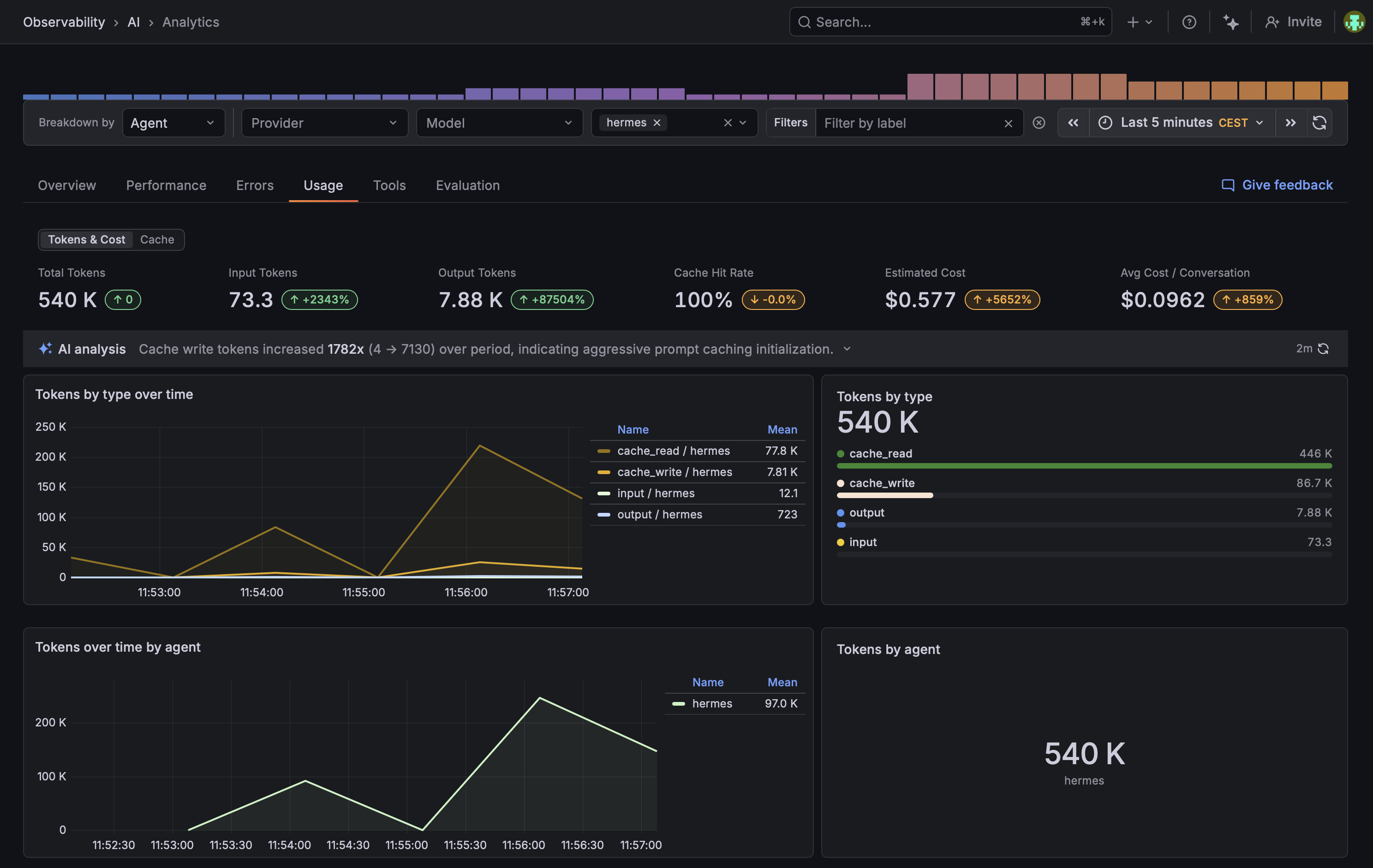
适用于 Hermes Agent 的 Grafana Agent Observability 插件。该插件将 LLM 调用和工具执行记录为 generation,并导出 OTel 追踪与指标。
推荐方式:让你的 Agent 来完成
将以下内容粘贴到 Hermes 中(或任何能够获取 URL 的 Claude、Codex、Cursor 或类似 Agent):
Install and configure the Grafana Agent Observability plugin for me by following
https://raw.githubusercontent.com/alexander-akhmetov/grafana-agento11y-hermes/main/llms.txt
该 Agent 会引导你完成 pip 安装、配置 ~/.hermes/config.yaml,以及从 Agent Observability 设置页面获取凭据。它还会说明默认会流转哪些对话数据,以及如何在启用前调整相关设置。
如果你还没有 Grafana Cloud 账户,请在 https://grafana.com/auth/sign-up/create-user/ 创建。免费套餐即可满足使用需求。
pip install grafana-agento11y-hermes
请安装到 Hermes 所在的同一 Python 环境中(可通过 which hermes 检查)。然后在 ~/.hermes/config.yaml 中启用插件:
plugins:
  enabled:
    - agento11y
Hermes 的
plugins enableCLI 目前无法识别通过 pip 安装的插件。它只会扫描~/.hermes/plugins/和内置目录。直接编辑 YAML 是目前的解决方法。hermes plugins list也不会显示该插件,因此请通过 Grafana Cloud 是否收到数据来确认它是否正常工作。
从 hermes-plugin-sigil 升级
软件包、模块、入口点键和环境变量均已更名。
-
重新安装:
pip uninstall hermes-plugin-sigil pip install grafana-agento11y-hermes
必须执行卸载。新软件包使用不同名称,因此 pip 会将其与旧版本并排安装,而不是替换旧版本;这样两个软件包都会注册插件。
-
将
~/.hermes/config.yaml中的键从sigil改为agento11y。旧键已无法解析,Hermes 不会在未完成此修改的情况下加载插件。 -
将你的
SIGIL_*环境变量重命名为AGENTO11Y_*,后缀保持不变(例如,SIGIL_ENDPOINT改为AGENTO11Y_ENDPOINT)。下方“配置”中的设置页面会提供一组使用新名称的环境变量。该插件目前仍会读取旧名称,并记录需要重命名的内容,因此升级后不会立刻中断。SDK 本身会忽略这些旧变量,因此 SDK 修复后,此兼容回退机制将会移除。
所有配置均可从你的 stack 中一个页面获取:
https://<stack>.grafana.net/a/grafana-agento11y-app/setup
- 点击 Create token。
- 点击 Copy as environment variables。
- 将该环境变量块放入启动 Hermes 的环境中。
如果你将其保存在 ~/.hermes/.env 中,Hermes 会以覆盖模式加载该文件,因此其中的值会覆盖 shell 中导出的同名变量,且不会给出警告。
你将获得如下环境变量块:
AGENTO11Y_ENDPOINT=https://agento11y-<...>.grafana.net
AGENTO11Y_PROTOCOL=http
AGENTO11Y_AUTH_MODE=basic
AGENTO11Y_AUTH_TENANT_ID=123456
AGENTO11Y_AUTH_TOKEN=glc_...
OTEL_EXPORTER_OTLP_ENDPOINT=https://otlp-gateway-<...>.grafana.net/otlp
OTEL_EXPORTER_OTLP_HEADERS='Authorization=Basic <base64 of "123456:glc_...">'
未设置采集模式时,插件会记录完整内容,因此系统提示词、工具定义、提示词、助手回复、工具参数和工具结果都会离开本机;设置 AGENTO11Y_CONTENT_CAPTURE_MODE=metadata_only 后,仍会记录每一次调用,但提示词、回复和工具 I/O 不会离开本机。
请使用交互式 Hermes。单次执行模式(hermes -z)会禁用整次运行的日志记录,因此不会写入下方任何日志行。
AGENTO11Y_DEBUG=true hermes
在 ~/.hermes/logs/agent.log 中,你应能看到:
grafana-agento11y-hermes: installed TracerProvider with OTLP HTTP exporter
grafana-agento11y-hermes: installed MeterProvider with OTLP HTTP exporter
grafana-agento11y-hermes: client initialized (generations=configured, otel=configured)
向 Hermes 提出任意问题,然后查看 Grafana Cloud -> Observability -> Agent -> Conversations。
Apache-2.0。
English / 原文
Grafana Agent Observability plugin for Hermes Agent. Records LLM calls and tool executions as generations and emits OTel traces + metrics.
Preferred: let your agent do it
Paste this into Hermes (or any Claude / Codex / Cursor / similar agent that can fetch URLs):
Install and configure the Grafana Agent Observability plugin for me by following
https://raw.githubusercontent.com/alexander-akhmetov/grafana-agento11y-hermes/main/llms.txt
The agent will walk you through pip install, ~/.hermes/config.yaml, and the credentials from the Agent Observability setup page. It will also explain what conversation data flows by default and how to tune it before turning anything on.
If you do not have a Grafana Cloud account, create one at https://grafana.com/auth/sign-up/create-user/. The free tier is enough.
pip install grafana-agento11y-hermes
Install into the same Python environment hermes runs from (which hermes to check). Then enable the plugin in ~/.hermes/config.yaml:
plugins:
  enabled:
    - agento11y
Hermes's
plugins enableCLI does not see pip-installed plugins yet. It only scans~/.hermes/plugins/and the bundled directory. Editing the YAML directly is the workaround.hermes plugins listwill not show the plugin either, so check that it works from the data arriving in Grafana Cloud.
Upgrading from hermes-plugin-sigil
The package, the module, the entry-point key and the env vars were all renamed.
- Reinstall:
pip uninstall hermes-plugin-sigil
pip install grafana-agento11y-hermes
The uninstall is required. The new package has a different name, so pip installs it alongside the old one instead of replacing it, and both would register a plugin.
-
Change the key in
~/.hermes/config.yamlfromsigiltoagento11y. The old key no longer resolves, and hermes will not load the plugin without this. -
Rename your
SIGIL_*env vars toAGENTO11Y_*, keeping the suffix (SIGIL_ENDPOINTbecomesAGENTO11Y_ENDPOINT). The setup page in Configure below gives you a fresh block with the new names. The plugin still reads the old names for now and logs what to rename, so nothing breaks the moment you upgrade. The SDK itself ignores them, so this fallback goes away once the SDK is fixed.
Everything comes from one page in your stack:
https://<stack>.grafana.net/a/grafana-agento11y-app/setup
- Click Create token.
- Click Copy as environment variables.
- Put the block in the environment hermes starts from.
If you keep it in ~/.hermes/.env instead, hermes loads that file with override on, so a value there beats the same variable exported in your shell, with no warning.
The block you get:
AGENTO11Y_ENDPOINT=https://agento11y-<...>.grafana.net
AGENTO11Y_PROTOCOL=http
AGENTO11Y_AUTH_MODE=basic
AGENTO11Y_AUTH_TENANT_ID=123456
AGENTO11Y_AUTH_TOKEN=glc_...
OTEL_EXPORTER_OTLP_ENDPOINT=https://otlp-gateway-<...>.grafana.net/otlp
OTEL_EXPORTER_OTLP_HEADERS='Authorization=Basic <base64 of "123456:glc_...">'
With no capture mode set, the plugin records full content, so the system prompt, the tool definitions, prompts, assistant replies, tool arguments and tool results all leave the machine; set AGENTO11Y_CONTENT_CAPTURE_MODE=metadata_only to keep recording every call while no prompts, responses or tool I/O leave the machine.
Use interactive hermes. One-shot mode (hermes -z) disables logging for the whole run, so it writes none of the lines below.
AGENTO11Y_DEBUG=true hermes
In ~/.hermes/logs/agent.log you should see:
grafana-agento11y-hermes: installed TracerProvider with OTLP HTTP exporter
grafana-agento11y-hermes: installed MeterProvider with OTLP HTTP exporter
grafana-agento11y-hermes: client initialized (generations=configured, otel=configured)
Ask hermes anything, then check Grafana Cloud - > Observability -> Agent -> Conversations.
Apache-2.0.