Canvas 如何让 Agent 工作流可见、可控且更具成本效率
英文标题:How canvases make agentic workflows visible, steerable, and cost-efficient
GitHub 开发者倡导者 Ayan Gupta 认为,聊天界面适合表达意图,但难以承载 Agent 执行过程中的计划、状态、验证与审批记录。GitHub Copilot app 的 Canvas 提供了持久化共享工作界面,可让人类与 Agent 共同查看、引导和审批工作流。作者以 Java Modernization Studio 和 Site Studio 为例,提出清晰定义状态、突出关键决策、即时保存进度与设置人工审批点的可复用模式。尽管两个 Canvas 分别耗费约 3,000 和 2,000 AI credits,作者认为其能通过减少重复提示、上下文丢失和返工,提升重复性工作流的效率、可预测性与治理能力。
 75.6 KB
 33.6 KB
 84.8 KB
 40.0 KB
 58.0 KB
 27.6 KB
 124.7 KB
 50.1 KB
 75.4 KB
 34.5 KB
 67.7 KB
 32.0 KB
 84.0 KB
 40.3 KB
 243.8 KB
 35.1 KB
 20.7 KB
 33.8 KB
 189.4 KB
 270.7 KB
中文
我上大学时,曾加入 VS Code 最早一批 AI 行内补全版本的 Beta 测试。那感觉就像一场颠覆。自那以后,GenAI 从根本上改变了软件开发:Agent 与人类协同工作的混合团队中,开发者处于核心位置,既是愿景制定者,也是编排者。我们此刻正身处这一转型之中。
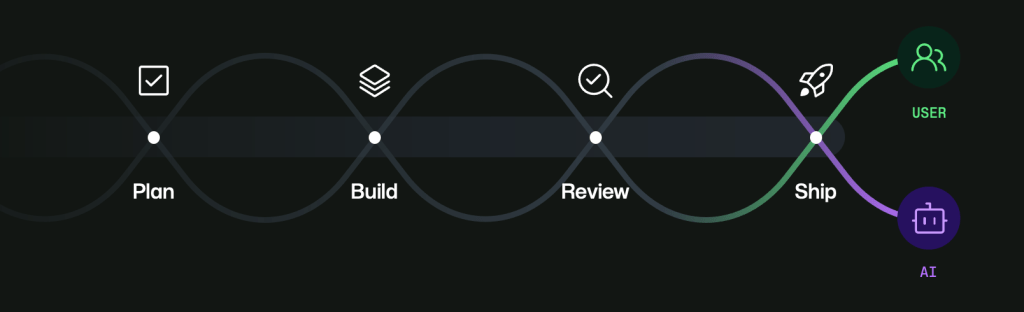
随着 GenAI 创新快速发展,一个自然结果是:我们如今已有工具可以帮助规划、构建、审查和发布代码。但在当前阶段,许多工作流依然显得割裂。上下文会在不同线程和界面之间丢失,审查 Agent 生成工作的时间也花得过多。Agent 生成变更的速度可以快过任何人类的审查速度,而大多数开发者工具最初并非为多 Agent 编排而设计。人们很容易失去对以下问题的追踪:哪些工作已经运行、哪些内容发生改变、哪些内容已经验证,以及哪些内容仍需要人类判断。
GitHub Copilot app 是解决这一问题的重要一步。其中有一项我已学会喜爱、并几乎每天使用的功能:Canvas。Canvas 让开发者和 Agent 能够在一个持久化的共享界面上交互。Canvas 不再将聊天视为唯一发生工作的场所,而是让工作在展开过程中变得可见、可引导且可审批。
聊天适合表达意图,但不擅长承载持久执行
我依然认为,聊天是我们拥有的、用于表达意图的最佳界面之一。你可以在其中思考、细化和下达指令。它快速而灵活,尤其适合问题仍然模糊的阶段。
但一旦 Agent 开始执行实际工作,聊天就会变成由指令、日志、方向调整和修正组成的漫长滚动记录。关键内容在技术上仍然存在,却被埋没其中:计划、决策点、验证和审批时刻。如果你必须从历史记录中重建这些内容,就已经在付出协作成本。
Canvas 通过为工作流提供一个归属地来解决这个问题。它让状态变得明确且持久。人类可以检查和引导,Agent 可以更新并推进。双方无需不断重放上下文,也能保持一致。
第一个构建:Java Modernization Studio
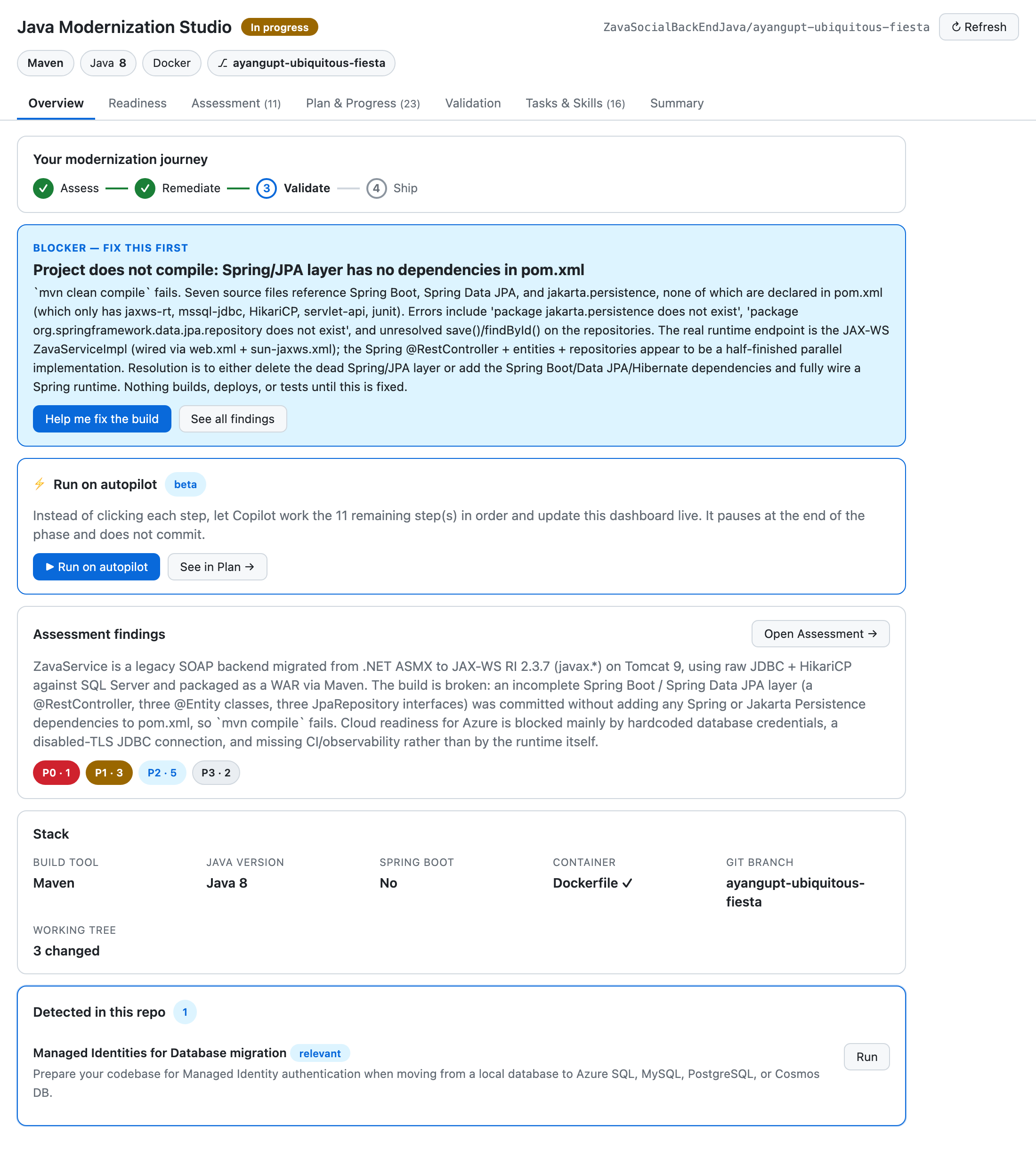
我构建的首批 Canvas 之一是 Java Modernization Studio。Java 现代化改造正是那类需要可见性和治理能力的工作流:评估、规划、迁移任务、验证关卡,以及发布准备。
在纯聊天体验中,这些步骤会模糊地混在一起。你仍然可以继续推进,但审计会变得更困难,规模化信任也更难建立,尤其是在有多名参与者时。团队不断提出同样昂贵的问题:我们处于哪个阶段?做出了哪些决策?什么被阻塞了?还有哪些内容需要人工批准?
该工作台让每个阶段都变得明确且可检查。团队不必解析叙述式历史记录,而可以直接看到运行状态。不必猜测发生了什么,而可以进行验证。人工审查者可以专注于高价值判断,而 Agent 则在检查点之间持续推进执行。
探索 Java Modernization Studio Canvas >
第二个构建:Site Studio
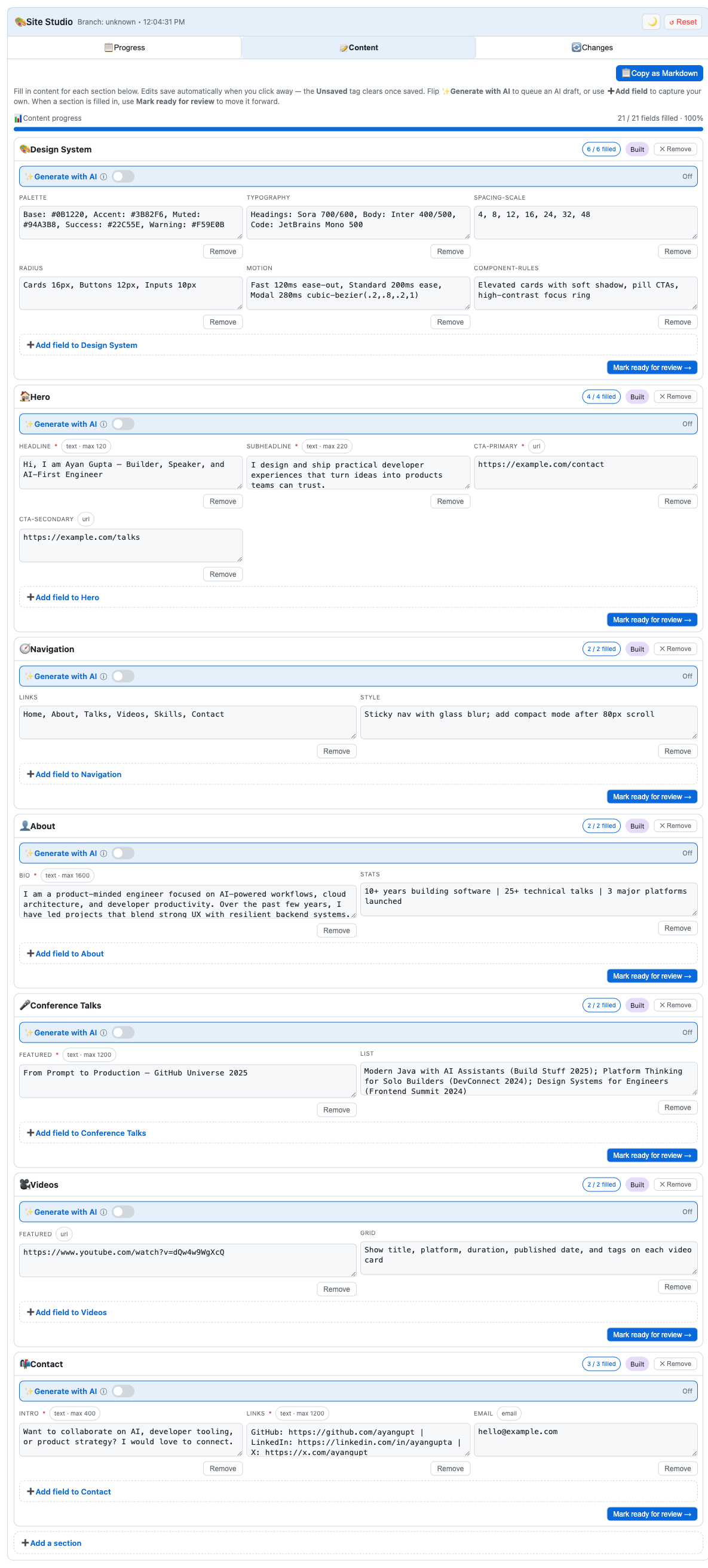
之后,我构建了 Site Studio,用于一种截然不同的工作流:创建和管理个人网站内容。它是内容密集型工作流,而非迁移密集型工作流,但编排挑战相似:章节进度、迭代编辑、审查循环和状态转换。
在纯聊天流程中,内容很容易快速漂移。一个章节被修改后又再次修改,人们对当前版本的信心会随之下降。反馈变得分散,草稿出现重复,推进速度变慢,因为每一次迭代都要先重建上下文。
Site Studio 让这种状态保持持久化。章节状态清晰可见,草稿值会在工作进行时保存,人工审查点也被明确标出。Agent 可以持续推进,而人类可以引导、批准或重新定向,且不会丢失上下文脉络。
可复用的模式
在这两个 Canvas 中,我发现了同一套可复用蓝图:
- 清晰定义工作流状态。
- 呈现重要决策。
- 立即持久化保存进度和草稿。
- 保留明确的人工审批点。
这会将模式从逐条提示交互,转变为持久的协作工作流。你不再将每一轮交互视为全新的开始,而是将每个工作流视为具有记忆、结构和控制能力的系统。
成本与效率:没错,Canvas 是一种投入
我也想明确谈谈成本:Canvas 可能是一项投入。例如,Site Studio 大约花费了我 2,000 AI credits,而现代化改造 Canvas 大约花费了我 3,000 AI credits。它们需要投入精力进行设计和打磨。
但从长期来看,特别是对于重复性工作流,这项投入会带来回报。持久化界面可以减少重复提示、减少上下文丢失、减少不必要的来回沟通,并降低返工。随着时间推移,这能够在提升信任与吞吐量的同时,节省时间和成本。
因此,对我而言,这并不是“花更多 token 来获得更好的 UX”,而是“投资于更好的工作流架构,让重复性工作变得更高效、更可预测,也更易于治理”。
现已在 awesome-copilot 中提供
我构建的 Canvas——Java Modernization Studio 和 Site Studio——已在 awesome-copilot 中提供,任何希望使用、改造或从中学习的人都可以访问。
如果你已经在使用 Copilot Agent,一个实际的下一步是选取一项重复性工作流,并通过 /create-canvas 围绕它构建一个最小化 Canvas。从小处开始,运行真实工作,再根据实际使用情况迭代。如果它能帮助你的团队,也可以将其贡献回 awesome-copilot,让其他人同样受益。
我们仍处于这场转型的早期阶段,但方向已经很清晰。Agent 可以加速执行,人类提供愿景、判断和问责。Canvas 是让这种合作关系变得真实、持久且可规模化的一种方式。
使用 /create-canvas 构建你自己的 Canvas,并将其贡献回 awesome-copilot >
作者
Ayan Gupta 是 GitHub 的开发者倡导者,致力于帮助开发者和团队在 GitHub Copilot、Azure 和开源领域采用实用的 AI 驱动开发工作流。他曾入选《福布斯》30 位 30 岁以下精英榜单,此前曾联合创办专注于扩大健康与教育服务可及性的科技企业。他目前的工作聚焦于让 Agent 驱动的工作流具备透明性、可引导性和可复用性;工作之余,他喜欢木工和志愿服务。
English / 原文
When I was in college, I joined the beta for one of the first versions of AI inline completions in VS Code. It felt like a game changer. Since then, GenAI has fundamentally changed software development: hybrid teams where agents and humans work in tandem, with the developer at the center as visionary and orchestrator. We are living in that transition right now.
As a natural byproduct of how fast innovation in GenAI has moved, we now have tools to help us plan, build, review, and ship code. But in the current state, many workflows still feel disjointed. Context gets lost across threads and surfaces, and too much time gets spent reviewing agent-generated work. Agents can produce changes faster than any human can review them, and most developer tools were not originally designed for multi-agent orchestration. It becomes easy to lose track of what ran, what changed, what was validated, and what still needs human judgment.
The GitHub Copilot app is a major step toward addressing this. One feature in particular that I’ve learned to love and use almost every day is canvases. Canvases let developers and agents interact on a durable, shared surface. Instead of treating chat as the only place where work happens, canvases make work visible, steerable, and approvable as it unfolds.
Chat is great for intent, but weak for durable execution
I still believe chat is one of the best interfaces we have for intent. It’s where you can think, refine, and direct. It’s fast and flexible, especially when the problem is still ambiguous.
But once an agent starts doing real work, chat becomes a long scroll of instructions, logs, pivots, and corrections. The important parts are technically there, but buried: the plan, decision points, validations, and approval moments. If you have to reconstruct all of that from history, you’re already paying a coordination tax.
Canvases solve that by giving workflows a home. They make state explicit and persistent. Humans can inspect and guide. Agents can update and progress. Both can stay aligned without constantly replaying context.
The first build: Java Modernization Studio
One of the first canvases I built was Java Modernization Studio. Java modernization is exactly the kind of workflow where visibility and governance matter: assessment, planning, migration tasks, validation gates, and readiness to ship.
In a chat-only experience, those steps blur together. You can still move forward, but it gets harder to audit and harder to trust at scale, especially with multiple contributors. Teams keep asking the same expensive questions: What stage are we in? What decisions were made? What is blocked? What still needs human approval?
The studio made each phase explicit and inspectable. Instead of parsing narrative history, teams could see operational state directly. Instead of guessing what happened, they could verify it. Human reviewers could focus on high-signal judgments while agents kept execution moving between checkpoints.
Explore the Java Modernization Studio canvas >
The second build: Site Studio
After that, I built Site Studio for a very different workflow: creating and managing personal site content. It’s content-heavy rather than migration-heavy, but the orchestration challenge is similar: section progress, iterative edits, review loops, and status transitions.
In a chat-only flow, content can drift quickly. A section gets revised, then revised again, and confidence drops in what is current. Feedback gets scattered, drafts repeat, and momentum slows because each iteration starts by rebuilding context.
Site Studio keeps that state durable. Section status is visible. Draft values are persisted as work happens. Human review points are explicit. The agent can keep moving while the human can steer, approve, or redirect without losing the thread.
Explore the Site Studio canvas>
The repeatable pattern
Across both canvases, I found the same repeatable blueprint:
- Define workflow states clearly.
- Surface the decisions that matter.
- Persist progress and drafts immediately.
- Keep explicit human approval points.
This shifts the model from prompt-by-prompt interaction to durable collaborative workflows. You stop treating each turn like a fresh start and start treating each workflow like a system with memory, structure, and control.
Cost and efficiency: yes, canvases are an investment
I also want to be explicit about cost: canvases can be an investment. For instance, Site Studio cost me about 2,000 AI credits, and the modernization canvas cost me about 3,000 AI credits. They take effort to design and shape well.
But in the long run, especially for repeated workflows, that investment pays back. Durable surfaces reduce repeated prompting, reduce context loss, reduce unnecessary back-and-forth, and reduce rework. Over time, that can save both time and money while improving trust and throughput.
So for me, this is not “spend more tokens for nicer UX.” It’s “invest in better workflow architecture so recurring work becomes more efficient, predictable, and governable.”
Available now in awesome-copilot
The canvases I built—Java Modernization Studio and Site Studio —are available in awesome-copilot for anyone who wants to use them, adapt them, or learn from them.
If you are already using Copilot agents, a practical next step is to pick one repeated workflow and build a minimal canvas around it with /create-canvas. Start small, run real work, and iterate from actual usage. If it helps your team, contribute it back to awesome-copilot so others can benefit too.
We’re still early in this transition, but the direction is clear. Agents can accelerate execution. Humans provide vision, judgment, and accountability. Canvases are one way to make that partnership real, durable, and scalable.
Build your own canvas with /create-canvas and contribute it back to awesome-copilot >
Written by
Ayan Gupta is a Developer Advocate at GitHub, where he helps developers and teams adopt practical, AI-powered development workflows across GitHub Copilot, Azure, and open source. A Forbes 30 Under 30 honoree, he previously co-founded technology ventures focused on expanding access to wellness and education. His work today centers on making agent-driven workflows transparent, steerable, and repeatable — and outside of it, he enjoys woodworking and volunteering.