使用 Amazon Bedrock 实现向量提示文档分类
英文标题:Implement vector-prompt document classification using Amazon Bedrock
本文介绍如何基于 Amazon Bedrock 和 Strands Agents SDK 构建多智能体保险文档分类方案。系统由文档分析 Agent、向量相似度搜索 Agent 和验证 Agent 组成,分别处理文本推理、版式视觉相似性识别及结果交叉验证。方案结合 Claude Haiku 4.5 的文本理解能力与 Amazon Titan Multimodal Embeddings 的视觉向量检索能力,并使用 FAISS 比对已知文档模板。对于开发者而言,该架构提供了可模块化扩展、可审计且能够标记人工复核边缘案例的自动化分类流程。
 1.3 MB
 101.1 KB
 124.1 KB
 345.0 KB
 141.2 KB
 346.5 KB
 145.7 KB
 737.9 KB
 45.4 KB
 706.4 KB
 274.2 KB
 158.1 KB
中文
基于 Amazon Bedrock 的向量提示分类可帮助保险公司准确分类每天接收的数千份文档,包括保单、宣誓书、批单和监管表单,以支持合规、理赔和客户服务。人工分类既耗时又容易出错,而传统自动化方法则难以处理外观相似但用途不同的文档。一份保单批单和一份监管宣誓书可能包含相似术语,但错误分类可能导致合规违规或处理延迟。
本文演示如何使用 Strands Agents SDK 构建多智能体解决方案。该方案编排三个专业 Agent:负责文本推理的文档分析 Agent、负责版式模式识别的向量相似度搜索 Agent,以及负责质量保证的验证 Agent。每个 Agent 都在各自的专业范围内自主运行,随后通过一个编排器协同交付结果。
你将学习如何针对自身的文档分类需求实现这种多智能体架构,其中包含代码示例和技术指导。这种多智能体方法结合了 Anthropic 的 Claude Haiku 4.5 的高级推理能力,以及可通过 Amazon Bedrock 获取的 Amazon Titan Multimodal Embeddings 的视觉模式识别能力,从而实现更高的分类准确率。
解决方案概述
该解决方案架构整合了多个专业 AI Agent,每个 Agent 均针对文档分析的特定方面进行了优化,并通过协调式编排共同工作。该多智能体方法利用 Amazon Bedrock 所提供的不同基础模型和技术的独特优势,解决了单模型分类的局限性。
下图展示了这一多智能体方法:
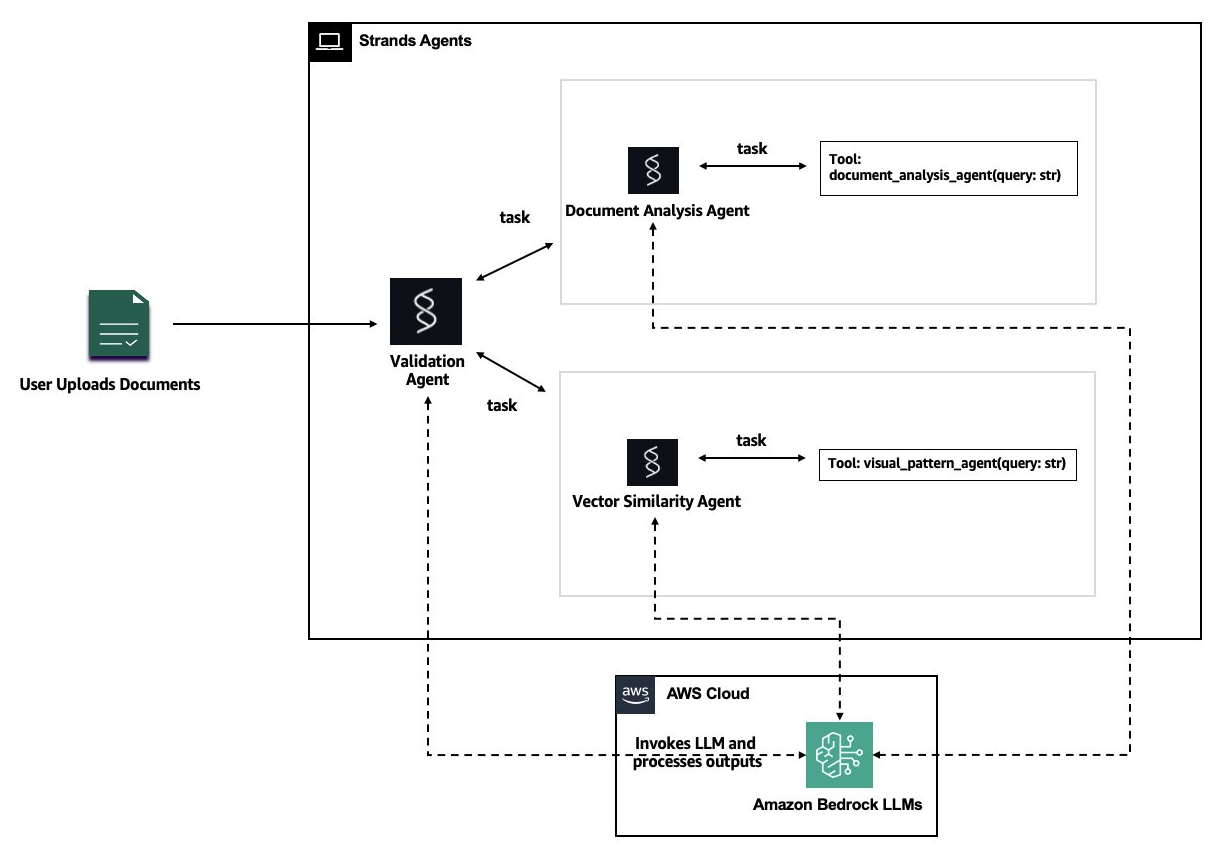
图 1:多智能体文档分类架构
使用 Strands Agents SDK 实现多智能体协作
在我们的测试中,单模型方法难以应对需要同时进行文本和视觉分析的边缘案例及复杂文档。多智能体系统通过将分类任务拆分为专业子任务来解决这一问题,每个 Agent 专注于其专长领域。
我们选择 Strands Agents SDK,因为它实现了 agents as tools 模式,而我们的分类系统需要一个能够将专业 Agent 作为可调用工具执行的编排器。验证 Agent 调用每个专业 Agent、比较其分类结果,并在无需自定义编排代码的情况下解决分歧。这一模式具有以下优势:
- 模块化:每个 Agent 都可以独立开发、测试和改进。
- 透明性:每个 Agent 都会提供其决策推理过程,从而形成审计轨迹。
- 灵活性:无需重构整个系统即可添加新的 Agent。
- 可靠性:编排器负责 Agent 协调、错误处理和结果综合。
架构组件
架构的核心是 验证 Agent,它充当编排器,并使用 Strands Agents SDK 实现 agents as tools 模式。该 Agent 通过交叉验证和置信度评分提供质量保证。它会比较 文档分析 Agent 与 向量相似度搜索 Agent 的输出,识别二者的一致与分歧之处,然后生成包含相应置信度评分的最终分类结果。这一验证步骤有助于系统维持高准确率,同时将边缘案例标记为需要人工审核。验证 Agent 与两个专业 Agent 协作:
文档分析 Agent:该 Agent 使用 Amazon Bedrock 上的 Anthropic Claude Haiku 4.5 进行高级文本推理和法律语言解读。Claude 擅长理解复杂文档、提取关键信息,并识别指示文档类型的细微文本模式。该 Agent 分析文档内容、元数据和语言特征,以生成分类假设。
向量相似度搜索 Agent:该 Agent 使用 Amazon Titan Multimodal Embeddings G1 将文档转换为高维向量表示,用于视觉相似度搜索。Claude Haiku 4.5 擅长理解文档内容,包括分析文本、提取关键信息和识别语言模式。向量相似度搜索 Agent 则通过聚焦视觉和结构特征对其形成补充。该 Agent 捕捉的是文档的外观而非其文本表述。它能够识别表单布局、表格结构和格式规范等格式模式;即使文本内容有所变化,这些模式仍可区分不同的文档类型。该 Agent 使用 FAISS(Facebook AI Similarity Search)进行高效向量相似度搜索,以支持与已知文档模板的快速比对。
通过结合文本分析、相似度分析和内置验证,这种多智能体架构可实现更高的分类准确率,并为自动化决策提供可靠的置信度评分。
在接下来的章节中,你将学习如何实现每个组件并部署完整解决方案。
前提条件
要跟随本演练操作,你需要具备以下条件:
AWS 账户和权限
开发环境
- 已安装 Python 3.14 或更高版本。
- 已配置凭证的 AWS CLI 2.0 或更高版本。
- 集成开发环境(IDE)或文本编辑器,例如 VS Code 或 PyCharm。
- 用于克隆示例存储库的 Git。
软件和库
- Strands Agents SDK(本演练中提供安装说明)。
- 用于向量相似度搜索的 FAISS 库。
**注意:**本演练使用的 AWS 服务可能会产生费用。请务必查看 Amazon Bedrock 定价,并遵循文末的清理说明,以避免持续产生费用。
实现多智能体文档分类系统
下面将逐步实现多智能体系统的各个组件。完整代码可在我们的 GitHub 存储库中获取。
第 1 步:配置基础模型
首先,通过 Amazon Bedrock 推理配置文件配置对 Claude 模型的访问。这可在各个 Region 中提供稳定的性能和可用性。
def create_bedrock_model(
    model_id: str = "anthropic.claude-haiku-4-5-20251001-v1:0", #
    temperature: float = 0.1,
    max_tokens: int = 4096
) -> BedrockModel:
    """Create a configured Bedrock model instance."""
    return BedrockModel(
        model_id=model_id,
        region_name="us-east-1",
        temperature=temperature,
        max_tokens=max_tokens
    )
**提示:**如需更低延迟和更高可用性(HA),可以在模型 ID 前添加与部署 Region 对应的地理前缀(us.、eu. 或 ap.),以使用跨 Region 推理配置文件。
第 2 步:创建文档分析 Agent
文档分析 Agent 专注于利用 Claude Haiku 4.5 的高级推理能力分析文本内容。该 Agent 使用结构化输出来返回一致、可由机器解析的分类结果。
class TextualAnalysisOutput(BaseModel):
    """Structured output for document text analysis."""
    classification: str = Field(description="Document category: POLICY, AFFIDAVIT, or MISCELLANEOUS")
    confidence: float = Field(description="Classification confidence score from 0.0 to 1.0")
    reasoning: str = Field(description="Explanation of textual features that led to this classification")

@tool
def analyze_document_text(document_text: str) -> str:
    """Analyze document text content to classify the insurance document."""

    TEXTUAL_ANALYSIS_PROMPT = """You are a Document Analysis Specialist for insurance documents.
    Analyze the provided document text and classify it into exactly one category:
    - POLICY: Insurance policies, endorsements, declarations, coverage documents
    - AFFIDAVIT: Sworn statements, notarized documents, legal declarations, regulatory filings
    - MISCELLANEOUS: Any document that doesn't clearly fit the above categories

    Provide your classification with a confidence score (0.0-1.0) and detailed reasoning
    explaining what textual features led to your decision."""

    text_agent = Agent(
        model=create_bedrock_model(),
        system_prompt=TEXTUAL_ANALYSIS_PROMPT,
        conversation_manager=NullConversationManager(),
    )

    result = text_agent(
        f"Classify this document:\n\n{document_text}",
        structured_output_model=TextualAnalysisOutput,
    )
    return str(result.structured_output)
第 3 步:构建向量相似度搜索 Agent
向量相似度搜索 Agent 使用 Amazon Titan Multimodal Embeddings 分析文档布局和视觉特征。
# Load FAISS index once at module level.
# allow_dangerous_deserialization=True is required because FAISS uses pickle internally;
# safe here since we created the index ourselves from our own training documents.
db = FAISS.load_local("hybrid_docs.vdb", embeddings=embeddings,
                      allow_dangerous_deserialization=True)

VECTOR_ANALYSIS_PROMPT = """You are a Vector Similarity Search Specialist.
Analyze the similarity search results and determine the document classification.
Consider the confidence scores and consistency of matches across pages."""


@tool
def analyze_document_vectors(pdf_path: str) -> str:
    """Classify document using vector similarity search with agentic reasoning."""
    base64_pages = pdf_to_base64(pdf_path)
    first_embedding = create_multimodal_embedding(image_base64=base64_pages[0])
    results = db.similarity_search_by_vector(embedding=first_embedding, k=3)

    labels = [r.metadata["label"] for r in results]
    classification = Counter(labels).most_common(1)[0][0]
    confidence = labels.count(classification) / len(labels)

    vector_agent = Agent(
        model=create_bedrock_model(),
        system_prompt=VECTOR_ANALYSIS_PROMPT,
        conversation_manager=NullConversationManager(),
    )

    result = vector_agent(
        f"Vector search results for {pdf_path}:\n"
        f"Top match: {classification} (confidence: {confidence:.2f})\n"
        f"All matches: {labels}\n"
        f"Provide final classification with reasoning.",
        structured_output_model=VectorAnalysisOutput,
    )
    return str(result.structured_output)
该 Agent 使用 perform_vector_classification 执行 FAISS 向量相似度搜索,将文档与存储在向量数据库中的预训练视觉模式进行匹配。
第 4 步:实现验证 Agent
验证 Agent 使用 agents as tools 模式协调专业 Agent。
class OrchestratorOutput(BaseModel):
    """Structured output for the validation orchestrator."""
    textual_analysis: str = Field(description="Textual agent classification: POLICY, AFFIDAVIT, or MISCELLANEOUS")
    textual_confidence: float = Field(description="Textual agent confidence 0.0-1.0")
    vector_analysis: str = Field(description="Vector agent classification: POLICY, AFFIDAVIT, or MISCELLANEOUS")
    vector_confidence: float = Field(description="Vector agent confidence 0.0-1.0")
    final_classification: str = Field(description="Final validated classification")
    confidence: float = Field(description="Overall confidence score")
    requires_human_review: bool = Field(description="Whether edge case needs human review")
    decision_logic: str = Field(description="Brief explanation of decision")
    justification: str = Field(description="Detailed reasoning from both specialists")


class MultiAgentDocumentClassifier:
    def __init__(self, model=None):
        self.model = model or create_bedrock_model()

        self.orchestrator = Agent(
            model=self.model,
            tools=[analyze_document_text, analyze_document_vectors],
            system_prompt="""You are a Document Classification Orchestrator.

Your workflow:
1. Use analyze_document_text for textual analysis
2. Use analyze_document_vectors for visual similarity analysis
3. Synthesize both into a final classification

Reasoning guidelines:
- Both agree → high confidence (0.85-0.95)
- Disagree → textual is more reliable for content-rich docs, vector for visually distinctive formats
- Very short text (<50 chars) or low textual confidence (<0.3) → defer to vector analysis
- Endorsements are POLICY documents
- Flag for human review when evidence is contradictory

Always use both tools before deciding."""
        )
验证 Agent 会交叉检查两个专业 Agent 的结果,以确保质量和一致性。
第 5 步:分类文档
完成组件配置后,以下展示 MultiAgentDocumentClassifier 的处理流程。
English / 原文
Vector-prompt classification on Amazon Bedrock helps insurance companies accurately classify thousands of daily documents: policies, affidavits, endorsements, and regulatory forms, for compliance, claims, and customer service. Manual classification is time-consuming and error-prone, while traditional automated approaches struggle with documents that look similar but serve different purposes. A policy endorsement and a regulatory affidavit might contain similar terminology, yet misclassifying them can lead to compliance violations or processing delays.
This post demonstrates how you can build a multi-agent solution using the Strands Agents SDK. The solution orchestrates three specialized agents: a Document Analysis Agent for textual reasoning, a Vector Similarity Search Agent for layout pattern recognition, and a Validation Agent for quality assurance. Each agent operates autonomously within its expertise, then collaborates through an Orchestrator to deliver results.
You will learn how to implement this multi-agent architecture for your own document classification needs, with code examples and technical guidance. This multi-agent approach combines the advanced reasoning capabilities of Anthropic’s Claude Haiku 4.5 with the visual pattern recognition of Amazon Titan Multimodal Embeddings available on Amazon Bedrock to achieve better classification accuracy.
Solution overview
The solution architecture combines multiple specialized AI agents, each optimized for specific aspects of document analysis, working together through coordinated orchestration. This multi-agent approach addresses the limitations of single-model classification by using the unique strengths of different foundation models and techniques available through Amazon Bedrock.
The following diagram illustrates the multi-agent approach:
Figure 1: Multi-agent document classification architecture
Multi-agent coordination with the Strands Agents SDK
In our testing, single-model approaches struggled with edge cases and complex documents that require both textual and visual analysis. Multi-agent systems address this by breaking down the classification task into specialized subtasks, with each agent focusing on its area of expertise.
We chose the Strands Agents SDK because it implements the agents as tools and our classification system needs an orchestrator that can invoke specialized agents as callable tools. The Validation Agent calls each specialist, compares their classifications, and resolves disagreements without custom orchestration code. This pattern offers several advantages:
- Modularity : Each agent can be developed, tested, and improved independently.
- Transparency : Every agent provides reasoning for its decisions, creating an audit trail.
- Flexibility : New agents can be added without restructuring the entire system.
- Reliability : The orchestrator handles agent coordination, error handling, and result synthesis.
Architecture components
At the core of the architecture is Validation Agent , which acts as an orchestrator and implements the agents as tools pattern using the Strands Agents SDK. This agent provides quality assurance through cross-validation and confidence scoring. It compares the outputs from both the Document Analysis Agent and Vector Similarity Search Agent. It identifies areas of agreement and disagreement, then generates a final classification with an associated confidence score. This validation step helps the system maintain high accuracy while flagging edge cases for human review. The Validation Agent coordinates with two specialized agents:
Document Analysis Agent : This agent uses Anthropic’s Claude Haiku 4.5 on Amazon Bedrock for advanced textual reasoning and legal language interpretation. Claude excels at understanding complex documents, extracting key information, and identifying subtle patterns in text that indicate document type. The agent analyzes document content, metadata, and linguistic features to generate classification hypotheses.
Vector Similarity Search Agent : This agent uses Amazon Titan Multimodal Embeddings G1 to convert documents into high-dimensional vector representations for visual similarity search. Claude Haiku 4.5 excels at understanding document content: analyzing text, extracting key information, and identifying linguistic patterns. The Vector Similarity Search Agent complements this by focusing on visual and structural characteristics. This agent captures how documents look rather than what they say. It identifies formatting patterns like form layouts, table structures, and formatting conventions that distinguish document types even when textual content varies. The agent uses FAISS (Facebook AI Similarity Search) for efficient vector similarity search, which supports rapid comparison against known document templates.
By combining textual and similarity analysis with built-in validation, this multi-agent architecture achieves higher classification accuracy and provides reliable confidence scores for automated decision-making.
In the next sections, you will learn how to implement each component and deploy the complete solution.
Prerequisites
To follow along with this walkthrough, you will need the following:
AWS account and permissions
Development environment
- Python 3.14 or later installed.
- AWS CLI version 2.0 or later, configured with your credentials.
- An integrated development environment (IDE) or text editor (such as VS Code or PyCharm).
- Git for cloning the sample repository.
Software and libraries
- Strands Agents SDK (installation instructions provided in the walkthrough).
- FAISS library for vector similarity search.
Note: This walkthrough uses AWS services that might incur costs. Make sure to review the pricing for Amazon Bedrock and follow the cleanup instructions at the end to avoid ongoing charges.
Implementing the multi-agent document classification system
Let’s walk through implementing each component of the multi-agent system. The complete code is available in our GitHub repository.
Step 1: Configure the foundation models
First, configure access to the Claude model through an Amazon Bedrock inference profile. This provides consistent performance and availability across Regions.
def create_bedrock_model(
    model_id: str = "anthropic.claude-haiku-4-5-20251001-v1:0", #
    temperature: float = 0.1,
    max_tokens: int = 4096
) -> BedrockModel:
    """Create a configured Bedrock model instance."""
    return BedrockModel(
        model_id=model_id,
        region_name="us-east-1",
        temperature=temperature,
        max_tokens=max_tokens
    )
Tip: For lower latency and higher availability (HA), you can use a cross-Region inference profile by adding a geographic prefix (us., eu., or ap.) that matches your deployment Region to the model ID.
Step 2: Create the Document Analysis Agent
The Document Analysis Agent specializes in textual content analysis using the advanced reasoning capabilities of Claude Haiku 4.5. The agent uses structured output to return consistent, machine-parseable classification results.
class TextualAnalysisOutput(BaseModel):
    """Structured output for document text analysis."""
    classification: str = Field(description="Document category: POLICY, AFFIDAVIT, or MISCELLANEOUS")
    confidence: float = Field(description="Classification confidence score from 0.0 to 1.0")
    reasoning: str = Field(description="Explanation of textual features that led to this classification")

@tool
def analyze_document_text(document_text: str) -> str:
    """Analyze document text content to classify the insurance document."""

    TEXTUAL_ANALYSIS_PROMPT = """You are a Document Analysis Specialist for insurance documents.
    Analyze the provided document text and classify it into exactly one category:
    - POLICY: Insurance policies, endorsements, declarations, coverage documents
    - AFFIDAVIT: Sworn statements, notarized documents, legal declarations, regulatory filings
    - MISCELLANEOUS: Any document that doesn't clearly fit the above categories

    Provide your classification with a confidence score (0.0-1.0) and detailed reasoning
    explaining what textual features led to your decision."""

    text_agent = Agent(
        model=create_bedrock_model(),
        system_prompt=TEXTUAL_ANALYSIS_PROMPT,
        conversation_manager=NullConversationManager(),
    )

    result = text_agent(
        f"Classify this document:\n\n{document_text}",
        structured_output_model=TextualAnalysisOutput,
    )
    return str(result.structured_output)
Step 3: Build the Vector Similarity Search Agent
The Vector Similarity Search Agent uses Amazon Titan Multimodal Embeddings to analyze document layout and visual characteristics.
# Load FAISS index once at module level.
# allow_dangerous_deserialization=True is required because FAISS uses pickle internally;
# safe here since we created the index ourselves from our own training documents.
db = FAISS.load_local("hybrid_docs.vdb", embeddings=embeddings,
                      allow_dangerous_deserialization=True)

VECTOR_ANALYSIS_PROMPT = """You are a Vector Similarity Search Specialist.
Analyze the similarity search results and determine the document classification.
Consider the confidence scores and consistency of matches across pages."""


@tool
def analyze_document_vectors(pdf_path: str) -> str:
    """Classify document using vector similarity search with agentic reasoning."""
    base64_pages = pdf_to_base64(pdf_path)
    first_embedding = create_multimodal_embedding(image_base64=base64_pages[0])
    results = db.similarity_search_by_vector(embedding=first_embedding, k=3)

    labels = [r.metadata["label"] for r in results]
    classification = Counter(labels).most_common(1)[0][0]
    confidence = labels.count(classification) / len(labels)

    vector_agent = Agent(
        model=create_bedrock_model(),
        system_prompt=VECTOR_ANALYSIS_PROMPT,
        conversation_manager=NullConversationManager(),
    )

    result = vector_agent(
        f"Vector search results for {pdf_path}:\n"
        f"Top match: {classification} (confidence: {confidence:.2f})\n"
        f"All matches: {labels}\n"
        f"Provide final classification with reasoning.",
        structured_output_model=VectorAnalysisOutput,
    )
    return str(result.structured_output)
This agent performs FAISS vector similarity search using perform_vector_classification to match documents against pre-trained visual patterns stored in the vector database.
Step 4: Implement the Validation Agent
The Validation Agent coordinates the specialist agents using the agents as tools pattern.
class OrchestratorOutput(BaseModel):
    """Structured output for the validation orchestrator."""
    textual_analysis: str = Field(description="Textual agent classification: POLICY, AFFIDAVIT, or MISCELLANEOUS")
    textual_confidence: float = Field(description="Textual agent confidence 0.0-1.0")
    vector_analysis: str = Field(description="Vector agent classification: POLICY, AFFIDAVIT, or MISCELLANEOUS")
    vector_confidence: float = Field(description="Vector agent confidence 0.0-1.0")
    final_classification: str = Field(description="Final validated classification")
    confidence: float = Field(description="Overall confidence score")
    requires_human_review: bool = Field(description="Whether edge case needs human review")
    decision_logic: str = Field(description="Brief explanation of decision")
    justification: str = Field(description="Detailed reasoning from both specialists")


class MultiAgentDocumentClassifier:
    def __init__(self, model=None):
        self.model = model or create_bedrock_model()

        self.orchestrator = Agent(
            model=self.model,
            tools=[analyze_document_text, analyze_document_vectors],
            system_prompt="""You are a Document Classification Orchestrator.

Your workflow:
1. Use analyze_document_text for textual analysis
2. Use analyze_document_vectors for visual similarity analysis
3. Synthesize both into a final classification

Reasoning guidelines:
- Both agree → high confidence (0.85-0.95)
- Disagree → textual is more reliable for content-rich docs, vector for visually distinctive formats
- Very short text (<50 chars) or low textual confidence (<0.3) → defer to vector analysis
- Endorsements are POLICY documents
- Flag for human review when evidence is contradictory

Always use both tools before deciding."""
        )
The Validation Agent cross-checks results from both specialist agents for quality and consistency.
Step 5: Classify documents
With the components in place, here’s how the MultiAgentDocumentClassifier processes a document end-to-end:
    # Method of MultiAgentDocumentClassifier
    def classify_document(self, pdf_path: str) -> OrchestratorOutput:
        """Classify a document using multi-agent orchestration."""
        filename = os.path.basename(pdf_path)
        text_content = extract_pdf_text(pdf_path, max_chars=3000)

        query = f"""Classify this insurance document: {filename}

Document text content (first 3000 characters):
{text_content}

Document file path for vector analysis: {pdf_path}

Use both analyze_document_text and analyze_document_vectors, then synthesize."""

        result = self.orchestrator(query, structured_output_model=OrchestratorOutput)
        return result.structured_output
To use the classifier:
classifier = MultiAgentDocumentClassifier()

result = classifier.classify_document("documents/sample_policy.pdf")
print(f"Classification: {result.final_classification}")
print(f"Confidence: {result.confidence:.2f}")
print(f"Reasoning: {result.justification}")
The system processes each document through specialist agents, synthesizing their analyses into a final classification with comprehensive reasoning.
Understanding the results
Model selection
For this workload, we selected Claude Haiku 4.5 on Amazon Bedrock as our inference model. Haiku 4.5 met our accuracy requirements while delivering lower latency and cost, averaging 19.3 seconds per document classification at 93 percent confidence. This makes it well-suited for production workloads where speed and cost-efficiency are priorities without sacrificing correctness.
Common approach comparison
We benchmarked the multi-agent system against three commonly used AWS approaches. The goal was straightforward: identify the most straightforward approach that meets accuracy requirements for compliance-sensitive workloads.
Amazon Textract and Amazon Comprehend are purpose-built for text extraction and entity recognition. They excel at those tasks. However, they weren’t designed for multi-class document classification where documents share overlapping legal terminology. Both achieved only 25 percent accuracy on our test set. Amazon Bedrock Data Automation (BDA) performed significantly better at 70 percent, correctly handling most affidavits and miscellaneous documents, but still misclassified nearly one in three documents overall. The multi-agent system was the only approach to achieve 100 percent accuracy across all document classes.
| Approach | Accuracy | Avg Time | Complexity | Cost
---|---|---|---|---|---
1 | Amazon Textract + Keywords | 25% | 2.88s | Low | Low
2 | Amazon Comprehend + Entities | 25% | 3.26s | Medium | Low
3 | Amazon Bedrock Data Automation | 70% | 25.7s | Medium | Medium
4 | Multi-Agent System | 100% | 23.3s | High | Medium
Accuracy by class and approach
The accuracy gap is most pronounced on policy documents: dense legal text with terminology that overlaps heavily with other document classes. Only the multi-agent system classified these correctly. Affidavits showed a similar pattern: BDA handled them well, but Amazon Textract and Amazon Comprehend couldn’t distinguish them from adjacent legal document types. Miscellaneous documents, which contain distinct structural markers, were classified correctly by all approaches.
| Class | Count | Amazon Textract | Amazon Comprehend | BDA | Multi-Agent
---|---|---|---|---|---|---
1 | Policy | 8 | 25% | 25% | 25% | 100%
2 | Affidavit | 10 | 10% | 10% | 100% | 100%
3 | Miscellaneous | 2 | 100% | 100% | 100% | 100%
In our testing with a limited evaluation scope of 20 documents across 3 classes, the multi-agent system achieved 100 percent accuracy, representing a 30 percent improvement over the next best approach (BDA at 70 percent). Production accuracy might vary with larger and more diverse document sets. Amazon Textract and Amazon Comprehend are purpose-built for text extraction and entity recognition respectively, and excel at those tasks. However, they weren’t designed for nuanced multi-class document classification where documents share overlapping terminology. These results reflect an initial run without fine-tuning or custom classification logic. With additional configuration, accuracy could improve for specific use cases.
The multi-agent system trades processing time (about 23 seconds per document) for significantly higher accuracy, making it well-suited for use cases where classification errors carry compliance or financial risk. Within the multi-agent framework, Claude Haiku 4.5 matched the accuracy of Claude Sonnet 4.5 while running 17 percent faster. This makes it the better choice for production workloads at lower latency and cost.
Production safeguards
Amazon Bedrock Guardrails provides content filtering and safety controls for model interactions. Configurable policies support denied topics, content filters, word filters, and sensitive information redaction for responsible AI deployment at the application layer. For a document classification pipeline processing sensitive insurance documents, explicit controls are required to make sure outputs remain accurate, appropriate, and auditable. Without these controls, a classification pipeline can produce hallucinated categories, leak sensitive data in logs or downstream systems, or make confident but incorrect decisions that violate compliance requirements.
When you deploy this multi-agent classification system, we recommend the following best practices:
- Apply personally identifiable information (PII) redaction filters to help prevent policyholder information from propagating into classification logs.
- Configure topic-denial policies to constrain agents to their classification scope.
- Turn on Amazon Bedrock model invocation logging to capture the full request-response chain, including guardrail intervention events, for auditing.
In our solution, the requires_human_review flag from the Validation Agent triggers automatic escalation when confidence falls below a defined threshold. This makes sure uncertain classifications reach a human reviewer rather than propagating downstream.
Cleaning up
To avoid incurring future charges, delete the resources created during this walkthrough:
Delete local resources:
- Remove the FAISS vector database files (
hybrid_docs.vdb) from your local environment. - Delete the test PDF documents you uploaded for classification.
- Clear the Python virtual environment if you created one specifically for this project.
Delete AWS resources:
- If you stored training documents in Amazon Simple Storage Service (Amazon S3), delete the S3 bucket and its contents.
- Clear the Amazon CloudWatch logs generated during testing.
- Review your Amazon Bedrock usage in the AWS Management Console to confirm there are no ongoing invocations.
Note : Amazon Bedrock charges are based on model invocations, so there are no persistent resources to delete. However, reviewing your usage helps you understand the costs incurred during testing.
For detailed cleanup instructions and scripts, see the cleanup section in our GitHub repository.
Conclusion
This post demonstrated how you can improve document classification accuracy through multi-agent workflows using Amazon Bedrock foundation models and the Strands Agents SDK. By orchestrating three specialized AI agents, you can achieve more accurate classification results that combine the strengths of both textual and visual analysis. The solution uses a Document Analysis Agent powered by Anthropic’s Claude Haiku 4.5, a Vector Similarity Search Agent using Amazon Titan Multimodal Embeddings, and a Validation Agent for quality assurance.
This multi-agent approach offers several advantages over traditional single-model classification systems. The specialized agents work autonomously within their domains of expertise, then collaborate through the Orchestrator to deliver results that are both accurate and explainable. You can begin by implementing the Document Analysis Agent with your own document types, then add the Vector Similarity Search Agent to improve accuracy on visually distinctive documents. Experiment with different confidence thresholds for human review to balance automation with quality assurance.
Additional Resources:
About the authors
Pavana Sai Sree Chalamarla
Pavana is an Associate Solutions Architect at AWS based in Austin, Texas. Prior to joining AWS, she developed machine learning systems, ETL pipelines, and frontend interfaces for video-on-demand platforms. Pavana specializes in multimodal applications and media entertainment solutions, focusing on understanding customer needs to personalize their cloud and AI/ML adoption journeys. She holds a Masters degree in Computer Science from the University of Southern California.
Anshi Vora
Anshi is a Solutions Architect at AWS currently based in Austin, Texas. She is passionate about AI/ML and intelligent document processing to help organizations optimize their infrastructure. Her expertise combines technical depth with practical problem-solving to drive successful cloud transformations. She holds a Bachelors degree in Computer Engineering from Virginia Tech.
Vishakha Harish Vidhani
Vishakha is Solutions Architect at AWS currently based in Austin, Texas. She specializes in AI/ML and intelligent document processing, with a focus on helping organizations automate document workflows and unlock value from unstructured data as part of their cloud transformation journey. She holds a Masters degree in Computer Science from the University of Southern California.
Kavya Rama Nandana Sidda
Kavya is a Solutions Architect at AWS based in Austin, Texas. She helps customers build robust and optimized cloud solutions leveraging AWS. She specializes in building AI/ML solutions, focusing on intelligent document processing and Agentic AI applications. She holds a Master’s degree in Computer Science from the University of Illinois at Chicago.