AgentCore Web Search 新增域名与发布日期筛选功能
英文标题:Domain and publish date filters for Web Search on AgentCore
Amazon Bedrock AgentCore 的 Web Search 现通过 web-search connector 1.2.0 支持运行时域名筛选和发布日期筛选。开发者可在每次 `tools/call` 调用中设置域名允许名单、拒绝名单及 ISO-8601 UTC 日期范围,且筛选在服务端执行,无需额外编排或客户端后处理。运行时筛选只能进一步收窄管理员策略设定的范围:允许名单取交集,拒绝名单取并集。该功能还扩展至欧洲(爱尔兰)和亚太(东京)两个 AWS 区域,为对延迟和数据邻近性有要求的受监管工作负载提供支持。
 1.3 MB
 101.1 KB
 124.1 KB
 345.0 KB
 141.2 KB
 346.5 KB
 36.4 KB
 110.9 KB
 7.6 KB
 120.7 KB
 17.7 KB
 82.3 KB
 153.4 KB
中文
当 AI Agent 代表客户使用 Web Search 为回答提供事实依据时,Agent 背后的组织需要通过域名和日期筛选来控制 Agent 可查阅哪些来源,以及这些来源必须有多新。金融服务 Agent 不应以未经审核的博客作为回答依据。当用户询问当前可用性时,产品信息 Agent 也不应引用三年前的价格或库存数据,因为库存水平和价格变化很快。
今天,我们宣布 Amazon Bedrock AgentCore 的 Web Search 推出运行时域名和发布日期筛选功能。Amazon Bedrock AgentCore 是一个可使用任何框架或模型大规模构建、连接和优化 Agent 的平台。该功能作为 web-search connector 1.2.0 版本的一部分发布。这些功能让开发者能够在每次调用时控制 Agent 可搜索哪些 Web 域名,以及结果必须落入哪个发布日期窗口;所有规则均在服务端执行,无需外部编排。当与现有的管理员级域名策略结合时,组织可获得分层筛选模型:在强制实施企业治理的同时,允许各个 API 调用按请求动态缩小范围。
除运行时筛选外,本次发布还将 Web Search 的可用性扩展至两个新的 AWS 区域:eu-west-1(都柏林)和 ap-northeast-1(东京)。欧洲和亚太地区的客户现在可从更接近其工作负载的区域端点调用 Web Search,从而降低延迟,并为具有数据邻近性要求的组织提供基于欧盟的接入点。AgentCore 采用零出站(zero-egress)架构,搜索查询始终保留在 AWS 内部。这一地区扩展为这些地区的受监管客户提供了构建有事实依据的 Agent 的路径,无需将流量经由大西洋路由。
本文将介绍运行时筛选是什么、为何重要、管理员加运行时的分层模型如何运作、如何开始使用新的 API 参数,以及区域可用性对工作负载意味着什么。
connector 1.2.0 有哪些新功能
本次发布在 Web Search 工具输入架构的 filters 对象中引入两项新功能:
1. 运行时域名筛选
在每次 tools/call 调用中传入域名 include(允许名单)或 exclude(拒绝名单)列表。这使得每项请求都可控制 Agent 能够查阅哪些来源。
| 字段 | 说明 |
|---|---|
| filters.domainFilter.include | 返回来自这些域名的结果 |
| filters.domainFilter.exclude | 排除来自这些域名的结果 |
每个列表最多支持 100 个域名,分别独立计数。
2. 发布日期筛选
使用 ISO-8601 UTC 边界,将结果限制为在特定日期范围内发布的内容:
| 字段 | 说明 |
|---|---|
| filters.publishedDateFilter.from | 最早发布日期(含当天) |
| filters.publishedDateFilter.to | 最晚发布日期(含当天) |
两类筛选器均为可选,并按请求应用。省略它们将保留现有行为,即所有已索引内容均可被返回。
为什么运行时筛选很重要
真实世界的 Agent 工作负载需要比仅靠组织级策略更精细的控制:
- 按任务限制来源:分析监管更新的合规 Agent 应仅搜索
.gov域名和经批准的发布者,而非开放 Web。 - 时间范围限定:汇总“本周财报电话会议”的市场情报 Agent,即使先前季度的结果在查询中排名很高,也绝不应展示这些旧结果。
- 调用时动态允许/拒绝:为不同客户提供服务的多租户平台,可能需要在每次请求中使用不同的域名策略,而不必为每个租户创建单独的 target。
- 内容新鲜度保证:回答“最新版本有哪些变化”的客户支持 Agent,应只返回过去 7 天内发布的文档。
运行时筛选通过将控制权移入 API 调用本身,满足这些需求。
工作原理:请求流程
下图展示了筛选搜索请求的生命周期:Agent 发送包含查询和筛选条件的 tools/call,Gateway 将运行时筛选条件与管理员级策略合并,对 Web 索引执行筛选后的查询,对原始结果实施合规检查,并仅返回经过验证的结果,供 Agent 为其回答提供依据。
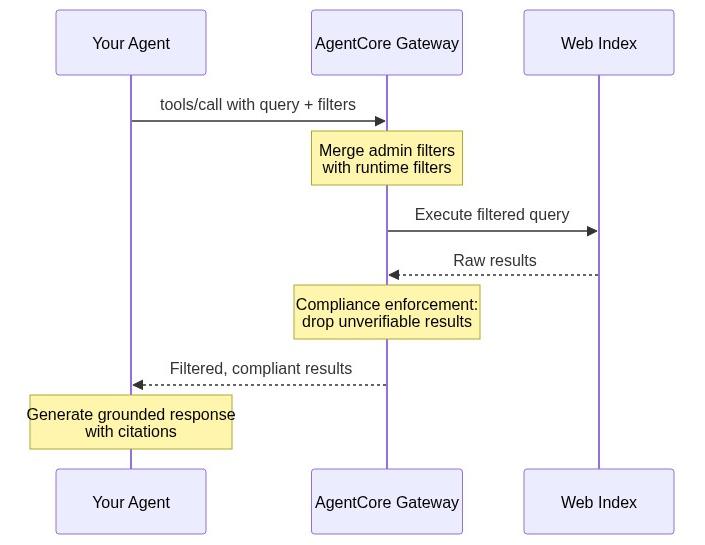
图 1:筛选后的 Web Search 请求生命周期,从 tools/call 到经验证的结果
整个生命周期均在服务端完成。不存在客户端筛选循环、后处理或额外往返请求。
分层筛选模型:管理员 + 运行时
本次发布的一项关键设计原则是:运行时筛选器可以缩小范围,但绝不能扩大管理员设定的范围。这确保无论运行时调用方请求什么,企业策略始终会得到执行。管理员级域名列表在创建 connector 资源时设置。
合并逻辑
下图展示管理员级和运行时筛选列表如何组合:允许名单通过交集进行合并(仅同时出现在两个列表中的域名会被保留),而拒绝名单通过并集进行合并(任一层级屏蔽的域名都会保持被屏蔽状态)。请注意,d.com 会从有效允许名单中移除,因为它仅出现在运行时列表中,而未出现在管理员策略中。
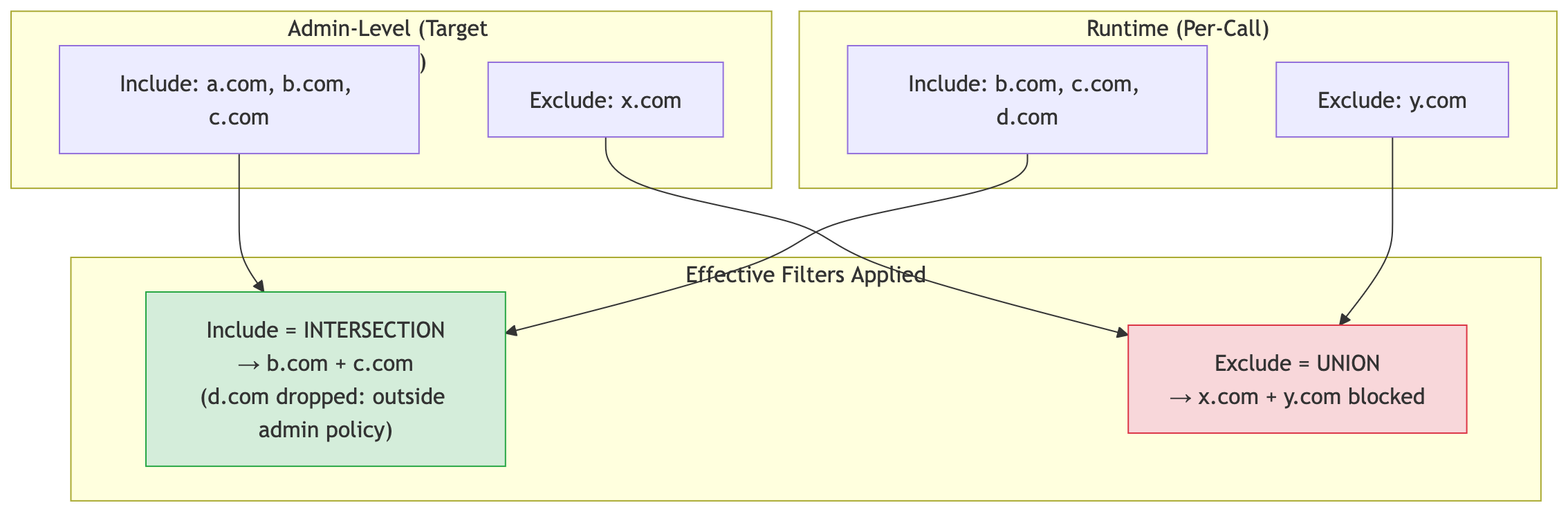
图 2:管理员和运行时域名列表的合并方式:允许名单取交集,拒绝名单取并集
域名 include(允许名单):有效允许名单是管理员列表与运行时列表的交集。如果管理员允许 [a.com, b.com, c.com],而运行时调用包含 [b.com, c.com, d.com],则只会搜索 b.com 和 c.com。域名 d.com 不在管理员域名列表内,会被静默移除。
域名 exclude(拒绝名单):有效拒绝名单是管理员列表与运行时列表的并集。如果管理员屏蔽 [x.com],而运行时调用排除 [y.com],则两者都会被屏蔽。
**注意:**运行时调用方不能搜索管理员未允许的域名,也不能解除管理员已拒绝的域名。运行时筛选器只能_进一步限制_搜索空间。
筛选合规行为
筛选器启用时,Web Search 优先考虑精确性而非召回率。无法依据筛选条件进行验证的结果会被排除,而不是在未筛选状态下返回:
- **域名筛选器启用:**没有可识别域名的结果将被排除在候选范围之外。
- **日期筛选器启用:**没有已识别发布日期的结果将被排除。
启用筛选器时,您可能会收到更少的结果,但收到的每一项结果都满足指定的筛选条件。
上限强制执行
共有四个列表:管理员 include、管理员 exclude、运行时 include 和运行时 exclude。每个列表均独立支持最多 100 项。有关完整配置细节和组合规则,请参阅《开发者指南》中的 配置域名筛选。
快速开始
Web Search 通过 AgentCore Gateway 提供。AgentCore Gateway 是 Amazon Bedrock AgentCore 的一项功能,可提供兼容 Model Context Protocol(MCP)的托管端点,用于将 Agent 连接至工具。按照以下步骤,为您的 Web Search target 启用运行时域名和日期筛选。
前提条件
- 一个 Amazon Bedrock AgentCore Gateway,其 Web Search target 固定使用 connector 1.2.0 或更高版本。
- AWS Identity and Access Management(IAM)权限:调用 Agent 或应用程序需要拥有针对 Gateway Amazon Resource Name(ARN)的
bedrock-agentcore:InvokeGateway权限,Gateway 的服务角色需要拥有bedrock-agentcore:InvokeWebSearch权限。完整策略请参阅配置 Gateway 服务角色。 - 最新版本的 AWS SDK(Python、JavaScript、Java、.NET、Go、Ruby 或 PHP)。
第 1 步:创建使用版本 1.2.0 的 Web Search target
使用适用于 Python 的 AWS SDK(Boto3)创建(或更新)一个固定使用 1.2.0 版本的 target,并配置管理员级域名策略。如果您已有一个使用 1.1.0 版本的 Web Search target,则可使用 UpdateGatewayTarget 将其固定到 1.2.0 版本,而无需创建新的 target。有关其他设置选项,包括 AgentCore CLI 和控制台,请参阅设置 Web Search Tool。
import boto3

gateway_client = boto3.client("bedrock-agentcore-control", region_name="us-east-1")

# Create a Web Search target pinned to version 1.2.0 with admin-level domain filtering
target = gateway_client.create_gateway_target(
    gatewayIdentifier="your-gateway-id",
    name="web-search-filtered",
    targetConfiguration={
        "mcp": {
            "connector": {
                "source": {"connectorId": "web-search", "version": "1.2.0"},
                "configurations": [
                    {
                        "name": "WebSearch",
                        "parameterValues": {
                            "domainFilter": {
                                "include": [
                                    "approved-wire-1.com",
                                    "approved-wire-2.com",
                                    "sec.gov",
                                    "investor.gov",
                                ],
                                "exclude": ["unreliable-source.net"],
                            }
                        },
                    }
                ],
            }
        }
    },
    credentialProviderConfigurations=[
        {"credentialProviderType": "GATEWAY_IAM_ROLE"}
    ],
)

print(f"Target ID: {target['targetId']}")
print(f"Status: {target['status']}")
第 2 步:使用运行时筛选器调用
假设您的 Agent 为法务团队监测 SEC 执法行动。该团队仅信任 sec.gov 作为主要来源,并且需要当月的行动信息,而不是历史备案文件。以下是 Agent 发送的 tools/call 负载:
{
    "jsonrpc": "2.0",
    "id": "1",
    "method": "tools/call",
    "params": {
        "name": "WebSearch",
        "arguments": {
            "query": "latest SEC enforcement actions 2026",
            "filters": {
                "domainFilter": {
                    "include": ["sec.gov"],
                    "exclude": []
                },
                "publishedDateFilter": {
                    "from": "2026-07-01T00:00:00Z",
                    "to": "2026-08-04T23:59:59Z"
                }
            }
        }
    }
}
Agent 仅会收到过去五周内由 sec.gov 发布的结果。结果中不会出现第三方法律评论或过时的备案文件。
注意:tools/call 请求中的工具名称,是通过 tools/list 发现的名称,遵循 <target-name>___WebSearch 模式。对于前面创建的 target,该名称为 web-search-filtered___WebSearch。运行时 include 列表(sec.gov)会与管理员列表(approved-wire-1.com、approved-wire-2.com、sec.gov、investor.gov)取交集。由于 sec.gov 同时出现在两个列表中,因此会被搜索。如果传入 some-other-site.com,它将被静默移除,因为它不在管理员允许名单中。
示例代码
以下示例展示如何使用从 AgentCore Gateway 创建的 MCP 客户端,在运行时结合新筛选器。 用于调用工具的 MCP 客户端创建代码示例
示例 1:具有监管引文要求的临床研究助手
您正在为一家制药公司的监管事务团队构建研究助手。公司政策要求每个回答只能引用 FDA、NIH 或 ClinicalTrials.gov。引用健康博客不仅是质量问题,更是可能在审计中暴露的合规违规行为。无论模型构造何种查询,Agent 都需要在每次搜索中执行这一限制。
import json

# Pharma research assistant: only approved regulatory sources
compliance_request = json.dumps({
    "jsonrpc": "2.0",
    "id": "req-001",
    "method": "tools/call",
    "params": {
        "name": "WebSearch",
        "arguments": {
            "query": "FDA drug approval process 2026 guidance",
            "maxResults": 10,
            "filters": {
                "domainFilter": {
                    "include": ["fda.gov", "nih.gov", "clinicaltrials.gov"]
                }
            }
        }
    }
})

# Send via your MCP client (SigV4-signed or OAuth-authent
English / 原文
When an AI agent uses Web Search to ground its answers on behalf of a customer, the organization behind that agent needs domain and date filters to control which sources the agent consults and how fresh those sources must be. A financial-services agent shouldn’t ground its answers in an unvetted blog. A product-information agent shouldn’t cite pricing or inventory data from three years ago when the user asked about current availability, as stock levels and pricing change rapidly.
Today, we’re announcing runtime domain and published-date filtering for Web Search on Amazon Bedrock AgentCore, a platform to build, connect, and optimize agents at scale with any framework or model. This capability ships as part of the web-search connector version 1.2.0. These capabilities give developers per-call control over which web domains their agents can search and what publication-date window results must fall within, all enforced server-side. No external orchestration is required. When combined with existing admin-level domain policies, organizations have a layered filtering model that enforces enterprise governance while giving individual API calls the flexibility to narrow scope dynamically, per request.
Alongside runtime filtering, this release also expands Web Search availability to two new AWS Regions: eu-west-1 (Dublin) and ap-northeast-1 (Tokyo). Customers in Europe and Asia Pacific can now invoke Web Search from a regional endpoint closer to their workloads, reducing latency and providing an EU-based entry point for organizations with data proximity requirements. AgentCore uses a zero-egress architecture where search queries remain within AWS. This regional expansion gives regulated customers in these regions a path to grounded agents without routing traffic across the Atlantic.
In this post, we walk through what runtime filtering is, why it matters, how the layered admin-plus-runtime model works, how to get started with the new API parameters, and what regional availability means for your workloads.
What’s new in connector version 1.2.0
This launch introduces two new capabilities within the filters object of the Web Search tool input schema:
1. Runtime domain filtering
Pass an include (allowlist) or exclude (denylist) list of domains on every tools/call invocation. This gives per-request control over which sources the agent may consult.
| Field | Description |
|---|---|
| filters.domainFilter.include | Results from these domains are returned |
| filters.domainFilter.exclude | Results from these domains are suppressed |
Each list supports up to 100 domains , counted independently.
2. Published-date filtering
Restrict results to content published within a specific date range using ISO-8601 UTC bounds:
| Field | Description |
|---|---|
| filters.publishedDateFilter.from | Earliest publication date (inclusive) |
| filters.publishedDateFilter.to | Latest publication date (inclusive) |
Both filters are optional and applied per request. Omitting them preserves the existing behavior where all indexed content is eligible.
Why runtime filtering matters
Real-world agent workloads demand more granular control than organization-wide policies alone can provide:
- Per-task source restriction : A compliance agent analyzing regulatory updates should only search .gov domains and approved publishers, not the open web.
- Temporal scoping : A market-intelligence agent summarizing “this week’s earnings calls” should never surface results from prior quarters, even if they rank highly for the query.
- Dynamic allow/deny at call time : A multi-tenant platform serving different customers may need different domain policies per request, without creating separate targets for each tenant.
- Content freshness guarantees : A customer support agent answering “what changed in the latest release” should only return documentation published in the past 7 days.
Runtime filtering addresses these needs by moving control into the API call itself.
How it works: The request flow
The following diagram shows the lifecycle of a filtered search request: your agent sends a tools/call with query and filters, the Gateway merges your runtime filters with the admin-level policy, executes the filtered query against the web index, enforces compliance on the raw results, and returns only verified results for your agent to ground its response on.
Figure 1: Lifecycle of a filtered Web Search request, from tools/call to verified results
The entire lifecycle is server-side. There’s no client-side filtering loop, no post-processing, and no additional roundtrips.
The layered filtering model: Admin + runtime
A key design principle of this launch is that runtime filters can narrow but never expand the scope set by an administrator. This ensures enterprise policy is always enforced, regardless of what a runtime caller requests. The admin-level domain lists are set up during creation of the connector resource.
Merge logic
The following diagram illustrates how admin-level and runtime filter lists combine: include lists merge by intersection (only domains present in both lists survive) while exclude lists merge by union (a domain blocked at either level stays blocked). Notice how d.com is dropped from the effective allowlist because it appears only in the runtime list, not the admin policy.
Figure 2: How admin and runtime domain lists merge, intersecting include lists and unioning exclude lists
Domain include (allowlist): The effective allowlist is the intersection of admin and runtime lists. If the admin allows [a.com, b.com, c.com] and the runtime call includes [b.com, c.com, d.com], only b.com and c.com are searched. The domain d.com is outside the admin domain list and is silently dropped.
Domain exclude (denylist): The effective denylist is the union of admin and runtime lists. If the admin blocks [x.com] and the runtime call excludes [y.com], both are blocked.
Note: A runtime caller can’t search a domain the admin hasn’t allowed and can’t unblock a domain the admin has denied. Runtime filters can only further restrict the search space.
Filter compliance behavior
When filters are active, Web Search prioritizes precision over recall. Results that can’t be verified against your filter criteria are excluded rather than returned unfiltered:
- Domain filter active: Results without a recognizable domain are excluded from consideration.
- Date filter active: Results without a recognized publication date are excluded.
You might receive fewer results when filters are active, but every result you do receive satisfies your specified filter criteria.
Cap enforcement
There are four lists: admin include, admin exclude, runtime include, and runtime exclude. Each supports up to 100 entries independently. For full configuration details and composition rules, see Configure domain filtering in the Developer Guide.
Getting started
Web Search is delivered through AgentCore Gateway, a capability of Amazon Bedrock AgentCore that provides a managed endpoint, compatible with the Model Context Protocol (MCP), for connecting agents to tools. Follow these steps to enable runtime domain and date filtering for your Web Search target.
Prerequisites
- An Amazon Bedrock AgentCore Gateway with a Web Search target pinned to connector version 1.2.0 or later.
- AWS Identity and Access Management (IAM) permissions: your calling agent or application needs
bedrock-agentcore:InvokeGatewayon the gateway Amazon Resource Name (ARN), and the Gateway’s service role needsbedrock-agentcore:InvokeWebSearch. See Configure the Gateway Service Role for the complete policy. - The latest AWS SDK (Python, JavaScript, Java, .NET, Go, Ruby, or PHP).
Step 1: Create a Web Search target with version 1.2.0
Use AWS SDK for Python (Boto3) to create (or update) a target pinned to version 1.2.0, with admin-level domain policies. If you already have a Web Search target on version 1.1.0, you can use UpdateGatewayTarget to pin it to version 1.2.0 instead of creating a new target. For additional setup options, including the AgentCore CLI and console, see Set up Web Search Tool.
import boto3

gateway_client = boto3.client("bedrock-agentcore-control", region_name="us-east-1")

# Create a Web Search target pinned to version 1.2.0 with admin-level domain filtering
target = gateway_client.create_gateway_target(
    gatewayIdentifier="your-gateway-id",
    name="web-search-filtered",
    targetConfiguration={
        "mcp": {
            "connector": {
                "source": {"connectorId": "web-search", "version": "1.2.0"},
                "configurations": [
                    {
                        "name": "WebSearch",
                        "parameterValues": {
                            "domainFilter": {
                                "include": [
                                    "approved-wire-1.com",
                                    "approved-wire-2.com",
                                    "sec.gov",
                                    "investor.gov",
                                ],
                                "exclude": ["unreliable-source.net"],
                            }
                        },
                    }
                ],
            }
        }
    },
    credentialProviderConfigurations=[
        {"credentialProviderType": "GATEWAY_IAM_ROLE"}
    ],
)

print(f"Target ID: {target['targetId']}")
print(f"Status: {target['status']}")
Step 2: Invoke with runtime filters
Imagine your agent monitors SEC enforcement actions for a legal team. The team only trusts sec.gov as a primary source, and they need actions from the current month, not historical filings. Here’s the tools/call payload your agent sends:
{
    "jsonrpc": "2.0",
    "id": "1",
    "method": "tools/call",
    "params": {
        "name": "WebSearch",
        "arguments": {
            "query": "latest SEC enforcement actions 2026",
            "filters": {
                "domainFilter": {
                    "include": ["sec.gov"],
                    "exclude": []
                },
                "publishedDateFilter": {
                    "from": "2026-07-01T00:00:00Z",
                    "to": "2026-08-04T23:59:59Z"
                }
            }
        }
    }
}
The agent receives only results from sec.gov published in the last five weeks. There’s no third-party legal commentary or outdated filings in the results.
Note: The tool name in your tools/call request is the name discovered through tools/list, which follows the pattern <target-name>___WebSearch. For the target created earlier, that’s web-search-filtered___WebSearch. The runtime include list (sec.gov) intersects with the admin list (approved-wire-1.com, approved-wire-2.com, sec.gov, investor.gov). Because sec.gov appears in both, it is searched. If you passed some-other-site.com, it would be silently dropped because it’s not in the admin allowlist.
Sample code examples
Here are some examples of how you can use the MCP client created from the AgentCore Gateway with the new filters at runtime. Code sample to create MCP client for calling tools
Example 1: Clinical research assistant with regulatory citation requirements
You’re building a research assistant for a pharmaceutical company’s regulatory affairs team. Company policy mandates that every answer cite only FDA, NIH, or ClinicalTrials.gov. A citation from a health blog isn’t only a quality issue. It’s a compliance violation that could surface in an audit. The agent needs to enforce this on every search, regardless of what query the model constructs.
import json

# Pharma research assistant: only approved regulatory sources
compliance_request = json.dumps({
    "jsonrpc": "2.0",
    "id": "req-001",
    "method": "tools/call",
    "params": {
        "name": "WebSearch",
        "arguments": {
            "query": "FDA drug approval process 2026 guidance",
            "maxResults": 10,
            "filters": {
                "domainFilter": {
                    "include": ["fda.gov", "nih.gov", "clinicaltrials.gov"]
                }
            }
        }
    }
})

# Send via your MCP client (SigV4-signed or OAuth-authenticated)
response = mcp_client.send(compliance_request)
results = json.loads(response)

# Every result is from fda.gov, nih.gov, or clinicaltrials.gov
for result in results["result"]["content"]:
    print(result["text"])
Every result your agent cites is now verifiably from an approved regulatory source. Even if a WebMD article ranks #1 for the query, it never enters the model’s context window.
Example 2: Stock-update agent, only this week’s coverage
Your trading desk runs an agent that generates stock updates throughout the trading day. The problem: when a trader asks “what’s the latest on semiconductor stocks?”, the agent used to surface a highly-ranked analysis from last quarter, and a trader who acts on stale coverage loses money. You need every result to be from the past 7 days, no exceptions.
from datetime import datetime, timedelta, timezone

# Calculate the 7-day window
now = datetime.now(timezone.utc)
seven_days_ago = now - timedelta(days=7)

stock_update_request = json.dumps({
    "jsonrpc": "2.0",
    "id": "req-002",
    "method": "tools/call",
    "params": {
        "name": "WebSearch",
        "arguments": {
            "query": "semiconductor stocks latest developments",
            "maxResults": 15,
            "filters": {
                "publishedDateFilter": {
                    "from": seven_days_ago.strftime("%Y-%m-%dT%H:%M:%SZ"),
                    "to": now.strftime("%Y-%m-%dT%H:%M:%SZ")
                }
            }
        }
    }
})

response = mcp_client.send(stock_update_request)
The agent’s stock updates now draw only on coverage published in the last seven days. That highly-ranked analysis from last quarter? It never reaches the model, so it can never mislead a trader.
Note: Results without a recognized publication date are excluded when the date filter is active. This ensures every returned result is verifiably within your time window.
Example 3: Investor-relations compliance, primary sources, current quarter only
Your investor-relations team uses an agent to prepare earnings analysis drafts. Two hard rules: (1) only primary sources: SEC filings and official investor pages: never crowdsourced financial commentary sites, and (2) only publications from this quarter, because citing last quarter’s numbers in a current-quarter analysis is a material error. You need both constraints enforced simultaneously on every search.
# IR compliance agent: primary sources + current quarter only
financial_request = json.dumps({
    "jsonrpc": "2.0",
    "id": "req-003",
    "method": "tools/call",
    "params": {
        "name": "WebSearch",
        "arguments": {
            "query": "AMZN quarterly earnings report Q2 2026",
            "maxResults": 10,
            "filters": {
                "domainFilter": {
                    "include": ["sec.gov", "investor.gov"],
                    "exclude": ["example-crowd-commentary-1.com", "example-crowd-commentary-2.com"]
                },
                "publishedDateFilter": {
                    "from": "2026-04-01T00:00:00Z",
                    "to": "2026-08-04T23:59:59Z"
                }
            }
        }
    }
})

response = mcp_client.send(financial_request)
The agent’s draft now cites only official filings and wire reports from Q2 and Q3 2026. Crowdsourced commentary and opinion pieces are blocked even if they match the query perfectly. Anything from prior quarters is excluded regardless of source.
Example 4: SaaS platform with per-tenant source policies
You operate a research-agent SaaS platform serving healthcare, legal, and financial-services customers. Each tenant has contractually agreed source policies. Your healthcare customer’s Business Associate Agreement (BAA) requires citations from PubMed, CDC, and approved medical research databases only. Your legal customer insists on Cornell LII and official court records. Your finance customer mandates SEC, the Federal Reserve, and approved wire services. You can’t spin up a separate gateway target per tenant (you have 200 tenants and counting), so you apply tenant-specific filters at runtime using the Strands Agents SDK.
from strands import Agent
from strands.models import BedrockModel
from strands.tools.mcp.mcp_client import MCPClient
from mcp.client.streamable_http import streamablehttp_client

# Per-tenant domain policies (from your config database)
TENANT_POLICIES = {
    "tenant-healthcare": {
        "include": ["pubmed.ncbi.nlm.nih.gov", "who.int", "cdc.gov"],
        "exclude": ["example-consumer-health-site.com"],
    },
    "tenant-legal": {
        "include": ["law.cornell.edu", "supremecourt.gov", "uscourts.gov"],
        "exclude": [],
    },
    "tenant-finance": {
        "include": ["sec.gov", "federalreserve.gov", "example-approved-wire.com"],
        "exclude": ["example-social-forum-site.com"],
    },
}


def search_for_tenant(tenant_id: str, query: str, days_back: int = 30):
    """Execute a policy-compliant web search for a specific tenant."""
    from datetime import datetime, timedelta, timezone

    policy = TENANT_POLICIES[tenant_id]
    now = datetime.now(timezone.utc)
    date_from = (now - timedelta(days=days_back)).strftime("%Y-%m-%dT%H:%M:%SZ")

    def create_transport():
        return streamablehttp_client(
            gateway_url,
            headers={"Authorization": f"Bearer {get_token()}"},
        )

    mcp_client = MCPClient(create_transport)

    model = BedrockModel(
        model_id="us.anthropic.claude-sonnet-4-20250514-v1:0",
        max_tokens=2048,
    )

    with mcp_client:
        tools = mcp_client.list_tools_sync()
        agent = Agent(model=model, tools=tools)

        # The agent's system prompt instructs it to pass these filters
        # on every WebSearch invocation
        system_prompt = f"""You are a research assistant. When using WebSearch,
ALWAYS include these filters in your tool call:

- domainFilter.include: {policy['include']}
- domainFilter.exclude: {policy['exclude']}
- publishedDateFilter.from: {date_from}

Never search outside approved domains."""

        result = agent(query, system_prompt=system_prompt)
        return result.message


# Usage
answer = search_for_tenant(
    "tenant-healthcare",
    "What are the latest clinical trial results for GLP-1 drugs?"
)
One gateway target serves 200 tenants, each with their own source policy, enforced dynamically at call time. Your healthcare tenant’s agent will never cite Reddit or WebMD, and your finance tenant’s agent will never cite a blog post, even though they share the same underlying infrastructure.
Important: System-prompt-based filtering (as shown earlier) relies on the agent following instructions. It isn’t hard enforcement. For hard enforcement, configure allowed domains at the target level (admin include list). Runtime filters passed directly in the tools/call payload provide API-level enforcement that cannot be bypassed by the model.
Input schema reference
The filters object introduced in connector version 1.2.0 adds domainFilter (include/exclude lists, up to 100 domains each) and publishedDateFilter (inclusive ISO-8601 UTC bounds) alongside the existing query and maxResults fields. For the complete input schema and field-by-field reference, see Input schema in the Amazon Bedrock AgentCore Developer Guide.
Availability and zero data egress
Runtime domain and date filtering is available today in the US East (N. Virginia) (us-east-1), Europe (Ireland) (eu-west-1), and Asia Pacific (Tokyo) (ap-northeast-1) Regions for Web Search on Amazon Bedrock AgentCore.
Web Search benefits from the zero data egress architecture of AgentCore: search queries are served entirely within AWS infrastructure. Customer queries are not sent to a third-party search engine or routed outside AWS. For organizations in regulated industries, such as financial services, healthcare, and government, this removes an entire category of compliance review.
Backward compatibility
These features are fully backward compatible:
- No breaking changes. Version 1.2.0 is a minor release. The new fields are additive and the filters object is optional. Existing API calls without filters continue to work exactly as before.
- SDK support. Available across AWS SDKs (Python (Boto3), JavaScript/TypeScript, Java, .NET, Go, Ruby, and PHP SDKs), AWS Command Line Interface (AWS CLI) and AgentCore CLI.
- Console support. The AWS Console for AgentCore Web Search targets now surfaces both include and exclude domain-list inputs in the connector configuration UI.
Conclusion
Runtime domain and published-date filtering give developers building on Amazon Bedrock AgentCore Gateway the per-call precision they need to build trustworthy, policy-compliant agents without sacrificing the simplicity of a managed, server-side search tool.
Whether you’re restricting an agent to approved regulatory sources, scoping results to the last 24 hours, or dynamically applying tenant-specific policies, Web Search on AgentCore keeps you in control with zero data egress, IAM-native authentication, and no external dependencies.
These features are available today in US East (N. Virginia) (us-east-1), Europe (Ireland) (eu-west-1), and Asia Pacific (Tokyo) (ap-northeast-1) AWS Regions for Web Search on Amazon Bedrock AgentCore.
Get started today:
About the authors
Gaurav Deshmukh
Gaurav is a Senior Software Development Engineer at Amazon AGI with nine years of experience at Amazon building large-scale distributed systems. He works on the information retrieval, grounding, and agentic AI services that power foundation models and AI agents, including capabilities available through Amazon Bedrock AgentCore. His work helps AI agents access accurate, real-time information and perform complex research tasks, improving the reliability of agentic applications at scale.
Mike Erickson
Mike is a Principal Engineer in the AGI for AWS organization, specializing in search. Currently, he is focused on optimizing search tools for use in agentic workflows, including search ML model performance, scalability, tool design, experiment design, and evaluation.
Kalyan Garimella
Kalyan is a Principal Product Manager at Amazon AGI, where he leads the development and launch of web search capabilities for Amazon Bedrock AgentCore. His work focuses on solving a core limitation of modern AI agents — their inability to access real-time, factual information — by enabling agents to ground their reasoning in live web data. Kalyan lives in the Bay Area with his family.
Omar Abdelwahab
Omar is a Technical Product Marketing Manager at Amazon Web Services (AWS), where he focuses on AI products including Agentic AI and Web Search. He holds a Ph.D. in Computer Science and enjoys working at the intersection of AI, technology, and go-to-market strategy to help customers build innovative applications.