使用 Amazon Bedrock AgentCore 和 Mistral AI Studio 构建并连接生产就绪的电商 MCP 服务器
英文标题:Building and connecting a production-ready ecommerce MCP server using Amazon Bedrock AgentCore and Mistral AI Studio
本文完整演示了如何端到端构建并连接一个生产级电商 MCP 服务器。您将实现 MCP 工具、设置双层 JWT 身份验证、通过 AWS CDK 部署,并将服务器连接到 Mistral AI 的 Vibe。该方案大幅减少了为每个 AI 客户端编写定制集成的工作,并利用 Amazon Cognito 和 AgentCore Runtime 的内置安全能力实现租户数据隔离,对希望加速智能体验上线的开发者具有直接参考价值。
 438.7 KB
 456.0 KB
 154.7 KB
 18.2 KB
 11.9 KB
 165.4 KB
中文
当电商团队需要更快地将 AI 驱动的客户体验推向市场时,他们往往面临数周的定制集成工作,这会延迟上线并增加安全风险。构建和连接生产就绪的 AI 助手通常需要为每个客户端编写定制 API 代码、管理容器基础设施以及处理复杂的身份验证。Amazon Bedrock AgentCore 和 Mistral AI Studio 简化了这一过程。通过 Amazon Bedrock AgentCore 上运行的生产级电商 Model Context Protocol (MCP) 服务器,并与 Mistral AI Studio 相连,可以显著加速开发。MCP 提供标准化的集成协议,AgentCore Runtime 管理容器并验证令牌,Amazon Cognito 处理身份管理。
在这篇文章中,您将端到端构建并连接该服务器。您将实现 MCP 工具、设置双层 JSON Web Token (JWT) 身份验证、使用 AWS Cloud Development Kit (AWS CDK) 进行部署,并将结果连接到 Mistral AI 的 Vibe。本文还涵盖先决条件、解决方案架构、MCP 服务器和 Vibe 连接器的最佳实践以及资源清理。您构建的电商服务器支持产品搜索、下单、评论提交和退货处理,使用 Amazon DynamoDB 存储数据,Amazon Cognito 管理身份。
Amazon Bedrock AgentCore 是一个大规模构建、连接和优化 AI Agent 的平台。其中,AgentCore Runtime 是一个全托管的无服务器组件,用于托管 Agent 和 MCP 工作负载,具备会话隔离、长时间请求支持、内置 JWT 验证和可观测性,因此您无需管理容器、负载均衡器或身份验证中间件。在本文中,您将使用 Python 和 FastMCP 构建 MCP 服务器,然后将其部署到 Runtime 进行托管。Amazon Cognito 通过 OAuth 2.1 管理用户身份,确保每个客户的数据隔离。使用 MCP,您只需编写一个服务器,多个 AI 客户端即可连接,而无需为每个客户端构建单独的集成。Mistral AI 的 Vibe 则为用户提供了在 Web、iOS 和 Android 上与服务器对话的界面。
完成本文后,您将拥有一个可用的电商 MCP 服务器,它通过 Amazon Cognito 对用户进行身份验证,按客户范围限定数据访问,并能响应来自 Vibe 的自然语言查询。由于该服务器使用 MCP 标准,其他兼容 MCP 的客户端也能连接到它。
要查看实际运作的解决方案,请观看以下演示。然后,浏览完整文章以获取详细指南,了解如何实现您自己的生产就绪 MCP 服务器并从 Vibe 查询它。
先决条件
您需要一个 AWS 账户,并拥有创建 Amazon DynamoDB 表(NoSQL 数据库)、Amazon Cognito 用户池(用户身份、OAuth 2.1)、AWS Identity and Access Management (IAM) 角色和 Amazon Elastic Container Registry (Amazon ECR) 存储库的权限,以及访问 Amazon Bedrock AgentCore(用于构建和运行 AI Agent 的平台)的权限。对于本地开发工具,请安装 Python 3.10 或更高版本、Node.js 18 或更高版本、AWS CDK (npm install -g aws-cdk)、已配置凭证的 AWS Command Line Interface (AWS CLI) 以及 Amazon Bedrock AgentCore CLI (pip install bedrock-agentcore)。您还需要一个有权访问 Vibe 的 Mistral AI 账户。不需要 Docker,因为 AgentCore Runtime 在云中使用 AWS CodeBuild 构建容器镜像。
解决方案概述
我们将向您展示如何构建一个可以执行实际购物操作的电商 MCP 服务器:搜索产品、下单、提交评论和处理退货。您将处理三个层次:
- 应用层: MCP 服务器是一个使用 FastMCP(一个构建 MCP 服务器的框架)构建的 Python 应用。它通过
/mcp端点暴露六个电商工具,并通过/health端点进行监控。AgentCore Runtime 将服务器作为容器运行。 - 数据层: 五张 Amazon DynamoDB 表存储电商数据:Products、Customers、Orders、Reviews 和 Returns。您使用按需容量预置这些表以实现自动扩缩。全局二级索引支持高效的查询模式。
- 安全层: 双层身份验证确保每个客户的数据私密。Amazon Cognito 充当身份提供者,AgentCore Runtime 在基础设施层验证 JWT 令牌,应用程序则提取用户特定属性,将数据访问限定于经过身份验证的客户。
您使用 AWS CDK 部署该解决方案,其中包含四个基础设施栈。DynamoDBStack 创建五张数据表及索引,并配置为可在开发环境中轻松拆除。CognitoStack 预置用户池,并添加用于客户识别的自定义属性,同时创建配置用于 Mistral AI Vibe 集成的 OAuth 2.1 应用客户端。DataLoaderStack 使用 AWS Lambda 自定义资源,以真实的测试数据(50 种产品、10 个客户、50 个订单、评论和退货)为数据库种子化,以便您部署后立即可测试服务器。AgentCoreRuntimeStack 创建一个具有所需权限的 IAM 角色,为容器镜像预置 ECR 存储库,并存储部署命令引用的配置参数。
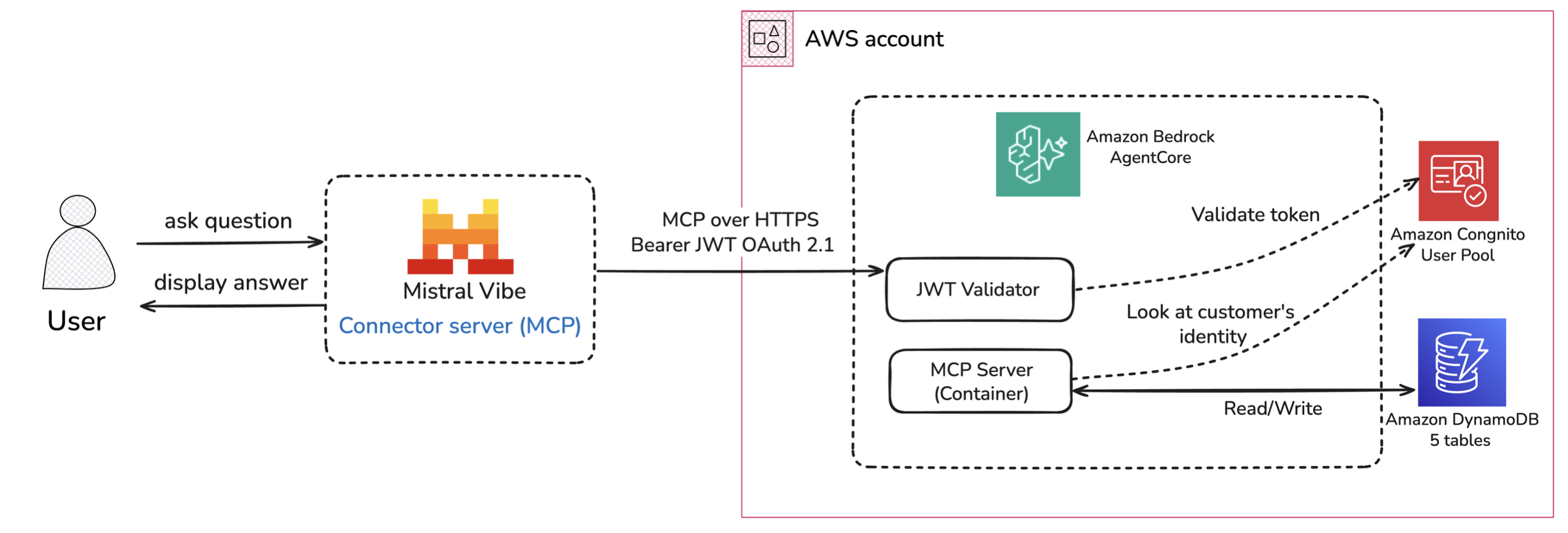
图 1. 电商 MCP 服务器的请求流架构
该图说明了用户通过 Mistral Vibe 与电商 MCP 服务器交互时的请求流。在第一个请求之前,用户通过 OAuth 2.1 登录流进行身份验证:Vibe 打开 Cognito 托管的登录页面,用户输入凭据,Cognito 发放一个 JWT 令牌,Vibe 存储该令牌用于会话。当用户询问“显示我最近的订单”时,AI 模型确定需要调用 get_order_history MCP 工具,并通过 HTTPS 向 AgentCore 端点发送 MCP 请求。请求包括来自 OAuth 2.1 登录流的 Bearer JWT 令牌。在到达应用程序代码之前,AgentCore 的 JWT 验证器会向 Cognito 用户池验证令牌。它检查签名、过期时间和客户端授权,然后拒绝无效令牌。验证通过后,请求到达 MCP 服务器容器,该容器调用 Cognito 以检索将经过身份验证的用户链接到其电商资料的客户 ID 属性。确认客户身份后,服务器查询相关的 DynamoDB 表。该操作仅限于该客户的数据,以强制执行隐私和隔离。然后,服务器将结构化响应通过 AgentCore 发回 Vibe,Vibe 生成自然语言答案,例如“您有 2 个最近的订单:订单 #1234 无线耳机(已交付)和订单 #1236 笔记本支架(处理中)”。
此架构采用分层安全措施。AgentCore Runtime 通过验证 JWT 签名和过期时间在基础设施层对请求进行身份验证。然后,应用程序使用经过验证的身份将数据访问范围限定为该特定客户的订单、评论和退货,所以一个用户无法访问另一个用户的数据。无服务器设计可根据需求进行扩展,无状态容器分布在多个可用区。
技术详解
在本节中,我们将深入介绍电商 MCP 服务器的关键组件,从项目结构和工具定义到身份验证以及在 Amazon Bedrock AgentCore 上的部署。
项目组织
您可以在该 GitHub 仓库找到完整的源代码和详细实现。三个主要组件共同构成 MCP 服务器:
- MCP 服务器应用位于
mcp_server/目录中,包含核心业务逻辑。server.py使用 FastMCP 装饰器定义六个电商工具并配置 HTTP 传输。utils/auth.py处理从 JWT 令牌中提取客户身份。utils/dynamodb_client.py提供与五张 DynamoDB 表交互的清晰接口,处理常规操作,如产品搜索、订单创建和评论查询。 ecommerce-mcp-cdk/中的基础设施代码使用 CDK 栈定义 AWS 资源。DynamoDB 栈创建五张表并附带合适的索引以实现高效查询。Cognito 栈预置用户池(包含自定义属性)和两个 OAuth 客户端,一个用于通用 API 访问,另一个专门为 Mistral AI Studio 配置。DataLoader栈在首次部署时使用真实的测试数据种子化数据库。AgentCoreRuntime栈创建具有相应 DynamoDB、Cognito 和 Amazon CloudWatch 权限的 IAM 执行角色,为容器镜像预置 ECR 存储库,并将配置值存储到 SSM Parameter Store 以供部署时引用。- 部署配置记录在
.bedrock_agentcore.yaml中,该文件由agentcore configure命令生成。此文件告知 AgentCore 在哪里找到用于 JWT 验证的 Cognito 用户池,哪些客户端 ID 被授权连接,以及哪些请求头应转发给应用程序。
您将 MCP 工具定义为使用 @mcp.tool() 装饰的 Python 函数。函数的参数、类型提示和文档字符串构成工具模式(schema)。AI 模型读取此模式以决定何时及如何调用每个工具。
下面是一个示例,展示了如何定义带身份验证的订单历史工具:
@mcp.tool()
def get_order_history(limit: int = 10) -> dict:
    """
    Get order history for the authenticated user.

    REQUIRES AUTHENTICATION - Pass Authorization header.

    Args:
        limit: Maximum number of orders to return

    Returns:
        List of past orders with status, product details, and pricing
    """
    customer_id = get_current_customer_id()
    if customer_id == 'anonymous':
        return {"success": False, "error": "Authentication required"}

    try:
        orders = db.get_customer_orders(customer_id, limit=limit)
        # Enrich orders with product names
        enriched_orders = []
        for order in orders:
            product_id = order.get('product_id')
            if product_id:
                product = db.get_product(product_id)
                if product:
                    order['product_name'] = product.get('name', 'Unknown Product')
                    order['product_category'] = product.get('category', 'Unknown')
            enriched_orders.append(order)
        return {"success": True, "order_count": len(enriched_orders), "orders": enriched_orders}
    except Exception as e:
        return {"success": False, "error": str(e)}
这个工具展示了几个重要模式。文档字符串明确标注“REQUIRES AUTHENTICATION”,以便 AI 模型理解该工具需要登录用户。首行代码会检查客户身份,如果用户是匿名的,则立即返回错误。这是一种纵深防御,尽管 AgentCore Runtime 已经在基础设施层验证了 JWT。响应通过连接产品信息来丰富订单数据,同时返回机器可读的 ID 和人类友好的标签,这样 AI 模型无需额外调用就能生成自然语言响应。
您需要将服务器配置为无状态操作,这是 AgentCore 进行负载均衡所必需的:
mcp = FastMCP("ecommerce-mcp-server")
mcp_app = mcp.http_app(path="/mcp", stateless_http=True)
双层身份验证
身份验证被拆分为两个层次,每个层次都有特定的职责。AgentCore Runtime 负责加密验证。应用程序代码仅需将经过验证的令牌解析为客户身份。
在基础设施层,AgentCore Runtime 在每个令牌到达应用程序之前对其进行验证。它使用 Cognito 的公钥验证加密签名,并检查发行者、过期时间和客户端 ID 是否在允许列表中。无效令牌会立即被拒绝。应用程序代码不会为未经身份验证的请求运行。
在应用层,服务器将经过验证的 JWT 解析为客户身份。由于 OAuth 2.1 令牌的有效负载中不包含自定义属性,服务器会调用 Cognito 来检索将用户与其电商数据关联起来的 custom:customer_id。它使用双重方法来处理不同的令牌类型:
def extract_customer_id_from_token(access_token: str) -> Optional[str]:
    """
    Extract custom:customer_id from a Cognito access token.

    Handles OAuth 2.1 tokens using AdminGetUser via IAM.
    """
    cognito = boto3.client('cognito-idp', region_name=AWS_REGION)

    # Primary method: AdminGetUser for OAuth 2.1 Authorization Code tokens
    try:
        payload = _decode_jwt_payload(access_token)
        username = payload.get('username') or payload.get('sub')
        user_pool_id = payload.get('iss', '').rstrip('/').split('/')[-1]

        if username and user_pool_id:
            user_info = cognito.admin_get_user(
                UserPoolId=user_pool_id,
                Username=username
            )
            for attr in user_info['UserAttributes']:
                if attr['Name'] == 'custom:customer_id':
                    return attr['Value']
    except (ClientError, Exception):
        pass

    # Fallback for client credentials tokens or direct calls
    try:
        payload = _decode_jwt_payload(access_token)
        return payload.get('custom:customer_id')
    except Exception:
        pass

    return None
这种双层方法将安全关注点清晰地分离。AgentCore 处理协议级别的令牌验证,而应用程序专注于业务逻辑,并信任它接收到的请求已经过正确身份验证。
English / 原文
When ecommerce teams need faster time-to-market for AI-powered customer experiences, they face weeks of custom integration work that delays launches and increases security risks. Building and connecting a production-ready AI assistant typically requires custom API code for each client, container infrastructure management, and complex authentication. Amazon Bedrock AgentCore and Mistral AI Studio streamline this process. A production-ready ecommerce Model Context Protocol (MCP) server on Amazon Bedrock AgentCore, connected to Mistral AI Studio, streamlines development. The MCP provides standardized integration protocols, AgentCore Runtime manages containers and validates tokens, and Amazon Cognito handles identity.
In this post, you build and connect that server end to end. You will implement MCP tools, set up two-layer JSON Web Token (JWT) authentication, deploy with AWS Cloud Development Kit (AWS CDK), and connect the result to Mistral AI’s Vibe. The post also covers prerequisites, solution architecture, best practices for MCP servers and Vibe connectors, and resource cleanup. The ecommerce server that you build supports product search, order placement, review submission, and returns processing using Amazon DynamoDB for data and Amazon Cognito for identity management.
Amazon Bedrock AgentCore is a platform to build, connect, and optimize AI agents at scale. Within it, AgentCore Runtime is the fully managed serverless component for hosting agent and MCP workloads, with session isolation, long-running request support, built-in JWT validation, and observability, so you don’t manage containers, load balancers, or auth middleware. In this post, you build the MCP server with Python and FastMCP, then deploy it to Runtime for managed hosting. Amazon Cognito manages user identity through OAuth 2.1, keeping each customer’s data isolated. With MCP, you write one server that multiple AI clients connect to, rather than building a separate integration for each client. Mistral AI’s Vibe gives users a conversational interface to the server on web, iOS, and Android.
By the end, you will have a working ecommerce MCP server that authenticates users through Amazon Cognito, scopes data access per customer, and responds to natural language queries from Vibe. Because the server uses the MCP standard, other MCP-compatible clients can also connect to it.
To see the solution in action, watch the following demo. Then, explore the full post for a detailed guide on implementing your own production-ready MCP server and querying it from Vibe.
Prerequisites
You need an AWS account with permissions to create Amazon DynamoDB tables (NoSQL database), Amazon Cognito user pools (user identity, OAuth 2.1), AWS Identity and Access Management (IAM) roles, and Amazon Elastic Container Registry (Amazon ECR) repositories, and to access Amazon Bedrock AgentCore (platform for building and running AI agents). For local development tools, install Python 3.10 or later, Node.js 18 or later, AWS CDK (npm install -g aws-cdk), the AWS Command Line Interface (AWS CLI) configured with credentials, and the Amazon Bedrock AgentCore CLI (pip install bedrock-agentcore). You also need a Mistral AI account with access to Vibe. Docker isn’t required because AgentCore Runtime builds container images in the cloud using AWS CodeBuild.
Solution overview
We show you how to build an ecommerce MCP server that performs real shopping operations: searching products, placing orders, submitting reviews, and processing returns. You work with three layers:
- Application layer: The MCP server is a Python application built with FastMCP, a framework for building MCP servers. It exposes six ecommerce tools through an
/mcpendpoint and a/healthendpoint for monitoring. AgentCore Runtime runs the server as a container. - Data layer: Five Amazon DynamoDB tables store ecommerce data: Products, Customers, Orders, Reviews, and Returns. You provision the tables with on-demand capacity for automatic scaling. Global Secondary Indexes support efficient query patterns.
- Security layer: Two-tier authentication that keeps each customer’s data private. Amazon Cognito serves as the identity provider, AgentCore Runtime validates JWT tokens at the infrastructure level, and the application extracts user-specific attributes to scope data access to the authenticated customer.
You deploy the solution using AWS CDK with four infrastructure stacks. The DynamoDBStack creates the five data tables with indexes and configures them for straightforward teardown in development environments. The CognitoStack provisions the user pool with custom attributes for customer identification and creates OAuth 2.1 app clients configured for Mistral AI Vibe integration. The DataLoaderStack uses an AWS Lambda custom resource to seed the database with realistic test data (50 products, 10 customers, 50 orders, reviews, and returns), so you can test the server immediately after deployment. The AgentCoreRuntimeStack creates an IAM role with the required permissions, provisions an ECR repository for the container image, and stores configuration parameters that the deployment command references.
Figure 1. Request flow architecture for the ecommerce MCP server
The diagram illustrates the request flow when a user interacts with the ecommerce MCP server through Mistral Vibe. Before the first request, the user authenticates through an OAuth 2.1 login flow: Vibe opens a Cognito-hosted login page, the user enters their credentials, and Cognito issues a JWT token that Vibe stores for the session. When a user asks, “Show me my recent orders,” the AI model determines it needs to call the get_order_history MCP tool and sends an MCP request over HTTPS to the AgentCore endpoint. The request includes the Bearer JWT token from the OAuth 2.1 login flow. Before reaching the application code, AgentCore’s JWT Validator verifies the token with Cognito User Pool. It checks the signature, expiration, and client authorization, then rejects invalid tokens. Once validated, the request reaches the MCP Server container, which calls Cognito to retrieve the customer ID attribute that links the authenticated user to their ecommerce profile. With the customer identity confirmed, the server queries the relevant DynamoDB tables. The operation is scoped to only that customer’s data to enforce privacy and isolation. The server then sends the structured response back through AgentCore to Vibe, which generates a natural language answer like “You have 2 recent orders: Order #1234 for Wireless Headphones (delivered) and Order #1236 for Laptop Stand (processing).”
This architecture uses layered security. AgentCore Runtime authenticates requests at the infrastructure layer by validating the JWT signature and expiration. The application then uses the authenticated identity to scope data access to that specific customer’s orders, reviews, and returns, so one user can’t access another user’s data. The serverless design scales based on demand, and stateless containers distribute across availability zones.
Technical walkthrough
In this section, we walk through the key components of the ecommerce MCP server, from project structure and tool definitions to authentication and deployment on Amazon Bedrock AgentCore.
Project organization
You can find the complete source code and detailed implementation at this GitHub repo. Three main components work together to form the MCP server:
- The MCP server application lives in the
mcp_server/directory and contains the core business logic.server.pydefines the six ecommerce tools using FastMCP decorators and configures the HTTP transport.utils/auth.pyhandles customer identity extraction from JWT tokens.utils/dynamodb_client.pyprovides a clean interface to the five DynamoDB tables, handling common operations like product search, order creation, and review queries. - The infrastructure code in
ecommerce-mcp-cdk/defines the AWS resources using CDK stacks. The DynamoDB stack creates five tables with appropriate indexes for efficient queries. The Cognito stack provisions the user pool with custom attributes and two OAuth clients, one for general API access and one specifically configured for Mistral AI Studio. TheDataLoaderstack seeds the database with realistic test data on first deployment. TheAgentCoreRuntimestack creates the IAM execution role with appropriate permissions for DynamoDB, Cognito, and Amazon CloudWatch, provisions the ECR repository for container images, and stores configuration values in SSM Parameter Store for reference during deployment. - The deployment configuration is captured in
.bedrock_agentcore.yaml, which is generated by theagentcore configurecommand. This file tells AgentCore where to find the Cognito user pool for JWT validation, which client IDs are authorized to connect, and which request headers should be forwarded to the application.
You define MCP tools as Python functions decorated with @mcp.tool(). The function’s parameters, type hints, and docstring become the tool schema. The AI model reads this schema to decide when and how to call each tool.
Here’s an example showing how the order history tool is defined with authentication:
@mcp.tool()
def get_order_history(limit: int = 10) -> dict:
    """
    Get order history for the authenticated user.

    REQUIRES AUTHENTICATION - Pass Authorization header.

    Args:
        limit: Maximum number of orders to return

    Returns:
        List of past orders with status, product details, and pricing
    """
    customer_id = get_current_customer_id()
    if customer_id == 'anonymous':
        return {"success": False, "error": "Authentication required"}

    try:
        orders = db.get_customer_orders(customer_id, limit=limit)
        # Enrich orders with product names
        enriched_orders = []
        for order in orders:
            product_id = order.get('product_id')
            if product_id:
                product = db.get_product(product_id)
                if product:
                    order['product_name'] = product.get('name', 'Unknown Product')
                    order['product_category'] = product.get('category', 'Unknown')
            enriched_orders.append(order)
        return {"success": True, "order_count": len(enriched_orders), "orders": enriched_orders}
    except Exception as e:
        return {"success": False, "error": str(e)}
This tool demonstrates several important patterns. The docstring clearly states “REQUIRES AUTHENTICATION” so the AI model understands this tool needs a logged-in user. The first lines check the customer identity and immediately return an error if the user is anonymous. This is defense in depth even though AgentCore Runtime has already validated the JWT at the infrastructure layer. The response enriches order data by joining with product information, returning both machine-readable IDs and human-friendly labels so the AI model can generate natural language responses without making additional calls.
You configure the server for stateless operation, which AgentCore requires for load balancing:
mcp = FastMCP("ecommerce-mcp-server")
mcp_app = mcp.http_app(path="/mcp", stateless_http=True)
Two-layer authentication
You split authentication across two layers, each with a specific responsibility. AgentCore Runtime owns cryptographic validation. The application code only needs to resolve the validated token into a customer identity.
At the infrastructure layer, AgentCore Runtime validates every JWT before it reaches the application. It verifies the cryptographic signature against Cognito’s public keys and checks the issuer, expiry, and client ID against the allowed list. Invalid tokens are rejected immediately. The application code doesn’t run for unauthenticated requests.
At the application layer, the server resolves the validated JWT into a customer identity. Since OAuth 2.1 tokens don’t include custom attributes in their payload, the server calls Cognito to retrieve the custom:customer_id that links the user to their ecommerce data. It uses a dual-method approach to handle different token types:
def extract_customer_id_from_token(access_token: str) -> Optional[str]:
    """
    Extract custom:customer_id from a Cognito access token.

    Handles OAuth 2.1 tokens using AdminGetUser via IAM.
    """
    cognito = boto3.client('cognito-idp', region_name=AWS_REGION)

    # Primary method: AdminGetUser for OAuth 2.1 Authorization Code tokens
    try:
        payload = _decode_jwt_payload(access_token)
        username = payload.get('username') or payload.get('sub')
        user_pool_id = payload.get('iss', '').rstrip('/').split('/')[-1]

        if username and user_pool_id:
            user_info = cognito.admin_get_user(
                UserPoolId=user_pool_id,
                Username=username
            )
            for attr in user_info['UserAttributes']:
                if attr['Name'] == 'custom:customer_id':
                    return attr['Value']
    except (ClientError, Exception):
        pass

    # Fallback method: get_user() for token types with admin scope
    try:
        user_info = cognito.get_user(AccessToken=access_token)
        for attr in user_info['UserAttributes']:
            if attr['Name'] == 'custom:customer_id':
                return attr['Value']
    except ClientError:
        pass

    return None
The primary method decodes the JWT payload to extract the username and user pool ID, then calls admin_get_user() using IAM permissions. This approach handles OAuth 2.1 tokens from Mistral Le Chat. The fallback method calls get_user() directly when tokens include admin scope. After it’s retrieved, the customer ID is stored in request context and used by authenticated tools to scope database operations to that user’s data.
Note: AgentCore Identity supports custom claims in JWT tokens, which can forward attributes like customer_id directly to your application without an additional API call. For more information, see Configuring OAuth for AgentCore Runtime and Inbound JWT Authorizer. This post uses the explicit admin_get_user() approach instead, because it works with OpenID Connect (OIDC)-compatible identity providers and shows the full authentication flow step by step.
Deployment workflow
Deploying the MCP server involves four steps: infrastructure provisioning, user creation, AgentCore configuration, and container deployment.
Infrastructure provisioning uses AWS CDK to create the required resources. Running cdk deploy --all from the ecommerce-mcp-cdk directory deploys four stacks in sequence. The deployment takes about 5 minutes and outputs the values needed for the next steps. These include the IAM role ARN, ECR repository URI, Cognito discovery URL, and client IDs. These values are also stored in SSM Parameter Store for quick retrieval.
User creation seeds the Cognito user pool with demo accounts. The create_cognito_users.py script creates ten test users (demo1@example.com through demo10@example.com) and assigns each a unique customer ID that links them to their orders and reviews in DynamoDB.
AgentCore configuration tells the runtime how to validate tokens and forward requests. The agentcore configure command creates the .bedrock_agentcore.yaml file with the necessary settings:
agentcore configure \
  -e server.py \
  -p MCP \
  -n ecommerce_mcp_server \
  -er $ROLE_ARN \
  -ecr $ECR_URI \
  -ac '{"customJWTAuthorizer":{"discoveryUrl":"$DISC_URL","allowedClients":["$CLIENT_ID","$MISTRAL_CLIENT_ID"]}}' \
  -rha "Authorization" \
  -r us-west-2 \
  --non-interactive
The key configuration elements in the generated YAML file are:
authorizer_configuration:
  customJWTAuthorizer:
    discoveryUrl: https://cognito-idp.us-west-2.amazonaws.com/us-west-2_xxxxx/.well-known/openid-configuration
    allowedClients:
      - xxxxxxxxxxxxxxxxxxxxxxxxxx  # mcp-client
      - yyyyyyyyyyyyyyyyyyyyyyyyyy  # mistral-oauth-client
request_header_configuration:
  requestHeaderAllowlist:
    - Authorization
The discoveryUrl points to Cognito’s OIDC configuration endpoint, where AgentCore fetches the public keys for JWT verification. The allowedClients list restricts access to authorized OAuth clients. The requestHeaderAllowlist tells AgentCore to forward the Authorization header to the application. Without this setting, requests would appear anonymous.
Container deployment uses the agentcore deploy command, which orchestrates a cloud-based build and deployment. AgentCore creates a CodeBuild project in your AWS account, uploads your source code to Amazon Simple Storage Service (Amazon S3), and builds an ARM64 Docker image in CodeBuild. You don’t need Docker installed locally. AgentCore then pushes the image to ECR and calls the Bedrock AgentCore API to create and start the runtime. The first invocation has a cold start of 10 to 20 seconds while the container initializes. Subsequent requests within the session respond in milliseconds.
The complete flow diagram
The diagram demonstrates how the solution works across four distinct phases.
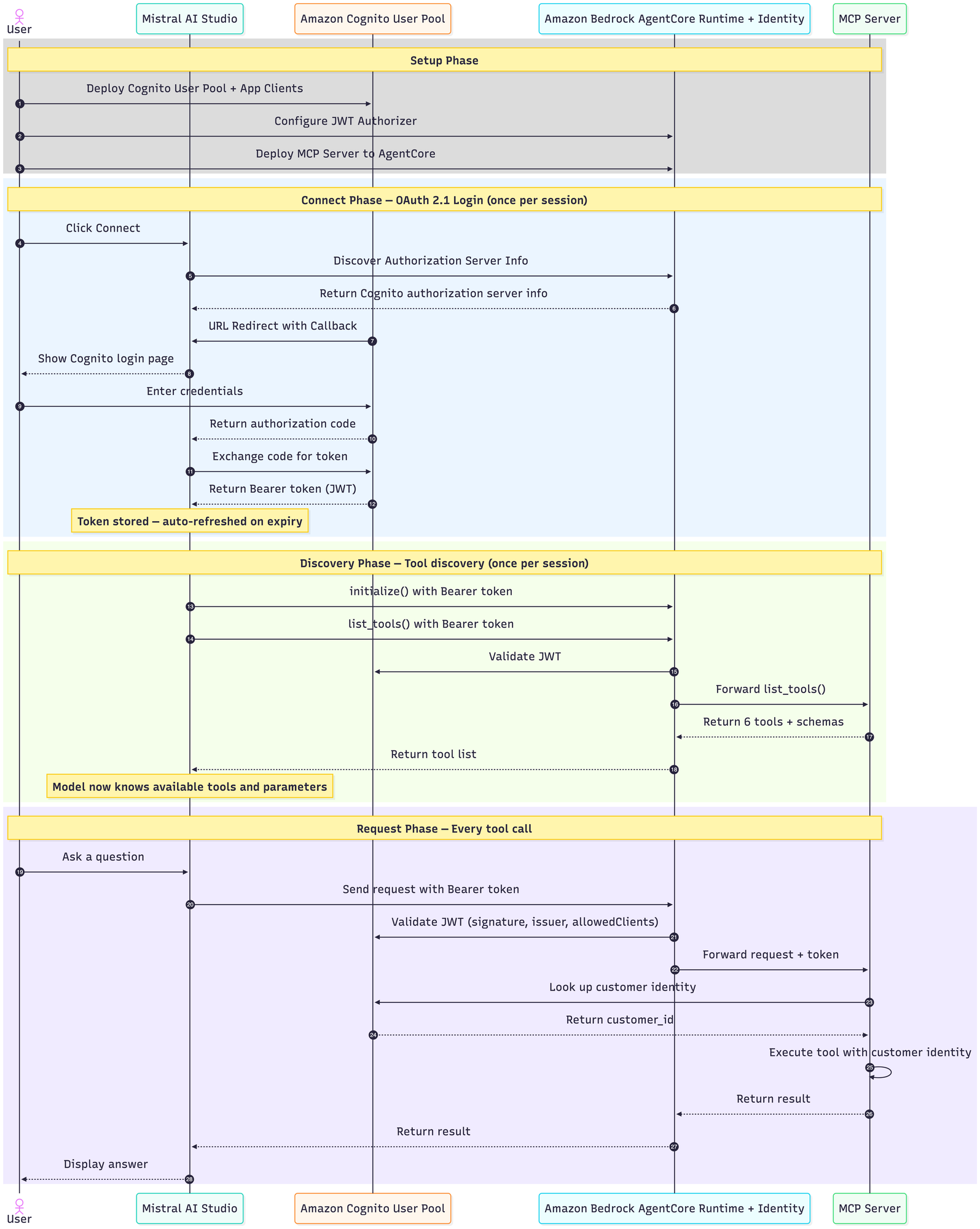
Figure 2. Four-phase architecture showing one-time setup, OAuth 2.1 connection flow, and per-request authentication
During the setup phase, a developer runs cdk deploy to create the AWS resources. These include the Cognito User Pool, OAuth app clients, five DynamoDB tables, IAM roles, and SSM parameters. The developer then configures AgentCore Runtime with the Cognito user pool and authorized client IDs, and runs agentcore deploy to build and deploy the MCP server container.
The Connect phase happens once per user session. The user opens Vibe, adds a custom MCP connector with OAuth 2.1, and enters the AgentCore server URL and OAuth credentials. When they click Connect, Mistral discovers the Cognito identity provider and opens a browser popup for login. After the user authenticates, Cognito issues a JWT Bearer token that Mistral stores and automatically refreshes throughout the session.
The Discovery phase also happens once per session, immediately after authentication. Mistral sends a list_tools() request to AgentCore with the Bearer token. AgentCore validates the JWT and forwards the request to the MCP Server, which returns the six available tools and their parameter schemas. Mistral now knows which operations the server supports and what arguments each tool accepts.
The Request phase occurs with every interaction. When a user asks “What electronics are in stock under $500?”, Mistral sends an MCP request to AgentCore with the JWT token. AgentCore validates the token with Cognito by checking signature, expiration, and client authorization. Once validated, the request reaches the MCP Server. The server extracts the customer identity from Cognito, queries DynamoDB for the requested data scoped to that customer, and returns formatted results. Mistral then generates a natural language response for the user.
This architecture separates deployment from runtime authentication, validates tokens at the infrastructure layer, discovers available tools before the first request, and scopes data access to the authenticated customer.
Best practices for MCP implementation
The following guidelines cover building and securing your MCP server on Amazon Bedrock AgentCore, and connecting it safely to Mistral Vibe.
Building MCP servers with AgentCore
When building MCP servers for deployment on Amazon Bedrock AgentCore, focus on clear tool design, layered security, and production-ready operations.
AI models rely heavily on tool descriptions when deciding which function to call. Clear, explicit documentation in your tool’s docstring directly affects how accurately the model selects and invokes tools.
- Limit tool count per server: Keep each server focused with 5–8 well-defined tools rather than dozens of overlapping functions. Each additional tool increases the model’s decision complexity. If you need more operations, split them across multiple MCP servers grouped by domain (for example, one server for order management and another for product catalog). AI clients like Vibe can connect to multiple servers in a single session.
- Explicit parameter guidance: Include examples in docstrings (“for example, ‘laptop’, ‘wireless headphones’”) and call out common mistakes (“Do NOT pass ‘in stock’ as query text, use the in_stock_only parameter”).
- Return structured responses: Include both machine-readable identifiers (order_id, product_id) and human-readable labels (product_name, status) so the model can generate natural responses without follow-up calls.
Implement layered security
AgentCore Runtime validates JWTs at the infrastructure layer, but application-level checks are equally important for defense in depth.
- Validate at the tool level: Check user identity at the start of every protected function, even though AgentCore Runtime blocks unauthenticated requests at the edge. Return clear error messages for anonymous users.
- Verify data ownership: Before mutations, confirm the resource belongs to the authenticated user (for example, verify
order.customer_idmatches the token’scustomer_id) to prevent unauthorized access. - Apply least privilege IAM: Scope the AgentCore Runtime execution role to specific actions on specific resources. Grant only GetItem, PutItem, Query on named table ARNs, with no wildcard permissions.
- Enforce tool-call boundaries with AgentCore Policy: Use AgentCore Policy to intercept tool calls before they execute. Define rules that validate which tools can be called, verify that parameters fall within acceptable ranges (for example, limit quantity to 1-100 on order placement), and reject calls that fall outside defined boundaries.
- Use AgentCore Gateway for API management: Place AgentCore Gateway in front of your runtime to manage rate limiting, request routing, and additional access controls at the API layer.
- Descope tokens before passing to tools: When forwarding a JWT to a tool, strip it to only the claims the tool needs. Don’t pass the full token with all scopes and attributes. This follows the principle of least privilege for token propagation and limits exposure if a tool is compromised.
Build for production operations
AgentCore Runtime manages container orchestration, but your server code should support reliable deployment and troubleshooting.
- Configure stateless mode: Set
stateless_http=Trueinmcp.http_app()so AgentCore can distribute requests across container instances without session affinity. - Deploy infrastructure as code: Use CDK or Terraform to make your entire stack reproducible. Include
RemovalPolicysettings appropriate for dev vs production environments. - Seed with realistic test data: Include a data loader that populates tables with representative records so you can validate tool behavior immediately after deployment.
Connecting MCP servers to Mistral Vibe
When connecting MCP servers to Mistral Vibe, verify that each server is trusted, properly authenticated, and scoped to only the permissions it needs.
Only add trusted MCP servers
We highly recommend connecting only to your own MCP servers or to trusted, well-documented servers, especially for tools that can run code or access sensitive systems.
Like for any web service, MCP server security starts with security basics. A good server should:
- Require strong authentication (OAuth, tokens that do expire).
- Enforce clear authorization rules.
- Use secure connections and session handling to prevent hijacking.
Before giving a connector access to your sensitive data, make sure the MCP server passes this baseline check.
There are several ways a malicious MCP server can trick you into causing trouble:
- Prompt injection: Hidden commands or instructions embedded in tool descriptions or metadata can trick the model into performing unintended actions.
- Tool shadowing and typo squatting: Malicious or lookalike tools with similar names can silently override legitimate ones, leading to unexpected tool call and unintended behavior.
- Over-exposure: Granting more access or functionality than needed increases your threat surface for no benefit.
- Privilege escalation through token forwarding: Passing the user’s full JWT to a tool gives that tool the user’s complete privileges. A compromised tool could access resources beyond its scope. Pass only the minimum claims each tool needs.
Even a seemingly harmless tool can become a security risk if it’s deceptive and has been given enough access to your workflows. Of course, this concern doesn’t apply in the case of the ecommerce MCP server we are building ourselves.
Note that if you’re part of an enterprise Vibe plan, we only allow administrators of the plan to add custom connectors to avoid the types of security issues documented in the preceding section.
Control the number of MCP connectors enabled
Adding Connectors in Vibe expands what your Mistral models can do, but it also introduces trade-offs. Each new Connector adds complexity that the model must manage. Some Connectors expose dozens of functions. With only 10 Connectors active, the model might have to choose among more than 150 possible functions before deciding which one to call.
More connectors can lead to a higher chance of error, as each additional integration increases the likelihood of misconfigured parameters, wrong tool or function call, or unexpected behaviors. Whenever feasible, we recommend limiting to 5–6 connectors active at a time.
Craft clean prompts
Even with the right Connectors, the quality of the output depends heavily on the quality of the input.
Ambiguous prompts lead to poor performance. If your request is vague, the large language model (LLM) might misinterpret the task or provide irrelevant results.
To write better prompts in Vibe:
- Name the tool and action explicitly:
- “Find the Q2 report” – > “Use Notion to search for Q2 Revenue Report”
- Specify parameters:
- “Show me John’s emails” ???? “ List Gmail emails from John Smith in the last 7 days”
- Define scope/format:
- “Check what’s planned on Monday” ???? “Check Calendar and return only event titles for Monday in a bullet list”
Clean up resources
To avoid ongoing charges, remove the resources created in this walkthrough. First, stop the AgentCore Runtime by running agentcore delete --name ecommerce_mcp_server. Then tear down the CDK stacks by running cdk destroy --all from the ecommerce-mcp-cdk directory. This deletes the Amazon DynamoDB tables, Amazon Cognito user pool, IAM roles, Amazon ECR repository, and related resources. The DynamoDB tables use RemovalPolicy.DESTROY, so they’re deleted automatically. Verify that the resources have been removed by checking the AWS CloudFormation console.
Conclusion
This blog post walked through building a production-ready ecommerce MCP server using Amazon Bedrock AgentCore, Amazon DynamoDB, and Amazon Cognito, then connecting it to Mistral AI’s Vibe. We covered how to define MCP tools with clear AI-friendly documentation, implement two-layer authentication where AgentCore validates JWT tokens at the infrastructure level while the application enforces data ownership rules, deploy the solution using CDK infrastructure as code, and establish best practices for both server development and client integration. The complete source code, deployment scripts, and step-by-step guide are available in this Github repository.
The patterns in this solution apply to other domains. If you’re new to MCP, clone the repository and deploy the ecommerce server as-is. Experiment with the tools in Vibe to see how MCP request and response cycles work. Then modify a single tool to return data from your own system. If you already run workloads on AgentCore Runtime, replace the ecommerce tools with your domain-specific operations, such as a customer support tool that queries a ticket database or a financial services tool that retrieves transaction records. If you’re preparing for production, add Amazon CloudWatch dashboards for request latency and error rates, integrate AWS WAF for additional request filtering, and use Amazon EventBridge to trigger notifications on order events.
To explore related solutions, check out AWS for Autonomous Agents for broader agent architecture patterns, the Amazon Bedrock AgentCore documentation for advanced features like memory persistence and policy enforcement, and Mistral AI’s integration guides for connecting additional enterprise tools to Vibe. For the AWS services used in this post, see the Amazon DynamoDB Developer Guide, the Amazon Cognito Developer Guide, the AWS CDK Developer Guide, the FastMCP documentation, and the Model Context Protocol specification. We’d love to hear how you’re using MCP and AgentCore Runtime in your applications. Share your experiences in the comments or reach out to the AWS AI services team.
About the authors
Ying Hou, PhD
Ying is a Senior Specialist Solutions Architect at Amazon Web Services, focused on Generative AI infrastructure and frameworks. Based in London, she works with customers to pre-train, post-train, and host large language models for inference using AWS infrastructure, with deep expertise in Amazon SageMaker HyperPod. Ying helps organizations design and optimize their ML training and inference workloads at scale, enabling them to get the most out of GPU clusters, distributed training, and efficient model serving on AWS.
Samuel Barry
Samuel is an Applied Scientist at Mistral AI, where he leads post-training initiatives for frontier language models with a focus on synthetic data generation, evaluation, model scaling, supervised fine-tuning, and reinforcement learning. His work spans both internal model development and strategic customer engagements, contributing to advances in multimodal AI, alignment, and safety while helping deploy cutting-edge AI systems in real-world applications.
Siddhant Waghjale
Siddhant is an Applied Scientist at Mistral AI, working on pre-training, post-training for language models with a focus on code and cybersecurity use cases. His work spans SFT, RL and building environment generation pipelines for producing training data across a range of tasks.