如何在 ADK 中评估实时与语音 Agent
英文标题:How to Evaluate Live & Voice Agents in ADK
将实时语音 Agent 从演示推向生产,需要通过可重复的自动化测试验证其在多轮对话、工具调用、上下文衔接和用户打断等场景中的稳定性。ADK 现已原生支持实时评估:开发者可使用由 LLM 驱动、并能合成语音的模拟用户测试实时 Agent,同时在与文本 Agent 相同的评估循环中对对话进行评分。该功能支持动态对话场景和固定对话脚本、端到端轨迹质量评分及单轮指标,并可通过 CLI、AgentEvaluator、CI/CD 和 ADK Web 完成运行与调试。
 11.7 KB
 1.2 MB
 157.5 KB
 224.5 KB
 368.8 KB
 38.9 KB
 92.7 KB
 532.1 KB
 147.3 KB
中文
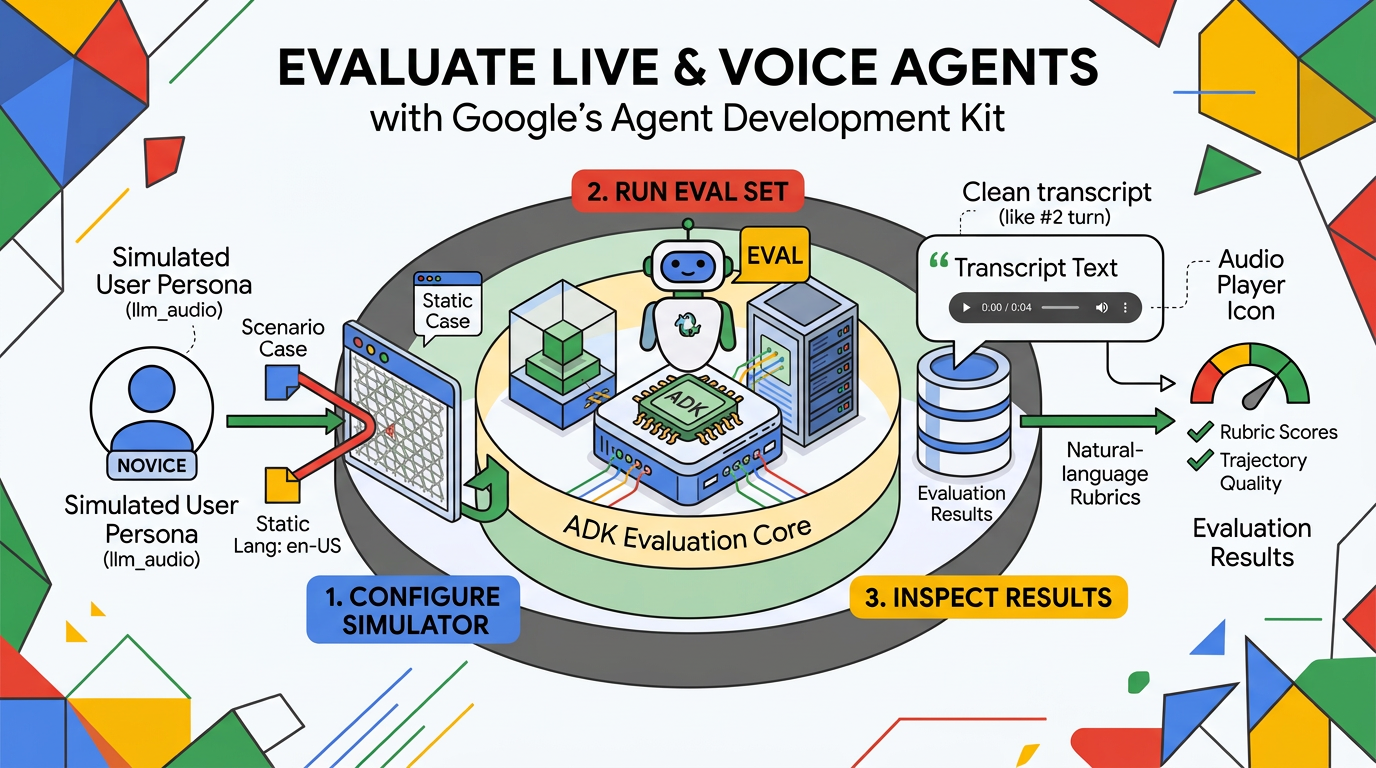
让实时 Agent 投入生产,远不止做出一个出色的演示那么简单。它必须在语音对话中一轮接一轮地采取正确行动,而时机把握和故障恢复与内容本身同样重要。昨天听起来完美的行为,可能会在下一次提示词调整或模型迭代后悄然改变。工具不再触发,上下文在轮次之间丢失,用户插话被忽略。要有信心地发布,就需要可重复的证据,证明 Agent 能够经受真实用户实际会进行的各种对话。
因此,我们为 ADK 带来了原生的实时评估功能。现在,你可以使用一名以音频说出每轮内容的模拟用户来驱动实时语音 Agent,对其语音回复进行评分,并在你已用于文本 Agent 的同一评估循环中完成这一切。本文将带你在无需离开 ADK 的情况下,将一个实时 Agent 从“它能在演示中运行”提升为“它已被量化评估并值得信赖”。
评估你的第一个实时 Agent
为了展示这一功能,我们将构建一个完整的实时评估循环:创建 Agent、编写评估用例、运行评估,以及检查记录的结果。
第 1 步:被测 Agent
我们的示例采用基于图的工作流:按顺序串联三个单一职责的实时 Agent,每个阶段均运行在 gemini-live-2.5-flash-native-audio 上。
python from google.adk.agents.llm_agent import Agent from google.adk.tools.tool_context import ToolContext from google.adk.workflow import START, Workflow from pydantic import BaseModel, Field
LIVE_MODEL = "gemini-live-2.5-flash-native-audio"
def validate_date_of_birth(dob: str, tool_context: ToolContext) -> dict: """Validate a confirmed date of birth against records (mocked).""" match = dob == "1985-07-12" tool_context.state["dob_verified"] = match return {"match": match}
greeter_agent = Agent( model=LIVE_MODEL, name="greeter_agent", mode="task", instruction="You are Sam, a friendly care-team assistant. Greet the caller " "and confirm you're speaking with John Doe before sharing anything else. " "Ask one question per turn, then complete your task with the confirmed name.", )
dob_verifier_agent = Agent( model=LIVE_MODEL, name="dob_verifier_agent", mode="task", tools=[validate_date_of_birth], instruction="Ask for the caller's date of birth, read it back to confirm, " "then call validate_date_of_birth in YYYY-MM-DD format. Complete your task " "with 'verified' or 'unverified'.", )
goals_agent = Agent( model=LIVE_MODEL, name="goals_agent", mode="task", instruction="Identity is verified. Proactively share the upcoming " "appointment on Tuesday, June 16th at 3 PM with Dr. Example, answer any " 'questions, then wrap up warmly and end with "Goodbye."', )
root_agent = Workflow( name="live_workflow", edges=[ (START, greeter_agent), (greeter_agent, dob_verifier_agent), (dob_verifier_agent, goals_agent), ], )
Python
每个阶段都是一个普通的实时 Agent,工作流只负责协调它们,并将输出从一个阶段传递至下一个阶段。该流程包含三个步骤,并在中间进行一次工具调用,因此会生成一段内容丰富、值得评分的多轮交互轨迹。随着控制权在不同 Agent 之间转移,用户不会察觉到任何交接。整个交互期间音频流始终保持打开状态,ADK 会将累积的会话状态和对话历史向后传递,使每个 Agent 都能在已有上下文中继续,而不是从零开始。
第 2 步:编写评估集
评估集是一个包含测试用例的 JSON 文件。测试用例与其运行方式解耦,因此你可以混合两种不同风格:对话场景和固定对话。
第一种是对话场景:你描述目标和角色设定,用户模拟器即兴生成每一轮对话。
{ "eval_id": "example_scenario_case", "conversation_scenario": { "starting_prompt": "Hello?", "conversation_plan": "You are John Doe. Confirm your name when greeted. When asked for your date of birth, give July 12th, 1985, and confirm it when read back. Listen to the appointment details, ask what you should bring to the visit, then say you have no other questions and let the call wrap up.", "user_persona": "NOVICE" }, "session_input": { "app_name": "live_workflow", "user_id": "test_user_id", "state": {} } }
JSON
user_persona 决定模拟用户的沟通方式。ADK 提供了一些内置角色,而 NOVICE 会让模拟器只分享高层目标,并等待 Agent 询问具体信息,从而测试 Agent 推动对话的能力。角色设定由提示词驱动,而非硬编码,因此你可以使用自定义角色扩展这一集合。conversation_plan 得到满足后,模拟器会自行结束场景;也就是说,你只需编写目标,并由它决定通话何时结束。为避免对话无限延伸,max_allowed_invocations 会限制总轮次数,为每个动态用例提供可预测的上限。
你也可以编写固定对话,逐字脚本化用户的发言。静态用例与模拟用户一样,都是实时运行的有效输入。
{ "eval_id": "example_fixed_case", "conversation": [ { "user_content": { "role": "user", "parts": [{ "text": "Hi, yes, this is John Doe." }] } }, { "user_content": { "role": "user", "parts": [{ "text": "My date of birth is July 12th, 1985." }] } } ] }
JSON
第 3 步:启用实时与音频模式
在 test_config.json 中添加 live_model_config,并将 ADK 指向 llm_audio 用户模拟器。上述用例中的每一轮用户发言都会通过你选择的 Gemini TTS 语音合成为语音,并流式传输给实时 Agent。
{ "criteria": { "rubric_based_multi_turn_trajectory_quality_v1": { "threshold": 0.7, "judge_model_options": { "judge_model": "gemini-3.7-flash" }, "rubrics": [ { "rubric_id": "verifies_identity_first", "rubric_content": { "text_property": "Across the call, the agent confirms the caller's name and validates their date of birth before disclosing any appointment details." } } // ... further end-to-end rubrics ] } }, "live_model_config": { "timeout_seconds": 300 }, "user_simulator_config": { "type": "llm_audio", "model": "gemini-3.7-flash", "max_allowed_invocations": 10, "audio_model": "gemini-3.1-flash-tts-preview", "audio_model_configuration": { "response_modalities": ["AUDIO"], "speech_config": { "voice_config": { "prebuilt_voice_config": { "voice_name": "Kore" } }, "language_code": "en-US" } } } }
JSON
以下几点值得特别说明:
live_model_config启用实时模式。若省略此配置,则会以标准文本模式运行完全相同的测试用例。model与audio_model:model负责模拟用户的轮次决策逻辑,而audio_model则将这些发言合成为语音。你可以调整voice_name和language_code,测试 Agent 面对不同语音和口音时的表现。criteria配置指标及通过/失败阈值。基于评分标准的 LLM 裁判(例如轨迹质量)会端到端地评估对话,非常适合多 Agent 图工作流。你还可以附加逐轮指标,为单次回复或工具执行打分。
语音回复可以用数百种不同措辞表达正确答案。自然语言评分标准会像人工审核者一样判断意图:只需定义一次,即可自动应用于评估套件中的每一段对话。
第 4 步:运行评估
准备好 Agent、评估集和配置后,可通过 CLI 运行评估:
shell
uv run adk eval
contributing/samples/live/live_workflow
contributing/samples/live/live_workflow/live_workflow.evalset.json
--config_file_path contributing/samples/live/live_workflow/test_config.json
Shell
注意:请确保已安装 eval 扩展(uv pip install -e ".[eval]"),并已为 Live API 和 Gemini TTS 配置 API 凭据。
同一条流水线也可以通过 AgentEvaluator 以编程方式调用,因此你可以轻松将实时语音评估接入 CI/CD 流水线,在发布前捕捉回归问题。
第 5 步:在 ADK Web 中检查结果
为支持交互式调试,ADK Web 现已原生支持实时评估。运行设置对话框中包含 Standard | Live 模式切换开关。选择 Live 后,会显示模拟用户的输入模态选项(音频或文本),以及语音和语言设置。
运行完成后,ADK 会将实时音频流重建为清晰的文字记录。每一轮都会显示在专属消息气泡中,包含转录文本和内嵌的可播放音频片段,因此你不仅可以评估 Agent 说了什么,还能评估它听起来如何。
开始使用
准备好测试你的实时 Agent 了吗?克隆 live_workflow 示例,运行 adk eval,然后在 ADK Web 中查看结果。
请查阅 ADK 文档,了解有关用户模拟、合成音频配置文件和自定义评估指标的深入指南。你的语音 Agent 不必再凭感觉发布——现在可以基于量化评估结果发布。
English / 原文
Getting a live agent into production is about more than a good demo. It has to take the right actions across a spoken conversation, turn after turn, where timing and recovery matter as much as content. Behavior that sounded perfect yesterday can quietly change on the next prompt tweak or model iteration. Tools stop firing. Context slips between turns. Interjections go ignored. Shipping with confidence takes repeatable evidence that the agent holds up across the conversations real users will actually have.
That’s why we’re bringing native live evaluation to ADK. You can now drive a live, voice-based agent with a simulated user that speaks its turns as audio, score the spoken replies, and do it all inside the same eval loop you already run for text agents. This post takes a live agent from "it works in a demo" to "it's measured and trusted" without leaving ADK.
Evaluate your first live agent
To see this in action, we’ll build a complete live evaluation loop: creating the agent, authoring an eval case, running the eval, and inspecting the recorded results.
Step 1: The agent under test
Our example uses a graph-based workflow: three single-purpose live agents sequenced together, with each stage running on gemini-live-2.5-flash-native-audio.
from google.adk.agents.llm_agent import Agent
from google.adk.tools.tool_context import ToolContext
from google.adk.workflow import START, Workflow
from pydantic import BaseModel, Field


LIVE_MODEL = "gemini-live-2.5-flash-native-audio"


def validate_date_of_birth(dob: str, tool_context: ToolContext) -> dict:
  """Validate a confirmed date of birth against records (mocked)."""
  match = dob == "1985-07-12"
  tool_context.state["dob_verified"] = match
  return {"match": match}


greeter_agent = Agent(
    model=LIVE_MODEL,
    name="greeter_agent",
    mode="task",
    instruction="You are Sam, a friendly care-team assistant. Greet the caller "
    "and confirm you're speaking with John Doe before sharing anything else. "
    "Ask one question per turn, then complete your task with the confirmed name.",
)


dob_verifier_agent = Agent(
    model=LIVE_MODEL,
    name="dob_verifier_agent",
    mode="task",
    tools=[validate_date_of_birth],
    instruction="Ask for the caller's date of birth, read it back to confirm, "
    "then call validate_date_of_birth in YYYY-MM-DD format. Complete your task "
    "with 'verified' or 'unverified'.",
)


goals_agent = Agent(
    model=LIVE_MODEL,
    name="goals_agent",
    mode="task",
    instruction="Identity is verified. Proactively share the upcoming "
    "appointment on Tuesday, June 16th at 3 PM with Dr. Example, answer any "
    'questions, then wrap up warmly and end with "Goodbye."',
)


root_agent = Workflow(
    name="live_workflow",
    edges=[
        (START, greeter_agent),
        (greeter_agent, dob_verifier_agent),
        (dob_verifier_agent, goals_agent),
    ],
)
Python
Each stage is an ordinary live agent, with the workflow simply orchestrating them and carrying output from one stage to the next. This flow walks through three steps with a tool call in the middle, so it generates a rich multi-turn trajectory worth grading. As control moves between agents, the user never notices a handoff. The audio stream stays open across the entire interaction, and ADK carries the accumulated session state and conversation history forward so each agent picks up in context rather than starting cold.
Step 2: Author the eval set
An eval set is a JSON file containing your test cases. Test cases are decoupled from how they run, so you can mix two distinct styles: conversation scenarios and fixed conversations.
The first is a conversation scenario : you describe a goal and a persona, and the user simulator improvises the turns.
{
  "eval_id": "example_scenario_case",
  "conversation_scenario": {
    "starting_prompt": "Hello?",
    "conversation_plan": "You are John Doe. Confirm your name when greeted. When asked for your date of birth, give July 12th, 1985, and confirm it when read back. Listen to the appointment details, ask what you should bring to the visit, then say you have no other questions and let the call wrap up.",
    "user_persona": "NOVICE"
  },
  "session_input": {
    "app_name": "live_workflow",
    "user_id": "test_user_id",
    "state": {}
  }
}
JSON
The user_persona shapes how the simulated user communicates. ADK ships with a few built-in personas, and NOVICE tells the simulator to share only high-level goals and wait for the agent to ask for specifics, testing how well the agent drives the conversation. Personas are prompt-driven rather than hardcoded, so you can extend the set with your own personas. The simulator ends a scenario on its own once the conversation_plan is satisfied, so you script the goal and let it decide when the call is finished. As a safeguard against run-off conversations, max_allowed_invocations caps the total number of turns, giving every dynamic case a predictable upper bound.
You can also author a fixed conversation and script the user's turns verbatim. A static case is just as valid an input to a live run as a simulated user.
{
  "eval_id": "example_fixed_case",
  "conversation": [
    {
      "user_content": {
        "role": "user",
        "parts": [{ "text": "Hi, yes, this is John Doe." }]
      }
    },
    {
      "user_content": {
        "role": "user",
        "parts": [{ "text": "My date of birth is July 12th, 1985." }]
      }
    }
  ]
}
JSON
Step 3: Turn on live and audio
In your test_config.json, add a live_model_config and point ADK at the llm_audio user simulator. Each user turn from the cases above is synthesized to speech with the Gemini TTS voice you pick and streamed to the live agent.
{
  "criteria": {
    "rubric_based_multi_turn_trajectory_quality_v1": {
      "threshold": 0.7,
      "judge_model_options": { "judge_model": "gemini-3.7-flash" },
      "rubrics": [
        {
          "rubric_id": "verifies_identity_first",
          "rubric_content": {
            "text_property": "Across the call, the agent confirms the caller's name and validates their date of birth before disclosing any appointment details."
          }
        }
        // ... further end-to-end rubrics
      ]
    }
  },
  "live_model_config": {
    "timeout_seconds": 300
  },
  "user_simulator_config": {
    "type": "llm_audio",
    "model": "gemini-3.7-flash",
    "max_allowed_invocations": 10,
    "audio_model": "gemini-3.1-flash-tts-preview",
    "audio_model_configuration": {
      "response_modalities": ["AUDIO"],
      "speech_config": {
        "voice_config": {
          "prebuilt_voice_config": { "voice_name": "Kore" }
        },
        "language_code": "en-US"
      }
    }
  }
}
JSON
A few things worth calling out:
live_model_configenables live mode. Omitting this runs the exact same test cases in standard text mode.modelvs.audio_model:modelpowers the simulated user’s turn-taking logic, whileaudio_modelsynthesizes those turns into speech. Adjustvoice_nameandlanguage_codeto test agent performance against different voices and accents.criteriaconfigures metrics and pass/fail thresholds. Rubric-based LLM judges (like trajectory quality) evaluate the conversation end to end—ideal for multi-agent graphs. You can also attach per-turn metrics to score individual responses or tool executions.
A spoken reply can be correct in hundreds of different phrasings. Natural-language rubrics judge intent the way a human reviewer would, captured once and applied automatically across every conversation in your suite.
Step 4: Run it
With your agent, eval set, and configuration ready, run the evaluation from the CLI:
uv run adk eval \
  contributing/samples/live/live_workflow \
  contributing/samples/live/live_workflow/live_workflow.evalset.json \
  --config_file_path contributing/samples/live/live_workflow/test_config.json
Shell
Note: Make sure you have the eval extras installed (uv pip install -e ".[eval]") and API credentials configured for both the Live API and Gemini TTS.
This same pipeline can be called programmatically via AgentEvaluator, making it easy to drop live voice evaluations into your CI/CD pipeline to catch regressions before shipping.
Step 5: Inspect the results in ADK Web
For interactive debugging, ADK Web now natively supports live evaluations. The run setup dialog includes a Standard | Live mode toggle. Selecting Live reveals input modality options (Audio or Text) alongside voice and language settings for the simulated user.
Once the run completes, ADK rebuilds the live audio stream into a clean transcript. Each turn renders in a dedicated message bubble complete with transcript text and an inline playable audio clip , so you can evaluate how your agent sounded, not just what it said.
Get started
Ready to test your live agent? Clone the live_workflow sample, run adk eval, and view your results in ADK Web.
Check out the ADK documentation for deeper guides on user simulation, synthetic audio profiles, and custom evaluation metrics. Your voice agent doesn't have to ship on vibes—now it can ship measured.