SageMaker HyperPod 推出全新 Ray 功能
英文标题:Introducing new Ray capabilities on SageMaker HyperPod
Amazon SageMaker HyperPod 现已在 Amazon EKS 上提供托管式 Ray 支持,开发者可在 SageMaker Studio 中创建、管理和监控 Ray 集群,无需手写 Kubernetes YAML 或配置 kubectl 端口转发。新功能支持将 JupyterLab 和 Code Editor 工作区连接到运行中的 Ray 集群,并提供 Ray Dashboard、Amazon Managed Grafana 以及远程任务提交能力。HyperPod 还通过节点健康监控、自动恢复、卡死任务检测和分层检查点机制,增强 Ray 分布式训练的韧性。对于推理场景,SageMaker JumpStart 可将模型权重直接加载到 Ray Serve 端点,并通过分层存储卸载 KV 缓存以支持长上下文请求。
 1.3 MB
 101.1 KB
 124.1 KB
 345.0 KB
 141.2 KB
 346.5 KB
 423.1 KB
 536.0 KB
 473.7 KB
 403.0 KB
 474.4 KB
 587.4 KB
 206.2 KB
 414.3 KB
 48.1 KB
 35.4 KB
 37.6 KB
 60.0 KB
中文
今天,我们宣布在 Amazon SageMaker HyperPod 上推出全新的 Ray 功能,将 Ray 与 HyperPod 专为基础模型训练和服务构建的基础设施相集成。
Ray 是一个开源框架,数据科学家可借助它将分布式 Python 工作负载扩展到 GPU 集群上,涵盖使用 Ray Train 进行分布式训练,以及使用 Ray Serve 进行模型服务。在 Kubernetes 上,Ray 集群由 KubeRay 管理;KubeRay 是一个开源 Operator,可通过自定义资源(RayCluster、RayJob、RayService)处理集群生命周期。SageMaker HyperPod 为基于 Amazon Elastic Kubernetes Service(Amazon EKS)的大规模机器学习(ML)提供专用基础设施,并内置节点健康监控和自动恢复功能。此前,在 Kubernetes 上运行 Ray 需要数据科学家编写 YAML 清单,为每次依赖项变更管理 Docker 镜像重建,通过 kubectl port-forward 访问 Ray Dashboard,并手动配置 Prometheus 和 Grafana 实现可观测性。
借助此次发布,数据科学家可完全在 SageMaker Studio 中创建 Ray 集群、打开 Ray Dashboard 和 Amazon Managed Grafana 可观测性仪表板、将 JupyterLab 或 Code Editor 工作区连接到集群、提交分布式任务,以及配置卡死任务检测。在应用层面,Ray 训练任务通过 HyperPod 节点健康监控和恢复获得自动容错能力,并可利用 HyperPod 分布式分层存储的分层检查点实现更快速的恢复。SageMaker JumpStart 集成可将模型权重直接加载到 Ray Serve 端点,同时将 KV 缓存卸载至分层存储,以服务长上下文请求。这些功能兼容开源 KubeRay 和标准 Ray API,因此现有脚本与工作流无需修改即可运行。
本文将介绍如何开始使用上述各项功能。
前提条件
要跟随本文操作,您需要一个采用 Amazon EKS 编排的 Amazon SageMaker HyperPod 集群,并在集群上安装以下组件:
- SageMaker Spaces EKS 插件:在 Amazon SageMaker HyperPod 中启用 JupyterLab 和 Code Editor 工作区,使其能够连接到 Ray 集群进行交互式开发。
- HyperPod Observability EKS 插件:从 Ray 工作负载收集指标,并在 Amazon Managed Grafana 中配置 Grafana 仪表板。
- KubeRay Operator:将 RayCluster、RayJob 和 RayService 作为原生 Kubernetes 资源进行管理。
- HyperPod Ray Endpoint Operator(Helm chart):为 Dashboard 访问和远程任务提交生成经过身份验证的公共端点。
您还需要一个 SageMaker Studio 域,它提供用于创建 Ray 集群、查看工作负载、打开仪表板和管理 HyperPod Spaces 的控制台界面。有关完整设置说明,请参阅 Ray on HyperPod 入门指南。
专为数据科学家打造的体验
SageMaker Studio 现在提供了完整的 Ray 开发环境。数据科学家无需编写 Kubernetes 清单或运行 kubectl 命令,即可直接从控制台创建、管理和监控 Ray 集群。您可以通过这一交互式演示查看完整体验。
要开始使用,请导航至 SageMaker Studio 并选择 HyperPod。选择您的 HyperPod 集群,然后进入 Tasks 选项卡。从任务类型列表中选择 RayCluster。控制台会显示 Ray 集群及其状态、实例类型和可用操作。要创建新集群,请选择 Create Ray Cluster。
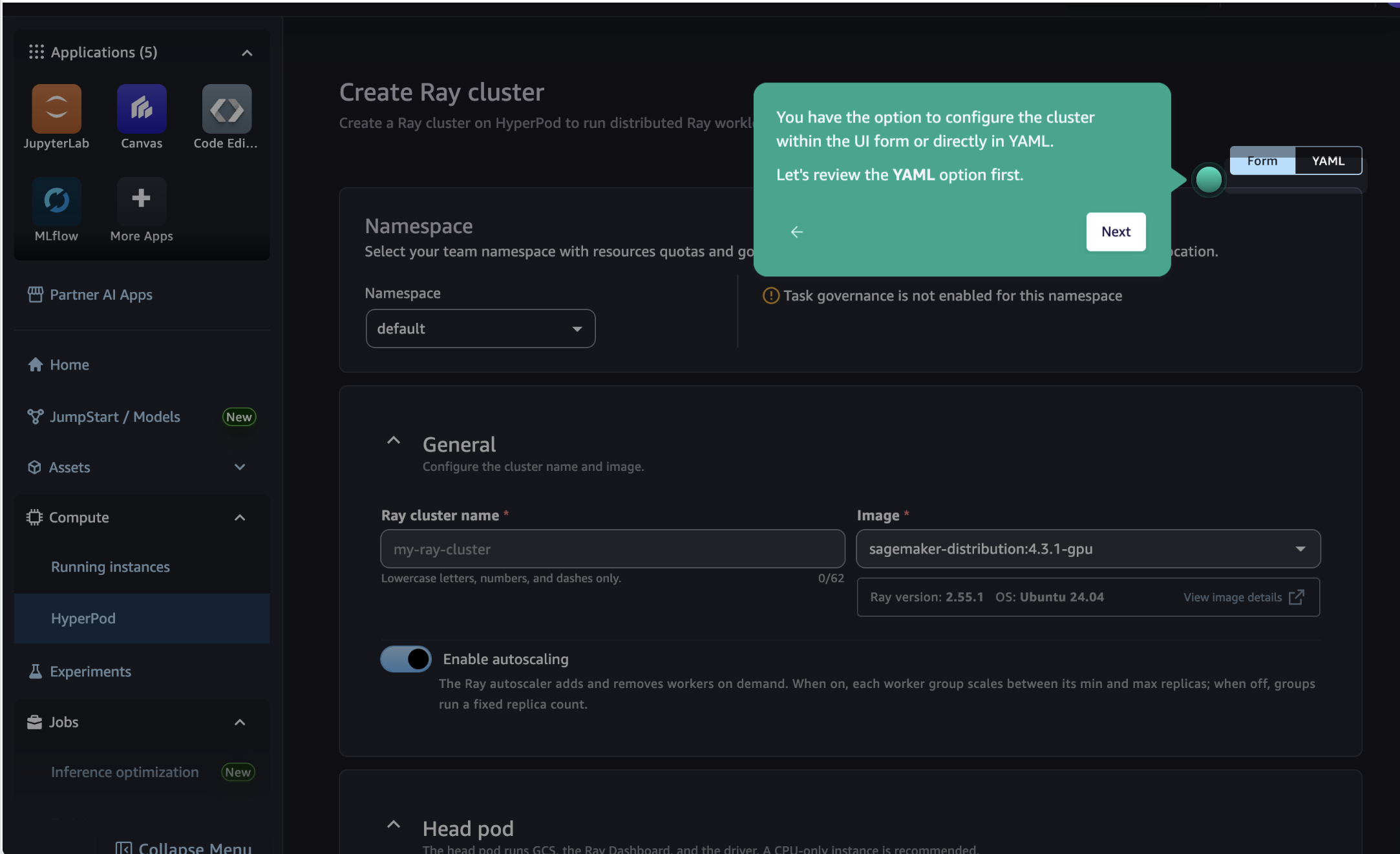
创建表单会要求您填写集群名称、头节点和工作节点实例类型、工作节点数量以及容器镜像。默认情况下,集群使用 SageMaker Distribution 镜像,该镜像已预装 Ray,并由 AWS 负责定期进行漏洞修复和软件升级。如果您的工作负载需要额外依赖项,也可以指定自定义容器镜像。
对于偏好使用 kubectl 或需要高级自定义功能的客户,Studio 中的内联 YAML 编辑器会展示完整 Kubernetes 清单。KubeRay Operator 还可与 HyperPod 任务治理集成,因此管理员可以为 Ray 工作负载与其他训练任务一并设置计算配额和调度优先级。
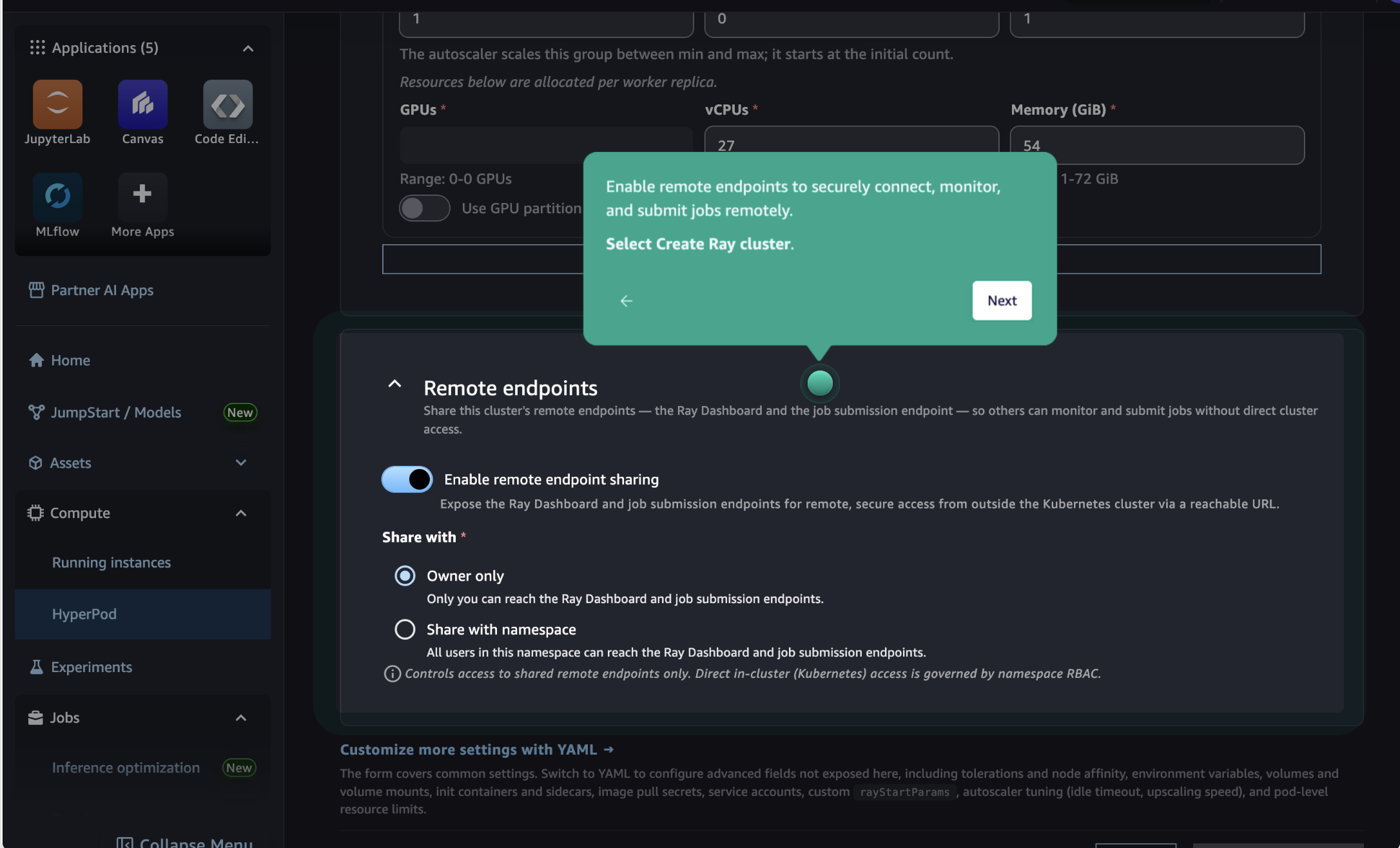
在创建过程中,请启用远程端点,这样您便可以从任何可访问互联网的位置安全地访问 Ray Dashboard、提交任务和检索日志,而无需在本地使用 kubectl port-forward。要了解更多信息,请参阅 Ray Dashboard 访问。
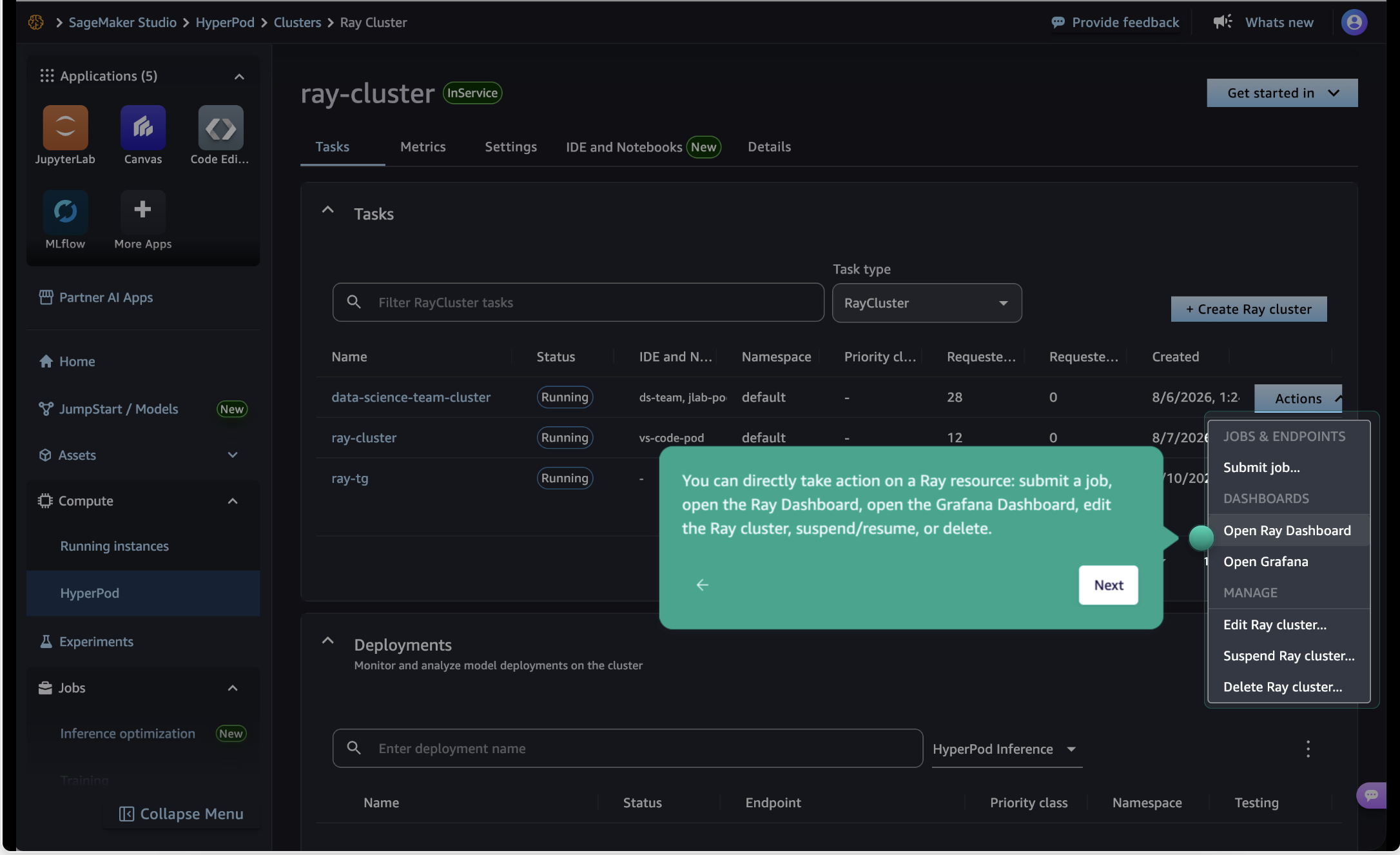
提交创建集群表单后,返回 Tasks 选项卡,即可看到如下截图所示的集群。通过 Actions 菜单,您可以打开 Ray Dashboard、查看 Grafana 指标、编辑集群配置或删除集群。
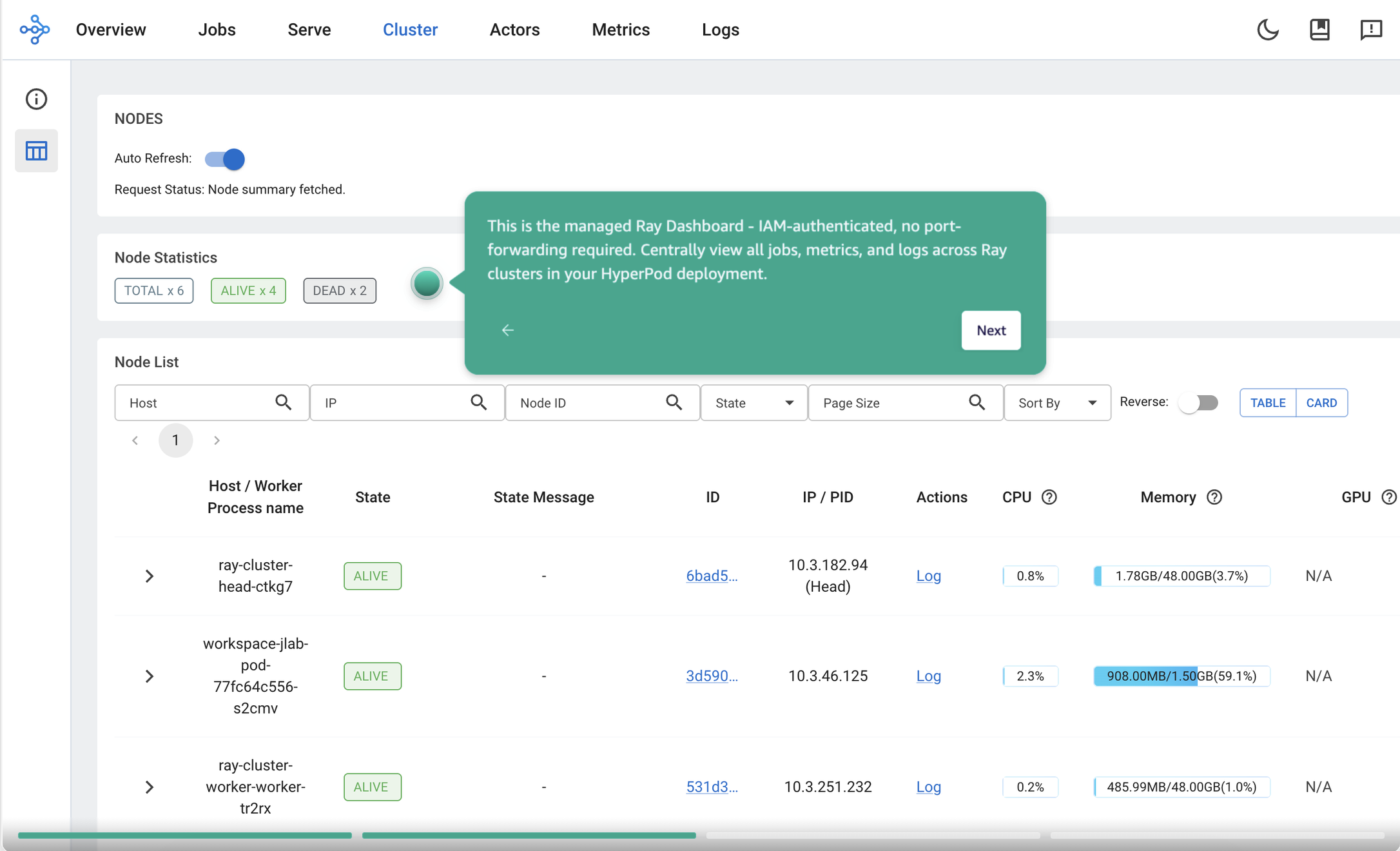
当集群进入 Running 状态后,从 Actions 菜单中选择 Open Ray Dashboard。系统会生成一个短期有效、通过 IAM 身份验证且仅限集群创建者使用的 URL。Ray Dashboard 会在新选项卡中打开,展示集群健康状态、运行中的任务和节点状态。
远程任务提交
对于生产工作负载,您可以使用 toolkit-for-ray-on-sagemaker-ai Python 软件包,从 Studio、笔记本电脑或持续集成与持续交付(CI/CD)流水线向 Ray 集群远程提交任务。该软件包通过 IAM 身份验证处理端点解析和 EKS API 凭证生成,因此您可以结合 SageMaker 感知型地址解析器使用标准 Ray 任务提交 API:
$ aws eks update-kubeconfig --name <eks-cluster-name> --region <region>
$ pip install toolkit-for-ray-on-sagemaker-ai
$ ray job submit --address sagemaker_ray://<ray-cluster-name>/<namespace> \
     --working-dir <your-code-directory> \
     --python your-code.py
# 列出 Ray 任务
$ ray job list --address sagemaker_ray://<ray-cluster-name>/<namespace>
使用 SageMaker Spaces 进行交互式开发
数据科学家可以从 Studio 将 Ray 集群连接到 HyperPod JupyterLab 或 Code Editor space。该 space 会作为一个零计算资源的工作节点加入集群,使笔记本获得完整的原生 Ray driver 访问能力。您可在创建 space 时从列表中选择集群,并立即开始工作。
创建 HyperPod JupyterLab 或 Code Editor space 后,配置面板中会显示 Ray 集群集成选项。
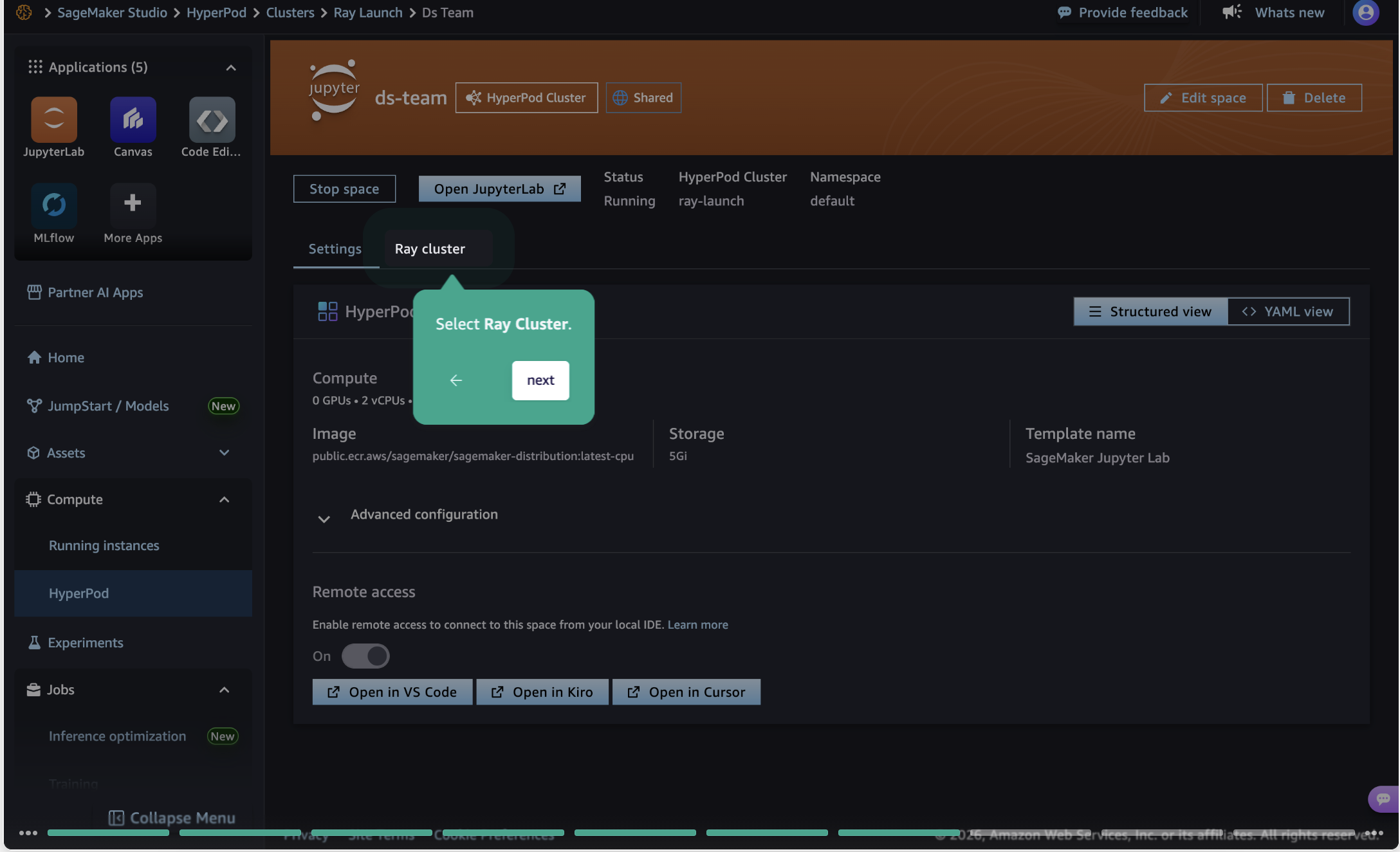
选择要让工作区连接到的 Ray 集群。
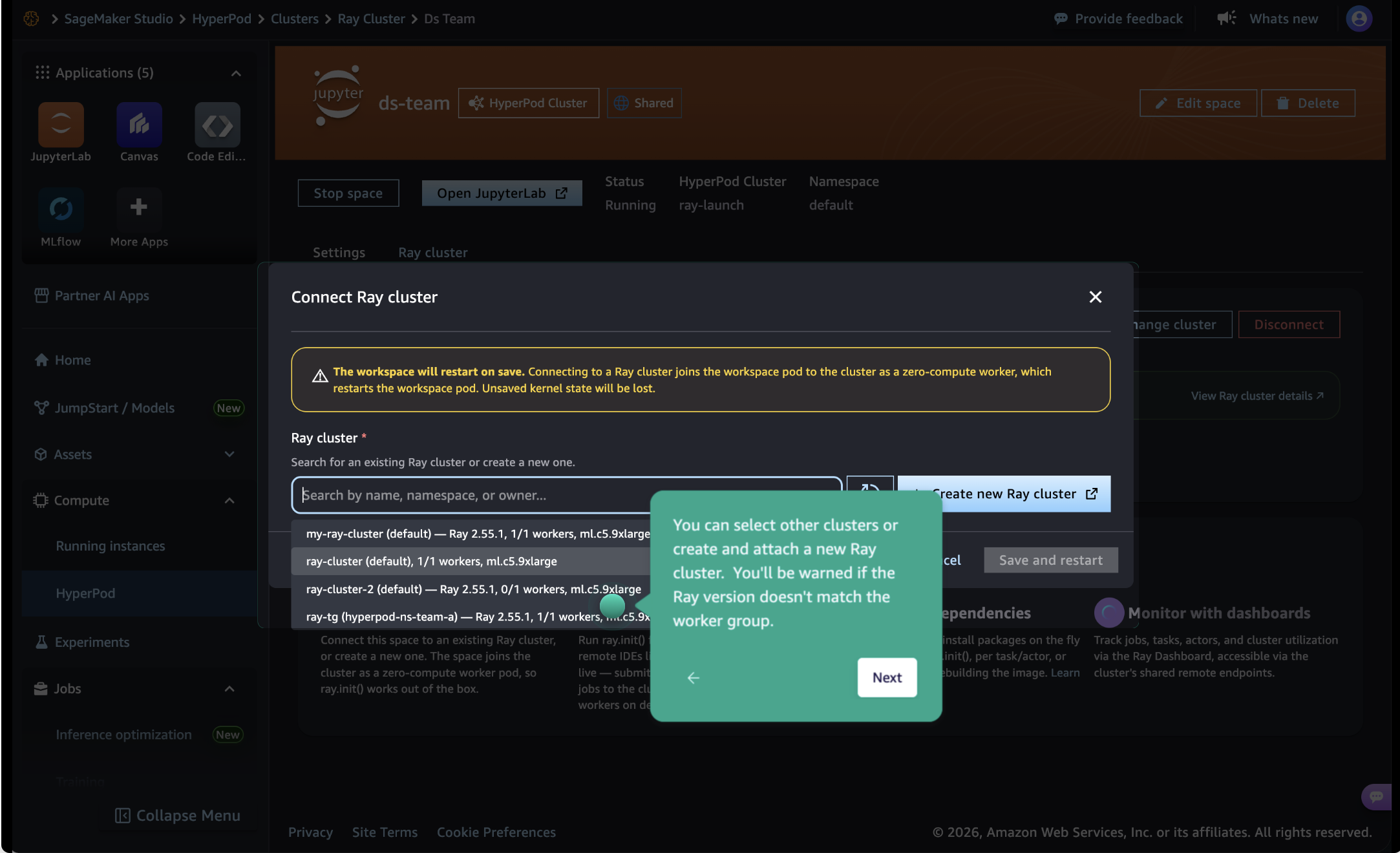
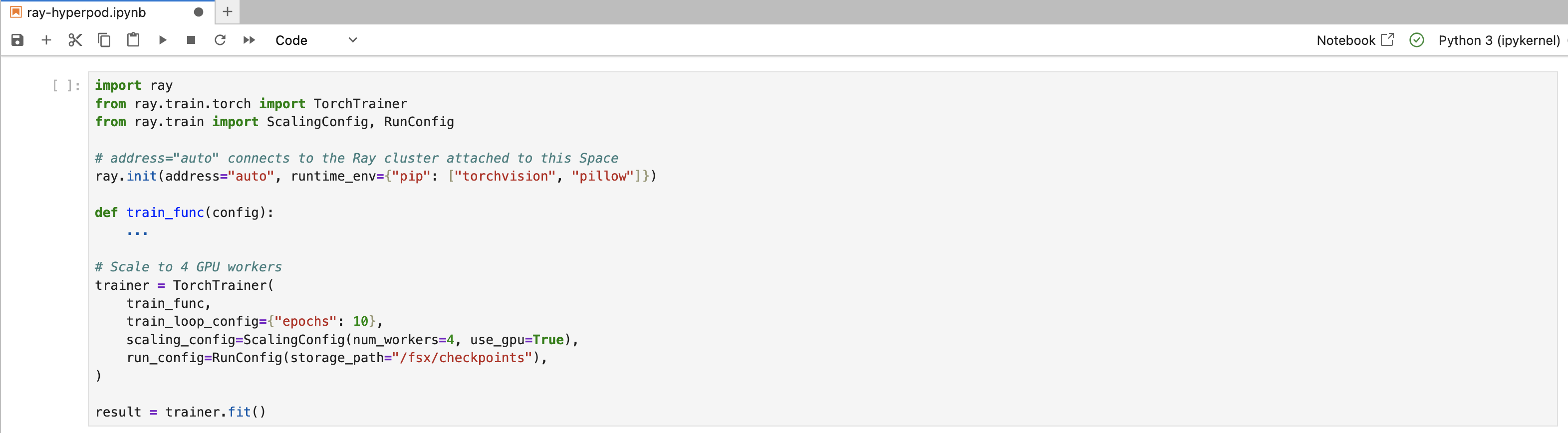
连接 Ray 集群会重启该 space。重启完成后,在浏览器中打开 JupyterLab 或 Code Editor,并调用 ray.init(address="auto")。此时,您已连接到 Ray 集群,可以如同位于头节点上一样运行分布式工作负载。Ray 的 runtime_env 参数允许您在运行时注入 Python 依赖项,而无需重建容器镜像;您也可以横向扩缩工作节点,而无需重建集群。例如,训练模型的数据科学家可以先在只有一个工作节点的笔记本中进行原型开发,然后通过修改 ScalingConfig 中的一行配置,将规模扩展至四个 GPU 工作节点。训练将在所连接的 Ray 集群中以分布式方式运行,而笔记本仍保持交互状态,可用于监控进度、调整超参数或检查中间结果。整个工作流均保留在笔记本中。
要了解更多信息,请参阅使用 Ray 的 IDE 和笔记本。
开箱即用的可观测性
在 Kubernetes 上结合 Amazon Managed Service for Prometheus 和 Amazon Managed Grafana 设置 Ray 可观测性是一个多步骤流程,涉及安装 Helm chart、创建 PodMonitor 和 ServiceMonitor、为 SigV4 签名配置 IAM 角色,以及手动导入仪表板 JSON 文件。
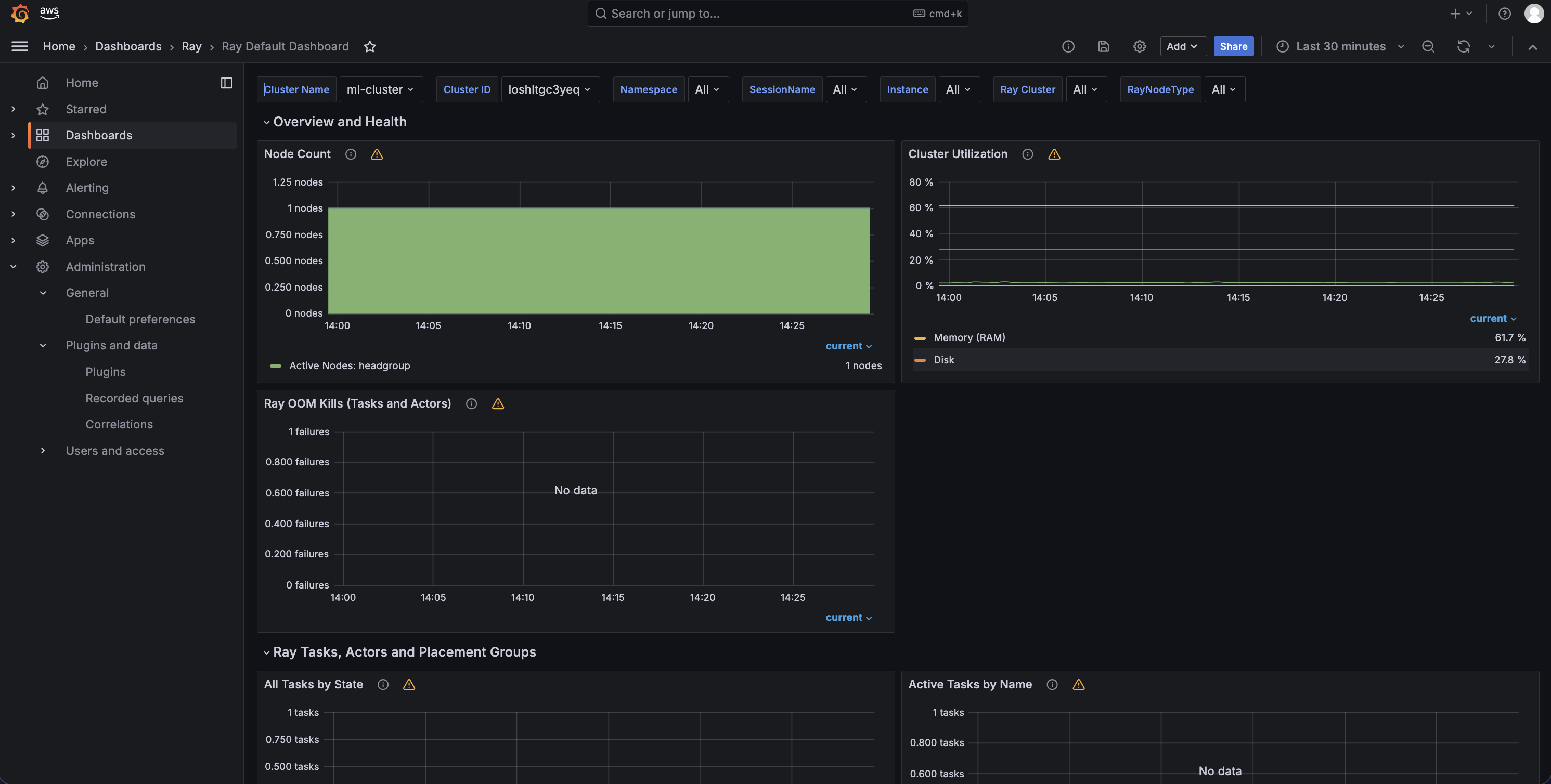
HyperPod Observability EKS 插件现在可以处理所有这些工作。它会自动发现 Ray 头节点和工作节点 Pod、抓取其指标端点,并在 Amazon Managed Grafana 中配置四个预构建 Grafana 仪表板:Ray Core、Ray Data、Ray Train 和 Ray Serve。您无需创建 PodMonitor、配置抓取目标或导入仪表板 JSON 文件。
这四个仪表板均归类在 Amazon Managed Grafana 的 Ray 文件夹下,并支持按特定 Ray 集群筛选指标。通过集群列表中的 Open Grafana 操作(如第一张截图所示),只需单击一次即可直接查看特定集群的指标。这些仪表板会与现有 HyperPod 基础设施仪表板(GPU、EFA、任务治理)一同显示,因此运维团队可以在同一位置查看 Ray 工作负载指标和集群健康状态。
高韧性训练
SageMaker HyperPod 为 Ray 训练工作负载提供三层韧性保障:当硬件发生故障时自动恢复节点、训练停滞时检测卡死任务,以及在上述任一事件发生后通过分层检查点实现快速恢复。
自动节点恢复
SageMaker HyperPod 持续监控节点健康状态,并可自动替换故障节点,因此 Ray 训练任务可按需持续运行,无需手动重启。当节点被替换时,Ray 会将工作节点 Pod 重新调度到新的健康节点上。如果训练代码会定期保存检查点,并包含从最新检查点恢复的逻辑,任务将从中断位置继续执行。这不需要对现有 Ray 训练代码进行任何更改。您只需在 RayJob 的 FailureConfig 中配置足够的重试次数,使任务能够自动恢复,而不是在首次中断后永久失败。要了解更多信息,请参阅使用 Ray 自动恢复节点。
卡死任务检测
分布式训练任务可能在不产生错误的情况下卡死。单个 Pod 因网络分区、存储挂载问题或硬件故障而失效后,其他所有 Pod 都会在下一次集合操作处阻塞,并无限期等待。GPU 仍被分配且已加载内存,但不会产出有用计算。由于没有错误消息或崩溃,数据科学家通常只能在数小时后手动检查任务进度时发现问题。在大规模场景下,数十块 GPU 累计数小时未被检测到的卡死时间,意味着显著的成本浪费。
SageMaker HyperPod EKS 现在包含一个按节点部署的 Job Monitoring Agent,可自动检测 Ray Train 工作负载中的这些情况,无需更改您的代码。该 Agent 会监控多个节点级和任务级信号,以判断训练任务何时停滞,并通过集群的 Amazon CloudWatch 日志组,以及由 HyperPod Observability 插件配置的 Ray Train Grafana 仪表板通知用户。
对于自定义检测规则,数据科学家可以使用 `toolkit-for-ray-on-
English / 原文
Today, we are announcing new Ray capabilities on Amazon SageMaker HyperPod that integrate Ray with the HyperPod purpose-built infrastructure for foundation model training and serving.
Ray is an open-source framework that data scientists use to scale distributed Python workloads across clusters of GPUs, from distributed training with Ray Train to model serving with Ray Serve. On Kubernetes, Ray clusters are managed by KubeRay, an open-source operator that handles cluster lifecycle through custom resources (RayCluster, RayJob, RayService). SageMaker HyperPod provides purpose-built infrastructure for large-scale machine learning (ML) on Amazon Elastic Kubernetes Service (Amazon EKS) with built-in node health monitoring and automatic recovery. Until now, running Ray on Kubernetes required data scientists to write YAML manifests, manage Docker image rebuilds for every dependency change, set up kubectl port-forward to access their Ray Dashboard, and configure Prometheus and Grafana manually for observability.
With this launch, data scientists can create Ray clusters, open the Ray Dashboard and Amazon Managed Grafana observability dashboards, connect a JupyterLab or Code Editor workspace to their cluster, submit distributed jobs, and configure hung job detection, all from SageMaker Studio. At the application level, Ray training jobs gain automatic fault tolerance through HyperPod node health monitoring and recovery, plus tiered checkpointing for faster resume through HyperPod distributed tiered storage. SageMaker JumpStart integration loads model weights directly into Ray Serve endpoints, with KV cache offloading to tiered storage for serving long-context requests. These capabilities work with open-source KubeRay and standard Ray APIs, so existing scripts and workflows run without modification.
In this post, we walk through how to get started with each of these capabilities.
Prerequisites
To follow along with this post, you need an Amazon SageMaker HyperPod cluster with Amazon EKS orchestration and the following components installed on your cluster:
- SageMaker Spaces EKS add-on , which enables JupyterLab and Code Editor workspaces in Amazon SageMaker HyperPod that attach to Ray clusters for interactive development.
- HyperPod Observability EKS add-on , which collects metrics from Ray workloads and provisions Grafana dashboards in Amazon Managed Grafana.
- KubeRay operator , which manages RayCluster, RayJob, and RayService as native Kubernetes resources.
- HyperPod Ray Endpoint Operator (Helm chart), which generates authenticated public endpoints for dashboard access and remote job submission.
You also need a SageMaker Studio domain, which provides the console interface for creating Ray clusters, viewing workloads, opening dashboards, and managing HyperPod Spaces. For full setup instructions, see the Ray on HyperPod getting started guide.
Purpose-built data scientist experience
SageMaker Studio now provides a complete Ray development environment. Data scientists can create, manage, and monitor Ray clusters directly from the console without writing Kubernetes manifests or running kubectl commands. You can check out the full experience in this interactive demo.
To get started, navigate to SageMaker Studio and choose HyperPod. Select your HyperPod cluster, then go to the Tasks tab. From the task type list, choose RayCluster. The console displays your Ray clusters with their status, instance types, and available actions. To create a new cluster, choose Create Ray Cluster.
The creation form prompts you for a cluster name, head and worker instance types, worker count, and container image. By default, clusters use the SageMaker Distribution image, which comes with Ray pre-installed and is managed by AWS with regular vulnerability patching and software upgrades. You can also specify a custom container image if your workload requires additional dependencies.
For customers who prefer kubectl or need advanced customization, an inline YAML editor in Studio exposes the full Kubernetes manifest. The KubeRay operator also integrates with HyperPod task governance, so administrators can set compute quotas and scheduling priorities for Ray workloads alongside other training jobs.
During creation, enable remote endpoints so that you can access the Ray Dashboard, submit jobs, and retrieve logs from anywhere with internet access, securely and without local kubectl port-forwarding. To learn more, see Ray Dashboard access.
After the create cluster form is submitted, go back to the tasks tab and it will show the cluster like in the screenshot below. From the Actions menu, you can open the Ray Dashboard, view Grafana metrics, edit the cluster configuration, or delete the cluster.
After the cluster reaches Running status, choose Open Ray Dashboard from the Actions menu. The system generates a short-lived, IAM-authenticated URL scoped to the cluster creator. The Ray Dashboard opens in a new tab, showing cluster health, running jobs, and node status.
Remote job submission
For production workloads, you can submit jobs remotely to Ray clusters from Studio, your laptop, or continuous integration and continuous delivery (CI/CD) pipelines using the toolkit-for-ray-on-sagemaker-ai Python package. The package handles endpoint resolution and EKS API credential generation through IAM authentication, so you use standard Ray job submission APIs with a SageMaker-aware address resolver:
$ aws eks update-kubeconfig --name <eks-cluster-name> --region <region>
$ pip install toolkit-for-ray-on-sagemaker-ai
$ ray job submit --address sagemaker_ray://<ray-cluster-name>/<namespace> \
     --working-dir <your-code-directory> \
     --python your-code.py
# To list ray jobs
$ ray job list --address sagemaker_ray://<ray-cluster-name>/<namespace>
Interactive development with SageMaker Spaces
Data scientists can attach a Ray cluster to a HyperPod JupyterLab or Code Editor space from Studio. The space joins the cluster as a zero-compute worker node, giving the notebook full native Ray driver access. You select your cluster from a list during space creation and begin working immediately.
After creating a HyperPod JupyterLab or Code Editor space, a Ray cluster integration option appears in the configuration panel.
Select the Ray cluster you want your workspace to connect to.
Attaching a Ray cluster restarts the space. Once it restarts, open JupyterLab or Code Editor in your browser and call ray.init(address="auto"). You are connected to your Ray cluster and can run distributed workloads as if you were on the head node. Ray’s runtime_env parameter lets you inject Python dependencies at runtime without rebuilding container images, and you can scale workers up or down without recreating the cluster. For example, a data scientist training a model can start prototyping in a notebook with a single worker, then scale to four GPU workers by changing one line in ScalingConfig. The training runs distributed across the attached Ray cluster while the notebook remains interactive for monitoring progress, adjusting hyperparameters, or inspecting intermediate results. The entire workflow stays within the notebook.
To learn more, see IDEs and Notebooks with Ray.
Out-of-the-box observability
Setting up Ray observability on Kubernetes with Amazon Managed Service for Prometheus and Amazon Managed Grafana is a multi-step process that involves installing Helm charts, creating PodMonitors and ServiceMonitors, configuring IAM roles for SigV4 signing, and manually importing dashboard JSON files.
The HyperPod Observability EKS add-on now handles all of this. It automatically discovers Ray head and worker pods, scrapes their metrics endpoints, and provisions four pre-built Grafana dashboards in Amazon Managed Grafana: Ray Core, Ray Data, Ray Train, and Ray Serve. You do not need to create PodMonitors, configure scrape targets, or import dashboard JSON files.
All four dashboards are organized under a Ray folder in Amazon Managed Grafana and support filtering metrics by specific Ray cluster. The Open Grafana action from the cluster list (shown in the first screenshot) takes you directly to the metrics for your specific cluster in one click. The dashboards appear alongside existing HyperPod infrastructure dashboards (GPU, EFA, task governance), so operations teams see Ray workload metrics and cluster health in one place.
Resilient training
SageMaker HyperPod provides three layers of resilience for Ray training workloads: automatic node recovery when hardware fails, hung job detection when training stalls, and tiered checkpointing for fast recovery after either event.
Automatic node recovery
SageMaker HyperPod continuously monitors node health and can automatically replace faulty nodes so your Ray training jobs can run for as long as needed without manual restarts. When a node is replaced, Ray reschedules worker pods onto the new healthy node. If your training code saves checkpoints periodically and includes logic to resume from the latest checkpoint, the job picks up where it left off. This requires no changes to your existing Ray training code. You only need to configure a sufficient number of retries in your RayJob’s FailureConfig so that jobs recover automatically rather than failing permanently on the first interruption. To learn more, see Automatic node recovery with Ray.
Hung job detection
Distributed training jobs can hang without producing errors. A single pod fails (because of a network partition, storage mount issue, or hardware fault), and every other pod blocks at the next collective operation, waiting indefinitely. GPUs stay allocated with memory loaded but produce no useful compute. Because there is no error message or crash, data scientists often discover the problem hours later when they check job progress manually. At scale, a few hours of undetected hang time across dozens of GPUs represents significant wasted cost.
SageMaker HyperPod EKS now includes a per-node Job Monitoring Agent that detects these conditions for Ray Train workloads automatically, with no changes to your code. The agent monitors multiple node-level and job-level signals to determine when a training job has stalled, and notifies the user through the cluster’s Amazon CloudWatch log group and the Ray Train Grafana dashboard provisioned by the HyperPod Observability add-on.
For custom detection rules, data scientists can use the toolkit-for-ray-on-sagemaker-ai library to define log patterns and timeout thresholds. When the configured action is cancel, HyperPod terminates the hung worker process and Ray Train’s built-in FailureConfig restarts workers from the last checkpoint. To learn more, see HyperPod Hung Job Detection on Ray.
Tiered checkpointing
Fast checkpoint recovery is critical for both node replacement and hung job restart scenarios. The amzn-sagemaker-checkpointing library integrates with HyperPod managed tiered checkpointing, which writes checkpoints to local disk and asynchronously uploads them to Amazon Simple Storage Service (Amazon S3). When a job restarts, the library checks HyperPod Tiered Storage first. If the checkpoint is still available there, recovery is faster than restoring from Amazon S3. For large models, this can reduce recovery time compared to restoring directly from Amazon S3. To learn more, see HyperPod Tiered Storage on Ray.
Accelerated inference
Ray Serve is Ray’s framework for deploying ML models as scalable, production-ready endpoints. It supports multi-model composition, autoscaling, and works with serving engines like vLLM. SageMaker HyperPod supports Ray Serve workloads on EKS, so you can deploy and scale inference endpoints on your HyperPod cluster.
SageMaker JumpStart provides a catalog of pre-trained models. With this launch, the toolkit-for-ray-on-sagemaker-ai library now includes a JumpStart model loader that downloads model weights from the JumpStart catalog and deploys them directly into Ray Serve on HyperPod without manual weight download, model configuration, or container setup.
One common challenge with large language model (LLM) serving is that inference latency grows with context length. Each new token requires recalculating attention over all previous tokens, making long documents and multi-turn conversations slow and expensive. SageMaker HyperPod addresses this with Managed Tiered KV Cache. The tiered cache stores attention key-value vectors in CPU memory on each node (L1) and on HyperPod Tiered Storage for cross-instance sharing (L2). Your Ray Serve deployments can take advantage of the Tiered Storage KV caching capabilities in SageMaker HyperPod with minimal code changes, reducing time-to-first-token for multi-turn conversations and long-document workloads. To learn more, see Accelerated Ray Inference on SageMaker HyperPod.
Clean up
To free up compute capacity on your cluster, delete any Ray clusters you created during this walkthrough. From the SageMaker Studio Tasks tab, select your Ray cluster and choose Delete from the Actions menu. If you created a HyperPod cluster, you can delete the cluster from the Amazon SageMaker AI console to stop incurring charges for the underlying compute instances. If you installed any prerequisite add-ons for testing, uninstall them from EKS console to free up compute capacity.
Conclusion
In this post, we walked through how Amazon SageMaker HyperPod now provides a complete Ray experience on EKS, from cluster creation and interactive notebooks to resilient training and accelerated inference. All of this works with open-source KubeRay and standard Ray APIs, so existing scripts run without modification. We’d like to thank Dhawal Parkar, Pradeep Cruz, Mark Vinciguerra, and Giuseppe Angelo Porcelli for their contributions to this post.
This integration is available today in all AWS Regions where SageMaker HyperPod EKS is supported. To get started, see the Amazon SageMaker HyperPod documentation and the Ray on HyperPod getting started guide. You can also explore the full workflow in this interactive demo. If you’d like to discuss how Ray on HyperPod can support your workloads, contact an AWS representative.
About the authors
Nilesh PS
Nilesh is a Senior Software Development Engineer at AWS working on Amazon SageMaker HyperPod. He focuses on Ray cluster management, training resiliency, and observability for large-scale distributed ML workloads on Kubernetes.
Vishal Shahane
Vishal is a Principal Engineer at AWS working on Amazon SageMaker HyperPod, where he focuses on building reliable, scalable infrastructure for large-scale AI/ML workloads.
Shreyas Adiyodi
Shreyas is a Product Manager at AWS based out of Seattle. He is focused on enabling Gen AI model development on SageMaker HyperPod, partnering with customers to simplify cluster provisioning, enhance OSS AI/ML framework support, and strengthen security and compliance.