知识民主化:使用 AWS 构建 AI 驱动的知识管理系统
英文标题:Democratizing institutional knowledge: Building an AI-powered knowledge management system with AWS
本文介绍了一套基于 AWS 的可定制知识管理加速器,通过支持语音交互的 AI 虚拟形象,帮助组织沉淀并传递长期积累的机构知识(“部落知识”)。该方案以 Amazon Bedrock Knowledge Bases 实现检索增强生成(RAG),利用 Amazon S3、Amazon OpenSearch Serverless、AWS Lambda 和 Amazon DynamoDB 构建知识检索、编排与智能缓存能力。方案可通过 AWS CloudFormation 在数小时内部署完成;测试显示,对于重复问题占比较高的工作负载,缓存命中率可达到 50%–70%,从而降低可变 AI 推理成本。对开发者和企业而言,该方案提供了面向一线及非技术员工的语音优先知识访问方式,但部署时需注意 OpenSearch Serverless 持续运行带来的固定成本,以及 Bedrock 模型和虚拟形象服务的区域可用性。
 1.3 MB
 101.1 KB
 124.1 KB
 345.0 KB
 141.2 KB
 346.5 KB
 146.4 KB
 3.9 KB
 344.0 KB
 321.0 KB
 378.4 KB
 262.9 KB
 319.9 KB
 80.1 KB
 93.6 KB
 181.6 KB
 275.9 KB
 38.7 KB
 30.6 KB
 113.3 KB
中文
各行业组织都面临着管理机构知识的挑战,即在多年运营中积累的集体智慧和经验。这类“部落知识”往往会在关键人员离职时流失,从而形成影响效率和创新的知识缺口。传统文档管理方式已被证明并不充分,往往导致最需要信息时,信息却已经过时或无法访问。
本文介绍一种可定制、具备智能缓存能力的云端解决方案。它由 AWS 服务提供支持,可通过智能虚拟形象系统采集、维护和交付机构知识。
谁应使用此解决方案
来自不同产业的组织都可以使用该系统来保留关键知识。例如,制造企业可在经验丰富的技术人员退休前,记录生产流程和维护规范。医疗机构、金融服务公司、能源企业和政府机构等其他组织,也可以利用该方案定制其使用场景。知识工作者可以通过自然语言查询访问流程和政策,而不必在多个资料库中搜索;领域专家和即将退休的员工则可以上传文档,为后代保留其专业知识。
组织可以根据各行业的具体运营环境部署该系统:通过桌面浏览器进行深入研究、通过语音交互实现免手操作,以及通过文本查询快速查阅信息。
解决方案概述
我们的解决方案利用 AWS 服务构建可扩展、可配置的知识管理系统,您可以将其调整为适合自身组织需求的形式。该架构的核心是将先进 AI 能力与稳健的云基础设施相结合,提供直观、响应迅速的知识交付系统。
该解决方案以支持文本和语音交互的浏览器界面为基础,使用户能够通过自然对话访问知识。此界面连接至一个可配置的虚拟形象系统,该系统可以与任何 AI 虚拟形象解决方案配合使用,使组织能够灵活选择或更换其偏好的虚拟形象技术。
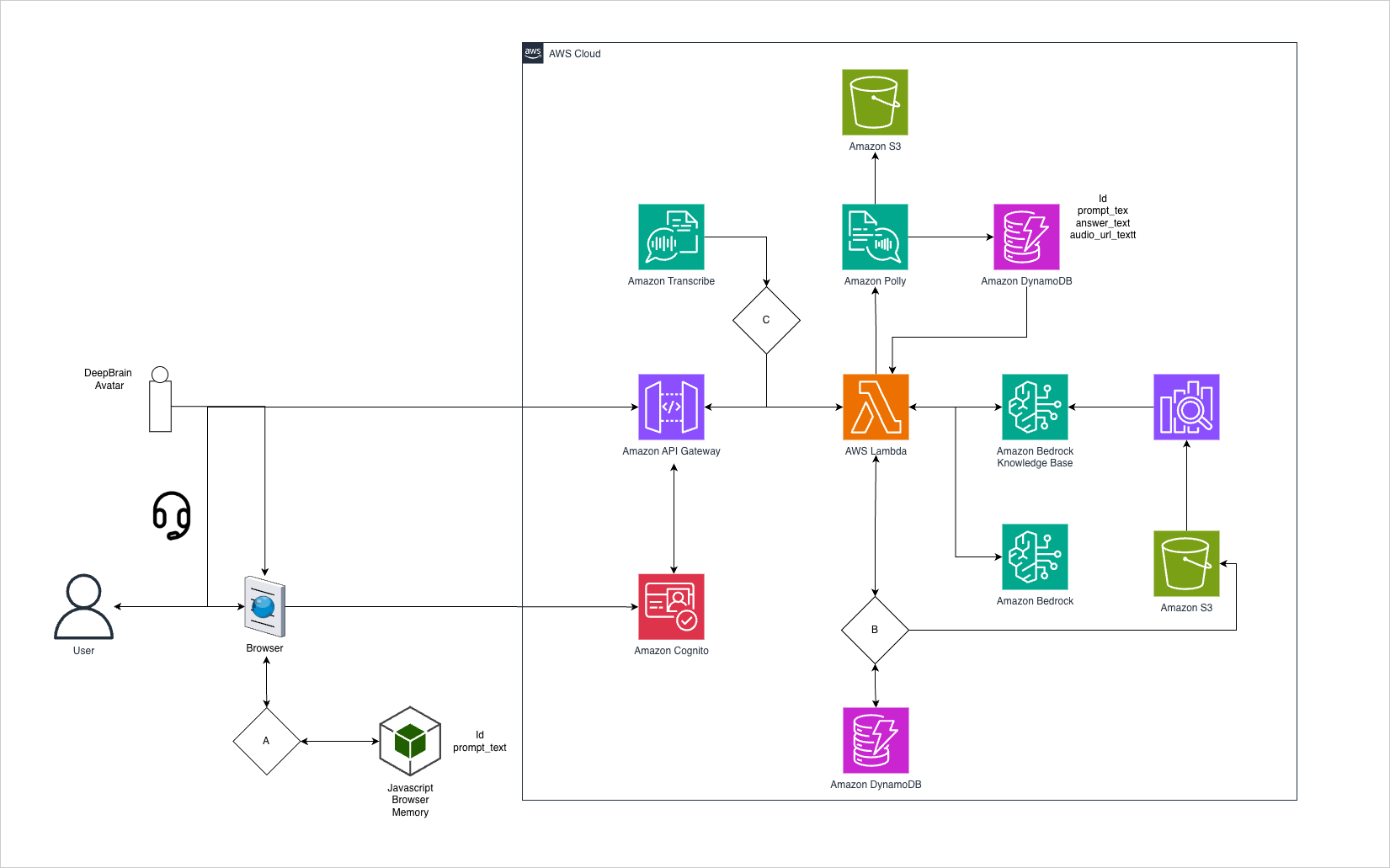
图 1:知识管理系统的解决方案架构
在后台,Amazon Cognito 负责保护访问管理,Amazon API Gateway 则为系统组件提供受控且可监控的访问。知识处理核心使用 Amazon Bedrock Knowledge Bases 实现托管式检索增强生成(RAG):存储在 Amazon Simple Storage Service(Amazon S3)中的机构知识作为数据源,Amazon Bedrock 负责分块、嵌入(使用 Amazon Titan Text Embeddings)和检索,使每个回答都基于您自己的文档。知识库由 Amazon OpenSearch Serverless 向量存储提供支持。Amazon DynamoDB 提供响应缓存,AWS Lambda 函数负责协调工作流。
成本说明: 部署过程会在您的账户中创建 Amazon OpenSearch Serverless 向量存储,并按 OpenSearch Compute Unit(OCU)计费;无论查询量多少,它都有持续运行的最低配置。因此,在预算中应将其视为一项持续性的基础成本(默认最低配置下约为每月数百美元)。这是该解决方案成本中最大的固定组成部分。有关缓存如何在此基础成本之上降低可变推理成本,请参阅“通过智能缓存进行成本优化”。
为什么选择此解决方案?
希望保留机构知识的组织有多种可选方案,包括在 Amazon Bedrock 上构建自定义解决方案,或部署基于文本的聊天 Agent。本方案通过三项核心能力实现差异化。
语音优先、虚拟形象驱动的交付: 此方案围绕与 AI 驱动虚拟形象的语音交互构建,而非仅提供文本聊天界面。非技术终端用户几乎不需要学习成本。他们只需向虚拟形象讲话,并获得语音回答,如同向同事提问一样。在培训室、控制室、质量实验室和维护规划办公室等互联环境中,工作人员可以在查看流程的同时免手操作地查询系统。与纯文本聊天机器人相比,基于虚拟形象的交互还可以提高非技术人群的采用率和信任度。(这是一个云连接设计。请参阅“可扩展性和性能特征”下的连接要求。)
为知识所有者简化操作: 内容管理不需要技术专业知识。知识所有者只需将现有文档上传至 Amazon S3(Word、PDF、纯文本、Markdown 或 JSON)。随后,摄取同步会对每份文档进行分块和嵌入,并将其写入向量存储,使其能够被查询。自动同步完成后,新文档会在上传不久后可供查询,但并非即时可用。无需重构内容、标记元数据或手动构建检索管道。
通过内置成本优化实现快速部署: 完整原型可通过 AWS CloudFormation 在数小时内部署。内置 DynamoDB 缓存可复用先前问题的回答,降低可变 AI 推理成本。在我们的测试中,对于以重复问题为主的工作负载,缓存命中率可达到 50%–70%。实际节省金额取决于查询组合的重复程度。
与替代方案相比如何
在 Amazon Bedrock 上构建自定义解决方案可提供完整的架构控制权,但需要自行设计和集成语音处理、虚拟形象渲染、缓存和检索管道。这通常需要数周到数月时间,并且要求具备跨多个 AWS 服务的深厚技术专业知识。
基于文本的聊天 Agent,例如 Amazon Q 和自定义 Amazon Bedrock 聊天界面,可更快完成部署,并擅长处理键入式知识检索。该解决方案在此基础上增加了语音优先交互和虚拟形象参与能力,从而提高了一线工作人员的采用率;这些工作人员尤其受益于免手访问能力。
该解决方案填补了这一空白:它是可在数小时内部署、具备生产质量的加速器,采用语音优先和可视化虚拟形象交互,并通过智能缓存进行成本优化。对于需要快速、经济地将机构知识交付给非技术员工的组织而言,该加速器降低了自行组装这些能力的复杂性。
何时选择此解决方案
当您的组织需要实现以下目标时,请选择此加速器:
- 通过语音和视觉交互,向非技术员工或一线员工交付机构知识。
- 使用经过验证的原型快速部署,而不是从零开始构建。
- 通过智能缓存降低 AI 推理成本。
- 以最低摩擦保留退休专家的知识。
实施历程
实施历程包括三个主要阶段:知识基础设置、基础设施部署和 AI 集成。每个阶段都以前一阶段为基础,构建全面的知识管理系统。
阶段 1:知识基础设置。 实施流程从整理机构知识开始。文档将上传至 Amazon S3 知识库,Amazon Bedrock Knowledge Bases 会从此处摄取文档。如果您的源内容位于其他系统中,或采用其他格式,您还可以选择添加 AWS Glue ETL 作业,在上传前将其转换为 AI 优化格式。此 ETL 步骤是一项独立的可选集成,不会由 CloudFormation 部署创建。文档已经采用下方列出的受支持格式的组织,可以直接上传至 S3。
关键注意事项:
- 支持的格式:文档可以采用多种格式(Word、PDF、纯文本、Markdown、JSON)。
- 最佳输出格式:建议使用 Markdown(
.md)或结构化 JSON,以获得最佳 AI 检索性能。 - ETL 负责转换: 如果使用可选的 AWS Glue ETL 作业,它会在文档上传至 S3 前,将源文档转换为推荐的输出格式。
有关使用 AWS Glue 进行数据提取和转换的详细指导,请参阅 AWS Glue ETL 文档。
阶段 2:基础设施部署。 核心基础设施部署始于 AWS CloudFormation 模板,以实现一致、可重复的部署。该阶段包括:
- 设置 Amazon Cognito,以实现安全的用户身份验证和访问控制。
- 配置 API Gateway 端点,以管理组件通信。
- 建立基于 S3 的知识存储库。
- 实施 DynamoDB 响应缓存。
阶段 3:AI 集成。 最后一个阶段集成 AI 能力和处理管道:
- 配置 Amazon Bedrock,用于知识处理和查询理解。
- 设置 Lambda 函数,用于请求编排和响应处理。
- 实施音频处理管道:
- 使用 Amazon Transcribe 将语音输入转换为文本。
- 使用 Amazon Polly 将文本响应转换为自然语音。
- 集成所选择的虚拟形象系统,以实现类人交互。
该系统通过智能缓存算法保持高性能,在保留信息准确性的同时显著缩短响应时间。这些组件的组合形成了一种体验:您可以通过偏好的沟通方式,无论是文本还是语音,与知识库交互。
实施步骤: 本指南概述了部署 Auto Demo 应用程序的步骤。以下步骤针对 us-east-1 编写并经过测试,我们选择该区域是因为它拥有此处使用的基础模型(FM)和虚拟形象流式服务最广泛的可用性。如果您部署到其他 AWS 区域,请在开始前确认所选 Amazon Bedrock 模型和虚拟形象提供商在该区域可用,并更新源代码中硬编码的区域。
前提条件
初始部署需要 IT 或 DevOps 团队具备一次性设置所需的技术能力,包括基本的 AWS Management Console 导航能力、基础设施即代码理解能力,以及身份管理相关知识。
终端用户无需具备技术能力。对话式界面降低了使用门槛。用户只需访问一个 URL,并像与人类专家交流一样,通过文本或语音自然交互。
AWS 账户
- 可访问具备创建 S3 存储桶、CloudFormation 堆栈和调用 Amazon Bedrock 模型权限的 AWS 账户。
- 具备用于部署和管理 AWS 资源的适当 AWS Identity and Access Management(IAM)权限。
按服务划分的所需 IAM 权限
CloudFormation 堆栈会在多个 AWS 服务中创建和管理资源。要部署和运行此解决方案,执行部署的 IAM 角色或用户需要拥有以下服务的权限:
- Amazon Bedrock(基础模型调用和 Amazon Bedrock Knowledge Bases 检索)
- Amazon S3(知识库存储和应用程序文件)
- AWS Lambda(用于请求编排的无服务器计算)
- Amazon Cognito(用户身份验证和访问管理)
- API Gateway(HTTP 端点管理)
- Amazon OpenSearch Serverless(支持 Amazon Bedrock 知识库的向量存储)
- Amazon Polly(用于语音回答的文本转语音)
- Amazon Transcribe(用于语音输入的语音转文本)
- Amazon CloudWatch Logs(集中式日志记录)
- IAM PassRole(用于 Lambda 和知识库执行角色的服务角色委派)
注意: 对于生产部署,请遵循最小权限原则,将资源 ARN 限定到您的特定账户和区域。CloudFormation 堆栈会自动创建必要的执行角色,并为运行时操作配置适当范围的权限。
基础模型访问: 此解决方案使用 Amazon Titan Text Embeddings(amazon.titan-embed-text-v1)将文档嵌入向量存储,并使用 Amazon Nova Pro(amazon.nova-pro-v1:0)和 Anthropic Claude 3 Sonnet(anthropic.claude-3-sonnet-20240229-v1:0)作为可选的回答生成模型。Amazon Bedrock 为 Amazon 自有的无服务器模型提供自动访问权限,因此 Amazon Nova Pro 和 Amazon Titan Text Embeddings 默认可用,无需手动启用。Anthropic Claude 模型并非在所有区域都被自动访问覆盖:在首次发送 Claude 请求前,请在 Amazon Bedrock 控制台中完成一次性的 Anthropic 模型访问请求,并确保您的账户拥有所需的 AWS Marketplace 订阅权限。账户管理员还可以通过 IAM 策略和 Service Control Policies(SCP)进一步限制或替换模型。有关更多信息,请参阅 Amazon Bedrock 现已在您的 AWS 区域为无服务器基础模型提供自动访问权限。
演练:代码安装步骤
请在 GitHub 网站上克隆公开的代码仓库,以获取应用程序源代码。应用程序位于 bedkbauto/ 文件夹下(包含 src 和 web 子文件夹)。
创建 S3 存储桶
- 登录 AWS Management Console。
- 导航至 S3 服务。
- 创建一个新的 S3 存储桶,用于存储应用程序文件。
- 创建额外文件夹,使其符合以下结构:`s3:///content/bedkb
English / 原文
Organizations across industries struggle with managing institutional knowledge, the collective wisdom and experience accumulated over years of operations. This “tribal knowledge” often disappears when key personnel leave, creating knowledge gaps that impact efficiency and innovation. Traditional documentation methods have proven inadequate, often resulting in outdated or inaccessible information when it’s needed most.
In this post, we present a customizable, smart-caching cloud-based solution that captures, maintains, and delivers institutional knowledge through an intelligent avatar system, powered by AWS services.
Who should use this solution
Organizations across diverse industries can use this system to preserve critical knowledge. For example, manufacturing organizations can capture production procedures and maintenance protocols before experienced technicians retire. Other organizations like healthcare facilities, financial services firms, energy companies, and government agencies can also tailor their use cases with the solution. Knowledge workers can access procedures and policies through natural language queries instead of searching multiple repositories, while subject matter experts and retiring employees can upload documentation to preserve their expertise for future generations.
Organizations can deploy the system with desktop browser access for detailed research, voice interaction for hands-free operation, and text-based queries for quick reference adapting to the specific operational contexts of each industry.
Solution overview
Our solution uses AWS services to create a scalable, configurable knowledge management system that you can adapt to your organization’s needs. At its core, the architecture combines advanced AI capabilities with robust cloud infrastructure to deliver an intuitive, responsive knowledge delivery system.
The foundation of our solution is a browser-based interface that supports both text and voice interactions, making knowledge accessible through natural conversation. This interface connects to a configurable avatar system that can work with any AI avatar solution, providing organizations with the flexibility to choose or change their preferred avatar technology.
Figure 1: Solution architecture for the knowledge management system
Behind the scenes, Amazon Cognito secures access management, while Amazon API Gateway provides controlled, monitored access to the system’s components. The knowledge-processing core uses Amazon Bedrock Knowledge Bases for managed Retrieval Augmented Generation (RAG): institutional knowledge stored in Amazon Simple Storage Service (Amazon S3) is the data source, and Amazon Bedrock handles chunking, embedding (using Amazon Titan Text Embeddings), and retrieval, grounding each answer in your own documents. The knowledge base is backed by an Amazon OpenSearch Serverless vector store. Amazon DynamoDB provides response caching, and AWS Lambda functions orchestrate the workflow.
Cost note: The Amazon OpenSearch Serverless vector store is created in your account by the deployment and bills per OpenSearch Compute Unit (OCU) with an always-on minimum, independent of query volume. Treat this as a standing baseline cost (on the order of a few hundred USD per month at the default floor) when budgeting. It is the largest fixed component of the solution’s cost. See Cost optimization through smart caching for how caching reduces the variable inference cost on top of this baseline.
Why this solution?
Organizations seeking to preserve institutional knowledge have several approaches available, from building custom solutions on Amazon Bedrock to deploying text-based chat agents. This solution differentiates through three core capabilities.
Voice-first, avatar-driven delivery: This solution is built around voice interaction with an AI-powered avatar rather than a text-only chat interface. Non-technical end users need little to no learning curve. They speak to the avatar and receive spoken answers, the same way they would ask a colleague. Workers in connected settings such as training rooms, control rooms, quality labs, and maintenance-planning offices can query the system hands-free while reviewing procedures. Avatar-based interaction can also increase adoption and trust among non-technical populations compared to text-only chatbots. (This is a cloud-connected design. See the connectivity requirement under Scalability and performance characteristics.)
Simplicity for knowledge owners: Content management requires no technical expertise. Knowledge owners simply upload existing documents into Amazon S3 (Word, PDF, plain text, Markdown, or JSON). An ingestion sync then chunks and embeds each document into the vector store, after which it becomes queryable. New documents are queryable shortly after upload, once that automated sync completes. It is not instantaneous. There is no need to restructure content, tag metadata, or hand-build a retrieval pipeline.
Rapid deployment with built-in cost optimization: The full prototype deploys in hours through AWS CloudFormation. A built-in DynamoDB cache reuses previous answers for repeated questions, reducing variable AI inference cost. In our testing, cache hit rates of 50–70 percent were achievable for workloads dominated by repeated questions. Actual savings depend on how repetitive your query mix is.
How this compares to alternatives
Building a custom solution on Amazon Bedrock provides full architectural control but requires independently designing and integrating voice processing, avatar rendering, caching, and retrieval pipelines. This typically takes weeks to months and assumes deep technical expertise across multiple AWS services.
Text-based chat agents such as Amazon Q and custom Amazon Bedrock chat interfaces offer a faster path to deployment and excel at typed knowledge retrieval. This solution adds voice-first interaction and avatar engagement on top, which improves adoption among frontline workers who benefit from hands-free access.
This solution fills the gap: a production-quality accelerator deployable in hours, voice-first with visual avatar engagement, and cost-optimized through smart caching. For organizations that need institutional knowledge in the hands of non-technical workers quickly and affordably, this accelerator alleviates the complexity of assembling these capabilities independently.
When to choose this solution
Choose this accelerator when your organization needs to:
- Deliver institutional knowledge to non-technical or frontline workers through voice and visual interaction.
- Deploy quickly with a proven prototype rather than building from scratch.
- Reduce AI inference costs through intelligent caching.
- Preserve knowledge from retiring experts with minimal friction.
Implementation journey
The implementation journey consists of three main phases: knowledge foundation setup, infrastructure deployment, and AI integration. Each phase builds upon the previous one to create a comprehensive knowledge management system.
Phase 1: Knowledge foundation setup. The implementation process begins with organizing institutional knowledge. Documents are uploaded to the Amazon S3 knowledge repository, and Amazon Bedrock Knowledge Bases ingests them from there. If your source content lives in other systems or formats, you can optionally add an AWS Glue ETL job to convert it into an AI-optimized format before uploading. This ETL step is a separate, optional integration and is not created by the CloudFormation deployment. Organizations whose documents are already in the supported formats listed below can upload directly to S3.
Key considerations:
- Supported formats : Documents can be in various formats (Word, PDF, plain text, Markdown, JSON).
- Optimal output : Markdown (.md) or structured JSON are recommended for best AI retrieval performance.
- ETL handles the conversion: If you use the optional AWS Glue ETL job, it transforms source documents into the recommended output format before they are uploaded to S3.
For detailed guidance on using AWS Glue for data extraction and transformation, refer to the AWS Glue ETL documentation.
Phase 2: Infrastructure deployment. The core infrastructure deployment begins with AWS CloudFormation templates, facilitating consistent and repeatable deployments. This phase includes:
- Setting up Amazon Cognito for secure user authentication and access controls.
- Configuring API Gateway endpoints to manage component communication.
- Establishing S3-based repositories for knowledge storage.
- Implementing DynamoDB for response caching.
Phase 3: AI integration. The final phase integrates the AI capabilities and processing pipeline:
- Configuring Amazon Bedrock for knowledge processing and query understanding.
- Setting up Lambda functions for request orchestration and response handling.
- Implementing the audio processing pipeline:
- Amazon Transcribe for converting voice input to text.
- Amazon Polly for converting text responses to natural speech.
- Integrating the chosen avatar system for human-like interactions.
The system maintains high performance through an intelligent caching algorithm that significantly reduces response times while preserving information accuracy. The combination of these components creates an experience where you can interact with the knowledge base through your preferred method of communication, whether text or voice.
Implementation steps: This guide outlines the steps to deploy the Auto Demo application. The steps that follow are written and tested for us-east-1, which we chose because it has the broadest availability of the foundation models (FMs) and avatar streaming used here. If you deploy in another AWS Region, confirm that your chosen Amazon Bedrock models and the avatar provider are available there, and update the hardcoded Region in the source, before you begin.
Prerequisites
Initial deployment requires technical capabilities from IT or DevOps teams for one-time setup, including basic AWS Management Console navigation, infrastructure-as-code understanding, and identity management familiarity.
End users require no technical capabilities. The conversational interface alleviates barriers. Users simply access a URL and interact naturally through text or voice as they would with a human expert.
AWS account
- Access to an AWS account with permissions to create S3 buckets, CloudFormation stacks, and invoke Amazon Bedrock models.
- Appropriate AWS Identity and Access Management (IAM) permissions for deploying and managing AWS resources.
Required IAM permissions by service
The CloudFormation stack creates and manages resources across multiple AWS services. To deploy and operate this solution, the deploying IAM role or user requires permissions for the following services:
- Amazon Bedrock (foundation model invocation and Amazon Bedrock Knowledge Bases retrieval)
- Amazon S3 (knowledge base storage and application files)
- AWS Lambda (serverless compute for request orchestration)
- Amazon Cognito (user authentication and access management)
- API Gateway (HTTP endpoint management)
- Amazon OpenSearch Serverless (vector store backing the Amazon Bedrock knowledge base)
- Amazon Polly (text-to-speech for voice responses)
- Amazon Transcribe (speech-to-text for voice input)
- Amazon CloudWatch Logs (centralized logging)
- IAM PassRole (service-role delegation for the Lambda and knowledge-base execution roles)
Note: For production deployments, follow the principle of least privilege by scoping resource ARNs to your specific account and Region. The CloudFormation stack automatically creates the necessary execution roles with appropriately scoped permissions for runtime operations.
Foundation model access: This solution uses Amazon Titan Text Embeddings (amazon.titan-embed-text-v1) to embed documents into the vector store, and Amazon Nova Pro (amazon.nova-pro-v1:0) and Anthropic Claude 3 Sonnet (anthropic.claude-3-sonnet-20240229-v1:0) as the selectable models for generating answers. Amazon Bedrock provides automatic access to Amazon-owned serverless models, so Amazon Nova Pro and Amazon Titan Text Embeddings are available by default with no manual enablement. Anthropic Claude models aren’t covered by automatic access in all Regions: before your first Claude request, complete the one-time Anthropic model-access request in the Amazon Bedrock console and make sure your account has the required AWS Marketplace subscription permissions. Account administrators can further restrict or substitute models through IAM policies and Service Control Policies (SCPs). For more information, see Amazon Bedrock now provides automatic access to serverless foundation models in your AWS Region.
Walkthrough: Code installation steps
Get the application source code by cloning the public repository on the GitHub website. The application is under the bedkbauto/ folder (the src and web subfolders).
Create the S3 bucket
- Log in to the AWS Management Console.
- Navigate to the S3 service.
- Create a new S3 bucket to store the application files.
- Create additional folders to follow this structure:
s3://<amzn-s3-demo-bucket>/content/bedkbauto/.
Upload application files
- Unzip the downloaded folder containing the application source code.
- Upload the unzipped folder contents to the S3 bucket created in the previous step. Only upload the
srcandwebfolders.

Figure 2: The src and web subfolders to upload to Amazon S3
Retrieve the S3 object URL
- Navigate to the S3 console.
- Locate the
setup.jsonfile in thesrcfolder of the uploaded application files. - Copy the URL of the
setup.jsonfile. It should look similar to this:https://<amzn-s3-demo-bucket>/content/bedkbauto/src/setup.json.
Create the CloudFormation stack
- Go to the CloudFormation console.
- Choose Create stack , and then choose With new resources (standard).
- In the Specify template step, choose Amazon S3 URL , and then paste the URL you copied earlier.
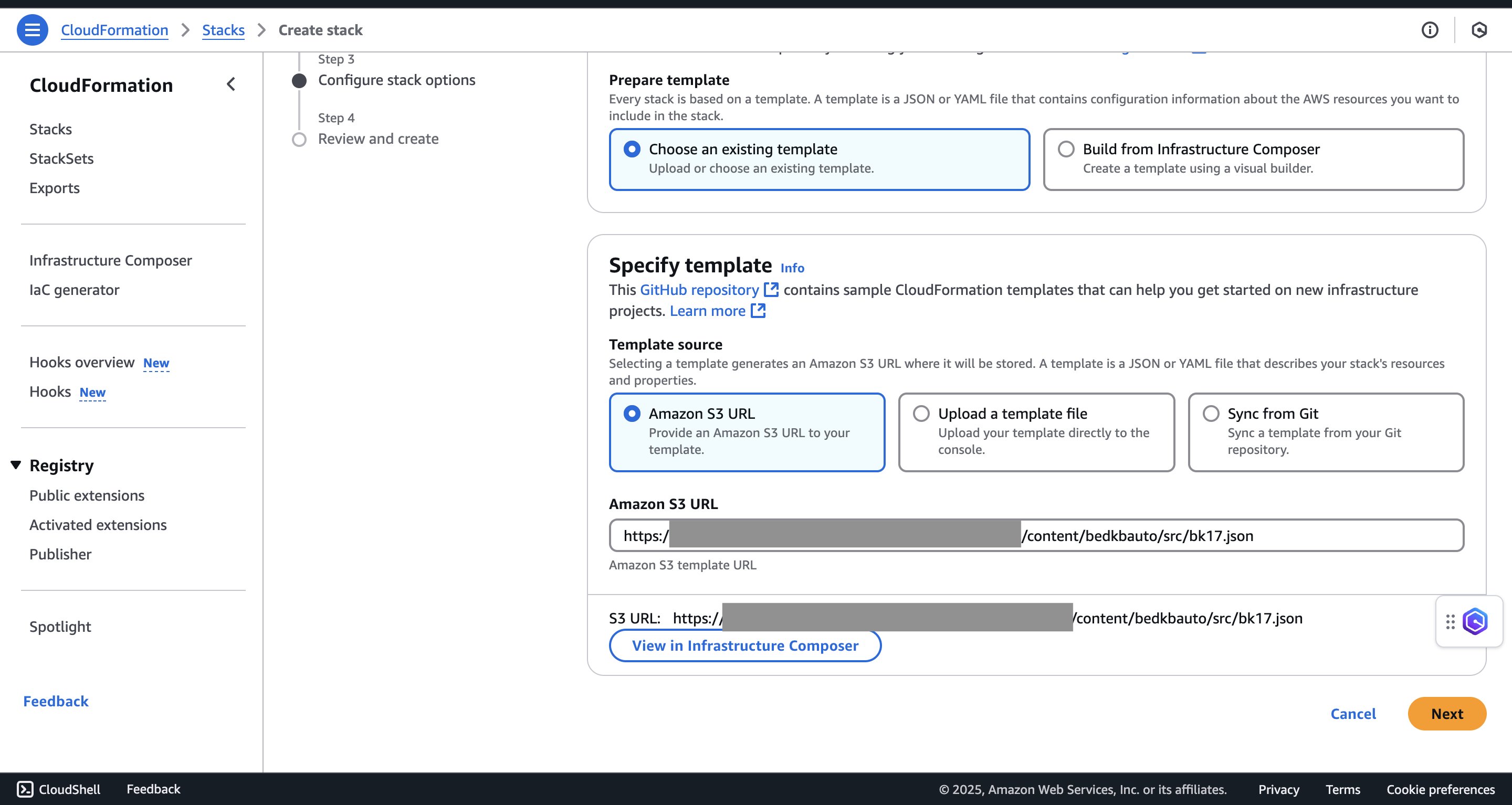
Figure 3: Specifying the template with the Amazon S3 URL
- During stack creation, provide these parameters: a stack name, your email address (which receives a one-time password for app login), a username for app login such as
demo-user, and the name of the S3 bucket you created earlier such as<amzn-s3-demo-bucket>.
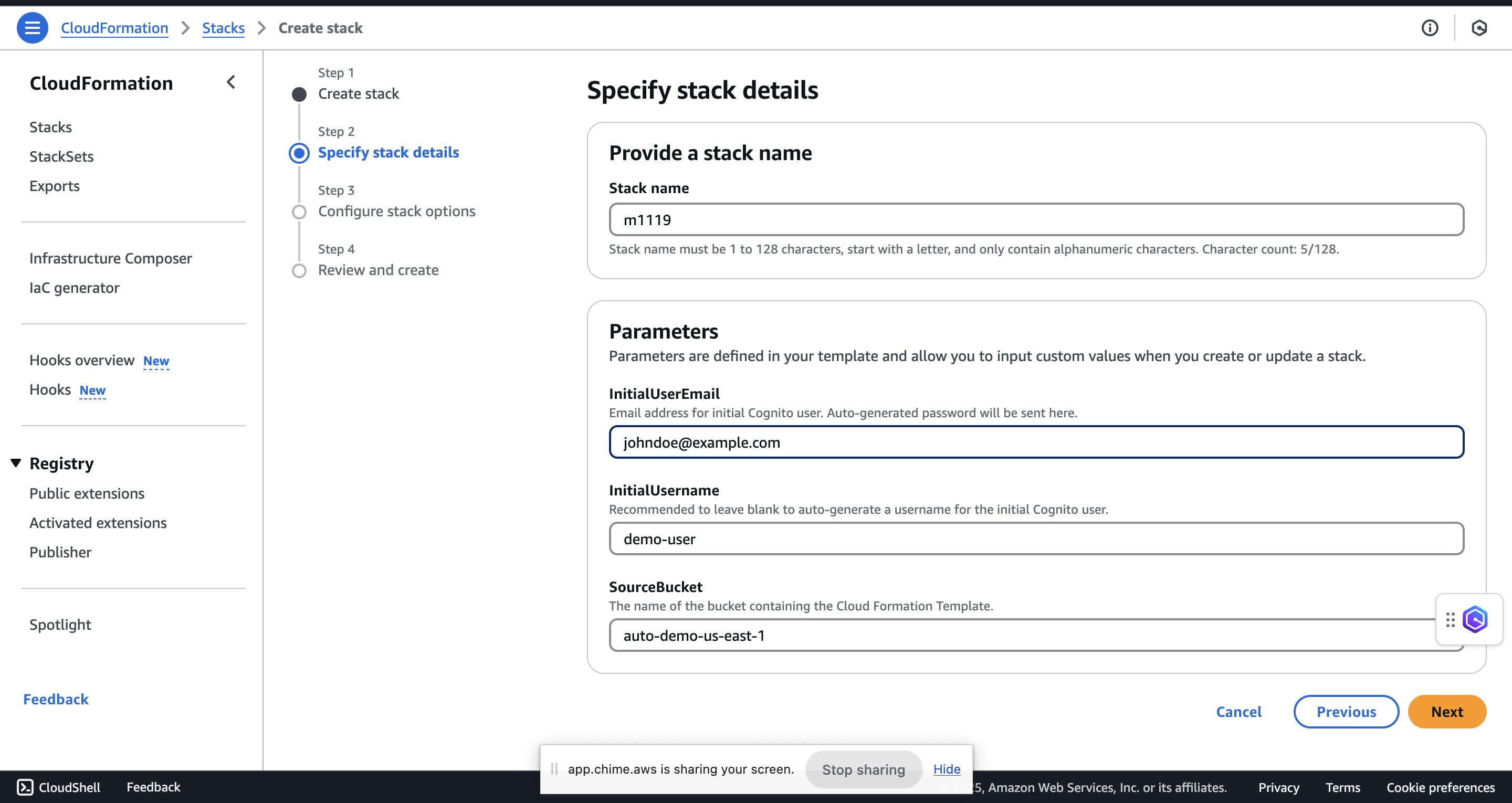
Figure 4: Providing the stack parameters
- Leave the remaining settings as default and select the two acknowledgment check boxes, I acknowledge that AWS CloudFormation might create IAM resources with custom names and I acknowledge that AWS CloudFormation might require the following capability: CAPABILITY_AUTO_EXPAND.
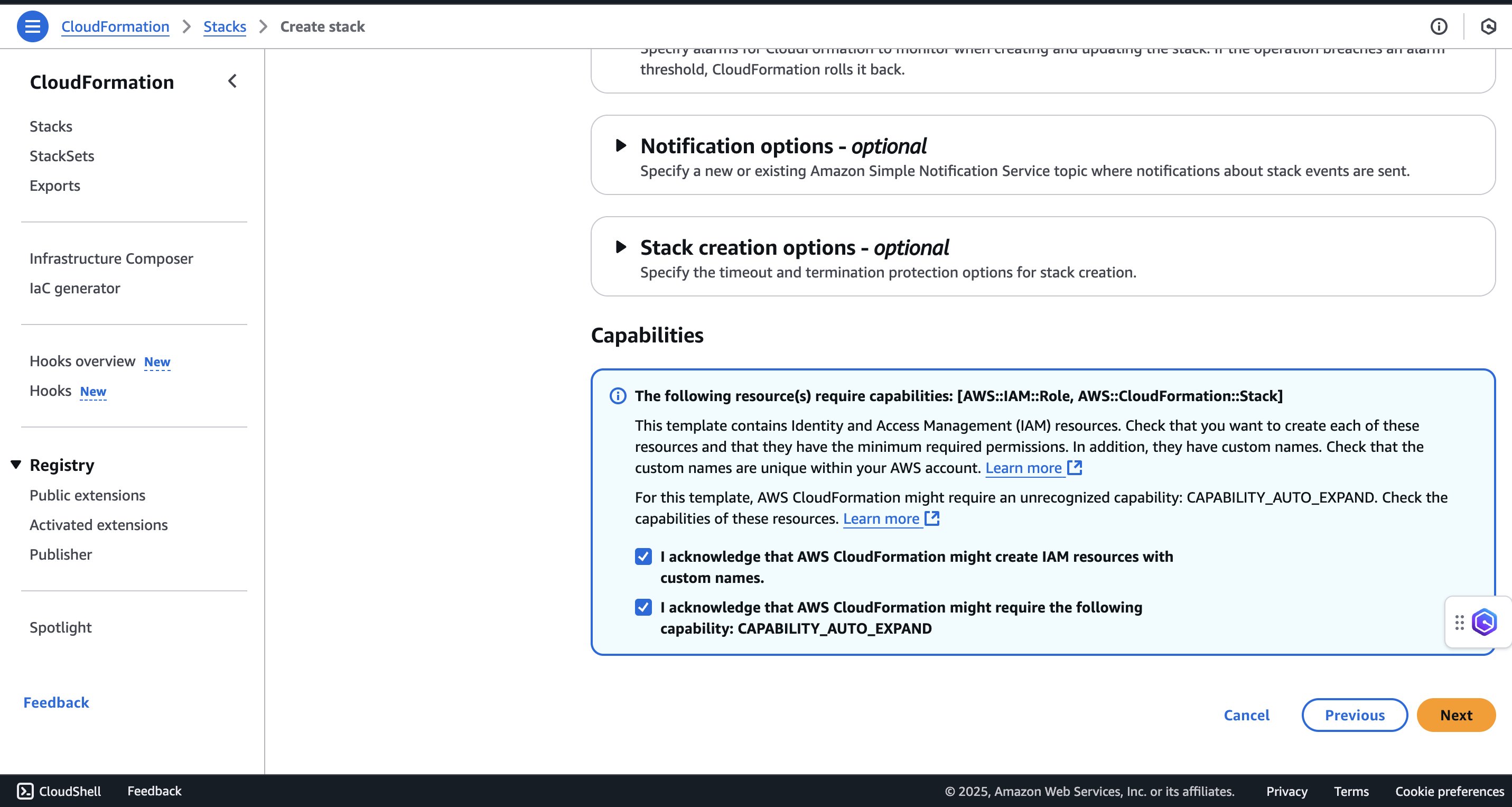
Figure 5: Acknowledging the required capabilities
- On the review page, choose Submit to create the stack.
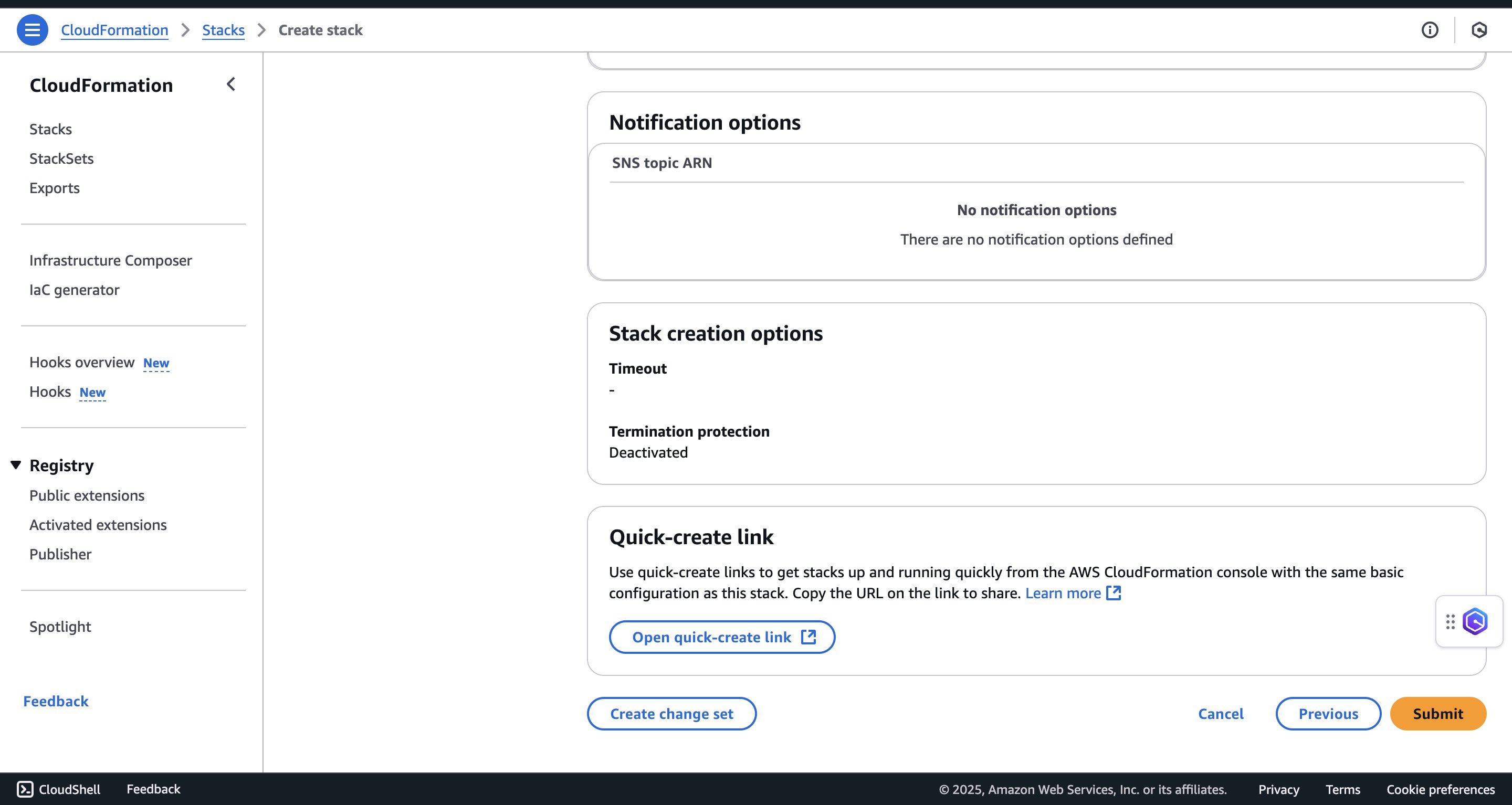
Figure 6: Reviewing and submitting the stack
Verify deployment
- After the CloudFormation stack creation is complete, open the Outputs tab to access the application.
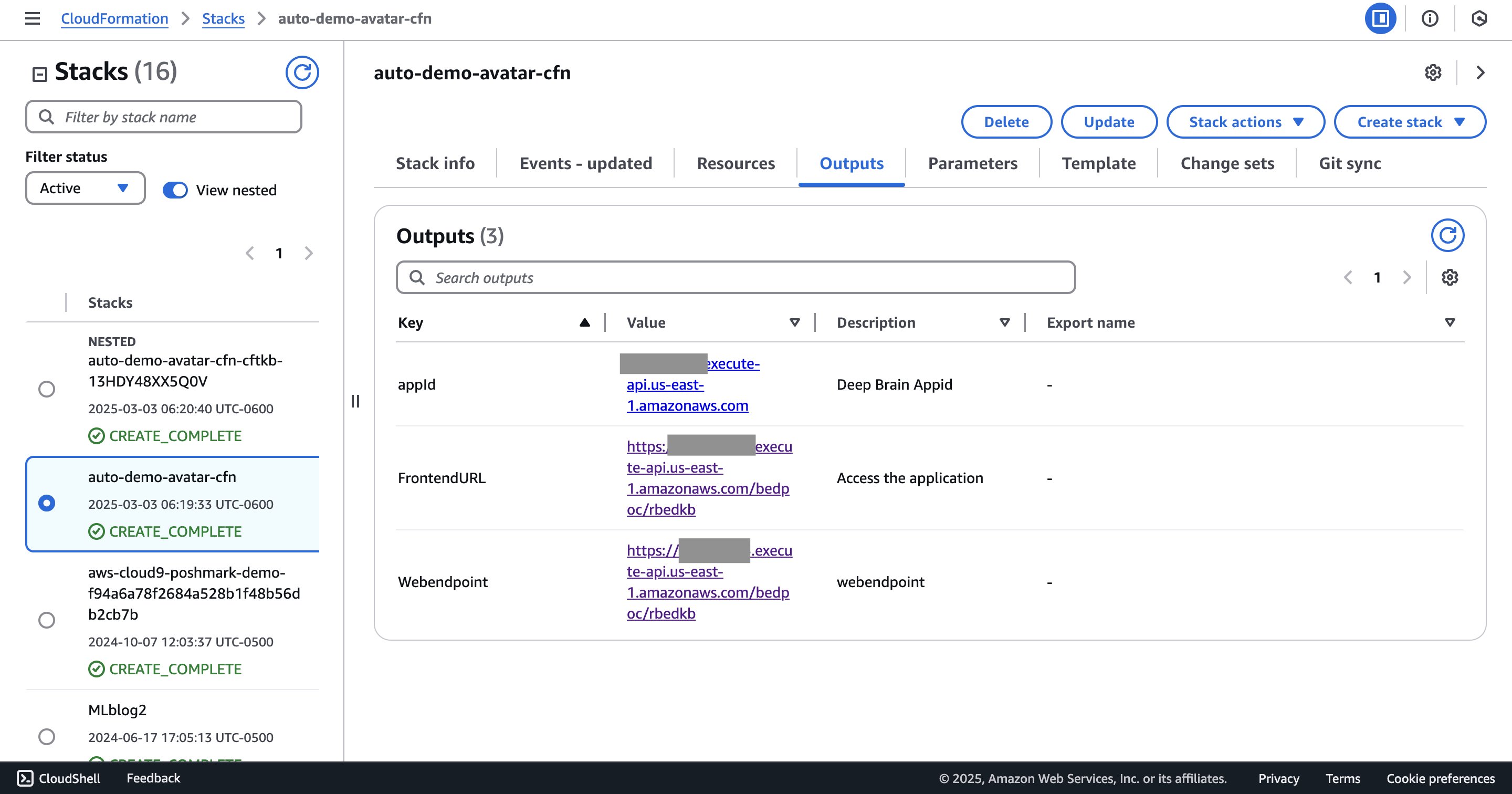
Figure 7: Locating the FrontendURL on the Outputs tab
- Copy the
FrontendURLvalue to a new tab and press Enter. - Enter the username you set during stack creation and the password sent to the email address that you provided.
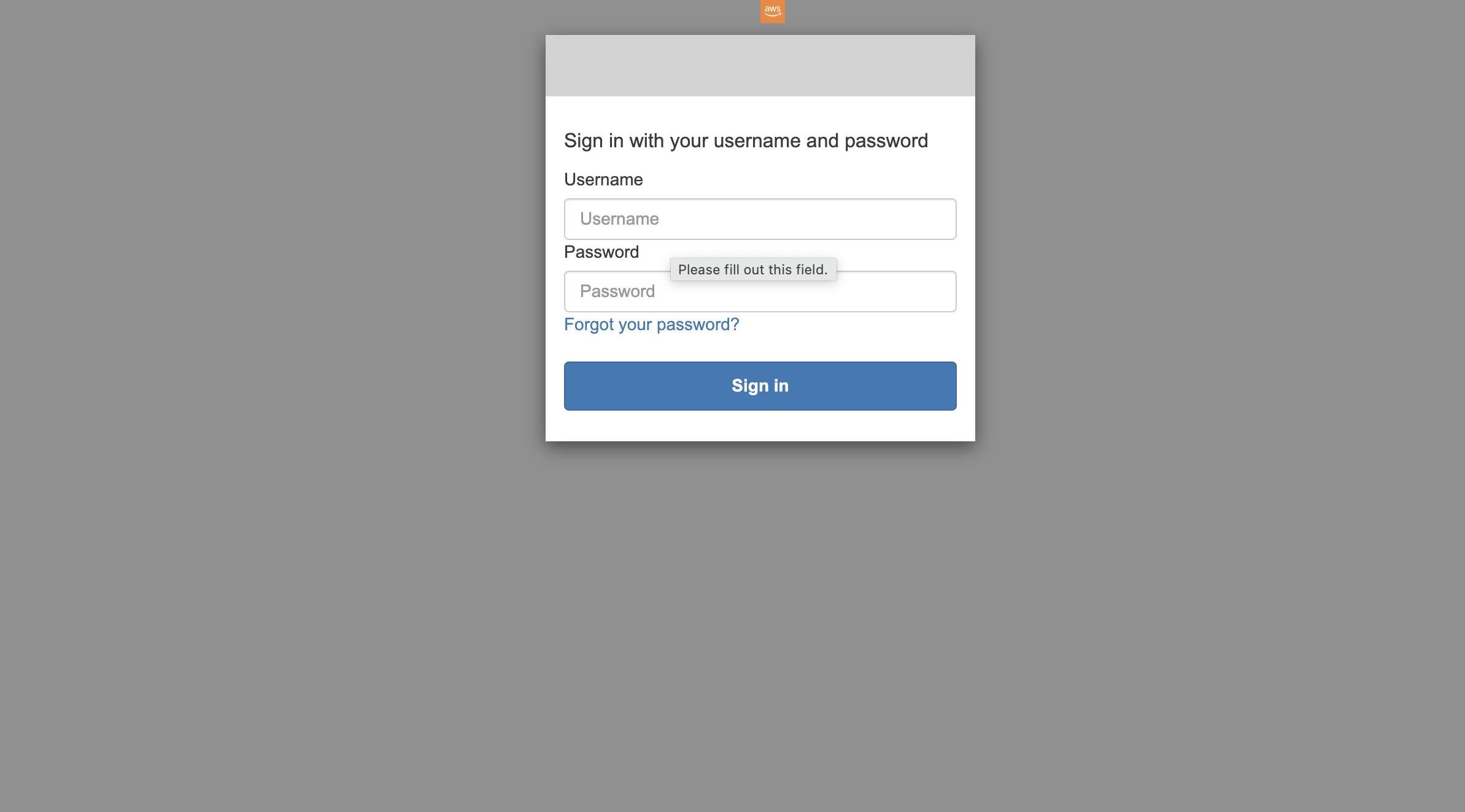
Figure 8: Signing in with the temporary password
- Change to your preferred password and choose Send.
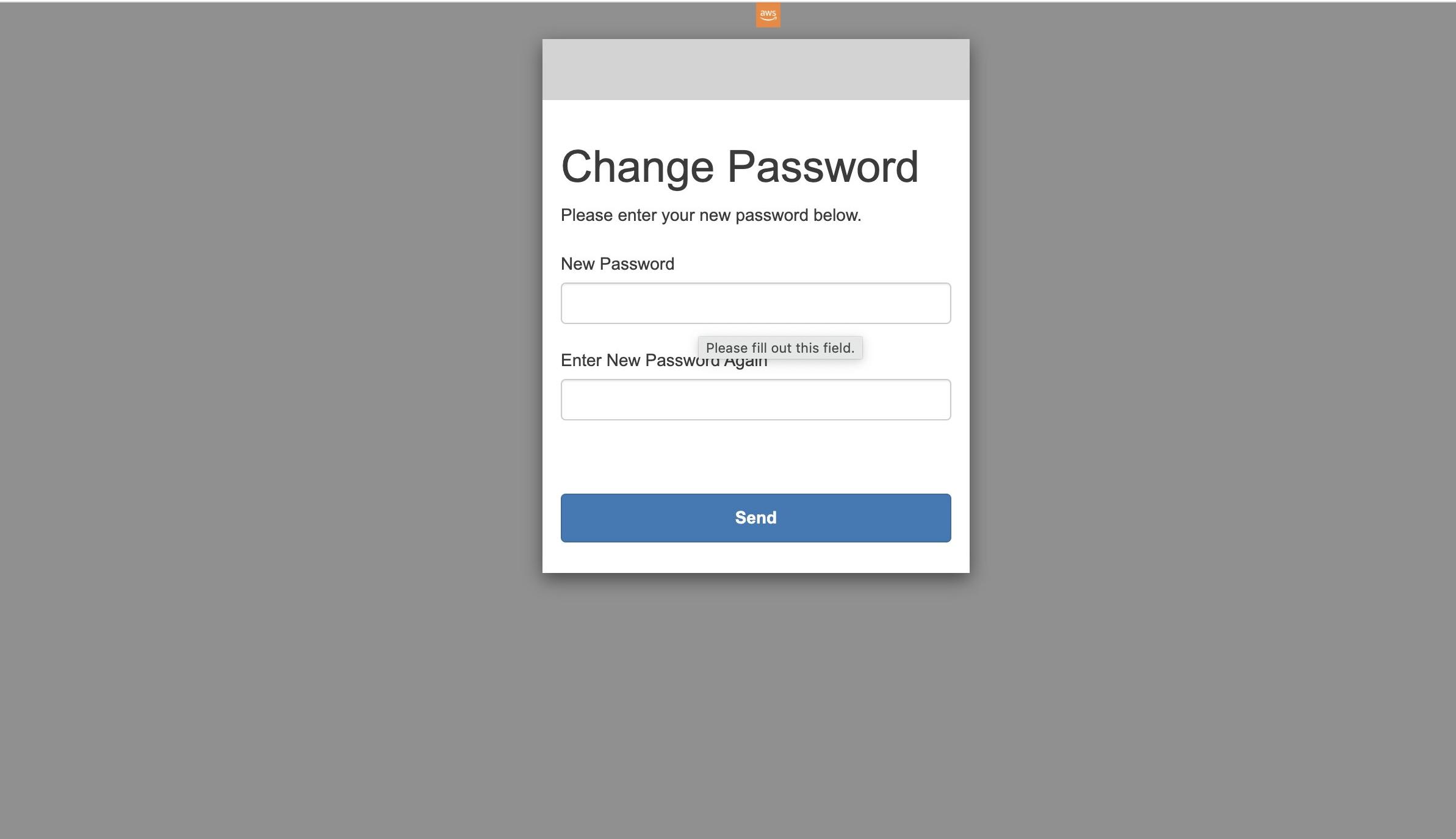
Figure 9: Setting a new password
You can now access the UI.
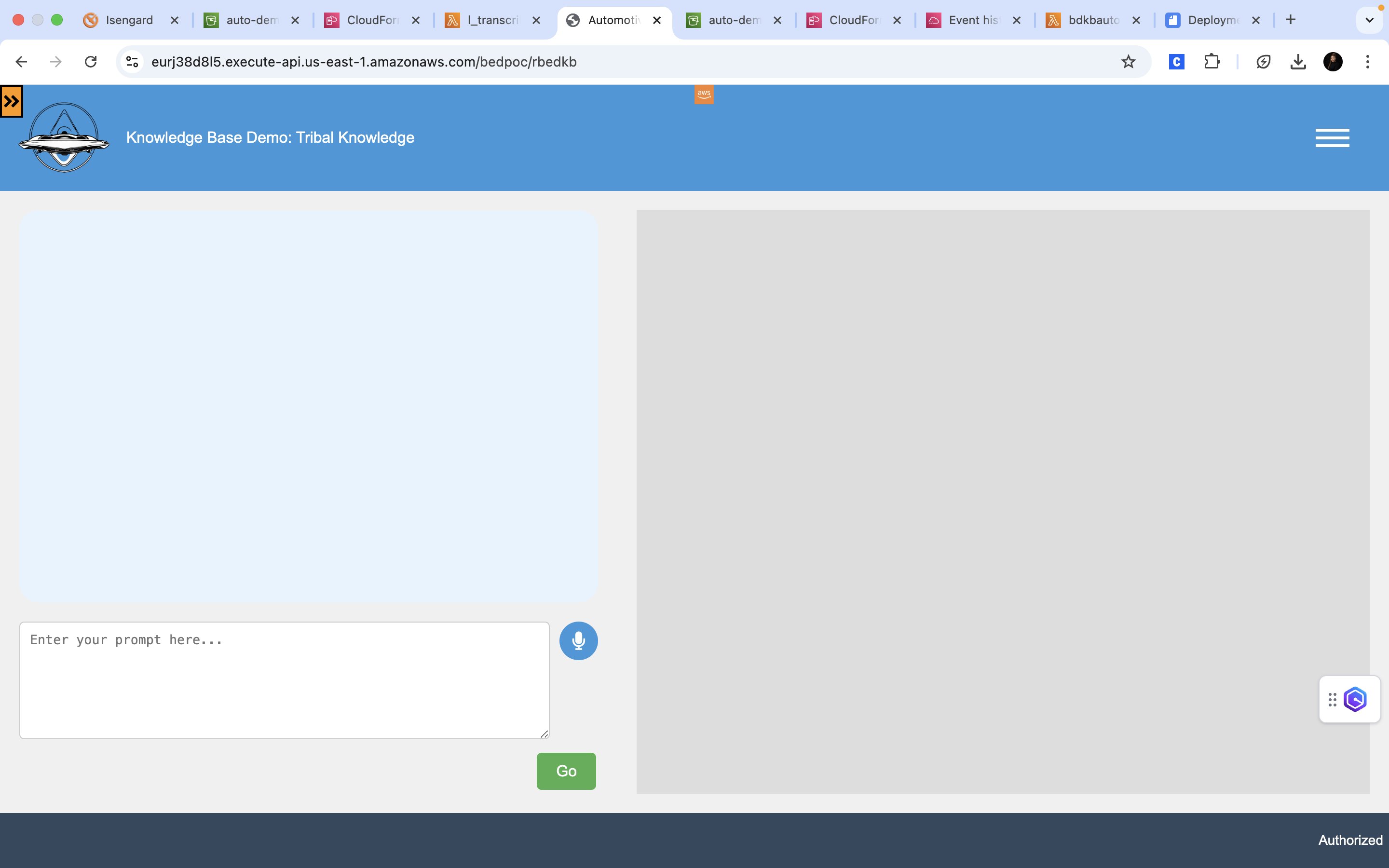
Figure 10: The deployed Knowledge Base Demo interface
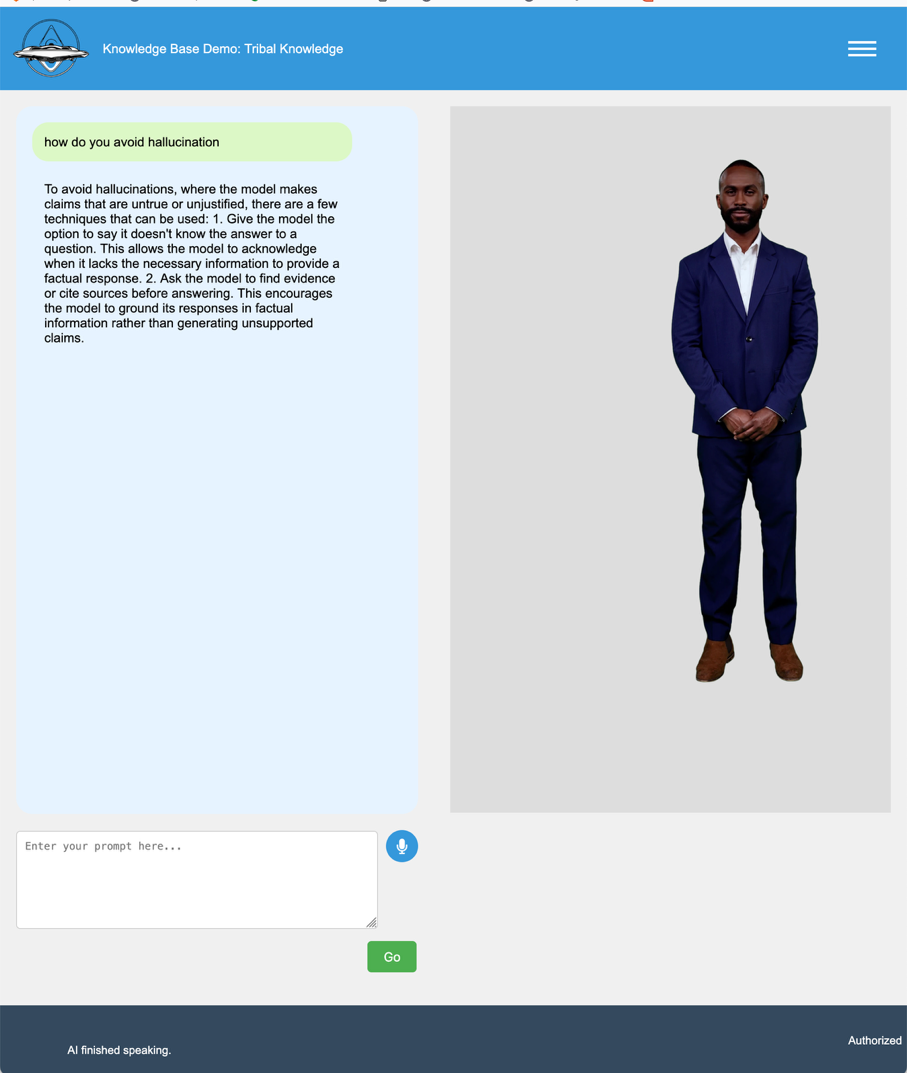
Figure 11: The Knowledge Base Demo answering a question through the avatar
Optimizing performance and user experience
Our knowledge management system employs a dual-layer caching strategy to maximize response speed and efficiency. At the front end, browser-side caching stores recent interactions directly in the user’s browser memory using an LRU (Least Recently Used) algorithm. This local cache minimizes server requests for repeated questions, providing instant responses for common queries. The backend DynamoDB cache maintains a broader knowledge repository with intelligent TTL (Time-To-Live) settings that vary based on content type, longer retention for fundamental knowledge, medium-term for operational procedures, and short-term for time-sensitive information. This tiered approach makes sure information stays fresh while reducing the processing load on AI services. Note that the current implementation matches cache entries on the exact query text, so the cache is most effective when users repeat established, frequently recurring questions. Semantic (embedding-based) matching is a natural enhancement that is not included in this prototype.
The avatar system serves as more than a visual interface. It’s a key component in making complex information accessible and engaging. Built on DeepBrain AI technology, the avatar provides real-time lip synchronization, contextual facial expressions, and natural gestures that match the conversation flow. Organizations can customize the avatar’s appearance, voice, and behavior to align with their brand identity and communication style.
The technical implementation uses WebRTC for smooth video streaming and integrates with Amazon Polly for natural speech synthesis, while WebSocket connections enable responsive avatar control.
Performance monitoring through Amazon CloudWatch provides continuous insights into cache effectiveness and response times. The system automatically adjusts its caching strategy based on usage patterns, warming frequently accessed information and optimizing TTL settings. This combination of efficient caching and natural avatar interaction creates a responsive, engaging knowledge delivery system that scales with organizational needs.
Scalability and performance characteristics
The serverless architecture provides automatic horizontal scaling across components, making sure the system handles growth from pilot to enterprise deployment without manual intervention. Functions provision additional execution environments as concurrent requests grow, handling traffic spikes without performance degradation. The API layer provides throttling while scaling to handle varying load, and the caching layer automatically adjusts capacity as query volume fluctuates.
Concurrent user support scales with configuration. The following figures are indicative estimates from our testing, not guarantees, and depend on Region, model choice, document size, cache hit rate, and configured service quotas. The default setup handled roughly 50 to 100 concurrent users with sub-second responses for cached queries. Raising the relevant service quotas extends this to roughly 500 to 1,000 concurrent users, and enterprise-scale usage of over 5,000 concurrent users is achievable with the same architecture but requires proactive service-quota increases.
Performance varies with caching effectiveness. In our testing, cached responses returned in well under a second, while fresh knowledge-base queries took roughly 2–4 seconds depending on the model and document size. Voice interaction adds speech-processing time on top. These are indicative figures, so measure against your own workload before committing to a latency target. Note that this is a cloud-dependent design: every query round-trips to AWS, and the avatar relies on live WebRTC/WebSocket streaming, which needs stable, low-latency, reasonably high-bandwidth connectivity. There is no edge, offline, or degraded-mode capability in this prototype, so it fits connected environments (training rooms, engineering and maintenance-planning offices, quality labs, control rooms, kiosk stations) rather than disconnected or intermittently connected plant-floor or OT settings. Supporting those would require a separate edge pattern such as local caching, offline fallback, and graceful degradation to text.
For organizations planning growth, start with default configuration for pilots, monitor metrics to identify bottlenecks, increase capacity limits when approaching thresholds, and request service quota increases proactively for enterprise deployments. The serverless architecture makes sure you pay only for actual usage, making it cost-effective to start small and scale as adoption grows.
Cost optimization through smart caching
A key contributor to efficiency is the caching layer, which reduces the largest variable cost: repeated calls to foundation models. The DynamoDB cache stores and reuses answers for repeated queries, so a question that has already been answered does not trigger another model invocation. In our testing this reduced inference cost roughly in proportion to the cache hit rate. For workloads where 50–70 percent of questions were repeats, inference cost fell by a comparable amount. Because the saving is a direct function of the hit rate, we quote a single figure rather than treating the two as independent guarantees. This variable saving sits on top of the fixed Amazon OpenSearch Serverless baseline noted earlier, so budget for both.
The system’s smart-caching mechanism is particularly effective for tribal knowledge use cases where many questions are related to established procedures, policies and institutional practices. By implementing time-based cache invalidation, we maintain an optimal balance between cost efficiency and information accuracy.
Maintaining and evolving the system
The key to long-term success lies in treating the knowledge management system as a dynamic that grows with your organization. To keep the knowledge base current, the deployment configures Amazon S3 event notifications on the knowledge repository: when a document is added or removed, the bucket invokes an AWS Lambda function that automatically starts a Bedrock Knowledge Bases ingestion job, re-embedding the change into the vector store with no manual step. Because ingestion is not instantaneous, updated content becomes queryable shortly after that sync completes. The content-type-aware TTL settings on the response cache complement this, so fundamental processes persist longer while dynamic information refreshes more frequently.
To support accuracy, answers are generated with Amazon Bedrock Knowledge Bases, which grounds each response in passages retrieved from your own verified documents rather than the model’s general training data. This grounding reduces the likelihood of fabricated or off-base answers, and the knowledge base can return source citations that you can surface to users for verification. Grounding reduces but does not eliminate the risk of incorrect answers: for high-consequence or safety-relevant decisions, keep a human in the loop and treat the system as decision support rather than an authoritative source. Explicit confidence thresholds or answer-validation checks are a recommended enhancement for such use cases and are not implemented in this prototype.
Security remains integral to system maintenance. Regular automated audits verify access controls and data protection measures, while modular architecture supports straightforward security updates. Organizations can integrate new security requirements or compliance measures without disrupting existing functionality.
The system’s flexibility extends to content management. As teams document new procedures or update existing ones, they can upload them to the knowledge base, which automatically incorporates these changes. This continuous evolution makes sure the system remains a reliable source of institutional knowledge, adapting to organizational changes while maintaining historical context where needed.
Conclusion
With our knowledge management solution, you can build a powerful tool for preserving institutional knowledge. By using AWS services and following a modular design, organizations can maintain their intellectual capital while facilitating efficient knowledge transfer across their workforce. The system’s flexibility and scalability make it suitable for various industries and use cases, providing a foundation for sustainable knowledge management in the digital age. To get started, clone the sample repository on the GitHub website and deploy the solution in your own AWS account. To learn more, explore Amazon Bedrock Knowledge Bases in the Amazon Bedrock console.
About the authors
Nneoma Okoroafor
Nneoma is a Partner Solutions Architect at AWS, where she specializes in helping organizations architect, scale, and optimize next-generation cloud and artificial intelligence solutions. With deep expertise in machine learning and generative AI workflows, she works closely with the global startup partner ecosystem to build robust, secure, and efficient cloud architectures. Outside of work she enjoys hiking, tennis and reading books.
Olalekan Fagbo
Olalekan is a Prototyping Architect in the AWS Prototyping and AI Customer Engineering (PACE) team. He works directly with customers to rapidly build functional prototypes that demonstrate the art of the possible with AWS services, specializing in generative AI, machine learning and security solutions. Outside of work, he enjoys playing tennis, hiking, and bass guitar. He is currently on a personal mission to read more books.
Kenneth Walsh
Kenneth is a Senior AI Acceleration Architect based in New York who helps accelerate Amazon Web Services (AWS) builder productivity with generative AI automation tools. As a trusted advisor, he guides customers through their generative AI journeys with both technical expertise and genuine passion. Outside the world of AI, Kenneth enjoys crafting culinary creations, immersing himself in audio books, and cherishing quality time with his family.
Adeogo Olajide
Adeogo is a Solutions Architect at AWS, where he supports GovTech customers and other public sector customers in their cloud transformation journey. He specializes in designing secure, scalable, and compliant architectures that help public sector organizations modernize their digital services. Outside of work, he enjoys playing and watching soccer.