将 Amazon Bedrock AgentCore 连接到跨账户知识库
英文标题:Connect Amazon Bedrock AgentCore to cross-account knowledge bases
本文介绍如何让一个 AWS 账户中的 Amazon Bedrock AgentCore Agent,在不复制源数据的前提下,从另一账户中由 Amazon Redshift Serverless 支撑的 Amazon Bedrock Knowledge Bases 获取生成式答案。由于知识库资源策略不支持跨账户 `RetrieveAndGenerate`,方案通过在知识库账户中配置最小权限 IAM 角色,并由工具使用 AWS STS 跨账户担任该角色来调用该 API。文章对比了两种通用可用的编排模式:运行在 AgentCore runtime 上的代码式 Strands Agent,以及通过 AgentCore Gateway 和 AWS Lambda 实现的声明式 AgentCore harness。对于开发团队而言,选择重点在于自定义编排控制能力与托管式编排之间的取舍;若无需 Agent 的工具选择、多步推理或会话状态,则应优先考虑原生 `Retrieve` 或直接调用 `RetrieveAndGenerate`。
 1.3 MB
 101.1 KB
 124.1 KB
 345.0 KB
 141.2 KB
 346.5 KB
 83.4 KB
 132.7 KB
 131.9 KB
 102.2 KB
 230.5 KB
 247.1 KB
 18.4 KB
 69.5 KB
 36.9 KB
 160.9 KB
中文
组织通常使用 Amazon Bedrock AgentCore 来部署 Agent。该平台可使用任意框架或模型,以规模化方式构建、连接和优化 Agent。这些 Agent 可能需要访问托管在不同 AWS 账户中的、受治理的知识库。这种跨账户隔离有助于维持清晰的工作负载边界,但也可能带来集成挑战。
本文说明如何让一个账户中的 AgentCore Agent,在无需复制源数据的情况下,从另一个账户中由 Amazon Redshift Serverless 支撑的知识库生成答案。该知识库使用 Amazon Bedrock Knowledge Bases,即全托管的检索增强生成(Retrieval Augmented Generation)能力。
本文介绍两种已正式发布的 Amazon Bedrock AgentCore 编排模式的架构、安全边界、请求流程和选型标准。链接的 GitHub 示例提供了两种变体的部署步骤和实现细节:
挑战
使用 Amazon Bedrock 构建 AI Agent 的组织,可能将结构化数据维护在 Amazon Redshift Serverless 中。这些数据存储库可能与 AI Agent 位于不同 AWS 账户。Amazon Bedrock Knowledge Bases 资源策略支持用于跨账户操作的 Retrieve 和 GetDocumentContent。但受支持的资源策略操作不包括 RetrieveAndGenerate。由于此解决方案需要返回由 RetrieveAndGenerate 生成的答案,工具会在调用 API 前,担任知识库账户中一个权限范围严格限定的 AWS Identity and Access Management(IAM)角色。
这为希望实现以下目标、并采用多账户架构的企业带来了挑战:
- 针对 Amazon Redshift Serverless 中的结构化数据生成自然语言答案。
- 保持 Agent 工作负载与数据工作负载之间的账户边界。
- 避免将受治理的源数据复制到 Agent 账户。
- 通过专用跨账户 IAM 角色授予最小权限访问。
解决方案概览
该解决方案以两种方式实现跨账户查询模式。变体 1 将一个 Strands Agent 部署到 AgentCore runtime。变体 2 使用声明式 AgentCore harness。两种实现使用相同的数据访问边界。由模型控制的工具使用 AWS Security Token Service(AWS STS)担任知识库访问角色,调用 RetrieveAndGenerate,并将生成的答案和引用返回到编排层。这两种变体的区别在于 Agent 循环由谁负责,以及工具的托管方式。图 1 对比了两条编排路径及其共享的跨账户数据访问边界。
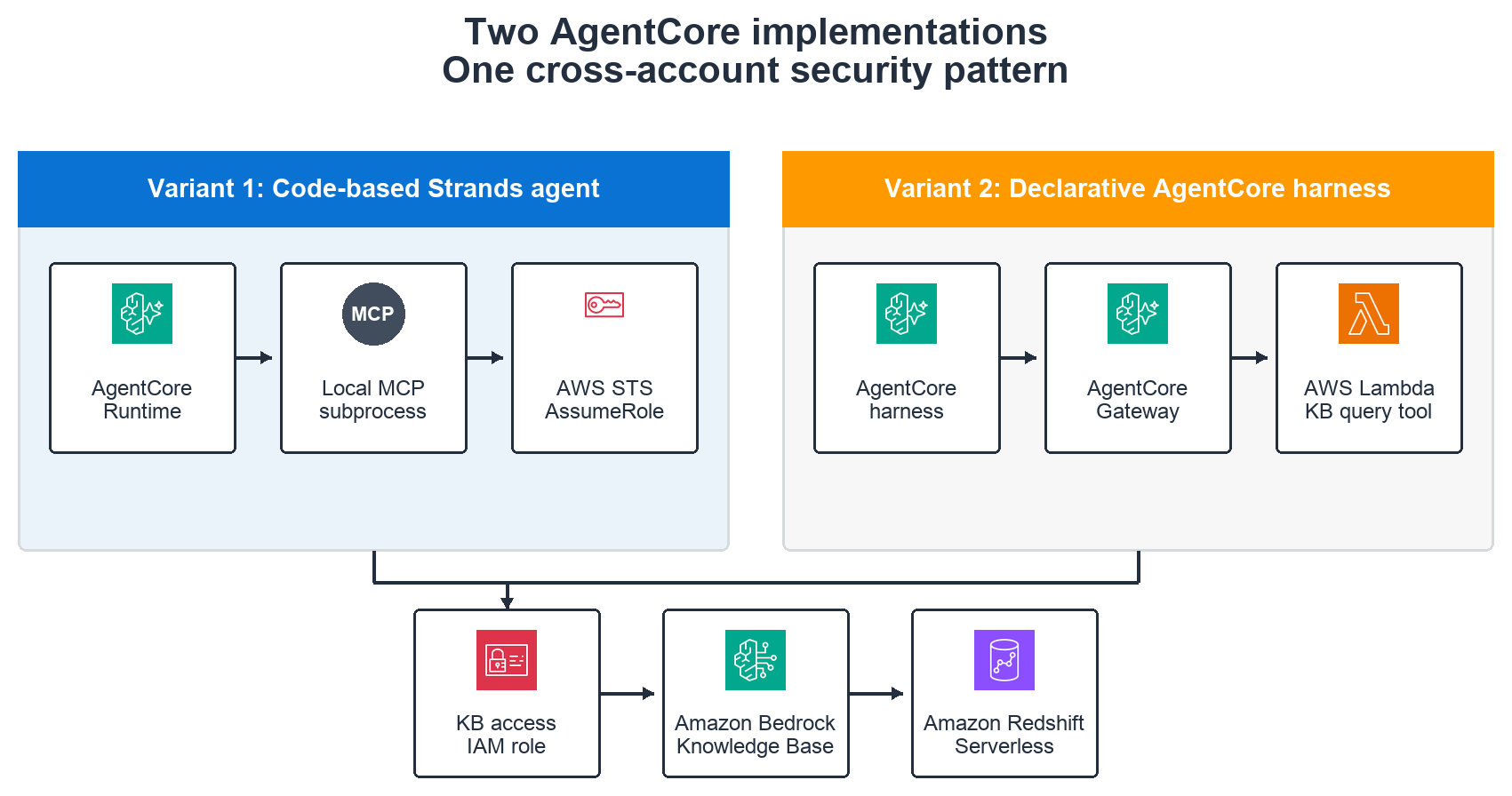
图 1:并列展示的 AgentCore 实现路径
请求流程
请求遵循以下顺序:
- 用户通过 Streamlit UI 或 AgentCore API 提交自然语言问题。
- Amazon Nova Pro 决定调用
query_knowledge_base工具。 - 在变体 1 中,工具运行在与 AgentCore runtime 一起打包的本地 Model Context Protocol(MCP)子进程中。在变体 2 中,AgentCore harness 通过 AgentCore Gateway(Amazon Bedrock AgentCore 的一项功能)调用 AWS Lambda 工具。
- 工具使用 AWS STS 担任知识库账户中的
bedrock_kb_access_role。 - 已担任角色的会话使用 Claude Haiku 4.5 调用
RetrieveAndGenerate。知识库将问题转换为针对 Amazon Redshift Serverless 的结构化查询。 - 生成的答案通过选定的编排路径返回给用户。
图 2 展示了代码式 Strands Agent 的请求路径。
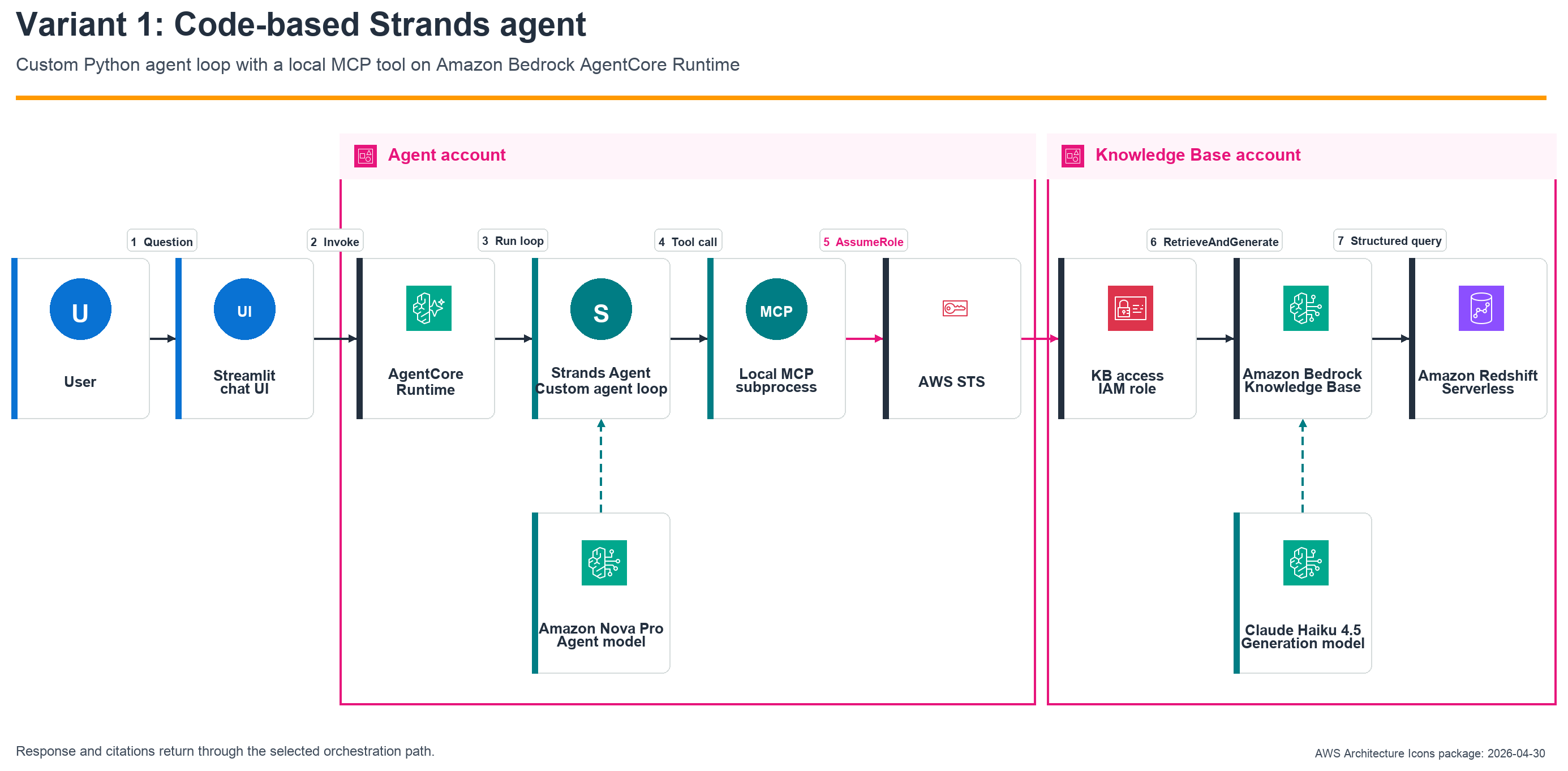
图 2:代码式 Strands Agent 架构
图 3 展示了声明式 AgentCore harness 对应的托管路径。
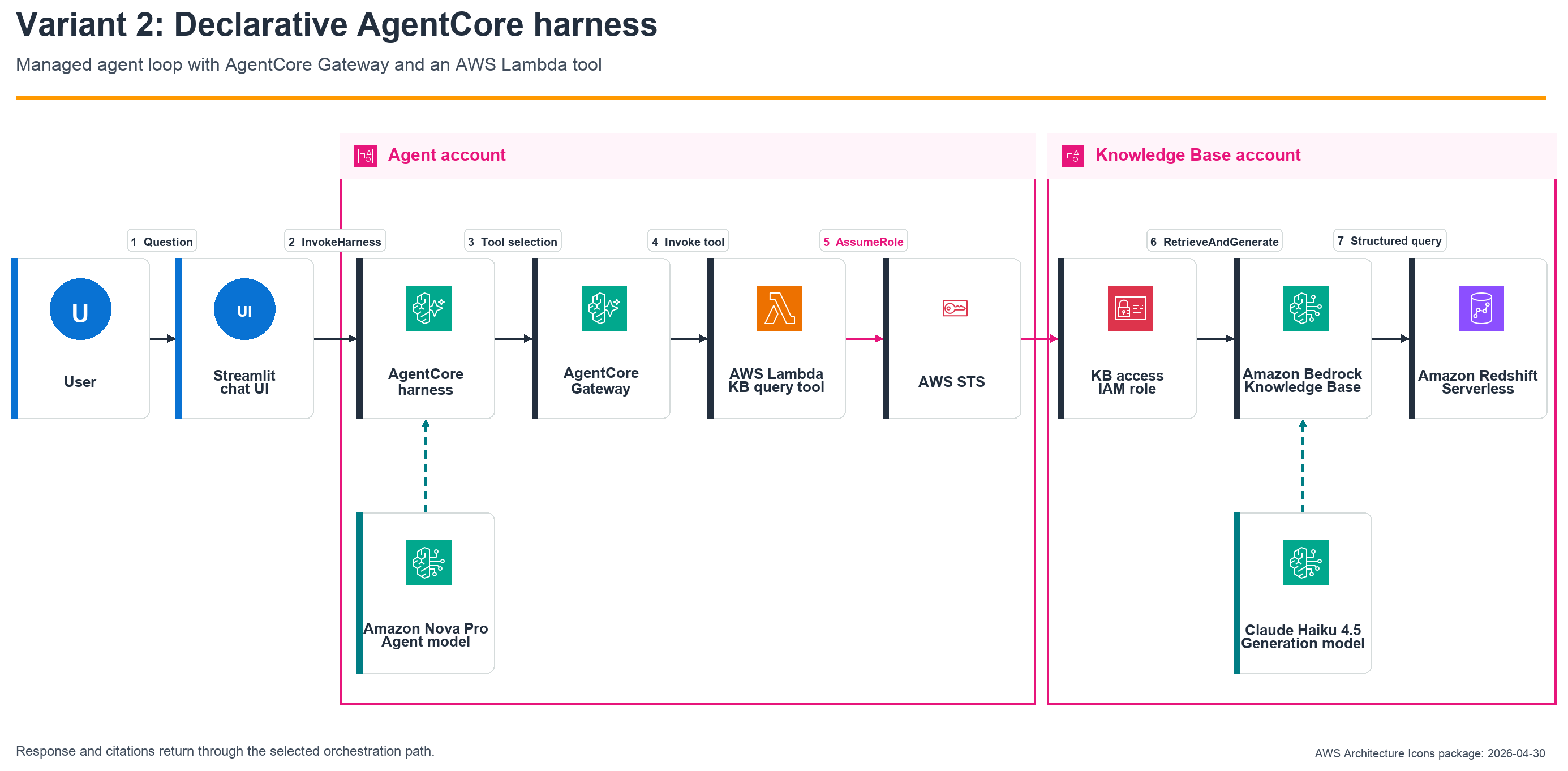
图 3:声明式 AgentCore harness 架构
选择足够简单的模式
在选择 Agent 实现方式之前,请先确定工作负载是否真的需要 Agent。这可以让设计与所需行为保持匹配。
- 如果应用程序只需要检索到的内容,请评估结合 Knowledge Base 资源策略的原生跨账户 Retrieve。
- 如果每个请求都确定性地需要一个生成式答案,请首先确认该工作负载是否不需要工具选择、多步推理或会话状态。如果不需要,可担任知识库账户角色,并直接从应用程序或 AWS Lambda 函数调用
RetrieveAndGenerate。 - 当模型必须作为更广泛的对话或工具使用工作流的一部分,决定何时或如何查询 Knowledge Base 时,才使用 Agent。
何时使用各 AgentCore 变体
跨账户需求并不偏向其中任何一种变体。请根据团队需要自定义和运营多少编排循环来选择。
| 决策维度 | 代码式 Strands Agent | 声明式 AgentCore harness |
|---|---|---|
| 最适合场景 | 需要自定义编排、钩子、中间件、重试行为、可观测性,或直接控制工具与流式处理的团队。 | 使用场景适合托管循环,并倾向于配置优先生命周期的团队。 |
| Agent 循环 | 由你的 Python 代码使用 Strands Agents SDK 运行循环。 | AgentCore 根据 harness 定义运行循环。 |
| 工具路径 | AgentCore runtime 到本地 MCP 子进程,再到 Knowledge Base。 | AgentCore harness 到 AgentCore Gateway,再到 AWS Lambda,最后到 Knowledge Base。 |
| 跨账户主体 | AgentCore runtime 执行角色。 | AgentCore Gateway 后端的 AWS Lambda 执行角色。 |
| 维护内容 | agent.py、依赖项、MCP 服务器、工具逻辑和 runtime 配置。 |
AgentCore harness 配置、系统提示词、AWS Lambda 工具、IAM 和应用程序行为。 |
| 调用 API | InvokeAgentRuntime。 |
InvokeHarness。 |
核心取舍是自定义控制与托管式编排之间的选择。
前提条件
开始前,请确认具备以下前提条件:
- 两个 AWS 账户:一个 agent 账户和一个 agent-kb 账户。
- AWS Command Line Interface(AWS CLI)v2.24.22 或更高版本,并且具备两个账户的凭证。
- Python 3.10 或更高版本,以及
jq。 - 一个连接到 Amazon Redshift Serverless 的结构化 Amazon Bedrock 知识库。
- 在美国西部(俄勒冈)区域具备模型访问权限:Agent 账户中的
us.amazon.nova-pro-v1:0,以及 agent-kb 账户中的us.anthropic.claude-haiku-4-5-20251001-v1:0。有关按区域划分的模型可用性,请参阅 Amazon Bedrock 中 AWS 区域支持的模型。 - 对于 harness 变体,除代码式变体使用的 Python
bedrock-agentcoreCLI 外,还需安装最新的@aws/agentcoreNode.js CLI。
假设
示例使用以下本地配置文件别名和占位账户 ID:
| 配置文件 | 示例账户 | 用途 |
|---|---|---|
| agent | 111122223333 | 托管 AgentCore 资源。 |
| agent-kb | 999999999999 | 托管 Knowledge Base 和 Redshift Serverless。 |
示例使用美国西部(俄勒冈)区域(us-west-2)。配置文件名称是本地别名,因此请将其替换为已配置的配置文件名称,并发现账户 ID,而不是将其硬编码。
AGENT_PROFILE=agent
AGENT_KB_PROFILE=agent-kb
REGION=us-west-2

AGENT_ACCOUNT=$(aws sts get-caller-identity \
--profile "$AGENT_PROFILE" --query Account --output text)
AGENT_KB_ACCOUNT=$(aws sts get-caller-identity \
--profile "$AGENT_KB_PROFILE" --query Account --output text)
aws bedrock-agent list-knowledge-bases \
--profile "$AGENT_KB_PROFILE" --region "$REGION"
实施指南
本文重点介绍架构和决策指导。部署步骤维护在公开 GitHub 示例中。请使用实施指南准备结构化 Knowledge Base、跨账户 IAM 角色,以及 AgentCore memory(Amazon Bedrock AgentCore 的一项功能)。然后,对于代码式 Strands 变体,请遵循运行 Agent;对于托管 Agent 循环,请遵循变体 2:声明式 harness。该示例还包含用于本地、AgentCore 和 Harness UI 模式的 Streamlit 端到端客户端。
验证
比较不同变体时,请使用相同的问题、Knowledge Base ID、模型、检索数量和新的会话。提示词约定要求两个 Agent 将用户问题完全按原样传递给工具,但 RetrieveAndGenerate 仍属于生成式能力。对于行级问题,请指定行数、日期范围和排序顺序。无边界的生成式 SQL 可能超过结果处理限制。请根据直接工具响应和底层结构化数据验证业务事实。
在 Streamlit 客户端中,请在比较结果前选择调用模式。对于 AgentCore 或 Harness 模式,请确认相应已部署资源的 Amazon Resource Name(ARN)已填入。对于每次独立的事实性比较,请开始新的对话。
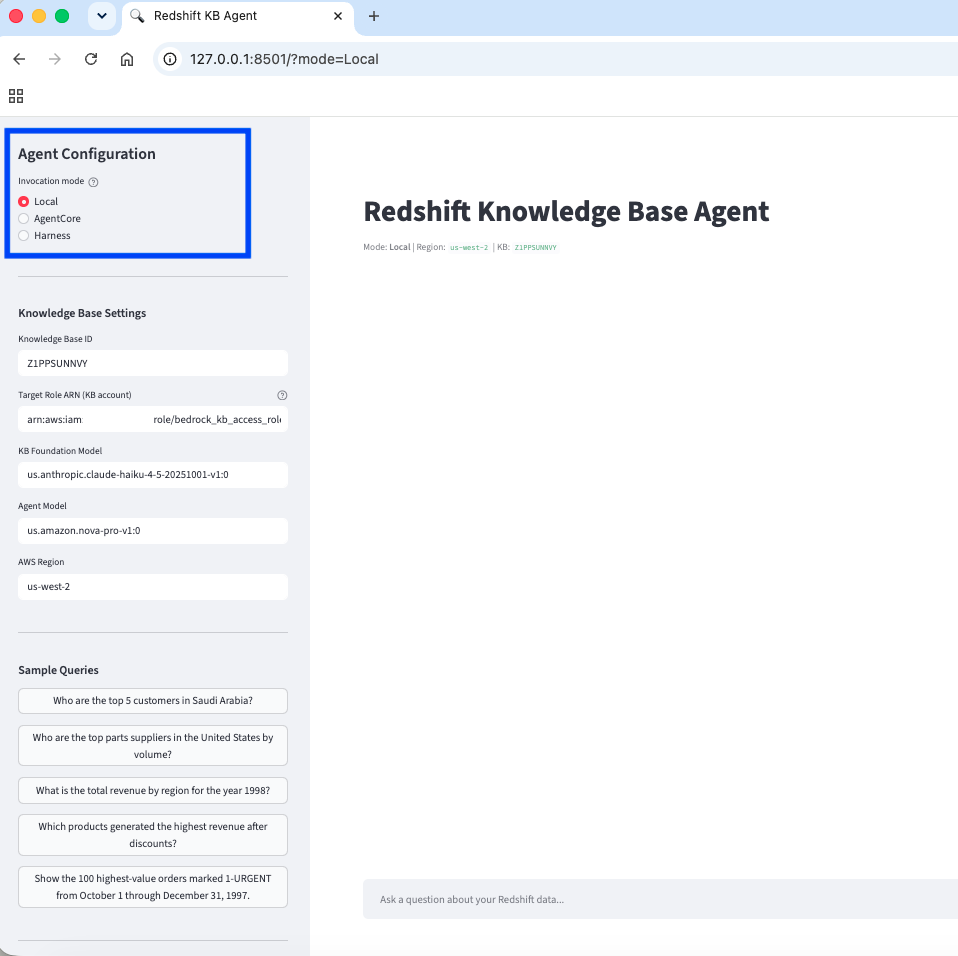
图 4:在 Streamlit 侧边栏中选择 Local、AgentCore 或 Harness
图 5 展示了 Harness 模式中的一次成功的有界查询。
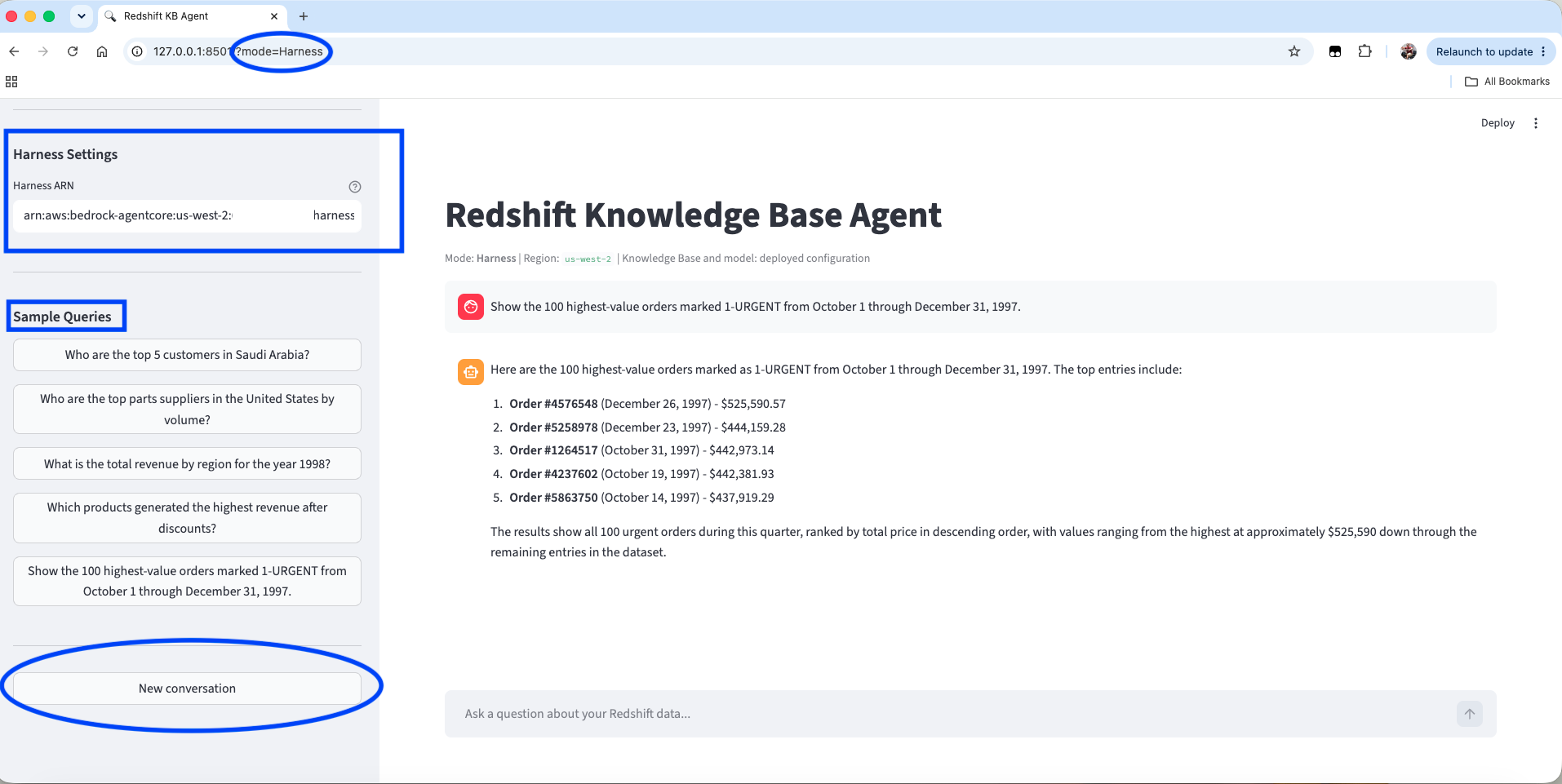
图 5:Harness 模式,显示已部署的 ARN 和一次成功的有界查询
TPC-H 数据集的示例问题包括:
- 沙特阿拉伯排名前 5 的客户是谁?
- 按交易量计算,美国排名前列的零部件供应商是谁?
- 1998 年按区域划分的总营收是多少?
- 哪些产品在折扣后创造了最高营收?
- 显示 1997 年 10 月 1 日至 12 月 31 日期间标记为 1-URGENT 的 100 笔最高价值订单。
建议实践
部署和验证任一变体时,请采用以下实践:
- 对独立的事实性比较使用新的会话 ID。
- 记录精确的工具查询、Knowledge Base ID、模型 ID 和检索结果数量。
- 使用经批准的精选 SQL 和列描述来定义衍生业务指标。
- 为行级问题明确指定行数、日期范围和排序顺序,以避免过大的 SQL 结果集。
- 将跨账户角色的权限范围限制在所需的 Knowledge Base 和模型资源。
- 在长期运行的 runtime 和预热的 AWS Lambda 环境中使用可刷新的 STS 凭证。
- 针对两种变体测试系统提示词、工具描述、IAM 和应用程序行为。
- 使用 Amazon Bedrock Guardrails 评估用户问题和生成答案中的有害内容、被拒绝主题及敏感信息。Guardrails 是最小权限访问、源数据治理、基于引用的验证和对重要决策进行人工审查的补充,而非替代。
清理资源
请遵循示例的清理章节,获取最新命令及所需顺序。当两种变体都已部署时,请先完成 harness 清理,以便从共享 Knowledge Base 访问角色中移除其 AWS Lambda 执行角色信任授权。随后,移除代码式 runtime 和共享 IAM 资源。脚本不会删除由项目管理的 AgentCore memory、Knowledge Base 或 Redshift Serverless 资源。请在不再需要这些资源时单独删除它们。
总结
本文介绍了 AgentCore Agent 如何跨越 AWS 账户边界,从结构化 Amazon Bedrock 知识库返回生成式答案。两种实现都使用数据账户中的最小权限角色。架构选择的关键在于由谁负责 Agent 循环,以及工具如何托管。当原生 Retrieve 或直接调用 RetrieveAndGenerate 能够满足需求时,应优先采用这些模式。
English / 原文
Organizations often deploy agents using Amazon Bedrock AgentCore, a platform to build, connect, and optimize agents at scale, with any framework or model. These agents may access governed knowledge bases hosted in separate AWS accounts. This cross-account separation helps maintain clear workload boundaries but can introduce integration challenges.
This post explains how AgentCore agents in one account can generate answers from a knowledge base (using Amazon Bedrock Knowledge Bases, the fully managed Retrieval Augmented Generation capability) backed by Amazon Redshift Serverless in another account without copying source data.
This post covers the architecture, security boundary, request flow, and selection criteria for two generally available Amazon Bedrock AgentCore orchestration models. The linked GitHub sample provides the deployment procedures and implementation details for both variants:
The challenge
Organizations that build AI agents using Amazon Bedrock can maintain structured data in Amazon Redshift Serverless. These data repositories can reside in separate AWS accounts from their AI agents. Amazon Bedrock Knowledge Bases resource policies support Retrieve and GetDocumentContent for cross-account operations. The supported resource policy actions do not include RetrieveAndGenerate. Because this solution needs the generated answer returned by RetrieveAndGenerate, the tool assumes a narrowly scoped AWS Identity and Access Management (IAM) role in the Knowledge Base account before calling the API.
This creates a challenge for enterprises with multi-account architectures who want to:
- Generate natural-language answers over structured data in Amazon Redshift Serverless.
- Maintain account boundaries between agent workloads and data workloads.
- Avoid copying governed source data into the agent account.
- Grant least-privilege access through a dedicated cross-account IAM role.
Solution overview
The solution implements the cross-account query pattern in two ways. Variant 1 deploys a Strands agent to AgentCore runtime. Variant 2 uses a declarative AgentCore harness. Both implementations use the same data access boundary. The model-controlled tool assumes the Knowledge Base access role with AWS Security Token Service (AWS STS), calls RetrieveAndGenerate, and returns the generated answer and citations to the orchestration layer. The variants differ in who owns the agent loop and how the tool is hosted. Figure 1 compares the two orchestration paths and their shared cross-account data access boundary.
Figure 1: Side-by-side AgentCore implementation paths
Request flow
The request follows this sequence:
- A user submits a natural-language question through Streamlit UI or an AgentCore API.
- Amazon Nova Pro decides to call the
query_knowledge_basetool. - In Variant 1, the tool runs in a local Model Context Protocol (MCP) subprocess packaged with AgentCore runtime. In Variant 2, the AgentCore harness calls an AWS Lambda tool through AgentCore Gateway, a capability of Amazon Bedrock AgentCore.
- The tool assumes the
bedrock_kb_access_rolein the Knowledge Base account by using AWS STS. - The assumed-role session calls
RetrieveAndGeneratewith Claude Haiku 4.5. The Knowledge Base translates the question into a structured query against Amazon Redshift Serverless. - The generated answer returns through the selected orchestration path to the user.
Figure 2 shows the request path for the code-based Strands agent.
Figure 2: Code-based Strands agent architecture
Figure 3 shows the corresponding managed path for the declarative AgentCore harness.
Figure 3: Declarative AgentCore harness architecture
Choose the simplest sufficient pattern
Before selecting an agent implementation, decide whether the workload needs an agent at all. This keeps the design proportional to the required behavior.
- If the application only needs retrieved content, evaluate native cross-account Retrieve with a Knowledge Base resource policy.
- If every request deterministically needs one generated answer, first confirm that the workload does not need tool selection, multi-step reasoning, or conversational state. If it does not, assume the Knowledge Base account role and call
RetrieveAndGeneratedirectly from the application or an AWS Lambda function. - Use an agent when the model must decide when or how to query the Knowledge Base as part of a broader conversation or tool-using workflow.
When to use each AgentCore variant
The cross-account requirement does not favor one variant. Choose according to how much of the orchestration loop your team needs to customize and operate.
| Decision area | Code-based Strands agent | Declarative AgentCore harness |
|---|---|---|
| Best fit | Teams that require custom orchestration, hooks, middleware, retry behavior, instrumentation, or direct control of tools and streaming. | Teams whose use case fits the managed loop and who prefer a configuration-first lifecycle. |
| Agent loop | Your Python code runs the loop with the Strands Agents SDK. | AgentCore runs the loop from the harness definition. |
| Tool path | AgentCore runtime to local MCP subprocess to Knowledge Base. | AgentCore harness to AgentCore Gateway to AWS Lambda to Knowledge Base. |
| Cross-account principal | AgentCore runtime execution role. | AWS Lambda execution role behind AgentCore Gateway. |
| What you maintain | agent.py, dependencies, MCP server, tool logic, and runtime configuration. |
AgentCore harness configuration, system prompt, AWS Lambda tool, IAM, and application behavior. |
| Invocation API | InvokeAgentRuntime. |
InvokeHarness. |
The decision is custom control versus managed orchestration.
Prerequisites
Before you begin, confirm that you have the following prerequisites:
- Two AWS accounts: an agent account and an agent-kb account.
- AWS Command Line Interface (AWS CLI) v2.24.22 or later with credentials for both accounts.
- Python 3.10 or later and
jq. - A structured Amazon Bedrock knowledge base connected to Amazon Redshift Serverless.
- Model access in US West (Oregon):
us.amazon.nova-pro-v1:0in the agent account andus.anthropic.claude-haiku-4-5-20251001-v1:0in the agent-kb account. For model availability by Region, refer to Supported models by AWS Region in Amazon Bedrock. - For the harness variant, install the current
@aws/agentcoreNode.js CLI in addition to the Pythonbedrock-agentcoreCLI used by the code-based variant.
Assumptions
The examples use the following local profile aliases and placeholder account IDs:
| Profile | Example account | Purpose |
|---|---|---|
| agent | 111122223333 | Hosts AgentCore resources. |
| agent-kb | 999999999999 | Hosts the Knowledge Base and Redshift Serverless. |
The examples use the US West (Oregon) Region (us-west-2). Profile names are local aliases, so replace them with your configured profile names and discover account IDs instead of hardcoding them.
AGENT_PROFILE=agent
AGENT_KB_PROFILE=agent-kb
REGION=us-west-2

AGENT_ACCOUNT=$(aws sts get-caller-identity \
--profile "$AGENT_PROFILE" --query Account --output text)
AGENT_KB_ACCOUNT=$(aws sts get-caller-identity \
--profile "$AGENT_KB_PROFILE" --query Account --output text)
aws bedrock-agent list-knowledge-bases \
--profile "$AGENT_KB_PROFILE" --region "$REGION"
Implementation walkthrough
This post focuses on architecture and decision guidance. Deployment procedures are maintained in the public GitHub sample. Use the Implementation walkthrough to prepare the structured Knowledge Base, cross-account IAM roles, and AgentCore memory, a capability of Amazon Bedrock AgentCore. Then follow Running the agent for the code-based Strands variant or Variant 2 – Declarative harness for the managed agent loop. The sample also includes the Streamlit end-to-end client for the Local, AgentCore, and Harness UI modes.
Validation
Use the same question, Knowledge Base ID, model, retrieval count, and fresh session when comparing variants. The prompt contract tells both agents to pass the user’s question to the tool exactly as written, but RetrieveAndGenerate remains generative. For row-level questions, specify a row count, date range, and sort order. Unbounded generated SQL can exceed result-handling limits. Validate business facts against the direct tool response and the underlying structured data.
In the Streamlit client, select the invocation mode before comparing results. For AgentCore or Harness mode, confirm that the corresponding deployed resource Amazon Resource Name (ARN) is populated. Start a new conversation for each independent factual comparison.
Figure 4: Select Local, AgentCore, or Harness in the Streamlit sidebar
Figure 5 shows a successful bounded query in Harness mode.
Figure 5: Harness mode with the deployed ARN and a successful bounded query
Sample questions for the TPC-H dataset include:
- Who are the top 5 customers in Saudi Arabia?
- Who are the top parts suppliers in the United States by volume?
- What is the total revenue by region for 1998?
- Which products generated the highest revenue after discounts?
- Show the 100 highest-value orders marked 1-URGENT from October 1 through December 31, 1997.
Recommended practices
Apply these practices when deploying and validating either variant:
- Use fresh session IDs for independent factual comparisons.
- Log the exact tool query, Knowledge Base ID, model ID, and retrieval result count.
- Define derived business metrics with approved curated SQL and column descriptions.
- Bound row-level questions with an explicit row count, date range, and sort order to avoid oversized SQL result sets.
- Keep the cross-account role scoped to the required Knowledge Base and model resources.
- Use refreshable STS credentials in long-lived runtimes and warm AWS Lambda environments.
- Test system prompts, tool descriptions, IAM, and application behavior for both variants.
- Apply Amazon Bedrock Guardrails to evaluate user questions and generated answers for harmful content, denied topics, and sensitive information. Guardrails complement, but do not replace, least-privilege access, source data governance, citation-based verification, and human review for consequential decisions.
Clean up resources
Follow the sample’s cleanup section for the current commands and required order. When both variants are deployed, complete harness cleanup first so that its AWS Lambda execution-role trust grant is removed from the shared Knowledge Base access role. Then remove the code-based runtime and shared IAM resources. The scripts do not delete the project-managed AgentCore memory, Knowledge Base, or Redshift Serverless resources. Delete those separately when they are no longer needed.
Summary
This post describes how AgentCore agents can return generated answers from a structured Amazon Bedrock knowledge base across AWS account boundaries. Both implementations use a least-privilege role in the data account. The architectural choice is who owns the agent loop and how the tool is hosted. Start with native Retrieve or a direct RetrieveAndGenerate call when those patterns satisfy the workload. When model-controlled tools or conversational orchestration are required, choose the code-based Strands variant for custom loop behavior and direct control. Choose the AgentCore harness when its managed loop fits and your team prefers a configuration-first operating model. Both are valid, generally available paths. Here is the Amazon Bedrock AgentCore Documentation where you can get started with Amazon Bedrock AgentCore with code samples.
About the authors
Kunal Ghosh
Kunal is an expert in AWS technologies. He is passionate about building efficient and effective solutions on AWS, especially involving generative AI, analytics, data science, and machine learning. Besides family time, he likes reading, swimming, biking, watching movies, and exploring food.
Arghya Banerjee
Arghya is a Sr. Solutions Architect at AWS in the San Francisco Bay Area, focused on helping customers adopt and use the AWS Cloud. His areas of focus include big data, data lakes, streaming and batch analytics services, and generative AI.
Indranil Banerjee
Indranil is a Sr. Solutions Architect at AWS in the San Francisco Bay Area, focused on helping customers in the high-tech and semiconductor sectors solve complex business problems using the AWS Cloud. His interests include modernization, migration, analytics platforms, and generative AI.
Yoginder Sethi
Yoginder is a Senior Solutions Architect on the Strategic Accounts Solutions Architecture team at AWS. He has extensive experience designing, building, and managing large-scale cloud architectures, DevOps tooling, and observability solutions. Based in the San Francisco Bay Area, California, he enjoys exploring new places, listening to music, and hiking outside of work.