使用 Amazon Quick 和 fal 构建智能体式创意工作流
英文标题:Build agentic creative workflows with Amazon Quick and fal
创意团队面临素材、格式和修改需求持续增长,但工具割裂与人工传递上下文导致生产流程效率受限;一项调查显示,78%的创意负责人认为需求已超过团队产能。本文介绍如何通过 Model Context Protocol(MCP)连接 Amazon Quick 与 fal,构建可复用、保留上下文并设有人类审核关卡的智能体工作流。文中演示了八格分镜制作和音乐视频概念原型两类流程:Amazon Quick 负责规划、编排和审批,fal 通过 MCP 提供超过 1,000 个生产级生成媒体模型。对开发者和创意行业而言,这种架构可将工作流规范沉淀为可共享的 Skills,并统一调用图像、音频和视频生成能力。
 1.3 MB
 101.1 KB
 124.1 KB
 345.0 KB
 141.2 KB
 346.5 KB
 124.1 KB
 91.0 KB
 105.5 KB
 542.7 KB
 359.5 KB
 402.8 KB
 291.8 KB
 464.0 KB
 268.0 KB
 581.0 KB
 251.2 KB
 43.6 KB
 28.1 KB
 32.8 KB
中文
创意团队正面临对更多素材、格式和修改版本不断增长的需求,但其脚本、参考资料、模型和输出内容往往仍分散在不同工具中。创作者必须反复转移上下文,并手动整合结果。由于有 78% 的创意负责人表示需求超过团队产能,仅仅加快生成速度并不能解决根本性的工作流问题。
为解决这一问题,媒体企业需要一套可复用的智能体框架:它能够保留上下文、支持长时间运行的媒体任务,并在人类创意审核的关键节点引入人工审查。该框架将可复用的工作流指令、共享工具基础设施和编排能力结合在一起。
本文通过两个工作流展示这一方法:创建八格分镜,以及制作音乐视频概念原型。Amazon Quick充当智能体工作区,fal 提供面向生产环境的生成媒体能力,而 Model Context Protocol(MCP)则提供连接两者的标准接口。以下章节将在工作流演示之前,分别说明各组件。
理解智能体框架
媒体工作流框架由四个可复用层构成:作为智能体界面与编排器的 Amazon Quick、作为标准化工作流指令的 Skills、作为共享工具契约的 MCP,以及作为专业生成媒体基础设施的 fal。这些层共同为创作者提供一个统一的引导式工作流,可在不同活动、团队和未来的智能体体验中复用。
Amazon Quick
Amazon Quick 是一个智能体式 AI 工作区,用于研究、业务洞察、工作流自动化和无代码应用构建。在本文介绍的工作流中,Amazon Quick 充当编排层。它会理解创作者的请求、规划工作并保留已经批准的决策,然后调用适当的外部工具,并呈现输出以供审核。
Skills
创作者还可以将可重复的流程沉淀为 Skills。一个 Skill 可以编码如下指令:在生成前确认艺术方向、在制作场景前创建角色参考,以及在已定义的质量关卡暂停以等待批准。这有助于团队复用创意流程,而不是为每次活动重新构建流程。
fal
fal 是一个面向开发者和企业的生成媒体平台,为图像、视频、音频、3D 及其他媒体生成任务提供对 超过 1,000 个模型的生产级访问能力。这些模型支持的创意工作流涵盖角色探索、参考图引导的图像生成、音频制作和视频创作。
Model Context Protocol
Model Context Protocol(MCP)是一项开放标准,允许 AI 应用通过一致的接口连接外部工具和数据源。fal 通过 MCP 服务器提供其生成媒体能力,Amazon Quick 则使用 MCP 客户端发现并调用这些工具。
创意团队的收益
通过 MCP 连接 Amazon Quick 和 fal,可带来以下收益:
- 统一的创意工作区:创作者可以规划、生成、比较和优化素材,无需针对每种模态在不同生成工具之间切换。
- 跨步骤保留上下文:随着项目推进,已批准的风格选择、角色参考、故事节拍和格式要求可以保留在工作上下文中。
- 在创意关卡保留人类判断:智能体可以在关键阶段后暂停,让创作者在后续素材制作前选择方向。
- 通过 fal 访问多个生成媒体模型:团队可通过一个 MCP 连接,为图像、音频和视频任务使用不同的生产级模型。
- 可重复的生产实践:Amazon Quick Skills 可以编码团队偏好的步骤和审批标准,使其他团队成员能够遵循相同流程。
- 更快验证概念:团队可以在投入完整制作周期前,评估分镜、风格方向或视频概念。
解决方案概览
该架构将工作流编排与媒体生成分离。Amazon Quick 充当智能体工作区和 MCP 客户端,fal 托管 MCP 服务器并提供生成媒体工具。Amazon Quick Skills 可承载可复用的工作流指令,而 MCP 则为在类似媒体工作流中发现和调用 fal 能力提供一致接口。
创作者在 Amazon Quick 中描述期望的成果,后者会通过已配置的 fal MCP 连接器调用相应工具。fal 处理每个受支持的请求,并返回生成的素材以供审核。随后,创作者可以批准结果、请求修改或生成额外素材。多阶段规划、参考资料保留和审批检查点等能力取决于 Skill 指令、可用的对话上下文以及连接器公开的工具。
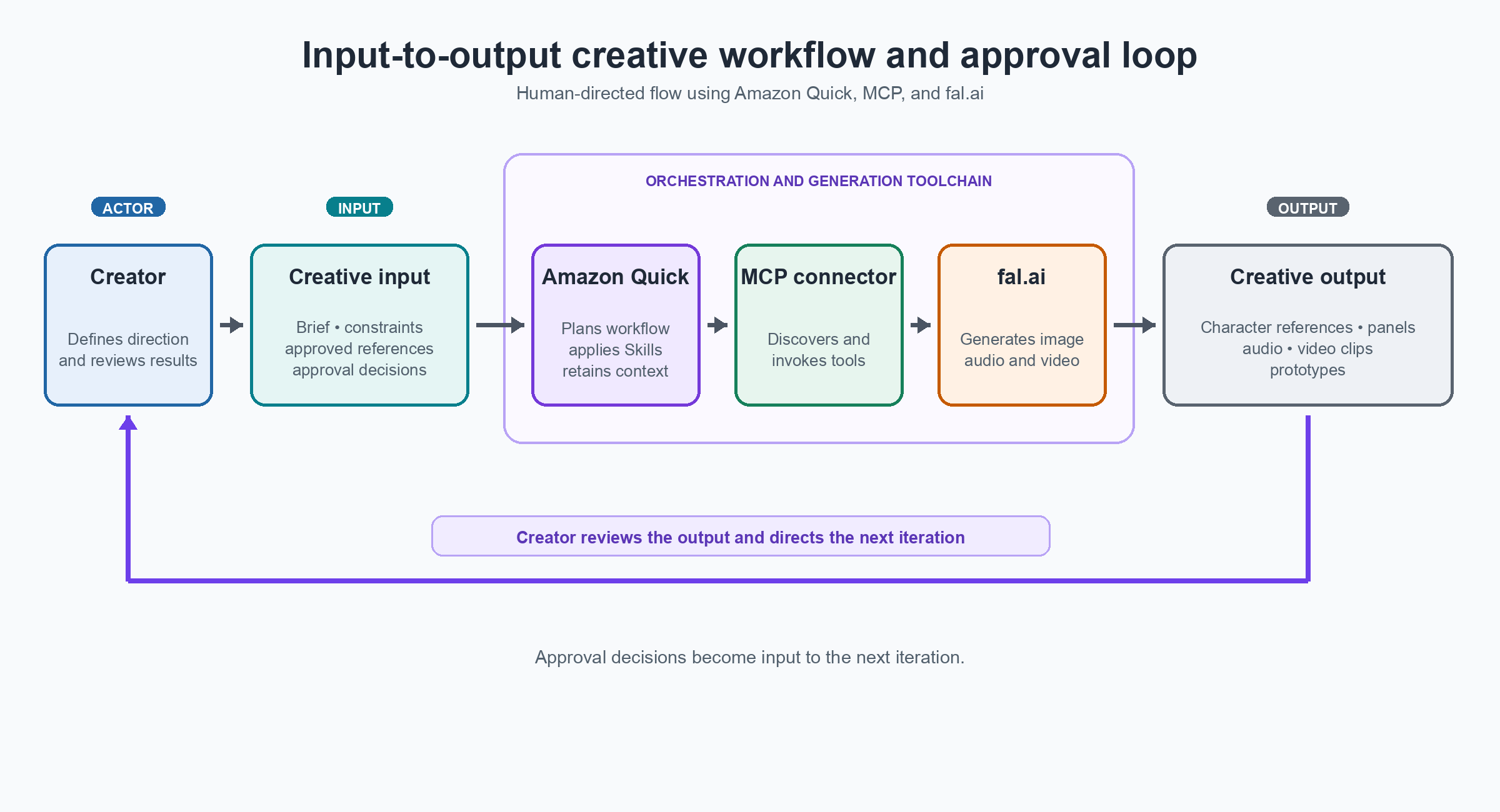
图 1:使用 Amazon Quick、MCP 和 fal 的迭代式创意工作流架构与数据流
配置集成
按照以下步骤,通过 MCP 将 fal 连接到 Amazon Quick,并在开始示例工作流之前验证可用的媒体生成工具。
前提条件
- 可访问 Amazon Quick,且已安装并登录 Amazon Quick 桌面应用。
- 拥有 fal 账户,以及可用于该集成的 API 密钥。
- 拥有在 Amazon Quick 中添加和配置远程 Model Context Protocol(MCP)连接器的权限。
第 1 步:获取 fal API 密钥
登录 fal 账户并打开 fal 控制台。为该集成创建新的 API 密钥,或获取一个已有密钥。请安全存储密钥,不要将其包含在截图、源文件或共享文档中。
第 2 步:将 fal MCP 服务器连接到 Amazon Quick
- 打开 Amazon Quick 桌面应用,依次前往 Settings、Capabilities、Connectors。
- 选择 Add MCP Server: Remote。
- 在 URL 中输入
https://mcp.fal.ai/mcp。 - 在请求头中输入
Authorization: Key YOUR_FAL_API_KEY。
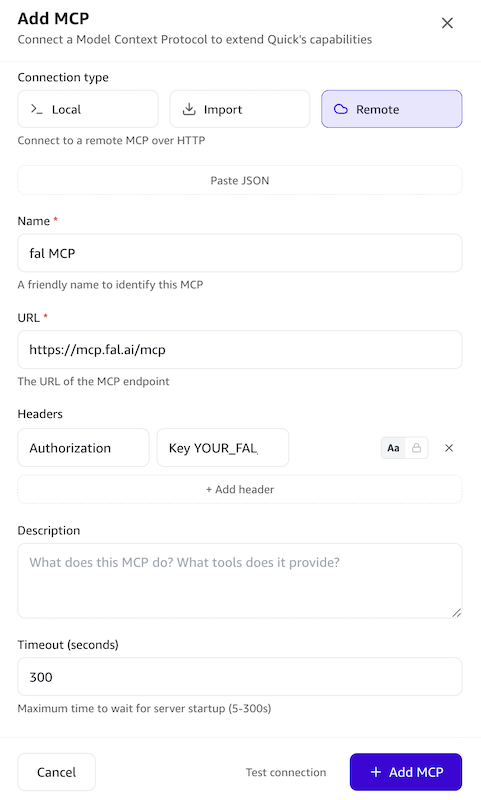
图 2:Amazon Quick 中的 MCP 配置设置
保存连接器,并确认 Amazon Quick 能够发现 fal MCP 服务器公开的工具。连接激活后,在 Amazon Quick 中开启一个新对话。
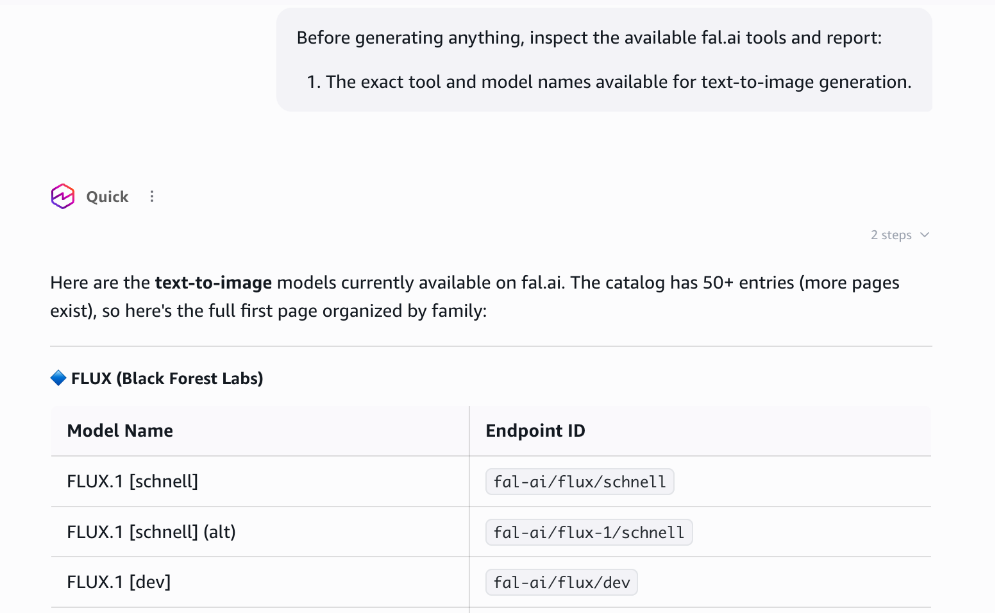
图 3:在 Amazon Quick 中验证 fal MCP 服务器工具
示例工作流 1:分镜制作
一个营销团队需要为产品发布制作八格分镜。在传统流程中,这意味着需要准备简报、交由设计师制作、经历三轮反馈,以及一周的耗时。在 Amazon Quick 中,同样的工作可以在一次交互式会话中,以智能体循环的方式完成。Quick 会规划、生成、展示选项、等待批准并继续推进。如果某些内容效果不佳,创作者可以回应,Quick 会进行迭代。整个过程中没有交接环节,也不会丢失上下文。
本演示展示了一种可能的前期制作流程。所使用的模型、迭代次数和审批关卡可根据创作者的偏好而变化。
“为一场未来主义赛车原型车发布会创建一个 8 格分镜。采用动漫风格和漫画网格布局。故事讲述一名年轻赛车手,从测试前准备、原型车揭幕,到高速试驾的过程。
遵循以下顺序:
**1. 确定创意方向:**确认艺术风格、漫画网格格式、宽高比和限制条件。 **2. 批准故事计划:**起草八个故事节拍、镜头列表和角色描述。 **3. 确定角色设计:**获得批准后,检查可用的 fal 模型并生成两个带标签的角色选项以供比较。当我选定其中一个后,创建其多视角参考图,并在生成分镜面板前等待批准。”
第 1 步:确定风格、格式和故事计划
Quick 会确认动漫风格、漫画网格格式、宽高比和视觉限制,并在后续调用中沿用这些约束。它会生成包含八个节拍的文字大纲、镜头列表和角色描述。
这一阶段不会生成图像。在批准计划前,创作者可以修改故事、节奏、角色处理方式或视觉方向。
第 2 步:探索并确定角色设计
在文字计划获批后,Quick 会检查可用的 fal 模型,并生成两个备选角色设计供比较。创作者选择最符合预期活动效果的方案。
图 4:A/B 双模型角色生成,创作者比较两个模型输出,并选择最符合其构想的参考图
随后,Quick 会创建一套参考资料,展示所选角色的正面和背面、佩戴头盔的多个姿势以及面部特写。
创作者审核头发、赛车服、面部外观、色彩和配饰。在该参考资料获批前,不会生成任何分镜面板。
图 5:多角度角色参考图,每次面板生成均将其作为输入,以保持视觉身份一致性
第 3 步:参考图引导的面板生成
角色设计获批后,Quick 使用 FLUX.1 Kontext 生成每个面板,并在每次调用中提供已批准的角色参考图,以在不同场景中保持视觉身份一致。
图 6:三个参考图引导的分镜面板,展示角色在不同场景中的一致身份特征
创作者在同一对话中审核整个序列,并请求所需的修改。
第 4 步:渲染
八个面板全部获批后,Quick 会按镜头列表顺序排列这些面板,并添加说明文字以创建交互式分镜查看器。创作者可以在将分镜以漫画网格、滚动页面或幻灯片形式呈现前,审核并修改单个面板。这些布局会复用已批准的图像,无需重新生成。
第 5 步:将已验证的工作流转换为可复用 Skill
创作者验证该流程,并确定分镜制作是团队将反复执行的任务。随后,创作者可以要求 Quick 根据这段对话创建一个 AI Storybuilding Skill。
该 Skill 包含:
- 创意方向和格式确认。
- 文字故事节拍和镜头规划。
- 图像生成前的计划审批。
- A/B 角色设计比较。
- 多角度角色参考图创建。
- 面板生成前的角色审批。
- 参考图引导的分镜生成。
- 创作者审核和修改。
Amazon Quick 中的 Skills 是可共享的工作流。一个人捕捉经过验证的流程,其他团队成员则可使用相同的质量关卡运行它。在 Skill 经审核并保存后,Quick 可以在新对话中启用 AI Storybuilding Skill,并收集缺失信息。Quick 会在计划和角色审批阶段暂停,但创作者仍可以更改故事、风格、模型或迭代次数。
示例工作流 2:音乐视频概念原型
第二个工作流复用已保存的 Skill,将音乐视频概念从简报推进至口型同步预览。
第 1 步:启用现有 Skill
团队已在 Amazon Quick 中拥有一个共享的 Music Video Prototyping Skill。该 Skill 编码了简报收集、镜头规划、音乐生成、角色参考、创意审批关卡、动作和口型同步测试、模型替换审批以及素材交付流程。
创作者首先输入:
“使用 Music Video Prototyping Skill 创建一个 60 秒的乡村音乐视频概念。生成歌曲、设计角色,并制作口型同步视频预览。”
Quick 启用该 Skill,收集缺失的需求,并遵循已保存的工作流和审批关卡。
第 2 步:规划制作
Quick 将概念拆解为单独镜头。它会识别需要口型同步的表演特写镜头、建立场景镜头和 B-roll、所需的角色参考资料,以及每个片段所需的音频。媒体生成开始前,创作者会审核镜头计划。
第 3 步:生成音乐和视觉参考资料
获得批准后,Quick 会使用通过 fal 提供的音频模型生成乡村音乐曲目,创建用于保持视觉一致性的角色参考资料,并制作计划镜头所需的场景静帧和音频片段。
第 4 步:制作并审核口型同步测试
在生成完整视频前,Quick 会先制作一段简短的口型同步表演片段。创作者可以在继续之前评估面部动作、时间同步、表演质量和视觉一致性。
图 7:Amazon Quick 中的音乐视频制作会话,展示口型同步测试及分镜选项
English / 原文
Creative teams face growing demand for more assets, formats, and revisions, while their scripts, references, models, and outputs often remain fragmented across tools. Creators must repeatedly transfer context and assemble results manually. With 78% of creative leaders saying demand exceeds their teams’ capacity, faster generation alone does not solve the underlying workflow problem.
To address this problem, media enterprises need a reusable agent harness that preserves context, supports long-running media jobs, and introduces human review at key creative gates. The harness combines reusable workflow instructions, shared tool infrastructure, and orchestration.
This post demonstrates that approach through two workflows: creating an eight-panel storyboard and prototyping a music-video concept. Amazon Quick serves as the agent workspace, fal provides production-ready generative media capabilities, and Model Context Protocol (MCP) provides the standard interface connecting them. The following sections explain each component before the workflow walkthroughs.
Understanding the agent harness
The media workflow harness has four reusable layers: Amazon Quick as the agent surface and orchestrator, Skills as standardized workflow instructions, MCP as the shared tool contract, and fal as the specialized generative media infrastructure. Together, these layers provide creators with one guided workflow that can be reused across campaigns, teams, and future agent experiences.
Amazon Quick
Amazon Quick is an agentic AI workspace for research, business insights, workflow automation, and no-code application building. In the workflows described in this post, Amazon Quick serves as the orchestration layer. It interprets the creator’s request, plans the work, and retains approved decisions. It then invokes the appropriate external tools and presents outputs for review.
Skills
Creators can also capture repeatable processes as Skills. A Skill can encode instructions such as confirming the art direction before generation, creating character references before producing scenes, and pausing for approval at defined quality gates. This helps teams reuse a creative process instead of rebuilding it for each campaign.
fal
fal is a generative media platform for developers and enterprises, providing production-ready access to more than 1,000 models for image, video, audio, 3D and other media-generation tasks. These models power creative workflows spanning character exploration, reference-guided image generation, audio production, and video creation.
Model Context Protocol
Model Context Protocol (MCP) is an open standard that allows AI applications to connect to external tools and data sources through a consistent interface. fal makes its generative media capabilities available through an MCP server, and Amazon Quick uses its MCP client to discover and invoke those tools.
Benefits for creative teams
Connecting Amazon Quick and fal through MCP provides the following benefits:
- A unified creative workspace : Creators can plan, generate, compare, and refine assets without moving between separate generation tools for every modality.
- Context retained across steps : Approved style choices, character references, story beats, and format requirements can remain part of the working context as the project progresses.
- Human judgment at creative gates : The agent can pause after key stages so that creators can choose a direction before downstream assets are produced.
- Access to multiple generative media models from fal : Teams can use different production-ready models for image, audio, and video tasks through one MCP connection.
- Repeatable production practices : Amazon Quick Skills can encode the team’s preferred steps and approval criteria, allowing other team members to follow the same process.
- Faster concept validation : Teams can evaluate a storyboard, style direction, or video concept before committing to a full production cycle.
Solution overview
This architecture separates workflow orchestration from media generation. Amazon Quick serves as the agentic workspace and MCP client, while fal hosts the MCP server and provides generative media tools. Amazon Quick Skills can capture reusable workflow instructions, and MCP provides a consistent interface for discovering and invoking fal capabilities across similar media workflows.
Creators describe the outcome they want in Amazon Quick, which invokes the appropriate tools through the configured fal MCP connector. fal processes each supported request and returns the generated asset for review. Creators can then approve the result, request revisions, or generate additional assets. Capabilities such as multi-stage planning, reference retention, and approval checkpoints depend on the Skill instructions, available conversational context, and tools exposed by the connector.
Figure 1: Architecture and dataflow for an iterative creative workflow using Amazon Quick, MCP, and fal
Set up the integration
Follow these steps to connect fal to Amazon Quick through MCP and verify the available media-generation tools before starting the example workflows.
Prerequisites
- Access to Amazon Quick, with the Amazon Quick desktop application installed and signed in.
- A fal account and an API key that you can use for the integration.
- Permission to add and configure a remote Model Context Protocol (MCP) connector in Amazon Quick.
Step 1: Obtain a fal API key
Sign in to your fal account and open the fal dashboard. Create a new API key for the integration or retrieve an existing one. Store the key securely, and don’t include it in screenshots, source files, or shared documents.
Step 2: Connect the fal MCP server to Amazon Quick
- Open the Amazon Quick desktop application and go to Settings , Capabilities , Connectors.
- Choose Add MCP Server: Remote.
- For URL , enter
https://mcp.fal.ai/mcp. - For the header, enter
Authorization: Key YOUR_FAL_API_KEY.
Figure 2: MCP setup configuration on Amazon Quick
Save the connector and confirm that Amazon Quick can discover the tools exposed by the fal MCP server. After the connection is active, start a new conversation in Amazon Quick.
Figure 3: Validating the fal MCP server tools in Amazon Quick
Example workflow 1: Storyboard production
A marketing team needs an eight-panel storyboard for a product launch. In a traditional process, this means a brief, a designer, three rounds of feedback, and a week of elapsed time. In Amazon Quick, the same work can happen in one interactive session as an agentic loop. Quick plans, generates, presents options, waits for approval, and continues. If something does not work, the creator responds and Quick iterates. There is no handoff and no context loss.
This walkthrough shows one possible pre-production flow. The models, number of iterations, and approval gates can vary based on the creator’s preferences.
“Create an 8-panel storyboard for a futuristic racing-prototype launch. Use an anime style and comic-grid layout. The story follows a young racer from pre-test preparation and the prototype reveal through a high-speed test drive.
Follow this sequence:
1. Lock the creative direction: Confirm the art style, comic-grid format, aspect ratio, and restrictions. 2. Approve the story plan: Draft eight story beats, a shot list, and the character description. 3. Lock the character design: After approval, inspect the available fal models and generate two labeled character options for comparison. Once I select one, create its multi-view reference sheet and wait for approval before generating storyboard panels.”
Step 1: Lock the style, format, and story plan
Quick confirms the anime style, comic-grid format, aspect ratio, and visual restrictions, then carries those constraints into later calls. It produces a written eight-beat outline, shot list, and character description.
No images are generated at this stage. The creator can revise the story, pacing, character treatment, or visual direction before approving the plan.
Step 2: Explore and lock the character design
After the written plan is approved, Quick inspects the available fal models and generates two alternative character designs for comparison. The creator selects the option that best matches the intended campaign.
Figure 4: A/B dual-model character generation, where the creator compares two model outputs and selects the reference that best matches their vision
Quick then creates a reference package showing the selected character from the front and rear, in multiple poses with a helmet, and in a close-up facial view.
The creator reviews the hair, racing suit, facial appearance, colors, and accessories. No storyboard panel is generated until this reference is approved.
Figure 5: Multi-angle character reference sheet passed as input to every panel generation to maintain visual identity
Step 3: Reference-guided panel generation
After the character design is approved, Quick uses FLUX.1 Kontext to generate each panel, supplying the approved character references with every call to preserve visual identity across scenes.
Figure 6: Three reference-guided storyboard panels showing consistent character identity across scenes
The creator reviews the sequence and requests any revisions in the same conversation.
Step 4: Rendering
After all eight panels are approved, Quick arranges them in shot-list order and adds captions to create an interactive storyboard viewer. The creator can review and revise individual panels before presenting the storyboard as a comic grid, scroll, or slideshow. These layouts reuse the approved images without regenerating them.
Step 5: Convert the validated workflow into a reusable Skill
The creator validates the process and identifies storyboard production as a task the team will repeat. Then the creator can ask Quick to create an AI Storybuilding Skill from the conversation.
The Skill captures:
- Creative-direction and format confirmation.
- Written story beats and shot planning.
- Planning approval before image generation.
- A/B character-design comparison.
- Multi-angle character-reference creation.
- Character approval before panel generation.
- Reference-guided storyboard generation.
- Creator review and revision.
Skills in Amazon Quick are shareable workflows. One person captures the validated process, and other team members run it with the same quality gates. After the Skill is reviewed and saved, Quick can activate the AI Storybuilding Skill in a new conversation and collect missing information. Quick pauses at the planning and character-approval stages, but creators can still change the story, style, models, or number of iterations.
Example workflow 2: Music video concept prototyping
The second workflow reuses a saved Skill to take a music-video concept from brief to lip-synced preview.
Step 1: Activate the existing Skill
The team already has a shared Music Video Prototyping Skill in Amazon Quick. The Skill encodes brief collection, shot planning, music generation, character references, creative approval gates, motion and lip-sync testing, model-substitution approval, and asset delivery.
The creator starts with:
“Use the Music Video Prototyping Skill to create a 60-second country music video concept. Generate the song, design the characters, and produce a lip-synced video preview.”
Quick activates the Skill, collects any missing requirements, and follows the saved workflow and approval gates.
Step 2: Plan the production
Quick breaks the concept into individual shots. It identifies the performance close-ups that need lip-sync, the establishing shots and B-roll, the required character references, and the audio needed for each sequence. The creator reviews the shot plan before media generation begins.
Step 3: Generate music and visual references
After approval, Quick generates a country music track with audio models available through fal, creates character references for visual consistency, and produces the scene stills and audio snippets needed for the planned shots.
Step 4: Produce and review a lip-sync test
Before generating the complete video, Quick produces a short lip-synced performance clip. The creator can evaluate facial movement, timing, performance quality, and visual consistency before continuing.
Figure 7: A music-video production session in Amazon Quick showing the lip-sync test and options to storyboard the video, generate scene stills, test motion, or save the validated assets

Figure 8: A frame from the generated lip-sync test showing the country performer singing into a microphone while playing guitar
Step 5: Continue toward the complete concept preview
After validating the song, character direction, and lip-sync test, the creator can continue prototyping the video. Quick can storyboard the remaining sequence, generate scene stills, test an animated motion shot, and save approved assets. The creator can then assemble these assets into a longer concept preview.
Operational considerations
- Prefer JPEG output when transparency and lossless quality aren’t required, because smaller assets can reduce data transferred through the MCP connection.
- Monitor fal usage and costs during generation-intensive workflows. For long sessions, save approved assets externally and process work in manageable batches.
- Treat the fal API key as a secret. Store it only in the connector configuration, restrict access, rotate it if exposed, and do not include it in prompts, files, screenshots, or logs. Because fal is a third-party service, send only approved content, follow your organization’s data-handling requirements, and review outputs before sharing.
Conclusion
The Amazon Quick and fal integration demonstrates one operator-facing agent harness pattern for media. With Amazon Quick, you can orchestrate the workflow and capture reusable logic in Skills. MCP provides a shared tool contract, while fal supplies image, audio, and video capabilities.
The value of the integration isn’t limited to producing an individual image or clip. It comes from coordinating the complete creative loop: establish direction, generate alternatives, preserve approved references, pause for human judgment, and assemble a prototype. The storyboard workflow demonstrates an approval-gated production loop, while the music-video workflow shows how teams can prototype and validate visual and audio assets before assembling the complete video.
To try this pattern, follow the Amazon Quick MCP integration guide to configure the fal connector, validate the available tools, and begin with one approval-gated creative workflow.
About the authors
James Wu
James is a Principal GenAI/ML Specialist Solutions Architect at AWS, helping enterprises design and execute AI transformation strategies. Specializing in generative AI, agentic systems, and media supply chain automation, he is a featured conference speaker and technical author. Prior to AWS, he was an architect, developer, and technology leader for over 10 years, with experience spanning engineering and marketing industries.
Chris Lott
Chris is a Principal GenAI/ML Specialist Solutions Architect on the Amazon Quick team. He has over 25 years of enterprise software development experience. Chris enjoys gardening, cooking, aerospace/general aviation, and traveling the world.
Daniel Quang
Daniel is a Solutions Architect on the Frontier AI Startups team at AWS, where he helps the world’s largest and most strategic GenAI startups scale their infrastructure on the cloud. He holds a PhD in Computer Science from the University of California, Irvine, with a research focus on machine learning and bioinformatics.
Hadrien Almela
Hadrien is a Senior Frontier AI Account Manager in the AWS Startup team, helping top AI startups build technical integrations and global GTM partnerships. He has 8 years of experience in the startup landscape. Hadrien lives in San Francisco, California, and enjoys diving, surfing, and traveling to exotic places.
Rahi Patel
Rahi is a Startups Technical Account Manager at AWS specializing in Networking. He architects cloud networking solutions optimizing performance across global AWS deployments. Previously a network engineer with Cisco Meraki, he holds an MS in Engineering from San Jose State University. Outside work, he enjoys tennis and pickleball.