Amazon Bedrock 在印度推出 OpenAI GPT-5.6 模型的境内推理支持
英文标题:Introducing OpenAI models on Amazon Bedrock for in-country inferencing in India
Amazon Bedrock 现已在印度支持 OpenAI GPT-5.6 Terra 和 Luna 模型,并通过印度地理跨区域推理将请求和数据处理限制在印度境内。两款模型均支持 100 万 token 上下文窗口、文本与图像输入以及文本输出,适用于长文档、代码库和多模态工作负载。开发者可通过 OpenAI Responses API、Chat Completions API 或 Amazon Bedrock Converse API 调用这些模型,并可使用提示词缓存和服务端多轮会话状态。该能力尤其面向金融服务、医疗和公共部门等具有本地数据处理与数据驻留要求的行业。
 1.3 MB
 101.1 KB
 124.1 KB
 345.0 KB
 141.2 KB
 346.5 KB
 38.4 KB
 39.2 KB
 2.7 KB
 39.2 KB
 47.6 KB
 75.6 KB
中文
Amazon Bedrock 现已在印度支持 OpenAI GPT-5.6 Terra 和 Luna 模型,并提供印度地理跨区域推理。如果你在印度有本地数据处理要求,包括金融服务、医疗保健和公共部门等领域,现在可以大规模使用这些 OpenAI 模型。Amazon Bedrock 会在印度境内处理推理请求和数据。
两款模型均提供 100 万 token 的上下文窗口,支持文本和图像输入,并生成文本输出。你的应用程序可以在单次请求中处理长文档、大型代码库以及文本与图像混合的工作负载。处理过程不会离开印度。
本文将介绍如何从孟买和海得拉巴区域使用印度地理跨区域推理。我们还将展示如何通过 Amazon Bedrock 控制台及代码快速开始,使用 OpenAI Responses API、OpenAI Chat Completions API 和 Amazon Bedrock Converse API。
印度地理跨区域推理
跨区域推理会自动将推理请求路由到多个 AWS 区域,以帮助提高吞吐量,而无需你自行管理每个区域的容量。它主要是一种容量机制。你的请求不再受限于单一区域的容量,而是可以利用更广泛的计算资源池。这有助于你在负载下保持吞吐量和性能的一致性,这在流量高峰时尤为重要。
借助印度地理跨区域推理,Amazon Bedrock 只会在印度地理范围内的区域之间路由请求,例如亚太地区(孟买)区域(ap-south-1)和亚太地区(海得拉巴)区域(ap-south-2)。你可以扩展以满足需求,同时将数据处理保留在印度境内,以满足数据驻留要求。你可以从任一印度区域作为源区域调用该配置文件,Amazon Bedrock 会根据容量将请求路由至目标印度区域。有关每个区域中模型可用性的最新信息,请参阅 Amazon Bedrock 用户指南中的按模型划分的区域可用性。
跨区域推理通过推理配置文件实现。你将配置文件 ID 作为模型调用,它定义了模型以及 Amazon Bedrock 可以将请求路由到的 AWS 区域。印度地理推理配置文件会将该路由限制在印度境内。共有两个配置文件:
- 用于 GPT-5.6 Terra 的
in.openai.gpt-5.6-terra。 - 用于 GPT-5.6 Luna 的
in.openai.gpt-5.6-luna。
使用推理配置文件时,无论由哪个后端区域处理请求,账单和配额消耗都会在源区域中计入你的账户。Amazon CloudWatch 和 AWS CloudTrail 仅在源区域记录日志条目,因此你的监控可集中在一处。
在 Amazon Bedrock Mantle 与 Runtime 端点之间选择
对于新应用程序,我们建议使用 bedrock-runtime 端点。它支持 Bedrock 原生的 InvokeModel 和 Converse API、与 OpenAI 兼容的 Responses 和 Chat Completions API,以及 Anthropic 的 Messages API;同时,Amazon Bedrock 的 Guardrails、智能提示词路由和跨区域推理等功能也可通过该端点使用。
数据驻留
印度地理配置文件可将推理限制在印度境内。请求仅会在 ap-south-1 和 ap-south-2 之间路由。你的输入提示词和输出结果可能会在这两个区域之间移动。数据会通过 Amazon 网络进行传输中加密。Amazon Bedrock 使用零数据保留(ZDR)数据安全模型。这意味着,默认情况下,Amazon Bedrock 不会存储模型输入或输出。但是,对于某些模型(包括 GPT-5.6),被 Amazon Bedrock 自动滥用检测分类器标记的内容会被保留,用于离线滥用检测。详情请参阅 Amazon Bedrock 用户指南中的滥用检测。
全球跨区域推理
Amazon Bedrock 还在印度提供全球跨区域推理和全球推理配置文件(以 global. 为前缀),可路由到全球受支持的商业 AWS 区域,以获得最大的容量。你可使用全球配置文件 ID 作为模型 ID,将请求发送至印度区域端点,即亚太地区(孟买)ap-south-1 或亚太地区(海得拉巴)ap-south-2。随后,Amazon Bedrock 会决定由哪个目标区域处理该请求。全球跨区域推理支持 OpenAI GPT-5.6 模型,包括 Sol、Terra 和 Luna。但是,如果你的工作负载具有本地数据处理要求,应改用印度配置文件(以 in. 为前缀),因为它们会将推理保留在印度境内。有关全球跨区域推理的更多信息,请参阅在 Amazon Bedrock 上为 OpenAI GPT-5.6 模型推出跨区域推理。
从 Amazon Bedrock 控制台访问 GPT-5.6 模型
你可以在 Amazon Bedrock 控制台的文本 playground 中试用 GPT-5.6,无需编写代码或配置 SDK。你可以发送提示词、调整推理参数,并在不同变体之间切换,以便在集成 API 前了解各模型的能力。
- 在模型可用的区域打开 Amazon Bedrock 控制台,例如亚太地区(孟买)ap-south-1。
- 在导航窗格的 Test 下,选择 Playground。
- 选择页面中间的 Select model。
- 搜索 OpenAI GPT-5.6 Terra,选择 IN OpenAI GPT-5.6 Terra,然后选择 Apply。
- 输入提示词并选择 Run 以生成响应。
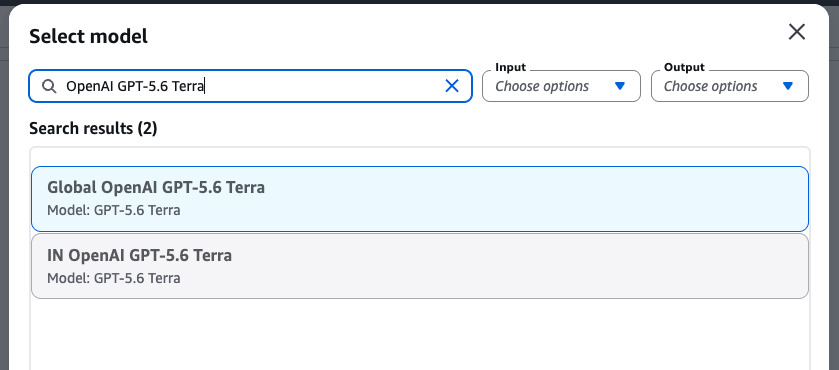
图 1:在 Amazon Bedrock 控制台 playground 中选定的 OpenAI GPT-5.6 Terra 模型
使用 OpenAI Responses API 调用 GPT-5.6 模型
Amazon Bedrock 上的 GPT-5.6 模型原生支持 OpenAI Responses API 格式。如果你的应用程序已在调用 OpenAI 模型,可以将现有 OpenAI SDK 客户端指向孟买或海得拉巴任一印度区域中的 Amazon Bedrock 端点,并将印度地理推理配置文件 ID 作为模型参数传入。
在身份验证方面,Amazon Bedrock 同时接受标准 AWS 凭证和 Amazon Bedrock API 密钥。对于 OpenAI SDK,API 密钥方式更为直接,因为 SDK 会将其作为 bearer token 传递。对于生产环境,请使用 aws-bedrock-token-generator 软件包以编程方式生成短期 API 密钥。该软件包会根据你现有的 AWS 凭证派生 bearer token,因此无需存储静态密钥。
以下示例使用亚太地区(孟买)ap-south-1 端点和印度地理推理配置文件 ID,在 Amazon Bedrock 上调用 OpenAI GPT-5.6 Terra。
from aws_bedrock_token_generator import provide_token
from openai import OpenAI

# Point the OpenAI SDK at the Amazon Bedrock OpenAI-compatible
# endpoint in the Asia Pacific (Mumbai) Region.
client = OpenAI(
    base_url="https://bedrock-runtime.ap-south-1.amazonaws.com/openai/v1",
    api_key=provide_token(region="ap-south-1"),  # short-term Amazon Bedrock API key, valid up to 12 hours
)

# Geographic (India) inference profile ID for GPT-5.6 Terra.
model_id = "in.openai.gpt-5.6-terra"  # "in.openai.gpt-5.6-luna" for luna
response = client.responses.create(
    model=model_id,
    input="Extract the payment due date and total amount from the invoice text that follows, and return them as JSON. <invoice text>",
    max_output_tokens=512,
)
print(response.output_text)
Responses API 使用单一 input 字段,并在 output_text 中返回生成的文本;输出限制通过 max_output_tokens 设置。同一客户端也可用于 Chat Completions API,适合已经使用这一格式的应用程序。
控制推理深度
要控制推理深度,请设置可选的 reasoning 参数,例如 reasoning={"effort": "low"}。Amazon Bedrock 上的 GPT-5.6 模型支持以下推理强度级别:none、low、medium、high、xhigh 和 max。更多信息请参阅相关文章开始在 Amazon Bedrock 上使用 OpenAI GPT-5.6 Sol、Terra 和 Luna。省略该参数时将使用模型默认值。
response = client.responses.create(
    model="in.openai.gpt-5.6-terra",
    input="Extract the payment due date and total amount from the invoice text that follows, and return them as JSON. <invoice text>",
    reasoning={"effort": "high"},  # none | low | medium | high | xhigh | max
    max_output_tokens=512,
)
如需支持参数的完整列表,请参阅Amazon Bedrock 用户指南中的 OpenAI 模型文档。
使用服务端状态进行多轮对话
设置 store=True 可让 Amazon Bedrock 在服务端保留响应,然后在下一轮通过 previous_response_id 引用该响应。你只需发送新一轮内容,无需重新发送此前的对话历史。
first = client.responses.create(
    model="in.openai.gpt-5.6-terra",
    input="Remember this: my favorite number is 42. Reply with just 'stored'..",
    max_output_tokens=50,
    store=True,
)

second = client.responses.create(
    model="in.openai.gpt-5.6-terra",
    previous_response_id=first.id,  # the model recalls the earlier turn
    input="what is my favourite number?",
    max_output_tokens=50,
    store=True,
)

print(second.output_text)
如果使用 previous_response_id 进行链式调用,被引用的响应必须通过 store=True 创建。对未存储响应进行链式调用将返回错误。
流式响应
如需流式输出,请设置 stream=True 并遍历事件:
stream = client.responses.create(
    model="in.openai.gpt-5.6-terra",
    input="Draft a short status update for a delayed shipment, in a polite and direct tone.",
    max_output_tokens=512,
    stream=True,
)

for event in stream:
    if event.type == "response.output_text.delta":
        print(event.delta, end="")
使用 Converse API 调用 GPT-5.6 模型
如果你更偏好 AWS SDK 和 SigV4 身份验证,而非 API 密钥,Amazon Bedrock Converse API 可通过与其他 Amazon Bedrock 模型相同的统一接口支持 GPT-5.6 模型。ConverseStream 用于流式调用场景。
import boto3

# Standard AWS credentials (SigV4), no API key needed.
client = boto3.client("bedrock-runtime", region_name="ap-south-1")
model_id = "in.openai.gpt-5.6-terra"  # India Geo inference profile
response = client.converse(
    modelId=model_id,
    messages=[
        {
            "role": "user",
            "content": [{"text": "Classify this support ticket as billing, technical, or account: <ticket text>"}],
        }
    ],
    inferenceConfig={"maxTokens": 512},
)
print(response["output"]["message"]["content"]
提示词缓存
你的提示词可能共享较长且稳定的前缀,例如系统指令、知识库摘录或一组 few-shot 示例。在这种情况下,Amazon Bedrock 上的 GPT-5.6 模型支持提示词缓存。与未缓存的输入 token 相比,缓存读取的计费可享受 90% 折扣。对于在多轮对话中重复使用相同上下文的检索增强生成(RAG)和 Agent 工作负载,这能迅速积累可观的成本节省。详情请参阅 Amazon Bedrock 提示词缓存文档。
提示词缓存可与印度地理推理配置文件配合使用,因此你可以在印度数据驻留边界内获得成本节省。提示词缓存有显式和隐式两种模式。使用隐式缓存时,Amazon Bedrock 会自动为你放置缓存断点。请注意,最小前缀长度为 1,024 个 token。使用显式缓存时,你可自行标记缓存边界以实现精确控制,且缓存前缀至少保持 30 分钟的活跃状态。
response = client.responses.create(
    model="in.openai.gpt-5.6-terra",
    prompt_cache_key="ticket-agent-ver123",  # same key across all requests
    input=[
        {
            "type": "message",
            "role": "developer",
            "content": [{
                "type": "input_text",
                "text": SYSTEM_INSTRUCTIONS,  # long, static: guidelines, KB excerpts (>= 1,024 tokens)
                "prompt_cache_breakpoint": {"mode": "explicit"},
            }],
        },
        {
            "type": "message",
            "role": "user",
            "content": [{
                "type": "input_text",
                "te
English / 原文
Amazon Bedrock now supports the OpenAI GPT-5.6 models, Terra and Luna, in India, with India geographic cross-Region inference. If you have local data processing requirements in India, including in financial services, healthcare, and the public sector, you can now use these OpenAI models at scale. Amazon Bedrock processes inference requests and data within India.
Both models offer a 1-million-token context window, accept text and image input, and produce text output. Your applications can process long documents, large code bases, and mixed text-and-image workloads in a single request. The processing never leaves the country.
In this post, we walk through how India geographic cross-Region inference works from the Mumbai and Hyderabad Regions. We also show how to get started from the Amazon Bedrock console and with code, using the OpenAI Responses API, OpenAI Chat Completions API, and the Amazon Bedrock Converse API.
India geographic cross-Region inference
Cross-Region inference automatically routes inference requests across multiple AWS Regions to help improve throughput, without you having to manage capacity in each Region yourself. It’s primarily a capacity mechanism. Instead of being bound to one Region’s capacity, your requests draw on a broader pool of compute. That helps you maintain throughput and consistent performance under load, which matters most during traffic peaks.
With India geographic cross-Region inference, Amazon Bedrock routes requests only within the India geography across Regions such as Asia Pacific (Mumbai) Region (ap-south-1) and Asia Pacific (Hyderabad) Region (ap-south-2). You can scale to meet demand while keeping data processed within India to meet data residency requirements. You call the profile from either India Region as the source, and Amazon Bedrock routes the request to the destination India Region based on capacity. For the most current information about model availability in each Region, see Regional availability by models in the Amazon Bedrock User Guide.
Cross-Region inference works through inference profiles. You call a profile ID as the model, and it defines the model and the AWS Regions Amazon Bedrock can route your request to. The India geographic inference profiles keep that routing within India. There are two profiles:
in.openai.gpt-5.6-terrafor GPT-5.6 Terra.in.openai.gpt-5.6-lunafor GPT-5.6 Luna.
With inference profiles, billing and quota consumption are tracked against your account in the source Region, regardless of which backend Region handled the request. Amazon CloudWatch and AWS CloudTrail record log entries in the source Region only, so your monitoring stays in one place.
Choosing between Amazon Bedrock Mantle and Runtime endpoints
For new applications, we recommend the bedrock-runtime endpoint. It supports the Bedrock-native InvokeModel and Converse APIs, the OpenAI-compatible Responses and Chat Completions APIs, and the Anthropic Messages API, and it is where Amazon Bedrock features such as Guardrails, intelligent prompt routing, and cross-Region inference are available.
Data residency
The India geographic profile keeps inference within India. Requests route only between ap-south-1 and ap-south-2. Your input prompts and output results might move between those two Regions. Data is encrypted in transit across the Amazon network. Amazon Bedrock uses a zero data retention (ZDR) data security model. This means that by default, Amazon Bedrock does not store model inputs or outputs. However, for certain models, including GPT-5.6, content flagged by the Amazon Bedrock automated abuse-detection classifiers is retained for offline abuse detection. Please see Abuse detection in the Amazon Bedrock User Guide for more details.
Global cross-Region inference
Amazon Bedrock also offers global cross-Region inference and global inference profiles (prefixed global.) in India that route to supported commercial AWS Regions worldwide for maximum capacity. You send your request to the India Region endpoint, either Asia Pacific (Mumbai) ap-south-1 or Asia Pacific (Hyderabad) ap-south-2, using the global profile ID as the model ID. Amazon Bedrock then decides which destination Region serves the request. Global cross-Region inference supports OpenAI GPT-5.6 models, including Sol, Terra, and Luna. However, if your workload has local data processing requirements, use the India (prefixed in.) profiles instead, because they keep inference within the country. To read more about global cross-Region inference, see Introduce cross-Region inference for OpenAI GPT-5.6 models on Amazon Bedrock.
Access GPT-5.6 models from the Amazon Bedrock console
You can try GPT-5.6 in the text playground in the Amazon Bedrock console, which requires no coding or SDK setup. You can send prompts, adjust inference parameters, and switch between variants to get a feel for each model before you integrate the API.
- Open the Amazon Bedrock console in a Region where the models are available, such as Asia Pacific (Mumbai) ap-south-1.
- In the navigation pane, under Test , choose Playground.
- Choose Select model in the middle of the page.
- Search for OpenAI GPT-5.6 Terra, select IN OpenAI GPT-5.6 Terra , and choose Apply.
- Enter a prompt and choose Run to generate a response.
Figure 1: The OpenAI GPT-5.6 Terra model selected in the Amazon Bedrock console playground
Call GPT-5.6 models with the OpenAI Responses API
GPT-5.6 models on Amazon Bedrock natively support the OpenAI Responses API format. If your application already calls OpenAI models, you can point your existing OpenAI SDK client at the Amazon Bedrock endpoint in either India Region, Mumbai or Hyderabad, and pass an India geographic inference profile ID as the model parameter.
For authentication, Amazon Bedrock accepts either standard AWS credentials or an Amazon Bedrock API key. The API key path is the straightforward fit for the OpenAI SDK, which passes it as the bearer token. For production, generate short-term API keys programmatically with the aws-bedrock-token-generator package. It derives a bearer token from your existing AWS credentials, so no static key needs to be stored.
The following example uses Asia Pacific (Mumbai) ap-south-1 endpoint and India geographic inference profile ID to call OpenAI GPT-5.6 Terra on Amazon Bedrock.
from aws_bedrock_token_generator import provide_token
from openai import OpenAI

# Point the OpenAI SDK at the Amazon Bedrock OpenAI-compatible
# endpoint in the Asia Pacific (Mumbai) Region.
client = OpenAI(
    base_url="https://bedrock-runtime.ap-south-1.amazonaws.com/openai/v1",
    api_key=provide_token(region="ap-south-1"),  # short-term Amazon Bedrock API key, valid up to 12 hours
)

# Geographic (India) inference profile ID for GPT-5.6 Terra.
model_id = "in.openai.gpt-5.6-terra"  # "in.openai.gpt-5.6-luna" for luna
response = client.responses.create(
    model=model_id,
    input="Extract the payment due date and total amount from the invoice text that follows, and return them as JSON. <invoice text>",
    max_output_tokens=512,
)
print(response.output_text)
The Responses API uses a single input field and returns the generated text in output_text, with the output limit set through max_output_tokens. The same client also works with the Chat Completions API, useful if your application already uses this format.
Controlling reasoning depth
To control reasoning depth, set the optional reasoning parameter, for example reasoning={"effort": "low"}. GPT-5.6 models on Amazon Bedrock support the following reasoning effort levels: none, low, medium, high, xhigh, and max. For more information, see the related post Get started with OpenAI GPT-5.6 Sol, Terra, and Luna on Amazon Bedrock. Omitting the parameter uses the model default.
response = client.responses.create(
    model="in.openai.gpt-5.6-terra",
    input="Extract the payment due date and total amount from the invoice text that follows, and return them as JSON. <invoice text>",
    reasoning={"effort": "high"},  # none | low | medium | high | xhigh | max
    max_output_tokens=512,
)
For the full list of supported parameters, see the OpenAI model documentation in the Amazon Bedrock User Guide.
Multi-turn conversations with server-side state
Set store=True to have Amazon Bedrock retain the response server-side, then reference it on the next turn with previous_response_id. You send only the new turn. You don’t resend the prior conversation history.
first = client.responses.create(
    model="in.openai.gpt-5.6-terra",
    input="Remember this: my favorite number is 42. Reply with just 'stored'..",
    max_output_tokens=50,
    store=True,
)

second = client.responses.create(
    model="in.openai.gpt-5.6-terra",
    previous_response_id=first.id,  # the model recalls the earlier turn
    input="what is my favourite number?",
    max_output_tokens=50,
    store=True,
)

print(second.output_text)
If you chain with previous_response_id, the response you chain from must have been created with store=True. Chaining from an unstored response returns an error.
Streaming responses
For streaming, set stream=True and iterate over the events:
stream = client.responses.create(
    model="in.openai.gpt-5.6-terra",
    input="Draft a short status update for a delayed shipment, in a polite and direct tone.",
    max_output_tokens=512,
    stream=True,
)

for event in stream:
    if event.type == "response.output_text.delta":
        print(event.delta, end="")
Call GPT-5.6 models with the Converse API
If you prefer the AWS SDK and SigV4 authentication over an API key, the Amazon Bedrock Converse API supports GPT-5.6 models with the same unified interface it provides for other models on Amazon Bedrock. ConverseStream covers the streaming case.
import boto3

# Standard AWS credentials (SigV4), no API key needed.
client = boto3.client("bedrock-runtime", region_name="ap-south-1")
model_id = "in.openai.gpt-5.6-terra"  # India Geo inference profile
response = client.converse(
    modelId=model_id,
    messages=[
        {
            "role": "user",
            "content": [{"text": "Classify this support ticket as billing, technical, or account: <ticket text>"}],
        }
    ],
    inferenceConfig={"maxTokens": 512},
)
print(response["output"]["message"]["content"]
Prompt caching
Your prompts might share a long, stable prefix, such as a system instruction, a knowledge base excerpt, or a set of few-shot examples. When they do, GPT-5.6 models on Amazon Bedrock support prompt caching. Cached reads are billed at a 90 percent discount compared to uncached input tokens. This adds up quickly for Retrieval Augmented Generation (RAG) and agent workloads that repeat the same context across many turns. You can find details on Amazon Bedrock prompt caching documentation.
Prompt caching works with the India geographic inference profiles, so you keep the savings under the India data-residency boundary. Prompt caching runs in two modes, explicit and implicit. With implicit caching, Amazon Bedrock places the cache breakpoints for you automatically. Note that the minimum prefix length is 1,024 tokens. With explicit caching, you mark the cache boundary yourself for precise control, and the cached prefix stays warm for at least 30 minutes.
response = client.responses.create(
    model="in.openai.gpt-5.6-terra",
    prompt_cache_key="ticket-agent-ver123",  # same key across all requests
    input=[
        {
            "type": "message",
            "role": "developer",
            "content": [{
                "type": "input_text",
                "text": SYSTEM_INSTRUCTIONS,  # long, static: guidelines, KB excerpts (>= 1,024 tokens)
                "prompt_cache_breakpoint": {"mode": "explicit"},
            }],
        },
        {
            "type": "message",
            "role": "user",
            "content": [{
                "type": "input_text",
                "text": user_question,  # changes on every request
            }],
        },
    ],
    extra_body={"prompt_cache_options": {"mode": "explicit"}},
)
Every response tells you what the cache did, in usage.input_tokens_details:
details = response.usage.input_tokens_details
print(f"cached: {details.cached_tokens}, written: {details.cache_write_tokens}")
On the first call, you will see cache_write_tokens populated as the prefix is stored. On subsequent calls, the same tokens come back as cached_tokens, billed at the cache-read rate. Because these counts are part of input_tokens rather than added on top, a cached token is counted and charged once.
IAM permissions for India geographic cross-Region inference
To allow an AWS Identity and Access Management (IAM) role to invoke GPT-5.6 models through the India geographic inference profile, grant the role access to three resources. These are the India geographic inference profile itself, the foundation model (FM) in the source Region, and the foundation model in each destination Region listed in the profile (ap-south-1 and ap-south-2). You can use the AmazonBedrockLimitedAccess managed policy or create your own.
The following example grants permission to use the GPT-5.6 Terra model through the India geographic inference profile. The source Region is ap-south-1, and the destination Regions are ap-south-1 and ap-south-2. Replace <ACCOUNT> with your account ID, and duplicate the resources for in.openai.gpt-5.6-luna if the role needs both models. If you source from Hyderabad, use the ap-south-2 inference-profile ARN in the first statement. The foundation-model resources in the second statement stay the same, because they already list both India Regions.
{
    "Version": "2012-10-17",
    "Statement": [
        {
            "Sid": "GrantGeoCrisInferenceProfileAccess",
            "Effect": "Allow",
            "Action": [
                "bedrock:InvokeModel*"
            ],
            "Resource": [
                "arn:aws:bedrock:ap-south-1:<ACCOUNT>:inference-profile/in.openai.gpt-5.6-terra",
                "arn:aws:bedrock:ap-south-1:<ACCOUNT>:project/default"
            ]
        },
        {
            "Sid": "GrantGeoCrisModelAccess",
            "Effect": "Allow",
            "Action": [
                "bedrock:InvokeModel*"
            ],
            "Resource": [
                "arn:aws:bedrock:ap-south-1::foundation-model/openai.gpt-5.6-terra",
                "arn:aws:bedrock:ap-south-2::foundation-model/openai.gpt-5.6-terra"
            ],
            "Condition": {
                "StringEquals": {
                    "bedrock:InferenceProfileArn": "arn:aws:bedrock:ap-south-1:<ACCOUNT>:inference-profile/in.openai.gpt-5.6-terra"
                }
            }
        },
        {
            "Sid": "AllowBearerTokenAuth",
            "Effect": "Allow",
            "Action": ["bedrock:CallWithBearerToken"],
            "Resource": "*"
        }
    ]
}
The first statement grants access to the India geographic inference profile for requests originating from the source Region. The second grants access to the foundation model in the source Region and in every destination Region listed in the profile. This access is scoped to that one profile through the bedrock:InferenceProfileArn condition. These policies grant bedrock:CallWithBearerToken and bedrock:InvokeModel on the project/default resource. The OpenAI Responses and Chat Completions APIs use this resource to authenticate with an Amazon Bedrock API key and run inference.
Service Control Policy (SCP)
If your organization uses Service Control Policies to block unused Regions, your Region-specific SCP conditions must allow every destination Region listed in the geographic inference profile.
For the India geographic inference profile, both ap-south-1 and ap-south-2 must be permitted. Blocking either destination Region causes cross-Region inference to fail even though the source Region remains accessible.
Setting up Codex with GPT-5.6 on Amazon Bedrock
Codex can use the geographic inference profiles through Amazon Bedrock Runtime. Install the latest Codex CLI (codex-cli 0.149.1 or later) to use the Amazon Bedrock Runtime model provider. For organizations whose identity provider is Okta, Auth0, Microsoft Entra ID, Amazon Cognito, or AWS IAM Identity Center, the AWS OIDC Auth Helper repository provides a sample credential helper.
First, follow the guide to configure your identity provider, the corresponding AWS federation resource, and an IAM role carrying the Bedrock permissions shown earlier. Then add a named profile to ~/.aws/config, so the helper does not replace credentials resolved by the default profile.
[profile <AWS_OIDC_PROFILE>]
credential_process = <ABSOLUTE_PATH_TO_CREDENTIAL_PROCESS> --profile <OIDC_HELPER_PROFILE>
region = ap-south-1
output = json
This federation helper exchanges an OIDC token for temporary AWS credentials, and Codex reads through the standard AWS credential chain with no further configuration. Next, create or update ~/.codex/config.toml and reference the AWS profile, see the Codex configuration reference for other supported settings:
model = "in.openai.gpt-5.6-terra"
model_provider = "amazon-bedrock-runtime"
model_reasoning_effort = "high"

[model_providers.amazon-bedrock-runtime.aws]
profile = "<AWS_OIDC_PROFILE>"
region = "ap-south-1"
If the helper does not have a valid cached session, it opens the configured sign-in page in your browser. After you authenticate, the helper returns temporary AWS credentials through credential_process. Requests are signed with AWS SigV4. When the profile is backed by AWS IAM Identity Center, the credentials are already short-term and rotate with the SSO session. To use this in the Asia Pacific (Hyderabad) Region, set the Region to ap-south-2 in the AWS profile and Codex configuration.
If you already have AWS credentials configured locally, Codex can use them directly. Point the Amazon Bedrock Runtime provider at an AWS profile and an India Region, and set the model to an India geographic inference profile ID.
Create or update ~/.codex/config.toml:
  model = "in.openai.gpt-5.6-terra"
  model_provider = "amazon-bedrock-runtime"
  model_reasoning_effort = "high"

  [model_providers.amazon-bedrock-runtime.aws]
  profile = "default"
  region = "ap-south-1"
The profile value is any profile in ~/.aws/config or ~/.aws/credentials. In this case, it is shown as “default”, but you can use your own named profile if you keep multiple accounts.
Monitoring and logging
The India geographic inference profiles work with the same account-level controls you already use for other models on Amazon Bedrock. Requests appear in Amazon Bedrock model invocation logging the same way on-demand requests do. You can deliver those logs to Amazon Simple Storage Service (Amazon S3) or Amazon CloudWatch Logs. CloudWatch metrics for invocation count, token count, latency, throttles, and errors are published per inference profile. You can track GPT-5.6 models usage from Mumbai or Hyderabad without correlating logs across Regions yourself.
To see which destination Region processed a given request, CloudTrail events include an additionalEventData field with an inferenceRegion key. For the India profile, this is always ap-south-1 or ap-south-2, which gives you an auditable record that inference stayed within India. Usage is itemized on AWS Cost Explorer and the AWS Cost and Usage Report. Spend attribution by model works the same way as for the rest of your Amazon Bedrock workloads.
Conclusion
Amazon Bedrock brings the OpenAI GPT-5.6 Terra and Luna models, with a 1-million-token context window, to customers building in India. The India geographic inference profiles are available on the bedrock-runtime endpoint, which is the endpoint we recommend for new applications. With India geographic cross-Region inference, you can scale across the Mumbai and Hyderabad Regions while keeping inference within the country. You can call the models through the OpenAI Responses API, the OpenAI Chat Completions API, or the Amazon Bedrock Converse API. If you have an existing workload on the bedrock-mantle endpoint, it remains fully supported and no changes are required; to adopt the India geographic profiles, point that workload at the bedrock-runtime endpoint in Mumbai or Hyderabad. Review the Amazon Bedrock pricing page for current GPT-5.6 rates before sizing a production workload.
To get started, review the model cards for GPT-5.6 Terra and Luna and the Cross-Region inference section in the Amazon Bedrock User Guide. Try a prompt in the Amazon Bedrock console playground in Mumbai or Hyderabad, then wire up the code examples shared earlier in this post. If you run into an issue or want to ask the community, AWS re:Post is a good place to search or post a question.
About the authors
Sahil Verma
Sahil is a Senior AI Specialist Solutions Architect at AWS based in India, where he focuses on Agentic AI and Generative AI initiatives for Banking, Financial Services, and Insurance (BFSI) customers. He works with customers from ideation to production—spanning agentic AI systems, AI engineering, foundation models, and inference-optimized architectures—to deliver measurable business outcomes.
Melanie Li
Melanie Li, PhD, is a Senior Generative AI Specialist Solutions Architect at AWS based in Sydney, Australia, where her focus is on working with customers to build solutions using state-of-the-art AI/ML tools. She has been actively involved in multiple generative AI initiatives across APJ, harnessing the power of large language models. Prior to joining AWS, Dr. Li held data science roles in the financial and retail industries.
Saurabh Trikande
Saurabh is a Senior Product Manager for Amazon Bedrock and Amazon SageMaker Inference. He is passionate about working with customers and partners, motivated by the goal of democratizing AI. He focuses on core challenges related to deploying complex AI applications, inference with multi-tenant models, cost optimizations, and making the deployment of generative AI models more accessible. In his spare time, Saurabh enjoys hiking, learning about innovative technologies, following TechCrunch, and spending time with his family.
Stephanie Chiao
Stephanie is a Generative AI Service and Capacity Lead at AWS.