Amazon SageMaker Feature Store 推出 UpdateRecord,实现特征级写入
英文标题:Amazon SageMaker Feature Store introduces UpdateRecord for feature-level writes
Amazon SageMaker Feature Store 新增 UpdateRecord API,允许开发者在一次调用中仅更新一个或多个特征值,无需读取或重写整条记录。该能力适用于基于 Amazon DynamoDB 的 Standard 在线存储层和基于 Amazon ElastiCache 的 In-Memory 在线存储层,其中 Standard 层需使用新的 Standard_V2 存储格式。新 API 通过原子合并减少读写延迟、RCU 成本及多流水线并发更新造成的丢失更新风险,同时支持基于 EventTime 的时序校验。AWS 还提供 Standard 到 Standard_V2 的批量迁移和原地切换方案,并新增 IAM 条件键以限制主体可更新的特征字段。
 1.3 MB
 101.1 KB
 124.1 KB
 345.0 KB
 141.2 KB
 346.5 KB
 180.3 KB
 25.8 KB
 22.0 KB
 18.1 KB
 23.0 KB
 16.5 KB
 178.9 KB
中文
我们很高兴宣布 Amazon SageMaker Feature Store 推出特征级写入。Amazon SageMaker Feature Store 是一个完全托管、专为存储、共享和管理机器学习(ML)特征而构建的存储库;特征是用于训练模型和生成预测的已处理数据。借助新的 UpdateRecord API,您现在可以在一次调用中更新一个或多个特征值,而无需读取或重写整条记录。此功能同时适用于 Standard(由 Amazon DynamoDB 支持)和 In-Memory(由 Amazon ElastiCache 支持)在线存储层。
挑战:每次变更都要进行整条记录写入
特征组(Feature Group)是相关特征的逻辑集合,一个或多个 ML 模型会使用这些特征来训练新模型或生成推理预测。此前,即使只更新特征组中的一个特征值,也需要通过 PutRecord 完成完整的“读取—修改—写入”循环。如果您的欺诈评分流水线需要刷新某位客户的 risk_score,应用程序必须:
这种模式会为每次更新增加额外延迟,消耗不必要的读取容量;当多个流水线并发更新同一记录中的不同特征时,还会引入竞态条件。在最坏情况下,一个流水线的写入可能会静默覆盖另一个流水线的写入。这是典型的丢失更新问题。
除延迟和正确性问题外,“读取—修改—写入”模式还会带来成本开销。每次写入前所需的额外 GetRecord 调用会产生额外的读取容量单位(RCU)费用。对于运行大规模、具有宽特征组且更新频率很高的客户,这些成本会迅速累积。
推出 UpdateRecord
UpdateRecord API 调用消除了“读取—修改—写入”循环。您只需提供希望变更的特征,Amazon SageMaker Feature Store 就会以原子方式将更新合并至现有记录。请求中未包含的特征将按原样保留。
UpdateRecord API 数据流
下图展示了 UpdateRecord API 如何处理部分写入请求,并与离线存储同步。
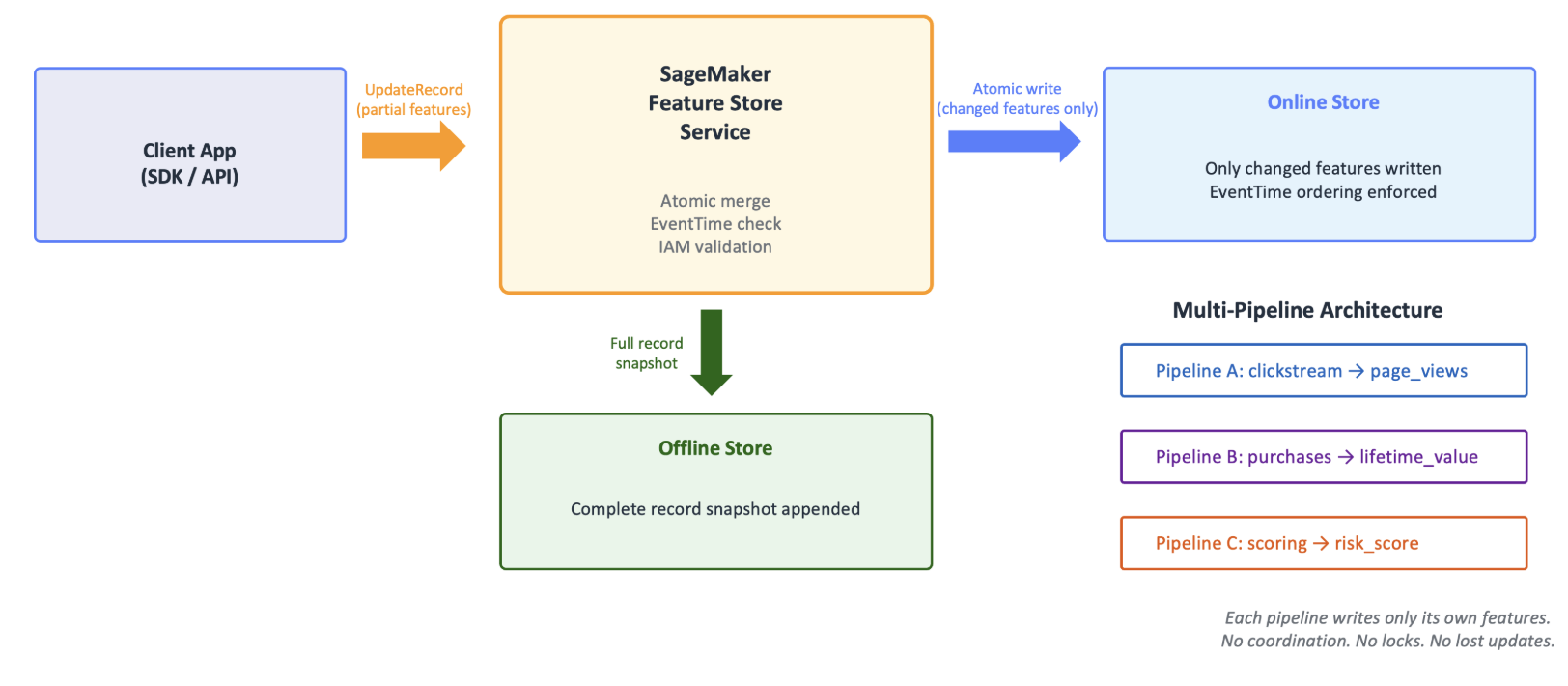
图 1:UpdateRecord API 到在线和离线存储的数据流
客户端应用程序仅携带已变更的特征调用 UpdateRecord API。Feature Store 服务会验证 AWS Identity and Access Management(IAM)权限,检查 EventTime 排序以拒绝过期写入,并执行原子合并。蓝色箭头表示仅将发生变化的特征写入在线存储的一次操作。同时,完整记录快照会自动复制到离线存储,以确保训练数据集的准确性。多个流水线(点击流、购买、评分)可以各自独立地向同一记录写入其负责的特征,无需协调。
请求格式
POST /FeatureGroup/{FeatureGroupName}/Record

{
  "RecordIdentifierValueAsString": "user_123",
  "Features": [
    { "FeatureName": "risk_score", "ValueAsString": "0.87" },
    { "FeatureName": "last_login", "ValueAsString": "2026-07-21T08:15:00Z" }
  ],
  "TtlDuration": {  // optional
    "Unit": "Days",
    "Value": 30
  }
}
- FeatureGroupName — 目标特征组。
- RecordIdentifierValueAsString — 要更新记录的主键。该记录必须已经存在(UpdateRecord 不是 upsert 操作)。
- Features — 要设置的一个或多个特征值列表。每次调用最多支持 100 个特征。
- TtlDuration(可选)— 覆盖或设置记录级生存时间(TTL)。如果提供该参数,则还必须提供 EventTime。
更新 EventTime:若还要更新与记录一同存储的 EventTime(两个必需字段之一),请在 Features 参数列表中提供新值。要使更新持久化,该 EventTime 必须比记录中当前存储的 EventTime 更新(即时间戳更晚)。否则,整个更新记录调用将被拒绝,并返回 HTTP 409 错误。
有关更多错误详细信息,请参阅此文档。
注意事项:新的 Standard_V2 存储格式
Amazon SageMaker Feature Store 在线存储传统上提供两个层级,每个层级均有各自的后端存储提供商。Standard Tier 由 Amazon DynamoDB 支持,In-Memory Tier 则由 Amazon ElastiCache(Redis OSS)支持。现在,Standard Tier 新增一种名为 Standard_V2 的存储格式。这是一种不同的序列化格式,支持特征级写入等额外功能。
**注意:**如果使用 In-Memory 层,则无需新的存储类型;特征级写入可直接适用于所有现有的 In-Memory 特征组。
在 Standard Tier 中使用特征级写入需要采用新的 Standard_V2 存储格式。您可以在创建特征组时通过以下语法选择启用:
import boto3

sm = boto3.client("sagemaker")

sm.create_feature_group(
    FeatureGroupName="user-profile-fg",
    RecordIdentifierFeatureName="user_id",
    EventTimeFeatureName="event_time",
    OnlineStoreConfig={
        "EnableOnlineStore": True,
        "StorageType": "Standard_V2"  # enables feature-level writes
    },
    FeatureDefinitions=[
        {"FeatureName": "user_id", "FeatureType": "String"},
        {"FeatureName": "event_time", "FeatureType": "String"},
        {"FeatureName": "risk_score", "FeatureType": "Fractional"},
        {"FeatureName": "last_login", "FeatureType": "String"},
        {"FeatureName": "balance", "FeatureType": "Fractional"},
    ],
)
将现有特征组从 Standard 迁移至 Standard_V2
如果您已经在使用原始 Standard 存储类型的特征组,可以迁移至 Standard_V2,以获得特征级写入能力,并保留 Standard 层原有的功能。以下部分介绍两种迁移策略。您的选择取决于对停机时间的敏感程度、首选迁移时机,以及是否需要回滚选项。
策略 A:使用 Feature Processor 进行批量迁移
- 使用 Feature Processor SDK 从现有 Standard 特征组读取记录,并将其重新摄取至新的 Standard_V2 特征组。
- 优点:您可以控制迁移时机。原始特征组会在迁移期间保持不变。回滚很直接,因为只需切回旧特征组。
- 缺点:该策略需要一个托管迁移作业。您需要预先为整个数据集支付完整的读取和写入成本。还必须更新应用程序客户端,使其指向新的特征组名称。
策略 B:使用 UpdateFeatureGroup API 进行原地受控切换
调用 UpdateFeatureGroup 并设置 OnlineStoreConfig.StorageType = “Standard_V2”,即可原地切换特征组的存储格式:
import boto3
sm = boto3.client("sagemaker")

sm.update_feature_group(
    FeatureGroupName="my-existing-fg",
    OnlineStoreConfig={"StorageType": "Standard_V2"}
)
一旦特征组被声明为 Standard_V2 格式,调用 PutRecord 或 BatchWriteRecord 将把底层格式更新为 Standard_V2。
这种方法不需要停机,仅对实际被触及的记录收取迁移成本。由于特征组名称和 API 端点保持不变,它能够保留现有应用程序代码。切换至 Standard_V2 不可逆,而从未被写入的冷数据记录将继续保留在旧格式中,直到被触及。
建议:对于大多数客户,策略 B(原地 UpdateFeatureGroup)是首选方案,因为它实现零停机,并采用按触及记录付费的经济模式。只有在需要完全可逆的迁移路径,或需要重命名或重构特征组时,才应使用策略 A。
EventTime:内置时序排序
UpdateRecord 支持与 PutRecord 相同的基于 EventTime 的排序机制。当您在请求中包含 EventTime 时:
- 如果提供的 EventTime 晚于或等于记录当前的 EventTime,更新将被应用,且记录的 EventTime 会推进。
- 如果提供的 EventTime 早于记录当前的 EventTime,更新将被拒绝,并返回 409 ConflictException。这样有助于防止过期或乱序事件覆盖较新的数据。
当省略 EventTime 时,更新会应用新的特征变更,同时保持记录上现有的 EventTime 不变。这非常适合多流水线架构:不同流水线负责不同特征,且不共享单一事件时钟。
使用场景
以下使用场景说明 UpdateRecord 如何简化常见的特征工程工作流。
流式特征补充
实时和流式场景通常需要由多个不同频率的数据流生成的数据。
场景:实时点击流流水线每隔数秒接收 page_views 和 session_duration 数据,而夜间批处理流水线刷新 lifetime_value 和 customer_segment 数据。使用 UpdateRecord 后,每个流水线只需向核心记录提交自己负责的特征,无需协调,也不会发生丢失更新。
回填新特征
借助 Amazon SageMaker Feature Store,您可以修改支撑特征组的表模式,以添加新列(特征)。
场景:团队向现有特征组添加 preferred_language 和 notification_opt_in。无需重写每条记录,您只需使用 UpdateRecord 调用并提供新字段的值。现有特征值不会受到影响。
大规模错误修正
当数据科学或 MLOps 团队发现现有特征数据存在差异时,现在可以高效地采取修正措施。
**场景:**数据质量作业发现 50,000 条记录的 customer_segment 分类错误。借助 UpdateRecord,您可以修正数千条记录中的一个字段,而无需冒着损坏其他特征值的风险。
高速特征更新
特征组通常包含多个事务数据字段,尽管这些字段会在不同时间生成或接收。
场景:欺诈检测系统在每次刷卡时都会接收 transaction_velocity。借助 UpdateRecord,每次写入只会触及发生变化的单个特征,从而消除了大规模整条记录写入的开销。
面向企业实体的多生产者特征组
大型组织通常围绕核心业务实体构建 Feature Store:每类实体对应一个特征组,数十个独立生产者会向相同记录贡献特征。
**场景:**一家企业为每个业务实体(例如客户、保单、车辆)维护一个特征组。该组包含数百万条记录和数百个特征,这些特征由不同团队、批量提取—转换—加载(ETL)作业、流式分析和实时评分引擎生成。没有 UpdateRecord 时,每个生产者都必须读取完整记录,注入自身负责的特征子集,再写回整个实体。这会产生压实作业、竞态条件,以及每月读取和写入操作成本。使用 UpdateRecord 后,每个生产者只会以原子方式写入自己的特征,无需再构建自定义压实解决方案。
细粒度访问控制
UpdateRecord 与 IAM 集成,因此您可以精确控制谁能够更新哪些特征。现提供两个新的 IAM 条件键:
- sagemaker:IsUpdateRecord(Bool)— 区分部分更新操作与完整 PutRecord 写入。
- sagemaker:UpdatableFeatures(ArrayOfString)— 限制主体允许更新的特征名称。
示例:仅允许更新非敏感特征
{
  "Effect": "Allow",
  "Action": "sagemaker:PutRecord",
  "Resource": "arn:aws:sagemaker:*:*:feature-group/user-profile-fg",
  "Condition": {
    "Bool": { "sagemaker:IsUpdateRecord": "true" },
    "ForAllValues:StringEquals": {
      "sagemaker:UpdatableFeatures": ["age", "score", "last_activity"]
    }
  }
}
该策略允许主体对 age、score 和 last_activity 调用 UpdateRecord,但会阻止对其他任何特征(例如 ssn 或 salary)的更新,并完全阻止直接调用 PutRecord。
向后兼容性
现有 IAM 策略若已定义
English / 原文
We are excited to announce feature-level writes for Amazon SageMaker Feature Store. Amazon SageMaker Feature Store is a fully managed, purpose-built repository to store, share, and manage machine learning (ML) features, the processed data used for training models and generating predictions. With the new UpdateRecord API, you can now update one or more feature values in a single call without reading or rewriting the entire record. This capability is available for both the Standard (Amazon DynamoDB-backed) and In-Memory (Amazon ElastiCache-backed) online store tiers.
The challenge: Full-record writes for every change
A Feature Group is a logical collection of features that are related, and are used by one or more ML models to either train a new model or generate inference predictions. Until now, updating even a single feature value in a feature group required a full read-modify-write cycle using PutRecord. If your fraud-scoring pipeline needed to refresh a customer’s risk_score, your application had to:
- Read the complete record (all features) by using GetRecord.
- Merge the new value in application code.
- Write the entire record back with PutRecord.
This pattern added extra latency per update, consumed unnecessary read capacity, and introduced race conditions when multiple pipelines concurrently updated different features in the same record. In the worst case, one pipeline’s write could silently overwrite another’s. This is a classic lost-update problem.
Beyond latency and correctness issues, the read-modify-write pattern also carries a cost overhead. The additional GetRecord calls required before each write generate extra Read Capacity Units (RCUs) charges. For customers operating at scale with wide feature groups and high update frequencies, these costs add up quickly.
Introducing UpdateRecord
The UpdateRecord API call removes the read-modify-write cycle. You provide only the features that you want to change, and Amazon SageMaker Feature Store applies the updates atomically to the existing record. Features you don’t include in the request are preserved as-is.
UpdateRecord API data flow
The following diagram illustrates how the UpdateRecord API processes a partial write request and synchronizes with the offline store.
Figure 1: UpdateRecord API data flow to the online and offline stores
The client application calls the UpdateRecord API with only the changed features. The Feature Store service validates AWS Identity and Access Management (IAM) permissions, checks EventTime ordering to reject stale writes, and performs an atomic merge. The blue arrow represents the single operation that writes only the changed features to the online store. Meanwhile, a full record snapshot is automatically replicated to the offline store to keep training datasets accurate. Multiple pipelines (clickstream, purchases, scoring) each write their own features independently to the same record. No coordination is needed.
Request shape
POST /FeatureGroup/{FeatureGroupName}/Record

{
  "RecordIdentifierValueAsString": "user_123",
  "Features": [
    { "FeatureName": "risk_score", "ValueAsString": "0.87" },
    { "FeatureName": "last_login", "ValueAsString": "2026-07-21T08:15:00Z" }
  ],
  "TtlDuration": {  // optional
    "Unit": "Days",
    "Value": 30
  }
}
- FeatureGroupName — the target feature group.
- RecordIdentifierValueAsString — the primary key of the record to update. The record must already exist (UpdateRecord is not an upsert).
- Features — a list of one or more feature values to set. Up to 100 features per call.
- TtlDuration (optional) — override or set a per-record time-to-live (TTL). If provided, EventTime must also be present.
Updating EventTime : To also update the EventTime (one of two required fields) stored with the record, provide a new value in the Features parameter list. For the update to persist, this EventTime must be newer (a later timestamp) than the existing EventTime stored for the record. Otherwise, the entire update record call is rejected with an HTTP 409 error.
For more Error details, refer to this documentation.
Things to know: New storage format Standard_V2
The Amazon SageMaker Feature Store online storage has traditionally offered two tiers, each with its own backend storage provider. Standard Tier is backed by Amazon DynamoDB, and the In-Memory Tier is backed by Amazon ElastiCache (Redis OSS). There is now a new storage format for the Standard Tier named Standard_V2. This represents a different serialization format that supports additional capabilities such as feature-level writes.
Note: If using the In-Memory tier, no new storage type is needed and feature-level writes work on all existing In-Memory feature groups out of the box.
Using feature-level writes with the Standard Tier will require the new Standard_V2 storage format. You opt in at feature group creation time with this syntax:
import boto3

sm = boto3.client("sagemaker")

sm.create_feature_group(
    FeatureGroupName="user-profile-fg",
    RecordIdentifierFeatureName="user_id",
    EventTimeFeatureName="event_time",
    OnlineStoreConfig={
        "EnableOnlineStore": True,
        "StorageType": "Standard_V2"  # enables feature-level writes
    },
    FeatureDefinitions=[
        {"FeatureName": "user_id", "FeatureType": "String"},
        {"FeatureName": "event_time", "FeatureType": "String"},
        {"FeatureName": "risk_score", "FeatureType": "Fractional"},
        {"FeatureName": "last_login", "FeatureType": "String"},
        {"FeatureName": "balance", "FeatureType": "Fractional"},
    ],
)
Migrating existing feature groups from Standard to Standard_V2
If you already have feature groups on the original Standard storage type, you can migrate to Standard_V2 to benefit from feature-level writes and maintain the same capabilities from Standard tier. The following sections describe two migration strategies. Your choice depends on your sensitivity to downtime, your preferred migration timing, and whether you want the option to roll back.
Strategy A: Bulk migration with Feature Processor
- Use the Feature Processor SDK to read records from the existing Standard feature group and re-ingest them into a new Standard_V2 feature group.
- Pros: You control the timing. The original feature group stays intact during migration. Rollback is straightforward, because you switch back to the old feature group.
- Cons: This strategy requires a managed migration job. You pay the full read and write cost for the entire dataset upfront. You must update application clients to point to the new feature group name.
Strategy B: In-place controlled switchover with UpdateFeatureGroup API
Call UpdateFeatureGroup with OnlineStoreConfig.StorageType = “Standard_V2” to flip the feature group’s storage format in place:
import boto3
sm = boto3.client("sagemaker")

sm.update_feature_group(
    FeatureGroupName="my-existing-fg",
    OnlineStoreConfig={"StorageType": "Standard_V2"}
)
Once the feature group is declared to be in Standard_V2 format, Calls to PutRecord or BatchWriteRecord update the underlying format to Standard_V2.
This approach requires zero downtime and charges migration cost only for records that are actually touched. It preserves existing application code, because the feature group name and API endpoints remain unchanged. The switch to Standard_V2 is irreversible, and cold records that are never written linger in the legacy format until touched.
Recommendation: For most customers, Strategy B (in-place UpdateFeatureGroup) is the preferred approach because of zero downtime and pay-per-touch economics. Use Strategy A only if you require a fully reversible migration path or need to rename or restructure the feature group.
EventTime: Temporal ordering built in
UpdateRecord supports the same EventTime-based ordering as PutRecord. When you include an EventTime in your request:
- If the provided EventTime is newer than or equal to the record’s current EventTime, the update is applied and the record’s EventTime advances.
- If the provided EventTime is earlier than the record’s current EventTime, the update is rejected with a 409 ConflictException. This helps prevent stale or out-of-order events from overwriting fresher data.
When EventTime is omitted, the update applies new feature changes while the existing EventTime on the record is left unchanged. This is ideal for multi-pipeline architectures where different pipelines own different features and don’t share a single event clock.
Use cases
The following use cases demonstrate how UpdateRecord simplifies common feature engineering workflows.
Streaming feature hydration
Real-time and streaming scenarios typically require data generated by multiple streams that occur at different frequencies.
Scenario : A real-time clickstream pipeline receives page_views and session_duration data every few seconds, and a nightly batch pipeline refreshes lifetime_value and customer_segment data. With UpdateRecord, each pipeline submits only the features it owns to the core record, with no coordination and no lost updates.
Backfilling new features
With Amazon SageMaker Feature Store, you can modify the table schema that backs the feature group to add new columns (features).
Scenario : Your team adds preferred_language and notification_opt_in to an existing feature group. Instead of rewriting every record, you call UpdateRecord with only the new field values. Existing feature values remain untouched.
Error correction at scale
When a data science or MLOps team discovers discrepancies in existing feature data, they can now take action to correct it efficiently.
Scenario: A data-quality job discovers that customer_segment is miscategorized for 50,000 records. With UpdateRecord, you can fix one field across thousands of records without risking corruption of other feature values.
High-velocity feature updates
Feature Groups often contain multiple fields of transactional data, even though these fields are generated or received at different times.
Scenario : A fraud detection system receives transaction_velocity on every card swipe. With UpdateRecord, each write touches only the single feature that changed, which eliminates the overhead of full-record writes at scale.
Multi-producer feature groups for enterprise entities
Large organizations often model their Feature Store around core business entities, one feature group per entity type, with dozens of independent producers contributing features to the same records.
Scenario: An enterprise maintains a single feature group per business entity (for example, customer, policy, vehicle). The group holds millions of records and hundreds of features produced by different teams, batch extract, transform, and load (ETL) jobs, streaming analytics, and real-time scoring engines. Without UpdateRecord, each producer must read the full record, inject its subset, and write back the entire entity. This creates compaction jobs, race conditions, and monthly costs in read and write operations. With UpdateRecord, each producer writes only its own features atomically, which removes the need for custom compaction solutions.
Fine-grained access control
UpdateRecord integrates with IAM so you can control exactly who can update which features. Two new IAM condition keys are available:
- sagemaker:IsUpdateRecord (Bool) — distinguish partial-update operations from full PutRecord writes.
- sagemaker:UpdatableFeatures (ArrayOfString) — restrict which feature names a principal is allowed to update.
Example: Allow updates only to non-sensitive features
{
  "Effect": "Allow",
  "Action": "sagemaker:PutRecord",
  "Resource": "arn:aws:sagemaker:*:*:feature-group/user-profile-fg",
  "Condition": {
    "Bool": { "sagemaker:IsUpdateRecord": "true" },
    "ForAllValues:StringEquals": {
      "sagemaker:UpdatableFeatures": ["age", "score", "last_activity"]
    }
  }
}
This policy allows the principal to call UpdateRecord on age, score, and last_activity but blocks updates to any other features (for example, ssn or salary) and blocks direct PutRecord calls entirely.
Backward compatibility
Existing IAM policies that deny sagemaker:PutRecord automatically block UpdateRecord as well. No customer migration is required for security controls to take effect.
Offline store integration
Updates made through UpdateRecord flow to the offline store automatically through the same replication pipeline used by PutRecord. Each update emits a complete record snapshot to the offline store, helping you maintain accurate training datasets and historical analytics.
- Record must exist. UpdateRecord is strictly a modify operation. Call PutRecord first to create the record.
- Feature names must be defined. You can’t add features that aren’t in the feature group’s schema. Use PutRecord for schema-conformant full writes.
- Record identifier is immutable. The primary key can’t be modified by using UpdateRecord.
- TTL requires EventTime. If you specify a TtlDuration, you must also include EventTime in the request.
Pricing
UpdateRecord follows the same pricing model as PutRecord. For the Standard tier, DynamoDB write capacity unit (WCU) charges are based on the item size after the update. However, you save on the read capacity that was previously required for the read-modify-write pattern. Consult the Amazon SageMaker Feature Store pricing page for details.
Getting started today
Feature-level writes with UpdateRecord is available today in all AWS Regions where Amazon SageMaker Feature Store is offered. To get started:
- Create a feature group with StorageType: Standard_V2 (Standard tier) or use any existing In-Memory feature group.
- Ingest records using PutRecord as usual.
- Call UpdateRecord to update individual features without rewriting the full record.
For more information, see the Amazon SageMaker Feature Store Developer Guide and the UpdateRecord API Reference.
Conclusion
Feature-level writes with the UpdateRecord API to remove the read-modify-write cycle that previously added extra ms of latency to every partial update. UpdateRecord reduces latency, lowers data-transfer costs for single-feature updates, and helps minimize the risk of lost updates in multi-pipeline architectures.
Combined with fine-grained IAM controls and automatic offline store replication, teams can build more efficient and reliable feature engineering workflows. Whether refreshing a single risk score in real time or orchestrating dozens of independent producers writing to shared enterprise-wide feature groups, UpdateRecord simplifies the path from raw data to production-ready features.
To learn more, see the Amazon SageMaker Feature Store Developer Guide, the UpdateRecord API Reference, or get started on the AWS Management Console.
About the authors
Mona Mona
Mona is a Specialist Solutions Architect at AWS, focused on machine learning infrastructure and AI/ML services. She helps customers design and optimize their ML pipelines using Amazon SageMaker.
Ioan Catana
Ioan is a Senior Artificial Intelligence and Machine Learning Specialist Solutions Architect at AWS. He helps customers develop and scale their ML solutions and generative AI applications in the AWS Cloud. Ioan has over 25 years of experience, mostly in software architecture design and cloud engineering.
Paul Hargis
Paul is a Principal Solutions Architect at AWS specializing in machine learning and data engineering. He works with enterprise customers to build scalable ML platforms.
Romik Amipara
Romik is a software engineer on the SageMaker Feature Store team, passionate about building elegant, scalable systems that bring big data and machine learning to people’s fingertips. His interests lie at the intersection of distributed systems and the rapidly evolving world of AI, with a focus on building reliable infrastructure that enables intelligent applications at scale.
Siamak Nariman
Siamak is a Senior Product Manager at AWS. He is focused on AI/ML technology, ML model management, and ML governance to improve overall organizational efficiency and productivity. He has extensive experience automating processes and deploying various technologies.