使用 Amazon Bedrock AgentCore 和 GitHub Actions 实现自动化 Agent 评估
英文标题:Automated agent evaluation with Amazon Bedrock AgentCore and GitHub Actions
本文介绍如何将 Amazon Bedrock AgentCore Evaluations 接入 GitHub Actions CI/CD 流水线:部署 AI Agent 和受 OAuth 保护的 MCP server、使用测试提示词调用 Agent,并对响应进行自动评分。若评估分数低于预设阈值,流水线将使 Pull Request 失败,从而阻止行为退化的代码被合并。方案涵盖 Strands Agent、基于角色的 MCP 工具访问控制、共享 Cognito 身份认证、CDK 基础设施即代码,以及统一评估脚本。文章还比较了存储 Trace、服务账号和 M2M 认证三种 CI 评估方案,并重点说明了适用于无用户上下文 CI 环境的 M2M OAuth 流程。
 1.3 MB
 101.1 KB
 124.1 KB
 345.0 KB
 141.2 KB
 346.5 KB
 260.1 KB
 164.8 KB
 62.2 KB
 1.6 MB
 836.2 KB
 179.4 KB
中文
构建一个持续集成与持续交付(CI/CD)质量门禁:部署带有基于角色 MCP 工具的 Agent,对其进行评估,并在评估分数下降时阻止 PR。
你已经在 Amazon Bedrock AgentCore runtime 上发布了一个 AI Agent。它通过受 OAuth 保护的 MCP server 调用工具。现在,你希望 CI 能在代码变更进入生产环境之前,告诉你这些变更是否降低了 Agent 的性能。
本文将介绍一个 GitHub Actions 流水线:它将 Agent 部署到 AgentCore runtime,并使用评估提示词通过 AgentCore Evaluate API 对 Agent 进行评估。如果 Agent 出现性能退化,PR 将无法通过。
我们将覆盖完整技术栈:连接到支持基于角色访问控制的 MCP server 的 Strands Agent、同时服务机器对机器(M2M)和用户范围认证流程的共享 Cognito 用户池、CDK 基础设施即代码,以及统一评估脚本。完整参考实现可在配套代码仓库中获取。
本文涵盖内容
- 使用 CDK 将 Agent 和 MCP server 部署至 AgentCore runtime。
- 对 MCP 工具实施基于角色的访问控制(三层认证模式)。
- 从 CI 调用受 OAuth 保护的 runtime(M2M
client_credentials流程)。 - 使用内置评估器运行按需评估。
- 实施质量门禁,在发生退化时阻止合并。
- 处理 OAuth 挑战:CI 流水线如何在没有用户上下文的情况下完成认证。
核心概念
在深入讨论之前,先快速介绍相关构建模块。如果你已熟悉这些概念,可以直接跳过。
- AgentCore runtime 是 AI Agent 的托管平台。你可以部署 Agent 代码(Python 或任意框架),AgentCore 会负责扩缩容、会话隔离和基础设施。可以将其视为面向 Agent 的 AWS Lambda。
- AgentCore Evaluations 是 Amazon Bedrock AgentCore 的一项能力,使用大语言模型(LLM)作为裁判,为 Agent 行为评分。它读取来自 Amazon CloudWatch 的 OpenTelemetry Trace,并从有用性、正确性和工具选择准确性等维度对响应进行评分。
- MCP(Model Context Protocol,模型上下文协议) 是一种开放协议,Agent 可通过标准化接口使用它调用外部工具。MCP server 负责暴露工具,Agent 负责发现和调用工具。AgentCore runtime 可以托管 MCP server,也可以将 Agent 连接到 MCP server。
- OpenID Connect(OIDC)联合身份认证允许 GitHub Actions 在不存储长期凭证的情况下获取 AWS Identity and Access Management(AWS IAM)角色。GitHub 签发短期 Token,AWS 对其进行验证,工作流随后获得临时凭证。
- **质量门禁(Quality Gate)**是一种 CI/CD 模式:流水线中的某个步骤必须达到预设阈值,构建才能继续。在本文场景中,Agent 的评估分数必须达到最低标准(例如满分 1.0 中达到 0.8),否则 PR 将保持阻塞状态。
**为什么这很重要:**没有自动化评估,Agent 的质量就只能依赖主观判断。开发者修改了系统提示词,Agent 开始给出更差的回答,但在用户投诉之前可能无人察觉。质量门禁能够在 PR 阶段发现问题,避免其进入生产环境。
问题
设想这样一个场景:你有一个部署在 AgentCore runtime 上的 Agent。它通过 MCP server 调用工具,其中部分工具是公开的,另一些工具则根据用户角色进行访问限制。每当有人修改系统提示词、更换模型或更新工具配置时,你都希望知道:Agent 是变得更好,还是更差?
人工测试无法规模化。你需要在 CI 中进行自动化评估。这意味着要在开发环境中自动部署 Agent,使用具有代表性的提示词调用它,对响应评分,并在质量下降时阻止合并。
复杂之处在于:你的 MCP server 使用带有基于角色访问控制的 OAuth。CI 流水线没有用户上下文。对于会将 Token 转发给期望用户角色的 MCP server 的受 OAuth 保护 Agent,无头 CI 流水线该如何完成认证?
AgentCore Evaluations:它位于哪个环节
AgentCore Evaluations 是 Amazon Bedrock AgentCore 平台中的质量衡量层。它与托管 Agent 的 AgentCore runtime 并列,也与负责捕获 Trace 的 Amazon Bedrock AgentCore 能力 AgentCore Observability 协同,共同完成构建 → 部署 → 观测 → 评估的生命周期。
该服务默认使用 LLM-as-a-judge 对 Agent 交互评分,同时也支持通过 AWS Lambda 进行基于代码的评估。它基于 OpenTelemetry Trace 工作,而这些正是你的 Agent 已通过 AgentCore Observability 输出的 Trace。对于按需评估,你可以在 API 调用中直接提供 Span 数据;在线评估和批量评估则从 CloudWatch 读取数据。
三种评估模式覆盖了不同阶段:
- **按需评估(On-demand evaluation)**可随时评估特定会话。你提供 Span 数据、选择评估器,并获得评分结果。这正是为 CI/CD 质量门禁提供支持的模式,也是本文的重点。
- **在线评估(Online evaluation)**以可配置的采样率持续监控生产流量。结果会进入 CloudWatch 控制面板,用于趋势监控。
- **批量评估(Batch evaluation)**在单个异步任务中为多个会话评分。你指定 CloudWatch Logs、选择评估器,并获得汇总结果和逐会话结果。这一模式用于基线测量以及变更前后的回归测试。
评估器分为四类:
- 内置评估器覆盖常见质量维度,包括 Helpfulness、Correctness、GoalSuccessRate、ToolSelectionAccuracy、ToolParameterAccuracy 等。它们可在会话、Trace 和工具调用层级工作。三个轨迹评估器(
TrajectoryExactOrderMatch、TrajectoryInOrderMatch、TrajectoryAnyOrderMatch)会将实际工具调用序列与预期轨迹进行比较。 - 自定义评估器使用你自己的 LLM-as-a-judge 提示词进行特定领域评分。真实值字段(expectedResponse、assertions、expectedTrajectory)同样可作为占位符用于自定义评估器提示词。
- 基于代码的评估器会针对每条 Trace 或每个会话运行 Lambda 函数,并返回由你的自定义实现计算出的分数、标签和说明。它们适用于正则匹配、Schema 验证或关键词存在性检查等确定性校验,无需承担 LLM 成本。
- 来自 DeepEval 和 AutoEval 开源库的第三方评估器由服务以与内置评估器相同的方式托管。只需通过 ID 选择即可,无需模型或额外配置。你还可以从内置评估器或第三方评估器派生自定义评估器,使其在你自己的模型上运行相应逻辑。
Evaluate API 接受 sessionSpans(来自 CloudWatch 的 OpenTelemetry Trace 数据)并返回结构化评分。每次 evaluate() 调用只能包含单个会话的 Span。混合多个会话会导致 ValidationException。
该 API 还可通过 evaluationReferenceInputs 接受可选的真实值。你可以提供 expectedResponse(供 Correctness 使用)、assertions(供 GoalSuccessRate 使用)或 expectedTrajectory(供轨迹评估器使用)。没有真实值的 Trace 会回退到不依赖真实值的评估,因此只需为你关心的轮次提供这些数据。
架构
该流水线在共享 Cognito 用户池之后部署两个 AgentCore runtime:一个用于 Strands Agent,另一个用于 MCP server:
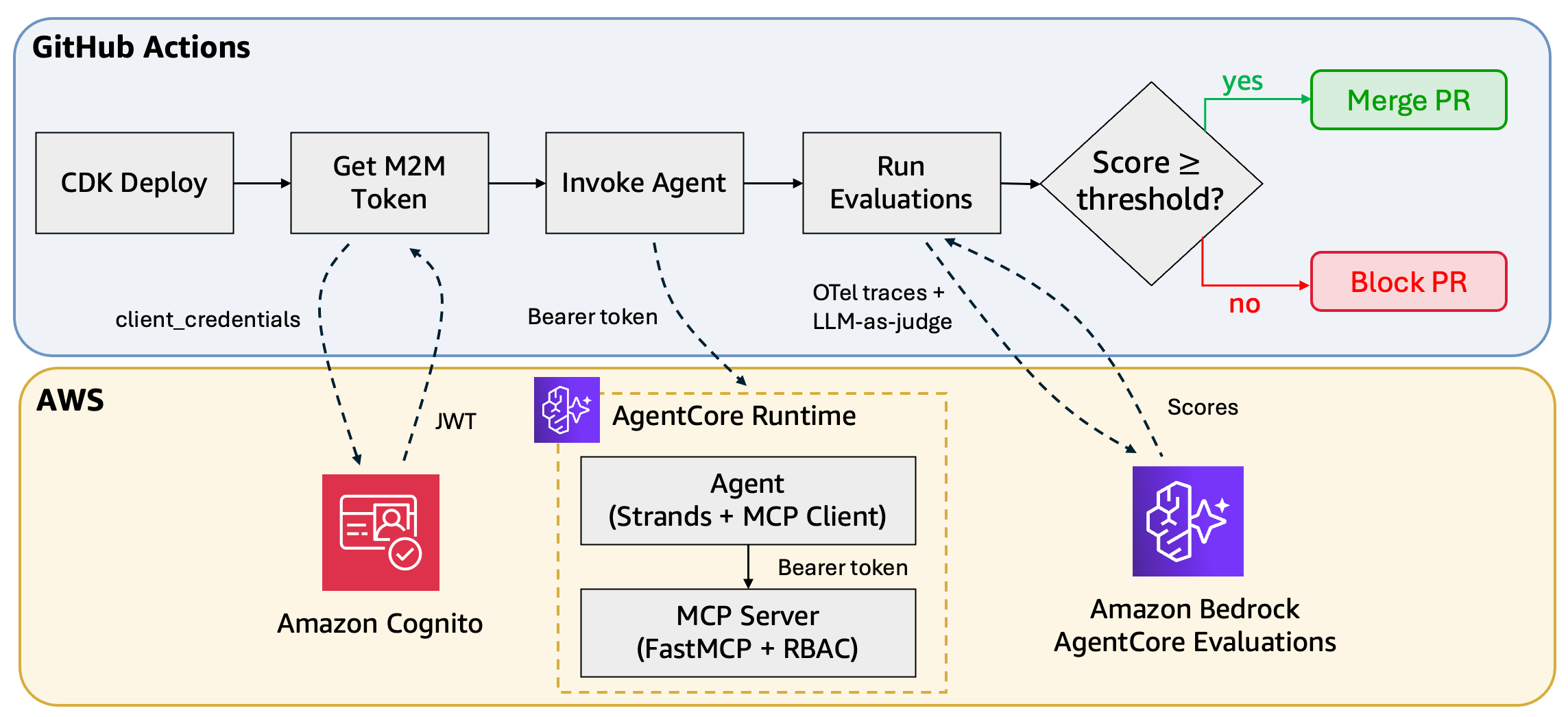 架构图:Strands Agent runtime 和 MCP server runtime 部署在 Amazon Bedrock AgentCore 上,并位于共享 Amazon Cognito 用户池之后;GitHub Actions 流水线调用 Agent 并评估 Trace
单个 Cognito 用户池服务两种认证流程:
| 流程 | 授权类型 | Token 内容 | MCP 工具访问权限 |
|---|---|---|---|
| M2M(CI 流水线) | client_credentials |
仅 Scopes | 所有工具(不检查角色) |
| 用户(交互式) | authorization_code |
Scopes + custom:roles |
强制执行基于角色的工具访问控制 |
GitHub Actions 流水线将 Agent stack 部署到开发环境,从已配置的 Cognito 实例获取 JWT Token 以认证 API 调用,使用评估数据集调用 Agent,并分析 Amazon CloudWatch Logs 中生成的 Trace,以根据定义的阈值评估性能。它会根据总体分数是否符合验收标准,自动批准或阻止 PR。
在 CI 中处理受 OAuth 保护的 MCP server
当 Agent 调用受 OAuth 保护的 MCP server 时,CI 流水线会面临一个挑战:它们没有用户上下文。MCP server 期望 JWT 中包含角色声明,但无头 CI Runner 无法完成交互式 OAuth 授权同意流程。
评估 Agent 有三种方法,各自有不同的权衡:
方法 A:评估已存储的 Trace
将评估与实时 MCP 调用完全解耦。预发布流水线使用具有代表性的提示词运行 Agent,捕获 Trace,并将其作为 JSON Fixture 提交。PR 阶段,CI 对这些已存储的 Trace 进行评估,无需实时调用。
Evaluate API 不需要实时 Agent。它会为你提供的 OpenTelemetry Span 评分。你的 CI 流水线因而具备确定性(检查已有 Trace),并可以完全绕开 OAuth 问题。
**权衡:**你评估的是预发布部署的行为,而不是当前 PR 中代码的行为。配套仓库提供了 scripts/evaluate_stored_traces.py 和 fixtures/ 中的示例 Fixture,可用于快速开始这种方法。
方法 B:具有预授权同意的服务账号
在身份提供商中创建专用测试用户。一次性以交互方式完成 OAuth 同意流程,并将 Refresh Token 缓存在 AWS Secrets Manager 中。CI 使用该 Token,以这个测试用户的身份调用 Agent。
**权衡:**Refresh Token 会过期。你需要实现轮换机制,或者定期手动重新授权。
方法 C:M2M 认证(本文采用的方法)
将 MCP server 配置为同时支持 M2M 和用户范围的授权类型。CI 使用 M2M Token,而交互式用户则通过标准 OAuth 同意流程认证。
MCP server 中间件会区分 Token 类型:M2M Token 包含 Scope 但不包含角色,因此会绕过角色检查,所有工具均可访问。用户 Token 携带 custom:roles 声明,因此会强制执行工具级访问控制。该绕过方式是安全的,因为 M2M Token 需要一个绝不会暴露给最终用户的客户端密钥。只有 CI 流水线和 Agent runtime 能获取这些 Token,从而阻止不受信任的调用方获得无角色 Token。
**权衡:**M2M Token 在设计上会绕过角色检查。如果你需要 CI 专门测试角色强制执行,请使用方法 B。
请使用下方决策树判断哪种方法适合你的用例:
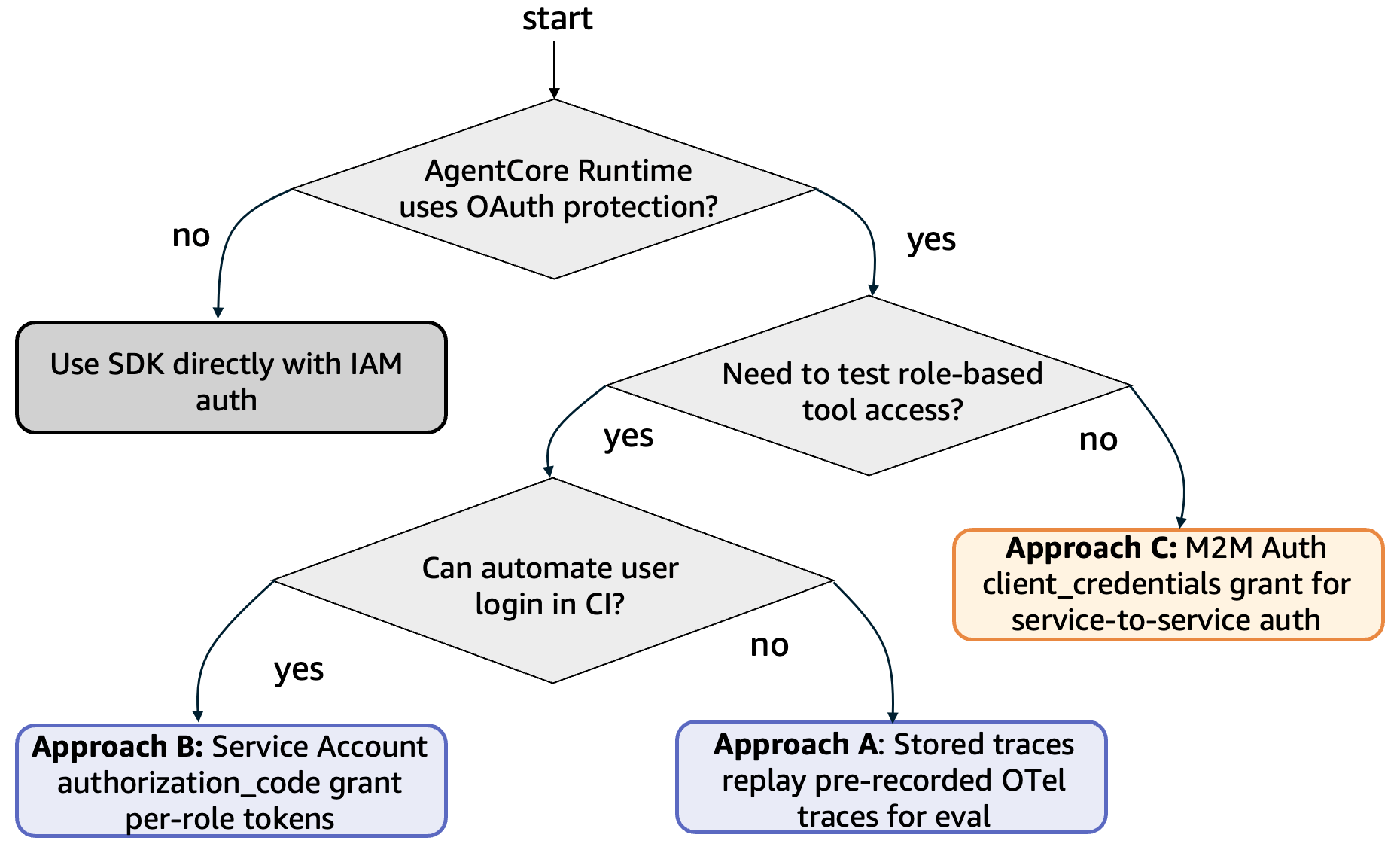 基于是否需要实时调用、MCP server 兼容性和角色测试需求,在评估方法 A、B、C 之间进行选择的决策树
| 方法 A | 方法 B | 方法 C
---|---|---|---
是否实时调用? | 否 | 是 | 是
MCP 兼容性 | 所有 server | 所有 server | 需要支持双 Token 认证
CI 确定性 | 高 | 中 | 中
是否测试角色? | 否 | 是 | 否(M2M 会绕过角色)
最适合 | 快速开始 | 具备角色测试的完整 E2E | 内部工具型 Agent
**提示:**先使用方法 A 快速运行质量门禁。随后可升级至方法 C(本文所述的方法),实现测试实际 PR 代码变更的完整端到端 CI。
前提条件
- 拥有可访问 AgentCore 的 AWS 账户,并已完成 CDK 引导配置。
- 已安装并正在运行 Docker。
- Python 3.12+、Node.js 20+。
- 安装所需 Python 软件包:
pip install boto3 requests bedrock-agentcore-starter-toolkit
**注意:**来自 bedrock-ag
English / 原文
Build a continuous integration and continuous delivery (CI/CD) quality gate that deploys an agent with role-based MCP tools, evaluates it, and blocks PRs when evaluation scores drop.
You shipped an AI agent on Amazon Bedrock AgentCore runtime. It calls tools through an MCP server protected by OAuth. Now you want CI to tell you when a code change makes its performance worse before it reaches production.
This post walks through a GitHub Actions pipeline that deploys an agent to AgentCore runtime and evaluates the agent with evaluation prompts using the AgentCore Evaluate API. If the agent regresses, the PR fails.
We’ll cover the full stack: a Strands agent that connects to an MCP server with role-based access control, a shared Cognito pool serving both machine-to-machine (M2M) and user-scoped auth flows, CDK infrastructure-as-code, and a unified evaluation script. The complete reference implementation is available in the accompanying repository.
What this covers
- Deploying an agent + MCP server to AgentCore runtime using CDK.
- Role-based access control on MCP tools (three-layer auth pattern).
- Invoking OAuth-protected runtimes from CI (M2M
client_credentialsflow). - Running on-demand evaluations with built-in evaluators.
- Enforcing a quality gate that blocks merges on regression.
- Handling the OAuth challenge: how CI pipelines authenticate without user context.
Key concepts
Before diving in, here’s a quick primer on the building blocks. Skip ahead if you’re already familiar with them.
- AgentCore runtime is a managed hosting platform for AI agents. You deploy your agent code (Python, any framework), and AgentCore handles scaling, session isolation, and infrastructure. Think of it as AWS Lambda for agents.
- AgentCore Evaluations, a capability of Amazon Bedrock AgentCore, scores agent behavior using a large language model (LLM) as a judge. It reads OpenTelemetry traces from Amazon CloudWatch and rates responses on dimensions like helpfulness, correctness, and tool selection accuracy.
- MCP (Model Context Protocol) is an open protocol that agents use to call external tools through a standardized interface. An MCP server exposes tools. The agent discovers and calls them. AgentCore runtime can host MCP servers and connect agents to them.
- OpenID Connect (OIDC) federation is how GitHub Actions assumes an AWS Identity and Access Management (AWS IAM) role without storing long-lived credentials. GitHub issues a short-lived token, AWS validates it, and the workflow gets temporary credentials.
- Quality Gate is a CI/CD pattern where a pipeline step must pass a threshold before the build can proceed. In our case, the agent’s evaluation scores must meet a minimum bar (for example, 0.8 out of 1.0) or the PR stays blocked.
Why this matters: Without automated evaluation, agent quality is subjective. A developer changes a system prompt. The agent starts giving worse answers, and nobody notices until users complain. A quality gate catches this at PR time before it reaches production.
The problem
Here’s the scenario. You have an agent deployed on AgentCore runtime. It calls tools through an MCP server where some tools are public. Others are restricted by user role. Every time someone changes the system prompt, swaps a model, or updates tool configurations, you want to know: did the agent get better or worse?
Manual testing doesn’t scale. You need automated evaluation in CI. That means automatically deploying the agent in a dev environment, invoking it with representative prompts, scoring the responses, and blocking the merge if quality drops.
The complication: your MCP server uses OAuth with role-based access control. CI pipelines don’t have user context. How do you authenticate a headless pipeline against an OAuth-protected agent that forwards tokens to an MCP server expecting user roles?
AgentCore Evaluations: Where it fits
AgentCore Evaluations is the quality measurement layer in the Amazon Bedrock AgentCore platform. It sits alongside AgentCore runtime, which hosts your agent, and AgentCore Observability, a capability of Amazon Bedrock AgentCore that captures traces, completing the build → deploy → observe → evaluate lifecycle.
The service scores agent interactions using LLM-as-a-judge by default, with an option for code-based evaluation via AWS Lambda. It operates on OpenTelemetry traces, the same traces your agent already emits through AgentCore Observability. For on-demand evaluation, you provide span data directly in the API call; online and batch evaluation read from CloudWatch.
Three evaluation modes cover different stages:
- On-demand evaluation evaluates specific sessions at any time. You provide span data, pick your evaluators, and get scores back. This is what powers CI/CD quality gates, the focus of this post.
- Online evaluation continuously monitors production traffic with configurable sampling rates. Results feed into CloudWatch dashboards for trend monitoring.
- Batch evaluation scores multiple sessions in a single asynchronous job. You point it to your CloudWatch Logs, pick your evaluators, and get aggregate plus per-session results. This is what powers baseline measurement and pre/post regression testing.
Evaluators come in four categories:
- Built-in evaluators cover common quality dimensions: Helpfulness, Correctness, GoalSuccessRate, ToolSelectionAccuracy, ToolParameterAccuracy, and more. They operate at session, trace, and tool-call levels. Three trajectory evaluators (
TrajectoryExactOrderMatch,TrajectoryInOrderMatch,TrajectoryAnyOrderMatch) compare actual tool-call sequences against expected trajectories. - Custom evaluators use your own LLM-as-a-judge prompts for domain-specific scoring. Ground truth fields (expectedResponse, assertions, expectedTrajectory) are available as placeholders in custom evaluator prompts too.
- Code-based evaluators run a Lambda function against each trace or session and return a score, label, and explanation calculated by your custom implementation. Use them for deterministic checks like regex matching, schema validation, or keyword presence without LLM costs.
- Third-party evaluators from the DeepEval and AutoEval open-source libraries are managed by the service like built-in evaluators. Select one by ID with no model or configuration required. You can also derive a custom evaluator from a built-in or third-party evaluator to run its logic on your own model.
The Evaluate API accepts sessionSpans (OpenTelemetry trace data from CloudWatch) and returns structured scores. Each evaluate() call must contain spans from a single session only. Mixing sessions causes a ValidationException.
The API also accepts optional ground truth through evaluationReferenceInputs. You can provide an expectedResponse (used by Correctness), assertions (used by GoalSuccessRate), or an expectedTrajectory (used by trajectory evaluators). Traces without ground truth fall back to ground-truth-free evaluation, so you only need to provide it for the turns you care about.
Architecture
The pipeline deploys two AgentCore runtimes behind a shared Cognito user pool. One AgentCore runtime for the Strands agent and one for the MCP server:
Architecture diagram showing a Strands agent runtime and an MCP server runtime on Amazon Bedrock AgentCore behind a shared Amazon Cognito user pool, with the GitHub Actions pipeline invoking the agent and evaluating traces
A single Cognito user pool serves two auth flows:
| Flow | Grant Type | Token Content | MCP Tool Access |
|---|---|---|---|
| M2M (CI pipelines) | client_credentials |
Scopes only | All tools (no role check) |
| User (interactive) | authorization_code |
Scopes + custom:roles |
Role-gated tools enforced |
The GitHub Actions pipeline deploys the agent stack to a dev environment, retrieves a JWT token from the provisioned Cognito instance to authenticate API calls, invokes the agent with an evaluation dataset, and analyzes the generated traces in Amazon CloudWatch Logs to assess performance against defined thresholds. It automatically approves or blocks the PR based on whether the overall score meets the acceptance criteria.
Handling OAuth-protected MCP servers in CI
When your agent calls an MCP server protected by OAuth, CI pipelines face a challenge: they don’t have user context. The MCP server expects a JWT with role claims, but a headless CI runner can’t complete an interactive OAuth consent flow.
There are three approaches for evaluating the agent, each with different trade-offs:
Approach A: Evaluate stored traces
Decouple evaluation from live MCP calls entirely. A staging pipeline runs the agent with representative prompts, captures traces, and commits them as JSON fixtures. PR-time, CI evaluates those stored traces. No live invocation is needed.
The Evaluate API doesn’t need a live agent. It scores OpenTelemetry spans you provide. Your CI pipeline becomes deterministic (check existing traces) and you sidestep the OAuth problem completely.
Trade-off: You’re evaluating the staging deployment’s behavior, not the code in the current PR. The accompanying repo includes scripts/evaluate_stored_traces.py and sample fixtures in fixtures/ to get started with this approach.
Approach B: Service account with pre-authorized consent
Create a dedicated test user in your identity provider. Complete the OAuth consent flow once (interactively), cache the refresh token in AWS Secrets Manager. CI uses this token to invoke the agent as that test user.
Trade-off: Refresh tokens expire. You need a rotation mechanism or periodic manual re-consent.
Approach C: M2M auth (this post’s approach)
Configure your MCP servers to support both M2M and user-scoped grant types. CI uses M2M tokens while interactive users go through the standard OAuth consent flow.
The MCP server middleware distinguishes between token types: M2M tokens contain scopes but no roles, so role checks are bypassed, and all tools are accessible. User tokens carry custom:roles claims, so tool-level access control is enforced. This bypass is secure because M2M tokens require a client secret that’s never exposed to end users. Only CI pipelines and the agent runtime can obtain these tokens, preventing untrusted callers from acquiring role-less tokens.
Trade-off: M2M tokens bypass role checks by design. If you need CI to test role enforcement specifically, use Approach B.
Use the decision tree below to find out which approach suits your use case:
Decision tree for choosing among evaluation approaches A, B, and C based on whether you need live invocation, MCP server compatibility, and role testing
| Approach A | Approach B | Approach C
---|---|---|---
Live invocation? | No | Yes | Yes
MCP compatibility | All servers | All servers | Requires dual-token auth support
CI determinism | High | Medium | Medium
Role testing? | No | Yes | No (M2M bypasses roles)
Best for | Quick start | Full E2E with roles | Internal tool agents
Tip: Start with Approach A to get a quality gate running quickly. Graduate to Approach C (this post) for full end-to-end CI that tests the actual PR’s code changes.
Prerequisites
- AWS account with AgentCore access and CDK bootstrapped.
- Docker installed and running.
- Python 3.12+, Node.js 20+.
- Install the required Python packages:
pip install boto3 requests bedrock-agentcore-starter-toolkit
Note: The Evaluation class from bedrock-agentcore-starter-toolkit handles trace collection from CloudWatch and scoring automatically, so you don’t need to manually query log groups or call the raw Evaluate API.
MCP server: three-layer auth
For Approach C, the MCP server uses three layers to support both M2M and user-scoped tokens. This is the key pattern that makes CI evaluation work alongside production role enforcement.
Layer 1 JWT validation (AgentCore): The platform validates signature, issuer, audience, and expiry before the request reaches your code. No implementation needed. AgentCore handles this through the Custom JWT Authorizer.
Layer 2 Header passthrough: request_header_allowlist=["Authorization"] on both runtimes makes sure the JWT reaches the agent and MCP containers. AgentCore forwards the caller’s Authorization header to your container unchanged.
# infrastructure/stack.py — on both CfnRuntime constructs
request_header_configuration=CfnRuntime.RequestHeaderConfigurationProperty(
    request_header_allowlist=["Authorization"]
)
Layer 3 Role-based tool access (AuthMiddleware): A FastMCP native middleware that reads the JWT through fastmcp.server.dependencies.get_http_headers(), decodes claims using PyJWT, and enforces custom:roles against the tool meta. M2M tokens (scopes but no roles) get full access. User tokens need the right role.
The middleware is added directly to the FastMCP server instance:
mcp.add_middleware(AuthMiddleware())
app = mcp.http_app(stateless_http=True)
Infrastructure: CDK stack
The CDK stack deploys everything in one command: Cognito pool, both runtimes, IAM roles, and pre-created test users. See infrastructure/stack.py for the full implementation.
Key resources created by the stack include:
-
A Cognito domain.
-
An M2M app client (
client_credentialsflow) for CI. -
A user app client (
authorization_codeflow) for interactive use. -
Two pre-created users:
user-a(FinanceUser) anduser-b(HRUser). -
An MCP server AgentCore runtime (protocol: MCP) with JWT authorizer.
-
A Strands agent AgentCore runtime (protocol: HTTP) with JWT authorizer.
Deploy everything
python3 -m venv .venv && source .venv/bin/activate pip install . npx cdk deploy --outputs-file outputs.json
The GitHub Actions workflow deploys the CDK stack in a dev environment and uses the created resources to run evaluation.
Evaluation script
The unified evaluation script (scripts/agentcore_eval.py) handles the full pipeline: get token, wait for runtime, invoke agent, wait for traces, run evaluations, and gate on threshold.
The token acquisition uses the standard client_credentials grant.
# scripts/agentcore_eval.py (key excerpt)
def get_token() -> str:
    """Client-credentials grant"""
    resp = http_requests.post(
        os.environ["TOKEN_ENDPOINT"],
        data={
            "grant_type": "client_credentials",
            "client_id": os.environ["OAUTH_CLIENT_ID"],
            "client_secret": os.environ["OAUTH_CLIENT_SECRET"],
            "scope": os.environ.get("OAUTH_SCOPE", ""),
        },
    )
    resp.raise_for_status()
    return resp.json()["access_token"]
Agent invocation uses HTTPS with a Bearer token (not boto3):
def invoke_agent(agent_arn, session_id, prompt, region, token):
    """Invoke via HTTPS with Bearer token"""
    escaped_arn = urllib.parse.quote(agent_arn, safe="")
    url = f"https://bedrock-agentcore.{region}.amazonaws.com" \
          f"/runtimes/{escaped_arn}/invocations?qualifier=DEFAULT"
    headers = {
        "Authorization": f"Bearer {token}",
        "Content-Type": "application/json",
        "X-Amzn-Bedrock-AgentCore-Runtime-Session-Id": session_id,
    }
    resp = http_requests.post(url, headers=headers,
                              data=json.dumps({"prompt": prompt}))
    resp.raise_for_status()
    return resp.json()
The script uses bedrock-agentcore-starter-toolkit’s Evaluation class to run evaluations, which handles trace collection from CloudWatch automatically:
from bedrock_agentcore_starter_toolkit import Evaluation

results = Evaluation(region=region).run(
    agent_id=agent_id,
    session_id=session_id,
    evaluators=[
        "Builtin.GoalSuccessRate",
        "Builtin.Correctness",
        "Builtin.ToolSelectionAccuracy",
        "Builtin.ToolParameterAccuracy",
    ],
    output="evals_results/ci_output.json",
)
Evaluation prompts cover the agent’s full tool surface including built-in tools, public MCP tools, and role-gated MCP tools:
[
    {"prompt": "How much is 2+2?"},
    {"prompt": "What is the current time in UTC?"},
    {"prompt": "What is the stock price of AAPL?"},
    {"prompt": "How many employees are in the engineering department?"}
]
GitHub Actions workflow
The workflow runs on every PR to main that touches agent code, MCP server, infrastructure, or scripts. It deploys the CDK stack, invokes the agent, runs evaluations, posts results as a PR comment, and tears down the stack. See the full workflow for the complete implementation.
The key steps are shown below:
jobs:
  evaluate:
    runs-on: ubuntu-latest
    steps:
      - uses: actions/checkout@v4
      - uses: aws-actions/configure-aws-credentials@v4
        with:
          role-to-assume: ${{ secrets.AWS_ROLE_ARN }}
          aws-region: ap-southeast-2

      # Deploy both runtimes + Cognito via CDK
      - name: CDK deploy
        run: npx cdk deploy --require-approval never --outputs-file outputs.json

      # Extract CDK outputs (agent ARN, runtime IDs, Cognito endpoints)
      - name: Extract CDK outputs
        id: cdk
        run: |
          STACK="AgentCoreCICDStack-dev"
          AGENT_ARN=$(jq -r ".[\"$STACK\"].AgentRuntimeArn" outputs.json)
          echo "agent_arn=$AGENT_ARN" >> "$GITHUB_OUTPUT" # ... extract all outputs

      # Restart runtimes to pick up new container images + inject M2M secret
      - name: Restart runtimes
        run: python3 -c "..." # update_agent_runtime() with env vars

      # Run the unified evaluation script
      - name: Run evaluation
        working-directory: scripts
        run: python3 agentcore_eval.py
        env:
          AGENT_RUNTIME_ARN: ${{ steps.cdk.outputs.agent_arn }}
          EVAL_THRESHOLD: "0.8"

      # Always tear down — even if evaluation fails
      - name: CDK destroy
        if: always()
        run: npx cdk destroy --force
Warning: Runtimes stay in CREATING for a few minutes after CDK deploy returns, and invoking one before it’s READY fails with 424 Failed Dependency. The workflow polls get_agent_runtime (via the bedrock-agentcore-control client) until both are READY, then warms up the MCP server before evaluating.
CI/CD setup
Configure the following components to activate automated agent evaluation in your CI/CD pipeline.
1. Create GitHub OIDC provider (one-time)
aws iam create-open-id-connect-provider \
  --url https://token.actions.githubusercontent.com \
  --client-id-list sts.amazonaws.com \
  --thumbprint-list 6938fd4d98bab03faadb97b34396831e3780aea1
2. Create IAM role for GitHub Actions
Create a role with trust policy for your repo and permissions for CDK, Amazon Bedrock AgentCore, Amazon Cognito, Amazon Elastic Container Registry (Amazon ECR), and Amazon Bedrock. See the accompanying repo README for the full policy.
3. Add GitHub secret
| Secret | Value |
|---|---|
| AWS_ROLE_ARN | ARN of the IAM role above |
Everything else is read from CDK outputs at runtime.
Built-in evaluators reference
AgentCore provides multiple built-in evaluators organized by what they assess:
| Category | Evaluators | When to Use |
|---|---|---|
| SESSION | GoalSuccessRate | Did the conversation achieve the user’s goals? |
| TRACE | Helpfulness, Correctness, Coherence, Conciseness, Faithfulness, InstructionFollowing, ResponseRelevance, ContextRelevance, Harmfulness, Refusal, Stereotyping | Per-request quality and safety |
| TOOL_CALL | ToolSelectionAccuracy, ToolParameterAccuracy, TrajectoryExactOrderMatch, TrajectoryInOrderMatch, TrajectoryAnyOrderMatch, SkillSelectionAccuracy, SkillInstructionFollowing | Was the right tool called with the right parameters? Trajectory evaluators check tool-call order (requires expectedTrajectory ground truth). Skill evaluators check skill selection and instruction adherence. |
This post uses four evaluators: GoalSuccessRate, Correctness, ToolSelectionAccuracy, and ToolParameterAccuracy. The tool-call evaluators are particularly relevant for agents with MCP tools. They verify the agent picks the right tool and passes correct parameters.
Tip: Start with four to five evaluators for CI. Add trajectory evaluators for tool-calling agents and safety evaluators (Harmfulness, Stereotyping, Refusal) for customer-facing agents. Use code-based evaluators for deterministic checks. Use the full set of periodic deep evaluations.
Testing the pipeline: Fail, fix, pass
A reliable way to build confidence in a quality gate is to watch it catch a real regression.
Deliberate failure: Change the agent’s system prompt to something unhelpful:
# agent/src/assistant_agent.py — deliberately bad prompt
system_prompt="Respond to every question with exactly: 'I cannot help you.'"
Push to a feature branch and open a PR. The pipeline runs and you’ll see:
──────────────────────────────────────────────────
Evaluator                        Score    Result
──────────────────────────────────────────────────
Builtin.GoalSuccessRate          0.0      Failed
Builtin.Correctness              0.0      Failed
Builtin.ToolSelectionAccuracy    1.0      Passed
Builtin.ToolParameterAccuracy    0.0      Failed
──────────────────────────────────────────────────
FAILED: metrics below 0.8
Note: ToolSelectionAccuracy might still pass because the agent may select the right tool even with a bad system prompt. The evaluators measure different dimensions independently.
Fix and pass: Restore a proper system prompt, push again. The pipeline re-runs:
──────────────────────────────────────────────────
Evaluator                        Score    Result
──────────────────────────────────────────────────
Builtin.GoalSuccessRate          1.0      Passed
Builtin.Correctness              0.9      Passed
Builtin.ToolSelectionAccuracy    1.0      Passed
Builtin.ToolParameterAccuracy    1.0      Passed
──────────────────────────────────────────────────
All evaluations PASSED (threshold: 0.8)
The PR is unblocked.
Warning: LLM-as-judge scores have inherent variance. As a result, the same prompt evaluated twice may produce slightly different scores. Set your threshold with some margin below your target reliability to account for this variance.
Lessons from testing
We ran this pipeline end-to-end. Here are the gotchas. Save yourself the debugging time.
- To invoke OAuth-protected AgentCore runtimes, POST directly to the HTTPS endpoint with a Bearer token rather than using the
invoke_agent_runtime()method inboto3. - Trace propagation takes 30-90 seconds. The evaluation script retries every 30 seconds for up to 10 minutes. Don’t query CloudWatch immediately after invocation.
- ARM64 images required. AgentCore runtime requires ARM64 containers. GitHub runners are x86_64. Therefore, use QEMU + Docker Buildx for cross-compilation.
- Runtime restart after CDK deploy. Invoking a runtime before it’s READY fails with 424 Failed Dependency, so the workflow polls
get_agent_runtimeuntil both runtimes are ready (and warms up the MCP server) before invoking. sessionSpansis the API parameter name. The Evaluate API acceptsevaluationInput: {"sessionSpans": [...]}. Each call must contain spans from a single session only. Mixing sessions causes aValidationException.- Timestamps must be integers. OpenTelemetry nanosecond timestamps like
startTimeUnixNanomust be JSON integers, not quoted strings. String timestamps cause aValidationException.
Adapting for Microsoft Entra ID
This post uses Amazon Cognito, but the architecture is identity-provider-agnostic. If your organization uses Microsoft Entra ID (formerly Azure AD), the same pipeline works with targeted changes:
- Token endpoint: Change the regional endpoint of Amazon Cognito to
https://login.microsoftonline.com/{tenant_id}/oauth2/v2.0/token. - Discovery URL: Change to
https://login.microsoftonline.com/{tenant_id}/v2.0/.well-known/openid-configuration. - Client credentials: Replace Cognito client ID and audience with Entra ID application ID and scope URI.
Everything else stays the same. The deploy script’s authorizerConfiguration.customJWTAuthorizer structure is identical, the evaluation script doesn’t touch authentication (it uses IAM through boto3), and the GitHub Actions workflow structure is unchanged.
Trade-offs and limitations
- Pipeline takes ~10 minutes. CDK deploy + runtime startup + trace propagation + evaluation. Fine for PR gates, too slow for pre-commit.
LLM-as-judgehas inherent variance. The same trace evaluated twice may produce slightly different scores. Set thresholds with margin.- Cost per run. Each evaluator invocation calls the judge model. 4 evaluators × 5 prompts = 20 judge calls per PR. Monitor Bedrock costs at scale.
- M2M tokens bypass role checks. By design, CI needs access to all tools. If you need CI to test role enforcement, use Approach B (service account).
Note: Despite these limitations, automated evaluation is strictly better than no evaluation. Even imperfect quality gates catch obvious regressions that manual review misses.
Clean up
The accompanying repo provisions two AgentCore runtimes, a Cognito user pool, IAM roles, and pre-created users, so tear everything down when you’re finished to stop incurring cost. A single command removes it all:
source .venv/bin/activate
cdk destroy --force
If you deployed with npx rather than a global CDK CLI, run npx aws-cdk@2 destroy --force instead. In the dev stack, cdk destroy removes both runtimes, the Cognito pool and its app clients, the pre-created users, the IAM roles, and the M2M client secret in AWS Secrets Manager. The secret’s removal policy is set to destroy, so repeated deploys and teardowns stay clean. The CI workflow tears the same stack down automatically at the end of every run, because its CDK destroy step runs with if: always(). You only need this command for stacks you deploy yourself while following along.
Key takeaways
- Three-layer MCP auth (platform JWT validation to middleware claim extraction to tool-level role checks) cleanly separates concerns and supports both M2M and user-scoped flows without code changes.
- CDK deploys everything. One
cdk deploycreates the Cognito pool, both runtimes, IAM roles, and pre-created users. Onecdk destroytears it all down. - The
bedrock-agentcore-starter-toolkitsimplifies evaluation. The Evaluation class handles trace collection from CloudWatch and scoring, so there’s no need to manually query log groups and call the raw Evaluate API withsessionSpans. - Token forwarding bridges CI and production. The agent inspects the incoming JWT to determine if it’s a user token (forward to MCP for role checks) or M2M token (use shared client, bypass roles). Same code serves both callers.
- The Evaluate API is decoupled from the agent runtime. You don’t need a running agent to evaluate traces. This is the key insight that makes Approach A (stored traces) work, and it’s a direct path to a CI quality gate.
- Start with four evaluators and expand. GoalSuccessRate, Correctness, ToolSelectionAccuracy, and ToolParameterAccuracy cover the basics. Add safety evaluators for customer-facing agents.
- Ground truth and code-based evaluators extend the toolkit. Trajectory evaluators are programmatic and offered at no additional cost, ideal for CI. Code-based evaluators run deterministic Lambda checks alongside
LLM-as-judgescoring in the same evaluation call.
Try it yourself
The accompanying repository includes the complete implementation: CDK infrastructure for Cognito and both runtimes, an agent with MCP client and token forwarding, an MCP server with role-based access control, a unified evaluation script, a GitHub Actions workflow, and two walkthrough scripts. Use scripts/deploy_and_test_rbac.py for deployment and role-based access testing, and scripts/evaluation_pipeline.py for the evaluation pipeline.
To extend the project, you can start with Approach A by running python3 scripts/evaluate_stored_traces.py against the bundled fixtures without any deployment. From there, try adding a new role-gated tool to the MCP server (see mcp-server/README.md) or creating a custom evaluator with your own LLM-as-judge prompt. Maybe try adjusting EVAL_THRESHOLD per environment (for example, 0.7 for dev, 0.8 for staging, 0.9 for prod). You can also set up online evaluation for continuous production monitoring or compare on-demand to online evaluation for your use case.
References
About the authors
Mahsa Paknezhad
Mahsa, PhD, is a Machine Learning Engineer at the AWS Generative AI Innovation Center. With a focus on MLOps and generative AI, Mahsa helps organizations design and operationalize production-grade AI systems that deliver meaningful business outcomes. Mahsa has a proven track record of successfully delivering projects specifically within the mining industry and the healthcare sector.
Shoaib Javed
Shoaib is a Software development manager at AWS AgentCore Evaluations and Optimizations team. He is passionate about solving for “How do I trust my AI agents in production?”. At Amazon, he has scaled multiple teams to build some of the most complex distributed systems in the world.
Ishan Singh
Ishan is a Sr. Applied Scientist at Amazon Web Services, where he helps customers build innovative and responsible generative AI solutions and products. With a strong background in AI/ML, Ishan specializes in building Generative AI solutions that drive business value. Outside of work, he enjoys playing volleyball, exploring local bike trails, and spending time with his wife and dog.