在 SageMaker AI 上评测小型 LLM 推理:G7 对比 G5 与 G6
英文标题:Benchmarking small LLM inference on SageMaker AI: G7 vs G5 and G6
本文在 Amazon SageMaker AI Inference 上,对两款 300 亿参数级 MoE 模型 Qwen3-Coder-30B 和 NVIDIA Nemotron-3-Nano-30B 进行 GPU 实例评测,覆盖 G5、G6、G6e 和 G7 系列。测试显示,在 Qwen3-Coder-30B 的固定非流式负载下,G7 的输出 Token 吞吐量达到 391.3 tok/s,较 G6 提升 60.8%,较 G5 提升 13.0%,同时具备最低延迟。G7 搭载 NVIDIA Blackwell GPU,并拥有原生 FP4 Tensor Core 支持,因此在采用 NVFP4 等低精度格式的 MoE 推理中具有结构性优势。文章还展示了开发者可通过 SageMaker AI 的基准测试工作流或自动化 Generative AI Inference Recommendations 工作流,选择面向生产环境的推理配置。
 1.3 MB
 101.1 KB
 124.1 KB
 345.0 KB
 141.2 KB
 346.5 KB
 409.3 KB
 626.5 KB
 23.1 KB
 17.7 KB
 25.9 KB
 224.4 KB
中文
为大语言模型(LLM)推理选择合适的 GPU 实例,是大规模部署生成式 AI 时最具影响力的决策之一。仅一次 GPU 世代升级,就可能显著降低延迟、提高吞吐量并减少每 Token 成本。不过,这些收益在实际环境中的幅度取决于模型架构、量化格式和工作负载形态。
本文借助 Amazon SageMaker AI 生成式 AI 推理推荐,在 Amazon SageMaker AI Inference 上对三个 GPU 实例系列中的两款代表性 300 亿参数级 Mixture-of-Experts(MoE)模型进行了基准测试。该功能既可针对吞吐量、成本和延迟提供推荐,也能对首 Token 时间和延迟等常见指标进行基准测试。
借助这一功能,我们展示了由 NVIDIA Blackwell GPU 驱动的新一代 G7 实例,如何在吞吐量、延迟和每 Token 成本方面带来可量化的提升。
用例 1:AI 编程助手
为企业代码生成、调试、重构和开发者 Copilot 等任务部署 Qwen3-Coder-30B。使用 Amazon SageMaker AI DJL Large Model Inference(LMI)容器,对 ml.g5.12xlarge(A10G)、ml.g6.12xlarge(L4)和 ml.g7.12xlarge(RTX PRO 4500 Blackwell)实例进行基准测试,以比较价格与性能。
G5 和 G6 配置各使用四张 GPU,GPU 总显存均为 96 GB;G7 则使用两张 GPU,GPU 总显存为 64 GB。该比较展示了 G7 在仅使用一半加速器数量、且 GPU 总显存更少时的表现。
用例 2:企业 AI 助手
为推理、问答、摘要和 Agent 工作负载部署 NVIDIA Nemotron-3-Nano-30B-A3B-NVFP4。使用搭配 vLLM 的 Amazon SageMaker AI Generative AI Inference Recommendations,评估 G6(L4)、G6e(L40S)和 G7(RTX PRO 4500 Blackwell)配置,并找出最佳性价比选项。
对于 12xlarge 配置,G6 提供四张 GPU 和 96 GB GPU 总显存,G6e 提供四张 GPU 和 192 GB GPU 总显存,G7 则提供两张 GPU 和 64 GB GPU 总显存。Generative AI Inference Recommendations 可自动完成这些 GPU 选项的基准测试与配置选择。
这两个用例共同展示了评估 G7 的两种互补方式:使用 LMI 进行直接基准测试,以及使用 Generative AI Inference Recommendations 和 vLLM 进行自动优化。通过改变模型、服务栈、GPU 配置和工作负载,这些基准测试说明了 G7 在何种情况下能够提供优于上一代 GPU 实例的性价比。
解决方案概述
在介绍这些用例之前,我们先说明 Amazon SageMaker AI 生成式 AI 推理推荐如何简化寻找合适生产配置的过程。您需要提供模型、预期工作负载和优化目标。随后,Amazon SageMaker AI 会在真实 GPU 基础设施上评估候选配置,并根据实际性能返回经过验证、可直接部署的推荐方案。
您可以将每种工作流直接对应到这两个用例:
1. 基准测试工作流:当您已有一个端点时
当您已将模型部署到 Amazon SageMaker AI 端点,并希望了解其在预期工作负载下的表现时,可使用基准测试。在我们的 Qwen3-Coder-30B 用例中,我们将首先展示如何把模型部署到不同 GPU 实例上的 Amazon SageMaker AI 端点,然后对这些端点进行基准测试,以比较延迟、吞吐量和性价比,如下图所示。
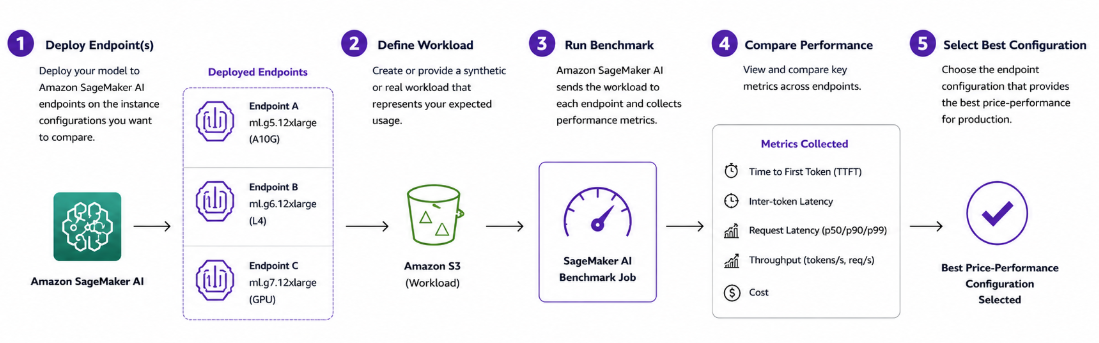 基准测试工作流:将模型部署到不同 GPU 实例上的 Amazon SageMaker AI 端点,然后对这些端点进行基准测试,以比较延迟、吞吐量和性价比。
2. 推荐工作流:当您希望 Amazon SageMaker AI 推理推荐为您推荐配置时
当您需要帮助确定哪一种部署配置最适合您的模型和工作负载时,可使用推荐工作流。在我们的 NVIDIA Nemotron-3-Nano-30B 用例中,我们将定义模型、候选实例系列、工作负载和优化目标。随后,Amazon SageMaker AI 会评估候选配置,对可行选项进行基准测试,并根据成本、延迟和吞吐量等指标返回排序后的推荐结果。您可以审阅这些推荐,并部署最符合生产需求的配置,如下图所示:
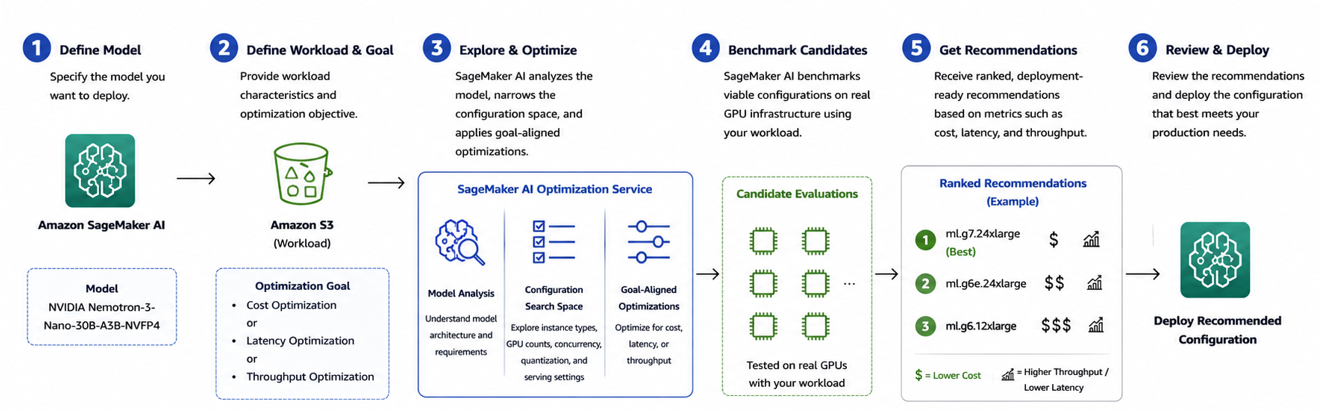 推荐工作流:定义模型、候选实例、工作负载和优化目标,然后 Amazon SageMaker AI 评估配置并返回排序后的推荐结果,供审阅和部署。
实例硬件对比
两个案例都使用了 AWS EC2 G5、G6、G6e 和 G7 系列的实例。每个系列均搭配不同代际的 NVIDIA GPU,并提供不同的显存、带宽和网络能力。影响 Mixture-of-Experts(MoE) 推理性能的关键差异包括:
为什么内存带宽对 MoE 模型很重要:MoE 架构在 Token 生成(解码)期间受内存带宽限制,因为每个 Token 仅激活一小部分专家。更高的内存带宽可直接降低 Token 间延迟并提高吞吐量。
为什么 NVFP4 很重要:NVFP4 是 NVIDIA 随 Blackwell GPU 架构 推出的 4 位浮点格式。NVIDIA 在 Blackwell Tensor Core 上的原生 FP4 量化,可在质量损失极小的情况下将模型尺寸缩小至每个权重大约 4 位。
**注意:**只有 G7 实例具备原生 FP4 Tensor Core 支持。G5、G6 等其他代际虽可运行 NVFP4 权重,但没有硬件加速,这使 G7 在 MoE 部署选择中具备结构性优势。
前提条件
- 拥有可访问 Amazon SageMaker AI 的 AWS 账户。
- 一个具有 Amazon SageMaker AI 和 Amazon Simple Storage Service(Amazon S3)权限的 AWS Identity and Access Management(IAM)执行角色。
- 在 AWS 区域中拥有目标实例类型的实例配额。
- Python 3.10+,以及 Amazon SageMaker Python SDK(
sagemaker>=3.16.0)。 - 已上传到 Amazon S3 的模型构件。
**注意:**G7 目前仅在美国东部(俄亥俄)和美国西部(俄勒冈)区域正式可用。
用例 1:跨 GPU 实例评测 Qwen3-Coder-30B
在此用例中,我们将使用这份演练 Notebook,在三种 GPU 实例类型——ml.g5.12xlarge、ml.g6.12xlarge 和 ml.g7.12xlarge——上评测 Qwen3-Coder-30B-A3B-Instruct-FP8,以确定哪种配置能为我们的代码工作负载提供最佳性能。
我们在全部三种配置中使用相同的模型、DJL Large Model Inference(LMI)28.0 服务容器和工作负载,以实现同类对比。配套的 Notebook 包含模型配置、端点部署和基准测试的完整代码。
该工作流包括三个步骤:
- 配置基准测试
- 运行基准测试
- 比较结果
步骤 1:配置基准测试
我们首先定义要评估的模型和工作负载。在此测试中,我们使用 MoE 代码模型 Qwen3-Coder-30B-A3B-Instruct-FP8,并通过 DJL Large Model Inference(LMI)28.0 容器部署该模型。
我们在以下 Amazon SageMaker AI 实例类型上评估同一模型:
| 配置 | 值 |
|---|---|
| 模型 | Qwen3-Coder-30B-A3B-Instruct-FP8 |
| 服务框架 | DJL Serving,LMI 28.0 |
| 实例 | ml.g5.12xlarge、ml.g6.12xlarge、ml.g7.12xlarge |
| 基准测试工具 | SageMaker AI 生成式 AI 基准测试 |
| 输入 Token | 平均 128 |
| 输出 Token | 平均 128 |
| 并发数 | 4 |
| 请求数 | 100 |
| 区域 | us-east-2 |
我们为每个端点使用相同的服务和工作负载配置,使底层实例类型成为比较中的主要变量。
配套的 Notebook 提供了每个端点的完整配置和部署代码。
步骤 2:运行基准测试
端点可用后,我们定义一个代表代码推理场景的合成工作负载,并针对每个端点运行 Amazon SageMaker AI 基准测试。
在本例中,该工作负载包含 100 个请求,并发数为 4,每个请求平均具有 128 个输入 Token 和 128 个输出 Token。
从高层来看,基准测试通过以下 Amazon SageMaker Python SDK 操作启动:
from sagemaker.serve import start_benchmark, Workload

workload = Workload.synthetic(
    tokenizer=HF_MODEL_ID,
    concurrency=4,
    request_count=100,
    prompt_input_tokens_mean=128,
    output_tokens_mean=128,
    streaming=False,
)

job = start_benchmark(
    endpoint=endpoint,
    workload=workload,
    role=ROLE,
    wait=False,
)
Amazon SageMaker AI 会将工作负载发送至端点,并使用 NVIDIA AIPerf 收集性能指标。我们对 G5、G6 和 G7 端点重复执行相同的基准测试。
在初步比较中,我们使用非流式请求并评估:
- 输出 Token 吞吐量
- 请求吞吐量
- 平均请求延迟
- P50、P90 和 P99 请求延迟
对于交互式应用,您还可以设置 streaming=True,以衡量首 Token 时间(TTFT)和Token 间延迟(ITL)。
步骤 3:比较基准测试结果
下表展示了在三种实例类型上运行相同非流式工作负载的结果。
| 指标 | G5.12xl | G6.12xl | G7.12xl |
|---|---|---|---|
| 输出 Token 吞吐量 | 346.3 tok/s | 243.4 tok/s | 391.3 tok/s |
| 请求吞吐量 | 2.69 req/s | 1.89 req/s | 3.04 req/s |
| 平均请求延迟 | 1,475.2 ms | 2,109.7 ms | 1,315.8 ms |
| P50 请求延迟 | 1,459.7 ms | 2,063.7 ms | 1,308.2 ms |
| P90 请求延迟 | 1,497.7 ms | 2,136.1 ms | 1,356.4 ms |
| P99 请求延迟 | 1,881.1 ms | 3,315.7 ms | 1,501.1 ms |
对于这一特定工作负载和配置,我们的测试显示,在所测试的三种配置中,G7 提供了最高吞吐量和最低延迟。G7 的输出 Token 吞吐量为每秒 391.3 个 Token,相比 G6 高约 60.8%,相比 G5 高约 13.0%。
与 G6 相比,G7 还将平均请求延迟降低约 37.6%;与 G5 相比则降低约 10.8%。在 P99 指标上差异更为明显:与 G6 相比,G7 将延迟降低约 54.7%;与 G5 相比则降低约 20.2%。
| 指标 | G7 对比 G6 | G7 对比 G5 |
|---|---|---|
| 输出 Token 吞吐量 | +60.8% | +13.0% |
| 平均延迟降低幅度 | 37.6% | 10.8% |
| P99 延迟降低幅度 | 54.7% | 20.2% |
评估流式性能
我们还在 G7 端点上运行了流式基准测试,以评估交互式代码应用的响应能力。
| 指标 | 平均值 | P50 | P90 | P99 |
|---|---|---|---|---|
| TTFT | 118.9 ms | 117.9 ms | 127.9 ms | 286.0 ms |
| ITL | 8.9 ms | 8.9 ms | 9.1 ms | 9.4 ms |
| 输出 Token 吞吐量 | 408.1 tok/s | — | — | — |
G7 的 TTFT 中位数约为 118 ms,使交互式应用能够迅速开始显示生成内容。其平均 ITL 为 8.9 ms,也可为开发者 Copilot 和基于 IDE 的代码生成等用例提供稳定的 Token 输出。
关键发现
该基准测试表明,在选择推理基础设施时,测量实际模型和工作负载的重要性。对于这一 Qwen3-Coder 工作负载,在测试的三种配置中,ml.g7.12xlarge 提供了最强的整体性能。
English / 原文
Choosing the right GPU instance for large language model (LLM) inference is one of the most impactful decisions you make when deploying generative AI at scale. A single generation jump can slash latency, increase throughput, and reduce cost-per-token. However, the real-world magnitude of those gains depends on model architecture, quantization format, and workload shape.
In this post, we benchmark two representative 30B Mixture-of-Experts (MoE) models across three GPU instance families on Amazon SageMaker AI Inference using Amazon SageMaker AI Generative AI inference recommendation. This feature provides both recommendations for throughput, cost, and latency, and benchmarking for common metrics such as time to first token and latency.
Using this feature, we demonstrate how the new G7 instances powered by NVIDIA Blackwell GPUs deliver measurable gains in throughput, latency, and cost-per-token.
Use case 1: AI coding assistant
Deploy Qwen3-Coder-30B for enterprise coding tasks such as code generation, debugging, refactoring, and developer copilots. Benchmark ml.g5.12xlarge (A10G), ml.g6.12xlarge (L4), and ml.g7.12xlarge (RTX PRO 4500 Blackwell) instances using the Amazon SageMaker AI DJL Large Model Inference (LMI) container to compare price and performance.
The G5 and G6 configurations each use four GPUs with 96 GB of aggregate GPU memory, while G7 uses two GPUs with 64 GB. This comparison shows how G7 performs with half the number of accelerators and less total GPU memory.
Use case 2: Enterprise AI assistant
Deploy NVIDIA Nemotron-3-Nano-30B-A3B-NVFP4 for reasoning, question answering, summarization, and agentic workloads. Use Amazon SageMaker AI Generative AI Inference Recommendations with vLLM to evaluate G6 (L4), G6e (L40S), and G7 (RTX PRO 4500 Blackwell) configurations and identify the best price-performance option.
For the 12xlarge configurations, G6 provides four GPUs with 96 GB of aggregate GPU memory, G6e provides four GPUs with 192 GB, and G7 provides two GPUs with 64 GB. Generative AI Inference Recommendations automates the benchmarking and configuration selection across these GPU options.
Together, these use cases demonstrate two complementary ways to evaluate G7: direct benchmarking with LMI and automated optimization with Generative AI Inference Recommendations and vLLM. By varying the models, serving stacks, GPU configurations, and workloads, the benchmarks show when G7 can provide better price-performance than prior-generation GPU instances.
Solution overview
Before we walk through the use cases, we explain how Amazon SageMaker AI generative AI inference recommendations simplifies the process of finding the right production configuration. You provide your model, expected workload, and optimization goal. Amazon SageMaker AI then evaluates candidate configurations on real GPU infrastructure and returns validated, deployment-ready recommendations based on actual performance.
You can connect each workflow directly to the two use cases:
1. Benchmarking workflow: When you already have an endpoint
Use benchmarking when you have a model deployed to an Amazon SageMaker AI endpoint and want to understand how it performs under your expected workload. In our Qwen3-Coder-30B use case, we will first show you how to deploy the model to Amazon SageMaker AI endpoints on different GPU instances and then benchmark those endpoints to compare latency, throughput, and price-performance as shown in the diagram.
Benchmarking workflow: deploy the model to Amazon SageMaker AI endpoints on different GPU instances, then benchmark those endpoints to compare latency, throughput, and price-performance.
2. Recommendation workflow: When you want Amazon SageMaker AI inference recommendation to recommend the configuration
Use the recommendation workflow when you want help determining which deployment configuration is best for your model and workload. In our NVIDIANemotron-3-Nano-30B use case, we will define the model, candidate instance families, workload, and optimization objective. Amazon SageMaker AI then evaluates candidate configurations, benchmarks for viable options, and returns ranked recommendations based on metrics such as cost, latency, and throughput. You can review the recommendations and deploy the configuration that best meets your production requirements as shown in the following diagram:
Recommendation workflow: define the model, candidate instances, workload, and optimization objective, then Amazon SageMaker AI evaluates configurations and returns ranked recommendations to review and deploy.
Instance hardware comparison
Both cases use instances from the AWS EC2 G5, G6, G6e, and G7 families. Each family pairs a different NVIDIA GPU generation with varying amounts of memory, bandwidth, and networking. The key differences that affect Mixture-of-Experts (MoE) inference performance are:
- GPU memory capacity (which determines whether a model fits on a single GPU).
- Memory bandwidth (which governs decode speed).
- Native support for low-precision formats like FP8 and NVFP4.
Why memory bandwidth matters for MoE models: MoE architectures are memory-bandwidth bound during token generation (decoding) because each token activates only a small subset of experts. Higher memory bandwidth directly reduces inter-token latency and increases throughput.
Why NVFP4 matters: NVFP4 is a 4-bit floating-point format introduced by NVIDIA with the Blackwell GPU architecture. NVIDIA’s native FP4 quantization on Blackwell Tensor Cores reduces model size to approximately 4 bits per weight with minimal quality loss.
Note: Only G7 instances have native FP4 Tensor Core support. Other generations such as G5 and G6 run NVFP4 weights without hardware acceleration, which puts G7 at a structural advantage for MoE deployment choice.
Prerequisites
- An AWS account with Amazon SageMaker AI access.
- An AWS Identity and Access Management (IAM) execution role with Amazon SageMaker AI and Amazon Simple Storage Service (Amazon S3) permissions.
- Instance quota for your target instance types in your AWS Region.
- Python 3.10+ with the Amazon SageMaker Python SDK (
sagemaker>=3.16.0) - Model artifacts uploaded to Amazon S3
Note : G7 is generally available in US East (Ohio) and US West (Oregon) only.
Use case 1: Benchmark Qwen3-Coder-30B across GPU instances
In this use case, we benchmark Qwen3-Coder-30B-A3B-Instruct-FP8 across three GPU instance types: ml.g5.12xlarge, ml.g6.12xlarge, and ml.g7.12xlarge to determine which configuration provides the best performance for our coding workload using this walkthrough notebook.
We use the same model, DJL Large Model Inference (LMI) 28.0 serving container, and workload across all three configurations to provide an apples-to-apples comparison. The accompanying notebook contains the complete code for model configuration, endpoint deployment, and benchmarking.
The workflow consists of three steps:
- Configure the benchmark
- Run the benchmark
- Compare the results
Step 1: Configure the benchmark
We first define the model and workload that we want to evaluate. For this test, we use Qwen3-Coder-30B-A3B-Instruct-FP8 , a Mixture-of-Experts (MoE) coding model, and deploy it using the DJL Large Model Inference (LMI) 28.0 container.
We evaluate the same model across the following Amazon SageMaker AI instance types:
| Configuration | Value |
|---|---|
| Model | Qwen3-Coder-30B-A3B-Instruct-FP8 |
| Serving framework | DJL Serving, LMI 28.0 |
| Instances | ml.g5.12xlarge, ml.g6.12xlarge, ml.g7.12xlarge |
| Benchmark tool | SageMaker AI generative AI benchmarking |
| Input tokens | 128 mean |
| Output tokens | 128 mean |
| Concurrency | 4 |
| Requests | 100 |
| Region | us-east-2 |
We use the same serving and workload configuration for each endpoint so that the underlying instance type is the primary variable in the comparison.
The accompanying notebook provides the complete configuration and deployment code for each endpoint.
Step 2: Run the benchmark
After the endpoints are available, we define a synthetic workload that represents our coding inference scenario and run the Amazon SageMaker AI benchmark against each endpoint.
For this example, the workload contains 100 requests at a concurrency of four, with an average of 128 input tokens and 128 output tokens per request.
At a high level, the benchmark is started using the following Amazon SageMaker Python SDK operations:
from sagemaker.serve import start_benchmark, Workload

workload = Workload.synthetic(
    tokenizer=HF_MODEL_ID,
    concurrency=4,
    request_count=100,
    prompt_input_tokens_mean=128,
    output_tokens_mean=128,
    streaming=False,
)

job = start_benchmark(
    endpoint=endpoint,
    workload=workload,
    role=ROLE,
    wait=False,
)
Amazon SageMaker AI sends the workload to the endpoint and collects performance metrics using NVIDIA AIPerf. We repeat the same benchmark for the G5, G6, and G7 endpoints.
For the initial comparison, we use non-streaming requests and evaluate:
- Output token throughput
- Request throughput
- Average request latency
- P50, P90, and P99 request latency
For interactive applications, you can also set streaming=True to measure time to first token (TTFT) and inter-token latency (ITL).
Step 3: Compare the benchmark results
The following table shows the results from running the same non-streaming workload across the three instance types.
| Metric | G5.12xl | G6.12xl | G7.12xl |
|---|---|---|---|
| Output token throughput | 346.3 tok/s | 243.4 tok/s | 391.3 tok/s |
| Request throughput | 2.69 req/s | 1.89 req/s | 3.04 req/s |
| Average request latency | 1,475.2 ms | 2,109.7 ms | 1,315.8 ms |
| P50 request latency | 1,459.7 ms | 2,063.7 ms | 1,308.2 ms |
| P90 request latency | 1,497.7 ms | 2,136.1 ms | 1,356.4 ms |
| P99 request latency | 1,881.1 ms | 3,315.7 ms | 1,501.1 ms |
For this specific workload and configuration, our testing showed that G7 delivered the highest throughput and lowest latency among the three configurations tested. At 391.3 output tokens per second, G7 provides approximately 60.8 percent higher throughput than G6 and 13.0 percent higher throughput than G5.
G7 also reduces average request latency by approximately 37.6 percent compared with G6 and 10.8 percent compared with G5. The difference is even greater at P99, where G7 reduces latency by approximately 54.7 percent compared with G6 and 20.2 percent compared with G5.
| Metric | G7 vs. G6 | G7 vs. G5 |
|---|---|---|
| Output token throughput | +60.8% | +13.0% |
| Average latency reduction | 37.6% | 10.8% |
| P99 latency reduction | 54.7% | 20.2% |
Evaluate streaming performance
We also run a streaming benchmark on the G7 endpoint to evaluate responsiveness for interactive coding applications.
| Metric | Average | P50 | P90 | P99 |
|---|---|---|---|---|
| TTFT | 118.9 ms | 117.9 ms | 127.9 ms | 286.0 ms |
| ITL | 8.9 ms | 8.9 ms | 9.1 ms | 9.4 ms |
| Output token throughput | 408.1 tok/s | — | — | — |
G7 achieves a median TTFT of approximately 118 ms, allowing an interactive application to begin displaying generated content quickly. Its average ITL of 8.9 ms also provides consistent token delivery for use cases such as developer copilots and IDE-based code generation.
Key findings
The benchmark shows why measuring your actual model and workload is important when selecting inference infrastructure. For this Qwen3-Coder workload, ml.g7.12xlarge provides the strongest overall performance of the three tested configurations, delivering the highest throughput and lowest average and tail latency.
These results are specific to the model, serving configuration, token distribution, concurrency, and workload used in this benchmark. For production deployments, use workload characteristics that reflect your application’s expected traffic.
In the next use case, we take a different approach. Instead of choosing the endpoint configurations ourselves and benchmarking them, we use Amazon SageMaker AI Generative AI Inference Recommendations to explore candidate configurations and recommend the best options for the workload.
Use case 2: Generate deployment recommendations for Nemotron-3-Nano-30B
In this use case, we use Amazon SageMaker AI Generative AI Inference Recommendations to identify suitable deployment configurations for NVIDIA Nemotron-3-Nano-30B-A3B-NVFP4. Unlike the benchmarking workflow, where we start with endpoints we want to compare, the recommendation workflow starts with the model, expected workload, candidate instances, and optimization objective. Amazon SageMaker AI evaluates viable configurations and returns measured performance recommendations.
For this example, we optimize for throughput using PerformanceTarget.THROUGHPUT. We also analyze cost per output token using the measured throughput and instance price, and review latency metrics such as TTFT and ITL. The accompanying notebook contains the complete implementation.
Step 1: Define representative workloads
We evaluate two workload profiles to understand how request shape affects the recommended deployment configuration.
| Profile | Input tokens | Output tokens | Example workload |
|---|---|---|---|
| A | 512 ± 50 | 256 ± 30 | Chat and conversational applications |
| B | 3,500 ± 50 | 200 ± 20 | RAG and long-context applications |
Profile A represents a balanced conversational workload. Profile B represents a Retrieval Augmented Generation (RAG)-style workload where the model processes substantially more input context before generating a shorter response.
Step 2: Generate throughput-optimized recommendations
We use ModelBuilder and generate_deployment_recommendations() to evaluate candidate GPU configurations with vLLM as the inference framework. The recommendation job is explicitly configured to optimize for throughput:
recommendation_job = mb.generate_deployment_recommendations(
    tokenizer="gpt2",
    concurrency=1,
    request_count=10,
    prompt_input_tokens_mean=512,
    output_tokens_mean=256,
    performance_target=PerformanceTarget.THROUGHPUT,
    instance_types=INSTANCE_TYPES,
    framework=InferenceFramework.VLLM,
    wait=True,
)
Amazon SageMaker AI evaluates the candidate deployment configurations and returns measured performance results, including output-token throughput and latency metrics such as time to first token (TTFT) and inter-token latency (ITL). The notebook follows this same ModelBuilder → generate_deployment_recommendations → recommendations workflow.
We then calculate estimated cost per one million output tokens using the measured throughput:
Cost per 1 million output tokens = ($/hour × 1,000,000) ÷ (output tokens/second × 3,600)
This gives us two useful views of the same results: the configuration that provides the highest throughput, and the configuration that provides the best cost per generated token. Cost is therefore a derived price-performance metric in this example. Throughput remains the optimization target.
Step 3: Compare the recommendations
For the shorter 512-input / 256-output token workload, g7.48xlarge provides the highest measured throughput at 2,397 output tokens per second, while g7.2xlarge provides the lowest estimated cost at $0.90 per 1 million output tokens.
For the longer 3,500-input / 200-output token RAG workload, throughput decreases as the model spends more computation processing the larger prompt. However, the same overall pattern remains: g7.48xlarge provides the highest throughput, while g7.2xlarge provides the lowest cost per output token.
| Workload | Lowest cost/token | Highest throughput |
|---|---|---|
| Chat – 512/256 | g7.2xlarge — $0.90/1M | g7.48xlarge — 2,397 tok/s |
| RAG – 3500/200 | g7.2xlarge — $2.29/1M | g7.48xlarge — 816 tok/s |
When we compare the most cost-efficient configurations from the tested GPU families, G7 provides approximately 1.4× lower cost per token than G6e for both workload profiles. Compared with G6, G7 provides approximately 4.9× lower cost per token for the chat workload and 5.6× lower for the RAG workload.
Key findings
This use case highlights that the best deployment configuration depends on the production objective. Because this recommendation job is configured to optimize for throughput, Amazon SageMaker AI helps identify configurations that perform well for that target. We can then use the returned performance measurements to make additional price-performance comparisons.
For the workloads tested:
- Throughput objective: g7.48xlarge provides the highest aggregate output-token throughput.
- Cost efficiency: g7.2xlarge provides the lowest estimated cost per output token.
- Latency: TTFT and ITL are available as additional responsiveness metrics, but latency isn’t the optimization objective in this example.
The comparison also demonstrates why workload characteristics matter. Increasing the input length from a conversational workload to a long-context RAG workload reduces absolute throughput and increases cost per generated token, even when using the same model.
Together, the two use cases show the two ways to use Generative AI Inference recommendation: use benchmarking when you already have endpoint configurations you want to measure and use Generative AI Inference Recommendations when you want Amazon SageMaker AI to help identify the deployment configuration for your model and workload.
Note : The results presented in this post are specific to the models, configurations, workloads, and Regions tested. We recommend benchmarking with workload characteristics representative of your own application before making production deployment decisions.
Clean up
To avoid ongoing charges, delete the resources you created during this walkthrough. Each Amazon SageMaker AI real-time endpoint incurs cost as long as it remains in service.
For use case 1 , delete the Amazon SageMaker model, endpoint configuration, and endpoint you created during the LMI deployment. Also delete the AIPerf benchmark job. You can perform these deletions from the Amazon SageMaker AI console by navigating to Inference, selecting Endpoints, and choosing the endpoint you created. Alternatively, use the DeleteEndpoint, DeleteEndpointConfig, and DeleteModel API actions through the AWS SDK or AWS Command Line Interface (AWS CLI).
For use case 2 , delete any endpoints and endpoint configurations created by the inference recommendation jobs. Each recommendation job also publishes a ModelPackage. Delete it from the Amazon SageMaker AI console under Inference, Model registry, or use the DeleteModelPackage API action.
Optionally, if you no longer need the model artifacts, remove the serving.properties file and any cached model weights from your S3 bucket to avoid storage charges.
Conclusion
In this post, we demonstrated two complementary ways to evaluate and optimize generative AI inference on Amazon SageMaker AI using 30B Mixture-of-Experts (MoE) models across multiple GPU generations. Across both approaches, G7 emerged as the strongest-performing instance family for the workloads we tested, delivering leading throughput, latency, and cost efficiency.
In the first use case, we deployed Qwen3-Coder-30B-A3B-Instruct-FP8 with DJL Large Model Inference (LMI) and used Amazon SageMaker AI generative AI benchmarking to compare G5, G6, and G7 configurations.
For the 128-input/128-output token workload, ml.g7.12xlarge achieved approximately 391.3 output tokens per second. That is 13 percent higher than G5 and 60.8 percent higher than G6, and it delivered the lowest average and P99 request latency among the configurations tested. Notably, G7 achieved these results with two GPUs and 64 GB of aggregate GPU memory, compared with four GPUs and 96 GB on the G5 and G6 configurations.
In the second use case, we used Amazon SageMaker AI Generative AI Inference Recommendations with NVIDIA Nemotron-3-Nano-30B-A3B-NVFP4 to automatically explore configurations across G6, G6e, and G7 for conversational and long-context RAG workloads. G7 again led the results: ml.g7.48xlarge achieved the highest measured throughput at 2,397 output tokens per second for the shorter workload, while ml.g7.2xlarge delivered the lowest estimated cost per output token at $0.90 per million tokens for chat and $2.29 per million tokens for RAG.
Across these benchmarks, G7 consistently stood out from maximizing throughput and reducing latency to minimizing cost per output token. At the same time, production requirements vary by model architecture, quantization, token lengths, concurrency, latency targets, and cost objectives. Generative AI Inference Recommendations help you measure these tradeoffs with your own workloads and select the configuration that best meets your production requirements. You can reproduce the benchmarks in this post using the notebooks in the accompanying GitHub repository. For more on optimizing LLM inference on Amazon SageMaker AI, see Streaming benchmark and recommendation results to MLflow with Amazon SageMaker AI and Amazon SageMaker AI now supports optimized generative AI inference recommendations.
About the authors
Mona Mona
Mona currently works as Sr AI/ML specialist Solutions Architect at Amazon. She worked in Google previously as Lead generative AI specialist. She is a published author of three books and her latest book is AI Agents on AWS. She has authored 20+ blogs on AI/ML and cloud technology and a co-author on a research paper on CORD19 Neural Search which won an award for Best Research Paper at the prestigious AAAI (Association for the Advancement of Artificial Intelligence) conference.
Hazim Qudah
Hazim is a Specialist Solutions Architect at AWS based in Dallas, TX. He enjoys helping customers build and adopt AI/ML solutions using AWS technologies and best practices. Prior to his role at AWS, he spent many years in technology consulting with customers across many industries and geographies. In his free time, he enjoys running and playing with his dogs Nala and Chai!
Harry Wang
Harry is a Software Development Engineer 1 on the Amazon SageMaker AI team. He works on optimizing large language model inference and helping customers get the best price-performance for their models on GPU instances.