在 Amazon SageMaker HyperPod 上使用 vLLM 部署 Qwen3.8-2.4T-A95B
英文标题:Deploying Qwen3.8-2.4T-A95B on Amazon SageMaker HyperPod with vLLM
阿里巴巴 Qwen 团队发布了开放权重的 Qwen3.8-2.4T-A95B,这是首个以开放权重形式提供的 Qwen-Max 级模型,拥有 2.4 万亿总参数、每个 token 激活约 950 亿参数。文章介绍了如何在搭载 8 块 NVIDIA B300 GPU 的 Amazon SageMaker HyperPod ml.p6-b300 实例上,通过 vLLM 部署该模型,并提供 OpenAI 兼容接口。部署方案使用 NVFP4 量化,将约 4.8 TB 的 BF16 权重压缩至约 1.2 TB,以适配单个 8-GPU 节点的 2.1 TB 显存。该配置还支持内置推理模式、工具调用、前缀缓存及原生 MTP 推测解码,面向编码 Agent、研究工作流和长上下文推理等生产场景。
 1.3 MB
 101.1 KB
 124.1 KB
 345.0 KB
 141.2 KB
 346.5 KB
 217.7 KB
 68.5 KB
 18.0 KB
 15.8 KB
 26.3 KB
 210.1 KB
中文
2026 年 8 月 12 日,阿里巴巴 Qwen 团队发布了 Qwen3.8-2.4T-A95B。这是 Qwen-Max 级模型首次以开放权重形式提供。Qwen3.8 拥有 2.4 万亿总参数(每个 token 激活 950 亿参数)、混合线性注意力与全注意力架构,以及原生最高 262K token 的上下文长度(可扩展至 1M),面向要求最严苛的 Agent 和推理工作负载,包括多步骤编程、长程规划和自主工具使用。
开放权重模型让你拥有完全控制权。数据留存在你的基础设施中,推理行为可自定义,并且在大规模使用时没有按 token 计费的 API 费用。相应的代价在于运维:托管一个 2.4 万亿参数的模型,需要专门构建的 GPU 基础设施和经过优化的服务栈。
本文展示如何使用 vLLM,在 ml.p6-b300 实例(8× NVIDIA B300 Blackwell Ultra GPU)上的 Amazon SageMaker HyperPod 部署 Qwen3.8-2.4T-A95B。我们将覆盖从集群配置到 OpenAI 兼容端点的完整路径,包括适用于 NVFP4 量化、内置推理、工具调用以及原生多 Token 预测(Multi-Token Prediction,MTP)推测解码的 vLLM 配置。
这是我们在 Amazon SageMaker HyperPod 上部署开放万亿参数模型系列的第二篇文章。关于 Kimi K3 的第一篇文章,请参阅 在 Amazon SageMaker HyperPod 和 Amazon EKS 上部署 Kimi K3。
Qwen3.8-2.4T-A95B 概览
Qwen3.8-2.4T-A95B(Qwen3.8-Max 的开放权重版本)是 Qwen 系列中规模最大、能力最强的模型。以下汇总了与部署相关的关键架构细节。
架构
| 属性 | 值 |
|---|---|
| 总参数量 | 2.4 T |
| 每个 token 激活参数量 | 95 B |
| 架构 | 细粒度专家混合(MoE) |
| 专家数量 | 512 个路由专家 + 1 个共享专家(每个 token 激活 10 个路由专家) |
| 层数 | 92 |
| 层布局 | 3 ×(Gated DeltaNet → MoE)→ 1 ×(Gated Attention → MoE),重复排列 |
| 上下文窗口 | 原生 262,144 token,可扩展至 1,010,000 |
| 最大输出长度 | 128K token |
| 多 Token 预测 | 原生 MTP 草稿头(无需单独模型即可启用推测解码) |
混合注意力设计是实现高效长上下文推理的关键。Gated DeltaNet 层(92 层中的 69 层)使用具有有界循环状态的线性注意力,以固定大小的内存取代不断增长的 KV-cache。Gated Attention 层(23 层)则使用完整的二次复杂度注意力,以实现高保真的 token 交互。3:1 的比例使得当上下文扩展到接近 1M token 时,计算和内存消耗仍保持受控。这对于跨多个轮次累积工具输出、代码和推理轨迹的 Agent 工作负载而言至关重要。
细粒度 MoE 将能力分布到 512 个小型专家中,而非少数几个大型专家,从而提高了路由效率和专业化程度。每次前向传播中仅约有 950 亿参数被激活,因此服务成本取决于激活参数量,而非完整的 2.4 万亿参数规模。
能力与推理控制
Qwen3.8 专为 Agent 执行而设计,支持多步骤编程、自主工具使用、长程规划和复杂研究工作流。它通过 reasoning_effort 参数(low、medium、high)提供内置推理控制,使开发者能够按请求在计算开销和推理深度之间权衡。对于困难的多步骤问题可以调高该参数,对于高吞吐量任务则可以调低。
模型权重与量化
开放权重以标准 Transformers 格式发布在 Hugging Face。社区量化版本包括 MXFP4 和 NVFP4(W4A4),可将模型压缩至约 1.2 TB,从而可部署在搭载 B300 Blackwell Ultra GPU 的单个 8-GPU 节点上。
基准测试亮点
根据厂商公布的基准测试结果,Qwen3.8-2.4T-A95 在研究工作流(PaperBench 93.0)、指令遵循(IFBench 82.8)和基于终端的编程(86.6)方面表现尤为突出。它在大多数类别中可与领先的前沿模型相媲美,但在更困难的仓库级任务(SWE-bench Pro)和通用工具使用(Toolathlon)方面仍有提升空间。对于正在评估专有 API 自托管替代方案的组织而言,这些结果表明 Qwen3.8-2.4T-A95 是一个可信的前沿级选择,尤其适合编码 Agent 和研究流水线。
为什么选择 Amazon SageMaker HyperPod 用于大型 MoE 推理
部署一个 2.4 万亿参数的模型并不只是 GPU 问题。它还需要能够处理模型下载、容器调度、健康监控、自动扩缩容和节点故障的编排系统,且无需人工干预。Amazon SageMaker HyperPod 正是为这一类工作负载而构建。
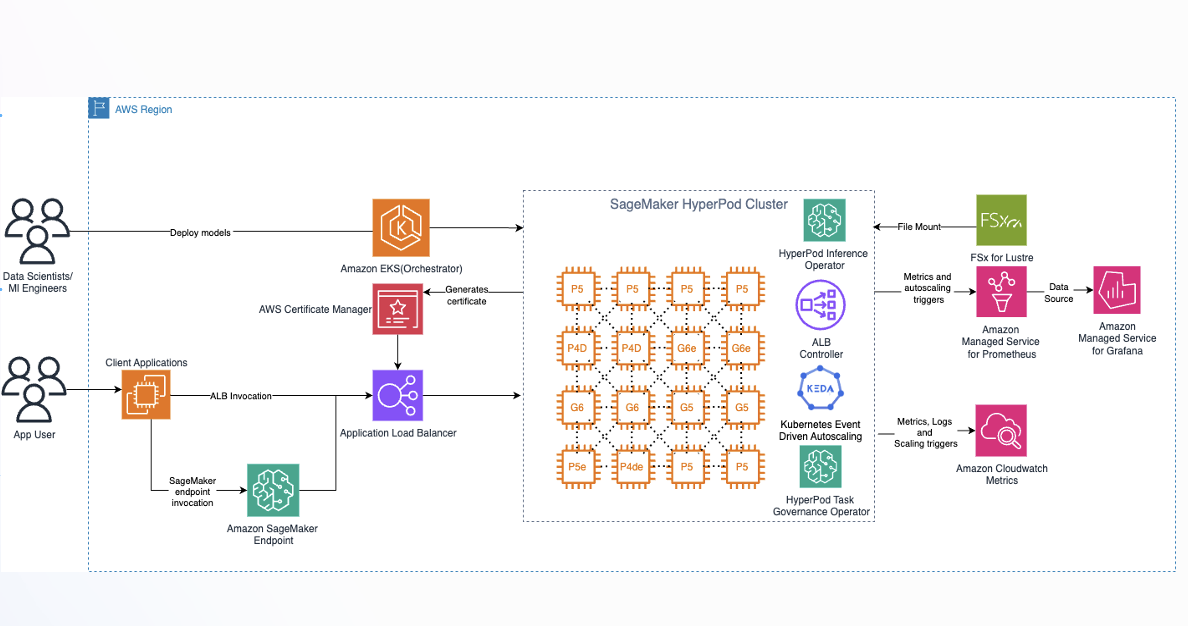
图 1:Amazon SageMaker HyperPod 的高层架构
由 EKS 编排的集群。 HyperPod 集群使用 Amazon Elastic Kubernetes Service(Amazon EKS)作为控制平面。你可以使用完整的 Kubernetes 生态系统,包括 kubectl、Helm charts 和自定义资源定义,同时 AWS 管理底层基础设施生命周期,包括网络、存储、GPU 驱动安装和 NVIDIA device plugin。
Inference Operator。 HyperPod Inference Operator(自动安装或作为 EKS Add-on 安装)提供了一个自定义资源定义(CRD)InferenceEndpointConfig,用于以声明式方式指定模型、容器镜像、GPU 资源请求和 vLLM 启动参数。该 Operator 可处理:
- 模型权重下载(来自 Hugging Face Hub、Amazon Simple Storage Service(Amazon S3)或 Amazon FSx)。
- 容器调度和 GPU 分配。
- 健康检查和就绪门控。
- 滚动更新和端点生命周期管理。
- 通过 KEDA 配合 Amazon CloudWatch 或 Prometheus 指标实现自动扩缩容。
通过 Flexible Training Plans 获得预留容量。 ml.p6-b300.48xlarge 实例类型需要预留容量。Flexible Training Plans 提供承诺式 GPU 预留,可直接分配给 HyperPod 集群。不必与按需资源池竞争,也不存在冷启动容量风险。
弹性。 HyperPod 持续监控节点健康状态,并自动替换性能退化的节点。对于全天候运行的持续推理工作负载,这减轻了人工检测和恢复硬件故障的运维负担。
其他推理功能(Inference Operator v3.x):
- 预填充与解码解耦(DPD)——将预填充和解码分配至不同的 GPU 池,在并发负载下提供可预测的逐 token 延迟。
- 推理数据捕获——在端点、负载均衡器或 Pod 层级记录输入和输出。
- 本地 NVMe 模型部署——从节点本地存储加载权重,以降低冷启动延迟。
- Amazon Route 53 DNS 管理——为端点自动创建自定义域名记录。
简而言之:你编写一个 YAML 清单来描述要部署的 内容。HyperPod 负责以可靠且可扩展的方式运行它的 方法。
基础设施规模规划:让硬件匹配模型
p6-b300 实例
ml.p6-b300.48xlarge 提供了在单节点上运行 Qwen3.8 服务所需的计算密度:
| 资源 | 规格 |
|---|---|
| GPU | 8× NVIDIA B300(Blackwell Ultra) |
| GPU 内存 | 每块 GPU 288 GB HBM3e(合计 2.1 TB) |
| GPU 内存带宽 | 每块 GPU 8 TB/s |
| GPU 互连 | NVLink + NVSwitch,14.4 TB/s 双向带宽 |
| FP4 算力 | 每块 GPU 约 15 PFLOPS(总计 120 PFLOPS) |
| vCPU | 192(Intel Xeon Emerald Rapids) |
| 系统内存 | 4,096 GiB |
| 网络 | 6,400 Gbps EFA |
| 本地存储 | 3.8 TB NVMe SSD |
为什么使用 NVFP4 量化
在 BF16 精度下,Qwen3.8 的 2.4 万亿参数仅权重就需要约 4.8 TB 内存,超出单个 8-GPU 节点的容量。NVFP4(W4A4)量化将权重压缩至每个参数约 4 bit,使总权重占用降至约 1.2 TB。这可以轻松容纳在 p6-b300 实例 2.1 TB 的聚合 GPU 内存中,并为 KV-cache 和激活值留出余量。
内存预算
以下是单个 p6-b300 节点的大致内存构成:
| 组件 | 估算大小 | 说明 |
|---|---|---|
| 模型权重(NVFP4) | 约 1.2 TB | 2.4T 参数 × 4 bit |
| KV-cache(全注意力层) | 可变 | 23 层 × KV heads × 上下文长度 |
| 循环状态(DeltaNet 层) | 固定约 50–100 GB | 69 层 × 有界状态(不随上下文增长) |
| 激活值及开销 | 约 100–200 GB | 张量并行缓冲区、框架开销 |
| 可用余量 | 约 500–700 GB | 用于批处理和更长上下文 |
混合注意力架构在这里具有关键优势:无论上下文长度如何,69 个 DeltaNet 层均维持固定大小的循环状态;这不同于传统模型的每一层 KV-cache 都会线性增长。只有 23 个全注意力层会造成依赖上下文长度的内存增长。
吞吐量预期
NVIDIA 在 GB300 NVL72(FP8、72 块 GPU)上的 Day-0 基准测试参考数据为:>4K tokens/sec/GPU、>350 tokens/sec/user。单个采用 NVFP4 的 8-GPU p6-b300 节点将提供相应更低的聚合吞吐量,但仍非常适合具有中等并发量的生产推理工作负载。
容量采购
ml.p6-b300.48xlarge 实例类型不提供按需容量。你必须通过 Flexible Training Plan 获取容量,这是一种为 HyperPod 集群提供 GPU 可用性承诺的预留计划。配置实例组时,将目标可用区设置为与计划分配相匹配的可用区。
vLLM 配置深入解析
本节详细介绍在单个 p6-b300 节点上为 Qwen3.8 配置 vLLM 服务的参数。该配置参考了 B300(NVFP4)上 Qwen3.8 的 vLLM 配方。
基础服务命令
完整的 vllm serve 调用如下:
vllm serve Inferact/Qwen3.8-2.4T-A95B-NVFP4 \
    --tensor-parallel-size 8 \
    --quantization nvfp4 \
    --load-format fastsafetensors \
    --trust-remote-code \
    --enable-prefix-caching \
    --moe-backend auto \
    --reasoning-parser qwen3 \
    --enable-auto-tool-choice \
    --tool-call-parser qwen3 \
    --speculative-config '{"method":"mtp","num_speculative_tokens":1}' \
    --served-model-name Qwen3.8
关键参数说明:
--tensor-parallel-size 8——将模型切分到全部 8 块 B300 GPU 上。--quantization nvfp4——启用 NVIDIA FP4(W4A4)量化,使 2.4T 模型能够装入 2.1 TB GPU 内存。--load-format fastsafetensors——使用加速的权重反序列化,以缩短冷启动时间。--trust-remote-code——Qwen3.8 在 Hugging Face 上使用自定义建模代码,因此需要该参数。--enable-prefix-caching——在共享提示词前缀的请求之间复用已计算的 KV-cache。对于系统提示词和对话历史会重复出现的多轮 Agent 对话而言至关重要。--moe-backend auto——让 vLLM 为硬件选择最优的 MoE 分发内核。
推理(思考模式)
--reasoning-parser qwen3 参数会从模型输出的 <think>...</think> 块中提取推理内容。关键行为包括:
- Qwen3.8 的推理功能默认启用——模型侧不需要额外参数。
- API 响应将
reasoning_content(思考轨迹)与content(最终回答)分离。 - 若要针对单个请求禁用思考模式,请在客户端调用中传入
extra_body={"chat_template_kwargs": {"enable_thinking": False}}。 - 结构化输出(
guided_json、guided_regex)可与推理功能同时使用——结构化输出引擎只约束content字段。
--enable-auto-tool-choice 和 --tool-call-parser qwen3 参数启用 OpenAI 兼容的函数调用:
- 支持的
tool_choice值包括:auto、required、none和具名函数。 - 工具调用仅从
content字段解析,reasoning_content不会被解析为函数调用。这意味着模型可以先推理 应调用哪个 工具,然后单独输出结构化调用。 - 当
tool_choice="auto",且某个工具定义中设置了strict: true时,vLLM 会对工具参数实施受 schema 约束的解码,从而有助于生成有效的 JSON 输出。
推测解码(原生 MTP)
--speculative-config '{"method":"mtp","num_speculative_tokens":1}' 参数使用 Qwen3.8 内置的草稿头启用多 Token 预测:
- Qwen3.8 使用 MTP 训练——轻量级草稿头已包含在模型权重中,无需下载或配置单独的草稿模型。
- 草稿头并行预测后续 N 个 token,随后在一次前向传播中验证这些 token。被接受的 token 可跳过单独的解码步骤,从而提升吞吐量。
num_speculative_tokens: 1是安全的起点。在验证接受率仍保持较高水平后,对于吞吐量敏感型工作负载可提高至 2–3。
English / 原文
On August 12, 2026, Alibaba’s Qwen team released Qwen3.8-2.4T-A95B. This is the first time a Qwen-Max-class model has been made available as open weights. With 2.4 trillion total parameters (95 billion activated per token), a hybrid linear-plus-full-attention architecture, and native context up to 262K tokens (extensible to 1M), Qwen3.8 targets the most demanding agentic and reasoning workloads. These include multi-step coding, long-horizon planning, and autonomous tool use.
Open weights models give you full control. Data stays within your infrastructure, inference behavior can be customized, and there are no per-token API fees at scale. The trade-off is operational: hosting a 2.4T-parameter model requires purpose-built GPU infrastructure and an optimized serving stack.
In this post we show how to deploy Qwen3.8-2.4T-A95B on Amazon SageMaker HyperPod using vLLM on a ml.p6-b300 instance (8× NVIDIA B300 Blackwell Ultra GPUs). We cover the full path from cluster provisioning to an OpenAI-compatible endpoint, including vLLM configuration for NVFP4 quantization, built-in reasoning, tool calling, and native Multi-Token Prediction (MTP) speculative decoding.
This is the second post in our series on deploying open trillion-parameter models on Amazon SageMaker HyperPod. For the first post covering Kimi K3, see Deploying Kimi K3 on Amazon SageMaker HyperPod and Amazon EKS.
Qwen3.8-2.4T-A95B at a glance
Qwen3.8-2.4T-A95B (the open-weight release of Qwen3.8-Max) is the largest and most capable model in the Qwen family. The following is a summary of the key architectural details relevant to deployment.
Architecture
| Attribute | Value |
|---|---|
| Total parameters | 2.4 T |
| Activated parameters per token | 95 B |
| Architecture | Fine-grained Mixture of Experts (MoE) |
| Expert count | 512 routed + 1 shared (10 routed experts activated per token) |
| Layers | 92 |
| Layer layout | 3 × (Gated DeltaNet → MoE) → 1 × (Gated Attention → MoE), repeated |
| Context window | 262,144 tokens native. Extensible to 1,010,000 |
| Max output length | 128K tokens |
| Multi-Token Prediction | Native MTP draft heads (enables speculative decoding without a separate model) |
The hybrid attention design is key to efficient long-context inference. Gated DeltaNet layers (69 of 92) use linear attention with a bounded recurrent state, replacing the growing KV-cache with a fixed-size memory. Gated Attention layers (23 of 92) use full quadratic attention for high-fidelity token interactions. This 3:1 ratio keeps both compute and memory bounded as context scales toward 1M tokens. This is a critical property for agentic workloads that accumulate tool outputs, code, and reasoning traces across many turns.
The fine-grained MoE distributes capacity across 512 small experts rather than a few large ones, improving routing efficiency and specialization. Only approximately 95B parameters are active per forward pass, so serving costs track activated parameters, not the full 2.4T.
Capabilities and reasoning control
Qwen3.8 is designed for agentic execution: multi-step coding, autonomous tool use, long-horizon planning, and complex research workflows. It includes built-in reasoning controls through the reasoning_effort parameter (low, medium, high), so developers can trade compute for reasoning depth per request. Dial up for hard multi-step problems and dial down for high-throughput tasks.
Model weights and quantization
The open weights are published on Hugging Face in the standard Transformers format. Community quantizations include MXFP4 and NVFP4 (W4A4), which compress the model to approximately 1.2 TB, fitting on a single 8-GPU node with B300 Blackwell Ultra GPUs.
Benchmark highlights
According to the vendor’s benchmarking results, Qwen3.8-2.4T-A95 shows particular strength in research workflows (PaperBench 93.0), instruction following (IFBench 82.8), and terminal-based coding (86.6). It performs comparably with leading frontier models across most categories, with remaining headroom on harder repository-level tasks (SWE-bench Pro) and general tool use (Toolathlon). For organizations evaluating self-hosted alternatives to proprietary APIs, these results position Qwen3.8-2.4T-A95 as a credible frontier-class option, particularly for coding agents and research pipelines.
Why Amazon SageMaker HyperPod for large MoE inference
Deploying a 2.4T-parameter model is not only a GPU problem. It requires orchestration that handles model download, container scheduling, health monitoring, autoscaling, and node failures without manual intervention. Amazon SageMaker HyperPod is purpose-built for this class of workload.
Figure 1: High-level architecture of Amazon SageMaker HyperPod
EKS-orchestrated clusters. HyperPod clusters use Amazon Elastic Kubernetes Service (Amazon EKS) as the control plane. You get the full Kubernetes landscape (kubectl, Helm charts, custom resource definitions), while AWS manages the underlying infrastructure lifecycle: networking, storage, GPU driver installation, and the NVIDIA device plugin.
Inference Operator. The HyperPod Inference Operator (installed automatically or as an EKS Add-on) provides a single custom resource definition (CRD), InferenceEndpointConfig, that declaratively specifies your model, container image, GPU resource requests, and vLLM launch arguments. The operator handles:
- Model weight download (from Hugging Face Hub, Amazon Simple Storage Service (Amazon S3), or Amazon FSx).
- Container scheduling and GPU allocation.
- Health checks and readiness gates.
- Rolling updates and endpoint lifecycle management.
- Autoscaling through KEDA with Amazon CloudWatch or Prometheus metrics.
Reserved capacity with Flexible Training Plans. The ml.p6-b300.48xlarge instance type requires reserved capacity. Flexible Training Plans provide committed GPU reservations that can be allocated directly to your HyperPod cluster. There’s no contention with on-demand pools and no cold-start capacity risk.
Resilience. HyperPod continuously monitors node health and automatically replaces degraded nodes. For sustained inference workloads running 24/7, this alleviates the operational overhead of manually detecting and recovering from hardware failures.
Additional inference features (Inference Operator v3.x):
- Disaggregated Prefill and Decode (DPD) – separates prefill and decode onto distinct GPU pools for predictable per-token latency under concurrent load.
- Inference data capture – log inputs/outputs at the endpoint, load balancer, or pod level.
- Local NVMe model deployment – load weights from node-local storage to reduce cold-start latency.
- Amazon Route 53 DNS management – automatic custom domain records for your endpoints.
In short: You write a YAML manifest describing what to deploy. HyperPod handles how to run it reliably at scale.
Infrastructure sizing: Matching hardware to the model
The p6-b300 instance
The ml.p6-b300.48xlarge provides the compute density required for single-node serving of Qwen3.8:
| Resource | Specification |
|---|---|
| GPUs | 8× NVIDIA B300 (Blackwell Ultra) |
| GPU memory | 288 GB HBM3e per GPU (2.1 TB total) |
| GPU memory bandwidth | 8 TB/s per GPU |
| GPU interconnect | NVLink + NVSwitch, 14.4 TB/s bisection bandwidth |
| FP4 compute | ~15 PFLOPS per GPU (120 PFLOPS total) |
| vCPUs | 192 (Intel Xeon Emerald Rapids) |
| System memory | 4,096 GiB |
| Networking | 6,400 Gbps EFA |
| Local storage | 3.8 TB NVMe SSD |
Why NVFP4 quantization
At BF16 precision, Qwen3.8’s 2.4T parameters require approximately 4.8 TB of memory for weights alone, exceeding a single 8-GPU node. NVFP4 (W4A4) quantization compresses weights to approximately 4 bits per parameter, bringing the total weight footprint to approximately 1.2 TB. This fits comfortably within the 2.1 TB of aggregate GPU memory on a p6-b300 instance, leaving headroom for KV-cache and activations.
Memory budget
A rough breakdown for a single p6-b300 node:
| Component | Estimated Size | Notes |
|---|---|---|
| Model weights (NVFP4) | ~1.2 TB | 2.4T params × 4 bits |
| KV-cache (full attention layers) | Variable | 23 layers × KV heads × context length |
| Recurrent state (DeltaNet layers) | Fixed ~50–100 GB | 69 layers × bounded state (does not grow with context) |
| Activations + overhead | ~100–200 GB | Tensor-parallel buffers, framework overhead |
| Available headroom | ~500–700 GB | For batching and longer contexts |
The hybrid attention architecture is a key advantage here: the 69 DeltaNet layers maintain a fixed-size recurrent state regardless of context length, unlike traditional models where KV-cache grows linearly with every layer. Only the 23 full-attention layers contribute to context-dependent memory growth.
Throughput expectations
Reference numbers from NVIDIA’s Day-0 benchmarks on GB300 NVL72 (FP8, 72 GPUs): >4K tokens/sec/GPU, >350 tokens/sec/user. A single 8-GPU p6-b300 node with NVFP4 will deliver proportionally lower aggregate throughput but remains well-suited for production inference workloads with moderate concurrency.
Capacity procurement
The ml.p6-b300.48xlarge instance type isn’t available on-demand. You must procure capacity through a Flexible Training Plan , a committed reservation of GPU availability for your HyperPod cluster. Set the target Availability Zone to match your plan’s allocation when configuring the instance group.
vLLM configuration deep dive
This section details the vLLM serving parameters for Qwen3.8 on a single p6-b300 node. The configuration is informed by the vLLM recipe for Qwen3.8 on B300 (NVFP4).
Base serving command
The full vllm serve invocation:
vllm serve Inferact/Qwen3.8-2.4T-A95B-NVFP4 \
    --tensor-parallel-size 8 \
    --quantization nvfp4 \
    --load-format fastsafetensors \
    --trust-remote-code \
    --enable-prefix-caching \
    --moe-backend auto \
    --reasoning-parser qwen3 \
    --enable-auto-tool-choice \
    --tool-call-parser qwen3 \
    --speculative-config '{"method":"mtp","num_speculative_tokens":1}' \
    --served-model-name Qwen3.8
Key flags explained:
--tensor-parallel-size 8– shards the model across all 8 B300 GPUs.--quantization nvfp4– activates NVIDIA FP4 (W4A4) quantization so the 2.4T model fits in 2.1 TB of GPU memory.--load-format fastsafetensors– uses accelerated weight deserialization for faster cold-start.--trust-remote-code– required for Qwen3.8’s custom modeling code on Hugging Face.--enable-prefix-caching– reuses computed KV-cache across requests that share prompt prefixes. Critical for multi-turn agentic conversations where the system prompt and conversation history repeat.--moe-backend auto– lets vLLM select the optimal MoE dispatch kernel for the hardware.
Reasoning (thinking mode)
The --reasoning-parser qwen3 flag extracts reasoning content from the model’s <think>...</think> output blocks. Key behaviors:
- Qwen3.8 reasoning is enabled by default – no extra flag needed on the model side.
- The API response separates
reasoning_content(the thinking trace) fromcontent(the final answer). - To disable thinking per-request, pass
extra_body={"chat_template_kwargs": {"enable_thinking": False}}in the client call. - Structured output (
guided_json,guided_regex) works alongside reasoning – the structured output engine constrains only thecontentfield.
The --enable-auto-tool-choice and --tool-call-parser qwen3 flags enable OpenAI-compatible function calling:
- Supports
tool_choicevalues:auto,required,none, and named functions. - Tool calls are parsed from the
contentfield only — thereasoning_contentis not parsed for function calls. This means the model can reason about which tool to call, then emit the structured call separately. - When
tool_choice="auto"andstrict: trueis set on a tool definition, vLLM enforces schema-constrained decoding for tool arguments, facilitating valid JSON output.
Speculative decoding (native MTP)
The --speculative-config '{"method":"mtp","num_speculative_tokens":1}' flag enables Multi-Token Prediction using Qwen3.8’s built-in draft heads:
- Qwen3.8 was trained with MTP – lightweight draft heads are bundled in the model weights. No separate draft model download or configuration is required.
- The draft head predicts the next N tokens in parallel, then verifies them in a single forward pass. Accepted tokens skip individual decode steps, increasing throughput.
num_speculative_tokens: 1is the safe starting point. Increase to 2–3 for throughput-sensitive workloads once you’ve validated that the acceptance rate remains high (monitor through vLLM’s/metricsendpoint).- MTP adds minimal latency overhead on the draft step because the heads reuse the model’s existing hidden states.
Deployment walkthrough on SageMaker HyperPod
The complete deployment manifests and scripts used in this post are available in our GitHub repository.
Prerequisites
Before deploying the model, you need a running HyperPod cluster with p6-b300 capacity:
-
Create a HyperPod cluster with EKS orchestration. In the Amazon SageMaker AI console, navigate to HyperPod Clusters , then choose Create. Choose Orchestrated by Amazon EKS and either Quick Setup (default networking and IAM) or Custom Setup with an existing virtual private cloud (VPC) and subnets. Make sure Use default Helm charts and add-ons is selected so the Inference Operator is installed automatically.
-
Provision a Flexible Training Plan. Under the instance group configuration, select Training plan as the capacity source. Create or attach a plan covering
ml.p6-b300.48xlargewith the instance count and duration you need. Set the Target Availability Zone to match the plan’s allocation. -
Add a p6-b300 worker group. Add an instance group with
ml.p6-b300.48xlargeand at least 1 instance. Wait for the cluster to reach Active state with healthy GPU nodes. -
Verify access. Confirm you can reach the cluster:
kubectl get nodes
# Expect node(s) with nvidia.com/gpu: 8 capacity
InferenceEndpointConfig manifest
Apply the following InferenceEndpointConfig to deploy Qwen3.8 with the vLLM configuration:
apiVersion: inference.sagemaker.aws.amazon.com/v1
kind: InferenceEndpointConfig
metadata:
  name: qwen38
spec:
  modelName: qwen38
  instanceType: ml.p6-b300.48xlarge
  invocationEndpoint: v1/chat/completions
  replicas: 1
  modelSourceConfig:
    huggingFaceModel:
      modelId: Inferact/Qwen3.8-2.4T-A95B-NVFP4
    modelSourceType: huggingface
  worker:
    image: vllm/vllm-openai:qwen38
    modelInvocationPort:
      containerPort: 8000
      name: http
    modelVolumeMount:
      mountPath: /opt/ml/model
      name: model-weights
    resources:
      limits:
        nvidia.com/gpu: 8
      requests:
        nvidia.com/gpu: 8
    args:
      - "--model"
      - "/opt/ml/model"
      - "--serving-model-name"
      - "Qwen3.8"
      - "--linear-backend"
      - "flashinfer_cutedsl"
      - "--trust-remote-code"
      - "--enable-prefix-caching"
      - "--enable-auto-tool-choice"
      - "--tool-call-parser"
      - "qwen3_coder"
      - "--reasoning-parser"
      - "qwen3"
      - "--served-model-name"
      - "Qwen3.8"
      - "--tensor-parallel-size"
      - "8"
    environmentVariables:
      - name: "VLLM_ENGINE_READY_TIMEOUT_S"
        value: "1800"
This manifest is also available in the GitHub repository.
Applying and monitoring
Apply the manifest:
kubectl apply -f qwen.yaml
Monitor the deployment progress:
# Watch the InferenceEndpointConfig status
kubectl get inferenceendpointconfig qwen38 -w

# Check pod status (model download and container startup)
kubectl get pods -l model-name=qwen38

# View vLLM startup logs
kubectl logs -f <pod-name> --tail=100
The deployment proceeds through these stages: model download (approximately 1.2 TB from Hugging Face, time depends on network bandwidth) then weight loading (fastsafetensors deserialization to GPU memory) then health checks pass and endpoint ready. On a fresh deployment with no cached weights, expect 15–30 minutes for the full sequence. Subsequent restarts with local NVMe caching are significantly faster.
After the endpoint shows Ready, you can send requests to the service:
# Get the service endpoint
kubectl get svc -l model-name=qwen38

# Quick health check
curl http://<service-endpoint>:8000/health
Inference in action: Calling the endpoint
After the endpoint is ready, it exposes an OpenAI-compatible API. You can use the standard OpenAI Python SDK, curl, or another HTTP client (note that in this deployment example the endpoint isn’t exposed to the public internet).
Basic chat completion (with reasoning)
from openai import OpenAI

client = OpenAI(
    base_url="http://<service-endpoint>:8000/v1",
    api_key="unused",  # vLLM does not require auth by default
)

response = client.chat.completions.create(
    model="Qwen3.8",
    messages=[{"role": "user", "content": "Explain the trade-offs of MoE vs dense models for inference."}],
    temperature=0.6,
    top_p=0.95,
)

# Reasoning trace (the model's thinking)
print("Thinking:", response.choices[0].message.reasoning_content)

# Final answer
print("Answer:", response.choices[0].message.content)
To control reasoning depth per request, pass reasoning_effort:
response = client.chat.completions.create(
    model="Qwen3.8",
    messages=[{"role": "user", "content": "What is 2+2?"}],
    extra_body={"chat_template_kwargs": {"enable_thinking": False}},  # disable thinking entirely
)
For streaming responses, check for the reasoning_content attribute on each chunk’s delta:
stream = client.chat.completions.create(
    model="Qwen3.8",
    messages=[{"role": "user", "content": "Write a Python quicksort."}],
    stream=True,
)

for chunk in stream:
    delta = chunk.choices[0].delta
    if hasattr(delta, "reasoning_content") and delta.reasoning_content:
        print(delta.reasoning_content, end="", flush=True)
    elif delta.content:
        print(delta.content, end="", flush=True)


tools = [{
    "type": "function",
    "function": {
        "name": "get_stock_price",
        "description": "Get the current stock price for a ticker symbol",
        "parameters": {
            "type": "object",
            "properties": {
                "ticker": {"type": "string", "description": "Stock ticker, e.g. 'AMZN'"}
            },
            "required": ["ticker"],
            "additionalProperties": False,
        },
        "strict": True,
    }
}]

response = client.chat.completions.create(
    model="Qwen3.8",
    messages=[{"role": "user", "content": "What's Amazon's stock price right now?"}],
    tools=tools,
    tool_choice="auto",
)

# The model reasons internally, then emits a structured tool call
print("Thinking:", response.choices[0].message.reasoning_content)

tool_call = response.choices[0].message.tool_calls[0].function
print(f"Function: {tool_call.name}, Args: {tool_call.arguments}")
With strict: True set on the tool definition, vLLM makes sure the arguments conform to the JSON schema. No post-validation is needed.
Recommended sampling parameters
For most use cases with Qwen3.8:
temperature=0.6– balances creativity and coherence. Use0.0for deterministic outputs (for example, structured extraction).top_p=0.95– standard nucleus sampling.top_k=20– limits vocabulary at each step and reduces degenerate outputs on long generations.max_tokens– set generously when thinking is enabled, since thereasoning_contentcounts toward the token budget. For complex reasoning tasks, 32,768–65,536 is a reasonable ceiling.
A curl example for quick validation:
curl http://<service-endpoint>:8000/v1/chat/completions \
  -H "Content-Type: application/json" \
  -d '{
    "model": "Qwen3.8",
    "messages": [{"role": "user", "content": "Hello, Qwen3.8!"}],
    "temperature": 0.6,
    "max_tokens": 256
  }'
Performance tuning tips
With the endpoint running, the following tuning levers let you optimize for your specific workload pattern.
Benchmark results
We benchmarked Qwen3.8-2.4T-A95B on a single p6-b300 instance (8× B300 GPUs) using 512 requests with 1,024 input tokens and 1,024 output tokens at a concurrency of 32. We tested four configurations to isolate the impact of Expert Parallelism (EP) and Multi-Token Prediction (MTP) speculative decoding:
- TP – Tensor Parallelism only (TP=8), our baseline.
- TP+MTP – TP=8 with native MTP speculative decoding (
num_speculative_tokens: 1). - TP+EP – TP=8 with Expert Parallelism enabled.
- TP+EP+MTP – TP=8 with both EP and MTP enabled.
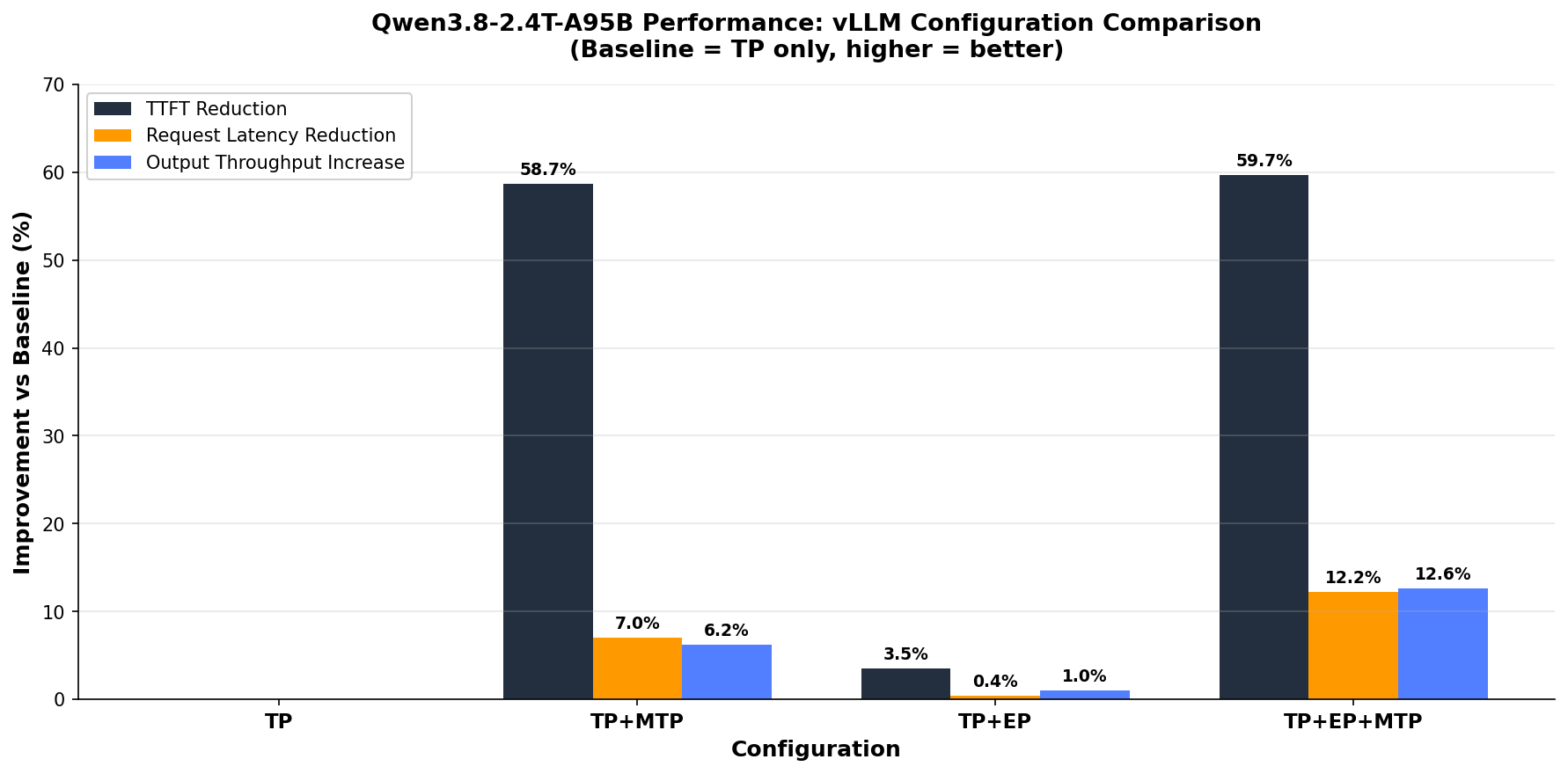
Figure 2: Benchmark comparison of TP, MTP, and EP configurations on a p6-b300 node
Key findings (percentage improvement compared to the TP baseline):
| Configuration | TTFT Reduction | Request Latency Reduction | Output Throughput Increase |
|---|---|---|---|
| TP+MTP | −58.7% | −7.0% | +6.2% |
| TP+EP | −3.5% | −0.4% | +1.0% |
| TP+EP+MTP | −59.7% | −12.2% | +12.6% |
Analysis:
- MTP is the dominant optimization for TTFT. Enabling speculative decoding (even with only 1 draft token) cuts time-to-first-token (TTFT) by nearly 59 percent, from 1,244 ms to 513 ms. This is because the MTP draft head predicts the first output tokens in parallel with the final prefill steps, overlapping compute.
- EP alone provides modest gains (approximately 3.5 percent TTFT, approximately 1 percent throughput). The benefit is more pronounced at higher concurrency levels where expert routing contention becomes a bottleneck.
- The combination of EP+MTP delivers the best overall result : 59.7 percent TTFT reduction, 12.2 percent latency reduction, and 12.6 percent higher output throughput. The two optimizations are complementary: EP reduces expert dispatch overhead while MTP reduces decode latency.
- Inter-token latency (not shown in chart) also improves: 17.97 ms (TP) to 17.33 ms (TP+MTP) to 16.36 ms (TP+EP+MTP), a 9 percent reduction with the full configuration.
Recommendation: For production deployments, enable both EP and MTP (--enable-expert-parallel + --speculative-config '{"method":"mtp","num_speculative_tokens":1}'). The combined configuration delivers the best latency and throughput profile with minimal additional complexity.
Prefix caching
Enabled with --enable-prefix-caching (already in our config). vLLM’s Automatic Prefix Caching (APC) reuses KV-cache blocks across requests that share the same prompt prefix. This is common in multi-turn agentic conversations where the system prompt and conversation history repeat. For workloads with high prefix overlap, this can reduce time-to-first-token (TTFT) by 50–80 percent on repeated turns. No downside for workloads without prefix sharing. Unused cached blocks are evicted automatically.
Speculative decoding (MTP) tuning
Our config starts with num_speculative_tokens: 1 (one extra token drafted per step). Tuning guidance:
- Increase to 2–3 for throughput-sensitive, low-concurrency workloads. Each additional speculative token increases the number of tokens that can be accepted per step, but also increases draft overhead and verification cost.
- Monitor acceptance rate through the vLLM
/metricsendpoint (spec_decode_acceptance_rate). If acceptance stays above 70–80 percent, increasingnum_speculative_tokensis profitable. Below 50 percent, reduce it or disable speculation. - High-concurrency caveat : at high queries per second (QPS), speculative decoding consumes additional GPU compute for drafting and verification. Under saturation, the overhead can reduce aggregate throughput. Consider disabling MTP under heavy batch load and enabling it only for latency-sensitive single-stream requests.
- MTP provides the best gains for memory-bound decode workloads (long outputs, low batch size) — exactly the pattern for agentic reasoning tasks with extended
<think>traces.
Memory and context length
--gpu-memory-utilization (default: 0.9) controls how much GPU memory vLLM pre-allocates for KV-cache. For Qwen3.8 with NVFP4, the model weights occupy approximately 57 percent of GPU memory, leaving approximately 43 percent (roughly 900 GB) for cache and overhead. Tuning:
- Keep at 0.9 for maximum throughput (more KV-cache slots = more concurrent requests).
- Reduce to 0.85 if you observe out-of-memory (OOM) errors during long-context requests. This sacrifices batch capacity but helps prevent preemption cascades.
--max-model-len caps the maximum sequence length vLLM will accept. Setting this lower than the model’s full 262K context gives vLLM more KV-cache slots for shorter requests, improving concurrency. Set it to match your actual workload’s maximum context requirement. For example, 32,768 for typical coding agents or 131,072 for long-document analysis.
Batching and scheduling
--max-num-seqs (default: 256) limits concurrent sequences in a batch. For MoE models with large per-token compute, reducing this to 64–128 decreases scheduling overhead and makes sure each request gets sufficient GPU attention, improving per-request latency at the cost of aggregate throughput.
--max-num-batched-tokens controls the total token budget per scheduling step (prefill + decode combined). vLLM V1 uses chunked prefill by default. Large prefills are split into chunks and interleaved with decode steps:
- Lower values (for example, 8192) provide better inter-token latency (ITL), because decodes aren’t stalled by large prefills.
- Higher values (for example, 32768+) lead to better TTFT, since more prefill tokens are processed per batch.
- For agentic workloads with mixed short and long requests, start at 16384 and adjust based on observed P99 ITL.
MoE backend selection
--moe-backend auto lets vLLM choose the optimal kernel. On Blackwell GPUs, this typically selects fused MoE kernels that treat sparse expert dispatch as grouped-GEMM operations, minimizing per-expert scheduling overhead. If profiling (using nsys or vLLM’s built-in profiler) reveals MoE dispatch as a bottleneck, you can experiment with explicit backends, but auto is the recommended starting point.
Expert parallelism (advanced)
For deployments needing higher concurrency than a single TP=8 configuration allows, vLLM supports Expert Parallelism (EP) where MoE experts are distributed across GPUs independently of attention heads. On a single p6-b300 node, you could combine TP=4 + EP=2. This halves the number of experts per GPU, freeing memory for larger KV-cache at the cost of increased all-to-all communication during expert dispatch. Profile before adopting: on NVLink-connected GPUs the communication cost is low, but gains depend on your concurrency target.
Monitoring
vLLM exposes Prometheus metrics at /metrics. Key gauges to watch:
vllm:num_requests_running– current batch size. Spikes indicate queuing.vllm:gpu_cache_usage_perc– KV-cache utilization. Sustained >95 percent signals preemption risk.vllm:num_preemptions_total– if this climbs, increasegpu_memory_utilizationor reducemax_num_seqs.vllm:spec_decode_acceptance_rate– MTP acceptance rate. Tunenum_speculative_tokensaccordingly.vllm:e2e_request_latency_seconds– end-to-end latency distribution for service level agreement (SLA) tracking.
For HyperPod deployments, these metrics can be scraped by Amazon Managed Prometheus and visualized in Grafana, or fed into KEDA for autoscaling decisions.
Clean up
To avoid ongoing charges, remove the resources in reverse order:
# Delete the inference endpoint
kubectl delete inferenceendpointconfig qwen38

# (Optional) Scale down or delete the HyperPod cluster
# via the SageMaker AI console or CLI
If you no longer need GPU capacity, release or let your Flexible Training Plan expire. Cluster deletion stops compute charges. The training plan commitment remains until its term ends regardless of usage.
Conclusion and next steps
In this post we deployed Qwen3.8-2.4T-A95B, a 2.4-trillion-parameter open-weight model, on a single p6-b300 instance using Amazon SageMaker HyperPod and vLLM. The deployment exposes a production-ready OpenAI-compatible endpoint with built-in reasoning, tool calling, and native MTP speculative decoding, all managed through a single Kubernetes manifest.
From here you can:
- Benchmark with your workload – run
vllm bench serveor your own evaluation harness against the endpoint to establish baseline throughput and latency for your specific prompt distribution. - Integrate into agentic pipelines – connect the endpoint to your orchestration framework (LangChain, CrewAI, or custom) using the standard OpenAI SDK. The tool-calling and reasoning outputs are compatible without additional configuration.
- Fine-tune for your domain – use NVIDIA NeMo or Amazon SageMaker training jobs to produce domain-adapted checkpoints, then redeploy with the same manifest by swapping the model ID.
- Add guardrails – layer I/O filtering (for example, NVIDIA NeMo Guardrails or a custom proxy) in front of the vLLM endpoint for content safety and policy compliance.
References
About the authors
Dmitry Soldatkin
Dmitry is a Worldwide Leader for Specialist Solutions Architecture, SageMaker Inference at AWS. He leads efforts to help customers design, build, and optimize GenAI and AI/ML solutions across the enterprise. His work spans a wide range of ML use cases, with a primary focus on Generative AI, deep learning, and deploying ML at scale. He has partnered with companies across industries including financial services, insurance, and telecommunications.
Andrew Smith
Andrew is a Sr. Cloud Support Engineer in the SageMaker, Vision & Other team at AWS, based in Sydney, Australia. He supports customers using many AI/ML services on AWS with expertise in working with Amazon SageMaker. Outside of work, he enjoys spending time with friends and family as well as learning about different technologies.
Vinay Arora
Vinay is a Worldwide Leader for Specialist Solution Architect, Generative AI at AWS, where he collaborates with customers in designing cutting-edge AI solutions, leveraging AWS technologies. Prior to AWS, Vinay has over two decades of experience in finance—including roles at banks and hedge funds—he has built risk models, trading systems, and market data platforms. Vinay holds a master’s degree in computer science and business management.