使用 Marengo 3.0 在 Amazon Bedrock Knowledge Bases 中搜索视频和图像
英文标题:Video and image search in Amazon Bedrock Knowledge Base using Marengo 3.0
TwelveLabs Marengo Embed 3.0 现已作为嵌入模型在 Amazon Bedrock Knowledge Bases 中正式可用,可对视频、图像和音频内容进行全托管的自然语言语义搜索。该多模态模型将视频、音频、图像和文本统一编码为 512 维向量,Managed Knowledge Bases 可自动完成分段、抽帧、转写、嵌入生成和索引。开发者可通过 Amazon S3 导入媒体资产,并使用控制台测试功能或 Amazon Bedrock Retrieve API 检索特定片段,无需自行搭建复杂的多模态 RAG 管道。该能力目前在美国东部(弗吉尼亚北部)和美国西部(加利福尼亚北部)区域提供,并适用于体育、媒体、安全、教育和零售等场景。
 1.3 MB
 101.1 KB
 124.1 KB
 345.0 KB
 141.2 KB
 346.5 KB
 124.5 KB
 99.4 KB
 118.0 KB
 48.3 KB
 218.3 KB
 122.1 KB
 31.2 KB
 763.5 KB
 36.3 KB
 104.6 KB
 20.7 KB
 21.4 KB
 24.8 KB
 17.6 KB
中文
今天,我们宣布 TwelveLabs Marengo Embed 3.0 已作为 Amazon Bedrock Knowledge Bases 中的嵌入模型正式可用。
视频和媒体资产在语义层面上仍然大多不可搜索。媒体、体育分析、教育、安全和零售团队需要通过自然语言,在数小时的视频素材中找到特定时刻。例如,查询可以是“向我展示下半场的点球”。如今,要在视频之上构建语义搜索,通常需要拼接复杂的流水线,包括转写服务、帧提取流水线、嵌入模型、向量数据库以及同步逻辑。
Amazon Bedrock Knowledge Bases 是一项全托管的检索增强生成(RAG)服务,负责存储、摄取、嵌入、重排序和检索。它支持视频文件(MP4、MOV)、图像(JPEG、PNG)和音轨,并提供 Amazon Simple Storage Service(Amazon S3)、SharePoint、Confluence 等服务的原生连接器。
Marengo Embed 3.0 是一款多模态嵌入模型,可将视频、音频、图像和文本联合编码到紧凑、存储高效的 512 维向量空间中。
随着 Marengo Embed 3.0 成为可选嵌入模型,针对视频、音频和图像内容的自然语言搜索成为全托管体验。Managed Knowledge Bases(Managed MKB)会自动生成多模态嵌入,将视觉、文本、语音和音频信号捕获到统一的向量表示中。
操作演练
本演练介绍如何使用 Amazon Bedrock 控制台创建由 Marengo 3.0 驱动的知识库(KB)。该场景使用了一段时长 10 分钟的 2022 年 FIFA 世界杯决赛视频片段。
我们将摄取该视频,并对其执行自然语言查询。
前提条件
- 一个处于活动状态的 AWS 账户。如果尚未拥有账户,请参阅创建 AWS 账户。
- 可访问 Amazon Bedrock,且已在受支持区域启用 TwelveLabs Marengo Embed 3.0。详情请参阅 Amazon Bedrock 文档中的模型访问。
- 一个用于存储视频和图像文件的 Amazon S3 存储桶。
- Amazon Bedrock 和 Amazon S3 的 AWS Identity and Access Management(IAM)权限。
首先,将视频文件上传至 Amazon S3 存储桶。无需进行预处理,因为 Managed MKB 会在内部处理分段、帧采样和转写。
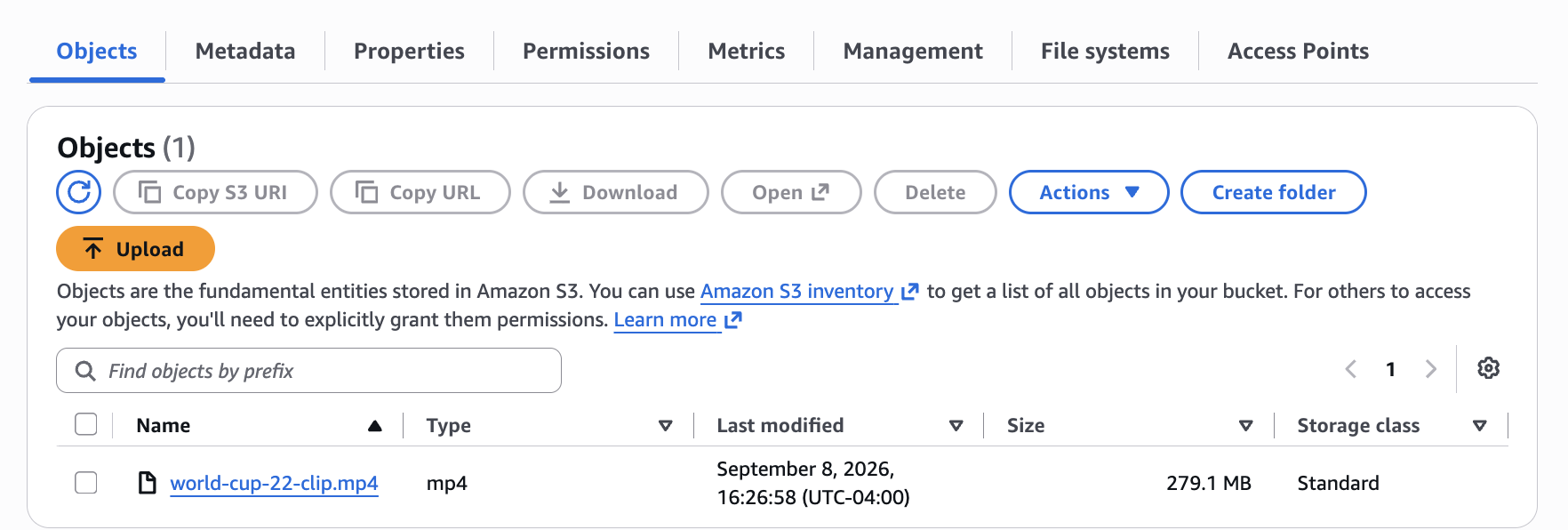
图 1:包含已上传足球视频文件、用于知识库摄取的 Amazon S3 存储桶
2. 创建托管知识库
在 Amazon Bedrock 控制台中,导航至 Knowledge Bases,然后选择 Create Managed KB。
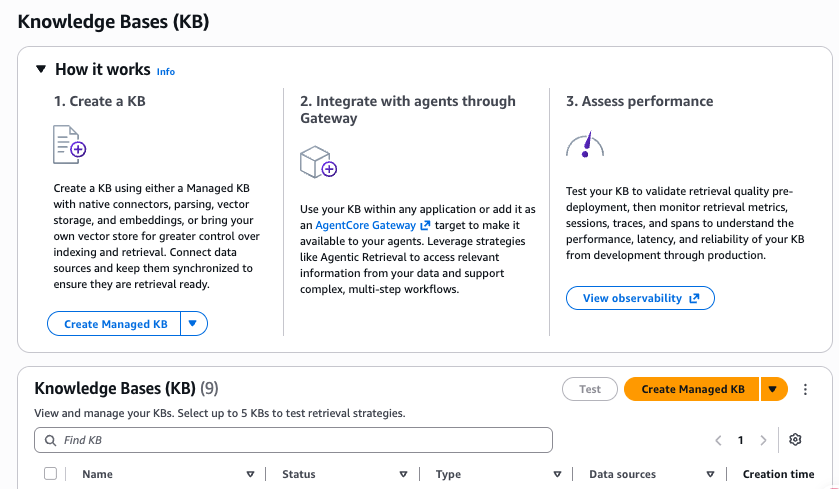
图 2:带有 Create managed KB 按钮的 Amazon Bedrock Knowledge Bases 控制台
展开 Additional Configuration 面板,并在 Embeddings model 中选择 Amazon Bedrock embeddings model。默认选中的是 Amazon Titan Text。选择笔形图标以编辑模型选择。
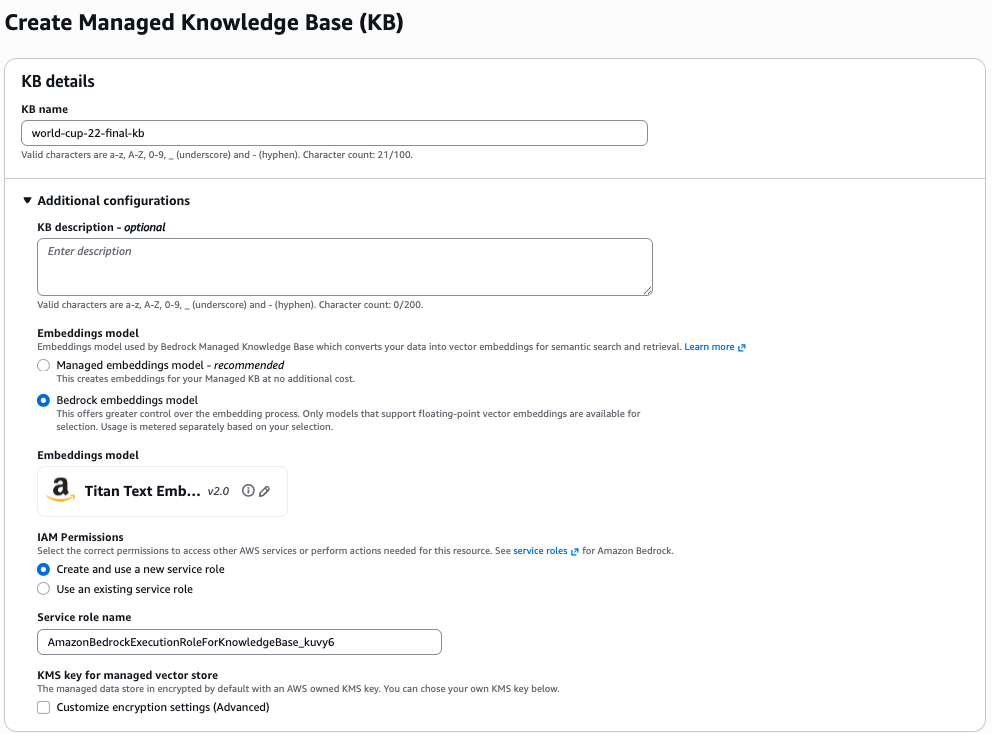
图 3:展示 KB 名称、服务角色和嵌入模型配置的知识库创建表单
如下一图所示,选择 TwelveLabs/Marengo Embed 3.0。
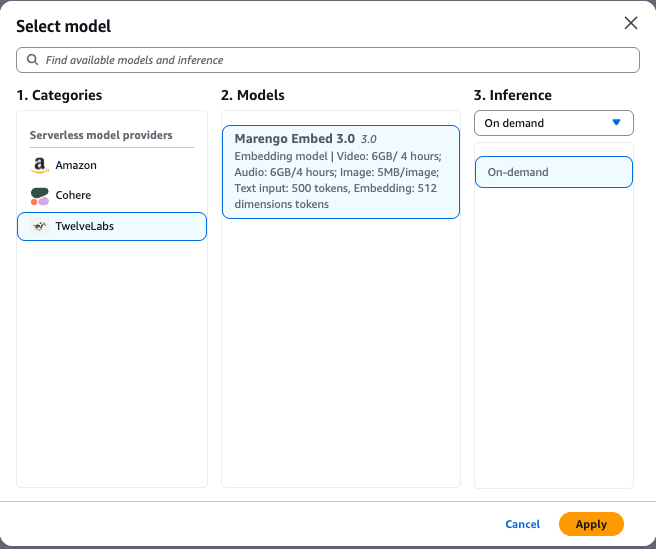
图 4:模型选择对话框,其中 TwelveLabs Marengo Embed 3.0 被选为嵌入模型
接下来,展开 Data source 面板,在 Data source type 中选择 Amazon S3,并配置包含视频资产的存储桶 S3 URI。
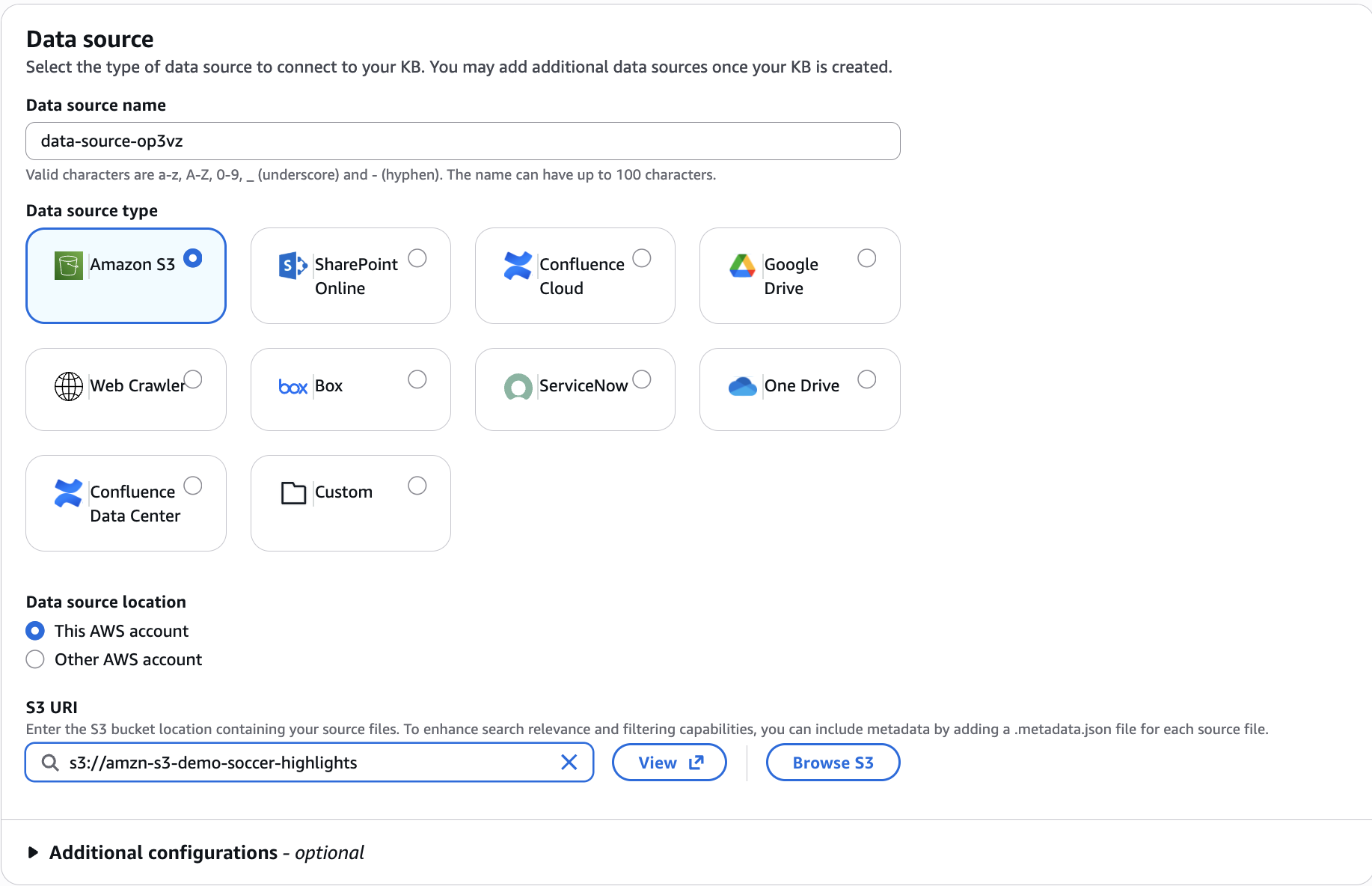
图 5:数据源配置面板,其中已选择 Amazon S3 并指定 S3 URI
在 Advanced configurations 下的 Audio/video segmentation configuration 部分,可以配置音频和视频分段时长。两种模态的默认时长均为 4 秒。
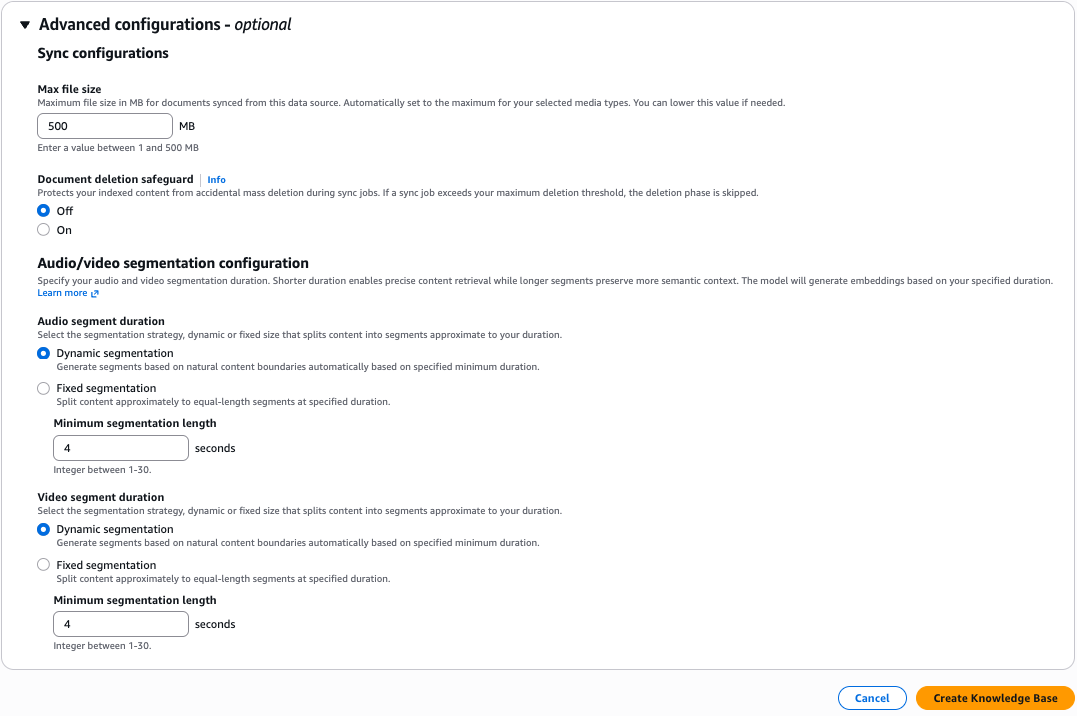
图 6:包括音频和视频分段设置在内的高级配置选项
保持高级参数不变,然后在页面右下角选择 Create Knowledge Base。
3. 同步并摄取数据
创建 KB 后,选择 Sync 以启动摄取。Managed MKB 会自动提取帧、转写音频、为每个片段生成 Marengo Embed 3.0 嵌入,并将向量写入索引。
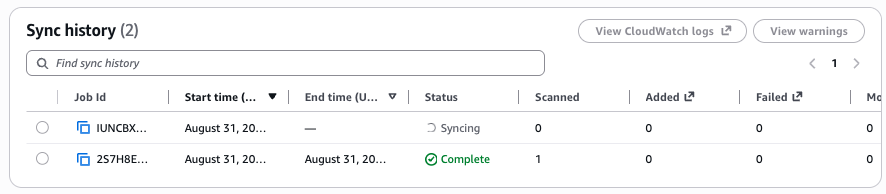
图 7:展示已完成数据摄取任务的同步历史面板
4. 运行语义搜索
您可以使用 Test 功能直接在控制台中测试 KB。配置要检索的源分块数量,应用元数据筛选器,并执行类似“向我展示这场足球比赛中的点球。”的查询。
响应会返回排序后的结果,以及包括分块开始时间、分块结束时间、源 URI 和嵌入类型在内的元数据,因此您可按需提取相关片段。
在此示例中,排名靠前的结果识别出了尝试主罚点球的时刻。
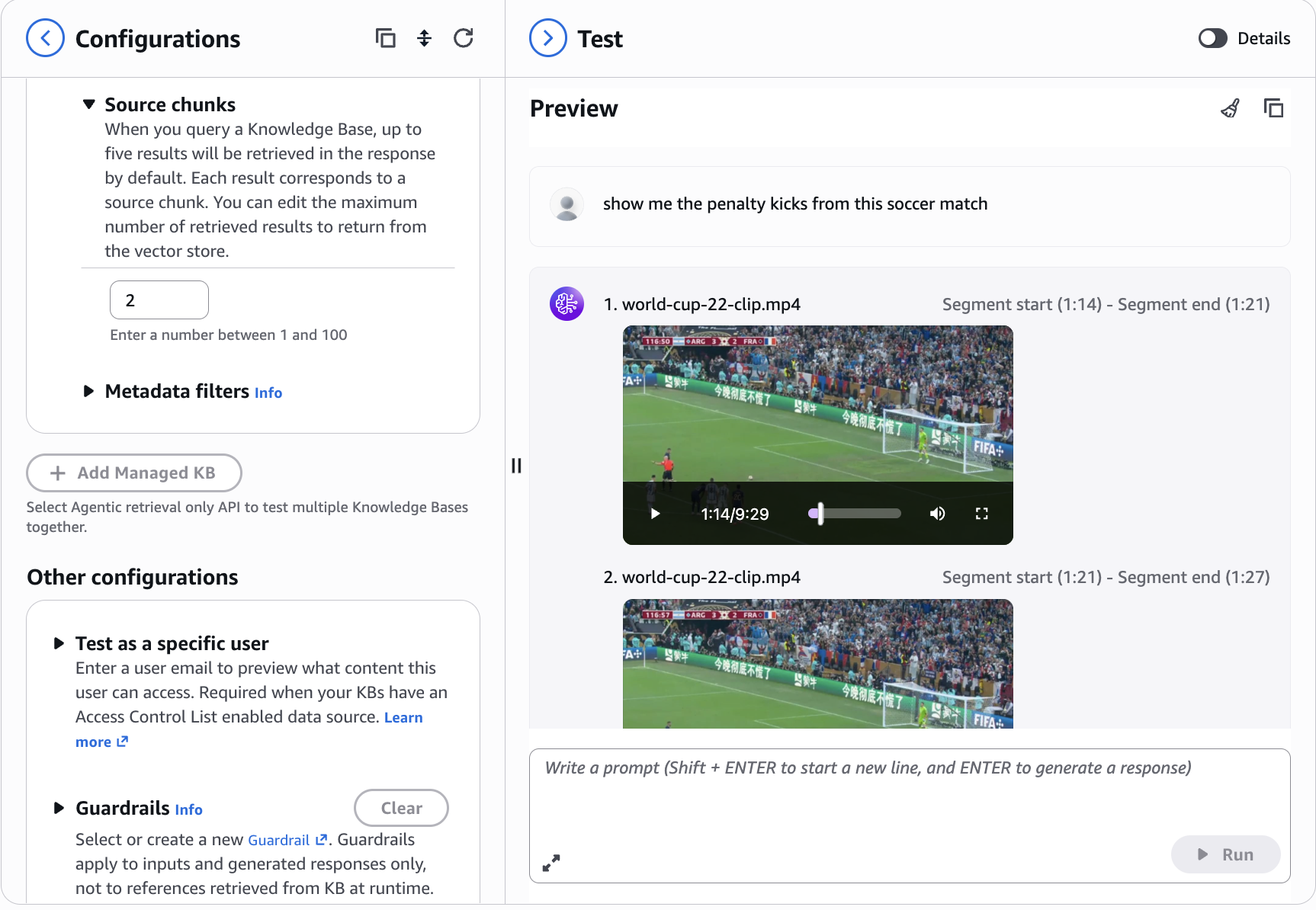
图 8:知识库测试界面,展示带视频播放和源分块时间线的语义搜索结果
5. 清理资源
要清理资源,请完成以下步骤:
- 在 Amazon Bedrock 控制台中,选择 Knowledge Bases。
- 选择您的知识库,并记下 IAM 服务角色名称以及 S3 Vector 索引的 Amazon Resource Name(ARN)。
- 选择 Delete 并确认。
- 在 IAM 控制台中,找到先前在创建知识库时创建的角色。
- 选择并删除该角色。
- 在 Amazon S3 控制台中,找到您的 S3 存储桶。
- 选择并删除为本教程上传的文件。
与应用程序集成
您可以使用 Amazon Bedrock Retrieve API 为下游应用程序提供支持。可从 Details 页面复制调用代码,作为起点。
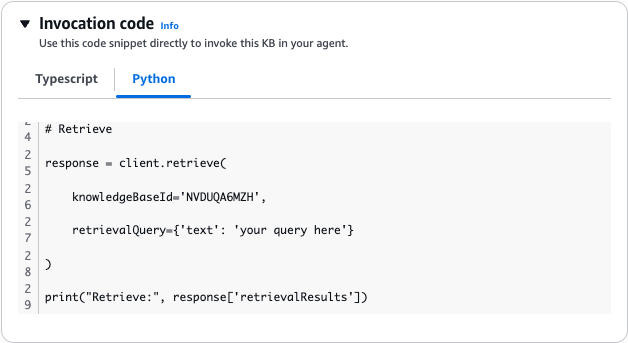
图 9:使用 Amazon Bedrock Retrieve API 查询知识库的 Python 代码示例
以下架构展示了多模态内容如何从 Amazon S3 流经搭载 Marengo 3.0 的 Managed Knowledge Bases,完成嵌入和索引。下游应用程序可通过 Boto SDK Retrieve API 查询知识库,或将其作为 Amazon Bedrock AgentCore 中的 Amazon Bedrock Gateway 目标进行查询。
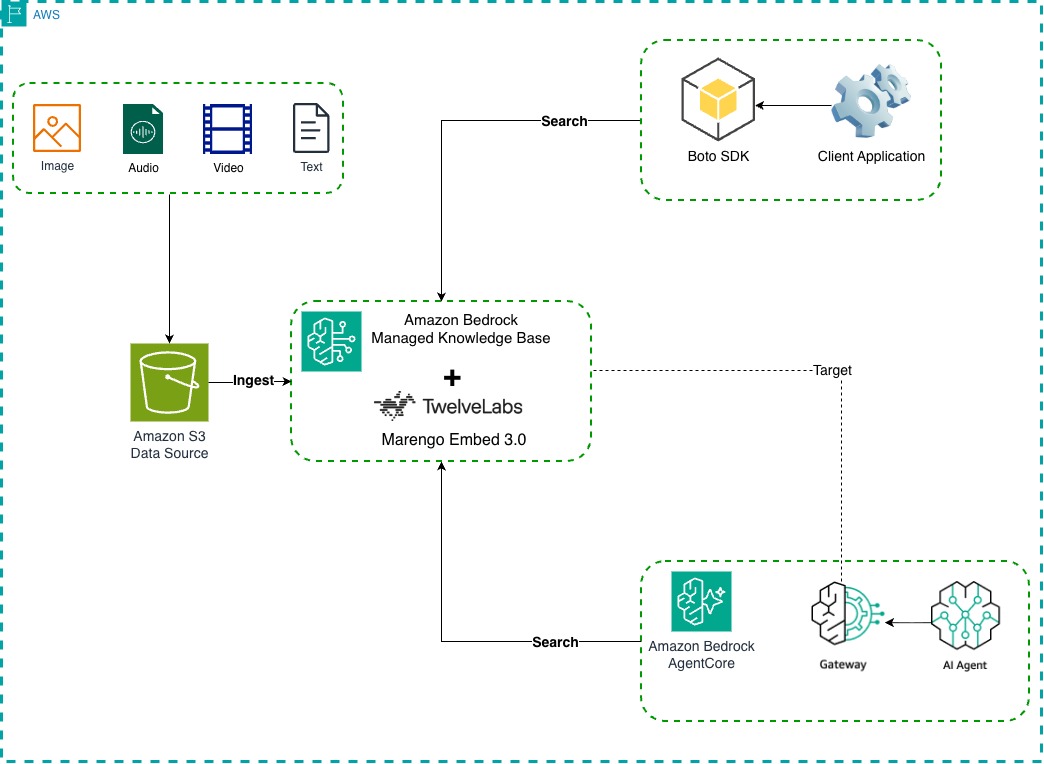
图 10:展示多模态内容从 Amazon S3 经由搭载 Marengo 3.0 的 Managed Knowledge Bases 流向下游应用程序的架构图
结论
随着 Marengo 3.0 在 Amazon Bedrock Knowledge Bases 中正式可用,您现在无需构建或管理复杂基础设施,即可通过自然语言搜索充分释放视频、音频和图像资产的价值。只需指定数据源、同步并搜索。
其业务影响覆盖多个行业:
- 体育分析: 在覆盖整个赛季的视频素材中查找特定比赛回合、阵型或球员动作。
- 媒体与娱乐: 对媒体资产进行管理,并对媒体档案或流媒体服务内容进行语义搜索。
- 安保与安全: 在监控摄像头视频中搜索特定事件或活动。
- 教育与培训: 按概念而不仅是关键词定位讲座片段。
- 零售: 在产品演示视频中搜索功能展示内容。
可用性和定价
搭载 Marengo Embed 3.0 的 Amazon Bedrock Managed Knowledge Bases 已在美国东部(弗吉尼亚北部)AWS 区域(us-east-1)和美国西部(加利福尼亚北部)区域(us-west-1)推出。有关受支持模型和区域的完整列表,请参阅 Amazon Bedrock 中按 AWS 区域划分的受支持模型。
使用 Amazon Bedrock Managed Knowledge Bases,您仅需为存储和检索的内容付费。使用 Marengo Embed 3.0 生成嵌入,将按照标准 Amazon Bedrock 模型调用费率计费。
有关更多信息,请参阅定价文档页面。
后续步骤
开始使用全托管多模态检索:
- 浏览文档:阅读 Amazon Bedrock Knowledge Bases 文档和构建托管知识库,了解更多技术细节。
- 试用代码示例:查看 Amazon Bedrock samples 仓库,其中提供演示多模态检索的实操 Notebook。
- 进一步了解 Marengo Embed 3.0:查阅 Marengo 3.0 文档,获取更深入的技术洞见。
关于作者
Eric Kim
Eric 是 TwelveLabs 负责 Marengo 和 Search 的高级产品经理,负责塑造前沿模型研究,并构建多模态搜索和视频理解解决方案。他与研究人员、工程师和客户合作,将 AI 技术进展转化为产品,帮助人们大规模理解视频集合。
Narcisse Zekpa
Narcisse 是一位常驻波士顿的高级解决方案架构师。他帮助美国东北部客户通过 AWS Cloud 上创新且可扩展的解决方案加速业务转型。他热衷于帮助组织利用高级分析和 AI 转型业务。Narcisse 不进行技术构建时,喜欢与家人共度时光、旅行和公路赛车。
Amit Choudhary
Amit 是 AWS 的首席产品经理,负责 Amazon Bedrock 和 Amazon Quick 知识库的产品战略。他致力于让企业客户能够便捷、安全并以生产就绪的方式使用多模态检索增强生成(RAG)。
Adam Stanley
Adam 是一位常驻西雅图的 AWS 解决方案架构师。他拥有统计学和机器学习背景,在与客户合作时覆盖机器学习的大多数领域,近期尤其专注于 GPU 和 AWS Trainium 等 AI 加速器硬件。
English / 原文
Today we’re announcing the general availability of TwelveLabs Marengo Embed 3.0 as an embedding model in Amazon Bedrock Knowledge Bases.
Video and media assets remain largely unsearchable by meaning. Teams in media, sports analytics, education, security, and retail need to find specific moments in hours of footage using natural language. An example query is “show me the penalty kick in the second half”. Building semantic search over video today requires stitching together a complex pipeline of transcription services, frame extraction pipelines, embedding models, vector databases, and synchronization logic.
Amazon Bedrock Knowledge Bases is a fully managed Retrieval Augmented Generation (RAG) service that handles storage, ingestion, embedding, re-ranking, and retrieval. It supports video files (MP4, MOV), images (JPEG, PNG), and audio tracks, with native connectors for Amazon Simple Storage Service (Amazon S3), SharePoint, Confluence, and more.
Marengo Embed 3.0 is a multimodal embedding model that jointly encodes video, audio, images, and text into a compact, storage-efficient 512-dimensional vector space.
With Marengo Embed 3.0 now available as an embedding model option, natural language search through video, audio, and image content becomes a fully managed experience. Managed Knowledge Bases (Managed MKB) automatically generates multimodal embeddings, capturing visual, textual, speech, and audio signals into a unified vector representation.
Walkthrough
This walkthrough shows how to create a knowledge base (KB) powered by Marengo 3.0 using the Amazon Bedrock console. The scenario contains a 10-minute clip of the 2022 FIFA World Cup final.
We ingest the video and run natural language queries against it.
Prerequisites
- An active AWS account. If you don’t have one, see Create an AWS Account.
- Access to Amazon Bedrock with TwelveLabs Marengo Embed 3.0 enabled in a supported Region. For details, see Model access in the Amazon Bedrock documentation.
- An Amazon S3 bucket to store your video and image files.
- AWS Identity and Access Management (IAM) permissions for Amazon Bedrock and Amazon S3.
First, upload video files to an Amazon S3 bucket. There’s no pre-processing required as Managed MKB handles segmentation, frame sampling, and transcription internally.
Figure 1: Amazon S3 bucket containing the uploaded soccer video file for knowledge base ingestion
2. Create a managed knowledge base
In the Amazon Bedrock console, navigate to Knowledge Bases and choose Create Managed KB.
Figure 2: Amazon Bedrock Knowledge Bases console with the Create managed KB button
Expand the Additional Configuration pane and select Amazon Bedrock embeddings model for Embeddings model. Amazon Titan Text is selected by default. Choose the pen icon to edit the model choice.
Figure 3: Knowledge base creation form showing the KB name, service role, and embeddings model configuration
Select TwelveLabs/Marengo Embed 3.0 as shown in the following figure.
Figure 4: Model selection dialog with TwelveLabs Marengo Embed 3.0 selected as the embedding model
Next, expand the Data source pane, select Amazon S3 as Data source type , and configure the S3 URI of the bucket containing your video assets.
Figure 5: Data source configuration pane with Amazon S3 selected and the S3 URI specified
In the Audio/video segmentation configuration section under Advanced configurations , you can configure audio and video segmentation durations. The default is 4 seconds for both modalities.
Figure 6: Advanced configuration options including audio and video segmentation settings
Leave the advanced parameters unchanged and choose Create Knowledge Base at the bottom right of the page.
3. Sync and ingest your data
After the KB has been created, choose Sync to start ingestion. Managed MKB automatically extracts frames, transcribes audio, generates Marengo Embed 3.0 embeddings for each segment, and writes vectors to the index.
Figure 7: Sync history panel showing a completed data ingestion job
4. Run a semantic search
You can test your KB without leaving the console using the Test feature. Configure how many source chunks to retrieve, apply metadata filters, and run a query such as “show me the penalty kicks from this soccer match.”
The response returns ranked results with metadata including chunk start time, chunk end time, source URI, and embedding type, so you can extract the relevant sections as needed.
In this example, the top results identify moments where penalty kicks were attempted.
Figure 8: Knowledge base test interface showing semantic search results with video playback and source chunk timeline
5. Clean up
To clean up your resources, complete the following steps:
- On the Amazon Bedrock console, choose Knowledge Bases.
- Select your knowledge base and note both the IAM service role name and the Amazon Resource Name (ARN) of the S3 Vector index.
- Choose Delete and confirm.
- On the IAM console, find the role created earlier during knowledge base creation.
- Select and delete the role.
- On the Amazon S3 console, find your S3 bucket.
- Select and delete the files that you uploaded for this tutorial.
Integrate with your application
You can use the Amazon Bedrock Retrieve API to power downstream applications. Copy the invocation code from the Details page as a starting point.
Figure 9: Python code example using the Amazon Bedrock Retrieve API to query the knowledge base
The following architecture shows how multimodal content flows from Amazon S3 through Managed Knowledge Bases with Marengo 3.0 for embedding and indexing. Downstream, applications query the knowledge base through the Boto SDK Retrieve API or as an Amazon Bedrock Gateway target in Amazon Bedrock AgentCore.
Figure 10: Architecture diagram showing the multimodal content flow from Amazon S3 through Managed Knowledge Bases with Marengo 3.0 to downstream applications
Conclusion
With the general availability of Marengo 3.0 in Amazon Bedrock Knowledge Bases, you can now unlock the full value of your video, audio, and image assets through natural language search, without building or managing complex infrastructure. Point your data source, sync, and search.
The business impact spans industries:
- Sports analytics: Find specific plays, formations, or player actions across entire seasons of footage.
- Media and entertainment: Media asset management, semantic search through media archive or streaming service content.
- Security and safety: Search security camera footage for specific incidents or activities.
- Education and training: Locate lecture segments by concept, not only keywords.
- Retail: Search product demo videos for feature demonstrations.
Availability and pricing
Managed Knowledge Bases for Amazon Bedrock with Marengo Embed 3.0 is available in the US East (N. Virginia) AWS Region (us-east-1) and the US West (N. California) Region (us-west-1). For a complete list of supported models and Regions, see Supported models by AWS Region in Amazon Bedrock.
With Managed Knowledge Bases for Amazon Bedrock, you pay only for what you store and retrieve. Embeddings generation with Marengo Embed 3.0 is charged at the standard Amazon Bedrock model invocation rate.
For more information, see the pricing documentation page.
Next steps
Get started with fully managed multimodal retrieval:
- Explore the documentation : Review the Amazon Bedrock Knowledge Bases documentation and Build a managed knowledge base for additional technical details.
- Experiment with code examples : Check out the Amazon Bedrock samples repository for hands-on notebooks demonstrating multimodal retrieval.
- Learn more about Marengo Embed 3.0 : Check out Marengo 3.0 documentation for deeper technical insights.
About the authors
Eric Kim
Eric is a Staff Product Manager leading Marengo and Search at TwelveLabs, where he shapes frontier model research and builds solutions for multimodal search and video understanding. He works with researchers, engineers, and customers to turn advances in AI into products that help humans make sense of video collections at scale.
Narcisse Zekpa
Narcisse is a Sr. Solutions Architect based in Boston. He helps customers in the Northeast U.S. accelerate their business transformation through innovative, and scalable solutions, on the AWS Cloud. He is passionate about enabling organizations to transform their business, using advanced analytics and AI. When Narcisse is not building, he enjoys spending time with his family, traveling and road racing.
Amit Choudhary
Amit is a Principal Product Manager at AWS, where he leads the product strategy for knowledge bases for Amazon Bedrock and Amazon Quick. He is passionate about making multimodal retrieval-augmented generation (RAG) accessible, secure, and production-ready for enterprise customers
Adam Stanley
Adam is an AWS Solution Architect based in Seattle. With a background in statistics and machine learning he covers most areas of machine learning in his work with customers, with a recent focus specifically on AI Accelerator hardware such as GPUs or AWS Trainium.