使用 Amazon Bedrock AgentCore 构建交互式 MCP Apps
英文标题:Build interactive MCP Apps using Amazon Bedrock AgentCore
AWS 展示了如何基于 Amazon Bedrock AgentCore 构建并部署带有交互式 HTML 小组件的 MCP App。该方案通过 MCP Apps 标准让同一 MCP 服务器可在 ChatGPT、Claude 等支持该扩展的 AI 主机中提供一致的富交互体验。示例应用 Unicorn Rentals 支持浏览独角兽、预订、查看进行中的订单和归还,并将业务逻辑交由 AWS Lambda 与 Amazon DynamoDB 处理。对开发者而言,AgentCore runtime 提供了具备原生 MCP 支持、会话隔离和自动扩缩容能力的托管运行环境,AgentCore Gateway 则通过统一安全端点向外部 AI 主机开放服务。
 1.3 MB
 101.1 KB
 124.1 KB
 345.0 KB
 141.2 KB
 346.5 KB
 3.1 MB
 1.5 MB
 549.6 KB
 660.3 KB
 85.6 KB
 19.0 KB
 21.8 KB
 262.0 KB
中文
随着客户逐渐通过 ChatGPT 和 Claude 等 AI 主机与数字服务交互,组织需要一种方式,使其服务能够通过富 UI 而非仅纯文本的形式,在这些应用中被访问。同时,组织还需要避免与单一主机绑定。MCP Apps 和 Amazon Bedrock AgentCore 正好提供了这种能力。MCP Apps 通过可直接在 AI 主机内渲染的交互式 HTML 小组件,扩展了 Model Context Protocol(MCP)。Amazon Bedrock AgentCore 是一个可使用任意框架或模型,大规模构建、连接和优化 Agent 的平台。具体对于 MCP Apps 而言,作为 Amazon Bedrock AgentCore 一项能力的 AgentCore runtime,提供了安全、无服务器、会话隔离且原生支持 MCP 的托管环境。作为 Amazon Bedrock AgentCore 一项能力的 AgentCore Gateway,则通过单一安全端点将其暴露出来,供兼容 MCP Apps 的主机访问。AgentCore 负责这些无差异化的繁重工作,因此您可以专注于业务逻辑和小组件设计。
本文演示如何在 Amazon Bedrock AgentCore 上构建和部署带有交互式 HTML 小组件的 MCP App。由于 MCP Apps 是与主机无关的标准,该应用可在支持 Apps 扩展的 AI 主机中提供相同的富交互体验。借助示例应用 Unicorn Rentals,客户可以浏览可用独角兽、预订租赁、查看进行中的预订,以及归还独角兽。无论客户是在 ChatGPT、Claude 还是其他受支持主机中打开 Unicorn Rentals,其外观和体验都保持一致。
工作原理
在深入了解架构之前,先来看看应用的实际运行效果。Unicorn Rentals 被部署为 MCP App,并连接至一个 AI 主机。以下示例使用 ChatGPT,但同一服务器同样可在 Claude 或其他支持 MCP Apps 扩展的主机中工作。我们将依次介绍从浏览独角兽队列到归还独角兽的四个步骤。现在开始。
步骤 1:列出可用独角兽
我们先提出一个自然语言问题:“Can you show all unicorns?”(能展示所有独角兽吗?)主机会理解该问题,并为每只独角兽渲染一张交互式卡片,展示其图片、名称、描述、小时费率和可用状态,而非返回纯文本列表。
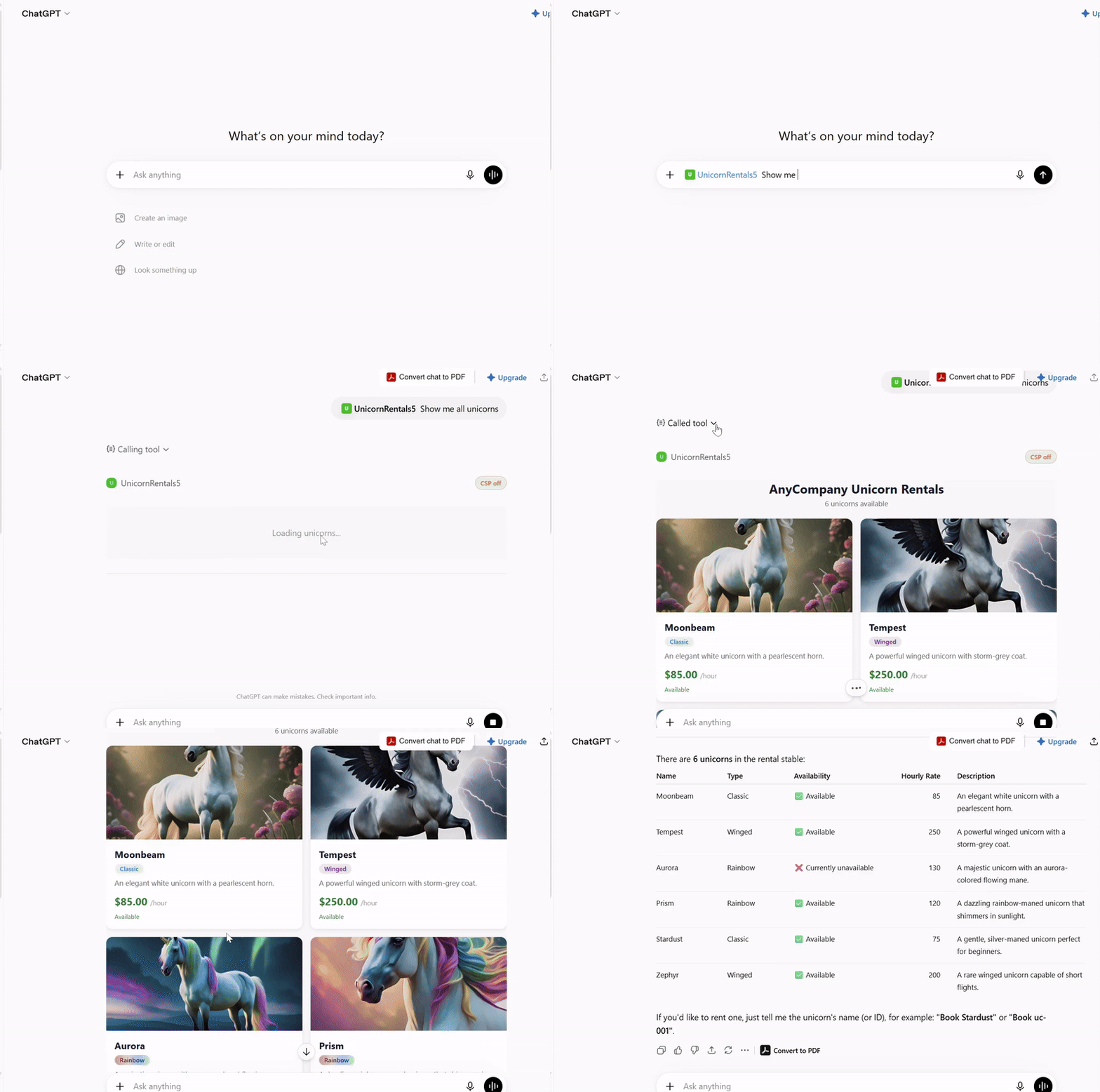
图 1:AI 主机将可用独角兽渲染为交互式卡片。
步骤 2:预订独角兽
如果您最喜欢的独角兽是 Stardust,可以说:“I would like to book Stardust unicorn”(我想预订独角兽 Stardust)来租用它。应用会记录这笔预订并立即确认,同时展示预订 ID、日期、小时费率以及您预订的独角兽。

图 2:预订已确认,详细信息显示在聊天中。
步骤 3:查看您的预订
若要查看您当前租用的独角兽,可以说:“Show me my unicorn bookings”(显示我的独角兽预订)。应用会返回您当前有效的租赁,以及截至目前的时长和已产生费用。这一次响应以文本形式返回,而不是卡片,因为并非每个请求都需要富交互界面。

图 3:当前有效的租赁以文本而非卡片形式返回。
步骤 4:归还独角兽
最后,“I would like to return my unicorn”(我想归还我的独角兽)会结束此次租赁。应用会根据租赁时长和小时费率计算总费用,并在对话中返回结果。

图 4:租赁结束并报告总费用。
您刚刚看到的所有功能,都由运行在 Amazon Bedrock AgentCore runtime 上的单个 MCP 服务器提供服务,并由 AgentCore Gateway 作为前端入口。本文余下部分将介绍其构建方式,以及如何自行部署。
解决方案概览
该解决方案在 Amazon Bedrock AgentCore 上部署一个 MCP App,通过 Model Context Protocol 暴露业务逻辑和交互式 HTML 小组件。用户通过 AI 主机进行交互,AI 主机使用 MCP Apps 模式渲染交互式 HTML 小组件。专用的 AWS Lambda 函数实现业务逻辑,并使用 Amazon DynamoDB 持久化数据。
下图展示了这些组件如何协同工作,向 AI 主机提供交互式小组件。

图 5:Amazon Bedrock AgentCore 上 MCP App 的架构
在将 MCP App 注册至 AI 主机时,会发生以下过程:
- 您提供 App 的详细信息,包括 MCP Server URL。
- AI 主机向 AgentCore Gateway 暴露的 MCP Server URL 发起 tools/list 和 resources/list MCP 调用。MCP 服务器提供
list_unicorns、book_unicorn、view_bookings和return_unicorn等工具,以及unicorn-list和booking-confirmation等资源;这些资源为每种响应提供小组件 HTML。 - AWS WAF 通过其 IP 允许列表和托管规则验证请求,随后 AgentCore Gateway 将请求路由至 AgentCore runtime。
- AgentCore Gateway 使用其 AWS Identity and Access Management(IAM)执行角色调用 AgentCore runtime。托管于其中的 MCP App 定义了 MCP 工具和 MCP 资源。
- MCP App 接收请求,并在响应中返回工具或资源列表。
- AI 主机可能会缓存这些信息,供后续使用。
当用户尝试通过 AI 主机访问独角兽租赁服务时,会发生以下过程。
-
用户通过 ChatGPT 或 Claude 等 AI 主机发起自然语言请求,例如“Show me all unicorns”(展示所有独角兽)。
-
AI 主机将请求转换为 MCP tools/call 消息,例如
list_unicorns,并发送到 AgentCore Gateway 端点。 -
AWS WAF 会在请求到达 AgentCore Gateway 端点前对其进行筛查。
-
AgentCore Gateway 调用托管 MCP App 的 AgentCore runtime。
-
MCP App 接收请求,并将业务操作委托给 Unicorn Rental Service AWS Lambda。
-
AWS Lambda 针对 DynamoDB 执行业务逻辑,并返回结果。
-
MCP App 将响应封装为 MCP 格式,并返回给 AI 主机。
-
如果工具具有关联资源 URI,例如
ui://widget/unicorn-list,AI 主机会启动这一阶段。没有关联小组件的工具,例如view_bookings和return_unicorn,仅返回文本内容,并完全跳过这一阶段。 -
主机针对该 URI 发送 MCP resources/read 请求。
-
该请求通过 AgentCore Gateway 到达 MCP App。
-
MCP App 解析资源 URI,并返回小组件的自包含 HTML。AI 主机可能会缓存这些数据以提升性能。
-
主机在沙箱化的
iframe中渲染 HTML,并通过 MCP Apps 生命周期注入工具响应中的结构化数据。 -
小组件从 Amazon CloudFront 获取所需图片,后者使用 Amazon Simple Storage Service(Amazon S3) 作为源站。
使用 AgentCore runtime 构建 MCP 服务器
本节介绍 MCP 服务器的组织结构,以及 AgentCore runtime 如何托管它。
MCP App
该解决方案中的 MCP App 是一个 TypeScript 应用,基于官方 @modelcontextprotocol/sdk 构建,并使用 @modelcontextprotocol/ext-apps 扩展;该扩展提供了一种从 MCP 服务器交付交互式小组件的标准方式。它作为 Express.js HTTP 服务器运行,并由 AgentCore runtime 在内部管理。MCP App 提供以下能力:
应用注册了 AI 主机可调用的 MCP 工具,例如 list_unicorns、book_unicorn、view_bookings 和 return_unicorn。工具通过 registerAppTool 注册,需要提供工具名称、工具配置和包含该工具业务逻辑的处理函数。应用注册 list_unicorns 工具。该工具处理用于工具发现的 tools/list MCP 请求,以及来自 AI 主机、用于调用工具的 tools/call MCP 请求。
工具配置中的 _meta.ui.resourceUri 字段会告知 AI 主机应使用哪个小组件来展示工具响应。tool/call 响应中的 structuredContent 包含数据负载。AI 主机会在渲染小组件时将这些数据注入其中。
MCP App 资源
应用将小组件注册为 AI 主机可使用的 MCP Resources。资源通过 registerAppResource 注册,需要提供资源名称、URI,以及返回小组件 HTML 数据的处理函数。应用注册 unicorn-list-widget 资源。该资源处理用于资源发现的 resource/list MCP 请求,以及来自 AI 主机、用于获取小组件 HTML 的 resource/read MCP 请求。
AgentCore runtime 上的 MCP App
该解决方案将 MCP App 部署在 AgentCore runtime 上。构建流程将 MCP App 代码打包为 zip 文件。部署步骤将其上传至 Amazon S3 存储桶,并创建引用该文件的 AgentCore runtime 资源。运行时配置指定 NODE_22 环境、入口点和 MCP 协议模式。
AgentCore runtime 提供安全、无服务器且专为部署和运行 MCP App 而构建的托管环境。它会根据传入请求量自动扩缩容。MCP 协议配置会告知 AgentCore 这是一个 MCP 服务器,从而启用协议特定优化。基于资源的策略会限制哪些主体能够调用该运行时。在此解决方案中,策略仅允许 AgentCore Gateway 执行角色调用,并拒绝其他主体。
通过 AgentCore Gateway 暴露 MCP 服务器
AgentCore runtime 支持使用 IAM(SigV4)和 OAuth 进行调用认证。该解决方案在运行时前部署 Amazon Bedrock AgentCore Gateway,使外部 AI 主机可以通过单一托管端点访问 MCP 服务器。Gateway 以 No Auth 方式接受入站请求,并通过 SigV4 使用自身 IAM 执行角色调用运行时,因此调用方无需自行处理 AWS 凭证。AWS WAF 通过 IP 允许列表、托管威胁检测规则和速率限制保护 AgentCore Gateway 端点。
业务逻辑层
AWS Lambda 函数实现独角兽租赁业务逻辑。它针对 Amazon DynamoDB 处理库存查询和预订操作,但完全不了解 MCP。在实际实现中,这可以是您现有的服务,运行在 Amazon Elastic Container Service(Amazon ECS)、Amazon Elastic Kubernetes Service(Amazon EKS) 或其他计算服务上。关键在于,MCP 服务器充当一个轻量级协议适配器。您的核心业务逻辑仍保留在原有位置,并通过 HTTP 调用或 SDK 客户端等标准调用模式连接至 MCP 层。
部署演练
以下部分将逐步介绍如何部署该解决方案。
前提条件
开始前,请确认您已具备:
部署该解决方案
English / 原文
As customers shift to interacting with digital services through AI hosts like ChatGPT and Claude, organizations need a way to make their services accessible across these applications with rich UI, not only plain text. They also need to do this without coupling to a single host. MCP Apps and Amazon Bedrock AgentCore provide exactly that. MCP Apps extends the Model Context Protocol (MCP) with interactive HTML widgets rendered directly inside AI hosts. Amazon Bedrock AgentCore is a platform to build, connect, and optimize agents at scale, with any framework or model. For MCP Apps specifically, AgentCore runtime, a capability of Amazon Bedrock AgentCore, provides a secure, serverless, session-isolated host with native MCP support. AgentCore Gateway, a capability of Amazon Bedrock AgentCore, exposes it through a single secure endpoint that MCP Apps-compatible hosts can reach. AgentCore takes care of this undifferentiated heavy lifting, so you can focus on your business logic and widget design.
In this post, we demonstrate how to build and deploy an MCP App with interactive HTML widgets on Amazon Bedrock AgentCore. Because MCP Apps is a host-agnostic standard, the app delivers the same rich experience across AI hosts that support the Apps extension. With the sample application, Unicorn Rentals, customers can browse available unicorns, book rentals, view active bookings, and return unicorns. Whether a customer opens Unicorn Rentals in ChatGPT, Claude, or another supported host, it looks and feels the same.
Here’s how it works
Before we get into the architecture, let’s see the app in action. Unicorn Rentals is deployed as an MCP App and connected to an AI host. The following examples use ChatGPT, but the same server works in Claude or other hosts that support the MCP Apps extension. We will walk through four steps, from browsing the fleet to returning a unicorn. Let’s get started.
Step 1: List the available unicorns
We start with a natural language question: “Can you show all unicorns?” The host interprets the question and renders an interactive card for each unicorn showing its image, name, description, hourly rate, and availability, rather than a plain text list.
Figure 1: The AI host renders the available unicorns as interactive cards.
Step 2: Book a unicorn
If your favorite unicorn is Stardust, you can rent it by saying “I would like to book Stardust unicorn”. The app records the booking and confirms it straight away, showing the booking ID, date, hourly rate, and the unicorn you booked.
Figure 2: The booking is confirmed and the details are shown in the chat.
Step 3: View your booking
To check what you currently have out, you can say “Show me my unicorn bookings”. The app returns your active rental along with the duration and cost incurred so far. This time the response comes back as text rather than a card, because not every request needs a rich interface.
Figure 3: The active rental is returned as text rather than a card.
Step 4: Return the unicorn
Finally, “I would like to return my unicorn” ends the rental. The app calculates the total cost from the duration and the hourly rate and reports it back in the conversation.
Figure 4: The rental ends and the total cost is reported.
Everything you just saw is served by a single MCP server running on Amazon Bedrock AgentCore runtime, fronted by an AgentCore Gateway. The rest of this post shows how it is built and how to deploy it yourself.
Solution overview
This solution deploys an MCP App on Amazon Bedrock AgentCore that exposes business logic and interactive HTML widgets through Model Context Protocol. Users interact with AI hosts which render interactive HTML widgets using the MCP Apps pattern. A dedicated AWS Lambda function implements the business logic with Amazon DynamoDB for persistence.
The following diagram shows how these components work together to serve interactive widgets to AI hosts.
Figure 5: Architecture of the MCP App on Amazon Bedrock AgentCore
Here’s what happens when you register an MCP App with an AI host:
- You provide the App details including MCP Server URL.
- The AI host makes tools/list and resources/list MCP calls to the MCP Server URL exposed by the AgentCore Gateway. The MCP server provides tools such as
list_unicorns,book_unicorn,view_bookings, andreturn_unicorn, along with resources such asunicorn-listandbooking-confirmationthat supply the widget HTML for each response. - AWS WAF validates the request through its IP allowlist and managed rules, and the AgentCore Gateway routes it to the AgentCore runtime.
- The AgentCore Gateway invokes the AgentCore runtime using its AWS Identity and Access Management (IAM) execution role. The MCP App hosted on it defines MCP tools and MCP resources.
- The MCP App receives the request and responds with the list of tools or resources in it.
- The AI host might cache that information for future use.
Here’s what happens when a user tries to access unicorn rental service from an AI host.
-
The user makes a natural language request (for example, “Show me all unicorns”) from an AI host like ChatGPT or Claude.
-
The AI host translates the request into an MCP tools/call message (for example,
list_unicorns) and sends it to the AgentCore Gateway endpoint. -
AWS WAF screens the request before it reaches the AgentCore Gateway endpoint.
-
The AgentCore Gateway invokes the AgentCore runtime, which hosts the MCP App.
-
The MCP App receives the request and delegates business operations to the Unicorn Rental Service AWS Lambda.
-
The AWS Lambda executes the business logic against DynamoDB and returns the result.
-
The MCP App wraps the response in MCP format and returns it to the AI host.
-
If the tool has an associated resource URI (for example,
ui://widget/unicorn-list), the AI host initiates this phase. Tools without an associated widget, such asview_bookingsandreturn_unicorn, return text-only content and skip this phase entirely. -
The host sends an MCP resources/read request for that URI.
-
The request reaches the MCP App through the AgentCore Gateway.
-
The MCP App resolves the resource URI and returns the self-contained HTML of the widget. The AI host might cache this data for better performance.
-
The host renders the HTML in a sandboxed
iframe, injecting the structured data from the tool response through the MCP Apps lifecycle. -
The widget fetches the images needed from Amazon CloudFront, which uses Amazon Simple Storage Service (Amazon S3) as the origin.
Build the MCP server using AgentCore runtime
This section covers how the MCP server is structured and how AgentCore runtime hosts it.
MCP App
The MCP App in this solution is a TypeScript application built on the official @modelcontextprotocol/sdk with the @modelcontextprotocol/ext-apps extension that provides a standard way to deliver interactive widgets from MCP servers. It runs as an Express.js HTTP server that AgentCore runtime manages internally. The MCP App provides the following capabilities:
The app registers the MCP tools like list_unicorns, book_unicorn, view_bookings, and return_unicorn that AI hosts can invoke. Tools are registered using registerAppTool by providing the tool name, tool config, and a handler function that contains the business logic of the tool. The app registers the list_unicorns tool. This handles the tools/list MCP requests for tools discovery and tools/call MCP requests for tool invocation from AI hosts.
The _meta.ui.resourceUri field in the tool config tells the AI host which widget to render for showing the tool’s response. The structuredContent in the tool/call response contains the data payload. AI hosts inject this data into the widgets while rendering them.
MCP App resources
The app registers widgets as MCP Resources that AI hosts can use. Resources are registered using registerAppResource, by providing the resource name, URI and a handler function that returns the HTML data of the widget. The app registers the unicorn-list-widget resource. This handles the resource/list MCP requests for resource discovery and resource/read MCP requests for getting widget HTML from AI hosts.
MCP App on AgentCore runtime
The solution deploys the MCP App on AgentCore runtime. The build process packages the MCP App code into a zip file. The deploy step uploads it to an Amazon S3 bucket and creates an AgentCore runtime resource that references it. The runtime configuration specifies the NODE_22 environment, the entry point, and the MCP protocol mode.
AgentCore runtime provides a secure, serverless, and purpose-built hosting environment for deploying and running the MCP App. It automatically scales based on incoming request volume. The MCP protocol configuration tells AgentCore this is an MCP server, which activates protocol-specific optimizations. Resource-based policies restrict which principals can invoke the runtime. In this solution, the policy allows only the AgentCore Gateway execution role and denies other principals.
Expose the MCP server through AgentCore Gateway
AgentCore runtime supports IAM (SigV4) and OAuth authentication for invocation. This solution places an Amazon Bedrock AgentCore Gateway in front of the runtime, so external AI hosts can reach the MCP server through a single managed endpoint. The Gateway accepts inbound requests with No Auth and invokes the runtime using its own IAM execution role over SigV4, so callers do not handle AWS credentials themselves. AWS WAF protects the AgentCore Gateway endpoint with IP allowlisting, managed threat-detection rules, and rate limiting.
Business logic layer
An AWS Lambda function implements the business logic of the unicorn rentals. It handles inventory queries and booking operations against Amazon DynamoDB. It knows nothing about MCP. In a real-world implementation, this could be your existing services running on Amazon Elastic Container Service (Amazon ECS), Amazon Elastic Kubernetes Service (Amazon EKS), or other compute services. The key point is that the MCP server acts as a thin protocol adapter. Your core business logic stays where it already lives and you connect it to the MCP layer through standard invocation patterns like HTTP calls or SDK clients.
Deployment walkthrough
The following section walks you through how to deploy the solution.
Prerequisites
Before you begin, verify that you have:
Deploy the solution
The deployment uses a single deploy.sh script that orchestrates building and CDK stack deployment.
Step 1: Download the solution code:
git clone https://github.com/aws-samples/sample-agentcore-mcp-apps.git
cd sample-agentcore-mcp-apps
Step 2: Deploy the required resources on your AWS account. Run the deployment script to deploy the CDK stacks:
Note the outputs printed after deployment. You will need the GatewayResourceUrl to connect an AI host.
Connect from AI hosts
Because this MCP server implements the MCP Apps open standard, other AI hosts that support the MCP Apps extension can connect and render the full interactive widget experience.
The repository includes detailed setup guides for connecting specific AI hosts:
ChatGPT
- Go to https://chatgpt.com/, choose User Profile , Plugins , Developer Mode , and turn on Developer mode.
- Go to Plugins and choose New Plugin.
- For Name , enter
UnicornRentals. - For Description , enter: “Browse unicorns, book rentals, view active bookings, and return unicorns. Shows rich UI cards with pricing and booking confirmations”.
- For Connection , enter the value of
GatewayResourceUrlfrom the CDK outputs. - For Authentication , choose No Auth.
- Choose Create.
Claude.ai
- Go to https://claude.ai, choose Customize , then Connectors.
- Choose Add Connector.
- For Name , enter
UnicornRentals. - For Remote MCP server URL , enter the value of
GatewayResourceUrlfrom the CDK outputs. - Choose Save.
Production deployment considerations
When moving this solution to production, consider the following.
For monitoring and observability, use Amazon CloudWatch to monitor your AgentCore Gateway request metrics, Unicorn Service Lambda invocations, and AgentCore runtime container health. Set up alarms for error rates and latency thresholds, and turn on logging to track MCP method calls and response times.
For cost optimization, note that AgentCore runtime uses consumption-based pricing based on container runtime and invocations. To keep costs in check, right-size your container memory and CPU allocation, and review Lambda concurrency settings based on expected traffic patterns.
For responsible AI, add safety controls at your trust boundaries. Validate tool arguments with strict schemas in the MCP server and re-validate them in the Unicorn Service Lambda so business logic doesn’t trust unvalidated input. For unstructured text that crosses the boundary, use Amazon Bedrock Guardrails to filter harmful content, block denied topics, and redact sensitive data like personally identifiable information (PII) from responses before they reach the client.
Cleanup
To delete all the resources created by the CDK stack, run the following commands.
cd infrastructure/cdk
npx cdk destroy
Next steps
To view the source code and deployment instructions for this example solution, visit the GitHub repository in aws-samples. You can adapt the pattern by replacing the Unicorn Rental Service Lambda with your own business logic and adding new tools and widgets.
Conclusion
This post showed you how to build and deploy an MCP server with interactive widget UI on Amazon Bedrock AgentCore runtime. The architecture pattern is a thin MCP protocol layer on AgentCore runtime that delegates business logic to dedicated Lambda functions and serves self-contained widget HTML as MCP App resources. It exposes the stack through an AgentCore Gateway endpoint and gives you a scalable MCP Apps deployment with minimal operational overhead.
What makes this approach powerful is what you don’t need to build. AgentCore runtime handles the undifferentiated heavy lifting of scaling, session isolation, health monitoring, and infrastructure management, so your team stays focused on the business logic and widget experiences that matter to your customers. You write a thin protocol adapter, point it at your existing services, and AgentCore takes care of the rest.
Because the solution is built on the open MCP Apps standard, your investment isn’t locked to a single AI host. The same server, the same tools, and the same interactive widgets work across other hosts that support the MCP Apps extension. You build once and reach customers wherever they choose to interact with AI. And because the architecture cleanly separates protocol handling from business logic, you can evolve independently. Swap your data store, add new tools, redesign your widgets, or connect additional backend services. None of these changes require rearchitecting the deployment. The MCP layer stays thin, your services stay portable, and AgentCore runtime keeps everything running.
About the authors
Dantis Stephen
Dantis is a Senior Solutions Architect on the Data and AI team at AWS, UK, where he specialises in designing and delivering generative AI solutions for enterprise customers. He works hands-on across the full lifecycle, leading architecture deep dives, building production-ready prototypes, and guiding complex workloads from experimentation to go-live.
Babs Khalidson
Babs is a machine learning engineer at the AWS Generative AI Innovation Centre in London, where he specializes in fine-tuning large language models, building AI agents, and model deployment solutions. He has over 6 years of experience in artificial intelligence and machine learning across finance and cloud computing, with expertise spanning from research to production deployment.