commit-rewriter 0.1 发布
英文标题:commit-rewriter 0.1
commit-rewriter 0.1 是一款用于批量编辑 Git 仓库提交信息的轻量级 Web 应用。作者最初开发它,是为了清理 Datasette 安全版本提交记录中编码 Agent 遗留内容及私有仓库 Issue ID 等不适合公开的信息。开发者可通过 `uvx commit-rewriter path/to/repo` 启动工具;提交修改后,工具会先创建带时间戳的备份分支,再从首次编辑的提交开始重写后续全部提交历史。
 34.6 KB
中文
我前几天开发了这个小型 Web 应用,用于协助编辑 Datasette 安全版本发布的提交信息。最初的提交中充满了编码 Agent 遗留的杂乱内容,以及来自我们私有仓库的 Issue ID 引用,因此不适合公开发布。
如果你想编辑某个仓库的提交信息,可以这样运行它:
uvx commit-rewriter path/to/repo
如果你已经位于该仓库目录中,则无需提供路径。
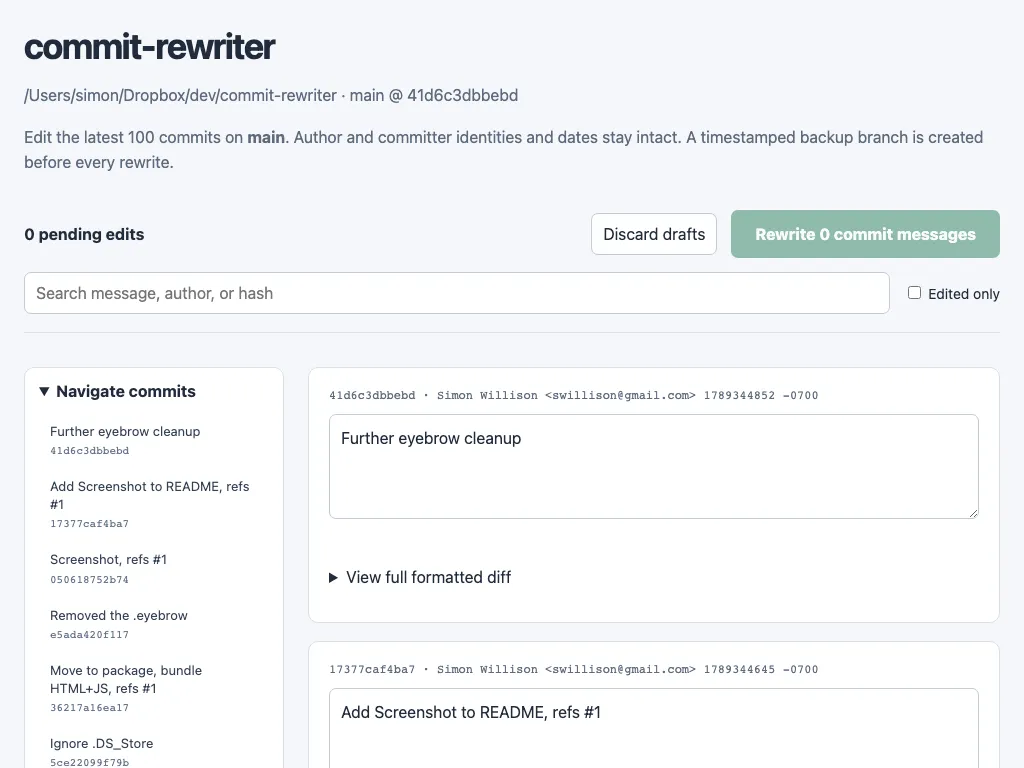
提交编辑内容后,该工具会针对当前仓库状态创建一个带时间戳的分支,以便在需要时回退;随后,它会从你首次编辑的提交开始,一直重写到最新提交为止的所有提交。
English / 原文
I built this little web app the other day to help edit the commit messages for the Datasette security releases. The initial commits were full of coding agent cruft and references to issue IDs from our private repository, so they weren't fit for publication.
If you want to edit the commit messages for a repository you can run it like this:
uvx commit-rewriter path/to/repo
Omit the path if you are already in the directory for that repo.
When you submit your edits the tool creates a timestamped branch of your current repo state - to allow you to revert if you need to - and then rewrites every commit from the first one you edited to the most recent.