🔶 Show HN: Papercrane-CLI —— 专为 Claude Code 打造的 BI 工具
英文标题:🔶 Show HN: Papercrane-CLI – a BI tool built for Claude Code
Papercrane-CLI 是一款命令行 BI 工具,它围绕 Claude Code 这类 AI 代理构建,而不是在传统仪表板旁附上 AI 助手。它让 Claude Code 能直接访问 Salesforce、Stripe 等 50 多个数据源,生成带有实时数据连接和可分享链接的 Next.js 仪表板。该工具解决了代理构建的仪表板数据冻结、身份认证杂散以及无法将本地原型直接分享为动态仪表板三大痛点,甚至支持从仪表板直接回写业务数据。对开发者而言,这改变了人机交互构建分析应用的方式,提供了一种代码可拥有、代理驱动、即时交付的 BI 范式。
 8.2 KB
 728.7 KB
 284.0 KB
 603.8 KB
 208.5 KB
 455.6 KB
 74.6 KB
 312.2 KB
 164.2 KB
 337.1 KB
 8.4 KB
 21.0 KB
中文
每个分析供应商都在往自己的仪表板里硬塞一个 AI 副驾驶。Power BI 有,Tableau 也有。它们的工作方式全都一样:人驱动着旧工具,AI 坐在侧边栏里提建议。
我走了相反的方向。我拿你已经在用的代理,然后围绕它构建了 BI 工具。
papercrane-cli 是一个命令行工具,它为 Claude Code 提供了将商业问题转化为实时仪表板所需的一切:对你数据的认证访问、一个真正的仪表板工作区,以及一条能把链接发给任何人的路径。它今天上线。
它免费,并且运行在你已经在付费的 Claude 订阅上。
以下是它存在的理由。
在 Claude Code 里只需一个提示:安装、登录、连接 Salesforce、构建、发布。大约四分钟,快放。
代理已经很擅长做仪表板了。拦住它们的是这些。
如果你用过 Claude Code,很可能已经尝试过这种事。你让它做一个营收仪表板,它写出了真正不错的 React。图表、布局,全套。然后它撞上了三个问题。我之所以知道,是因为我每一个都撞上了,而 papercrane-cli 就是我当时希望在另一边存在的工具。
1. 代理构建的所有东西都冻结在时间里
现在让代理做一个仪表板,你会得到三样东西之一:一个 HTML 文件、一个 PDF,或者一个聊天工件。这三者都有一个你要到周四才会注意到的缺陷:数字是在构建时硬编码进去的。它是你业务的一张快照,拍下的那一刻是准的,之后每一天都越来越偏离事实。
MCP 修不了这个问题,值得把原因说清楚。MCP 擅长它做的事:它让你的代理在对话期间调用工具。要点在于,这个连接是属于聊天会话的。你的代理写的仪表板无法继承它。于是代理查询你的数据,把结果硬编码进去,交给你一个看起来像仪表板、行为却像屏幕截图的东西。
Papercrane 把数据连接放进了仪表板内部。每个仪表板都是一个小小的 Next.js 应用,它的服务端代码所调用的认证 API,就是你的代理在构建它时用的那套。聊天结束了,数字继续在动。这个差别是结构性的:底下没有一个常驻数据层,你写再多提示也得不到这一点。
2. 认证又乱又没法到处用
你的数字住在登录界面后面:GA4、HubSpot、Salesforce、QuickBooks。代理点不开那些界面,而变通方案都很丑。要么某个技术人员给每个工具都搭一个自定义的开发者连接(一个以周为单位、堆满审批队列和安全审查的项目),要么你就开始把密钥粘贴到终端和聊天窗口里,然后祈祷没人往上翻。
我们把连接的工作做了一遍,给所有人用。连接一个工具只是常规登录:你的浏览器打开一个普通的登录页面,你批准访问,就像连接任何两个应用一样,搞定。你的代理获得一条干净、安全的路径来访问 GA4、Stripe、HubSpot、Postgres、BigQuery 以及另外 50 多个来源:数仓、广告平台、CRM、财务、产品分析。凭证在 Papercrane 端加密保存,远离你的笔记本电脑和聊天记录,而当某个服务需要在后台续期访问时,也替你处理好了。
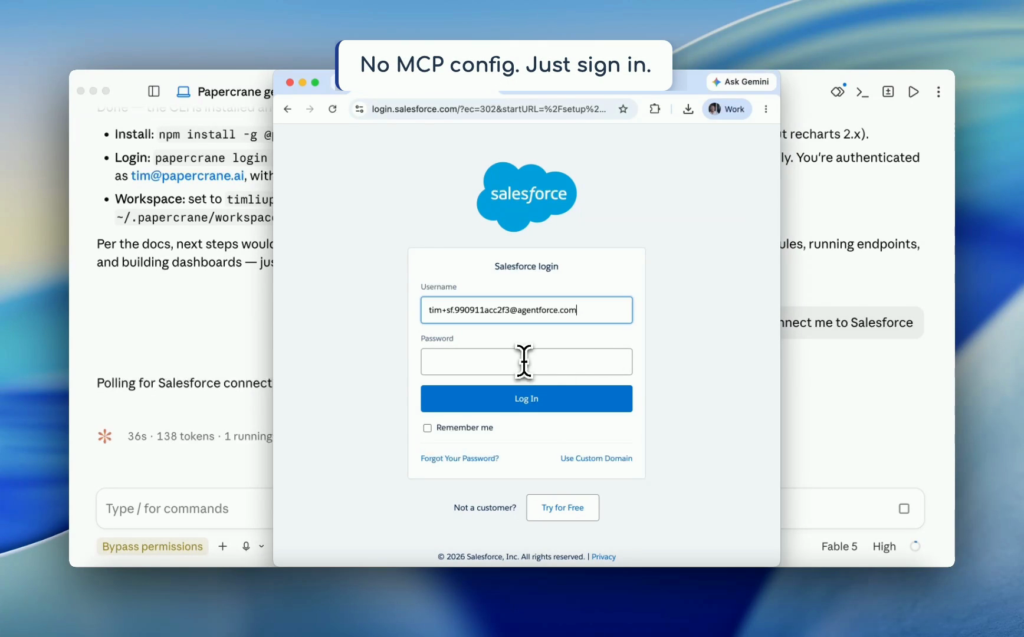 连接一个来源就是一个普通的登录页面。没有密钥,没有配置。
3. 仪表板是你要发给别人的东西
一个仪表板在你能把它发出去的那一刻才算真正挣口饭吃:发给你团队、CEO、某个客户。每一款本地原型都是死在这一步。当你准备好了,papercrane publish 把你的仪表板放在一个可分享的链接上,带有访问控制,收件人看到的数字也是实时的。云端处理的是本地工具永远做不到的事:托管、嵌入、自定义域名。
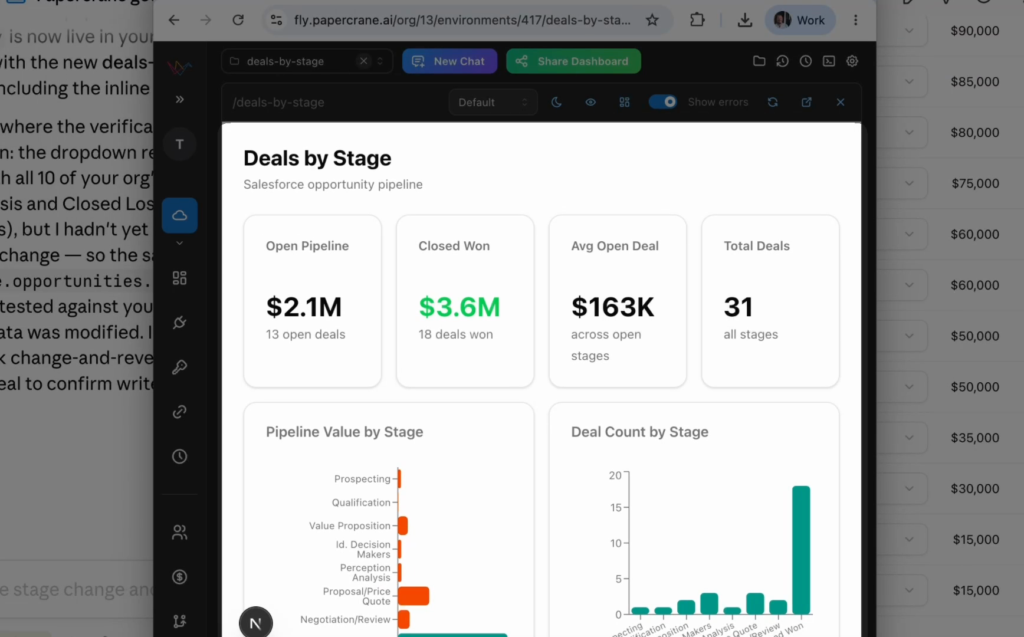 已发布并上线。把链接发给任何人,他们看到的数字也保持实时。
它还能反向流回去
到目前所说的一切都是数据流进来。数据也能流出去。一个仪表板可以承载操作:一个按钮把一笔交易推进到 Salesforce 的下一个阶段,一个控件更新某个图表背后的记录。读数字的那套认证连接,同样也能把数据写回去。就是从这一点开始,用「仪表板」这个词已经不足以描述你得到的东西了:一个能让你从里面做行动的报告,就是一个工具,而 BI 从来没有交付过这种东西。
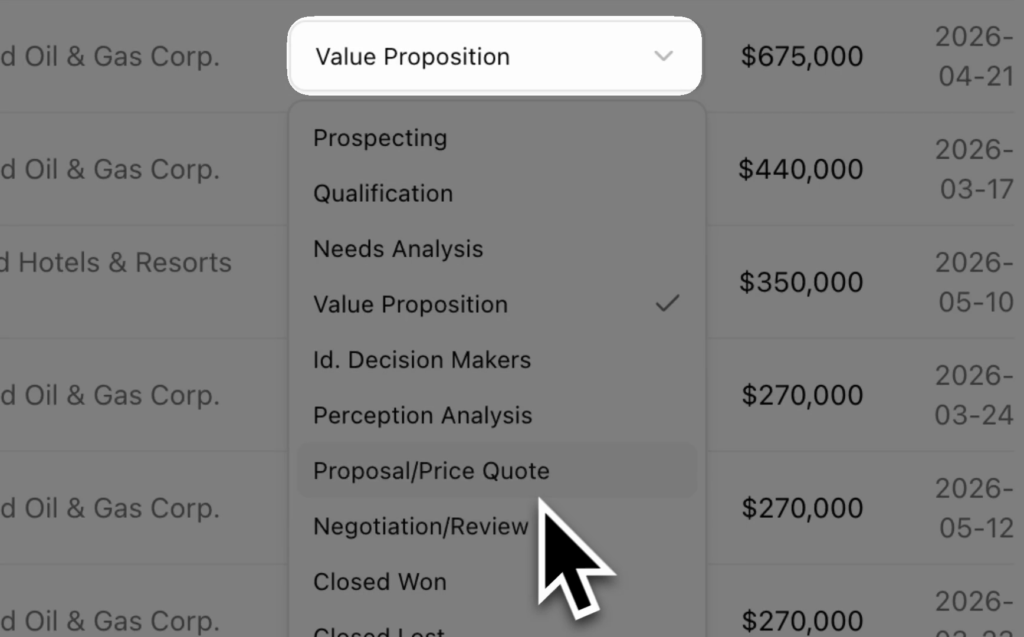 在仪表板上直接把一笔交易移到下个阶段。Salesforce 会收到更新。
所有凭证,汇聚一处
关于如今人们如何把代理和数据连起来,还有一个更隐蔽的问题:凭证散得到处都是。一个 API 密钥放在你笔记本上的环境变量里。另一个塞在 MCP 配置里。还有一个三周前粘贴进提示里的,你已经忘了。乘上每个想让自己的代理访问相同系统的队友,没有人能回答那两个真正重要的问题:谁有权访问什么,我们怎么才能关掉这一切?
有了 Papercrane,你的组织每个来源只连接一次。凭证加密后保存在一处,代理通过一个经过认证的 API 访问数据,连接都有审计日志,访问可以集中撤销。一个队友的代理能获得和你一样的访问能力,而不需要有人在 Slack 上转发密钥。这件事开始变得要紧,正好是在这玩意儿不再是玩具的那一刻:仪表板是真实的,数据是敏感的,而且不止一个人的代理在触碰它。
当某类连接器不存在,你的代理会写一个
每个集成都只是一个 TypeScript 处理器,CLI 里还包含了一份专门写给代理本身的指南:papercrane local-integration-guide 把整套操作方法直接打印到标准输出。如果你的数据放在我们还没覆盖的地方,告诉你的代理去构建那个连接器。它落到你的工作区里,本地运行,调用起来完全就像官方托管的一样。工具集自己会扩展。
代码归你所有
每个仪表板都是 Next.js 和 React 源码,就放在你的工作区里:一个 page.tsx、一个服务器操作、recharts、Tailwind。用一条命令发布到你自己的 GitHub 仓库。如果明天你离开 Papercrane,你依然保有可运行的软件。
为 AI 而生的工具,不是为人
papercrane-cli 中的每一个设计决策都源自一个问题:代理需要什么?文档以模型能读懂的 Markdown 提供。每条命令输出的都是模型能解析的内容。这里没有什么清单规范或协议,只有无情的约定:只要 Claude Code 能读、能运行,它就能工作。Codex、Cursor 以及任何其他能读取标准输出的东西也都能用。
这也是为什么配置只需一个提示。打开 Claude Code 并输入:
Read https://papercrane.ai/get-started.md and login
你的代理读了指南,安装 CLI,打开你的浏览器让你登录,并连接你的第一个数据来源。之后你只需要说出你想看到什么。
构建过程也就在你聊天的地方完成。papercrane-cli 接入了 Claude Code 的预览功能,所以仪表板会在 Claude 应用内部渲染,就在代理处理它的同时。你看着图表在正在构建它们的对话旁边成形。
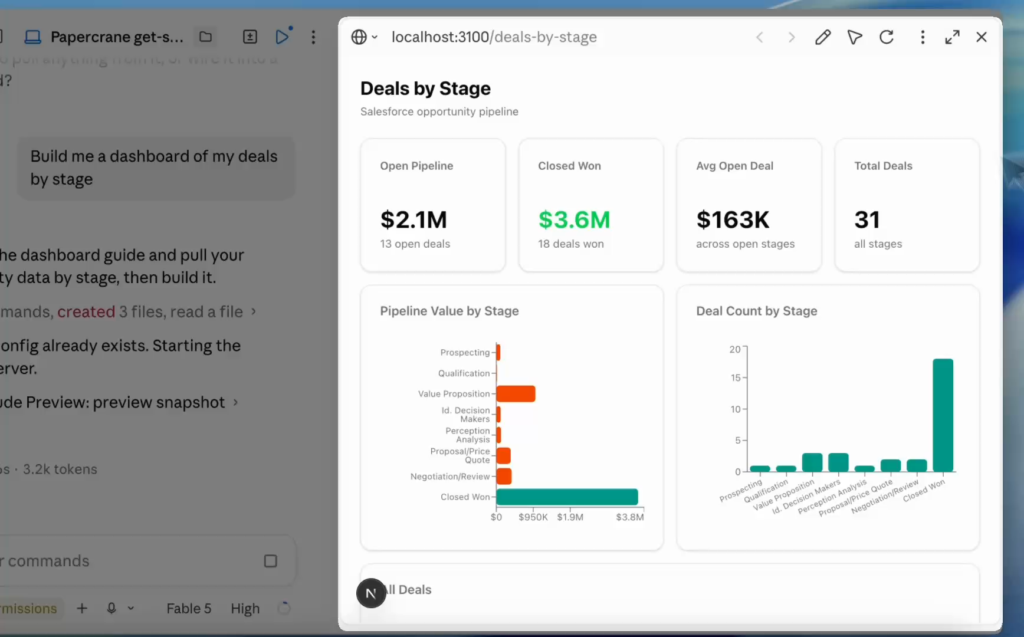 仪表板在 Claude 应用内成形,就紧挨着构建它的对话。
它的价格
CLI 免费。仪表板运行在你自己的 Claude 或 OpenAI 订阅上,所以无需购买 AI 积分,也无须谈判什么按席位定价。免费层包含五个仪表板以及全部连接器。付费层级在你需要时加入团队功能、自定义域名和嵌入分析。
这走向何方
BI 工具花了三十年让人更擅长操作软件。那个时代正在结束。下一个 BI 工具不需要一个更友好的查询构建器,因为驱动它的那个东西每秒阅读上千字的文档,而且永远不嫌点得累。它需要的是代理需要的东西:凭证、一个工作区,以及一条交付的路径。这正是我们构建的东西。
如果你已经装了 Claude Code,你距离一个运行在你真实数据上的实时仪表板只有九十秒。粘贴提示,看看会发生什么,然后把你构建的第一个仪表板发给我。每一封我都会看。
npm install -g @papercraneai/cli,或者直接告诉你的代理:Read https://papercrane.ai/get-started.md and login
English / 原文
Every analytics vendor is bolting an AI copilot onto their dashboards. Power BI has one. Tableau has one. They all work the same way: the human drives the old tool, and the AI sits in a sidebar making suggestions.
I went the opposite direction. I took the agent you already use and built the BI tool around it.
papercrane-cli is a command line tool that gives Claude Code everything it needs to turn a business question into a live dashboard: authenticated access to your data, a real dashboard workspace, and a path to a link you can send to anyone. It launches today.
It’s free and it runs on the Claude subscription you already pay for.
Here’s why it exists.
One prompt in Claude Code: install, sign in, connect Salesforce, build, publish. About four minutes, sped up.
Agents are already great at dashboards. Here’s what stops them.
If you use Claude Code, you’ve probably tried this. You ask it for a revenue dashboard and it writes genuinely good React. Charts, layout, the works. Then it runs into three problems. I know because I hit every one of them, and papercrane-cli is the tool I wanted on the other side.
1. Everything an agent builds is frozen in time
Ask an agent for a dashboard right now and you get one of three things: an HTML file, a PDF, or a chat artifact. All three share a flaw you won’t notice until Thursday: the numbers were baked in at build time. It’s a photograph of your business, accurate the moment it was taken and drifting further from the truth every day after.
MCP doesn’t fix this, and it’s worth being precise about why. MCP is good at what it does: it lets your agent call tools during a conversation. The catch is that the connection belongs to the chat session. The dashboard your agent writes can’t inherit it. So the agent queries your data, hard codes the results, and hands you something that looks like a dashboard and behaves like a screenshot.
Papercrane puts the data connection inside the dashboard itself. Every dashboard is a small Next.js app whose server code calls the same authenticated API your agent used to build it. The chat ends. The numbers keep moving. That difference is structural: no amount of prompting gets you there without a standing data layer underneath.
2. Authentication is messy and isn’t portable
Your numbers live behind sign in screens: GA4, HubSpot, Salesforce, QuickBooks. An agent can’t click through those screens, and the workarounds are ugly. Either someone technical builds a custom developer connection for every tool (a project measured in weeks, with approval queues and security reviews), or you start pasting secret keys into terminals and chat windows and hoping nobody scrolls up.
We did the connection work once, for everyone. Connecting a tool is just signing in: your browser opens a normal sign in page, you approve access the way you’d connect any two apps, done. Your agent gets one clean, secure way to reach GA4, Stripe, HubSpot, Postgres, BigQuery, and 50+ more: warehouses, ad platforms, CRMs, finance, product analytics. The credentials stay encrypted with Papercrane, off your laptop and out of your chat history, and when a service needs its access renewed behind the scenes, that’s handled for you.
Connecting a source is a normal sign in page. No keys, no config.
3. A dashboard is something you send to someone
A dashboard earns its keep the moment you send it: to your team, your CEO, a client. That’s the step where every local prototype dies. When you’re ready, papercrane publish puts your dashboard on a link you can share, with access control, and the numbers are live for the recipient too. The cloud side handles what a local tool never will: hosting, embedding, custom domains.
Published and live. Send the link to anyone, and the numbers stay live for them too.
It goes both ways
Everything so far describes data flowing in. It can flow out too. A dashboard can carry actions: a button that moves a deal to its next stage in Salesforce, a control that updates the record behind a chart. The same authenticated connection that reads the numbers can write them back. That’s the point where the word dashboard starts to undersell what you’ve got: a report you can act from is a tool, and BI has never shipped one of those.
Move a deal to its next stage right on the dashboard. Salesforce gets the update.
All of your credentials, in one place
There’s a quieter problem with how people wire agents to data today: the credentials end up everywhere. An API key in an env var on your laptop. Another in an MCP config. One pasted into a prompt three weeks ago that you’ve already forgotten about. Multiply that by every teammate who wants their agent reaching the same systems, and nobody can answer the two questions that matter: who has access to what, and how do we turn it off?
With Papercrane, your organization connects each source once. Credentials are encrypted and held in one place, agents reach data through one authenticated API, connections are audit logged, and access gets revoked centrally. A teammate’s agent gets the same reach as yours without anyone forwarding keys over Slack. That starts to matter at exactly the moment this stops being a toy: the dashboard is real, the data is sensitive, and more than one person’s agent is touching it.
When a connector doesn’t exist, your agent writes one
Every integration is a TypeScript handler, and the CLI includes a guide written for the agent itself: papercrane local-integration-guide prints the whole how to straight to stdout. If your data lives somewhere we don’t cover, tell your agent to build the connector. It lands in your workspace, runs locally, and is callable exactly like the hosted ones. The toolset extends itself.
Code you own
Every dashboard is Next.js and React source sitting in your workspace: a page.tsx, a server action, recharts, Tailwind. Publish it to your own GitHub repo with one command. If you leave Papercrane tomorrow, you keep working software.
A tool for AI, not for a person
Every design decision in papercrane-cli follows from one question: what does the agent need? The docs are served as markdown a model can read. Every command prints output a model can parse. There’s no manifest spec or protocol here, just ruthless convention: if Claude Code can read it and run it, it works. Codex, Cursor, and anything else that reads stdout work too.
Which is why setup is one prompt. Open Claude Code and type:
Read https://papercrane.ai/get-started.md and login
Your agent reads the guide, installs the CLI, opens your browser to sign you in, and connects your first source. From there you just ask for what you want to see
Building happens right where you’re chatting, too. papercrane-cli is wired into Claude Code’s preview, so the dashboard renders inside the Claude app while the agent works on it. You watch the charts take shape next to the conversation that’s building them.
The dashboard takes shape inside the Claude app, right next to the conversation building it.
What it costs
The CLI is free. Dashboards run on your own Claude or OpenAI subscription, so there are no AI credits to buy and no per seat pricing to negotiate. The free tier includes five dashboards and every connector. Paid tiers add team features, custom domains, and embedded analytics when you need them.
Where this is going
BI tools have spent thirty years making humans better at operating software. That era is ending. The next BI tool doesn’t need a friendlier query builder, because the thing driving it reads documentation at a thousand words a second and never gets tired of clicking. It needs what an agent needs: credentials, a workspace, and a way to ship. That’s what we’ve built.
If you have Claude Code installed, you’re ninety seconds from a live dashboard on your real data. Paste the prompt, watch what happens, and send me the first dashboard you build. I read everything.
npm install -g @papercraneai/cli, or just tell your agent: Read https://papercrane.ai/get-started.md and login