使用 Amazon Bedrock AgentCore 为 AI Agent 管理终端用户 OAuth 同意
英文标题:Manage end-user OAuth consent for AI agents with Amazon Bedrock AgentCore
Amazon Bedrock AgentCore Identity 现推出 Consent portal,为 AgentCore Gateway 提供托管式 Web 同意体验和会话绑定端点。管理员可配置企业 IdP、GitHub 与 Slack 的三方 OAuth(3LO)目标、执行角色及门户 URL,终端用户则可分别授权不同服务。该能力免除了客户自行构建 HTTPS 回调、浏览器会话管理和 `CompleteResourceTokenAuth` 调用等会话绑定基础设施的需求。它尤其适用于 Kiro、Claude Code、Cursor 和 Visual Studio Code 等 IDE 与 MCP 客户端,使 Agent 能复用按用户安全存储的令牌调用工具。
 1.3 MB
 101.1 KB
 124.1 KB
 345.0 KB
 141.2 KB
 346.5 KB
 241.3 KB
 175.4 KB
 75.9 KB
 245.8 KB
 184.0 KB
 212.8 KB
 99.4 KB
 91.0 KB
 105.2 KB
 123.4 KB
 24.4 KB
 26.0 KB
 23.8 KB
 58.4 KB
中文
AI Agent 经常需要代表用户访问 GitHub、Slack 等服务。Agent 在执行操作前,用户必须通过服务提供商完成身份验证,并明确批准所请求的访问权限。随后,应用程序必须将生成的 OAuth 授权安全地关联到批准该授权的用户。此过程称为会话绑定(session binding)。
此前,使用 AgentCore Identity(Amazon Bedrock AgentCore 的一项功能)三方 OAuth(3LO)流程(也称 OAuth 2.0 授权码流程)的客户,必须自行构建并托管会话绑定基础设施。这包括展示授权 URL、托管公开 HTTPS 回调、验证返回用户的身份、管理浏览器会话,以及调用 CompleteResourceTokenAuth 来完成流程。
AgentCore Identity 现提供 Consent portal:这是面向 AgentCore Gateway(Amazon Bedrock AgentCore 的一项功能)的托管式 Web 体验和会话绑定端点。您可为网关创建一个门户,并将其 URL 分享给用户。用户通过组织的身份提供商(IdP)进行身份验证,查看 Agent 可使用的服务,并分别向各服务提供商授予同意。该门户负责处理浏览器重定向和会话绑定,而 AgentCore Identity 则将生成的令牌存储在其令牌库中。
此能力尤其适用于通过 IDE 和模型上下文协议(MCP)客户端(如 Kiro、Claude Code、Cursor 和 Visual Studio Code)访问的 Agent。用户可在调用工具前授予同意,后续工具调用即可使用已为该用户存储的令牌。本文以软件开发助手为例,介绍管理员和终端用户在 AWS Management Console 与浏览器中的操作体验,并展示如何在 AWS CloudTrail 中审查生成的活动记录。
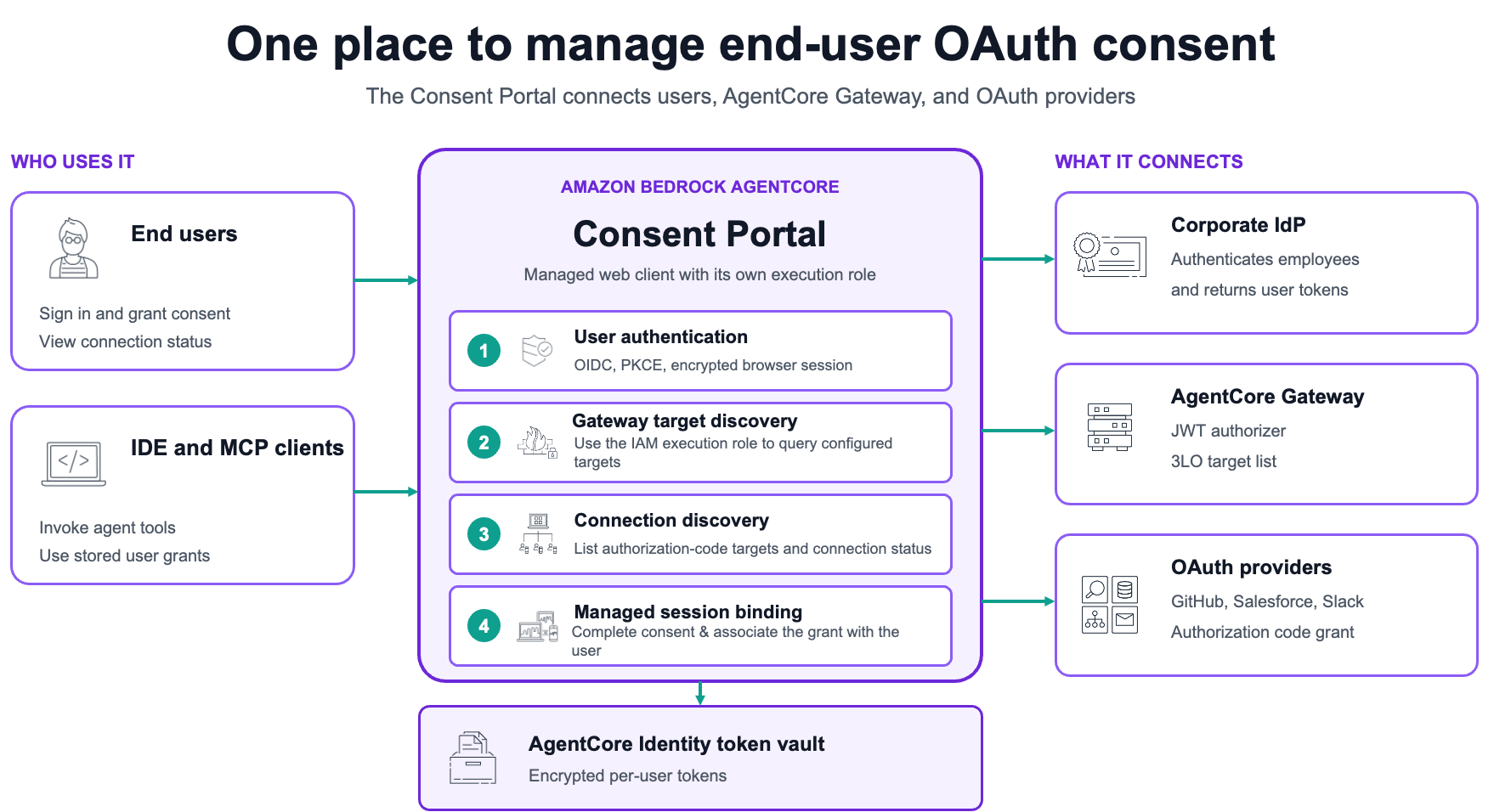
图 1:Consent portal 通过企业 IdP 验证用户身份,使用其 IAM 执行角色发现已配置的网关目标,展示服务提供商连接,完成会话绑定,并将每用户令牌存储在 AgentCore Identity 令牌库中
示例场景:向开发助手授予 GitHub 访问权限
假设有一家名为 Example Corp 的公司,该公司通过 AgentCore Gateway 为开发人员提供 AI 编程助手。该助手具有两个目标:
- 一个 GitHub 目标,可列出仓库并创建 issue。
- 一个 Slack 目标,可列出公共频道并发布消息。
Example Corp 使用企业 IdP 对员工进行身份验证。管理员希望每个 GitHub 和 Slack OAuth 授权始终与批准该授权的员工关联。开发人员可以独立连接任一服务提供商,并返回其 IDE,而无需反复面对授权提示。
本演练包含以下两种角色:
- 管理员: 配置企业 IdP、GitHub 和 Slack 网关目标、执行角色及 Consent portal,然后将门户 URL 发送给开发人员。
- 终端用户: 打开 URL,通过企业 IdP 登录,在需要时连接 GitHub,并可单独授予 Slack 访问权限。
前提条件
在开始演练前,Example Corp 需要:
开始使用
以下步骤展示 Example Corp 管理员需要配置的内容,以及开发人员收到门户 URL 后的使用体验。
管理员步骤
管理员完成步骤 1–6,以配置身份提供商、网关目标、执行角色和 Consent portal。
步骤 1:准备企业 IdP 和网关连接
管理员 IAM 策略
将以下策略附加到执行步骤 1–3 的管理员身份。请替换账户 ID。
{
  "Version": "2012-10-17",
  "Statement": [
    {
      "Sid": "ManageConsentPortalResources",
      "Effect": "Allow",
      "Action": [
        "bedrock-agentcore:CreateConsentPortal",
        "bedrock-agentcore:GetConsentPortal",
        "bedrock-agentcore:ListConsentPortals",
        "bedrock-agentcore:CreateOauth2CredentialProvider",
        "bedrock-agentcore:GetOauth2CredentialProvider",
        "bedrock-agentcore:ListOauth2CredentialProviders",
        "bedrock-agentcore:GetGateway",
        "bedrock-agentcore:ListGateways",
        "bedrock-agentcore:CreateGatewayTarget",
        "bedrock-agentcore:GetGatewayTarget",
        "bedrock-agentcore:ListGatewayTargets",
        "bedrock-agentcore:UpdateGatewayTarget"
      ],
      "Resource": "*"
    },
    {
      "Sid": "CreateAndPassExecutionRole",
      "Effect": "Allow",
      "Action": [
        "iam:CreateRole",
        "iam:GetRole",
        "iam:PutRolePolicy",
        "iam:GetRolePolicy",
        "iam:PassRole"
      ],
      "Resource": "arn:aws:iam::111122223333:role/service-role/AmazonBedrockAgentCoreConsentPortal*"
    }
  ]
}
该 AWS Identity and Access Management(IAM)语句覆盖控制台中的 Create default role 选项;该选项会创建一个名为 AmazonBedrockAgentCoreConsentPortalDefaultServiceRole-<suffix> 的服务角色。如果您改为提供自己的角色,请将 iam:PassRole 的范围限制为该角色 ARN。
步骤 2:配置企业 IdP 应用程序
- 在企业 IdP 中,为 Consent portal 创建一个 OpenID Connect(OIDC)Web 应用程序。
- 启用授权码授权类型,并生成客户端 ID 和客户端密钥。
- 配置登录范围,至少包括
openid。 - 记录 OpenID Connect(OIDC)发现 URL。门户将使用该文档中的授权端点、令牌端点和签名密钥。
- 添加一个临时回调 URL。您将在步骤 6 中、门户 URL 创建后替换它。
IdP 必须签发门户可验证的 JSON Web Token(JWT)访问令牌。例如,使用 Okta 时,请使用自定义授权服务器,并配置允许该应用程序和授权码授权类型的访问策略。使用 Auth0 时,请在需要时配置 audience,以便 IdP 返回已签名的 JWT 访问令牌而不是不透明令牌。
步骤 3:创建 IdP 凭证提供商
门户从 OAuth2 凭证提供商读取 IdP 客户端 ID 和客户端密钥。
- 打开 Amazon Bedrock AgentCore 控制台。
- 在 Build 下,选择 Identity。
- 在 Outbound Auth 中,选择 Add Outbound Auth,然后选择 Add OAuth client。
- 输入名称,例如
gateway-demo-idp。 - 输入企业 IdP 应用程序中的客户端 ID 和客户端密钥,并提供 OIDC 发现配置。
- 选择 Add OAuth client。
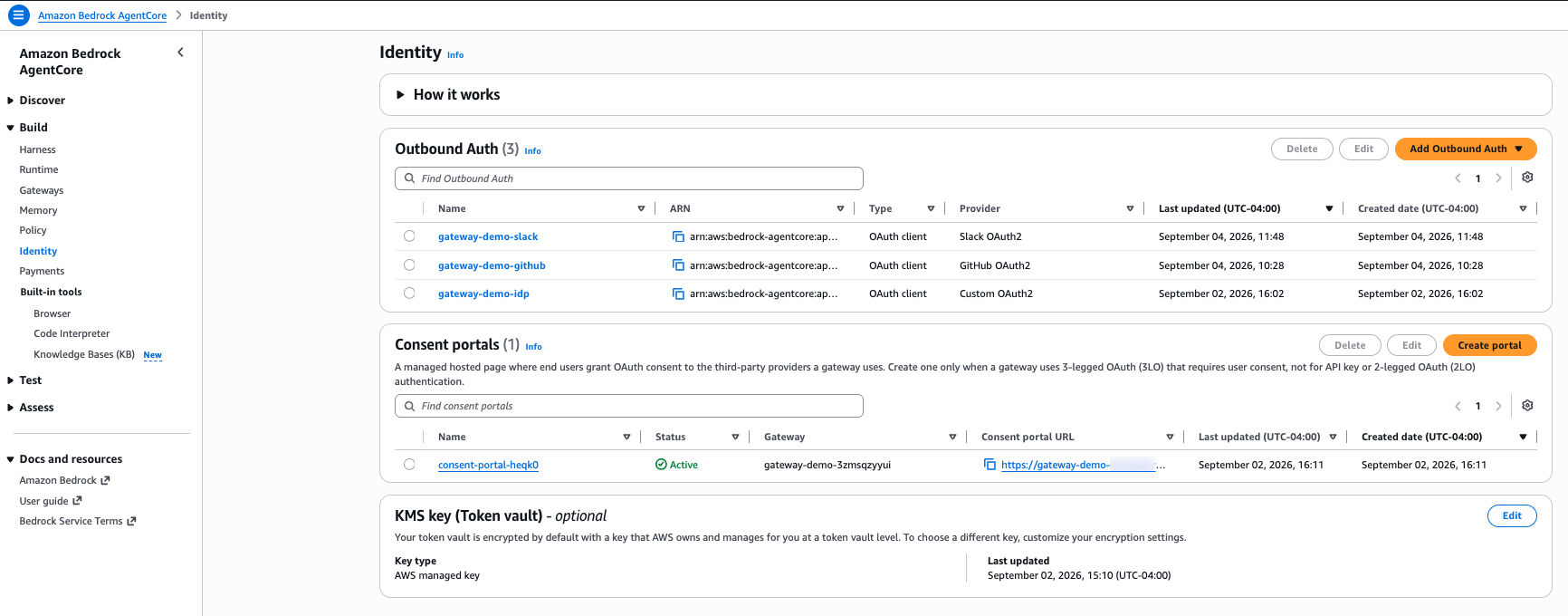
图 2:AgentCore Identity 使用一个凭证提供商供门户登录,并为 GitHub 和 Slack 分别使用独立的出站提供商
步骤 4:验证出站前提条件
创建 Consent portal 前,请确认:
- GitHub 和 Slack OAuth 应用程序均已注册,且其客户端密钥存储在 AWS Secrets Manager 中。
- AgentCore Identity 为 GitHub 和 Slack 分别配置了独立的出站 OAuth 凭证提供商,且每个生成的回调 URL 均已在相应的服务提供商应用程序中注册。
- GitHub 和 Slack 网关目标使用授权码授权类型,仅请求必要的范围,并且状态为 Ready。
- 在步骤 5 中选择的 Consent portal 执行角色可以读取出站凭证提供商引用的任何客户自主管理密钥。
分配门户 URL 后,请在步骤 6 中配置每个目标的默认返回 URL。
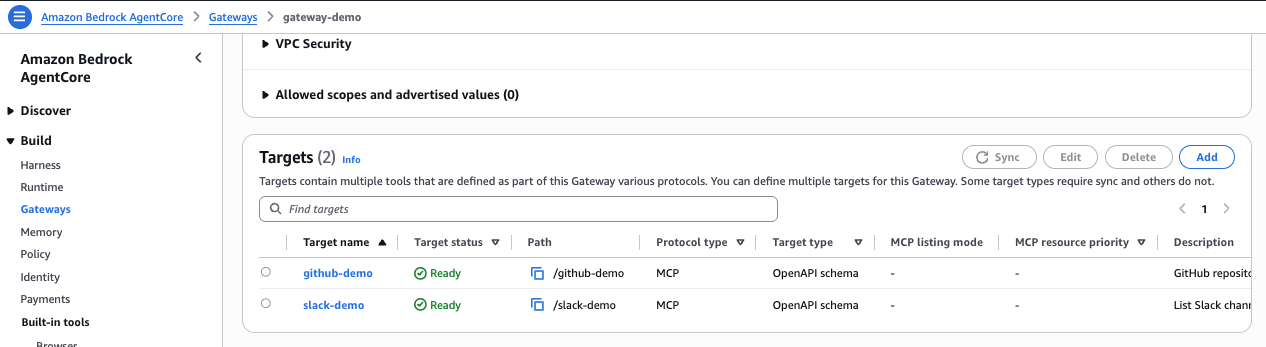
图 3:网关公开独立的 GitHub 和 Slack 目标,每个目标都关联到自己的出站 OAuth 提供商
步骤 5:创建 Consent portal
在 Identity 页面中,Consent portals 部分列出了该账户和 AWS 区域中的门户。
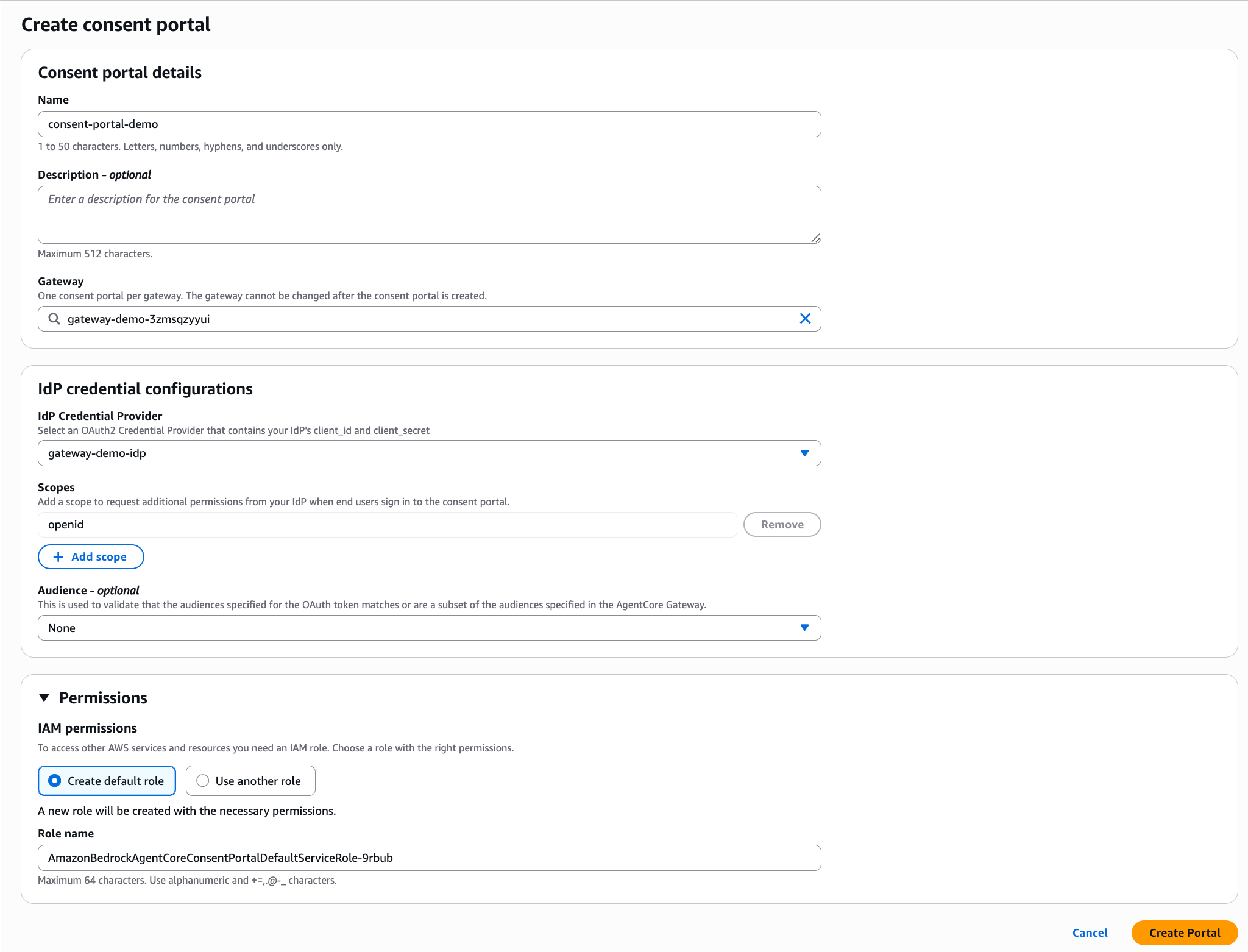
图 4:AgentCore Identity 页面中的 Consent portals 部分。仅当网关使用需要用户同意的 3LO 时才创建门户
- 在 Consent portals 中,选择 Create portal。
- 在 Consent portal details 下的 Name 中,输入名称,例如
consent-portal-heqk0。名称支持 1–50 个字符,可使用字母、数字、连字符和下划线。 - 可选输入最多 512 个字符的 Description。
- 在 Gateway 中,选择开发助手的网关。终端用户可在 Consent portal 中看到网关名称,因此请选择清晰且易识别的名称。每个网关只允许有一个 Consent portal,且创建后无法更改网关。
- 在 IdP credential configurations 下的 IdP Credential Provider 中,选择步骤 3 创建的 OAuth2 凭证提供商。
- 在 Scopes 下,保留必需的
openid范围。其他范围为可选项。仅当您的 IdP 或应用程序需要时,才选择 Add scope。 - 对于 Audience – optional,除非您的网关指定了 audience,否则请保留 None。该值将针对 AgentCore Gateway 上配置的 audience 进行验证。
- 展开 Permissions。对于 IAM permissions,请选择 Create default role,由控制台创建具备必要权限的服务角色;或者选择 Use another role,以选择已有角色。
- 选择 Create portal。
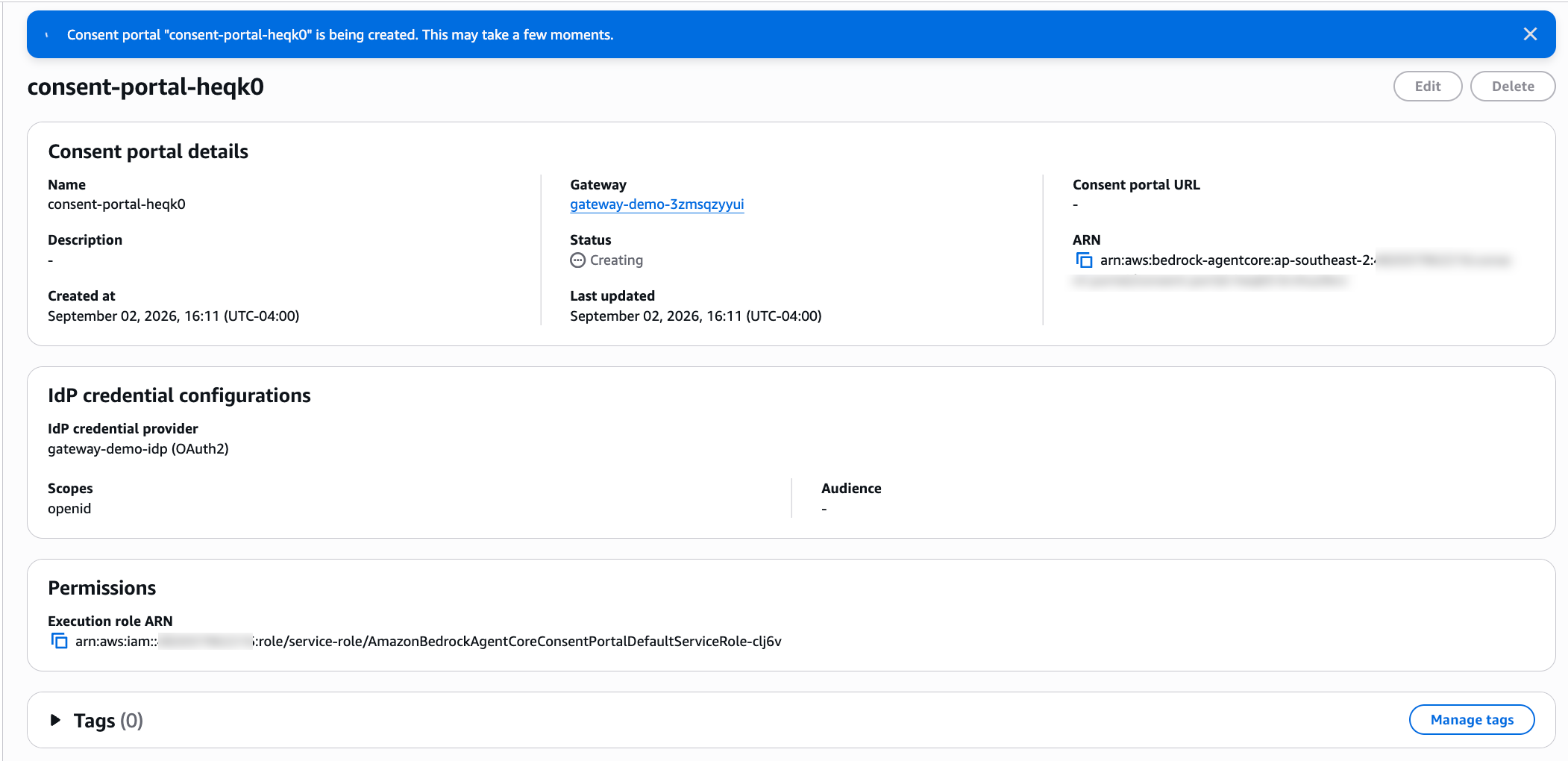
图 5:状态为 Creating 时,可以看到门户 ARN 和执行角色,但尚未分配 URL
预配完成后,状态将变为 Active,并显示 Consent portal URL;Launch Consent portal 按钮可在新标签页中打开该门户。该 URL 遵循如下模式:https://<gateway-name>.consent-portal.bedrock-agentcore.<region>.amazonaws.com。
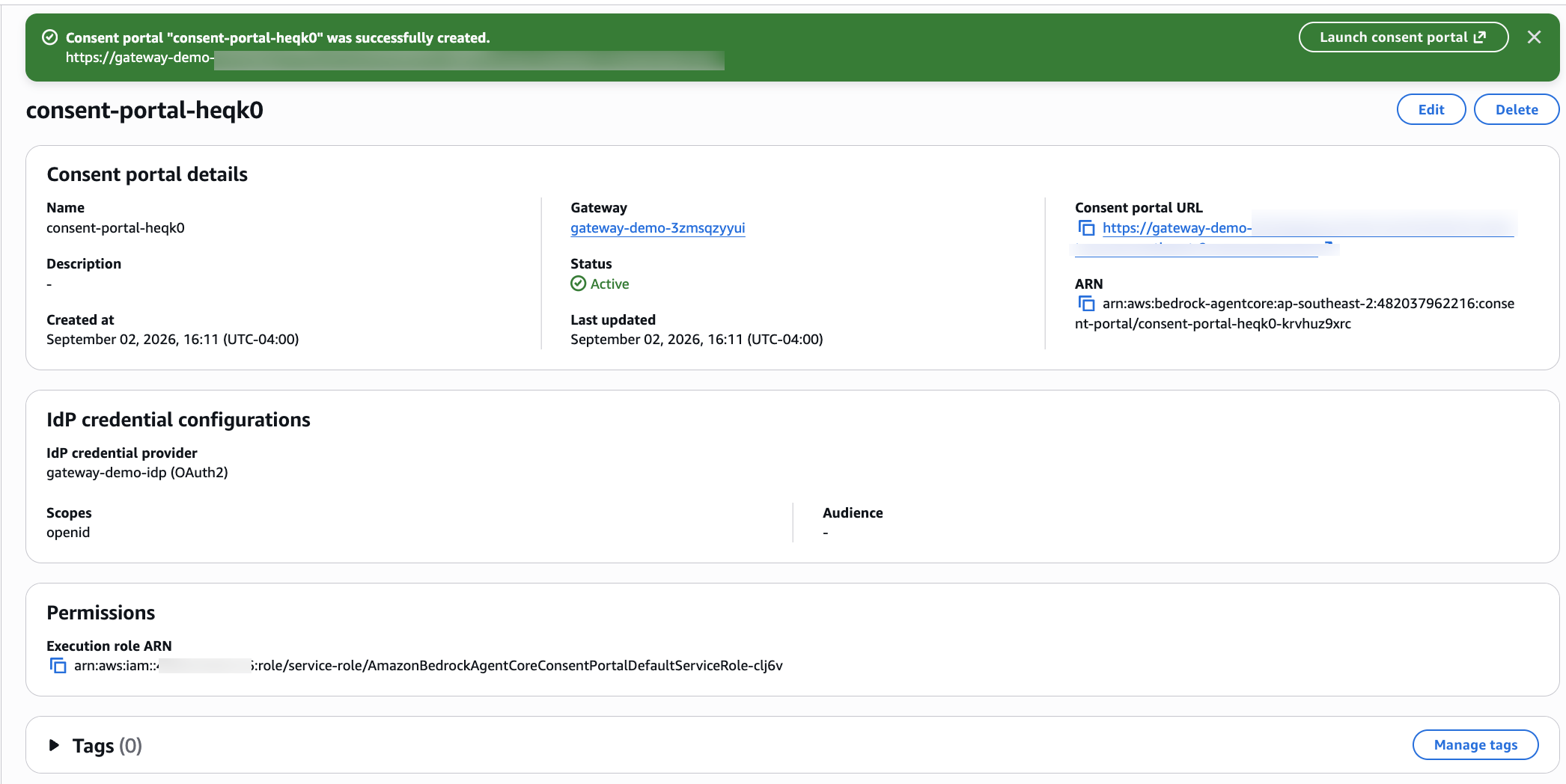
图 6:门户变为 Active 后,控制台会显示分配的 URL,您可将其分享给终端用户
步骤 6:注册回调 URL 并发送门户 URL
- 从门户详情页面复制 consent portal URL。
- 在企业 IdP 应用程序(例如 Amazon Cognito、Okta 或 Auth0)中,将临时回调替换为
<portal-url>/callback。不要添加末尾斜杠。这不是 GitHub 或 Slack 应用程序的回调;这些应用程序使用唯一的 AgentCore IdentitycallbackUrl。 - 对每个 3LO 网关目标,将默认返回 URL 设置为
<portal-url>/connect/callback。 - 确认每个出站提供商应用程序都包含在创建其 OAuth 凭证提供商时返回的 AgentCore Identity 回调 URL。
- 在浏览器中测试门户 URL。
- 通过获批准的通信渠道将门户 URL 发送给开发团队。
回调 URL 参考
| URL | 配置位置 | 用途 |
|---|---|---|
<portal-url>/callback |
企业 IdP 应用程序 | 在门户登录后将用户返回至门户 |
<portal-url>/connect/callback |
网关目标,作为默认返回 URL | 将用户返回至托管式会话绑定端点 |
AgentCore Identity callbackUrl |
出站服务提供商应用程序 | 将服务提供商的授权码发送给 AgentCore Identity |
完成服务提供商回调和网关目标配置后,请在分享门户 URL 前验证最终管理员配置。
终端用户步骤
终端用户在收到门户 URL 后完成步骤 7,以登录并连接服务提供商。
步骤 7:登录并连接服务提供商
- 在浏览器中打开门户 URL。
- 选择 Sign in。浏览器将重定向至 Example Corp IdP。
- 使用企业身份进行验证。随后,门户将使用其 IAM 执行角色检索网关已配置的目标及其连接状态。
- 在 Connections 页面上,查看 GitHub 和 Slack OAuth 客户端及其目标状态。
- 为 GitHub 选择 Connect。
- 在 GitHub 的同意页面上查看权限范围并批准访问。
- 浏览器返回门户后,验证 GitHub 显示为 Connected,而 Slack 仍显示为 Not connected。这表明各服务提供商的授权彼此独立。
- 如果 Agent 需要 Slack,请为 Slack 选择 Connect,选择工作区,
English / 原文
AI agents often need to access services such as GitHub and Slack on a user’s behalf. Before an agent can act, the user must authenticate with the provider and explicitly approve the requested access. The application must then securely associate the resulting OAuth grant with the user who authorized it. This process is called session binding.
Previously, customers using the AgentCore Identity (a capability of Amazon Bedrock AgentCore) three-legged OAuth (3LO) flow (also known as OAuth 2.0 authorization code flow) had to build and host their own session binding infrastructure. This included presenting the authorization URL, hosting a public HTTPS callback, authenticating the returning user, managing browser sessions, and calling CompleteResourceTokenAuth to complete the flow.
AgentCore Identity now offers a Consent portal, a managed web experience and session binding endpoint for AgentCore Gateway, a capability of Amazon Bedrock AgentCore. You create a portal for a gateway and share its URL with your users. Users authenticate with your organization’s identity provider (IdP), review the services available to the agent, and grant consent to individual providers. The portal handles the browser redirects and session binding, while AgentCore Identity stores the resulting tokens in its token vault.
This capability is particularly useful for agents accessed through IDE and Model Context Protocol (MCP) clients such as Kiro, Claude Code, Cursor, and Visual Studio Code. Users can grant consent before invoking a tool, and subsequent tool calls can use the token already stored for that user. In this post, we use a software development assistant as an example. We walk through the administrator and end-user experiences on the AWS Management Console and browser, and show how to review the resulting activity in AWS CloudTrail.
Figure 1: The Consent portal authenticates the user with the corporate IdP, uses its IAM execution role to discover configured gateway targets, presents provider connections, completes session binding, and stores per-user tokens in the AgentCore Identity token vault
Example scenario: Give a development assistant access to GitHub
Consider a company named Example Corp that provides its developers with an AI coding assistant through an AgentCore Gateway. The assistant has two targets:
- A GitHub target that can list repositories and create issues.
- A Slack target that can list public channels and post messages.
Example Corp uses its corporate IdP to authenticate employees. The administrator wants each GitHub and Slack OAuth grant to remain associated with the employee who approved it. Developers can connect either provider independently and return to their IDE without repeated prompts.
The walkthrough follows these two roles:
- Administrator: Configures the corporate IdP, GitHub and Slack gateway targets, execution role, and Consent portal, and then sends the portal URL to developers.
- End user: Opens the URL, signs in with the corporate IdP, connects GitHub when needed, and can grant Slack access separately.
Prerequisites
Before starting the walkthrough, Example Corp needs:
Getting started
The following steps show what the Example Corp administrator configures and what a developer experiences after receiving the portal URL.
Steps for administrator
The administrator completes Steps 1–6 to configure the identity provider, gateway targets, execution role, and Consent portal.
Step 1: Prepare the corporate IdP and gateway connections
Administrator IAM policy
Attach this policy to the administrator identity that performs Steps 1–3. Replace the account ID.
{
  "Version": "2012-10-17",
  "Statement": [
    {
      "Sid": "ManageConsentPortalResources",
      "Effect": "Allow",
      "Action": [
        "bedrock-agentcore:CreateConsentPortal",
        "bedrock-agentcore:GetConsentPortal",
        "bedrock-agentcore:ListConsentPortals",
        "bedrock-agentcore:CreateOauth2CredentialProvider",
        "bedrock-agentcore:GetOauth2CredentialProvider",
        "bedrock-agentcore:ListOauth2CredentialProviders",
        "bedrock-agentcore:GetGateway",
        "bedrock-agentcore:ListGateways",
        "bedrock-agentcore:CreateGatewayTarget",
        "bedrock-agentcore:GetGatewayTarget",
        "bedrock-agentcore:ListGatewayTargets",
        "bedrock-agentcore:UpdateGatewayTarget"
      ],
      "Resource": "*"
    },
    {
      "Sid": "CreateAndPassExecutionRole",
      "Effect": "Allow",
      "Action": [
        "iam:CreateRole",
        "iam:GetRole",
        "iam:PutRolePolicy",
        "iam:GetRolePolicy",
        "iam:PassRole"
      ],
      "Resource": "arn:aws:iam::111122223333:role/service-role/AmazonBedrockAgentCoreConsentPortal*"
    }
  ]
}
The AWS Identity and Access Management (IAM) statement covers the Create default role option on the console, which creates a service role named AmazonBedrockAgentCoreConsentPortalDefaultServiceRole-<suffix>. If you supply your own role instead, scope iam:PassRole to that role ARN.
Step 2: Configure the corporate IdP application
- In the corporate IdP, create an OpenID Connect (OIDC) web application for the Consent portal.
- Enable the authorization code grant and generate a client ID and client secret.
- Configure the login scopes, at minimum
openid. - Record the OpenID Connect (OIDC) discovery URL. The portal uses the authorization endpoint, token endpoint, and signing keys from this document.
- Add a temporary callback URL. You replace it in Step 6, after the portal URL exists.
The IdP must issue a JSON Web Token (JWT) access token that the portal can validate. For example, with Okta, use a custom authorization server with an access policy that permits the application and the authorization code grant. With Auth0, configure an audience when needed so the IdP returns a signed JWT access token instead of an opaque token.
Step 3: Create the IdP credential provider
The portal reads the IdP client ID and client secret from an OAuth2 credential provider.
- Open the Amazon Bedrock AgentCore console.
- Under Build , choose Identity.
- In Outbound Auth , choose Add Outbound Auth , and then choose Add OAuth client.
- Enter a name, such as
gateway-demo-idp. - Enter the client ID and client secret from the corporate IdP application, and provide the OIDC discovery configuration.
- Choose Add OAuth client.
Figure 2: AgentCore Identity uses one credential provider for portal sign-in and separate outbound providers for GitHub and Slack
Step 4: Verify outbound prerequisites
Before creating the Consent portal, confirm:
- The GitHub and Slack OAuth applications are registered, and their client secrets are stored in AWS Secrets Manager.
- AgentCore Identity has separate outbound OAuth credential providers for GitHub and Slack, and each generated callback URL is registered with the matching provider application.
- The GitHub and Slack gateway targets use the authorization code grant, request only the required scopes, and have a Ready status.
- The Consent portal execution role selected in Step 5 can read any customer-managed secrets referenced by the outbound credential providers.
After the portal URL is assigned, configure each target’s default return URL in Step 6.
Figure 3: The gateway exposes independent GitHub and Slack targets, each associated with its own outbound OAuth provider
Step 5: Create the Consent portal
On the Identity page, the Consent portals section lists the portals in the account and AWS Region.
Figure 4: The Consent portals section on the AgentCore Identity page. Create a portal only when a gateway uses 3LO that requires user consent
- In Consent portals , choose Create portal.
- Under Consent portal details , for Name , enter a name such as
consent-portal-heqk0. Names accept 1–50 characters, using letters, numbers, hyphens, and underscores. - Optionally enter a Description of up to 512 characters.
- For Gateway , select the development assistant’s gateway. The gateway name is visible to end users in the Consent portal, so choose a clear, recognizable name. One Consent portal is allowed per gateway, and the gateway can’t be changed after creation.
- Under IdP credential configurations , for IdP Credential Provider , select the OAuth2 credential provider created in Step 3.
- Under Scopes , keep the required
openidscope. Additional scopes are optional. Choose Add scope only when your IdP or application requires them. - For Audience – optional , keep None unless your gateway specifies audiences. The value is validated against the audiences configured on the AgentCore Gateway.
- Expand Permissions. For IAM permissions , choose Create default role to have the console create a service role with the required permissions, or choose Use another role to select an existing role.
- Choose Create portal.
Figure 5: While the status is Creating, the portal ARN and execution role are visible but the URL isn’t assigned yet
When provisioning finishes, the status changes to Active , the Consent portal URL appears, and a Launch Consent portal button opens it in a new tab. The URL follows the pattern https://<gateway-name>.consent-portal.bedrock-agentcore.<region>.amazonaws.com.
Figure 6: After the portal becomes Active, the console shows the assigned URL that you share with end users
Step 6: Register callback URLs and send the portal URL
- Copy the consent portal URL from the portal details page.
- In the corporate IdP application, for example, Amazon Cognito, Okta, or Auth0, replace the temporary callback with
<portal-url>/callback. Don’t add a trailing slash. This isn’t the GitHub or Slack application callback. Those applications use the unique AgentCore IdentitycallbackUrl. - For each 3LO gateway target, set the default return URL to
<portal-url>/connect/callback. - Confirm that each outbound provider application contains the AgentCore Identity callback URL returned when its OAuth credential provider was created.
- Test the portal URL in a browser.
- Send the portal URL to the development team through an approved communication channel.
Callback URL reference
| URL | Where it is configured | Purpose |
|---|---|---|
<portal-url>/callback |
Corporate IdP application | Returns the user after portal login |
<portal-url>/connect/callback |
Gateway target as the default return URL | Returns the user to the managed session binding endpoint |
AgentCore Identity callbackUrl |
Outbound provider application | Sends the provider’s authorization code to AgentCore Identity |
After completing the provider callbacks and gateway targets, verify the final administrator configuration before sharing the portal URL.
Steps for end user
The end user completes Step 7 to sign in and connect providers after receiving the portal URL.
Step 7: Sign in and connect providers
- Open the portal URL in a browser.
- Choose Sign in. The browser redirects to the Example Corp IdP.
- Authenticate with the corporate identity. The portal then uses its IAM execution role to retrieve the gateway’s configured targets and their connection state.
- On the Connections page, review the GitHub and Slack OAuth clients and their target status.
- Choose Connect for GitHub.
- Review the scopes on GitHub’s consent page and approve access.
- After the browser returns to the portal, verify that GitHub shows Connected while Slack remains Not connected. This demonstrates that grants are independent for each provider.
- If the agent needs Slack, choose Connect for Slack, select the workspace, review the requested permissions, and approve the app. Otherwise, leave Slack unconnected until it is needed.
- Return to the IDE or MCP client configured to use the same AgentCore Gateway attached to the Consent portal, and retry the applicable GitHub or Slack tool call through that gateway.
The following screenshots capture useful checkpoints for the walkthrough.
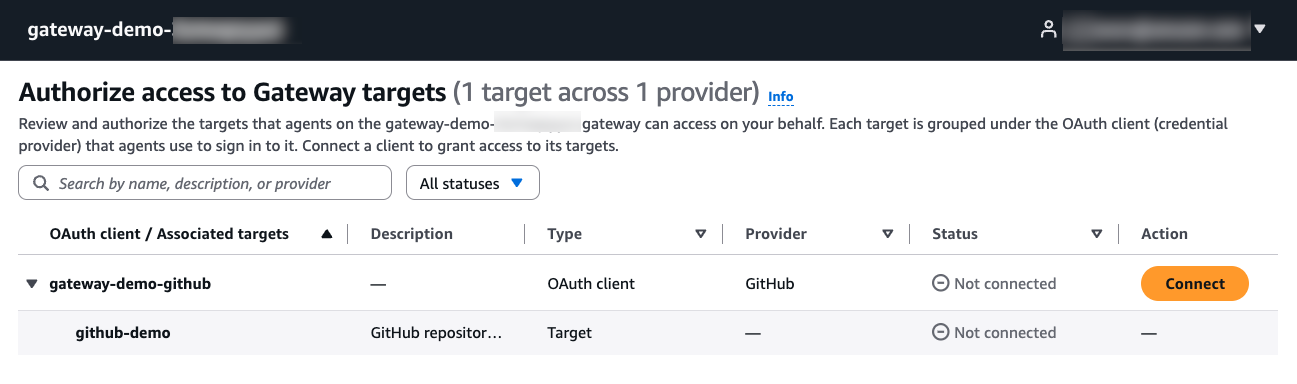
Figure 7: The Consent portal discovers the GitHub OAuth client and its target. Both remain Not connected until the user grants access
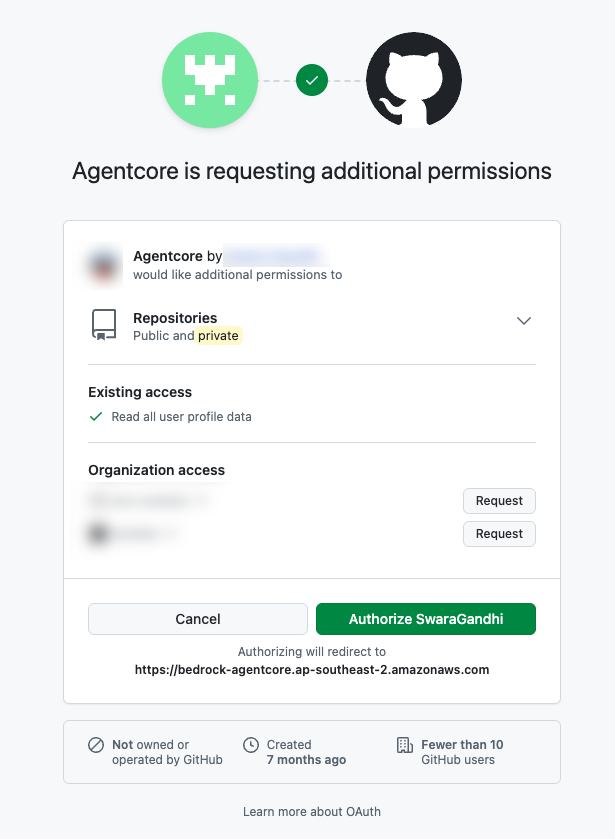
Figure 8: GitHub displays the scopes and organization access requested by the OAuth application before the user authorizes it
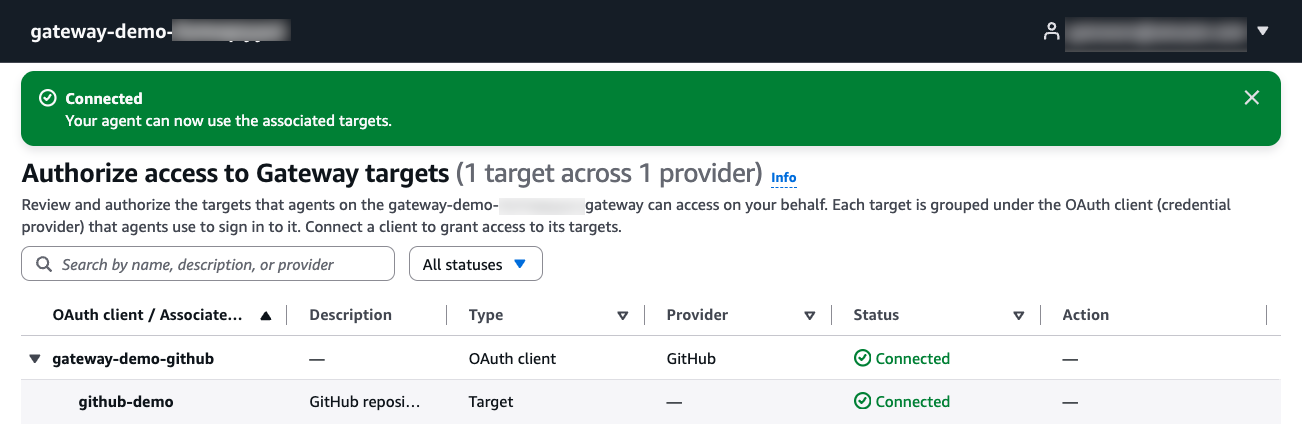
Figure 9: After GitHub returns the authorization result, the portal completes session binding and shows the OAuth client and target as Connected
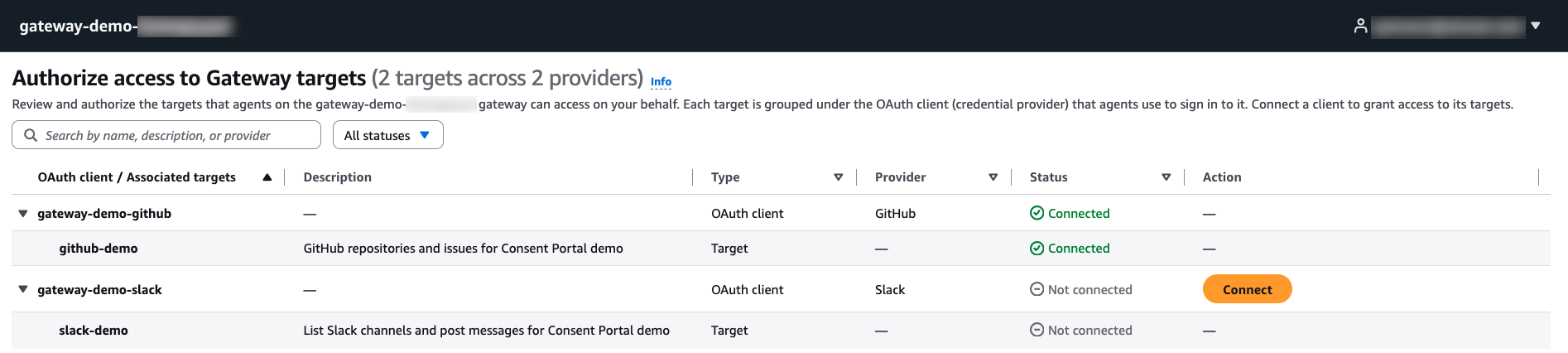
Figure 10: GitHub remains Connected while Slack is Not connected, demonstrating that users grant consent independently for each outbound provider
Behind the scenes
- The portal validates the IdP response and establishes an encrypted browser session.
- The portal uses its execution role to list the attached gateway’s 3LO targets.
- When the user chooses Connect , the portal calls
GetResourceOauth2Tokenand receives an authorization URL and session URI. - After the provider returns the authorization code to AgentCore Identity, the browser returns to the portal’s managed session binding endpoint.
- The portal calls
CompleteResourceTokenAuthwith the authenticated user context. - When the provider returns a refresh token, AgentCore Identity stores it and automatically uses it to obtain a new access token after the current access token expires. Sometimes no valid refresh token is available, because the provider didn’t issue one or it has expired or been revoked. In that case, the user must return to the Consent portal and reauthorize when the access token can no longer be used. Configure the provider to issue refresh tokens where supported. For example, enable user-to-server token expiration for GitHub or token rotation for Slack.
The next time the developer opens the portal, connected providers remain visible. The developer doesn’t need to approve a provider again unless the grant is revoked, expires, or requires renewed consent. The developer can also choose Disconnect and later connect the provider again.
Review consent activity in AWS CloudTrail
Amazon Bedrock AgentCore records consent operations in AWS CloudTrail. In CloudTrail event history , filter Event source by bedrock-agentcore.amazonaws.com, then review:
GetResourceOauth2Tokenwhen the portal starts OAuth authorization for a provider.CompleteResourceTokenAuthwhen session binding is completed.GetWorkloadAccessTokenForJWTwhen the portal obtains gateway access for the authenticated user.
A GetResourceOauth2Token event identifies the credential provider, requested scopes, OAuth flow, portal execution role, and Region. Sensitive token and state values are redacted.
{
  "eventSource": "bedrock-agentcore.amazonaws.com",
  "eventName": "GetResourceOauth2Token",
  "awsRegion": "ap-southeast-2",
  "userIdentity": {
    "type": "AssumedRole",
    "arn": "arn:aws:sts::111122223333:assumed-role/AmazonBedrockAgentCoreConsentPortalDefaultServiceRole-example/consent-dashboard-example"
  },
  "requestParameters": {
    "workloadIdentityToken": "HIDDEN_DUE_TO_SECURITY_REASONS",
    "resourceCredentialProviderName": "gateway-demo-github",
    "scopes": ["read:user", "repo"],
    "oauth2Flow": "USER_FEDERATION",
    "customState": "HIDDEN_DUE_TO_SECURITY_REASONS"
  },
  "resources": [
    {
      "accountId": "111122223333",
      "type": "AWS::BedrockAgentCore::OAuth2CredentialProvider",
      "ARN": "arn:aws:bedrock-agentcore:ap-southeast-2:111122223333:token-vault/default/oauth2credentialprovider/gateway-demo-github"
    }
  ],
  "managementEvent": true
}
For failures, use errorCode and errorMessage with the event time, assumed role, Region, credential provider, and requested scopes to identify the cause.
Clean up
When you no longer need the resources:
- Open the Amazon Bedrock AgentCore console and delete the Consent portal.
- Remove the portal callback URLs from the corporate IdP application and gateway targets.
- Delete the gateway targets that reference the outbound credential providers.
- Delete the outbound OAuth credential providers and corporate IdP credential provider if they aren’t used elsewhere.
- Delete the portal execution role if no other resource uses it.
Note: Delete the gateway target before deleting its outbound credential provider. A credential provider still referenced by a target can’t be deleted.
Conclusion
The Amazon Bedrock AgentCore Consent portal gives administrators a managed way to configure end-user OAuth consent for an AgentCore Gateway. Administrators connect the corporate IdP, execution role, gateway, and outbound providers, and then share one URL. End users authenticate, review available providers, and grant consent individually. The portal handles the browser flow and managed session binding, while AgentCore Identity protects the resulting user tokens in the token vault.
For end-to-end examples using Microsoft Entra ID and Okta, see the following Amazon Bedrock AgentCore samples on GitHub:
To learn more, see Amazon Bedrock AgentCore.
About the authors
Swara Gandhi
Swara is a Senior Solutions Architect on the AWS Identity Solutions team. She works on building secure and scalable end-to-end identity solutions. She is passionate about everything identity, security, and cloud.
Satveer Khurpa
Satveer is a Sr. WW Specialist Solutions Architect, Amazon Bedrock AgentCore at Amazon Web Services, specializing in agentic AI security with a focus on AgentCore Identity and Security. In this role, he uses his expertise in cloud-based architectures to help clients design and deploy secure agentic AI systems across diverse industries. Satveer applies his deep understanding of agentic AI patterns, identity and access management, and defense-in-depth security principles to architect scalable, secure, and responsible agent-based applications, enabling organizations to unlock new business opportunities while maintaining robust security postures for autonomous AI workloads.
Eashan Kaushik
Eashan is a Specialist Solutions Architect AI/ML at Amazon Web Services. He is driven by creating cutting-edge generative AI solutions while prioritizing a customer-centric approach to his work. Before this role, he obtained an MS in Computer Science from NYU Tandon School of Engineering. Outside of work, he enjoys sports, lifting, and running marathons.