MCP 工具设计:实践方法与权衡
英文标题:MCP tool design: Practical approaches and tradeoffs
当 MCP 工具表现不佳时,原因通常在于工具设计,核心问题包括占用过多上下文的“臃肿”和导致错误调用的“混乱”。本文通过模拟 K-12 内容搜索 API 的 6 个版本,展示了从原始透传到惰性加载等上下文工程实践,包括丰富描述、模式约束、按需上下文和服务端推断。研究指出,合理设计工具定义可减少重试,而按需加载工具可最高减少 85% 的令牌消耗。对开发者而言,找到臃肿与混乱之间的平衡至关重要,文中提供了可运行的对比示例以帮助决策。
 100.1 KB
 62.6 KB
 62.0 KB
 46.4 KB
 5.4 KB
 19.9 KB
 117.1 KB
中文
当模型上下文协议(MCP)工具表现不佳时,原因很少在于协议本身,而在于工具设计。许多团队一开始是将现有 API 原样暴露,并寄希望于代理能自行处理剩下的部分。这是将 API 扩展到代理系统和生成式 AI 编码工具的自然方式。对于简单用例,这可以奏效。但往往不行。
你必须根据大语言模型(LLM)和代理系统的工作方式来设计工具。否则,你将面临工具调用失败、参数值错误以及浪费上下文并降低性能的重试风险。在本文中,我们将展示 MCP 工具设计在哪里出错,以及如何通过实用的上下文工程方法加以修复。
大多数这类失败背后有两个问题。第一个是臃肿。每次调用时,工具定义都会加载到 LLM 的上下文中,无论该工具是否被使用。多个相连的 MCP 服务器可能在用户还没提问前就已占用大量上下文。随着上下文填满,LLM 的推理能力可能会下降,导致会话效率降低。
第二个是混乱。随着推理能力下降,LLM 做出的选择更差,调用错误的工具并选择不正确的参数。后续的重试进一步加剧臃肿,使问题更加复杂。工具之间的语义相似性、过多的选项和模糊的命名也会加剧混乱。常见的解决方案是用更清晰的定义、自然语言映射和使用示例来丰富工具描述。这确实有助于缓解混乱。但新增的一切都可能加剧臃肿,使你想解决的问题变得更糟。
这种模式很常见。你的代理做出意料之外的选择,上下文比预期更快填满,然后会话很快变得不那么有用。应对臃肿和混乱是一个上下文工程问题。上下文工程塑造了 LLM 看到的内容以及何时看到,从而让模型产生更好的结果。改善其中一个或两个问题是一项复杂的平衡工作。
接下来的章节将探讨解决这些问题的实践方法与权衡。为了使内容更具体,我们构建了几个示例,通过 MCP 协议暴露一个模拟的 K-12 内容搜索 API。你将在本地运行它们,并使用Kiro CLI进行交互,以亲自比较差异。
方法与权衡
我们分享的方法在工具层面解决了这些问题。有些方法塑造了 LLM 看到的内容或看到的时间。其他方法则改变了工具的结构。当你应用这些方法时,需要理解它们如何影响臃肿和混乱,从而在两者之间找到适当的平衡。
描述与响应
解决 MCP 工具行为的自然第一步是改进描述。减少混乱的可靠方法是明确值的含义、自然语言如何映射到这些值以及工具的用途。但如果做得过头,你会迅速增加臃肿。当许多 MCP 服务器被加载到客户端时,上下文和成本可能会迅速增长。
工具返回的内容也会影响行为。一个每次结果返回 50 个字段的工具会迅速填满上下文。如果 5 个字段足以做出决策,就将响应默认设置为这些字段,并提供单独的选项以请求详细视图。据Anthropic 的研究,将详细输出转变为按需获取的方式,可将响应令牌减少约三分之二。
正确的错误消息是另一种提高效率的方式。当工具调用失败时,有帮助的错误信息可以引导下一次尝试。一个显示“搜索要求查询中包含 2 个或更多词语”的响应能确切地告诉 LLM 需要修改什么。而一个只返回“无结果”的响应则没有提供任何信息,导致模型要么放弃,要么继续猜测。
模式约束
在描述和正确的错误信息引导 LLM 走向正确值的同时,像枚举和默认值这样的模式约束可以彻底消除猜测。为应对常见的模式问题,请考虑以下几点:
- 重命名参数,使其符合 LLM 理解领域的方式,而不是数据库的列名。
- 一个名为
resource_class且值为“学生资源”或“教师支持”的参数对 LLM 更清晰。content_bucket列则要求 LLM 了解内部约定。
- 一个名为
- 将最常用的值设为默认值,这样 LLM 只需指定有变化的参数。
- 用枚举约束有限值的字段,由模式本身告诉 LLM 哪些是有效的。
- 删除很少使用或 LLM 无法良好使用的字段。
重构工具与按需上下文
将一个多功能工具拆分为几个专用工具,可以为模型提供清晰度并产生更细粒度的结果。一个延迟加载发现工具就是一个例子。你可以从始终加载的上下文中移除复杂的工具描述,并提供单独的工具用于按需检索。LLM 仅在任务需要时才检索这些上下文。这保持了上下文的精简和专注。Anthropic 的工具搜索工具和Amazon Bedrock AgentCore Gateway 展示了这些概念在大规模应用的情况。Anthropic 报告称,通过仅在相关时加载工具定义,可减少高达 85% 的令牌。
技能(Skills)是另一个延迟加载的例子,但它们在客户端实现。这些本地文件包含对工具有用的上下文,但只有在相关时才会被读入上下文。这减少了实现和分发的难度。但无法保证技能在需要时被加载,或安装后保持不变。
服务端推断
当你无法控制哪个模型将解释你的指令时,上下文工程具有挑战性。而一旦部署,你可能也无法控制哪个 LLM 调用你的 MCP 工具。针对一个模型调试的描述可能会让另一个模型感到困惑。全面测试客户端可能使用的所有潜在模型是不现实的。
解决这个问题的一种方法是添加一个内省工具,直接调用外部 LLM。客户端使用自然语言查询你的内省工具,并获取使用其他工具的有针对性指令。因为你选择模型,所以你可以恰当地为该工具进行提示工程,并使用黄金查询进行测试。客户端 LLM 仍然执行最终的工具调用,但你的 LLM 解释需求并提供正确的值。由于用例明确,一个更小、更快的模型可以很好地处理此任务,并大规模地保持合理的成本。
当你需要准确性和完全控制时,下一步自然的演进是用你自己的代理来支撑整个 MCP 服务器。内省的示例处理单个解释步骤,而代理工具则处理整个交互。工具变成了客户端的自然语言端点。它陈述自己需要什么,然后你的代理完成其余工作。前面介绍的其他技术仍然适用。权衡完全由你掌握,但与内省一样,你可以用你选择的模型完全设计行为。
下一节将带领大家编写工作代码,将这些方法应用于相同的后端和测试查询,让你可以直接比较它们的行为。
演练
这 6 个版本中的每一个都用不同的 MCP 工具设计来封装同一个模拟的 K-12 内容搜索后端。后端有 14 个可过滤字段(学科、年级、格式、标准对齐、语言、资源类别等),并带有受控词汇表。LLM 面临的挑战是弥合教师表达请求的方式与这些字段接受的确切值之间的差距。V1 从原始的透传开始,将这一差距敞开着。后面每个版本都以不同的方式弥补了这一差距。
先决条件
你需要以下条件来运行示例代码:
克隆示例代码仓库并按照仓库 README 中的说明完成详细的先决条件、安装和服务器启动步骤。随后的演练假设所有六个版本都在运行。
没有基础设施部署到 AWS。所有代码都在本地运行。对 Amazon Bedrock 的推断调用是除编码客户端外的唯一成本。请参阅 Amazon Bedrock 定价了解当前费率。
本演练假设你正在使用 Kiro,并且已经从仓库运行了 python scripts/setup_agents.py。
测试查询
以下查询可从示例数据库返回真实结果。尝试对每个版本执行它们:
- “为我的 7 年级学生找一份关于分数的测验。”
- “你有在中学教西班牙语的课程吗?”
- “我需要符合 TEKS 标准的内容,给初中生用于学习除法。”
- “我可以搜索哪些类型的内容?”
- “我能查看 n-sc-1096 的详细信息吗?”
当你逐个版本运行时:
- 观察 LLM 是否在第一次调用时就选择了正确的过滤值。
- 记下它进行了多少次工具调用。
- 检查响应是否包含了 LLM 不需要的信息。
- 观察上下文窗口填满的速度。查看 Kiro 中显示的百分比,或使用
/context show获取详细分解。
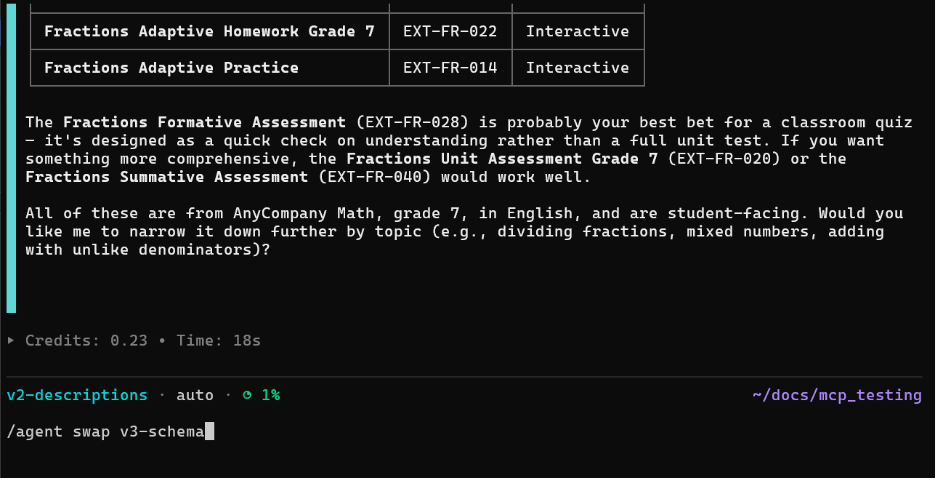
要在版本之间切换,请使用 /agent swap(例如 /agent swap v1-passthrough)。切换版本后使用 /clear 清空上下文,以免之前的结果影响下一个版本。
V1:原始透传
v1_passthrough.py
第一个版本是基线反模式。它直接暴露后端 API。工具定义有 14 个参数,使用了如 discipline、media_type、content_bucket 这样的内部名称,以及一行文档字符串,写着“对教育资源执行全局搜索”。没有列出有效值,没有自然语言映射,没有指导。
工具定义很小,但 LLM 对哪些值是有效的没有任何指导。尝试第一个查询。它可能会为 media_type 传入“quiz”,而有效值是“Assessment”;或者传入“math”,而字段期待的是“Math”。每次错误的选择都会触发一次重试,从而消耗更多上下文。唯一能提示出错的线索是空结果。LLM 只能猜测下一次尝试应该修改什么。低基线成本具有误导性,因为混乱会通过反复试错推高实际成本。
V2:丰富的描述
v2_better_descriptions.py
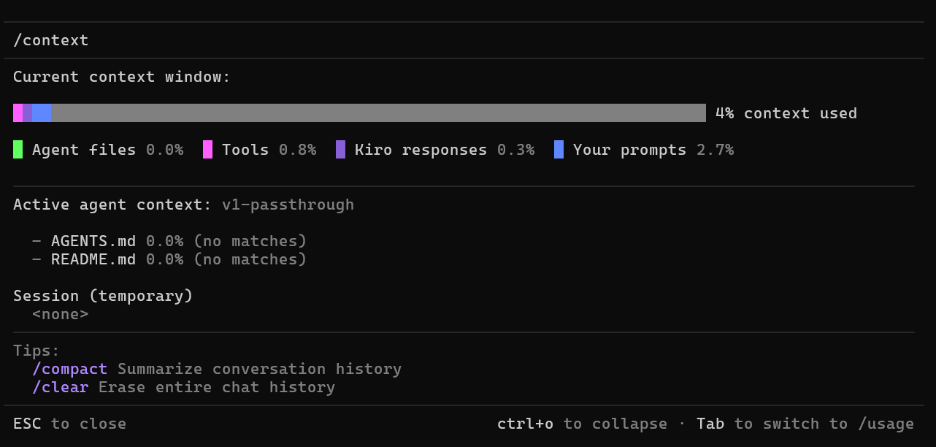
结构与 V1 相同,后端零重构。文档字符串现在为每个字段列出了有效值和同义词映射。例如,discipline 显示“有效值:数学、科学、读写/ELA……”,media_type 映射“ ‘测验’/‘测试’ → Assessment,‘工作表’ → Activity”。它还区分了模糊搜索(keyword)和严格过滤器(其他所有)。三个不常用的参数被删除,并且错误消息现在会返回关于应添加哪些过滤器的指导,而不是返回空结果。
尝试相同的查询。由于 LLM 看到了有效值和同义词映射,准确性立即提高。工具定义明显变大了。这就是臃肿的代价。每次调用都要付出代价,无论工具是否被使用。五次查询后,将消耗的总上下文与 V1 进行比较。每次调用的开销更高,但更少的重试往往使总消耗量更低。
V3:模式与默认值
v3_rethought_schema.py
这个版本重命名了参数,以匹配 LLM 的思考方式,并通过模式本身约束值。参数被重命名:discipline 变为 subject,content_bucket 变为 resource_class。每个有限值字段使用 Literal 类型,直接在模式中列出有效选项。合理的默认值处理了常见情况:structure='Asset',resource_class='Student Resource',language='en'。一个单独的 get_resource_detail 工具处理下钻查询。这应用了重构方法,为每个工具分配了明确的职责,并保持搜索响应简洁。
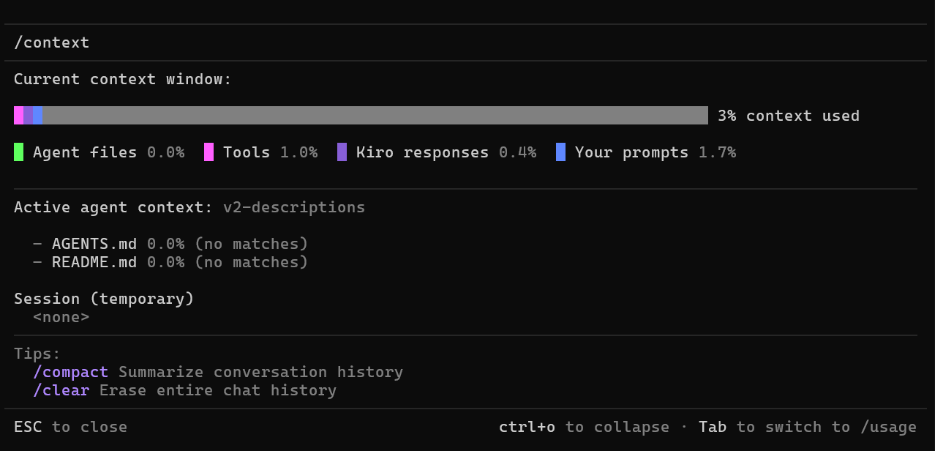
枚举有助于在协议层面防止错误值。默认值意味着 LLM 只需指定有变化的参数。响应中包含一个 defaults_applied 字段,让 LLM 知道哪些值被隐式过滤了。由于名称和枚举做了以往冗长描述的工作,定义比 V2 更小。运行查询并与 V2 的准确性进行比较。准确性提高的同时,上下文减少了。
V4:延迟加载(重构)
v4_lazy_loading.py
这种方法不是将枚举和详细描述嵌入搜索工具,而是将它们移到一个单独的工具后面。搜索工具只保留简短的提示性描述,如“学科领域,例如‘数学’、‘科学’、‘读写’”。get_taxonomy 工具接受一个字段名列表,并仅针对与当前查询相关的字段返回有效值和自然语言映射。
搜索工具定义是迄今为止最精简的。注意工具调用。对于模糊的查询,LLM 会在搜索前调用 get_taxonomy 以确认有效值。对于简单的 queri
English / 原文
When Model Context Protocol (MCP) tools underperform, the cause is rarely the protocol itself but the tool design. Many teams start by exposing an existing API as-is and trusting the agent to figure out the rest. It is a natural way to extend APIs to agentic systems and generative AI coding tools. For straightforward use cases, it can work. But often it does not.
You must design your tools for how large language models (LLMs) and agentic systems work. Without this, you risk failed tool calls, wrong parameter values, and retries that waste context and degrade performance. In this post, we show where MCP tool design goes wrong and how to fix it with practical context engineering approaches.
Two problems are behind most of these failures. The first is bloat. Tool definitions load into the LLM’s context on every call, whether the tool is used or not. Multiple connected MCP servers can consume significant context before the user has asked a single question. As context fills, an LLM’s ability to reason can degrade and cause the session to become less productive.
The second is confusion. As reasoning degrades, the LLM makes poorer choices, calls the wrong tool and chooses incorrect parameters. Subsequent retries compound the issue by further contributing to bloat. Semantic similarity between tools, too many options, and ambiguous naming also contribute to confusion. A common solution is to enrich the tool descriptions with clearer definitions, natural language mappings, and usage examples. This does help with confusion. But everything added risks worsening bloat and compounding the very issue you are working to solve.
This pattern is common. Your agent makes unexpected choices, the context fills sooner than expected, and your session quickly becomes less useful. Addressing bloat and confusion is a context engineering problem. Context engineering shapes what the LLM sees and when it sees it, so the model produces better results. Improving one, or both, of these is a complex balancing act.
The following sections explore approaches and tradeoffs to address these issues. To make them concrete, we built several examples that expose a simulated K-12 content search API using the MCP protocol. You will run them locally and interact with them using Kiro CLI to compare the differences yourself.
Approaches and tradeoffs
The approaches we share address these issues at the tool level. Some shape what the LLM sees or when it sees it. Others change how tools are structured. As you apply them, you need to understand how they impact bloat and confusion to find the right balance between the two.
Descriptions and responses
The natural first step to fixing MCP tool behavior is to improve the descriptions. A reliable way to reduce confusion is to clarify what values mean, how natural language maps to them, and what the tool is for. But take it too far, and you quickly add to bloat. Context and cost can grow quickly when many MCP servers are loaded into a client.
What the tool returns shapes behavior too. A tool that returns 50 fields per result fills context quickly. If 5 are sufficient for a decision, default the response to those fields and provide a separate option to request a detailed view. Shifting to an on-demand approach for detailed output cuts response tokens by roughly two-thirds, according to Anthropic’s research.
Proper error messages are another way to improve efficiency. When a tool call fails, helpful errors can steer the next attempt. A response that says “search requires 2 or more terms in query” tells the LLM exactly what to change. A response that returns only “no results” gives it nothing, causing the model to either give up or keep guessing.
Schema constraints
Where descriptions and proper errors guide the LLM toward correct values, schema constraints like enums and default values can remove the guesswork entirely. Consider the following to address common schema issues:
- Rename parameters to match how the LLM might understand the domain, not how your database labels its columns.
- A parameter called
resource_classwith values like ‘Student Resource’ or ‘Teacher Support’ is clearer for the LLM. Acontent_bucketcolumn requires the LLM to know an internal convention.
- A parameter called
- Set defaults to the most common values so the LLM only needs to specify what varies.
- Constrain finite-value fields with enums so the schema itself tells the LLM what is valid.
- Drop fields that are rarely used or that the LLM cannot use well.
Restructuring tools and on-demand context
Splitting a multi-purpose tool into several specific tools provides clarity to the model and gives more granular results. A lazy loading discovery tool is one example. You can remove complex tool descriptions from the always-loaded context and provide a separate tool for on-demand retrieval. The LLM only retrieves this context when the task requires it. This keeps context lean and focused. Anthropic’s Tool Search Tool and Amazon Bedrock AgentCore Gateway show these concepts applied at scale. Anthropic reports up to 85% token reduction by loading tool definitions only when relevant.
Skills are another example of lazy loading, but implemented client side. These local files contain useful context for the tool but are only read into context when relevant. This reduces the effort to implement and distribute them. But there is no guarantee that the skill loads when needed or remains unchanged once installed.
Server-side inference
Context engineering is challenging when you do not control which model will interpret your instructions. And once deployed, you may not control which LLM calls your MCP tools. A description tuned against one model might confuse another. Fully testing all the potential models a client might use is unrealistic.
One way to address this is to add an introspection tool that directly calls an external LLM. The client uses natural language to query your introspection tool and gets targeted instructions for using the other tools. Because you choose the model, you can properly prompt engineer this tool and test with golden queries. The client LLM still makes the final tool call, but your LLM interprets the need and provides correct values. Because the use case is focused, a smaller, faster model handles this task well and keeps costs reasonable at scale.
When you need accuracy and full control, the next logical progression is to back your entire MCP server with an agent of your own. The introspection example handles a single interpretation step, but an agentic tool handles the entire interaction. The tools become natural language endpoints to the client. It states what it needs, and your agent does the rest. The other techniques covered still apply. The tradeoffs are yours to own completely, but as with introspection, you can fully engineer the behavior with the model of your choice.
The next section walks through working code that applies these approaches against the same backend and test queries, so you can compare their behavior directly.
Walkthrough
Each of the 6 versions wraps the same simulated K-12 content search backend with a different MCP tool design. The backend has 14 filterable fields (subject, grade, format, standards alignment, language, resource class, and others) with controlled vocabularies. The challenge for the LLM is bridging the gap between how a teacher phrases a request and the exact values those fields accept. V1 starts with the raw passthrough that leaves this gap open. Each later version closes it differently.
Prerequisites
You need the following to run the sample code:
Clone the sample code repository and follow the repository README for detailed prerequisites, installation, and server startup instructions. The walkthrough that follows assumes all six versions are running.
No infrastructure is deployed to AWS. You run all code locally. Inference calls to Amazon Bedrock are the only cost aside from your coding client. See Amazon Bedrock pricing for current rates.
This walkthrough assumes you are using Kiro and have run python scripts/setup_agents.py from the repository.
Test queries
These queries return real results from the sample database. Try them against each version:
- “Find me a quiz on fractions for my 7th graders.”
- “Do you have any lessons for teaching Spanish in middle school?”
- “I need TEKS-aligned content for kids working on dividing in middle school.”
- “What types of content can I search for?”
- “Can I get details on n-sc-1096?”
As you run through each version:
- Observe whether the LLM picked the right filter values on the first call.
- Note how many tool calls it took.
- Check whether the response included information the LLM didn’t need.
- Observe how quickly the context window fills. Check the percentage displayed in Kiro, or use
/context showfor a detailed breakdown.
To switch between versions, use /agent swap (for example, /agent swap v1-passthrough). Clear context with /clear between versions so prior results don’t influence the next one.
V1: Raw passthrough
v1_passthrough.py
The first version is the baseline anti-pattern. It exposes the backend API directly. The tool definition has 14 parameters with internal names like discipline, media_type, content_bucket, and a one-line docstring that says “Performs a global search for educational resources.” No valid values listed, no natural language mappings, no guidance.
The tool definition is small, but the LLM has no guidance on what values are valid. Try the first query. It might pass “quiz” for media_type when the valid value is “Assessment”, or “math” when the field expects “Math”. Each wrong choice triggers a retry that consumes more context. The only clue that something went wrong is an empty result. The LLM is left guessing what to change on the next attempt. Low baseline cost is misleading when confusion drives up the actual cost through churn.
V2: Rich descriptions
v2_better_descriptions.py
Same structure as V1, zero backend refactoring. The docstring now lists valid values and synonym mappings for each field. For example, discipline shows “Valid: Math, Science, Literacy/ELA…” and media_type maps “‘quiz’/‘test’ → Assessment, ‘worksheet’ → Activity.” It also distinguishes fuzzy search (keyword) from strict filters (everything else). Three rarely-used parameters are dropped and error messages now return guidance on which filters to add, rather than an empty result.
Try the same queries. Accuracy improves immediately because the LLM sees valid values and synonym mappings. The tool definition is noticeably larger. That’s the bloat tradeoff. Every call pays it whether the tool is used or not. After five queries, compare total context consumed to V1. The per-call overhead is higher, but fewer retries often make the total lower.
V3: Schema and defaults
v3_rethought_schema.py
This version renames parameters to match how the LLM thinks and constrains values through the schema itself. Parameters are renamed: discipline becomes subject, content_bucket becomes resource_class. Each finite-value field uses a Literal type that lists valid options directly in the schema. Sensible defaults handle the common case: structure='Asset', resource_class='Student Resource', language='en'. A separate get_resource_detail tool handles drill-down. This applies the restructuring approach, giving each tool a clear job and keeping search responses concise.
Enums help prevent wrong values at the protocol level. Defaults mean the LLM only specifies what varies. The response includes a defaults_applied field so the LLM knows what was filtered implicitly. The definition is smaller than V2 because names and enums do the work that verbose descriptions did before. Run the queries and compare accuracy to V2. Accuracy improves while context drops.
V4: Lazy loading (restructuring)
v4_lazy_loading.py
Instead of embedding enums and detailed descriptions in the search tool, this approach moves them behind a separate tool. The search tool keeps only short hint descriptions like “Subject area, e.g. ‘Math’, ‘Science’, ‘Literacy’”. A get_taxonomy tool takes a list of field names and returns valid values and natural language mappings only for the fields relevant to the current query.
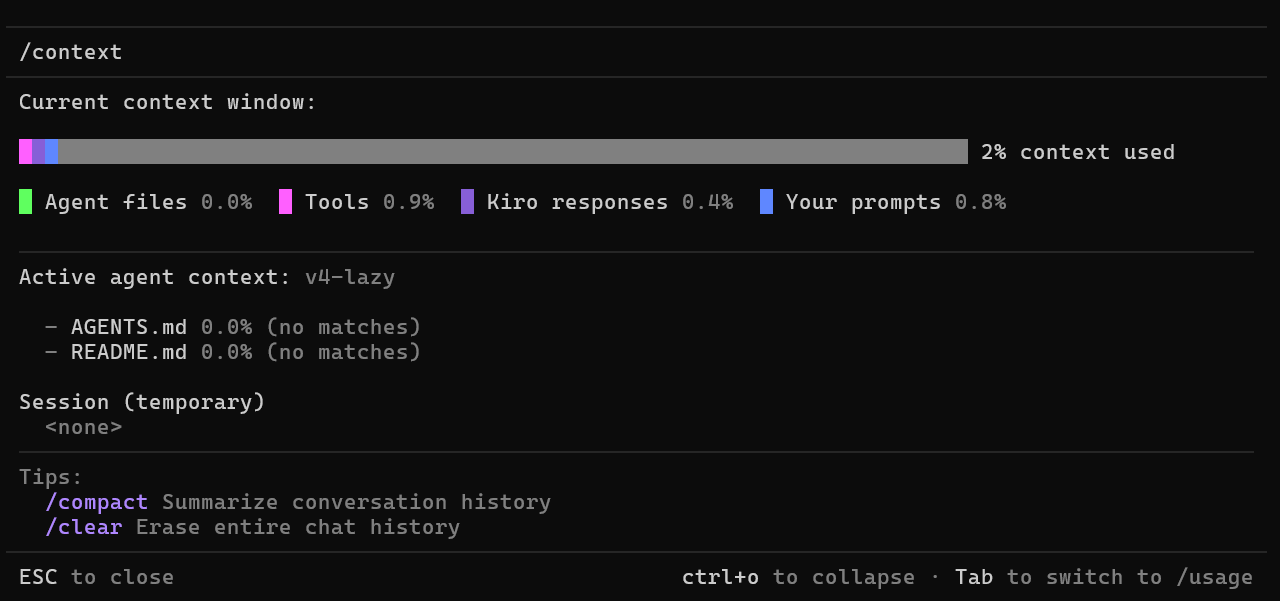
The search tool definition is the leanest so far. Notice the tool calls. For ambiguous queries, the LLM calls get_taxonomy before searching to confirm valid values. For straightforward queries where the hints are sufficient, it might skip the taxonomy call entirely and search directly. Common values in the hints handle frequent queries without a round-trip, whereas the full taxonomy is available for edge cases. Because the taxonomy loads only when needed, every prior interaction in the session runs without that context cost. The savings in this example is modest, but in environments with many connected tools and complex tool schemas it compounds quickly.
V5: LLM introspection
v5_llm_introspect.py
This version adds an introspect tool backed by Amazon Nova 2 Lite on Amazon Bedrock. The introspect_query tool takes the teacher’s natural-language question and returns recommended filter values with rationale explaining each choice. It interprets “TEKS-aligned content for kids working on dividing in middle school” and returns recommended filters: subject “Math”, grades 6-8, state_standard “TX-TEKS”, topic “dividing,division”.
Kiro still makes the final search call. Because introspect runs on a model of your choice, prompt engineering and testing are reliable. The interpretation happens server-side, so your context stays lean. The tradeoff is cost. You pay for the server call but results stay consistent regardless of which model Kiro uses. Switch models with /model and compare V4 versus V5. Without introspection, weaker models produce inconsistent results. With introspection, results stay stable.
v6/app/v6/main.py
The final version exposes a single MCP tool backed by a Strands Agents agent with its own system prompt and internal tools. The external interface is one tool with one parameter: agentic_search_content(question: str). Your agent handles taxonomy lookup, search, detail retrieval, and response formatting internally using its own tools that the client LLM does not see.
Try all 5 queries and compare client context usage to the other versions. The client LLM does minimal work. Behavior is consistent regardless of which client connects because your agent owns the reasoning. Conversation history persists across calls, so follow-up questions work naturally. The tradeoff is cost and latency in exchange for direct control over behavior and consistency. Switch between models with /model in Kiro and notice results remain stable across models.
Tradeoffs at a glance
Each version trades one cost for another. This table lays them side by side.
| Version | Approach | Tradeoff |
|---|---|---|
| V2 | Rich descriptions | Accuracy up, definition larger |
| V3 | Schema + defaults | Accuracy up, definition smaller |
| V4 | Restructuring + lazy loading | Leanest baseline, extra round-trip |
| V5 | Server-side introspection | Handles ambiguity, you pay for inference |
| V6 | Agent-as-tool | Direct control, highest infrastructure cost |
After running the test queries across all 6 versions, notice the patterns. V2 is the fastest path to better results with no refactoring. V4 has the leanest baseline context. V5 handles ambiguous queries that other versions miss. V6 gives you the most control at the highest infrastructure cost. No version wins across all dimensions. The right choice depends on your field count, vocabulary stability, latency budget, and how much you need consistent behavior across different clients.
Cleaning up
All servers run locally. To stop them, run scripts/stop_all.sh from the repository root. See the accompanying repository README for details.
Conclusion
MCP itself is not the problem. It is a key protocol for agentic solutions. The problem is tool design. The approaches in this post address bloat and confusion through context engineering at the tool level. The code walkthrough demonstrates each approach against the same scenario so you can observe the tradeoffs directly and decide what fits your situation.
The protocol continues to evolve. The MCP 2026 Roadmap addresses transport scaling, agent communication, and features for enterprise deployment.
To go deeper, explore the following resources:
- MCP Strategies on AWS – Covers the broader architecture: which MCP patterns to use, when to connect multiple servers, and how to structure your MCP system beyond a single tool.
- AWS MCP Server – A managed MCP server that gives AI coding agents access to AWS APIs, documentation search, and curated agent skills through a single connection. Study how it uses on-demand skill loading to keep context lean.
- Strands Agents SDK – Go deeper on the agentic approach from V6. Build multi-turn agents with tool orchestration, memory, and testable behavior.
- Amazon Bedrock AgentCore – Deploy your MCP server without managing infrastructure. Includes runtime hosting, gateway for multi-server tool discovery, and persistent memory across sessions.
For more MCP code examples and patterns:
- Open Source MCP Servers for AWS – 56 open source MCP servers covering documentation, infrastructure, AI/ML, data, developer tools, and more. Pick one and evaluate its tool descriptions against the bloat and confusion framework from this post.
- Amazon Bedrock AgentCore Samples – Getting-started guides, feature demos, use-case examples, blueprints, and workshops for AgentCore.
- Sample Serverless MCP Servers – Reference implementations for hosting MCP servers on AWS Lambda and Amazon Elastic Container Service (Amazon ECS), including stateless and stateful patterns, plus Strands agents on Lambda.
- Guidance for Vibe Coding with AWS MCP Servers – A sample hotel booking application demonstrating how AI coding assistants use AWS MCP servers to accelerate development with AgentCore.
About the authors
Daniel Wells
Daniel has over 20 years of IT experience across architecture and leadership roles, supporting a wide variety of technologies. He currently works as an AWS Senior Solutions Architect specializing in AI/ML and agentic AI, supporting Education Technology companies striving to make a difference for learners and educators worldwide. Daniel’s interests outside of work include music, family, health, education, and anything that allows him to express himself creatively.
Raian Osman
Raian is a Technical Account Manager at AWS and works closely with Education technology customers based out of North America. He has been with AWS for over 4 years and began his journey working as a Solutions Architect. Raian works closely with organizations to optimize and secure workloads on AWS, while exploring innovative use cases for generative AI.