使用编程 Agent 在 Amazon SageMaker AI 上部署 Hugging Face 模型
英文标题:Deploy Hugging Face models on Amazon SageMaker AI with coding agents
本文介绍如何借助六项开源 Agent skills,将 Hugging Face 模型部署为具备生产就绪能力的 Amazon SageMaker AI 端点。技能会自动完成服务容器与 AWS DLC 镜像选择、IAM 执行角色检查、自动扩缩容、Amazon CloudWatch 告警以及销毁后的资源验证。测试显示,未受引导的编程 Agent 可能因使用过时的 TGI 容器而多次部署失败并产生 GPU 费用,而安装技能后可在创建资源前正确选择 vLLM。该方案仅依赖 Python 和 AWS CLI,可在 macOS、Linux 与 Windows 上运行,并支持实时、缩容至零、无服务器、异步、批量转换和 Amazon Bedrock Custom Model Import 等部署方式。
 1.3 MB
 101.1 KB
 124.1 KB
 345.0 KB
 141.2 KB
 346.5 KB
 102.4 KB
 49.1 KB
 29.6 KB
 46.2 KB
 3.0 KB
 24.8 KB
 160.8 KB
中文
将 Hugging Face 模型部署到生产环境,意味着要做出十几项决策:为模型架构选择正确的服务容器、确认适用于所在 AWS 区域的当前镜像标签,以及根据模型的内存占用匹配实例类型。除了基础设施外,你还必须配置自动扩缩容,避免空闲端点持续消耗 GPU 小时。你还需要设置 Amazon CloudWatch 告警,在用户发现之前捕捉静默故障。完成这些决策后,Amazon SageMaker AI 可将原本需要数小时的工作压缩为更高效的流程。
这类结构化、可重复的工作,正是 Kiro 和 Claude Code 等编程 Agent 擅长处理的任务。人们很容易希望只在编程 Agent 中描述要部署的模型,离开后再回来查看可用的端点。实际上,未经引导的编程 Agent 可能作出错误决策,生成脆弱、昂贵或存在隐蔽错误的端点。对于较新的模型,这个问题会更加严重,因为其训练数据可能不包含最新的部署知识。
本文将介绍如何使用 Agent skills,在 SageMaker AI 上部署生产就绪的 Hugging Face 模型。你将从 Hugging Face Skills 安装六项技能,将编程 Agent 指向一个 Hugging Face 模型,并获得一个实时端点,其中包含自动扩缩容、Amazon CloudWatch 告警、来自 AWS Deep Learning Containers (DLC) 目录的正确服务容器,以及经过验证的资源销毁路径。实时端点是默认方式,但这些技能也支持支持缩容至零的实时推理、无服务器推理、异步推理、批量转换和 Amazon Bedrock Custom Model Import。这些技能为开源项目,仅使用 Python 和 AWS Command Line Interface (AWS CLI),且无需修改即可运行于 macOS、Linux 和 Windows。
未受引导的编程 Agent 存在的问题
为说明这些技能实际避免了哪些问题,观察一个能力较强的 Agent 在没有它们时如何操作会很有帮助。我们针对以下请求,测试了 Kiro(使用 Auto 或 Claude Fable 5)和 Claude Code(使用 Opus 4.8):
deploy the small [Qwen/Qwen3-0.6B] (https://huggingface.co/Qwen/Qwen3-0.6B) model to a real-time endpoint, write the plan to a file first, and keep a log of every action.
两种编程 Agent 最初都选择 Text Generation Inference(TGI)作为部署所用的服务容器。考虑到 TGI 多年来一直是默认选择,并且模型训练数据中包含大量使用它的教程,这是一个可以理解的选择。但该区域中可用的 TGI 构建版本早于 Qwen3 的架构,无法加载此模型。端点未能通过健康检查。Agent 随后升级 TGI 版本并重新部署,但再次失败,继而转向 vLLM。这导致多次部署失败;每次部署启动后崩溃时,都会产生 GPU 使用费用。
第二个请求的失败更加隐蔽。我们要求同一个 Agent 部署一个多模态混合专家(MoE)扩散模型,该模型仅在测试前数周发布。编程 Agent 确认该模型存在,并再次编写了基于 TGI 的脚本;但 TGI 是一款文本生成服务器,没有用于离散扩散图文模型的后端。没有任何错误会明显地大声报出。只有当端点无法启动时,你才会发现问题。
这两次运行的根本原因相同:缺少部署事实,而非推理能力不足。Agent 的规划和调试都做得不错;它所缺乏的是当前且具体的知识。近期的 Qwen 模型需要 vLLM。Python 3.13 对机器学习(ML)技术栈的大部分组件没有可用的 wheel。容器镜像应从已发布的 AWS Deep Learning Containers 目录中解析。这类知识的变化速度快于模型权重更新速度。因此,我们将其写入可编辑的 skill 文件,而不是依赖模型的最新版本吸收这些知识。
表 1 对比了未受引导 Agent 完成的模型部署与安装 skills 后 Agent 完成的部署。
| 部署考量 | 未受引导 Agent | 安装 skills 后 |
|---|---|---|
| 服务容器 | 首先使用 TGI → 健康检查失败 → 改用 vLLM | 在创建任何资源前选择 vLLM |
| 镜像 URI | 通过反复试错发现 | 从 AWS DLC 目录解析;注册表查询被拒绝时使用回退方案 |
| 自动扩缩容 | 无 | 目标跟踪,1–2 个实例 |
| 监控 | 无 | 三项 CloudWatch 告警(延迟、错误、开销) |
| 文档 | README 推荐 TGI、SageMaker SDK 和 Python 3.13 | 计划和脚本与实际运行内容一致 |
| 区域、角色、环境 | 原生正确 | 按规则正确 |
| 资源销毁 | 一个可执行的脚本 | 执行后验证资源已被删除 |
表 1:同一请求在未安装和安装 skills 的 Agent 上运行的对比
本文剩余部分将展示如何通过 Agent skills 部署 Hugging Face 模型至 SageMaker AI 端点(表 1 右侧列)。
用于在 SageMaker AI 上部署 Hugging Face 模型的 Agent skills
来自 Hugging Face Skills GitHub 仓库的六项技能覆盖端到端部署工作流。规划器技能会编排另外五项技能,如下图所示。
hf-cloud-sagemaker-deployment-planner (orchestrate, ask only what's needed)
│
├── hf-cloud-aws-context-discovery (discover local AWS context)
├── hf-cloud-python-env-setup (set up an isolated Python environment)
├── hf-cloud-sagemaker-iam-preflight (verify a usable execution role)
├── hf-cloud-serving-image-selection (select the right container family and image URI)
└── hf-cloud-sagemaker-production-defaults (deploy with autoscaling, alarms, and tags)
Agent skill 示例
Agent skill 是一种开放标准的软件包,由一个包含必需 SKILL.md 文件的文件夹构成。该文件包含元数据(至少包括名称和描述)以及指示 Agent 如何执行特定任务的说明。Skills 通过渐进式披露方式加载:当当前任务与技能描述匹配时,Agent 会按需读取该技能。以下是 hf-cloud-serving-image-selection skill 的精简版本。
---
name: hf-cloud-serving-image-selection
description: Pick the right serving container for a SageMaker model deployment and find its current image URI. Use this skill whenever about to deploy a model to a SageMaker endpoint and an image URI needs to be chosen --- including when the user says "deploy this LLM", "host this HuggingFace model", "serve this fine-tuned model", "deploy this embedding model", "host a reranker", "serve a sentence-transformers model", or when about to hardcode any container URI in deployment code. HuggingFace-curated Deep Learning Containers are ALWAYS preferred: HuggingFace vLLM (LLMs and generative rerankers), HuggingFace vLLM-Omni (multimodal), TEI (embeddings/cross-encoder rerankers), HF Inference Toolkit (other transformers). Generic images (AWS vLLM, DJL-LMI, SGLang) are used only when no HuggingFace image is compatible --- never merely because they carry a newer version. Never hardcode a container URI from memory and never default to TGI. Prevents stale-image failures and wrong-region URIs
---
Serving Image Selection
The serving container is the single thing most likely to break a deployment
that "looked correct on paper". Wrong container, stale tag, or wrong AMI all
produce the same opaque `Failed to pass health check` error.
端到端模型部署阶段
这些 skills 会驱动五项 AWS 服务。Amazon SageMaker AI 托管端点,AWS Identity and Access Management (IAM) 提供执行角色。Amazon Elastic Container Registry (Amazon ECR) 和 AWS Deep Learning Containers 提供服务镜像,而 Amazon CloudWatch 支持告警功能。Skills 中的所有辅助脚本都通过 Boto3 和 AWS Command Line Interface(AWS CLI)调用这些服务,因此可以完全控制所创建的资源。SageMaker Python SDK 同样可用,但这些 skills 默认使用 Boto3。
部署遵循以下六个阶段:
- 通过只读调用发现 AWS 上下文(配置文件、区域、账户和调用方身份)。
- 使用受支持的 Python 版本和最新
boto3设置隔离的 Python 环境。 - 查找现有 SageMaker AI 执行角色;仅在没有现成角色且你拥有相应权限时创建角色。
- 选择服务容器系列,并从 AWS DLC 目录解析当前镜像 URI。
- 创建模型、端点配置和端点,然后附加自动扩缩容和 Amazon CloudWatch 告警。
- 对在线端点运行冒烟测试,并报告结果。
前提条件
如需跟随操作,你需要满足以下条件:
- 一个拥有使用 Amazon SageMaker AI 权限的 AWS 账户,包括现有 SageMaker AI 执行角色。Skills 可自动查找该角色;如果没有现有角色且凭证允许,也可以创建一个。
- 已使用该账户凭证完成配置的 AWS CLI v2。
- Python 3.10、3.11 或 3.12。不支持 Python 3.13 或更高版本,因为 ML 技术栈的大部分组件尚未为这些版本发布 wheel。
- 支持 skills 的 编程 Agent。本文使用 Kiro IDE。
- Git,用于克隆 skills 仓库。
本文会将 Qwen/Qwen3-0.6B 部署到 US East (N. Virginia) Region (us-east-1) 中的单个 ml.g5.xlarge 实时推理实例。在开始前,请确认你的账户拥有该实例类型的可用配额。
请注意,无论实时端点是否提供流量,都会持续计费。因此,在完成操作后请删除端点,或遵循本文最后的资源销毁步骤。
安装 skills
Kiro 支持两种 skill 作用域:工作区和全局。工作区 skills 位于项目的 .kiro/skills/ 下,仅适用于特定项目的工作流。全局 skills 位于 ~/.kiro/skills/ 下,可在所有工作区中使用。
要从 Hugging Face Skills GitHub 仓库将六项 skills 安装到当前工作区,请在 Kiro 默认 Agent 聊天会话中输入以下请求:
Install six agent skills from the huggingface/skills repo, pinned to commit
f3186efbbc322121eb5d0f31e8a1d669ee961159, into this workspace.
Source: https://github.com/huggingface/skills.git
Commit: f3186efbbc322121eb5d0f31e8a1d669ee961159
Skills live under the repo's skills/ directory:
- hf-cloud-sagemaker-deployment-planner
- hf-cloud-aws-context-discovery
- hf-cloud-python-env-setup
- hf-cloud-sagemaker-iam-preflight
- hf-cloud-serving-image-selection
- hf-cloud-sagemaker-production-defaults
Kiro 会汇总已安装的文件,如图 1 所示。请注意,本文测试和使用的是具有特定 SHA 的仓库版本:f3186efbbc322121eb5d0f31e8a1d669ee961159。
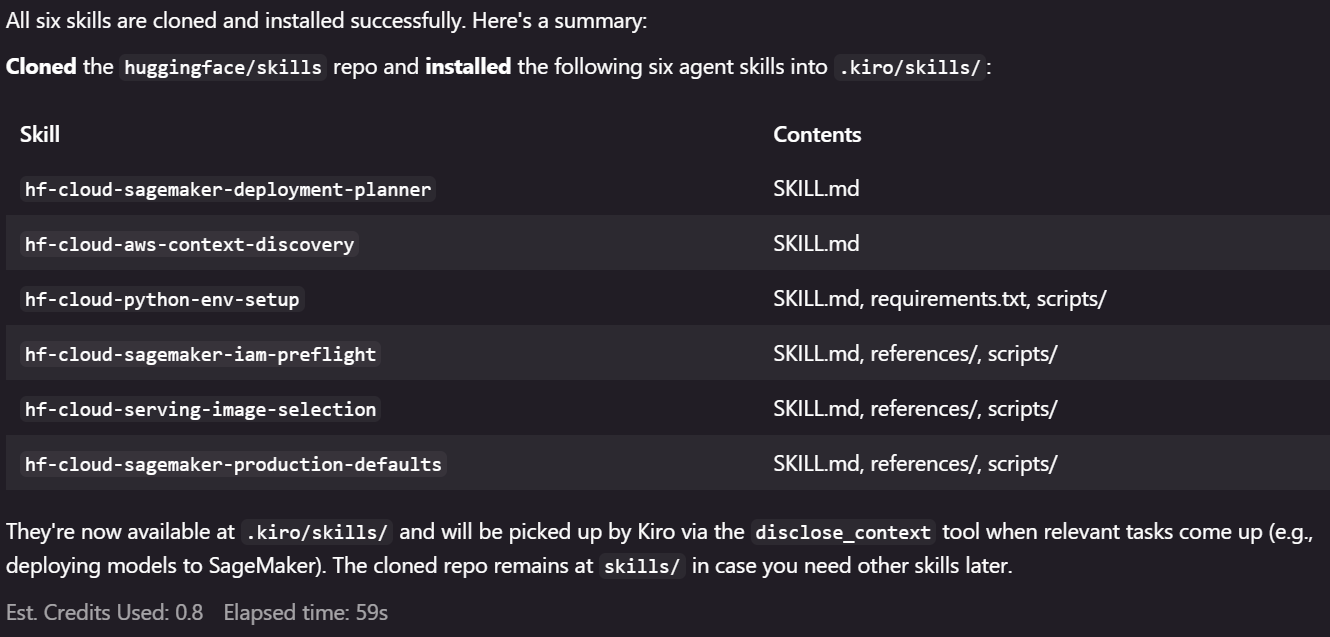
图 1:Kiro 完成六项 Agent skills 的安装
为确认全部六个 skill 目录均已存在,请在 Kiro 聊天会话中输入 /,即可将可用 skills 显示为斜杠命令,如图 2 所示。
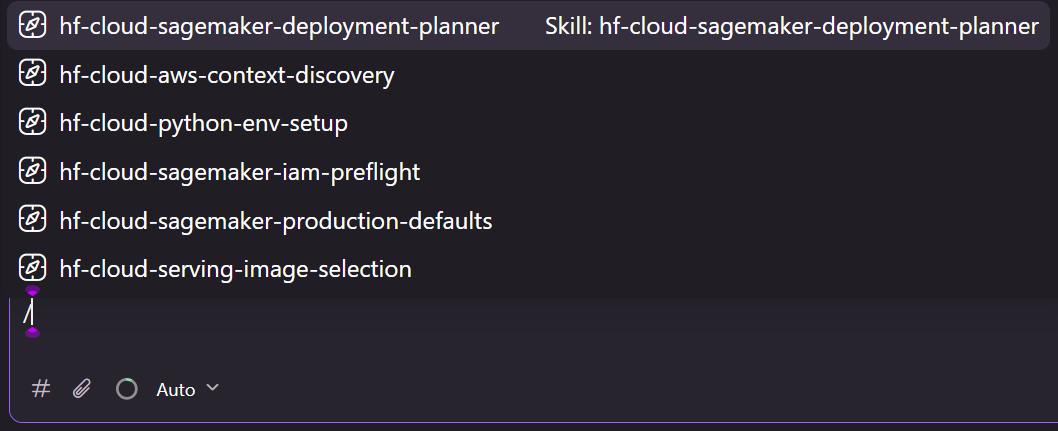
图 2:在 Kiro 聊天会话中输入 / 以查看可用 skills
使用 Kiro 部署模型
安装 skills 后,你可以使用自然语言向 Agent 描述模型,规划器 skill 将接手后续工作。你无需指定要使用哪个容器系列、如何查找执行角色,或需要附加哪些生产默认配置,因为这些决策都已包含在 skills 中。
在 Kiro 聊天会话中输入以下请求:
I need to deploy a model on AWS SageMaker, and I don't want to deal with all the console selecting and boto3 myself. The model is Qwen3 0.6B, pinned to commit `c1899de289a04d12100db370d81485cdf75e47ca`, called from an internal app. Figure out the best way to deploy it and walk me through it. Write the plan to a file first, and keep a log of every action you take.
要部署模型,请完成以下步骤:
审阅计划。 Agent 会将部署计划写入文件,并在创建任何会产生费用的资源之前等待你的批准。
AWS 上下文发现和容器选择。 Agent 会发现 AWS 上下文(配置文件、区域、账户)。hf-cloud-serving-image-selection skill 会为 Qwen3 选择 vLLM,并从 AWS DLC 目录解析镜像 URI。
当 Agent 提示时,批准部署。hf-cloud-sagemaker-production-defaults skill 会以一个整体创建模型、端点配置和端点,然后附加自动扩缩容及 CloudWatch 告警。
验证。 端点达到 InService 状态后,检查 Agent 报告的冒烟测试结果。
以下内容来自 Agent 在运行期间保留的部署日志:
## Step 5: Serving Image Selection
| Value | Resolved to |
| Image URI | `763104351884.dkr.ecr.us-east-1.amazonaws.com/huggingface-vllm:0.28.0-transformers5.15.0-gpu-py312-cu130-ubuntu24.04` |
| InferenceAmiVersion | `al2-ami-sagemaker-inference-gpu-3-1` |
| `SM_VLLM_MODEL` | `Qwen/Qwen3-0.6B` |
| `SM_VLLM_HOST` | `0.0.0.0` (else vLLM binds localhost, ping fails, container dies) |
| `SM_VLLM_TRUST_REMOTE_CODE` | `false`
English / 原文
Deploying a Hugging Face model to production means making a dozen decisions: choosing the right serving container for the model’s architecture, confirming the current image tag for your AWS Region, and matching an instance type to the model’s memory footprint. Beyond infrastructure, you must wire autoscaling so you don’t burn GPU hours on an idle endpoint. You also set Amazon CloudWatch alarms that catch silent failures before your users do. After you’ve made those decisions, Amazon SageMaker AI collapses that work into hours.
This kind of structured, repeatable work is exactly what coding agents, like Kiro and Claude Code, are built for. It’s tempting to describe a model to deploy in a coding agent, walk away, and come back to a working endpoint. In practice, an unguided coding agent might make wrong decisions, producing endpoints that are fragile, costly, or quietly wrong. The problem gets worse for newer models, since their training data might not include the latest deployment knowledge.
In this post, you learn how to deploy production-ready Hugging Face models on SageMaker AI using agent skills. You install six skills from Hugging Face Skills, point a coding agent at a Hugging Face model, and get back a real-time endpoint with autoscaling, Amazon CloudWatch alarms, the correct serving container from the AWS Deep Learning Containers (DLC) catalog, and a verified teardown path. Real-time endpoint is the default, but the skills also support real-time with scale-to-zero, serverless inference, asynchronous inference, batch transform, and Amazon Bedrock Custom Model Import. The skills are open source, use only Python and the AWS Command Line Interface (AWS CLI), and work unchanged on macOS, Linux, and Windows.
The problem with an unguided coding agent
To show what the skills actually prevent, it helps to watch what a capable agent does without them. We tested both Kiro (with Auto or Claude Fable 5) and Claude Code (with Opus 4.8) for the request:
deploy the small [Qwen/Qwen3-0.6B] (https://huggingface.co/Qwen/Qwen3-0.6B) model to a real-time endpoint, write the plan to a file first, and keep a log of every action.
Both coding agents initially chose Text Generation Inference (TGI) as the serving container to deploy, an understandable choice given that TGI was the default for years and model training data is full of tutorials that reach it. But the TGI build available in the Region predated Qwen3’s architecture and couldn’t load the model. The endpoint failed its health check. The agent bumped the TGI version, redeployed, failed again, and pivoted to vLLM. This resulted in multiple deployment failures, each of which billed GPU time as it started and then crashed.
The second request failed more quietly. We asked the same agent to deploy a multimodal mixture-of-experts (MoE) diffusion model released only weeks before the test. The coding agents confirmed it existed, and again wrote a script built on TGI, a text-generation server with no backend for a discrete-diffusion image-text model. Nothing failed loudly. You would find out only when the endpoint refused to come up.
The two runs share the same root cause: missing deployment facts, not reasoning failure. The agent planned and debugged well. What it lacked was current, specific knowledge. Recent Qwen models need vLLM. Python 3.13 has no working wheels for much of the machine learning (ML) stack. Container images should be resolved from the published AWS Deep Learning Containers catalog. This knowledge changes faster than model weights get updated. So we make it into editable skill files rather than rely on the latest release of a model to absorb it.
Table 1 compares the model deployment made by the unguided agent against the agent with skills installed.
| Deployment concerns | Unguided agent | With skills |
|---|---|---|
| Serving container | TGI first → health-check failure → vLLM | vLLM, chosen before any resource was created |
| Image URI | Discovered by trial and error | Resolved from the AWS DLC catalog, with fallback when the registry query was denied |
| Autoscaling | None | Target tracking, 1–2 instances |
| Monitoring | None | Three CloudWatch alarms (latency, errors, overhead) |
| Documentation | README recommended TGI, the SageMaker SDK, and Python 3.13 | Plan and scripts matched what actually ran |
| Region, role, environment | Correct natively | Correct by rule |
| Teardown | A script you could run | Run, then verified the resources were gone |
Table 1: The same request, run by the agent without and with the skills installed
The rest of this post shows how we deploy Hugging Face models on SageMaker AI endpoints (the right-hand column of Table 1) using agent skills.
Agent skills for deploying Hugging Face models on SageMaker AI
Six skills from the Hugging Face Skills GitHub repo cover the end-to-end deployment workflow. The planner skill orchestrates the other five, as shown in the following diagram.
hf-cloud-sagemaker-deployment-planner (orchestrate, ask only what's needed)
│
├── hf-cloud-aws-context-discovery (discover local AWS context)
├── hf-cloud-python-env-setup (set up an isolated Python environment)
├── hf-cloud-sagemaker-iam-preflight (verify a usable execution role)
├── hf-cloud-serving-image-selection (select the right container family and image URI)
└── hf-cloud-sagemaker-production-defaults (deploy with autoscaling, alarms, and tags)
An agent skill example
An agent skill is an open standard package consisting of a folder with a required SKILL.md file. This file includes metadata (name and description, at minimum) and instructions that tell an agent how to perform a specific task. Skills load through progressive disclosure. An agent reads a skill on demand when the current task matches its description. The following is a trimmed version of the hf-cloud-serving-image-selection skill.
---
name: hf-cloud-serving-image-selection
description: Pick the right serving container for a SageMaker model deployment and find its current image URI. Use this skill whenever about to deploy a model to a SageMaker endpoint and an image URI needs to be chosen --- including when the user says "deploy this LLM", "host this HuggingFace model", "serve this fine-tuned model", "deploy this embedding model", "host a reranker", "serve a sentence-transformers model", or when about to hardcode any container URI in deployment code. HuggingFace-curated Deep Learning Containers are ALWAYS preferred: HuggingFace vLLM (LLMs and generative rerankers), HuggingFace vLLM-Omni (multimodal), TEI (embeddings/cross-encoder rerankers), HF Inference Toolkit (other transformers). Generic images (AWS vLLM, DJL-LMI, SGLang) are used only when no HuggingFace image is compatible --- never merely because they carry a newer version. Never hardcode a container URI from memory and never default to TGI. Prevents stale-image failures and wrong-region URIs
---
Serving Image Selection
The serving container is the single thing most likely to break a deployment
that "looked correct on paper". Wrong container, stale tag, or wrong AMI all
produce the same opaque `Failed to pass health check` error.
End-to-end model deployment phases
The skills drive five AWS services. Amazon SageMaker AI hosts the endpoint, AWS Identity and Access Management (IAM) provides the execution role. Amazon Elastic Container Registry (Amazon ECR) and AWS Deep Learning Containers supply the serving image, while Amazon CloudWatch powers the alarms. All helper scripts in skills call these services through Boto3 and the AWS Command Line Interface (AWS CLI), which retains full control over what gets created. The SageMaker Python SDK works too, but the skills default to Boto3.
The deployment follows six phases:
- Discover the AWS context (profile, Region, account, and caller identity) with read-only calls.
- Set up an isolated Python environment with a supported Python version and a current
boto3. - Find an existing SageMaker AI execution role and create one only if none exists and you have permission.
- Select the serving container family and resolve a current image URI from the AWS DLC catalog.
- Create the model, endpoint configuration, and endpoint, and then attach autoscaling and Amazon CloudWatch alarms.
- Run a smoke test against the live endpoint and report the result.
Prerequisites
To follow along, you need the following:
- An AWS account with permission to use Amazon SageMaker AI, including an existing SageMaker AI execution role. The skills can find one automatically or create one if none exists and your credentials allow it.
- AWS CLI v2 , configured with credentials for that account.
- Python 3.10, 3.11, or 3.12. Python 3.13 or later isn’t supported because much of the ML stack does not yet publish wheels for these versions.
- A coding agent that supports skills. This post uses Kiro IDE.
- Git, to clone the skills repository.
This post deploys Qwen/Qwen3-0.6B to a single ml.g5.xlarge real-time inference instance in US East (N. Virginia) Region (us-east-1). Confirm your account has available quota for this instance type before you start.
Note that a real-time endpoint bills continuously whether it serves traffic, so delete the endpoint when you’re done or follow the teardown steps at the end of this post.
Install the skills
Kiro supports two skill scopes: workspace and global. The workspace skills reside in your project under .kiro/skills/ and apply only to project-specific workflows. The global skills reside under ~/.kiro/skills/ and are available across all workspaces.
To install the six skills from the Hugging Face Skills GitHub repo in the current workspace, enter the following request in a Kiro default agent chat session:
Install six agent skills from the huggingface/skills repo, pinned to commit
f3186efbbc322121eb5d0f31e8a1d669ee961159, into this workspace.
Source: https://github.com/huggingface/skills.git
Commit: f3186efbbc322121eb5d0f31e8a1d669ee961159
Skills live under the repo's skills/ directory:
- hf-cloud-sagemaker-deployment-planner
- hf-cloud-aws-context-discovery
- hf-cloud-python-env-setup
- hf-cloud-sagemaker-iam-preflight
- hf-cloud-serving-image-selection
- hf-cloud-sagemaker-production-defaults
Kiro summarizes the installed files as shown in Figure 1. Note that this post tested and used the repo with a specific SHA: f3186efbbc322121eb5d0f31e8a1d669ee961159.
Figure 1: Kiro finishes installing the six agent skills
To confirm all six skill directories are present, enter / in the Kiro chat session to see available skills as slash commands, as shown in Figure 2.
Figure 2: Enter / to see available skills in the Kiro chat session
Deploy a model with Kiro
With the skills installed, you describe the model to the agent in plain language, and the planner skill takes over. You don’t specify which container family to use, how to find the execution role, or which production defaults to attach, because those decisions live in the skills.
Enter the following request in the Kiro chat session:
I need to deploy a model on AWS SageMaker, and I don't want to deal with all the console selecting and boto3 myself. The model is Qwen3 0.6B, pinned to commit `c1899de289a04d12100db370d81485cdf75e47ca`, called from an internal app. Figure out the best way to deploy it and walk me through it. Write the plan to a file first, and keep a log of every action you take.
To deploy the model, complete the following steps:
Review the plan. The agent writes a deployment plan to a file and waits for your approval before creating any billable resources.
AWS context discovery and container selection. The agent discovers the AWS context (profile, Region, account). The hf-cloud-serving-image-selection skill selects vLLM for Qwen3 and resolves the image URI from the AWS DLC catalog.
Approve the deployment when the agent asks. The hf-cloud-sagemaker-production-defaults skill creates the model, endpoint configuration, and endpoint as a unit, then attaches autoscaling and CloudWatch alarms.
Verify. Review the smoke-test result the agent reports after the endpoint reaches InService.
The following lines come from the deployment log the agent kept during the run:
## Step 5: Serving Image Selection
| Value | Resolved to |
| Image URI | `763104351884.dkr.ecr.us-east-1.amazonaws.com/huggingface-vllm:0.28.0-transformers5.15.0-gpu-py312-cu130-ubuntu24.04` |
| InferenceAmiVersion | `al2-ami-sagemaker-inference-gpu-3-1` |
| `SM_VLLM_MODEL` | `Qwen/Qwen3-0.6B` |
| `SM_VLLM_HOST` | `0.0.0.0` (else vLLM binds localhost, ping fails, container dies) |
| `SM_VLLM_TRUST_REMOTE_CODE` | `false` |
| `SM_VLLM_MAX_MODEL_LEN` | `8192` |
For a gated model, add a HUGGING_FACE_HUB_TOKEN environment variable.
Resolve the execution role
Deployments often stop at the execution role when calling iam:CreateRole fails on a corporate account whose AWS IAM Identity Center session has no IAM write access. The hf-cloud-sagemaker-iam-preflight skill reverses the order: find first, create only as a last resort.
Its check_role.py script searches the account for existing roles that match patterns such as AmazonSageMaker-ExecutionRole-* and *SageMaker*Execution*, and ranks them by last-used date. It also validates the trust policy and returns the Amazon Resource Name (ARN). It creates a role only when none exists and the caller has iam:CreateRole permission. Note that the created role carries AmazonSageMakerFullAccess. We recommend updating the role to grant only the permissions it needs, following the principle of least privilege.
Apply production defaults
The hf-cloud-sagemaker-production-defaults skill turns an endpoint from a demo into a production deployment. It applies the defaults in Table 2 to every endpoint, establishing an operational baseline. For production deployment, you need to add user-specific configurations, such as Amazon Virtual Private Cloud and AWS Key Management Service configurations.
| Resource | Name | Billing |
|---|---|---|
| Model | qwen3-06b-internal |
none |
| Endpoint config | qwen3-06b-internal-20260904-1913-config |
none |
| Endpoint | qwen3-06b-internal-20260904-1913 |
$1.408/hr per instance |
| Autoscaling target + policy | endpoint/.../variant/AllTraffic, min 1 max 4 |
none |
| CloudWatch alarms x3 | <endpoint>-Invocation5XXErrors, -ModelLatencyP99, -OverheadLatencyP99 |
negligible |
Table 2: Production defaults the skill applies to every endpoint
Decisions the coding agent made on its own
Agent skills define the workflow, but the coding agent still makes judgment calls within it. In one case, when the agent queried Amazon ECR for the newest image tag, the call was denied because the IAM Identity Center role lacked ecr-public:DescribeImages permission. Rather than fail the deployment, the agent fell back to the known-good tag the skill ships as a safety net and recorded the reason in the log. In another case, after the smoke test returned HTTP 200, the agent noticed that the actual answer was never emitted. This is because the model’s reply was truncated at max_tokens while still inside the Qwen3 reasoning block. The agent flagged this in the log as a configuration issue: the calling application should raise the token limit rather than treat the test as a pass.
Clean up
A real-time endpoint bills for its instance the entire time it exists. Delete the resources you created to avoid ongoing charges. The sagemaker-production-defaults skill includes a teardown.py script that removes the deployment resources and then confirms they’re gone.
To clean up, complete the following steps:
- Ask the agent to tear down the deployment or run
teardown.pydirectly with the endpoint name and Region. - Confirm the script reports the endpoint, endpoint configuration, and model as deleted. The script verifies the deletion.
- Check that the autoscaling policy and CloudWatch alarms have been removed. Delete any that remain.
Conclusion
Six reusable agent skills turn an unguided coding agent into one that deploys Hugging Face models on SageMaker AI endpoints with production-ready features. Each deployment includes the proper container, autoscaling, CloudWatch alarms, and a verified teardown path. Without these skills, agents reach for outdated containers, skip production safeguards, and leave misleading documentation. This post walks through each skill: AWS context discovery, Python environment setup, IAM role resolution, container selection from the AWS DLC catalog, and deployment with production defaults.
To get started, install the skills from the Hugging Face Skills GitHub repo and deploy your first model. The skills are open source and contributions are welcome.
Teams can also use Amazon SageMaker JumpStart to deploy a set of popular Hugging Face models directly from the console, and Inference Recommendations to automatically benchmark and select the optimal instance type for their workload.
Learn more
Amazon SageMaker AI Developer Guide – Real-time inference
AWS Deep Learning Containers documentation
About the authors
Dario Salvati
Dario holds a master’s degree in Artificial Intelligence. He is an engineer at Hugging Face, where he works on cloud partnerships, including with AWS, and developer tooling. His work sits at the intersection of ML infrastructure and systems, focused on making it easier to deploy and train machine learning models at scale.
Álvaro Bartolomé
Álvaro Bartolomé is a Technical Lead at Hugging Face, where he focuses on building and optimizing scalable machine learning infrastructure across cloud platforms. Álvaro is passionate about productionizing generative AI models, high-performance inference, and making state-of-the-art ML accessible through open source and open science.
Qiong Zhang
Qiong (Jo) Zhang, PhD, is a Senior Solutions Architect at AWS, specializing in Data and AI. Her current areas of interest include distributed training and AI-Driven Software Development. She holds 30+ patents and has co-authored 100+ journal and conference papers. She is also the recipient of the Best Paper Award at IEEE NetSoft 2016, IEEE ICC 2011, ONDM 2010, and IEEE GLOBECOM 2005.
Sanhita Sarkar
Sanhita Sarkar, PhD, drives global AI/ML and generative AI partner solutions at AWS. She brings extensive leadership experience across edge, cloud, and data center environments, holds several patents, has published research papers, and serves as chair for technical conferences.