在 Amazon SageMaker AI 上运行 Positron,支持数据科学工作流
英文标题:Run Positron on Amazon SageMaker AI for data science workflows
Posit 的数据科学 IDE Positron 现可运行于 Amazon SageMaker AI,使数据科学家能够在同一受治理的 Studio Space 中完成 Athena 数据访问、R 分析、Python 建模、实时端点部署、Shiny 应用开发和 Quarto 报告生成。该示例基于一个包含 5 万笔贷款的合成数据集:XGBoost 模型在留出集上取得 0.834 的 AUC,最高风险十分位的实际违约率为 12.3%。Positron 通过 Space 执行角色访问 AWS 服务,无需管理长期凭证;Posit Assistant 还可通过 Amazon Bedrock 在客户自己的 AWS 账户和区域内提供 AI 编程辅助。对开发者和企业而言,这种部署方式将 R、Python、受治理的数据访问、托管推理和可复现报告整合到一个受控环境中。
 1.3 MB
 101.1 KB
 124.1 KB
 345.0 KB
 141.2 KB
 346.5 KB
 385.1 KB
 186.3 KB
 109.1 KB
 250.1 KB
 75.3 KB
 211.4 KB
 233.9 KB
 497.4 KB
 464.6 KB
 114.6 KB
 37.8 KB
 190.3 KB
 240.6 KB
 6.8 KB
中文
数据科学团队通常需要在多个独立工具之间切换,以完成受治理的数据访问、R 分析、Python 模型开发、部署、应用开发和报告。Posit 的数据科学集成开发环境(IDE)Positron 现已可在 Amazon SageMaker AI 上运行。
对于数据科学家而言,在 SageMaker AI 上运行 Positron 意味着:
- 无需管理凭证即可访问数据。 Positron 在 Space 执行角色下运行,因此你可以直接从 IDE 查询 Amazon Athena、AWS Glue Data Catalog 和 Amazon Simple Storage Service(Amazon S3)。访问遵循该角色的权限,无需存储或轮换密钥。
- 随时可用的计算资源。 你可以按所需实例规格启动 Space,团队还可以通过 SageMaker AI 训练计划预留容量,确保计算资源可用于计划内训练。
- 始终留在你的账户中的 AI 助手。 Posit 的 AI 编程助手 Posit Assistant 可以使用 Amazon Bedrock 作为模型提供商,因此 AI 辅助基于你自己的 AWS 账户和 AWS 区域中的模型运行。
- 支持并行与协作的工作空间。 你可以同时运行多个 Space 以处理独立项目,也可以使用共享 Space,让多人在同一个 Positron 应用中协作。
Posit 发布了 Positron 的容器镜像定义,该镜像构建于 Amazon SageMaker Distribution 镜像之上。平台管理员构建该镜像,将其推送至自己的 Amazon Elastic Container Registry(Amazon ECR)仓库,在 SageMaker AI 中注册镜像,并将其附加到 Studio 域。随后,数据科学家创建 Space 时可以选择 Positron,并直接在 Studio 中打开该 IDE。
本文展示数据科学家如何在 SageMaker AI 中体验 Positron:从探索 Amazon Athena 表,到部署实时端点。
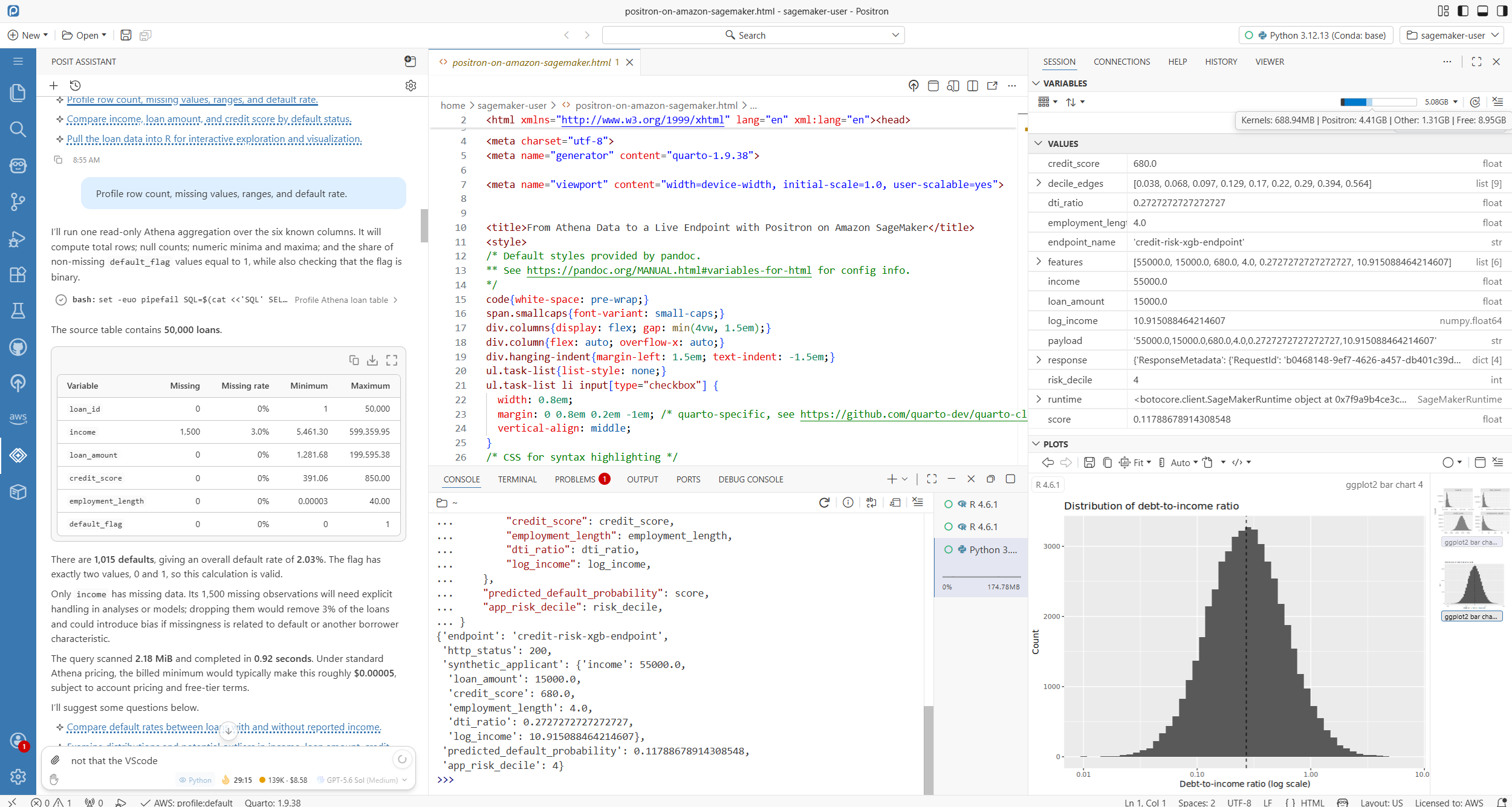
图 1. Amazon SageMaker Studio 上的 Positron 集成开发环境(IDE)。
解决方案概述
本演示使用一个包含 50,000 笔贷款的合成贷款组合。Amazon S3 存储源数据,AWS Glue Data Catalog 对其进行注册。Amazon Athena 查询数据,R 验证特征,Python 训练 XGBoost 分类器。Shiny for Python 调用端点,Quarto 记录工作流。截图和指标均来自记录的运行过程。这些数据并不代表生产环境中的贷款系统。
前提条件
要完成本演示,组织需要具备:
- Posit 许可证授权,以及对 Posit 发布的 Positron 镜像定义的访问权限。
- 用于管理 Amazon ECR 并为 Amazon SageMaker Studio 域配置自定义镜像的管理员权限。
- 具有 Amazon Athena 和 AWS Glue Data Catalog 访问权限的 Space 执行角色。
- 一个 Amazon S3 源位置,以及已配置的 Athena 查询结果位置。
- 使用 Posit 的 AI 编程助手 Posit Assistant 时,在与 Studio 域相同 AWS 区域内的 Amazon Bedrock 模型访问权限。
- 用于所示环境的
ml.t3.xlarge或更大实例。
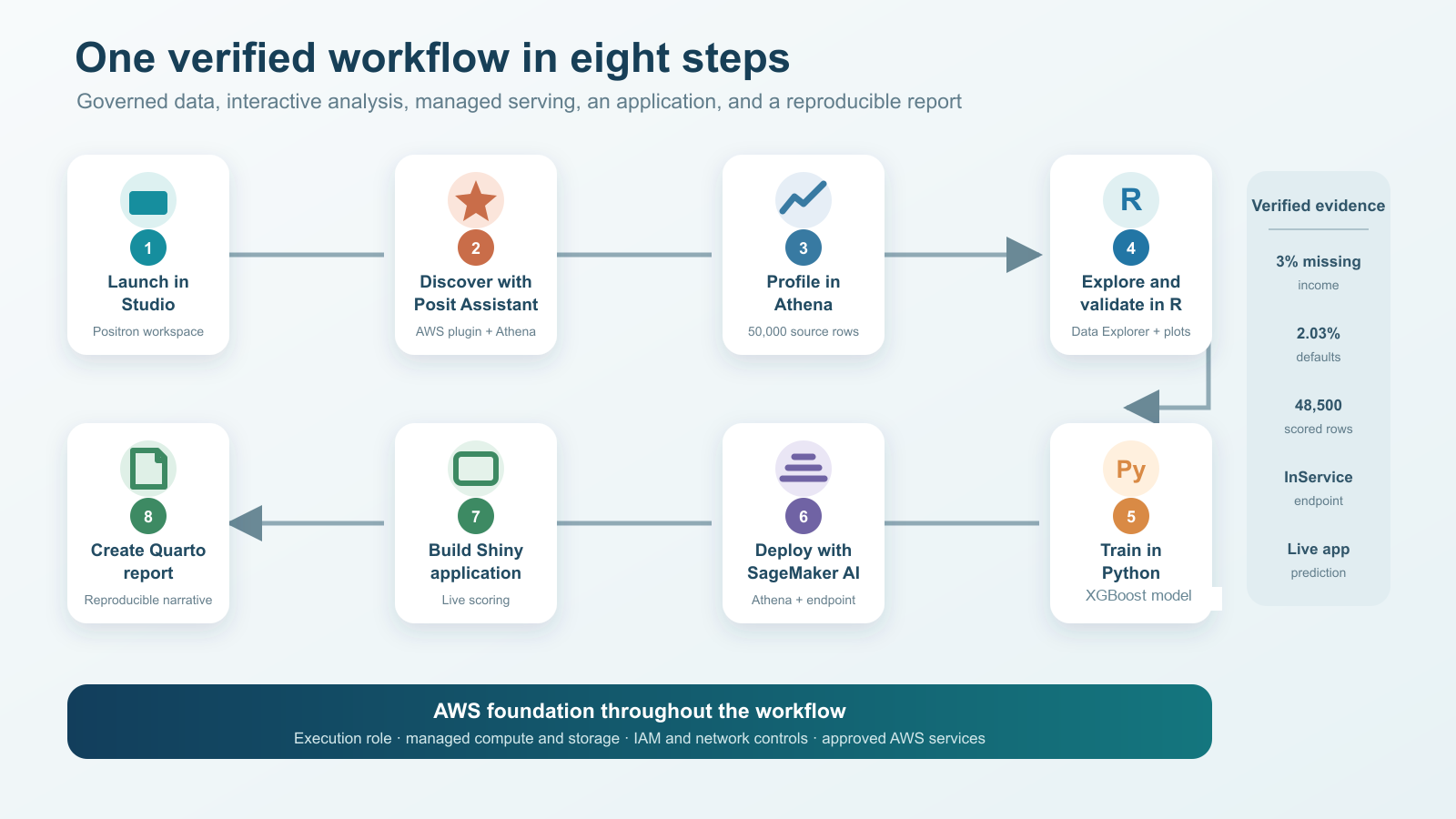
图 2. 一个项目连接受治理的 AWS 数据、R 和 Python 分析、托管服务、应用程序以及可复现报告。
步骤 1:SageMaker Studio Space 中的 Positron
此次运行从 SageMaker Studio Space 中的 Positron 开始。项目资源管理器、编辑器、R 和 Python 会话、变量窗格、绘图、终端和应用预览均可在同一个基于浏览器的环境中使用,该环境运行在 Space 执行角色下的 SageMaker 计算资源上。
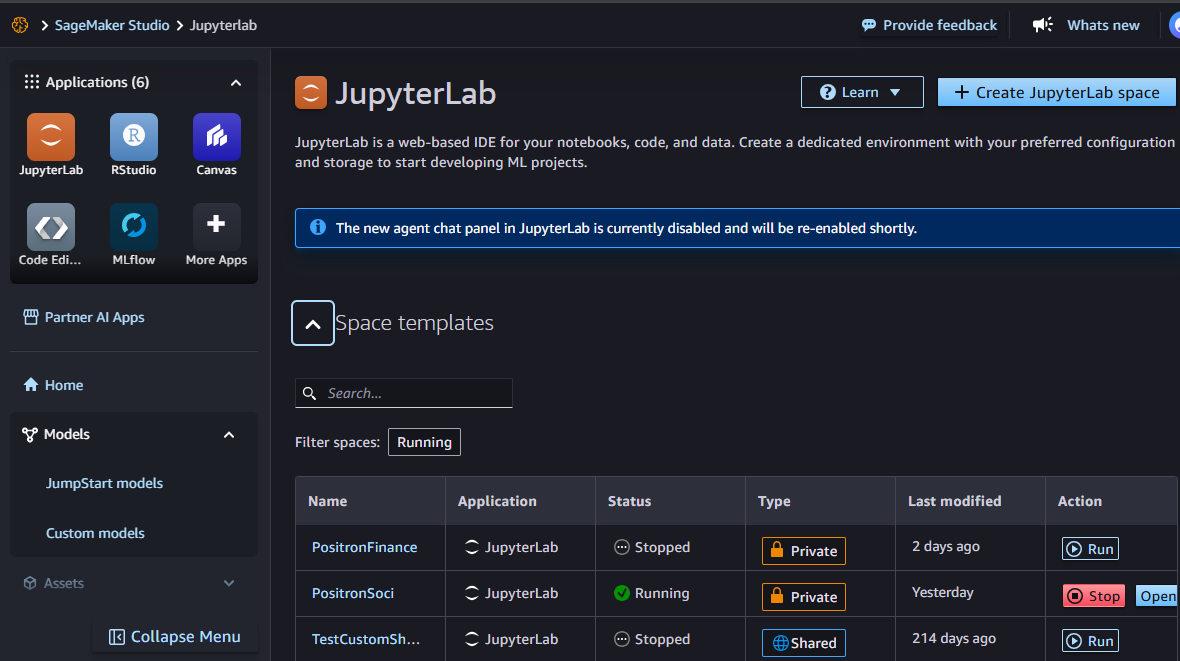
图 3. 配置为运行 Positron 自定义镜像的 JupyterLab Space。
步骤 2:借助 Posit Assistant 进行受治理的数据发现
在同一个 Space 中,Posit Assistant 在 AWS Glue Data Catalog 中识别出 credit_risk_blog.loan_tape_source,并准备了一个只读 Amazon Athena 查询。该查询返回了六个字段中的五条示例记录,扫描了 2.18 MiB,并在一秒内完成。
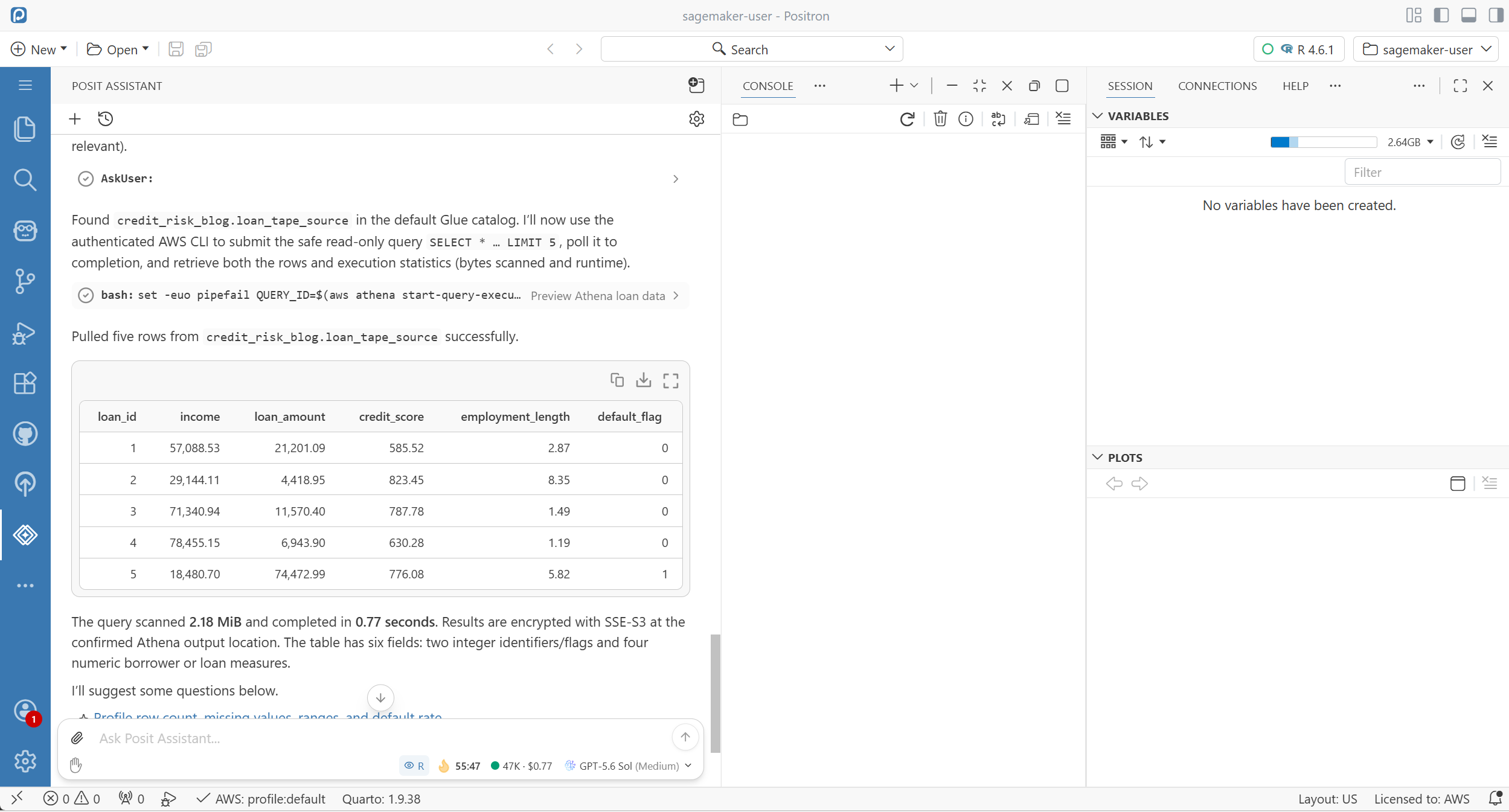
图 4. Posit Assistant 使用已配置的 Athena 环境检查受治理的数据源。
2.1:Amazon Bedrock Token 和缓存使用情况
Posit Assistant 可以通过 AWS 凭证和已配置的 AWS 区域使用 Amazon Bedrock 作为模型提供商。当 Amazon Bedrock 身份验证通过环境的 AWS 凭证完成解析时,无需单独的模型提供商 API 密钥。客户内容经过加密,不会用于改进基础模型,也不会与模型提供商共享(参见 Amazon Bedrock 数据保护)。还可以通过 AWS PrivateLink 配置私有连接。
记录的 Session information 视图显示,本次会话共使用 6,657,942 个 token,其中包括 6,118,411 个缓存读取 token 和 462,905 个缓存写入 token;估算成本为 6.319 美元,缓存效率为 92.5%,如下图所示。这些数值描述的是本次会话及 Assistant 的估算结果,并非 AWS 账单,也不构成通用成本基准。缓存行为和定价取决于所选模型及提供商。
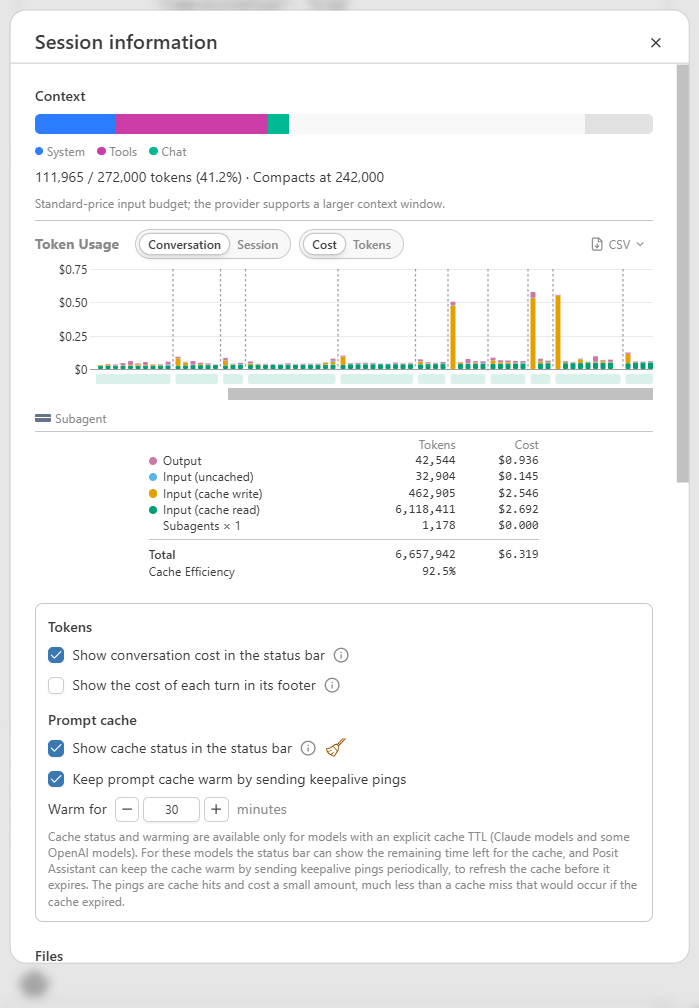
图 5. 已记录 Assistant 会话的 Session information 视图。
步骤 3:在 Amazon Athena 中进行数据剖析
该工作流使用聚合 Athena 查询检查行数、标识符唯一性、缺失值、数值范围和目标变量有效性。结果识别出 50,000 笔贷款,其中 1,500 条记录的收入缺失,1,015 笔发生违约,整体违约率为 2.03%。
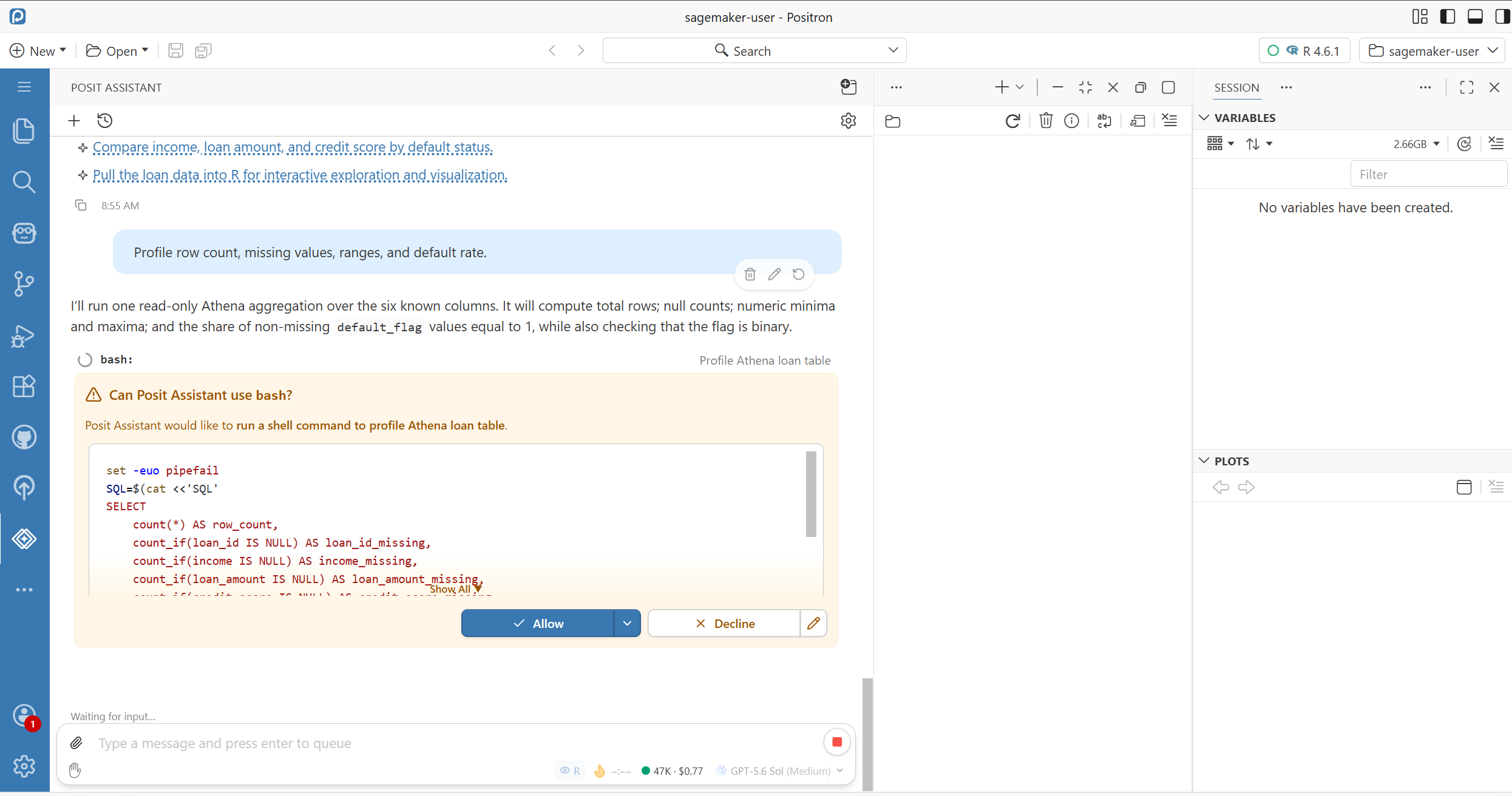
图 6. Posit Assistant 运行剖析命令前的审批检查点。
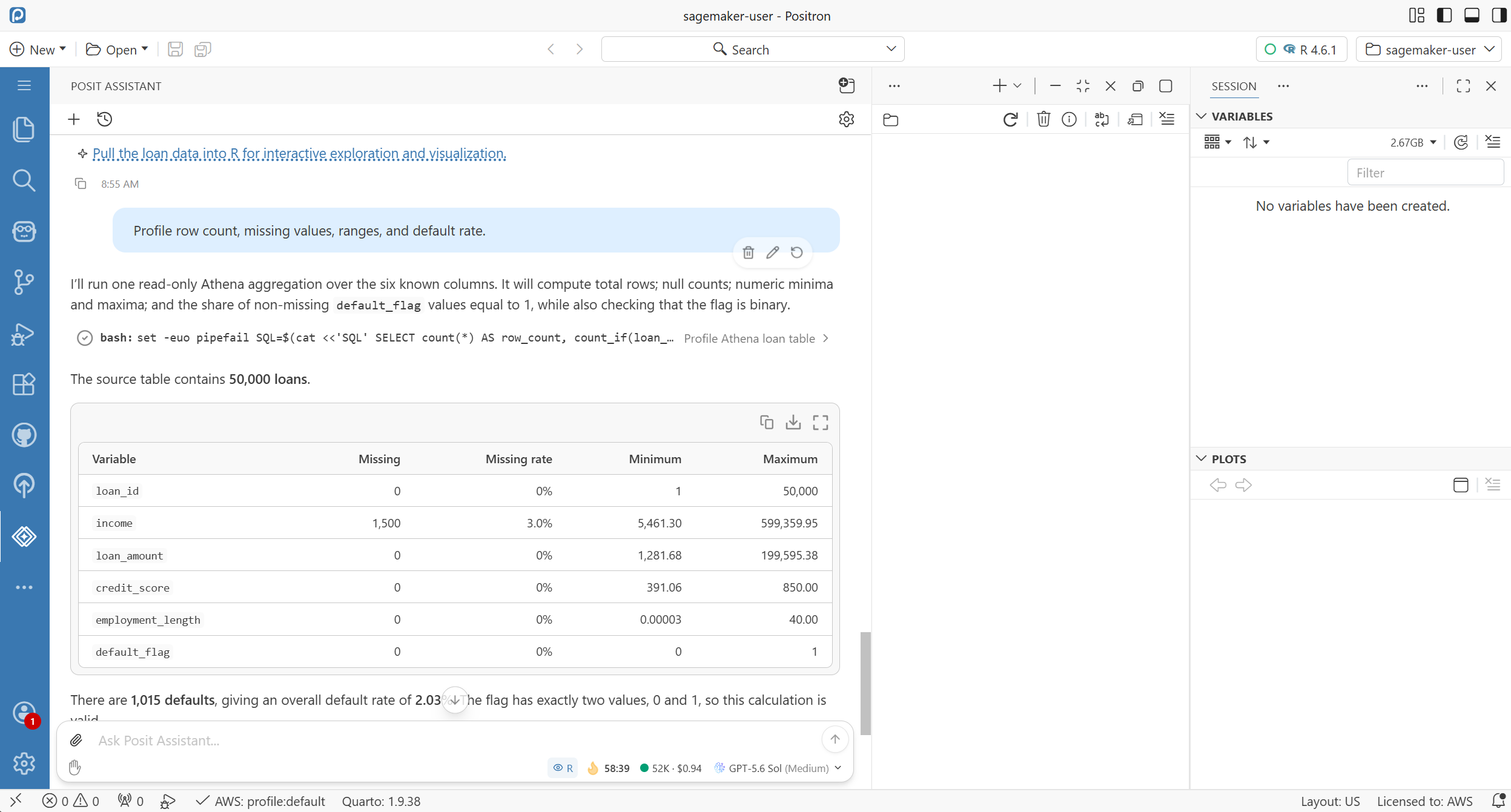
图 7. 在模型开发前对 50,000 行源数据进行剖析。
步骤 4:在 R 中进行交互式数据探索
该工作流将包含 50,000 行的表加载到活动 R 会话中,并在 Data Explorer 中打开。R 创建了债务收入比和对数收入特征,并在 Plots 窗格中显示债务收入比分布。排除 1,500 条不完整记录后,剩余 48,500 笔贷款可用于建模和评分。
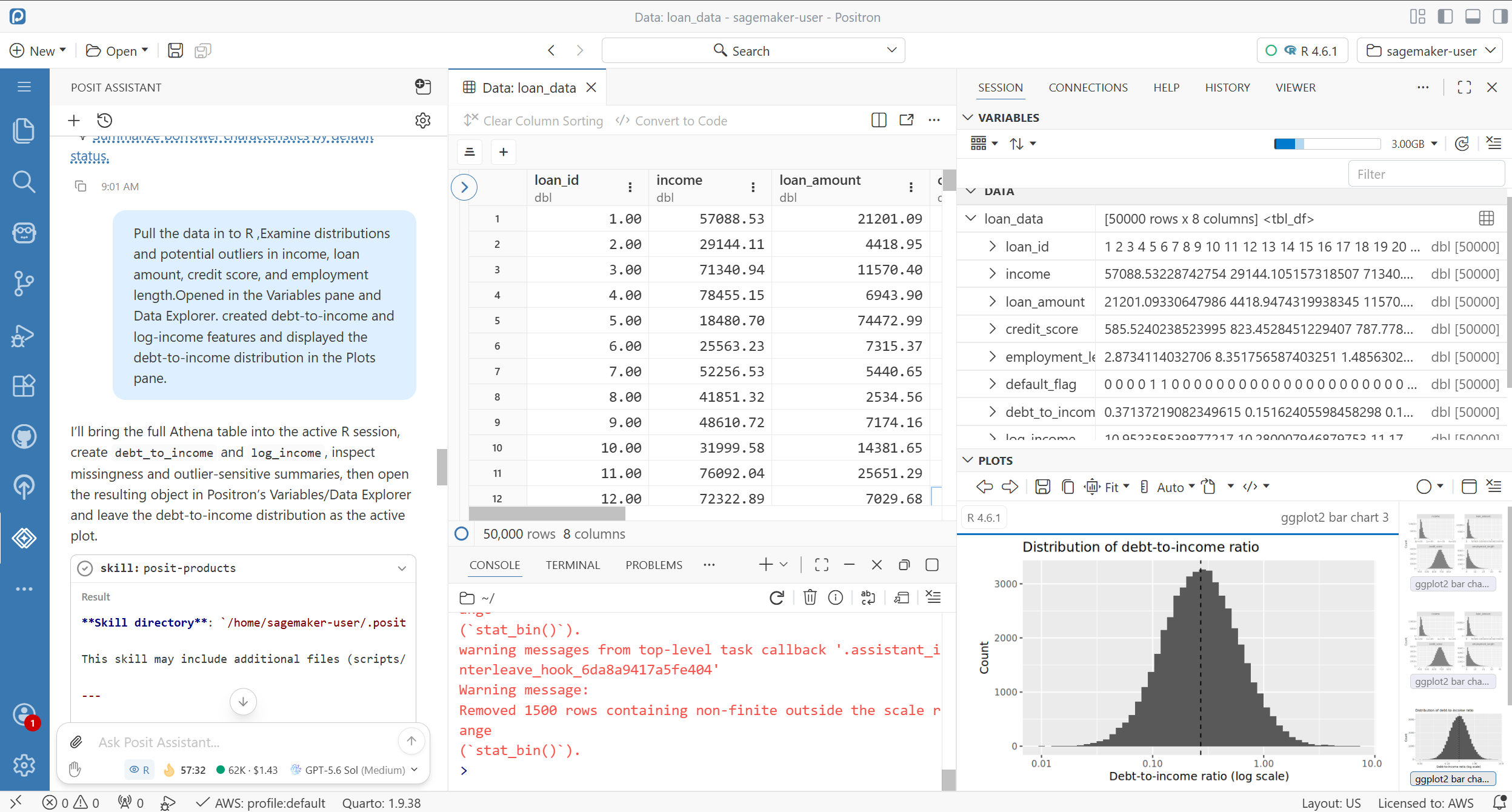
图 8. 在 R 中检查源数据并验证派生变量。
步骤 5:特征验证和 Python 模型训练
随后,经过验证的特征定义被迁移到 Python。一个 XGBoost 分类器在包含 40,000 行和三个模型特征的矩阵上完成训练。留出集评估得出 AUC 为 0.834,并显示最高风险十分位的实际违约率为 12.3%。
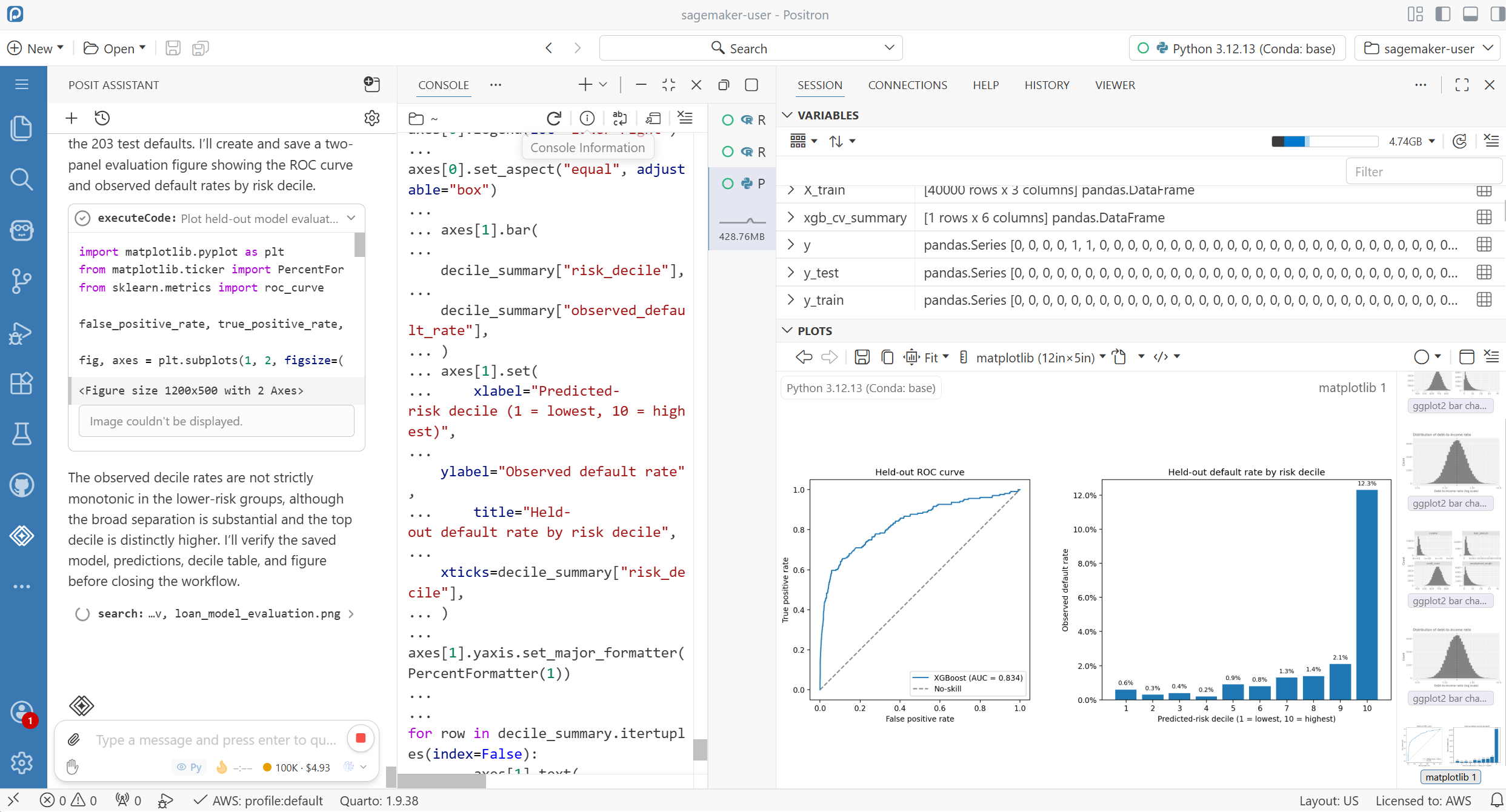
图 9. 模型评估:留出集 AUC 为 0.834,并按风险十分位展示实际违约率。
步骤 6:使用 SageMaker AI 进行托管部署
该工作流将 48,500 笔贷款的预测概率和风险十分位写入 Parquet,并将结果注册为 Athena 中的 credit_risk_blog.scored_loans。随后,它创建了 SageMaker AI 模型、端点配置和实时端点。该端点状态变为 InService,并且使用合成申请人载荷的调用成功完成。
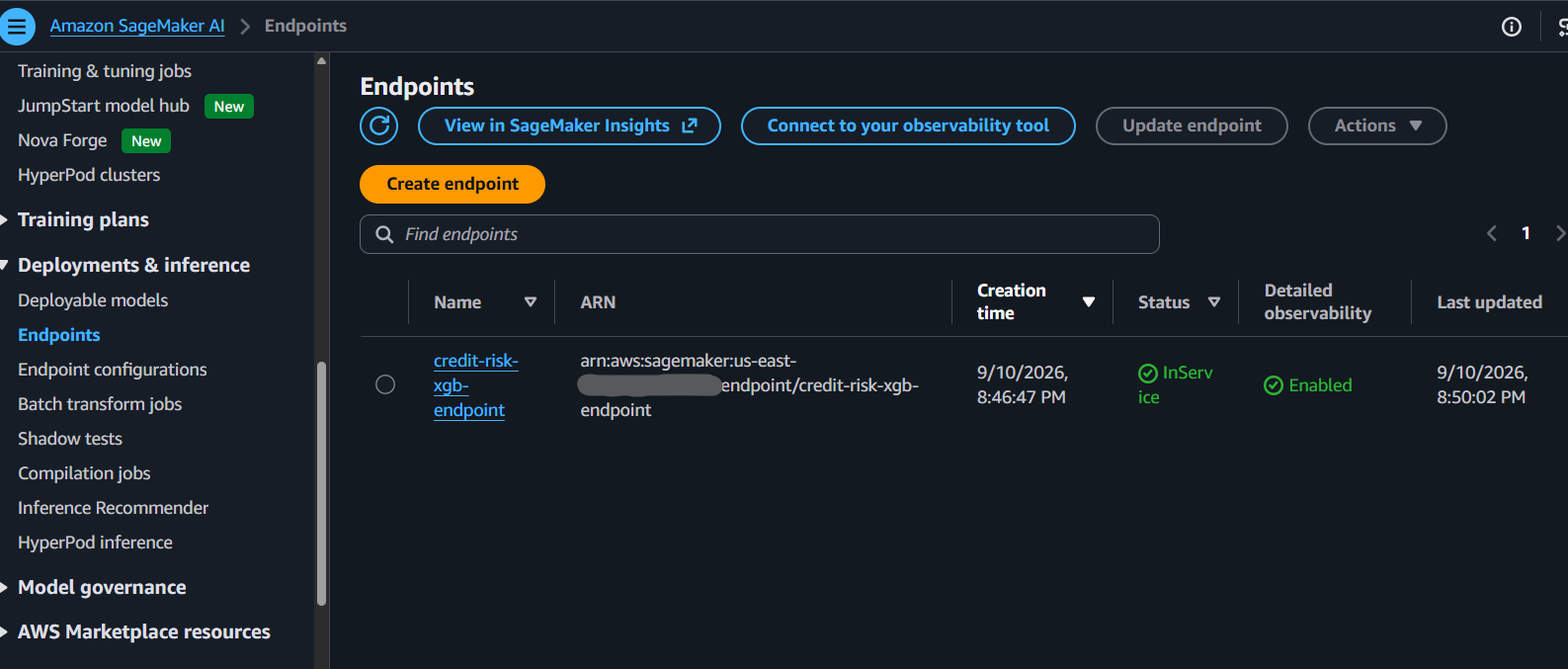
图 10. 处于服务状态的实时 SageMaker AI 端点。
步骤 7:使用 Shiny for Python 进行实时推理
该项目使用 Shiny for Python 应用调用已部署端点。该应用接收合成申请人信息,应用训练时使用的特征定义,并显示返回的违约概率。源代码和运行中的应用保留在同一个 Positron 项目中,该项目运行在 Amazon SageMaker Studio 应用代理之后,且仅供已通过 Space 身份验证的用户访问。它通过 Space 执行角色而非任何存储的密钥调用端点,并且该角色仅限于对端点 ARN 执行 sagemaker:InvokeEndpoint 操作。
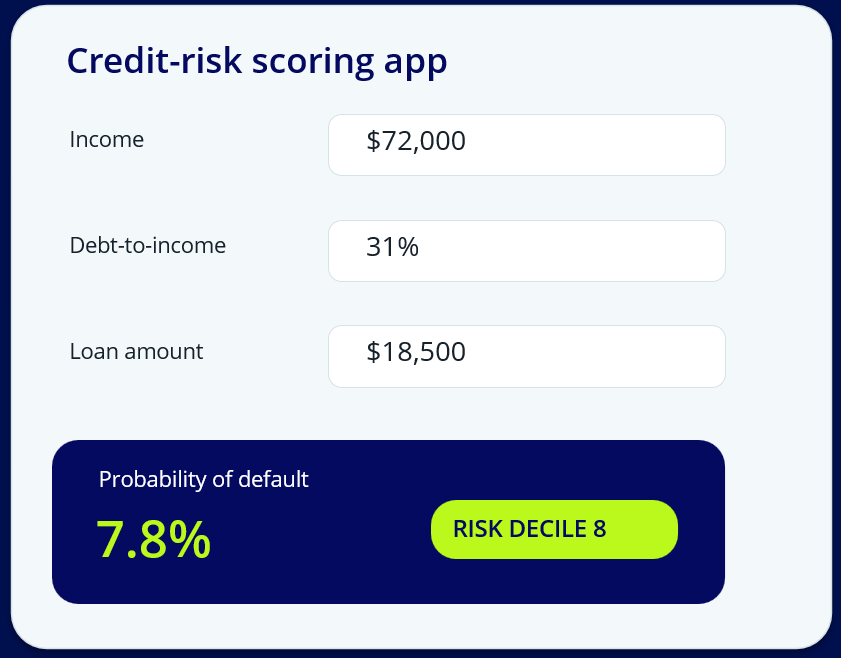
图 11. 调用实时 SageMaker AI 端点的 Shiny for Python 应用。
步骤 8:使用 Quarto 进行可复现报告
此次运行以一份 Quarto 报告收尾,该报告连接了 Athena 数据源、数据质量发现、R 验证、Python 模型、评分输出、SageMaker AI 端点和 Shiny 应用。该报告直接从项目生成,将工作流的证据和结果保存在一个可复现文档中。
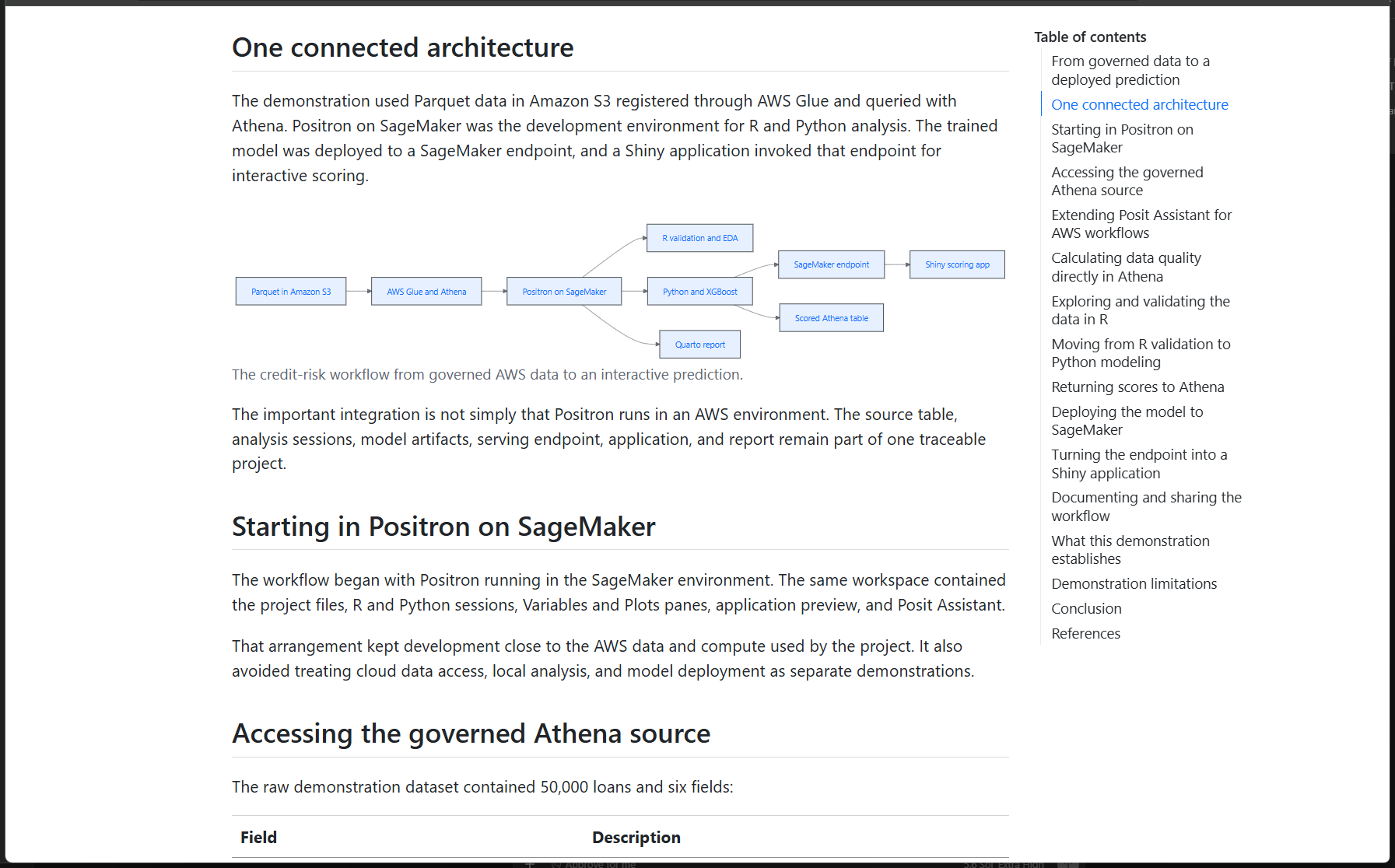
图 12. Quarto 保存工作流中的证据和决策。
部署架构
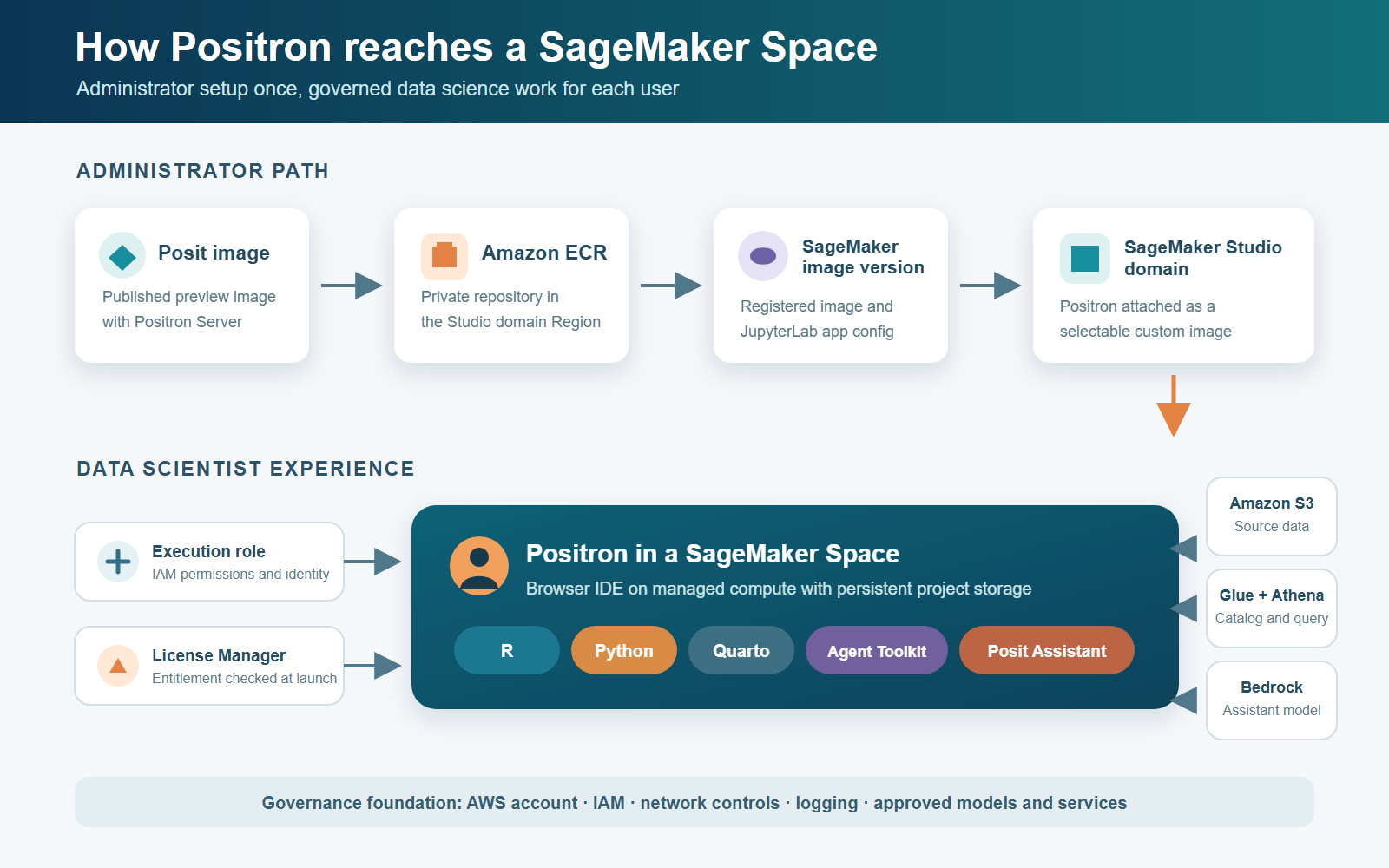
部署涉及两条路径:管理员路径用于构建和注册自定义 Positron 镜像;数据科学路径则使用该镜像分析数据并部署模型。
管理员路径
Positron 作为构建于 Amazon SageMaker Distribution 镜像之上的自定义镜像在 SageMaker AI 中运行。管理员构建 Posit 发布的镜像定义,将其推送到 Studio 域所在 AWS 区域内的私有 Amazon Elastic Container Registry(Amazon ECR)仓库,注册 SageMaker AI 镜像及其版本,创建 JupyterLab 应用镜像配置,验证许可证,为执行角色授予所需权限,并将镜像附加到该域。Posit 发布镜像定义,例如构建于 SageMaker Distribution 基础镜像之上的 Positron SageMaker Containerfile。Amazon Bedrock 为可选项,且仅在被选为 Posit Assistant 提供商时参与其中。
各方职责保持分离。Posit 提供软件镜像和产品支持。客户负责身份、权限、许可证、网络、日志、镜像更新和经批准的 AWS 服务。AWS 负责运营托管云服务。
数据科学路径
数据科学家在 SageMaker Studio Space 中启动 JupyterLab,打开 Positron,并使用 R、Python、Quarto、Posit Database Drivers,以及可选的 Posit Assistant,查询和分析数据并部署模型。
[
English / 原文
Data science teams often move among separate tools for governed data access, R analysis, Python model development, deployment, application development, and reporting. Positron, Posit’s integrated development environment (IDE) for data science, now runs on Amazon SageMaker AI.
For a data scientist, running Positron on SageMaker AI means:
- Data access without managing credentials. Positron runs under the Space execution role, so you query Amazon Athena, the AWS Glue Data Catalog, and Amazon Simple Storage Service (Amazon S3) directly from the IDE. Access follows the role’s permissions, with no keys to store or rotate.
- Compute that is ready when you are. You launch a Space on the instance size you need, and teams can reserve capacity with SageMaker AI training plans so compute is available for scheduled training.
- AI assistance that stays in your account. Posit Assistant, Posit’s AI coding assistant, can use Amazon Bedrock as its model provider, so AI help runs on models in your own AWS account and AWS Region.
- Room to work in parallel and together. You can run multiple Spaces at once for independent projects, and use a shared Space so several people collaborate in the same Positron application.
Posit publishes a container image definition for Positron, built on the Amazon SageMaker Distribution image. Platform administrators build that image, push it to their own Amazon Elastic Container Registry (Amazon ECR) repository, register it with SageMaker AI, and attach it to a Studio domain. Data scientists then choose Positron when they create a Space and open the IDE directly in Studio.
This post shows how a data scientist experiences Positron in SageMaker AI, from exploring an Amazon Athena table to deploying a real-time endpoint.
Figure 1. Positron Integrated Development Environment (IDE) on Amazon SageMaker Studio.
Solution overview
This walkthrough uses a synthetic 50,000-loan portfolio. Amazon S3 stores the source data, and the AWS Glue Data Catalog registers it. Amazon Athena queries the data, R validates features, and Python trains an XGBoost classifier. Shiny for Python invokes the endpoint, and Quarto records the workflow. The screenshots and metrics come from the captured run. The data does not represent a production lending system.
Prerequisites
To follow this walkthrough, an organization needs:
- A Posit license grant and access to the Posit-published Positron image definition.
- Administrator permissions to manage Amazon ECR and configure custom images for the Amazon SageMaker Studio domain.
- A Space execution role with access to Amazon Athena and the AWS Glue Data Catalog.
- An Amazon S3 source location and a configured Athena query-results location.
- Amazon Bedrock model access in the same AWS Region as the Studio domain when using Posit Assistant, Posit’s AI coding assistant.
- An
ml.t3.xlargeinstance or larger for the demonstrated environment.
Figure 2. One project connects governed AWS data, R and Python analysis, managed serving, an application, and a reproducible report.
Step 1: Positron in a SageMaker Studio Space
The run began with Positron in a SageMaker Studio Space. The project explorer, editor, R and Python sessions, Variables pane, plots, terminal, and application preview were available in one browser-based environment on SageMaker compute under the Space execution role.
Figure 3. A JupyterLab Space configured to run the Positron custom image.
Step 2: Governed data discovery with Posit Assistant
From the same Space, Posit Assistant identified credit_risk_blog.loan_tape_source in the AWS Glue Data Catalog and prepared a read-only Amazon Athena query. The query returned five sample rows across six fields, scanned 2.18 MiB, and completed in under one second.
Figure 4. Posit Assistant using the configured Athena environment to inspect the governed source.
2.1: Amazon Bedrock token and cache usage
Posit Assistant can use Amazon Bedrock as a model provider with AWS credentials and a configured AWS Region. No separate model-provider API key is required when Amazon Bedrock authentication resolves through the environment’s AWS credentials. Customer content is encrypted, isn’t used to improve base models, and isn’t shared with model providers (see Amazon Bedrock data protection). Private connectivity can be configured with AWS PrivateLink.
The captured Session information view recorded 6,657,942 tokens, including 6,118,411 cache-read and 462,905 cache-write tokens, with an estimated cost of $6.319 and 92.5 percent cache efficiency, as shown in the following figure. Those values describe this session and the Assistant’s estimate. They aren’t an AWS invoice or a general cost benchmark. Cache behavior and pricing depend on the selected model and provider.
Figure 5. The Session information view for the recorded Assistant session.
Step 3: Data profiling in Amazon Athena
The workflow used an aggregate Athena query to examine row counts, identifier uniqueness, missing values, numeric ranges, and target validity. The results identified 50,000 loans, including 1,500 records with missing income and 1,015 defaults, for an overall default rate of 2.03 percent.
Figure 6. The approval checkpoint before Posit Assistant runs the profiling command.
Figure 7. Profiling the 50,000-row source before model development.
Step 4: Interactive data exploration in R
The workflow loaded the 50,000-row table into the active R session and opened it in Data Explorer. R created debt-to-income and log-income features and displayed the debt-to-income distribution in the Plots pane. Excluding the 1,500 incomplete records left 48,500 loans for modeling and scoring.
Figure 8. Inspecting the source data and validating derived variables in R.
Step 5: Feature validation and Python model training
The validated feature definitions then moved into Python. An XGBoost classifier trained on a matrix containing 40,000 rows and three model features. The held-out evaluation produced an AUC of 0.834 and showed a 12.3 percent observed default rate in the highest-risk decile.
Figure 9. Model evaluation with a held-out AUC of 0.834 and observed default rates by risk decile.
Step 6: Managed deployment with SageMaker AI
The workflow wrote predicted probabilities and risk deciles for 48,500 loans to Parquet and registered the results as credit_risk_blog.scored_loans in Athena. It then created a SageMaker AI model, endpoint configuration, and real-time endpoint. The endpoint reached InService, and an invocation using a synthetic applicant payload succeeded.
Figure 10. The real-time SageMaker AI endpoint in service.
Step 7: Live inference with a Shiny for Python application
The project used a Shiny for Python application to invoke the deployed endpoint. The application accepted synthetic applicant information, applied the feature definitions used during training, and displayed the returned probability of default. The source code and running application remained in the same Positron project which runs behind the Amazon SageMaker Studio application proxy and is reachable only by users authenticated to the Space. It invokes the endpoint under the Space execution role rather than any stored key, and the role is limited to sagemaker:InvokeEndpoint on the endpoint ARN.
Figure 11. A Shiny for Python application invoking the live SageMaker AI endpoint.
Step 8: Reproducible reporting with Quarto
The run concluded with a Quarto report that connected the Athena source, data-quality findings, R validation, Python model, scored output, SageMaker AI endpoint, and Shiny application. The report was generated directly from the project, preserving the workflow’s evidence and results in one reproducible document.
Figure 12. Quarto preserving the evidence and decisions from the workflow.
Deployment architecture
The deployment involves two paths: an administrator path that builds and registers the custom Positron image, and a data science path that uses it to analyze data and deploy models.
Administrative path
Positron runs as a custom image built on the Amazon SageMaker Distribution image in SageMaker AI. An administrator builds the Posit-published image definition, pushes it to a private Amazon Elastic Container Registry (Amazon ECR) repository in the Studio domain’s AWS Region, registers a SageMaker AI image and version, creates a JupyterLab app image configuration, verifies licensing, grants the execution role the required permissions, and attaches the image to the domain. Posit publishes the image definition, for example the Positron SageMaker Containerfile, which builds on the SageMaker Distribution base image. Amazon Bedrock is optional and is involved only when it’s selected as the Posit Assistant provider.
Responsibilities remain separate. Posit provides the software image and product support. The customer manages identity, permissions, licensing, networking, logging, image updates, and approved AWS services. AWS operates the managed cloud services.
Data science path
The data scientist launches JupyterLab in a SageMaker Studio Space, opens Positron, and uses R, Python, Quarto, Posit Database Drivers, and optionally Posit Assistant to query and analyze data and deploy models.
Figure 13. Administrator setup and data scientist responsibilities for the Positron Space.
What the recorded run established
The recorded workflow demonstrated the following capabilities within a single Positron Space:
- Governed data access. Athena discovery, sampling, and profiling ran from the configured Space.
- Cross-language analysis. R validated the data and features before Python trained the model.
- Measured model behavior. The held-out AUC was 0.834 and the top risk decile had a 12.3 percent observed default rate.
- Managed deployment. The workflow registered 48,500 scored rows in Athena and brought a real-time endpoint to InService.
- Connected outputs. The live Shiny application and Quarto report were produced from the same project.
Scope and limitations
The dataset and applicant payloads were synthetic. The workflow didn’t establish model fairness, calibration, lending suitability, production latency, load behavior, monitoring, or regulatory compliance. The AUC and decile results came from one held-out split, and the lower deciles weren’t strictly monotonic. The screenshots document one recorded run and shouldn’t be presented as a general performance or cost benchmark.
Production adoption also requires validating the Posit preview terms, license grant, and image version alongside supported AWS Regions and model availability. Teams must also confirm network design, least-privilege permissions, secrets handling, logging, image patching, and operational ownership.
Clean up
To avoid ongoing charges, delete the resources this walkthrough created. Delete them in the following order, because the real-time endpoint depends on both its endpoint configuration and its model: delete the endpoint first, then the endpoint configuration, then the model.
-
Delete the real-time inference endpoint. In the SageMaker AI console, go to Inference > Endpoints , select your endpoint, and choose Delete.
aws sagemaker delete-endpoint --endpoint-name
-
Delete the endpoint configuration. Go to Inference > Endpoint configurations , select your configuration, and choose Delete.
aws sagemaker delete-endpoint-config --endpoint-config-name
-
Delete the model. Go to Inference > Models , select your model, and choose Delete.
aws sagemaker delete-model --model-name
-
Delete the query-output objects and drop the Athena table. In the Amazon S3 console, open your bucket, go to the output prefix, select the objects, and choose Delete.
aws s3 rm s3://amzn-s3-demo-bucket// --recursive
Then, in the Amazon Athena console query editor, run:
DROP TABLE IF EXISTS <database>.<table>;
-
Delete the Amazon ECR image version. In the Amazon ECR console, go to Repositories , select your repository, select the image tag, and choose Delete.
aws ecr batch-delete-image --repository-name --image-ids imageTag=
-
Delete the SageMaker AI image registration. In the SageMaker AI console, go to Admin configurations > Images , select your image, and choose Delete.
aws sagemaker delete-image --image-name
-
Stop and delete Test Spaces you are not using. Back up any project files you need and confirm the Space’s storage-retention behavior first. In SageMaker Studio, go to Spaces , select the Space, and choose Stop. Delete the Space only after you have backed up its files.
Conclusion
The recorded workflow shows how a custom Positron image can keep governed AWS data access, R and Python analysis, model deployment, application development, and reproducible reporting in one SageMaker Studio Space. The continuity is useful because the evidence, code, deployment result, and communication artifact remain connected. Production use still depends on the customer’s security, governance, validation, and operating controls.
Related resources
For related background, see:
About the authors
Abhishek Maligehalli Shivalingaiah
Abhishek is a Partners Solutions Architect at AWS, specializing in building Generative AI applications. With a deep passion for using agentic AI frameworks to solve complex business challenges, he brings nearly a decade of expertise in developing data and AI solutions that deliver tangible value for enterprises. Beyond his professional endeavors, Abhishek is an artist who finds joy in creating portraits of family and friends, expressing his creativity through various artistic mediums.
SriAakash Mandavilli
SriAakash is a Software Engineer on the Amazon SageMaker AI team, where he builds products and developer experiences across Amazon SageMaker Studio. He focuses on developing solutions that simplify and enhance the machine learning development experience for data scientists and developers. Outside of work, SriAakash enjoys staying active through hiking, biking, and long walks.
Arkaprava De
Arkaprava is a Software Development Manager at AWS on the SageMaker AI team. He has been at Amazon for over 10 years and works on improving the Amazon SageMaker Studio IDE experience for machine learning developers.
Arantza Rodriguez
Arantza is a Senior Technical Product Manager for Amazon SageMaker AI. She is passionate about building scalable products that solve real customer problems. At AWS, she focuses on the developer experience of SageMaker AI Studio, helping data scientists across industries build, train, and deploy AI/ML models. Outside of work, Arantza enjoys traveling, playing soccer, and cooking.
Sam McIntyre
Sam is a Senior Partner Development Manager working with GenAI ISVs, building strategic partnerships and innovative solutions for AWS customers. With over 12 years of experience across cloud technology and the partner ecosystem, Sam brings deep expertise in AWS Marketplace and collaboration with leading system integrators and GenAI partners.