使用 Amazon SageMaker AI 并发扫描为生成式 AI 端点合理选型
英文标题:Right-size generative AI endpoints with concurrency sweeps on Amazon SageMaker AI
并发扫描通过向 Amazon SageMaker AI 端点发送逐级增加的并发请求,帮助团队在可接受延迟范围内找到吞吐量与成本效益最优的实例和服务配置。文章以 NVIDIA Nemotron-3 Nano 30B 为例,介绍了部署 vLLM 容器、定义工作负载、通过 CreateAIBenchmarkJob API 执行扫描,以及分析吞吐量、p99 延迟和 TTFT 等指标的完整流程。测试示例显示,256 并发请求处出现吞吐量趋于平缓、p99 延迟显著上升的饱和拐点。开发者还可使用基于 SLA 的自动搜索,在多个延迟和错误率约束下自动寻找最高可支持并发度,从而降低容量规划的测试成本。
 1.3 MB
 101.1 KB
 124.1 KB
 345.0 KB
 141.2 KB
 346.5 KB
 45.8 KB
 91.0 KB
 25.8 KB
 1.7 MB
 22.8 KB
 5.7 KB
 402.3 KB
 114.1 KB
中文
并发扫描可通过找出在延迟保持于可接受范围内、价格性能比最高的实例类型和服务配置,帮助你为生成式 AI 端点合理选型。若没有系统化方法,合理选型意味着部署、手动压测、调整,然后反复进行,直到指标看起来可以接受。若本来一台 ml.g7e.2xlarge 实例就够用,却选择五台,你会把预算浪费在闲置 GPU 上;若实例太少,请求就会排队、延迟飙升,用户体验也会下降。
并发扫描能够解决这一问题。并发扫描是一种系统化基准测试方法:它向 Amazon SageMaker AI 端点发送受控且逐步增加的并发流量,并分析其性能。并发扫描内置于 Amazon SageMaker AI Inference Recommendations,因此无需构建或维护自定义压测基础设施。
本文将介绍如何部署 NVIDIA Nemotron-3 Nano 30B 模型、运行自动化并发扫描,并利用结果进行数据驱动的容量决策。读完后,你将了解端点在延迟变得不可接受之前能够处理多少并发请求,以及如何自动化发现这一容量边界。
什么是并发扫描?
并发扫描向 SageMaker AI 端点发送受控数量的同时请求,并在每个并发级别测量两项指标:
- 吞吐量:端点每秒生成多少 token。
- 延迟:每个请求耗时多久。
通过逐步提高并发度(例如从 64 到 256,再到 1,024 个同时请求),你可以绘制一条曲线,揭示端点的_饱和点_。这指的是继续增加并发流量不再提升吞吐量、反而会恶化延迟的时刻。
并发扫描可为生产规划提供三项数据:
- 理想平衡点:吞吐量最大且延迟可接受时的并发级别。
- 临界点:延迟越过服务等级协议(SLA)阈值的位置。
- 合理选型系数:基于单实例容量,覆盖峰值流量所需的实例数量。
接下来看看端到端工作流如何组合在一起。
解决方案概览
并发扫描工作流包含四个步骤:
- 使用原生 vLLM 容器,将模型部署到 SageMaker AI 端点。
- 配置工作负载配置文件(输入和输出 token 数量、流式模式)。
- 使用 CreateAIBenchmarkJob API 运行并发扫描。
- 分析结果,识别最佳并发度并为实例集群合理选型。
下图展示了这一过程。
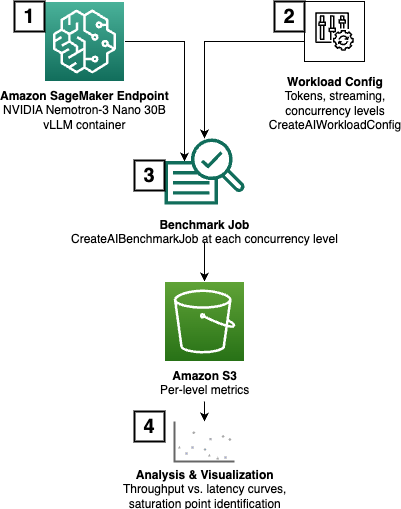
图 1:四步并发扫描工作流
操作演示
以下四个步骤将带你从全新部署完成一份完整的容量画像。每一步都以前一步为基础,因此建议配合随附 Notebook操作。
先决条件
开始前,请确保具备:
- 一个拥有 Amazon SageMaker AI 访问权限的 AWS 账户。
- 一个具备 SageMaker AI 和 Amazon Simple Storage Service(Amazon S3)权限的 AWS Identity and Access Management(IAM)执行角色。可在 Notebook 中查看相关说明。
ml.g7e.2xlarge端点的服务配额。
第 1 步:使用原生 vLLM 容器部署模型
我们将 NVIDIA Nemotron-3 Nano 30B 部署到 ml.g7e.2xlarge 实例。该模型是一款 Mixture-of-Experts(MoE)模型,只有 30 亿活跃参数。该实例由 NVIDIA Blackwell GPU 支持,可为推理工作负载提供出色的价格性能比。
我们使用适用于 SageMaker AI 的 vLLM Deep Learning Container,并通过 SM_VLLM_* 环境变量进行配置:
VLLM_IMAGE = (
    f"763104351884.dkr.ecr.{region}.amazonaws.com/"
    f"vllm:0.19.1-gpu-py312-cu129-ubuntu22.04-sagemaker"
)

environment = {
    "SM_VLLM_MODEL": "nvidia/NVIDIA-Nemotron-3-Nano-30B-A3B-BF16",
    "SM_VLLM_ENFORCE_EAGER": "true",  # required for Mamba-Transformer hybrid
    "SM_VLLM_TENSOR_PARALLEL_SIZE": "1",  # single GPU
    "SM_VLLM_GPU_MEMORY_UTILIZATION": "0.85",
    "SM_VLLM_MAX_MODEL_LEN": "10240",
    "SM_VLLM_ENABLE_PREFIX_CACHING": "true",
    "SM_VLLM_TRUST_REMOTE_CODE": "true",
}
其中三项设置值得解释。SM_VLLM_ENFORCE_EAGER 标志是必需的,因为 Nemotron-3 Nano 使用 Mamba-Transformer 混合架构,要求采用 eager execution 模式。我们将 GPU 内存利用率设为 0.85,以便在高并发下为 KV 缓存增长预留空间。启用前缀缓存后,系统提示词在多个请求中重复出现的场景可以复用已缓存的键值对,从而提升性能。
在创建模型、端点配置和端点之后,我们会先通过验证确认部署成功,再进入基准测试环节。
第 2 步:配置工作负载配置文件
在运行任何负载测试之前,基准测试引擎需要知道要模拟何种流量。我们使用 CreateAIWorkloadConfig 定义一个工作负载配置文件,以反映真实的生成式 AI 推理模式。下表汇总了用于定义工作负载的值。你可以参考随附 Notebook中的代码。
| 参数 | 值 | 说明 |
|---|---|---|
tokenizer |
模型 tokenizer ID | 用于准确统计 token 数量 |
streaming |
True |
启用流式响应(TTFT 指标必需) |
prompt_input_tokens_mean |
1,024 | 平均输入提示词长度 |
output_tokens_mean |
256 | 平均生成响应长度 |
选择 1,024 个输入 token 和 256 个输出 token,代表了检索增强生成(RAG)或摘要类工作负载。如果你的应用使用较短的提示词和较长的补全文本(例如代码生成),请相应调整这些值。启用流式传输是为了捕获首 token 时间(TTFT)指标;对于交互式用户体验而言,感知响应速度与原始吞吐量同样重要。
定义好工作负载配置文件后,下一步是启动扫描。
第 3 步:运行并发扫描
现在,我们可以通过 CreateAIBenchmarkJob API 创建基准测试任务,并设置扫描所用参数。在示例 Notebook 展示的场景中,参数如下:
sweep_params = {
    "concurrency": [64, 256, 1024],  # powers of 4
    "request_count": 1024,  # requests per concurrency level
}
基准测试引擎(AIPerf)会在单个任务中按顺序运行各个并发级别,并在每个级别发送 request_count 所定义的请求总数。顺序而非并行运行各个级别,意味着每次测量都反映了干净、隔离的负载。这种方法能提供统计上稳定的估算结果,同时控制成本。
任务完成后,结果会写入 OutputConfig 中指定的 Amazon S3 路径,保存为一个 tarball,其中包含各级别的 JSON 格式指标。
第 4 步:分析结果
任务完成后,我们可以下载并解析输出以进行分析。解读结果时,以下四项指标最为重要:
- 吞吐量(输出 token/秒): 是否趋于平台期,还是仍在持续增长?
- p99 端到端延迟: 在哪里越过你的 SLA?
- p50 到 p99 的延迟差距: 差距扩大表明负载下发生了排队。
- 首 token 时间(TTFT): 对流式用户体验至关重要。
当你绘制各并发级别下吞吐量与延迟的关系图时,饱和点会以曲线中的“拐点”显现:吞吐量变平,而 p99 延迟急剧向上弯曲。在我们的测试场景中,这发生在 256 个并发请求时。低于拐点的并发级别是安全运行区域;高于拐点时,端点已过载,用户将不得不等待。
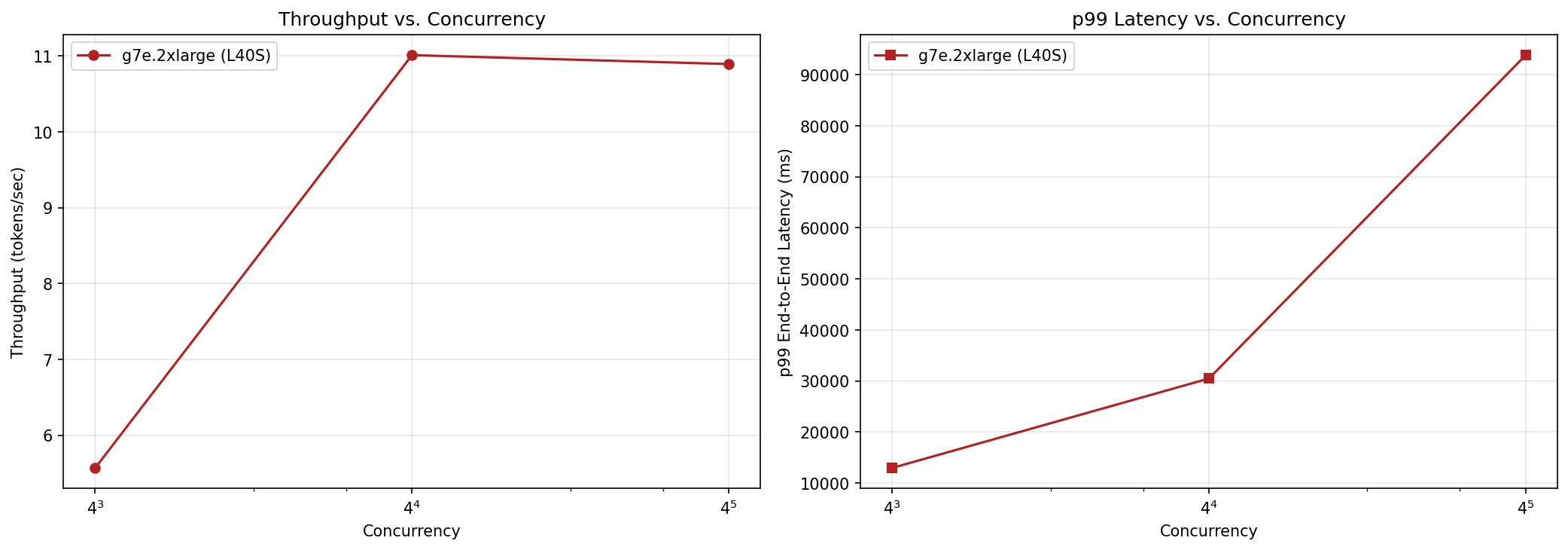
图 2:不同并发级别下的吞吐量和 p99 延迟,256 个并发请求处为饱和拐点
至此,你已获得端点在负载下行为的完整画像。对许多团队而言,这已经足以做出有把握的容量决策。如果你希望在不同模型版本或实例类型之间自动搜索最佳运行点,基准测试引擎还提供了自动化替代方案。
进一步探索:基于 SLA 的自动并发搜索
第 3 步中的并发扫描要求你自行选择要测试的并发级别。你可能并不知道合适的范围,或者希望在模型版本之间自动化容量规划。无论哪种情况,都可以在同一个 CreateAIBenchmarkJob 调用中,使用搜索方案替换固定的并发列表。max-concurrency-under-sla 方案接受一个或多个 SLA 阈值,并搜索同时满足所有阈值的最高并发度。
下表说明可用的 SLA 阈值参数:
| 参数 | 含义 | 统计量 | 需要流式传输? |
|---|---|---|---|
ttft_sla_ms |
最大首 token 时间(毫秒) | p95 | 是 |
tpot_sla_ms |
每个输出 token 的最长时间(毫秒) | p95 | 是 |
e2e_sla_ms |
最大端到端请求延迟(毫秒) | p99 | 否 |
error_rate_sla |
失败请求比例上限 | avg | 否 |
例如,我们可以使用以下搜索参数,查找 p99 端到端延迟保持在 50 秒以下时的最大并发度:
search_params = {
    "search_recipe": "max-concurrency-under-sla",
    "e2e_sla_ms": 50000,
    "concurrency_min": 16,
    "concurrency_max": 4096,
    "search_max_iterations": 10,
    "search_initial_points": 512,
    "request_count": 1024,
}
搜索引擎使用优化规划器,相比线性扫描可在更少迭代中收敛到答案。它从较宽范围开始并逐步缩小,只评估确定边界所需的并发级别。这可减少迭代次数和搜索总成本。
| 迭代 | 并发度 | 吞吐量(OTPS) | 通过 SLA? |
|---|---|---|---|
| 1 | 16 | 492.5 | ✓ |
| 2 | 32 | 904.2 | ✓ |
| 3 | 64 | 1433.4 | ✓ |
| 4 | 128 | 2066.8 | ✓ |
| 5 | 256 | 2823.4 | ✓ |
| 6 | 512 | 2782.3 | ✗ |
| 7 | 320 | 2781.8 | ✓ |
| 8 | 284 | 2788.6 | ✗ |
在此示例中,规划器从并发度 16 开始,并在每次迭代中翻倍。并发度达到 512 时首次违反 SLA,原因可能是 p99 端到端延迟超过阈值,或调用发生失败。随后,规划器将搜索范围缩小到 256–512,并发现并发度 320 能够满足 SLA,吞吐量为每秒 2,782 个 token。搜索最多运行你在 search_max_iterations 中定义的迭代次数。
组合多个 SLA
单个 SLA 阈值对大多数生产工作负载而言并不充分,因为某些场景要求模型同时满足多个 SLA。例如,在交互式用户体验中,你可能需要同时控制端到端延迟和首 token 时间。你仍然可以使用 max-concurrency-under-sla 搜索方案,只需在搜索参数中传入多个 SLA:
search_params = {
    "search_recipe": "max-concurrency-under-sla",
    "e2e_sla_ms": 50000,  # p99 end-to-end < 50s
    "ttft_sla_ms": 1500,  # p95 time-to-first-token < 1.5s
    "concurrency_min": 16,
    "concurrency_max": 4096,
    "search_max_iterations": 10,
    "request_count": 1024,
}
| 迭代 | 并发度 | 吞吐量(OTPS) | 通过 SLA? |
|---|---|---|---|
| 1 | 16 | 480.2 | ✓ |
| 2 | 32 | 888.6 | ✓ |
| 3 | 64 | 1429.9 | ✓ |
| 4 | 128 | 2061.4 | ✗ |
| 5 | 80 | 1599.3 | ✓ |
在这种情况下,我们观察到,当同时对端到端延迟和首 token 时间设置 SLA 时,支持的最大并发度为 80。
基准测试完成后,让我们清理本次操作演示期间创建的资源。
清理
为避免持续产生费用,请删除 SageMaker 端点、[端点配置](https://docs.aws.ama
English / 原文
Concurrency sweeps help you right-size a generative AI endpoint by finding the instance type and serving configuration that maximizes price-performance while holding latency within acceptable bounds. Without a systematic approach, right-sizing means deploying, load-testing manually, adjusting, and repeating until the numbers look acceptable. Choose five ml.g7e.2xlarge instances when one would suffice, and you burn your budget on idle GPUs. Choose too few, and requests queue, latency spikes, and users experience degraded service.
Concurrency sweeps address this problem. A concurrency sweep is a systematic benchmarking approach that sends controlled, increasing levels of concurrent traffic to your Amazon SageMaker AI endpoint and analyzes its performance. Concurrency sweeps are built into Amazon SageMaker AI Inference Recommendations, so there’s no custom load-testing infrastructure to build or maintain.
In this post, we walk through deploying the NVIDIA Nemotron-3 Nano 30B model, running automated concurrency sweeps, and using the results to make data-driven capacity decisions. By the end, you will know how many concurrent requests your endpoint can handle before latency becomes unacceptable, and how to automate that discovery.
What is a concurrency sweep?
A concurrency sweep sends a controlled number of simultaneous requests to your SageMaker AI endpoint and measures two metrics at each level:
- Throughput : how many tokens per second your endpoint produces.
- Latency: how long each request takes.
By progressively increasing the concurrency (for example, 64 to 256, and then 1,024 simultaneous requests), you can trace a curve that reveals your endpoint’s saturation point. This is the point where adding more concurrent traffic stops improving throughput and degrades latency.
A concurrency sweep gives you three data points for production planning:
- The ideal balance: the concurrency level where throughput is maximized with acceptable latency.
- The breaking point: where latency crosses your service level agreement (SLA) threshold.
- The right-size factor: how many instances you need to cover your peak traffic, given the per-instance capacity.
Let’s now look at how the end-to-end workflow comes together.
Solution overview
The concurrency sweep workflow has four steps:
- Deploy the model to a SageMaker AI endpoint using the native vLLM container.
- Configure the workload profile (input and output token counts, streaming mode).
- Run the concurrency sweep using the CreateAIBenchmarkJob API.
- Analyze the results to identify optimal concurrency and right-size your fleet.
The following diagram illustrates this process.
Figure 1: The four-step concurrency sweep workflow
Walkthrough
The following four steps will take you from a fresh deployment to a complete capacity profile. Each step builds on the previous one, so we recommend following along with the accompanying notebook.
Prerequisites
Before getting started, make sure that you have:
- An AWS account with Amazon SageMaker AI access.
- An AWS Identity and Access Management (IAM) execution role with permissions for SageMaker AI and Amazon Simple Storage Service (Amazon S3). You can check instructions in the notebook.
- Service quota for
ml.g7e.2xlargeendpoints.
Step 1: Deploy the model with the native vLLM container
We deploy NVIDIA Nemotron-3 Nano 30B, a Mixture-of-Experts (MoE) model with only 3B active parameters, to an ml.g7e.2xlarge instance. This instance is backed by an NVIDIA Blackwell GPU, which provides a strong price-performance ratio for inference workloads.
We use the vLLM Deep Learning Container for SageMaker AI, configured through SM_VLLM_* environment variables:
VLLM_IMAGE = (
    f"763104351884.dkr.ecr.{region}.amazonaws.com/"
    f"vllm:0.19.1-gpu-py312-cu129-ubuntu22.04-sagemaker"
)

environment = {
    "SM_VLLM_MODEL": "nvidia/NVIDIA-Nemotron-3-Nano-30B-A3B-BF16",
    "SM_VLLM_ENFORCE_EAGER": "true",  # required for Mamba-Transformer hybrid
    "SM_VLLM_TENSOR_PARALLEL_SIZE": "1",  # single GPU
    "SM_VLLM_GPU_MEMORY_UTILIZATION": "0.85",
    "SM_VLLM_MAX_MODEL_LEN": "10240",
    "SM_VLLM_ENABLE_PREFIX_CACHING": "true",
    "SM_VLLM_TRUST_REMOTE_CODE": "true",
}
Three of these settings are worth explaining. The SM_VLLM_ENFORCE_EAGER flag is required because Nemotron-3 Nano uses a Mamba-Transformer hybrid architecture that requires eager execution mode. We set the GPU memory utilization to 0.85 to leave headroom for KV cache growth under high concurrency. Prefix caching is enabled to improve performance in scenarios where system prompts are repeated across requests to benefit from reusing cached key-value pairs.
After creating the model, endpoint configuration, and endpoint, we verify the deployment with a validation before moving on to benchmarking.
Step 2: Configure the workload profile
Before running any load test, the benchmark engine needs to know what kind of traffic to simulate. We define a workload profile that mirrors a realistic generative AI inference pattern using CreateAIWorkloadConfig. The following table summarizes the values we used for defining the workload. You can follow the code in the accompanying notebook.
| Parameter | Value | Description |
|---|---|---|
tokenizer |
Model tokenizer ID | Used to count tokens accurately |
streaming |
True |
Enables streaming responses (required for TTFT metrics) |
prompt_input_tokens_mean |
1,024 | Average input prompt length |
output_tokens_mean |
256 | Average generated response length |
The choice of 1,024 input tokens and 256 output tokens is representative of Retrieval Augmented Generation (RAG) or summarization workloads. If your application uses shorter prompts and longer completions (such as code generation), adjust these values accordingly. Streaming is enabled to capture time to first token (TTFT) metrics, which are important for interactive user experiences where perceived responsiveness matters as much as raw throughput.
With the workload profile defined, the next step is to launch the sweep.
Step 3: Run the concurrency sweep
We can now create the benchmark job with the CreateAIBenchmarkJob API with the parameters to use in the sweep. In the scenario illustrated in the sample notebook, we have:
sweep_params = {
    "concurrency": [64, 256, 1024],  # powers of 4
    "request_count": 1024,  # requests per concurrency level
}
The benchmark engine (AIPerf) runs each concurrency level sequentially within a single job, sending the total number of requests defined under request_count at each level. Running the levels sequentially instead of in parallel means each measurement reflects a clean, isolated load. This approach gives you statistically stable estimates while keeping costs contained.
When the job completes, the results are written to the Amazon S3 path defined under OutputConfig as a tarball containing per-level metrics in JSON format.
Step 4: Analyze the results
After the job completes, we can download and parse the output for analysis. Four metrics matter most when reading the results:
- Throughput (output tokens/sec): Does it plateau or keep climbing?
- p99 end-to-end latency : Where does it cross your SLA?
- p50 to p99 latency spread: A widening gap signals queuing under load.
- Time to first token (TTFT) : Critical for streaming user experiences.
When you plot throughput against latency across the concurrency levels, the saturation point is visible as a “knee” in the curve: throughput flattens while p99 latency bends sharply upward. This happens at 256 concurrent requests in our test scenario. Concurrency levels below the knee are your safe operating region. Above it, the endpoint is overloaded and users are waiting.
Figure 2: Throughput and p99 latency across concurrency levels, with the saturation knee at 256 concurrent requests
At this point you have a complete picture of how your endpoint behaves under load. For many teams, this is sufficient to make a confident capacity decision. If you want to automate the search for the optimal operating point across model versions or instance types, the benchmark engine offers an automated alternative.
Going further: Automatic SLA-based concurrency search
The concurrency sweep in Step 3 requires you to choose the concurrency levels to test. You might not know the right range, or you might want to automate capacity planning across model versions. In either case, replace the fixed concurrency list with a search recipe in the same CreateAIBenchmarkJob call. The max-concurrency-under-sla recipe accepts one or more SLA thresholds and searches for the highest concurrency that satisfies all of them.
The following table describes the available SLA threshold parameters:
| Parameter | Meaning | Statistic | Requires streaming? |
|---|---|---|---|
ttft_sla_ms |
Max Time To First Token (ms) | p95 | Yes |
tpot_sla_ms |
Max Time Per Output Token (ms) | p95 | Yes |
e2e_sla_ms |
Max end-to-end request latency (ms) | p99 | No |
error_rate_sla |
Max fraction of failed requests | avg | No |
For example, we can use the following search parameters to find the maximum concurrency where p99 end-to-end latency stays under 50 seconds:
search_params = {
    "search_recipe": "max-concurrency-under-sla",
    "e2e_sla_ms": 50000,
    "concurrency_min": 16,
    "concurrency_max": 4096,
    "search_max_iterations": 10,
    "search_initial_points": 512,
    "request_count": 1024,
}
The search engine uses an optimization planner that can converge on the answer in fewer iterations than a linear sweep. It starts with a broad range and narrows progressively, evaluating only the concurrency levels needed to identify the boundary. This can reduce both the number of iterations and the total cost of the search.
| Iteration | Concurrency | Throughput (OTPS) | Passed SLA? |
|---|---|---|---|
| 1 | 16 | 492.5 | ✓ |
| 2 | 32 | 904.2 | ✓ |
| 3 | 64 | 1433.4 | ✓ |
| 4 | 128 | 2066.8 | ✓ |
| 5 | 256 | 2823.4 | ✓ |
| 6 | 512 | 2782.3 | ✗ |
| 7 | 320 | 2781.8 | ✓ |
| 8 | 284 | 2788.6 | ✗ |
In this example, the planner starts at concurrency 16 and doubles through each iteration. At concurrency 512, the first SLA violation occurs, either because the p99 end-to-end latency exceeded the threshold or because invocations failed. The planner then narrows the search to the 256–512 range and finds that concurrency 320 meets the SLA at 2,782 tokens per second. The search runs for at most the number of iterations you define in search_max_iterations.
Combining multiple SLAs
A single SLA threshold is insufficient for most production workloads, as some scenarios require that a model must meet multiple SLAs at the same time. For instance, in interactive user experiences, you might need to control both the end-to-end latency and the time to first token. You can still use the max-concurrency-under-sla search recipe by passing multiple SLAs under search parameters:
search_params = {
    "search_recipe": "max-concurrency-under-sla",
    "e2e_sla_ms": 50000,  # p99 end-to-end < 50s
    "ttft_sla_ms": 1500,  # p95 time-to-first-token < 1.5s
    "concurrency_min": 16,
    "concurrency_max": 4096,
    "search_max_iterations": 10,
    "request_count": 1024,
}
| Iteration | Concurrency | Throughput (OTPS) | Passed SLA? |
|---|---|---|---|
| 1 | 16 | 480.2 | ✓ |
| 2 | 32 | 888.6 | ✓ |
| 3 | 64 | 1429.9 | ✓ |
| 4 | 128 | 2061.4 | ✗ |
| 5 | 80 | 1599.3 | ✓ |
In this case, we observe that when putting SLAs in both the end-to-end latency and time to first token, the maximum level of concurrency supported is 80.
With the benchmarking complete, let’s clean up the resources we created during this walkthrough.
Cleaning up
To avoid ongoing charges, delete your SageMaker endpoints, endpoint configurations, and models after testing. Endpoints bill by the hour whether or not they’re receiving traffic.
Conclusion
Concurrency sweeps replace guesswork with data in the capacity planning process for generative AI endpoints. Instead of over-provisioning as a precaution or discovering bottlenecks in production, you can systematically map your endpoint’s performance envelope. You can then make informed decisions about fleet size before a single user request hits your system.
In this post, you learned how to:
- Deploy a model using the native vLLM container on Amazon SageMaker AI.
- Run concurrency sweeps using the
CreateAIBenchmarkJobAPI. - Plot throughput against latency to identify the saturation point.
- Use the
max-concurrency-under-slarecipe to automatically discover the optimal concurrency for your SLA targets.
The complete notebook is available in the GitHub repository. To get started with your own models, see the Generative AI Inference Recommendations documentation. We have also created another example that benchmarks GLM 5.3 Flash on Amazon SageMaker AI using this feature.
Related resources:
About the authors
Mona Mona
Mona currently works as Sr AI/ML specialist Solutions Architect at Amazon. She is a published author of three books and her latest book is AI Agents on AWS. She has authored 20+ blogs on AI/ML and cloud technology and a co-author on a research paper on CORD19 Neural Search which won an award for Best Research Paper at the prestigious AAAI (Association for the Advancement of Artificial Intelligence) conference.
Hrushikesh Gangur
Hrushikesh is a Principal Solutions Architect for AI/ML startups with expertise in both AWS machine learning and networking services. He helps startups building generative AI, autonomous vehicles, and ML platforms to run their business efficiently and effectively on AWS.
Felipe Lopez
Felipe is a Principal AI/ML Specialist Solutions Architect at AWS. Prior to joining AWS, Felipe worked with GE Digital and SLB, where he focused on modeling and optimization products for industrial applications.
Lokeshwaran Ravi
Lokeshwaran is a Senior Deep Learning Compiler Engineer at AWS, specializing in ML optimization, model acceleration, and AI security. He focuses on enhancing efficiency, reducing costs, and building secure ecosystems to democratize AI technologies, making cutting-edge ML accessible and impactful across industries.
Sheng Moua
Sheng is a software engineer on SageMaker focused on inference and model optimization, building scalable, user-friendly tools that help customers deploy AI models faster and more efficiently.