借助 Agentforce 和 AWS 扩展公共部门智能能力
英文标题:Extending public sector intelligence with Agentforce and AWS
公共部门机构需要从执法记录仪视频、监控视频和扫描文件等大量非结构化证据中提取可行动的洞察。本文介绍如何结合 Amazon Bedrock Data Automation 与 Model Context Protocol(MCP),将多模态数据转化为结构化结果,并通过 Salesforce Agentforce 的自然语言交互呈现。该架构以 Amazon S3 存储为基础,利用 Lambda、DynamoDB、EventBridge、AgentCore Gateway 和 Cognito 构建事件驱动的异步处理与查询链路。对开发者而言,示例提供了 AWS CDK 部署和 Agentforce MCP 接入步骤,但示例代码并非生产就绪,需按组织的安全与业务要求进行加固。
 1.3 MB
 101.1 KB
 124.1 KB
 345.0 KB
 141.2 KB
 346.5 KB
 63.5 KB
 106.1 KB
 141.5 KB
 109.4 KB
 117.7 KB
 111.6 KB
 127.6 KB
 141.5 KB
 213.4 KB
 321.3 KB
 22.8 KB
 26.4 KB
 24.6 KB
 196.0 KB
中文
公共部门机构需要处理海量非结构化证据,例如执法记录仪视频、监控视频和扫描文件;在任何人能够据此采取行动之前,都需要从中提取洞察。本文介绍如何结合 Amazon Bedrock Data Automation 与 Model Context Protocol(MCP),将非结构化数据转化为结构化洞察。随后,您可以通过 AI Agent 中的自然语言查询来呈现这些洞察,例如 Salesforce Agentforce。
在上一篇文章 使用 Amazon S3 现代化 Salesforce Public Sector Solutions 中的证据管理中,我们以 Agentforce Public Sector(原 Public Sector Solutions)的 External Storage of Files with Amazon Simple Storage Service(Amazon S3)集成为示例实现。有了这一基础,您现在拥有了持久且具备成本效益的存储能力,可用于保存执法记录仪视频、监控视频、照片、录音和扫描文件。
然而,存储只是挑战的一半。若没有自动化,您必须花费大量时间手动审阅、分类并从这些文件中提取相关细节,之后才能采取行动。借助此集成,Agentforce 用户可以搜索存储在 AWS 上的已处理数据,从非结构化数据中呈现关键洞察,并执行更高级的操作,且无需离开 Salesforce 控制台。
解决方案概述
两个主要流程协同工作,将原始证据转化为可执行的调查洞察。第一个流程通过 面向公共部门的 External Storage of Files with Amazon S3 连接器,将非结构化媒体文件和文档迁移到 Amazon S3。图 1 展示了 Amazon S3 如何提供企业级规模的存储基础设施,用于存放大型文档和媒体文件。
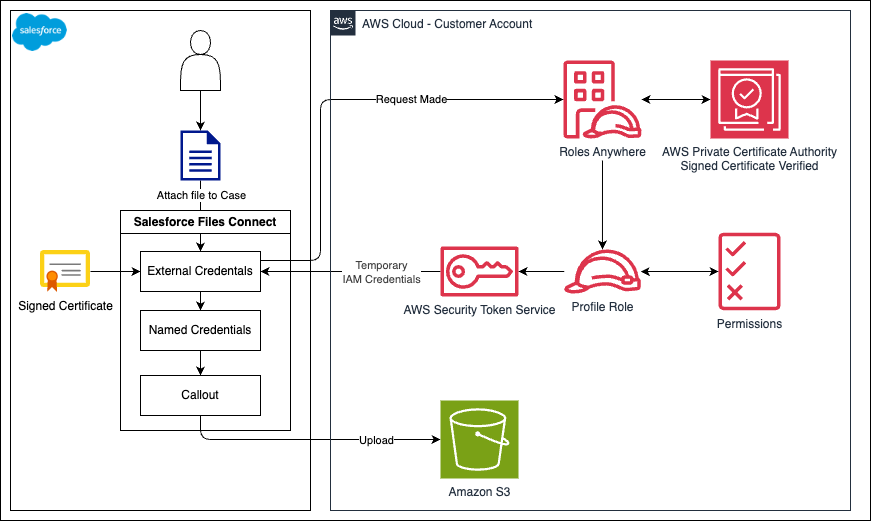
图 1:Agentforce Public Sector 与 Amazon S3 集成
第二个流程是在数据进入 Amazon S3 后,利用事件驱动架构通过 Amazon Bedrock Data Automation 异步处理多模态数据。图 2 展示了如何扩展存储解决方案以创建一种架构模式。该模式可将非结构化数据转化为可执行洞察,并通过 MCP 让 Salesforce Agentforce 可以使用这些洞察。
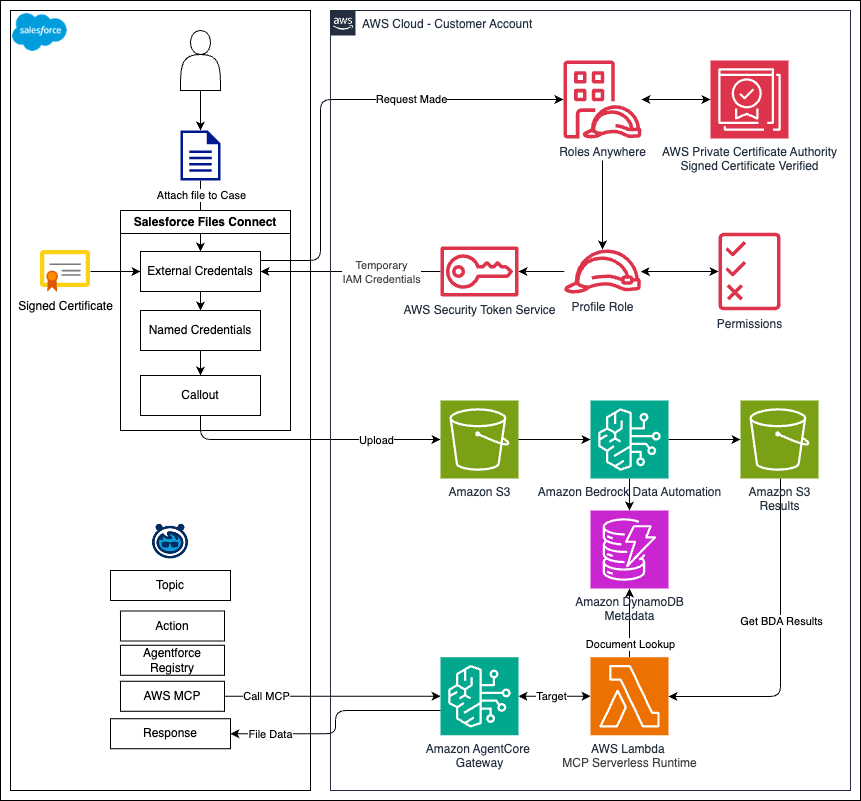
图 2:从非结构化数据生成洞察
如图 2 所示,当文件或文档进入 Amazon S3 时,S3 事件通知会调用一个 AWS Lambda 函数。该 Lambda 函数会生成文档 ID,将其与文档元数据一同存储在 Amazon DynamoDB 中,并启动 Amazon Bedrock Data Automation 任务来处理该文件。Amazon Bedrock Data Automation 会根据媒体类型提取结构化洞察。任务完成后,Amazon EventBridge 规则将触发第二个 Lambda 函数,将结果保存至 Amazon S3 中的专用输出存储桶。
在 Salesforce 侧,用户在 Agentforce 中的聊天会触发一个已配置的操作,该操作通过 MCP 调用 AWS。调用会经由 Amazon Bedrock AgentCore Gateway 路由;这是 Amazon Bedrock AgentCore 的一项功能,可对请求进行身份验证并调用运行在 AWS Lambda 上的 MCP 服务器。Amazon Bedrock AgentCore 是一个可使用任何框架或模型大规模构建、连接和优化 Agent 的平台。
Lambda 函数首先查询 DynamoDB 表以定位相关结果,然后从 Amazon S3 检索并返回这些结果。结果通过 AgentCore Gateway 返回给 Agentforce,数据会被加载到 Agent 的上下文中,以生成自然语言回复。
借助 Amazon Bedrock Data Automation,您可以依据每个文件的媒体类型对其进行处理。对于文档,它会提取文本、识别关键字段并生成结构化摘要。对于图像,它会生成描述,并识别画面中的对象或文本。对于视频和音频文件,它会生成转录文本和场景级摘要。Amazon Bedrock Data Automation 项目配置定义了要针对每种文件类型应用哪些提取能力,部署后您可以在 Amazon Bedrock Data Automation 控制台中自定义这些设置。
这一处理过程在后台进行。Salesforce 用户可以完全在 Salesforce 控制台内上传文件、提出问题并获得 AI 驱动的洞察,无需在系统之间切换,也无需直接管理 AWS 资源。
该架构刻意采用模块化和可扩展的设计,旨在作为一种可适配到远超证据管理场景的模式。每个组件,从处理管道到查询路径,均可独立运行,并可根据您机构的独特需求进行定制。例如,您可以在 AWS Lambda MCP Serverless Runtime 中添加自定义处理逻辑,或在 Amazon DynamoDB 中存储额外元数据,以实现更丰富的文档查询。您还可以通过 MCP 连接不同的 Agent 前端,而无需变更底层数据管道。
技术实施指南
本节介绍如何部署 AWS 基础设施,以及如何配置 Salesforce Agentforce 以连接到 MCP 端点。
前提条件
开始前,请完成上一篇文章 使用 Amazon S3 现代化 Salesforce Public Sector Solutions 中的证据管理中概述的步骤,因为本文直接构建于该基础之上。此外,请确认您的 Salesforce 组织支持通过 Agentforce Registry 注册和调用外部 MCP 服务器。您可以通过导航至 设置 > API Catalog > MCP Server,并确认存在注册 MCP 服务器的选项来进行验证。Developer、Enterprise、Performance 和 Unlimited 版本支持注册外部 MCP 服务器(参见 管理外部 MCP 服务器)。
部署 AWS Cloud Development Kit(AWS CDK)堆栈
此 GitHub 存储库提供了创建事件驱动架构所需 AWS 资源的部署方案。该解决方案部署了一套无服务器基础设施,其中包括 Amazon EventBridge 规则、Amazon Bedrock Data Automation 配置、AWS Lambda 函数、Amazon DynamoDB 表以及 Amazon Bedrock AgentCore Gateway。此示例代码旨在演示这一模式,并非生产就绪;在用于生产环境前,请对其进行审查和加固,以满足您组织的要求。
部署 AWS CDK 堆栈后,配置 Salesforce Agentforce 以连接 Amazon Bedrock AgentCore Gateway MCP 端点。Agentforce 使用 MCP Streamable HTTP 传输方式连接到 AgentCore Gateway。通过此连接,Agentforce 可以发现并调用由网关公开的证据检索工具。AWS CDK 堆栈会输出配置 Salesforce 与 AWS 之间连接所需的多个值。继续之前,请先从 AWS Management Console 获取这些值。
可选地,在配置 Salesforce 连接之前,您可以使用 MCP Inspector 验证网关端点。这是一款开发者工具,可通过交互式界面对 MCP 服务器进行测试和调试。此步骤并非必需,但有助于在将 AgentCore Gateway 与 Agentforce 集成之前确认其响应是否正常。
步骤 1:获取 AWS CloudFormation 输出
在 Intelligent Media Processing 解决方案完全部署后,设置 MCP 连接所需的输出可在 AWS CloudFormation 的 McpGatewayStack 输出中获取。如图 3 所示,主要输出包括 CognitoClientId、CognitoTokenEndpoint 和 GatewayMcpEndpoint。
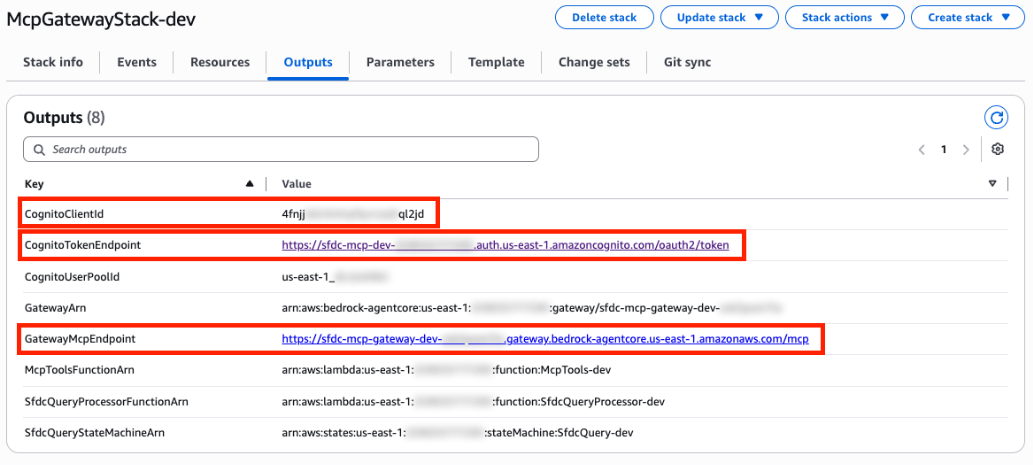
图 3:AWS CloudFormation 输出
Agentforce 通过 Amazon Cognito 与 AWS 进行身份验证。您需要 Cognito 应用客户端的客户端密钥,才能完成 Salesforce 中的 MCP 服务器注册。
步骤 2:获取客户端密钥
- 在 AWS Management Console 中打开 Amazon Cognito。
- 在 User Pools 中,选择由 AWS CloudFormation 模板创建的用户池名称。
- 选择与该用户池对应的应用客户端。
图 4 展示了 Amazon Cognito 应用客户端页面,您可以在此找到 Client secret。
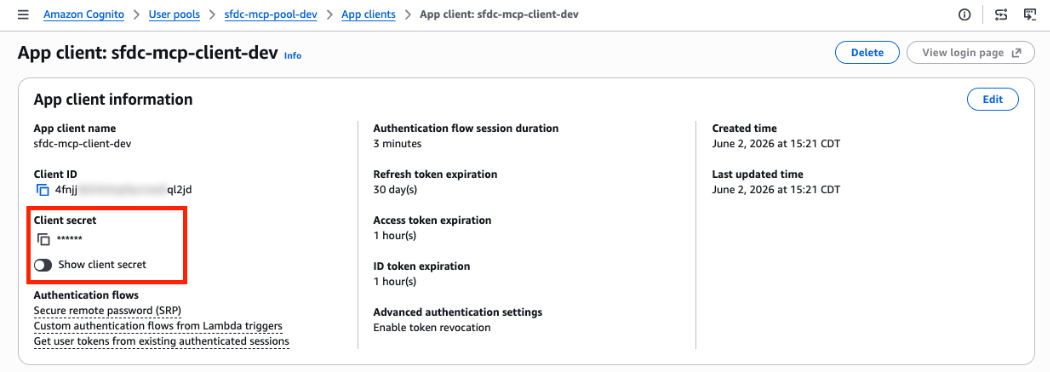
图 4:Amazon Cognito 客户端密钥
将 Agentforce 连接到 MCP 端点
获得 AWS 凭证后,您现在可以在 Salesforce 中注册 MCP 服务器。这将建立经过身份验证的连接,以便 Agentforce 可以调用 AWS 工具。
步骤 3:创建 MCP 连接
- 在 Salesforce 设置控制台中,打开 Quick Find 并搜索 API Catalog,然后选择 MCP Server(参见 管理外部 MCP 服务器)。
- 选择 New。然后选择 Register MCP Server 以创建连接。
- 将 MCP 服务器命名为
AwsBdaResultsMcp,并将描述设置为MCP server for accessing results from Amazon Bedrock Data Automation。 - 获取步骤 1 和步骤 2 中从 AWS 收集的值,并将其输入相应字段,如图 5 所示,然后选择 Create and Continue。
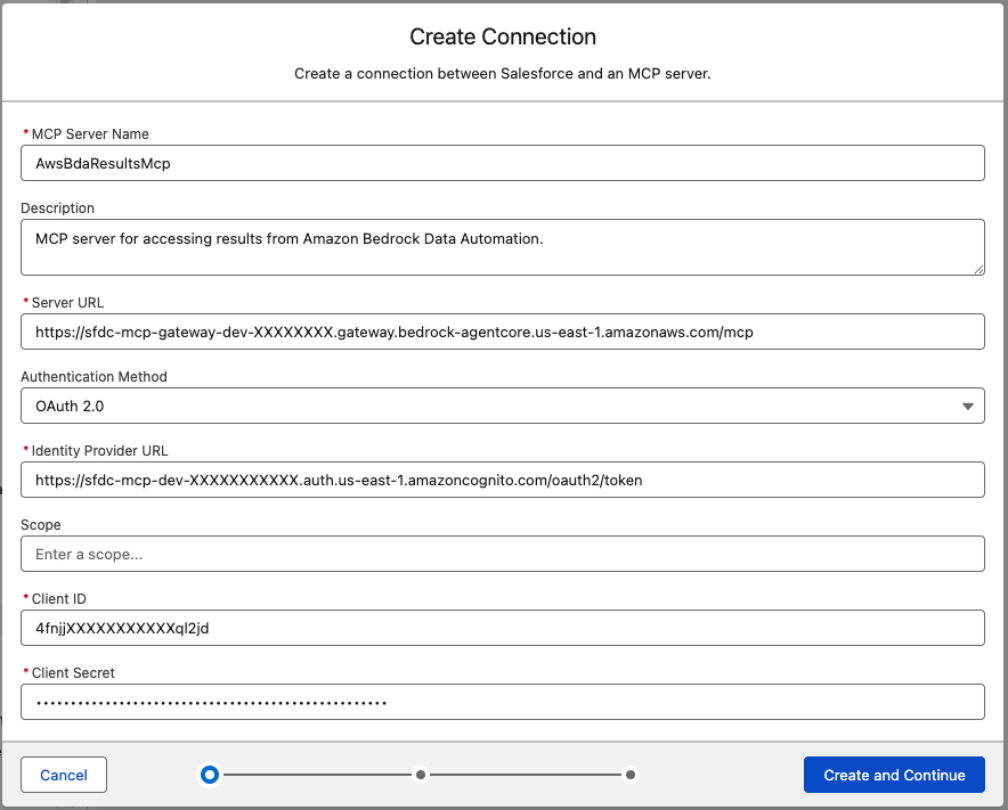
图 5:MCP Server 创建连接
- 按照提示操作。进入 MCP Server Allowlist 后,选择一个或多个您希望使用、且已通过 AWS CDK 部署的可用工具。在生产环境中,应将允许列表限制为您的 Agent 所需的工具。请参阅安全注意事项部分。
- 选择 Save。
您已成功将 Amazon Bedrock AgentCore MCP 服务器连接至 Salesforce Agentforce。
配置 Agentforce 以使用 MCP
现在 MCP 服务器已完成注册,您可以将 MCP 工具添加到现有的 Agentforce 子 Agent,或者创建新的子 Agent。以下步骤将创建一个专用的 Agentforce 子 Agent,其主要任务是处理与证据检索相关的请求。该子 Agent 使用 MCP 工具查询存储在 AWS 中的已处理证据,并以自然语言向用户返回洞察。
要集成外部 MCP 服务器,请使用新版 Agentforce Builder。以下步骤使用 Employee Agent 模板。您可以将同样的 MCP 集成应用于其他 Agent 类型(例如 Service Agent 或 Customer Agent),但具体导航路径和配置选项可能有所不同。如果您有使用旧版 Agentforce Builder 构建的 Agent,请遵循本指南 升级至新版 Builder。
-
从 App Launcher 打开 Agentforce Studio,然后选择 New Agent。从可用模板中选择 Agentforce Employee Agent,然后将其命名为
Case Agent,或使用与您的用例相关的名称。 -
在 Agentforce Builder 中,创建新的子 Agent。输入
Media Processor作为名称,并输入以下描述:
处理与当前案件所附文件、文档、照片、图像、视频或音频相关的所有问题。检索来自已处理媒体的 AI 生成洞察,并以自然语言回复。 -
选择 Save。
-
在 Media Processor 子 Agent 中,在 Actions Available for Reasoning 部分下,选择 Add action,然后选择 Add from Asset Library。搜索您注册的 MCP 工具(搜索
AwsBdaResultsMcp可将结果缩小至相关工具)。图 6 展示了在 Actions Available for Reasoning 部分下选中的已连接 MCP。
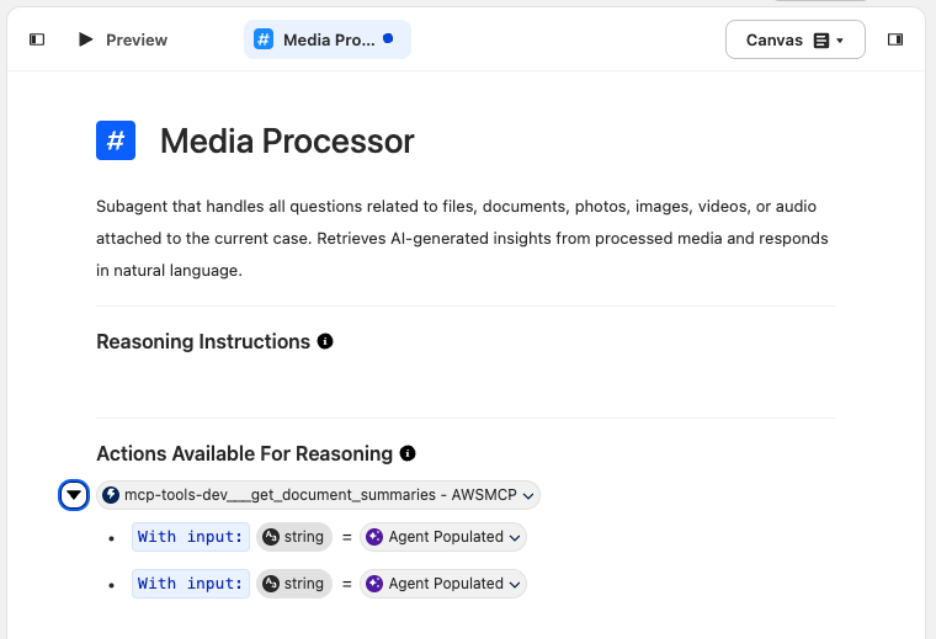
图 6:使 MCP 可用于 Agent 操作
-
在 Reasoning Instructions 下,为子 Agent 提供有关应执行什么操作及如何回复的指令。使用以下推理指令模板:
处理与当前案件所附文件、文档、照片、图像、视频或音频有关的所有问题。运行 <MCP_PLACEHOLDER> 以检索已处理的洞察。如果没有可用洞察,请告知用户该附件尚未处理。不要编造有关未处理文件的内容。 -
在 `<MCP_PLACEHOLD
English / 原文
Public sector agencies process large volumes of unstructured evidence, such as body camera footage, surveillance video, and scanned documents, that require extracting insights before anyone can act on them. This post shows how to combine Amazon Bedrock Data Automation with the Model Context Protocol (MCP) to turn unstructured data into structured insights. You can then expose those insights through natural language queries in an AI agent, such as Salesforce Agentforce.
In our previous post, Modernizing evidence management in Salesforce Public Sector Solutions with Amazon S3, we used the External Storage of Files with Amazon Simple Storage Service (Amazon S3) integration from Agentforce Public Sector (formerly Public Sector Solutions) as an example implementation. With that foundation in place, you now have durable, cost-efficient storage for body camera footage, surveillance video, photographs, audio recordings, and scanned documents.
However, storage is only half the challenge. Without automation, you spend significant time manually reviewing, classifying, and extracting relevant details from these files before you can act on them. With this integration, Agentforce users can search for processed data stored on AWS, surface key insights from unstructured data, and perform more advanced actions, all without leaving the Salesforce console.
Solution overview
Two main flows work together to turn raw evidence into actionable investigative insights. The first flow moves unstructured media files and documents into Amazon S3 using the External Storage of Files with Amazon S3 for Public Sector connector. Figure 1 illustrates how Amazon S3 provides enterprise-scale storage infrastructure for storing large documents and media files.
Figure 1: Agentforce Public Sector and Amazon S3 integration
Second, after data is in Amazon S3, an event-driven architecture asynchronously processes multimodal data using Amazon Bedrock Data Automation. Figure 2 shows how you can extend the storage solution to create an architecture pattern. This pattern transforms unstructured data into actionable insights and makes them available to Salesforce Agentforce through MCP.
Figure 2: Generating insights from unstructured data
As Figure 2 illustrates, when a file or document lands in Amazon S3, an S3 event notification invokes an AWS Lambda function. The Lambda function generates a document ID, stores it alongside document metadata in Amazon DynamoDB, and starts an Amazon Bedrock Data Automation job to process the file. Amazon Bedrock Data Automation extracts structured insights based on the media type. When the job completes, an Amazon EventBridge rule triggers a second Lambda function that saves the results to a dedicated output bucket in Amazon S3.
On the Salesforce side, a user’s chat in Agentforce triggers a configured action that calls AWS over MCP. The call routes through Amazon Bedrock AgentCore Gateway, a capability of Amazon Bedrock AgentCore, which authenticates the request and invokes an MCP server running on AWS Lambda. Amazon Bedrock AgentCore is the platform to build, connect, and optimize agents at scale, with any framework or model.
The Lambda function first queries the DynamoDB table to locate the relevant results. It then retrieves and returns them from Amazon S3. The results return through AgentCore Gateway to Agentforce, where the data is loaded into the agent’s context for a natural language response.
With Amazon Bedrock Data Automation, you can process each file based on its media type. For documents, it extracts text, identifies key fields, and generates structured summaries. For images, it produces descriptions and identifies objects or text within the frame. For video and audio files, it generates transcriptions and scene-level summaries. The Amazon Bedrock Data Automation project configuration defines which extraction capabilities to apply to each file type, and you can customize these settings in the Amazon Bedrock Data Automation console after deployment.
This processing happens behind the scenes. Salesforce users can upload files, ask questions, and receive AI-powered insights entirely from the Salesforce console, without switching between systems or managing AWS resources directly.
This architecture is intentionally modular and extensible, designed as a pattern you can adapt well beyond evidence management. Each component, from the processing pipeline to the query path, operates independently and can be customized to your agency’s unique requirements. For example, you can add custom processing logic in the AWS Lambda MCP Serverless Runtime or store additional metadata in Amazon DynamoDB for richer document lookups. You can also connect different agent frontends through MCP without changing the underlying data pipeline.
Technical implementation guide
This section walks through deploying the AWS infrastructure and configuring Salesforce Agentforce to connect to the MCP endpoint.
Prerequisites
Before beginning, complete the steps outlined in the previous post, Modernizing evidence management in Salesforce Public Sector Solutions with Amazon S3, as this post builds directly on that foundation. Additionally, confirm that your Salesforce org supports registering and calling external MCP servers through the Agentforce Registry. You can verify this by navigating to Setup > API Catalog > MCP Server and confirming the option to register an MCP server is available. Registering external MCP servers is available in Developer, Enterprise, Performance, and Unlimited Editions (see Manage External MCP Servers).
Deploy AWS Cloud Development Kit (AWS CDK) stack
This GitHub repository provides a deployment of the AWS resources required to create an event-driven architecture. The solution deploys a serverless infrastructure that includes Amazon EventBridge rules, Amazon Bedrock Data Automation configuration, AWS Lambda functions, Amazon DynamoDB tables, and Amazon Bedrock AgentCore Gateway. This sample code is provided to demonstrate the pattern and isn’t production ready, so review and harden it to meet your organization’s requirements before using it in production.
After deploying the AWS CDK stack, configure Salesforce Agentforce to connect to the Amazon Bedrock AgentCore Gateway MCP endpoint. Agentforce connects to AgentCore Gateway using the MCP Streamable HTTP transport. With this connection, Agentforce can discover and invoke the evidence retrieval tools exposed by the gateway. The AWS CDK stack outputs several values you need to configure the connection between Salesforce and AWS. Retrieve these from the AWS Management Console before proceeding.
Optionally, before configuring the Salesforce connection, you can validate your gateway endpoint using the MCP Inspector, a developer tool for testing and debugging MCP servers through an interactive interface. This step isn’t required but can help confirm that your AgentCore Gateway is responding correctly before integrating it with Agentforce.
Step 1: Get AWS CloudFormation outputs
After the Intelligent Media Processing solution is fully deployed, the outputs required to set up the MCP connections are available in AWS CloudFormation under the McpGatewayStack outputs. As shown in Figure 3, the primary outputs are CognitoClientId, CognitoTokenEndpoint, and GatewayMcpEndpoint.
Figure 3: AWS CloudFormation outputs
Agentforce authenticates with AWS through Amazon Cognito. You need the client secret from your Cognito app client to complete the MCP server registration in Salesforce.
Step 2: Get client secret
- Open Amazon Cognito on the AWS Management Console.
- In User Pools , choose the User pool name created by the AWS CloudFormation template.
- Choose the app client that corresponds to this user pool.
Figure 4 displays the Amazon Cognito app client page, where you can find the Client secret.
Figure 4: Amazon Cognito client secret
Connect Agentforce to the MCP endpoint
With the AWS credentials in hand, you can now register the MCP server in Salesforce. This establishes the authenticated link so Agentforce can call AWS tools.
Step 3: Create MCP connection
- In the Salesforce Setup console, open Quick Find and search for API Catalog , then choose MCP Server (see Manage External MCP Servers).
- Choose New. Then choose Register MCP Server to create a connection.
- Name the MCP server
AwsBdaResultsMcpand set the description toMCP server for accessing results from Amazon Bedrock Data Automation. - Take the values gathered from AWS in Step 1 and 2 and input them into their corresponding fields, as illustrated by Figure 5, then choose Create and Continue.
Figure 5: MCP Server create connection
- Follow the prompts. When you reach the MCP Server Allowlist, choose one or more of the available tools that you want to use and that were deployed with the AWS CDK. In production, scope the allowlist to only the tools your agent requires. See the Security considerations section.
- Choose Save.
You have successfully connected your Amazon Bedrock AgentCore MCP server to Salesforce Agentforce.
Configure Agentforce to use MCP
Now that the MCP server is registered, you can add MCP tools to an existing Agentforce subagent, or create a new subagent. The following steps walk through creating a dedicated Agentforce subagent whose primary task is handling requests related to evidence retrieval. This subagent uses the MCP tools to query processed evidence stored in AWS and return insights to the user in natural language.
To integrate an external MCP server, use the new Agentforce Builder. The following steps use the Employee Agent template. You can apply this same MCP integration to other agent types (such as Service Agent or Customer Agent), though the exact navigation and configuration options might vary. If you have an agent that was built using the legacy Agentforce Builder, follow this guide to Upgrade to New Builder.
-
From the App Launcher, open Agentforce Studio, then select New Agent. Select Agentforce Employee Agent from the available templates, then name it
Case Agentor a name relevant to your use case. -
In Agentforce Builder , create a new subagent. Enter
Media Processoras the name and the following as the description:
Subagent that handles all questions related to files, documents, photos, images, videos, or audio attached to the current case. Retrieves AI-generated insights from processed media and responds in natural language. -
Choose Save.
-
In the Media Processor Subagent, under the Actions Available for Reasoning section, choose Add action , then select Add from Asset Library. Search for the MCP tool you registered (searching
AwsBdaResultsMcpnarrows the results to the relevant tools). Figure 6 shows the connected MCP selected under the Actions Available for Reasoning section.
Figure 6: Make MCP available for agent action
-
Under Reasoning Instructions , provide the subagent with instructions on what to do and how to reply. Use the following reasoning instruction template:
Handle all questions about files, documents, photos, images, videos, or audio attached to the current case. Run <MCP_PLACEHOLDER> to retrieve processed insights. If no insights are available, inform the user the attachment has not yet been processed. Don't fabricate content about unprocessed files. -
In place of
<MCP_PLACEHOLDER>, enter@to reference a resource inline, then select the MCP associated with this subagent. Figure 7 shows the MCP referenced inline in the Reasoning Instructions.
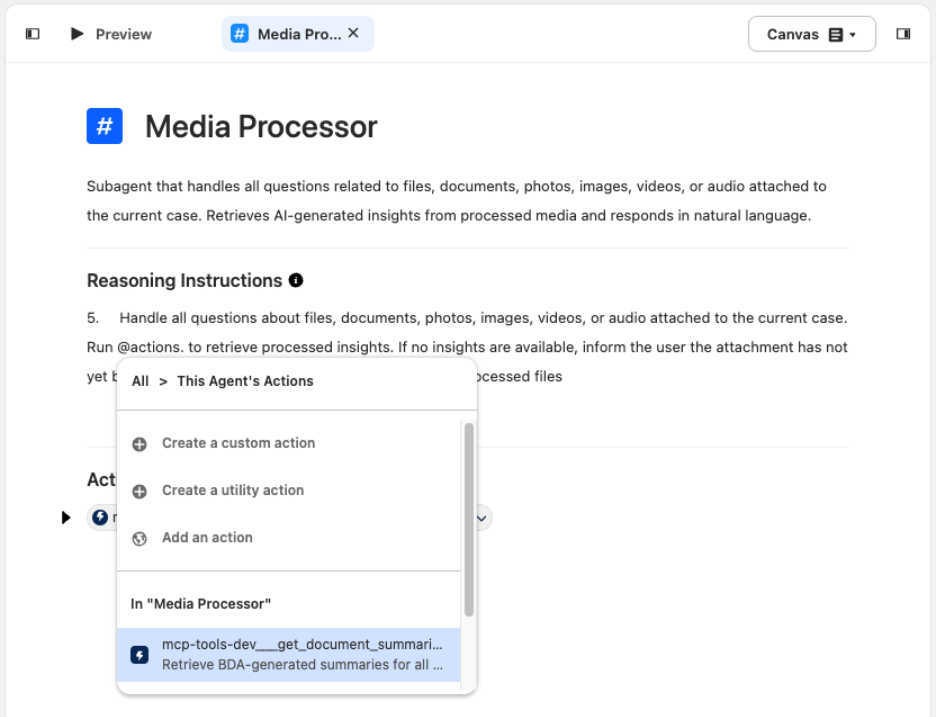
Figure 7: Add MCP to subagent
- With the configuration complete, choose Save to preview the agent.
Step 5: Test and validate MCP integration
With Agentforce Builder, you can preview the agent and how it responds to questions in the chat. To simulate the conditions of an employee asking questions in the Salesforce console, you can modify the Context Variables. These variables represent the values that would be assigned to the agent’s context when a user works in the Salesforce console. Figure 8 shows the Preview panel’s Context Variables in the Agentforce Builder.
To test the agent, set the currentRecordId context variable to the Record ID (the unique 18-character ID) of the case that you want to test. Then choose Apply and Restart Session. This sample uses the Agentforce Employee Agent. Other agent types might have different context variables preconfigured, so adjust accordingly.
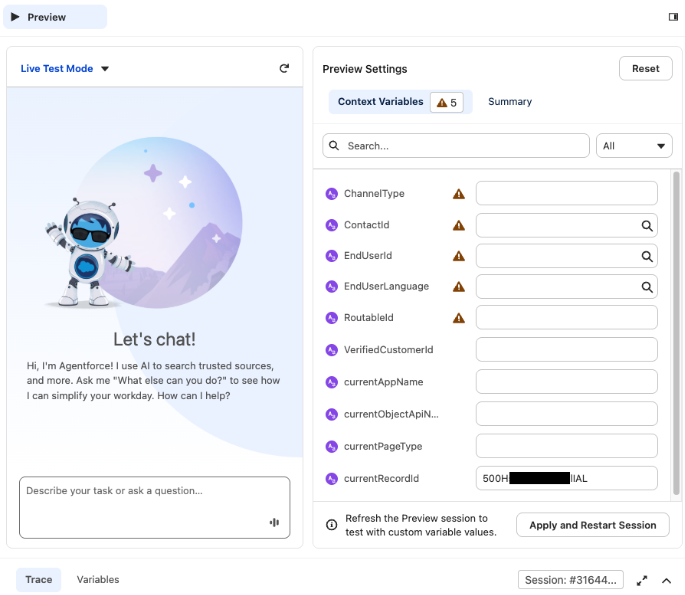
Figure 8: Preview context variables
To test the configuration of the agent and verify that it can make an MCP callout to AWS, perform the following:
- After you set the Context Variables to simulate a case that has media files uploaded to Amazon S3 and processed through this integration, open Preview. Enter a prompt that can trigger the subagent configured in Step 4, such as
Summarize the files for this case. - The test succeeds when the agent returns a summary of each item associated with the case record, as shown in Figure 9.
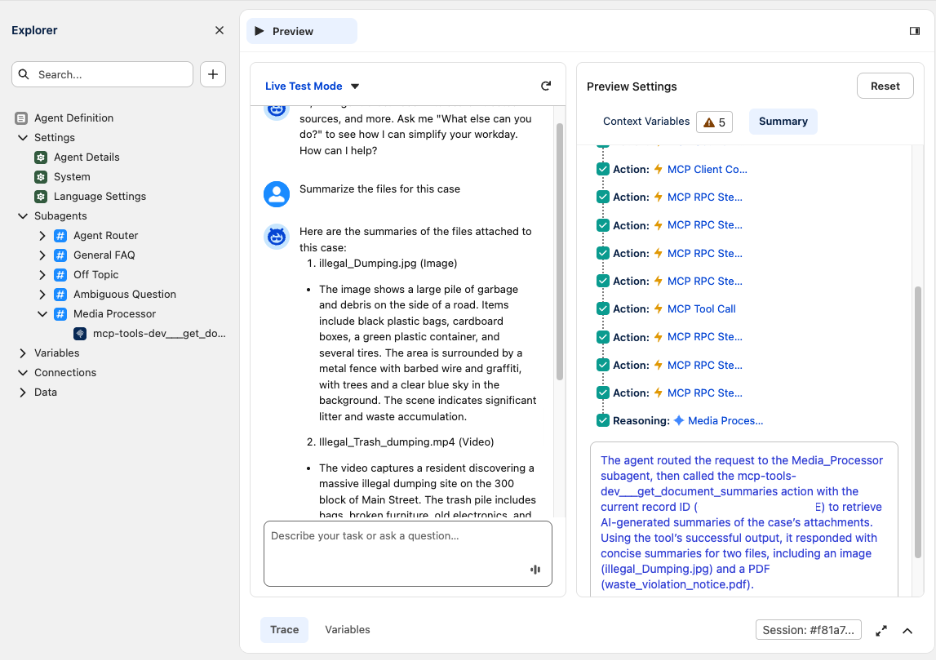
Figure 9: Preview outputs
- To see how the Agentforce agent produced this output, review the Summary outputs. They provide a natural language summary of the trace, explaining the steps the agent took to handle the request (see Figure 10).
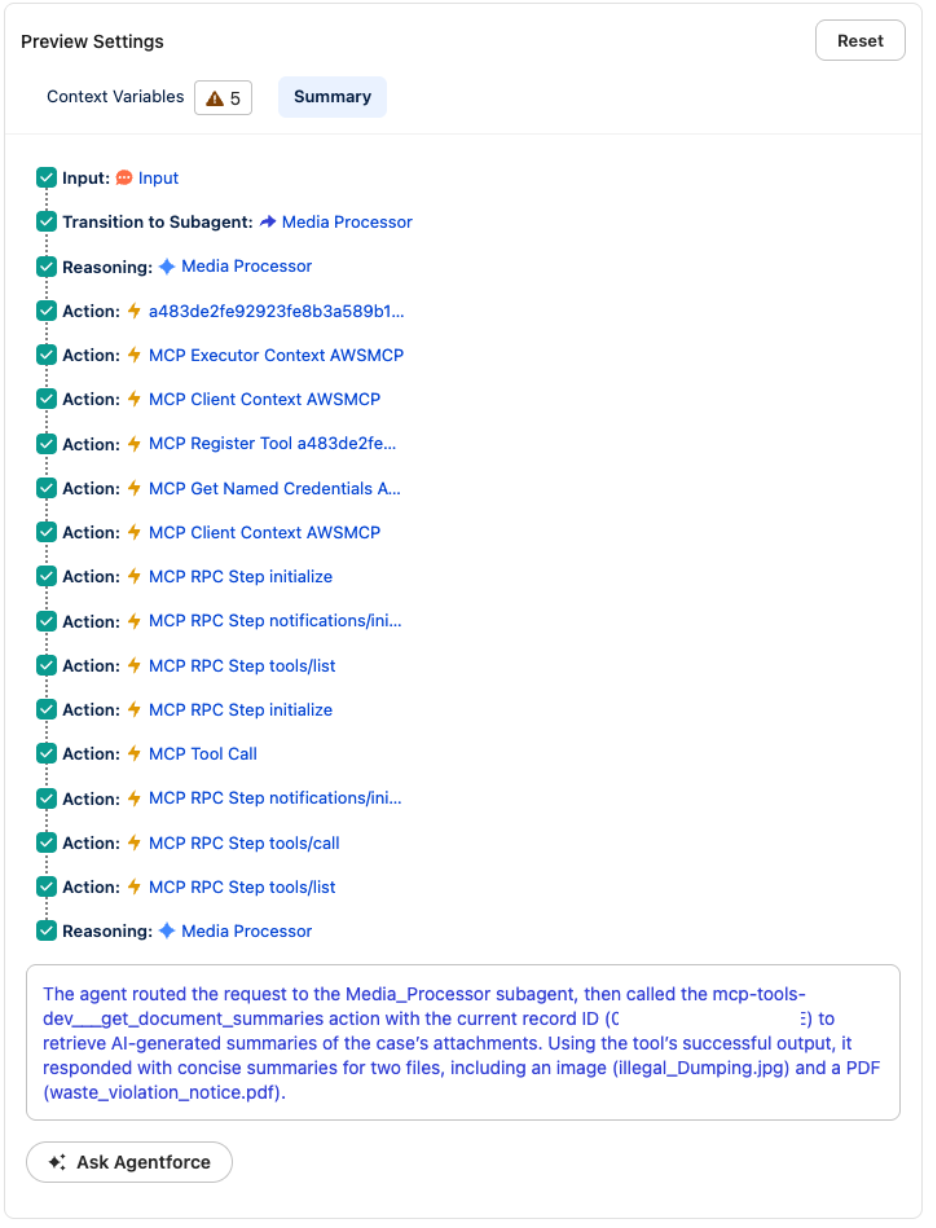
Figure 10: Summary of action
- If there are any changes needed to get the expected outputs, modify the prompt in Agentforce Builder and select Save before testing again in Preview.
- After you are satisfied with the outputs, you can deploy this agent or subagent into the agent interfaces your organization uses.
Extend this pattern to your own use case
The architecture demonstrated in this post is not limited to evidence management. You can apply the same modular pattern to build solutions for workflows that involve processing unstructured data, such as permits, benefits claims, or compliance reviews. The key components are the following:
- Amazon S3 for storage.
- Amazon Bedrock Data Automation for processing.
- Amazon Bedrock AgentCore Gateway for MCP-based tool exposure.
- Salesforce Agentforce for natural language interaction.
Each of these can be recombined and extended for use cases involving unstructured data. Because each component operates independently, you can replace the processing engine to match your agency’s requirements while keeping the same ingestion and MCP query layers. For document-heavy workflows such as permits, benefits claims, or tax forms, you can substitute the GenAI Intelligent Document Processing (IDP) Accelerator as an alternative processing engine. This keeps the same Amazon S3 ingestion and MCP query path. Additionally, because the MCP server is built on an open standard, you only need to build it once. MCP-compatible agents or systems can connect to the same endpoint, so you can reuse the same query layer across multiple applications beyond Agentforce.
Regardless of which processing approach you choose, the MCP query path remains the same. AgentCore Gateway exposes your processed data as tools that MCP-compatible agents can discover and invoke. This means that, in most cases, the architecture supports starting with a single use case and expanding to additional workflows without re-architecting the integration between AWS and Salesforce.
Security considerations
Because this solution connects an AI agent to your data through an MCP server, review its security posture against your organization’s requirements before you move beyond a proof of concept. Under the AWS Shared Responsibility Model, AWS secures the underlying infrastructure, and you secure your implementation. As a starting point, consider which users can access the agent and which tools and actions it can invoke. Also remember that content the agent processes, such as text extracted from evidence, might contain hidden instructions that trick the agent into unintended actions. This risk is known as indirect prompt injection. To mitigate this risk, treat all content extracted from evidence as untrusted data, never as instructions for the agent. Apply input validation on retrieved content before it enters the agent’s context. Scope the agent’s available actions to the minimum required using the MCP allowlist. Use Amazon Bedrock Guardrails to filter or reject content that attempts to override agent behavior. For a broader framework on threats specific to large language models (LLMs), see the OWASP Top 10 for LLM Applications.
This solution processes public sector evidence, so apply responsible AI controls before production. Amazon Bedrock Guardrails can filter harmful content and redact sensitive information such as personally identifiable information (PII). It can also run grounding checks that confirm responses stay grounded in the retrieved evidence rather than fabricated. These are examples, not a complete list. For authoritative guidance on securing agents and MCP tool access, follow Security for agentic AI on AWS, Amazon Bedrock AgentCore best practices, and apply Amazon Bedrock Guardrails with least-privilege controls.
Also, note that the accompanying sample code is intended to demonstrate this pattern and is not production ready. Review and harden it to meet your organization’s requirements before deploying to production.
Clean up
To avoid ongoing charges, clean up your resources when you’re finished experimenting. For step-by-step commands to remove all deployed resources, see the GitHub repo.
You must also manually delete the Agentforce MCP connection in Salesforce.
Because this is an event-driven, serverless architecture, you only pay for what you use. Processing costs are incurred only when evidence is actively uploaded and analyzed. Amazon S3 and Amazon DynamoDB storage costs are based on the amount of data stored, with no minimum commitments or upfront fees. For details, refer to the pricing pages for each service used.
Conclusion
This post demonstrated how to combine Amazon Bedrock Data Automation with the Model Context Protocol to process unstructured evidence and surface structured insights directly in Salesforce Agentforce. Using Amazon Bedrock Data Automation, the architecture automatically extracts text from documents, generates descriptions from images, and produces transcriptions from video and audio files.
This pattern extends well beyond evidence management to public sector workflows involving unstructured multimodal data. For guidance on adapting this architecture to your agency’s specific needs, refer to the Extend this pattern to your own use case section earlier in this post.
The full sample code is available on the GitHub repo. You can also explore extending the solution with additional Amazon Bedrock Data Automation output types. Another option is to integrate Amazon Bedrock Knowledge Bases, the fully managed capability for Retrieval Augmented Generation (RAG), to support RAG-based Q&A across large evidence collections.
About the authors
Christian Ramirez
Christian Ramirez is an AWS Partner Solutions Architect working with Salesforce across Public Sector customers, where he helps organizations modernize their technology infrastructure and use cloud solutions. Beyond work, Christian enjoys running, cycling, and exploring US National Parks.
Bridget Concannon
Bridget is a Senior Solutions Architect who works with strategic enterprise customers to create, design, and scale innovative cloud solutions. She has a focus on Storage, Analytics, and AI/ML domains. In her free time, she spends time coaching softball and hiking.
Varun Ghatge
Varun is a Senior Technical Account Manager at AWS, partnering with strategic enterprise customers on large-scale infrastructure and AI/ML adoption. He specializes in solving complex business challenges for his customers and turning them into cloud-driven outcomes.