基于 AWS 构建 Agentic 对话式视频智能方案
英文标题:Agentic conversational video intelligence built on AWS
本文介绍如何利用 Agentic AI 在 AWS 上构建可通过自然语言查询视频内容的智能分析方案。该方案以单个 Strands Agents SDK Agent 为编排核心,在运行时根据问题调用 Amazon Bedrock、Amazon Rekognition、Amazon Transcribe 或 BDA,而非为不同场景预建固定处理流水线。对于已分析并缓存的视频内容,查询响应可在 1 秒内返回;新视频的首次分析通常需 5—10 分钟。某大型媒体娱乐企业采用该方法后,据其内部对比统计,在超过 200 段多小时录制内容的积压处理中,人工审阅时间减少约 80%。
 1.3 MB
 101.1 KB
 124.1 KB
 345.0 KB
 141.2 KB
 346.5 KB
 109.3 KB
 74.3 KB
 428.9 KB
 177.0 KB
 191.2 KB
 22.0 KB
 37.8 KB
 49.7 KB
中文
借助由 Agentic AI 驱动的视频智能技术,你可以针对已上传的视频提出自然语言问题,并在数秒内获得答案。媒体、安全、保险和专业服务等行业的组织生成的视频数量,正超过团队可人工审阅的能力。会议录音不断积累在共享驱动器中,安防摄像头拍摄了数周尚未审阅的录像,现场检查视频在初次审核结束后长期存放于对象存储中。
这些视频中的信息往往很有价值:三周前讨论的一项设计决策、某人抵达门口的确切时刻,或一场车辆碰撞发生前的事件顺序。然而,获取这些信息传统上需要人工观看数小时内容。另一种方案是针对每类问题构建定制机器学习(ML)流水线,但这需要大量开发投入。每新增一个使用场景,都意味着新的开发工作:
- 面向会议查询的转录流水线。
- 面向视觉搜索的计算机视觉流水线。
- 人脸匹配集成。
本文将介绍构建视频智能方案的架构和关键模式:该方案可接受自然语言问题,并从视频内容中返回答案。该方案采用 Agentic 架构,在运行时决定调用哪些 AWS 服务。对于此前已分析的内容,响应可在 1 秒内返回;新视频的初始分析则视视频长度和所需服务而定,通常需要 5—10 分钟。完整实现可参见配套的 GitHub 仓库。
我们并未为每类问题预先构建固定流水线,而是使用 Strands Agents SDK 创建一个单一 AI Agent,根据用户提问编排 Amazon Bedrock、Amazon Rekognition 和 Amazon Transcribe。一家大型媒体娱乐公司在 AWS Professional Services 项目中采用了这一方法。借助该方案,其顾问可以查询录制的需求发现会议内容,提取设计决策、行动项和利益相关方立场。根据该客户对每段录制内容分析师工时进行的内部前后对比(未经独立验证),在超过 200 段多小时录制内容的积压处理中,人工审阅时间减少了约 80%。
方案概览
该方案是一个 AI Agent:它接收视频文件,并让用户能够通过自然对话即时查询视频内容。用户可以上传一段 90 分钟的会议录制视频,并询问“这场会议做出了哪些决定?”或“是否有人提到预算时间表?”。Agent 会判断应调用转录服务、视觉分析服务,还是两者都调用,然后将结果整合为连贯的回答。该系统同样可处理安防录像查询(“这个人是否出现过?”)、内容分析(“总结前 30 分钟内容”)和调查类问题(“碰撞前哪辆车变更了车道?”)。每种使用场景都不需要单独的处理流水线。
以下截图展示了该界面:其中包含用于自然语言查询的聊天面板,以及用于文件上传和分析模式选择的侧边栏。
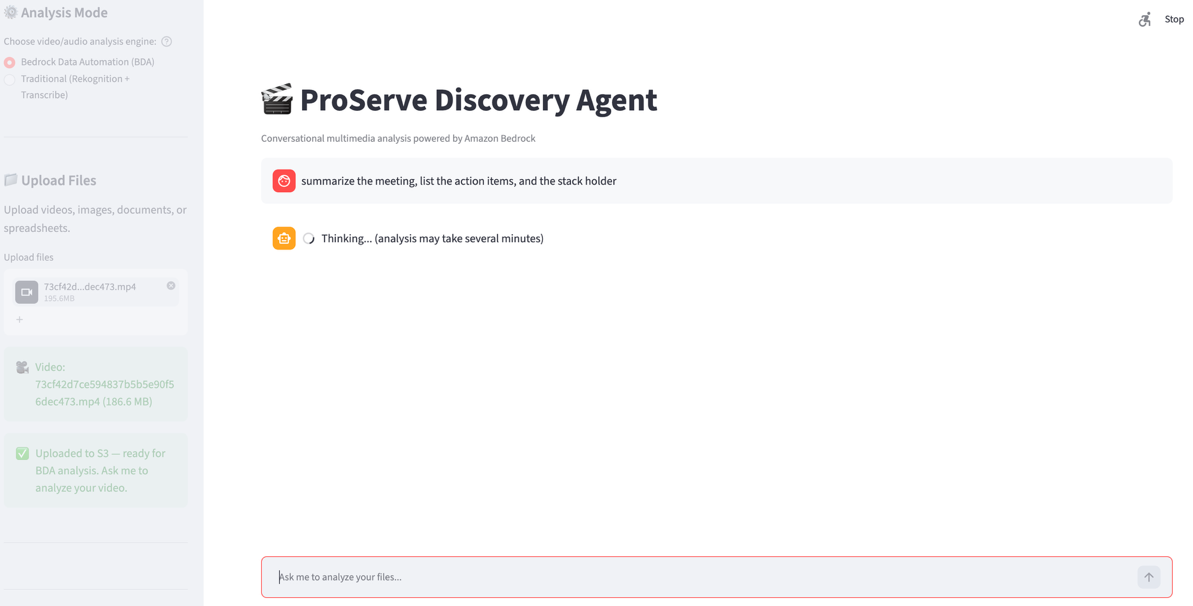
图 1:视频智能聊天界面
关键洞察在于,流水线是在运行时确定的。对于语音内容相关问题,Agent 调用 Amazon Transcribe;对于人脸匹配,转而调用 Amazon Rekognition;对于已处理内容的后续问题,则复用缓存结果。路由决策由模型完成,而不是由应用程序代码完成。
前提条件
要跟随本文实现该方案,你需要具备:
- 一个 AWS 账户,并拥有 Amazon Bedrock 访问权限(已启用 Anthropic Claude Sonnet)和 Amazon Simple Storage Service(Amazon S3)。对于文档处理,需要 Amazon Bedrock Data Automation(BDA),或者 Amazon Rekognition 和 Amazon Transcribe。请参阅 Amazon Bedrock 中按 AWS 区域列出的支持模型。
- Python 3.11 或更高版本,并已安装 Strands Agents SDK(
pip install strands-agents strands-agents-tools)。 - 已配置 AWS Identity and Access Management(IAM)权限的 AWS Command Line Interface(AWS CLI),权限需覆盖前述服务。
- 对 AI Agent 概念有基本了解,例如工具使用和推理循环。
架构
该系统由一个连接多个 AWS AI 服务的 Agent 编排器构成,Amazon S3 则为上传的视频和缓存的分析输出提供存储。Agent 编排器是推理引擎。它基于 Strands Agents SDK 构建,并由 Amazon Bedrock 驱动,使用 Claude Sonnet 或其他支持工具调用的大型语言模型(LLM)。它接收用户的自然语言查询,根据问题决定调用哪些工具,在必要时按顺序执行多个服务调用,并将结果整合为对话式回复。Agent 会维护对话历史,因此后续问题可基于此前分析继续展开,而无需重新处理。
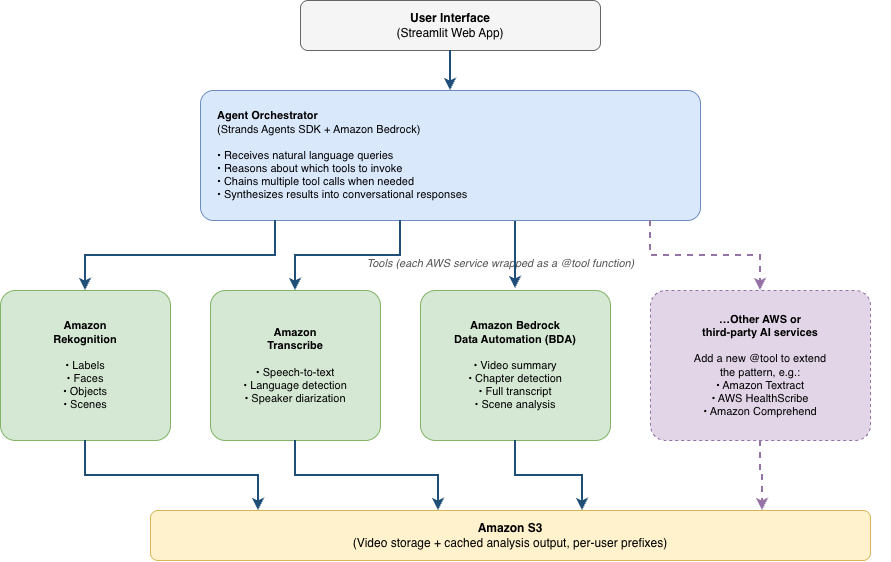
图 2:方案架构
Amazon Rekognition 提供视觉分析能力,包括检测视频帧中的对象、场景、活动和人脸。当用户问题涉及视频中可见的内容时,Agent 会调用 Amazon Rekognition。Amazon Transcribe 可将语音音频转换为文本,支持超过 100 种语言的自动语言检测(参见 Amazon Transcribe 支持的语言),并支持说话人分离。当问题与语音内容有关时,Agent 会使用 Transcribe。Amazon Bedrock Data Automation(BDA)提供了替代分析路径,可通过一次 API 调用完成视频摘要、章节检测和完整转录。当用户希望一步完成全面分析,或者 Amazon Rekognition 或 Transcribe 不可用时,这一方式十分有用。所有上传视频和分析输出都保存在 Amazon S3 中,并通过按用户划分的前缀实现多租户隔离。
这三项服务只是起始集合,并非固定集合。由于 Agent 是根据工具描述而非硬编码的工作流逻辑选择工具,同一架构可以将更多服务作为工具接入。我们将在 扩展至视频之外 一节回到这一点。对于生产部署,我们建议添加 Amazon Bedrock Guardrails,对 Agent 回复实施内容过滤和依据性检查,尤其是在人脸匹配和监控使用场景中,负责任 AI 控制至关重要。
Agentic 编排如何工作
在传统视频分析应用中,开发者会定义一条固定处理流水线:上传视频、运行转录、执行视觉分析、呈现结果。无论具体查询是什么,这种方法都会让每个视频经历相同步骤,而且用户必须等待整个流水线完成后才能提问。Agentic 方法颠倒了这一模式。除了将视频文件上传到 S3 存储桶这一有限的预处理外,Agent 会独立推理每一个问题,并且只调用回答该问题所需的服务。
当用户提交查询时,Agent 首先解析意图:用户需要转录摘要、视觉搜索,还是人脸匹配?然后,它检查相关分析是否已执行并缓存。若没有,它会选择适当工具并执行;当一个工具的输出需要作为另一个工具的输入时,还可能按顺序执行。最后,它将结果组合为自然语言回答。在我们针对 60 分钟视频的测试中,关于某视频的第一个问题通常需要 5—10 分钟,因为此时需要运行转录或视觉分析。对于相同内容的后续问题,Agent 会复用缓存结果,因此可在 1 秒内返回。实际耗时会随视频长度、分辨率以及调用的 AWS 服务而变化。
配置 Agent
以下代码展示了完整的 Agent 配置。我们定义模型提供方、用于引导 Agent 推理行为的系统提示词,以及可用工具集合。通过 Strands,全部编排逻辑——决定调用哪些工具、调用顺序以及如何组合输出——均由 LLM 处理,而不是由应用程序代码处理。这里展示了两个具有代表性的工具实现(search_faces_in_video 和 analyze_with_bda)。其余工具包括 transcribe_video 和 analyze_video_visuals,遵循相同模式,并可在 GitHub 仓库中获取。
from strands import Agent
from strands.models.bedrock import BedrockModel
from tools import (
    transcribe_video, analyze_video_visuals,
    search_faces_in_video, analyze_reference_image,
    analyze_with_bda, upload_video
)

model = BedrockModel(
    model_id="us.anthropic.claude-sonnet-4-5-20250929-v1:0",
    max_tokens=4096
)

SYSTEM_PROMPT = """
You are a video intelligence assistant. For each user query:
1. Determine whether it requires spoken content analysis,
   visual content analysis, or both
2. Check if prior analysis results are already cached
3. Invoke the appropriate tools
4. Synthesize results into a clear answer with timestamps
"""
生产系统提示词约有 250 行源代码。以下简化示例用于说明三项具有代表性的策略——缓存复用、服务回退和多模态编排——而非逐字复现提示词:
# --- Cache management (excerpt) ---
CACHE_GUIDANCE = """
Before invoking any analysis tool, check the cache:
- Call get_cached_result(video_id, analysis_type) first
- If cached results exist and are < 24 hours old, use them
- If the user says "re-analyze" or "fresh analysis", bypass cache
- After any new analysis, store results with cache_result()

# --- Tool fallback behavior ---
If a tool call fails or returns low-confidence results:
- Transcribe failure: suggest BDA as fallback
- Rekognition low confidence (<60%): report uncertainty to user
- BDA timeout: fall back to individual Transcribe + Rekognition calls

# --- Multi-modal orchestration ---
When the query requires both audio and visual understanding:
1. Run Transcribe and Rekognition in parallel when possible
2. Correlate timestamps across modalities
3. Synthesize a unified answer referencing both sources
4. Cite specific timestamps for each claim
"""

agent = Agent(
    model=model,
    system_prompt=SYSTEM_PROMPT,
    tools=[transcribe_video, analyze_video_visuals,
           search_faces_in_video, analyze_reference_image,
           analyze_with_bda, upload_video]
)
生产提示词的其余部分会列出可用工具,并定义文件选择、缓存复用和显式重新分析、BDA 设置与访问被拒绝时的回退、参考图像搜索、转录与字幕、体育赛事集锦、架构图,以及在 BDA 与特定服务分析之间进行选择的工作流。它还对统一的多文件回复进行标准化,要求在清理前进行确认,为后续问题复用先前结果,并应用范围与上传进度防护措施。
通过这一配置,Agent 可自主处理路由、工具调用顺序和回复整合。添加一项新能力(例如检测屏幕上的文字)只需定义新的工具函数并将其加入工具列表,无需修改工作流逻辑。
每项 AWS 服务都以由 @tool 装饰的 Python 函数形式暴露给 Agent。函数签名定义参数,而文档字符串则告知 Agent 应在何时以及如何使用该工具。这个文档字符串至关重要:它相当于该工具的 Agent 使用说明书。以下示例展示了封装 Amazon Rekognition 的人脸搜索工具:
from strands.tools import tool
import boto3

@tool
def search_faces_in_video(
    video_s3_key: str,
    collection_id: str,
    confidence_threshold: float = 80.0
) -> dict:
    """Search for a specific person in video footage.

    Use this tool when the user provides a reference photo
    and asks whether that person appears in a video.
    Requires a face collection created first via
    analyze_reference_image.

    Args:
        video_s3_key: S3 key of the uploaded video
        collection_id: Rekognition collection with the
            indexed reference face
        confidence_threshold: Minimum confidence for a
            match (default 80%)

    Returns:
        Dict with matched_faces containing timestamps
        and confidence scores for each appearance
    """
    rek = boto3.client("rekognition")
    response = rek.start_face_search(
        Video={"S3Object": {
            "Bucket": BUCKET, "Name": video_s3_key}},
        CollectionId=collection_id,
        FaceMatchThreshold=confidence_threshold
    )
English / 原文
With video intelligence powered by agentic AI, you can ask natural language questions about uploaded videos and get answers within seconds. Organizations across media, security, insurance, and professional services are generating more video than their teams can review. Meeting recordings accumulate in shared drives, and security cameras capture weeks of unreviewed footage. Field inspection videos sit in object storage long after the initial review. The information inside these videos is often valuable: a design decision discussed three weeks ago, the exact moment a person arrived at a door, or the sequence of events leading to a vehicle collision. But accessing it has traditionally required watching hours of content manually. The alternative, building custom machine learning (ML) pipelines for each specific question type, demands significant development effort. Each new use case meant new development work:
- A transcription pipeline for meeting queries.
- A computer vision pipeline for visual search.
- A face-matching integration.
In this post, we walk through the architecture and key patterns for building a video intelligence solution that accepts natural language questions and returns answers from video content. The solution uses an agentic architecture that decides at runtime which AWS services to invoke. For previously analyzed content, responses return in under a second. Initial analysis of new videos takes 5–10 minutes depending on length and services required. The complete implementation is available in the companion GitHub repository.
Rather than pre-building a fixed pipeline for each question type, we use the Strands Agents SDK to create a single AI agent that orchestrates Amazon Bedrock, Amazon Rekognition, and Amazon Transcribe based on what the user asks. A major media and entertainment company adopted this approach during an AWS Professional Services engagement. With this solution, their consultants can query recorded discovery session content, extracting design decisions, action items, and stakeholder positions. The result: a reduction in manual review time of approximately 80 percent across a backlog of more than 200 multi-hour recordings, based on the customer’s internal before-and-after comparison of analyst hours per recording (not independently verified).
Solution overview
The solution is an AI agent that accepts video files and makes their content instantly queryable through natural conversation. A user can upload a 90-minute meeting recording and ask “What decisions were made in this meeting?” or “Did anyone mention the budget timeline?” The agent determines whether to invoke transcription, visual analysis, or both, then synthesizes the results into a coherent answer. The same system handles security footage queries (“Did this person appear?”), content analysis (“Summarize the first 30 minutes”), and investigative questions (“Which vehicle changed lanes before the collision?”). No separate processing pipelines are required for each use case.
The following screenshot shows the interface that provides a chat panel for natural language queries and a sidebar for file uploads and analysis mode selection.
Figure 1: The video intelligence chat interface
The key insight is that the pipeline is determined at runtime. The agent calls Amazon Transcribe for spoken-content questions, turns to Amazon Rekognition for face matching, and reuses cached results for follow-up questions about previously processed content. The model handles the routing, not application code.
Prerequisites
To follow along with the implementation in this post, you need:
- An AWS account with access to Amazon Bedrock (Anthropic Claude Sonnet enabled) and Amazon Simple Storage Service (Amazon S3). For document processing, either Amazon Bedrock Data Automation (BDA) or Amazon Rekognition and Amazon Transcribe is required. See Supported models by AWS Region in Amazon Bedrock.
- Python 3.11 or later with the Strands Agents SDK installed (
pip install strands-agents strands-agents-tools). - AWS Command Line Interface (AWS CLI) configured with AWS Identity and Access Management (IAM) permissions for the services listed earlier.
- Basic familiarity with AI agent concepts such as tool use and reasoning loops.
Architecture
The system consists of an agent orchestrator connected to multiple AWS AI services, with Amazon S3 providing storage for uploaded videos and cached analysis outputs. The agent orchestrator is the reasoning engine. It’s built with the Strands Agents SDK and powered by Amazon Bedrock, using Claude Sonnet or another large language model (LLM) that supports tool use. It receives natural language queries from users and determines which tools to invoke based on the question, sequences multiple service calls when needed, and synthesizes the results into conversational responses. The agent maintains conversation history, so follow-up questions build on prior analysis without reprocessing.
Figure 2: Solution architecture
Amazon Rekognition provides visual analysis, including detecting objects, scenes, activities, and faces in video frames. The agent invokes Amazon Rekognition when the user’s question concerns something visible in the video. Amazon Transcribe converts spoken audio to text with automatic language detection across more than 100 languages (see Amazon Transcribe supported languages) and speaker diarization. The agent uses Transcribe when the question relates to spoken content. Amazon Bedrock Data Automation (BDA) offers an alternative analysis path that combines video summary, chapter detection, and full transcription in a single API call. This is useful when the user wants comprehensive analysis in one step, or when Amazon Rekognition or Transcribe aren’t available. All uploaded videos and analysis outputs are stored in Amazon S3 with per-user prefixes for multi-tenant isolation.
These three services are the starting set, not a fixed one. Because the agent selects tools from their descriptions rather than from hard-coded workflow logic, the same architecture accepts additional services as tools. We return to this point in Extending beyond video. For production deployments, we recommend adding Amazon Bedrock Guardrails to enforce content filtering and grounding checks on agent responses, particularly for face-matching and surveillance use cases where responsible-AI controls are essential.
How agentic orchestration works
In a conventional video analysis application, the developer defines a fixed processing pipeline: upload the video, run transcription, perform visual analysis, present results. This approach processes every video through the same steps regardless of the specific query, and users wait for the full pipeline to complete before asking questions. The agentic approach inverts this model. With minimal pre-processing limited to uploading video files to an S3 bucket, the agent reasons about each question independently and calls only the services needed to answer it.
When a user submits a query, the agent first parses the intent: the user wants a transcript summary, a visual search, or a face match? Then it checks whether relevant analysis has already been performed and cached. If not, it selects the appropriate tools, executes them (potentially in sequence when one tool’s output feeds another), and combines the results into a natural language answer. In our testing with 60-minute videos, the first question about a video typically takes 5–10 minutes (while transcription or visual analysis runs). Subsequent questions about the same content return in under a second because the agent reuses cached results. Actual times vary based on video length, resolution, and the AWS services invoked.
Configuring the agent
The following code shows the complete agent setup. We define the model provider, a system prompt that guides the agent’s reasoning behavior, and the set of available tools. With Strands, the entire orchestration logic (deciding which tools to call, in what order, and how to combine their outputs) is handled by the LLM rather than application code. We show two representative tool implementations (search_faces_in_video and analyze_with_bda). The remaining tools, including transcribe_video and analyze_video_visuals, follow the same pattern and are available in the GitHub repository.
from strands import Agent
from strands.models.bedrock import BedrockModel
from tools import (
    transcribe_video, analyze_video_visuals,
    search_faces_in_video, analyze_reference_image,
    analyze_with_bda, upload_video
)

model = BedrockModel(
    model_id="us.anthropic.claude-sonnet-4-5-20250929-v1:0",
    max_tokens=4096
)

SYSTEM_PROMPT = """
You are a video intelligence assistant. For each user query:
1. Determine whether it requires spoken content analysis,
   visual content analysis, or both
2. Check if prior analysis results are already cached
3. Invoke the appropriate tools
4. Synthesize results into a clear answer with timestamps
"""
The production system prompt spans approximately 250 source lines. The following abbreviated example illustrates three representative policies (cache reuse, service fallback, and multi-modal orchestration) rather than reproducing the prompt verbatim:
# --- Cache management (excerpt) ---
CACHE_GUIDANCE = """
Before invoking any analysis tool, check the cache:
- Call get_cached_result(video_id, analysis_type) first
- If cached results exist and are < 24 hours old, use them
- If the user says "re-analyze" or "fresh analysis", bypass cache
- After any new analysis, store results with cache_result()

# --- Tool fallback behavior ---
If a tool call fails or returns low-confidence results:
- Transcribe failure: suggest BDA as fallback
- Rekognition low confidence (<60%): report uncertainty to user
- BDA timeout: fall back to individual Transcribe + Rekognition calls

# --- Multi-modal orchestration ---
When the query requires both audio and visual understanding:
1. Run Transcribe and Rekognition in parallel when possible
2. Correlate timestamps across modalities
3. Synthesize a unified answer referencing both sources
4. Cite specific timestamps for each claim
"""

agent = Agent(
    model=model,
    system_prompt=SYSTEM_PROMPT,
    tools=[transcribe_video, analyze_video_visuals,
           search_faces_in_video, analyze_reference_image,
           analyze_with_bda, upload_video]
)
The rest of the production prompt inventories the available tools and defines workflows for file selection, cache reuse and explicit re-analysis, BDA setup and access-denied fallback, reference-image search, transcription and captions, sports highlights, architecture diagrams, and choosing between BDA and service-specific analysis. It also standardizes unified multi-file responses, requires confirmation before cleanup, reuses prior results for follow-up questions, and applies scope and upload-progress guardrails.
With this configuration, the agent handles the routing, tool sequencing, and response synthesis autonomously. Adding a new capability (for example, detecting on-screen text) requires only defining a new tool function and adding it to the tools list. No workflow logic changes are needed.
Each AWS service is exposed to the agent as a Python function decorated with @tool. The function signature defines the parameters, and the docstring tells the agent when and how to use it. This docstring is critical: It serves as the agent’s instruction manual for the tool. The following example shows the face search tool that wraps Amazon Rekognition:
from strands.tools import tool
import boto3

@tool
def search_faces_in_video(
    video_s3_key: str,
    collection_id: str,
    confidence_threshold: float = 80.0
) -> dict:
    """Search for a specific person in video footage.

    Use this tool when the user provides a reference photo
    and asks whether that person appears in a video.
    Requires a face collection created first via
    analyze_reference_image.

    Args:
        video_s3_key: S3 key of the uploaded video
        collection_id: Rekognition collection with the
            indexed reference face
        confidence_threshold: Minimum confidence for a
            match (default 80%)

    Returns:
        Dict with matched_faces containing timestamps
        and confidence scores for each appearance
    """
    rek = boto3.client("rekognition")
    response = rek.start_face_search(
        Video={"S3Object": {
            "Bucket": BUCKET, "Name": video_s3_key}},
        CollectionId=collection_id,
        FaceMatchThreshold=confidence_threshold
    )
    job_id = response["JobId"]
    # Poll for completion and collect results...
    return {"matched_faces": matches}
The following example shows the BDA tool, which provides comprehensive video analysis (summary, chapters, and transcript) in a single API call:
@tool
def analyze_with_bda(
    s3_uri: str,
    analysis_types: list[str] = ["SUMMARY", "CHAPTERS", "TRANSCRIPT"]
) -> dict:
    """Perform comprehensive video analysis using Amazon Bedrock Data Automation.

    Use this tool when the user wants a full video summary, chapter
    breakdown, or complete transcript, or when Rekognition/Transcribe
    are unavailable. Returns all requested analysis types in one call.

    Args:
        s3_uri: S3 URI of the uploaded video (s3://amzn-s3-demo-bucket/key)
        analysis_types: List of analysis types to perform.
            Options: "SUMMARY", "CHAPTERS", "TRANSCRIPT", "IAB"

    Returns:
        Dict with keys for each requested analysis type,
        including timestamps and confidence scores
    """
    bda = boto3.client("bedrock-data-automation-runtime")
    response = bda.invoke_data_automation_async(
        inputConfiguration={"s3Uri": s3_uri},
        dataAutomationConfiguration={
            "dataAutomationArn": BDA_PROJECT_ARN
        },
        outputConfiguration={"s3Uri": f"s3://{BUCKET}/bda-output/"}
    )
    invocation_arn = response["invocationArn"]
    # Poll for completion...
    result = poll_bda_result(invocation_arn)
    return {
        "summary": result.get("summary"),
        "chapters": result.get("chapters", []),
        "transcript": result.get("transcript")
    }
Multi-step reasoning in action
To illustrate how the agent chains multiple tool calls, consider a user who uploads a reference photo and asks “Did this person appear in my security footage?” The agent must first index the reference face, then search for it in the video. These are two sequential operations that depend on each other. The following trace shows the agent’s internal reasoning:
[Think] This is a face-matching query. I need to index
the reference photo first, then search the video.

[Act] analyze_reference_image(image="reference.jpg")
[Observe] {"faces_detected": 1, "face_id": "face_001",
"confidence": 99.8}

[Think] Face indexed. Now searching the video.

[Act] search_faces_in_video(
video_s3_key="security_cam_july5.mp4",
collection_id="user_collection")
[Observe] {"matched_faces": [
{"timestamp": "00:14:32", "confidence": 97.2},
{"timestamp": "00:47:15", "confidence": 94.8}]}

[Response] Yes, the person appeared twice: at 14:32
(97% confidence) and 47:15 (95% confidence).
The agent determined the correct sequence of operations and handled the dependency between them (the face search requires an indexed collection). It then presented the results conversationally. No application code defined this sequence. The model reasoned through it based on the tool descriptions and the user’s question.
For comprehensive analysis (when the user asks “analyze this video” or “summarize this recording”), the agent can invoke Amazon Bedrock Data Automation (BDA) instead of calling Amazon Rekognition and Transcribe separately. BDA produces a video summary, chapter-by-chapter breakdown with timestamps, and full transcript in a single asynchronous API call:
[Think] The user wants a full summary. BDA provides summary +
chapters + transcript in one call, more efficient than
running Rekognition and Transcribe separately.

[Act] analyze_with_bda(s3_uri="s3://amzn-s3-demo-bucket/meeting.mp4")
[Observe] {"summary": "Team discussed Q3 roadmap...",
"chapters": [{"title": "Introductions", "start": "00:00"},
{"title": "Roadmap Review", "start": "05:32"}, ...],
"transcript": "Welcome everyone. Let's start with..."}

[Response] Here's the meeting summary with chapters:
Summary
The team discussed the Q3 roadmap...
Chapters
- 00:00 - Introductions
When results are ambiguous, the agent communicates uncertainty explicitly. A borderline confidence score (for example, 62 percent) produces a qualified answer: “I found a possible match at 14:32, but the confidence is low, so you may want to verify manually.” If transcription fails because of poor audio, the agent suggests alternatives: “The audio quality is too low for reliable transcription. Would you like me to try visual analysis of the presentation slides instead?”
Example use cases
The agentic pattern applies broadly to scenarios where users need to extract specific information from video content without knowing in advance which analysis type is required.
Meeting intelligence – A team member joining a project mid-stream uploads prior meeting recordings and asks targeted questions: “What architecture decisions were made in April?”, “When did the team agree to use GraphQL?”, or “Summarize discussions about the authentication approach.” The agent transcribes, searches, and summarizes, returning answers with timestamps that reference the specific moment in the recording.
Security and access monitoring – A building manager uploads lobby camera footage with a photo of an expected visitor and asks “Did this person enter the building this week? When?” The agent runs face matching against the video and returns specific timestamps with confidence scores.
Claims investigation – An insurance adjuster uploads dash-cam footage and asks “Describe the sequence of events before the collision” or “Which vehicle was in the wrong lane?” The agent combines visual scene analysis with audio (verbal reactions, horns) to reconstruct the event timeline.
The three examples above all analyze video, but nothing about the architecture is video-specific. The agent selects tools from their docstrings, so adding a new capability (or a new modality entirely) is a matter of wrapping another service as a @tool function and describing when to use it. No workflow logic changes. The same orchestrator, cache, and per-user isolation apply unchanged.
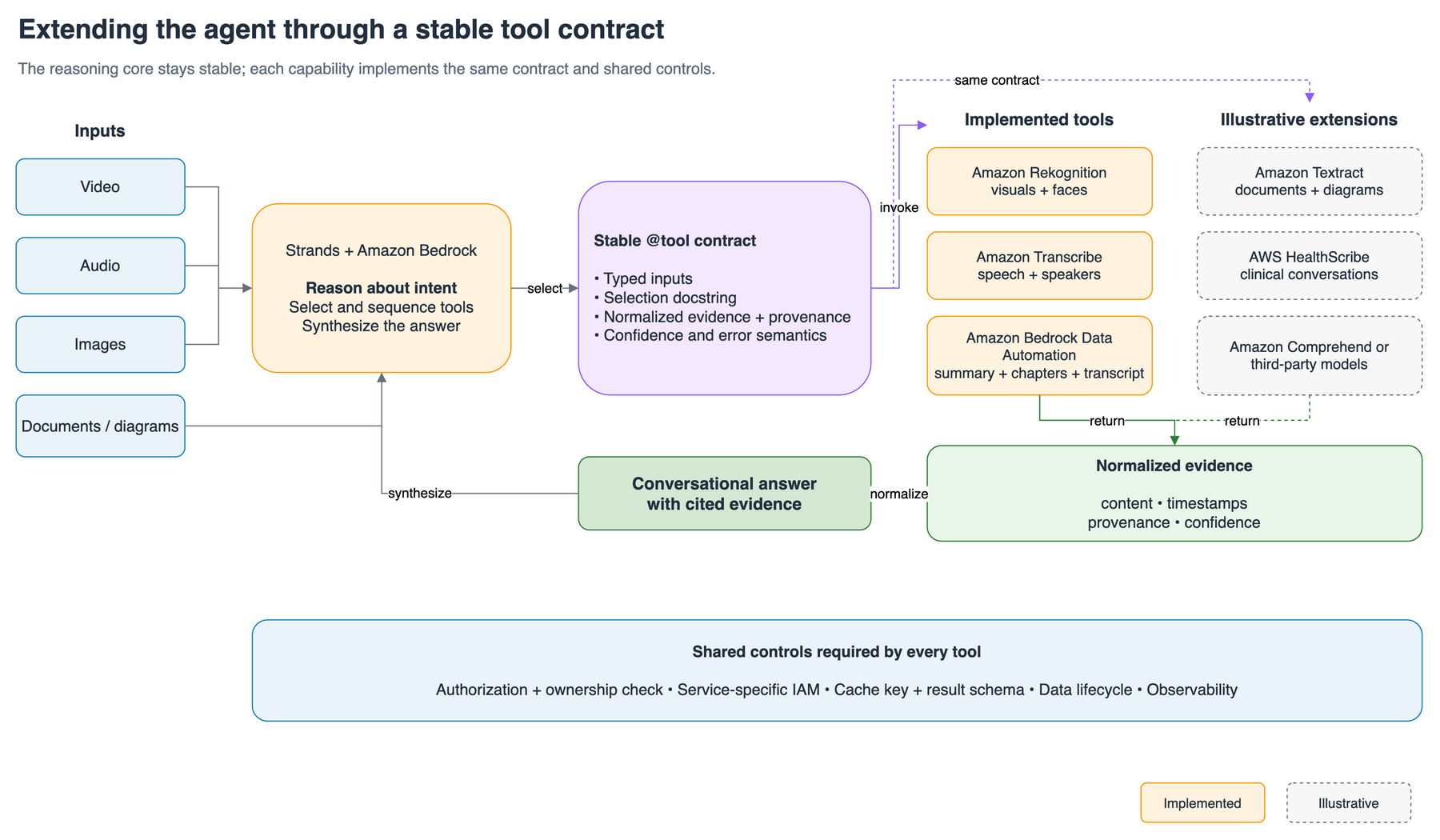
Figure 3: Extending the pattern to other modalities
That makes the pattern a general template for multi-modal AI assistants, using either AWS services or third-party models:
- Document and diagram understanding with Amazon Textract. A discovery session rarely lives only in video. Add a Textract tool to extract text, tables, and form fields from architecture diagrams and working documents supplied as PDFs, and the agent can cross-reference what was drawn on a whiteboard with what was said in the recording. This enriches the same conversational session that already answers questions about the meeting audio.
- Clinical conversations with AWS HealthScribe. Point the same pattern at a clinician-patient audio file and a HealthScribe tool returns a structured clinical note (a turn-by-turn transcript plus extracted sections such as chief complaint and treatment plan), so a user can ask “What follow-up was recommended?” against the recording.
- Entity and sentiment extraction, or a third-party model. An Amazon Comprehend tool can pull entities, key phrases, and personally identifiable information (PII) from any transcript the agent produces. A model available on Amazon Bedrock (including third-party models) can be wrapped the same way for domain-specific reasoning.
In each case the extension point is the tool contract, not the pipeline. A team that has built the video assistant already has the scaffolding (orchestration, caching, authentication, and per-user isolation) to stand up an AI assistant for a different modality by adding tools.
Cost considerations
The per-query cost depends on which AWS services the agent invokes. After the initial analysis (transcription or visual processing), follow-up questions about the same video only incur Amazon Bedrock reasoning costs because results are cached. The following table shows approximate costs for a 60-minute video:
| Service | Operation | Approximate cost |
|---|---|---|
| Amazon Transcribe | 60-minute audio transcription | $1.44 |
| Amazon Rekognition | Face search (60-min video) | $6.00* |
| Amazon Rekognition | Label detection (60-min video) | $6.00* |
| Amazon Bedrock | Agent reasoning (per turn) | $0.05–$0.15 |
| Amazon S3 | Storage (500 MB, 24 hours) | <$0.01 |
The $6.00 Amazon Rekognition cost is one-time per-video costs (subsequent queries only incur Bedrock reasoning costs).
Based on AWS service pricing as of July 2025 and the preceding cost table, a typical transcript-based query on a 60-minute video costs approximately $1.50 for the initial transcription plus Bedrock reasoning. Subsequent questions about the same transcribed content cost only $0.05–$0.15 per turn, covering only the Bedrock inference call. Actual costs depend on model selection, input length, and AWS Region. For current pricing, see Amazon Bedrock pricing, Amazon Transcribe pricing, and Amazon Rekognition pricing.
Deployment
The solution deploys on Amazon Elastic Container Service (Amazon ECS) with AWS Fargate. The Streamlit application and the agent runtime run in Fargate tasks behind an internal Application Load Balancer, and an Amazon CloudFront distribution is the only public entry point. CloudFront reaches the load balancer through a virtual private cloud (VPC) origin, so the load balancer stays in private subnets with no route to an internet gateway and isn’t directly reachable from the internet. CloudFront also terminates viewer TLS using its default *.cloudfront.net certificate, which provides a publicly trusted HTTPS endpoint without a custom domain or an AWS Certificate Manager certificate. Amazon Cognito handles authentication (invitation-only, with mandatory multi-factor authentication (MFA) through a time-based one-time password (TOTP) by default), and uploads and cached output are stored in Amazon S3 under per-user prefixes with a 24-hour lifecycle policy.
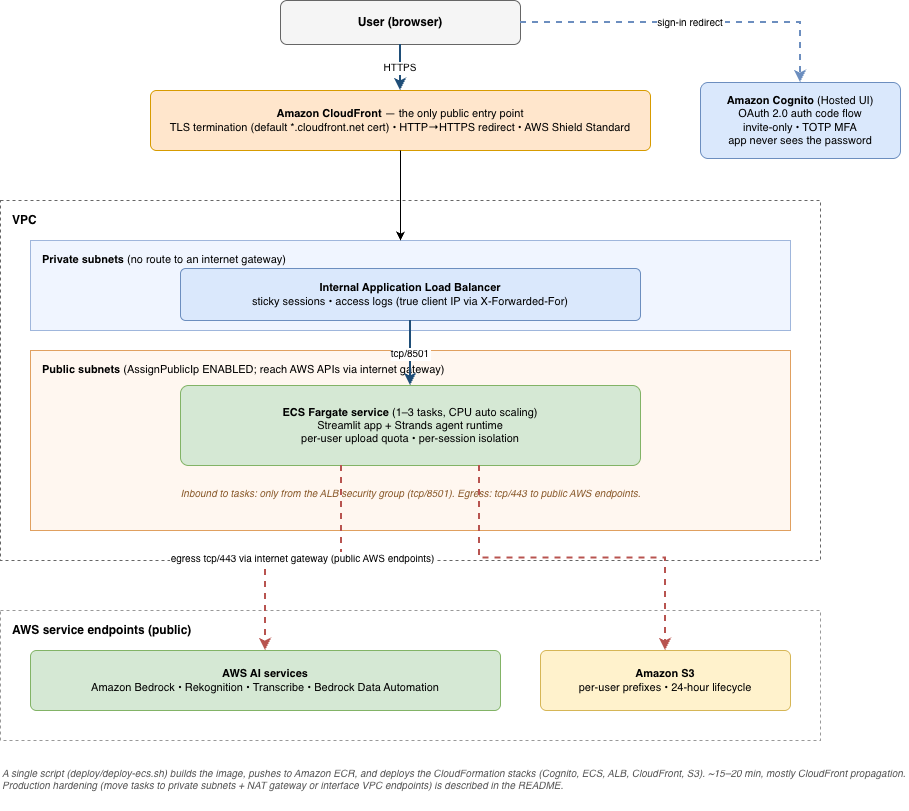
Figure 4: Deployment architecture on Amazon ECS and AWS Fargate
A single script (./deploy/deploy-ecs.sh) builds the container image, pushes it to Amazon Elastic Container Registry (Amazon ECR), and deploys the AWS CloudFormation stacks. Deployment typically completes in 15–20 minutes, most of which is CloudFront propagation. Full deployment prerequisites, the AllowSelfSignup parameter and its trade-offs, and step-by-step instructions are in the repository README.
Development workflow
Kiro is an AI-powered development environment that supports spec-driven software development by turning high-level ideas into structured requirements, designs, and implementation tasks. We used its spec workflow, persistent project context, and agent hooks to move from concept to a deployable sample while building security into each capability as it took shape.
Specs defined each capability before implementation. The face-matching spec defined inputs (reference photo plus video), expected behavior (index the face, search, and return timestamps), and edge cases (no face detected, low-confidence matches). The transcription spec covered multi-language detection, speaker diarization, and cache behavior for repeated queries. Kiro generated implementation tasks from each spec and maintained context across the full feature lifecycle. Based on the team’s prior experience building similar integrations, this compressed what they estimated would typically be a multi-week effort into a focused sprint.
Threat modeling ran alongside the specs, not after them. As each capability was specified, we modeled how it could be abused and captured the result in a living threat model (see docs/threat-model.md in the companion repository). The model works through concrete kill chains (authentication bypass, network exposure, agent exploitation through prompt injection, over-privileged IAM, and audit evasion) and assigns each threat a disposition. Every Critical and High finding was remediated in the sample. The items that remain open are recorded there with an explicit decision (accepted residual, or a documented production change). The controls described in the next section are outputs of that process rather than an afterthought.
Security scanning was embedded in the development loop. Kiro Hooks ran automated static and infrastructure-as-code scans on changes as they landed, using tooling such as the Automated Security Helper (ASH), and the container image repository is created with scan-on-push enabled. Findings came back as tasks in the same workflow that produced the feature, so a misconfiguration surfaced while the code was being written instead of in a separate review at the end. The net effect is a shift-left posture: A single small team held feature velocity and security rigor in one workflow, and secure-by-design was the default path rather than an extra gate.
Security considerations
Video often contains sensitive business discussions and identifiable people, so a multi-user deployment must control access, isolate each user’s data, and limit the effect of any one user’s actions.
The reference deployment implements four primary controls:
- Invitation-only Amazon Cognito accounts with mandatory MFA.
- Per-user Amazon S3 prefixes enforced by ownership validation at every tool boundary.
- An internal Application Load Balancer exposed only through CloudFront.
- Per-user upload quotas that limit cross-tenant resource exhaustion.
Production deployments should still decide whether to use a custom domain with a stricter viewer TLS policy, attach AWS WAF, expand audit logging and monitoring, and define data-handling requirements for face collections, transcripts, and cross-Region Amazon Bedrock model inference. Work with your legal and privacy teams to define applicable consent, retention, deletion, and residency requirements. For the full control-by-control analysis, accepted residuals, kill chains, and hardening checklist, see docs/threat-model.md and the README’s Security Considerations for Production in the companion repository.
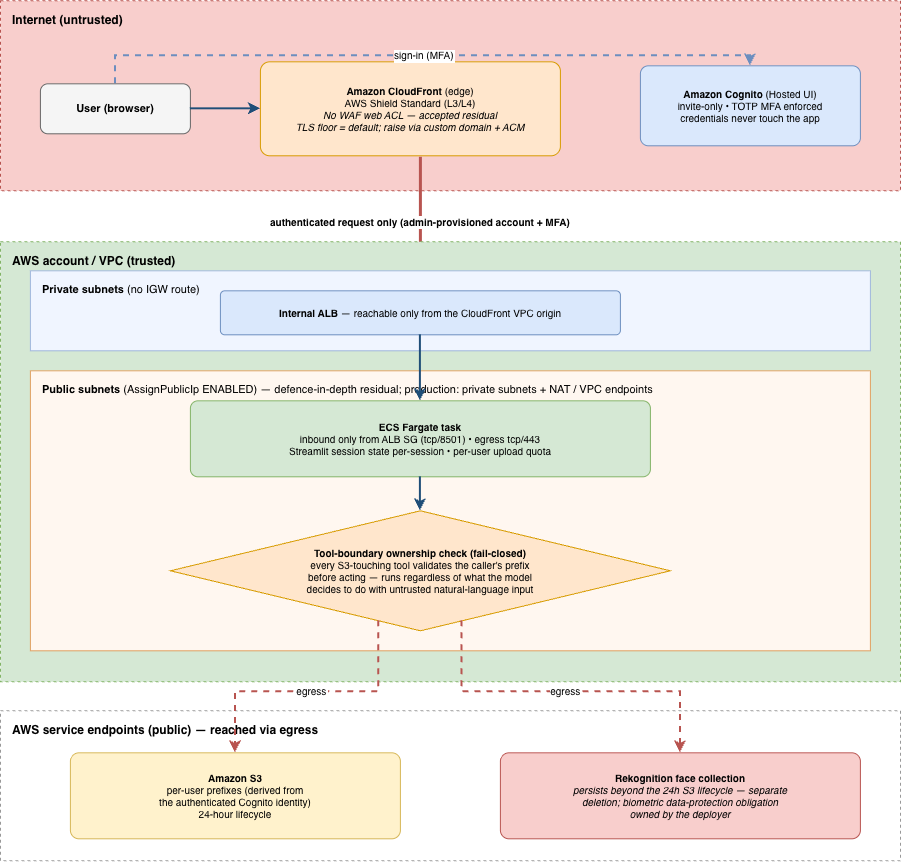
Figure 5: Security controls in the reference deployment
Current limitations
Videos longer than two to three hours require several minutes for initial transcription, though subsequent queries return near-instantly from cache. Face-matching accuracy depends on the quality of the reference photo. Clear, well-lit images produce the best results, while blurry crops from group photos might yield lower confidence. Transcription accuracy degrades with heavy background noise or overlapping speakers. The agent surfaces this when it detects quality issues. The web interface accepts MP4, MOV, AVI, and MKV files up to 2 GB, a limit set deliberately below the Fargate task’s memory because Streamlit buffers uploads in memory. For larger media, upload directly to Amazon S3 under your user prefix and ask the agent to analyze the object by its URI (BDA accepts video objects up to 10 GB). Concurrent capacity is bounded by task ephemeral storage and the per-user quota (roughly six concurrent users per task at the defaults), and auto scaling adds tasks under CPU load.
Clean up
If you deployed this solution and no longer need it, remove the provisioned resources to avoid ongoing charges. Teardown spans three CloudFormation stacks that are connected by parameter values rather than cross-stack exports, so CloudFormation does not enforce their dependency order. After emptying the S3 buckets, delete the stacks in this order: (1) video-analytic-agent-ecs (application), (2) video-analytic-cognito (identity), and (3) video-object-locator-infra (storage). The templates also leave behind the Amazon ECR repository and images, and the AWS Key Management Service (AWS KMS) key remains on its pending-deletion schedule.
Amazon Rekognition face collections require separate cleanup. The application creates them at runtime, so CloudFormation doesn’t own them, and they persist independently of the video bucket’s 24-hour S3 lifecycle. Deleting uploaded objects or stacks does not delete indexed faces. List and delete each collection explicitly. The full teardown sequence, including emptying the versioned S3 buckets first, is in the repository README under Teardown / clean up.
Conclusion
In this post, we showed the architecture and key patterns for building a conversational video intelligence solution using the Strands Agents SDK, Amazon Bedrock, Amazon Rekognition, and Amazon Transcribe. With this agentic architecture, you no longer need to pre-build processing pipelines for each question type. Instead, a single agent reasons about which services to invoke at runtime based on the user’s natural language query. Adding new capabilities requires only a new @tool function and a prompt update, not a new pipeline.
To apply this pattern to your own use case, start by configuring a Strands agent with Bedrock as the model provider and wrapping each relevant AWS service as a tool function with a descriptive docstring. Then define a system prompt that guides reasoning for your domain and deploy on ECS Fargate for access or run locally for prototyping. The full source code, deployment automation, and all tool implementations are available in the companion GitHub repository.
To learn more about the services used in this solution, visit:
For related reading, see Introducing Strands Agents, an Open Source AI Agents SDK on the AWS Machine Learning Blog.
About the authors
Michael Li
Michael is a Senior Security Consultant with AWS Professional Services, where he helps customers design and secure cloud and AI-driven workloads. His work spans identity, application security, data privacy, and the security architecture of ML and generative AI solutions, and he is particularly interested in how AI-assisted development impacts secure-by-design implementation. Outside work, he’s an avid hiker, marathon runner, and reader.
Kara Yang
Kara is a Data Scientist at AWS Professional Services, where she delivers machine learning and generative AI solutions across energy, automotive, aerospace, and manufacturing. She specializes in production-grade agent systems, RAG pipelines, and LLM evaluation frameworks. She is passionate about emerging AI technologies and helping customers turn complex challenges into practical solutions.