借助 GitHub Security Lab Taskflow Agent 实现 AI 驱动的模糊测试
英文标题:AI-powered fuzzing with the GitHub Security Lab Taskflow Agent
GitHub Security Lab 推出了基于 Taskflow Agent 的 Fuzzing Taskflow,可自动为 C/C++ GitHub 项目识别入口点、生成 fuzz harness、运行 AFL++、分析覆盖率并分诊崩溃。该流程以 Claude Sonnet 5 为默认模型,通过 LLM Agent 负责决策、MCP 工具负责执行的架构,实现覆盖率反馈循环、结构感知输入生成和持续演进的语料库。系统会对崩溃进行最小化、去重、根因分析,并生成包含修复建议的漏洞报告,但官方强调所有结论和补丁仍需人工审查。对于开发者而言,该工具有望降低持续模糊测试所需的人力投入,并帮助未开展或已开展 fuzzing 的项目提升覆盖率、发现新漏洞。
 75.6 KB
 33.6 KB
 84.8 KB
 40.0 KB
 60.5 KB
 27.6 KB
 127.1 KB
 52.6 KB
 77.9 KB
 37.0 KB
 70.2 KB
 34.5 KB
 86.5 KB
 42.8 KB
 277.0 KB
 35.9 KB
 53.0 KB
 160.5 KB
 29.8 KB
 31.0 KB
中文
如果你刚接触模糊测试,并希望先学习基础知识,请查看我们的 Fuzzing 101 课程。
持续模糊测试并不是能够解决所有问题的魔法方案。即使已经加入 OSS-Fuzz 多年的项目,仍可能隐藏关键漏洞,而原因几乎总是相同:需要有人持续关注覆盖率,为尚未触达的代码编写新的 harness,并分诊另一端产出的崩溃。换言之,模糊测试仍然需要人工参与。
因此,我不断问自己一个很自然的问题:这些人工工作中,究竟有多少可以真正交给 LLM Agent?
这正是我构建 Fuzzing Taskflow 的原因:它是一条面向 C/C++ 项目的自主模糊测试流水线。你只需将它指向一个 GitHub 仓库,其余工作均由它完成:识别合适的入口点、分析构建系统、编写 harness、运行 AFL++、读取覆盖率报告、改进 harness、分诊每一次崩溃,并为每个唯一漏洞编写漏洞报告,全程无需人工看护。
Fuzzing Taskflow 构建于 GitHub Security Lab Taskflow Agent 之上。后者是我们用于编写 LLM 驱动安全自动化能力的框架,因此,这条流水线被表示为一组由 Agent 端到端运行的 taskflow。
本文将带你了解它的工作方式及其背后的设计决策。开始吧!
如何运行
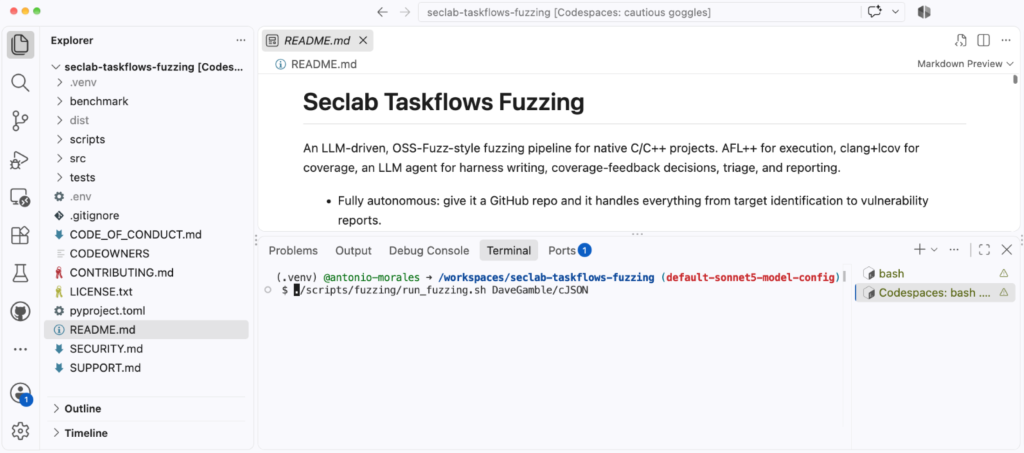
最简单的运行方式是访问 https://github.com/GitHubSecurityLab/seclab-taskflows-fuzzing 并启动一个 Codespace。
随后,按如下方式运行脚本:
./scripts/fuzzing/run_fuzzing.sh PROJECT
例如:
./scripts/fuzzing/run_fuzzing.sh tukaani-project/xz
就是这样。参数只是一个 GitHub owner/repo 标识。之后,Agent 会自行处理全部准备步骤:
- 安装 AFL 等软件
- 克隆仓库
- 识别代码中最相关的函数
- 为这些函数创建 fuzz target
如果你只想在投入一次长时间测试活动前进行快速冒烟测试,可以将其指向一个较小的项目:
./scripts/fuzzing/run_fuzzing.sh DaveGamble/cJSON
运行前需要提醒一句:这个 taskflow 会在宿主机上直接运行 afl-fuzz、clang,以及由 LLM 选择的任意构建命令,中间没有容器隔离。理论上,遭遇提示词注入的 Agent 可以执行当前用户能够执行的任何操作。因此,请务必只在一次性环境中运行它(例如 Codespace 或临时 VM),并且不要使用提升后的权限。
模型选择
一些前沿模型会对其输出施加安全护栏。对于模糊测试 taskflow,我们默认使用 Claude Sonnet 5,因为它通过了我们所有的内部测试,未出现问题。你可以通过修改以下文件选择其他模型:src/seclab_taskflows_fuzzing/configs/model_config.yaml。
一分钟了解架构
在深入有趣的部分之前,先了解各个组件如何组合会有所帮助。系统共有三层:
- 一个Shell 驱动程序(run_fuzzing.sh),用于将流水线的各个阶段串联起来。
- 一组 taskflow YAML,每个阶段对应一个;它们本质上是提示词,用于告诉 LLM Agent 在每一步应当做什么。
- 一组 MCP 工具,由 Agent 调用以实际完成工作:运行 AFL、编译 harness、存储崩溃、读取覆盖率报告等。
我最重视的设计原则是职责的清晰分离:LLM Agent 负责决策,MCP 工具负责执行。Agent 决定测试什么、编写什么样的 harness,以及下一步应追踪哪个覆盖率缺口。工具仅暴露诸如 run_afl_for 或 compile_harness 的基础能力。Agent 从不直接调用 AFL 或 clang;它利用这些构建模块组合出流水线。所有状态均存储在 SQLite 数据库(fuzz_context.db)中,因此各阶段不会在内存中相互传递数据,只会通过数据库进行交互。
还有一个虽小但重要的细节:每个 harness 都会构建两次。AFL 的边覆盖率插桩非常适合引导 fuzzer,但对于人类可读的覆盖率报告毫无帮助。因此,每个 harness 都会生成 .afl 二进制文件(使用 afl-clang-lto -fsanitize=address,undefined 构建)和 .cov 二进制文件(使用 clang -fprofile-instr-generate -fcoverage-mapping 构建)。.afl 二进制文件负责模糊测试;.cov 二进制文件则在之后重放 AFL 队列,以生成真实的源代码行覆盖率和分支覆盖率。
覆盖率反馈循环
这是整个流水线的核心,也是最直接自动化本文开头所述人工工作流的部分。
如果你曾尝试过手动提高模糊测试覆盖率,就会知道这是一个如下所示的迭代过程:
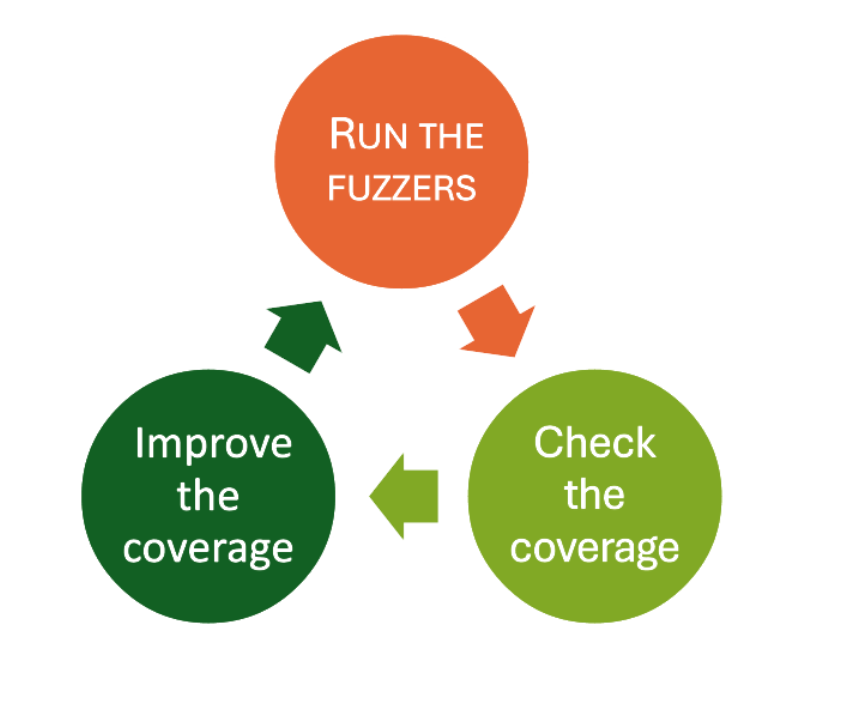
过去,“检查覆盖率”这一步由我完成:我会手动阅读 LCOV 报告,寻找未覆盖的分支。“改进覆盖率”也由我完成:这次则是编写新的 harness 或构造新的输入。Fuzzing Taskflow 将这两项工作都交给了 Agent。
每次迭代中,Agent 都会针对每个 harness 在给定时间预算内运行 AFL,随后通过 .cov 二进制文件重放队列以获取真实覆盖率报告,再读取未覆盖分支的列表。根据发现的情况,它会从以下操作中选择一种:
- 添加一个经过构造、可触达未覆盖分支的新 seed
- 编辑 harness 源码以调用额外的 API
- 使用 guard 正在比对的魔术常量,自动扩充 AFL 字典
- 如果缺口属于不值得追踪的低频错误路径或供应商代码,则直接跳过
时间预算会在每次迭代中翻倍:
30s → 60s → 120s → 240s → 480s → 960s(约每个 target 32 分钟)
其思路是在早期采用成本低、耗时短的轮次,因为此时还有很多容易获取的覆盖率;在后期采用耗时更长的轮次,因为 fuzzer 需要更多时间来突破困难的 guard。
与我的人工工作流一样,这里也需要回答一个问题:何时停止? 在这里,循环采用平台期检测:一旦连续两次迭代的覆盖率增幅都低于可配置阈值(默认是绝对行覆盖率增加 1%),循环就会认定收益已经递减,并继续处理下一个目标。这样可以避免 Agent 为挤出最后零点几个百分点的覆盖率而耗费数小时算力。
结构感知模糊测试
AFL 默认的字节级变异器(位翻转、算术运算、块拼接)非常擅长处理二进制格式,但对结构化的文本输入表现不佳。经典解决方案是为每种格式手写自定义变异器,但这项工作很繁琐。这次我希望流水线替我完成这项工作,因此它提供了四种互补机制来生成结构感知输入。
1. 按格式提供的字典和自定义变异器。 对于输入格式可被识别的目标(JSON、XML、正则表达式、PNG、长度前缀二进制 TLV),taskflow 内置了预先构建的 AFL 字典和 LLVMFuzzerCustomMutator C 文件。JSON 变异器可进行 token 拼接和配对括号复制;XML 变异器了解标签、实体和 billion-laughs token;正则表达式变异器则携带真实的 ReDoS 模式。每个变异器会将一半变异操作交回 AFL 默认的字节变异器,以保留引擎的随机性,而不是与之对抗。
2. 源码级字典。 对于流水线无法识别的格式,它会通过扫描目标自身的 .c/.h 文件,即时生成自定义变异器。它会提取字符串字面量和 32 位数值常量(来自 #define、case 和 enum),过滤噪声后将其用作拼接 token。其直觉很简单:解析器检查的最有价值魔术值,通常就写在它自身的源代码某个位置。
3. 通过覆盖率驱动扩充的动态生成 AFL 字典。 同一组源代码 token 也会在第一次迭代前被输出为 AFL 经典字典,其中数值常量会以两种字节序写入,因此无论宿主机字节序如何,fuzzer 都可以满足针对 4 字节魔术值的 memcmp 比较。随后,在每次覆盖率步骤之后,流水线都会查看未覆盖行附近的 guard(strncmp、memcmp、case 0xN、== ‘X’),并追加找到的任何新 token。该字典会真正朝着 fuzzer 目前尚无法抵达的代码方向增长。
4. 语料库拼接算子。 智能变异器还可以从语料库目录加载文件,并将其随机子区域拼接到输入中。这是一种重组式算子,而 AFL 自带的 havoc 并不擅长完成这项工作。
演进中的语料库
悄然降低模糊测试效率的一件事,是丢弃既有进展。如果每次运行都从原始 seed 开始,你就必须反复付出重新发现相同路径的成本。
为避免这种情况,每个 harness 都拥有一个可跨迭代、跨完整测试活动保留的稳定语料库目录:
/corpus/harness_/
每次迭代结束时,AFL 队列都会合并到该目录中,并通过 afl-cmin 控制其规模。其效果是:昨天发现的有价值输入会带入今天的运行,上周测试活动中找到的输入也会带入本次活动。如果你停止后重新启动一次测试活动,不会丢失任何内容。
崩溃分诊和漏洞报告
发现崩溃只完成了一半工作。任何做过根因分析的人都知道,分诊往往是整个过程中最繁琐的部分。这也是 Agent 表现出色的另一处场景。
模糊测试循环结束后,系统会自动运行三个阶段。首先,使用 afl-tmin 最小化每次崩溃,在 ASan 下重放以捕获堆栈跟踪,并通过 stack-top hash 去重——即取顶部经过规范化处理的栈帧;模板、内联命名空间和 LTO 后缀都会被移除,使语义相同的崩溃归并在一起。其次,会针对当前二进制文件重放先前已知的崩溃,以确认上游修复是否已经解决它们。第三,Agent 会读取 harness 源码和发生崩溃的函数,从公开 API 向后追溯调用链,并为每次崩溃编写独立的 Markdown 报告。
每份报告会给出以下结论之一:
- vulnerability
- library_hardening
- harness_bug
- OOM
- timeout
- assertion_failure
- duplicate
区分真正的 vulnerability(可通过公开 API 触达并可利用)与仅仅是 harness_bug(漏洞位于我们自己的 harness 中,而非库中),正是过去需要我坐下来手动追踪代码才能完成的判断。每份报告都包含带有 file:line 引用的根因分析、可达性论证、可利用性评估、以 unified diff 形式给出的建议修复方案,以及回归测试草案。
需要特别说明的是,建议补丁被标记为“需要审查”是有原因的。Agent 的分析能力受限于模型对目标代码的理解,它确实可能出错。请将这些结论视为为人工审查准备充分的起点,而不是最终结果。
实时仪表盘
运行自主测试活动却无法看到其工作过程会令人不安,因此流水线会将所有信息发布到一个实时 HTML 仪表盘中。只要启动测试活动,它就会在后台自动启动,并监听 8765 端口。在 Codespace 中,该端口会被自动转发,因此你可以在任意浏览器中打开它,并通过仪表盘实时观察测试活动的进展。
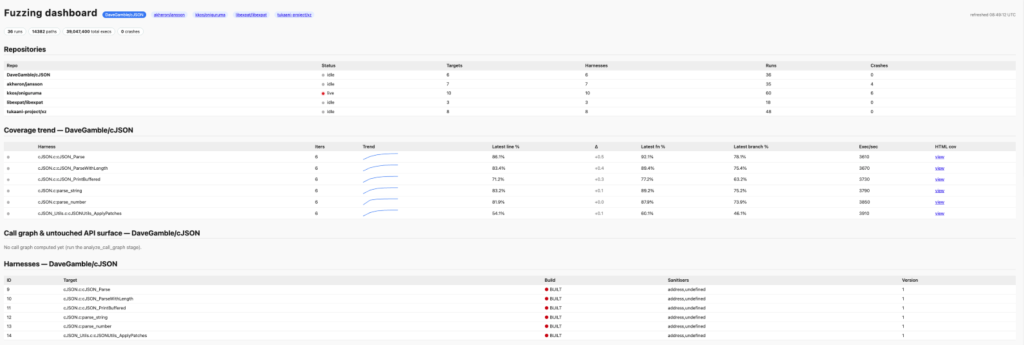
该页面展示的内容包括:
- 每个 harness 的“运行中”状态脉冲
- 带内联迷你趋势图的覆盖率趋势表
- 崩溃热力图
- 迭代时间线
结论
我启动这个项目的动力,来自每位安全研究人员都非常熟悉的局限:模糊测试有效,但如果没有人工关注,它无法规模化;而这种人工关注正是瓶颈。Fuzzing Taskflow 是我为后移这一瓶颈所做的尝试:将重复性工作——编写 harness、读取覆盖率、追踪缺口、分诊崩溃——交给 LLM Agent,同时保持 Agent 判断与执行实际工作的工具之间清晰的职责分离。
如果你是 C/C++ 项目的维护者,请试用它。如果你的项目此前从未进行过模糊测试,这个工具将帮助你快速起步。如果你的项目_已经_进行过模糊测试,那么该工具或许能通过提高模糊测试覆盖率来帮助发现新漏洞。
源代码已经开源,因此如果你遇到任何 bug,请创建 issue。也欢迎贡献!
English / 原文
If you’re new to fuzzing and want to learn the fundamentals first, check out our Fuzzing 101 course atgh.io/fuzzing101.
Continuous fuzzing is not a magic solution that solves all your problems . Even projects that have been enrolled in OSS-Fuzz for years can still hide critical bugs, and the reason is almost always the same: someone needs to keep an eye on coverage, write new harnesses for the code that nobody is reaching, and triage the crashes that come out the other end. In other words, fuzzing still needs a human in the loop.
So the natural question I kept asking myself was: how much of that human work can we actually hand over to an LLM agent?
That is what led me to build the Fuzzing Taskflow, an autonomous fuzzing pipeline for C/C++ projects. You only need to point it at a GitHub repository, and it does the rest: it identifies the suitable entrypoints, analyzes the build system, writes the harnesses, runs AFL++, reads the coverage reports, improves the harnesses, triages every crash, and writes a vulnerability report for each unique bug, all without a human babysitting it.
The Fuzzing Taskflow is built on top of the GitHub Security Lab Taskflow Agent, our framework for writing LLM-driven security automation, so the pipeline is expressed as a set of taskflows that an agent runs end to end.
In this post, I’ll walk you through how it works and the design decisions behind it. Let’s get going!
How to run it
The simplest way to run it’s just to go to https://github.com/GitHubSecurityLab/seclab-taskflows-fuzzing and start a codespace.
Then, run the script like this:
./scripts/fuzzing/run_fuzzing.sh PROJECT
So, for example:
./scripts/fuzzing/run_fuzzing.sh tukaani-project/xz
That’s it. The argument is just a GitHub owner/repo slug. Then, the agent, takes care of all the preliminary steps on its own:
- Installing software such as AFL
- Cloning the repository
- Identifying the most relevant functions in the code
- Creating fuzz targets for those functions
If you just want a quick smoke test before committing to a long campaign, point it at something small:
./scripts/fuzzing/run_fuzzing.sh DaveGamble/cJSON
A word of warning before you run it: this taskflow runs afl-fuzz, clang, and arbitrary build commands chosen by the LLM directly on the host, with no container in between. A prompt-injected agent could, in principle, do anything your user can. So please run it only inside a disposable environment (e.g., a Codespace or a throwaway VM), without elevated privileges.
Model selection
Some frontier models impose security guardrails on their outputs. For the fuzzing task flow, we use Claude Sonnet 5 by default because it passed all of our internal tests without issues. You can choose a different model by modifying the following file: src/seclab_taskflows_fuzzing/configs/model_config.yaml.
The architecture in one minute
Before getting into the interesting parts, it helps to know how the pieces fit together. There are three layers:
- A shell driver (run_fuzzing.sh) that chains the pipeline stages together.
- A set of taskflow YAMLs , one per stage, which are essentially the prompts that tell the LLM agent what to do at each step.
- A set of MCP tools that the agent calls to actually do the work: run AFL, compile a harness, store a crash, read a coverage report, and so on.
The design rule I cared about most is a clean separation of responsibility: the LLM agent owns the decisions, and the MCP tools own the execution. The agent decides what to fuzz, what harness to write, and what coverage gap to chase next. The tools just expose primitives like run_afl_for or compile_harness. The agent never calls AFL or clang directly; it composes the pipeline out of these building blocks. All the state lives in a SQLite database (fuzz_context.db), so the stages never hand data to each other in memory, only through the database.
One small but important detail: each harness is built twice. AFL’s edge instrumentation is great for guiding the fuzzer but useless for human-readable coverage reports. So every harness becomes both a .afl binary (built with afl-clang-lto -fsanitize=address,undefined) and a .cov binary (built with clang -fprofile-instr-generate -fcoverage-mapping). The .afl binary does the fuzzing; the .cov binary replays AFL’s queue afterwards to produce real source-line and branch coverage.
The coverage-feedback loop
This is the heart of the whole pipeline, and it’s the part that most directly automates the manual workflow I described at the start.
If you have ever tried to improve fuzzing coverage by hand, you’ll know that it’s an iterative process that looks like this:
The “check the coverage” step used to be completed by me, manually reading an LCOV report looking for uncovered branches. The “improve the coverage” step was also completed by me, this time, writing a new harness or crafting a new input. The Fuzzing Taskflow hands both of those steps to the agent.
Each iteration, for each harness, the agent runs AFL for a time budget, replays the queue against the .cov binary to get a real coverage report, and then reads the list of uncovered branches. Based on what it finds, it picks one of a handful of actions:
- Add a new seed crafted to reach an uncovered branch
- Edit the harness source to call an additional API
- Auto-enrich the AFL dictionary with the magic constants a guard is comparing against
- Simply skip the gap if it’s a cold error path or vendor code that isn’t worth chasing
The time budgets double every iteration:
30s → 60s → 120s → 240s → 480s → 960s (≈ 32 min/target)
The idea is to spend cheap, short rounds early (when there’s lots of low-hanging coverage to grab) and longer rounds later (when the fuzzer needs more time to break through a hard guard).
And just like in my manual workflow, I need an answer to the question: when do we stop? Here, the loop uses plateau detection : once two consecutive iterations each gain less than a configurable threshold (1% absolute line coverage by default), the loop decides it has hit diminishing returns and moves on. This keeps the agent from burning hours of compute squeezing out the last fraction of a percent.
Structure-aware fuzzing
AFL’s default byte-level mutators (bit flips, arithmetic, block splicing) do a great job on binary formats but struggle with structured, text-based inputs. The classic solution is to hand-write custom mutators for each format, which is tedious work. This time I want the pipeline to do that work for me, so it ships four complementary mechanisms for producing structure-aware inputs.
1. Per-format dictionaries and custom mutators. For targets whose input format is recognized (JSON, XML, regex, PNG, length-prefixed binary TLV), the taskflow ships pre-built AFL dictionaries and LLVMFuzzerCustomMutator C files. The JSON mutator does token splicing and balanced-bracket duplication; the XML one knows about tags, entities, and billion-laughs tokens; the regex one carries real ReDoS patterns. Each mutator delegates half of its mutations back to AFL’s default byte mutator, so we keep the engine’s randomization instead of fighting it.
2. A source level dictionary. For formats the pipeline doesn’t recognize, it generates a custom mutator on the fly by scanning the target’s own .c/.h files. It extracts string literals and 32-bit numeric constants (from #define , case , and enum), filters out the noise, and uses them as splice tokens. The intuition is simple: the most interesting magic values that a parser checks for are usually written down somewhere in its own source.
3. A dynamically generated AFL dictionary with coverage-driven enrichment. The same source-token set is also emitted as an AFL classic dictionary before iteration 1 (numeric constants in both endiannesses, so the fuzzer can satisfy a memcmp against a 4-byte magic regardless of host byte order). Then, after every coverage step, the pipeline looks at the guards near the uncovered lines (strncmp , memcmp , case 0xN , == ‘X’) and appends any new tokens it finds. The dictionary literally grows toward the code the fuzzer can’t yet reach.
4. A corpus-splice operator. The smart mutator can also load files from a corpus directory and splice random sub-regions of them into the input, a recombination-style operator that AFL’s stock havoc doesn’t do well.
Evolving corpus
One of the things that quietly kills fuzzing efficiency is throwing away progress. If every run starts from the original seeds, you re-pay the cost of rediscovering the same paths over and over.
To avoid that, every harness gets a stable corpus directory that survives across iterations and across entire campaigns:
<workspace>/corpus/harness_<id>/
At the end of each iteration, AFL’s queue is merged into this directory and run through afl-cmin to keep its size bounded. The effect is that yesterday’s interesting inputs carry into today’s run, and the inputs you found in last week’s campaign carry into this one. If you stop and restart a campaign, you lose nothing.
Triage and vulnerability reports
Finding a crash is only half the job. As anyone who has done root-cause analysis knows, triaging is often the most tedious part of the whole process. This is the other place where the agent shines.
After the fuzzing loop finishes, three stages run automatically. First, every crash is minimized with afl-tmin , replayed under ASan to capture a stack trace, and deduplicated by a stack-top hash (the top normalized frames, with templates, inline namespaces, and LTO suffixes stripped so semantically identical crashes collapse together). Second, previously known crashes are replayed against the current binary to see whether an upstream fix has resolved them. Third, the agent reads the harness source and the crashing function, walks the call chain back from the public API, and writes a per-crash markdown report.
Each report assigns one of the following verdicts:
- vulnerability
- library_hardening
- harness_bug
- OOM
- timeout
- assertion_failure
- duplicate
The distinction between a real vulnerability (reachable and exploitable through a public API) and a mere harness_bug (the bug is in our own harness, not the library) is exactly the kind of judgment call that used to require me to sit down and trace the code by hand. Every report includes a root-cause analysis with file:line references, a reachability argument, an exploitability assessment, a suggested fix as a unified diff and a regression-test sketch.
Just as clarification: the suggested patches are marked “review required” for a reason. The agent’s analysis is limited by the model’s understanding of the target code, and it does get things wrong. Treat the verdicts as a very well-prepared starting point for a human, not as final result.
Live dashboard
Running an autonomous campaign and not being able to see what it’s doing is uncomfortable, so the pipeline publishes everything to a live HTML dashboard. It auto-starts in the background as soon as you launch a campaign, on port 8765. In a Codespace that port is auto-forwarded, so you can open it in any browser and watch the campaign progress in real time on the dashboard.
The page shows amongst others:
- a per-harness “running” pulse
- a coverage-trend table with inline sparklines
- a crash heatmap
- an iteration timeline
Conclusion
I started this project motivated by the limitations that any security researcher knows well: fuzzing works, but it doesn’t scale without human attention, and that human attention is the bottleneck. The Fuzzing Taskflow is my attempt to push that bottleneck back by handing the repetitive parts (writing harnesses, reading coverage, chasing gaps, triaging crashes) to an LLM agent, while keeping a clean separation between the agent’s judgment and the tools that do the real work.
If you’re the maintainer of C/C++ project, then please give it a try. If your project has never been fuzzed before, then this tool will help you to get started quickly. Or if your project has been fuzzed before, then this tool might help to find new bugs by increasing your fuzzing coverage.
The source code is open source, so please create an issue if you encounter any bugs. Contributions are also welcome!