使用 AgentCore Gateway 和 MCP 构建多账户 AI Agent
英文标题:Build a multi-account AI agent with AgentCore Gateway and MCP
本文介绍一种多 AWS 账户 AI Agent 架构:各业务线(LOB)团队将数据保留在各自账户中,由中心平台账户统一运行 Agent 和大语言模型推理。Amazon Bedrock AgentCore Gateway 将多个 LOB 账户中的 MCP 服务器聚合为单一工具发现和调用端点,并通过 AgentCore Identity、Okta OAuth 2.0 及 Cedar 策略实现跨账户认证与细粒度授权。该方案仅在查询时返回所需的工具结果,不复制或迁移底层数据集,从而兼顾数据主权、隔离性与统一智能访问。对开发者而言,它提供了可扩展的 MCP 工具接入模式、集中治理与可观测性,并支持将新 LOB 通过新增 Gateway target 快速接入。
 1.3 MB
 101.1 KB
 124.1 KB
 345.0 KB
 141.2 KB
 346.5 KB
 237.6 KB
 30.1 KB
 24.4 KB
 26.4 KB
 220.2 KB
中文
企业越来越希望 AI Agent 能够基于分布在多个 AWS 账户中的数据进行推理,而无需复制或集中这些数据。每个团队出于充分理由将数据保留在自己的账户中:明确的所有权、范围隔离以及独立的部署生命周期。但只能看到单一账户数据的 Agent 价值有限,而要将其连接到分布式数据源,通常意味着复制数据,或者理清复杂的跨账户 AWS Identity and Access Management (IAM) 权限关系。目标是让数据继续保留在其原有位置,即各业务线(LOB)账户中。只有一次请求实际需要的特定数据会在查询时流出,因此底层数据集不会离开其所属账户。
在本文中,您将使用 Amazon Bedrock AgentCore Gateway 和 Model Context Protocol (MCP) 构建一个多账户架构:每个团队的数据保留在自己的账户中,同时为 Agent 提供统一的跨账户查询方式。Amazon Bedrock AgentCore 是一项 Agent 服务,可安全且大规模地构建、部署和运营高效 Agent。中心平台账户承载 Agent 层,并通过 Amazon Bedrock 执行大语言模型(LLM)推理。LOB 团队将其数据和工具公开为 MCP 服务器,而平台账户的 AgentCore Gateway 为 Agent 提供单一端点,用于在已注册的 LOB 中发现和调用工具。在这一过程中,您将配置跨账户 MCP 集成、使用 Amazon Bedrock AgentCore 的功能 AgentCore Identity 和 Okta 进行认证、使用 Policy in Amazon Bedrock AgentCore 进行细粒度授权,以及支持生产就绪的治理控制措施。
解决方案概览
该架构采用三层多账户模型:中心平台账户、分布式 LOB 账户,以及作为连接层的 AgentCore Gateway。
平台账户——Agent 控制平面
平台团队拥有平台账户,并在其中的 AgentCore Runtime 上运行 Agent;AgentCore Runtime 是 Amazon Bedrock AgentCore 的一项功能。AgentCore Runtime 是一个无服务器、框架无关的环境,具备专用 microVM 中的会话隔离、按用量计费和内置认证能力。为使演示过程更清晰,本文只使用一个 Agent,但同一模式也支持在平台账户中运行多个 Agent。Agent 连接到平台账户的 Gateway,而不是连接各个 LOB 的 MCP 服务器。
LLM 推理通过 Amazon Bedrock 在平台账户中运行。平台团队控制可用的基础模型(FM)、应用 Amazon Bedrock Guardrails,并通过单一计费边界追踪成本,避免在数十个 LOB 账户中管理模型配额的开销。随着需求增长,一些组织会将推理分布到多个专用推理账户中,并在前方部署 AgentCore Gateway 作为 Inference Gateway,在模型提供商之间路由流量,根据请求选择提供商,并应用每团队速率限制。
平台账户中的 AgentCore Gateway 充当 Agent 的单一 MCP 端点。它将每个 LOB 账户的 MCP 服务器注册为 target,并通过这一个端点提供统一的语义搜索工具发现、通过 AgentCore Identity 进行的集中认证、通过 Policy in AgentCore 进行的细粒度授权,以及可观测性。
除聚合 MCP 服务器和充当 Inference Gateway 外,AgentCore Gateway 还支持其他 target 类型,使其成为中央集成点。HTTP targets 可将 AgentCore Runtime Agent、Agent-to-Agent(A2A)服务及其他 HTTP 端点纳入同一个受治理的端点中,每个端点均可通过其自身子路径访问。平台团队还可以应用用于内容安全的 Amazon Bedrock Guardrails,并配置 Policy in AgentCore(Cedar)以实施细粒度访问控制;两者都在 Gateway 层执行,无需写入 Agent 代码。
各 LOB 团队并不直接公开原始 AWS 资源(Amazon Simple Storage Service (Amazon S3) 存储桶、数据库、Amazon Bedrock Knowledge Bases),而是将其数据和工具封装为 MCP 服务器。零售银行团队公开诸如 get_balance 和 get_profile 的工具。信贷团队提供 get_credit_score 和 search_lending_policies,后者会针对银行政策 PDF 查询 Amazon Bedrock Knowledge Bases 中完全托管的 检索增强生成(RAG) 功能。该参考架构将独立的 Amazon Bedrock Knowledge Base 封装在 MCP 服务器中,以便对检索流水线进行细粒度控制。对于新的实现,您也可以将 Amazon Bedrock Managed Knowledge Base 作为原生连接器直接附加到 Gateway,使 Agent 能够使用标准 MCP 调用查询它,而您无需运营任何检索基础设施。
MCP 服务器运行在 LOB 账户中的 AgentCore Runtime 上。这是一个无服务器、框架无关的环境,具备专用 microVM 中的会话隔离、按用量计费、通过 AgentCore Identity 提供的内置认证,以及面向 Agent 的可观测性。这使 LOB 团队能够完全掌控其工具表面:他们决定公开哪些能力、每项工具背后运行什么业务逻辑,并且只要 MCP 工具接口保持一致,就可以在不影响平台 Agent 的情况下变更实现。
跨账户集成:Gateway 和 Identity 连接各层
该架构采用中心辐射模式:每个 LOB 使用基于 Streamable HTTP 的 MCP 部署独立 MCP 服务器(辐射端),而 AgentCore Gateway(中心端)将它们聚合到单一端点之后。Agent 将 Gateway 作为一个 MCP 服务器连接,Gateway 则在已注册的 LOB target 之间联合执行工具调用。当 Agent 调用工具时,Gateway 从 AgentCore Identity 获取 OAuth 2.0 machine-to-machine(M2M)凭证,将其附加到出站请求中,并路由到正确的 LOB MCP 服务器;该服务器会在本地处理请求前,根据 Okta 的 OpenID Connect(OIDC)端点验证令牌。
LOB 数据保留在其所属账户中:MCP 服务器仅返回工具产生的特定结果,而不是原始数据集;该结果作为推理上下文流向平台账户。源数据不会被复制或迁移。
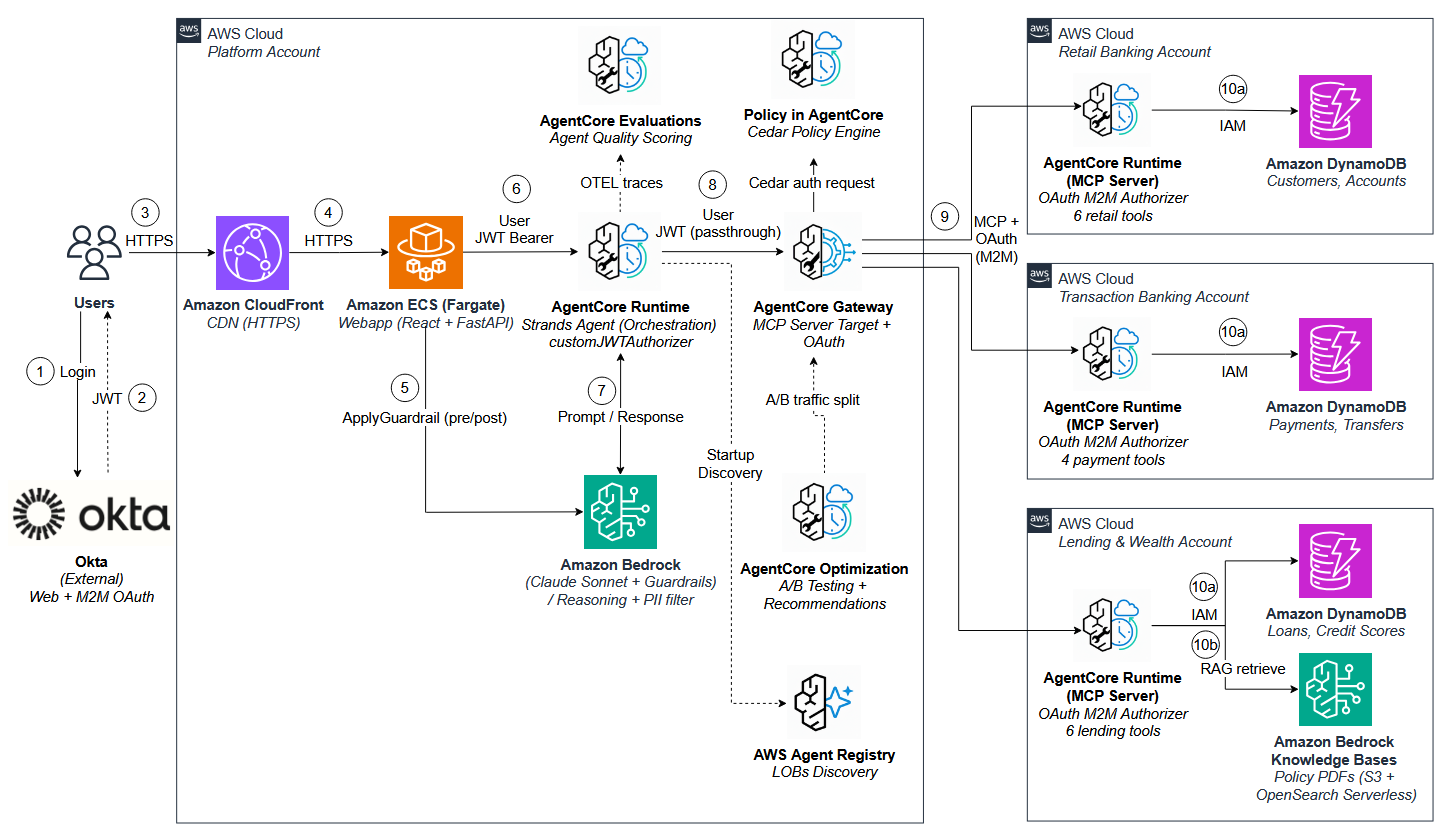
图 1:采用 AgentCore Gateway 和 MCP 的多账户 AI Agent 架构
以下演练追踪一个用户问题如何跨越账户边界、调用分布式工具并返回统一答案:
- 用户通过 React Web 应用登录,该应用会重定向至 Okta 进行认证。
- Okta 验证用户凭证,并返回一个包含身份声明(sub、groups、audience)的 JSON Web Token(JWT)。
- 用户通过 Web 应用提交提示词,请求经 HTTPS 到达 Amazon CloudFront。
- CloudFront 将请求转发至运行在 AWS Fargate 上的 Amazon Elastic Container Service (Amazon ECS) 中的 FastAPI 后端。
- 后端在用户输入到达 Agent 之前应用 Amazon Bedrock Guardrails,对其中的个人身份信息(PII)进行脱敏;在 Agent 输出到达用户之前再次执行脱敏。
- 后端调用运行在 AgentCore Runtime 上的 Strands Agent,并在 Authorization 请求头中转发用户的 JWT,以实现身份传播。
- Agent 将提示词发送至 Amazon Bedrock 进行推理。Agent 根据模型响应确定应调用哪些工具。
- Agent 将用户 JWT 转发给 AgentCore Gateway,后者使用语义搜索在 LOB target 中发现工具。Policy in AgentCore(当策略引擎与 Gateway 关联时)会根据 Cedar 规则评估 JWT 声明,并按用户身份、角色或操作允许或拒绝每次工具调用。由于出站调用使用 M2M,因此用户级授权在此 Gateway 层执行。
- 对于获准的调用,Gateway 从 AgentCore Identity 获取 OAuth 2.0 M2M 凭证,将其附加至出站请求,并转发至正确的 LOB MCP 服务器。每个 LOB MCP 服务器都会在处理前验证传入的 OAuth 令牌。
- LOB MCP 服务器运行其工具逻辑:(a) 针对本地 Amazon DynamoDB 表执行结构化数据查询;以及 (b) 对于 Lending & Wealth LOB,还会针对存储在 Amazon S3 中、由 Amazon OpenSearch Serverless 建立索引的银行政策 PDF,在 Amazon Bedrock Knowledge Bases 中执行 RAG 检索。
结果沿相同链路返回(LOB 到 Gateway,再到 Agent 和后端)。示例应用中的追踪面板会显示访问了哪些 LOB,以及 Policy in AgentCore 的拒绝记录。每个 LOB Runtime 都会验证入站 OAuth 令牌。在生产环境中,LOB 团队应配置 allowedWorkloadConfiguration,将 Runtime 调用限制为身份链中包含 Gateway 的请求,从而降低绕过 Gateway 策略和 Cedar 授权进行直接访问的风险。
Strands Agent 通过 Gateway 的 tools/list 方法发现 LOB 工具,并在启动时查询 AWS Agent Registry(预览版)以发现已注册的 LOB MCP 服务器。接入新的 LOB 只需添加一个 Gateway target。Agent 会在下一次 tools/list 调用时发现新工具。
技术实现
以下章节将逐层介绍该架构:LOB 团队如何构建和部署 MCP 服务器,平台团队如何为 AgentCore Gateway 配置 OAuth 出站认证和 Policy in AgentCore 授权,以及持续评估如何帮助 Agent 在工具和模型不断演进时保持可靠性。要获取完整实现,请克隆配套代码库,并运行部署脚本。该脚本会在四个账户中引导部署 AWS Cloud Development Kit (AWS CDK),预置平台和 LOB 资源,部署 MCP 服务器和 Gateway target,并在 CloudFront 后方的 Amazon ECS 上启动 React Web 应用。
先决条件
配套代码库假设具备以下条件:
- 一个通过 AWS Organizations 管理的 AWS 多账户环境,其中平台账户和 LOB 账户位于同一组织中。
- 平台账户中的 Amazon Bedrock 模型访问权限。
- 平台账户和每个 LOB 账户中均已配置 AgentCore:平台账户用于 Agent、Gateway 和 Registry,LOB 账户用于在 Runtime 上托管 MCP 服务器。
- 兼容 OIDC 的身份提供商,例如 Okta、Amazon Cognito 或 Microsoft Entra ID,并且具有用于 OAuth 2.0 客户端凭证授权的 M2M 应用客户端。该代码库使用 Okta。
- MCP 服务器将要封装的 LOB 数据源,例如 Amazon Bedrock Knowledge Bases、Amazon DynamoDB 表、Amazon S3 存储桶或 API 端点。
在 LOB 账户中设置 MCP 服务器
每个 LOB 团队使用 FastMCP 构建 MCP 服务器,并使用 AgentCore CLI 将其部署到 AgentCore Runtime,将团队数据以具有类型化输入和输出的结构化工具形式公开。每个 LOB 团队为其服务器配置 customJWTAuthorizer,该组件会根据 Okta 的 OIDC 发现端点验证传入 OAuth 令牌,因此请求必须提供有效令牌才能调用 LOB 工具。为强化生产环境安全性,请将 Runtime 的 allowedWorkloadConfiguration 设置为 Gateway 的 Amazon Resource Name(ARN);这会将其配置为仅在身份链包含该 Gateway 时接受请求。本示例主要依赖 OAuth audience 验证作为访问控制。添加 allowedWorkloadConfiguration 有助于将调用限制为经由 Gateway 到达的请求,从而降低绕过 Gateway 策略的直接访问风险。
以下代码片段展示了 Lending & Wealth LOB 的 MCP 服务器,它将 Amazon DynamoDB 查询与 Amazon Bedrock Knowledge Bases 检索相结合。
REGION = os.environ.get("AWS_REGION", "us-east-1")
dynamodb = boto3.resource("dynamodb", region_name=REGION)
bedrock_agent_runtime = boto3.client("bedrock-agent-runtime", region_name=REGION)
KNOWLEDGE_BASE_ID = os.environ.get("KNOWLEDGE_BASE_ID", "")

mcp =
English / 原文
Enterprises increasingly want AI agents that can reason over data spread across many AWS accounts without copying or centralizing it. Each team keeps its data in its own account for good reasons: clear ownership, scope isolation, and independent deployment lifecycles. But an agent that sees only one account’s data delivers limited value, and connecting it to distributed sources usually means replicating data or untangling cross-account AWS Identity and Access Management (IAM). The goal is to let data stay where it already lives, in each line-of-business (LOB) account. Only the specific data a request needs flows out at query time, so the underlying datasets do not leave their owning account.
In this post, you build a multi-account architecture that keeps each team’s data in its own account while giving agents a unified way to query across them, using Amazon Bedrock AgentCore Gateway and Model Context Protocol (MCP). Amazon Bedrock AgentCore is an agentic service for building, deploying, and operating highly effective agents securely at scale. A central platform account hosts the agent tier and large language model (LLM) inference through Amazon Bedrock. LOB teams expose their data and tools as MCP servers, and the platform account’s AgentCore Gateway gives agents a single endpoint for tool discovery and invocation across registered LOBs. Along the way, you set up cross-account MCP integration, authentication with AgentCore Identity, a capability of Amazon Bedrock AgentCore, and Okta, fine-grained authorization with Policy in Amazon Bedrock AgentCore, and the governance controls that support production readiness.
Solution overview
The architecture follows a multi-account model with three layers: a central platform account, distributed LOB accounts, and AgentCore Gateway as the integration layer that connects them.
Platform account — the agent control plane
The platform team owns the platform account, which runs the agent on AgentCore Runtime, a capability of Amazon Bedrock AgentCore. AgentCore Runtime is a serverless, framework-agnostic environment with session isolation in dedicated microVMs, consumption-based pricing, and built-in authentication. To keep the walkthrough clear, this post uses a single agent, but the same pattern supports multiple agents in the platform account. The agent connects to the platform account’s Gateway rather than to individual LOB MCP servers.
LLM inference runs in the platform account through Amazon Bedrock. The platform team controls available foundation models (FMs), applies Amazon Bedrock Guardrails, and tracks costs through a single billing boundary, avoiding the overhead of managing model quotas across dozens of LOB accounts. As demand grows, some organizations distribute inference across several dedicated inference accounts, placing AgentCore Gateway in front as an Inference Gateway that routes traffic across model providers, selecting the provider based on the request and applying per-team rate limits.
AgentCore Gateway in the platform account acts as the single MCP endpoint for the agent. It registers each LOB account’s MCP server as a target and, from that one endpoint, provides unified tool discovery with semantic search, centralized authentication through AgentCore Identity, fine-grained authorization with Policy in AgentCore, and observability.
Beyond aggregating MCP servers and acting as an Inference Gateway, AgentCore Gateway supports additional target types that make it a central integration point. HTTP targets bring AgentCore Runtime agents, agent-to-agent (A2A) services, and other HTTP endpoints into the same governed endpoint, each addressable through its own sub-path. The platform team can also apply Amazon Bedrock Guardrails for content safety and configure Policy in AgentCore (Cedar) for fine-grained access control, both enforced at the Gateway layer outside the agent’s code.
Rather than exposing raw AWS resources (Amazon Simple Storage Service (Amazon S3) buckets, databases, Amazon Bedrock Knowledge Bases) directly, each LOB team packages its data and tools as an MCP server. The retail banking team exposes tools like get_balance and get_profile. The lending team offers get_credit_score and search_lending_policies, where the latter queries the fully managed Retrieval Augmented Generation (RAG) capability in Amazon Bedrock Knowledge Bases over bank policy PDFs. This reference architecture wraps a standalone Amazon Bedrock Knowledge Base inside the MCP server for fine-grained control over the retrieval pipeline. For new implementations, you can instead attach an Amazon Bedrock Managed Knowledge Base directly to the Gateway as a native connector, so agents query it with standard MCP calls and you operate no retrieval infrastructure.
The MCP server runs on AgentCore Runtime in the LOB account, a serverless, framework-agnostic environment with session isolation in dedicated microVMs, consumption-based pricing, built-in authentication through AgentCore Identity, and agent-specific observability. This gives LOB teams full ownership of their tool surface: they decide what to expose and what business logic runs behind each tool, and can change the implementation without affecting the platform agent, as long as the MCP tool interface stays consistent.
Cross-account integration: Gateway and Identity connect the layers
This architecture follows a hub-and-spoke pattern: each LOB deploys a standalone MCP server (the spoke) using MCP over Streamable HTTP, while AgentCore Gateway (the hub) aggregates them behind a single endpoint. The agent connects to the Gateway as one MCP server, and the Gateway federates tool invocation across registered LOB targets. When the agent invokes a tool, the Gateway retrieves OAuth 2.0 machine-to-machine (M2M) credentials from AgentCore Identity, attaches them to the outbound request, and routes it to the right LOB MCP server, which authenticates the token against Okta’s OpenID Connect (OIDC) endpoint before processing the request locally.
The LOB’s data stays in its own account: the MCP server returns only the specific result the tool produced, not the raw dataset, and that result flows to the platform account as context for inference. The source data isn’t copied or relocated.
Figure 1: Multi-account AI agent architecture with AgentCore Gateway and MCP
The following walkthrough traces a user’s question as it crosses account boundaries, invokes distributed tools, and returns a unified answer:
- The user logs in through the React webapp, which redirects to Okta for authentication.
- Okta validates the user’s credentials and returns a JSON Web Token (JWT) containing identity claims (sub, groups, audience).
- The user submits a prompt through the webapp, which reaches Amazon CloudFront over HTTPS.
- CloudFront forwards the request to the FastAPI backend running on Amazon Elastic Container Service (Amazon ECS) with AWS Fargate.
- The backend applies Amazon Bedrock Guardrails for personally identifiable information (PII) redaction on the user’s input before it reaches the agent, and again on the agent’s output before it reaches the user.
- The backend invokes the Strands Agent on AgentCore Runtime, forwarding the user’s JWT in the Authorization header for identity propagation.
- The agent sends the prompt to Amazon Bedrock for reasoning. Based on the model’s response, the agent determines which tools to invoke.
- The agent forwards the user’s JWT to AgentCore Gateway, which uses semantic search for tool discovery across LOB targets. Policy in AgentCore (when a policy engine is associated with the Gateway) evaluates the JWT claims against Cedar rules and permits or denies each tool call by user identity, role, or action. Because the outbound call uses M2M, user-level authorization is enforced here at the Gateway.
- For permitted calls, the Gateway retrieves OAuth 2.0 M2M credentials from AgentCore Identity, attaches them to the outbound request, and forwards it to the correct LOB MCP server. Each LOB MCP server validates the inbound OAuth token before processing.
- The LOB MCP server runs its tool logic: (a) against local Amazon DynamoDB tables for structured data lookups, and (b) for the Lending & Wealth LOB, also performs RAG retrieval against Amazon Bedrock Knowledge Bases over bank policy PDFs stored in Amazon S3 with Amazon OpenSearch Serverless indexing.
Results flow back through the same chain (LOB to Gateway to Agent to backend), with a trace panel in the sample application showing which LOBs were accessed and Policy in AgentCore denials. Each LOB runtime validates the inbound OAuth token. In production, the LOB team configures allowedWorkloadConfiguration to restrict runtime invocation to requests whose identity chain includes the Gateway, reducing the risk of direct access that bypasses Gateway policy and Cedar authorization.
The Strands Agent discovers LOB tools through the Gateway’s tools/list method, and queries AWS Agent Registry (Preview) at startup to discover registered LOB MCP servers. Onboarding a new LOB involves adding a Gateway target. The agent discovers the new tools on its next tools/list call.
Technical implementation
The following sections walk through each layer of the architecture: how LOB teams build and deploy MCP servers, how the platform team configures AgentCore Gateway with OAuth outbound authentication and Policy in AgentCore authorization, and how continuous evaluation helps keep the agent reliable as tools and models evolve. For the complete implementation, clone the accompanying repository and run the deployment script, which bootstraps AWS Cloud Development Kit (AWS CDK) across the four accounts, provisions the platform and LOB resources, deploys the MCP servers and Gateway targets, and launches a React web application on Amazon ECS behind CloudFront.
Prerequisites
The accompanying repository assumes the following:
- An AWS multi-account setup managed through AWS Organizations, with the platform and LOB accounts in the same organization.
- Amazon Bedrock model access in the platform account.
- AgentCore configured in both the platform account (for the agent, Gateway, and Registry) and each LOB account (for MCP server hosting on Runtime).
- An OIDC-compatible identity provider (such as Okta, Amazon Cognito, or Microsoft Entra ID) with M2M app clients for the OAuth 2.0 client credentials grant. The repository uses Okta.
- LOB data sources (Amazon Bedrock Knowledge Bases, Amazon DynamoDB tables, Amazon S3 buckets, or API endpoints) that the MCP servers will wrap.
Set up MCP servers in the LOB accounts
Each LOB team builds an MCP server with FastMCP and deploys it to AgentCore Runtime using the AgentCore CLI, exposing the team’s data as structured tools with typed inputs and outputs. Each LOB team configures its server with a customJWTAuthorizer that authenticates inbound OAuth tokens against Okta’s OIDC discovery endpoint, so requests must present a valid token before they can invoke the LOB’s tools. For production hardening, set allowedWorkloadConfiguration on the Runtime to the Gateway’s Amazon Resource Name (ARN), which configures it to accept requests only when the identity chain includes that Gateway. This sample relies on OAuth audience validation as its primary access control. Adding allowedWorkloadConfiguration helps restrict invocations to those arriving through the Gateway, reducing the risk of direct access that bypasses Gateway policy.
This snippet shows the Lending & Wealth LOB’s MCP server, combining Amazon DynamoDB lookups with Amazon Bedrock Knowledge Bases retrieval.
REGION = os.environ.get("AWS_REGION", "us-east-1")
dynamodb = boto3.resource("dynamodb", region_name=REGION)
bedrock_agent_runtime = boto3.client("bedrock-agent-runtime", region_name=REGION)
KNOWLEDGE_BASE_ID = os.environ.get("KNOWLEDGE_BASE_ID", "")

mcp = FastMCP("lending-wealth", host="0.0.0.0", stateless_http=True)


@mcp.tool()
def get_credit_score(customer_id: str) -> dict:
    """Get credit score and contributing factors for a customer."""
    table = dynamodb.Table("CreditScores")
    resp = table.get_item(Key={"customer_id": customer_id})
    item = resp.get("Item")
    if not item:
        return {"error": f"No credit score found for customer {customer_id}"}
    return item


@mcp.tool()
def search_lending_policies(query: str) -> str:
    """Search the bank's lending policy documents for guidelines,
    eligibility criteria, and regulatory requirements."""
    if not KNOWLEDGE_BASE_ID:
        return json.dumps({"error": "KNOWLEDGE_BASE_ID not configured"})
    resp = bedrock_agent_runtime.retrieve(
        knowledgeBaseId=KNOWLEDGE_BASE_ID,
        retrievalQuery={"text": query},
        retrievalConfiguration={"vectorSearchConfiguration": {"numberOfResults": 5}},
    )
    chunks = []
    for r in resp.get("retrievalResults", []):
        text = r.get("content", {}).get("text", "")
        source = r.get("location", {}).get("s3Location", {}).get("uri", "")
        if text:
            chunks.append({"text": text, "source": os.path.basename(source)})
    return json.dumps({"results": chunks}, default=str)


if __name__ == "__main__":
    mcp.run(transport="streamable-http")
Deploy the MCP server to AgentCore Runtime with the AgentCore CLI. The configure step sets the entrypoint and protocol. The deploy step packages and pushes it:
# Configure the MCP server
agentcore configure \
    --entrypoint server.py \
    --name lending_wealth_mcp \
    --protocol MCP \
    --disable-memory \
    --non-interactive \
    --authorizer-config '{
      "customJWTAuthorizer": {
        "discoveryUrl": "<OKTA_DISCOVERY_URL>",
        "allowedAudience": ["lobfederation"]
      }
    }'

# Deploy to AgentCore Runtime
agentcore deploy --auto-update-on-conflict \
    --env KNOWLEDGE_BASE_ID=<your-knowledge-base-id>
After deployment, the CLI returns a runtime ARN that the platform team uses to register the MCP server as a Gateway target.
Configure AgentCore Gateway
In the platform account, create the Gateway with a Custom JWT authorizer that points to Okta’s OIDC discovery URL and validates the audience (aud) claim to restrict which applications can connect:
ctrl.update_gateway(
    gatewayIdentifier=gateway_id,
    name="lobfederation-gateway",
    protocolType="MCP",
    protocolConfiguration={
        "mcp": {
            "searchType": "SEMANTIC",
            "supportedVersions": ["2025-03-26"],
        }
    },
    authorizerType="CUSTOM_JWT",
    authorizerConfiguration={
        "customJWTAuthorizer": {
            "discoveryUrl": "https://<your-okta-domain>/oauth2/<auth-server-id>/.well-known/openid-configuration",
            "allowedAudience": ["lobfederation"],
        }
    },
)
For outbound authentication to LOB MCP servers, the Gateway uses the OAuth 2.0 client credentials grant (M2M). The platform team registers an OAuth credential provider in AgentCore Identity that stores the Okta M2M client credentials. When the Gateway invokes a LOB MCP server, AgentCore Identity obtains a fresh access token from Okta and passes it in the Authorization header. Register the credential provider and attach it to each Gateway target:
# Register an OAuth credential provider (M2M / client_credentials)
resp = ctrl.create_oauth2_credential_provider(
    name="lobfederation-okta-m2m",
    credentialProviderVendor="CustomOauth2",
    oauth2ProviderConfigInput={
        "customOauth2ProviderConfig": {
            "oauthDiscovery": {
                "discoveryUrl": "https://<your-okta-domain>/oauth2/<auth-server-id>/.well-known/openid-configuration"
            },
            "clientId": "<M2M_CLIENT_ID>",
            "clientSecret": "<M2M_CLIENT_SECRET>",
            "clientAuthenticationMethod": "CLIENT_SECRET_BASIC",
        }
    },
)
cred_arn = resp["credentialProviderArn"]

# Create a Gateway target for the LOB MCP server with OAuth outbound auth
ctrl.create_gateway_target(
    gatewayIdentifier=gateway_id,
    name="lending-wealth",
    description="Lending & Wealth --- loans, credit scores, eligibility, policy search",
    targetConfiguration={
        "mcp": {
            "mcpServer": {
                "endpoint": f"https://bedrock-agentcore.{REGION}.amazonaws.com/runtimes/{encoded_runtime_arn}/invocations",
            }
        }
    },
    credentialProviderConfigurations=[
        {
            "credentialProviderType": "OAUTH",
            "credentialProvider": {
                "oauthCredentialProvider": {
                    "providerArn": cred_arn,
                    "scopes": ["lobfederation.invoke"],
                    "grantType": "CLIENT_CREDENTIALS",
                }
            },
        }
    ],
)
When a LOB tool must enforce per-user access itself (for example, row-level security), AgentCore Identity also provides on-behalf-of (OBO) token exchange, where the Gateway exchanges the inbound user token for a downstream-scoped token carrying both the agent’s and the user’s identity. This implementation uses M2M because the Okta developer account used for the sample doesn’t support the OBO flow. AgentCore Gateway also supports the authorization code grant and API keys. For examples, see the AgentCore Gateway outbound authentication samples.
Deploy the agent
Deploy the Strands agent to AgentCore Runtime with a Custom JWT authorizer for inbound auth. The deployment script applies the authorizer configuration through the AgentCore control-plane API after the initial deploy. At request time, the agent forwards the user’s JWT to the Gateway so Policy in AgentCore can evaluate the user’s claims before routing each tool call:
{
  "agents": [
    {
      "name": "lobfederation-agent",
      "authorizerType": "CUSTOM_JWT",
      "authorizerConfiguration": {
        "customJwtAuthorizer": {
          "discoveryUrl": "https://<your-okta-domain>/oauth2/<auth-server-id>/.well-known/openid-configuration",
          "allowedAudience": ["lobfederation"]
        }
      },
      "requestHeaderAllowlist": ["Authorization"]
    }
  ]
}
After deployed, the agent reads the user’s JWT from the inbound request headers and passes it to AgentCore Gateway. This propagates the end-user identity through to the Cedar policy engine without the agent needing to parse or modify the token:
@app.entrypoint
def invoke(payload, context=None):
    prompt = payload.get("prompt", "Hello")

    # Read the user's JWT from inbound request headers (passed through by Runtime)
    request_headers = context.request_headers if context else {}
    user_jwt = request_headers.get("Authorization", "")

    # Connect to Gateway with the user's JWT --- Cedar evaluates per-user policies
    mcp_client = MCPClient(
        lambda: streamablehttp_client(
            url=GATEWAY_URL,
            headers={"Authorization": user_jwt},
        )
    )

    with mcp_client:
        tools = mcp_client.list_tools_sync()
        agent = Agent(model=MODEL_ID, system_prompt=SYSTEM_PROMPT, tools=tools)
        result = agent(prompt)
Operate the agent
After the agent is deployed, the platform team keeps it reliable through continuous evaluation, safe version rollouts, and observability.
Evaluate continuously
In a multi-account architecture where the agent orchestrates tools across many LOBs, the platform team needs confidence that it keeps performing correctly as tools, models, and prompts evolve. AgentCore Evaluations provides a managed framework that helps catch regressions before they reach customers.
Online evaluation continuously scores a sample of live production traffic (for example, 10 percent of sessions) using built-in evaluators such as Tool Selection Accuracy, Correctness, and Goal Success Rate. Scores surface in the AgentCore Observability dashboard, a capability of Amazon Bedrock AgentCore powered by Amazon CloudWatch, with alerts when quality drops and no code changes required if the agent already emits OpenTelemetry traces. This can surface quiet degradations that latency and error-rate monitoring miss, such as an agent routing lending queries to the wrong LOB.
On-demand evaluation is a real-time API for development and continuous integration and continuous delivery (CI/CD). The team defines an evaluation dataset once (scenarios paired with expected responses, tool trajectories, and goal assertions), and AgentCore Evaluations replays it on every change using dataset evaluation. Because both modes share the same evaluators, what the team gates on before deployment is exactly what it monitors in production. To close the loop, AgentCore Optimization analyzes production traces and recommends prompt and tool-description improvements, validated before they ship.
Version and roll out safely
You deploy the agent on AgentCore Runtime with endpoints (prod, staging, dev) that point to specific versions. When the platform team updates the agent’s prompt or model, it publishes a new version and updates the endpoint, and LOB MCP servers are unaffected because the tool interface doesn’t change. Before promoting a change, the team can run A/B testing through AgentCore Gateway, splitting live traffic between the current and candidate versions. The platform team then promotes the winning configuration once results reach statistical significance.
Monitor and observe
AgentCore provides built-in observability through Amazon CloudWatch and OpenTelemetry. The platform team monitors invocation latency, error rates, and token usage, and views metrics and logs from LOB MCP servers through CloudWatch cross-account observability without switching accounts.
Security, governance, and cost management
Centralizing the agent while distributing data creates specific governance requirements: controlling who can invoke which tools, auditing cross-account calls, enforcing responsible AI policies, and attributing costs back to the LOB that triggered them.
Least-privilege access and data owner approval
LOB teams control who can invoke their MCP server through the JWT authorizer configuration on their AgentCore Runtime deployment. A request from the platform account’s Gateway reaches a LOB’s tools only after the LOB team has configured their MCP server to accept tokens from the platform’s identity provider. This approval is independent of the platform team. Even if the Gateway adds a new target, the LOB MCP server rejects unauthenticated requests.
Policy in AgentCore authorization
The Gateway runs Policy in AgentCore in ENFORCE mode, evaluating rules before routing each tool call against the user’s JWT claims (from the token the agent forwards). Policy in AgentCore uses the Cedar policy language, so rules are explicit permit and forbid statements. For example, a policy can permit read-only tools like get_balance for all authenticated users while restricting writes like transfer_funds to a specific role, or block destructive operations like delete_customer entirely:
// Permit all authenticated users to invoke read-only tools
permit(
    principal is AgentCore::OAuthUser,
    action in [
        AgentCore::Action::"retail-banking___get_customer",
        AgentCore::Action::"retail-banking___get_accounts",
        AgentCore::Action::"retail-banking___get_balance",
        AgentCore::Action::"tools/list",
        AgentCore::Action::"initialize"
    ],
    resource
);

// Block destructive operations regardless of user
forbid(
    principal,
    action == AgentCore::Action::"retail-banking___delete_customer",
    resource
);
Because Policy in AgentCore uses a default-deny model, only actions with an explicit permit succeed. This gives the platform team centralized control over what the agent can do across registered LOBs, while individual LOB teams retain their own authorization at the MCP server level.
Network connectivity and VPC considerations
This reference implementation uses the default public network mode for AgentCore Runtime, where traffic traverses the public internet over HTTPS with OAuth. This suits development but not production. For production, AgentCore Runtime supports virtual private cloud (VPC) connectivity through elastic network interfaces (ENIs) for private resource access, an interface VPC endpoint over AWS PrivateLink for private ingress to the Gateway, and allowedWorkloadConfiguration to restrict runtime invocation to your Gateway. For configuration steps, see network connectivity patterns for AgentCore Runtime and secure ingress to AgentCore Gateway using interface VPC endpoints.
Guardrails
Apply Amazon Bedrock Guardrails in the platform account for content filtering, PII redaction, and topic restrictions. Because inference is centralized, one guardrail configuration applies to agent interactions across LOB tools. As a newer option, you can apply Guardrails as policies directly on AgentCore Gateway, so checks run at the Gateway layer, outside the agent’s code, covering the tools and context sources routed through the Gateway.
Audit and compliance
To enable data-plane logging, configure log delivery on the Gateway to Amazon CloudWatch Logs, which captures tool invocations and request metadata. AWS CloudTrail captures control-plane operations (creating and updating gateways, runtimes, targets, and policies) by default. To also capture individual tool calls in CloudTrail, enable data event logging for AgentCore Gateway resources using an advanced event selector. For centralized audit, configure an organization-level CloudTrail trail that aggregates logs from platform and LOB accounts into a dedicated logging account.
Cost attribution
This architecture provides natural cost boundaries. Each LOB’s data-plane costs (Amazon DynamoDB, Amazon Bedrock Knowledge Bases, MCP server compute) stay in its own account and appear directly in AWS Cost Explorer. LLM inference and Gateway invocations accrue in the platform account. To attribute these back to the originating LOB, the agent’s execution role carries tags (for example, a lob or costCenter tag). After you activate the cost allocation tag in the AWS Billing console, these tags flow to the AWS Cost and Usage Report for per-LOB chargeback. The agent’s tool trace records which tools each LOB called for proportional allocation. For a deeper approach, see granular cost attribution for Amazon Bedrock.
Cleaning up
To avoid ongoing charges after deploying the accompanying repository, run the included cleanup script. It removes deployed resources across the four accounts, including AgentCore components (agent, Gateway, Registry, credential providers), Okta configuration (authorization server, M2M app clients), MCP server deployments, CDK stacks (Amazon DynamoDB tables, Amazon S3 buckets, Amazon Elastic Container Registry repositories, Amazon ECS clusters), and sample data sources.
Run it from the repository root:
The script runs in reverse order of deployment, removing agent and MCP servers first, then Gateway targets and Policy in AgentCore configuration, then CDK infrastructure stacks across all four accounts.
Conclusion
This post showed how to build a multi-account architecture that runs the agent centrally through Amazon Bedrock and AgentCore while keeping data distributed across LOB accounts. LOB teams expose their data as MCP servers, the platform account’s Gateway provides a single authenticated endpoint for tool discovery and invocation, and Policy in AgentCore enforces per-user authorization at the Gateway layer. The pattern scales naturally: to onboard a new line of business, the platform team adds a Gateway target and the agent discovers the new tools on its next invocation.
To try this pattern yourself, clone the accompanying repository and deploy the four-account reference implementation.
Connect Amazon Bedrock AgentCore to cross-account knowledge bases
Transform your MCP architecture: Unite MCP servers through AgentCore Gateway
About the authors
Senthil Kamala Rathinam
Senthil is a Senior Solutions Architect at Amazon Web Services, specializing in Data and Analytics for banking customers across North America. With expertise in AI/ML, and Generative AI, he helps organizations realize business value through data-driven transformation. Beyond work, Senthil enjoys spending time with family and exploring the outdoors.
Karthik Tharmarajan
Karthik is a Senior Generative AI Solutions Architect at Amazon Web Services, serving financial services customers across North America. He specializes in generative AI, agentic architectures, and identity patterns for AI agents on Amazon Bedrock and Amazon Bedrock AgentCore, helping banking organizations bring AI workloads securely into production.
Shashi Makkapati
Shashi is a Senior Solutions Architect serving banking customers across North America. He specializes in data analytics, AI/ML, and generative AI, focusing on innovative solutions that transform financial organizations. Shashi is passionate about leveraging technology to solve complex business challenges in the banking sector. Outside of work, he enjoys traveling and spending quality time with his family.