使用 Amazon SageMaker HyperPod 上的 SkyRL 加速多模态 RL 训练
英文标题:Accelerate multimodal RL training with SkyRL on Amazon SageMaker HyperPod
本文介绍如何在 Amazon SageMaker HyperPod 上运行开源强化学习框架 SkyRL,对 `Qwen3-VL-8B` 视觉语言模型进行 GRPO 后训练,使其学会导航视觉迷宫。该方案使用一个 CPU Ray 头节点和三个 GPU 工作节点,将 vLLM rollout 推理与 FSDP 策略训练部署在同一批 GPU 上,并通过 Amazon FSx for Lustre 同步 LoRA 权重与保存检查点。以 VisGym SFT 检查点为起点,模型在固定的 64 个迷宫评测集上的解题率从 43.75% 提升至超过 95%。对开发者而言,HyperPod 的节点韧性、远程 Ray 作业提交和 Grafana 可观测性能力,有助于降低多节点、长时间 RL 训练的运维复杂度与硬件故障风险。
 1.3 MB
 101.1 KB
 124.1 KB
 345.0 KB
 141.2 KB
 346.5 KB
 87.8 KB
 495.5 KB
 204.0 KB
 451.0 KB
 555.2 KB
 733.1 KB
 26.4 KB
 28.7 KB
 22.4 KB
 20.6 KB
 112.0 KB
中文
强化学习(RL)后训练正成为构建高能力语言模型 Agent 的标准步骤。模型通过生成轨迹、接收奖励,并依据结果更新其策略,学习如何跨越一系列步骤进行推理和行动。要大规模运行这一过程——每次训练运行跨多个节点、消耗数百 GPU 小时来进行 rollout——需要持久化的集群基础设施。这类基础设施必须能够支撑长时间运行的作业,在不丢失进度的情况下从硬件故障中恢复,并在训练展开时提供对训练动态的可观测性。
Amazon SageMaker HyperPod 为 Amazon Elastic Kubernetes Service(Amazon EKS) 上的大规模机器学习(ML)工作负载提供了此类基础设施。借助其集群韧性功能,它会持续监控节点健康状况,并自动替换发生故障的节点,因此硬件故障不会导致整个集群宕机。结合检查点机制,训练作业可以从最近一次保存的步骤继续,而不必从头开始。这对于长时间、多节点的 RL 运行尤其重要,否则一次硬件故障就可能造成数小时 rollout 进度的损失。结合 HyperPod 上的 Ray 功能,您可以从 SageMaker Studio 创建 Ray 集群,使用安全连接远程提交作业,并通过 HyperPod Observability EKS 插件为您预配置的 Amazon Managed Grafana 控制面板监控训练。
本文展示如何使用这些功能运行开源 RL 框架 SkyRL,通过 SageMaker HyperPod 上的 Group Relative Policy Optimization(GRPO)训练 Qwen3-VL-8B 视觉语言模型导航视觉迷宫。以监督微调(SFT)起点 VisGym SFT checkpoint 为基础,在 HyperPod 上进行 GRPO 后训练后,模型在固定的 64 个迷宫评测集上的解题率从 43.75% 提升至超过 95%。
前提条件
要完成本演练,您需要:
- 一个采用 Amazon EKS 编排的 SageMaker HyperPod 集群,其中至少包含 3 个 ml.g7e.12xlarge 实例和 1 个 ml.r5d.16xlarge 实例。
- 在集群中安装以下 Kubernetes Operator:KubeRay operator、HyperPod Observability EKS add-on 和 HyperPod Ray Endpoint Operator(用于远程作业提交)。请参阅 HyperPod 上 Ray 入门指南。
- 在集群中安装 Amazon FSx for Lustre CSI driver。此外,您还需要一个 Amazon FSx for Lustre 文件系统、由该文件系统支持的 PersistentVolume,以及可供 Pod 挂载的 PersistentVolumeClaim(ReadWriteMany)。训练作业会在
/shared路径使用它来存储检查点、同步 Low-Rank Adaptation(LoRA)适配器,以及保存评测输出。 - 一个有权限连接至 HyperPod 集群的 SageMaker Studio 域。请参阅为 Ray 设置 SageMaker Studio。
- 已安装
toolkit-for-ray-on-sagemaker-aiPython 软件包。
背景
本节回顾训练所依据的强化学习概念,以及本演练使用的集群拓扑。
多轮 RL 与 GRPO
标准的单轮 RL 会为单次模型输出分配奖励。多轮 RL 则在完整的步骤序列上训练 Agent:Agent 观察状态、采取行动、获得反馈,然后转入下一个状态。策略从整轮 episode 中累积的奖励学习,而不是从任意单个步骤中学习。
以在二维迷宫中导航的问题为例。一个 episode 是单次迷宫运行,每一轮则是一次移动:模型查看当前迷宫图片,选择一个方向或决定停止,环境随后返回更新后的视图。奖励是稀疏的,因此模型只有在移动次数限制内实际抵达目标时才能获得 1.0 的奖励,其他情况均无奖励。由于某一步移动是否正确取决于其前后相邻的移动,因此不存在可用于训练的逐步答案参考。
这正是 SkyRL 的 Group Relative Policy Optimization(GRPO)发挥作用的场景。对于每个起始位置,Agent 会在当前策略下多次运行迷宫,而 GRPO 会将这些运行结果相互比较:强化优于组内平均水平的结果,并降低落后于组内平均水平的结果。组内比较本身就是全部训练信号,因此 GRPO 无需单独的 critic 或 value model。
训练拓扑
本文讨论的方案在一个 HyperPod Ray 集群上运行 SkyRL,该集群包含三个 GPU 工作节点和一个 CPU 头节点。SkyRL 将推理和训练部署在相同的 GPU 上:vLLM 引擎生成 rollout(完整的迷宫 episode),而采用 Fully Sharded Data Parallel(FSDP)分片的策略模型负责执行梯度更新。每次优化器步骤完成后,更新后的 LoRA 适配器权重会通过 Amazon FSx for Lustre 共享存储,从训练 rank 同步至推理引擎。
以下是我们使用的实例类型。只要工作节点拥有足够的 GPU 显存来容纳模型,其他 GPU 实例和集群规模同样适用。
- 工作节点:3 个
ml.g7e.12xlarge(每个实例配备 2 张 NVIDIA RTX PRO 6000 Blackwell GPU,共 6 张 GPU)。 - 头节点:
ml.r5d.16xlarge(512 GB RAM,负责管理 Ray GCS、控制面板和 LoRA 适配器整合)。 - 策略模型:采用 LoRA(rank 32)的
Qwen3-VL-8B,使用 PyTorch FSDP 在 6 张 GPU 上进行分片。 - Rollout 引擎:6 个共置的 vLLM 实例,每张 GPU 一个。
- 共享存储:挂载于
/shared的 Amazon FSx for Lustre,用于 LoRA 同步和评测输出。
HyperPod 提供集群基础设施:Ray 集群从 SageMaker Studio 创建,作业提交使用 sagemaker_ray:// 协议,训练指标则通过 HyperPod Observability 插件自动流入预构建的 Amazon Managed Grafana 控制面板。
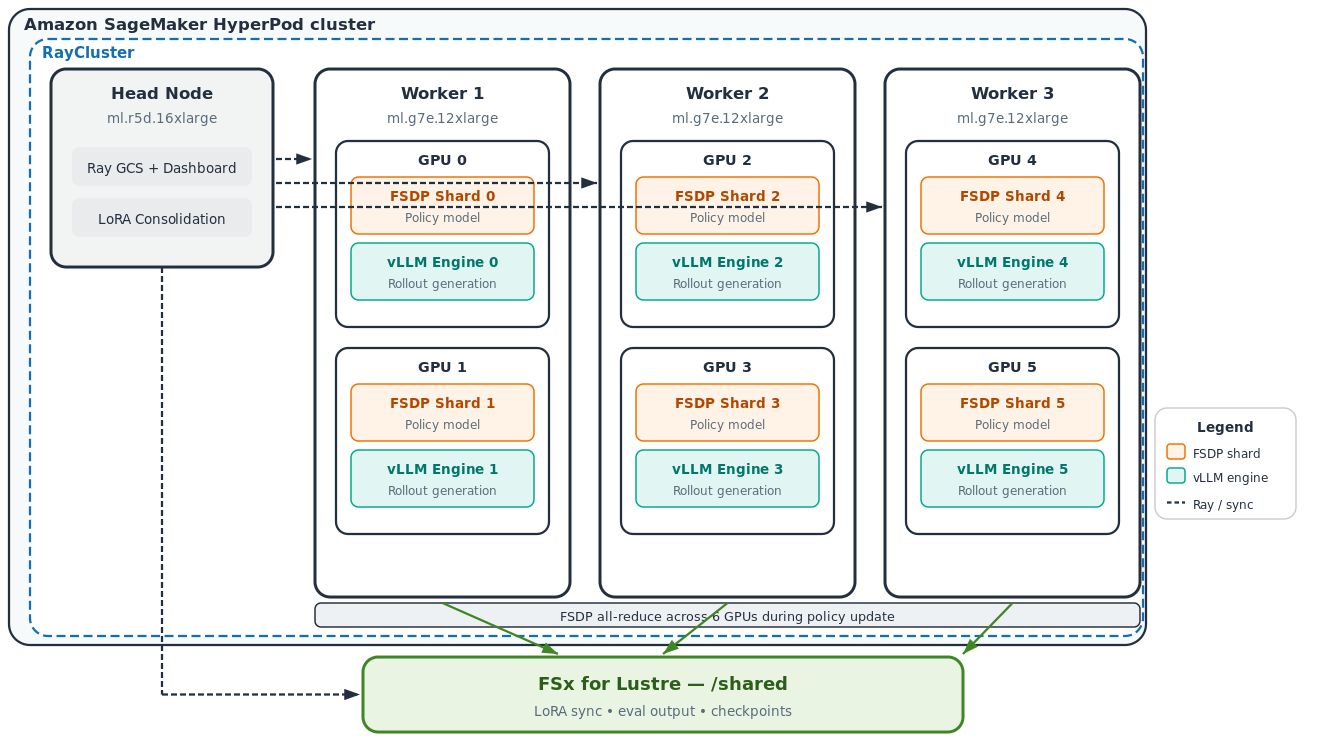
图 1:Amazon SageMaker HyperPod 上的 RayCluster 拓扑,包含一个 CPU 头节点和三个 GPU 工作节点;这些工作节点通过共享的 Amazon FSx for Lustre 文件系统共置 FSDP 策略分片和 vLLM rollout 引擎
方案概览
以下步骤将介绍如何准备训练环境、启动集群、运行作业、监控进度,以及托管训练完成的模型。
步骤 1:准备容器镜像
为快速开始,请使用以下 Dockerfile 构建一个预安装 SkyRL、VisGym 及其依赖项的容器镜像。在下一步于 HyperPod 上启动 Ray 集群时,您将指定该镜像。该镜像基于官方 NovaSky-AI SkyRL 基础镜像构建,并将 SkyRL 和 VisGym 均固定到特定的 commit SHA,以确保构建可复现:
FROM novaskyai/skyrl-train-ray-2.57.0-py3.12-cu13.0

ENV HF_HUB_ENABLE_HF_TRANSFER=1 \
    QWEN_VL_MODEL=Qwen/Qwen3-VL-8B-Instruct \
    UV_PROJECT_ENVIRONMENT=/home/ray/anaconda3

# SkyRL's full FSDP stack into the system python Ray uses (uv .venv is invisible to `ray start`).
# Pinned to a commit SHA so the build is reproducible.
ARG SKYRL_REF=4298730b55bb01fe1b711662df53dca42a3b7615
RUN git clone https://github.com/NovaSky-AI/SkyRL.git /home/ray/skyrl \
    && cd /home/ray/skyrl && git checkout ${SKYRL_REF} \
    && cd /home/ray/skyrl/skyrl-train \
    && uv sync --active --extra fsdp \
    && /home/ray/anaconda3/bin/python -c \
       "import ray, torch, vllm, transformers, flash_attn; \
        from vllm_router.launch_router import launch_router; \
        print('skyrl stack OK', torch.__version__, vllm.__version__)"

# uv sync prunes Ray's dashboard extras; restore ray[default] so the full dashboard starts.
RUN uv pip install --python /home/ray/anaconda3/bin/python "ray[default]==2.57.0" \
    && /home/ray/anaconda3/bin/python -c \
       "from ray.dashboard.optional_deps import aiohttp"

# VisGym maze environment and dataset generator.
ARG VISGYM_REF=184fbd5e5dc81e32c8b944d9e40ac54dad62e3f2
RUN git clone https://github.com/anyscale/VisGym.git /home/ray/visgym \
    && cd /home/ray/visgym && git checkout ${VISGYM_REF} \
    && uv pip install --python /home/ray/anaconda3/bin/python -e . "pygame==2.6.1"

ENV FI_PROVIDER=efa FI_EFA_USE_DEVICE_RDMA=1 NCCL_PROTO=simple NCCL_DEBUG=INFO
WORKDIR /workspace
CMD ["/bin/bash"]
构建镜像并将其推送至您账户中的 Amazon Elastic Container Registry(Amazon ECR)仓库。请记录完整的镜像 URI,因为您会在下一步创建 Ray 集群时使用它:
ACCOUNT=$(aws sts get-caller-identity --query Account --output text)
REGION=us-west-2
IMAGE_URI="${ACCOUNT}.dkr.ecr.${REGION}.amazonaws.com/ray/skyrl-visgym:latest"

aws ecr get-login-password --region ${REGION} | \
  docker login --username AWS --password-stdin ${ACCOUNT}.dkr.ecr.${REGION}.amazonaws.com

docker build -t skyrl-visgym .
docker tag skyrl-visgym ${IMAGE_URI}
docker push ${IMAGE_URI}

echo "Image URI: ${IMAGE_URI}"
步骤 2:从 SageMaker Studio 启动 Ray 集群
进入 SageMaker Studio,选择 HyperPod,选择您的集群,然后转到 Tasks 选项卡。在任务类型列表中选择 RayCluster,然后选择 Create Ray Cluster。
在创建表单中,将集群命名为 skyrl-visgym,将头节点实例类型设为 ml.r5d.16xlarge,并添加三个使用 ml.g7e.12xlarge 的工作节点。将容器镜像设为您在步骤 1 中推送的 IMAGE_URI。
这里列出的实例类型是我们在本演练中使用的配置。其他实例类型同样可以使用,但头节点有一项约束需要注意:它需要较大的内存。头节点会在每次保存检查点时整合来自 GPU 工作节点的 LoRA 适配器分片,这会暂时将完整的适配器权重集加载到 CPU 内存中。我们使用了 ml.r5d.16xlarge,利用其大内存容量(512 GB RAM)来满足这一需求。
挂载 Amazon FSx for Lustre
要挂载 Amazon FSx 文件系统,请选择创建表单右上角的 YAML 按钮,切换至原始 manifest 编辑器;然后在头节点和工作节点的 Pod spec 中均添加卷及挂载。每个 Pod 的相关部分如下所示:
containers:
  - name: ray-head  # or ray-worker
    volumeMounts:
      - name: shared
        mountPath: /shared
volumes:
  - name: shared
    persistentVolumeClaim:
      claimName: <your-fsx-pvc-name>
将 <your-fsx-pvc-name> 替换为由您的 Amazon FSx 文件系统支持的 PersistentVolumeClaim 名称。完成此配置后,集群中的每个节点都能使用 /shared,训练作业便可从 Pod 中读取和写入检查点、LoRA 权重以及评测输出。
启用 Remote endpoints,以便您无需在本地使用 kubectl port-forward 即可提交作业和打开控制面板。集群会为这两项功能生成使用 IAM 认证的 URL。
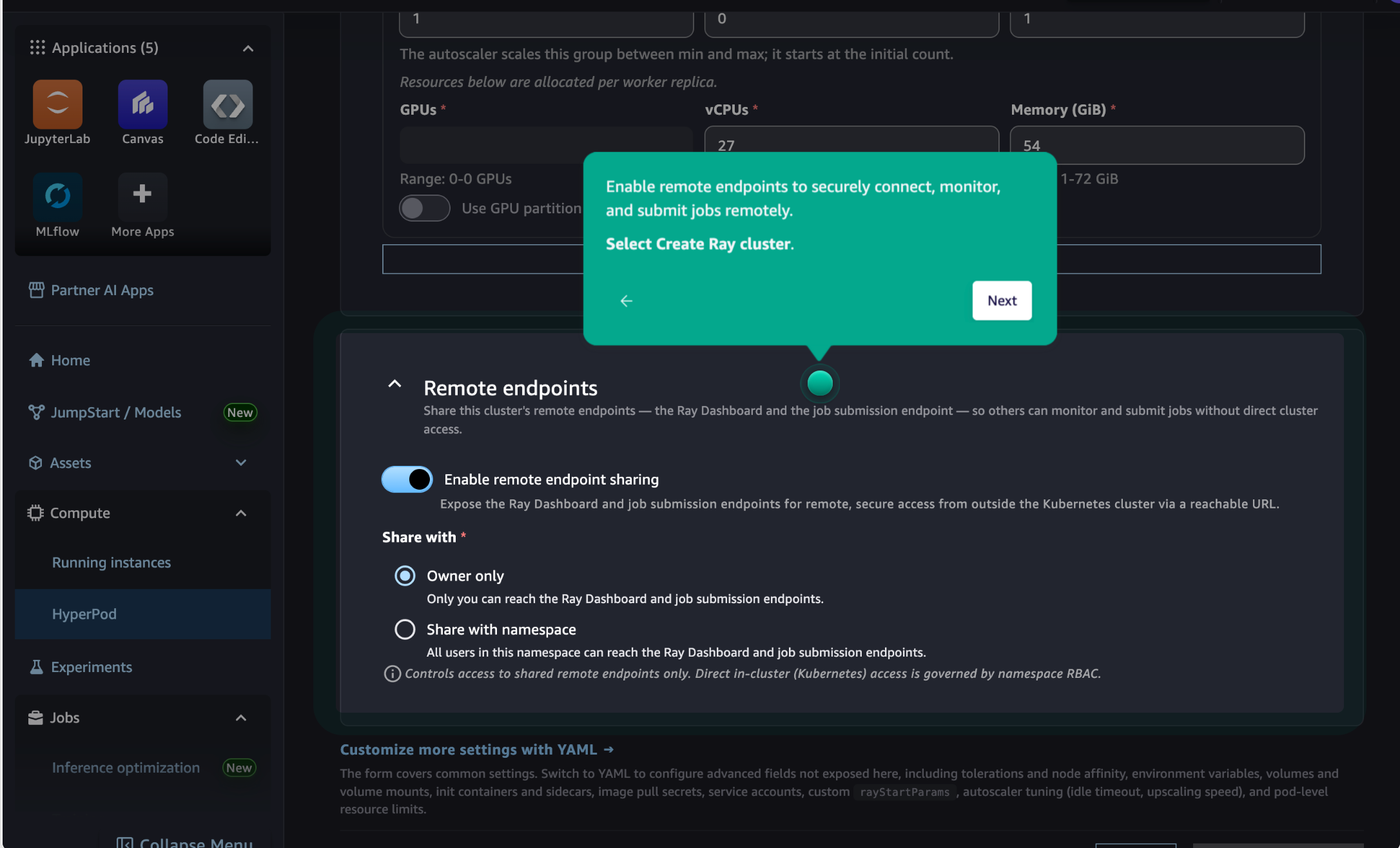
图 2:SageMaker Studio 中的 Create Ray Cluster 表单,已启用用于作业提交和控制面板访问的远程端点
集群达到 Running 状态后,Tasks 选项卡中的 Actions 菜单将提供 Open Ray Dashboard、Open Grafana 和集群管理选项。
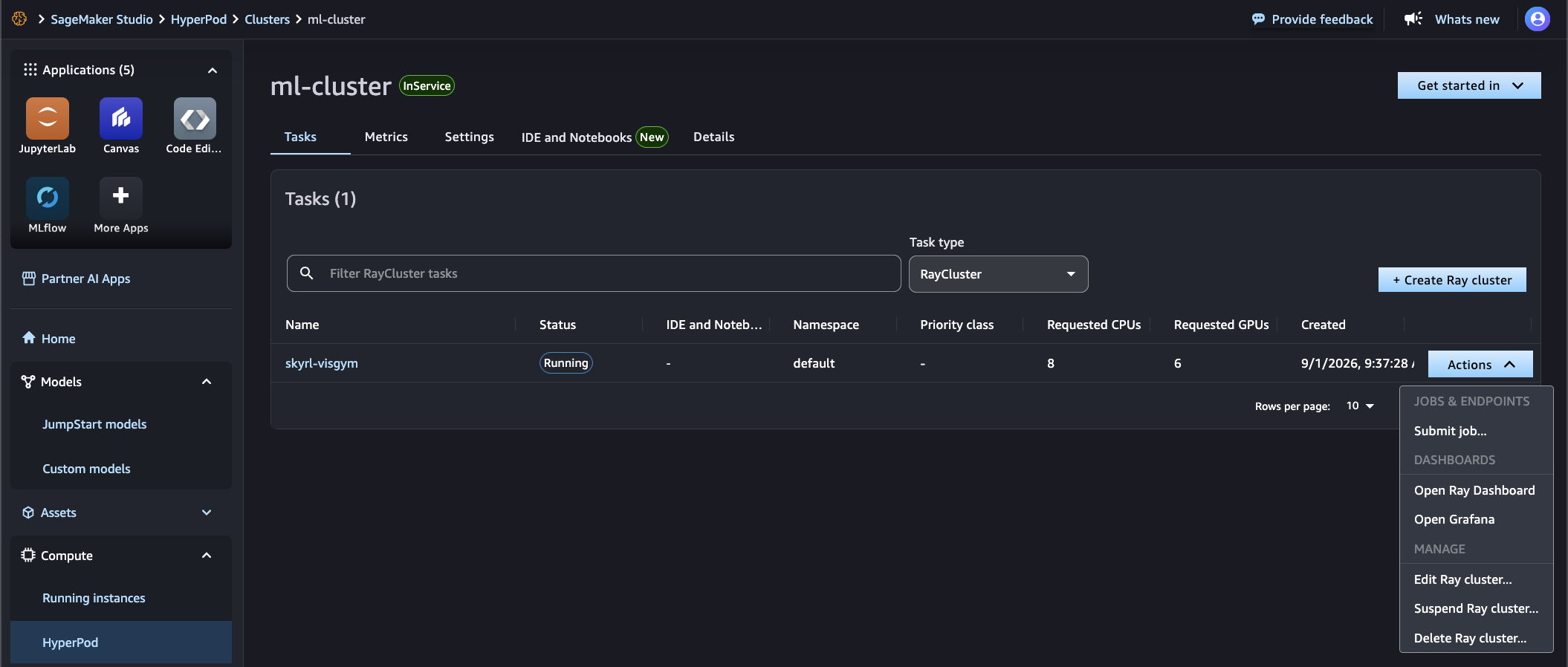
图 3:SageMaker Studio Tasks 选项卡中处于 Running 状态的 skyrl-visgym Ray 集群,Actions 菜单已展开
步骤 3:准备训练脚本
将以下内容以 train_job.sh 的文件名保存至您的工作目录。该脚本会在首次运行时下载 SFT checkpoint 并生成数据集(两者都会保存至 Amazon FSx,因此可跨运行持续保留),随后启动 GRPO 训练作业。
SFT checkpoint 为 GRPO 提供了良好的起点:预先在 VisGym 演示数据上训练的 Qwen3-VL-8B 已经知道如何解析迷宫图像并输出结构化移动动作,因此 GRPO 只需进一步优化哪些动作序列能够抵达目标。
使用 trainer.placement.colocate_all=true 时,vLLM rollout 引擎和 FSDP 策略工作进程会共享同一批 GPU。在 rollout 期间,GPU 并行执行推理;在策略更新步骤期间,它们共同执行 FSDP 训练。lora_sync_path 指向 Amazon FSx,因此每次优化器步骤完成后,更新后的适配器权重会立即对各节点上的推理引擎可见。若不采用共置部署,则需要为训练配置独立的 GPU 资源池。[原文在此处截断]
English / 原文
Reinforcement learning (RL) post-training is becoming a standard step in building capable language model agents. Models learn to reason and act across sequences of steps by generating trajectories, receiving rewards, and updating their policy based on outcomes. Running this at scale, across multiple nodes with hundreds of GPU-hours of rollouts per training run, requires persistent cluster infrastructure. That infrastructure needs to sustain long jobs, recover from hardware failures without losing progress, and provide visibility into training dynamics as they unfold.
Amazon SageMaker HyperPod provides this infrastructure for large-scale machine learning (ML) workloads on Amazon Elastic Kubernetes Service (Amazon EKS). Through its cluster resiliency features, it continuously monitors node health and automatically replaces faulty nodes, so a hardware failure does not take the cluster down with it. Paired with checkpointing, a training job can pick up from its last saved step instead of restarting from scratch. This matters for long multi-node RL runs, where a single hardware failure would otherwise cost hours of rollout progress. Combined with the Ray capabilities on HyperPod, you can create Ray clusters from SageMaker Studio, submit jobs remotely using secure connections, and monitor training through pre-built Amazon Managed Grafana dashboards that the HyperPod Observability EKS add-on provisions for you.
In this post, we show how to use these capabilities to run SkyRL, an open-source RL framework, to train a Qwen3-VL-8B vision-language model to navigate visual mazes using Group Relative Policy Optimization (GRPO) on SageMaker HyperPod. Starting from the VisGym SFT checkpoint, a supervised fine-tuning (SFT) starting point, GRPO post-training on HyperPod improves the maze solve rate from 43.75% to more than 95% on a fixed 64-maze evaluation set.
Prerequisites
To follow this walkthrough, you need:
- A SageMaker HyperPod cluster with Amazon EKS orchestration that has at least 3 ml.g7e.12xlarge instances and one ml.r5d.16xlarge instance.
- The following Kubernetes operators installed in your cluster: KubeRay operator , HyperPod Observability EKS add-on , and HyperPod Ray Endpoint Operator (for remote job submission). See the Ray on HyperPod getting started guide.
- The Amazon FSx for Lustre CSI driver installed on the cluster. You also need an Amazon FSx for Lustre filesystem, a PersistentVolume backed by that filesystem, and a PersistentVolumeClaim (ReadWriteMany) that the pods can mount. The training job uses this at
/sharedfor checkpoint storage, Low-Rank Adaptation (LoRA) adapter synchronization, and evaluation output. - A SageMaker Studio domain with permissions to connect to your HyperPod cluster. See setting up SageMaker Studio for Ray.
- The
toolkit-for-ray-on-sagemaker-aiPython package installed.
Background
This section reviews the reinforcement learning concepts behind the training and the cluster topology the walkthrough uses.
Multi-turn RL and GRPO
Standard single-turn RL assigns a reward to a single model output. Multi-turn RL instead trains an agent over a whole sequence of steps, where it observes a state, acts, gets feedback, and moves on to the next state. The policy learns from the reward accumulated over the entire episode rather than from any one step.
Consider the example problem of navigating a 2D maze. One episode is a single run at a maze, and each turn is one move: the model looks at the current picture of the maze, chooses a direction or decides to stop, and the environment sends back the updated view. Rewards are sparse, so the model earns 1.0 only when it actually reaches the goal within the move limit and nothing otherwise. There is no move-by-move answer key to train against, since whether a move was good depends on the moves around it.
This is where SkyRL’s Group Relative Policy Optimization (GRPO) comes in. For each starting position, the agent runs the maze several times under the current policy, and GRPO grades those runs against one another, reinforcing the ones that beat the group’s average and pushing down the ones that trail it. That within-group comparison is the whole training signal, which lets GRPO work without a separate critic or value model.
Training topology
The solution discussed here runs SkyRL on a HyperPod Ray cluster with three GPU worker nodes and a CPU head node. SkyRL colocates inference and training on the same GPUs: vLLM engines generate rollouts (complete maze episodes) while a policy model sharded with Fully Sharded Data Parallel (FSDP) handles gradient updates. After each optimizer step, updated LoRA adapter weights sync from the training ranks to the inference engines through Amazon FSx for Lustre shared storage.
These are the instance types we used. Other GPU instances and cluster sizes work as well, provided the workers have enough GPU memory for the model.
- Workers : 3x
ml.g7e.12xlarge(2x NVIDIA RTX PRO 6000 Blackwell GPUs each, 6 GPUs total). - Head :
ml.r5d.16xlarge(512 GB RAM, manages Ray GCS, dashboard, and LoRA adapter consolidation). - Policy model :
Qwen3-VL-8Bwith LoRA (rank 32), sharded across the 6 GPUs using PyTorch FSDP. - Rollout engines : 6 colocated vLLM instances, one per GPU.
- Shared storage : Amazon FSx for Lustre at
/shared, used for LoRA sync and evaluation output.
HyperPod provides the cluster infrastructure: the Ray cluster is created from SageMaker Studio, job submission uses the sagemaker_ray:// protocol, and training metrics flow automatically into pre-built Amazon Managed Grafana dashboards through the HyperPod Observability add-on.
Figure 1: RayCluster topology on Amazon SageMaker HyperPod, with one CPU head node and three GPU worker nodes that colocate FSDP policy shards and vLLM rollout engines over a shared Amazon FSx for Lustre filesystem
Solution overview
The following steps walk through preparing the training environment, launching the cluster, running the job, monitoring progress, and hosting the trained model.
Step 1: Prepare the container image
To get started quickly, use the following Dockerfile to build a container image with SkyRL, VisGym, and their dependencies pre-installed. This is the image you will specify when launching your Ray cluster on HyperPod in the next step. It builds on the official NovaSky-AI SkyRL base and pins both SkyRL and VisGym to specific commit SHAs so the build is reproducible:
FROM novaskyai/skyrl-train-ray-2.57.0-py3.12-cu13.0

ENV HF_HUB_ENABLE_HF_TRANSFER=1 \
    QWEN_VL_MODEL=Qwen/Qwen3-VL-8B-Instruct \
    UV_PROJECT_ENVIRONMENT=/home/ray/anaconda3

# SkyRL's full FSDP stack into the system python Ray uses (uv .venv is invisible to `ray start`).
# Pinned to a commit SHA so the build is reproducible.
ARG SKYRL_REF=4298730b55bb01fe1b711662df53dca42a3b7615
RUN git clone https://github.com/NovaSky-AI/SkyRL.git /home/ray/skyrl \
    && cd /home/ray/skyrl && git checkout ${SKYRL_REF} \
    && cd /home/ray/skyrl/skyrl-train \
    && uv sync --active --extra fsdp \
    && /home/ray/anaconda3/bin/python -c \
       "import ray, torch, vllm, transformers, flash_attn; \
        from vllm_router.launch_router import launch_router; \
        print('skyrl stack OK', torch.__version__, vllm.__version__)"

# uv sync prunes Ray's dashboard extras; restore ray[default] so the full dashboard starts.
RUN uv pip install --python /home/ray/anaconda3/bin/python "ray[default]==2.57.0" \
    && /home/ray/anaconda3/bin/python -c \
       "from ray.dashboard.optional_deps import aiohttp"

# VisGym maze environment and dataset generator.
ARG VISGYM_REF=184fbd5e5dc81e32c8b944d9e40ac54dad62e3f2
RUN git clone https://github.com/anyscale/VisGym.git /home/ray/visgym \
    && cd /home/ray/visgym && git checkout ${VISGYM_REF} \
    && uv pip install --python /home/ray/anaconda3/bin/python -e . "pygame==2.6.1"

ENV FI_PROVIDER=efa FI_EFA_USE_DEVICE_RDMA=1 NCCL_PROTO=simple NCCL_DEBUG=INFO
WORKDIR /workspace
CMD ["/bin/bash"]
Build the image and push it to an Amazon Elastic Container Registry (Amazon ECR) repository in your account. Note the full image URI, as you will use it when creating the Ray cluster in the next step:
ACCOUNT=$(aws sts get-caller-identity --query Account --output text)
REGION=us-west-2
IMAGE_URI="${ACCOUNT}.dkr.ecr.${REGION}.amazonaws.com/ray/skyrl-visgym:latest"

aws ecr get-login-password --region ${REGION} | \
  docker login --username AWS --password-stdin ${ACCOUNT}.dkr.ecr.${REGION}.amazonaws.com

docker build -t skyrl-visgym .
docker tag skyrl-visgym ${IMAGE_URI}
docker push ${IMAGE_URI}

echo "Image URI: ${IMAGE_URI}"
Step 2: Launch the Ray cluster from SageMaker Studio
Navigate to SageMaker Studio, choose HyperPod , select your cluster, then go to the Tasks tab. From the task type list, choose RayCluster , then choose Create Ray Cluster.
In the creation form, give the cluster the name skyrl-visgym, set the head instance type to ml.r5d.16xlarge, and add three workers using ml.g7e.12xlarge. Set the container image to the IMAGE_URI you pushed in Step 1.
The instance types listed here are what we used for this walkthrough. Other instance types will work, but keep one constraint in mind for the head node: it needs large memory. The head consolidates LoRA adapter shards from the GPU workers at each checkpoint save, which briefly loads the full adapter weight set into CPU memory. We used ml.r5d.16xlarge for its large memory capacity (512 GB RAM) to accommodate this.
Mounting Amazon FSx for Lustre
To attach your Amazon FSx filesystem, choose the YAML button in the top-right corner of the creation form to switch to the raw manifest editor, then add the volume and mount to both the head and worker pod specs. The relevant section for each pod looks like this:
containers:
  - name: ray-head  # or ray-worker
    volumeMounts:
      - name: shared
        mountPath: /shared
volumes:
  - name: shared
    persistentVolumeClaim:
      claimName: <your-fsx-pvc-name>
Replace <your-fsx-pvc-name> with the name of the PersistentVolumeClaim backed by your Amazon FSx filesystem. With this in place, /shared is available on every node in the cluster and the training job can read and write checkpoints, LoRA weights, and evaluation output from the pods.
Turn on Remote endpoints so you can submit jobs and open dashboards without a local kubectl port-forward. The cluster generates IAM-authenticated URLs for both.
Figure 2: The Create Ray Cluster form in SageMaker Studio with remote endpoints turned on for job submission and dashboard access
Once the cluster reaches Running status, the Actions menu in the Tasks tab offers Open Ray Dashboard, Open Grafana, and cluster management options.
Figure 3: The skyrl-visgym Ray cluster at Running status in the SageMaker Studio Tasks tab, with the Actions menu open
Step 3: Prepare the training script
Save the following as train_job.sh in your working directory. The script downloads the SFT checkpoint and generates datasets on first run (both go to Amazon FSx, so they persist across runs), then launches the GRPO training job.
The SFT checkpoint gives GRPO a strong starting point: Qwen3-VL-8B pre-trained on VisGym demonstrations already knows how to parse a maze image and emit structured move actions, so GRPO only needs to refine which sequences reach the goal.
With trainer.placement.colocate_all=true, the vLLM rollout engines and FSDP policy workers share the same GPUs. During rollout, GPUs run inference in parallel. During the policy update step, they run FSDP training collectively. The lora_sync_path points to Amazon FSx so updated adapter weights are immediately visible to the inference engines on the nodes after each optimizer step. Without colocation, you need separate GPU pools for training and inference, and they sit idle waiting for each other between phases, a ping-pong pattern that wastes compute. Colocation avoids that idle time by having training and inference take turns on the same hardware. That is why gpu_memory_utilization=0.45 is set conservatively: each GPU needs headroom for both the FSDP shard and the vLLM KV cache at the same time.
A few other parameters are worth noting. n_samples_per_prompt=8 controls how many rollout trajectories GRPO generates per maze prompt to compute the group advantage. max_turns=15 caps each episode at 15 moves. hf_save_interval=20 consolidates LoRA adapter shards onto the head node and saves a Hugging Face-compatible checkpoint every 20 steps. eval_interval=10 runs the held-out 64-maze evaluation every 10 steps so you can track solve rate as training progresses.
The job also writes full training checkpoints so it can recover from an interruption. Setting ckpt_interval=20 saves the complete training state to ckpt_path every 20 steps. That state includes the model weights, optimizer state, learning rate schedule, and dataloader position. resume_mode=latest tells SkyRL to pick up from the most recent checkpoint under that path when the job starts. Point ckpt_path at durable shared storage that is not tied to a single node, such as an Amazon Simple Storage Service (Amazon S3) prefix or your Amazon FSx mount. Keep the path stable across runs so a restarted job can find its checkpoint. This is what pairs with HyperPod cluster resiliency. When a node fails, HyperPod detects and replaces it automatically, and when you resubmit the job it continues from the last saved step instead of starting over. The full checkpoints written here capture training state for resumption, while the hf_save_interval exports capture inference-ready LoRA adapters, so the two run alongside each other for different purposes.
#!/usr/bin/env bash
# GRPO fine-tune from the VisGym SFT checkpoint on maze_2d/easy.
set -euxo pipefail
cd /home/ray/skyrl
export HF_HUB_ENABLE_HF_TRANSFER=0
export SKYRL_RAY_PG_TIMEOUT_IN_S=600
RUN_ID=$(date +%Y%m%d-%H%M%S)
EXPORT_PATH="/shared/runs/${RUN_ID}-train"

ENV_ID=maze_2d/easy
TRAIN_DIR=/tmp/visgym_train_256
EVAL_DIR=/tmp/visgym_eval_seeded
SFT_CKPT=/shared/models/visgym_sft_mixed_qwen3vl

if [ ! -f "$SFT_CKPT/config.json" ]; then
  echo "=== Downloading SFT checkpoint ==="
  mkdir -p "$SFT_CKPT"
  python -c "
from huggingface_hub import snapshot_download
snapshot_download(repo_id='VisGym/visgym_model', allow_patterns='mixed_qwen3vl/*',
    local_dir='$SFT_CKPT', local_dir_use_symlinks=False)
import shutil, os; src='$SFT_CKPT/mixed_qwen3vl'
[shutil.move(os.path.join(src,f),'$SFT_CKPT') for f in os.listdir(src)]; os.rmdir(src)
"
fi

python examples/train/visgym/dataset.py --env_id "$ENV_ID" --num_rows 256 --output_dir "$TRAIN_DIR"
python examples/train/visgym/dataset.py --env_id "$ENV_ID" --num_rows 64  --seed --output_dir "$EVAL_DIR"

python examples/train/visgym/entrypoint.py \
  --env_variant sft \
  data.train_data="['$TRAIN_DIR/train.parquet']" \
  data.val_data="['$EVAL_DIR/train.parquet']" \
  trainer.algorithm.advantage_estimator="grpo" \
  trainer.policy.model.path="$SFT_CKPT" \
  trainer.policy.model.lora.rank=32 \
  trainer.policy.model.lora.alpha=32 \
  trainer.policy.model.lora.lora_sync_path="/shared/lora" \
  trainer.placement.colocate_all=true \
  trainer.strategy=fsdp \
  trainer.placement.policy_num_nodes=3 \
  trainer.placement.policy_num_gpus_per_node=2 \
  trainer.placement.ref_num_nodes=3 \
  trainer.placement.ref_num_gpus_per_node=2 \
  trainer.ref.fsdp_config.cpu_offload=false \
  generator.inference_engine.num_engines=6 \
  generator.inference_engine.tensor_parallel_size=1 \
  generator.inference_engine.gpu_memory_utilization=0.45 \
  generator.inference_engine.engine_init_kwargs.max_model_len=16000 \
  environment.env_class=visgym \
  trainer.epochs=20 \
  trainer.train_batch_size=24 \
  trainer.policy_mini_batch_size=12 \
  trainer.micro_forward_batch_size_per_gpu=1 \
  trainer.micro_train_batch_size_per_gpu=1 \
  trainer.update_epochs_per_batch=1 \
  trainer.max_prompt_length=2048 \
  generator.sampling_params.max_generate_length=1024 \
  generator.sampling_params.temperature=0.7 \
  generator.max_turns=15 \
  generator.max_input_length=8192 \
  generator.n_samples_per_prompt=8 \
  generator.vision_language_generator=true \
  generator.batched=false \
  trainer.remove_microbatch_padding=false \
  trainer.algorithm.use_kl_loss=false \
  trainer.policy.optimizer_config.lr=3.0e-6 \
  trainer.eval_interval=10 \
  trainer.eval_before_train=true \
  trainer.ckpt_interval=20 \
  trainer.hf_save_interval=20 \
  trainer.logger="console" \
  trainer.project_name="vlm_maze_2d_easy" \
  trainer.run_name="sft_grpo_${RUN_ID}" \
  trainer.resume_mode=latest \
  trainer.log_path="/tmp/skyrl-logs" \
  trainer.dump_eval_results=true \
  trainer.export_path="$EXPORT_PATH" \
  trainer.ckpt_path="s3://<your-bucket>/skyrl-visgym/ckpts/sft-grpo"
Step 4: Submit the training job remotely
When toolkit-for-ray-on-sagemaker-ai is installed, Ray’s standard Jobs CLI authenticates through the cluster’s secured endpoint using the sagemaker_ray:// address scheme the package registers. The library authenticates to the Ray endpoint using your AWS credentials, so you don’t need to do it yourself. This way, you can submit and track jobs from a laptop, a CI/CD pipeline, or an environment with AWS credentials, with no kubectl port-forward and no direct network path to the cluster.
First, authenticate against the EKS cluster:
aws eks update-kubeconfig --name <eks-cluster-name> --region us-west-2
Then submit the job, passing the current directory as the working dir so train_job.sh is uploaded to the cluster head:
# Address format: sagemaker_ray://<ray-cluster-name>/<namespace>
ray job submit \
  --address sagemaker_ray://skyrl-visgym/default \
  --submission-id sft-train \
  --working-dir . \
  -- bash train_job.sh
Once submitted, track progress using the same address:
# List jobs and check status
ray job list --address sagemaker_ray://skyrl-visgym/default

# Stream logs
ray job logs sft-train \
  --address sagemaker_ray://skyrl-visgym/default --follow
You can also track the job in SageMaker Studio under the Tasks tab, or open the Ray Dashboard directly from the cluster Actions menu for a full job view with per-actor resource utilization.
Step 5: Monitor training progress
HyperPod provides two monitoring surfaces: the Ray Dashboard for job-level visibility, and Amazon Managed Grafana for infrastructure and training metrics. Both are accessible directly from the Tasks tab in SageMaker Studio.
Ray Dashboard
From the Tasks tab in SageMaker Studio, choose Open Ray Dashboard. This generates a short-lived authenticated URL for you automatically.
You can also generate the URL from the HyperPod CLI:
hyp create ray-dashboard-connection \
  --cluster-name <ray-cluster-name> \
  --namespace <kubernetes-namespace>
The command returns a presigned URL. Open it in a browser to view the Ray dashboard. The session is valid for up to six hours. For more details, see Generating a dashboard connection URL in the HyperPod documentation.
The following screenshot shows the Jobs view with the running job, its current step, and per-worker resource utilization.
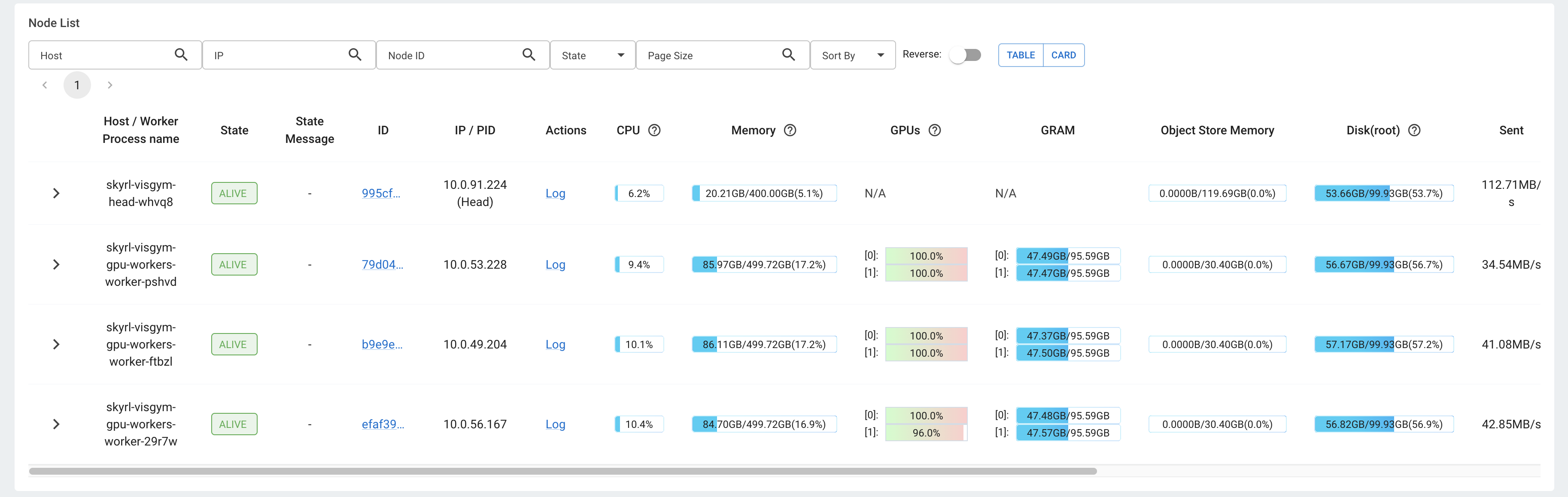
Figure 4: The Ray Dashboard Jobs view showing the running training job and per-worker GPU utilization
HyperPod Observability dashboards
From the Tasks tab, choose Open Grafana. The HyperPod Observability EKS add-on provisions four pre-built Ray dashboards in Amazon Managed Grafana: Ray Core , Ray Data , Ray Train , and Ray Serve. All four appear under a Ray folder and support filtering by cluster name. Here is a section of the core dashboard showing CPU, GPU, and memory utilization while the training is in progress.
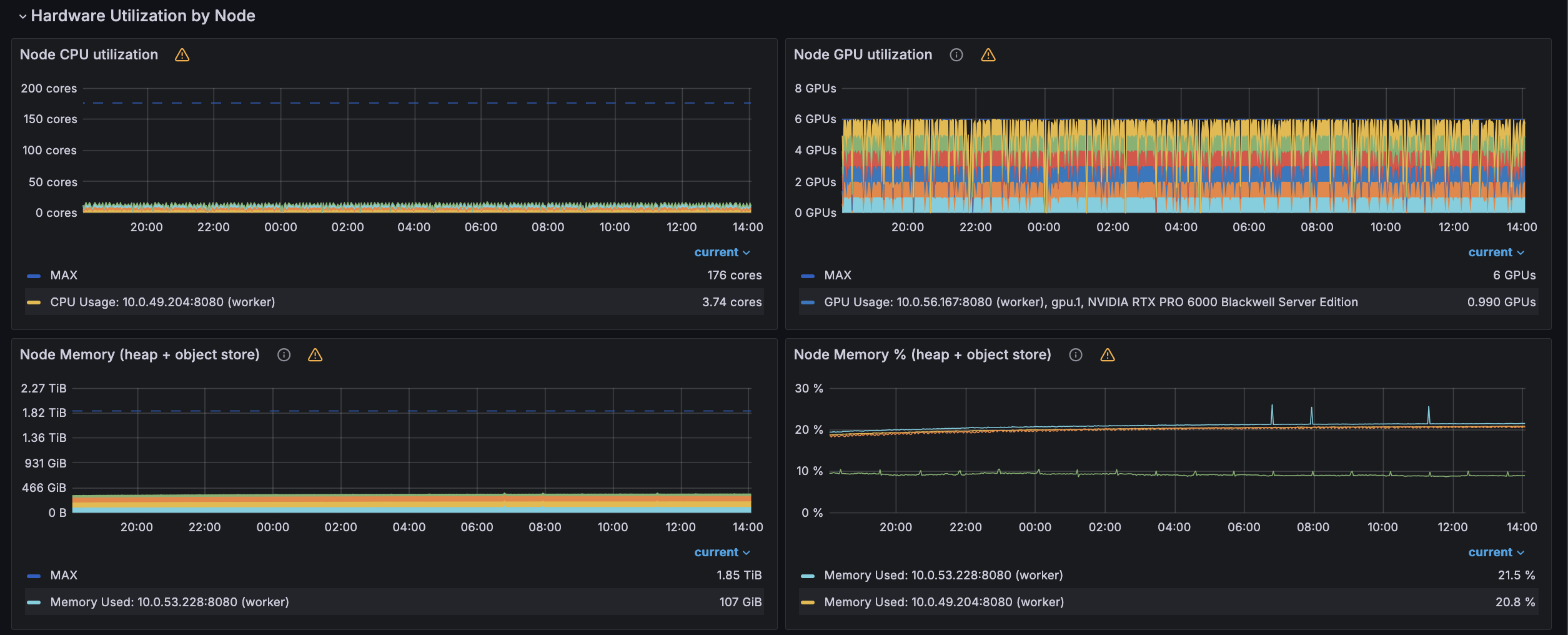
Figure 5: Amazon Managed Grafana Ray Core dashboard panels for CPU, GPU, and memory utilization during training
Tracking evaluation accuracy
SkyRL runs an evaluation pass every eval_interval=10 steps against the fixed 64-maze held-out set and logs eval/all/pass_at_1 to the console. You can grep for it in the job logs:
ray job logs sft-train \
  --address sagemaker_ray://skyrl-visgym/default | grep "eval/all/pass_at_1"
In our experiment, the model reached 75% solve rate around step 100 and peaked at 96.875% (62/64 mazes) at step 160, compared to a baseline of 43.75% (28/64 mazes) before GRPO post-training. Your results will vary based on hyperparameters and the maze configuration. Once the solve rate reaches your target, the LoRA adapter at that step is ready for inference. Checkpoints are saved to /shared/runs/<run_id>/global_step_<N>/policy/adapter_model.safetensors every 20 steps.
Step 6: Host the trained model for inference
With training complete, the artifact you deploy is a LoRA adapter rather than a full model, and Ray Serve loads that adapter on demand at request time. The one requirement is where the adapter lives. Ray Serve’s dynamic LoRA loader reads adapters from cloud storage such as Amazon S3, so begin by staging the adapter in an S3 prefix. Copy the adapter from the checkpoint step you selected during training into that prefix:
aws s3 cp --recursive \
  /shared/runs/<run_id>/global_step_N/policy/ \
  s3://<your-bucket>/lora-adapters/maze-grpo/
Each adapter occupies its own subdirectory beneath this prefix, and that subdirectory name (maze-grpo in this example) is the name you will use to request the adapter once the endpoint is live.
Serve with Ray Serve on a Ray cluster
To host the adapter, run Ray Serve on a Ray cluster built from the AWS Deep Learning Container for Ray Serve LLM, which bundles Ray Serve, the ray[llm] stack, and vLLM. With it, you can stand up an OpenAI-compatible endpoint using the built-in ray.serve.llm:build_openai_app builder and no custom image. We recommend running inference on a RayService, which KubeRay reconciles into its own Ray cluster (see the KubeRay docs).
A RayService describes its Serve application through a serveConfigV2 spec, and within that spec the ray.serve.llm:build_openai_app builder accepts one llm_configs entry per base model, as shown in the following configuration:
serveConfigV2: |
  applications:
    - name: maze-vlm
      route_prefix: /
      import_path: ray.serve.llm:build_openai_app
      args:
        llm_configs:
          - model_loading_config:
              model_id: visgym-qwen3vl
              # base SFT model on FSx
              model_source: /shared/models/visgym_sft_mixed_qwen3vl
            lora_config:
              # adapter prefix in S3
              dynamic_lora_loading_path: s3://<your-bucket>/lora-adapters
              max_num_adapters_per_replica: 1
            engine_kwargs:
              enable_lora: true
              # match the training LoRA rank
              max_lora_rank: 32
              max_loras: 1
              max_model_len: 16000
            deployment_config:
              autoscaling_config: { min_replicas: 1, max_replicas: 1 }
In this configuration, model_source points at the base SFT model on the Amazon FSx mount, while dynamic_lora_loading_path points at the S3 prefix you populated in the previous step. Set max_lora_rank to the same LoRA rank you used during training. Finally, make sure the Ray Serve replicas can obtain AWS credentials to read the adapters from your S3 bucket. On Amazon EKS, the recommended mechanism for this is Amazon EKS Pod Identity.
Dynamic LoRA loading per request
With this configuration in place, a single deployment serves both the base model and every adapter stored under the S3 prefix, and you choose which one to run through the model field on each request:
- Set
modeltovisgym-qwen3vlto run the base SFT model on its own. - Set
modeltovisgym-qwen3vl:maze-grpoto apply the GRPO adapter on top of that base model. The ID follows the<base-model-id>:<adapter-name>convention, where the adapter name is the subdirectory you created underdynamic_lora_loading_path.
The first time an adapter is requested, Ray Serve downloads it from Amazon S3 onto the replica and caches it, so every later request reuses the loaded weights without downloading again. Because the endpoint speaks the OpenAI API, you can call it from an OpenAI-compatible client. For the complete set of configuration options, see the Ray Serve LLM documentation and the multi-LoRA deployment guide.
With the adapter deployed, the model can run a full maze episode on its own, taking in the current view at each turn and returning its next move until it reaches the goal. The loop that drives this (building the prompt, encoding the maze image, parsing the action, stepping the environment) is the same one SkyRL and VisGym already use for rollouts. Point that environment at the served endpoint rather than rebuilding it around a raw client.
Here is a sample result, the trained model navigating two mazes end to end:
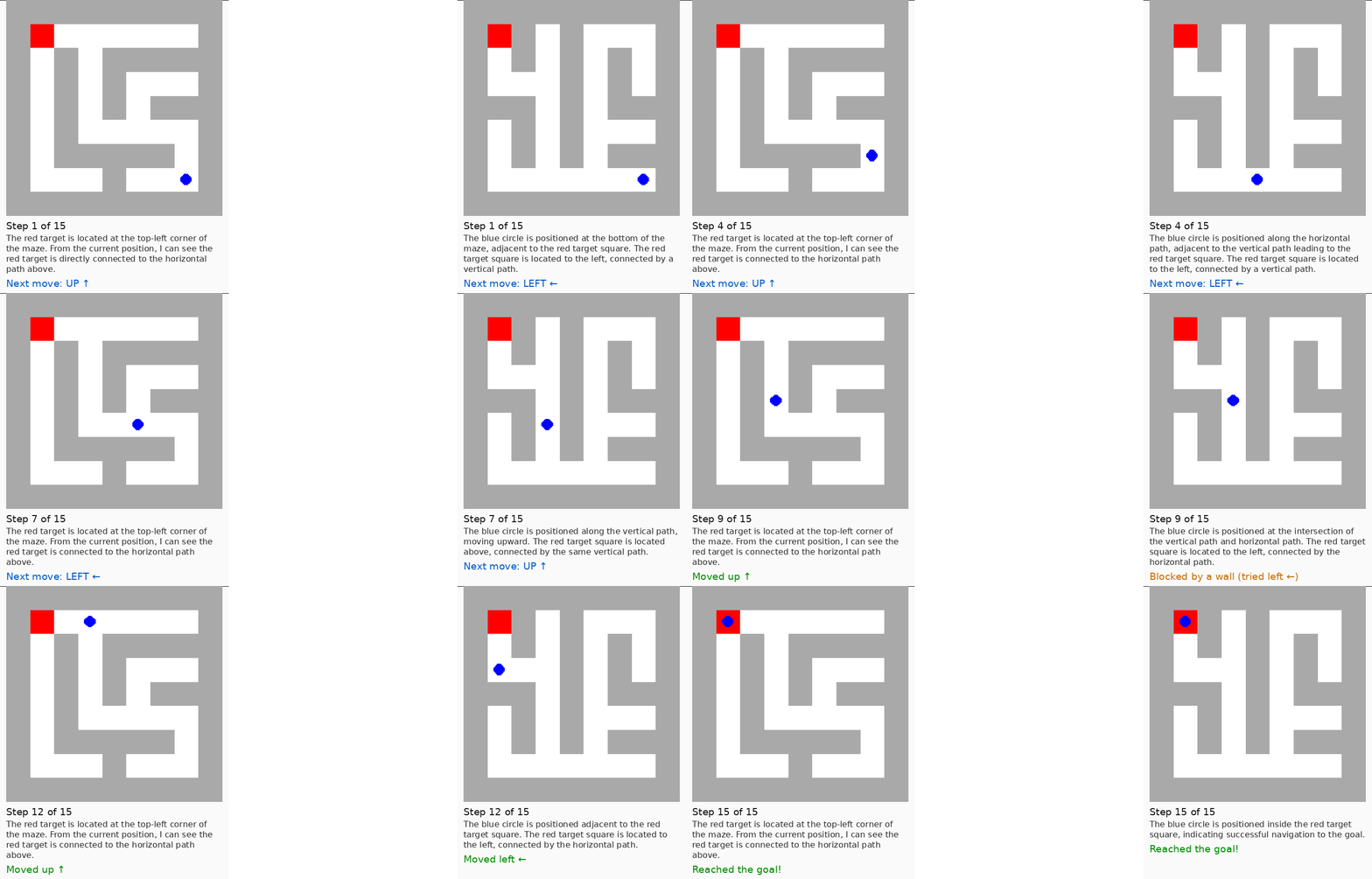
Figure 6: The fine-tuned model solving two mazes end to end, taking one move per turn until it reaches the goal
Clean up
When you finish the walkthrough, clean up the resources you created to stop incurring charges. Open the Tasks tab in SageMaker Studio, select the skyrl-visgym Ray cluster, and choose Delete from the Actions menu. If you created a separate RayService to host the trained adapter, delete that as well with kubectl delete rayservice <name>. To release the GPU capacity itself, scale down the HyperPod instance groups you added for this walkthrough, or delete the HyperPod cluster from the Amazon SageMaker AI console. If you no longer need the SageMaker Studio domain, you can delete it from the SageMaker AI console too.
Conclusion
In this post, we walked through an end-to-end multimodal RL training workflow on Amazon SageMaker HyperPod: building a custom container image, launching a Ray cluster from SageMaker Studio, starting from the VisGym SFT checkpoint to give GRPO a strong initialization, submitting the job using the sagemaker_ray:// protocol, monitoring evaluation accuracy through the Ray Dashboard and Grafana dashboards provisioned by the HyperPod Observability add-on, and hosting the trained adapter for inference once it reached the target solve rate. The entire workflow runs on the resilient, self-healing compute infrastructure that Amazon SageMaker HyperPod provides.
The same pattern applies to SkyRL workloads or other Ray-based RL frameworks. The HyperPod infrastructure, the Studio console experience, and the Amazon FSx shared storage work with frameworks that use standard Ray APIs.
To get started, see the Amazon SageMaker HyperPod documentation and the Ray on HyperPod getting started guide.
About the authors
Nilesh PS
Nilesh is a Senior Software Development Engineer at AWS working on Amazon SageMaker HyperPod. He focuses on Ray cluster management, training resiliency, and observability for large-scale distributed ML workloads on Kubernetes.
Pradeep Cruz
Pradeep is a Senior Software Development Manager at AWS, leading SageMaker HyperPod infrastructure for enterprise AI, Training, Inference and Model Customization. With over 20 years of experience, he has scaled critical 0-to-1 AI/ML platforms across AWS, T-Mobile, and Ericsson. An expert in distributed systems and infrastructure, he holds an MBA from Michigan Ross.
Dhawal Parkar
Dhawal is a Software Development Manager at AWS, working on Amazon SageMaker HyperPod. He leads the engineering organization responsible for cluster resiliency, health management, and observability, helping customers train and serve foundation models on large-scale GPU and Trainium clusters with high reliability and minimal downtime.
Vishal Shahane
Vishal is a Principal Engineer at AWS working on Amazon SageMaker HyperPod, where he focuses on building reliable, scalable infrastructure for large-scale AI/ML workloads.