在 AWS 上使用 Stardog 和 Amazon Bedrock AgentCore 为代理式 AI 构建语义层
英文标题:Build a semantic layer for agentic AI on AWS with Stardog and Amazon Bedrock AgentCore
本文演示了如何利用 Stardog 的语义 AI 应用在 Amazon Aurora 与 Amazon Redshift 上构建语义层,并通过 Amazon Bedrock AgentCore 运行 Strands Agents 代理,实现无需 ETL 的跨源客户 360 分析。该方案让 AI 代理能依据统一的业务定义和规则推导出可信答案,避免因数据分散导致结果冲突。对于开发者,它提供了一种将知识图谱、联邦查询与安全治理相结合的生产级路径,有效弥补了 RAG 架构在分析类问题中的不足。
 211.3 KB
 216.2 KB
 154.7 KB
 511.5 KB
 2.6 KB
 2.4 KB
 23.4 KB
 12.4 KB
 232.1 KB
中文
本文展示如何使用 Stardog 的语义 AI 应用在 Amazon Aurora 和 Amazon Redshift 上构建语义层,并如何在 Amazon Bedrock AgentCore 上运行 Strands Agents 代理,通过查询该语义层来回答跨两个数据源的客户 360 问题,且无需提取、转换和加载(ETL)。同一套 Stardog 部署可以在多种 AWS 计算环境(Amazon Elastic Kubernetes Service (Amazon EKS)、Amazon Elastic Container Service (Amazon ECS) 和 AWS Lambda)中工作。我们在此使用 AgentCore 是因为它将入站认证、托管和工具凭证整合到一个托管服务中。
企业分析二十年来一直在追求同一个目标:缩短从业务问题到可信答案的时间。定时报告曾经被仪表板取代,仪表板后来又被自助式商业智能(BI)取代。但即便是自助式 BI,也仍依赖数据工程师事先为特定问题构建好正确的模型,而人类分析师依然是所有预设数据集之外问题的瓶颈。生成式 AI 代理是下一步的演进。它们不再只是将数据可视化,而是直接对数据进行推理。它们会规划、编写查询、评估结果、修正并针对公司的实时数据反复迭代。代理式分析 便是这个转变的术语:每个业务用户手边都有一个自主代理,无需排队等待即可完成分析师的工作。
难点已不在于基础模型(FM)。Amazon Bedrock 上可用的基础模型已经能够规划多步骤工作流、推理数据模式并生成足够充当初级分析师的 SQL。真正的难点在底层:模型所推理的数据。企业数据分散在多个系统中,而这些系统对同一事物的定义各不相同。客户关系管理(CRM)系统中的“客户”与计费系统中的“客户”并非同一个记录;北美团队计算的“收入”与欧洲团队得出的数字也不相同。如果让 AI 代理直接访问这些碎片化数据,它会写出技术上正确但答案错误、矛盾或无法解释的查询。当两个代理对同一个问题返回两个不同的数字时,信任便会瞬间崩塌。
在 AWS 上,这些数据分布在一个我们熟悉的组合中。操作记录存在于 Amazon Aurora 和其他 Amazon Relational Database Service (Amazon RDS) 引擎中。分析历史数据存在于 Amazon Redshift 中。非结构化数据存在于 Amazon Simple Storage Service (Amazon S3) 中,可通过 Amazon Athena 查询,并且越来越多地采用 Apache Iceberg 等开放表格式,存储在 Amazon S3 Tables(Amazon S3 的一项功能)上,Athena、Amazon EMR 和 Amazon Redshift 均可读取这些数据。每一层都是为所存储的数据专门构建的,大多数企业会保持这种架构。挑战在于如何帮助 AI 代理同时跨所有层进行推理,并像资深人类分析师面对同一问题时那样流畅自如。
基础模型带来语言能力,而 AWS 数据应用则带来事实。如今连接二者的常见方式是检索增强生成(RAG):将政策文档、手册和工单索引到 Amazon Bedrock 知识库中,并在查询时将匹配的段落拉取进模型的上下文中。当答案存在于搜索能找到的文本中时,RAG 效果很好。但对于那些依赖于跨系统联查实时记录、需要一致地应用业务规则并遵守行级或列级访问策略的分析性问题,RAG 就力不从心了。
在语言和事实之间,分析性问题通常缺少的是 业务上下文和业务指标。举一个典型的零售示例:关于什么是“客户”、如何将“订单”与之关联、什么算作“高消费客户”或“高风险账户”、哪个系统拥有哪些事实以及企业报告中的数字是如何计算的,都需要一个共享定义。同样的差距也以不同的名称出现在其他领域(保险中的理赔与保单、医疗中的患者与就诊、供应链中的零部件与发货)。语义层可以一次性捕获这些上下文,并让所有代理和工具都能复用。有了它,AI 代理能够从多个来源组合答案,并对其返回的数字负责。语义层不会取代 RAG,而是对 RAG 的补充。大多数生产系统既需要 RAG,也需要语义层,且应通过同一个代理即可访问二者。
语义层是一个以本体驱动的企业数据视图。本体捕获了对业务重要的概念、关系、属性和规则。映射则声明了这些概念如何从每个实时数据源的行中映射而来。代理查询语义层,语义层在运行时将每个查询转换为针对底层系统的 SQL。数据留在原地,含义则被捕获一次并重复使用。
当语义层像 Stardog 那样实现时——包含本体、每个实体的稳定标识符、推导出新事实的规则以及根据本体验证数据的约束——其结果就是一个 知识图谱。数据作为业务实体的关系网而非表中的行被连接起来,每个实体都有一个被称为 IRI 的稳定 URL 风格唯一标识符,查询则使用 W3C 定义的、基于标准的查询语言 SPARQL 在这些连接上遍历。本文后续还会反复出现两个术语:
- 命名图 是图的一个带标签子集,由其自身的 IRI 标识。Stardog 将命名图用作访问控制的单元。同一个查询对不同角色返回不同结果,具体取决于每个角色被允许读取哪些命名图。
- 虚拟图 是一种命名图,其内容完全不存储在 Stardog 中,而是存放在外部系统(Aurora、Amazon Redshift、Athena)中,Stardog 按需根据映射获取行。本文中的跨源联邦即实现为一组虚拟图,每个数据源对应一个。
Stardog 术语表 定义了上述每个术语,Stardog 入门系列 则提供了相关的背景知识。
读完本文你将了解:
- 语义层如何与 RAG 配合,以及如何在两者间做出选择。
- 如何在 Amazon Aurora 和 Amazon Redshift 上对 Stardog 进行联邦配置,并介绍如何扩展到 Amazon Athena 及其他 AWS 数据源。
- 为什么推荐在生产环境中使用 AgentCore Runtime、Gateway 和 Identity 来运行代理。
- 从代理到 Stardog 的两种集成路径:直接的 SPARQL 工具,以及将 Stardog Cloud MCP(模型上下文协议)服务器作为 Gateway 工具目标。
- 在治理、部署以及当前正式发布(GA)与 beta 功能之间的权衡。
代理所需的三个层次
一个能够给出可靠且符合业务上下文答案的 AI 代理,需要三个方面协同工作。每一层都解决了其他层无法解决的问题。
-
模型层。 一个能够规划和编写的基础模型。Amazon Bedrock 通过单一 API 提供对多个模型系列的支持。我们使用 Anthropic Claude Sonnet 4.6。模型懂得语言,但不懂得你的业务。
-
含义层。 一个语义层,为模型提供对业务问题背后数据的可信且受控的访问。本体声明了概念以及从这些概念推导出新事实的规则,联邦在查询时从每个源拉取实时行。语义层执行实际工作:确定哪些数据是相关的,将 SPARQL 查询重写为针对每个源的 SQL,并根据共享标识符联接行。模型的工作则更窄:读取用户的问题,在需要数据时调用语义层,并用通俗的英语写出答案。真正的数据推理,例如跨联邦源应用
Big_Spender规则,仍然在 Stardog 内部进行,而不是在提示词中。我们在此使用 Stardog 对 Aurora 和 Amazon Redshift 的联邦知识图谱来实现这一层。 -
代理运行时层。 承载代理、终止入站请求、管理工具凭证并为安全和治理提供操作界面的计算环境。在 AWS 上,你有多种选择:一端是像 Amazon Bedrock AgentCore 这样的托管运行时,另一端是像 Amazon ECS、Amazon EKS 或 AWS Lambda 这样的自托管选项。正确的选择取决于你想要承担多少代理运维工作。我们在本文中使用 Amazon Bedrock AgentCore,因为它在 AWS 上为生产级代理提供了最规范的选择。
这三层中,含义层是本文所讨论的差距所在,也是后续演练构建的重点。代理运行时层往往是大多数团队低估的一层:代理如何被调用、如何进行认证、它访问语义层的凭证存放在何处,以及如何扩展。AgentCore 将上述问题的答案打包进一个托管服务中,这正是我们在这里使用它的原因。
示例用例:跨 Aurora 和 Amazon Redshift 的客户 360 代理
我们在接下来的演练中选择客户 360(C360)场景,因为它能暴露 AI 代理在尝试进行真正分析工作时遇到的所有差距,同时也让我们能够展示语义层如何仅用几百行映射和规则就逐一弥补这些差距。在典型的零售设置中,客户资料、地址、信用卡和奖励信息存储在操作数据库中。订单、产品、类别和供应商则存放在用于分析的数据仓库中。每一侧都针对其用途进行了良好的优化,单独任何一侧都无法回答关于客户整体情况的问题。一个试图回答“谁是我们最有价值的客户,他们在购买什么?”的代理必须协调两个数据库、两种模式、两种对“客户”的定义以及一个不属于任何表中列的派生概念(“最有价值”)。C360 让这些差距变得具体可见。
C360 代理面向分析团队运行。它接受来自销售主管、营销人员或欺诈分析师的通俗英语问题,编写查询,在公司数据上运行它们,并以简短的叙述性答案和支撑数字作为回复。用户不会看到 SQL 或 SPARQL,代理也看不到它未被允许查看的数据。
一位用户用通俗英语向 C360 代理提问:“谁是我们在威斯康星州的高消费客户?” 客户资料和地址存储在 Aurora 中。订单总额存储在 Amazon Redshift 中。代理必须通过稳定的客户标识符将它们联接起来,而该联接正是语义层所补充的三件事之一:
-
通过共享含义实现跨系统联接。 语义层使用共享的业务键将 Aurora 和 Amazon Redshift 中的客户记录映射到一个共同的客户身份。这使得联接可以通过语义模型表述,而不是通过物理集成管道。如果没有这一层,这种联接通常需要维护一条生成数据第三副本的管道,并且每当任一源发生更改时都要保持同步。
-
将派生事实作为规则而非查询。 像“高消费客户”这样的定义可以作为一条规则存在于本体中,而不是在每个查询中重复表达,每个提及该规则的查询都会得到相同的答案。如果没有它,这个定义就会被复制到多个仪表板、笔记本和报告中。当阈值发生变化时,这些副本就会发生漂移,导致同一问题开始返回不同的答案。
-
图级别的访问控制。 命名图安全机制在图级别控制访问,因此不同角色会看到企业知识图谱的不同子集。对于更细粒度的保护,你可以将诸如
:ssn和:cardNumber等敏感属性指定为受保护属性。有权限的用户能看到实际值,其他用户则默认看到掩码后的值。通过这种方法,不同角色可以运行相同的查询,而知识图谱则在每个访问它的应用程序中统一执行安全策略。
我们采用了 Stardog 的 C360 知识套件(该套件最初加载本地 CSV),并对其进行了改造,使其能够联邦到 Aurora PostgreSQL(客户侧)和 Amazon Redshift(购买侧)。该套件提供了本体、示例数据和现成的查询。你可以将其作为你自己工作的起点。
代理看不到的数据模型
在代理之下,C360 数据分布跨在两个 AWS 数据库上。Aurora 存放操作型、面向客户的表。Amazon Redshift 存放分析型事实表和产品维度。
Aurora PostgreSQL(操作型)
| 表 | 键列 |
|---|---|
customer |
cid, first_name, last_name, email, ssn, phone, location |
address |
id, city, state, zip, street_name |
credit_card |
id, cid, card_num, card_type |
rewards_account |
id, cid, account_id, create_date |
Amazon Redshift(分析型)
| 表 | 键列 |
|---|---|
purchase |
id, cid, pid, date, quantity, price, card |
product |
id, name, brand, price, dept |
category |
id, dept_name, parent |
vendor |
id, vendor_name, industry |
跨两个数据库的共享标识符是整数 cid。它作为主键出现在 Aurora 的 customer 表中,并作为非外键列出现在 Amazon Redshift 的 purchase 表中。没有 SQL 约束将它们连接起来,也不可能存在,因为它们位于不同的引擎中。将客户与其订单联接起来的答案必须在每次查询时协调该整数,且无需 ETL。
这就是语义层所吸收的内容。本体声明一个概念 :Customer,以及它的一个稳定标识符:一个 [IRI](https://www.w3.org/TR/rdf11-conce
English / 原文
In this post we show how to build a semantic layer on AWS using Stardog’s Semantic AI Application over Amazon Aurora and Amazon Redshift, and how to run a Strands Agents agent on Amazon Bedrock AgentCore that queries the layer to answer customer 360 questions across both sources without extract, transform, and load (ETL). The same Stardog deployment works behind AWS computes (Amazon Elastic Kubernetes Service (Amazon EKS), Amazon Elastic Container Service (Amazon ECS), and AWS Lambda). We use AgentCore here because it bundles inbound auth, hosting, and tool credentials into one managed service.
Enterprise analytics has been chasing the same goal for two decades: shrink the time between a business question and a trustworthy answer. Scheduled reports gave way to dashboards, then dashboards gave way to self-service business intelligence (BI). Even self-service depended on a data engineer having already built the right model for the right question, and the human analyst remained the bottleneck for everything outside the prepared dataset. Generative AI agents are the next step. Instead of visualizing data, they reason over it. They plan, write queries, evaluate results, refine, and iterate against the company’s live data on demand. Agentic analytics is the term for this shift: an autonomous agent at every business user’s elbow, doing the analyst’s work without waiting in the request queue.
The hard part is no longer the foundation model (FM). Foundation models available on Amazon Bedrock can already plan multi-step workflows, reason about schemas, and produce SQL well enough to act as a junior analyst would. The hard part sits underneath: the data the model reasons over. Enterprise data is scattered across systems that define the same things differently. The “customer” in your customer relationship management (CRM) system is not the same record as the “customer” in your billing system. “Revenue” calculated by the North American team isn’t the same number the European team would produce. An AI agent given direct access to this fragmented data will write technically valid queries that return wrong, conflicting, or unexplainable answers. Confidence erodes the first time two agents return two different numbers for the same question.
On AWS, that data sits across a familiar mix. Operational records live in Amazon Aurora and other Amazon Relational Database Service (Amazon RDS) engines. Analytics history lives in Amazon Redshift. Unstructured data lives in Amazon Simple Storage Service (Amazon S3), queried through Amazon Athena, and increasingly in open table formats such as Apache Iceberg, on Amazon S3 Tables, a capability of Amazon S3, which Athena, Amazon EMR, and Amazon Redshift can all read. Each layer is purpose-built for what it stores and most enterprises will keep that shape. The challenge is helping an AI agent reason across all of them at once with the same fluency a senior human analyst would bring to the same question.
Foundation models bring the language and the AWS data application brings the facts. The familiar way to connect them today is Retrieval Augmented Generation (RAG): index policy documents, manuals, and support tickets into Amazon Bedrock Knowledge Bases and pull matching passages into the model’s context at query time. RAG works well when the answer lives in text the search can find. It works less well for analytical questions where the answer depends on joining live records across systems, applying a business rule consistently, and honoring row- or column-level access policies.
What sits between language and facts, and is usually missing for those analytical questions, is business context and business metrics. Take a typical retail example: a shared definition of what a customer is, how an order links to one, what counts as a big spender or a high-risk account , which system owns which fact, and how the numbers the business reports are computed. The same gap shows up in other domains (claims and policies in insurance, patients and encounters in healthcare, parts and shipments in supply chain) under different names. A semantic layer captures that context once and lets every agent and tool reuse it. With it, an AI agent can compose answers from many sources and stand behind the numbers it returns. A semantic layer doesn’t replace RAG. It complements it. Most production systems need both, reachable through the same agent.
A semantic layer is an ontology-driven view of your enterprise data. The ontology captures the concepts, relationships, attributes and rules that matter to your business. Mappings declare how those concepts are mapped from rows in each live source. The agent queries the layer. The layer translates each query into SQL against the underlying systems at runtime. Data stays where it is. Meaning is captured once and reused.
When that semantic layer is implemented as Stardog does it (an ontology, stable identifiers for every entity, and rules that derive new facts, and constraints that validate the data against the ontology) the result is a knowledge graph. The data is connected as a graph of business entities rather than rows in tables, every entity has a stable URL-style unique identifier called an IRI, and queries traverse those connections in a W3C-defined, standards-based query language called SPARQL. Two more terms come up repeatedly in the rest of the post:
- A named graph is a labeled subset of the graph, identified by an IRI of its own. Stardog uses named graphs as the unit of access control. The same query produces different results for different roles depending on which named graphs each role is allowed to read.
- A virtual graph is a named graph whose contents are not stored in Stardog at all. They live in an external system (Aurora, Amazon Redshift, Athena) and Stardog fetches the rows on demand using the mappings. Federation in this post is implemented as a set of virtual graphs, one per source.
The Stardog glossary defines each of these terms, and the Stardog Getting Started series puts them in context.
By the end of this post you will know:
- How a semantic layer fits alongside RAG, and when to pick each.
- How to federate Stardog across Amazon Aurora and Amazon Redshift, with notes on extending to Amazon Athena and other AWS data sources.
- Why we recommend AgentCore Runtime, Gateway, and Identity for running the agent in production.
- Two integration paths from the agent to Stardog: a direct SPARQL tool, and the Stardog Cloud Model Context Protocol (MCP) server as a Gateway tool target.
- Tradeoffs on governance, deployment, and what is generally available (GA) versus beta today.
Three layers an agent needs
An AI agent that gives reliable, business-context-aware answers depends on three things working together. Each one solves a problem the others can’t.
1. Model layer. A foundation model that can plan and write. Amazon Bedrock provides a single API to multiple model families. We use Anthropic Claude Sonnet 4.6. The model knows language, it doesn’t know your business.
2. Meaning layer. A semantic layer that gives the model trustworthy, governed access to the data behind your business questions. The ontology declares the concepts and the rules that derive new facts from them, and the federation pulls live rows from each source at query time. The layer does the work: it figures out which data is relevant, rewrites the SPARQL query into SQL for each source, and joins the rows on shared identifiers. The model has a narrower job. It reads the user’s question, calls the layer when it needs data, and writes the answer in plain English. The actual reasoning over data, like applying the Big_Spender rule across the federated sources, stays inside Stardog rather than inside the prompt. We use Stardog’s federated knowledge graph over Aurora and Amazon Redshift for this.
3. Agent runtime layer. The compute that hosts the agent, terminates inbound requests, manages tool credentials, and provides the operational surface for security and governance. On AWS you have a spectrum of choices: managed runtimes like Amazon Bedrock AgentCore at one end, and self-managed options like Amazon ECS, Amazon EKS, or AWS Lambda at the other. The right choice depends on how much of the agent operations you want to own. We use Amazon Bedrock AgentCore in this post because it is the most prescriptive of the options for production agents on AWS.
Of the three, the meaning layer is the gap this post is about, and the rest of the walkthrough builds it. The agent runtime layer is the one most teams underestimate: how does the agent get called, how does it authenticate, where does its credential to the semantic layer live, and how does it scale. AgentCore packages answers to those questions into one managed service, which is why we use it here.
Example use case: A customer 360 agent across Aurora and Amazon Redshift
We chose customer 360 (C360) for the rest of this walkthrough because it surfaces every gap an AI agent runs into the moment it tries to do real analytical work, and it lets us show how the semantic layer closes each one in a few hundred lines of mappings and rules. In a typical retail setup, customer profile, address, credit card, and rewards information sit in an operational database. Orders, products, categories, and vendors live in a data warehouse for analytics. Each side is well-tuned for what it does. Neither side, on its own, can answer a question about the customer as a whole. An agent that tries to answer “who are our most valuable customers, and what are they buying?” has to reconcile two databases, two schemas, two definitions of “customer”, and a derived idea (“most valuable”) that lives in nobody’s column. C360 makes those gaps concrete.
The C360 agent runs for the analytics team. It accepts a question in plain English from a sales lead, a marketer, or a fraud analyst. It writes the queries, runs them across the company’s data, and replies with a short narrative answer plus the supporting numbers. The user does not see SQL or SPARQL, and the agent does not see the data it is not allowed to see.
A user asks the C360 agent, in plain English: “Who are our top spenders in Wisconsin?” Customer profile and address live in Aurora. Order totals live in Amazon Redshift. The agent has to join them on a stable customer identifier, and that join is one of three things a semantic layer adds:
1. Joins across systems through shared meaning. The semantic layer maps customer records from both Aurora and Amazon Redshift to a common customer identity using shared business keys. This lets the join be expressed through the semantic model rather than a physical integration pipeline. Without it, that join often requires a maintained pipeline that materializes a third copy of the data and must be kept in sync each time either source changes.
2. Derived facts as rules, not queries. A definition like “big spender” can live in the ontology as a rule rather than being re-expressed in every query, and every query that mentions it gets the same answer. Without it, that definition gets duplicated across dashboards, notebooks, and reports. When the threshold changes, the copies drift apart and the same question starts returning different answers.
3. Graph-level access control. Named graph security controls access at the graph level, so different roles see different subsets of the enterprise knowledge graph. For more fine-grained protection, you can designate sensitive properties such as :ssn and :cardNumber as protected properties. Users with permission see the actual values, while others see masked values by default. With this approach, different roles can run the same query while the knowledge graph enforces consistent security policies across every application that accesses it.
We took Stardog’s C360 Knowledge Kit, which originally loads local CSVs, and adapted it to federate across Aurora PostgreSQL (customer side) and Amazon Redshift (purchase side). The kit ships an ontology, sample data, and ready-made queries. You can use it as the starting point for your own work.
The data model the agent does not see
Underneath the agent, the C360 data is split across two AWS databases. Aurora holds the operational, customer-facing tables. Amazon Redshift holds the analytics fact table and product dimensions.
Aurora PostgreSQL (operational)
| Table | Key columns |
|---|---|
customer |
cid, first_name, last_name, email, ssn, phone, location |
address |
id, city, state, zip, street_name |
credit_card |
id, cid, card_num, card_type |
rewards_account |
id, cid, account_id, create_date |
Amazon Redshift (analytics)
| Table | Key columns |
|---|---|
purchase |
id, cid, pid, date, quantity, price, card |
product |
id, name, brand, price, dept |
category |
id, dept_name, parent |
vendor |
id, vendor_name, industry |
The shared identifier across the two databases is the integer cid. It appears as a primary key in the customer table on Aurora and as a non-foreign-key column in the purchase table on Amazon Redshift. There’s no SQL constraint linking them. There can’t be: they live in different engines. Answers that join customers to their orders must reconcile that integer at query time, every time, without ETL.
This is what the semantic layer absorbs. The ontology declares one concept, :Customer, and one stable identity for it: an IRI of the form urn:stardog:demos:c360:customer:{cid}. Both the Aurora customer mapping and the Amazon Redshift purchase mapping mint that same IRI from their respective cid values. The agent sees one customer entity with a profile, addresses, cards, rewards accounts, and orders. The warehouses see their own rows, unchanged. The mappings mint the same customer IRI from the cid in both databases. Stardog uses that shared identity to join the federated results without requiring the underlying databases to know about one another.
Reference architecture
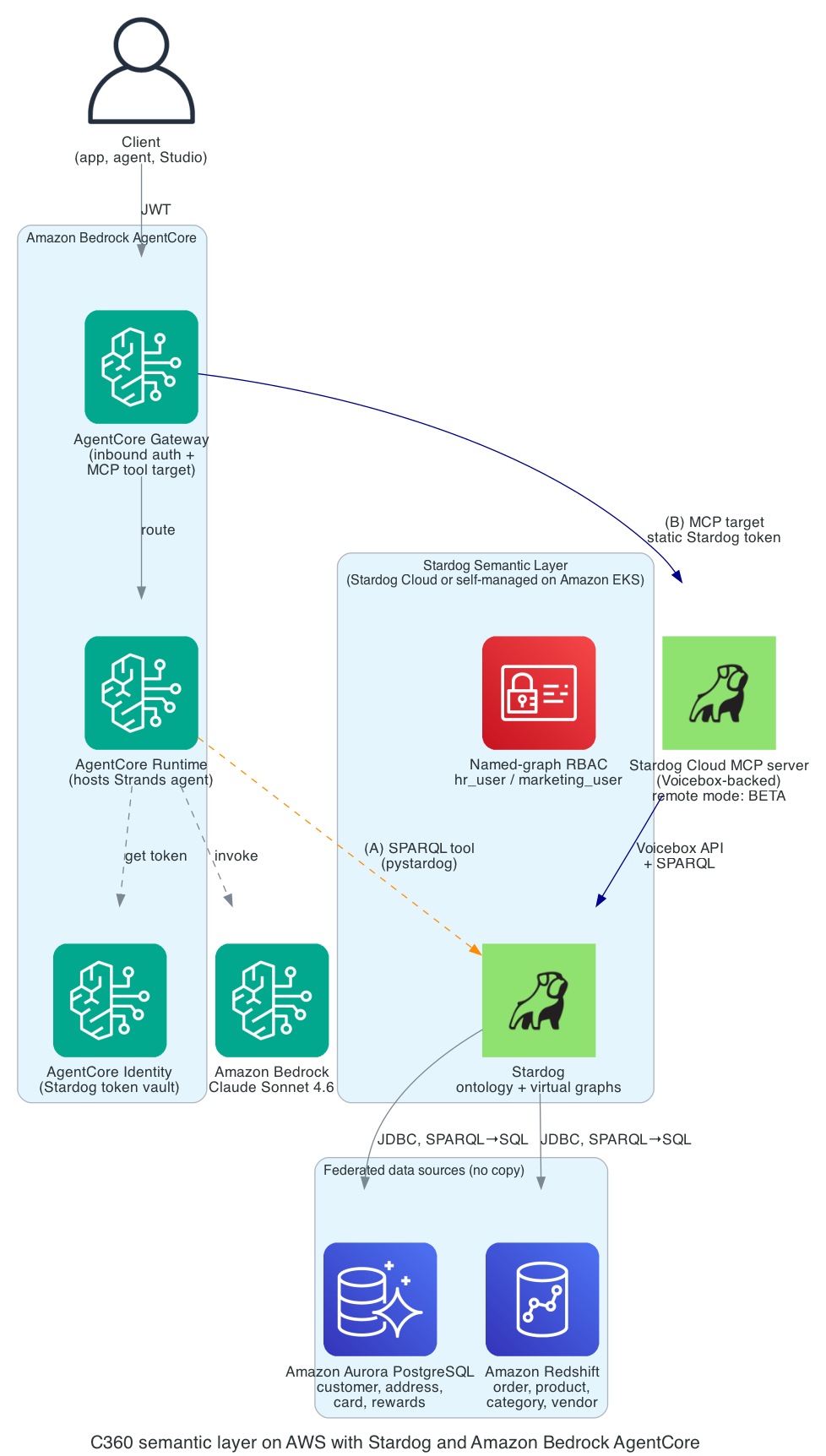
Figure 1. Key point: data stays in Aurora and Amazon Redshift. Only queries flow through the semantic layer.
This is the recommended production architecture. The proof of concept (POC) for this post used Path A with the agent running as a standalone script.
The diagram shows two flows.
Inbound. A client (an application, another agent, or Stardog Studio) calls the agent through AgentCore Gateway. Gateway validates the inbound JSON Web Token (JWT) and routes the call to AgentCore Runtime, which hosts the Strands agent. The agent invokes Claude Sonnet 4.6 on Amazon Bedrock for planning and answer composition.
Outbound to the semantic layer. Two paths are shown.
- Path A (today, orange dashed): The Strands agent calls a
query_kgSPARQL tool that talks to Stardog directly. Use this when you don’t yet have Voicebox API access (described later in this post). - Path B (Stardog Cloud MCP, when API access is available, blue): AgentCore Gateway has the Stardog Cloud MCP server registered as an MCP target. Gateway pulls the Stardog token from AgentCore Identity and forwards the call. The agent doesn’t touch the credential.
Stardog itself federates to the warehouses at query time over Java Database Connectivity (JDBC). SPARQL is rewritten to SQL per source. Results are joined inside Stardog on shared IRIs. There is no ETL job and no third copy of the data.
Build the semantic layer
Three pieces make the federation work. The ontology declares the concepts (:Customer, :Order, :Product) and the relationships between them. The mappings declare how rows in each datastore become instances of those concepts. Reasoning rules derive new facts from the data already in scope. Stardog Designer is the authoring surface for all three.
The ontology
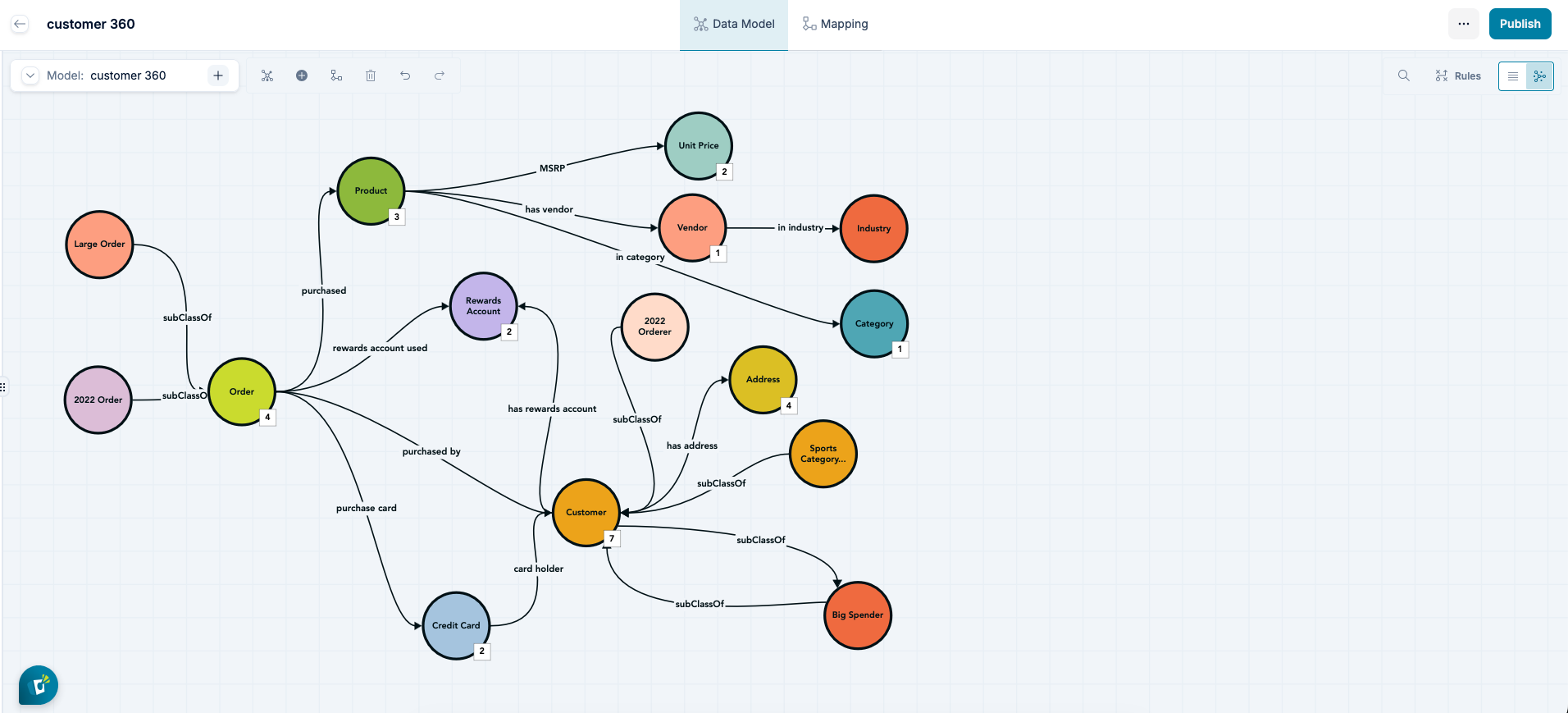
Figure 2. The C360 model in Stardog Designer. Concepts like Customer , Order , Product , and Address appear as colored nodes connected by labeled relationships ( purchased , card holder , has address , in category ). The lighter-shaded nodes around the edges ( Big Spender , Large Order , 2022 Orderer , the Sports Category shopper) are derived classes inferred by reasoning rules in the model rather than columns in any source.
The C360 ontology is authored in Stardog Designer, a no-code visual modeling and mapping tool. The modeler creates concepts (:Customer, :Order, :Product), connects them with relationships (:purchasedBy links an :Order back to a :Customer), and declares fields like :ssn and :cardNumber as sensitive properties. No OWL or RDF is written by hand. The full C360 model defines roughly ten classes and thirty properties. Designer can also generate a starting model from existing source metadata such as table schemas, FHIR definitions, use case description and competency questions, which is a faster path than writing the model from scratch.
Portability is a key advantage of Designer which uses Turtle, the W3C standard serialization for RDF to persist models. This standards-based approach helps prevent vendor lock-in and supports interoperability with the broader RDF network:
- Import ontologies directly from tools like Protégé.
- Export data to services such as Amazon Neptune.
- Perform round-trip workflows across other RDF compatible utilities.
The ontology grows over time as the questions it needs to answer get more specific. Most teams start with a small use case and competency questions used to build a model and then it is extended incrementally.
Under the hood: what Designer generates. The portion of the model the federation rests on is small (prefix declarations elided for brevity).
:Customer a owl:Class .

:purchasedBy a owl:ObjectProperty ;
    so:domainIncludes :Order ;
    so:rangeIncludes :Customer .

:ssn a owl:DatatypeProperty, m:SensitiveProperty ;
    so:domainIncludes :Customer .
The points worth noticing: every concept gets a stable identifier, the relationship from :Order to :Customer is declared once and reused everywhere, and :ssn is classified as m:SensitiveProperty (from Stardog’s metadata vocabulary) in the model itself rather than in a downstream policy file. The full ontology is in the C360 Knowledge Kit.
The mappings (federation building block)
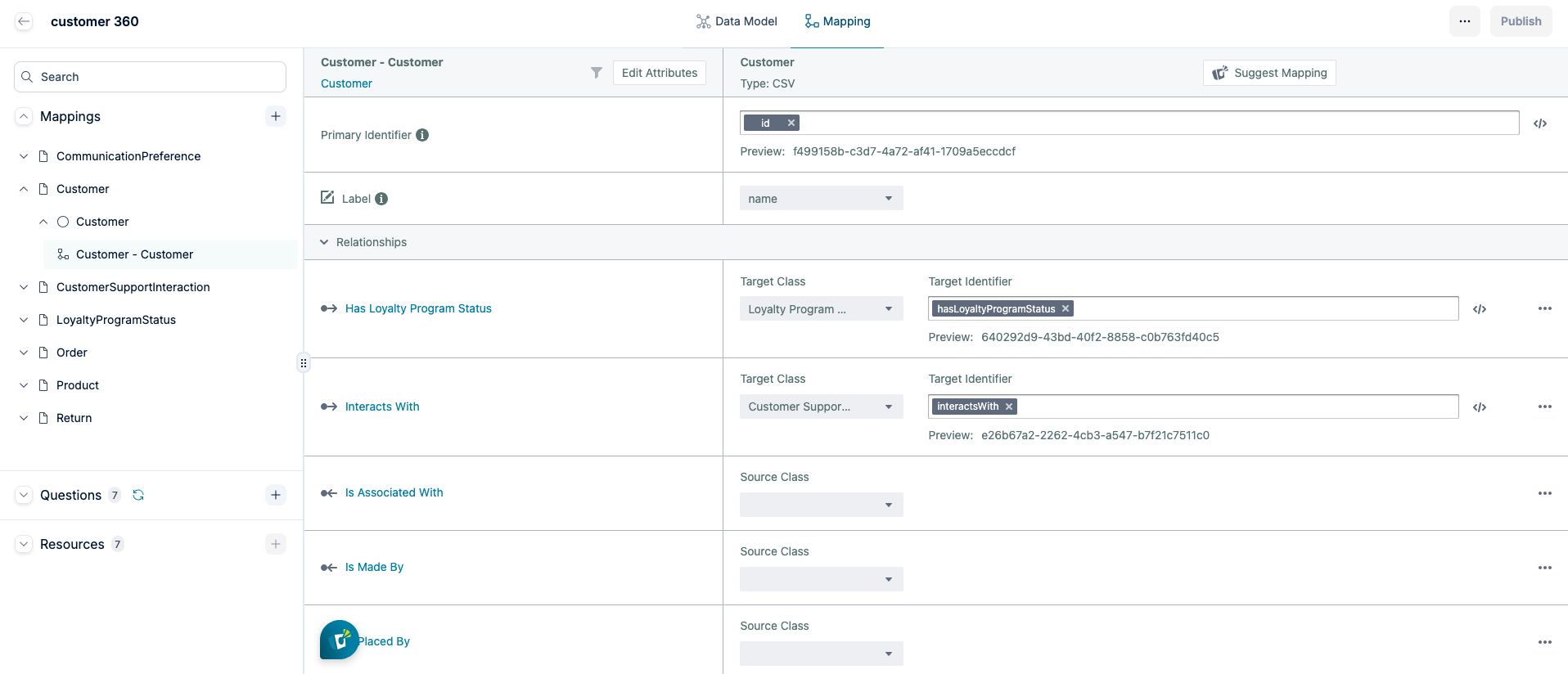
Figure 3. The mapping editor in Stardog Designer. The Customer source on the right is bound to the Customer concept on the left. The id column is set as the Primary Identifier, which is what produces the stable IRI used everywhere else. Below the identifier, relationships like Has Loyalty Program Status and Interacts With link the customer to other concepts in the same model.
In Designer, mappings are authored visually. The modeler maps the Aurora customer table to the :Customer concept and tells Designer that id is the entity key. Designer does the same on the Amazon Redshift side: map the purchase table, mark cid as the customer key. (In database terms, cid in :purchase references id in :Customer.) The same map-and-mark-the-key flow works for both warehouses. The mappings stay independent, but they line up because the IRI produced from the values in the cid in :Purchase is the same IRI as produced for the values of id in :customer.
The architectural property to understand is the IRI template. It is what lets the agent answer cross-warehouse questions without ETL. Both mappings produce the same identifier for the same customer. A customer with cid=42 becomes urn:stardog:demos:c360:customer:42 whether the row came from the Aurora customer table or the Amazon Redshift purchase table. The agent sees one entity. The warehouses are unchanged. No SQL JOIN ever crosses the two warehouses. The “join” is the IRI agreement.
Under the hood: what Designer generates. When Designer saves a mapping, it emits Stardog Mapping Syntax (SMS), a superset of the W3C R2RML standard that uses a SPARQL-like syntax. Stardog reads R2RML directly and can export SMS back to R2RML, so mappings port either direction. The two excerpts that carry the federation building block look like this:
# Aurora customer mapping (excerpt)
BIND(TEMPLATE("urn:stardog:demos:c360:customer:{cid}") AS ?iri)

# Redshift order mapping (excerpt)
BIND(TEMPLATE("urn:stardog:demos:c360:customer:{cid}") AS ?cust_iri)
The full mapping files for every C360 table are in the kit.
The following diagram traces a question from the agent down to the data sources and back. The middle band is the semantic layer. Nothing in it stores rows. The rows live in Aurora and Amazon Redshift. Stardog uses the ontology and the mappings to decide which SQL to run where, then joins the result sets on the shared IRI before handing them back.
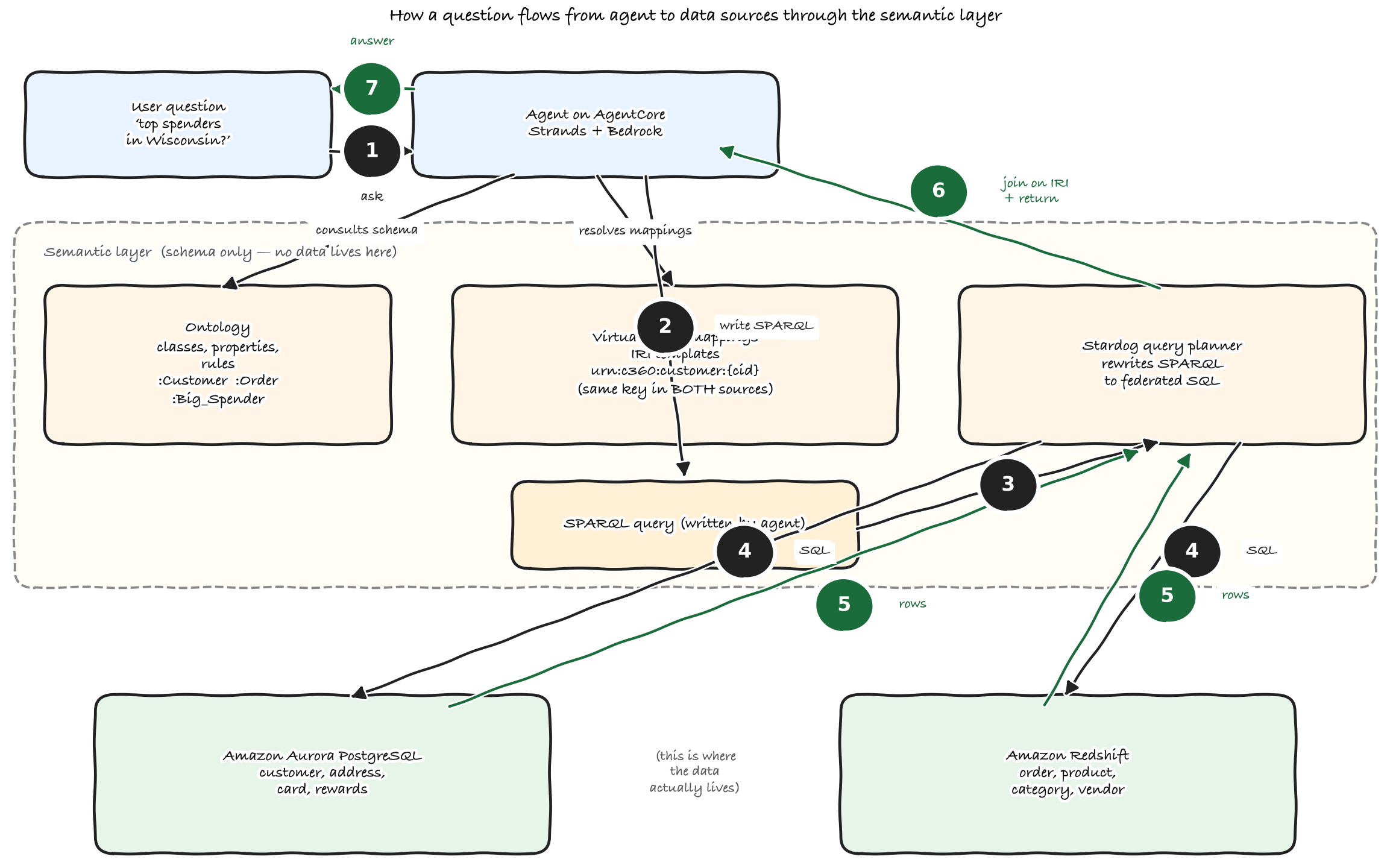
Figure 4. The query flow from the C360 agent to Aurora and Amazon Redshift and back. SPARQL is rewritten to SQL per source. Result sets are joined inside Stardog on the shared customer IRI.
Reasoning over the graph
Stardog supports OWL reasoning and user-defined rules written in Stardog Rule Syntax (SRS) or SWRL. Reasoning is the process of inferring new facts from existing data using the schema. The kit defines derived classes such as Big_Spender (a customer who has placed at least one order above a threshold) and Large_Order. With reasoning enabled at query time, asking “how many big spenders by state?” works without precomputing or materializing those facts. The rules are defined once in the semantic model and evaluated over live data when the query runs.
Encoding business definitions once, instead of re-implementing them in SQL queries, dashboards and prompts, is one of the hardest parts of moving beyond RAG.
Govern access with named-graph security
Customer 360 data is regulated. Two requirements show up early.
1. Some users (HR, fraud) need to see personally identifiable information (PII) like a Social Security number (SSN) and full card number. Most users (marketing, analytics) must not.
2. The control shouldn’t require changes in the underlying warehouses.
Stardog’s mechanism for this is named-graph security. A named graph is a labeled subset of the data. Named-graph security gates reads against each named graph on a per-user basis. Each virtual graph in the federation has its own named-graph IRI. We split the Aurora mapping into two virtual graphs.
aurora_c360_safe: Customer profile minus PII (everything except:ssnand:cardNumber).aurora_c360_pii: Only the PII triples, keyed to the same customer IRI.
The Amazon Redshift mapping is one graph, redshift_c360. We then create two roles.
hr_user: Read on all three virtual graphs.marketing_user: Read onaurora_c360_safeandredshift_c360only.
When marketing_user runs a SPARQL query that asks for ?c :ssn ?ssn, Stardog’s planner treats aurora_c360_pii as if it did not exist for that user. The JDBC pushdown for the SSN column doesn’t happen. No application-level filter, no warehouse-side change, no chance of leaking the value through a misconfigured BI tool. Same SPARQL query, two roles, two different result sets.
For row-level filters (a US-East analyst only sees east-coast customers, for example) the same named-graph mechanism scales: split the source into more virtual graphs along the row dimension, then grant per-graph reads. This is repetition of the PII pattern, not a new feature.
Stardog also supports tagging individual properties as sensitive on the ontology, with the tag driving column-level masking at query time. This is worth evaluating as an alternative to the preceding named-graph split. It fits best when sensitive fields are scattered across many entities and you would rather mark them in the ontology than partition the data. See Stardog’s fine-grained security docs for the configuration steps.
Run the agent and call Stardog from it
Strands Agents is a small framework for building agents. A short Python script wires Claude Sonnet 4.6 (on Amazon Bedrock) to a tool that runs SPARQL against Stardog. A summary of the ontology is loaded into the agent’s system prompt. The model writes SPARQL, the tool returns rows, the model summarizes the results.
That code is portable. The same agent can run as a Python script on a laptop, in a container on Amazon ECS or Amazon EKS, behind an Application Load Balancer, or as an AWS Lambda function. For production we recommend deploying it on Amazon Bedrock AgentCore because it bundles the operational scaffolding into one managed service.
- AgentCore Runtime hosts the agent and handles concurrency and session state.
- AgentCore Gateway is the inbound surface that validates the JWT from your identity provider (IdP) and routes the call to Runtime.
- AgentCore Identity holds the Stardog token as a credential provider, so the credential doesn’t live in the agent code.
If you pick a different runtime, the same building blocks still need a home: a hosting layer, an inbound authenticator, and a credential vault. The integration patterns that follow don’t change. What changes is which AWS service holds each piece.
The integration to Stardog is where deployments differ. Two paths are worth knowing. Default to Path A unless you already have Voicebox API access.
Path A: Direct SPARQL tool. A small Python tool wraps the pystardog client and is exposed to the agent through Strands’ tool decorator. The agent writes SPARQL, the tool runs it, the tool returns rows. This works on Stardog instances you can reach over HTTPS, including Stardog Cloud’s Free tier. We used this path in the POC because it requires no special enablement on the Stardog account.
Path B: Stardog Cloud MCP server as a Gateway tool target. Stardog publishes an official MCP server, stardog-union/stardog-cloud-mcp, that exposes Voicebox (Stardog’s natural-language query layer) as three tools: voicebox_ask, voicebox_generate_query, and voicebox_settings. Voicebox runs its own ontology-aware natural-language-to-SPARQL pipeline and returns the reasoning chain and provenance with each answer. AgentCore Gateway can register this MCP server as a tool target, which means the agent inside Runtime sees Voicebox as a tool with no glue code, and AgentCore Identity injects the token at the Gateway hop.
The MCP server’s local mode is stable. Remote mode is in beta. Path B also requires a Voicebox API token, which is gated to specific accounts. Contact Stardog if your portal doesn’t show “Manage API Keys.”
Pick Path A when you don’t yet have API access or when you want full control over SPARQL generation. Pick Path B when you have API access and want Voicebox’s reasoning chain and provenance for no additional cost.
We recommend enabling Amazon Bedrock prompt caching for production deployments. The agent reuses the same large system prompt, the C360 ontology summary, on every call. Amazon Bedrock prompt caching keeps the cached portion of that prompt warm across calls, which reduces input-token cost on repeat invocations. In Stardog deployments, prompt caching can reduce per-query input-token cost when the same ontology context is reused across requests. Caching is configured per request. Check your agent framework’s BedrockModel parameters for how to expose the cache point.
Sample queries and verification
To confirm the federation behaved as designed, we ran three categories of questions against the live deployment.
Aurora-only. “List ten customers and their state.” Source data is in Aurora. Stardog issues one SQL query against the Aurora customer and address tables and returns the rows. The Amazon Redshift virtual graph is not touched.
Amazon Redshift-only. “Top ten products by units sold.” Source data is in Amazon Redshift. Stardog issues a single grouped aggregation against the purchase table and returns the totals. Aurora isn’t touched.
Federated. “Top ten customer spenders, with their state.” This needs Aurora customers and addresses joined with Amazon Redshift orders on the shared customer IRI. The actual SPARQL the agent runs:
PREFIX : <tag:stardog:api:ecomm:>

SELECT ?cust ?fname ?lname ?state (SUM(?price * ?qty) AS ?spend)
WHERE {
    GRAPH <virtual://aurora_c360_safe> {
        ?cust a :Customer ;
            :firstName ?fname ;
            :lastName ?lname ;
            :address ?a .
        ?a :state ?state .
    }
    GRAPH <virtual://redshift_c360> {
        ?o :purchasedBy ?cust ;
            :purchasePrice ?price ;
            :quantity ?qty .
    }
}
GROUP BY ?cust ?fname ?lname ?state
ORDER BY DESC(?spend)
LIMIT 10
Stardog issues a SQL query to each source (one against the Aurora customer and address tables, one that aggregates Amazon Redshift purchase by cid), receives both result sets, and joins them on the ?cust variable, that is, the IRI mapped from cid on each side. The top result for our seed data was Carolyn Inworth, $502,529 in total spend across her purchases. The same query against the same data returns the same number on every run.
We then ran the reasoning case: “how many big spenders are there per state?” with reasoning enabled. Stardog applied the Big_Spender rule across the federated graph at query time and returned counts per state without precomputing or materializing the derived class.
For governance we ran the same SPARQL query twice, once as hr_user and once as marketing_user. The HR role saw the SSN value bound. The marketing role got back the same row shape with an empty ?ssn binding, with no change to the query text and no warehouse-side filter.
Extending the semantic layer across AWS data sources and beyond
Stardog’s virtual graph mechanism is not specific to Aurora or Amazon Redshift. To add a new source or extend the ontology, the modeler works in Stardog Designer, the same authoring surface used for the initial C360 model. Designer generates the SMS mapping. When the modeler marks the same entity key (for example, cid for the customer concept), the IRI template matches and the new source becomes part of the federated semantic layer without changing the ontology or existing queries. On AWS this includes Amazon Athena (data lake on Amazon S3) and Amazon RDS engines that ship a JDBC driver. Off AWS this includes Snowflake, Google BigQuery, MongoDB, and SAP HANA. The full list is in Stardog’s supported data sources page.
The architectural property to preserve as you add sources is the IRI template. As long as the new mappings mint IRIs that match existing ones for the same logical entity, the new source can participate naturally in the existing federated graph. Stardog calls this “cooperation without coordination”: each team owns its source and its mappings, and the graph composes.
Stardog Cloud compared to self-managed on Amazon EKS
Stardog runs in two shapes on AWS, and the choice is operational, not functional.
Stardog Cloud (SaaS). Stardog operates the SOC 2 compliant service with 99.9 percent service level agreements (SLAs). You bring data sources and credentials. Free, Essentials, and Enterprise tiers exist. Use this when you want to skip operations, when your data sources are reachable from Stardog Cloud (over the public internet, or through AWS PrivateLink for Enterprise), and when the Stardog-managed update cadence works for you. We used Stardog Cloud for the work behind this post.
Self-managed on Amazon EKS. Stardog ships container images and Helm charts. You run the cluster, manage upgrades, and handle backup. Use this when you need to keep data plane traffic inside your virtual private cloud (VPC), when you want to control the version cadence, when compliance requires a specific deployment posture, or when the data sources are themselves only reachable from inside your VPC.
Egress matters either way. Stardog Cloud connects to Aurora and Amazon Redshift over JDBC, so the security groups on those data sources must allow inbound connections from Stardog Cloud’s egress IP range. Stardog publishes the current set of egress IPs in their documentation. Allowlist those CIDRs on each data source security group and the federation works. See Allow-listing virtual graph calls from Stardog Cloud for the current values and the configuration steps.
Conclusion
Reliable agentic analytics needs three things working together: a foundation model that can plan and generate queries, a semantic layer that provides a governed business view across live enterprise data, and a production runtime that hosts the agent and manages security. Amazon Bedrock, Stardog, and Amazon Bedrock AgentCore each play one of those roles.
The key architectural idea is that the agent talks to the semantic layer, not directly to the underlying databases. As data sources and schemas evolve, the ontology and mappings absorb those changes, allowing agents to continue reasoning over stable business concepts rather than physical tables and columns.
Where to start
Most teams that get this working start with one workflow rather than a wide rollout.
A practical sequence:
1. Pick one workflow that gets answered slowly today because the data spans two or three systems. Narrower is better.
2. Write three to five competency questions the workflow needs answered. These are the queries the semantic layer has to support on day one.
3. Bootstrap the ontology from your source schemas in Designer, then refine it against the competency questions until each one returns a sensible answer.
4. Stand up the federation as virtual graphs over the live sources. No ETL, no third copy.
5. Wire the agent to the layer through Path A or Path B, depending on your Voicebox API access.
The Stardog C360 Knowledge Kit is a useful starting point. It is the same kit this post adapts.
Further reading
About the authors
Navin Sharma
Navin is the Chief Product Officer at Stardog, where he leads product strategy and direction for Stardog’s enterprise knowledge graph application.
JP Boreddy
JP is a Senior Solutions Architect at AWS, where he partners with enterprise customers on cloud architecture, data, and AI workloads.
Sahil Thapar
Sahil is a Principal Solutions Architect at AWS, where he works with ISV customers to build highly available, scalable, and resilient applications on the AWS Cloud. He specializes in containers, machine learning, and Generative AI, helping enterprises architect production-grade solutions.
Raghu Prabhu
Raghu is a Principal Technical Product Manager at AWS, where he drives product strategy and roadmap for services that help customers build agentic and generative AI applications on AWS.